Skip to content
  • Home
  • Recent
  • Tags
  • 0 Unread 0
  • Categories
  • Unreplied
  • Popular
  • GitHub
  • Docu
  • Hilfe
Skins
  • Light
  • Brite
  • Cerulean
  • Cosmo
  • Flatly
  • Journal
  • Litera
  • Lumen
  • Lux
  • Materia
  • Minty
  • Morph
  • Pulse
  • Sandstone
  • Simplex
  • Sketchy
  • Spacelab
  • United
  • Yeti
  • Zephyr
  • Dark
  • Cyborg
  • Darkly
  • Quartz
  • Slate
  • Solar
  • Superhero
  • Vapor

  • Default (No Skin)
  • No Skin
Collapse
ioBroker Logo

Community Forum

donate donate
  1. ioBroker Community Home
  2. Deutsch
  3. ioBroker Allgemein
  4. Performance Probleme durch Shelly Adapter?

NEWS

  • UPDATE 31.10.: Amazon Alexa - ioBroker Skill läuft aus ?
    apollon77A
    apollon77
    48
    3
    8.8k

  • Monatsrückblick – September 2025
    BluefoxB
    Bluefox
    13
    1
    2.2k

  • Neues Video "KI im Smart Home" - ioBroker plus n8n
    BluefoxB
    Bluefox
    16
    1
    3.2k

Performance Probleme durch Shelly Adapter?

Scheduled Pinned Locked Moved ioBroker Allgemein
256 Posts 14 Posters 49.9k Views 9 Watching
  • Oldest to Newest
  • Newest to Oldest
  • Most Votes
Reply
  • Reply as topic
Log in to reply
This topic has been deleted. Only users with topic management privileges can see it.
  • S Schtallone

    @thomas-braun
    ist nen QNAP TS251D mit 8gb RAM.

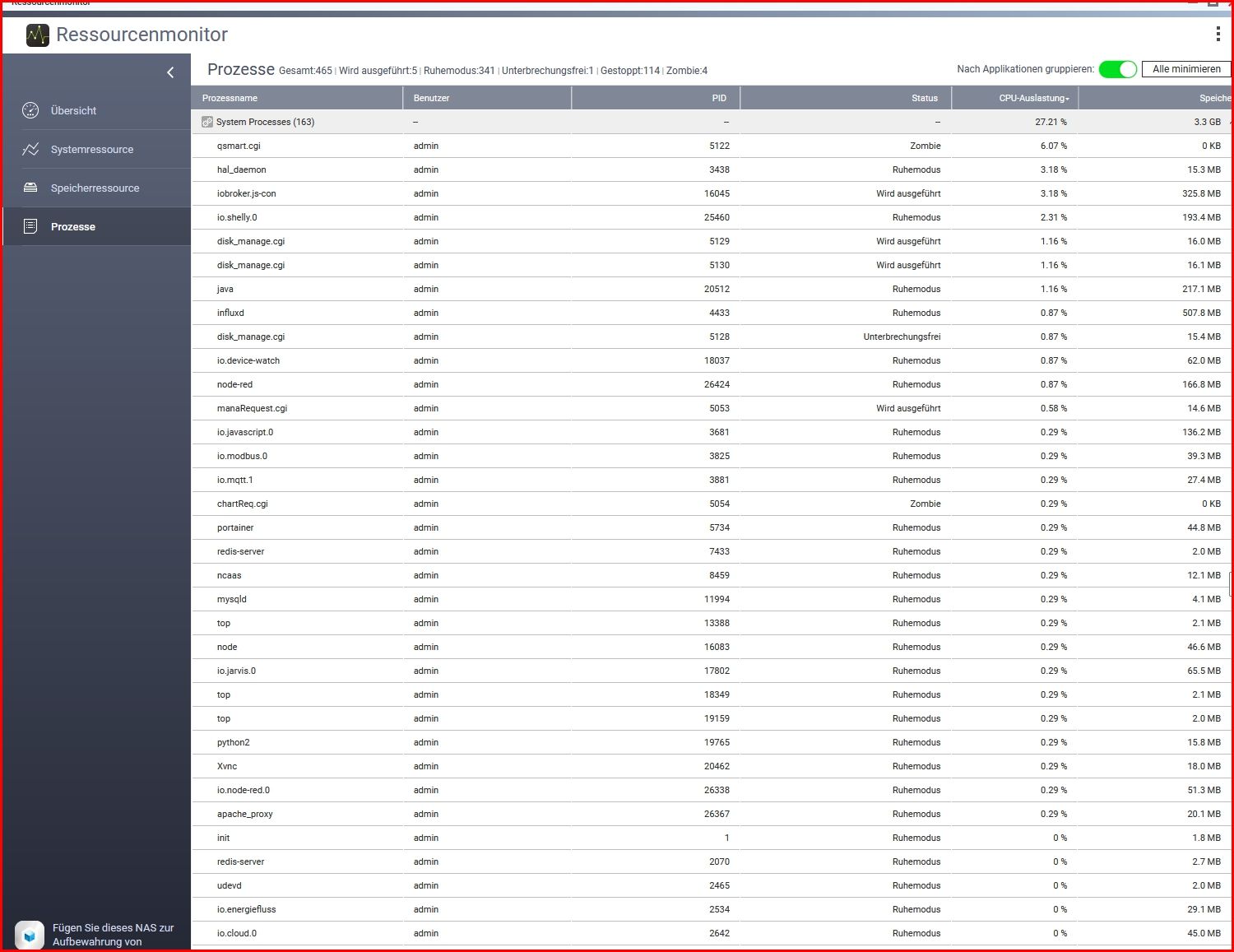
    Hier aktuelle Performance-Monitor Daten:

    Snap-2023-09-16-12-55-48.jpg

    HomoranH Do not disturb
    HomoranH Do not disturb
    Homoran
    Global Moderator Administrators
    wrote on last edited by
    #26

    @schtallone sagte in Performance Probleme durch Shelly Adapter?:

    Hier aktuelle Performance-Monitor Daten:

    vom NAS selbst?

    kein Support per PN! - Fragen im Forum stellen - es gibt fast nichts, was nicht auch für andere interessant ist.

    Benutzt das Voting rechts unten im Beitrag wenn er euch geholfen hat.

    der Installationsfixer: curl -fsL https://iobroker.net/fix.sh | bash -

    S 1 Reply Last reply
    0
    • HomoranH Homoran

      @schtallone sagte in Performance Probleme durch Shelly Adapter?:

      Hier aktuelle Performance-Monitor Daten:

      vom NAS selbst?

      S Offline
      S Offline
      Schtallone
      wrote on last edited by
      #27

      @homoran
      ja vom NAS. hier nochmals in größer
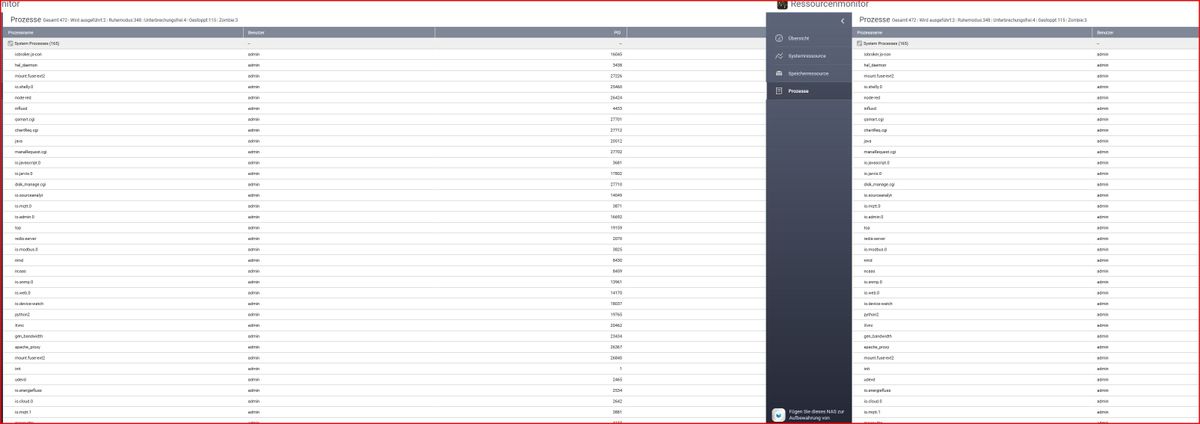
      Snap-2023-09-16-12-59-03.jpg

      Thomas BraunT HomoranH 2 Replies Last reply
      0
      • S Schtallone

        @homoran
        ja vom NAS. hier nochmals in größer

        Snap-2023-09-16-12-59-03.jpg

        Thomas BraunT Online
        Thomas BraunT Online
        Thomas Braun
        Most Active
        wrote on last edited by
        #28

        @schtallone

        Da wanken auch drei Zombies durch das System.
        Starte das mal alles sauber durch.

        Linux-Werkzeugkasten:
        https://forum.iobroker.net/topic/42952/der-kleine-iobroker-linux-werkzeugkasten
        NodeJS Fixer Skript:
        https://forum.iobroker.net/topic/68035/iob-node-fix-skript
        iob_diag: curl -sLf -o diag.sh https://iobroker.net/diag.sh && bash diag.sh

        S 1 Reply Last reply
        0
        • S Schtallone

          @homoran
          ja vom NAS. hier nochmals in größer

          Snap-2023-09-16-12-59-03.jpg

          HomoranH Do not disturb
          HomoranH Do not disturb
          Homoran
          Global Moderator Administrators
          wrote on last edited by
          #29

          @schtallone sagte in Performance Probleme durch Shelly Adapter?:

          hier nochmals in größer

          was ist daran größer?
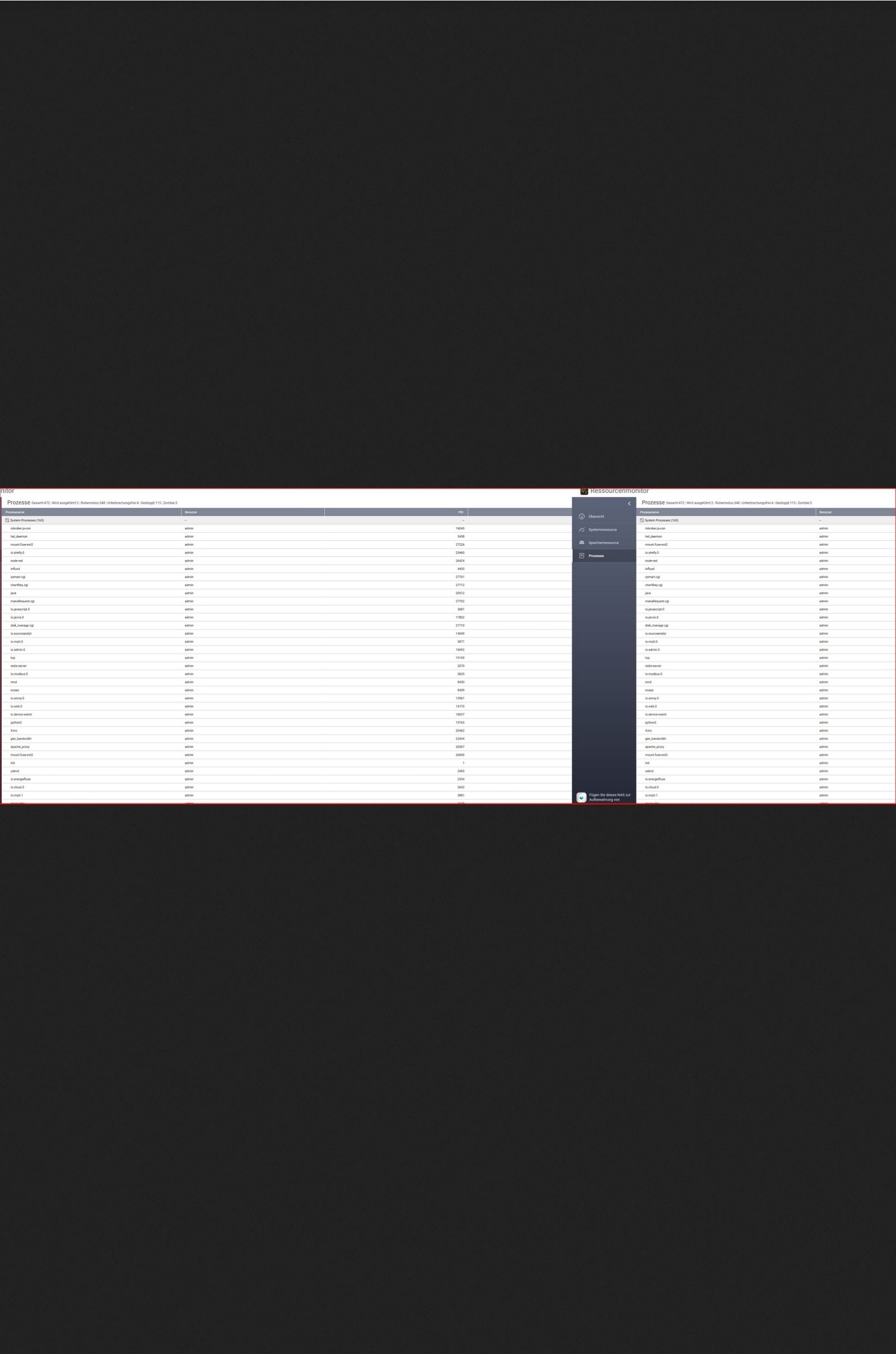
          Screenshot_20230916-130117_Firefox.jpg

          die Schrift jedenfalls nicht

          kein Support per PN! - Fragen im Forum stellen - es gibt fast nichts, was nicht auch für andere interessant ist.

          Benutzt das Voting rechts unten im Beitrag wenn er euch geholfen hat.

          der Installationsfixer: curl -fsL https://iobroker.net/fix.sh | bash -

          1 Reply Last reply
          0
          • Thomas BraunT Thomas Braun

            @schtallone

            Da wanken auch drei Zombies durch das System.
            Starte das mal alles sauber durch.

            S Offline
            S Offline
            Schtallone
            wrote on last edited by
            #30

            @thomas-braun

            hier nochhmals ohne diesen balken....

            Snap-2023-09-16-13-02-05.jpg

            HomoranH 1 Reply Last reply
            0
            • S Schtallone

              @thomas-braun

              hier nochhmals ohne diesen balken....

              Snap-2023-09-16-13-02-05.jpg

              HomoranH Do not disturb
              HomoranH Do not disturb
              Homoran
              Global Moderator Administrators
              wrote on last edited by Homoran
              #31

              @schtallone was ist passiert?
              nur noch 22%CPU statt vorher 66?

              der js controller auf vernünftigen 3.18, statt 20

              kein Support per PN! - Fragen im Forum stellen - es gibt fast nichts, was nicht auch für andere interessant ist.

              Benutzt das Voting rechts unten im Beitrag wenn er euch geholfen hat.

              der Installationsfixer: curl -fsL https://iobroker.net/fix.sh | bash -

              S 1 Reply Last reply
              0
              • HomoranH Homoran

                @schtallone was ist passiert?
                nur noch 22%CPU statt vorher 66?

                der js controller auf vernünftigen 3.18, statt 20

                S Offline
                S Offline
                Schtallone
                wrote on last edited by
                #32

                @homoran
                nichts, es schwankt hin und her. Ich habe durchschittlich ca. 70% CPU Auslastung gehabt. Ich starte das NAS einmal komplett neu. Bis gleich

                1 Reply Last reply
                0
                • S Schtallone

                  @ticaki
                  Ich habe vor 20 min mal den device watcher ausgeschaltet.

                  top - 12:22:05 up 21:46,  0 users,  load average: 7,08, 7,24, 7,59
                  Tasks:  37 total,   2 running,  35 sleeping,   0 stopped,   0 zombie
                  %Cpu(s): 36,9 us, 21,1 sy,  0,0 ni, 12,1 id, 29,2 wa,  0,0 hi,  0,7 si,  0,0 st
                  MiB Mem :   7792,2 total,   1012,2 free,   5113,5 used,   1666,5 buff/cache
                  MiB Swap:  23447,2 total,  21722,4 free,   1724,8 used.   1911,4 avail Mem 
                  
                    PID USER      PR  NI    VIRT    RES    SHR S  %CPU  %MEM     TIME+ COMMAND                                                                                                                                                                                                                                                                           
                    453 iobroker  20   0   11,2g 298988  10992 S   5,3   3,7 396:15.25 iobroker.js-con                                                                                                                                                                                                                                                                   
                  32461 iobroker  20   0 1062764 204584  11836 S   2,0   2,6   8:16.99 io.shelly.0                                                                                                                                                                                                                                                                       
                  31327 iobroker  20   0   21,0g 167288  12832 S   1,7   2,1   3:54.99 node-red                                                                                                                                                                                                                                                                          
                   1167 iobroker  20   0  851380 126644   9148 S   0,7   1,6  18:48.56 io.javascript.0                                                                                                                                                                                                                                                                   
                   1390 iobroker  20   0  960232  46568  10124 R   0,7   0,6   0:37.93 io.netatmo.0                                                                                                                                                                                                                                                                      
                   1854 iobroker  20   0  694088  67636   9896 S   0,7   0,8  11:39.10 io.jarvis.0                                                                                                                                                                                                                                                                       
                    486 iobroker  20   0 1063652 151672   9988 S   0,3   1,9   3:27.47 io.admin.0                                                                                                                                                                                                                                                                        
                   1423 iobroker  20   0  694844  42024   9476 S   0,3   0,5   0:27.42 io.shuttercontr                                                                                                                                                                                                                                                                   
                   1655 iobroker  20   0  705512  61012   9400 S   0,3   0,8   1:29.35 io.sourceanalyt                                                                                                                                                                                                                                                                   
                   1831 iobroker  20   0  952040  32844  10696 S   0,3   0,4   0:23.47 io.pushover.0                                                                                                                                                                                                                                                                     
                   3859 root      20   0   10308   2204   1724 S   0,3   0,0   0:03.83 top                                                                                                                                                                                                                                                                               
                   3878 root      20   0   10308   2144   1676 R   0,3   0,0   0:03.79 top                                                                                                                                                                                                                                                                               
                      1 root      20   0    7372    204    204 S   0,0   0,0   0:00.07 bash                                                                                                                                                                                                                                                                              
                    499 iobroker  20   0  866856  76112   8560 S   0,0   1,0   1:46.15 io.admin.1                                                                                                                                                                                                                                                                        
                    516 iobroker  20   0   10,9g  48316   9540 S   0,0   0,6   0:25.88 io.backitup.0                                                                                                                                                                                                                                                                     
                   1056 iobroker  20   0  689424  40376   8428 S   0,0   0,5   0:51.22 io.energiefluss                                                                                                                                                                                                                                                                   
                   1082 iobroker  20   0  961136  47388   9816 S   0,0   0,6   1:04.70 io.cloud.0                                                                                                                                                                                                                                                                        
                   1119 iobroker  20   0  950440  51728  12392 S   0,0   0,6   0:08.78 io.pvforecast.0                                                                                                                                                                                                                                                                   
                   1174 iobroker  20   0  697508  42024   8908 S   0,0   0,5   0:46.79 io.modbus.0                                                                                                                                                                                                                                                                       
                   1189 iobroker  20   0  779844  60304   8884 S   0,0   0,8   5:30.04 io.mqtt.0                                                                                                                                                                                                                                                                         
                   1196 iobroker  20   0  700524  29568   8512 S   0,0   0,4   0:25.82 io.mqtt.1                                                                                                                                                                                                                                                                         
                   1644 iobroker  20   0  691912  39412   8984 S   0,0   0,5   0:53.31 io.snmp.0                                                                                                                                                                                                                                                                         
                   1666 iobroker  20   0  758052  22932   8364 S   0,0   0,3   0:22.84 io.terminal.0  
                  

                  ist seit dem auch im Log ruhiger

                  Ich mache den device watcher nochmals an und teile die ergebnisse

                  GlasfaserG Offline
                  GlasfaserG Offline
                  Glasfaser
                  wrote on last edited by Glasfaser
                  #33

                  @schtallone sagte in Performance Probleme durch Shelly Adapter?:

                  486 iobroker 20 0 1063652 151672 9988 S 0,3 1,9 3:27.47 io.admin.0

                  499 iobroker 20 0 866856 76112 8560 S 0,0 1,0 1:46.15 io.admin.1

                  Warum hast du 2 x Admin
                  und was ich mich auch schon im anderen Thread gefragt habe

                  warum bist du BETA Tester ... hat das ein Grund !?

                  EDIT :

                  Wegen admin.1 , das war noch von gestern eine Test wegen dem Port , den kannst du deinstallieren

                  https://forum.iobroker.net/post/1044331

                  Synology 918+ 16GB - ioBroker in Docker v9 , VISO auf Trekstor Primebook C13 13,3" , Hikvision Domkameras mit Surveillance Station .. CCU RaspberryMatic in Synology VM .. Zigbee CC2538+CC2592 .. Sonoff .. KNX .. Modbus ..

                  S 1 Reply Last reply
                  0
                  • S Schtallone

                    @thomas-braun
                    ist nen QNAP TS251D mit 8gb RAM.

                    Hier aktuelle Performance-Monitor Daten:

                    Snap-2023-09-16-12-55-48.jpg

                    ? Offline
                    ? Offline
                    A Former User
                    wrote on last edited by
                    #34

                    @schtallone sagte in Performance Probleme durch Shelly Adapter?:

                    st nen QNAP TS251D mit 8gb RAM.

                    Moin,

                    kenne QNAP nicht, aber wenn Dein Docker und die darin enthaltenen Container schon ein Großteil des Memory auffressen, dann bleibt für das Basisbetriebssystem nicht mehr viel, man sieht auch, dass das Betriebssystem schon mal gut 1.7 GB in den Swap verschoben hat.

                    Der Tipp kam ja schon, einmal sauber neu starten, dann mal alles auf der QNAP anhalten, was Du definitiv nicht brauchst.

                    Bei mir auf der Synology sieht das mit 17 Containern und 8 GB so aus,
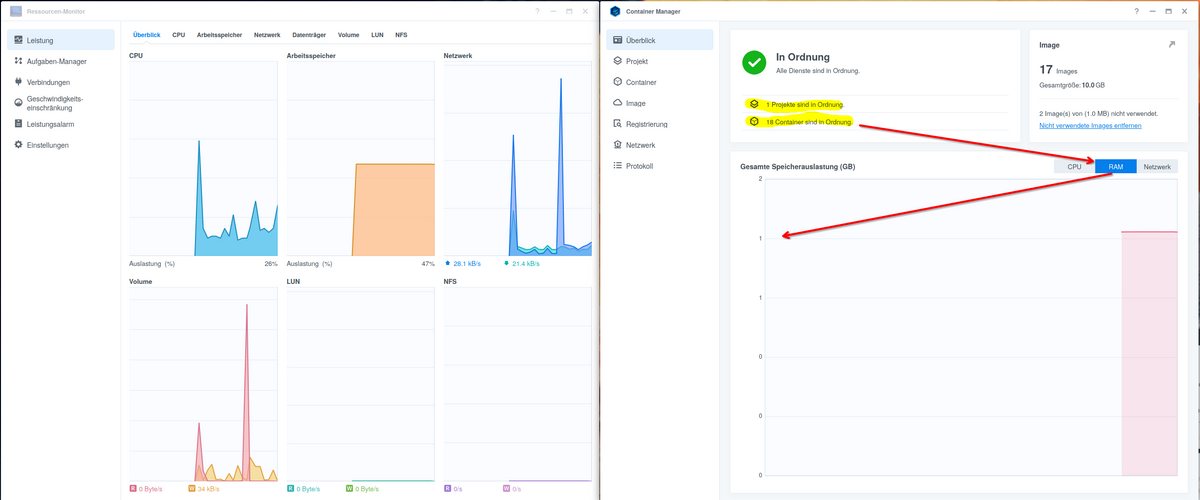
                    11b732fd-3dd1-4976-8847-9e962e29ca66-grafik.png

                    VG
                    Bernd

                    S 1 Reply Last reply
                    0
                    • S Schtallone

                      Hallo zusammen,

                      seit einigen Tagen bemerke ich Performance-Probeme im ioBroker. Oft können z.b. die Instancen nicht angeigt werden. Ich habe den Shelly Adapter in Verdacht, da dieser häufig folgende Fehlermeldung ausgibt:

                      2023-09-16 10:08:19.966  - error: shelly.0 (31449) [MQTT] Unable to get mqttprefix of client with id "shellyplus2pm-b8d61a8b94fc"
                      2023-09-16 10:08:19.967  - error: shelly.0 (31449) [MQTT] Unable to get mqttprefix of client with id "shellyplus2pm-5443b23fd3dc"
                      2023-09-16 10:08:19.968  - error: shelly.0 (31449) [MQTT] Unable to get mqttprefix of client with id "shellyplus2pm-5443b23d6114"
                      2023-09-16 10:08:19.968  - error: shelly.0 (31449) [MQTT] Unable to get mqttprefix of client with id "shellyplus1-441793a820f4"
                      2023-09-16 10:08:20.526  - error: shelly.0 (31449) [MQTT] Unable to get mqttprefix of client with id "shellyplus1pm-a8032ab96370"
                      2023-09-16 10:08:21.305  - info: shelly.0 (31449) [MQTT] Client Close:  (shellyplus2pm / shellyplus2pm-5443b23d6114 / shellyplus2pm#5443b23d6114#1) (false)
                      2023-09-16 10:08:21.309  - info: shelly.0 (31449) [MQTT] Client Close:  (shellyplus2pm / shellyplus2pm-5443b23e5f74 / shellyplus2pm#5443b23e5f74#1) (false)
                      2023-09-16 10:08:21.790  - error: shelly.0 (31449) [MQTT] Unable to get mqttprefix of client with id "shellyplus2pm-4022d8da969c"
                      2023-09-16 10:08:21.794  - error: shelly.0 (31449) [MQTT] Unable to get mqttprefix of client with id "shellyplus2pm-b8d61a8abb7c"
                      2023-09-16 10:08:21.795  - error: shelly.0 (31449) [MQTT] Unable to get mqttprefix of client with id "shellyplus1pm-a8032ab96980"
                      2023-09-16 10:08:21.795  - error: shelly.0 (31449) [MQTT] Unable to get mqttprefix of client with id "shellyplus2pm-485519a2a5d4"
                      2023-09-16 10:08:21.935  - info: shelly.0 (31449) [MQTT] Device with client id "shellyplus2pm-4022d8dbe474" connected!
                      2023-09-16 10:08:22.320  - error: shelly.0 (31449) [MQTT] Unable to get mqttprefix of client with id "shellyplus2pm-b8d61a876248"
                      2023-09-16 10:08:24.058  - info: shelly.0 (31449) [MQTT] Device with client id "shellyplus1pm-a8032ab96980" connected!
                      2023-09-16 10:08:24.359  - error: shelly.0 (31449) [MQTT] Unable to get mqttprefix of client with id "shellyplus1pm-7c87ce65d794"
                      2023-09-16 10:08:24.359  - error: shelly.0 (31449) [MQTT] Unable to get mqttprefix of client with id "shellyplus1pm-7c87ce65d970"
                      2023-09-16 10:08:24.360  - error: shelly.0 (31449) [MQTT] Unable to get mqttprefix of client with id "shellyplus1pm-a8032ab94e10"
                      2023-09-16 10:08:24.360  - error: shelly.0 (31449) [MQTT] Unable to get mqttprefix of client with id "shellyplus2pm-b8d61a8bf730"
                      2023-09-16 10:08:24.360  - error: shelly.0 (31449) [MQTT] Unable to get mqttprefix of client with id "shellyplus2pm-5443b23e5f74"
                      2023-09-16 10:08:24.360  - error: shelly.0 (31449) [MQTT] Unable to get mqttprefix of client with id "shellyplus1pm-3c610579bd34"
                      2023-09-16 10:08:24.361  - error: shelly.0 (31449) [MQTT] Unable to get mqttprefix of client with id "shellyplus1pm-a8032ab94e10"
                      2023-09-16 10:08:24.361  - error: shelly.0 (31449) [MQTT] Unable to get mqttprefix of client with id "shellyplus2pm-441793acae2c"
                      2023-09-16 10:08:24.361  - error: shelly.0 (31449) [MQTT] Unable to get mqttprefix of client with id "shellyplus1pm-a8032ab96370"
                      2023-09-16 10:08:24.479  - info: shelly.0 (31449) [MQTT] Client Close:  (shellyplus2pm / shellyplus2pm-b8d61a863524 / shellyplus2pm#b8d61a863524#1) (false)
                      2023-09-16 10:08:24.525  - info: shelly.0 (31449) [MQTT] Client Close:  (shellyplus2pm / shellyplus2pm-b8d61a8abb7c / shellyplus2pm#b8d61a8abb7c#1) (false)
                      2023-09-16 10:08:24.606  - info: shelly.0 (31449) [MQTT] Client Close:  (shellyplus2pm / shellyplus2pm-b8d61a8b94fc / shellyplus2pm#b8d61a8b94fc#1) (false
                      

                      Hat jemand eine Idee oder ähnliche Probleme?

                      Was benötigt Ihr noch von mir als Infos?

                      Vielen Dank und Gruß

                      GlasfaserG Offline
                      GlasfaserG Offline
                      Glasfaser
                      wrote on last edited by Glasfaser
                      #35

                      @schtallone

                      Da du im anderen Thread auch ein Binding beim Admin falsch hattest ,
                      zeige mal

                      iob list instances | grep port
                      

                      Synology 918+ 16GB - ioBroker in Docker v9 , VISO auf Trekstor Primebook C13 13,3" , Hikvision Domkameras mit Surveillance Station .. CCU RaspberryMatic in Synology VM .. Zigbee CC2538+CC2592 .. Sonoff .. KNX .. Modbus ..

                      1 Reply Last reply
                      0
                      • GlasfaserG Glasfaser

                        @schtallone sagte in Performance Probleme durch Shelly Adapter?:

                        486 iobroker 20 0 1063652 151672 9988 S 0,3 1,9 3:27.47 io.admin.0

                        499 iobroker 20 0 866856 76112 8560 S 0,0 1,0 1:46.15 io.admin.1

                        Warum hast du 2 x Admin
                        und was ich mich auch schon im anderen Thread gefragt habe

                        warum bist du BETA Tester ... hat das ein Grund !?

                        EDIT :

                        Wegen admin.1 , das war noch von gestern eine Test wegen dem Port , den kannst du deinstallieren

                        https://forum.iobroker.net/post/1044331

                        S Offline
                        S Offline
                        Schtallone
                        wrote on last edited by
                        #36

                        @glasfaser

                        Admin.1 ist bereits deinstalliert.

                        Ich bin kein BETA tester, eher BETA User ;-)

                        GlasfaserG Thomas BraunT 2 Replies Last reply
                        0
                        • S Schtallone

                          @glasfaser

                          Admin.1 ist bereits deinstalliert.

                          Ich bin kein BETA tester, eher BETA User ;-)

                          GlasfaserG Offline
                          GlasfaserG Offline
                          Glasfaser
                          wrote on last edited by
                          #37

                          @schtallone

                          Kommt die Ausgabe vom Befehl noch ...

                          oder war es das gewesen , damit kann ich/wir nichts anfangen!?

                          ich bin kein BETA tester, eher BETA User 😉

                          Synology 918+ 16GB - ioBroker in Docker v9 , VISO auf Trekstor Primebook C13 13,3" , Hikvision Domkameras mit Surveillance Station .. CCU RaspberryMatic in Synology VM .. Zigbee CC2538+CC2592 .. Sonoff .. KNX .. Modbus ..

                          S 1 Reply Last reply
                          0
                          • S Schtallone
                            ======== Start marking the full check here =========
                            
                            
                            Skript v.2023-06-20
                            
                            *** BASE SYSTEM ***
                            cat: /sys/devices/virtual/dmi/id/sys_vendor: No such file or directory
                            Hardware Vendor : 
                            Kernel          : x86_64
                            Userland        : amd64
                            Docker          : v8.1.0
                            Virtualization  : Docker
                            Kernel          : x86_64
                            Userland        : amd64
                            
                            Systemuptime and Load:
                             12:41:54 up 22:06,  0 users,  load average: 8.64, 8.88, 8.33
                            CPU threads: 2
                            
                            
                            *** Time and Time Zones ***
                            Sat Sep 16 10:41:54 UTC 2023
                            Sat Sep 16 12:41:54 CEST 2023
                            CEST +0200
                            Etc/UTC
                            
                            *** User and Groups ***
                            root
                            /root
                            root
                            
                            *** X-Server-Setup ***
                            X-Server:       false
                            Desktop: 
                            Terminal: 
                            
                            
                            *** MEMORY ***
                                           total        used        free      shared  buff/cache   available
                            Mem:            7.8G        5.2G        1.1G        238M        1.5G        1.9G
                            Swap:            23G        1.7G         21G
                            Total:           31G        6.8G         22G
                            
                                     7792 M total memory
                                     5170 M used memory
                                     2476 M active memory
                                     2644 M inactive memory
                                     1076 M free memory
                                      512 M buffer memory
                                     1032 M swap cache
                                    23447 M total swap
                                     1659 M used swap
                                    21787 M free swap
                            
                            *** FILESYSTEM ***
                            Filesystem            Type     Size  Used Avail Use% Mounted on
                            overlay               overlay  2.6T  1.6T  1.1T  61% /
                            tmpfs                 tmpfs     64M     0   64M   0% /dev
                            tmpfs                 tmpfs    3.9G     0  3.9G   0% /sys/fs/cgroup
                            shm                   tmpfs     64M     0   64M   0% /dev/shm
                            /dev/mapper/cachedev1 ext4     2.6T  1.6T  1.1T  61% /opt/iobroker
                            tmpfs                 tmpfs    3.9G     0  3.9G   0% /proc/asound
                            tmpfs                 tmpfs    3.9G     0  3.9G   0% /proc/acpi
                            tmpfs                 tmpfs    3.9G     0  3.9G   0% /proc/scsi
                            tmpfs                 tmpfs    3.9G     0  3.9G   0% /sys/firmware
                            
                            Messages concerning ext4 filesystem in dmesg:
                            dmesg: read kernel buffer failed: Operation not permitted
                            
                            Show mounted filesystems (real ones only):
                            TARGET           SOURCE                                                                                                                                                      FSTYPE OPTIONS
                            /opt/iobroker    /dev/mapper/cachedev1[/Docker/iobroker]                                                                                                                     ext4   rw,relatime,stripe=256,data=ordered,data_err=abort,jqfmt=vfsv1,usrjquota=aquota.user
                            /etc/resolv.conf /dev/mapper/cachedev1[/Container/container-station-data/lib/docker/containers/fc3f3c4c81fc4d371ff10ae519deeb41066e2e757561c9f538dca358839bd4af/resolv.conf] ext4   rw,relatime,stripe=256,data=ordered,data_err=abort,jqfmt=vfsv1,usrjquota=aquota.user
                            /etc/hostname    /dev/mapper/cachedev1[/Container/container-station-data/lib/docker/containers/fc3f3c4c81fc4d371ff10ae519deeb41066e2e757561c9f538dca358839bd4af/hostname]    ext4   rw,relatime,stripe=256,data=ordered,data_err=abort,jqfmt=vfsv1,usrjquota=aquota.user
                            /etc/hosts       /dev/mapper/cachedev1[/Container/container-station-data/lib/docker/containers/fc3f3c4c81fc4d371ff10ae519deeb41066e2e757561c9f538dca358839bd4af/hosts]       ext4   rw,relatime,stripe=256,data=ordered,data_err=abort,jqfmt=vfsv1,usrjquota=aquota.user
                            
                            Files in neuralgic directories:
                            
                            /var:
                            33M     /var/
                            31M     /var/lib
                            18M     /var/lib/apt/lists
                            18M     /var/lib/apt
                            13M     /var/lib/dpkg


                            /opt/iobroker/backups:
                            987M    /opt/iobroker/backups/
                            
                            /opt/iobroker/iobroker-data:
                            639M    /opt/iobroker/iobroker-data/
                            415M    /opt/iobroker/iobroker-data/files
                            132M    /opt/iobroker/iobroker-data/files/javascript.admin
                            129M    /opt/iobroker/iobroker-data/files/devices.admin/static
                            129M    /opt/iobroker/iobroker-data/files/devices.admin
                            
                            The five largest files in iobroker-data are:
                            35M     /opt/iobroker/iobroker-data/files/devices.admin/static/js/main.f95354b8.js.map
                            35M     /opt/iobroker/iobroker-data/files/devices.admin/static/js/main.24f2bb56.js.map
                            33M     /opt/iobroker/iobroker-data/files/devices.admin/static/js/main.10538062.js.map
                            32M     /opt/iobroker/iobroker-data/objects.jsonl
                            21M     /opt/iobroker/iobroker-data/files/web.admin/static/js/main.edf7552a.js.map
                            
                            *** NodeJS-Installation ***
                            
                            /usr/bin/nodejs         v18.17.1
                            /usr/bin/node           v18.17.1
                            /usr/bin/npm            9.6.7
                            /usr/bin/npx            9.6.7
                            
                            
                            nodejs:
                              Installed: 18.17.1-deb-1nodesource1
                              Candidate: 18.17.1-deb-1nodesource1
                              Version table:
                             *** 18.17.1-deb-1nodesource1 500
                                    500 https://deb.nodesource.com/node_18.x bullseye/main amd64 Packages
                                    100 /var/lib/dpkg/status
                                 12.22.12~dfsg-1~deb11u4 500
                                    500 http://deb.debian.org/debian-security bullseye-security/main amd64 Packages
                                 12.22.12~dfsg-1~deb11u3 500
                                    500 http://deb.debian.org/debian bullseye/main amd64 Packages
                            
                            Temp directories causing npm8 problem: 0
                            No problems detected
                            
                            Errors in npm tree: 0
                            
                            *** ioBroker-Installation ***
                            
                            ioBroker Status
                            iobroker is running on this host.
                            
                            
                            Objects type: jsonl
                            States  type: jsonl
                            
                            No configuration change needed.
                            
                            
                            Multihost discovery server: disabled
                            Discovery authentication:   enabled
                            Persistent activation:      disabled
                            Objects:                    jsonl on 127.0.0.1
                            States:                     jsonl on 127.0.0.1
                            
                            Core adapters versions
                            js-controller:  5.0.12
                            admin:          6.10.1
                            javascript:     7.1.4
                            
                            Adapters from github:   1
                            
                            Adapter State
                            + system.adapter.admin.0                  : admin                 : iobroker                                 -  enabled, port: 8081, bind: 0.0.0.0, run as: admin
                              system.adapter.alias-manager.0          : alias-manager         : iobroker                                 - disabled
                            + system.adapter.backitup.0               : backitup              : iobroker                                 -  enabled
                            + system.adapter.cloud.0                  : cloud                 : iobroker                                 -  enabled
                            + system.adapter.device-watcher.0         : device-watcher        : iobroker                                 -  enabled
                              system.adapter.devices.0                : devices               : iobroker                                 - disabled
                              system.adapter.dwd.0                    : dwd                   : iobroker                                 -  enabled
                            + system.adapter.energiefluss.0           : energiefluss          : iobroker                                 -  enabled
                              system.adapter.feiertage.0              : feiertage             : iobroker                                 -  enabled
                              system.adapter.ical.0                   : ical                  : iobroker                                 -  enabled
                            + system.adapter.influxdb.0               : influxdb              : iobroker                                 -  enabled, port: 8086
                            + system.adapter.jarvis.0                 : jarvis                : iobroker                                 -  enabled
                            + system.adapter.javascript.0             : javascript            : iobroker                                 -  enabled
                              system.adapter.meross.0                 : meross                : iobroker                                 - disabled
                            + system.adapter.modbus.0                 : modbus                : iobroker                                 -  enabled
                            + system.adapter.mqtt.0                   : mqtt                  : iobroker                                 -  enabled, port: 1883, bind: 0.0.0.0
                            + system.adapter.mqtt.1                   : mqtt                  : iobroker                                 -  enabled, port: 1883, bind: 0.0.0.0
                            + system.adapter.netatmo.0                : netatmo               : iobroker                                 -  enabled
                            + system.adapter.node-red.0               : node-red              : iobroker                                 -  enabled, port: 1880, bind: 192.168.1.10
                            + system.adapter.pushover.0               : pushover              : iobroker                                 -  enabled
                            + system.adapter.pvforecast.0             : pvforecast            : iobroker                                 -  enabled
                              system.adapter.schoolfree.0             : schoolfree            : iobroker                                 -  enabled
                            + system.adapter.shelly.0                 : shelly                : iobroker                                 -  enabled, port: 1882, bind: 192.168.1.10
                            + system.adapter.shuttercontrol.0         : shuttercontrol        : iobroker                                 -  enabled
                            + system.adapter.snmp.0                   : snmp                  : iobroker                                 -  enabled
                              system.adapter.sonos.0                  : sonos                 : iobroker                                 - disabled
                            + system.adapter.sourceanalytix.0         : sourceanalytix        : iobroker                                 -  enabled
                              system.adapter.telegram.0               : telegram              : iobroker                                 - disabled, port: 8443, bind: 0.0.0.0
                            + system.adapter.terminal.0               : terminal              : iobroker                                 -  enabled, port: 8088, bind: 192.168.1.10, run as: admin
                            + system.adapter.vw-connect.0             : vw-connect            : iobroker                                 -  enabled
                            + system.adapter.web.0                    : web                   : iobroker                                 -  enabled, port: 8082, bind: 0.0.0.0, run as: admin
                            
                            + instance is alive
                            
                            Enabled adapters with bindings
                            + system.adapter.admin.0                  : admin                 : iobroker                                 -  enabled, port: 8081, bind: 0.0.0.0, run as: admin
                            + system.adapter.influxdb.0               : influxdb              : iobroker                                 -  enabled, port: 8086
                            + system.adapter.mqtt.0                   : mqtt                  : iobroker                                 -  enabled, port: 1883, bind: 0.0.0.0
                            + system.adapter.mqtt.1                   : mqtt                  : iobroker                                 -  enabled, port: 1883, bind: 0.0.0.0
                            + system.adapter.node-red.0               : node-red              : iobroker                                 -  enabled, port: 1880, bind: 192.168.1.10
                            + system.adapter.shelly.0                 : shelly                : iobroker                                 -  enabled, port: 1882, bind: 192.168.1.10
                            + system.adapter.terminal.0               : terminal              : iobroker                                 -  enabled, port: 8088, bind: 192.168.1.10, run as: admin
                            + system.adapter.web.0                    : web                   : iobroker                                 -  enabled, port: 8082, bind: 0.0.0.0, run as: admin
                            
                            ioBroker-Repositories
                            stable        : http://download.iobroker.net/sources-dist.json
                            beta          : http://download.iobroker.net/sources-dist-latest.json
                            
                            Active repo(s): beta
                            
                            Installed ioBroker-Instances
                            Used repository: beta
                            Adapter    "admin"        : 6.10.1   , installed 6.10.1
                            Adapter    "alias-manager": 1.2.6    , installed 1.2.6
                            Adapter    "backitup"     : 2.8.1    , installed 2.8.1
                            Adapter    "cloud"        : 4.4.1    , installed 4.4.1
                            Adapter    "device-watcher": 2.9.3   , installed 2.9.3
                            Adapter    "devices"      : 1.1.5    , installed 1.1.5
                            Adapter    "dwd"          : 2.8.5    , installed 2.8.5
                            Adapter    "feiertage"    : 1.1.4    , installed 1.1.4
                            Adapter    "ical"         : 1.13.3   , installed 1.13.3
                            Adapter    "influxdb"     : 3.2.0    , installed 3.2.0
                            Adapter    "jarvis"       : 3.1.8    , installed 3.1.8
                            Adapter    "javascript"   : 7.1.4    , installed 7.1.4
                            Controller "js-controller": 5.0.12   , installed 5.0.12
                            Adapter    "meross"       : 1.15.1   , installed 1.15.1
                            Adapter    "modbus"       : 5.0.11   , installed 5.0.11
                            Adapter    "mqtt"         : 4.1.1    , installed 4.1.1
                            Adapter    "netatmo"      : 3.1.0    , installed 3.1.0
                            Adapter    "node-red"     : 4.0.3    , installed 4.0.3
                            Adapter    "pushover"     : 3.0.4    , installed 3.0.4
                            Adapter    "pvforecast"   : 2.7.1    , installed 2.7.1
                            Adapter    "schoolfree"   : 1.1.2    , installed 1.1.2
                            Adapter    "shelly"       : 6.4.1    , installed 6.4.1
                            Adapter    "shuttercontrol": 1.6.2   , installed 1.6.2
                            Adapter    "simple-api"   : 2.7.2    , installed 2.7.2
                            Adapter    "snmp"         : 2.4.11   , installed 2.4.11
                            Adapter    "socketio"     : 6.5.5    , installed 6.5.5
                            Adapter    "sonos"        : 2.3.1    , installed 2.3.1
                            Adapter    "sourceanalytix": 0.4.14  , installed 0.4.14
                            Adapter    "telegram"     : 1.16.0   , installed 1.16.0
                            Adapter    "terminal"     : 1.0.0    , installed 1.0.0
                            Adapter    "vw-connect"   : 0.1.2    , installed 0.1.2
                            Adapter    "web"          : 6.1.2    , installed 6.1.2
                            Adapter    "ws"           : 2.5.5    , installed 2.5.5
                            
                            Objects and States
                            Please stand by - This may take a while
                            Objects:        10441
                            States:         8960
                            
                            *** OS-Repositories and Updates ***
                            Hit:1 http://deb.debian.org/debian bullseye InRelease
                            Hit:2 http://deb.debian.org/debian-security bullseye-security InRelease
                            Hit:3 http://deb.debian.org/debian bullseye-updates InRelease
                            Hit:4 https://deb.nodesource.com/node_18.x bullseye InRelease
                            Reading package lists...
                            Pending Updates: 0
                            
                            *** Listening Ports ***
                            Active Internet connections (only servers)
                            Proto Recv-Q Send-Q Local Address           Foreign Address         State       User       Inode      PID/Program name    
                            tcp        0      0 0.0.0.0:8400            0.0.0.0:*               LISTEN      1000       5569456    -                   
                            tcp        0      0 192.168.1.10:1880       0.0.0.0:*               LISTEN      1000       9092066    -                   
                            tcp        0      0 192.168.1.10:1882       0.0.0.0:*               LISTEN      1000       9247890    -                   
                            tcp        0      0 127.0.0.11:44959        0.0.0.0:*               LISTEN      0          5407964    -                   
                            tcp        0      0 127.0.0.1:9000          0.0.0.0:*               LISTEN      1000       5422351    -                   
                            tcp        0      0 127.0.0.1:9001          0.0.0.0:*               LISTEN      1000       5422233    -                   
                            tcp6       0      0 :::8081                 :::*                    LISTEN      1000       5425094    -                   
                            tcp6       0      0 :::8082                 :::*                    LISTEN      1000       5536059    -                   
                            tcp6       0      0 :::8088                 :::*                    LISTEN      1000       5535121    -                   
                            udp        0      0 0.0.0.0:38695           0.0.0.0:*                           1000       5552420    -                   
                            udp        0      0 127.0.0.11:60125        0.0.0.0:*                           0          5407963    -                   
                            udp        0      0 0.0.0.0:46182           0.0.0.0:*                           1000       5552419    -                   
                            
                            *** Log File - Last 25 Lines ***
                            
                            2023-09-15 00:37:02.337  - info: shelly.0 (506) [MQTT] Client Close:  (shellyplus1pm / shellyplus1pm-a8032ab94e10 / shellyplus1pm#a8032ab94e10#1) (false)
                            2023-09-15 00:37:03.121  - error: shelly.0 (506) [MQTT] Unable to get mqttprefix of client with id "shellyplus2pm-b8d61a876248"
                            2023-09-15 00:37:04.440  - info: shelly.0 (506) [MQTT] Device with client id "shellyplus2pm-5443b23e5f74" connected!
                            2023-09-15 00:37:05.005  - error: shelly.0 (506) [MQTT] Unable to get mqttprefix of client with id "shellyplus2pm-b8d61a8b94fc"
                            2023-09-15 00:37:05.005  - error: shelly.0 (506) [MQTT] Unable to get mqttprefix of client with id "shellyplus1pm-7c87ce65d970"
                            2023-09-15 00:37:05.006  - error: shelly.0 (506) [MQTT] Unable to get mqttprefix of client with id "shellyplus2pm-b8d61a8bf730"
                            2023-09-15 00:37:05.006  - error: shelly.0 (506) [MQTT] Unable to get mqttprefix of client with id "shellyplus1pm-a8032ab94e10"
                            2023-09-15 00:37:05.295  - info: shelly.0 (506) [MQTT] Client Close:  (shellyplus2pm / shellyplus2pm-b8d61a863524 / shellyplus2pm#b8d61a863524#1) (false)
                            2023-09-15 00:37:05.587  - info: shelly.0 (506) [MQTT] Client Close:  (shellyplus1pm / shellyplus1pm-3c610579bd34 / shellyplus1pm#3c610579bd34#1) (false)
                            2023-09-15 00:37:06.868  - error: shelly.0 (506) [MQTT] Unable to get mqttprefix of client with id "shellyplus2pm-b8d61a863524"
                            2023-09-15 00:37:07.457  - error: shelly.0 (506) [MQTT] Unable to get mqttprefix of client with id "shellyplus1pm-3c610579bd34"
                            2023-09-15 00:37:07.722  - info: shelly.0 (506) [MQTT] Client Close:  (shellyplus2pm / shellyplus2pm-4022d8da969c / shellyplus2pm#4022d8da969c#1) (false)
                            2023-09-15 00:37:07.785  - info: shelly.0 (506) [MQTT] Client Close:  (shellyplus1pm / shellyplus1pm-7c87ce65d794 / shellyplus1pm#7c87ce65d794#1) (false)
                            2023-09-15 00:37:11.460  - info: modbus.0 (411) Connected to slave 192.168.1.47
                            2023-09-15 00:37:12.224  - info: shelly.0 (506) [MQTT] Device with client id "shellyplus2pm-5443b23ecce4" connected!
                            2023-09-15 00:37:14.432  - info: shelly.0 (506) [MQTT] Client Close:  (shellyplus2pm / shellyplus2pm-5443b23e5f74 / shellyplus2pm#5443b23e5f74#1) (false)
                            2023-09-15 00:37:22.217  - info: shelly.0 (506) [MQTT] Client Close:  (shellyplus2pm / shellyplus2pm-5443b23ecce4 / shellyplus2pm#5443b23ecce4#1) (false)
                            2023-09-15 00:37:25.564  - info: shelly.0 (506) [MQTT] Device with client id "shellyplus2pm-5443b23fd3dc" connected!
                            2023-09-15 00:37:27.320  - info: modbus.0 (411) Disconnected from slave 192.168.1.47
                            2023-09-15 00:37:29.078  - info: shelly.0 (506) [MQTT] Device with client id "shellyplus1pm-a8032abc230c" connected!
                            2023-09-15 00:37:30.096  - info: shelly.0 (506) [MQTT] Device with client id "shellyplus2pm-5443b23e1a90" connected!
                            2023-09-15 00:37:35.564  - info: shelly.0 (506) [MQTT] Client Close:  (shellyplus2pm / shellyplus2pm-5443b23fd3dc / shellyplus2pm#5443b23fd3dc#1) (false)
                            2023-09-15 00:37:36.407  - info: shelly.0 (506) [MQTT] Device with client id "shellyplus2pm-4022d8dbe474" connected!
                            2023-09-15 00:37:38.493  - info: shelly.0 (506) [MQTT] Device with client id "shellyplus1-441793a820f4" connected!
                            2023-09-15 00:37:38.853  - info: shelly.0 (506) [MQTT] Client Close:  (shellyplus1pm / shellyplus1pm-a8032abc230c / shellyplus1pm#a8032abc230c#1) (false)
                            
                            
                            ============ Mark until here for C&P =============
                            
                            iob diag has finished.
                            
                            HomoranH Do not disturb
                            HomoranH Do not disturb
                            Homoran
                            Global Moderator Administrators
                            wrote on last edited by
                            #38

                            @schtallone sagte in Performance Probleme durch Shelly Adapter?:

                            • system.adapter.mqtt.0 : mqtt : iobroker - enabled, port: 1883, bind: 0.0.0.0

                            und das ganze nochmal mit mqtt.1

                            warum?

                            kein Support per PN! - Fragen im Forum stellen - es gibt fast nichts, was nicht auch für andere interessant ist.

                            Benutzt das Voting rechts unten im Beitrag wenn er euch geholfen hat.

                            der Installationsfixer: curl -fsL https://iobroker.net/fix.sh | bash -

                            1 Reply Last reply
                            0
                            • GlasfaserG Glasfaser

                              @schtallone

                              Kommt die Ausgabe vom Befehl noch ...

                              oder war es das gewesen , damit kann ich/wir nichts anfangen!?

                              ich bin kein BETA tester, eher BETA User 😉

                              S Offline
                              S Offline
                              Schtallone
                              wrote on last edited by Schtallone
                              #39

                              @glasfaser

                              root@iobroker:/opt/iobroker# iob list instances | grep port
                              Uncaught Rejection: Error: Objects DB is not allowed to start in the current Multihost environment
                                  at Redis.<anonymous> (/opt/iobroker/node_modules/@iobroker/db-objects-redis/build/lib/objects/objectsInRedisClient.js:493:23)
                                  at process.processTicksAndRejections (node:internal/process/task_queues:95:5)
                              
                              GlasfaserG 1 Reply Last reply
                              0
                              • S Schtallone

                                @glasfaser

                                Admin.1 ist bereits deinstalliert.

                                Ich bin kein BETA tester, eher BETA User ;-)

                                Thomas BraunT Online
                                Thomas BraunT Online
                                Thomas Braun
                                Most Active
                                wrote on last edited by
                                #40

                                @schtallone sagte in Performance Probleme durch Shelly Adapter?:

                                Ich bin kein BETA tester, eher BETA User

                                Das ist in sich ein Widerspruch.

                                Linux-Werkzeugkasten:
                                https://forum.iobroker.net/topic/42952/der-kleine-iobroker-linux-werkzeugkasten
                                NodeJS Fixer Skript:
                                https://forum.iobroker.net/topic/68035/iob-node-fix-skript
                                iob_diag: curl -sLf -o diag.sh https://iobroker.net/diag.sh && bash diag.sh

                                1 Reply Last reply
                                2
                                • S Schtallone

                                  @glasfaser

                                  root@iobroker:/opt/iobroker# iob list instances | grep port
                                  Uncaught Rejection: Error: Objects DB is not allowed to start in the current Multihost environment
                                      at Redis.<anonymous> (/opt/iobroker/node_modules/@iobroker/db-objects-redis/build/lib/objects/objectsInRedisClient.js:493:23)
                                      at process.processTicksAndRejections (node:internal/process/task_queues:95:5)
                                  
                                  GlasfaserG Offline
                                  GlasfaserG Offline
                                  Glasfaser
                                  wrote on last edited by
                                  #41

                                  @schtallone

                                  pkill -u iobroker
                                  iob fix
                                  

                                  Container danach neu starten

                                  dann nochmal

                                  iob list instances | grep port
                                  

                                  und

                                  iob status
                                  

                                  zeigen

                                  Synology 918+ 16GB - ioBroker in Docker v9 , VISO auf Trekstor Primebook C13 13,3" , Hikvision Domkameras mit Surveillance Station .. CCU RaspberryMatic in Synology VM .. Zigbee CC2538+CC2592 .. Sonoff .. KNX .. Modbus ..

                                  S 1 Reply Last reply
                                  0
                                  • ? A Former User

                                    @schtallone sagte in Performance Probleme durch Shelly Adapter?:

                                    st nen QNAP TS251D mit 8gb RAM.

                                    Moin,

                                    kenne QNAP nicht, aber wenn Dein Docker und die darin enthaltenen Container schon ein Großteil des Memory auffressen, dann bleibt für das Basisbetriebssystem nicht mehr viel, man sieht auch, dass das Betriebssystem schon mal gut 1.7 GB in den Swap verschoben hat.

                                    Der Tipp kam ja schon, einmal sauber neu starten, dann mal alles auf der QNAP anhalten, was Du definitiv nicht brauchst.

                                    Bei mir auf der Synology sieht das mit 17 Containern und 8 GB so aus,
                                    11b732fd-3dd1-4976-8847-9e962e29ca66-grafik.png

                                    VG
                                    Bernd

                                    S Offline
                                    S Offline
                                    Schtallone
                                    wrote on last edited by
                                    #42

                                    @dp20eic
                                    Hier mal nach 1 Std laufzeit die Messungen:
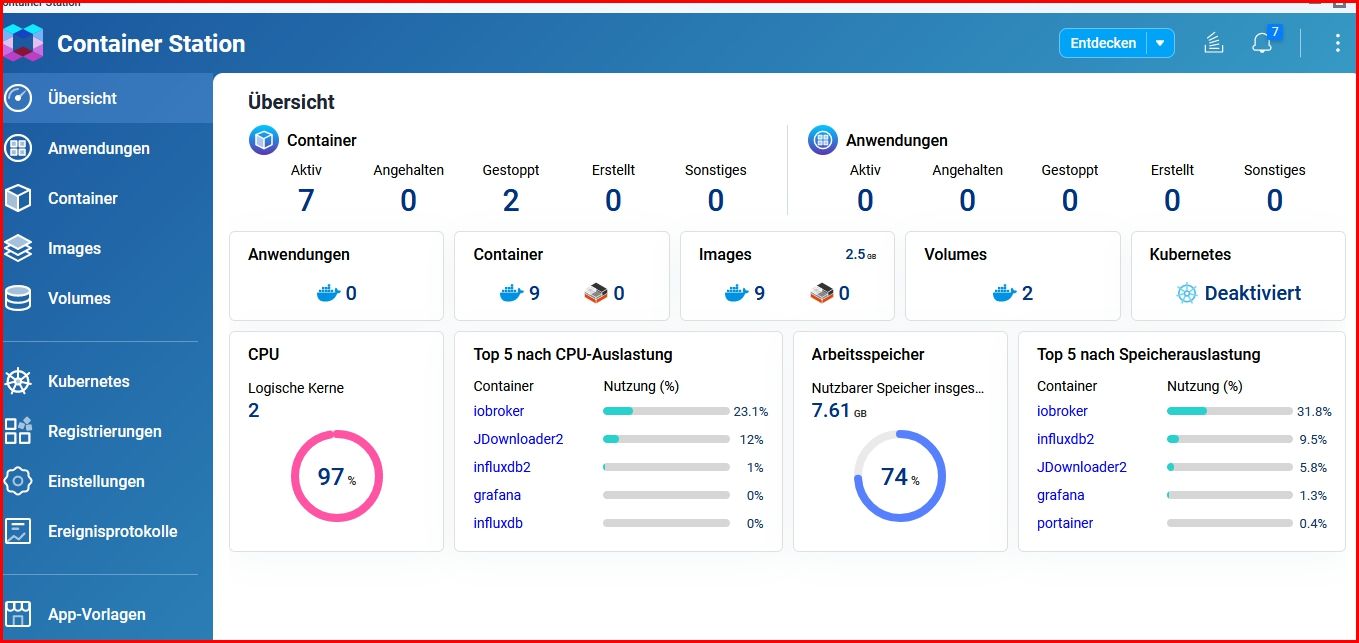
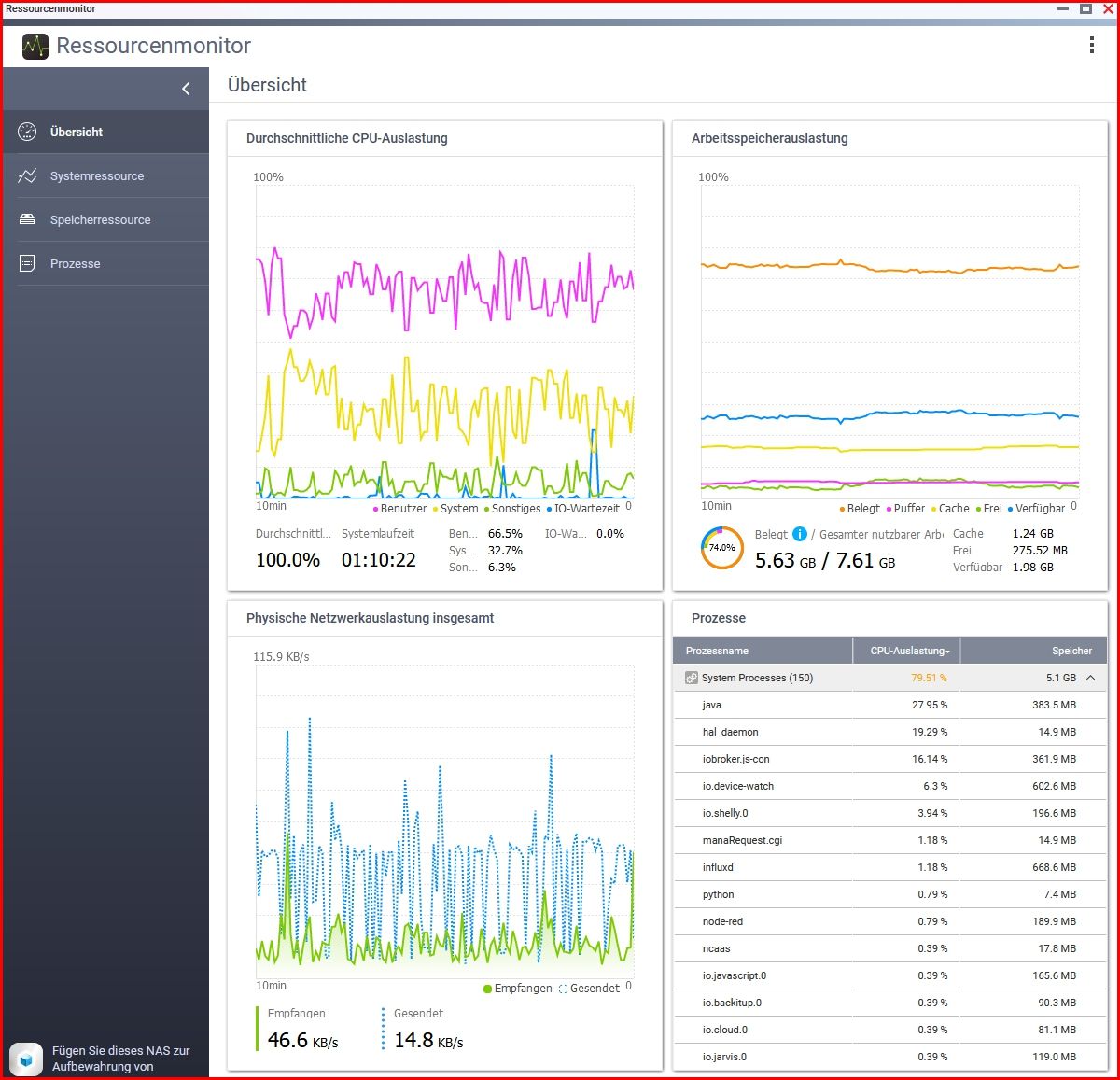
                                    Snap-2023-09-16-14-19-28.jpg

                                    Snap-2023-09-16-14-19-18.jpg

                                    DJMarc75D 1 Reply Last reply
                                    0
                                    • S Schtallone

                                      @dp20eic
                                      Hier mal nach 1 Std laufzeit die Messungen:

                                      Snap-2023-09-16-14-19-28.jpg

                                      Snap-2023-09-16-14-19-18.jpg

                                      DJMarc75D Offline
                                      DJMarc75D Offline
                                      DJMarc75
                                      wrote on last edited by
                                      #43

                                      @schtallone JDownloader2 frisst in Windows schon prinzipiell viele Ressourcen und bei aktiviertem Download macht es Dein Netzwerk mehr als träge !
                                      Warum läuft sowas auf einer NAS ?

                                      Lehrling seit 1975 !!!
                                      Beitrag geholfen ? dann gerne ein upvote rechts unten im Beitrag klicken ;)
                                      https://forum.iobroker.net/topic/51555/hinweise-f%C3%BCr-gute-forenbeitr%C3%A4ge

                                      S 1 Reply Last reply
                                      0
                                      • DJMarc75D DJMarc75

                                        @schtallone JDownloader2 frisst in Windows schon prinzipiell viele Ressourcen und bei aktiviertem Download macht es Dein Netzwerk mehr als träge !
                                        Warum läuft sowas auf einer NAS ?

                                        S Offline
                                        S Offline
                                        Schtallone
                                        wrote on last edited by
                                        #44

                                        @djmarc75 Damit ich den rechner nicht ständig laufen lassen muss

                                        1 Reply Last reply
                                        0
                                        • GlasfaserG Glasfaser

                                          @schtallone

                                          pkill -u iobroker
                                          iob fix
                                          

                                          Container danach neu starten

                                          dann nochmal

                                          iob list instances | grep port
                                          

                                          und

                                          iob status
                                          

                                          zeigen

                                          S Offline
                                          S Offline
                                          Schtallone
                                          wrote on last edited by
                                          #45

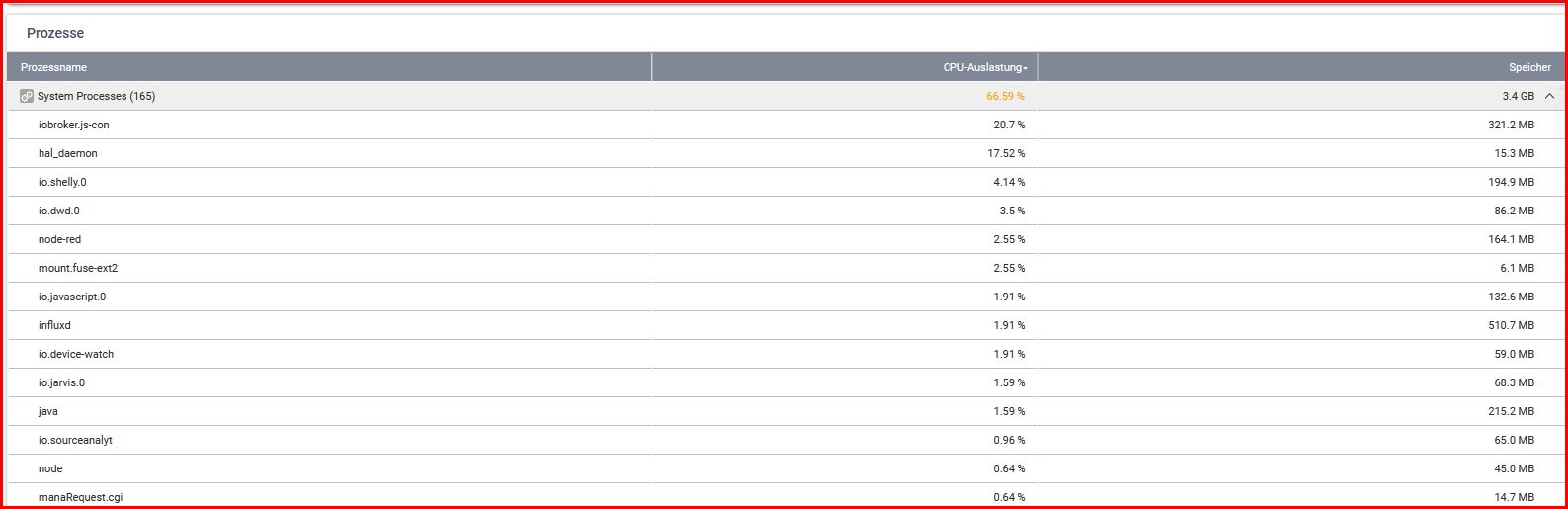
                                          @glasfaser said in Performance Probleme durch Shelly Adapter?:

                                          iob list instances | grep port
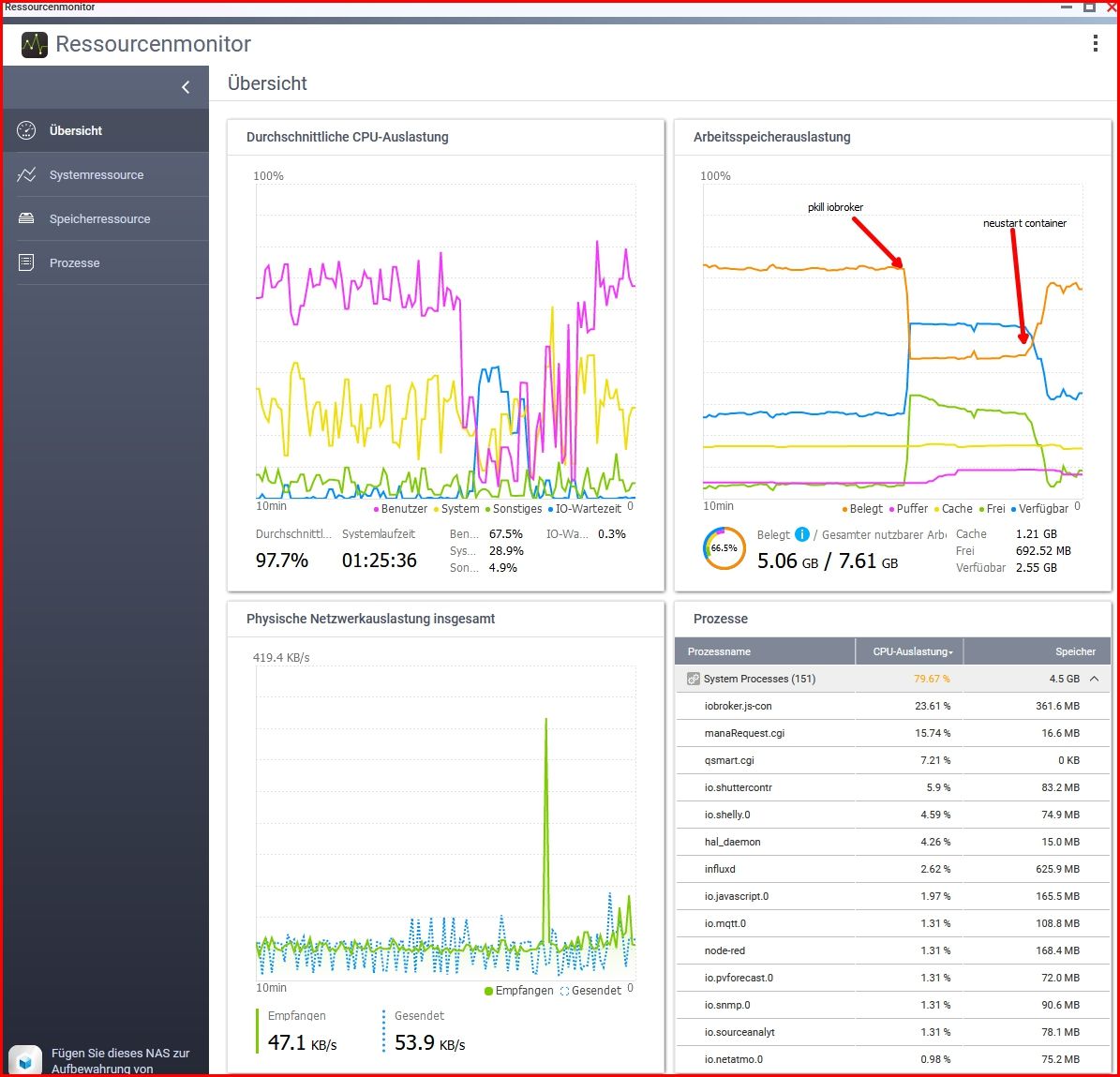
                                          Snap-2023-09-16-14-36-20.jpg

                                          root@iobroker:/opt/iobroker# iob list instances | grep port
                                          + system.adapter.admin.0                  : admin                 : iobroker                                 -  enabled, port: 8081, bind: 0.0.0.0, run as: admin
                                          + system.adapter.influxdb.0               : influxdb              : iobroker                                 -  enabled, port: 8086
                                          + system.adapter.mqtt.0                   : mqtt                  : iobroker                                 -  enabled, port: 1883, bind: 0.0.0.0
                                          + system.adapter.mqtt.1                   : mqtt                  : iobroker                                 -  enabled, port: 1883, bind: 0.0.0.0
                                          + system.adapter.node-red.0               : node-red              : iobroker                                 -  enabled, port: 1880, bind: 192.168.1.10
                                          + system.adapter.shelly.0                 : shelly                : iobroker                                 -  enabled, port: 1882, bind: 192.168.1.10
                                            system.adapter.telegram.0               : telegram              : iobroker                                 - disabled, port: 8443, bind: 0.0.0.0
                                          + system.adapter.terminal.0               : terminal              : iobroker                                 -  enabled, port: 8088, bind: 192.168.1.10, run as: admin
                                          + system.adapter.web.0                    : web                   : iobroker                                 -  enabled, port: 8082, bind: 0.0.0.0, run as: admin
                                          
                                          root@iobroker:/opt/iobroker# iob status
                                          iobroker is running on this host.
                                          
                                          
                                          Objects type: jsonl
                                          States  type: jsonl
                                          
                                          GlasfaserG 2 Replies Last reply
                                          0
                                          Reply
                                          • Reply as topic
                                          Log in to reply
                                          • Oldest to Newest
                                          • Newest to Oldest
                                          • Most Votes


                                          Support us

                                          ioBroker
                                          Community Adapters
                                          Donate
                                          FAQ Cloud / IOT
                                          HowTo: Node.js-Update
                                          HowTo: Backup/Restore
                                          Downloads
                                          BLOG

                                          528

                                          Online

                                          32.4k

                                          Users

                                          81.5k

                                          Topics

                                          1.3m

                                          Posts
                                          Community
                                          Impressum | Datenschutz-Bestimmungen | Nutzungsbedingungen | Einwilligungseinstellungen
                                          ioBroker Community 2014-2025
                                          logo
                                          • Login

                                          • Don't have an account? Register

                                          • Login or register to search.
                                          • First post
                                            Last post
                                          0
                                          • Home
                                          • Recent
                                          • Tags
                                          • Unread 0
                                          • Categories
                                          • Unreplied
                                          • Popular
                                          • GitHub
                                          • Docu
                                          • Hilfe