




Multihost - Master in Synology Docker, Slave RPI - jsonl?
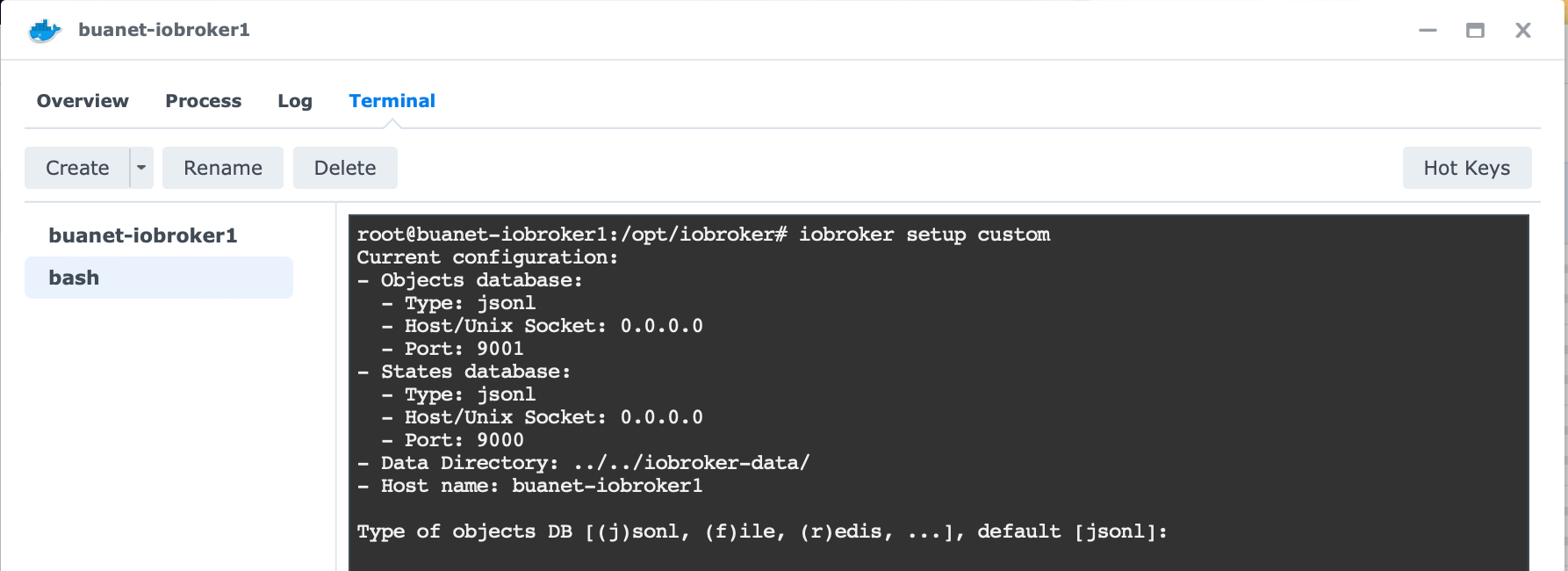
-
@glasfaser So - nun habe ich es geschafft...
Raspberry:
Skript v.2023-04-16

*** BASE SYSTEM ***
Model		: Raspberry Pi 4 Model B Rev 1.5
Architecture    : aarch64
Docker          : false
Virtualization  : none
Distributor ID:	Raspbian
Description:	Raspbian GNU/Linux 11 (bullseye)
Release:	11
Codename:	bullseye

PRETTY_NAME="Raspbian GNU/Linux 11 (bullseye)"
NAME="Raspbian GNU/Linux"
VERSION_ID="11"
VERSION="11 (bullseye)"
VERSION_CODENAME=bullseye
ID=raspbian
ID_LIKE=debian
HOME_URL="http://www.raspbian.org/"
SUPPORT_URL="http://www.raspbian.org/RaspbianForums"
BUG_REPORT_URL="http://www.raspbian.org/RaspbianBugs"

Systemuptime and Load:
 19:10:07 up 1 min,  3 users,  load average: 0.98, 0.35, 0.12
CPU threads: 4

Raspberry only:
throttled=0x0
Other values than 0x0 hint to temperature/voltage problems
temp=40.4'C
volt=0.9160V

*** Time and Time Zones ***
               Local time: Mon 2023-06-12 19:10:07 CEST
           Universal time: Mon 2023-06-12 17:10:07 UTC
                 RTC time: n/a
                Time zone: Europe/Berlin (CEST, +0200)
System clock synchronized: yes
              NTP service: active
          RTC in local TZ: no

*** User and Groups ***
pi
/home/pi
pi adm dialout cdrom sudo audio www-data video plugdev games users input render netdev lpadmin gpio i2c spi iobroker

*** X-Server-Setup ***
X-Server: 	true
Desktop:
Terminal: 	tty
Boot Target: 	graphical.target

*** MEMORY ***
               total        used        free      shared  buff/cache   available
Mem:            7.8G        298M        7.0G         42M        520M        7.4G
Swap:            99M          0B         99M
Total:          7.9G        298M        7.1G

         7811 M total memory
          298 M used memory
          547 M active memory
          123 M inactive memory
         6992 M free memory
           37 M buffer memory
          483 M swap cache
           99 M total swap
            0 M used swap
           99 M free swap

Raspberry only:
oom events: 0
lifetime oom required: 0 Mbytes
total time in oom handler: 0 ms
max time spent in oom handler: 0 ms

*** FILESYSTEM ***
Filesystem     Type      Size  Used Avail Use% Mounted on
/dev/root      ext4      110G  7.3G   97G   8% /
devtmpfs       devtmpfs  3.6G     0  3.6G   0% /dev
tmpfs          tmpfs     3.9G     0  3.9G   0% /dev/shm
tmpfs          tmpfs     1.6G  1.2M  1.6G   1% /run
tmpfs          tmpfs     5.0M  4.0K  5.0M   1% /run/lock
/dev/sda1      vfat      253M   52M  201M  21% /boot
tmpfs          tmpfs     782M   24K  782M   1% /run/user/1000

Messages concerning ext4 filesystem in dmesg:
[Mon Jun 12 19:09:06 2023] Kernel command line: coherent_pool=1M 8250.nr_uarts=1 snd_bcm2835.enable_headphones=0 snd_bcm2835.enable_headphones=1 snd_bcm2835.enable_hdmi=1 snd_bcm2835.enable_hdmi=0  smsc95xx.macaddr=D8:3A:DD:0A:FB:70 vc_mem.mem_base=0x3eb00000 vc_mem.mem_size=0x3ff00000  console=ttyS0,115200 console=tty1 root=PARTUUID=ecf8b169-02 rootfstype=ext4 fsck.repair=yes rootwait quiet splash plymouth.ignore-serial-consoles
[Mon Jun 12 19:09:09 2023] EXT4-fs (sda2): mounted filesystem with ordered data mode. Quota mode: none.
[Mon Jun 12 19:09:09 2023] VFS: Mounted root (ext4 filesystem) readonly on device 8:2.
[Mon Jun 12 19:09:11 2023] EXT4-fs (sda2): re-mounted. Quota mode: none.

Show mounted filesystems (real ones only):
TARGET  SOURCE    FSTYPE OPTIONS
/       /dev/sda2 ext4   rw,noatime
`-/boot /dev/sda1 vfat   rw,relatime,fmask=0022,dmask=0022,codepage=437,iocharset=ascii,shortname=mixed,errors=remount-ro

Files in neuralgic directories:

/var:
976M	/var/
459M	/var/log
457M	/var/log/journal/d0ff3fe7bc51440c943b485698aeaf33
457M	/var/log/journal
258M	/var/cache

Archived and active journals take up 456.0M in the file system.

/opt/iobroker/backups:
4.0K	/opt/iobroker/backups/

/opt/iobroker/iobroker-data:
40M	/opt/iobroker/iobroker-data/
19M	/opt/iobroker/iobroker-data/backup-objects
15M	/opt/iobroker/iobroker-data/files
13M	/opt/iobroker/iobroker-data/files/admin.admin/custom/static/js
13M	/opt/iobroker/iobroker-data/files/admin.admin/custom/static

The five largest files in iobroker-data are:
6.4M	/opt/iobroker/iobroker-data/objects.jsonl
6.3M	/opt/iobroker/iobroker-data/files/admin.admin/custom/static/js/vendors-node_modules_iobroker_adapter-react-v5_assets_devices_parseNames_js-node_modules_iobr-99c23e.847b8ad9.chunk.js.map
2.8M	/opt/iobroker/iobroker-data/files/admin.admin/custom/static/js/vendors-node_modules_iobroker_adapter-react-v5_assets_devices_parseNames_js-node_modules_iobr-99c23e.847b8ad9.chunk.js
1.6M	/opt/iobroker/iobroker-data/files/admin.admin/custom/static/js/vendors-node_modules_mui_material_Accordion_index_js-node_modules_mui_material_AccordionDetai-57e02d.0886b730.chunk.js.map
1.1M	/opt/iobroker/iobroker-data/backup-objects/2023-06-12_17-27_objects.jsonl.gz

*** NodeJS-Installation ***

/usr/bin/nodejs 	v20.2.0
/usr/bin/node 		v20.2.0
/usr/bin/npm 		9.6.6
/usr/bin/npx 		9.6.6


nodejs:
  Installed: 20.2.0-deb-1nodesource1
  Candidate: 20.2.0-deb-1nodesource1
  Version table:
 *** 20.2.0-deb-1nodesource1 500
        500 https://deb.nodesource.com/node_20.x bullseye/main armhf Packages
        100 /var/lib/dpkg/status
     12.22.12~dfsg-1~deb11u4 500
        500 http://raspbian.raspberrypi.org/raspbian bullseye/main armhf Packages

Temp directories causing npm8 problem: 0
No problems detected

*** ioBroker-Installation ***

ioBroker Status
 The DB port  9001 is occupied by something that is not a Redis protocol server. Please check other software running on this port or, if you use iobroker, make sure to update to js-controller 2.0 or higher!
 The DB port  9001 is occupied by something that is not a Redis protocol server. Please check other software running on this port or, if you use iobroker, make sure to update to js-controller 2.0 or higher!
 The DB port  9001 is occupied by something that is not a Redis protocol server. Please check other software running on this port or, if you use iobroker, make sure to update to js-controller 2.0 or higher!
 The DB port  9001 is occupied by something that is not a Redis protocol server. Please check other software running on this port or, if you use iobroker, make sure to update to js-controller 2.0 or higher!
 The DB port  9001 is occupied by something that is not a Redis protocol server. Please check other software running on this port or, if you use iobroker, make sure to update to js-controller 2.0 or higher!
 The DB port  9001 is occupied by something that is not a Redis protocol server. Please check other software running on this port or, if you use iobroker, make sure to update to js-controller 2.0 or higher!
 The DB port  9001 is occupied by something that is not a Redis protocol server. Please check other software running on this port or, if you use iobroker, make sure to update to js-controller 2.0 or higher!
 The DB port  9001 is occupied by something that is not a Redis protocol server. Please check other software running on this port or, if you use iobroker, make sure to update to js-controller 2.0 or higher!
 The DB port  9001 is occupied by something that is not a Redis protocol server. Please check other software running on this port or, if you use iobroker, make sure to update to js-controller 2.0 or higher!
 The DB port  9001 is occupied by something that is not a Redis protocol server. Please check other software running on this port or, if you use iobroker, make sure to update to js-controller 2.0 or higher!
 The DB port  9001 is occupied by something that is not a Redis protocol server. Please check other software running on this port or, if you use iobroker, make sure to update to js-controller 2.0 or higher!
 The DB port  9001 is occupied by something that is not a Redis protocol server. Please check other software running on this port or, if you use iobroker, make sure to update to js-controller 2.0 or higher!
 The DB port  9001 is occupied by something that is not a Redis protocol server. Please check other software running on this port or, if you use iobroker, make sure to update to js-controller 2.0 or higher!
 The DB port  9001 is occupied by something that is not a Redis protocol server. Please check other software running on this port or, if you use iobroker, make sure to update to js-controller 2.0 or higher!
 The DB port  9001 is occupied by something that is not a Redis protocol server. Please check other software running on this port or, if you use iobroker, make sure to update to js-controller 2.0 or higher!
 The DB port  9001 is occupied by something that is not a Redis protocol server. Please check other software running on this port or, if you use iobroker, make sure to update to js-controller 2.0 or higher!
 The DB port  9001 is occupied by something that is not a Redis protocol server. Please check other software running on this port or, if you use iobroker, make sure to update to js-controller 2.0 or higher!
 The DB port  9001 is occupied by something that is not a Redis protocol server. Please check other software running on this port or, if you use iobroker, make sure to update to js-controller 2.0 or higher!
 The DB port  9001 is occupied by something that is not a Redis protocol server. Please check other software running on this port or, if you use iobroker, make sure to update to js-controller 2.0 or higher!
 The DB port  9001 is occupied by something that is not a Redis protocol server. Please check other software running on this port or, if you use iobroker, make sure to update to js-controller 2.0 or higher!
 The DB port  9001 is occupied by something that is not a Redis protocol server. Please check other software running on this port or, if you use iobroker, make sure to update to js-controller 2.0 or higher!
 The DB port  9001 is occupied by something that is not a Redis protocol server. Please check other software running on this port or, if you use iobroker, make sure to update to js-controller 2.0 or higher!
 The DB port  9001 is occupied by something that is not a Redis protocol server. Please check other software running on this port or, if you use iobroker, make sure to update to js-controller 2.0 or higher!
 The DB port  9001 is occupied by something that is not a Redis protocol server. Please check other software running on this port or, if you use iobroker, make sure to update to js-controller 2.0 or higher!
 The DB port  9001 is occupied by something that is not a Redis protocol server. Please check other software running on this port or, if you use iobroker, make sure to update to js-controller 2.0 or higher!
 The DB port  9001 is occupied by something that is not a Redis protocol server. Please check other software running on this port or, if you use iobroker, make sure to update to js-controller 2.0 or higher!
No connection to databases possible ...


Core adapters versions
js-controller: 	4.0.24
admin: 		6.3.5
javascript: 	"javascript" not found

Adapters from github: 	0

Adapter State
 The DB port  9000 is occupied by something that is not a Redis protocol server. Please check other software running on this port or, if you use iobroker, make sure to update to js-controller 2.0 or higher!
 The DB port  9001 is occupied by something that is not a Redis protocol server. Please check other software running on this port or, if you use iobroker, make sure to update to js-controller 2.0 or higher!
 The DB port  9001 is occupied by something that is not a Redis protocol server. Please check other software running on this port or, if you use iobroker, make sure to update to js-controller 2.0 or higher!
 The DB port  9001 is occupied by something that is not a Redis protocol server. Please check other software running on this port or, if you use iobroker, make sure to update to js-controller 2.0 or higher!
 The DB port  9001 is occupied by something that is not a Redis protocol server. Please check other software running on this port or, if you use iobroker, make sure to update to js-controller 2.0 or higher!
 The DB port  9001 is occupied by something that is not a Redis protocol server. Please check other software running on this port or, if you use iobroker, make sure to update to js-controller 2.0 or higher!
 The DB port  9001 is occupied by something that is not a Redis protocol server. Please check other software running on this port or, if you use iobroker, make sure to update to js-controller 2.0 or higher!
 The DB port  9001 is occupied by something that is not a Redis protocol server. Please check other software running on this port or, if you use iobroker, make sure to update to js-controller 2.0 or higher!
 The DB port  9001 is occupied by something that is not a Redis protocol server. Please check other software running on this port or, if you use iobroker, make sure to update to js-controller 2.0 or higher!
 The DB port  9001 is occupied by something that is not a Redis protocol server. Please check other software running on this port or, if you use iobroker, make sure to update to js-controller 2.0 or higher!
 The DB port  9001 is occupied by something that is not a Redis protocol server. Please check other software running on this port or, if you use iobroker, make sure to update to js-controller 2.0 or higher!
 The DB port  9001 is occupied by something that is not a Redis protocol server. Please check other software running on this port or, if you use iobroker, make sure to update to js-controller 2.0 or higher!
 The DB port  9001 is occupied by something that is not a Redis protocol server. Please check other software running on this port or, if you use iobroker, make sure to update to js-controller 2.0 or higher!
 The DB port  9001 is occupied by something that is not a Redis protocol server. Please check other software running on this port or, if you use iobroker, make sure to update to js-controller 2.0 or higher!
 The DB port  9001 is occupied by something that is not a Redis protocol server. Please check other software running on this port or, if you use iobroker, make sure to update to js-controller 2.0 or higher!
 The DB port  9001 is occupied by something that is not a Redis protocol server. Please check other software running on this port or, if you use iobroker, make sure to update to js-controller 2.0 or higher!
 The DB port  9001 is occupied by something that is not a Redis protocol server. Please check other software running on this port or, if you use iobroker, make sure to update to js-controller 2.0 or higher!
 The DB port  9001 is occupied by something that is not a Redis protocol server. Please check other software running on this port or, if you use iobroker, make sure to update to js-controller 2.0 or higher!
 The DB port  9001 is occupied by something that is not a Redis protocol server. Please check other software running on this port or, if you use iobroker, make sure to update to js-controller 2.0 or higher!
 The DB port  9001 is occupied by something that is not a Redis protocol server. Please check other software running on this port or, if you use iobroker, make sure to update to js-controller 2.0 or higher!
 The DB port  9001 is occupied by something that is not a Redis protocol server. Please check other software running on this port or, if you use iobroker, make sure to update to js-controller 2.0 or higher!
 The DB port  9001 is occupied by something that is not a Redis protocol server. Please check other software running on this port or, if you use iobroker, make sure to update to js-controller 2.0 or higher!
 The DB port  9001 is occupied by something that is not a Redis protocol server. Please check other software running on this port or, if you use iobroker, make sure to update to js-controller 2.0 or higher!
 The DB port  9001 is occupied by something that is not a Redis protocol server. Please check other software running on this port or, if you use iobroker, make sure to update to js-controller 2.0 or higher!
 The DB port  9001 is occupied by something that is not a Redis protocol server. Please check other software running on this port or, if you use iobroker, make sure to update to js-controller 2.0 or higher!
 The DB port  9001 is occupied by something that is not a Redis protocol server. Please check other software running on this port or, if you use iobroker, make sure to update to js-controller 2.0 or higher!
 The DB port  9001 is occupied by something that is not a Redis protocol server. Please check other software running on this port or, if you use iobroker, make sure to update to js-controller 2.0 or higher!
 The DB port  9001 is occupied by something that is not a Redis protocol server. Please check other software running on this port or, if you use iobroker, make sure to update to js-controller 2.0 or higher!
 The DB port  9001 is occupied by something that is not a Redis protocol server. Please check other software running on this port or, if you use iobroker, make sure to update to js-controller 2.0 or higher!
No connection to databases possible ...

Enabled adapters with bindings

ioBroker-Repositories
 The DB port  9001 is occupied by something that is not a Redis protocol server. Please check other software running on this port or, if you use iobroker, make sure to update to js-controller 2.0 or higher!
 The DB port  9001 is occupied by something that is not a Redis protocol server. Please check other software running on this port or, if you use iobroker, make sure to update to js-controller 2.0 or higher!
 The DB port  9001 is occupied by something that is not a Redis protocol server. Please check other software running on this port or, if you use iobroker, make sure to update to js-controller 2.0 or higher!
 The DB port  9001 is occupied by something that is not a Redis protocol server. Please check other software running on this port or, if you use iobroker, make sure to update to js-controller 2.0 or higher!
 The DB port  9001 is occupied by something that is not a Redis protocol server. Please check other software running on this port or, if you use iobroker, make sure to update to js-controller 2.0 or higher!
 The DB port  9001 is occupied by something that is not a Redis protocol server. Please check other software running on this port or, if you use iobroker, make sure to update to js-controller 2.0 or higher!
 The DB port  9001 is occupied by something that is not a Redis protocol server. Please check other software running on this port or, if you use iobroker, make sure to update to js-controller 2.0 or higher!
 The DB port  9001 is occupied by something that is not a Redis protocol server. Please check other software running on this port or, if you use iobroker, make sure to update to js-controller 2.0 or higher!
 The DB port  9001 is occupied by something that is not a Redis protocol server. Please check other software running on this port or, if you use iobroker, make sure to update to js-controller 2.0 or higher!
 The DB port  9001 is occupied by something that is not a Redis protocol server. Please check other software running on this port or, if you use iobroker, make sure to update to js-controller 2.0 or higher!
 The DB port  9001 is occupied by something that is not a Redis protocol server. Please check other software running on this port or, if you use iobroker, make sure to update to js-controller 2.0 or higher!
 The DB port  9001 is occupied by something that is not a Redis protocol server. Please check other software running on this port or, if you use iobroker, make sure to update to js-controller 2.0 or higher!
 The DB port  9001 is occupied by something that is not a Redis protocol server. Please check other software running on this port or, if you use iobroker, make sure to update to js-controller 2.0 or higher!
 The DB port  9001 is occupied by something that is not a Redis protocol server. Please check other software running on this port or, if you use iobroker, make sure to update to js-controller 2.0 or higher!
 The DB port  9001 is occupied by something that is not a Redis protocol server. Please check other software running on this port or, if you use iobroker, make sure to update to js-controller 2.0 or higher!
 The DB port  9001 is occupied by something that is not a Redis protocol server. Please check other software running on this port or, if you use iobroker, make sure to update to js-controller 2.0 or higher!
 The DB port  9001 is occupied by something that is not a Redis protocol server. Please check other software running on this port or, if you use iobroker, make sure to update to js-controller 2.0 or higher!
 The DB port  9001 is occupied by something that is not a Redis protocol server. Please check other software running on this port or, if you use iobroker, make sure to update to js-controller 2.0 or higher!
 The DB port  9001 is occupied by something that is not a Redis protocol server. Please check other software running on this port or, if you use iobroker, make sure to update to js-controller 2.0 or higher!
 The DB port  9001 is occupied by something that is not a Redis protocol server. Please check other software running on this port or, if you use iobroker, make sure to update to js-controller 2.0 or higher!
 The DB port  9001 is occupied by something that is not a Redis protocol server. Please check other software running on this port or, if you use iobroker, make sure to update to js-controller 2.0 or higher!
 The DB port  9001 is occupied by something that is not a Redis protocol server. Please check other software running on this port or, if you use iobroker, make sure to update to js-controller 2.0 or higher!
 The DB port  9001 is occupied by something that is not a Redis protocol server. Please check other software running on this port or, if you use iobroker, make sure to update to js-controller 2.0 or higher!
 The DB port  9001 is occupied by something that is not a Redis protocol server. Please check other software running on this port or, if you use iobroker, make sure to update to js-controller 2.0 or higher!
 The DB port  9001 is occupied by something that is not a Redis protocol server. Please check other software running on this port or, if you use iobroker, make sure to update to js-controller 2.0 or higher!
 The DB port  9001 is occupied by something that is not a Redis protocol server. Please check other software running on this port or, if you use iobroker, make sure to update to js-controller 2.0 or higher!
 The DB port  9001 is occupied by something that is not a Redis protocol server. Please check other software running on this port or, if you use iobroker, make sure to update to js-controller 2.0 or higher!
 The DB port  9001 is occupied by something that is not a Redis protocol server. Please check other software running on this port or, if you use iobroker, make sure to update to js-controller 2.0 or higher!
No connection to databases possible ...

Installed ioBroker-Instances
 The DB port  9001 is occupied by something that is not a Redis protocol server. Please check other software running on this port or, if you use iobroker, make sure to update to js-controller 2.0 or higher!
 The DB port  9001 is occupied by something that is not a Redis protocol server. Please check other software running on this port or, if you use iobroker, make sure to update to js-controller 2.0 or higher!
 The DB port  9001 is occupied by something that is not a Redis protocol server. Please check other software running on this port or, if you use iobroker, make sure to update to js-controller 2.0 or higher!
 The DB port  9001 is occupied by something that is not a Redis protocol server. Please check other software running on this port or, if you use iobroker, make sure to update to js-controller 2.0 or higher!
 The DB port  9001 is occupied by something that is not a Redis protocol server. Please check other software running on this port or, if you use iobroker, make sure to update to js-controller 2.0 or higher!
 The DB port  9001 is occupied by something that is not a Redis protocol server. Please check other software running on this port or, if you use iobroker, make sure to update to js-controller 2.0 or higher!
 The DB port  9001 is occupied by something that is not a Redis protocol server. Please check other software running on this port or, if you use iobroker, make sure to update to js-controller 2.0 or higher!
 The DB port  9001 is occupied by something that is not a Redis protocol server. Please check other software running on this port or, if you use iobroker, make sure to update to js-controller 2.0 or higher!
 The DB port  9001 is occupied by something that is not a Redis protocol server. Please check other software running on this port or, if you use iobroker, make sure to update to js-controller 2.0 or higher!
 The DB port  9001 is occupied by something that is not a Redis protocol server. Please check other software running on this port or, if you use iobroker, make sure to update to js-controller 2.0 or higher!
 The DB port  9001 is occupied by something that is not a Redis protocol server. Please check other software running on this port or, if you use iobroker, make sure to update to js-controller 2.0 or higher!
 The DB port  9001 is occupied by something that is not a Redis protocol server. Please check other software running on this port or, if you use iobroker, make sure to update to js-controller 2.0 or higher!
 The DB port  9001 is occupied by something that is not a Redis protocol server. Please check other software running on this port or, if you use iobroker, make sure to update to js-controller 2.0 or higher!
 The DB port  9001 is occupied by something that is not a Redis protocol server. Please check other software running on this port or, if you use iobroker, make sure to update to js-controller 2.0 or higher!
 The DB port  9001 is occupied by something that is not a Redis protocol server. Please check other software running on this port or, if you use iobroker, make sure to update to js-controller 2.0 or higher!
 The DB port  9001 is occupied by something that is not a Redis protocol server. Please check other software running on this port or, if you use iobroker, make sure to update to js-controller 2.0 or higher!
 The DB port  9001 is occupied by something that is not a Redis protocol server. Please check other software running on this port or, if you use iobroker, make sure to update to js-controller 2.0 or higher!
 The DB port  9001 is occupied by something that is not a Redis protocol server. Please check other software running on this port or, if you use iobroker, make sure to update to js-controller 2.0 or higher!
 The DB port  9001 is occupied by something that is not a Redis protocol server. Please check other software running on this port or, if you use iobroker, make sure to update to js-controller 2.0 or higher!
 The DB port  9001 is occupied by something that is not a Redis protocol server. Please check other software running on this port or, if you use iobroker, make sure to update to js-controller 2.0 or higher!
 The DB port  9001 is occupied by something that is not a Redis protocol server. Please check other software running on this port or, if you use iobroker, make sure to update to js-controller 2.0 or higher!
 The DB port  9001 is occupied by something that is not a Redis protocol server. Please check other software running on this port or, if you use iobroker, make sure to update to js-controller 2.0 or higher!
 The DB port  9001 is occupied by something that is not a Redis protocol server. Please check other software running on this port or, if you use iobroker, make sure to update to js-controller 2.0 or higher!
 The DB port  9001 is occupied by something that is not a Redis protocol server. Please check other software running on this port or, if you use iobroker, make sure to update to js-controller 2.0 or higher!
 The DB port  9001 is occupied by something that is not a Redis protocol server. Please check other software running on this port or, if you use iobroker, make sure to update to js-controller 2.0 or higher!
No connection to databases possible ...

Objects and States
Please stand by - This may take a while
Objects: 	26
States: 	29

*** OS-Repositories and Updates ***
Hit:1 http://raspbian.raspberrypi.org/raspbian bullseye InRelease
Hit:2 http://archive.raspberrypi.org/debian bullseye InRelease
Hit:3 https://repos.influxdata.com/debian stable InRelease
Hit:4 https://deb.nodesource.com/node_20.x bullseye InRelease
Hit:5 https://repos.influxdata.com/debian bullseye InRelease
Reading package lists...
Pending Updates: 0

*** Listening Ports ***
Active Internet connections (only servers)
Proto Recv-Q Send-Q Local Address           Foreign Address         State       User       Inode      PID/Program name
tcp        0      0 127.0.0.1:631           0.0.0.0:*               LISTEN      0          12999      597/cupsd
tcp        0      0 0.0.0.0:22              0.0.0.0:*               LISTEN      0          14665      638/sshd: /usr/sbin
tcp        0      0 0.0.0.0:5900            0.0.0.0:*               LISTEN      0          16502      623/vncserver-x11-c
tcp        0      0 0.0.0.0:1883            0.0.0.0:*               LISTEN      116        14650      612/mosquitto
tcp        0      0 0.0.0.0:1880            0.0.0.0:*               LISTEN      1000       17141      456/node-red
tcp        0      0 127.0.0.1:8088          0.0.0.0:*               LISTEN      999        16480      458/influxd
tcp6       0      0 :::8086                 :::*                    LISTEN      999        17182      458/influxd
tcp6       0      0 ::1:631                 :::*                    LISTEN      0          12998      597/cupsd
tcp6       0      0 :::22                   :::*                    LISTEN      0          14667      638/sshd: /usr/sbin
tcp6       0      0 :::80                   :::*                    LISTEN      0          16429      663/apache2
tcp6       0      0 :::5900                 :::*                    LISTEN      0          16501      623/vncserver-x11-c
tcp6       0      0 :::1883                 :::*                    LISTEN      116        14651      612/mosquitto
udp        0      0 0.0.0.0:54638           0.0.0.0:*                           108        15900      433/avahi-daemon: r
udp        0      0 0.0.0.0:68              0.0.0.0:*                           0          17584      511/dhcpcd
udp        0      0 0.0.0.0:631             0.0.0.0:*                           0          16497      756/cups-browsed
udp        0      0 0.0.0.0:5353            0.0.0.0:*                           108        15898      433/avahi-daemon: r
udp6       0      0 :::46829                :::*                                108        15901      433/avahi-daemon: r
udp6       0      0 :::5353                 :::*                                108        15899      433/avahi-daemon: r

*** Log File - Last 25 Lines ***

2023-06-12 19:14:07.823  - error: host.raspberrypi The DB port  9001 is occupied by something that is not a Redis protocol server. Please check other software running on this port or, if you use iobroker, make sure to update to js-controller 2.0 or higher!
2023-06-12 19:14:08.130  - error: host.raspberrypi The DB port  9001 is occupied by something that is not a Redis protocol server. Please check other software running on this port or, if you use iobroker, make sure to update to js-controller 2.0 or higher!
2023-06-12 19:14:08.439  - error: host.raspberrypi The DB port  9001 is occupied by something that is not a Redis protocol server. Please check other software running on this port or, if you use iobroker, make sure to update to js-controller 2.0 or higher!
2023-06-12 19:14:08.746  - error: host.raspberrypi The DB port  9001 is occupied by something that is not a Redis protocol server. Please check other software running on this port or, if you use iobroker, make sure to update to js-controller 2.0 or higher!
2023-06-12 19:14:09.057  - error: host.raspberrypi The DB port  9001 is occupied by something that is not a Redis protocol server. Please check other software running on this port or, if you use iobroker, make sure to update to js-controller 2.0 or higher!
2023-06-12 19:14:09.366  - error: host.raspberrypi The DB port  9001 is occupied by something that is not a Redis protocol server. Please check other software running on this port or, if you use iobroker, make sure to update to js-controller 2.0 or higher!
2023-06-12 19:14:09.676  - error: host.raspberrypi The DB port  9001 is occupied by something that is not a Redis protocol server. Please check other software running on this port or, if you use iobroker, make sure to update to js-controller 2.0 or higher!
2023-06-12 19:14:09.986  - error: host.raspberrypi The DB port  9001 is occupied by something that is not a Redis protocol server. Please check other software running on this port or, if you use iobroker, make sure to update to js-controller 2.0 or higher!
2023-06-12 19:14:10.296  - error: host.raspberrypi The DB port  9001 is occupied by something that is not a Redis protocol server. Please check other software running on this port or, if you use iobroker, make sure to update to js-controller 2.0 or higher!
2023-06-12 19:14:10.604  - error: host.raspberrypi The DB port  9001 is occupied by something that is not a Redis protocol server. Please check other software running on this port or, if you use iobroker, make sure to update to js-controller 2.0 or higher!
2023-06-12 19:14:10.910  - error: host.raspberrypi The DB port  9001 is occupied by something that is not a Redis protocol server. Please check other software running on this port or, if you use iobroker, make sure to update to js-controller 2.0 or higher!
2023-06-12 19:14:11.217  - error: host.raspberrypi The DB port  9001 is occupied by something that is not a Redis protocol server. Please check other software running on this port or, if you use iobroker, make sure to update to js-controller 2.0 or higher!
2023-06-12 19:14:11.525  - error: host.raspberrypi The DB port  9001 is occupied by something that is not a Redis protocol server. Please check other software running on this port or, if you use iobroker, make sure to update to js-controller 2.0 or higher!
2023-06-12 19:14:11.832  - error: host.raspberrypi The DB port  9001 is occupied by something that is not a Redis protocol server. Please check other software running on this port or, if you use iobroker, make sure to update to js-controller 2.0 or higher!
2023-06-12 19:14:12.139  - error: host.raspberrypi The DB port  9001 is occupied by something that is not a Redis protocol server. Please check other software running on this port or, if you use iobroker, make sure to update to js-controller 2.0 or higher!
2023-06-12 19:14:12.446  - error: host.raspberrypi The DB port  9001 is occupied by something that is not a Redis protocol server. Please check other software running on this port or, if you use iobroker, make sure to update to js-controller 2.0 or higher!
2023-06-12 19:14:12.757  - error: host.raspberrypi The DB port  9001 is occupied by something that is not a Redis protocol server. Please check other software running on this port or, if you use iobroker, make sure to update to js-controller 2.0 or higher!
2023-06-12 19:14:13.063  - error: host.raspberrypi The DB port  9001 is occupied by something that is not a Redis protocol server. Please check other software running on this port or, if you use iobroker, make sure to update to js-controller 2.0 or higher!
2023-06-12 19:14:13.372  - error: host.raspberrypi The DB port  9001 is occupied by something that is not a Redis protocol server. Please check other software running on this port or, if you use iobroker, make sure to update to js-controller 2.0 or higher!
2023-06-12 19:14:13.681  - error: host.raspberrypi The DB port  9001 is occupied by something that is not a Redis protocol server. Please check other software running on this port or, if you use iobroker, make sure to update to js-controller 2.0 or higher!
2023-06-12 19:14:13.966  - error: host.raspberrypi No connection to databases possible, restart
2023-06-12 19:14:13.971  - info: host.raspberrypi iobroker _restart
2023-06-12 19:14:13.996  - error: host.raspberrypi The DB port  9001 is occupied by something that is not a Redis protocol server. Please check other software running on this port or, if you use iobroker, make sure to update to js-controller 2.0 or higher!
2023-06-12 19:14:14.304  - error: host.raspberrypi The DB port  9001 is occupied by something that is not a Redis protocol server. Please check other software running on this port or, if you use iobroker, make sure to update to js-controller 2.0 or higher!
2023-06-12 19:14:14.611  - error: host.raspberrypi The DB port  9001 is occupied by something that is not a Redis protocol server. Please check other software running on this port or, if you use iobroker, make sure to update to js-controller 2.0 or higher!
Synology:
Skript v.2023-04-16 *** BASE SYSTEM *** Architecture : x86_64 Docker : v8.0.0 Virtualization : Unknown (buanet/Synology?) Distributor ID: Debian Description: Debian GNU/Linux 11 (bullseye) Release: 11 Codename: bullseye PRETTY_NAME="Debian GNU/Linux 11 (bullseye)" NAME="Debian GNU/Linux" VERSION_ID="11" VERSION="11 (bullseye)" VERSION_CODENAME=bullseye ID=debian HOME_URL="https://www.debian.org/" SUPPORT_URL="https://www.debian.org/support" BUG_REPORT_URL="https://bugs.debian.org/" Systemuptime and Load: 19:56:48 up 54 days, 12:41, 0 users, load average: 0.64, 0.56, 0.67 CPU threads: 2 *** Time and Time Zones *** Mon Jun 12 17:56:48 UTC 2023 Mon Jun 12 19:56:48 CEST 2023 CEST +0200 Etc/UTC *** User and Groups *** root /root root *** X-Server-Setup *** X-Server: false Desktop: Terminal: *** MEMORY *** total used free shared buff/cache available Mem: 5.8G 2.0G 151M 38M 3.6G 3.4G Swap: 5.5G 966M 4.6G Total: 11G 3.0G 4.7G 5786 M total memory 2035 M used memory 2467 M active memory 2365 M inactive memory 151 M free memory 14 M buffer memory 3584 M swap cache 5519 M total swap 966 M used swap 4553 M free swap *** FILESYSTEM *** Filesystem Type Size Used Avail Use% Mounted on /dev/vg1000/lv btrfs 8.8T 3.1T 5.7T 36% / tmpfs tmpfs 64M 0 64M 0% /dev tmpfs tmpfs 2.9G 0 2.9G 0% /sys/fs/cgroup shm tmpfs 64M 0 64M 0% /dev/shm /dev/vg1000/lv btrfs 8.8T 3.1T 5.7T 36% /opt/iobroker /dev/vg1000/lv btrfs 8.8T 3.1T 5.7T 36% /etc/hosts tmpfs tmpfs 2.9G 0 2.9G 0% /proc/acpi tmpfs tmpfs 2.9G 0 2.9G 0% /proc/scsi tmpfs tmpfs 2.9G 0 2.9G 0% /sys/firmware Messages concerning ext4 filesystem in dmesg: Show mounted filesystems (real ones only): TARGET SOURCE FSTYPE OPTIONS / /dev/vg1000/lv[/@syno/@docker/btrfs/subvolumes/0a15fff5f15149cd4b791dd277c106f39f903fcd69ed43d1a2cf7b3d4811cfc0] btrfs rw,nodev,relatime,ssd,synoacl,space_cache=v2,auto_reclaim_space,metadata_ratio=50,syno_allocator,subvolid=1172,subvol=/@syno/@docker/btrfs/subvolumes/0a15fff5f15149cd4b791dd277c106f39f903fcd69ed43d1a2cf7b3d4811cfc0 |-/opt/iobroker /dev/vg1000/lv[/@syno/docker/iobroker] btrfs rw,nodev,relatime,ssd,synoacl,space_cache=v2,auto_reclaim_space,metadata_ratio=50,syno_allocator,subvolid=1061,subvol=/@syno/docker/iobroker |-/etc/resolv.conf /dev/vg1000/lv[/@syno/@docker/containers/4ac5b3189883032b687a2bc64e1c0851b081119ca9b628d5ebd426e7171d9482/resolv.conf] btrfs rw,nodev,relatime,ssd,synoacl,space_cache=v2,auto_reclaim_space,metadata_ratio=50,syno_allocator,subvolid=257,subvol=/@syno/@docker/containers/4ac5b3189883032b687a2bc64e1c0851b081119ca9b628d5ebd426e7171d9482/resolv.conf |-/etc/hostname /dev/vg1000/lv[/@syno/@docker/containers/4ac5b3189883032b687a2bc64e1c0851b081119ca9b628d5ebd426e7171d9482/hostname] btrfs rw,nodev,relatime,ssd,synoacl,space_cache=v2,auto_reclaim_space,metadata_ratio=50,syno_allocator,subvolid=257,subvol=/@syno/@docker/containers/4ac5b3189883032b687a2bc64e1c0851b081119ca9b628d5ebd426e7171d9482/hostname `-/etc/hosts /dev/vg1000/lv[/@syno/@docker/containers/4ac5b3189883032b687a2bc64e1c0851b081119ca9b628d5ebd426e7171d9482/hosts] btrfs rw,nodev,relatime,ssd,synoacl,space_cache=v2,auto_reclaim_space,metadata_ratio=50,syno_allocator,subvolid=257,subvol=/@syno/@docker/containers/4ac5b3189883032b687a2bc64e1c0851b081119ca9b628d5ebd426e7171d9482/hosts Files in neuralgic directories: /var: 33M /var/ 30M /var/lib 18M /var/lib/apt/lists 18M /var/lib/apt 13M /var/lib/dpkg /opt/iobroker/backups: 35M /opt/iobroker/backups/ /opt/iobroker/iobroker-data: 150M /opt/iobroker/iobroker-data/ 65M /opt/iobroker/iobroker-data/files 56M /opt/iobroker/iobroker-data/backup-objects 51M /opt/iobroker/iobroker-data/files/javascript.admin 32M /opt/iobroker/iobroker-data/files/javascript.admin/static/js The five largest files in iobroker-data are: 22M /opt/iobroker/iobroker-data/objects.jsonl 6.9M /opt/iobroker/iobroker-data/files/javascript.admin/static/js/610.de0231c9.chunk.js.map 6.8M /opt/iobroker/iobroker-data/states.jsonl 6.3M /opt/iobroker/iobroker-data/files/admin.admin/custom/static/js/vendors-node_modules_iobroker_adapter-react-v5_assets_devices_parseNames_js-node_modules_iobr-99c23e.847b8ad9.chunk.js.map 4.9M /opt/iobroker/iobroker-data/files/javascript.admin/static/js/848.7424922d.chunk.js.map *** NodeJS-Installation *** /usr/bin/nodejs v18.16.0 /usr/bin/node v18.16.0 /usr/bin/npm 9.5.1 /usr/bin/npx 9.5.1 nodejs: Installed: 18.16.0-deb-1nodesource1 Candidate: 18.16.0-deb-1nodesource1 Version table: *** 18.16.0-deb-1nodesource1 500 500 https://deb.nodesource.com/node_18.x bullseye/main amd64 Packages 100 /var/lib/dpkg/status 12.22.12~dfsg-1~deb11u4 500 500 http://deb.debian.org/debian-security bullseye-security/main amd64 Packages 12.22.12~dfsg-1~deb11u3 500 500 http://deb.debian.org/debian bullseye/main amd64 Packages Temp directories causing npm8 problem: 0 No problems detected *** ioBroker-Installation *** ioBroker Status iobroker is running on this host. Objects type: jsonl States type: jsonl MULTIHOSTSERVICE/enabled: false Core adapters versions js-controller: 4.0.24 admin: 6.3.5 javascript: 6.1.4 Adapters from github: 0 Adapter State + system.adapter.admin.0 : admin : buanet-iobroker1 - enabled, port: 8081, bind: 0.0.0.0, run as: admin + system.adapter.backitup.0 : backitup : buanet-iobroker1 - enabled + system.adapter.discovery.0 : discovery : buanet-iobroker1 - enabled + system.adapter.esphome.0 : esphome : buanet-iobroker1 - enabled + system.adapter.influxdb.0 : influxdb : buanet-iobroker1 - enabled, port: 8086 + system.adapter.javascript.0 : javascript : buanet-iobroker1 - enabled + system.adapter.node-red.0 : node-red : buanet-iobroker1 - enabled, port: 1880, bind: 0.0.0.0 + system.adapter.simple-api.0 : simple-api : buanet-iobroker1 - enabled, port: 8087, bind: 0.0.0.0, run as: admin + system.adapter.sonoff.0 : sonoff : buanet-iobroker1 - enabled, port: 1889, bind: 0.0.0.0 + instance is alive Enabled adapters with bindings + system.adapter.admin.0 : admin : buanet-iobroker1 - enabled, port: 8081, bind: 0.0.0.0, run as: admin + system.adapter.influxdb.0 : influxdb : buanet-iobroker1 - enabled, port: 8086 + system.adapter.node-red.0 : node-red : buanet-iobroker1 - enabled, port: 1880, bind: 0.0.0.0 + system.adapter.simple-api.0 : simple-api : buanet-iobroker1 - enabled, port: 8087, bind: 0.0.0.0, run as: admin + system.adapter.sonoff.0 : sonoff : buanet-iobroker1 - enabled, port: 1889, bind: 0.0.0.0 ioBroker-Repositories stable : http://download.iobroker.net/sources-dist.json beta : http://download.iobroker.net/sources-dist-latest.json Active repo(s): stable Installed ioBroker-Instances Used repository: stable Adapter "admin" : 6.3.5 , installed 6.3.5 Adapter "backitup" : 2.6.19 , installed 2.6.19 Adapter "discovery" : 3.1.0 , installed 3.1.0 Adapter "influxdb" : 3.2.0 , installed 3.2.0 Adapter "javascript" : 6.1.4 , installed 6.1.4 Controller "js-controller": 4.0.24 , installed 4.0.24 Adapter "node-red" : 4.0.0 , installed 4.0.0 Adapter "simple-api" : 2.7.2 , installed 2.7.2 Adapter "sonoff" : 2.5.1 , installed 2.5.1 Objects and States Please stand by - This may take a while Objects: 684 States: 608 *** OS-Repositories and Updates *** Hit:1 http://deb.debian.org/debian bullseye InRelease Hit:2 http://deb.debian.org/debian-security bullseye-security InRelease Hit:3 http://deb.debian.org/debian bullseye-updates InRelease Hit:4 https://deb.nodesource.com/node_18.x bullseye InRelease Reading package lists... Pending Updates: 33 *** Listening Ports *** Active Internet connections (only servers) Proto Recv-Q Send-Q Local Address Foreign Address State User Inode PID/Program name tcp 0 0 0.0.0.0:1889 0.0.0.0:* LISTEN 1000 421507695 - tcp 0 0 0.0.0.0:6052 0.0.0.0:* LISTEN 1000 421510022 - tcp 0 0 127.0.0.1:9000 0.0.0.0:* LISTEN 1000 421504716 - tcp 0 0 127.0.0.1:9001 0.0.0.0:* LISTEN 1000 421503506 - tcp 0 0 0.0.0.0:1880 0.0.0.0:* LISTEN 1000 421506660 - tcp6 0 0 :::8081 :::* LISTEN 1000 421503847 - tcp6 0 0 :::8087 :::* LISTEN 1000 421509377 - udp 0 0 172.17.0.4:5353 0.0.0.0:* 1000 421508883 - udp 0 0 127.0.0.1:5353 0.0.0.0:* 1000 421508882 - udp 0 0 0.0.0.0:5353 0.0.0.0:* 1000 421508876 - udp 0 0 0.0.0.0:5353 0.0.0.0:* 1000 421508762 - *** Log File - Last 25 Lines *** 2023-06-12 02:28:36.926 - info: host.buanet-iobroker1 Delete log file iobroker.2023-06-04.log.gz 2023-06-12 08:06:52.002 - info: admin.0 (199) ==> Connected system.user.admin from ::ffff:172.17.0.1 2023-06-12 09:40:52.435 - info: admin.0 (199) <== Disconnect system.user.admin from ::ffff:172.17.0.1 admin 2023-06-12 09:52:41.607 - info: admin.0 (199) ==> Connected system.user.admin from ::ffff:172.17.0.1 2023-06-12 09:59:51.649 - info: admin.0 (199) <== Disconnect system.user.admin from ::ffff:172.17.0.1 admin 2023-06-12 13:58:07.603 - info: sonoff.0 (296) Client [mqtt-analyzer-Abv3g7IH] connected with secret 1686571087570_7455 2023-06-12 13:58:07.746 - info: sonoff.0 (296) new object created: sonoff.0.mqtt-analyzer-Abv3g7IH 2023-06-12 13:58:07.753 - info: sonoff.0 (296) new object created: sonoff.0.mqtt-analyzer-Abv3g7IH.alive 2023-06-12 14:03:07.692 - info: sonoff.0 (296) Client [mqtt-analyzer-Abv3g7IH] connection closed: timeout 2023-06-12 14:27:50.853 - info: admin.0 (199) ==> Connected system.user.admin from ::ffff:172.17.0.1 2023-06-12 14:28:28.499 - info: admin.0 (199) <== Disconnect system.user.admin from ::ffff:172.17.0.1 admin 2023-06-12 15:44:29.187 - info: admin.0 (199) ==> Connected system.user.admin from ::ffff:172.17.0.1 2023-06-12 15:44:47.834 - info: admin.0 (199) ==> Connected system.user.admin from ::ffff:172.17.0.1 2023-06-12 15:44:49.489 - info: admin.0 (199) <== Disconnect system.user.admin from ::ffff:172.17.0.1 admin 2023-06-12 15:52:14.361 - info: admin.0 (199) <== Disconnect system.user.admin from ::ffff:172.17.0.1 admin 2023-06-12 17:47:35.600 - info: sonoff.0 (296) Client [mqtt-analyzer-7d4oNp12] connected with secret 1686584855581_4924 2023-06-12 17:47:35.612 - info: sonoff.0 (296) new object created: sonoff.0.mqtt-analyzer-7d4oNp12 2023-06-12 17:47:35.619 - info: sonoff.0 (296) new object created: sonoff.0.mqtt-analyzer-7d4oNp12.alive 2023-06-12 17:48:19.139 - info: sonoff.0 (296) Client [mqtt-analyzer-7d4oNp12] connection closed: closed 2023-06-12 17:49:37.330 - info: admin.0 (199) ==> Connected system.user.admin from ::ffff:172.17.0.1 2023-06-12 17:49:53.419 - info: admin.0 (199) ==> Connected system.user.admin from ::ffff:172.17.0.1 2023-06-12 17:50:56.369 - info: admin.0 (199) <== Disconnect system.user.admin from ::ffff:172.17.0.1 2023-06-12 17:51:39.697 - info: admin.0 (199) ==> Connected system.user.admin from ::ffff:172.17.0.1 2023-06-12 17:52:07.731 - info: admin.0 (199) <== Disconnect system.user.admin from ::ffff:172.17.0.1 2023-06-12 19:04:35.565 - info: admin.0 (199) <== Disconnect system.user.admin from ::ffff:172.17.0.1 admin@sebhoff sagte in Multihost - Master in Synology Docker, Slave RPI - jsonl?:
*** ioBroker-Installation ***
ioBroker Status
In der Raspberry Einstellung stimmt da was nicht
in der Synology hast du
*** ioBroker-Installation ***
ioBroker Status
iobroker is running on this host.
Objects type: jsonl
States type: jsonl
-
@sebhoff sagte in Multihost - Master in Synology Docker, Slave RPI - jsonl?:
/usr/bin/nodejs v20.2.0
Wo hast du das denn her !?
Nodejs 18 ist Empfohlen !
@glasfaser sagte in Multihost - Master in Synology Docker, Slave RPI - jsonl?:
Wo hast du das denn her !?
Na von hier:
https://deb.nodesource.com/node_20.x bullseye/main armhf Packages
@sebhoff Wirf da nodejs@18 drauf.
Und schalt den Desktop aus. -
@glasfaser sagte in Multihost - Master in Synology Docker, Slave RPI - jsonl?:
Wo hast du das denn her !?
Na von hier:
https://deb.nodesource.com/node_20.x bullseye/main armhf Packages
@sebhoff Wirf da nodejs@18 drauf.
Und schalt den Desktop aus.@thomas-braun @Glasfaser
Ok Ok - aber erst mal ne Stunde (oder so) Familie... -
@thomas-braun @Glasfaser
Ok Ok - aber erst mal ne Stunde (oder so) Familie... -
@thomas-braun said in Multihost - Master in Synology Docker, Slave RPI - jsonl?:
Auf dem Raspberry:
sudo ss -lp | grep 9001Da kommt gar nichts...
-
@thomas-braun said in Multihost - Master in Synology Docker, Slave RPI - jsonl?:
Auf dem Raspberry:
sudo ss -lp | grep 9001Da kommt gar nichts...
Hast du auf nodejs@18 umgestellt?
-
@sebhoff sagte in Multihost - Master in Synology Docker, Slave RPI - jsonl?:
*** ioBroker-Installation ***
ioBroker Status
In der Raspberry Einstellung stimmt da was nicht
in der Synology hast du
*** ioBroker-Installation ***
ioBroker Status
iobroker is running on this host.
Objects type: jsonl
States type: jsonl
@glasfaser said in Multihost - Master in Synology Docker, Slave RPI - jsonl?:
@sebhoff sagte in Multihost - Master in Synology Docker, Slave RPI - jsonl?:
*** ioBroker-Installation ***
ioBroker Status
In der Raspberry Einstellung stimmt da was nicht
Warum? Was genau? Die Raspberry-Sache ist nun ja als Slave konfiguriert, und versucht entsprechend, Objects/States DBs auf dem Master zu erreichen (was nicht klappt)?
-
Hast du auf nodejs@18 umgestellt?
@thomas-braun Noch nicht - google gerade... Mache sowas nicht alle Tage...
-
@thomas-braun Noch nicht - google gerade... Mache sowas nicht alle Tage...
Google durch meine Signatur...
-
@thomas-braun Noch nicht - google gerade... Mache sowas nicht alle Tage...
@sebhoff sagte in Multihost - Master in Synology Docker, Slave RPI - jsonl?:
google gerade
wofür?
wozu hat @Thomas-Braun seine Signatur?
-
@thomas-braun Noch nicht - google gerade... Mache sowas nicht alle Tage...
-
@thomas-braun said in Multihost - Master in Synology Docker, Slave RPI - jsonl?:
sudo ss -lp | grep 9001
Sowohl die Docker shell als auch die Synology shell können mit ss nichts anfangen.
-
@thomas-braun said in Multihost - Master in Synology Docker, Slave RPI - jsonl?:
sudo ss -lp | grep 9001
Sowohl die Docker shell als auch die Synology shell können mit ss nichts anfangen.
-
@sebhoff sagte in Multihost - Master in Synology Docker, Slave RPI - jsonl?:
nichts anfangen.
sudo netstat -ntlp | grep LISTEN@glasfaser said in Multihost - Master in Synology Docker, Slave RPI - jsonl?:
sudo netstat -ntlp | grep LISTENroot@buanet-iobroker1:/opt/iobroker# sudo netstat -ntlp | grep LISTEN tcp 0 0 0.0.0.0:1889 0.0.0.0:* LISTEN - tcp 0 0 0.0.0.0:6052 0.0.0.0:* LISTEN - tcp 0 0 127.0.0.1:9000 0.0.0.0:* LISTEN - tcp 0 0 127.0.0.1:9001 0.0.0.0:* LISTEN - tcp 0 0 0.0.0.0:1880 0.0.0.0:* LISTEN - tcp6 0 0 :::8081 :::* LISTEN - tcp6 0 0 :::8087 :::* LISTEN - -
@glasfaser said in Multihost - Master in Synology Docker, Slave RPI - jsonl?:
sudo netstat -ntlp | grep LISTENroot@buanet-iobroker1:/opt/iobroker# sudo netstat -ntlp | grep LISTEN tcp 0 0 0.0.0.0:1889 0.0.0.0:* LISTEN - tcp 0 0 0.0.0.0:6052 0.0.0.0:* LISTEN - tcp 0 0 127.0.0.1:9000 0.0.0.0:* LISTEN - tcp 0 0 127.0.0.1:9001 0.0.0.0:* LISTEN - tcp 0 0 0.0.0.0:1880 0.0.0.0:* LISTEN - tcp6 0 0 :::8081 :::* LISTEN - tcp6 0 0 :::8087 :::* LISTEN - -
@glasfaser said in Multihost - Master in Synology Docker, Slave RPI - jsonl?:
sudo netstat -ltp
root@buanet-iobroker1:/opt/iobroker# sudo netstat -ltp Active Internet connections (only servers) Proto Recv-Q Send-Q Local Address Foreign Address State PID/Program name tcp 0 0 0.0.0.0:1889 0.0.0.0:* LISTEN - tcp 0 0 0.0.0.0:6052 0.0.0.0:* LISTEN - tcp 0 0 localhost:9000 0.0.0.0:* LISTEN - tcp 0 0 localhost:9001 0.0.0.0:* LISTEN - tcp 0 0 0.0.0.0:1880 0.0.0.0:* LISTEN - tcp6 0 0 [::]:8081 [::]:* LISTEN - tcp6 0 0 [::]:8087 [::]:* LISTEN - -
@glasfaser said in Multihost - Master in Synology Docker, Slave RPI - jsonl?:
sudo netstat -ltp
root@buanet-iobroker1:/opt/iobroker# sudo netstat -ltp Active Internet connections (only servers) Proto Recv-Q Send-Q Local Address Foreign Address State PID/Program name tcp 0 0 0.0.0.0:1889 0.0.0.0:* LISTEN - tcp 0 0 0.0.0.0:6052 0.0.0.0:* LISTEN - tcp 0 0 localhost:9000 0.0.0.0:* LISTEN - tcp 0 0 localhost:9001 0.0.0.0:* LISTEN - tcp 0 0 0.0.0.0:1880 0.0.0.0:* LISTEN - tcp6 0 0 [::]:8081 [::]:* LISTEN - tcp6 0 0 [::]:8087 [::]:* LISTEN -Lüppt überhaupt etwas auf deinem iobroker !?
So bei mir
root@iobroker:/opt/iobroker# sudo netstat -ntlp

Active Internet connections (only servers)
Proto Recv-Q Send-Q Local Address           Foreign Address         State       PID/Program name
tcp        0      0 127.0.0.1:9000          0.0.0.0:*               LISTEN      204/iobroker.js-con

tcp        0      0 127.0.0.1:9001          0.0.0.0:*               LISTEN      204/iobroker.js-con
Edit ...
Log gekürzt -
Lüppt überhaupt etwas auf deinem iobroker !?
So bei mir
root@iobroker:/opt/iobroker# sudo netstat -ntlp

Active Internet connections (only servers)
Proto Recv-Q Send-Q Local Address           Foreign Address         State       PID/Program name
tcp        0      0 127.0.0.1:9000          0.0.0.0:*               LISTEN      204/iobroker.js-con

tcp        0      0 127.0.0.1:9001          0.0.0.0:*               LISTEN      204/iobroker.js-con
Edit ...
Log gekürzt@glasfaser said in Multihost - Master in Synology Docker, Slave RPI - jsonl?:
Lüppt überhaupt etwas auf deinem iobroker !?
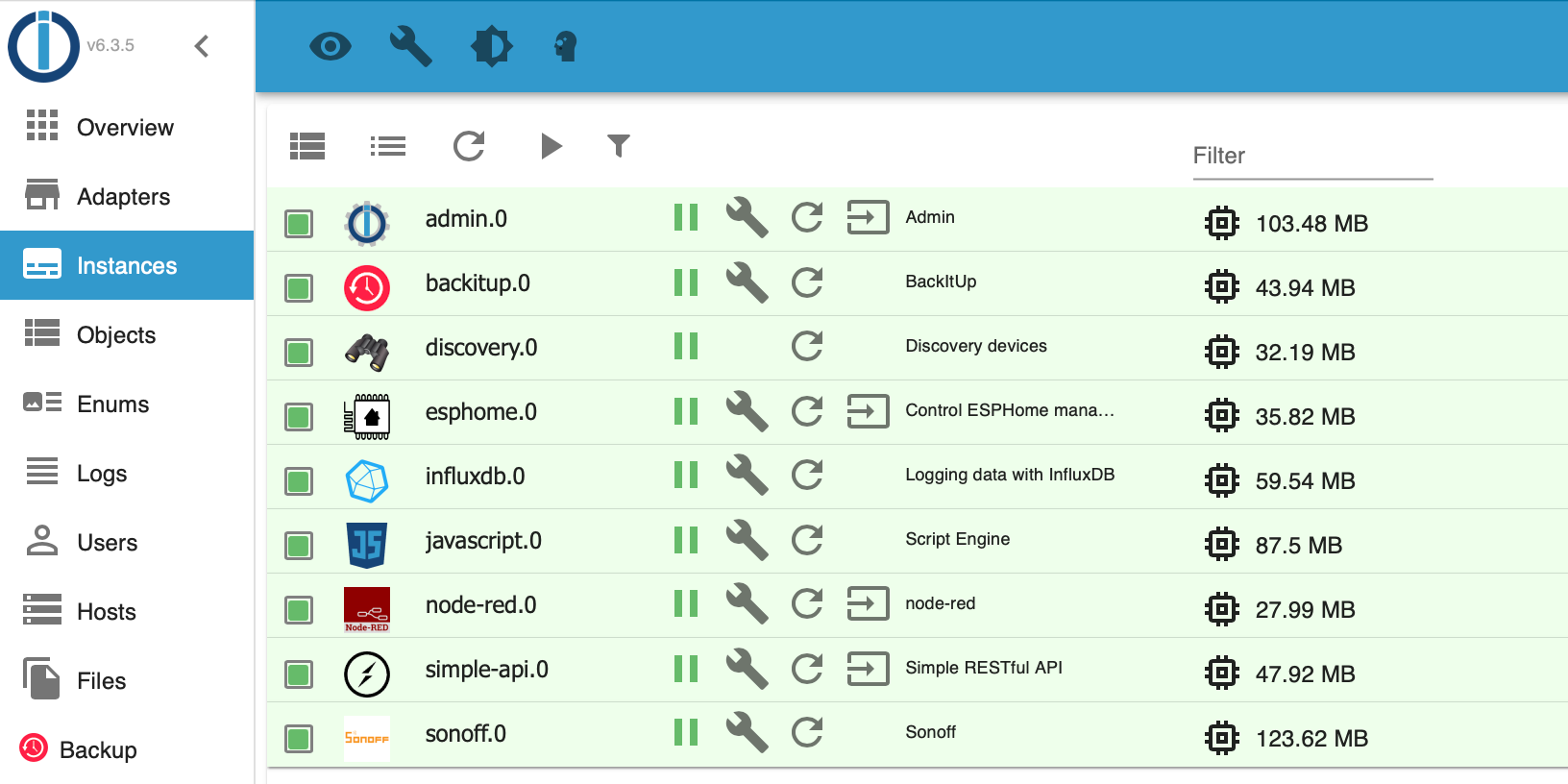
-
@glasfaser said in Multihost - Master in Synology Docker, Slave RPI - jsonl?:
Lüppt überhaupt etwas auf deinem iobroker !?
-
Hast du auf nodejs@18 umgestellt?
@thomas-braun said in Multihost - Master in Synology Docker, Slave RPI - jsonl?:
Hast du auf nodejs@18 umgestellt?
Besser?
pi@raspberrypi:/opt/iobroker $ uname -m && type -P nodejs node npm npx && nodejs -v && node -v && npm -v && npx -v && iob -v && whoami && groups && echo $XDG_SESSION_TYPE && pwd && sudo apt update &> /dev/null && sudo apt update && apt policy nodejs
aarch64
/usr/bin/nodejs
/usr/bin/node
/usr/bin/npm
/usr/bin/npx
v18.16.0
v18.16.0
9.5.1
9.5.1
4.0.24
pi
pi adm dialout cdrom sudo audio www-data video plugdev games users input render netdev lpadmin gpio i2c spi iobroker
tty
/opt/iobroker
Hit:1 http://raspbian.raspberrypi.org/raspbian bullseye InRelease
Hit:2 http://archive.raspberrypi.org/debian bullseye InRelease
Hit:3 https://repos.influxdata.com/debian stable InRelease
Hit:4 https://deb.nodesource.com/node_18.x bullseye InRelease
Hit:5 https://repos.influxdata.com/debian bullseye InRelease
Reading package lists... Done
Building dependency tree... Done
Reading state information... Done
All packages are up to date.
nodejs:
  Installed: 18.16.0-deb-1nodesource1
  Candidate: 18.16.0-deb-1nodesource1
  Version table:
 *** 18.16.0-deb-1nodesource1 500
        500 https://deb.nodesource.com/node_18.x bullseye/main armhf Packages
        100 /var/lib/dpkg/status
     12.22.12~dfsg-1~deb11u4 500
        500 http://raspbian.raspberrypi.org/raspbian bullseye/main armhf Packages


Hey! Du scheinst an dieser Unterhaltung interessiert zu sein, hast aber noch kein Konto.
Hast du es satt, bei jedem Besuch durch die gleichen Beiträge zu scrollen? Wenn du dich für ein Konto anmeldest, kommst du immer genau dorthin zurück, wo du zuvor warst, und kannst dich über neue Antworten benachrichtigen lassen (entweder per E-Mail oder Push-Benachrichtigung). Du kannst auch Lesezeichen speichern und Beiträge positiv bewerten, um anderen Community-Mitgliedern deine Wertschätzung zu zeigen.
Mit deinem Input könnte dieser Beitrag noch besser werden 💗
Registrieren Anmelden458
Online33.0k
Benutzer83.5k
Themen1.3m
Beiträge