Skip to content
  • Home
  • Recent
  • Tags
  • 0 Unread 0
  • Categories
  • Unreplied
  • Popular
  • GitHub
  • Docu
  • Hilfe
Skins
  • Light
  • Brite
  • Cerulean
  • Cosmo
  • Flatly
  • Journal
  • Litera
  • Lumen
  • Lux
  • Materia
  • Minty
  • Morph
  • Pulse
  • Sandstone
  • Simplex
  • Sketchy
  • Spacelab
  • United
  • Yeti
  • Zephyr
  • Dark
  • Cyborg
  • Darkly
  • Quartz
  • Slate
  • Solar
  • Superhero
  • Vapor

  • Default (No Skin)
  • No Skin
Collapse
ioBroker Logo

Community Forum

donate donate
  1. ioBroker Community Home
  2. Deutsch
  3. Off Topic
  4. Proxmox
  5. Proxmox LXC mit Frigate

NEWS

  • Monatsrückblick Januar/Februar 2026 ist online!
    BluefoxB
    Bluefox
    17
    1
    377

  • Jahresrückblick 2025 – unser neuer Blogbeitrag ist online! ✨
    BluefoxB
    Bluefox
    17
    1
    4.9k

  • Neuer Blogbeitrag: Monatsrückblick - Dezember 2025 🎄
    BluefoxB
    Bluefox
    13
    1
    1.3k

Proxmox LXC mit Frigate

Scheduled Pinned Locked Moved Proxmox
176 Posts 16 Posters 53.3k Views 21 Watching
  • Oldest to Newest
  • Newest to Oldest
  • Most Votes
Reply
  • Reply as topic
Log in to reply
This topic has been deleted. Only users with topic management privileges can see it.
  • WalW Wal

    @martinschm ,
    im Container muss nichts installiert werden.
    Ich habe die Coreltreiber in Proxmox installiert.

    M Offline
    M Offline
    martinschm
    wrote on last edited by
    #97

    @wal said in Proxmox LXC mit Frigate:

    @martinschm ,
    im Container muss nichts installiert werden.
    Ich habe die Coreltreiber in Proxmox installiert.

    In dem von dir verlinkten Post bei proxmox schreiben sie, das sie die Treiber im Container installiert haben: https://forum.proxmox.com/threads/proxmox-google-coral-usb.114098/#post-505746

    Und hier dann, das man es nach der Anleitung von Google installieren soll: https://forum.proxmox.com/threads/proxmox-google-coral-usb.114098/post-512047

    WalW 1 Reply Last reply
    0
    • M martinschm

      @wal said in Proxmox LXC mit Frigate:

      @martinschm ,
      im Container muss nichts installiert werden.
      Ich habe die Coreltreiber in Proxmox installiert.

      In dem von dir verlinkten Post bei proxmox schreiben sie, das sie die Treiber im Container installiert haben: https://forum.proxmox.com/threads/proxmox-google-coral-usb.114098/#post-505746

      Und hier dann, das man es nach der Anleitung von Google installieren soll: https://forum.proxmox.com/threads/proxmox-google-coral-usb.114098/post-512047

      WalW Offline
      WalW Offline
      Wal
      Developer
      wrote on last edited by
      #98

      @martinschm ,
      ich kann dir nur sagen wie ich es gemacht habe, allerdings habe ich die dual coral tpu und musste auch die pci treiber installieren. Das habe ich alles im Proxmox Host gemacht.

      Gruß
      Walter

      DoorIO-Adapter
      wioBrowser-Adapter und wioBrowser

      M 1 Reply Last reply
      1
      • WalW Wal

        @martinschm ,
        ich kann dir nur sagen wie ich es gemacht habe, allerdings habe ich die dual coral tpu und musste auch die pci treiber installieren. Das habe ich alles im Proxmox Host gemacht.

        M Offline
        M Offline
        martinschm
        wrote on last edited by martinschm
        #99

        @wal läuft jetzt bei mir :-)

        Also vermute ich zumindest :-)

        Das steht in meiner config.

        mqtt:
          enabled: true
          host: 192.168.1.198
          port: 1885
        user: xx
          password: xxx
        
        cameras:
          Eingang:
            ffmpeg:
              inputs:
                - path: rtsp://xx:xx@192.168.1.141:8554/unicast
                  roles:
                    - detect
         
            detect:
              enabled: true
              width: 640
              height: 480
        
        #ffmpeg:
        #      hwaccel_args:
        #        - -hwaccel
        #        - vaapi 
        #        - -hwaccel_device
        #        - /dev/dri/renderD128 
        #      inputs:
        
        detectors:
          coral:
            type: edgetpu
            device: usb
        

        Wenn ich mir in frigate die Kamera anschaue und in den Debug Modus gehe zeigt er mir, wenn ich durch die Kamera laufe einen Kasten um mich an und dann 80% Person. Da ich nur Coral als detector definiert habe, muß es ja darüber laufen, oder ?

        Jetzt muß ich nur noch MQTT und deine Erweiterung ans fliegen bekommen.

        Das sind meine Einstellungen beim MQTT Adapter, aber ich bekomme keine Verbindug zustande.
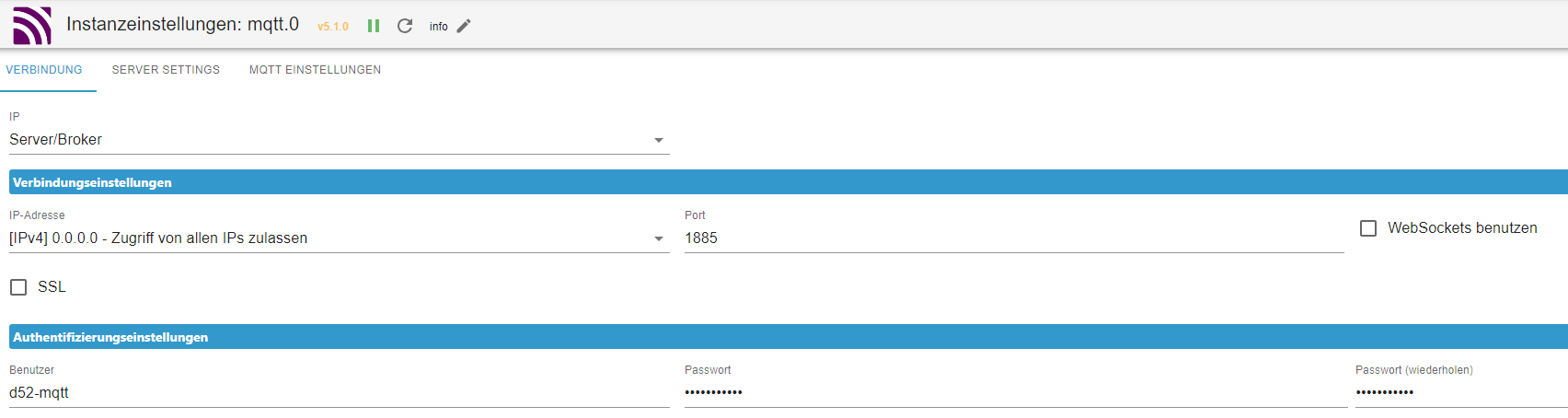
        78f050b2-51fe-46fe-802e-cbe51caa2959-image.png
        8cb3eeef-393c-45f6-af9c-c241c203c044-image.png

        Woran liegt es eigentlich, das wenn ich durchs Bild laufe, in frigate kein Event geloggt wird?

        WalW 1 Reply Last reply
        0
        • M martinschm

          @wal läuft jetzt bei mir :-)

          Also vermute ich zumindest :-)

          Das steht in meiner config.

          mqtt:
            enabled: true
            host: 192.168.1.198
            port: 1885
          user: xx
            password: xxx
          
          cameras:
            Eingang:
              ffmpeg:
                inputs:
                  - path: rtsp://xx:xx@192.168.1.141:8554/unicast
                    roles:
                      - detect
           
              detect:
                enabled: true
                width: 640
                height: 480
          
          #ffmpeg:
          #      hwaccel_args:
          #        - -hwaccel
          #        - vaapi 
          #        - -hwaccel_device
          #        - /dev/dri/renderD128 
          #      inputs:
          
          detectors:
            coral:
              type: edgetpu
              device: usb
          

          Wenn ich mir in frigate die Kamera anschaue und in den Debug Modus gehe zeigt er mir, wenn ich durch die Kamera laufe einen Kasten um mich an und dann 80% Person. Da ich nur Coral als detector definiert habe, muß es ja darüber laufen, oder ?

          Jetzt muß ich nur noch MQTT und deine Erweiterung ans fliegen bekommen.

          Das sind meine Einstellungen beim MQTT Adapter, aber ich bekomme keine Verbindug zustande.
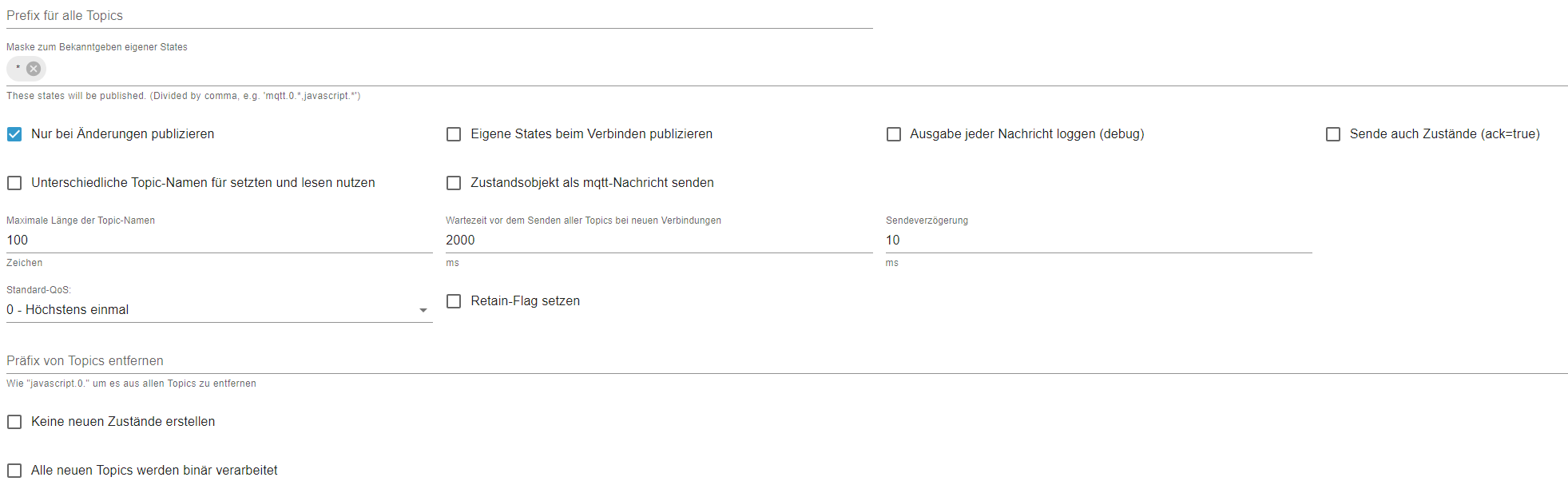
          78f050b2-51fe-46fe-802e-cbe51caa2959-image.png
          8cb3eeef-393c-45f6-af9c-c241c203c044-image.png

          Woran liegt es eigentlich, das wenn ich durchs Bild laufe, in frigate kein Event geloggt wird?

          WalW Offline
          WalW Offline
          Wal
          Developer
          wrote on last edited by Wal
          #100

          @martinschm sagte in Proxmox LXC mit Frigate:

          Wenn ich mir in frigate die Kamera anschaue und in den Debug Modus gehe zeigt er mir, wenn ich durch die Kamera laufe einen Kasten um mich an und dann 80% Person. Da ich nur Coral als detector definiert habe, muß es ja darüber laufen, oder ?

          Im Webinterface von Frigate muss in den Logs TPU found stehen.

          2023-10-11 15:22:46.667252280  [2023-10-11 15:22:46] frigate.detectors.plugins.edgetpu_tfl INFO    : TPU found
          2023-10-11 15:22:46.672202351  [2023-10-11 15:22:46] frigate.detectors.plugins.edgetpu_tfl INFO    : TPU found
          

          Dein Hardware Transcoding ist nicht aktiv "ffmpeg: hwaccel_args: preset-vaapi".

          Im MQTT Adapter habe ich keinen Haken und bei Maske nur mqtt.0.* stehen.
          In den Frigate Kamera Objekten muss unter frigate.0."Kameranamen".detect.state ein true stehen.

          Meine Config:

          detectors:
            coral1:
              type: edgetpu
              device: pci:0
            coral2:
              type: edgetpu
              device: pci:1
          
          mqtt:
            ***
          
          birdseye:
            enabled: False
            mode: continuous
            
          cameras:
            doorbell:
              ffmpeg:
                hwaccel_args: preset-vaapi
                inputs:
                  ***
              detect:
               ***
          
          objects:
                track:
                  - person
                  - car
          #        - truck
          #        - bicycle
          #        - motorcycle
          #        - dog
          #        - cat
          snapshots:
                # Optional: Enable writing jpg snapshot to /media/frigate/clips (default: shown below)
                # This value can be set via MQTT and will be updated in startup based on retained value
            enabled: True
                # Optional: print a timestamp on the snapshots (default: shown below)
            timestamp: False
                # Optional: draw bounding box on the snapshots (default: shown below)
            bounding_box: False
                # Optional: crop the snapshot (default: shown below)
            crop: False
                # Optional: height to resize the snapshot to (default: original size)
            height: 175
                # Optional: Restrict snapshots to objects that entered any of the listed zones (default: no required zones)
            required_zones: []
                # Optional: Camera override for retention settings (default: global values)
            retain:
                  # Required: Default retention days (default: shown below)
              default: 10
                  # Optional: Per object retention days
              objects:
                person: 15
          
          record:
            enabled: True
            retain:
              days: 7
              mode: motion
            events:
              retain:
                default: 14
                mode: active_objects
                objects:
                  person: 14
          

          Gruß
          Walter

          DoorIO-Adapter
          wioBrowser-Adapter und wioBrowser

          M 1 Reply Last reply
          0
          • WalW Wal

            @martinschm sagte in Proxmox LXC mit Frigate:

            Wenn ich mir in frigate die Kamera anschaue und in den Debug Modus gehe zeigt er mir, wenn ich durch die Kamera laufe einen Kasten um mich an und dann 80% Person. Da ich nur Coral als detector definiert habe, muß es ja darüber laufen, oder ?

            Im Webinterface von Frigate muss in den Logs TPU found stehen.

            2023-10-11 15:22:46.667252280  [2023-10-11 15:22:46] frigate.detectors.plugins.edgetpu_tfl INFO    : TPU found
            2023-10-11 15:22:46.672202351  [2023-10-11 15:22:46] frigate.detectors.plugins.edgetpu_tfl INFO    : TPU found
            

            Dein Hardware Transcoding ist nicht aktiv "ffmpeg: hwaccel_args: preset-vaapi".

            Im MQTT Adapter habe ich keinen Haken und bei Maske nur mqtt.0.* stehen.
            In den Frigate Kamera Objekten muss unter frigate.0."Kameranamen".detect.state ein true stehen.

            Meine Config:

            detectors:
              coral1:
                type: edgetpu
                device: pci:0
              coral2:
                type: edgetpu
                device: pci:1
            
            mqtt:
              ***
            
            birdseye:
              enabled: False
              mode: continuous
              
            cameras:
              doorbell:
                ffmpeg:
                  hwaccel_args: preset-vaapi
                  inputs:
                    ***
                detect:
                 ***
            
            objects:
                  track:
                    - person
                    - car
            #        - truck
            #        - bicycle
            #        - motorcycle
            #        - dog
            #        - cat
            snapshots:
                  # Optional: Enable writing jpg snapshot to /media/frigate/clips (default: shown below)
                  # This value can be set via MQTT and will be updated in startup based on retained value
              enabled: True
                  # Optional: print a timestamp on the snapshots (default: shown below)
              timestamp: False
                  # Optional: draw bounding box on the snapshots (default: shown below)
              bounding_box: False
                  # Optional: crop the snapshot (default: shown below)
              crop: False
                  # Optional: height to resize the snapshot to (default: original size)
              height: 175
                  # Optional: Restrict snapshots to objects that entered any of the listed zones (default: no required zones)
              required_zones: []
                  # Optional: Camera override for retention settings (default: global values)
              retain:
                    # Required: Default retention days (default: shown below)
                default: 10
                    # Optional: Per object retention days
                objects:
                  person: 15
            
            record:
              enabled: True
              retain:
                days: 7
                mode: motion
              events:
                retain:
                  default: 14
                  mode: active_objects
                  objects:
                    person: 14
            
            M Offline
            M Offline
            martinschm
            wrote on last edited by martinschm
            #101

            @wal said in Proxmox LXC mit Frigate:

            Guten Morgen @Wal

            danke erstmal für deine Unterstützung. Das Ausmaß an Hilfsbereitschaft in der iobroker Community ist echt mega.

            Im Webinterface von Frigate muss in den Logs TPU found stehen.

            2023-10-11 15:22:46.667252280  [2023-10-11 15:22:46] frigate.detectors.plugins.edgetpu_tfl INFO    : TPU found
            2023-10-11 15:22:46.672202351  [2023-10-11 15:22:46] frigate.detectors.plugins.edgetpu_tfl INFO    : TPU found
            

            Aktuell sieht es so aus

            2023-11-18 23:45:02.078551335  [INFO] Starting Frigate...
            2023-11-18 23:45:05.197894986  [2023-11-18 23:45:05] frigate.app                    INFO    : Starting Frigate (0.12.1-367d724)
            2023-11-18 23:45:05.252454933  [2023-11-18 23:45:05] peewee_migrate                 INFO    : Starting migrations
            2023-11-18 23:45:05.253249754  [2023-11-18 23:45:05] peewee_migrate                 INFO    : There is nothing to migrate
            2023-11-18 23:45:05.291757508  [2023-11-18 23:45:05] frigate.app                    INFO    : Output process started: 283
            2023-11-18 23:45:05.328377860  [2023-11-18 23:45:05] frigate.app                    INFO    : Camera processor started for Eingang: 290
            2023-11-18 23:45:05.346169291  [2023-11-18 23:45:05] frigate.app                    INFO    : Capture process started for Eingang: 292
            2023-11-18 23:45:08.027040196  [2023-11-18 23:45:05] detector.coral                 INFO    : Starting detection process: 282
            2023-11-18 23:45:08.029757862  [2023-11-18 23:45:05] frigate.detectors.plugins.edgetpu_tfl INFO    : Attempting to load TPU as usb
            2023-11-18 23:45:08.030460133  [2023-11-18 23:45:08] frigate.detectors.plugins.edgetpu_tfl INFO    : TPU found
            2023-11-18 23:45:08.871703954  [2023-11-18 23:45:08] frigate.comms.mqtt             ERROR   : Unable to publish to Eingang/all: client is not connected
            

            Scheint also geklappt zu haben

            Dein Hardware Transcoding ist nicht aktiv "ffmpeg: hwaccel_args: preset-vaapi".

            Ok danke, füge ich hinzu. Dachte das hätte was mit der OpenV Sache zu tun. Dabei geht es aber tatsächlich um die Umwandlung des Streams, korrekt ?

            Im MQTT Adapter habe ich keinen Haken und bei Maske nur mqtt.0.* stehen.

            Sehe gerade in den ioB Logs, das frigate sich nicht einloggen kann. Hab jetzt Username und Passwort nochmal überall ber copy paste eingefügt.
            Copy Paste war anscheinend die Ursache. Hab das Passwort nochmal eingetippt und jetzt klappt es. Vermutlich hat er beim Kopieren noch ein Leerzeichen hinten dran eingefügt. Das ist mir schon ein paar mal aufgefallen, das so was passiert.

            In den Frigate Kamera Objekten muss unter frigate.0."Kameranamen".detect.state ein true stehen.

            167f0604-01d1-4638-9f05-3bac0efd4de6-image.png

            Läuft. Mega cool.

            M 1 Reply Last reply
            0
            • M martinschm

              @wal said in Proxmox LXC mit Frigate:

              Guten Morgen @Wal

              danke erstmal für deine Unterstützung. Das Ausmaß an Hilfsbereitschaft in der iobroker Community ist echt mega.

              Im Webinterface von Frigate muss in den Logs TPU found stehen.

              2023-10-11 15:22:46.667252280  [2023-10-11 15:22:46] frigate.detectors.plugins.edgetpu_tfl INFO    : TPU found
              2023-10-11 15:22:46.672202351  [2023-10-11 15:22:46] frigate.detectors.plugins.edgetpu_tfl INFO    : TPU found
              

              Aktuell sieht es so aus

              2023-11-18 23:45:02.078551335  [INFO] Starting Frigate...
              2023-11-18 23:45:05.197894986  [2023-11-18 23:45:05] frigate.app                    INFO    : Starting Frigate (0.12.1-367d724)
              2023-11-18 23:45:05.252454933  [2023-11-18 23:45:05] peewee_migrate                 INFO    : Starting migrations
              2023-11-18 23:45:05.253249754  [2023-11-18 23:45:05] peewee_migrate                 INFO    : There is nothing to migrate
              2023-11-18 23:45:05.291757508  [2023-11-18 23:45:05] frigate.app                    INFO    : Output process started: 283
              2023-11-18 23:45:05.328377860  [2023-11-18 23:45:05] frigate.app                    INFO    : Camera processor started for Eingang: 290
              2023-11-18 23:45:05.346169291  [2023-11-18 23:45:05] frigate.app                    INFO    : Capture process started for Eingang: 292
              2023-11-18 23:45:08.027040196  [2023-11-18 23:45:05] detector.coral                 INFO    : Starting detection process: 282
              2023-11-18 23:45:08.029757862  [2023-11-18 23:45:05] frigate.detectors.plugins.edgetpu_tfl INFO    : Attempting to load TPU as usb
              2023-11-18 23:45:08.030460133  [2023-11-18 23:45:08] frigate.detectors.plugins.edgetpu_tfl INFO    : TPU found
              2023-11-18 23:45:08.871703954  [2023-11-18 23:45:08] frigate.comms.mqtt             ERROR   : Unable to publish to Eingang/all: client is not connected
              

              Scheint also geklappt zu haben

              Dein Hardware Transcoding ist nicht aktiv "ffmpeg: hwaccel_args: preset-vaapi".

              Ok danke, füge ich hinzu. Dachte das hätte was mit der OpenV Sache zu tun. Dabei geht es aber tatsächlich um die Umwandlung des Streams, korrekt ?

              Im MQTT Adapter habe ich keinen Haken und bei Maske nur mqtt.0.* stehen.

              Sehe gerade in den ioB Logs, das frigate sich nicht einloggen kann. Hab jetzt Username und Passwort nochmal überall ber copy paste eingefügt.
              Copy Paste war anscheinend die Ursache. Hab das Passwort nochmal eingetippt und jetzt klappt es. Vermutlich hat er beim Kopieren noch ein Leerzeichen hinten dran eingefügt. Das ist mir schon ein paar mal aufgefallen, das so was passiert.

              In den Frigate Kamera Objekten muss unter frigate.0."Kameranamen".detect.state ein true stehen.

              167f0604-01d1-4638-9f05-3bac0efd4de6-image.png

              Läuft. Mega cool.

              M Offline
              M Offline
              martinschm
              wrote on last edited by martinschm
              #102

              Bei motion gibt es zwei Werte, einmal hat der Ordner auch einen Wert und darunter gibt es noch einen State. Ist das so korrekt angelegt ?

              416190ec-d743-45da-aa5a-c508dd739022-image.png

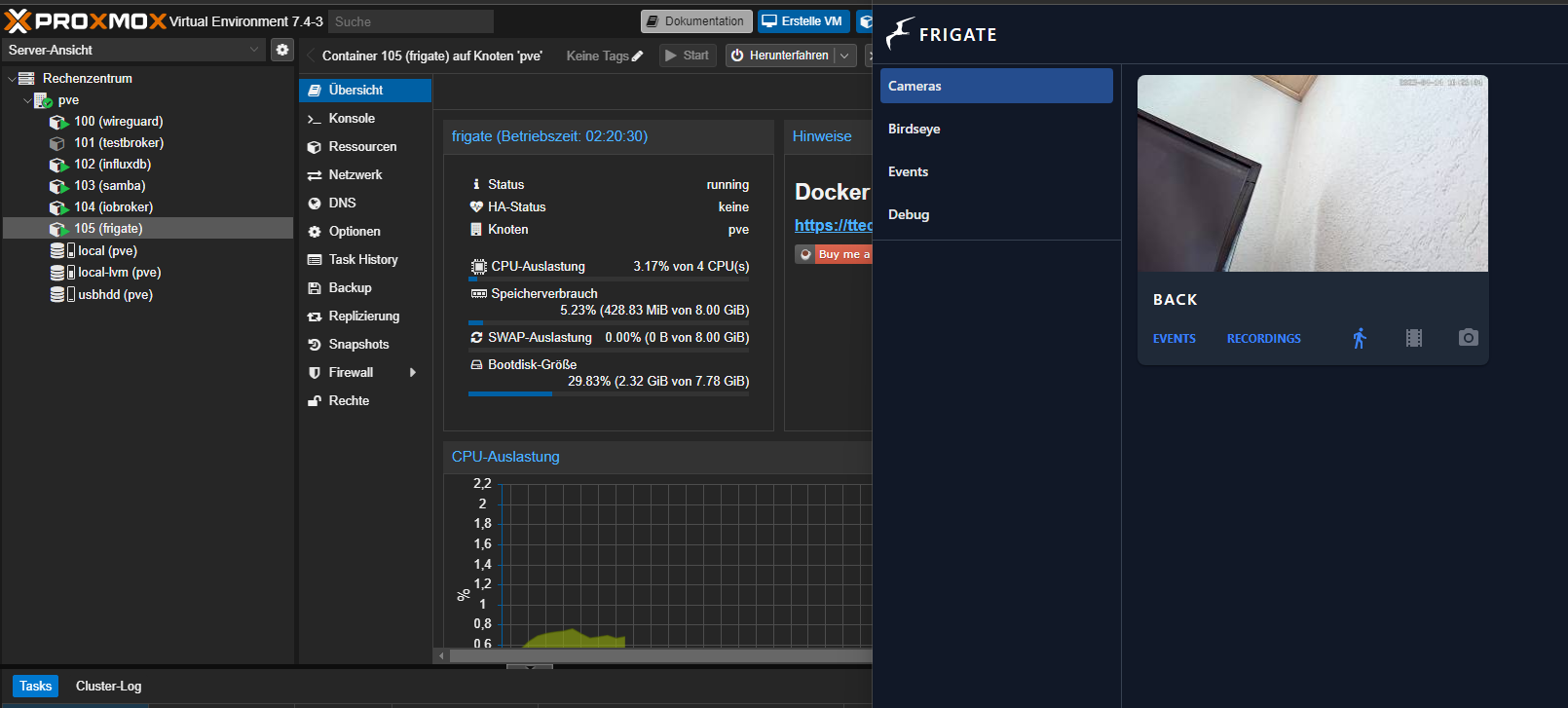
              Hab aktuell ein Stream laufen, so sieht mein LXC Container aus
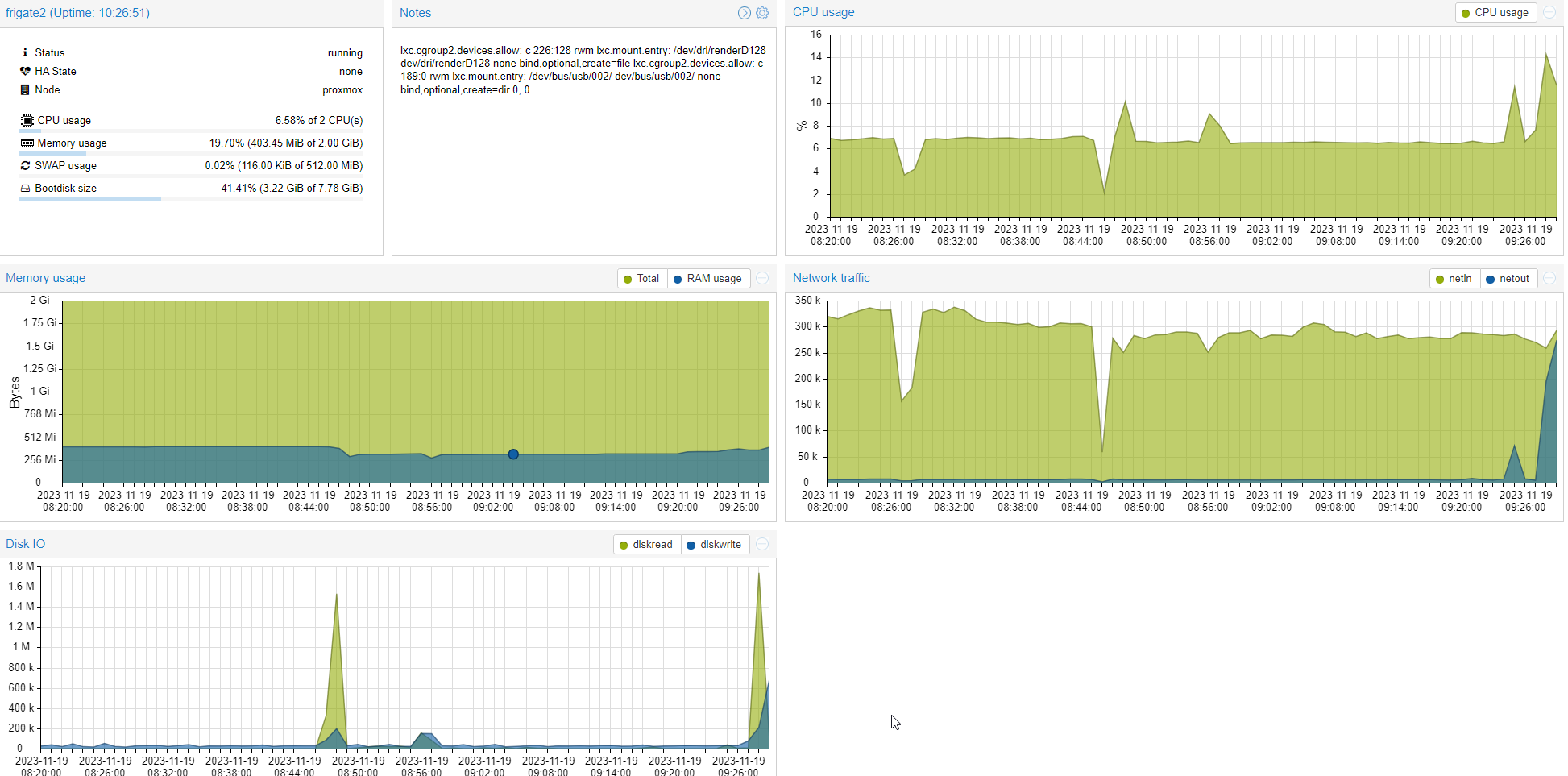
              3de1035e-2a0f-47b1-a724-87472595bfee-image.png

              Und das sind die Werte aus frigate
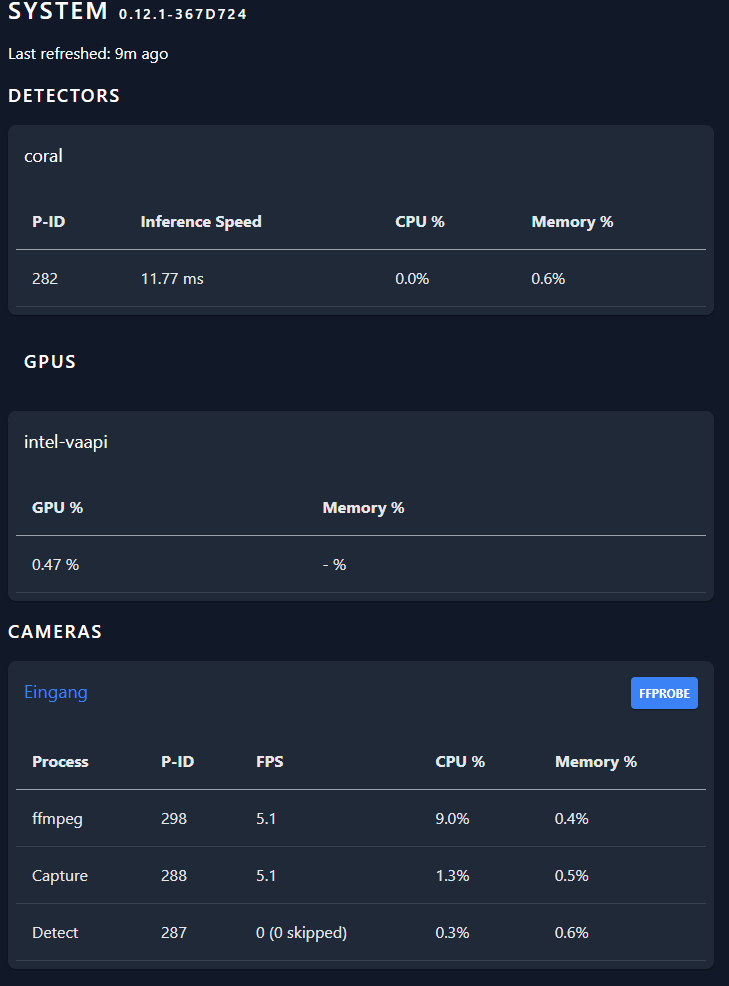
              18b17aa6-275f-498c-ba71-93217a532ad1-image.png

              Bin mal gespannt wie es ausschaut mit mehreren Kameras.

              Die ersten Tests mit Objekterkennung vor der Haustür waren auf jeden Fall sehr gut.

              WalW 1 Reply Last reply
              0
              • M martinschm

                Bei motion gibt es zwei Werte, einmal hat der Ordner auch einen Wert und darunter gibt es noch einen State. Ist das so korrekt angelegt ?
                416190ec-d743-45da-aa5a-c508dd739022-image.png

                Hab aktuell ein Stream laufen, so sieht mein LXC Container aus
                3de1035e-2a0f-47b1-a724-87472595bfee-image.png

                Und das sind die Werte aus frigate
                18b17aa6-275f-498c-ba71-93217a532ad1-image.png

                Bin mal gespannt wie es ausschaut mit mehreren Kameras.

                Die ersten Tests mit Objekterkennung vor der Haustür waren auf jeden Fall sehr gut.

                WalW Offline
                WalW Offline
                Wal
                Developer
                wrote on last edited by
                #103

                @martinschm ,
                wenn du jetzt noch den Frigate Adapter installieren und mittesten würdest wäre das nicht schlecht.

                Gruß
                Walter

                DoorIO-Adapter
                wioBrowser-Adapter und wioBrowser

                M 1 Reply Last reply
                0
                • WalW Wal

                  @martinschm ,
                  wenn du jetzt noch den Frigate Adapter installieren und mittesten würdest wäre das nicht schlecht.

                  M Offline
                  M Offline
                  martinschm
                  wrote on last edited by
                  #104

                  @wal said in Proxmox LXC mit Frigate:

                  @martinschm ,
                  wenn du jetzt noch den Frigate Adapter installieren und mittesten würdest wäre das nicht schlecht.

                  Hi, der läuft doch schon längst 😁

                  Hab jetzt bei Dunkelheit einige Fehlalarme bekommen. Bekomme lauter leere Bilder geschickt.

                  M 1 Reply Last reply
                  0
                  • WalW Offline
                    WalW Offline
                    Wal
                    Developer
                    wrote on last edited by
                    #105

                    Achtung, nach Kernel Update auf 6.5.11-4-pve läuft der Coral Beschleuniger nicht mehr.

                    Gruß
                    Walter

                    DoorIO-Adapter
                    wioBrowser-Adapter und wioBrowser

                    1 Reply Last reply
                    0
                    • M martinschm

                      @wal said in Proxmox LXC mit Frigate:

                      @martinschm ,
                      wenn du jetzt noch den Frigate Adapter installieren und mittesten würdest wäre das nicht schlecht.

                      Hi, der läuft doch schon längst 😁

                      Hab jetzt bei Dunkelheit einige Fehlalarme bekommen. Bekomme lauter leere Bilder geschickt.

                      M Offline
                      M Offline
                      martinschm
                      wrote on last edited by
                      #106

                      @martinschm said in Proxmox LXC mit Frigate:

                      @wal said in Proxmox LXC mit Frigate:

                      @martinschm ,
                      wenn du jetzt noch den Frigate Adapter installieren und mittesten würdest wäre das nicht schlecht.

                      Hi, der läuft doch schon längst 😁

                      Hab jetzt bei Dunkelheit einige Fehlalarme bekommen. Bekomme lauter leere Bilder geschickt.

                      Lag übrigens dran, das ein Spinnenfaden Bewegung ausgelöst hat und Frigate eine Halloweendeko als Person erkannt hat :-)
                      Danke für die Warnung mit dem Kernel Update.

                      Die Kombi Frigate mit deinem Adapter und iob laufen seit über eine Woche perfekt.

                      1 Reply Last reply
                      1
                      • M Offline
                        M Offline
                        MrHenker27
                        wrote on last edited by
                        #107

                        erst mal danke für die gute Anleitung.
                        Gibt es auch eine Möglichkeit jede Bewegung aufzuzeichnen ?

                        Also nicht nur Hund und Katze sondern immer wenn sich was in einer Zone bewegt?

                        greets

                        WalW 1 Reply Last reply
                        0
                        • M MrHenker27

                          erst mal danke für die gute Anleitung.
                          Gibt es auch eine Möglichkeit jede Bewegung aufzuzeichnen ?

                          Also nicht nur Hund und Katze sondern immer wenn sich was in einer Zone bewegt?

                          greets

                          WalW Offline
                          WalW Offline
                          Wal
                          Developer
                          wrote on last edited by
                          #108

                          @mrhenker27 ,
                          das musst du testen, es gibt ja noch mehr Objekte siehe auf der Frigate Seite.

                          Gruß
                          Walter

                          DoorIO-Adapter
                          wioBrowser-Adapter und wioBrowser

                          M 1 Reply Last reply
                          0
                          • WalW Wal

                            @mrhenker27 ,
                            das musst du testen, es gibt ja noch mehr Objekte siehe auf der Frigate Seite.

                            M Offline
                            M Offline
                            MrHenker27
                            wrote on last edited by
                            #109

                            ich meinte ohne Objekt detection also rein motion.

                            WalW 1 Reply Last reply
                            0
                            • M MrHenker27

                              ich meinte ohne Objekt detection also rein motion.

                              WalW Offline
                              WalW Offline
                              Wal
                              Developer
                              wrote on last edited by
                              #110

                              @mrhenker27 ,
                              Musst du in der Frigate Anleitung nachlesen, mir ist da nichts bekannt.

                              Gruß
                              Walter

                              DoorIO-Adapter
                              wioBrowser-Adapter und wioBrowser

                              D 1 Reply Last reply
                              0
                              • WalW Wal

                                @mrhenker27 ,
                                Musst du in der Frigate Anleitung nachlesen, mir ist da nichts bekannt.

                                D Offline
                                D Offline
                                drapo
                                wrote on last edited by
                                #111

                                @wal hab mal ganz generell eine frage zur hardware bevor ich mich hier in unkosten stürze.
                                Würde frigate gerne nutzen.
                                Bei mir läuft mein iobroker auf einer synology im docker.
                                Kann ich auf dem selben nas auch den frigate container installieren ohne an das limit des nas zu kommen? Die coral usb accelerator könnte hier sicherlich helfen. Geht das oder würdet ihr mir zu einer neuen separaten hardware raten? Wenn ja welche was sollte das teil haben?
                                Ich hab momentan 5 kameras die ich mittels personen erkennung mit frigate betreiben möchte.

                                da_WoodyD WalW 2 Replies Last reply
                                0
                                • D drapo

                                  @wal hab mal ganz generell eine frage zur hardware bevor ich mich hier in unkosten stürze.
                                  Würde frigate gerne nutzen.
                                  Bei mir läuft mein iobroker auf einer synology im docker.
                                  Kann ich auf dem selben nas auch den frigate container installieren ohne an das limit des nas zu kommen? Die coral usb accelerator könnte hier sicherlich helfen. Geht das oder würdet ihr mir zu einer neuen separaten hardware raten? Wenn ja welche was sollte das teil haben?
                                  Ich hab momentan 5 kameras die ich mittels personen erkennung mit frigate betreiben möchte.

                                  da_WoodyD Online
                                  da_WoodyD Online
                                  da_Woody
                                  wrote on last edited by
                                  #112

                                  @drapo kommt auf deine sysology an.

                                  gruß vom Woody
                                  HAPPINESS is not a DESTINATION, it's a WAY of LIFE!

                                  D 1 Reply Last reply
                                  0
                                  • da_WoodyD da_Woody

                                    @drapo kommt auf deine sysology an.

                                    D Offline
                                    D Offline
                                    drapo
                                    wrote on last edited by
                                    #113

                                    @da_woody da fällt mir gerade ein dass unter dsm 7 der synology wohl keine usb mehr unterstützt werden. Das geisst wohl ich muss mir was zusätzliches zulegen. Was habt ihr denn für hardware am laufen oder was würdet ihr nach euren erfahrungen empfehlen?

                                    crunchipC 1 Reply Last reply
                                    0
                                    • D drapo

                                      @da_woody da fällt mir gerade ein dass unter dsm 7 der synology wohl keine usb mehr unterstützt werden. Das geisst wohl ich muss mir was zusätzliches zulegen. Was habt ihr denn für hardware am laufen oder was würdet ihr nach euren erfahrungen empfehlen?

                                      crunchipC Away
                                      crunchipC Away
                                      crunchip
                                      Forum Testing Most Active
                                      wrote on last edited by
                                      #114

                                      @drapo https://docs.frigate.video/frigate/hardware/

                                      umgestiegen von Proxmox auf Unraid

                                      D 1 Reply Last reply
                                      0
                                      • crunchipC crunchip

                                        @drapo https://docs.frigate.video/frigate/hardware/

                                        D Offline
                                        D Offline
                                        drapo
                                        wrote on last edited by
                                        #115

                                        @crunchip dank dir das kenn ich.
                                        Wollte eure erfahrungen wissen und was ihr nutzt und mit was ihr zufrieden seit und wo ihr allenfalls mehr ram mehr cpu oder dergkeichen einsetzen würdet. Was verwendest du denn

                                        crunchipC 1 Reply Last reply
                                        0
                                        • D drapo

                                          @crunchip dank dir das kenn ich.
                                          Wollte eure erfahrungen wissen und was ihr nutzt und mit was ihr zufrieden seit und wo ihr allenfalls mehr ram mehr cpu oder dergkeichen einsetzen würdet. Was verwendest du denn

                                          crunchipC Away
                                          crunchipC Away
                                          crunchip
                                          Forum Testing Most Active
                                          wrote on last edited by crunchip
                                          #116

                                          @drapo nen Geekom AS6 mit unraid, allerdings läuft da ja noch vieeeel mehr

                                          frigate selbst, bei 4 cams

                                          ed404524-3aee-4905-83cd-02cd70815e3a-image.png

                                          ne Empfehlung rein nur für frigate, so wie es auf der Seite beschrieben ist, ein kleiner miniPC

                                          umgestiegen von Proxmox auf Unraid

                                          1 Reply Last reply
                                          0
                                          Reply
                                          • Reply as topic
                                          Log in to reply
                                          • Oldest to Newest
                                          • Newest to Oldest
                                          • Most Votes


                                          Support us

                                          ioBroker
                                          Community Adapters
                                          Donate

                                          324

                                          Online

                                          32.7k

                                          Users

                                          82.5k

                                          Topics

                                          1.3m

                                          Posts
                                          Community
                                          Impressum | Datenschutz-Bestimmungen | Nutzungsbedingungen | Einwilligungseinstellungen
                                          ioBroker Community 2014-2025
                                          logo
                                          • Login

                                          • Don't have an account? Register

                                          • Login or register to search.
                                          • First post
                                            Last post
                                          0
                                          • Home
                                          • Recent
                                          • Tags
                                          • Unread 0
                                          • Categories
                                          • Unreplied
                                          • Popular
                                          • GitHub
                                          • Docu
                                          • Hilfe