
NEWS




Iobroker Admin Webseite nicht erreichbar
-
@schtallone sagte in Iobroker Admin Webseite nicht erreichbar:
Die IP habe ich im Portainer für den Container vergeben
eben, deshalb funktioniert der zugriff nicht. jetzt mach doch einfach mal was ich geschrieben hatte!
@fastfoot said in Iobroker Admin Webseite nicht erreichbar:
@schtallone sagte in Iobroker Admin Webseite nicht erreichbar:
Die IP habe ich im Portainer für den Container vergeben
eben, deshalb funktioniert der zugriff nicht. jetzt mach doch einfach mal was ich geschrieben hatte!
habe ich:
root@iobroker:/opt/iobroker# iobroker list instances
+ system.adapter.admin.0                  : admin                 : iobroker                                 -  enabled, port: 8081, bind: 0.0.0.0, run as: admin
  system.adapter.alias-manager.0          : alias-manager         : iobroker                                 - disabled
+ system.adapter.backitup.0               : backitup              : iobroker                                 -  enabled
  system.adapter.cloud.0                  : cloud                 : iobroker                                 - disabled
  system.adapter.device-watcher.0         : device-watcher        : iobroker                                 - disabled
  system.adapter.devices.0                : devices               : iobroker                                 - disabled
  system.adapter.dwd.0                    : dwd                   : iobroker                                 - disabled
  system.adapter.energiefluss.0           : energiefluss          : iobroker                                 - disabled
  system.adapter.feiertage.0              : feiertage             : iobroker                                 - disabled
  system.adapter.ical.0                   : ical                  : iobroker                                 - disabled
  system.adapter.influxdb.0               : influxdb              : iobroker                                 - disabled, port: 8086
  system.adapter.jarvis.0                 : jarvis                : iobroker                                 - disabled
  system.adapter.javascript.0             : javascript            : iobroker                                 - disabled
  system.adapter.meross.0                 : meross                : iobroker                                 - disabled
  system.adapter.modbus.0                 : modbus                : iobroker                                 - disabled
  system.adapter.mqtt.0                   : mqtt                  : iobroker                                 - disabled, port: 1883, bind: 0.0.0.0
  system.adapter.mqtt.1                   : mqtt                  : iobroker                                 - disabled, port: 1883, bind: 0.0.0.0
  system.adapter.netatmo.0                : netatmo               : iobroker                                 - disabled
  system.adapter.node-red.0               : node-red              : iobroker                                 - disabled, port: 1880, bind: 192.168.1.10
  system.adapter.pushover.0               : pushover              : iobroker                                 - disabled
  system.adapter.pvforecast.0             : pvforecast            : iobroker                                 - disabled
  system.adapter.schoolfree.0             : schoolfree            : iobroker                                 - disabled
  system.adapter.shelly.0                 : shelly                : iobroker                                 - disabled, port: 1882, bind: 192.168.1.10
  system.adapter.shuttercontrol.0         : shuttercontrol        : iobroker                                 - disabled
  system.adapter.snmp.0                   : snmp                  : iobroker                                 - disabled
  system.adapter.sonos.0                  : sonos                 : iobroker                                 - disabled
  system.adapter.sourceanalytix.0         : sourceanalytix        : iobroker                                 - disabled
  system.adapter.telegram.0               : telegram              : iobroker                                 - disabled, port: 8443, bind: 0.0.0.0
  system.adapter.terminal.0               : terminal              : iobroker                                 - disabled, port: 8088, bind: 192.168.1.10, run as: admin
  system.adapter.vw-connect.0             : vw-connect            : iobroker                                 - disabled
  system.adapter.web.0                    : web                   : iobroker                                 - disabled, port: 8082, bind: 0.0.0.0, run as: admin

+ instance is alive
kein Zugriff unter http://iob_ip:8081/
-
@fastfoot said in Iobroker Admin Webseite nicht erreichbar:
@schtallone sagte in Iobroker Admin Webseite nicht erreichbar:
Die IP habe ich im Portainer für den Container vergeben
eben, deshalb funktioniert der zugriff nicht. jetzt mach doch einfach mal was ich geschrieben hatte!
habe ich:
root@iobroker:/opt/iobroker# iobroker list instances
+ system.adapter.admin.0                  : admin                 : iobroker                                 -  enabled, port: 8081, bind: 0.0.0.0, run as: admin
  system.adapter.alias-manager.0          : alias-manager         : iobroker                                 - disabled
+ system.adapter.backitup.0               : backitup              : iobroker                                 -  enabled
  system.adapter.cloud.0                  : cloud                 : iobroker                                 - disabled
  system.adapter.device-watcher.0         : device-watcher        : iobroker                                 - disabled
  system.adapter.devices.0                : devices               : iobroker                                 - disabled
  system.adapter.dwd.0                    : dwd                   : iobroker                                 - disabled
  system.adapter.energiefluss.0           : energiefluss          : iobroker                                 - disabled
  system.adapter.feiertage.0              : feiertage             : iobroker                                 - disabled
  system.adapter.ical.0                   : ical                  : iobroker                                 - disabled
  system.adapter.influxdb.0               : influxdb              : iobroker                                 - disabled, port: 8086
  system.adapter.jarvis.0                 : jarvis                : iobroker                                 - disabled
  system.adapter.javascript.0             : javascript            : iobroker                                 - disabled
  system.adapter.meross.0                 : meross                : iobroker                                 - disabled
  system.adapter.modbus.0                 : modbus                : iobroker                                 - disabled
  system.adapter.mqtt.0                   : mqtt                  : iobroker                                 - disabled, port: 1883, bind: 0.0.0.0
  system.adapter.mqtt.1                   : mqtt                  : iobroker                                 - disabled, port: 1883, bind: 0.0.0.0
  system.adapter.netatmo.0                : netatmo               : iobroker                                 - disabled
  system.adapter.node-red.0               : node-red              : iobroker                                 - disabled, port: 1880, bind: 192.168.1.10
  system.adapter.pushover.0               : pushover              : iobroker                                 - disabled
  system.adapter.pvforecast.0             : pvforecast            : iobroker                                 - disabled
  system.adapter.schoolfree.0             : schoolfree            : iobroker                                 - disabled
  system.adapter.shelly.0                 : shelly                : iobroker                                 - disabled, port: 1882, bind: 192.168.1.10
  system.adapter.shuttercontrol.0         : shuttercontrol        : iobroker                                 - disabled
  system.adapter.snmp.0                   : snmp                  : iobroker                                 - disabled
  system.adapter.sonos.0                  : sonos                 : iobroker                                 - disabled
  system.adapter.sourceanalytix.0         : sourceanalytix        : iobroker                                 - disabled
  system.adapter.telegram.0               : telegram              : iobroker                                 - disabled, port: 8443, bind: 0.0.0.0
  system.adapter.terminal.0               : terminal              : iobroker                                 - disabled, port: 8088, bind: 192.168.1.10, run as: admin
  system.adapter.vw-connect.0             : vw-connect            : iobroker                                 - disabled
  system.adapter.web.0                    : web                   : iobroker                                 - disabled, port: 8082, bind: 0.0.0.0, run as: admin

+ instance is alive
kein Zugriff unter http://iob_ip:8081/
@schtallone sagte in Iobroker Admin Webseite nicht erreichbar:
kein Zugriff unter http://iob_ip:8081/
??
so
-
@fastfoot said in Iobroker Admin Webseite nicht erreichbar:
@schtallone sagte in Iobroker Admin Webseite nicht erreichbar:
Die IP habe ich im Portainer für den Container vergeben
eben, deshalb funktioniert der zugriff nicht. jetzt mach doch einfach mal was ich geschrieben hatte!
habe ich:
root@iobroker:/opt/iobroker# iobroker list instances
+ system.adapter.admin.0                  : admin                 : iobroker                                 -  enabled, port: 8081, bind: 0.0.0.0, run as: admin
  system.adapter.alias-manager.0          : alias-manager         : iobroker                                 - disabled
+ system.adapter.backitup.0               : backitup              : iobroker                                 -  enabled
  system.adapter.cloud.0                  : cloud                 : iobroker                                 - disabled
  system.adapter.device-watcher.0         : device-watcher        : iobroker                                 - disabled
  system.adapter.devices.0                : devices               : iobroker                                 - disabled
  system.adapter.dwd.0                    : dwd                   : iobroker                                 - disabled
  system.adapter.energiefluss.0           : energiefluss          : iobroker                                 - disabled
  system.adapter.feiertage.0              : feiertage             : iobroker                                 - disabled
  system.adapter.ical.0                   : ical                  : iobroker                                 - disabled
  system.adapter.influxdb.0               : influxdb              : iobroker                                 - disabled, port: 8086
  system.adapter.jarvis.0                 : jarvis                : iobroker                                 - disabled
  system.adapter.javascript.0             : javascript            : iobroker                                 - disabled
  system.adapter.meross.0                 : meross                : iobroker                                 - disabled
  system.adapter.modbus.0                 : modbus                : iobroker                                 - disabled
  system.adapter.mqtt.0                   : mqtt                  : iobroker                                 - disabled, port: 1883, bind: 0.0.0.0
  system.adapter.mqtt.1                   : mqtt                  : iobroker                                 - disabled, port: 1883, bind: 0.0.0.0
  system.adapter.netatmo.0                : netatmo               : iobroker                                 - disabled
  system.adapter.node-red.0               : node-red              : iobroker                                 - disabled, port: 1880, bind: 192.168.1.10
  system.adapter.pushover.0               : pushover              : iobroker                                 - disabled
  system.adapter.pvforecast.0             : pvforecast            : iobroker                                 - disabled
  system.adapter.schoolfree.0             : schoolfree            : iobroker                                 - disabled
  system.adapter.shelly.0                 : shelly                : iobroker                                 - disabled, port: 1882, bind: 192.168.1.10
  system.adapter.shuttercontrol.0         : shuttercontrol        : iobroker                                 - disabled
  system.adapter.snmp.0                   : snmp                  : iobroker                                 - disabled
  system.adapter.sonos.0                  : sonos                 : iobroker                                 - disabled
  system.adapter.sourceanalytix.0         : sourceanalytix        : iobroker                                 - disabled
  system.adapter.telegram.0               : telegram              : iobroker                                 - disabled, port: 8443, bind: 0.0.0.0
  system.adapter.terminal.0               : terminal              : iobroker                                 - disabled, port: 8088, bind: 192.168.1.10, run as: admin
  system.adapter.vw-connect.0             : vw-connect            : iobroker                                 - disabled
  system.adapter.web.0                    : web                   : iobroker                                 - disabled, port: 8082, bind: 0.0.0.0, run as: admin

+ instance is alive
kein Zugriff unter http://iob_ip:8081/
@schtallone sagte in Iobroker Admin Webseite nicht erreichbar:
kein Zugriff unter http://iob_ip:8081/
und welche iob_ip hast du benutzt?
-
@schtallone sagte in Iobroker Admin Webseite nicht erreichbar:
kein Zugriff unter http://iob_ip:8081/
und welche iob_ip hast du benutzt?
-
@homoran 192.168.1.5, die des Nas
@schtallone sagte in Iobroker Admin Webseite nicht erreichbar:
@homoran 192.168.1.5, die des Nas
Was ist los , du hast ihm doch
192.168.1.10 vergeben , also damit aufrufen !
-
@schtallone sagte in Iobroker Admin Webseite nicht erreichbar:
kein Zugriff unter http://iob_ip:8081/
und welche iob_ip hast du benutzt?
@homoran ICh bekomme die Meldung, dass SSL verwendet werden muss. Aber mit https geht es ebenfalls nicht. Vorher war unter der 192.168.1.10 auch mit https nur möglich, aberes ging dann auch
-
@schtallone sagte in Iobroker Admin Webseite nicht erreichbar:
@homoran 192.168.1.5, die des Nas
Was ist los , du hast ihm doch
192.168.1.10 vergeben , also damit aufrufen !
@glasfaser
das habe ich genau gemacht:iob set admin.0 --secure false --auth false --bind 0.0.0.0
-
@homoran ICh bekomme die Meldung, dass SSL verwendet werden muss. Aber mit https geht es ebenfalls nicht. Vorher war unter der 192.168.1.10 auch mit https nur möglich, aberes ging dann auch
@schtallone dann hast dunicht das komplette reset kommando benutzt oder du rufst mit https:// auf anstatt mit http://
-
@schtallone dann hast dunicht das komplette reset kommando benutzt oder du rufst mit https:// auf anstatt mit http://
root@iobroker:/opt/iobroker# iob set admin.0 --secure false --auth false --bind 0.0.0.0 New secure for "admin.0" is: false New auth for "admin.0" is: false New bind for "admin.0" is: 0.0.0.0 Instance settings for "admin.0" are changed. -
root@iobroker:/opt/iobroker# iob set admin.0 --secure false --auth false --bind 0.0.0.0 New secure for "admin.0" is: false New auth for "admin.0" is: false New bind for "admin.0" is: 0.0.0.0 Instance settings for "admin.0" are changed.@schtallone genau! zeige mal noch die Ausgabe von
ifconfig -
root@iobroker:/opt/iobroker# iob set admin.0 --secure false --auth false --bind 0.0.0.0 New secure for "admin.0" is: false New auth for "admin.0" is: false New bind for "admin.0" is: 0.0.0.0 Instance settings for "admin.0" are changed. -
@schtallone genau! zeige mal noch die Ausgabe von
ifconfigC:\Users\schta>ipconfig Windows-IP-Konfiguration Ethernet-Adapter Ethernet: Verbindungsspezifisches DNS-Suffix: fritz.box IPv6-Adresse. . . . . . . . . . . : fd00::9a4a:3fb6:8254:20b7 Temporäre IPv6-Adresse. . . . . . : fd00::b40f:790c:e253:2427 Verbindungslokale IPv6-Adresse . : fe80::8c65:9cab:8394:ae1b%17 IPv4-Adresse . . . . . . . . . . : 192.168.1.119 Subnetzmaske . . . . . . . . . . : 255.255.255.0 Standardgateway . . . . . . . . . : 192.168.1.1 Drahtlos-LAN-Adapter WLAN: Medienstatus. . . . . . . . . . . : Medium getrennt Verbindungsspezifisches DNS-Suffix: Drahtlos-LAN-Adapter LAN-Verbindung* 9: Medienstatus. . . . . . . . . . . : Medium getrennt Verbindungsspezifisches DNS-Suffix: Drahtlos-LAN-Adapter LAN-Verbindung* 10: Medienstatus. . . . . . . . . . . : Medium getrennt Verbindungsspezifisches DNS-Suffix: Ethernet-Adapter Bluetooth-Netzwerkverbindung: Medienstatus. . . . . . . . . . . : Medium getrennt Verbindungsspezifisches DNS-Suffix: -
C:\Users\schta>ipconfig Windows-IP-Konfiguration Ethernet-Adapter Ethernet: Verbindungsspezifisches DNS-Suffix: fritz.box IPv6-Adresse. . . . . . . . . . . : fd00::9a4a:3fb6:8254:20b7 Temporäre IPv6-Adresse. . . . . . : fd00::b40f:790c:e253:2427 Verbindungslokale IPv6-Adresse . : fe80::8c65:9cab:8394:ae1b%17 IPv4-Adresse . . . . . . . . . . : 192.168.1.119 Subnetzmaske . . . . . . . . . . : 255.255.255.0 Standardgateway . . . . . . . . . : 192.168.1.1 Drahtlos-LAN-Adapter WLAN: Medienstatus. . . . . . . . . . . : Medium getrennt Verbindungsspezifisches DNS-Suffix: Drahtlos-LAN-Adapter LAN-Verbindung* 9: Medienstatus. . . . . . . . . . . : Medium getrennt Verbindungsspezifisches DNS-Suffix: Drahtlos-LAN-Adapter LAN-Verbindung* 10: Medienstatus. . . . . . . . . . . : Medium getrennt Verbindungsspezifisches DNS-Suffix: Ethernet-Adapter Bluetooth-Netzwerkverbindung: Medienstatus. . . . . . . . . . . : Medium getrennt Verbindungsspezifisches DNS-Suffix:@schtallone ich meinte vom container, will nur sicher gehen dass die ip sich nicht geändert hat
-
@glasfaser
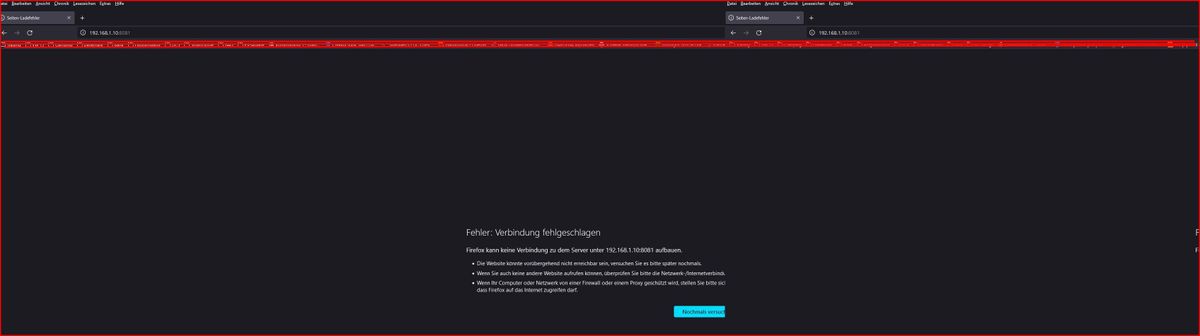
Firefox im privaten Modus mit der genannten IP http://192.168.1.10:8081 geht nicht -
@glasfaser
Firefox im privaten Modus mit der genannten IP http://192.168.1.10:8081 geht nicht@schtallone sagte in Iobroker Admin Webseite nicht erreichbar:
geht nicht
was heißt geht nicht ... was kommt dann
Mehr Input
-
@schtallone ich meinte vom container, will nur sicher gehen dass die ip sich nicht geändert hat
root@iobroker:/opt/iobroker# ifconfig eth0: flags=4163<UP,BROADCAST,RUNNING,MULTICAST> mtu 1500 inet 192.168.1.10 netmask 255.255.255.0 broadcast 192.168.1.255 ether 02:42:c9:94:71:79 txqueuelen 1000 (Ethernet) RX packets 12911 bytes 3119016 (2.9 MiB) RX errors 0 dropped 2694 overruns 0 frame 0 TX packets 864 bytes 58409 (57.0 KiB) TX errors 0 dropped 0 overruns 0 carrier 0 collisions 0 lo: flags=73<UP,LOOPBACK,RUNNING> mtu 65536 inet 127.0.0.1 netmask 255.0.0.0 loop txqueuelen 1000 (Local Loopback) RX packets 13327 bytes 53611834 (51.1 MiB) RX errors 0 dropped 0 overruns 0 frame 0 TX packets 13327 bytes 53611834 (51.1 MiB) TX errors 0 dropped 0 overruns 0 carrier 0 collisions 0 -
@glasfaser
Firefox im privaten Modus mit der genannten IP http://192.168.1.10:8081 geht nicht@schtallone sagte in Iobroker Admin Webseite nicht erreichbar:
mit der genannten IP
das ist doch die IP vom Container ioBroker die du uns doch die ganze Zeit beschreibst und sogar ein Screenshot davon !
-
@schtallone sagte in Iobroker Admin Webseite nicht erreichbar:
geht nicht
was heißt geht nicht ... was kommt dann
Mehr Input
-
-
@schtallone sicher, dass Firefox da nicht https vorsetzt


675
Online32.6k
Users82.3k
Topics1.3m
Posts