Skip to content
  • Home
  • Recent
  • Tags
  • 0 Unread 0
  • Categories
  • Unreplied
  • Popular
  • GitHub
  • Docu
  • Hilfe
Skins
  • Light
  • Brite
  • Cerulean
  • Cosmo
  • Flatly
  • Journal
  • Litera
  • Lumen
  • Lux
  • Materia
  • Minty
  • Morph
  • Pulse
  • Sandstone
  • Simplex
  • Sketchy
  • Spacelab
  • United
  • Yeti
  • Zephyr
  • Dark
  • Cyborg
  • Darkly
  • Quartz
  • Slate
  • Solar
  • Superhero
  • Vapor

  • Default (No Skin)
  • No Skin
Collapse
ioBroker Logo

Community Forum

donate donate
  1. ioBroker Community Home
  2. Deutsch
  3. ioBroker Allgemein
  4. [Synology Docker]Iobroker startet nicht (no database)

NEWS

  • Jahresrückblick 2025 – unser neuer Blogbeitrag ist online! ✨
    BluefoxB
    Bluefox
    17
    1
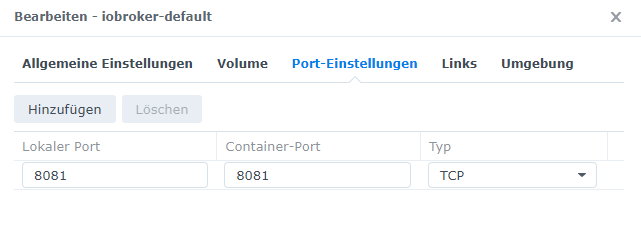
    3.7k

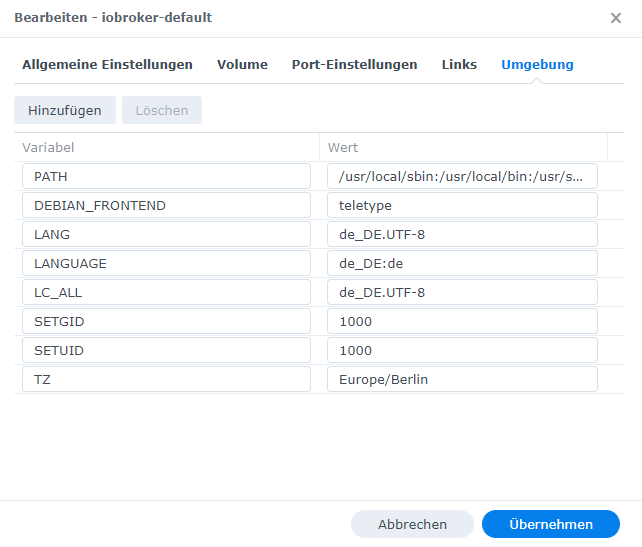
  • Neuer Blogbeitrag: Monatsrückblick - Dezember 2025 🎄
    BluefoxB
    Bluefox
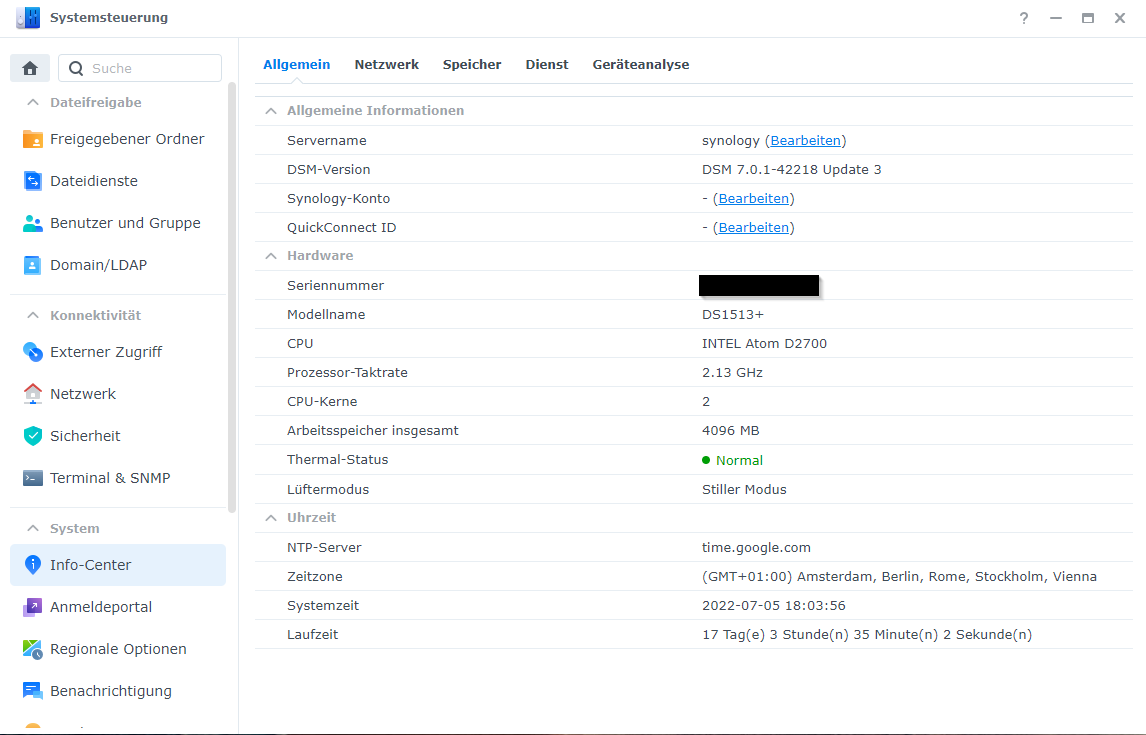
    13
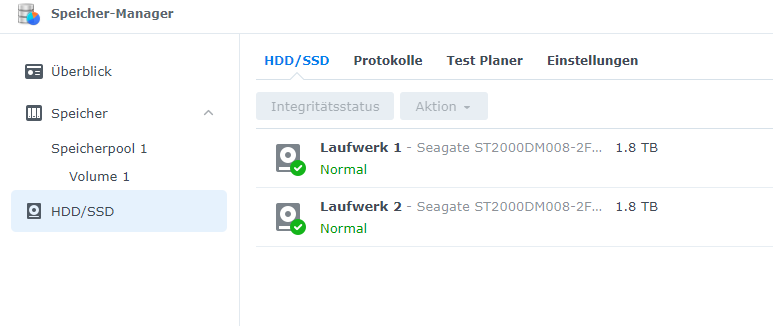
    1
    1.2k

  • Weihnachtsangebot 2025! 🎄
    BluefoxB
    Bluefox
    25
    1
    2.5k

[Synology Docker]Iobroker startet nicht (no database)

Scheduled Pinned Locked Moved ioBroker Allgemein
130 Posts 11 Posters 17.5k Views 9 Watching
  • Oldest to Newest
  • Newest to Oldest
  • Most Votes
Reply
  • Reply as topic
Log in to reply
This topic has been deleted. Only users with topic management privileges can see it.
  • S SimKa

    @glasfaser said in [Synology Docker]Iobroker startet nicht (no database):

    @simka sagte in [Synology Docker]Iobroker startet nicht (no database):

    v16.15.1

    War das schon im Container oder hast du ein Update von 14 auf 16 gemacht !?

    Ich hab nur den Container erstellt, den Ordner gemountet und gestartet. Während der Container startete, sind einige Sachen installiert worden. Manuell habe ich nichts installiert.

    GlasfaserG Offline
    GlasfaserG Offline
    Glasfaser
    wrote on last edited by
    #48

    @simka sagte in [Synology Docker]Iobroker startet nicht (no database):

    @glasfaser said in [Synology Docker]Iobroker startet nicht (no database):

    @simka sagte in [Synology Docker]Iobroker startet nicht (no database):

    v16.15.1

    War das schon im Container oder hast du ein Update von 14 auf 16 gemacht !?

    Ich hab nur den Container erstellt, den Ordner gemountet und gestartet. Während der Container startete, sind einige Sachen installiert worden. Manuell habe ich nichts installiert.

    Das ist irgendwie verwirrend bei dir
    , denn der Container den du hast

    ist das :
    Image : v6.1.0
    mit :
    npm: 6.14.16
    node: v14.19.0

    und im ganzen Verlauf .... schreibst du , du hast nichts gemacht ,
    bist trotzdem

    " Iobroker startet nicht (no database) "
    mich hat es leider auch getroffen. Iobroker lässt sich nicht mehr starten.

    und hast ganz oben im Start-Thread wie ich schon mehere male erwähnt und auch nachgefragt Node in
    v16.15.1
    8.11.0

    , also das aktuelle.

    Von alleine geht das nicht !!

    Synology 918+ 16GB - ioBroker in Docker v9 , VISO auf Trekstor Primebook C13 13,3" , Hikvision Domkameras mit Surveillance Station .. CCU RaspberryMatic in Synology VM .. Zigbee CC2538+CC2592 .. Sonoff .. KNX .. Modbus ..

    S 1 Reply Last reply
    0
    • andreA Offline
      andreA Offline
      andre
      Developer
      wrote on last edited by
      #49

      @simka sagte in [Synology Docker]Iobroker startet nicht (no database):

      Ich erstelle es von iobroker/iobroker:latest

      Latest ist schon mal nicht so gut. Aktuell scheint bei dir zwar noch v6.1.0 lokal zu liegen, wenn du da Image allerdings neu pullst würdest du die v7.0.0 bekommen. Das könnte dann noch andere Probleme geben. :) Aber das ist eine andere Story.

      @simka sagte in [Synology Docker]Iobroker startet nicht (no database):

      iobroker-default.html

      Dein Log von nem neuen Container sieht sauber aus. Image Version passt zur node version.
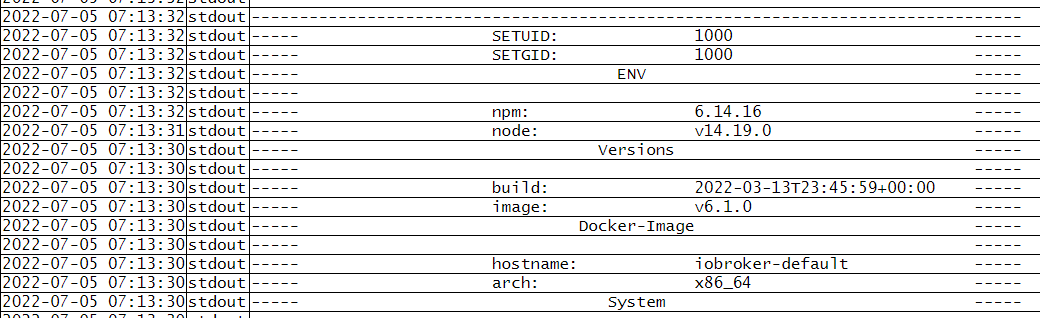
      26eb78a1-0230-4143-92f8-9e5cd6eb4abf-image.png

      Wenn ich es richtig verstehe, dann kommt der iobroker auch "jungfräulich" hoch, richtig?

      @simka sagte in [Synology Docker]Iobroker startet nicht (no database):

      Habe nun über die console ein Backup versuche
      ...
      Auch nicht mehr erreichbar über port 8081 und https (auch nicht über http)
      iobroker.2022-07-05.log

      Dein Restore sieht m.E: auch schonmal gut aus.

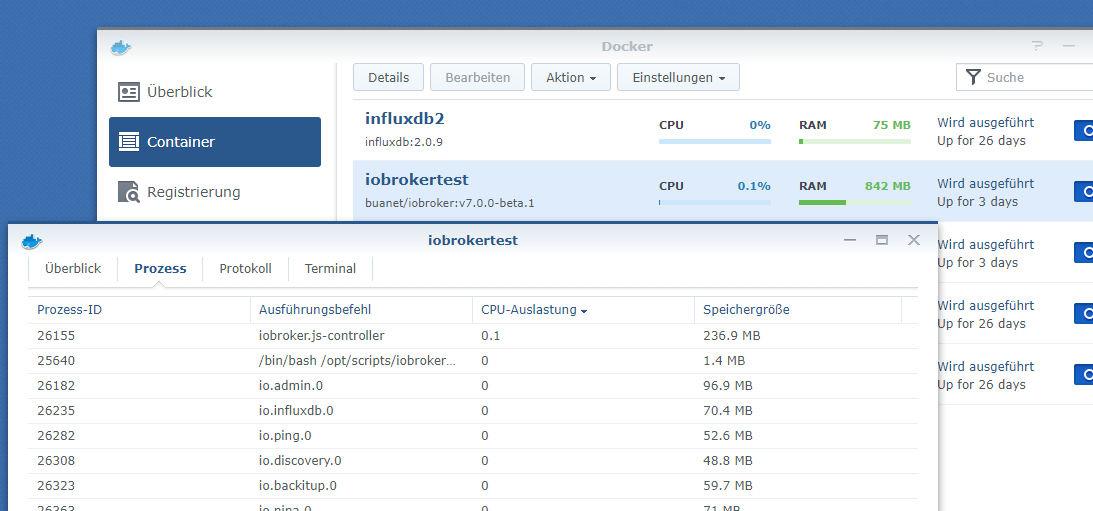
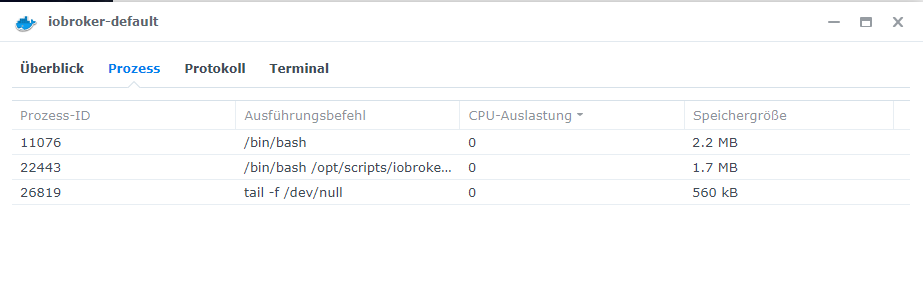
      Jetzt kannst du über die Kommandozeile die beiden Kommandos die @Glasfaser gepostet hat mal ausführen. Gleichzeitig mal schauen welche Prozesse in deinem Container laufen:
      e904665d-489a-468f-a529-f2e5dd88d768-image.png

      Mag ja sein, dass alles läuft, du aber nur nich drauf kommst? Was sagt das Protokoll vom Container nach dem restore?

      MfG,
      André

      Bitte keine Support-Fragen per PN! Nutzt die öffentliche Kanäle damit auch andere von den Antworten profitieren können!

      1 Reply Last reply
      0
      • GlasfaserG Glasfaser

        @simka

        iobroker status
        
        iobroker list instances
        
        S Offline
        S Offline
        SimKa
        wrote on last edited by
        #50

        @glasfaser said in [Synology Docker]Iobroker startet nicht (no database):

        iobroker list instances

        root@iobroker-default:/opt/iobroker# iobroker status                                                                                                                                                
        iobroker is not running on this host.                                                                                                                                                               
                                                                                                                                                                                                            
                                                                                                                                                                                                            
        Objects type: jsonl                                                                                                                                                                                 
        States  type: jsonl                                                                                                                                                                                 
        root@iobroker-default:/opt/iobroker# iobroker list instances                                                                                                                                        
          system.adapter.admin.0                  : admin                 : iobroker-default                         -  enabled, port: 8081, bind: 0.0.0.0 (SSL), run as: admin                             
          system.adapter.backitup.0               : backitup              : iobroker-default                         -  enabled                                                                             
          system.adapter.daswetter.0              : daswetter             : iobroker-default                         - disabled                                                                             
          system.adapter.discovery.0              : discovery             : iobroker-default                         - disabled                                                                             
          system.adapter.hm-rpc.0                 : hm-rpc                : iobroker-default                         - disabled, port: 42101                                                                
          system.adapter.hm-rpc.1                 : hm-rpc                : iobroker-default                         - disabled, port: 42102                                                                
          system.adapter.ical.0                   : ical                  : iobroker-default                         - disabled                                                                             
          system.adapter.icons-mfd-svg.0          : icons-mfd-svg         : iobroker-default                         - disabled                                                                             
          system.adapter.slideshow.0              : slideshow             : iobroker-default                         - disabled                                                                             
          system.adapter.slideshow.1              : slideshow             : iobroker-default                         - disabled                                                                             
          system.adapter.slideshow.2              : slideshow             : iobroker-default                         - disabled                                                                             
          system.adapter.synology.0               : synology              : iobroker-default                         - disabled, port: 5001                                                                 
          system.adapter.tankerkoenig.0           : tankerkoenig          : iobroker-default                         - disabled                                                                             
          system.adapter.trashschedule.0          : trashschedule         : iobroker-default                         - disabled                                                                             
          system.adapter.vis-bars.0               : vis-bars              : iobroker-default                         - disabled                                                                             
          system.adapter.vis-canvas-gauges.0      : vis-canvas-gauges     : iobroker-default                         - disabled                                                                             
          system.adapter.vis-fancyswitch.0        : vis-fancyswitch       : iobroker-default                         - disabled                                                                             
          system.adapter.vis-hqwidgets.0          : vis-hqwidgets         : iobroker-default                         - disabled                                                                             
          system.adapter.vis-inventwo.0           : vis-inventwo          : iobroker-default                         - disabled                                                                             
          system.adapter.vis-jqui-mfd.0           : vis-jqui-mfd          : iobroker-default                         - disabled                                                                             
          system.adapter.vis-justgage.0           : vis-justgage          : iobroker-default                         - disabled                                                                             
          system.adapter.vis-keyboard.0           : vis-keyboard          : iobroker-default                         - disabled                                                                             
          system.adapter.vis-players.0            : vis-players           : iobroker-default                         - disabled                                                                             
          system.adapter.vis-rgraph.0             : vis-rgraph            : iobroker-default                         - disabled                                                                             
          system.adapter.vis-timeandweather.0     : vis-timeandweather    : iobroker-default                         - disabled                                                                             
          system.adapter.vis-weather.0            : vis-weather           : iobroker-default                         - disabled                                                                             
          system.adapter.vis.0                    : vis                   : iobroker-default                         - disabled                                                                             
          system.adapter.web.0                    : web                   : iobroker-default                         - disabled, port: 8082, bind: 0.0.0.0, run as: admin                                   
                                                                                                                                                                                                            
        + instance is alive                                                                                                                                                                                 
        root@iobroker-default:/opt/iobroker#  
        

        2022-07-05 13_59_57-Window.png

        iobroker-default (1).html

        GlasfaserG 1 Reply Last reply
        0
        • GlasfaserG Glasfaser

          @simka sagte in [Synology Docker]Iobroker startet nicht (no database):

          @glasfaser said in [Synology Docker]Iobroker startet nicht (no database):

          @simka sagte in [Synology Docker]Iobroker startet nicht (no database):

          v16.15.1

          War das schon im Container oder hast du ein Update von 14 auf 16 gemacht !?

          Ich hab nur den Container erstellt, den Ordner gemountet und gestartet. Während der Container startete, sind einige Sachen installiert worden. Manuell habe ich nichts installiert.

          Das ist irgendwie verwirrend bei dir
          , denn der Container den du hast

          ist das :
          Image : v6.1.0
          mit :
          npm: 6.14.16
          node: v14.19.0

          und im ganzen Verlauf .... schreibst du , du hast nichts gemacht ,
          bist trotzdem

          " Iobroker startet nicht (no database) "
          mich hat es leider auch getroffen. Iobroker lässt sich nicht mehr starten.

          und hast ganz oben im Start-Thread wie ich schon mehere male erwähnt und auch nachgefragt Node in
          v16.15.1
          8.11.0

          , also das aktuelle.

          Von alleine geht das nicht !!

          S Offline
          S Offline
          SimKa
          wrote on last edited by
          #51

          @glasfaser said in [Synology Docker]Iobroker startet nicht (no database):

          @simka sagte in [Synology Docker]Iobroker startet nicht (no database):

          @glasfaser said in [Synology Docker]Iobroker startet nicht (no database):

          @simka sagte in [Synology Docker]Iobroker startet nicht (no database):

          v16.15.1

          War das schon im Container oder hast du ein Update von 14 auf 16 gemacht !?

          Ich hab nur den Container erstellt, den Ordner gemountet und gestartet. Während der Container startete, sind einige Sachen installiert worden. Manuell habe ich nichts installiert.

          Das ist irgendwie verwirrend bei dir
          , denn der Container den du hast

          ist das :
          Image : v6.1.0
          mit :
          npm: 6.14.16
          node: v14.19.0

          und im ganzen Verlauf .... schreibst du , du hast nichts gemacht ,
          bist trotzdem

          " Iobroker startet nicht (no database) "
          mich hat es leider auch getroffen. Iobroker lässt sich nicht mehr starten.

          und hast ganz oben im Start-Thread wie ich schon mehere male erwähnt und auch nachgefragt Node in
          v16.15.1
          8.11.0

          , also das aktuelle.

          Von alleine geht das nicht !!

          Da habe ich mich wohl falsch ausgedrückt. Entschuldige für die Verwirrung.
          Ich habe bereits nach dem Problem gegoogelt und auch hier im Forum danach gesucht. Ich habe am Anfang den iobroker fix und den curl Befehl mit dem fix ausgeführt, paar mal neu gestartet, dann den js-controller installiert usw. Da alles nichts geholfen hat, habe ich eine neue Instanz erstellt und dort das Backup eingespielt und wieder paar Sachen versucht, z.B. zu updaten usw.
          Als ich geschrieben habe, dass ich nichts gemacht habe, meinte ich damit, dass ich eine neue Instanz erstellt habe und nicht an dieser Instanz gemacht habe, z.B. habe ich kein Update des Dockers oder von iobroker durchgeführt.

          1 Reply Last reply
          0
          • S SimKa

            @glasfaser said in [Synology Docker]Iobroker startet nicht (no database):

            iobroker list instances

            root@iobroker-default:/opt/iobroker# iobroker status                                                                                                                                                
            iobroker is not running on this host.                                                                                                                                                               
                                                                                                                                                                                                                
                                                                                                                                                                                                                
            Objects type: jsonl                                                                                                                                                                                 
            States  type: jsonl                                                                                                                                                                                 
            root@iobroker-default:/opt/iobroker# iobroker list instances                                                                                                                                        
              system.adapter.admin.0                  : admin                 : iobroker-default                         -  enabled, port: 8081, bind: 0.0.0.0 (SSL), run as: admin                             
              system.adapter.backitup.0               : backitup              : iobroker-default                         -  enabled                                                                             
              system.adapter.daswetter.0              : daswetter             : iobroker-default                         - disabled                                                                             
              system.adapter.discovery.0              : discovery             : iobroker-default                         - disabled                                                                             
              system.adapter.hm-rpc.0                 : hm-rpc                : iobroker-default                         - disabled, port: 42101                                                                
              system.adapter.hm-rpc.1                 : hm-rpc                : iobroker-default                         - disabled, port: 42102                                                                
              system.adapter.ical.0                   : ical                  : iobroker-default                         - disabled                                                                             
              system.adapter.icons-mfd-svg.0          : icons-mfd-svg         : iobroker-default                         - disabled                                                                             
              system.adapter.slideshow.0              : slideshow             : iobroker-default                         - disabled                                                                             
              system.adapter.slideshow.1              : slideshow             : iobroker-default                         - disabled                                                                             
              system.adapter.slideshow.2              : slideshow             : iobroker-default                         - disabled                                                                             
              system.adapter.synology.0               : synology              : iobroker-default                         - disabled, port: 5001                                                                 
              system.adapter.tankerkoenig.0           : tankerkoenig          : iobroker-default                         - disabled                                                                             
              system.adapter.trashschedule.0          : trashschedule         : iobroker-default                         - disabled                                                                             
              system.adapter.vis-bars.0               : vis-bars              : iobroker-default                         - disabled                                                                             
              system.adapter.vis-canvas-gauges.0      : vis-canvas-gauges     : iobroker-default                         - disabled                                                                             
              system.adapter.vis-fancyswitch.0        : vis-fancyswitch       : iobroker-default                         - disabled                                                                             
              system.adapter.vis-hqwidgets.0          : vis-hqwidgets         : iobroker-default                         - disabled                                                                             
              system.adapter.vis-inventwo.0           : vis-inventwo          : iobroker-default                         - disabled                                                                             
              system.adapter.vis-jqui-mfd.0           : vis-jqui-mfd          : iobroker-default                         - disabled                                                                             
              system.adapter.vis-justgage.0           : vis-justgage          : iobroker-default                         - disabled                                                                             
              system.adapter.vis-keyboard.0           : vis-keyboard          : iobroker-default                         - disabled                                                                             
              system.adapter.vis-players.0            : vis-players           : iobroker-default                         - disabled                                                                             
              system.adapter.vis-rgraph.0             : vis-rgraph            : iobroker-default                         - disabled                                                                             
              system.adapter.vis-timeandweather.0     : vis-timeandweather    : iobroker-default                         - disabled                                                                             
              system.adapter.vis-weather.0            : vis-weather           : iobroker-default                         - disabled                                                                             
              system.adapter.vis.0                    : vis                   : iobroker-default                         - disabled                                                                             
              system.adapter.web.0                    : web                   : iobroker-default                         - disabled, port: 8082, bind: 0.0.0.0, run as: admin                                   
                                                                                                                                                                                                                
            + instance is alive                                                                                                                                                                                 
            root@iobroker-default:/opt/iobroker#  
            

            2022-07-05 13_59_57-Window.png

            iobroker-default (1).html

            GlasfaserG Offline
            GlasfaserG Offline
            Glasfaser
            wrote on last edited by
            #52

            @simka

            system.adapter.admin.0 : admin : iobroker-default - enabled, port: 8081, bind: 0.0.0.0 (SSL), run as: admin

            ist das richtig , verschlüsselt !?

            iobroker start 
            iobroker logs --watch
            

            Synology 918+ 16GB - ioBroker in Docker v9 , VISO auf Trekstor Primebook C13 13,3" , Hikvision Domkameras mit Surveillance Station .. CCU RaspberryMatic in Synology VM .. Zigbee CC2538+CC2592 .. Sonoff .. KNX .. Modbus ..

            S 1 Reply Last reply
            0
            • GlasfaserG Glasfaser

              @simka

              system.adapter.admin.0 : admin : iobroker-default - enabled, port: 8081, bind: 0.0.0.0 (SSL), run as: admin

              ist das richtig , verschlüsselt !?

              iobroker start 
              iobroker logs --watch
              
              S Offline
              S Offline
              SimKa
              wrote on last edited by
              #53

              @glasfaser said in [Synology Docker]Iobroker startet nicht (no database):

              iobroker logs --watch

              Was meinst du mit richtig verschlüsselt? Ich habe Https/SSL damals beim Einrichten angehakt

              root@iobroker-default:/opt/iobroker# iobroker start                                                                                                                                                 
              Starting iobroker controller daemon...                                                                                                                                                              
              iobroker controller daemon started. PID: 16246                                                                                                                                                      
              root@iobroker-default:/opt/iobroker# iobroker logs --watch                                                                                                                                          
              2022-07-05 09:17:00.349  - info: host.iobroker-default iobroker.js-controller version 4.0.21 js-controller starting                                                                                 
              2022-07-05 09:17:00.363  - info: host.iobroker-default Copyright (c) 2014-2022 bluefox, 2014 hobbyquaker                                                                                            
              2022-07-05 09:17:00.364  - info: host.iobroker-default hostname: iobroker-default, node: v14.19.3                                                                                                   
              2022-07-05 09:17:00.365  - info: host.iobroker-default ip addresses: 172.17.0.2                                                                                                                     
              Failed to set capabilities on file `/usr/bin/node' (Operation not supported)                                                                                                                        
              The value of the capability argument is not permitted for a file. Or the file is not a regular (non-symlink) file                                                                                   
              2022-07-05 09:17:01.176  - info: host.iobroker-default added notifications configuration of host                                                                                                    
              2022-07-05 09:17:01.646  - info: host.iobroker-default 3 instances found                                                                                                                            
              2022-07-05 09:17:01.769  - info: host.iobroker-default instance system.adapter.admin.0 started with pid 1866                                                                                        
              2022-07-05 09:17:01.669  - info: host.iobroker-default starting 3 instances                                                                                                                         
              2022-07-05 09:17:05.179  - info: admin.0 (1866) received all objects                                                                                                                                
              2022-07-05 09:17:05.230  - info: admin.0 (1866) Request actual repository...                                                                                                                        
              2022-07-05 09:17:05.259  - info: host.iobroker-default Updating repository "stable" under "http://download.iobroker.net/sources-dist.json"                                                          
              2022-07-05 09:17:01.002  - info: host.iobroker-default connected to Objects and States                                                                                                              
              2022-07-05 09:17:01.049  - info: host.iobroker-default Node.js version has changed from unknown to 14.19.3                                                                                          
              2022-07-05 09:17:01.157  - warn: host.iobroker-default Error while trying to update capabilities after detecting new Node.js version: Command failed: sudo setcap cap_net_bind_service,cap_net_raw+e
              pi /usr/bin/node                                                                                                                                                                                    
              2022-07-05 09:17:02.109  - info: host.iobroker-default Created UUID: 36ffb7ca-2961-47dd-a566-a29dbe05f8ea                                                                                           
              2022-07-05 09:17:04.901  - info: admin.0 (1866) starting. Version 5.3.1 in /opt/iobroker/node_modules/iobroker.admin, node: v14.19.3, js-controller: 4.0.21                                         
              2022-07-05 09:17:05.010  - info: admin.0 (1866) requesting all states                                                                                                                               
              2022-07-05 09:17:05.012  - info: admin.0 (1866) requesting all objects                                                                                                                              
              2022-07-05 09:17:05.277  - info: admin.0 (1866) http server listening on port 8081                                                                                                                  
              2022-07-05 09:17:05.279  - info: admin.0 (1866) Use link "http://localhost:8081" to configure. 
              2022-07-05 09:17:05.541  - warn: admin.0 (1866) Repository cannot be read: Active repo - stable                                                                                                     
              2022-07-05 09:17:05.543  - warn: admin.0 (1866) Active repository "stable cannot be read                                                                                                            
              2022-07-05 09:17:05.778  - info: host.iobroker-default instance system.adapter.discovery.0 started with pid 1894                                                                                    
              2022-07-05 09:17:09.224  - info: admin.0 (1866) Repository received successfully.                                                                                                                   
              2022-07-05 09:17:09.639  - info: discovery.0 (1894) starting. Version 2.7.5 in /opt/iobroker/node_modules/iobroker.discovery, node: v14.19.3, js-controller: 4.0.21                                 
              2022-07-05 09:17:09.761  - info: host.iobroker-default instance system.adapter.backitup.0 started with pid 1909                                                                                     
              2022-07-05 09:17:12.916  - info: backitup.0 (1909) starting. Version 2.3.3 in /opt/iobroker/node_modules/iobroker.backitup, node: v14.19.3, js-controller: 4.0.21                                   
              2022-07-05 09:17:13.036  - info: backitup.0 (1909) [iobroker] backup was activated at 02:40 every 1 day(s)                                                                                          
              2022-07-05 09:19:45.668  - info: admin.0 (1866) terminating http server on port 8081                                                                                                                
              2022-07-05 09:19:45.670  - info: backitup.0 (1909) cleaned everything up...                                                                                                                         
              2022-07-05 09:19:45.663  - info: host.iobroker-default received SIGTERM                                                                                                                             
              2022-07-05 09:19:45.693  - info: host.iobroker-default stopInstance system.adapter.admin.0 (force=false, process=true)                                                                              
              2022-07-05 09:19:45.695  - info: host.iobroker-default stopInstance system.adapter.discovery.0 (force=false, process=true)                                                                          
              2022-07-05 09:19:45.697  - info: host.iobroker-default stopInstance system.adapter.backitup.0 (force=false, process=true)                                                                           
              2022-07-05 09:19:45.740  - info: admin.0 (1866) Got terminate signal TERMINATE_YOURSELF                                                                                                             
              2022-07-05 09:19:45.744  - info: discovery.0 (1894) Got terminate signal TERMINATE_YOURSELF                                                                                                         
              2022-07-05 09:19:45.747  - info: backitup.0 (1909) Got terminate signal TERMINATE_YOURSELF                                                                                                          
              2022-07-05 09:19:45.761  - info: discovery.0 (1894) Terminated (START_IMMEDIATELY_AFTER_STOP): Without reason                                                                                       
              2022-07-05 09:19:45.762  - info: host.iobroker-default stopInstance system.adapter.admin.0 send kill signal                                                                                         
              2022-07-05 09:19:45.767  - info: admin.0 (1866) Terminated (START_IMMEDIATELY_AFTER_STOP): Without reason                                                                                           
              2022-07-05 09:19:45.770  - info: host.iobroker-default stopInstance system.adapter.discovery.0 send kill signal                                                                                     
              2022-07-05 09:19:45.772  - info: host.iobroker-default stopInstance system.adapter.backitup.0 send kill signal                                                                                      
              2022-07-05 09:19:45.803  - info: backitup.0 (1909) Terminated (START_IMMEDIATELY_AFTER_STOP): Without reason                                                                                        
              2022-07-05 09:19:46.367  - info: host.iobroker-default instance system.adapter.discovery.0 terminated with code 156 (START_IMMEDIATELY_AFTER_STOP)                                                  
              2022-07-05 09:19:46.412  - info: host.iobroker-default instance system.adapter.admin.0 terminated with code 156 (START_IMMEDIATELY_AFTER_STOP)                                                      
              2022-07-05 09:19:46.434  - info: host.iobroker-default instance system.adapter.backitup.0 terminated with code 156 (START_IMMEDIATELY_AFTER_STOP)                                                   
              2022-07-05 09:19:46.435  - info: host.iobroker-default All instances are stopped.                                                                                                                   
              2022-07-05 09:19:46.560  - info: host.iobroker-default terminated                                                                                                                                   
              2022-07-05 14:05:38.950  - info: host.iobroker iobroker.js-controller version 4.0.21 js-controller starting                                                                                         
              2022-07-05 14:05:38.971  - info: host.iobroker Copyright (c) 2014-2022 bluefox, 2014 hobbyquaker                                                                                                    
              2022-07-05 14:05:38.973  - info: host.iobroker hostname: iobroker, node: v14.19.3                                                                                                                   
              2022-07-05 14:05:38.974  - info: host.iobroker ip addresses: 172.17.0.2                                                                                                                             
              2022-07-05 14:05:40.838  - info: host.iobroker connected to Objects and States                                                                                                                      
              2022-07-05 14:05:40.907  - info: host.iobroker Node.js version has changed from unknown to 14.19.3                                                                                                  
              2022-07-05 14:05:40.938  - info: host.iobroker added notifications configuration of host                                                                                                            
              2022-07-05 14:05:41.613  - warn: host.iobroker Error while trying to update capabilities after detecting new Node.js version: Command failed: sudo setcap cap_net_bind_service,cap_net_raw+epi /usr/
              bin/node                                                                                                                                                                                            
              Failed to set capabilities on file `/usr/bin/node' (Operation not supported)                                                                                                                        
              The value of the capability argument is not permitted for a file. Or the file is not a regular (non-symlink) file                                                                                   
              2022-07-05 14:05:41.778  - info: host.iobroker Delete host system.host.iobroker-default                                                                                                             
              2022-07-05 14:05:41.970  - info: host.iobroker 28 instances found                                                                                                                                   
              2022-07-05 14:05:41.999  - warn: host.iobroker does not start any instances on this host 
              
              GlasfaserG 1 Reply Last reply
              0
              • S SimKa

                @glasfaser said in [Synology Docker]Iobroker startet nicht (no database):

                iobroker logs --watch

                Was meinst du mit richtig verschlüsselt? Ich habe Https/SSL damals beim Einrichten angehakt

                root@iobroker-default:/opt/iobroker# iobroker start                                                                                                                                                 
                Starting iobroker controller daemon...                                                                                                                                                              
                iobroker controller daemon started. PID: 16246                                                                                                                                                      
                root@iobroker-default:/opt/iobroker# iobroker logs --watch                                                                                                                                          
                2022-07-05 09:17:00.349  - info: host.iobroker-default iobroker.js-controller version 4.0.21 js-controller starting                                                                                 
                2022-07-05 09:17:00.363  - info: host.iobroker-default Copyright (c) 2014-2022 bluefox, 2014 hobbyquaker                                                                                            
                2022-07-05 09:17:00.364  - info: host.iobroker-default hostname: iobroker-default, node: v14.19.3                                                                                                   
                2022-07-05 09:17:00.365  - info: host.iobroker-default ip addresses: 172.17.0.2                                                                                                                     
                Failed to set capabilities on file `/usr/bin/node' (Operation not supported)                                                                                                                        
                The value of the capability argument is not permitted for a file. Or the file is not a regular (non-symlink) file                                                                                   
                2022-07-05 09:17:01.176  - info: host.iobroker-default added notifications configuration of host                                                                                                    
                2022-07-05 09:17:01.646  - info: host.iobroker-default 3 instances found                                                                                                                            
                2022-07-05 09:17:01.769  - info: host.iobroker-default instance system.adapter.admin.0 started with pid 1866                                                                                        
                2022-07-05 09:17:01.669  - info: host.iobroker-default starting 3 instances                                                                                                                         
                2022-07-05 09:17:05.179  - info: admin.0 (1866) received all objects                                                                                                                                
                2022-07-05 09:17:05.230  - info: admin.0 (1866) Request actual repository...                                                                                                                        
                2022-07-05 09:17:05.259  - info: host.iobroker-default Updating repository "stable" under "http://download.iobroker.net/sources-dist.json"                                                          
                2022-07-05 09:17:01.002  - info: host.iobroker-default connected to Objects and States                                                                                                              
                2022-07-05 09:17:01.049  - info: host.iobroker-default Node.js version has changed from unknown to 14.19.3                                                                                          
                2022-07-05 09:17:01.157  - warn: host.iobroker-default Error while trying to update capabilities after detecting new Node.js version: Command failed: sudo setcap cap_net_bind_service,cap_net_raw+e
                pi /usr/bin/node                                                                                                                                                                                    
                2022-07-05 09:17:02.109  - info: host.iobroker-default Created UUID: 36ffb7ca-2961-47dd-a566-a29dbe05f8ea                                                                                           
                2022-07-05 09:17:04.901  - info: admin.0 (1866) starting. Version 5.3.1 in /opt/iobroker/node_modules/iobroker.admin, node: v14.19.3, js-controller: 4.0.21                                         
                2022-07-05 09:17:05.010  - info: admin.0 (1866) requesting all states                                                                                                                               
                2022-07-05 09:17:05.012  - info: admin.0 (1866) requesting all objects                                                                                                                              
                2022-07-05 09:17:05.277  - info: admin.0 (1866) http server listening on port 8081                                                                                                                  
                2022-07-05 09:17:05.279  - info: admin.0 (1866) Use link "http://localhost:8081" to configure. 
                2022-07-05 09:17:05.541  - warn: admin.0 (1866) Repository cannot be read: Active repo - stable                                                                                                     
                2022-07-05 09:17:05.543  - warn: admin.0 (1866) Active repository "stable cannot be read                                                                                                            
                2022-07-05 09:17:05.778  - info: host.iobroker-default instance system.adapter.discovery.0 started with pid 1894                                                                                    
                2022-07-05 09:17:09.224  - info: admin.0 (1866) Repository received successfully.                                                                                                                   
                2022-07-05 09:17:09.639  - info: discovery.0 (1894) starting. Version 2.7.5 in /opt/iobroker/node_modules/iobroker.discovery, node: v14.19.3, js-controller: 4.0.21                                 
                2022-07-05 09:17:09.761  - info: host.iobroker-default instance system.adapter.backitup.0 started with pid 1909                                                                                     
                2022-07-05 09:17:12.916  - info: backitup.0 (1909) starting. Version 2.3.3 in /opt/iobroker/node_modules/iobroker.backitup, node: v14.19.3, js-controller: 4.0.21                                   
                2022-07-05 09:17:13.036  - info: backitup.0 (1909) [iobroker] backup was activated at 02:40 every 1 day(s)                                                                                          
                2022-07-05 09:19:45.668  - info: admin.0 (1866) terminating http server on port 8081                                                                                                                
                2022-07-05 09:19:45.670  - info: backitup.0 (1909) cleaned everything up...                                                                                                                         
                2022-07-05 09:19:45.663  - info: host.iobroker-default received SIGTERM                                                                                                                             
                2022-07-05 09:19:45.693  - info: host.iobroker-default stopInstance system.adapter.admin.0 (force=false, process=true)                                                                              
                2022-07-05 09:19:45.695  - info: host.iobroker-default stopInstance system.adapter.discovery.0 (force=false, process=true)                                                                          
                2022-07-05 09:19:45.697  - info: host.iobroker-default stopInstance system.adapter.backitup.0 (force=false, process=true)                                                                           
                2022-07-05 09:19:45.740  - info: admin.0 (1866) Got terminate signal TERMINATE_YOURSELF                                                                                                             
                2022-07-05 09:19:45.744  - info: discovery.0 (1894) Got terminate signal TERMINATE_YOURSELF                                                                                                         
                2022-07-05 09:19:45.747  - info: backitup.0 (1909) Got terminate signal TERMINATE_YOURSELF                                                                                                          
                2022-07-05 09:19:45.761  - info: discovery.0 (1894) Terminated (START_IMMEDIATELY_AFTER_STOP): Without reason                                                                                       
                2022-07-05 09:19:45.762  - info: host.iobroker-default stopInstance system.adapter.admin.0 send kill signal                                                                                         
                2022-07-05 09:19:45.767  - info: admin.0 (1866) Terminated (START_IMMEDIATELY_AFTER_STOP): Without reason                                                                                           
                2022-07-05 09:19:45.770  - info: host.iobroker-default stopInstance system.adapter.discovery.0 send kill signal                                                                                     
                2022-07-05 09:19:45.772  - info: host.iobroker-default stopInstance system.adapter.backitup.0 send kill signal                                                                                      
                2022-07-05 09:19:45.803  - info: backitup.0 (1909) Terminated (START_IMMEDIATELY_AFTER_STOP): Without reason                                                                                        
                2022-07-05 09:19:46.367  - info: host.iobroker-default instance system.adapter.discovery.0 terminated with code 156 (START_IMMEDIATELY_AFTER_STOP)                                                  
                2022-07-05 09:19:46.412  - info: host.iobroker-default instance system.adapter.admin.0 terminated with code 156 (START_IMMEDIATELY_AFTER_STOP)                                                      
                2022-07-05 09:19:46.434  - info: host.iobroker-default instance system.adapter.backitup.0 terminated with code 156 (START_IMMEDIATELY_AFTER_STOP)                                                   
                2022-07-05 09:19:46.435  - info: host.iobroker-default All instances are stopped.                                                                                                                   
                2022-07-05 09:19:46.560  - info: host.iobroker-default terminated                                                                                                                                   
                2022-07-05 14:05:38.950  - info: host.iobroker iobroker.js-controller version 4.0.21 js-controller starting                                                                                         
                2022-07-05 14:05:38.971  - info: host.iobroker Copyright (c) 2014-2022 bluefox, 2014 hobbyquaker                                                                                                    
                2022-07-05 14:05:38.973  - info: host.iobroker hostname: iobroker, node: v14.19.3                                                                                                                   
                2022-07-05 14:05:38.974  - info: host.iobroker ip addresses: 172.17.0.2                                                                                                                             
                2022-07-05 14:05:40.838  - info: host.iobroker connected to Objects and States                                                                                                                      
                2022-07-05 14:05:40.907  - info: host.iobroker Node.js version has changed from unknown to 14.19.3                                                                                                  
                2022-07-05 14:05:40.938  - info: host.iobroker added notifications configuration of host                                                                                                            
                2022-07-05 14:05:41.613  - warn: host.iobroker Error while trying to update capabilities after detecting new Node.js version: Command failed: sudo setcap cap_net_bind_service,cap_net_raw+epi /usr/
                bin/node                                                                                                                                                                                            
                Failed to set capabilities on file `/usr/bin/node' (Operation not supported)                                                                                                                        
                The value of the capability argument is not permitted for a file. Or the file is not a regular (non-symlink) file                                                                                   
                2022-07-05 14:05:41.778  - info: host.iobroker Delete host system.host.iobroker-default                                                                                                             
                2022-07-05 14:05:41.970  - info: host.iobroker 28 instances found                                                                                                                                   
                2022-07-05 14:05:41.999  - warn: host.iobroker does not start any instances on this host 
                
                GlasfaserG Offline
                GlasfaserG Offline
                Glasfaser
                wrote on last edited by
                #54

                @simka sagte in [Synology Docker]Iobroker startet nicht (no database):

                backups/iobroker_2022_05_07-02_40_10_backupiobroker.tar.gz

                hast du kein älteres Backup !?

                2022-07-05 14:05:38.974 - info: host.iobroker ip addresses: 172.17.0.2

                Hast du bei den neu erstellten Containern auch die Ports durchgereicht !?

                Synology 918+ 16GB - ioBroker in Docker v9 , VISO auf Trekstor Primebook C13 13,3" , Hikvision Domkameras mit Surveillance Station .. CCU RaspberryMatic in Synology VM .. Zigbee CC2538+CC2592 .. Sonoff .. KNX .. Modbus ..

                GlasfaserG 1 Reply Last reply
                0
                • andreA Offline
                  andreA Offline
                  andre
                  Developer
                  wrote on last edited by
                  #55

                  @glasfaser sagte in [Synology Docker]Iobroker startet nicht (no database):

                  Hast du bei den neu erstellten Containern auch die Ports durchgereicht !?

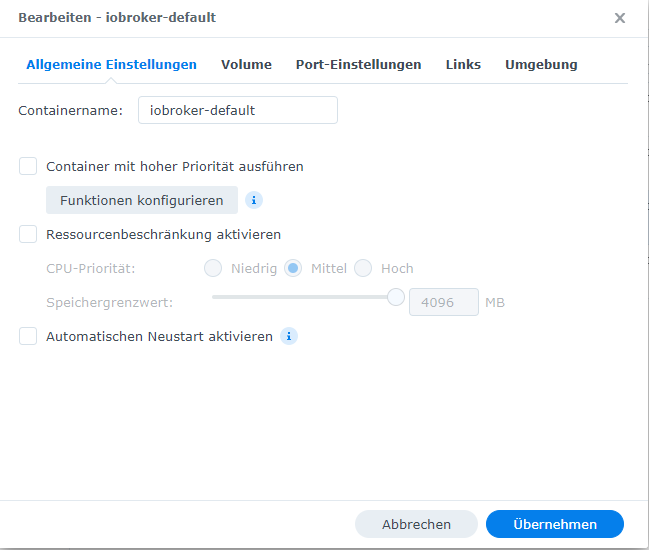
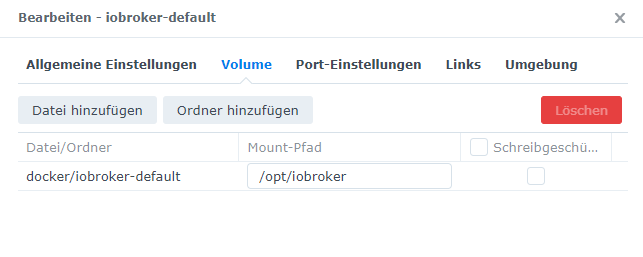
                  Generell wäre mal das Setup interessant. Nutzt du das Bridge Netzwerk?

                  Ich glaube das Backup ist schon ok. Aber es gibt offenbar Probleme beim Setzen der capabilities.

                  2022-07-05 14:05:41.613  - warn: host.iobroker Error while trying to update capabilities after detecting new Node.js version: Command failed: sudo setcap cap_net_bind_service,cap_net_raw+epi /usr/
                  bin/node                                                                                                                                                                                            
                  Failed to set capabilities on file `/usr/bin/node' (Operation not supported)                                                                                                                        
                  The value of the capability argument is not permitted for a file. Or the file is not a regular (non-symlink) file     
                  

                  MfG,
                  André
                  Bitte keine Support-Fragen per PN! Nutzt die öffentliche Kanäle damit auch andere von den Antworten profitieren können!

                  S 1 Reply Last reply
                  0
                  • S Offline
                    S Offline
                    SimKa
                    wrote on last edited by
                    #56

                    2022-07-05 15_11_08-Window.png

                    2022-07-05 15_11_39-Window.png

                    Ja 8081 Port ist durch gemappt. Der Wizard ist erreichbar, nachdem der Docker zum ersten Mal gestartet wurde.

                    Was ist mit capabilities gemeint?

                    1 Reply Last reply
                    0
                    • andreA andre

                      @glasfaser sagte in [Synology Docker]Iobroker startet nicht (no database):

                      Hast du bei den neu erstellten Containern auch die Ports durchgereicht !?

                      Generell wäre mal das Setup interessant. Nutzt du das Bridge Netzwerk?

                      Ich glaube das Backup ist schon ok. Aber es gibt offenbar Probleme beim Setzen der capabilities.

                      2022-07-05 14:05:41.613  - warn: host.iobroker Error while trying to update capabilities after detecting new Node.js version: Command failed: sudo setcap cap_net_bind_service,cap_net_raw+epi /usr/
                      bin/node                                                                                                                                                                                            
                      Failed to set capabilities on file `/usr/bin/node' (Operation not supported)                                                                                                                        
                      The value of the capability argument is not permitted for a file. Or the file is not a regular (non-symlink) file     
                      

                      MfG,
                      André
                      S Offline
                      S Offline
                      SimKa
                      wrote on last edited by
                      #57

                      @andre said in [Synology Docker]Iobroker startet nicht (no database):

                      @glasfaser sagte in [Synology Docker]Iobroker startet nicht (no database):

                      Hast du bei den neu erstellten Containern auch die Ports durchgereicht !?

                      Generell wäre mal das Setup interessant. Nutzt du das Bridge Netzwerk?

                      Ich glaube das Backup ist schon ok. Aber es gibt offenbar Probleme beim Setzen der capabilities.

                      2022-07-05 14:05:41.613  - warn: host.iobroker Error while trying to update capabilities after detecting new Node.js version: Command failed: sudo setcap cap_net_bind_service,cap_net_raw+epi /usr/
                      bin/node                                                                                                                                                                                            
                      Failed to set capabilities on file `/usr/bin/node' (Operation not supported)                                                                                                                        
                      The value of the capability argument is not permitted for a file. Or the file is not a regular (non-symlink) file     
                      

                      MfG,
                      André
                      2022-07-05 15_14_31-Window.png 2022-07-05 15_14_52-Window.png 2022-07-05 15_15_13-Window.png 2022-07-05 15_15_32-Window.png

                      Die Fenster, die ich nich fotografiert habe, bei denen ist nichts eingestellt.

                      1 Reply Last reply
                      0
                      • andreA Offline
                        andreA Offline
                        andre
                        Developer
                        wrote on last edited by
                        #58

                        Was bekommst du hier:

                        getcap $(eval readlink -f `which node`)
                        

                        MfG,
                        André

                        Bitte keine Support-Fragen per PN! Nutzt die öffentliche Kanäle damit auch andere von den Antworten profitieren können!

                        S 1 Reply Last reply
                        0
                        • andreA andre

                          Was bekommst du hier:

                          getcap $(eval readlink -f `which node`)
                          

                          MfG,
                          André

                          S Offline
                          S Offline
                          SimKa
                          wrote on last edited by
                          #59

                          @andre said in [Synology Docker]Iobroker startet nicht (no database):

                          getcap $(eval readlink -f which node)

                          root@iobroker-default:/opt/iobroker# getcap $(eval readlink -f `which node`)                                       
                          Failed to get capabilities of file '/usr/bin/node' (Operation not supported)                                       
                          root@iobroker-default:/opt/iobroker#
                          
                          andreA 1 Reply Last reply
                          0
                          • S SimKa

                            @andre said in [Synology Docker]Iobroker startet nicht (no database):

                            getcap $(eval readlink -f which node)

                            root@iobroker-default:/opt/iobroker# getcap $(eval readlink -f `which node`)                                       
                            Failed to get capabilities of file '/usr/bin/node' (Operation not supported)                                       
                            root@iobroker-default:/opt/iobroker#
                            
                            andreA Offline
                            andreA Offline
                            andre
                            Developer
                            wrote on last edited by andre
                            #60

                            @simka Das ist das Problem. So sollte es aussehen:

                            7feee0b0-fb0f-4f6b-b042-1276303c08de-image.png

                            Wenn ich das Google, dann lande ich mehr oder weniger immer bei Problemen mit dem Filesystem...
                            Welche DSM Version hast du?

                            [EDIT] Hatte dazu sogar mal einen Issue (https://github.com/buanet/ioBroker.docker/issues/37) Aber leider ohne Lösung...

                            Bitte keine Support-Fragen per PN! Nutzt die öffentliche Kanäle damit auch andere von den Antworten profitieren können!

                            S 1 Reply Last reply
                            0
                            • andreA andre

                              @simka Das ist das Problem. So sollte es aussehen:

                              7feee0b0-fb0f-4f6b-b042-1276303c08de-image.png

                              Wenn ich das Google, dann lande ich mehr oder weniger immer bei Problemen mit dem Filesystem...
                              Welche DSM Version hast du?

                              [EDIT] Hatte dazu sogar mal einen Issue (https://github.com/buanet/ioBroker.docker/issues/37) Aber leider ohne Lösung...

                              S Offline
                              S Offline
                              SimKa
                              wrote on last edited by
                              #61

                              @andre said in [Synology Docker]Iobroker startet nicht (no database):

                              @simka Das ist das Problem. So sollte es aussehen:

                              7feee0b0-fb0f-4f6b-b042-1276303c08de-image.png

                              Wenn ich das Google, dann lande ich mehr oder weniger immer bei Problemen mit dem Filesystem...
                              Welche DSM Version hast du?

                              [EDIT] Hatte dazu sogar mal einen Issue (https://github.com/buanet/ioBroker.docker/issues/37) Aber leider ohne Lösung...

                              Hmm schade. Wundert mich, dass erst nach dem Update die Probleme auftreten.
                              2022-07-05 18_04_21-Window.png

                              2022-07-05 18_05_26-Window.png

                              GlasfaserG 2 Replies Last reply
                              0
                              • S SimKa

                                @andre said in [Synology Docker]Iobroker startet nicht (no database):

                                @simka Das ist das Problem. So sollte es aussehen:

                                7feee0b0-fb0f-4f6b-b042-1276303c08de-image.png

                                Wenn ich das Google, dann lande ich mehr oder weniger immer bei Problemen mit dem Filesystem...
                                Welche DSM Version hast du?

                                [EDIT] Hatte dazu sogar mal einen Issue (https://github.com/buanet/ioBroker.docker/issues/37) Aber leider ohne Lösung...

                                Hmm schade. Wundert mich, dass erst nach dem Update die Probleme auftreten.
                                2022-07-05 18_04_21-Window.png

                                2022-07-05 18_05_26-Window.png

                                GlasfaserG Offline
                                GlasfaserG Offline
                                Glasfaser
                                wrote on last edited by
                                #62

                                @simka

                                mach da mal einen Haken rein .

                                183c38cd-83f2-42db-ae10-74e0b3ec4dcb-grafik.png

                                Synology 918+ 16GB - ioBroker in Docker v9 , VISO auf Trekstor Primebook C13 13,3" , Hikvision Domkameras mit Surveillance Station .. CCU RaspberryMatic in Synology VM .. Zigbee CC2538+CC2592 .. Sonoff .. KNX .. Modbus ..

                                1 Reply Last reply
                                0
                                • S SimKa

                                  @andre said in [Synology Docker]Iobroker startet nicht (no database):

                                  @simka Das ist das Problem. So sollte es aussehen:

                                  7feee0b0-fb0f-4f6b-b042-1276303c08de-image.png

                                  Wenn ich das Google, dann lande ich mehr oder weniger immer bei Problemen mit dem Filesystem...
                                  Welche DSM Version hast du?

                                  [EDIT] Hatte dazu sogar mal einen Issue (https://github.com/buanet/ioBroker.docker/issues/37) Aber leider ohne Lösung...

                                  Hmm schade. Wundert mich, dass erst nach dem Update die Probleme auftreten.

                                  2022-07-05 18_04_21-Window.png

                                  2022-07-05 18_05_26-Window.png

                                  GlasfaserG Offline
                                  GlasfaserG Offline
                                  Glasfaser
                                  wrote on last edited by
                                  #63

                                  @simka

                                  Nur eine Idee

                                  pkill -u iobroker
                                  iobroker fix
                                  sudo setcap cap_net_bind_service,cap_net_raw+epi /usr/bin/node
                                  

                                  Container neu starten

                                  Synology 918+ 16GB - ioBroker in Docker v9 , VISO auf Trekstor Primebook C13 13,3" , Hikvision Domkameras mit Surveillance Station .. CCU RaspberryMatic in Synology VM .. Zigbee CC2538+CC2592 .. Sonoff .. KNX .. Modbus ..

                                  S 1 Reply Last reply
                                  0
                                  • GlasfaserG Glasfaser

                                    @simka

                                    Nur eine Idee

                                    pkill -u iobroker
                                    iobroker fix
                                    sudo setcap cap_net_bind_service,cap_net_raw+epi /usr/bin/node
                                    

                                    Container neu starten

                                    S Offline
                                    S Offline
                                    SimKa
                                    wrote on last edited by
                                    #64

                                    @glasfaser said in [Synology Docker]Iobroker startet nicht (no database):

                                    @simka

                                    Nur eine Idee

                                    pkill -u iobroker
                                    iobroker fix
                                    sudo setcap cap_net_bind_service,cap_net_raw+epi /usr/bin/node
                                    

                                    Container neu starten

                                    ==========================================================================                                                                                                                          
                                        Installing prerequisites (1/3)                                                                                                                                                                  
                                    ==========================================================================                                                                                                                          
                                                                                                                                                                                                                                        
                                    Get:1 http://deb.debian.org/debian bullseye InRelease [116 kB]                                                                                                                                      
                                    Get:2 http://security.debian.org/debian-security bullseye-security InRelease [44,1 kB]                                                                                                              
                                    Get:3 http://deb.debian.org/debian bullseye-updates InRelease [39,4 kB]                                                                                                                             
                                    Get:4 https://deb.nodesource.com/node_14.x bullseye InRelease [4.586 B]                                                                                                                             
                                    Get:5 http://deb.debian.org/debian bullseye/main amd64 Packages [8.182 kB]                                                                                                                          
                                    Get:6 http://security.debian.org/debian-security bullseye-security/main amd64 Packages [164 kB]                                                                                                     
                                    Get:7 https://deb.nodesource.com/node_14.x bullseye/main amd64 Packages [774 B]                                                                                                                     
                                    Get:8 http://deb.debian.org/debian bullseye-updates/main amd64 Packages [2.592 B]                                                                                                                   
                                    Fetched 8.553 kB in 8s (1.115 kB/s)                                                                                                                                                                 
                                    Reading package lists... Done                                                                                                                                                                       
                                    Installed gcc-c++                                                                                                                                                                                   
                                    Failed to set capabilities on file `/usr/bin/node' (Operation not supported)                                                                                                                        
                                    The value of the capability argument is not permitted for a file. Or the file is not a regular (non-symlink) file                                                                                   
                                                                                                                                                                                                                                        
                                    ==========================================================================                                                                                                                          
                                        Checking ioBroker user and directory permissions (2/3)                                                                                                                                          
                                    ==========================================================================                                                                                                                          
                                                                                                                                                                                                                                        
                                    Created /etc/sudoers.d/iobroker                                                                                                                                                                     
                                    Fixing directory permissions...                                                                                                                                                                     
                                    This system does not support setting default permissions.                                                                                                                                           
                                    Do not use npm to manually install adapters unless you know what you are doing!                                                                                                                     
                                                                                                                                                                                                                                        
                                    ==========================================================================                                                                                                                          
                                        Checking autostart (3/3)                                                                                                                                                                        
                                    ==========================================================================                                                                                                                          
                                                                                                                                                                                                                                        
                                    Unsupported init system, cannot enable autostart!                                                                                                                                                   
                                                                                                                                                                                                                                        
                                    ==========================================================================                                                                                                                          
                                                                                                                                                                                                                                        
                                        Your installation was fixed successfully                                                                                                                                                        
                                        Run iobroker start to start ioBroker again!                                                                                                                                                     
                                                                                                                                                                                                                                        
                                    ==========================================================================                                                                                                                          
                                                                                                                                                                                                                                        
                                    root@iobroker-default:/opt/iobroker# sudo setcap cap_net_bind_service,cap_net_raw+epi /usr/bin/node                                                                                                 
                                    Failed to set capabilities on file `/usr/bin/node' (Operation not supported)                                                                                                                        
                                    The value of the capability argument is not permitted for a file. Or the file is not a regular (non-symlink) file    
                                    

                                    iobroker.2022-07-05 (1).log

                                    1 Reply Last reply
                                    0
                                    • GlasfaserG Glasfaser

                                      @simka sagte in [Synology Docker]Iobroker startet nicht (no database):

                                      backups/iobroker_2022_05_07-02_40_10_backupiobroker.tar.gz

                                      hast du kein älteres Backup !?

                                      2022-07-05 14:05:38.974 - info: host.iobroker ip addresses: 172.17.0.2

                                      Hast du bei den neu erstellten Containern auch die Ports durchgereicht !?

                                      GlasfaserG Offline
                                      GlasfaserG Offline
                                      Glasfaser
                                      wrote on last edited by Glasfaser
                                      #65

                                      @simka

                                      @glasfaser sagte in [Synology Docker]Iobroker startet nicht (no database):

                                      @simka sagte in [Synology Docker]Iobroker startet nicht (no database):

                                      backups/iobroker_2022_05_07-02_40_10_backupiobroker.tar.gz

                                      hast du kein älteres Backup !?

                                      Was war jetzt hiermit ,

                                      denn .... wenn du iobroker neu installierst ist ja alles OK , nur bei einem Backup einspielen ist es so.

                                      Synology 918+ 16GB - ioBroker in Docker v9 , VISO auf Trekstor Primebook C13 13,3" , Hikvision Domkameras mit Surveillance Station .. CCU RaspberryMatic in Synology VM .. Zigbee CC2538+CC2592 .. Sonoff .. KNX .. Modbus ..

                                      S andreA 2 Replies Last reply
                                      0
                                      • GlasfaserG Glasfaser

                                        @simka

                                        @glasfaser sagte in [Synology Docker]Iobroker startet nicht (no database):

                                        @simka sagte in [Synology Docker]Iobroker startet nicht (no database):

                                        backups/iobroker_2022_05_07-02_40_10_backupiobroker.tar.gz

                                        hast du kein älteres Backup !?

                                        Was war jetzt hiermit ,

                                        denn .... wenn du iobroker neu installierst ist ja alles OK , nur bei einem Backup einspielen ist es so.

                                        S Offline
                                        S Offline
                                        SimKa
                                        wrote on last edited by
                                        #66

                                        @glasfaser said in [Synology Docker]Iobroker startet nicht (no database):

                                        @simka

                                        @glasfaser sagte in [Synology Docker]Iobroker startet nicht (no database):

                                        @simka sagte in [Synology Docker]Iobroker startet nicht (no database):
                                        

                                        backups/iobroker_2022_05_07-02_40_10_backupiobroker.tar.gz

                                        hast du kein älteres Backup !?

                                        Was war jetzt hiermit ,

                                        denn .... wenn du iobroker neu installierst ist ja alles OK , nur bei einem Backup einspielen ist es so.

                                        Habe eine neue Instanz gestartet und es mit einem anderen Backup versucht, gleiches Problem :-/
                                        iobroker.2022-07-05 (2).log

                                        GlasfaserG 2 Replies Last reply
                                        0
                                        • S SimKa

                                          @glasfaser said in [Synology Docker]Iobroker startet nicht (no database):

                                          @simka

                                          @glasfaser sagte in [Synology Docker]Iobroker startet nicht (no database):

                                          @simka sagte in [Synology Docker]Iobroker startet nicht (no database):
                                          

                                          backups/iobroker_2022_05_07-02_40_10_backupiobroker.tar.gz

                                          hast du kein älteres Backup !?

                                          Was war jetzt hiermit ,

                                          denn .... wenn du iobroker neu installierst ist ja alles OK , nur bei einem Backup einspielen ist es so.

                                          Habe eine neue Instanz gestartet und es mit einem anderen Backup versucht, gleiches Problem :-/
                                          iobroker.2022-07-05 (2).log

                                          GlasfaserG Offline
                                          GlasfaserG Offline
                                          Glasfaser
                                          wrote on last edited by
                                          #67

                                          @simka

                                          host.iobroker-default

                                          Bitte nicht immer den gleichen nutzen , auch eine anderen Mount Ordner nutzen !!!

                                          Hast du viele Container laufen , wenn nein dann:

                                          Docker ( Paket ) von Syn deinstallieren und neu installieren .

                                          Synology 918+ 16GB - ioBroker in Docker v9 , VISO auf Trekstor Primebook C13 13,3" , Hikvision Domkameras mit Surveillance Station .. CCU RaspberryMatic in Synology VM .. Zigbee CC2538+CC2592 .. Sonoff .. KNX .. Modbus ..

                                          S 1 Reply Last reply
                                          0
                                          Reply
                                          • Reply as topic
                                          Log in to reply
                                          • Oldest to Newest
                                          • Newest to Oldest
                                          • Most Votes


                                          Support us

                                          ioBroker
                                          Community Adapters
                                          Donate
                                          FAQ Cloud / IOT
                                          HowTo: Node.js-Update
                                          HowTo: Backup/Restore
                                          Downloads
                                          BLOG

                                          694

                                          Online

                                          32.7k

                                          Users

                                          82.4k

                                          Topics

                                          1.3m

                                          Posts
                                          Community
                                          Impressum | Datenschutz-Bestimmungen | Nutzungsbedingungen | Einwilligungseinstellungen
                                          ioBroker Community 2014-2025
                                          logo
                                          • Login

                                          • Don't have an account? Register

                                          • Login or register to search.
                                          • First post
                                            Last post
                                          0
                                          • Home
                                          • Recent
                                          • Tags
                                          • Unread 0
                                          • Categories
                                          • Unreplied
                                          • Popular
                                          • GitHub
                                          • Docu
                                          • Hilfe