



Skip to content
  • Home
  • Recent
  • Tags
  • 0 Unread 0
  • Categories
  • Unreplied
  • Popular
  • GitHub
  • Docu
  • Hilfe
Skins
  • Light
  • Brite
  • Cerulean
  • Cosmo
  • Flatly
  • Journal
  • Litera
  • Lumen
  • Lux
  • Materia
  • Minty
  • Morph
  • Pulse
  • Sandstone
  • Simplex
  • Sketchy
  • Spacelab
  • United
  • Yeti
  • Zephyr
  • Dark
  • Cyborg
  • Darkly
  • Quartz
  • Slate
  • Solar
  • Superhero
  • Vapor

  • Default (No Skin)
  • No Skin
Collapse
ioBroker Logo

Community Forum

donate donate
  1. ioBroker Community Home
  2. Deutsch
  3. ioBroker Allgemein
  4. Probleme bei npx Installation unter OSX

NEWS

  • Jahresrückblick 2025 – unser neuer Blogbeitrag ist online! ✨
    BluefoxB
    Bluefox
    17
    1
    2.2k

  • Neuer Blogbeitrag: Monatsrückblick - Dezember 2025 🎄
    BluefoxB
    Bluefox
    13
    1
    943

  • Weihnachtsangebot 2025! 🎄
    BluefoxB
    Bluefox
    25
    1
    2.2k

Probleme bei npx Installation unter OSX

Scheduled Pinned Locked Moved ioBroker Allgemein
22 Posts 4 Posters 1.6k Views
  • Oldest to Newest
  • Newest to Oldest
  • Most Votes
Reply
  • Reply as topic
Log in to reply
This topic has been deleted. Only users with topic management privileges can see it.
  • apollon77A apollon77

    Hi All,

    im Zuge der Erneuerung des Windows-Installers sind neue Betriebssystem-Unabhängige Befehlt für die Installation bzw. "Fixen" von ioBroker entstanden, welche ab sofort auch genutzt werden können.

    npx @iobroker/install

    Wenn Node.JS installiert ist kann dieser neue Befehl direkt genutzt werden ohne den Umständlichen "curl" befehl unter Linux raussuchen zu müssen :-)

    Der curl Befehl (curl -sLf https://iobroker.net/install.sh | bash -) bzw die neue WIndows-Installer-EXE ist weiterhin sinnvoll für Fälle wo ein ganz frisches System aufgesetzt wird, da er auch Node.JS in der empfohlenen Version mit Installiert.

    npx @iobroker/fix

    Wenn iobroker installiert ist kann dieser Befehl in Zukunft ebenso auf allen unterstützten Betriebssystemen genutzt werden um den Fixer aufzurufen. (Unter Linux wird auch iob fix weiterhin funktionieren und Unter Windows wird mit dem nächsten js-controller update "iob.bat fix" ebenso tun)

    Ingo

    AsgothianA Offline
    AsgothianA Offline
    Asgothian
    Developer
    wrote on last edited by
    #1

    @apollon77 ich habe das gerade auf einem neuen OSX System versucht, und bekomme eine Liste von Optionen (ohne Anleitung was was bedeutet) angezeigt, und es wird nichts installiert.

    Ich habe Node 14 und NPM 6 installiert. Die Meldungen die ich bekomme sind:

    ae@Grayskin ioBroker % npx @iobroker/install
    usage: install [-bCcpSsv] [-B suffix] [-f flags] [-g group] [-m mode]
                   [-o owner] file1 file2
           install [-bCcpSsv] [-B suffix] [-f flags] [-g group] [-m mode]
                   [-o owner] file1 ... fileN directory
           install -d [-v] [-g group] [-m mode] [-o owner] directory ...


    ioBroker auf RPi4 - Hardware soweit wie möglich via Zigbee.
    "Shit don't work" ist keine Fehlermeldung, sondern ein Fluch.

    apollon77A 1 Reply Last reply
    0
    • AsgothianA Asgothian

      @apollon77 ich habe das gerade auf einem neuen OSX System versucht, und bekomme eine Liste von Optionen (ohne Anleitung was was bedeutet) angezeigt, und es wird nichts installiert.

      Ich habe Node 14 und NPM 6 installiert. Die Meldungen die ich bekomme sind:

      ae@Grayskin ioBroker % npx @iobroker/install
      usage: install [-bCcpSsv] [-B suffix] [-f flags] [-g group] [-m mode]
                     [-o owner] file1 file2
             install [-bCcpSsv] [-B suffix] [-f flags] [-g group] [-m mode]
                     [-o owner] file1 ... fileN directory
             install -d [-v] [-g group] [-m mode] [-o owner] directory ...
      
      
      apollon77A Offline
      apollon77A Offline
      apollon77
      wrote on last edited by
      #2

      @asgothian Interessant ... Diese Liste der Optionen kommt nicht vom installer ...

      Kannst Du mal das @iobroker/install in Anführungszeichen setzen? Bzw hast Du das kommando kopiert oder getippt? Nicht das das "/" irgendwie kein echtes ist?

      Ich habe auch macOS und da fragt mich das Kommando (ohne anführungszeichen) nach kurzer wartezeit

      Need to install the following packages:
        @iobroker/install
      Ok to proceed? (y)
      

      Beitrag hat geholfen? Votet rechts unten im Beitrag :-) https://paypal.me/Apollon77 / https://github.com/sponsors/Apollon77

      • Debug-Log für Instanz einschalten? Admin -> Instanzen -> Expertenmodus -> Instanz aufklappen - Loglevel ändern
      • Logfiles auf Platte /opt/iobroker/log/… nutzen, Admin schneidet Zeilen ab
      AsgothianA 1 Reply Last reply
      0
      • apollon77A apollon77

        @asgothian Interessant ... Diese Liste der Optionen kommt nicht vom installer ...

        Kannst Du mal das @iobroker/install in Anführungszeichen setzen? Bzw hast Du das kommando kopiert oder getippt? Nicht das das "/" irgendwie kein echtes ist?

        Ich habe auch macOS und da fragt mich das Kommando (ohne anführungszeichen) nach kurzer wartezeit

        Need to install the following packages:
          @iobroker/install
        Ok to proceed? (y)
        
        AsgothianA Offline
        AsgothianA Offline
        Asgothian
        Developer
        wrote on last edited by
        #3

        @apollon77 auch wenn ich den Befehl kopiere und/oder das @iobroker/install in "" setze kommt die gleiche Meldung.

        Ich hab OSX 12.4.

        A.

        ioBroker auf RPi4 - Hardware soweit wie möglich via Zigbee.
        "Shit don't work" ist keine Fehlermeldung, sondern ein Fluch.

        apollon77A 1 Reply Last reply
        0
        • AsgothianA Asgothian

          @apollon77 auch wenn ich den Befehl kopiere und/oder das @iobroker/install in "" setze kommt die gleiche Meldung.

          Ich hab OSX 12.4.

          A.

          apollon77A Offline
          apollon77A Offline
          apollon77
          wrote on last edited by apollon77
          #4

          @asgothian sagte in Neue (zusätzliche) einheitliche Installer/Fix-Kommandos:

          Ich hab OSX 12.4.

          Ich auch ...
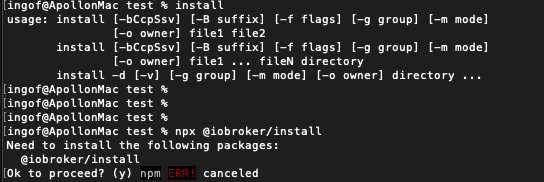
          Bildschirmfoto 2022-05-27 um 22.26.17.png

          Also Deine Ausgaben kommen auf jeden Fall vom normalen Befehl "Install" ... aber der soollte hier gar nicht aufgerufen werden.

          Was sagt npx --version bei dir?

          Bei mit 8.1.2

          Beitrag hat geholfen? Votet rechts unten im Beitrag :-) https://paypal.me/Apollon77 / https://github.com/sponsors/Apollon77

          • Debug-Log für Instanz einschalten? Admin -> Instanzen -> Expertenmodus -> Instanz aufklappen - Loglevel ändern
          • Logfiles auf Platte /opt/iobroker/log/… nutzen, Admin schneidet Zeilen ab
          AsgothianA 1 Reply Last reply
          0
          • apollon77A apollon77

            @asgothian sagte in Neue (zusätzliche) einheitliche Installer/Fix-Kommandos:

            Ich hab OSX 12.4.

            Ich auch ...

            Bildschirmfoto 2022-05-27 um 22.26.17.png

            Also Deine Ausgaben kommen auf jeden Fall vom normalen Befehl "Install" ... aber der soollte hier gar nicht aufgerufen werden.

            Was sagt npx --version bei dir?

            Bei mit 8.1.2

            AsgothianA Offline
            AsgothianA Offline
            Asgothian
            Developer
            wrote on last edited by
            #5

            @apollon77

            ae@Grayskin ioBroker % install
            usage: install [-bCcpSsv] [-B suffix] [-f flags] [-g group] [-m mode]
                           [-o owner] file1 file2
                   install [-bCcpSsv] [-B suffix] [-f flags] [-g group] [-m mode]
                           [-o owner] file1 ... fileN directory
                   install -d [-v] [-g group] [-m mode] [-o owner] directory ...
            ae@Grayskin ioBroker % npx @iobroker/install
            usage: install [-bCcpSsv] [-B suffix] [-f flags] [-g group] [-m mode]
                           [-o owner] file1 file2
                   install [-bCcpSsv] [-B suffix] [-f flags] [-g group] [-m mode]
                           [-o owner] file1 ... fileN directory
                   install -d [-v] [-g group] [-m mode] [-o owner] directory ...
            ae@Grayskin ioBroker % node -v
            v14.19.3
            ae@Grayskin ioBroker % npm -v
            6.14.17
            

            ioBroker auf RPi4 - Hardware soweit wie möglich via Zigbee.
            "Shit don't work" ist keine Fehlermeldung, sondern ein Fluch.

            apollon77A 1 Reply Last reply
            0
            • AsgothianA Asgothian

              @apollon77

              ae@Grayskin ioBroker % install
              usage: install [-bCcpSsv] [-B suffix] [-f flags] [-g group] [-m mode]
                             [-o owner] file1 file2
                     install [-bCcpSsv] [-B suffix] [-f flags] [-g group] [-m mode]
                             [-o owner] file1 ... fileN directory
                     install -d [-v] [-g group] [-m mode] [-o owner] directory ...
              ae@Grayskin ioBroker % npx @iobroker/install
              usage: install [-bCcpSsv] [-B suffix] [-f flags] [-g group] [-m mode]
                             [-o owner] file1 file2
                     install [-bCcpSsv] [-B suffix] [-f flags] [-g group] [-m mode]
                             [-o owner] file1 ... fileN directory
                     install -d [-v] [-g group] [-m mode] [-o owner] directory ...
              ae@Grayskin ioBroker % node -v
              v14.19.3
              ae@Grayskin ioBroker % npm -v
              6.14.17
              
              apollon77A Offline
              apollon77A Offline
              apollon77
              wrote on last edited by
              #6

              @asgothian Und was sagt "npx --version"??

              Beitrag hat geholfen? Votet rechts unten im Beitrag :-) https://paypal.me/Apollon77 / https://github.com/sponsors/Apollon77

              • Debug-Log für Instanz einschalten? Admin -> Instanzen -> Expertenmodus -> Instanz aufklappen - Loglevel ändern
              • Logfiles auf Platte /opt/iobroker/log/… nutzen, Admin schneidet Zeilen ab
              AsgothianA HomoranH 2 Replies Last reply
              0
              • apollon77A apollon77

                @asgothian Und was sagt "npx --version"??

                AsgothianA Offline
                AsgothianA Offline
                Asgothian
                Developer
                wrote on last edited by
                #7

                @apollon77 6.4.17

                ioBroker auf RPi4 - Hardware soweit wie möglich via Zigbee.
                "Shit don't work" ist keine Fehlermeldung, sondern ein Fluch.

                1 Reply Last reply
                0
                • apollon77A apollon77

                  @asgothian Und was sagt "npx --version"??

                  HomoranH Do not disturb
                  HomoranH Do not disturb
                  Homoran
                  Global Moderator Administrators
                  wrote on last edited by
                  #8

                  @apollon77 sagte in Neue (zusätzliche) einheitliche Installer/Fix-Kommandos:

                  npx --version"?

                  @asgothian sagte in Neue (zusätzliche) einheitliche Installer/Fix-Kommandos:

                  npm -v

                  kein Support per PN! - Fragen im Forum stellen - es gibt fast nichts, was nicht auch für andere interessant ist.

                  Benutzt das Voting rechts unten im Beitrag wenn er euch geholfen hat.

                  der Installationsfixer: curl -fsL https://iobroker.net/fix.sh | bash -

                  AsgothianA 1 Reply Last reply
                  0
                  • HomoranH Homoran

                    @apollon77 sagte in Neue (zusätzliche) einheitliche Installer/Fix-Kommandos:

                    npx --version"?

                    @asgothian sagte in Neue (zusätzliche) einheitliche Installer/Fix-Kommandos:

                    npm -v

                    AsgothianA Offline
                    AsgothianA Offline
                    Asgothian
                    Developer
                    wrote on last edited by
                    #9

                    @homoran beides gibt das gleiche:

                    ae@Grayskin ioBroker % node -v
                    v14.19.3
                    ae@Grayskin ioBroker % npm -v
                    6.14.17
                    ae@Grayskin ioBroker % npx --version
                    6.14.17
                    ae@Grayskin ioBroker % 
                    

                    ioBroker auf RPi4 - Hardware soweit wie möglich via Zigbee.
                    "Shit don't work" ist keine Fehlermeldung, sondern ein Fluch.

                    1 Reply Last reply
                    0
                    • apollon77A Offline
                      apollon77A Offline
                      apollon77
                      wrote on last edited by
                      #10

                      Interessant ... das Sieht fast so aus als ob es nur mit npm 8 funktioniert :-(

                      Beitrag hat geholfen? Votet rechts unten im Beitrag :-) https://paypal.me/Apollon77 / https://github.com/sponsors/Apollon77

                      • Debug-Log für Instanz einschalten? Admin -> Instanzen -> Expertenmodus -> Instanz aufklappen - Loglevel ändern
                      • Logfiles auf Platte /opt/iobroker/log/… nutzen, Admin schneidet Zeilen ab
                      AsgothianA Thomas BraunT 2 Replies Last reply
                      0
                      • apollon77A apollon77

                        Interessant ... das Sieht fast so aus als ob es nur mit npm 8 funktioniert :-(

                        AsgothianA Offline
                        AsgothianA Offline
                        Asgothian
                        Developer
                        wrote on last edited by
                        #11

                        @apollon77 probier ich morgen aus. Heute ist mir das zu spät.

                        A.

                        ioBroker auf RPi4 - Hardware soweit wie möglich via Zigbee.
                        "Shit don't work" ist keine Fehlermeldung, sondern ein Fluch.

                        1 Reply Last reply
                        1
                        • apollon77A apollon77

                          Interessant ... das Sieht fast so aus als ob es nur mit npm 8 funktioniert :-(

                          Thomas BraunT Online
                          Thomas BraunT Online
                          Thomas Braun
                          Most Active
                          wrote on last edited by
                          #12

                          @apollon77

                          Dann muss wohl nodejs@16 zur 'empfohlenen Version' deklariert werden. Das kommt ja mit npm@8 daher. :-D

                          Linux-Werkzeugkasten:
                          https://forum.iobroker.net/topic/42952/der-kleine-iobroker-linux-werkzeugkasten
                          NodeJS Fixer Skript:
                          https://forum.iobroker.net/topic/68035/iob-node-fix-skript
                          iob_diag: curl -sLf -o diag.sh https://iobroker.net/diag.sh && bash diag.sh

                          apollon77A 1 Reply Last reply
                          0
                          • Thomas BraunT Thomas Braun

                            @apollon77

                            Dann muss wohl nodejs@16 zur 'empfohlenen Version' deklariert werden. Das kommt ja mit npm@8 daher. :-D

                            apollon77A Offline
                            apollon77A Offline
                            apollon77
                            wrote on last edited by
                            #13

                            @thomas-braun Ich frage mich dasnn wie das unter windows mit der Nodejs 14 funktioniert die Bluefox installiert ... finden wir raus

                            Beitrag hat geholfen? Votet rechts unten im Beitrag :-) https://paypal.me/Apollon77 / https://github.com/sponsors/Apollon77

                            • Debug-Log für Instanz einschalten? Admin -> Instanzen -> Expertenmodus -> Instanz aufklappen - Loglevel ändern
                            • Logfiles auf Platte /opt/iobroker/log/… nutzen, Admin schneidet Zeilen ab
                            1 Reply Last reply
                            0
                            • apollon77A Offline
                              apollon77A Offline
                              apollon77
                              wrote on last edited by
                              #14

                              Also interessanterweise stellt sich wohl heraus das an der CLI der npx Befehl erst ab npm 8 tut ... aber unter Windows ausgeführt vom EXE installer tut es wie es soll .... Das verstehe wer will ;-)

                              Beitrag hat geholfen? Votet rechts unten im Beitrag :-) https://paypal.me/Apollon77 / https://github.com/sponsors/Apollon77

                              • Debug-Log für Instanz einschalten? Admin -> Instanzen -> Expertenmodus -> Instanz aufklappen - Loglevel ändern
                              • Logfiles auf Platte /opt/iobroker/log/… nutzen, Admin schneidet Zeilen ab
                              AsgothianA 1 Reply Last reply
                              0
                              • apollon77A apollon77

                                Also interessanterweise stellt sich wohl heraus das an der CLI der npx Befehl erst ab npm 8 tut ... aber unter Windows ausgeführt vom EXE installer tut es wie es soll .... Das verstehe wer will ;-)

                                AsgothianA Offline
                                AsgothianA Offline
                                Asgothian
                                Developer
                                wrote on last edited by
                                #15

                                @apollon77 so..ich bin einen Schritt weiter - aber nur einen.

                                Nach Update auf node 16 und nem 8 ist die Installationdurchgelaufen - der ioBroker läuft aber nicht. Als Meldung kommt

                                ae@Grayskin log % iobroker start
                                Load failed: 5: Input/output error
                                Try running `launchctl bootstrap` as root for richer errors.


                                in launchctl list taucht der ioBroker auch nicht auf.

                                ioBroker auf RPi4 - Hardware soweit wie möglich via Zigbee.
                                "Shit don't work" ist keine Fehlermeldung, sondern ein Fluch.

                                apollon77A 1 Reply Last reply
                                0
                                • AsgothianA Asgothian

                                  @apollon77 so..ich bin einen Schritt weiter - aber nur einen.

                                  Nach Update auf node 16 und nem 8 ist die Installationdurchgelaufen - der ioBroker läuft aber nicht. Als Meldung kommt

                                  ae@Grayskin log % iobroker start
                                  Load failed: 5: Input/output error
                                  Try running `launchctl bootstrap` as root for richer errors.


                                  in launchctl list taucht der ioBroker auch nicht auf.

                                  apollon77A Offline
                                  apollon77A Offline
                                  apollon77
                                  wrote on last edited by
                                  #16

                                  @asgothian Haste die Install ausgabe? Weil am Ende ruft das npx nur das curl kommando auf :-)

                                  Beitrag hat geholfen? Votet rechts unten im Beitrag :-) https://paypal.me/Apollon77 / https://github.com/sponsors/Apollon77

                                  • Debug-Log für Instanz einschalten? Admin -> Instanzen -> Expertenmodus -> Instanz aufklappen - Loglevel ändern
                                  • Logfiles auf Platte /opt/iobroker/log/… nutzen, Admin schneidet Zeilen ab
                                  AsgothianA 1 Reply Last reply
                                  0
                                  • apollon77A apollon77

                                    @asgothian Haste die Install ausgabe? Weil am Ende ruft das npx nur das curl kommando auf :-)

                                    AsgothianA Offline
                                    AsgothianA Offline
                                    Asgothian
                                    Developer
                                    wrote on last edited by
                                    #17

                                    @apollon77 leider nein. Soweit ich erinnere kam erst eine Meldung über ein fehlendes "homebrew". welches nicht installiert war - danach gingen die Meldungen normal durch. Gibt es eine Log Datei wo ich die nachlesen kann ?

                                    ioBroker auf RPi4 - Hardware soweit wie möglich via Zigbee.
                                    "Shit don't work" ist keine Fehlermeldung, sondern ein Fluch.

                                    apollon77A 1 Reply Last reply
                                    0
                                    • AsgothianA Asgothian

                                      @apollon77 leider nein. Soweit ich erinnere kam erst eine Meldung über ein fehlendes "homebrew". welches nicht installiert war - danach gingen die Meldungen normal durch. Gibt es eine Log Datei wo ich die nachlesen kann ?

                                      apollon77A Offline
                                      apollon77A Offline
                                      apollon77
                                      wrote on last edited by
                                      #18

                                      @asgothian sagte in Neue (zusätzliche) einheitliche Installer/Fix-Kommandos:

                                      Gibt es eine Log Datei wo ich die nachlesen kann ?

                                      Nope, aber für mich klingt das gerade eher nach eineim eigenen GitHub issue weil scheinbar macos "curl script install" nciht mehr tut ... also hier wäre es das beste mal mit dem curl zu versuchen ... wenn das tut und nur npx nicht dann ists was anderes. ;üssen rausfinden wo der Schuh drückt

                                      Beitrag hat geholfen? Votet rechts unten im Beitrag :-) https://paypal.me/Apollon77 / https://github.com/sponsors/Apollon77

                                      • Debug-Log für Instanz einschalten? Admin -> Instanzen -> Expertenmodus -> Instanz aufklappen - Loglevel ändern
                                      • Logfiles auf Platte /opt/iobroker/log/… nutzen, Admin schneidet Zeilen ab
                                      AsgothianA 2 Replies Last reply
                                      0
                                      • apollon77A apollon77

                                        @asgothian sagte in Neue (zusätzliche) einheitliche Installer/Fix-Kommandos:

                                        Gibt es eine Log Datei wo ich die nachlesen kann ?

                                        Nope, aber für mich klingt das gerade eher nach eineim eigenen GitHub issue weil scheinbar macos "curl script install" nciht mehr tut ... also hier wäre es das beste mal mit dem curl zu versuchen ... wenn das tut und nur npx nicht dann ists was anderes. ;üssen rausfinden wo der Schuh drückt

                                        AsgothianA Offline
                                        AsgothianA Offline
                                        Asgothian
                                        Developer
                                        wrote on last edited by Asgothian
                                        #19

                                        @apollon77 ich schau mal was das curl Skript macht. Gibt es debug flags für mehr Meldungen die ich setzen kann ?

                                        ioBroker auf RPi4 - Hardware soweit wie möglich via Zigbee.
                                        "Shit don't work" ist keine Fehlermeldung, sondern ein Fluch.

                                        1 Reply Last reply
                                        0
                                        • apollon77A apollon77

                                          @asgothian sagte in Neue (zusätzliche) einheitliche Installer/Fix-Kommandos:

                                          Gibt es eine Log Datei wo ich die nachlesen kann ?

                                          Nope, aber für mich klingt das gerade eher nach eineim eigenen GitHub issue weil scheinbar macos "curl script install" nciht mehr tut ... also hier wäre es das beste mal mit dem curl zu versuchen ... wenn das tut und nur npx nicht dann ists was anderes. ;üssen rausfinden wo der Schuh drückt

                                          AsgothianA Offline
                                          AsgothianA Offline
                                          Asgothian
                                          Developer
                                          wrote on last edited by
                                          #20

                                          @apollon77

                                          ae@Grayskin ioBroker % curl -sLf https://iobroker.net/install.sh | bash -
                                          library: loaded
                                          Library version=2022-02-10
                                          
                                          ==========================================================================
                                          
                                              Welcome to the ioBroker installer!
                                              Installer version: 2022-02-13
                                              
                                              You might need to enter your password a couple of times.
                                          
                                          ==========================================================================
                                          
                                          
                                          ==========================================================================
                                              Installing prerequisites (1/4)
                                          ==========================================================================
                                          
                                          Password:
                                          sudo: brew: command not found
                                          Changing npm registry to https://registry.npmjs.org
                                          Since brew is not installed, frequently-used dependencies could not be installed.
                                          Before installing some adapters, you might have to install some packages yourself.
                                          Please check the adapter manuals before installing them.
                                          
                                          ==========================================================================
                                              Creating ioBroker user and directory (2/4)
                                          ==========================================================================
                                          
                                          Directory /usr/local/iobroker created
                                          
                                          ==========================================================================
                                              Installing ioBroker (3/4)
                                          ==========================================================================
                                          
                                          
                                          ==========================================================================
                                              Finalizing installation (4/4)
                                          ==========================================================================
                                          
                                          Enabling autostart...
                                          bash: line 1271: /Users/ae/Library/LaunchAgents/org.ioBroker.LaunchAtLogin.plist: No such file or directory
                                          Load failed: 5: Input/output error
                                          Try running `launchctl bootstrap` as root for richer errors.
                                          Autostart enabled!
                                          mkdir: /root: Read-only file system
                                          touch: /root/.bashrc: No such file or directory
                                          
                                          ==========================================================================
                                          
                                              ioBroker was installed successfully
                                              Open http://192.168.101.101:8081 in a browser and start configuring!
                                          
                                          ==========================================================================
                                          
                                          
                                          You need to re-login before doing anything else on the console!
                                          
                                          ae@Grayskin ioBroker % 


                                          Anscheinend fehlt ein Verzeichnis bei einem neu installierten macOS 12.5

                                          A.

                                          ioBroker auf RPi4 - Hardware soweit wie möglich via Zigbee.
                                          "Shit don't work" ist keine Fehlermeldung, sondern ein Fluch.

                                          apollon77A 1 Reply Last reply
                                          0
                                          Reply
                                          • Reply as topic
                                          Log in to reply
                                          • Oldest to Newest
                                          • Newest to Oldest
                                          • Most Votes


                                          Support us

                                          ioBroker
                                          Community Adapters
                                          Donate
                                          FAQ Cloud / IOT
                                          HowTo: Node.js-Update
                                          HowTo: Backup/Restore
                                          Downloads
                                          BLOG

                                          523

                                          Online

                                          32.6k

                                          Users

                                          82.2k

                                          Topics

                                          1.3m

                                          Posts
                                          Community
                                          Impressum | Datenschutz-Bestimmungen | Nutzungsbedingungen | Einwilligungseinstellungen
                                          ioBroker Community 2014-2025
                                          logo
                                          • Login

                                          • Don't have an account? Register

                                          • Login or register to search.
                                          • First post
                                            Last post
                                          0
                                          • Home
                                          • Recent
                                          • Tags
                                          • Unread 0
                                          • Categories
                                          • Unreplied
                                          • Popular
                                          • GitHub
                                          • Docu
                                          • Hilfe