




Test ioBroker unter Windows installieren - 2022 Edition
-
Einen guten Zusammen - da heute scheiß Wetter war, wollte ich mal aus Spaß eine Win Installation nach alt her gebrachter Weise ausführen. Da funktioniert ja so gut wie nichts mehr, wenn man es dann auf den aktuellen Stand bringen will.
Durch Zufall wurde ich von @BananaJoe auf diesen Thread aufmerksam gemacht. Darum steige ich jetzt hier auch mal mit ein - leider mit nicht guten News, denn irgendwie sieht es bei mir ähnlich aus, wie bei den meisten anderen auch.
In der Windows Installation gibt es unter c:/ProgrammFiles/nodejs ein Verzeichnis mit der nodejs Version 16.16.0 / npm 8.11.0
Das BS sieht wie folgt aus: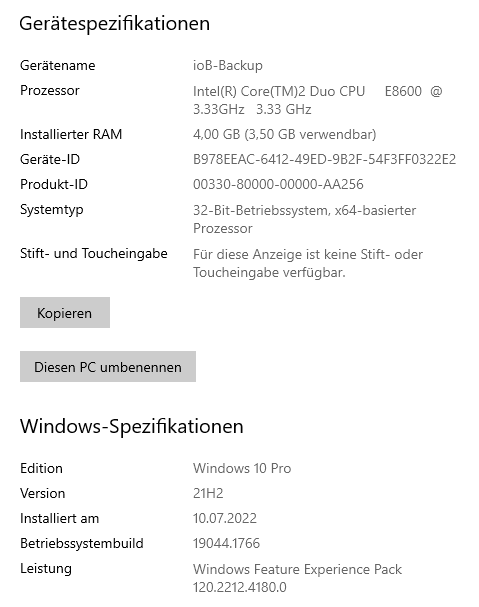
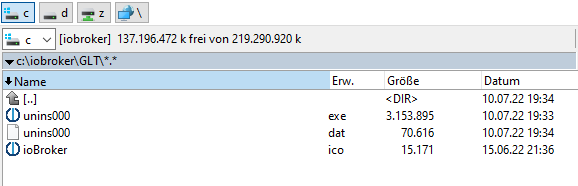
Die Installer Datei wird als Admin ausgeführt und liefert folgenden "Bildchen" während des Install Prozess. Im Ordner tauchen nur die drei Dateien auf (siehe Bild weiter unten). Im Windows Menü gibt es zwar einen neuen Eintrag, aber die .bat Dateien, welche sich ja ebenfalls in dem ioBroker Ordner befinden sollten, wurden nicht angelegt und sind somit auch nicht startbar.
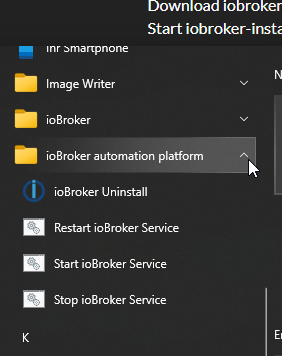
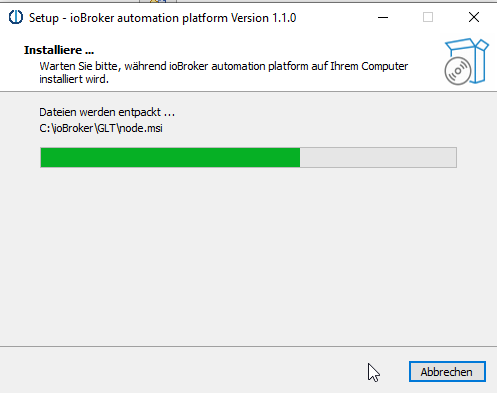
Während der Installation poppt im Millisekundenbereich ein Eingabefenster auf, was schon eine Kunst war als Screenshot einzufangen. Mehr kann ich zu dem Fenster leider nicht beitragen.
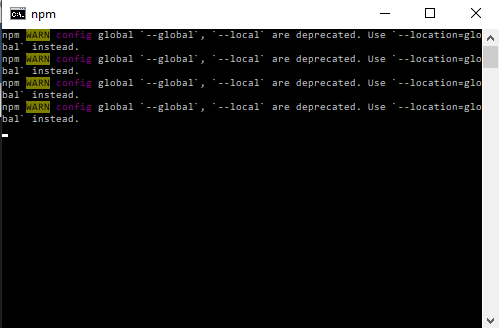
Als Ergebnis des Install Prozess folgt dann dieses Fenster - alles in allem würde ich sagen, da funktioniert bis jetzt nicht viel.
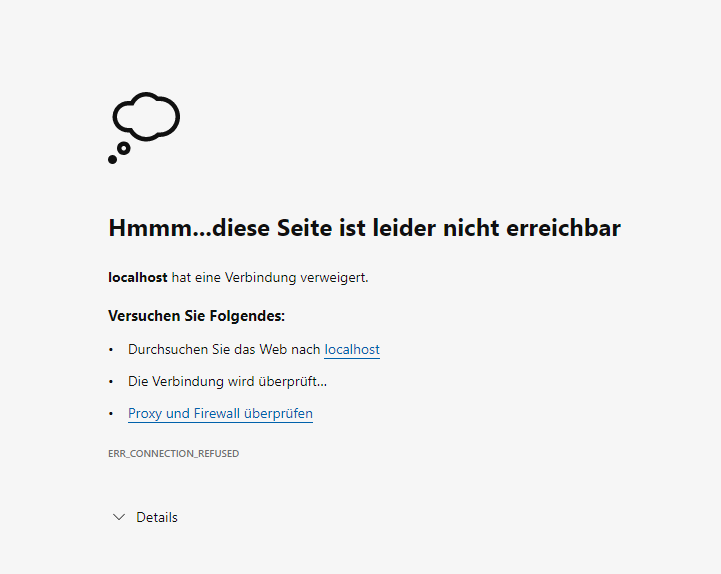
@jb_sullivan
Also bei mir hat geholfen einfach nochmal das setup drüber zu jagen, beim zweiten mal startete die Installationsroutine dann auch und es wurde wie gewohnt alles in c:\iobroker installiert.Was ich aber noch nicht hingebracht habe ist eine Migration einer vorhandenen Windows Installation.
-
Auch die manuelle Installation via Kommandozeile funktioniert nicht
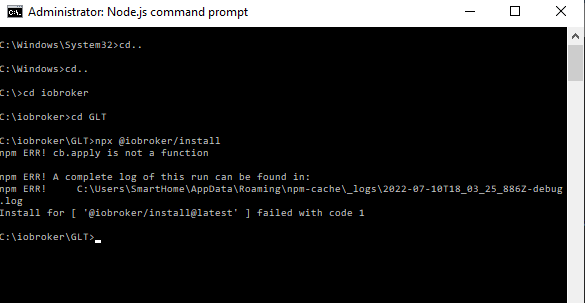
0 info it worked if it ends with ok 1 warn npm npm does not support Node.js v16.15.1 2 warn npm You should probably upgrade to a newer version of node as we 3 warn npm can't make any promises that npm will work with this version. 4 warn npm Supported releases of Node.js are the latest release of 6, 8, 9, 10, 11, 12. 5 warn npm You can find the latest version at https://nodejs.org/ 6 verbose cli [ 6 verbose cli 'C:\\Program Files\\nodejs\\node.exe', 6 verbose cli 'C:\\Users\\SmartHome\\AppData\\Roaming\\npm\\node_modules\\npm\\bin\\npm-cli.js', 6 verbose cli 'install', 6 verbose cli '@iobroker/install@latest', 6 verbose cli '--global', 6 verbose cli '--prefix', 6 verbose cli 'C:\\Users\\SmartHome\\AppData\\Roaming\\npm-cache\\_npx\\5484', 6 verbose cli '--loglevel', 6 verbose cli 'error', 6 verbose cli '--json' 6 verbose cli ] 7 info using npm@6.9.0 8 info using node@v16.15.1 9 verbose npm-session 0a4d3002ca044574 10 silly install loadCurrentTree 11 silly install readGlobalPackageData 12 http fetch GET 304 https://registry.npmjs.org/@iobroker%2finstall 1692ms (from cache) 13 silly pacote tag manifest for @iobroker/install@latest fetched in 1713ms 14 verbose stack TypeError: cb.apply is not a function 14 verbose stack at C:\Users\SmartHome\AppData\Roaming\npm\node_modules\npm\node_modules\graceful-fs\polyfills.js:285:20 14 verbose stack at FSReqCallback.oncomplete (node:fs:199:5) 15 verbose cwd C:\iobroker\GLT 16 verbose Windows_NT 10.0.19044 17 verbose argv "C:\\Program Files\\nodejs\\node.exe" "C:\\Users\\SmartHome\\AppData\\Roaming\\npm\\node_modules\\npm\\bin\\npm-cli.js" "install" "@iobroker/install@latest" "--global" "--prefix" "C:\\Users\\SmartHome\\AppData\\Roaming\\npm-cache\\_npx\\5484" "--loglevel" "error" "--json" 18 verbose node v16.15.1 19 verbose npm v6.9.0 20 error cb.apply is not a function 21 verbose exit [ 1, true ] -
Hallo
Wegen einem SSD-Crash auf meinem Proxmox-Server musste ich jetzt ioB auf dem Win-Rechner installieren.
Funktionierte auch perfekt.Dann Backitup installiert und das gestrige Backup einspielen wollen.
Es kam die Meldung, dass ein neuer Tab mit den Logs des Backup aufgemacht wird.
Tab wurde keiner geöffnet und ioB ist seit 10 Minuten nicht mehr erreichbar.Muss ich vor dem Einspielen des Backups auf Beta wechseln (war in der urspr. Inst. auf Beta)?
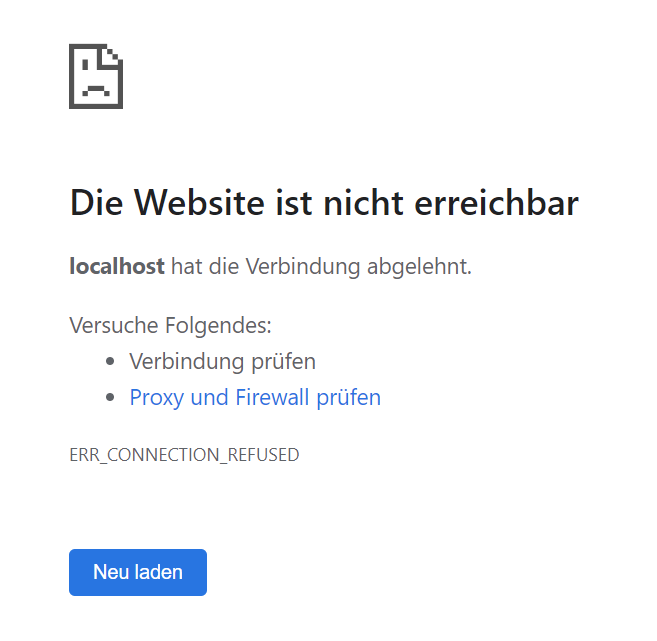
Service läuft (war gerade beendet)

Edit:
hier ein neuer Versuch.
Beim Start des Restores wird der Dienst (iobroker.exe) kurz darauf beendet.
Nach 10 Min. hab ich ihn wieder händisch gestartet. ioB startet dann wieder, aber es wirde nichts vom Backup wiederhergestellt. :(2022-07-16 17:36:39.577 - info: host.PC-Nega iobroker.js-controller version 4.0.23 js-controller starting 2022-07-16 17:36:39.580 - info: host.PC-Nega Copyright (c) 2014-2022 bluefox, 2014 hobbyquaker 2022-07-16 17:36:39.580 - info: host.PC-Nega hostname: PC-Nega, node: v16.15.1 2022-07-16 17:36:39.580 - info: host.PC-Nega ip addresses: fe80::a923:aa5b:39d6:dd7f 10.0.1.31 fe80::8825:49e9:fafd:205f 172.19.96.1 2022-07-16 17:36:39.659 - info: host.PC-Nega connected to Objects and States 2022-07-16 17:36:39.665 - info: host.PC-Nega Node.js version has changed from unknown to 16.15.1 2022-07-16 17:36:39.677 - info: host.PC-Nega added notifications configuration of host 2022-07-16 17:36:39.814 - info: host.PC-Nega 2 instances found 2022-07-16 17:36:39.816 - info: host.PC-Nega starting 2 instances 2022-07-16 17:36:39.838 - info: host.PC-Nega instance system.adapter.admin.0 started with pid 2652 2022-07-16 17:36:40.670 - info: admin.0 (2652) starting. Version 5.3.8 in C:/ioBroker/node_modules/iobroker.admin, node: v16.15.1, js-controller: 4.0.23 2022-07-16 17:36:40.678 - info: admin.0 (2652) requesting all states 2022-07-16 17:36:40.679 - info: admin.0 (2652) requesting all objects 2022-07-16 17:36:40.704 - info: admin.0 (2652) received all objects 2022-07-16 17:36:40.736 - info: admin.0 (2652) http server listening on port 8081 2022-07-16 17:36:40.736 - info: admin.0 (2652) Use link "http://localhost:8081" to configure. 2022-07-16 17:36:40.756 - warn: admin.0 (2652) Repository cannot be read: Active repo - stable 2022-07-16 17:36:40.756 - warn: admin.0 (2652) Active repository "stable cannot be read 2022-07-16 17:36:42.784 - info: host.PC-Nega Updating repository "stable" under "http://download.iobroker.net/sources-dist.json" 2022-07-16 17:36:43.846 - info: host.PC-Nega instance system.adapter.discovery.0 started with pid 1248 2022-07-16 17:36:44.583 - info: discovery.0 (1248) starting. Version 3.0.3 in C:/ioBroker/node_modules/iobroker.discovery, node: v16.15.1, js-controller: 4.0.23 2022-07-16 17:37:58.721 - info: host.PC-Nega stopInstance system.adapter.admin.0 (force=false, process=true) 2022-07-16 17:37:58.724 - info: admin.0 (2652) Got terminate signal TERMINATE_YOURSELF 2022-07-16 17:37:58.724 - info: host.PC-Nega stopInstance system.adapter.admin.0 send kill signal 2022-07-16 17:37:58.725 - info: admin.0 (2652) terminating http server on port 8081 2022-07-16 17:37:58.725 - info: admin.0 (2652) terminating 2022-07-16 17:37:58.726 - info: admin.0 (2652) Terminated (ADAPTER_REQUESTED_TERMINATION): Without reason 2022-07-16 17:37:59.248 - info: host.PC-Nega instance system.adapter.admin.0 terminated with code 11 (ADAPTER_REQUESTED_TERMINATION) 2022-07-16 17:38:01.748 - info: host.PC-Nega instance system.adapter.admin.0 started with pid 15032 2022-07-16 17:38:02.624 - info: admin.0 (15032) starting. Version 5.3.8 in C:/ioBroker/node_modules/iobroker.admin, node: v16.15.1, js-controller: 4.0.23 2022-07-16 17:38:02.656 - info: admin.0 (15032) requesting all states 2022-07-16 17:38:02.656 - info: admin.0 (15032) requesting all objects 2022-07-16 17:38:02.786 - info: admin.0 (15032) received all objects 2022-07-16 17:38:02.844 - info: admin.0 (15032) https server listening on port 8081 2022-07-16 17:38:02.844 - info: admin.0 (15032) Use link "https://localhost:8081" to configure. 2022-07-16 17:38:07.368 - info: admin.0 (15032) failed connection to socket.io from ::1: 2022-07-16 17:38:07.370 - error: admin.0 (15032) Error: "error" 2022-07-16 17:38:54.348 - info: host.PC-Nega stopInstance system.adapter.admin.0 (force=false, process=true) 2022-07-16 17:38:54.351 - info: host.PC-Nega stopInstance system.adapter.admin.0 send kill signal 2022-07-16 17:38:54.383 - info: host.PC-Nega stopInstance system.adapter.discovery.0 (force=false, process=true) 2022-07-16 17:38:54.384 - info: discovery.0 (1248) Got terminate signal TERMINATE_YOURSELF 2022-07-16 17:38:54.385 - info: discovery.0 (1248) terminating 2022-07-16 17:38:54.385 - info: discovery.0 (1248) Terminated (ADAPTER_REQUESTED_TERMINATION): Without reason 2022-07-16 17:38:54.387 - info: host.PC-Nega stopInstance system.adapter.discovery.0 send kill signal 2022-07-16 17:38:54.390 - info: admin.0 (15032) Got terminate signal TERMINATE_YOURSELF 2022-07-16 17:38:54.393 - info: admin.0 (15032) terminating https server on port 8081 2022-07-16 17:38:54.394 - info: admin.0 (15032) terminating 2022-07-16 17:38:54.394 - info: admin.0 (15032) Terminated (ADAPTER_REQUESTED_TERMINATION): Without reason 2022-07-16 17:38:55.015 - info: host.PC-Nega instance system.adapter.discovery.0 terminated with code 11 (ADAPTER_REQUESTED_TERMINATION) 2022-07-16 17:38:55.045 - info: host.PC-Nega instance system.adapter.admin.0 terminated with code 11 (ADAPTER_REQUESTED_TERMINATION) 2022-07-16 17:38:57.376 - info: host.PC-Nega instance system.adapter.admin.0 started with pid 27544 2022-07-16 17:38:57.404 - info: host.PC-Nega instance system.adapter.discovery.0 started with pid 14464 2022-07-16 17:38:58.174 - info: discovery.0 (14464) starting. Version 3.0.3 in C:/ioBroker/node_modules/iobroker.discovery, node: v16.15.1, js-controller: 4.0.23 2022-07-16 17:38:58.270 - info: admin.0 (27544) starting. Version 5.3.8 in C:/ioBroker/node_modules/iobroker.admin, node: v16.15.1, js-controller: 4.0.23 2022-07-16 17:38:58.302 - info: admin.0 (27544) requesting all states 2022-07-16 17:38:58.303 - info: admin.0 (27544) requesting all objects 2022-07-16 17:38:58.428 - info: admin.0 (27544) received all objects 2022-07-16 17:38:58.465 - warn: admin.0 (27544) Repository cannot be read: Active repo - beta 2022-07-16 17:38:58.466 - warn: admin.0 (27544) Active repository "beta cannot be read 2022-07-16 17:38:58.479 - info: admin.0 (27544) https server listening on port 8081 2022-07-16 17:38:58.479 - info: admin.0 (27544) Use link "https://localhost:8081" to configure. 2022-07-16 17:39:23.233 - info: host.PC-Nega Updating repository "beta" under "http://download.iobroker.net/sources-dist-latest.json" 2022-07-16 17:40:08.058 - info: host.PC-Nega iobroker add backitup --host PC-Nega 2022-07-16 17:40:10.089 - error: host.PC-Nega iobroker npm WARN config global `--global`, `--local` are deprecated. Use `--location=global` instead. 2022-07-16 17:40:10.090 - info: host.PC-Nega iobroker NPM version: 8.11.0 2022-07-16 17:40:10.090 - info: host.PC-Nega iobroker Installing iobroker.backitup@2.4.10... (System call) 2022-07-16 17:40:17.204 - info: host.PC-Nega iobroker 2022-07-16 17:40:17.205 - info: host.PC-Nega iobroker added 79 packages, and audited 520 packages in 6s 39 packages are looking for funding run `npm fund` for details 2022-07-16 17:40:17.216 - info: host.PC-Nega iobroker 12 vulnerabilities (3 low, 7 moderate, 1 high, 1 critical) To address issues that do not require attention, run: npm audit fix 2022-07-16 17:40:17.217 - info: host.PC-Nega iobroker To address all issues (including breaking changes), run: npm audit fix --force Run `npm audit` for details. 2022-07-16 17:40:17.241 - info: host.PC-Nega iobroker host.PC-Nega install adapter backitup 2022-07-16 17:40:17.258 - info: host.PC-Nega iobroker upload [10] backitup.admin C:/ioBroker/node_modules/iobroker.backitup/admin/adapter-settings.js adapter-settings.js application/javascript 2022-07-16 17:40:17.269 - info: host.PC-Nega iobroker upload [9] backitup.admin C:/ioBroker/node_modules/iobroker.backitup/admin/backitup.png backitup.png image/png 2022-07-16 17:40:17.273 - info: host.PC-Nega iobroker upload [8] backitup.admin C:/ioBroker/node_modules/iobroker.backitup/admin/backitup.svg backitup.svg image/svg+xml 2022-07-16 17:40:17.276 - info: host.PC-Nega iobroker upload [7] backitup.admin C:/ioBroker/node_modules/iobroker.backitup/admin/index.html index.html text/html 2022-07-16 17:40:17.280 - info: host.PC-Nega iobroker upload [6] backitup.admin C:/ioBroker/node_modules/iobroker.backitup/admin/index_m.html index_m.html text/html 2022-07-16 17:40:17.284 - info: host.PC-Nega iobroker upload [5] backitup.admin C:/ioBroker/node_modules/iobroker.backitup/admin/index_m.js index_m.js application/javascript 2022-07-16 17:40:17.288 - info: host.PC-Nega iobroker upload [4] backitup.admin C:/ioBroker/node_modules/iobroker.backitup/admin/style.css style.css text/css 2022-07-16 17:40:17.291 - info: host.PC-Nega iobroker upload [3] backitup.admin C:/ioBroker/node_modules/iobroker.backitup/admin/tab_m.css tab_m.css text/css 2022-07-16 17:40:17.295 - info: host.PC-Nega iobroker upload [2] backitup.admin C:/ioBroker/node_modules/iobroker.backitup/admin/tab_m.html tab_m.html text/html 2022-07-16 17:40:17.298 - info: host.PC-Nega iobroker upload [1] backitup.admin C:/ioBroker/node_modules/iobroker.backitup/admin/tab_m.js tab_m.js application/javascript 2022-07-16 17:40:17.301 - info: host.PC-Nega iobroker upload [0] backitup.admin C:/ioBroker/node_modules/iobroker.backitup/admin/words.js words.js application/javascript 2022-07-16 17:40:17.315 - info: host.PC-Nega iobroker host.PC-Nega object system.adapter.backitup created/updated 2022-07-16 17:40:17.329 - info: host.PC-Nega iobroker host.PC-Nega create instance backitup 2022-07-16 17:40:17.333 - info: host.PC-Nega iobroker host.PC-Nega object system.adapter.backitup.0.alive created 2022-07-16 17:40:17.335 - info: host.PC-Nega iobroker host.PC-Nega object system.adapter.backitup.0.connected created 2022-07-16 17:40:17.337 - info: host.PC-Nega iobroker host.PC-Nega object system.adapter.backitup.0.compactMode created 2022-07-16 17:40:17.339 - info: host.PC-Nega iobroker host.PC-Nega object system.adapter.backitup.0.cpu created 2022-07-16 17:40:17.341 - info: host.PC-Nega iobroker host.PC-Nega object system.adapter.backitup.0.cputime created 2022-07-16 17:40:17.343 - info: host.PC-Nega iobroker host.PC-Nega object system.adapter.backitup.0.memHeapUsed created 2022-07-16 17:40:17.345 - info: host.PC-Nega iobroker host.PC-Nega object system.adapter.backitup.0.memHeapTotal created 2022-07-16 17:40:17.347 - info: host.PC-Nega iobroker host.PC-Nega object system.adapter.backitup.0.memRss created 2022-07-16 17:40:17.349 - info: host.PC-Nega iobroker host.PC-Nega object system.adapter.backitup.0.uptime created 2022-07-16 17:40:17.351 - info: host.PC-Nega iobroker host.PC-Nega object system.adapter.backitup.0.inputCount created 2022-07-16 17:40:17.352 - info: host.PC-Nega iobroker host.PC-Nega object system.adapter.backitup.0.outputCount created 2022-07-16 17:40:17.357 - info: host.PC-Nega iobroker host.PC-Nega object system.adapter.backitup.0.eventLoopLag created 2022-07-16 17:40:17.359 - info: host.PC-Nega iobroker host.PC-Nega object system.adapter.backitup.0.sigKill created 2022-07-16 17:40:17.361 - info: host.PC-Nega iobroker host.PC-Nega object system.adapter.backitup.0.logLevel created 2022-07-16 17:40:17.363 - info: host.PC-Nega iobroker host.PC-Nega object backitup.0.info created 2022-07-16 17:40:17.364 - info: host.PC-Nega iobroker host.PC-Nega object backitup.0.info.latestBackup created 2022-07-16 17:40:17.365 - info: host.PC-Nega iobroker host.PC-Nega object backitup.0.info.ccuNextTime created 2022-07-16 17:40:17.368 - info: host.PC-Nega iobroker host.PC-Nega object backitup.0.info.iobrokerNextTime created 2022-07-16 17:40:17.372 - info: host.PC-Nega iobroker host.PC-Nega object backitup.0.history created 2022-07-16 17:40:17.373 - info: host.PC-Nega iobroker host.PC-Nega object backitup.0.history.html created 2022-07-16 17:40:17.375 - info: host.PC-Nega iobroker host.PC-Nega object backitup.0.history.json created 2022-07-16 17:40:17.377 - info: host.PC-Nega iobroker host.PC-Nega object backitup.0.history.ccuLastTime created 2022-07-16 17:40:17.379 - info: host.PC-Nega iobroker host.PC-Nega object backitup.0.history.iobrokerLastTime created 2022-07-16 17:40:17.380 - info: host.PC-Nega iobroker host.PC-Nega object backitup.0.history.ccuSuccess created 2022-07-16 17:40:17.382 - info: host.PC-Nega iobroker host.PC-Nega object backitup.0.history.iobrokerSuccess created 2022-07-16 17:40:17.384 - info: host.PC-Nega iobroker host.PC-Nega object backitup.0.oneClick created 2022-07-16 17:40:17.385 - info: host.PC-Nega iobroker host.PC-Nega object backitup.0.oneClick.ccu created 2022-07-16 17:40:17.387 - info: host.PC-Nega iobroker host.PC-Nega object backitup.0.oneClick.iobroker created 2022-07-16 17:40:17.388 - info: host.PC-Nega iobroker host.PC-Nega object backitup.0.output created 2022-07-16 17:40:17.390 - info: host.PC-Nega iobroker host.PC-Nega object backitup.0.output.line created 2022-07-16 17:40:17.391 - info: host.PC-Nega iobroker host.PC-Nega Set default value of backitup.0.info.ccuNextTime: none 2022-07-16 17:40:17.392 - info: host.PC-Nega iobroker host.PC-Nega Set default value of backitup.0.info.iobrokerNextTime: none 2022-07-16 17:40:17.394 - info: host.PC-Nega iobroker host.PC-Nega Set default value of backitup.0.history.html: No backups yet 2022-07-16 17:40:17.395 - info: host.PC-Nega iobroker host.PC-Nega Set default value of backitup.0.history.json: [] 2022-07-16 17:40:17.397 - info: host.PC-Nega iobroker host.PC-Nega Set default value of backitup.0.history.ccuLastTime: No backups yet 2022-07-16 17:40:17.398 - info: host.PC-Nega iobroker host.PC-Nega Set default value of backitup.0.history.iobrokerLastTime: No backups yet 2022-07-16 17:40:17.400 - info: host.PC-Nega iobroker host.PC-Nega Set default value of backitup.0.history.ccuSuccess: false 2022-07-16 17:40:17.401 - info: host.PC-Nega iobroker host.PC-Nega Set default value of backitup.0.history.iobrokerSuccess: false 2022-07-16 17:40:17.402 - info: host.PC-Nega iobroker host.PC-Nega Set default value of backitup.0.oneClick.ccu: false 2022-07-16 17:40:17.404 - info: host.PC-Nega iobroker host.PC-Nega Set default value of backitup.0.oneClick.iobroker: false 2022-07-16 17:40:17.405 - info: host.PC-Nega iobroker host.PC-Nega Set default value of backitup.0.output.line: 2022-07-16 17:40:17.409 - info: host.PC-Nega iobroker host.PC-Nega object system.adapter.backitup.0 created 2022-07-16 17:40:18.427 - info: host.PC-Nega iobroker exit 0 2022-07-16 17:40:20.432 - info: host.PC-Nega instance system.adapter.backitup.0 started with pid 5468 2022-07-16 17:40:21.205 - info: backitup.0 (5468) starting. Version 2.4.10 in C:/ioBroker/node_modules/iobroker.backitup, node: v16.15.1, js-controller: 4.0.23 2022-07-16 17:40:21.222 - info: backitup.0 (5468) [iobroker] backup was activated at 02:40 every 1 day(s) 2022-07-16 17:40:46.096 - info: host.PC-Nega Updating repository "beta" under "http://download.iobroker.net/sources-dist-latest.json" 2022-07-16 17:41:08.191 - info: host.PC-Nega iobroker add backitup --host PC-Nega 2022-07-16 17:41:08.998 - info: host.PC-Nega iobroker host.PC-Nega create instance backitup 2022-07-16 17:41:09.003 - info: host.PC-Nega iobroker host.PC-Nega object system.adapter.backitup.1.alive created 2022-07-16 17:41:09.005 - info: host.PC-Nega iobroker host.PC-Nega object system.adapter.backitup.1.connected created 2022-07-16 17:41:09.007 - info: host.PC-Nega iobroker host.PC-Nega object system.adapter.backitup.1.compactMode created 2022-07-16 17:41:09.009 - info: host.PC-Nega iobroker host.PC-Nega object system.adapter.backitup.1.cpu created 2022-07-16 17:41:09.011 - info: host.PC-Nega iobroker host.PC-Nega object system.adapter.backitup.1.cputime created 2022-07-16 17:41:09.012 - info: host.PC-Nega iobroker host.PC-Nega object system.adapter.backitup.1.memHeapUsed created 2022-07-16 17:41:09.014 - info: host.PC-Nega iobroker host.PC-Nega object system.adapter.backitup.1.memHeapTotal created 2022-07-16 17:41:09.016 - info: host.PC-Nega iobroker host.PC-Nega object system.adapter.backitup.1.memRss created 2022-07-16 17:41:09.018 - info: host.PC-Nega iobroker host.PC-Nega object system.adapter.backitup.1.uptime created 2022-07-16 17:41:09.021 - info: host.PC-Nega iobroker host.PC-Nega object system.adapter.backitup.1.inputCount created 2022-07-16 17:41:09.024 - info: host.PC-Nega iobroker host.PC-Nega object system.adapter.backitup.1.outputCount created 2022-07-16 17:41:09.025 - info: host.PC-Nega iobroker host.PC-Nega object system.adapter.backitup.1.eventLoopLag created 2022-07-16 17:41:09.027 - info: host.PC-Nega iobroker host.PC-Nega object system.adapter.backitup.1.sigKill created 2022-07-16 17:41:09.029 - info: host.PC-Nega iobroker host.PC-Nega object system.adapter.backitup.1.logLevel created 2022-07-16 17:41:09.031 - info: host.PC-Nega iobroker host.PC-Nega object backitup.1.info created 2022-07-16 17:41:09.032 - info: host.PC-Nega iobroker host.PC-Nega object backitup.1.info.latestBackup created 2022-07-16 17:41:09.034 - info: host.PC-Nega iobroker host.PC-Nega object backitup.1.info.ccuNextTime created 2022-07-16 17:41:09.036 - info: host.PC-Nega iobroker host.PC-Nega object backitup.1.info.iobrokerNextTime created 2022-07-16 17:41:09.037 - info: host.PC-Nega iobroker host.PC-Nega object backitup.1.history created 2022-07-16 17:41:09.039 - info: host.PC-Nega iobroker host.PC-Nega object backitup.1.history.html created 2022-07-16 17:41:09.040 - info: host.PC-Nega iobroker host.PC-Nega object backitup.1.history.json created 2022-07-16 17:41:09.042 - info: host.PC-Nega iobroker host.PC-Nega object backitup.1.history.ccuLastTime created 2022-07-16 17:41:09.044 - info: host.PC-Nega iobroker host.PC-Nega object backitup.1.history.iobrokerLastTime created 2022-07-16 17:41:09.048 - info: host.PC-Nega iobroker host.PC-Nega object backitup.1.history.ccuSuccess created 2022-07-16 17:41:09.049 - info: host.PC-Nega iobroker host.PC-Nega object backitup.1.history.iobrokerSuccess created 2022-07-16 17:41:09.051 - info: host.PC-Nega iobroker host.PC-Nega object backitup.1.oneClick created 2022-07-16 17:41:09.052 - info: host.PC-Nega iobroker host.PC-Nega object backitup.1.oneClick.ccu created 2022-07-16 17:41:09.053 - info: host.PC-Nega iobroker host.PC-Nega object backitup.1.oneClick.iobroker created 2022-07-16 17:41:09.055 - info: host.PC-Nega iobroker host.PC-Nega object backitup.1.output created 2022-07-16 17:41:09.057 - info: host.PC-Nega iobroker host.PC-Nega object backitup.1.output.line created 2022-07-16 17:41:09.058 - info: host.PC-Nega iobroker host.PC-Nega Set default value of backitup.1.info.ccuNextTime: none 2022-07-16 17:41:09.059 - info: host.PC-Nega iobroker host.PC-Nega Set default value of backitup.1.info.iobrokerNextTime: none 2022-07-16 17:41:09.061 - info: host.PC-Nega iobroker host.PC-Nega Set default value of backitup.1.history.html: No backups yet 2022-07-16 17:41:09.063 - info: host.PC-Nega iobroker host.PC-Nega Set default value of backitup.1.history.json: [] 2022-07-16 17:41:09.066 - info: host.PC-Nega iobroker host.PC-Nega Set default value of backitup.1.history.ccuLastTime: No backups yet 2022-07-16 17:41:09.069 - info: host.PC-Nega iobroker host.PC-Nega Set default value of backitup.1.history.iobrokerLastTime: No backups yet 2022-07-16 17:41:09.071 - info: host.PC-Nega iobroker host.PC-Nega Set default value of backitup.1.history.ccuSuccess: false 2022-07-16 17:41:09.072 - info: host.PC-Nega iobroker host.PC-Nega Set default value of backitup.1.history.iobrokerSuccess: false 2022-07-16 17:41:09.075 - info: host.PC-Nega iobroker host.PC-Nega Set default value of backitup.1.oneClick.ccu: false 2022-07-16 17:41:09.077 - info: host.PC-Nega iobroker host.PC-Nega Set default value of backitup.1.oneClick.iobroker: false 2022-07-16 17:41:09.078 - info: host.PC-Nega iobroker host.PC-Nega Set default value of backitup.1.output.line: 2022-07-16 17:41:09.087 - info: host.PC-Nega iobroker host.PC-Nega object system.adapter.backitup.1 created 2022-07-16 17:41:10.110 - info: host.PC-Nega iobroker exit 0 2022-07-16 17:41:12.111 - info: host.PC-Nega instance system.adapter.backitup.1 started with pid 26356 2022-07-16 17:41:12.873 - info: backitup.1 (26356) starting. Version 2.4.10 in C:/ioBroker/node_modules/iobroker.backitup, node: v16.15.1, js-controller: 4.0.23 2022-07-16 17:41:12.890 - info: backitup.1 (26356) [iobroker] backup was activated at 02:40 every 1 day(s) 2022-07-16 17:44:44.738 - error: host.PC-Nega instance system.adapter.admin.0 terminated with code 4294967295 (4294967295) 2022-07-16 17:44:44.739 - info: host.PC-Nega Restart adapter system.adapter.admin.0 because enabled 2022-07-16 17:44:45.080 - error: host.PC-Nega instance system.adapter.discovery.0 terminated with code 4294967295 (4294967295) 2022-07-16 17:44:45.080 - info: host.PC-Nega Restart adapter system.adapter.discovery.0 because enabled 2022-07-16 17:44:45.424 - error: host.PC-Nega instance system.adapter.backitup.0 terminated with code 4294967295 (4294967295) 2022-07-16 17:44:45.424 - info: host.PC-Nega Restart adapter system.adapter.backitup.0 because enabled 2022-07-16 17:44:46.457 - error: host.PC-Nega instance system.adapter.backitup.1 terminated with code 4294967295 (4294967295) 2022-07-16 17:44:46.457 - info: host.PC-Nega Restart adapter system.adapter.backitup.1 because enabled 2022-07-16 17:45:16.431 - info: host.PC-Nega iobroker.js-controller version 4.0.23 js-controller starting 2022-07-16 17:45:16.433 - info: host.PC-Nega Copyright (c) 2014-2022 bluefox, 2014 hobbyquaker 2022-07-16 17:45:16.434 - info: host.PC-Nega hostname: PC-Nega, node: v16.15.1 2022-07-16 17:45:16.434 - info: host.PC-Nega ip addresses: fe80::a923:aa5b:39d6:dd7f 10.0.1.31 fe80::8825:49e9:fafd:205f 172.19.96.1 2022-07-16 17:45:16.644 - info: host.PC-Nega connected to Objects and States 2022-07-16 17:45:16.651 - info: host.PC-Nega added notifications configuration of host 2022-07-16 17:45:16.799 - info: host.PC-Nega 4 instances found 2022-07-16 17:45:16.801 - info: host.PC-Nega starting 4 instances 2022-07-16 17:45:16.822 - info: host.PC-Nega instance system.adapter.admin.0 started with pid 14548 2022-07-16 17:45:17.528 - error: admin.0 (14548) admin.0 already running 2022-07-16 17:45:17.529 - warn: admin.0 (14548) Terminated (ADAPTER_ALREADY_RUNNING): Without reason 2022-07-16 17:45:18.047 - error: host.PC-Nega instance system.adapter.admin.0 terminated with code 7 (ADAPTER_ALREADY_RUNNING) 2022-07-16 17:45:18.047 - info: host.PC-Nega Restart adapter system.adapter.admin.0 because enabled 2022-07-16 17:45:20.821 - info: host.PC-Nega instance system.adapter.discovery.0 started with pid 22860 2022-07-16 17:45:21.388 - error: discovery.0 (22860) discovery.0 already running 2022-07-16 17:45:21.389 - warn: discovery.0 (22860) Terminated (ADAPTER_ALREADY_RUNNING): Without reason 2022-07-16 17:45:21.911 - error: host.PC-Nega instance system.adapter.discovery.0 terminated with code 7 (ADAPTER_ALREADY_RUNNING) 2022-07-16 17:45:21.911 - info: host.PC-Nega Restart adapter system.adapter.discovery.0 because enabled 2022-07-16 17:45:24.811 - info: host.PC-Nega instance system.adapter.backitup.0 started with pid 19532 2022-07-16 17:45:25.407 - error: backitup.0 (19532) backitup.0 already running 2022-07-16 17:45:25.408 - warn: backitup.0 (19532) Terminated (ADAPTER_ALREADY_RUNNING): Without reason 2022-07-16 17:45:25.932 - error: host.PC-Nega instance system.adapter.backitup.0 terminated with code 7 (ADAPTER_ALREADY_RUNNING) 2022-07-16 17:45:25.933 - info: host.PC-Nega Restart adapter system.adapter.backitup.0 because enabled 2022-07-16 17:45:28.818 - info: host.PC-Nega instance system.adapter.backitup.1 started with pid 25516 2022-07-16 17:45:29.406 - error: backitup.1 (25516) backitup.1 already running 2022-07-16 17:45:29.407 - warn: backitup.1 (25516) Terminated (ADAPTER_ALREADY_RUNNING): Without reason 2022-07-16 17:45:29.924 - error: host.PC-Nega instance system.adapter.backitup.1 terminated with code 7 (ADAPTER_ALREADY_RUNNING) 2022-07-16 17:45:29.924 - info: host.PC-Nega Restart adapter system.adapter.backitup.1 because enabled 2022-07-16 17:45:48.064 - info: host.PC-Nega instance system.adapter.admin.0 started with pid 17716 2022-07-16 17:45:48.910 - info: admin.0 (17716) starting. Version 5.3.8 in C:/ioBroker/node_modules/iobroker.admin, node: v16.15.1, js-controller: 4.0.23 2022-07-16 17:45:48.942 - info: admin.0 (17716) requesting all states 2022-07-16 17:45:48.943 - info: admin.0 (17716) requesting all objects 2022-07-16 17:45:49.207 - info: admin.0 (17716) received all objects 2022-07-16 17:45:49.298 - info: admin.0 (17716) https server listening on port 8081 2022-07-16 17:45:49.299 - info: admin.0 (17716) Use link "https://localhost:8081" to configure. 2022-07-16 17:45:50.355 - error: admin.0 (17716) Error: "error" 2022-07-16 17:45:51.922 - info: host.PC-Nega instance system.adapter.discovery.0 started with pid 31528 2022-07-16 17:45:52.628 - info: discovery.0 (31528) starting. Version 3.0.3 in C:/ioBroker/node_modules/iobroker.discovery, node: v16.15.1, js-controller: 4.0.23 2022-07-16 17:45:55.945 - info: host.PC-Nega instance system.adapter.backitup.0 started with pid 33756 2022-07-16 17:45:56.705 - info: backitup.0 (33756) starting. Version 2.4.10 in C:/ioBroker/node_modules/iobroker.backitup, node: v16.15.1, js-controller: 4.0.23 2022-07-16 17:45:56.726 - info: backitup.0 (33756) [iobroker] backup was activated at 02:40 every 1 day(s) 2022-07-16 17:45:59.941 - info: host.PC-Nega instance system.adapter.backitup.1 started with pid 14012 2022-07-16 17:46:00.695 - info: backitup.1 (14012) starting. Version 2.4.10 in C:/ioBroker/node_modules/iobroker.backitup, node: v16.15.1, js-controller: 4.0.23 2022-07-16 17:46:00.713 - info: backitup.1 (14012) [iobroker] backup was activated at 02:40 every 1 day(s) 2022-07-16 17:46:29.153 - info: host.PC-Nega "system.adapter.backitup.0" disabled 2022-07-16 17:46:29.154 - info: host.PC-Nega stopInstance system.adapter.backitup.0 (force=false, process=true) 2022-07-16 17:46:29.156 - info: backitup.0 (33756) Got terminate signal TERMINATE_YOURSELF 2022-07-16 17:46:29.156 - info: host.PC-Nega stopInstance system.adapter.backitup.0 send kill signal 2022-07-16 17:46:29.156 - info: backitup.0 (33756) cleaned everything up... 2022-07-16 17:46:29.157 - info: backitup.0 (33756) terminating 2022-07-16 17:46:29.157 - info: backitup.0 (33756) Terminated (ADAPTER_REQUESTED_TERMINATION): Without reason 2022-07-16 17:46:29.676 - info: host.PC-Nega instance system.adapter.backitup.0 terminated with code 11 (ADAPTER_REQUESTED_TERMINATION) 2022-07-16 17:46:37.779 - info: host.PC-Nega "system.adapter.backitup.0" enabled 2022-07-16 17:46:37.791 - info: host.PC-Nega instance system.adapter.backitup.0 started with pid 11328 2022-07-16 17:46:38.546 - info: backitup.0 (11328) starting. Version 2.4.10 in C:/ioBroker/node_modules/iobroker.backitup, node: v16.15.1, js-controller: 4.0.23 2022-07-16 17:46:38.564 - info: backitup.0 (11328) [iobroker] backup was activated at 02:40 every 1 day(s) 2022-07-16 17:47:39.613 - info: host.PC-Nega "system.adapter.backitup.1" disabled 2022-07-16 17:47:39.614 - info: host.PC-Nega stopInstance system.adapter.backitup.1 (force=false, process=true) 2022-07-16 17:47:39.615 - info: backitup.1 (14012) Got terminate signal TERMINATE_YOURSELF 2022-07-16 17:47:39.615 - info: host.PC-Nega stopInstance system.adapter.backitup.1 send kill signal 2022-07-16 17:47:39.616 - info: backitup.1 (14012) cleaned everything up... 2022-07-16 17:47:39.616 - info: backitup.1 (14012) terminating 2022-07-16 17:47:39.617 - info: backitup.1 (14012) Terminated (ADAPTER_REQUESTED_TERMINATION): Without reason 2022-07-16 17:47:40.141 - info: host.PC-Nega instance system.adapter.backitup.1 terminated with code 11 (ADAPTER_REQUESTED_TERMINATION) 2022-07-16 17:47:51.050 - info: host.PC-Nega iobroker del backitup.1 2022-07-16 17:47:51.787 - info: host.PC-Nega iobroker Delete instance "backitup.1" 2022-07-16 17:47:51.793 - info: host.PC-Nega iobroker host.PC-Nega Counted 1 instances of backitup.1 2022-07-16 17:47:51.796 - info: host.PC-Nega iobroker host.PC-Nega Counted 4 channels of backitup.1 2022-07-16 17:47:51.799 - info: host.PC-Nega iobroker host.PC-Nega Counted 12 states of backitup.1 2022-07-16 17:47:51.801 - info: host.PC-Nega iobroker host.PC-Nega Counted 15 states of system.adapter.backitup.1 2022-07-16 17:47:51.802 - info: host.PC-Nega iobroker host.PC-Nega Counted 12 states (io.backitup.1.*) from states 2022-07-16 17:47:51.805 - info: host.PC-Nega iobroker host.PC-Nega Counted 15 states (system.adapter.backitup.1.*) from states 2022-07-16 17:47:51.982 - info: host.PC-Nega iobroker host.PC-Nega Counted 1 objects of backitup.1 2022-07-16 17:47:51.983 - info: host.PC-Nega iobroker host.PC-Nega Deleting 33 object(s). 2022-07-16 17:47:52.020 - info: host.PC-Nega object deleted system.adapter.backitup.1 2022-07-16 17:47:52.025 - info: host.PC-Nega iobroker host.PC-Nega Deleting 27 state(s). 2022-07-16 17:47:53.066 - info: host.PC-Nega iobroker exit 0 2022-07-16 17:48:25.103 - info: host.PC-Nega stopInstance system.adapter.backitup.0 (force=false, process=true) 2022-07-16 17:48:25.105 - info: host.PC-Nega stopInstance system.adapter.backitup.0 send kill signal 2022-07-16 17:48:25.105 - info: backitup.0 (11328) Got terminate signal TERMINATE_YOURSELF 2022-07-16 17:48:25.105 - info: backitup.0 (11328) cleaned everything up... 2022-07-16 17:48:25.106 - info: backitup.0 (11328) terminating 2022-07-16 17:48:25.106 - info: backitup.0 (11328) Terminated (ADAPTER_REQUESTED_TERMINATION): Without reason 2022-07-16 17:48:25.636 - info: host.PC-Nega instance system.adapter.backitup.0 terminated with code 11 (ADAPTER_REQUESTED_TERMINATION) 2022-07-16 17:48:28.118 - info: host.PC-Nega instance system.adapter.backitup.0 started with pid 33496 2022-07-16 17:48:28.856 - info: backitup.0 (33496) starting. Version 2.4.10 in C:/ioBroker/node_modules/iobroker.backitup, node: v16.15.1, js-controller: 4.0.23 2022-07-16 17:49:42.241 - error: host.PC-Nega instance system.adapter.admin.0 terminated with code 4294967295 (4294967295) 2022-07-16 17:49:42.241 - info: host.PC-Nega Restart adapter system.adapter.admin.0 because enabled 2022-07-16 17:49:42.592 - error: host.PC-Nega instance system.adapter.discovery.0 terminated with code 4294967295 (4294967295) 2022-07-16 17:49:42.592 - info: host.PC-Nega Restart adapter system.adapter.discovery.0 because enabled 2022-07-16 17:49:43.612 - error: host.PC-Nega instance system.adapter.backitup.0 terminated with code 4294967295 (4294967295) 2022-07-16 17:49:43.612 - info: host.PC-Nega Restart adapter system.adapter.backitup.0 because enabled 2022-07-16 18:00:23.937 - info: host.PC-Nega iobroker.js-controller version 4.0.23 js-controller starting 2022-07-16 18:00:23.939 - info: host.PC-Nega Copyright (c) 2014-2022 bluefox, 2014 hobbyquaker 2022-07-16 18:00:23.939 - info: host.PC-Nega hostname: PC-Nega, node: v16.15.1 2022-07-16 18:00:23.940 - info: host.PC-Nega ip addresses: fe80::a923:aa5b:39d6:dd7f 10.0.1.31 fe80::8825:49e9:fafd:205f 172.19.96.1 2022-07-16 18:00:24.144 - info: host.PC-Nega connected to Objects and States 2022-07-16 18:00:24.155 - info: host.PC-Nega added notifications configuration of host 2022-07-16 18:00:24.304 - info: host.PC-Nega 3 instances found 2022-07-16 18:00:24.307 - info: host.PC-Nega starting 3 instances 2022-07-16 18:00:24.329 - info: host.PC-Nega instance system.adapter.admin.0 started with pid 15456 2022-07-16 18:00:25.048 - error: admin.0 (15456) admin.0 already running 2022-07-16 18:00:25.049 - warn: admin.0 (15456) Terminated (ADAPTER_ALREADY_RUNNING): Without reason 2022-07-16 18:00:25.568 - error: host.PC-Nega instance system.adapter.admin.0 terminated with code 7 (ADAPTER_ALREADY_RUNNING) 2022-07-16 18:00:25.568 - info: host.PC-Nega Restart adapter system.adapter.admin.0 because enabled 2022-07-16 18:00:28.326 - info: host.PC-Nega instance system.adapter.discovery.0 started with pid 20384 2022-07-16 18:00:28.905 - error: discovery.0 (20384) discovery.0 already running 2022-07-16 18:00:28.906 - warn: discovery.0 (20384) Terminated (ADAPTER_ALREADY_RUNNING): Without reason 2022-07-16 18:00:29.433 - error: host.PC-Nega instance system.adapter.discovery.0 terminated with code 7 (ADAPTER_ALREADY_RUNNING) 2022-07-16 18:00:29.433 - info: host.PC-Nega Restart adapter system.adapter.discovery.0 because enabled 2022-07-16 18:00:32.320 - info: host.PC-Nega instance system.adapter.backitup.0 started with pid 9652 2022-07-16 18:00:32.962 - error: backitup.0 (9652) backitup.0 already running 2022-07-16 18:00:32.963 - warn: backitup.0 (9652) Terminated (ADAPTER_ALREADY_RUNNING): Without reason 2022-07-16 18:00:33.487 - error: host.PC-Nega instance system.adapter.backitup.0 terminated with code 7 (ADAPTER_ALREADY_RUNNING) 2022-07-16 18:00:33.488 - info: host.PC-Nega Restart adapter system.adapter.backitup.0 because enabled 2022-07-16 18:00:55.579 - info: host.PC-Nega instance system.adapter.admin.0 started with pid 32868 2022-07-16 18:00:56.402 - info: admin.0 (32868) starting. Version 5.3.8 in C:/ioBroker/node_modules/iobroker.admin, node: v16.15.1, js-controller: 4.0.23 2022-07-16 18:00:56.435 - info: admin.0 (32868) requesting all states 2022-07-16 18:00:56.436 - info: admin.0 (32868) requesting all objects 2022-07-16 18:00:56.702 - info: admin.0 (32868) received all objects 2022-07-16 18:00:56.789 - info: admin.0 (32868) https server listening on port 8081 2022-07-16 18:00:56.789 - info: admin.0 (32868) Use link "https://localhost:8081" to configure. 2022-07-16 18:00:57.004 - error: admin.0 (32868) Error: "error" 2022-07-16 18:00:59.448 - info: host.PC-Nega instance system.adapter.discovery.0 started with pid 1508 2022-07-16 18:01:00.146 - info: discovery.0 (1508) starting. Version 3.0.3 in C:/ioBroker/node_modules/iobroker.discovery, node: v16.15.1, js-controller: 4.0.23 2022-07-16 18:01:03.503 - info: host.PC-Nega instance system.adapter.backitup.0 started with pid 30724 2022-07-16 18:01:04.265 - info: backitup.0 (30724) starting. Version 2.4.10 in C:/ioBroker/node_modules/iobroker.backitup, node: v16.15.1, js-controller: 4.0.23 -
Leider hat auch bei mir das zurückspielen nicht funktioniert. Backup Datei wird nicht eingespielt. Sowohl nicht über die Weboberfläche als auch nicht über die Konsole.
Das Kopieren des gesammten IO-Data Ordners hat nur zufolge, dass sie im Verzeichnis auftauchen aber nicht in der Weboberfläche.
Gibt es hierzu schon eine Lösung?============================= Running Admin shell ============================= ioBroker wird beendet. ioBroker wurde erfolgreich beendet. C:\ioBroker>iobroker restore 0 host.DESKTOP-KPUH0GA Using backup file 2022_03_14-21_17_00_backupiobroker.tar.gz iobroker controller daemon is not running host.DESKTOP-KPUH0GA OK. Uncaught Rejection: TypeError: Cannot read properties of undefined (reading 'hostname') at BackupRestore._restoreAfterStop (C:\ioBroker\node_modules\iobroker.js-controller\lib\setup\setupBackup.js:696:52) at Daemon.<anonymous> (C:\ioBroker\node_modules\iobroker.js-controller\lib\setup\setupBackup.js:1128:49) at Daemon.emit (node:events:539:35) at Daemon.emit (node:domain:475:12) at Daemon._kill (C:\ioBroker\node_modules\daemonize2\lib\daemonize.js:246:14) at Daemon.stop (C:\ioBroker\node_modules\daemonize2\lib\daemonize.js:185:17) at C:\ioBroker\node_modules\iobroker.js-controller\lib\setup\setupBackup.js:1132:24 This error originated either by throwing inside of an async function without a catch block, or by rejecting a promise which was not handled with .catch(). The promise rejected with the reason: TypeError: Cannot read properties of undefined (reading 'hostname') at BackupRestore._restoreAfterStop (C:\ioBroker\node_modules\iobroker.js-controller\lib\setup\setupBackup.js:696:52) at Daemon.<anonymous> (C:\ioBroker\node_modules\iobroker.js-controller\lib\setup\setupBackup.js:1128:49) at Daemon.emit (node:events:539:35) at Daemon.emit (node:domain:475:12) at Daemon._kill (C:\ioBroker\node_modules\daemonize2\lib\daemonize.js:246:14) at Daemon.stop (C:\ioBroker\node_modules\daemonize2\lib\daemonize.js:185:17) at C:\ioBroker\node_modules\iobroker.js-controller\lib\setup\setupBackup.js:1132:24 C:\ioBroker>iobroker update Used repository: stable Adapter "accuweather" : 1.2.1 , installed 1.2.4 Adapter "admin" : 5.3.8 , installed 5.3.8 Adapter "alexa2" : 3.11.2 , installed 3.17.2 Adapter "backitup" : 2.4.9 , installed 2.4.9 Adapter "cloud" : 4.1.1 , installed 4.2.0 Adapter "daswetter" : 3.1.2 , installed 3.1.3 Adapter "discovergy" : 0.5.8 , installed 0.5.8 Adapter "discovery" : 3.0.5 , installed 3.0.3 [Updatable] Adapter "dwd" : 2.8.3 , installed 2.8.3 Adapter "fritzbox" : 0.2.1 , installed 0.5.0 Adapter "fritzdect" : 2.2.3 , installed 2.2.3 Adapter "habpanel" : 0.5.0 , installed 0.5.0 Adapter "hm-rega" : 3.0.40 , installed 3.0.40 Adapter "hm-rpc" : 1.15.12 , installed 1.15.12 Adapter "ical" : 1.13.1 , installed 1.13.1 Adapter "icons-icons8" : 0.0.1 , installed 0.0.1 Adapter "icons-mfd-svg": 1.1.0 , installed 1.1.0 Adapter "info" : 1.9.19 , installed 1.9.18 [Updatable] Adapter "iogopro" : 0.2.6 , installed 0.2.6 Adapter "iot" : 1.11.8 , installed 1.11.8 Adapter "javascript" : 5.7.0 , installed 5.8.5 Controller "js-controller": 4.0.23 , installed 4.0.23 Adapter "material" : 1.1.2 , installed 1.1.2 Adapter "parser" : 1.1.7 , installed 1.1.8 Adapter "samsung" : 0.5.8 , installed 0.5.11 Adapter "sayit" : 1.12.3 , installed 1.12.6 Adapter "scenes" : 2.3.9 , installed 2.3.9 Adapter "simple-api" : 2.7.0 , installed 2.7.0 Adapter "socketio" : 4.2.0 , installed 6.1.8 Adapter "solarwetter" : 1.0.0 , installed 1.0.0 Adapter "sonos" : 2.2.3 , installed 2.2.3 Adapter "spotify-premium": 1.2.1 , installed 1.2.2 Adapter "sprinklecontrol": 0.2.9 , installed 0.2.11 Adapter "terminal" : 0.2.6 , installed 0.2.6 Adapter "text2command" : 2.2.2 , installed 2.2.2 Adapter "tr-064" : 4.2.16 , installed 4.2.16 Adapter "tuya" : 3.6.15 , installed 3.6.15 Adapter "vis" : 1.4.15 , installed 1.4.15 Adapter "vis-fancyswitch": 1.1.0 , installed 1.0.0 [Updatable] Adapter "vis-google-fonts": 1.0.3 , installed 1.0.3 Adapter "vis-hqwidgets": 1.2.0 , installed 1.2.0 Adapter "vis-icontwo" : 0.89.0 , installed 0.87.0 [Updatable] Adapter "vis-inventwo" : 3.3.1 , installed 3.3.3 Adapter "vis-jqui-mfd" : 1.0.12 , installed 1.0.5 [Updatable] Adapter "vis-keyboard" : 0.0.2 , installed 0.0.2 Adapter "vis-map" : 1.0.4 , installed 1.0.4 Adapter "vis-metro" : 1.2.0 , installed 1.2.0 Adapter "vis-players" : 0.1.6 , installed 0.1.6 Adapter "vis-timeandweather": 1.1.7, installed 1.2.2 Adapter "vis-weather" : 2.5.5 , installed 2.5.5 Adapter "weatherunderground": 3.4.2, installed 3.4.2 Adapter "web" : 4.3.0 , installed 5.2.4 Adapter "wifilight" : 1.1.4 , installed 1.1.4 Adapter "ws" : 1.3.0 , installed 2.1.3 Adapter "yr" : 5.3.0 , installed 5.3.0 Adapter "zigbee" : 1.7.5 , installed 1.7.5 -
Leider hat auch bei mir das zurückspielen nicht funktioniert. Backup Datei wird nicht eingespielt. Sowohl nicht über die Weboberfläche als auch nicht über die Konsole.
Das Kopieren des gesammten IO-Data Ordners hat nur zufolge, dass sie im Verzeichnis auftauchen aber nicht in der Weboberfläche.
Gibt es hierzu schon eine Lösung?============================= Running Admin shell ============================= ioBroker wird beendet. ioBroker wurde erfolgreich beendet. C:\ioBroker>iobroker restore 0 host.DESKTOP-KPUH0GA Using backup file 2022_03_14-21_17_00_backupiobroker.tar.gz iobroker controller daemon is not running host.DESKTOP-KPUH0GA OK. Uncaught Rejection: TypeError: Cannot read properties of undefined (reading 'hostname') at BackupRestore._restoreAfterStop (C:\ioBroker\node_modules\iobroker.js-controller\lib\setup\setupBackup.js:696:52) at Daemon.<anonymous> (C:\ioBroker\node_modules\iobroker.js-controller\lib\setup\setupBackup.js:1128:49) at Daemon.emit (node:events:539:35) at Daemon.emit (node:domain:475:12) at Daemon._kill (C:\ioBroker\node_modules\daemonize2\lib\daemonize.js:246:14) at Daemon.stop (C:\ioBroker\node_modules\daemonize2\lib\daemonize.js:185:17) at C:\ioBroker\node_modules\iobroker.js-controller\lib\setup\setupBackup.js:1132:24 This error originated either by throwing inside of an async function without a catch block, or by rejecting a promise which was not handled with .catch(). The promise rejected with the reason: TypeError: Cannot read properties of undefined (reading 'hostname') at BackupRestore._restoreAfterStop (C:\ioBroker\node_modules\iobroker.js-controller\lib\setup\setupBackup.js:696:52) at Daemon.<anonymous> (C:\ioBroker\node_modules\iobroker.js-controller\lib\setup\setupBackup.js:1128:49) at Daemon.emit (node:events:539:35) at Daemon.emit (node:domain:475:12) at Daemon._kill (C:\ioBroker\node_modules\daemonize2\lib\daemonize.js:246:14) at Daemon.stop (C:\ioBroker\node_modules\daemonize2\lib\daemonize.js:185:17) at C:\ioBroker\node_modules\iobroker.js-controller\lib\setup\setupBackup.js:1132:24 C:\ioBroker>iobroker update Used repository: stable Adapter "accuweather" : 1.2.1 , installed 1.2.4 Adapter "admin" : 5.3.8 , installed 5.3.8 Adapter "alexa2" : 3.11.2 , installed 3.17.2 Adapter "backitup" : 2.4.9 , installed 2.4.9 Adapter "cloud" : 4.1.1 , installed 4.2.0 Adapter "daswetter" : 3.1.2 , installed 3.1.3 Adapter "discovergy" : 0.5.8 , installed 0.5.8 Adapter "discovery" : 3.0.5 , installed 3.0.3 [Updatable] Adapter "dwd" : 2.8.3 , installed 2.8.3 Adapter "fritzbox" : 0.2.1 , installed 0.5.0 Adapter "fritzdect" : 2.2.3 , installed 2.2.3 Adapter "habpanel" : 0.5.0 , installed 0.5.0 Adapter "hm-rega" : 3.0.40 , installed 3.0.40 Adapter "hm-rpc" : 1.15.12 , installed 1.15.12 Adapter "ical" : 1.13.1 , installed 1.13.1 Adapter "icons-icons8" : 0.0.1 , installed 0.0.1 Adapter "icons-mfd-svg": 1.1.0 , installed 1.1.0 Adapter "info" : 1.9.19 , installed 1.9.18 [Updatable] Adapter "iogopro" : 0.2.6 , installed 0.2.6 Adapter "iot" : 1.11.8 , installed 1.11.8 Adapter "javascript" : 5.7.0 , installed 5.8.5 Controller "js-controller": 4.0.23 , installed 4.0.23 Adapter "material" : 1.1.2 , installed 1.1.2 Adapter "parser" : 1.1.7 , installed 1.1.8 Adapter "samsung" : 0.5.8 , installed 0.5.11 Adapter "sayit" : 1.12.3 , installed 1.12.6 Adapter "scenes" : 2.3.9 , installed 2.3.9 Adapter "simple-api" : 2.7.0 , installed 2.7.0 Adapter "socketio" : 4.2.0 , installed 6.1.8 Adapter "solarwetter" : 1.0.0 , installed 1.0.0 Adapter "sonos" : 2.2.3 , installed 2.2.3 Adapter "spotify-premium": 1.2.1 , installed 1.2.2 Adapter "sprinklecontrol": 0.2.9 , installed 0.2.11 Adapter "terminal" : 0.2.6 , installed 0.2.6 Adapter "text2command" : 2.2.2 , installed 2.2.2 Adapter "tr-064" : 4.2.16 , installed 4.2.16 Adapter "tuya" : 3.6.15 , installed 3.6.15 Adapter "vis" : 1.4.15 , installed 1.4.15 Adapter "vis-fancyswitch": 1.1.0 , installed 1.0.0 [Updatable] Adapter "vis-google-fonts": 1.0.3 , installed 1.0.3 Adapter "vis-hqwidgets": 1.2.0 , installed 1.2.0 Adapter "vis-icontwo" : 0.89.0 , installed 0.87.0 [Updatable] Adapter "vis-inventwo" : 3.3.1 , installed 3.3.3 Adapter "vis-jqui-mfd" : 1.0.12 , installed 1.0.5 [Updatable] Adapter "vis-keyboard" : 0.0.2 , installed 0.0.2 Adapter "vis-map" : 1.0.4 , installed 1.0.4 Adapter "vis-metro" : 1.2.0 , installed 1.2.0 Adapter "vis-players" : 0.1.6 , installed 0.1.6 Adapter "vis-timeandweather": 1.1.7, installed 1.2.2 Adapter "vis-weather" : 2.5.5 , installed 2.5.5 Adapter "weatherunderground": 3.4.2, installed 3.4.2 Adapter "web" : 4.3.0 , installed 5.2.4 Adapter "wifilight" : 1.1.4 , installed 1.1.4 Adapter "ws" : 1.3.0 , installed 2.1.3 Adapter "yr" : 5.3.0 , installed 5.3.0 Adapter "zigbee" : 1.7.5 , installed 1.7.5 -
@gregor Dann js-controller downgraden ... mit wecher controller Version wurde das Backup denn im März erstellt? Dann ggf controller downgrade, backup restore, controller upgrade
-
@apollon77 wenn ich das noch wüsste? Kann ich das irgendwo in einer der Dateien sehen. Hatte damals aus den gesamten Ordner gespeichert?
-
@thomas-braun sagte in Test ioBroker unter Windows installieren - 2022 Edition:
Aber wie kommst du auf npm 8.11.0?
Habe mal in der CMD ein Update gemacht, da stand:
Es gibt eine neure Version auf 8.11.0
Habe mit den Installer auch schon neu installiert, da kommt ja V 14
Egal was ich dann mache , NPM bleibt auf 8.11.0 -
@michihorn sagte in Test ioBroker unter Windows installieren - 2022 Edition:
@sigi234 Wie hast du das Update denn gemacht, ich würde gerne auch updaten
Gruß
MichaelKein Update, neu installiert und alles vom alten zurückgespielt.
-
Hi All,
sorry für die verzögerung. jetzt geht es hier aber weiter.
Unter https://iobroker.live/images/win/iobroker-installer.exe haben wir eine neue Installer exe die jetzt Node.js 16 mitbringt ... könnt Ihr die bitte mal checken? Danke!
Ingo und Bluefox
Beitrag hat geholfen? Votet rechts unten im Beitrag :-) https://paypal.me/Apollon77 / https://github.com/sponsors/Apollon77
- Debug-Log für Instanz einschalten? Admin -> Instanzen -> Expertenmodus -> Instanz aufklappen - Loglevel ändern
- Logfiles auf Platte /opt/iobroker/log/… nutzen, Admin schneidet Zeilen ab
-
Hi All,
sorry für die verzögerung. jetzt geht es hier aber weiter.
Unter https://iobroker.live/images/win/iobroker-installer.exe haben wir eine neue Installer exe die jetzt Node.js 16 mitbringt ... könnt Ihr die bitte mal checken? Danke!
Ingo und Bluefox
@apollon77
Bitte prüfen, ob es mit angemessenem Aufwand möglich ist die Version in den Dateinamen einfließen zu lassen. Wenn alle Versionen beim Download per Default iobroker-installer.exe heißen, kommen sie (zumindest mir) leicht durcheinander. Besser wäre (meiner Ansicht nach) iobroker-installer-1.1.2.exe (oder so ähnlich)Entwicklung u Betreuung: envertech-pv, hoymiles-ms, ns-client, pid, snmp Adapter;
Support Repositoryverwaltung.Wer Danke sagen will, kann nen Kaffee spendieren: https://paypal.me/mcm1957atiobroker
-
@apollon77
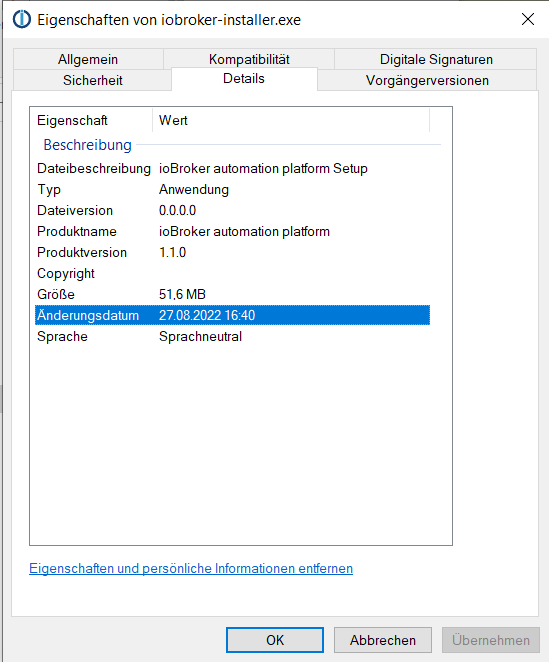
Bitte prüfen, ob es mit angemessenem Aufwand möglich ist die Version in den Dateinamen einfließen zu lassen. Wenn alle Versionen beim Download per Default iobroker-installer.exe heißen, kommen sie (zumindest mir) leicht durcheinander. Besser wäre (meiner Ansicht nach) iobroker-installer-1.1.2.exe (oder so ähnlich)Im Moment scheint der Download weiterhin die alte Version auszuliefern.
Download v. heute 16:40
Download von eben:
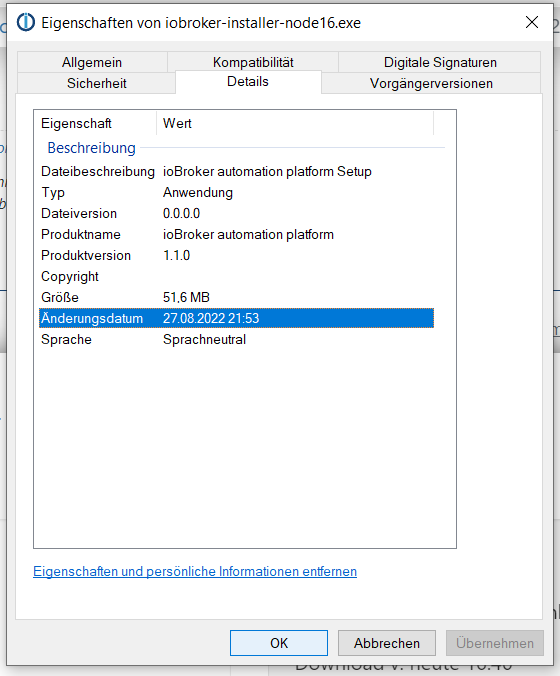
Eine Testinstallation der "neuen" Version hat bestätigt, dass die Version nicht neu ist :-)
Entwicklung u Betreuung: envertech-pv, hoymiles-ms, ns-client, pid, snmp Adapter;
Support Repositoryverwaltung.Wer Danke sagen will, kann nen Kaffee spendieren: https://paypal.me/mcm1957atiobroker
-
Im Moment scheint der Download weiterhin die alte Version auszuliefern.
Download v. heute 16:40
Download von eben:
Eine Testinstallation der "neuen" Version hat bestätigt, dass die Version nicht neu ist :-)
-
Hi All,
sorry für die verzögerung. jetzt geht es hier aber weiter.
Unter https://iobroker.live/images/win/iobroker-installer.exe haben wir eine neue Installer exe die jetzt Node.js 16 mitbringt ... könnt Ihr die bitte mal checken? Danke!
Ingo und Bluefox
@apollon77 sagte in Test ioBroker unter Windows installieren - 2022 Edition:
Unter https://iobroker.live/images/win/iobroker-installer.exe haben wir eine neue Installer exe die jetzt Node.js 16 mitbringt ... könnt Ihr die bitte mal checken? Danke!
Setze gerade ein System auf,das produktiv gehen soll, wenn es stabil wird
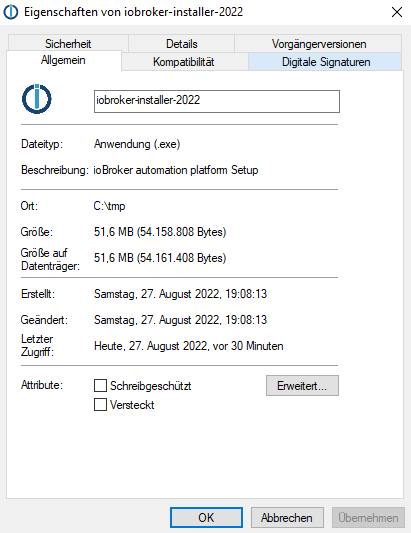
Ich habe nach der Instalallation ioBroker gestoppt und das iobroker-data meines derzeitigen Produktivsystems reinkopiert.
Dann ioBroker gestartet und dieAdapter deaktiviert,
Unter der Haube wurde wohl kräftig Adapter neu gebautC:\Users\admin>iobroker -version 4.0.23 C:\Users\admin>node -v v16.15.1 C:\Users\admin>npm -v npm WARN config global `--global`, `--local` are deprecated. Use `--location=global` instead. 8.11.0 C:\Users\admin>passt das, oder habe ich etwas verhauen?
-
@apollon77 sagte in Test ioBroker unter Windows installieren - 2022 Edition:
Unter https://iobroker.live/images/win/iobroker-installer.exe haben wir eine neue Installer exe die jetzt Node.js 16 mitbringt ... könnt Ihr die bitte mal checken? Danke!
Setze gerade ein System auf,das produktiv gehen soll, wenn es stabil wird
Ich habe nach der Instalallation ioBroker gestoppt und das iobroker-data meines derzeitigen Produktivsystems reinkopiert.
Dann ioBroker gestartet und dieAdapter deaktiviert,
Unter der Haube wurde wohl kräftig Adapter neu gebautC:\Users\admin>iobroker -version 4.0.23 C:\Users\admin>node -v v16.15.1 C:\Users\admin>npm -v npm WARN config global `--global`, `--local` are deprecated. Use `--location=global` instead. 8.11.0 C:\Users\admin>passt das, oder habe ich etwas verhauen?
@klassisch sieht für mich ok aus ... warum npm aktuell mit diesen warn messages wegen geänderter Konfig um sich wirft hab ich noch keine ahnung
-
@klassisch sieht für mich ok aus ... warum npm aktuell mit diesen warn messages wegen geänderter Konfig um sich wirft hab ich noch keine ahnung
@apollon77 Danke, dann wage ich es demnächst mal das System als Produktivsystem einzusetzen.
-
Bin jetzt mit dem Produktivsystem auf die neue Installation.
Dabei habe ich die IP Adresse unter der Fritte so geändert, daß der neue Rechner mit ioBroker die IP von alten ioBroker Rechner bekommen hat. Sollte also alles ansprechbar sein wie bisher. Das Prozedere habe ich in den letzten Jahren mehrfach gemacht.
Jetzt habe ich einen seltsamen Effekt, daß die admin Seiten Ports :8082 :8081 von aussen nicht mehr ansprechbar sind und auch die HM sowie ein paar MQTT Geräte keinen Zugriff mehr haben.
Vom ioBroker Rechner aus geht Admin sowohl per localhost als auch per ID.
Der Rechner ist anpingbar und wird im Netzwerk auch gefunden. Freigegebene Ordner sehe ich.
Hat jemand eine Idee was ich noch wie freigeben muß, damit ich den Admin, Flot etc auch von aussen sehe? -
@apollon77 sagte in Test ioBroker unter Windows installieren - 2022 Edition:
Unter https://iobroker.live/images/win/iobroker-installer.exe haben wir eine neue Installer exe die jetzt Node.js 16 mitbringt ... könnt Ihr die bitte mal checken? Danke!
Setze gerade ein System auf,das produktiv gehen soll, wenn es stabil wird
Ich habe nach der Instalallation ioBroker gestoppt und das iobroker-data meines derzeitigen Produktivsystems reinkopiert.
Dann ioBroker gestartet und dieAdapter deaktiviert,
Unter der Haube wurde wohl kräftig Adapter neu gebautC:\Users\admin>iobroker -version 4.0.23 C:\Users\admin>node -v v16.15.1 C:\Users\admin>npm -v npm WARN config global `--global`, `--local` are deprecated. Use `--location=global` instead. 8.11.0 C:\Users\admin>passt das, oder habe ich etwas verhauen?
@klassisch sagte in Test ioBroker unter Windows installieren - 2022 Edition:
das iobroker-data meines derzeitigen Produktivsystems reinkopiert.
ich kenne mich mit Windows nicht aus, aber wimre sind diese Dateien auf die bisherige node/npm Version gebaut und müssten zumindest einen rebuild erfahren.
Dazu könnte möglicherweise passen@apollon77 sagte in Test ioBroker unter Windows installieren - 2022 Edition:
warum npm aktuell mit diesen warn messages wegen geänderter Konfig um sich wirft hab i
müsste aber @apollon77 was zu sagen
-
Bin jetzt mit dem Produktivsystem auf die neue Installation.
Dabei habe ich die IP Adresse unter der Fritte so geändert, daß der neue Rechner mit ioBroker die IP von alten ioBroker Rechner bekommen hat. Sollte also alles ansprechbar sein wie bisher. Das Prozedere habe ich in den letzten Jahren mehrfach gemacht.
Jetzt habe ich einen seltsamen Effekt, daß die admin Seiten Ports :8082 :8081 von aussen nicht mehr ansprechbar sind und auch die HM sowie ein paar MQTT Geräte keinen Zugriff mehr haben.
Vom ioBroker Rechner aus geht Admin sowohl per localhost als auch per ID.
Der Rechner ist anpingbar und wird im Netzwerk auch gefunden. Freigegebene Ordner sehe ich.
Hat jemand eine Idee was ich noch wie freigeben muß, damit ich den Admin, Flot etc auch von aussen sehe?Das wäre ja super wenn jetzt eine Migration gehen würde.
Du hast du den alten iobroker-data Ordner drüber kopiert?
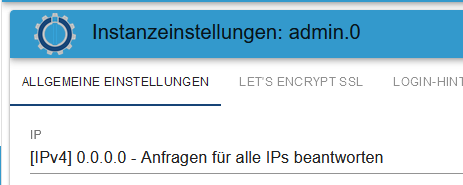
Hast du den neuen Iobroker im gleichen Verzeichnis wie vorher drin oder in einem anderen?P.S. Wegen dem Admin von außen, schau mal ob du im Admin auch die 0.0.0.0 als IP Adresse drin hast:
-
@apollon77
Bitte prüfen, ob es mit angemessenem Aufwand möglich ist die Version in den Dateinamen einfließen zu lassen. Wenn alle Versionen beim Download per Default iobroker-installer.exe heißen, kommen sie (zumindest mir) leicht durcheinander. Besser wäre (meiner Ansicht nach) iobroker-installer-1.1.2.exe (oder so ähnlich)Ich glaub ich hab rausgefunden, warum gestern die "neue" Installation node 14 geliefert hat.
Die Version 1.1.0 des Installers war schon gestern VOR deinen Announcements aktiv. Daher waren die Downloaddaten bei meinem Reinstallationsversuch natürlich identisch.
Version 1.1.0 -> liefert Node 16 aus
Version 1.0.1 -> liefert Node 14 ausNUR wenn die Version 1.0.1 installiert ist / war dann macht die Installation von 1.1.0 scheinbar keinen Upgrade von node (und meldet auch nichts diesbezügliches). Erst nachdem ich node 14.x.x via Windows Programme desinstalliuert habe wurde Node 16.x (mit ein paar Problemchen) installiert.
Ich teste das Ganze nochmals und schreib dann eine Zusammenfassung.








Support us
316
Online32.7k
Users82.5k
Topics1.3m
Posts