




(gelöst)BLE-Adapter
-
@ostseereiter dann weiss ich auch nicht mehr weiter
welche Geräte sind denn eigentlich per ble verbunden?
@crunchip
also nix was ich nicht entbehren kann sind von MI-flora -
@crunchip sagte in BLE-Adapter:
dann weiss ich auch nicht mehr weiter
wenn ich das richtig deute:
@ostseereiter sagte in BLE-Adapter:
Rebuilding native modules done
werden die deps gar nicht neu gebaut.
müsste man vielleicht mit npm rebuild im richtigen Verzeichnis nochmal versuchen
@homoran
ok aber welches Verzeichnes. oder ich werde den Adapter löschen und nochmal installieren ansonsten weg damit. -
cd /opt/iobroker/node_modules/iobroker.ble
npm rebuild
umgestiegen von Proxmox auf Unraid
-
cd /opt/iobroker/node_modules/iobroker.ble npm rebuild@crunchip sagte in BLE-Adapter:
npm rebuild
ja leider auch nicht nun werde ich dann den Adapter deinstallieren und neu und wenn dann nicht ok
-
nun neu installiert nun ist er ja schon mal gelb
	2022-03-09 18:24:26.455	error	ENODEV, No such device

ble.0
2022-03-09 18:24:25.527	info	starting scanner process...

ble.0
2022-03-09 18:24:25.524	info	monitored services: fe95

ble.0
2022-03-09 18:24:25.521	info	enabled plugins: Xiaomi, mi-flora, _default

ble.0
2022-03-09 18:24:25.519	info	loaded plugins: Xiaomi, mi-flora, ruuvi-tag, _default

ble.0
2022-03-09 18:24:25.332	info	starting. Version 0.12.0 in /opt/iobroker/node_modules/iobroker.ble, node: v14.19.0, js-controller: 4.0.19

ble.0
2022-03-09 18:24:23.559	debug	States connected to redis: 127.0.0.1:9000

ble.0
2022-03-09 18:24:23.436	debug	States create User PubSub Client

ble.0
2022-03-09 18:24:23.432	debug	States create System PubSub Client

ble.0
2022-03-09 18:24:23.354	debug	Redis States: Use Redis connection: 127.0.0.1:9000

ble.0
2022-03-09 18:24:23.226	debug	Objects connected to redis: 127.0.0.1:9001

ble.0
2022-03-09 18:24:23.190	debug	Objects client initialize lua scripts

ble.0
2022-03-09 18:24:22.916	debug	Objects create User PubSub Client

ble.0
2022-03-09 18:24:22.914	debug	Objects create System PubSub Client

ble.0
2022-03-09 18:24:22.911	debug	Objects client ready ... initialize now

ble.0
2022-03-09 18:24:22.778	debug	Redis Objects: Use Redis connection: 127.0.0.1:9001

ble.0
2022-03-09 18:24:16.856	info	Terminated (ADAPTER_REQUESTED_TERMINATION): Without reason

ble.0
2022-03-09 18:24:16.854	info	terminating

ble.0
2022-03-09 18:24:16.851	info	Got terminate signal TERMINATE_YOURSELF

ble.0
2022-03-09 18:23:52.187	error	ENODEV, No such device

ble.0
2022-03-09 18:23:51.283	info	starting scanner process...

ble.0
2022-03-09 18:23:51.279	info	monitored services: fe95

ble.0
2022-03-09 18:23:51.274	info	enabled plugins: Xiaomi, mi-flora, _default

ble.0
2022-03-09 18:23:51.273	info	loaded plugins: Xiaomi, mi-flora, ruuvi-tag, _default

ble.0
2022-03-09 18:23:51.075	info	starting. Version 0.12.0 in /opt/iobroker/node_modules/iobroker.ble, node: v14.19.0, js-controller: 4.0.19

ble.0
2022-03-09 18:23:42.411	info	Terminated (ADAPTER_REQUESTED_TERMINATION): Without reason

ble.0
2022-03-09 18:23:42.409	info	terminating

ble.0
2022-03-09 18:23:42.407	info	Got terminate signal TERMINATE_YOURSELF

ble.0
2022-03-09 18:22:07.322	error	ENODEV, No such device

ble.0
2022-03-09 18:22:06.419	info	starting scanner process...

ble.0
2022-03-09 18:22:06.407	info	monitored services: fe95

ble.0
2022-03-09 18:22:06.403	info	enabled plugins: Xiaomi, mi-flora, _default

ble.0
2022-03-09 18:22:06.399	info	loaded plugins: Xiaomi, mi-flora, ruuvi-tag, _default

ble.0
2022-03-09 18:22:06.187	info	starting. Version 0.12.0 in /opt/iobroker/node_modules/iobroker.ble, node: v14.19.0, js-controller: 4.0.19

ble.0
2022-03-09 18:21:56.769	info	Terminated (ADAPTER_REQUESTED_TERMINATION): Without reason

ble.0
2022-03-09 18:21:56.767	info	terminating

ble.0
2022-03-09 18:21:56.765	info	Got terminate signal TERMINATE_YOURSELF

ble.0
2022-03-09 18:21:42.115	error	ENODEV, No such device

ble.0
2022-03-09 18:21:41.274	info	starting scanner process...

ble.0
2022-03-09 18:21:41.271	info	monitored services:

ble.0
2022-03-09 18:21:41.269	info	enabled plugins: _default

ble.0
2022-03-09 18:21:41.267	info	loaded plugins: Xiaomi, mi-flora, ruuvi-tag, _default

ble.0
2022-03-09 18:21:40.971	info	starting. Version 0.12.0 in /opt/iobroker/node_modules/iobroker.ble, node: v14.19.0, js-controller: 4.0.19
Gruß OSR
Plattform
Linux x64 CPUs2 AMD G-T56N Processor 1646 MHz 8GB RAM -
nun neu installiert nun ist er ja schon mal gelb
2022-03-09 18:24:26.455 error ENODEV, No such device ble.0 2022-03-09 18:24:25.527 info starting scanner process... ble.0 2022-03-09 18:24:25.524 info monitored services: fe95 ble.0 2022-03-09 18:24:25.521 info enabled plugins: Xiaomi, mi-flora, _default ble.0 2022-03-09 18:24:25.519 info loaded plugins: Xiaomi, mi-flora, ruuvi-tag, _default ble.0 2022-03-09 18:24:25.332 info starting. Version 0.12.0 in /opt/iobroker/node_modules/iobroker.ble, node: v14.19.0, js-controller: 4.0.19 ble.0 2022-03-09 18:24:23.559 debug States connected to redis: 127.0.0.1:9000 ble.0 2022-03-09 18:24:23.436 debug States create User PubSub Client ble.0 2022-03-09 18:24:23.432 debug States create System PubSub Client ble.0 2022-03-09 18:24:23.354 debug Redis States: Use Redis connection: 127.0.0.1:9000 ble.0 2022-03-09 18:24:23.226 debug Objects connected to redis: 127.0.0.1:9001 ble.0 2022-03-09 18:24:23.190 debug Objects client initialize lua scripts ble.0 2022-03-09 18:24:22.916 debug Objects create User PubSub Client ble.0 2022-03-09 18:24:22.914 debug Objects create System PubSub Client ble.0 2022-03-09 18:24:22.911 debug Objects client ready ... initialize now ble.0 2022-03-09 18:24:22.778 debug Redis Objects: Use Redis connection: 127.0.0.1:9001 ble.0 2022-03-09 18:24:16.856 info Terminated (ADAPTER_REQUESTED_TERMINATION): Without reason ble.0 2022-03-09 18:24:16.854 info terminating ble.0 2022-03-09 18:24:16.851 info Got terminate signal TERMINATE_YOURSELF ble.0 2022-03-09 18:23:52.187 error ENODEV, No such device ble.0 2022-03-09 18:23:51.283 info starting scanner process... ble.0 2022-03-09 18:23:51.279 info monitored services: fe95 ble.0 2022-03-09 18:23:51.274 info enabled plugins: Xiaomi, mi-flora, _default ble.0 2022-03-09 18:23:51.273 info loaded plugins: Xiaomi, mi-flora, ruuvi-tag, _default ble.0 2022-03-09 18:23:51.075 info starting. Version 0.12.0 in /opt/iobroker/node_modules/iobroker.ble, node: v14.19.0, js-controller: 4.0.19 ble.0 2022-03-09 18:23:42.411 info Terminated (ADAPTER_REQUESTED_TERMINATION): Without reason ble.0 2022-03-09 18:23:42.409 info terminating ble.0 2022-03-09 18:23:42.407 info Got terminate signal TERMINATE_YOURSELF ble.0 2022-03-09 18:22:07.322 error ENODEV, No such device ble.0 2022-03-09 18:22:06.419 info starting scanner process... ble.0 2022-03-09 18:22:06.407 info monitored services: fe95 ble.0 2022-03-09 18:22:06.403 info enabled plugins: Xiaomi, mi-flora, _default ble.0 2022-03-09 18:22:06.399 info loaded plugins: Xiaomi, mi-flora, ruuvi-tag, _default ble.0 2022-03-09 18:22:06.187 info starting. Version 0.12.0 in /opt/iobroker/node_modules/iobroker.ble, node: v14.19.0, js-controller: 4.0.19 ble.0 2022-03-09 18:21:56.769 info Terminated (ADAPTER_REQUESTED_TERMINATION): Without reason ble.0 2022-03-09 18:21:56.767 info terminating ble.0 2022-03-09 18:21:56.765 info Got terminate signal TERMINATE_YOURSELF ble.0 2022-03-09 18:21:42.115 error ENODEV, No such device ble.0 2022-03-09 18:21:41.274 info starting scanner process... ble.0 2022-03-09 18:21:41.271 info monitored services: ble.0 2022-03-09 18:21:41.269 info enabled plugins: _default ble.0 2022-03-09 18:21:41.267 info loaded plugins: Xiaomi, mi-flora, ruuvi-tag, _default ble.0 2022-03-09 18:21:40.971 info starting. Version 0.12.0 in /opt/iobroker/node_modules/iobroker.ble, node: v14.19.0, js-controller: 4.0.19 -
@thomas-braun
so sieht es aus
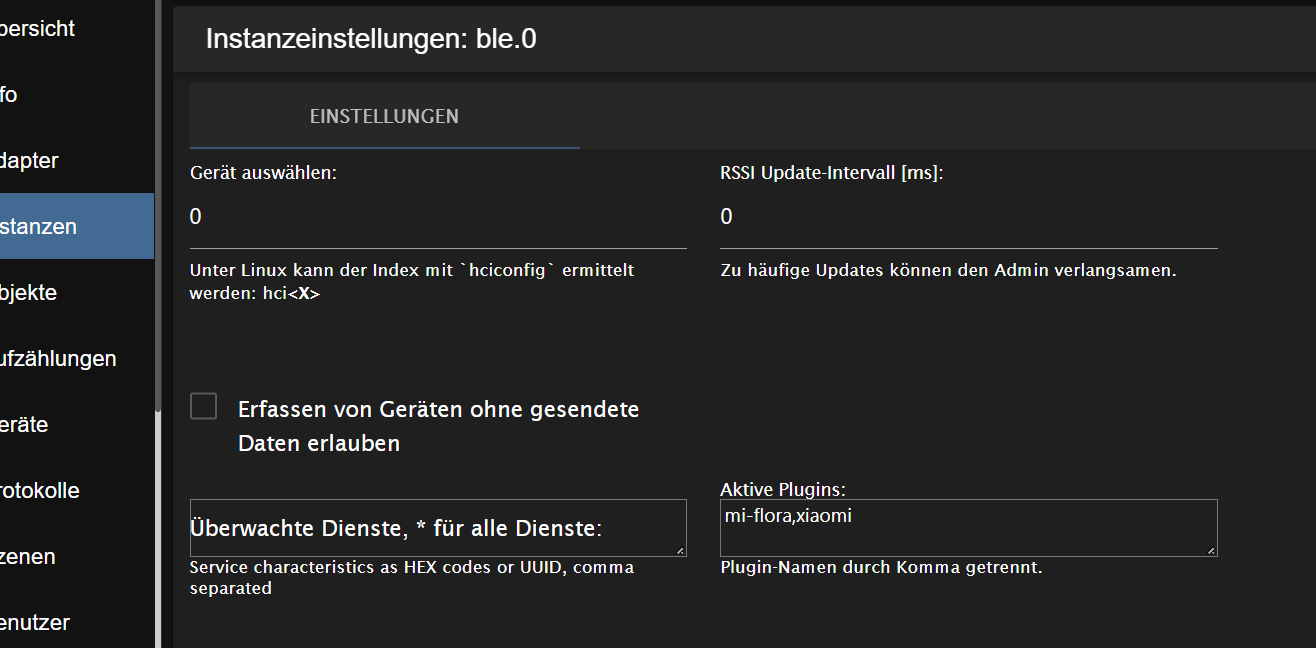
Gruß OSR
Plattform
Linux x64 CPUs2 AMD G-T56N Processor 1646 MHz 8GB RAM -
@thomas-braun
so sieht es aus
Ist denn das noch hci0 oder ist das Gerät durch die Restarts vielleicht auf hci1 gewandert?
-
Ist denn das noch hci0 oder ist das Gerät durch die Restarts vielleicht auf hci1 gewandert?
andy@debian:~$ hciconfig
hci1: Type: Primary Bus: USB
BD Address: 00:1A:7D:DA:71:0F ACL MTU: 310:10 SCO MTU: 64:8
UP RUNNING
RX bytes:6547330 acl:0 sco:0 events:183574 errors:0
TX bytes:14599 acl:0 sco:0 commands:1417 errors:0Gruß OSR
Plattform
Linux x64 CPUs2 AMD G-T56N Processor 1646 MHz 8GB RAM -
andy@debian:~$ hciconfig
hci1: Type: Primary Bus: USB
BD Address: 00:1A:7D:DA:71:0F ACL MTU: 310:10 SCO MTU: 64:8
UP RUNNING
RX bytes:6547330 acl:0 sco:0 events:183574 errors:0
TX bytes:14599 acl:0 sco:0 commands:1417 errors:0@ostseereiter
ist auf der 1 danke an alle alles grün -
@thomas-braun
so sieht es aus
@ostseereiter so nebenbei, das update intervall wieder anpassen, z.b. 20000
umgestiegen von Proxmox auf Unraid
-
@ostseereiter so nebenbei, das update intervall wieder anpassen, z.b. 20000
-
@ostseereiter
@thomas-braun
bei mir ist auch der Wurm drin:hier sieht noch alles gut aus
jan@Beelink:~$ sudo systemctl status bluetooth                                  ● bluetooth.service - Bluetooth service
     Loaded: loaded (/lib/systemd/system/bluetooth.service; enabled; vendor pre>
     Active: active (running) since Wed 2022-03-09 19:08:57 CET; 54min ago
       Docs: man:bluetoothd(8)
   Main PID: 557 (bluetoothd)
     Status: "Running"
      Tasks: 1 (limit: 4459)
     Memory: 3.9M
        CPU: 31ms
     CGroup: /system.slice/bluetooth.service
             └─557 /usr/libexec/bluetooth/bluetoothd
hier ist das Ding down
jan@Beelink:~$ sudo hciconfig hci0: Type: Primary Bus: USB BD Address: 00:00:00:00:00:00 ACL MTU: 0:0 SCO MTU: 0:0 DOWN RX bytes:0 acl:0 sco:0 events:0 errors:0 TX bytes:4 acl:0 sco:0 commands:1 errors:0 -
@ostseereiter
@thomas-braun
bei mir ist auch der Wurm drin:hier sieht noch alles gut aus
jan@Beelink:~$ sudo systemctl status bluetooth                                  ● bluetooth.service - Bluetooth service
     Loaded: loaded (/lib/systemd/system/bluetooth.service; enabled; vendor pre>
     Active: active (running) since Wed 2022-03-09 19:08:57 CET; 54min ago
       Docs: man:bluetoothd(8)
   Main PID: 557 (bluetoothd)
     Status: "Running"
      Tasks: 1 (limit: 4459)
     Memory: 3.9M
        CPU: 31ms
     CGroup: /system.slice/bluetooth.service
             └─557 /usr/libexec/bluetooth/bluetoothd
hier ist das Ding down
jan@Beelink:~$ sudo hciconfig hci0: Type: Primary Bus: USB BD Address: 00:00:00:00:00:00 ACL MTU: 0:0 SCO MTU: 0:0 DOWN RX bytes:0 acl:0 sco:0 events:0 errors:0 TX bytes:4 acl:0 sco:0 commands:1 errors:0sudo hcitool hci0 up -
wäre zu einfach gewesen :
jan@Beelink:~$ sudo hcitool hci0 up [sudo] Passwort für jan: Unknown command - "hci0"sudo hciconfig hci0 reset -
wäre zu einfach gewesen :
jan@Beelink:~$ sudo hcitool hci0 up [sudo] Passwort für jan: Unknown command - "hci0"sudo rfkill list -
sudo hciconfig hci0 resetjan@Beelink:~$ sudo hciconfig hci0 reset Can't init device hci0: Connection timed out (110) -
@jan1 mal probiert, deinen beelink kurz vom Strom zu nehmen, bei meinem zotac gab es auch hin und wieder Probleme mit dem internen bluetooth, musst dann den rechner kurz vom Strom nehmen, danach funktionierte es wieder



Hey! Du scheinst an dieser Unterhaltung interessiert zu sein, hast aber noch kein Konto.
Hast du es satt, bei jedem Besuch durch die gleichen Beiträge zu scrollen? Wenn du dich für ein Konto anmeldest, kommst du immer genau dorthin zurück, wo du zuvor warst, und kannst dich über neue Antworten benachrichtigen lassen (entweder per E-Mail oder Push-Benachrichtigung). Du kannst auch Lesezeichen speichern und Beiträge positiv bewerten, um anderen Community-Mitgliedern deine Wertschätzung zu zeigen.
Mit deinem Input könnte dieser Beitrag noch besser werden 💗
Registrieren Anmelden259
Online33.0k
Benutzer83.6k
Themen1.3m
Beiträge