Skip to content
  • Home
  • Recent
  • Tags
  • 0 Unread 0
  • Categories
  • Unreplied
  • Popular
  • GitHub
  • Docu
  • Hilfe
Skins
  • Light
  • Brite
  • Cerulean
  • Cosmo
  • Flatly
  • Journal
  • Litera
  • Lumen
  • Lux
  • Materia
  • Minty
  • Morph
  • Pulse
  • Sandstone
  • Simplex
  • Sketchy
  • Spacelab
  • United
  • Yeti
  • Zephyr
  • Dark
  • Cyborg
  • Darkly
  • Quartz
  • Slate
  • Solar
  • Superhero
  • Vapor

  • Default (No Skin)
  • No Skin
Collapse
ioBroker Logo

Community Forum

donate donate
  1. ioBroker Community Home
  2. Deutsch
  3. Tester
  4. Adapter Hyundai (Bluelink) oder KIA (UVO)

NEWS

  • Monatsrückblick Januar/Februar 2026 ist online!
    BluefoxB
    Bluefox
    18
    1
    742

  • Jahresrückblick 2025 – unser neuer Blogbeitrag ist online! ✨
    BluefoxB
    Bluefox
    18
    1
    6.0k

  • Neuer Blogbeitrag: Monatsrückblick - Dezember 2025 🎄
    BluefoxB
    Bluefox
    13
    1
    1.5k

Adapter Hyundai (Bluelink) oder KIA (UVO)

Scheduled Pinned Locked Moved Tester
2.4k Posts 157 Posters 957.8k Views 144 Watching
  • Oldest to Newest
  • Newest to Oldest
  • Most Votes
Reply
  • Reply as topic
Log in to reply
This topic has been deleted. Only users with topic management privileges can see it.
  • arteckA arteck

    @meister-mopper ja da gabs mal wieder ein Problem..stand aber auch in der App drin.. deshalb am beten immer gegenchecken wenn der Login in Adapter nicht geht, wobei hier auch aufpassen.. wenn der Adapter auf einen anderen Server umgeroutet wird als die App dann passt es dann auch nicht..aber als grobe Richtung..

    Meister MopperM Online
    Meister MopperM Online
    Meister Mopper
    wrote on last edited by
    #2269

    @arteck

    Ok, der Adapter v3.1.23 funktioniert wieder mit einem frischen refresh token 😊

    Proxmox und HA - dank KI/AI endlich "blocklyfrei"

    Wolfgang GaryW 1 Reply Last reply
    3
    • Meister MopperM Meister Mopper

      @arteck

      Ok, der Adapter v3.1.23 funktioniert wieder mit einem frischen refresh token 😊

      Wolfgang GaryW Offline
      Wolfgang GaryW Offline
      Wolfgang Gary
      wrote on last edited by Wolfgang Gary
      #2270

      Auch bei mir funktioniert nun die v3.1.23 mit Kia EV6 und Hyundai Kona E.
      Herzlichen Dank an @arteck! Danke für deine Geduld mit uns Usern und Ausdauer!

      PLCHome 0P 1 Reply Last reply
      0
      • Wolfgang GaryW Wolfgang Gary

        Auch bei mir funktioniert nun die v3.1.23 mit Kia EV6 und Hyundai Kona E.
        Herzlichen Dank an @arteck! Danke für deine Geduld mit uns Usern und Ausdauer!

        PLCHome 0P Offline
        PLCHome 0P Offline
        PLCHome 0
        Developer
        wrote on last edited by PLCHome 0
        #2271

        Ich hatte ein Problem und hab den Kontainer vor zwei Tagen neu gestartet. Jetzt bekomme ich die Fehlermeldung:
        bluelink.0
        2025-10-25 20:38:53.518 error next auto login attempt in 1 hour or restart adapter manual

        bluelink.0
        2025-10-25 20:38:53.518 error Server is not available or login credentials are wrong

        bluelink.0
        2025-10-25 20:38:53.518 error ManagedBluelinkyError: @EuropeController.login: [400] Bad Request on [POST] https://prd.eu-ccapi.hyundai.com:8080/api/v1/user/signin - {"errId":"ea320d9d-ba44-444e-8f37-5be3a9eab35a","errCode":"4003","errMsg":"Invalid values"}

        User, Passwort und Pin sind OK die habe ich in der App geprüft.
        Auto ist Hyundai EV
        die v3.1.23 habe ich auch getestet:

        bluelink.0
        2025-10-25 20:51:57.839 error next auto login attempt in 1 hour or restart adapter manual

        bluelink.0
        2025-10-25 20:51:57.838 error Server is not available or login credentials are wrong

        bluelink.0
        2025-10-25 20:51:57.837 error HTTPError: Response code 400 (Bad Request)

        Oh man ich hatte fast zwei Jahre keine Probleme imt dem Adapter...

        F 1 Reply Last reply
        0
        • PLCHome 0P PLCHome 0

          Ich hatte ein Problem und hab den Kontainer vor zwei Tagen neu gestartet. Jetzt bekomme ich die Fehlermeldung:
          bluelink.0
          2025-10-25 20:38:53.518 error next auto login attempt in 1 hour or restart adapter manual

          bluelink.0
          2025-10-25 20:38:53.518 error Server is not available or login credentials are wrong

          bluelink.0
          2025-10-25 20:38:53.518 error ManagedBluelinkyError: @EuropeController.login: [400] Bad Request on [POST] https://prd.eu-ccapi.hyundai.com:8080/api/v1/user/signin - {"errId":"ea320d9d-ba44-444e-8f37-5be3a9eab35a","errCode":"4003","errMsg":"Invalid values"}

          User, Passwort und Pin sind OK die habe ich in der App geprüft.
          Auto ist Hyundai EV
          die v3.1.23 habe ich auch getestet:

          bluelink.0
          2025-10-25 20:51:57.839 error next auto login attempt in 1 hour or restart adapter manual

          bluelink.0
          2025-10-25 20:51:57.838 error Server is not available or login credentials are wrong

          bluelink.0
          2025-10-25 20:51:57.837 error HTTPError: Response code 400 (Bad Request)

          Oh man ich hatte fast zwei Jahre keine Probleme imt dem Adapter...

          F Offline
          F Offline
          fichte_112
          wrote on last edited by fichte_112
          #2272

          @plchome-0
          siehe hier

          PLCHome 0P 1 Reply Last reply
          0
          • F fichte_112

            @plchome-0
            siehe hier

            PLCHome 0P Offline
            PLCHome 0P Offline
            PLCHome 0
            Developer
            wrote on last edited by PLCHome 0
            #2273

            @fichte_112 verstehe ich nicht. Egal den nächste Adapter schrott.

            F arteckA 2 Replies Last reply
            0
            • PLCHome 0P PLCHome 0

              @fichte_112 verstehe ich nicht. Egal den nächste Adapter schrott.

              F Offline
              F Offline
              fichte_112
              wrote on last edited by
              #2274

              @plchome-0 es muß ein Refresh Token erstellt werden. Dieser Refresh Token ist das Passwort für den Bluelink Adapter.
              Hier sind weitere Infos

              PLCHome 0P T F 3 Replies Last reply
              0
              • F fichte_112

                @plchome-0 es muß ein Refresh Token erstellt werden. Dieser Refresh Token ist das Passwort für den Bluelink Adapter.
                Hier sind weitere Infos

                PLCHome 0P Offline
                PLCHome 0P Offline
                PLCHome 0
                Developer
                wrote on last edited by
                #2275

                @fichte_112 ok jetzt hab ich es gerafft. Geht wieder...

                1 Reply Last reply
                0
                • PLCHome 0P PLCHome 0

                  @fichte_112 verstehe ich nicht. Egal den nächste Adapter schrott.

                  arteckA Offline
                  arteckA Offline
                  arteck
                  Developer Most Active
                  wrote on last edited by
                  #2276

                  @plchome-0 was heisst den nächste Adapter schrott ??

                  zigbee hab ich, zwave auch, nuc's genauso und HA auch

                  PLCHome 0P 1 Reply Last reply
                  0
                  • arteckA arteck

                    @plchome-0 was heisst den nächste Adapter schrott ??

                    PLCHome 0P Offline
                    PLCHome 0P Offline
                    PLCHome 0
                    Developer
                    wrote on last edited by
                    #2277

                    @arteck der worx meint seit 2 Versionen, dass ich baue zu viele Verbindungen auf, obwohl ich nix geändert habe. Der lief nur noch mit Downgrade. Egal er ist raus. Der im HASS tuts auch.

                    arteckA 1 Reply Last reply
                    0
                    • F fichte_112

                      @plchome-0 es muß ein Refresh Token erstellt werden. Dieser Refresh Token ist das Passwort für den Bluelink Adapter.
                      Hier sind weitere Infos

                      T Offline
                      T Offline
                      tobi19
                      wrote on last edited by
                      #2278

                      @fichte_112
                      Danke für die ausführliche Windows Anleitung!

                      kurze Ergänzung:
                      Wer den Adapter nicht neu installiert, sondern nur das Passwort gegen das Token austauscht,
                      muss auch die Pin neu eingeben, sonst gibt es wieder Fehler.

                      1 Reply Last reply
                      2
                      • PLCHome 0P PLCHome 0

                        @arteck der worx meint seit 2 Versionen, dass ich baue zu viele Verbindungen auf, obwohl ich nix geändert habe. Der lief nur noch mit Downgrade. Egal er ist raus. Der im HASS tuts auch.

                        arteckA Offline
                        arteckA Offline
                        arteck
                        Developer Most Active
                        wrote on last edited by arteck
                        #2279

                        @plchome-0 dann guck rein was da los ist..wenns nur bei dir ist

                        zigbee hab ich, zwave auch, nuc's genauso und HA auch

                        PLCHome 0P 1 Reply Last reply
                        0
                        • arteckA arteck

                          @plchome-0 dann guck rein was da los ist..wenns nur bei dir ist

                          PLCHome 0P Offline
                          PLCHome 0P Offline
                          PLCHome 0
                          Developer
                          wrote on last edited by
                          #2280

                          @arteck https://youtu.be/TB_oWe_0RFg?si=dwQ4b3aRCEuxnmxa
                          Fühle mich stigmatisiert trotz Hamer und Amboss .... Ne aktuell keine Zeit, andere Projekte.

                          Aber mal eine andere Frage, ich da aktuell das Problem, dass die Ladelimits unter Control nicht mehr auf ack=true gehen. Die bleiben nach dem Setzen ACK=false. In RAW-Data kommen die. Einer eine Idee?

                          arteckA 1 Reply Last reply
                          0
                          • PLCHome 0P PLCHome 0

                            @arteck https://youtu.be/TB_oWe_0RFg?si=dwQ4b3aRCEuxnmxa
                            Fühle mich stigmatisiert trotz Hamer und Amboss .... Ne aktuell keine Zeit, andere Projekte.

                            Aber mal eine andere Frage, ich da aktuell das Problem, dass die Ladelimits unter Control nicht mehr auf ack=true gehen. Die bleiben nach dem Setzen ACK=false. In RAW-Data kommen die. Einer eine Idee?

                            arteckA Offline
                            arteckA Offline
                            arteck
                            Developer Most Active
                            wrote on last edited by
                            #2281

                            @plchome-0 sagte in Adapter Hyundai (Bluelink) oder KIA (UVO):

                            Aber mal eine andere Frage, ich da aktuell das Problem, dass die Ladelimits unter Control nicht mehr auf ack=true gehen. Die bleiben nach dem Setzen ACK=false. In RAW-Data kommen die. Einer eine Idee?

                            die werden nicht bestätigt..

                            zigbee hab ich, zwave auch, nuc's genauso und HA auch

                            PLCHome 0P 1 Reply Last reply
                            0
                            • arteckA arteck

                              @plchome-0 sagte in Adapter Hyundai (Bluelink) oder KIA (UVO):

                              Aber mal eine andere Frage, ich da aktuell das Problem, dass die Ladelimits unter Control nicht mehr auf ack=true gehen. Die bleiben nach dem Setzen ACK=false. In RAW-Data kommen die. Einer eine Idee?

                              die werden nicht bestätigt..

                              PLCHome 0P Offline
                              PLCHome 0P Offline
                              PLCHome 0
                              Developer
                              wrote on last edited by PLCHome 0
                              #2282

                              @arteck Laut Ccode werden die Ladelimits vom RAW nach Control mit ack=true übertragen. In RAW sehe ich die Änderung auch. Ich muss mir mal was zum Debuggen einbauen, ob der Code durchlaufen wird.

                              1 Reply Last reply
                              0
                              • B Offline
                                B Offline
                                bigal
                                wrote on last edited by
                                #2283

                                gemacht wie beschrieben bekomme folgende Fehler

                                	2025-10-31 07:39:27.840	info	terminating
                                bluelink.0
                                	2025-10-31 07:39:27.839	info	Adapter bluelink cleaned up everything...
                                bluelink.0
                                	2025-10-31 07:39:27.833	error	Cannot read properties of null (reading 'val')
                                bluelink.0
                                	2025-10-31 07:39:27.833	error	TypeError: Cannot read properties of null (reading 'val') at Bluelink.readStatus (/opt/iobroker/node_modules/iobroker.bluelink/main.js:353:63) at async _e.<anonymous> (/opt/iobroker/node_modules/iobroker.bluelink/main.js:297:21)
                                bluelink.0
                                	2025-10-31 07:39:27.832	error	unhandled promise rejection: Cannot read properties of null (reading 'val')
                                bluelink.0
                                	2025-10-31 07:39:27.831	error	Unhandled promise rejection. This error originated either by throwing inside of an async function without a catch block, or by rejecting a promise which was not handled with .catch().
                                bluelink.0
                                	2025-10-31 07:39:27.798	info	Update for KMHKRxxxxx0 successfull
                                bluelink.0
                                	2025-10-31 07:39:25.998	info	Read new update for KMHxxxxx from the server
                                bluelink.0
                                	2025-10-31 07:39:25.815	info	2 Vehicles found
                                bluelink.0
                                	2025-10-31 07:39:24.743	info	Login to api
                                bluelink.0
                                	2025-10-31 07:39:24.707	info	starting. Version 3.1.23 (non-npm: Newan/ioBroker.bluelink#bc3f169280c05401294b4a017ca4b9dec8af0df5) in /opt/iobroker/node_modules/iobroker.bluelink, node: v20.19.1, js-controller: 7.0.7
                                
                                1 Reply Last reply
                                0
                                • arteckA Offline
                                  arteckA Offline
                                  arteck
                                  Developer Most Active
                                  wrote on last edited by
                                  #2284

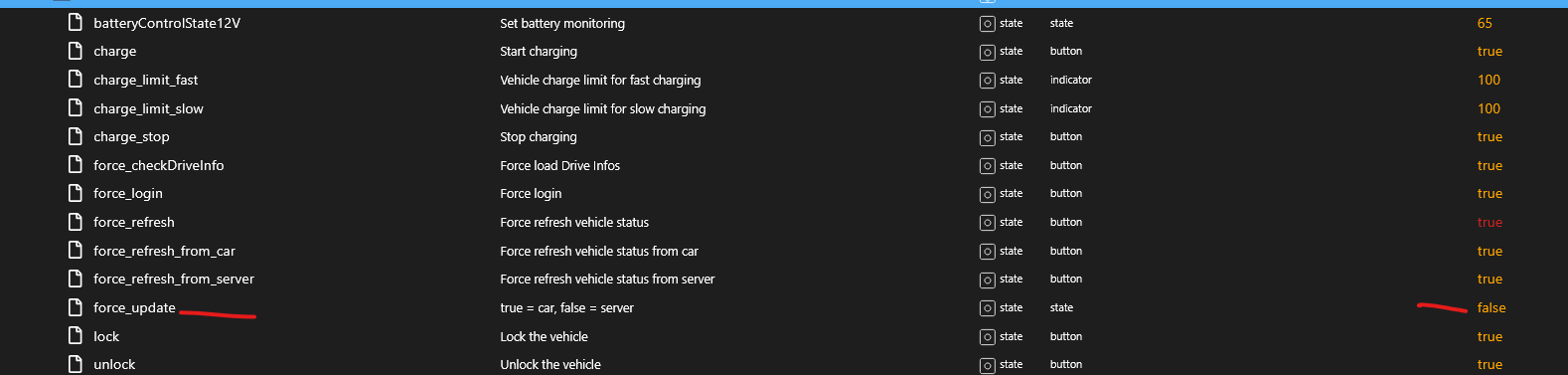
                                  @bigal da stimmt was nicht mit dem object

                                  force_update
                                  

                                  5cd251e4-0b19-4478-b607-bf437c1027b4-grafik.png

                                  zigbee hab ich, zwave auch, nuc's genauso und HA auch

                                  1 Reply Last reply
                                  0
                                  • B Offline
                                    B Offline
                                    bigal
                                    wrote on last edited by bigal
                                    #2285

                                    ich habe jetzt nach neuinstallation aber nur ein Fahrzeug in den Objekten

                                    B 1 Reply Last reply
                                    0
                                    • B bigal

                                      ich habe jetzt nach neuinstallation aber nur ein Fahrzeug in den Objekten

                                      B Offline
                                      B Offline
                                      bigal
                                      wrote on last edited by
                                      #2286

                                      @bigal udn der Adapter Startet ständig neu.... da stimmt was nicht

                                      1 Reply Last reply
                                      0
                                      • B Offline
                                        B Offline
                                        bigal
                                        wrote on last edited by
                                        #2287
                                        bluelink.0
                                        	2025-10-31 07:52:06.706	error	Cannot read properties of null (reading 'val')
                                        bluelink.0
                                        	2025-10-31 07:52:06.705	error	TypeError: Cannot read properties of null (reading 'val') at Bluelink.readStatus (/opt/iobroker/node_modules/iobroker.bluelink/main.js:353:63) at async _e.<anonymous> (/opt/iobroker/node_modules/iobroker.bluelink/main.js:297:21)
                                        bluelink.0
                                        	2025-10-31 07:52:06.704	error	unhandled promise rejection: Cannot read properties of null (reading 'val')
                                        bluelink.0
                                        	2025-10-31 07:52:06.703	error	Unhandled promise rejection. This error originated either by throwing inside of an async function without a catch block, or by rejecting a promise which was not handled with .catch().
                                        
                                        1 Reply Last reply
                                        0
                                        • F fichte_112

                                          Anleitung zur Erstellung eines Tokens für Hyundai oder KIA mit Windows

                                          Python Releases for Windows installieren.
                                          Google Chrome installieren

                                          In der Konsole folgenden Befehl ausführen. (oder den Adapter Bluelink löschen)

                                          rm -r /opt/iobroker/node_modules/bluelinky/
                                          

                                          Im Iobroker den Reiter Adapter anklicken. Dan den Expertenmodus aktivieren und die Katze anklicken.
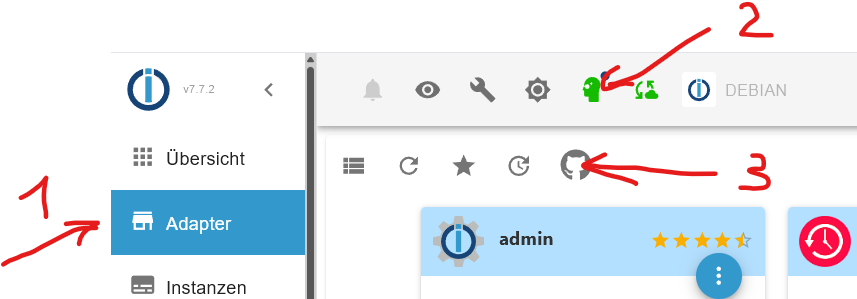
                                          Screenshot 2025-10-22 114413.png

                                          Screenshot 2025-10-22 150641.png

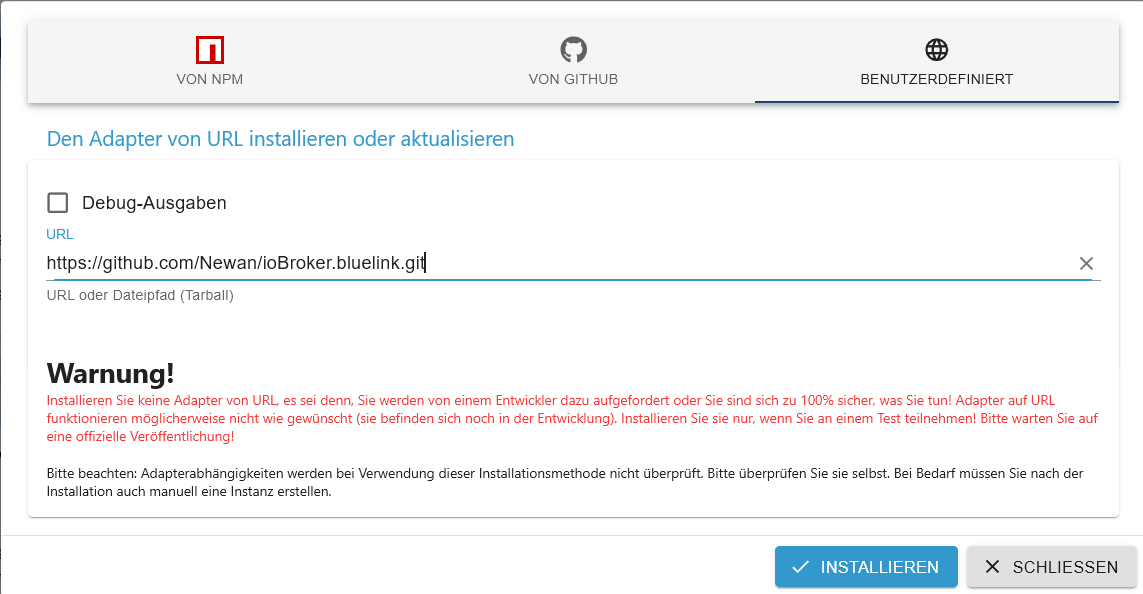
                                          Den Reiter Benutzerdefiniert auswählen und folgendes eintragen und installieren.

                                          https://github.com/Newan/ioBroker.bluelink.git
                                          

                                          Jetzt Windows PowerShell mit administrativen Rechten starten.

                                          Jetzt folgende Befehle nacheinander ausführen.

                                          Set-ExecutionPolicy Unrestricted
                                          

                                          A eingeben und mit Enter bestätigen.

                                          mkdir $env:TEMP\token 2>$null; cd $env:TEMP\token
                                          
                                          $code = @"
                                          # Original authors:
                                          # Kia: fuatakgun (https://gist.githubusercontent.com/fuatakgun/fa4ef1e1d48b8dca2d22133d4d028dc9#gistfile1.txt)
                                          # Hyundai: Maaxion (https://gist.github.com/Maaxion/22a38ba8fb06937da18482ddf35171ac#file-gistfile1-txt)
                                          #
                                          import argparse
                                          import re
                                          from selenium import webdriver
                                          from selenium.webdriver.common.by import By
                                          from selenium.webdriver.support.ui import WebDriverWait
                                          from selenium.webdriver.support import expected_conditions as EC
                                          from selenium.common.exceptions import TimeoutException
                                          import requests
                                          
                                          import time
                                          
                                          def main():
                                              """
                                              Determine brand to get the refresh token for
                                              """
                                              parser = argparse.ArgumentParser()
                                              parser.add_argument("--brand", help="Brand of vehicle (Hyundai/Kia)", type=str.lower, required=True, choices=['hyundai','kia'])
                                              args = parser.parse_args()
                                          
                                              """
                                              Populate global variables
                                              """
                                              BASE_URL = f"https://idpconnect-eu.{args.brand}.com/auth/api/v2/user/oauth2/"
                                              TOKEN_URL = f"{BASE_URL}token"
                                          
                                              if args.brand == 'kia':
                                                  # Kia specific variables here
                                                  CLIENT_ID = "fdc85c00-0a2f-4c64-bcb4-2cfb1500730a"
                                                  CLIENT_SECRET = "secret"
                                                  REDIRECT_URL_FINAL = "https://prd.eu-ccapi.kia.com:8080/api/v1/user/oauth2/redirect"
                                                  SUCCESS_ELEMENT_SELECTOR = "a[class='logout user']" 
                                                  LOGIN_URL = f"{BASE_URL}authorize?ui_locales=de&scope=openid%20profile%20email%20phone&response_type=code&client_id=peukiaidm-online-sales&redirect_uri=https://www.kia.com/api/bin/oneid/login&state=aHR0cHM6Ly93d3cua2lhLmNvbTo0NDMvZGUvP21zb2NraWQ9MjM1NDU0ODBmNmUyNjg5NDIwMmU0MDBjZjc2OTY5NWQmX3RtPTE3NTYzMTg3MjY1OTImX3RtPTE3NTYzMjQyMTcxMjY=_default" 
                                              elif args.brand == 'hyundai':
                                                  # Hyundai specific variables
                                                  CLIENT_ID = "6d477c38-3ca4-4cf3-9557-2a1929a94654"
                                                  CLIENT_SECRET = "KUy49XxPzLpLuoK0xhBC77W6VXhmtQR9iQhmIFjjoY4IpxsV"
                                                  REDIRECT_URL_FINAL = "https://prd.eu-ccapi.hyundai.com:8080/api/v1/user/oauth2/token"
                                                  SUCCESS_ELEMENT_SELECTOR = "button.mail_check" 
                                                  LOGIN_URL = f"{BASE_URL}authorize?client_id=peuhyundaiidm-ctb&redirect_uri=https%3A%2F%2Fctbapi.hyundai-europe.com%2Fapi%2Fauth&nonce=&state=NL_&scope=openid+profile+email+phone&response_type=code&connector_client_id=peuhyundaiidm-ctb&connector_scope=&connector_session_key=&country=&captcha=1&ui_locales=en-US" 
                                          
                                              REDIRECT_URL = f"{BASE_URL}authorize?response_type=code&client_id={CLIENT_ID}&redirect_uri={REDIRECT_URL_FINAL}&lang=de&state=ccsp"
                                          
                                              """
                                              Main function to run the Selenium automation.
                                              """
                                              # Initialize the Chrome WebDriver
                                              # Make sure you have chromedriver installed and in your PATH,
                                              # or specify the path to it.
                                              options = webdriver.ChromeOptions()
                                              options.add_argument("user-agent=Mozilla/5.0 (Linux; Android 4.1.1; Galaxy Nexus Build/JRO03C) AppleWebKit/535.19 (KHTML, like Gecko) Chrome/18.0.1025.166 Mobile Safari/535.19_CCS_APP_AOS")
                                              options.add_argument("--auto-open-devtools-for-tabs")
                                              driver = webdriver.Chrome(options=options)
                                              driver.maximize_window()
                                          
                                              # 1. Open the login page
                                              print(f"Opening login page: {LOGIN_URL}")
                                              driver.get(LOGIN_URL)
                                          
                                              print("\n" + "="*50)
                                              print("Please log in manually in the browser window.")
                                              print("The script will wait for you to complete the login...")
                                              print("="*50 + "\n")
                                          
                                              try:
                                                  wait = WebDriverWait(driver, 300) # 300-second timeout
                                                  if args.brand == "kia":
                                                      wait.until(EC.presence_of_element_located((By.CSS_SELECTOR, SUCCESS_ELEMENT_SELECTOR)))
                                                  else:
                                                      wait.until(EC.any_of(
                                                          EC.presence_of_element_located((By.CSS_SELECTOR, SUCCESS_ELEMENT_SELECTOR)),
                                                          EC.presence_of_element_located((By.CSS_SELECTOR, "button.ctb_button"))
                                                          )
                                                      )
                                                      
                                                  print("✅ Login successful! Element found.")
                                                  print(f"Redirecting to: {REDIRECT_URL}")
                                                  driver.get(REDIRECT_URL)
                                                  wait = WebDriverWait(driver, 15) # 15-second timeout
                                                  
                                                  current_url = ""
                                          
                                                  tries_left = 10
                                                  redir_found = False
                                                  
                                                  while (tries_left > 0):
                                                      current_url = driver.current_url
                                                      print(f" - [{11 - tries_left}] Waiting for redirect URLwith code")
                                                      if args.brand == "kia":
                                                          if re.match(r'^https://.*:8080/api/v1/user/oauth2/redirect', current_url):
                                                              redir_found = True
                                                              break
                                                      elif args.brand == "hyundai":
                                                          if re.match(r'^https://.*:8080/api/v1/user/oauth2/token', current_url):
                                                              redir_found = True
                                                              break
                                                      tries_left -= 1
                                                      time.sleep(1)
                                                  
                                                  if redir_found == False:
                                                      print(f"\n❌ Failed to get redirected to correct URL, got {current_url} instead")
                                                      
                                                  code = re.search(
                                                          r'code=([0-9a-fA-F-]{36}\.[0-9a-fA-F-]{36}\.[0-9a-fA-F-]{36})',
                                                          current_url
                                                      ).group(1)
                                                  data = {
                                                      "grant_type": "authorization_code",
                                                      "code": code,
                                                      "redirect_uri": REDIRECT_URL_FINAL,
                                                      "client_id": CLIENT_ID,
                                                      "client_secret": CLIENT_SECRET,
                                                  }
                                                  session = requests.Session()
                                                  response = session.post(TOKEN_URL, data=data)
                                                  if response.status_code == 200:
                                                      tokens = response.json()
                                                      if tokens is not None:
                                                          refresh_token = tokens["refresh_token"]
                                                          access_token = tokens["access_token"]
                                                          print(f"\n✅ Your tokens are:\n\n- Refresh Token: {refresh_token}\n- Access Token: {access_token}")
                                                  else:
                                                      print(f"\n❌ Error getting tokens from der API!\n{response.text}")
                                          
                                              except TimeoutException:
                                                  print("❌ Timed out after 5 minutes. Login was not completed or the success element was not found.")
                                              except Exception as e:
                                                  print(f"An unexpected error occurred: {e}")
                                                  time.sleep(3600)
                                              finally:
                                                  print("Cleaning up and closing the browser.")
                                                  driver.quit()        
                                          
                                          if __name__ == "__main__":
                                              main()
                                          "@
                                          $code | Out-File -FilePath "$env:TEMP\token\ApiToken.py" -Encoding UTF8


                                          py -m venv .venv
                                          
                                          .\.venv\Scripts\Activate.ps1
                                          
                                          pip install --upgrade pip
                                          
                                          pip install selenium requests webdriver-manager
                                          
                                          py -m pip install --upgrade pip selenium requests
                                          

                                          Achtung jetzt nur den Befehl für Hyundai oder KIA verwenden!!!

                                          für Hyundai

                                          cls
                                          
                                          py .\ApiToken.py --brand hyundai
                                          

                                          für KIA

                                          cls
                                          
                                          py .\ApiToken.py --brand kia
                                          

                                          Hier geht es für beide weiter.

                                          Jetzt sollte sich Chrome öffnen. Dort mit den Benutzerdaten einloggen.
                                          Nun sollte im Fenster von PowerShell ein Refresh Token und ein Access Token erscheinen.
                                          Diese mit der Maus markieren und mit Strg-C kopieren und in eine leere Textdatei mit Strg-V einfügen.
                                          Der Refresh Token ist das Passwort für den Bluelink Adapter

                                          Als letztes kann nun noch die Ausführungsrichtlinien (Unrestricted) für PowerShell-Scripts entfernt und der temporäre Ordner gelöscht werden. Dazu in der Powershell die folgenden Befehle eingeben.

                                          Set-ExecutionPolicy Undefined
                                          

                                          A eingeben und mit Enter bestätigen.

                                          cd..
                                          
                                          Remove-item $env:TEMP\token
                                          

                                          A eingeben und mit Enter bestätigen.

                                          Viel Spass

                                          R Offline
                                          R Offline
                                          rewenode
                                          wrote on last edited by
                                          #2288

                                          Hier gibt es ja eine Super Windows-Anleitung für das token:
                                          Bei mir läuft ioB im Docker Container. Ich nehme mal an, refresh_token kann ich auch auf meinem Mac machen.
                                          Was ändert sich da bzgl der Pfade?
                                          Ich könnte vlt. auch nach dieser Anleitung gehen:
                                          https://github.com/Hyundai-Kia-Connect/hyundai_kia_connect_api/wiki/Kia-Europe-Login-Flow
                                          Aber das scheint sich nur auf Kia zu beziehen.

                                          Kann mir vlt. ein Mac/Linux user auf die Sprünge helfen?

                                          Danke

                                          H 1 Reply Last reply
                                          0

                                          Hello! It looks like you're interested in this conversation, but you don't have an account yet.

                                          Getting fed up of having to scroll through the same posts each visit? When you register for an account, you'll always come back to exactly where you were before, and choose to be notified of new replies (either via email, or push notification). You'll also be able to save bookmarks and upvote posts to show your appreciation to other community members.

                                          With your input, this post could be even better 💗

                                          Register Login
                                          Reply
                                          • Reply as topic
                                          Log in to reply
                                          • Oldest to Newest
                                          • Newest to Oldest
                                          • Most Votes


                                          Support us

                                          ioBroker
                                          Community Adapters
                                          Donate

                                          614

                                          Online

                                          32.8k

                                          Users

                                          82.7k

                                          Topics

                                          1.3m

                                          Posts
                                          Community
                                          Impressum | Datenschutz-Bestimmungen | Nutzungsbedingungen | Einwilligungseinstellungen
                                          ioBroker Community 2014-2025
                                          logo
                                          • Login

                                          • Don't have an account? Register

                                          • Login or register to search.
                                          • First post
                                            Last post
                                          0
                                          • Home
                                          • Recent
                                          • Tags
                                          • Unread 0
                                          • Categories
                                          • Unreplied
                                          • Popular
                                          • GitHub
                                          • Docu
                                          • Hilfe