
NEWS




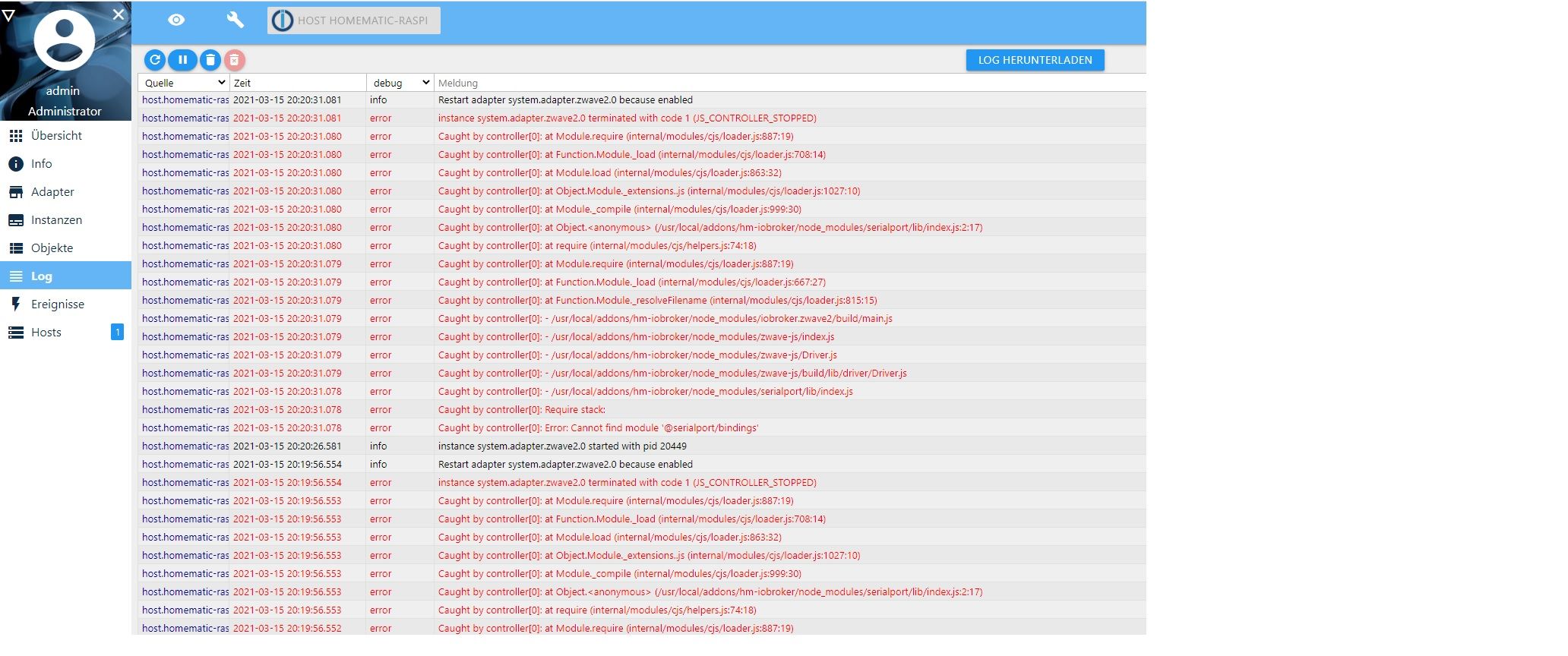
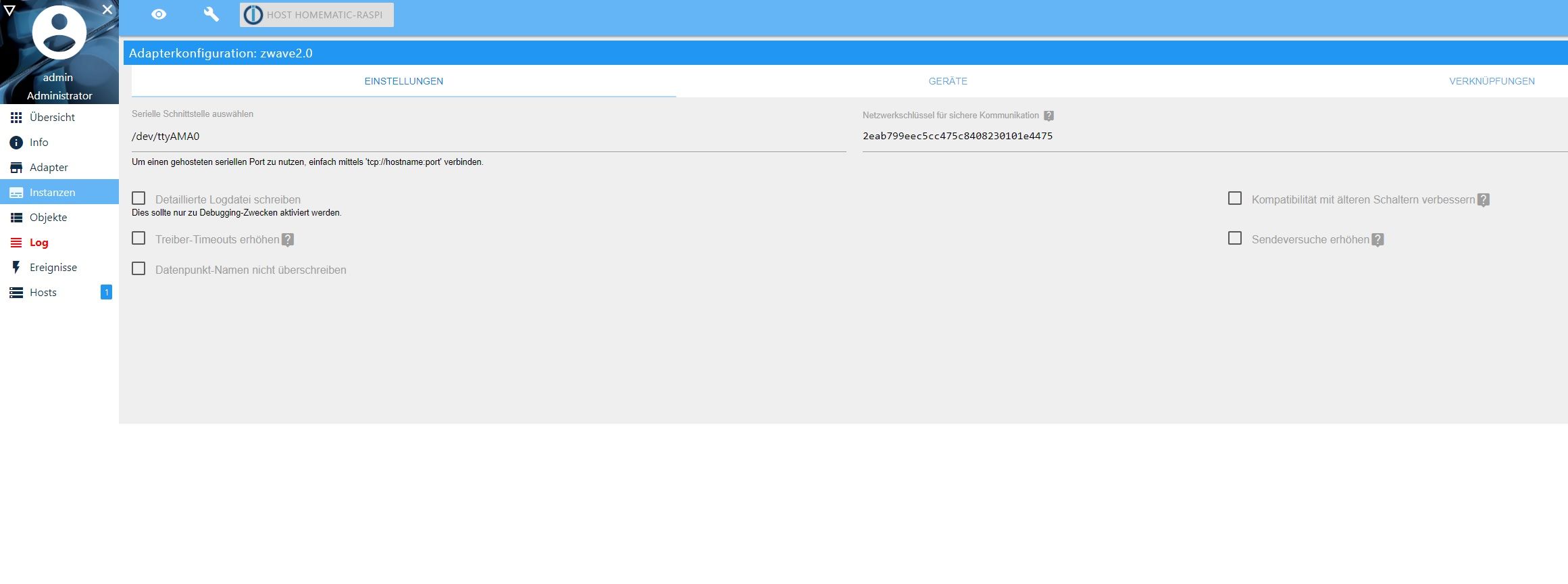
Zwave läuft nicht iobroker als Raspberrymatic addon
-
@thomas-braun witzig - https://www.iobroker.net/docu/index-24.htm?page_id=3068&lang=de
da wird es so beschrieben - was ist nun richtig?@rhartmann76 sagte in Zwave läuft nicht iobroker als Raspberrymatic addon:
da wird es so beschrieben
von 2017 eine Seite, die längst aus dem Netz genommen wurde
-
pi@raspberrypi:~ $ sudo iobroker multihost browse
1 |      192.168.178.94 |  host |      192.168.178.94 | "authentication required"
pi@raspberrypi:~ $ sudo iobroker multihost connec
Invalid parameters. Following is possible: enable, browse, connect, status
pi@raspberrypi:~ $ sudo iobroker multihost connect
1 |      192.168.178.94 |  host |      192.168.178.94 | "authentication required"
Please select host [1]: 192.168.178.94
passt das soweit?
@rhartmann76
Nachdem der Master nun aktiviert ist, versuch doch dich an meine Anleitung zu halten
https://forum.iobroker.net/topic/43296/zwave-läuft-nicht-iobroker-als-raspberrymatic-addon/36 -
@thomas-braun witzig - https://www.iobroker.net/docu/index-24.htm?page_id=3068&lang=de
da wird es so beschrieben - was ist nun richtig?@rhartmann76 sagte in Zwave läuft nicht iobroker als Raspberrymatic addon:
da wird es so beschrieben
Wie findet ihr nur immer diese Uralt-Links, nachdem man den Link zur aktuellen Doku schon gepostet hat?!
Warum `sudo` böse ist: https://forum.iobroker.net/post/17109
-
@rhartmann76 sagte in Zwave läuft nicht iobroker als Raspberrymatic addon:
da wird es so beschrieben
Wie findet ihr nur immer diese Uralt-Links, nachdem man den Link zur aktuellen Doku schon gepostet hat?!
@alcalzone sagte in Zwave läuft nicht iobroker als Raspberrymatic addon:
nachdem man den Link zur aktuellen Doku schon gepostet hat?!
und da war auch noch ein
sudoan falscher Stelle,
Hab ich gerade entfernt ;-)EDIT:
...und WOW, wird wohl jetzt direkt übernommen, nach:
https://www.iobroker.net/#de/documentation/config/multihost.md -
@rhartmann76 sagte in Zwave läuft nicht iobroker als Raspberrymatic addon:
da wird es so beschrieben
Wie findet ihr nur immer diese Uralt-Links, nachdem man den Link zur aktuellen Doku schon gepostet hat?!
@alcalzone sorry, für Neulinge sind es viele Sache auf einmal.
kannst Du mir hier kurz noch helfen.
Ich bin die Anleitung zum Installieren von z-wave soweit schon fast durch. Nun hänge ich hier.
Open the Makefile and find the following line:

OPENZWAVE := ../
LIBMICROHTTPD := -lmicrohttpd

Change it to:

OPENZWAVE := ../open-zwave
LIBMICROHTTPD := /usr/local/lib/libmicrohttpd.a

Build ozwcp

make
ln -sd ../open-zwave/config
Mir sind die Befehle nicht klar. Was soll man hier genau eingeben. Vielen Dank
-
@alcalzone sorry, für Neulinge sind es viele Sache auf einmal.
kannst Du mir hier kurz noch helfen.
Ich bin die Anleitung zum Installieren von z-wave soweit schon fast durch. Nun hänge ich hier.
Open the Makefile and find the following line:

OPENZWAVE := ../
LIBMICROHTTPD := -lmicrohttpd

Change it to:

OPENZWAVE := ../open-zwave
LIBMICROHTTPD := /usr/local/lib/libmicrohttpd.a

Build ozwcp

make
ln -sd ../open-zwave/config
Mir sind die Befehle nicht klar. Was soll man hier genau eingeben. Vielen Dank
-
@rhartmann76 Lass die Finger von OpenZWave, das ist nicht mehr maintained und der zugehörige Adapter ist seit kurzem auch deprecated.
Installiere stattdessen
ioBroker.zwave2, ganz einfach über den Admin.pi@raspberrypi:~ $ iobroker multihost browse 1 | 192.168.178.94 | host | 192.168.178.94 | "authentication required" pi@raspberrypi:~ $ iobroker multihost connect 192.168.178.94 rh1977rh 1 | 192.168.178.94 | host | 192.168.178.94 | "authentication required" Invalid index: 192soweit richtig
-
pi@raspberrypi:~ $ iobroker multihost browse
1 |      192.168.178.94 |  host |      192.168.178.94 | "authentication required"
pi@raspberrypi:~ $ iobroker multihost connect 192.168.178.94 rh1977rh
1 |      192.168.178.94 |  host |      192.168.178.94 | "authentication required"
Invalid index: 192
soweit richtig
@rhartmann76 Wo ist das jetzt schon wieder her?
https://www.iobroker.net/#de/documentation/config/multihost.md?slavekonfiguration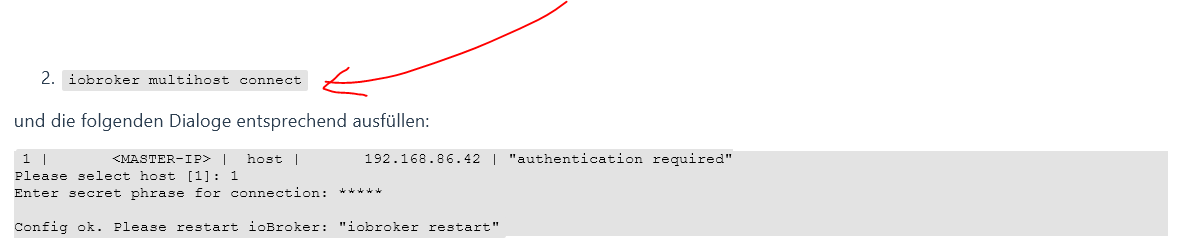
-
@rhartmann76 Wo ist das jetzt schon wieder her?
https://www.iobroker.net/#de/documentation/config/multihost.md?slavekonfiguration@alcalzone jawollllll, Multihost läuft jetzt.
z-wave2 soll ich jetzt über den Admin installieren - wahrscheinlich auf dem Slave?Muss ich dann auf dem Slave auch noch die Seriel freigeben?
Danke
-
@alcalzone jawollllll, Multihost läuft jetzt.
z-wave2 soll ich jetzt über den Admin installieren - wahrscheinlich auf dem Slave?Muss ich dann auf dem Slave auch noch die Seriel freigeben?
Danke
habe nun versucht auf dem Slave zu installieren.
Fertig mit Fehler: host.homematic-raspi Cannot install iobroker.zwave2@1.8.11: 1
host.homematic-raspi 2021-03-18 13:54:14.760 error iobroker host.homematic-raspi Cannot install iobroker.zwave2@1.8.11: 1 host.homematic-raspi 2021-03-18 13:54:14.727 info iobroker npm ERR! A complete log of this run can be found in:npm ERR! /usr/local/addons/hm-iobroker/npm_io/.npm/_logs/2021-03-18T12_54_14_702Z-debug.log host.homematic-raspi 2021-03-18 13:54:14.723 info iobroker host.homematic-raspi 2021-03-18 13:54:14.693 info iobroker ERR! @serialport/bindings@9.0.7 install: `prebuild-install --tag-prefix @serialport/bindings@ || node-gyp rebuild`npm ERR! Exit status 1npm ERR! npm ERR! Failed at the @serialport/bindings@9 host.homematic-raspi 2021-03-18 13:54:14.691 info iobroker npm host.homematic-raspi 2021-03-18 13:54:14.680 info iobroker ERR! code ELIFECYCLEnpm ERR! errno 1 host.homematic-raspi 2021-03-18 13:54:14.677 info iobroker npm host.homematic-raspi 2021-03-18 13:54:13.028 info iobroker ERR! stack Error: Could not find any Python installation to usegyp ERR! stack at PythonFinder.fail (/usr/lib/node_modules/npm/node_modules/node-gyp/lib/find-python.js:307:47)gyp ERR! sta host.homematic-raspi 2021-03-18 13:54:13.023 info iobroker ERR! find Python - Use the switch --python="/path/to/pythonexecutable"gyp ERR! find Python (accepted by both node-gyp and npm)gyp ERR! find Python - Set the environment variable PYTHONgyp host.homematic-raspi 2021-03-18 13:54:13.019 info iobroker ERR! find Python gyp ERR! find Python Python is not set from command line or npm configurationgyp ERR! find Python Python is not set from environment variable PYTHONgyp ERR! find Python che host.homematic-raspi 2021-03-18 13:54:13.016 info iobroker gyp host.homematic-raspi 2021-03-18 13:53:46.001 info iobroker npm install iobroker.zwave2@1.8.11 --loglevel error --unsafe-perm --prefix "/usr/local/addons/hm-iobroker" (System call) host.homematic-raspi 2021-03-18 13:53:45.996 info iobroker NPM version: 6.14.10 host.homematic-raspi 2021-03-18 13:53:37.938 info iobroker add zwave2 --host raspberrypi host.homematic-raspi 2021-03-18 13:53:13.612 warn States 192.168.178.95:34574 Error from InMemDB: Error: client NOT SUPPORTED host.homematic-raspi 2021-03-18 13:53:13.596 warn States 192.168.178.95:34572 Error from InMemDB: Error: client NOT SUPPORTED host.homematic-raspi 2021-03-18 13:53:13.563 warn Objects 192.168.178.95:57066 Error from InMemDB: Error: client NOT SUPPORTED host.homematic-raspi 2021-03-18 13:53:13.507 warn Objects 192.168.178.95:57064 Error from InMemDB: Error: client NOT SUPPORTED host.homematic-raspi 2021-03-18 13:51:23.469 warn some hosts are offline info.0 2021-03-18 13:50:57.883 info (1152) starting. Version 1.7.10 in /usr/local/addons/hm-iobroker/node_modules/iobroker.info, node: v12.20.1, js-controller: 3.1.6 discovery.0 2021-03-18 13:50:49.044 info (1129) starting. Version 2.3.11 in /usr/local/addons/hm-iobroker/node_modules/iobroker.discovery, node: v12.20.1, js-controller: 3.1.6 host.homematic-raspi 2021-03-18 13:50:48.348 info instance system.adapter.info.0 started with pid 1152 admin.0 2021-03-18 13:50:46.619 info (1118) Use link "http://localhost:8081" to configure. admin.0 2021-03-18 13:50:46.617 info (1118) http server listening on port 8081 admin.0 2021-03-18 13:50:46.552 info (1118) received all objects admin.0 2021-03-18 13:50:46.193 info (1118) requesting all objects admin.0 2021-03-18 13:50:46.191 info (1118) requesting all states admin.0 2021-03-18 13:50:46.127 info (1118) starting. Version 4.1.10 in /usr/local/addons/hm-iobroker/node_modules/iobroker.admin, node: v12.20.1, js-controller: 3.1.6 host.homematic-raspi 2021-03-18 13:50:44.348 info instance system.adapter.discovery.0 started with pid 1129 host.homematic-raspi 2021-03-18 13:50:43.427 warn Objects 192.168.178.95:57056 Error from InMemDB: Error: client NOT SUPPORTED host.homematic-raspi 2021-03-18 13:50:40.939 warn States 192.168.178.95:34558 Error from InMemDB: Error: client NOT SUPPORTED host.homematic-raspi 2021-03-18 13:50:40.374 info instance system.adapter.admin.0 started with pid 1118 host.homematic-raspi 2021-03-18 13:50:40.330 info starting 3 instances host.homematic-raspi 2021-03-18 13:50:40.301 info 3 instances found host.homematic-raspi 2021-03-18 13:50:40.293 info Multihost discovery server: service started on 0.0.0.0:50005 host.homematic-raspi 2021-03-18 13:50:39.800 info connected to Objects and States host.homematic-raspi 2021-03-18 13:50:39.486 info ip addresses: 192.168.178.94 fd00::dea6:32ff:fefb:9ff3 fe80::dea6:32ff:fefb:9ff3 host.homematic-raspi 2021-03-18 13:50:39.480 info hostname: homematic-raspi, node: v12.20.1 host.homematic-raspi 2021-03-18 13:50:39.479 info Copyright (c) 2014-2020 bluefox, 2014 hobbyquaker host.homematic-raspi 2021-03-18 13:50:39.474 info iobroker.js-controller version 3.1.6 js-controller starting host.homematic-raspi 2021-03-18 13:46:32.532 info iobroker exit 25 -
habe nun versucht auf dem Slave zu installieren.
Fertig mit Fehler: host.homematic-raspi Cannot install iobroker.zwave2@1.8.11: 1
host.homematic-raspi 2021-03-18 13:54:14.760 error iobroker host.homematic-raspi Cannot install iobroker.zwave2@1.8.11: 1 host.homematic-raspi 2021-03-18 13:54:14.727 info iobroker npm ERR! A complete log of this run can be found in:npm ERR! /usr/local/addons/hm-iobroker/npm_io/.npm/_logs/2021-03-18T12_54_14_702Z-debug.log host.homematic-raspi 2021-03-18 13:54:14.723 info iobroker host.homematic-raspi 2021-03-18 13:54:14.693 info iobroker ERR! @serialport/bindings@9.0.7 install: `prebuild-install --tag-prefix @serialport/bindings@ || node-gyp rebuild`npm ERR! Exit status 1npm ERR! npm ERR! Failed at the @serialport/bindings@9 host.homematic-raspi 2021-03-18 13:54:14.691 info iobroker npm host.homematic-raspi 2021-03-18 13:54:14.680 info iobroker ERR! code ELIFECYCLEnpm ERR! errno 1 host.homematic-raspi 2021-03-18 13:54:14.677 info iobroker npm host.homematic-raspi 2021-03-18 13:54:13.028 info iobroker ERR! stack Error: Could not find any Python installation to usegyp ERR! stack at PythonFinder.fail (/usr/lib/node_modules/npm/node_modules/node-gyp/lib/find-python.js:307:47)gyp ERR! sta host.homematic-raspi 2021-03-18 13:54:13.023 info iobroker ERR! find Python - Use the switch --python="/path/to/pythonexecutable"gyp ERR! find Python (accepted by both node-gyp and npm)gyp ERR! find Python - Set the environment variable PYTHONgyp host.homematic-raspi 2021-03-18 13:54:13.019 info iobroker ERR! find Python gyp ERR! find Python Python is not set from command line or npm configurationgyp ERR! find Python Python is not set from environment variable PYTHONgyp ERR! find Python che host.homematic-raspi 2021-03-18 13:54:13.016 info iobroker gyp host.homematic-raspi 2021-03-18 13:53:46.001 info iobroker npm install iobroker.zwave2@1.8.11 --loglevel error --unsafe-perm --prefix "/usr/local/addons/hm-iobroker" (System call) host.homematic-raspi 2021-03-18 13:53:45.996 info iobroker NPM version: 6.14.10 host.homematic-raspi 2021-03-18 13:53:37.938 info iobroker add zwave2 --host raspberrypi host.homematic-raspi 2021-03-18 13:53:13.612 warn States 192.168.178.95:34574 Error from InMemDB: Error: client NOT SUPPORTED host.homematic-raspi 2021-03-18 13:53:13.596 warn States 192.168.178.95:34572 Error from InMemDB: Error: client NOT SUPPORTED host.homematic-raspi 2021-03-18 13:53:13.563 warn Objects 192.168.178.95:57066 Error from InMemDB: Error: client NOT SUPPORTED host.homematic-raspi 2021-03-18 13:53:13.507 warn Objects 192.168.178.95:57064 Error from InMemDB: Error: client NOT SUPPORTED host.homematic-raspi 2021-03-18 13:51:23.469 warn some hosts are offline info.0 2021-03-18 13:50:57.883 info (1152) starting. Version 1.7.10 in /usr/local/addons/hm-iobroker/node_modules/iobroker.info, node: v12.20.1, js-controller: 3.1.6 discovery.0 2021-03-18 13:50:49.044 info (1129) starting. Version 2.3.11 in /usr/local/addons/hm-iobroker/node_modules/iobroker.discovery, node: v12.20.1, js-controller: 3.1.6 host.homematic-raspi 2021-03-18 13:50:48.348 info instance system.adapter.info.0 started with pid 1152 admin.0 2021-03-18 13:50:46.619 info (1118) Use link "http://localhost:8081" to configure. admin.0 2021-03-18 13:50:46.617 info (1118) http server listening on port 8081 admin.0 2021-03-18 13:50:46.552 info (1118) received all objects admin.0 2021-03-18 13:50:46.193 info (1118) requesting all objects admin.0 2021-03-18 13:50:46.191 info (1118) requesting all states admin.0 2021-03-18 13:50:46.127 info (1118) starting. Version 4.1.10 in /usr/local/addons/hm-iobroker/node_modules/iobroker.admin, node: v12.20.1, js-controller: 3.1.6 host.homematic-raspi 2021-03-18 13:50:44.348 info instance system.adapter.discovery.0 started with pid 1129 host.homematic-raspi 2021-03-18 13:50:43.427 warn Objects 192.168.178.95:57056 Error from InMemDB: Error: client NOT SUPPORTED host.homematic-raspi 2021-03-18 13:50:40.939 warn States 192.168.178.95:34558 Error from InMemDB: Error: client NOT SUPPORTED host.homematic-raspi 2021-03-18 13:50:40.374 info instance system.adapter.admin.0 started with pid 1118 host.homematic-raspi 2021-03-18 13:50:40.330 info starting 3 instances host.homematic-raspi 2021-03-18 13:50:40.301 info 3 instances found host.homematic-raspi 2021-03-18 13:50:40.293 info Multihost discovery server: service started on 0.0.0.0:50005 host.homematic-raspi 2021-03-18 13:50:39.800 info connected to Objects and States host.homematic-raspi 2021-03-18 13:50:39.486 info ip addresses: 192.168.178.94 fd00::dea6:32ff:fefb:9ff3 fe80::dea6:32ff:fefb:9ff3 host.homematic-raspi 2021-03-18 13:50:39.480 info hostname: homematic-raspi, node: v12.20.1 host.homematic-raspi 2021-03-18 13:50:39.479 info Copyright (c) 2014-2020 bluefox, 2014 hobbyquaker host.homematic-raspi 2021-03-18 13:50:39.474 info iobroker.js-controller version 3.1.6 js-controller starting host.homematic-raspi 2021-03-18 13:46:32.532 info iobroker exit 25@rhartmann76 sagte in Zwave läuft nicht iobroker als Raspberrymatic addon:
Could not find any Python installation
Python nachinstallieren.
-
@rhartmann76 sagte in Zwave läuft nicht iobroker als Raspberrymatic addon:
Could not find any Python installation
Python nachinstallieren.
@thomas-braun Danke, auf dem Master oder dem Slave?
-
@thomas-braun Danke, auf dem Master oder dem Slave?
@rhartmann76 Auf der Maschine wo das compile laufen soll.
-
@rhartmann76 sagte in Zwave läuft nicht iobroker als Raspberrymatic addon:
Could not find any Python installation
Python nachinstallieren.
@thomas-braun sagte in Zwave läuft nicht iobroker als Raspberrymatic addon:
@rhartmann76 sagte in Zwave läuft nicht iobroker als Raspberrymatic addon:
Could not find any Python installation
Python nachinstallieren.
wieso ist denn python nicht auf dem pi drauf??
dass es auf der rudimentären buildroot-Umgebung von RaspberryMatic nicht drauf ist, kann ich mir eher vorstellen.
@rhartmann76
Warum muss ioBroker denn unbedingt als Addon auf der RM laufen? -
@thomas-braun sagte in Zwave läuft nicht iobroker als Raspberrymatic addon:
@rhartmann76 sagte in Zwave läuft nicht iobroker als Raspberrymatic addon:
Could not find any Python installation
Python nachinstallieren.
wieso ist denn python nicht auf dem pi drauf??
dass es auf der rudimentären buildroot-Umgebung von RaspberryMatic nicht drauf ist, kann ich mir eher vorstellen.
@rhartmann76
Warum muss ioBroker denn unbedingt als Addon auf der RM laufen?@homoran naja, für mich ist es als Anfänger ganz schön - aber so langsam habe ich den Eindruck. dass ich den PI4 auch neu aufsetze und dann auch alles einzeln zu installieren.
Hat jemand eine Image Empfehlung für das CCU3 Thema auf dem pi4?
Puh, könnte ja so schön einfach sein ;-)
Danke
-
@homoran naja, für mich ist es als Anfänger ganz schön - aber so langsam habe ich den Eindruck. dass ich den PI4 auch neu aufsetze und dann auch alles einzeln zu installieren.
Hat jemand eine Image Empfehlung für das CCU3 Thema auf dem pi4?
Puh, könnte ja so schön einfach sein ;-)
Danke
@rhartmann76
Ich würde da gar keine Images von den Diensten nehmen sondern nur das Grundsystem installieren und dann jeweils 'von Hand' piVCCU und daneben dann den ioBroker setzen. -
@homoran naja, für mich ist es als Anfänger ganz schön - aber so langsam habe ich den Eindruck. dass ich den PI4 auch neu aufsetze und dann auch alles einzeln zu installieren.
Hat jemand eine Image Empfehlung für das CCU3 Thema auf dem pi4?
Puh, könnte ja so schön einfach sein ;-)
Danke
@rhartmann76 sagte in Zwave läuft nicht iobroker als Raspberrymatic addon:
Hat jemand eine Image Empfehlung für das CCU3 Thema auf dem pi4?
welches Funkmodul hast du?
da schon die RM auf dem Pi4 läuft, tippe ich auf das kleine, oder?Gibt viele Möglichkeiten:
Natürlich kannst du die RM weiterlaufen lassen und deine ioBroker-Installation als master auf dem Pi3
Oder tauschen -> pi3: RM, pi4 - iobrokeroder Kombi mit echtem Linux und pivccu und iobroker auf dem Pi4
-
habe nun versucht auf dem Slave zu installieren.
Fertig mit Fehler: host.homematic-raspi Cannot install iobroker.zwave2@1.8.11: 1
host.homematic-raspi 2021-03-18 13:54:14.760 error iobroker host.homematic-raspi Cannot install iobroker.zwave2@1.8.11: 1 host.homematic-raspi 2021-03-18 13:54:14.727 info iobroker npm ERR! A complete log of this run can be found in:npm ERR! /usr/local/addons/hm-iobroker/npm_io/.npm/_logs/2021-03-18T12_54_14_702Z-debug.log host.homematic-raspi 2021-03-18 13:54:14.723 info iobroker host.homematic-raspi 2021-03-18 13:54:14.693 info iobroker ERR! @serialport/bindings@9.0.7 install: `prebuild-install --tag-prefix @serialport/bindings@ || node-gyp rebuild`npm ERR! Exit status 1npm ERR! npm ERR! Failed at the @serialport/bindings@9 host.homematic-raspi 2021-03-18 13:54:14.691 info iobroker npm host.homematic-raspi 2021-03-18 13:54:14.680 info iobroker ERR! code ELIFECYCLEnpm ERR! errno 1 host.homematic-raspi 2021-03-18 13:54:14.677 info iobroker npm host.homematic-raspi 2021-03-18 13:54:13.028 info iobroker ERR! stack Error: Could not find any Python installation to usegyp ERR! stack at PythonFinder.fail (/usr/lib/node_modules/npm/node_modules/node-gyp/lib/find-python.js:307:47)gyp ERR! sta host.homematic-raspi 2021-03-18 13:54:13.023 info iobroker ERR! find Python - Use the switch --python="/path/to/pythonexecutable"gyp ERR! find Python (accepted by both node-gyp and npm)gyp ERR! find Python - Set the environment variable PYTHONgyp host.homematic-raspi 2021-03-18 13:54:13.019 info iobroker ERR! find Python gyp ERR! find Python Python is not set from command line or npm configurationgyp ERR! find Python Python is not set from environment variable PYTHONgyp ERR! find Python che host.homematic-raspi 2021-03-18 13:54:13.016 info iobroker gyp host.homematic-raspi 2021-03-18 13:53:46.001 info iobroker npm install iobroker.zwave2@1.8.11 --loglevel error --unsafe-perm --prefix "/usr/local/addons/hm-iobroker" (System call) host.homematic-raspi 2021-03-18 13:53:45.996 info iobroker NPM version: 6.14.10 host.homematic-raspi 2021-03-18 13:53:37.938 info iobroker add zwave2 --host raspberrypi host.homematic-raspi 2021-03-18 13:53:13.612 warn States 192.168.178.95:34574 Error from InMemDB: Error: client NOT SUPPORTED host.homematic-raspi 2021-03-18 13:53:13.596 warn States 192.168.178.95:34572 Error from InMemDB: Error: client NOT SUPPORTED host.homematic-raspi 2021-03-18 13:53:13.563 warn Objects 192.168.178.95:57066 Error from InMemDB: Error: client NOT SUPPORTED host.homematic-raspi 2021-03-18 13:53:13.507 warn Objects 192.168.178.95:57064 Error from InMemDB: Error: client NOT SUPPORTED host.homematic-raspi 2021-03-18 13:51:23.469 warn some hosts are offline info.0 2021-03-18 13:50:57.883 info (1152) starting. Version 1.7.10 in /usr/local/addons/hm-iobroker/node_modules/iobroker.info, node: v12.20.1, js-controller: 3.1.6 discovery.0 2021-03-18 13:50:49.044 info (1129) starting. Version 2.3.11 in /usr/local/addons/hm-iobroker/node_modules/iobroker.discovery, node: v12.20.1, js-controller: 3.1.6 host.homematic-raspi 2021-03-18 13:50:48.348 info instance system.adapter.info.0 started with pid 1152 admin.0 2021-03-18 13:50:46.619 info (1118) Use link "http://localhost:8081" to configure. admin.0 2021-03-18 13:50:46.617 info (1118) http server listening on port 8081 admin.0 2021-03-18 13:50:46.552 info (1118) received all objects admin.0 2021-03-18 13:50:46.193 info (1118) requesting all objects admin.0 2021-03-18 13:50:46.191 info (1118) requesting all states admin.0 2021-03-18 13:50:46.127 info (1118) starting. Version 4.1.10 in /usr/local/addons/hm-iobroker/node_modules/iobroker.admin, node: v12.20.1, js-controller: 3.1.6 host.homematic-raspi 2021-03-18 13:50:44.348 info instance system.adapter.discovery.0 started with pid 1129 host.homematic-raspi 2021-03-18 13:50:43.427 warn Objects 192.168.178.95:57056 Error from InMemDB: Error: client NOT SUPPORTED host.homematic-raspi 2021-03-18 13:50:40.939 warn States 192.168.178.95:34558 Error from InMemDB: Error: client NOT SUPPORTED host.homematic-raspi 2021-03-18 13:50:40.374 info instance system.adapter.admin.0 started with pid 1118 host.homematic-raspi 2021-03-18 13:50:40.330 info starting 3 instances host.homematic-raspi 2021-03-18 13:50:40.301 info 3 instances found host.homematic-raspi 2021-03-18 13:50:40.293 info Multihost discovery server: service started on 0.0.0.0:50005 host.homematic-raspi 2021-03-18 13:50:39.800 info connected to Objects and States host.homematic-raspi 2021-03-18 13:50:39.486 info ip addresses: 192.168.178.94 fd00::dea6:32ff:fefb:9ff3 fe80::dea6:32ff:fefb:9ff3 host.homematic-raspi 2021-03-18 13:50:39.480 info hostname: homematic-raspi, node: v12.20.1 host.homematic-raspi 2021-03-18 13:50:39.479 info Copyright (c) 2014-2020 bluefox, 2014 hobbyquaker host.homematic-raspi 2021-03-18 13:50:39.474 info iobroker.js-controller version 3.1.6 js-controller starting host.homematic-raspi 2021-03-18 13:46:32.532 info iobroker exit 25@rhartmann76 sagte in Zwave läuft nicht iobroker als Raspberrymatic addon:
habe nun versucht auf dem Slave zu installieren.
Fertig mit Fehler: host.homematic-raspi Cannot install iobroker.zwave2@1.8.11: 1HÄÄ?
Ich denke Homematic läuft auf dem Master? Auf dem Pi3 (Slave) hast du doch jetzt (hoffentlich) ioBroker frisch aufgesetzt, da sollte Python gleich mit dabei sein.
Oder versucht ioBroker jetzt erst auf dem master zu installieren?
Warum `sudo` böse ist: https://forum.iobroker.net/post/17109
-
@rhartmann76 sagte in Zwave läuft nicht iobroker als Raspberrymatic addon:
habe nun versucht auf dem Slave zu installieren.
Fertig mit Fehler: host.homematic-raspi Cannot install iobroker.zwave2@1.8.11: 1HÄÄ?
Ich denke Homematic läuft auf dem Master? Auf dem Pi3 (Slave) hast du doch jetzt (hoffentlich) ioBroker frisch aufgesetzt, da sollte Python gleich mit dabei sein.
Oder versucht ioBroker jetzt erst auf dem master zu installieren?
@alcalzone sagte in Zwave läuft nicht iobroker als Raspberrymatic addon:
Ich denke Homematic läuft auf dem Master
umgekehrt! :joy:
der Master läuft auf der HM@rhartmann76 versucht ein ioBroker-Addon für die Raspberrymatic als Master zu verwenden
-
@alcalzone sagte in Zwave läuft nicht iobroker als Raspberrymatic addon:
Ich denke Homematic läuft auf dem Master
umgekehrt! :joy:
der Master läuft auf der HM@rhartmann76 versucht ein ioBroker-Addon für die Raspberrymatic als Master zu verwenden
@homoran @AlCalzone auf dem PI3 ist iobroker frisch installiert und als Slave konfiguriert.
Der pi4 mit der Homematice ist der iobroker als Addon installiert und da als Master.Da hatten wir aber den oben genannten Fehler.
Ich setzte den pi4 nun neu auf. Melde mich dann wieder ;-)




870
Online32.5k
Users81.6k
Topics1.3m
Posts