




deCONZ Installation schlägt fehl
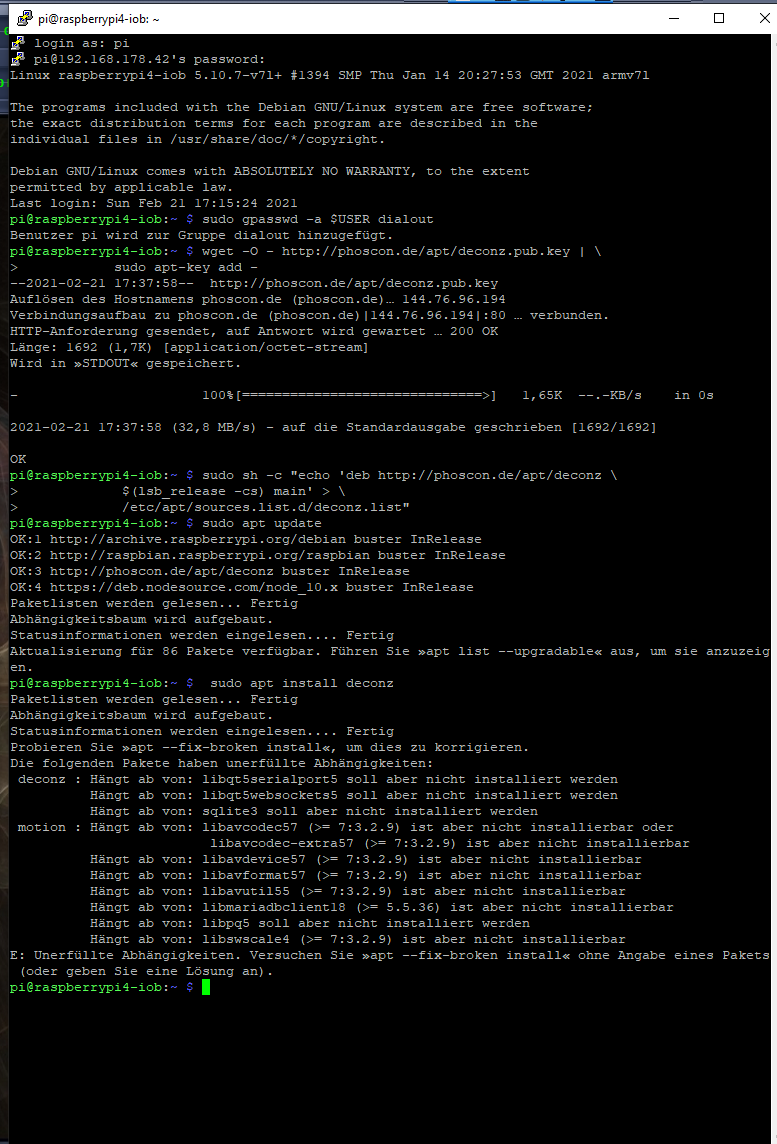
-
Seit gestern funktioniert nichts mehr deconz lässt sich nicht ausführen , das Hängt vielleicht mit meinem anderen Problem zusammen. Ist aber alles aktuell.
https://forum.iobroker.net/topic/42696/iobroker-per-browser-nicht-erreichbar/40login as: pi pi@192.168.178.42's password: Linux raspberrypi4-iob 5.10.11-v7l+ #1399 SMP Thu Jan 28 12:09:48 GMT 2021 armv7l The programs included with the Debian GNU/Linux system are free software; the exact distribution terms for each program are described in the individual files in /usr/share/doc/*/copyright. Debian GNU/Linux comes with ABSOLUTELY NO WARRANTY, to the extent permitted by applicable law. Last login: Sat Feb 27 09:11:48 2021 pi@raspberrypi4-iob:~ $ sudo apt install deconz motion Paketlisten werden gelesen... Fertig Abhängigkeitsbaum wird aufgebaut. Statusinformationen werden eingelesen.... Fertig motion ist schon die neueste Version (4.1.1-1.1+b2). deconz ist schon die neueste Version (2.09.03-raspbian-buster-stable). 0 aktualisiert, 0 neu installiert, 0 zu entfernen und 0 nicht aktualisiert. pi@raspberrypi4-iob:~ $ sudo apt update OK:1 http://phoscon.de/apt/deconz buster InRelease OK:2 http://archive.raspberrypi.org/debian buster InRelease OK:3 http://raspbian.raspberrypi.org/raspbian buster InRelease OK:4 http://packages.microsoft.com/repos/code stable InRelease OK:5 https://deb.nodesource.com/node_10.x buster InRelease Paketlisten werden gelesen... Fertig Abhängigkeitsbaum wird aufgebaut. Statusinformationen werden eingelesen.... Fertig Alle Pakete sind aktuell. pi@raspberrypi4-iob:~ $ ^C pi@raspberrypi4-iob:~ $ ^C pi@raspberrypi4-iob:~ $ -
Seit gestern funktioniert nichts mehr deconz lässt sich nicht ausführen , das Hängt vielleicht mit meinem anderen Problem zusammen. Ist aber alles aktuell.
https://forum.iobroker.net/topic/42696/iobroker-per-browser-nicht-erreichbar/40login as: pi pi@192.168.178.42's password: Linux raspberrypi4-iob 5.10.11-v7l+ #1399 SMP Thu Jan 28 12:09:48 GMT 2021 armv7l The programs included with the Debian GNU/Linux system are free software; the exact distribution terms for each program are described in the individual files in /usr/share/doc/*/copyright. Debian GNU/Linux comes with ABSOLUTELY NO WARRANTY, to the extent permitted by applicable law. Last login: Sat Feb 27 09:11:48 2021 pi@raspberrypi4-iob:~ $ sudo apt install deconz motion Paketlisten werden gelesen... Fertig Abhängigkeitsbaum wird aufgebaut. Statusinformationen werden eingelesen.... Fertig motion ist schon die neueste Version (4.1.1-1.1+b2). deconz ist schon die neueste Version (2.09.03-raspbian-buster-stable). 0 aktualisiert, 0 neu installiert, 0 zu entfernen und 0 nicht aktualisiert. pi@raspberrypi4-iob:~ $ sudo apt update OK:1 http://phoscon.de/apt/deconz buster InRelease OK:2 http://archive.raspberrypi.org/debian buster InRelease OK:3 http://raspbian.raspberrypi.org/raspbian buster InRelease OK:4 http://packages.microsoft.com/repos/code stable InRelease OK:5 https://deb.nodesource.com/node_10.x buster InRelease Paketlisten werden gelesen... Fertig Abhängigkeitsbaum wird aufgebaut. Statusinformationen werden eingelesen.... Fertig Alle Pakete sind aktuell. pi@raspberrypi4-iob:~ $ ^C pi@raspberrypi4-iob:~ $ ^C pi@raspberrypi4-iob:~ $systemctl status deconz deconz-gui -
systemctl status deconz deconz-gui@thomas-braun said in deCONZ Installation schlägt fehl:
systemctl status deconz deconz-gui
login as: pi pi@192.168.178.42's password: Linux raspberrypi4-iob 5.10.11-v7l+ #1399 SMP Thu Jan 28 12:09:48 GMT 2021 armv7l The programs included with the Debian GNU/Linux system are free software; the exact distribution terms for each program are described in the individual files in /usr/share/doc/*/copyright. Debian GNU/Linux comes with ABSOLUTELY NO WARRANTY, to the extent permitted by applicable law. Last login: Sat Feb 27 10:19:09 2021 from 192.168.178.51 pi@raspberrypi4-iob:~ $ systemctl status deconz deconz-gui ● deconz.service - deCONZ: ZigBee gateway -- REST API Loaded: loaded (/lib/systemd/system/deconz.service; enabled; vendor preset: enabled) Active: active (running) since Sat 2021-02-27 09:11:41 CET; 1h 9min ago Main PID: 415 (deCONZ) Tasks: 2 (limit: 4915) CGroup: /system.slice/deconz.service └─415 /usr/bin/deCONZ -platform minimal --http-port=80 Feb 27 09:11:41 raspberrypi4-iob systemd[1]: Started deCONZ: ZigBee gateway -- REST API. Feb 27 09:11:43 raspberrypi4-iob deCONZ[415]: QStandardPaths: XDG_RUNTIME_DIR not set, defaulting to Feb 27 09:11:43 raspberrypi4-iob deCONZ[415]: libpng warning: iCCP: known incorrect sRGB profile Feb 27 09:11:44 raspberrypi4-iob deCONZ[415]: This plugin does not support propagateSizeHints() Feb 27 09:11:44 raspberrypi4-iob deCONZ[415]: This plugin does not support propagateSizeHints() Feb 27 09:11:45 raspberrypi4-iob deCONZ[415]: This plugin does not support propagateSizeHints() ● deconz-gui.service - deCONZ: ZigBee gateway -- GUI/REST API Loaded: loaded (/lib/systemd/system/deconz-gui.service; disabled; vendor preset: enabled) Active: inactive (dead) Feb 27 10:19:20 raspberrypi4-iob systemd[1]: /lib/systemd/system/deconz-gui.service:10: Unknown lval Feb 27 10:21:04 raspberrypi4-iob systemd[1]: /lib/systemd/system/deconz-gui.service:10: Unknown lval lines 1-21/21 (END) -
@thomas-braun said in deCONZ Installation schlägt fehl:
systemctl status deconz deconz-gui
login as: pi pi@192.168.178.42's password: Linux raspberrypi4-iob 5.10.11-v7l+ #1399 SMP Thu Jan 28 12:09:48 GMT 2021 armv7l The programs included with the Debian GNU/Linux system are free software; the exact distribution terms for each program are described in the individual files in /usr/share/doc/*/copyright. Debian GNU/Linux comes with ABSOLUTELY NO WARRANTY, to the extent permitted by applicable law. Last login: Sat Feb 27 10:19:09 2021 from 192.168.178.51 pi@raspberrypi4-iob:~ $ systemctl status deconz deconz-gui ● deconz.service - deCONZ: ZigBee gateway -- REST API Loaded: loaded (/lib/systemd/system/deconz.service; enabled; vendor preset: enabled) Active: active (running) since Sat 2021-02-27 09:11:41 CET; 1h 9min ago Main PID: 415 (deCONZ) Tasks: 2 (limit: 4915) CGroup: /system.slice/deconz.service └─415 /usr/bin/deCONZ -platform minimal --http-port=80 Feb 27 09:11:41 raspberrypi4-iob systemd[1]: Started deCONZ: ZigBee gateway -- REST API. Feb 27 09:11:43 raspberrypi4-iob deCONZ[415]: QStandardPaths: XDG_RUNTIME_DIR not set, defaulting to Feb 27 09:11:43 raspberrypi4-iob deCONZ[415]: libpng warning: iCCP: known incorrect sRGB profile Feb 27 09:11:44 raspberrypi4-iob deCONZ[415]: This plugin does not support propagateSizeHints() Feb 27 09:11:44 raspberrypi4-iob deCONZ[415]: This plugin does not support propagateSizeHints() Feb 27 09:11:45 raspberrypi4-iob deCONZ[415]: This plugin does not support propagateSizeHints() ● deconz-gui.service - deCONZ: ZigBee gateway -- GUI/REST API Loaded: loaded (/lib/systemd/system/deconz-gui.service; disabled; vendor preset: enabled) Active: inactive (dead) Feb 27 10:19:20 raspberrypi4-iob systemd[1]: /lib/systemd/system/deconz-gui.service:10: Unknown lval Feb 27 10:21:04 raspberrypi4-iob systemd[1]: /lib/systemd/system/deconz-gui.service:10: Unknown lval lines 1-21/21 (END) -
-
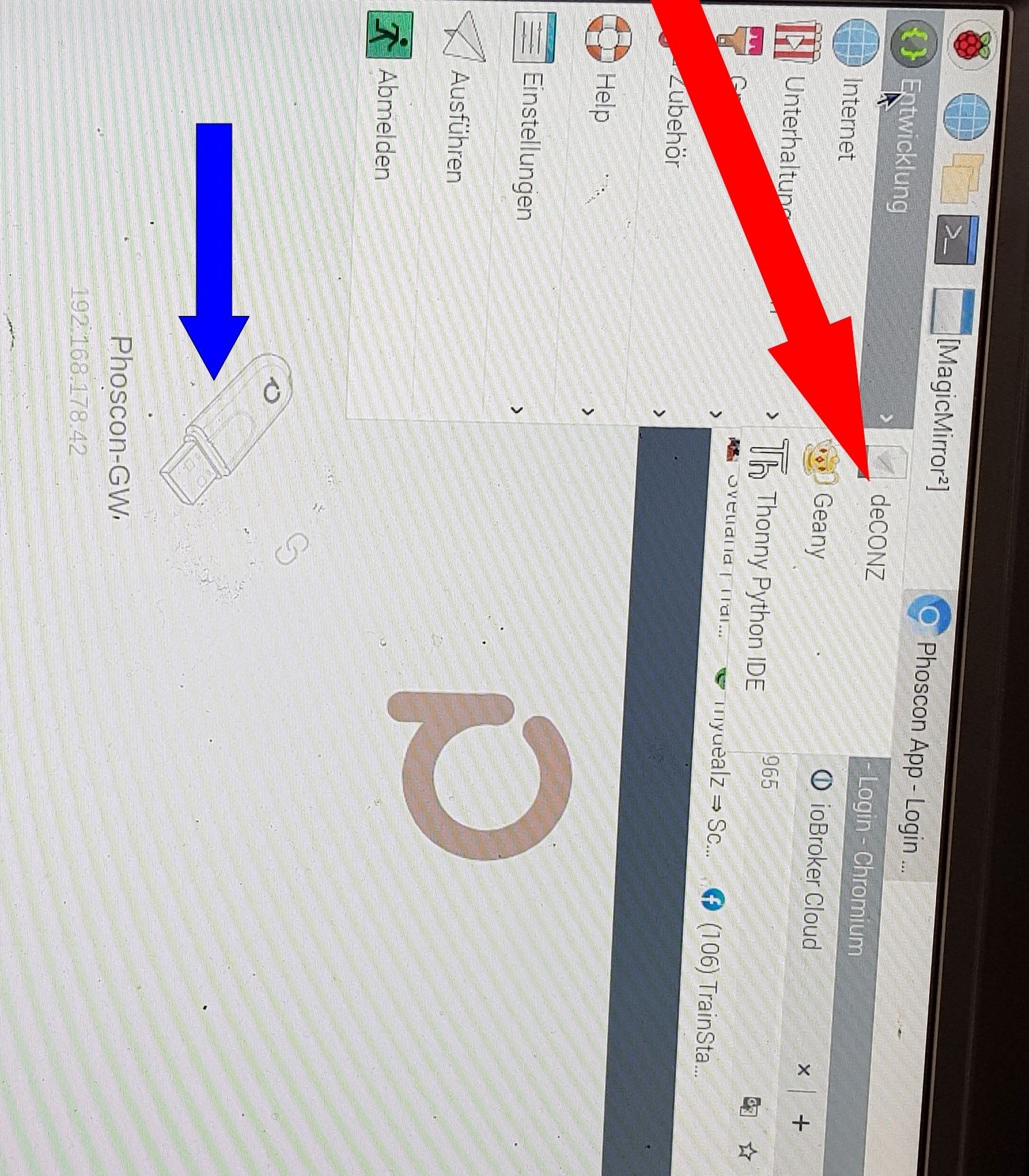
beides grau und kann nicht angeklickt werden. keine Ahnung wie ich das Foto drehen soll.
● deconz.service - deCONZ: ZigBee gateway -- REST API
   Loaded: loaded (/lib/systemd/system/deconz.service; enabled; vendor preset: enabled)
   Active: active (running) since Sat 2021-02-27 09:11:41 CET; 1h 9min ago
Läuft. Als Webservice im Browser, nicht über eine GUI.
-
● deconz.service - deCONZ: ZigBee gateway -- REST API
   Loaded: loaded (/lib/systemd/system/deconz.service; enabled; vendor preset: enabled)
   Active: active (running) since Sat 2021-02-27 09:11:41 CET; 1h 9min ago
Läuft. Als Webservice im Browser, nicht über eine GUI.
@thomas-braun said in deCONZ Installation schlägt fehl:
● deconz.service - deCONZ: ZigBee gateway -- REST API
   Loaded: loaded (/lib/systemd/system/deconz.service; enabled; vendor preset: enabled)
   Active: active (running) since Sat 2021-02-27 09:11:41 CET; 1h 9min ago
Läuft. Als Webservice im Browser, nicht über eine GUI.
Wie komme ich in die app ?
-
@thomas-braun said in deCONZ Installation schlägt fehl:
● deconz.service - deCONZ: ZigBee gateway -- REST API
   Loaded: loaded (/lib/systemd/system/deconz.service; enabled; vendor preset: enabled)
   Active: active (running) since Sat 2021-02-27 09:11:41 CET; 1h 9min ago
Läuft. Als Webservice im Browser, nicht über eine GUI.
Wie komme ich in die app ?
@jasimi
IP_DES_GATEWAY:80 -
@jasimi
IP_DES_GATEWAY:80 -
@jasimi
Halt die IP von deinem Raspberry. Oder wo auch immer der Stick drinsteckt. -
@jasimi
Halt die IP von deinem Raspberry. Oder wo auch immer der Stick drinsteckt.@thomas-braun said in deCONZ Installation schlägt fehl:
@jasimi
Halt die IP von deinem Raspberry. Oder wo auch immer der Stick drinsteckt.die ip von raspberry :http://192.168.178.42:8081
-
@thomas-braun said in deCONZ Installation schlägt fehl:
@jasimi
Halt die IP von deinem Raspberry. Oder wo auch immer der Stick drinsteckt.die ip von raspberry :http://192.168.178.42:8081
-
@Thomas-Braun hat geschrieben:
IP_DES_GATEWAY:80du schreibst:
http://192.168.178.42:8081Finde den Unterschied
@wendy2702
http://192.168.178.42:80 wenn das so gemeint ist, geht auch nicht. -
@wendy2702
http://192.168.178.42:80 wenn das so gemeint ist, geht auch nicht. -
@thomas-braun said in deCONZ Installation schlägt fehl:
sudo netstat -npl
pi@raspberrypi4-iob:~ $ sudo netstat -npl Aktive Internetverbindungen (Nur Server) Proto Recv-Q Send-Q Local Address Foreign Address State PID/Program name tcp 0 0 0.0.0.0:22 0.0.0.0:* LISTEN 578/sshd tcp 0 0 127.0.0.1:631 0.0.0.0:* LISTEN 489/cupsd tcp 0 0 0.0.0.0:9093 0.0.0.0:* LISTEN 21933/io.fakeroku.0 tcp 0 0 127.0.0.1:9000 0.0.0.0:* LISTEN 560/iobroker.js-con tcp 0 0 127.0.0.1:9001 0.0.0.0:* LISTEN 560/iobroker.js-con tcp 0 0 127.0.0.1:8080 0.0.0.0:* LISTEN 933/electron.js tcp 0 0 0.0.0.0:80 0.0.0.0:* LISTEN 415/deCONZ tcp 0 0 192.168.178.42:8081 0.0.0.0:* LISTEN 748/io.admin.0 tcp6 0 0 :::8082 :::* LISTEN 14298/io.web.0 tcp6 0 0 :::22 :::* LISTEN 578/sshd tcp6 0 0 ::1:631 :::* LISTEN 489/cupsd tcp6 0 0 :::11900 :::* LISTEN 933/electron.js tcp6 0 0 :::11901 :::* LISTEN 933/electron.js tcp6 0 0 :::11902 :::* LISTEN 933/electron.js tcp6 0 0 :::12000 :::* LISTEN 933/electron.js tcp6 0 0 :::12001 :::* LISTEN 933/electron.js tcp6 0 0 :::12002 :::* LISTEN 933/electron.js tcp6 0 0 :::12005 :::* LISTEN 933/electron.js tcp6 0 0 :::61991 :::* LISTEN 10781/io.harmony.0 udp 0 0 224.0.0.251:5353 0.0.0.0:* 15458/chromium-brow udp 0 0 0.0.0.0:5353 0.0.0.0:* 22700/io.chromecast udp 0 0 224.0.0.251:5353 0.0.0.0:* 15406/chromium-brow udp 0 0 224.0.0.251:5353 0.0.0.0:* 15458/chromium-brow udp 0 0 0.0.0.0:5353 0.0.0.0:* 407/avahi-daemon: r udp 0 0 0.0.0.0:36086 0.0.0.0:* 407/avahi-daemon: r udp 0 0 0.0.0.0:33556 0.0.0.0:* 15458/chromium-brow udp 0 0 0.0.0.0:1900 0.0.0.0:* 933/electron.js udp 0 0 0.0.0.0:61991 0.0.0.0:* 10781/io.harmony.0 udp 0 0 0.0.0.0:5678 0.0.0.0:* 7449/io.discovery.0 udp 0 0 0.0.0.0:60462 0.0.0.0:* 11114/io.heos.0 udp 0 0 0.0.0.0:68 0.0.0.0:* 498/dhcpcd udp 0 0 0.0.0.0:631 0.0.0.0:* 561/cups-browsed udp6 0 0 :::5353 :::* 407/avahi-daemon: r udp6 0 0 :::51528 :::* 15458/chromium-brow udp6 0 0 :::546 :::* 498/dhcpcd udp6 0 0 :::49210 :::* 407/avahi-daemon: r raw6 0 0 :::58 :::* 7 498/dhcpcd Aktive Sockets in der UNIX-Domäne (Nur Server) Proto RefCnt Flags Type State I-Node PID/Program name Pfad unix 2 [ ACC ] STREAM HÖRT 19011 660/systemd /run/user/1000/system d/private unix 2 [ ACC ] STREAM HÖRT 19017 660/systemd /run/user/1000/gnupg/ S.gpg-agent unix 2 [ ACC ] STREAM HÖRT 19018 660/systemd /run/user/1000/gnupg/ S.gpg-agent.browser unix 2 [ ACC ] STREAM HÖRT 19019 660/systemd /run/user/1000/bus unix 2 [ ACC ] STREAM HÖRT 19020 660/systemd /run/user/1000/pulse/ native unix 2 [ ACC ] STREAM HÖRT 19021 660/systemd /run/user/1000/gnupg/ S.gpg-agent.extra unix 2 [ ACC ] STREAM HÖRT 19022 660/systemd /run/user/1000/gnupg/ S.gpg-agent.ssh unix 2 [ ACC ] STREAM HÖRT 19023 660/systemd /run/user/1000/gnupg/ S.dirmngr unix 2 [ ACC ] STREAM HÖRT 20134 871/pcmanfm /run/user/1000/pcmanf m-socket--0 unix 2 [ ACC ] STREAM HÖRT 21303 938/menu-cached /run/user/1000/menu-c ached-:0 unix 2 [ ACC ] STREAM HÖRT 17305 608/Xorg @/tmp/.X11-unix/X0 unix 2 [ ACC ] STREAM HÖRT 11347 1/init /run/systemd/private unix 2 [ ACC ] STREAM HÖRT 102248 16200/PM2 v4.5.1: G /home/iobroker/.pm2/p ub.sock unix 2 [ ACC ] STREAM HÖRT 11356 1/init /run/systemd/fsck.pro gress unix 2 [ ACC ] STREAM HÖRT 102249 16200/PM2 v4.5.1: G /home/iobroker/.pm2/r pc.sock unix 2 [ ACC ] STREAM HÖRT 19766 621/PM2 v4.5.1: God /home/pi/.pm2/pub.soc k unix 2 [ ACC ] STREAM HÖRT 11358 1/init /run/systemd/journal/ stdout unix 2 [ ACC ] STREAM HÖRT 19767 621/PM2 v4.5.1: God /home/pi/.pm2/rpc.soc k unix 2 [ ACC ] SEQPAKET HÖRT 11383 1/init /run/udev/control unix 2 [ ACC ] STREAM HÖRT 14690 1/init /run/thd.socket unix 2 [ ACC ] STREAM HÖRT 14692 1/init /run/avahi-daemon/soc ket unix 2 [ ACC ] STREAM HÖRT 14693 1/init /var/run/dbus/system_ bus_socket unix 2 [ ACC ] STREAM HÖRT 14695 1/init /run/cups/cups.sock unix 2 [ ACC ] STREAM HÖRT 17306 608/Xorg /tmp/.X11-unix/X0 unix 2 [ ACC ] STREAM HÖRT 21036 784/ssh-agent /tmp/ssh-eB480OBeri2w /agent.695 unix 2 [ ACC ] STREAM HÖRT 16753 498/dhcpcd /var/run/dhcpcd.sock unix 2 [ ACC ] STREAM HÖRT 19257 883/ssh-agent /tmp/ssh-Gxw25opMsrNH /agent.879 unix 2 [ ACC ] STREAM HÖRT 16754 498/dhcpcd /var/run/dhcpcd.unpri v.sock unix 2 [ ACC ] STREAM HÖRT 99644 15406/chromium-brow /tmp/.org.chromium.Ch romium.Ut0NS5/SingletonSocket pi@raspberrypi4-iob:~ $ -
@Thomas-Braun hat geschrieben:
IP_DES_GATEWAY:80du schreibst:
http://192.168.178.42:8081Finde den Unterschied
@wendy2702 alles gute zum Geburtstag
-
@wendy2702 alles gute zum Geburtstag
@jasimi sagte in deCONZ Installation schlägt fehl:
@wendy2702 alles gute zum Geburtstag
Danke, aber ich habe keinen Geburtstag ;-)
-
@wendy2702 alles gute zum Geburtstag
@jasimi
Wenn da ohnehin ein X laufen muss:sudo systemctl stop deconz sudo systemctl disable deconz sudo systemctl enable deconz-gui sudo systemctl start deconz-gui -
@jasimi sagte in deCONZ Installation schlägt fehl:
@wendy2702 alles gute zum Geburtstag
Danke, aber ich habe keinen Geburtstag ;-)
@wendy2702 said in deCONZ Installation schlägt fehl:
@jasimi sagte in deCONZ Installation schlägt fehl:
@wendy2702 alles gute zum Geburtstag
Danke, aber ich habe keinen Geburtstag ;-)
dacht weil 27.02. in deinen Namen steht
-
@jasimi
Wenn da ohnehin ein X laufen muss:sudo systemctl stop deconz sudo systemctl disable deconz sudo systemctl enable deconz-gui sudo systemctl start deconz-gui@thomas-braun said in deCONZ Installation schlägt fehl:
sudo systemctl start deconz-gui
pi@raspberrypi4-iob:~ $ sudo systemctl stop deconz
pi@raspberrypi4-iob:~ $ sudo systemctl disable deconz
Removed /etc/systemd/system/multi-user.target.wants/deconz.service.
pi@raspberrypi4-iob:~ $ sudo systemctl enable deconz-gui
Created symlink /etc/systemd/system/multi-user.target.wants/deconz-gui.service → /lib/systemd/system/deconz-gui.service.
pi@raspberrypi4-iob:~ $ sudo systemctl start deconz-gui
pi@raspberrypi4-iob:~ $


Hey! Du scheinst an dieser Unterhaltung interessiert zu sein, hast aber noch kein Konto.
Hast du es satt, bei jedem Besuch durch die gleichen Beiträge zu scrollen? Wenn du dich für ein Konto anmeldest, kommst du immer genau dorthin zurück, wo du zuvor warst, und kannst dich über neue Antworten benachrichtigen lassen (entweder per E-Mail oder Push-Benachrichtigung). Du kannst auch Lesezeichen speichern und Beiträge positiv bewerten, um anderen Community-Mitgliedern deine Wertschätzung zu zeigen.
Mit deinem Input könnte dieser Beitrag noch besser werden 💗
Registrieren Anmelden191
Online33.0k
Benutzende83.7k
Themen1.3m
Beiträge