



Skip to content
  • Home
  • Recent
  • Tags
  • 0 Unread 0
  • Categories
  • Unreplied
  • Popular
  • GitHub
  • Docu
  • Hilfe
Skins
  • Light
  • Brite
  • Cerulean
  • Cosmo
  • Flatly
  • Journal
  • Litera
  • Lumen
  • Lux
  • Materia
  • Minty
  • Morph
  • Pulse
  • Sandstone
  • Simplex
  • Sketchy
  • Spacelab
  • United
  • Yeti
  • Zephyr
  • Dark
  • Cyborg
  • Darkly
  • Quartz
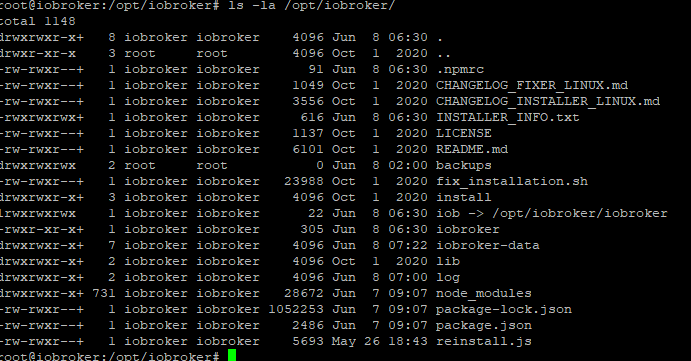
  • Slate
  • Solar
  • Superhero
  • Vapor

  • Default (No Skin)
  • No Skin
Collapse
ioBroker Logo

Community Forum

donate donate
  1. ioBroker Community Home
  2. Deutsch
  3. ioBroker Allgemein
  4. wie gelöschten Zigbee Adapter wieder herstellen?

NEWS

  • Monatsrückblick Januar/Februar 2026 ist online!
    BluefoxB
    Bluefox
    18
    1
    805

  • Jahresrückblick 2025 – unser neuer Blogbeitrag ist online! ✨
    BluefoxB
    Bluefox
    18
    1
    6.3k

  • Neuer Blogbeitrag: Monatsrückblick - Dezember 2025 🎄
    BluefoxB
    Bluefox
    13
    1
    1.6k

wie gelöschten Zigbee Adapter wieder herstellen?

Scheduled Pinned Locked Moved ioBroker Allgemein
46 Posts 7 Posters 6.8k Views 7 Watching
  • Oldest to Newest
  • Newest to Oldest
  • Most Votes
Reply
  • Reply as topic
Log in to reply
This topic has been deleted. Only users with topic management privileges can see it.
  • B burncolonia

    Hallo zusammen,

    ich habe aktuell exakt das selbe Problem. Ich möchte von meinem alten Rechner mit Ubuntu auf eine neue VM (ESXi) auch Ubuntu umziehen. Habe alles gebackuped und wollte es nun auf der neuen VM wieder einspielen. iobroker klappt soweit auch nur wenn es dann an Jarvis, Influx, History oder Zigbee geht kommt der EPERM utime Fehler.

    Ich habe auch festgestellt das der Ordner /opt/iobroker/backups "root" gehört. Ich bekomme das wenn der backitup Adapter läuft auch nicht geändert. Wenn ich Ihn stoppe kann ich es ändern, sobald ich ihn wieder starte gehört er wieder root. Ändere ich es dann nochmal geht es, sobald ich dann aber die Backups zu wiederherstellen einlese gehört er wieder root.

    Langsam verzweifle ich dran ... aber schön das ich nicht alleine bin ... ;-)

    simatecS Offline
    simatecS Offline
    simatec
    Developer Most Active
    wrote on last edited by
    #22

    @burncolonia
    Von wo stellst du die Backups wieder her?

    • Besuche meine Github Seite
    • Beitrag hat geholfen oder willst du mich unterstützen
    • HowTo Restore ioBroker
    B 1 Reply Last reply
    0
    • simatecS simatec

      @burncolonia
      Von wo stellst du die Backups wieder her?

      B Offline
      B Offline
      burncolonia
      wrote on last edited by
      #23

      @simatec
      Hi,

      habe sowohl vom NAS (cifs) als auch von GoogleDrive probiert.

      simatecS 1 Reply Last reply
      0
      • B burncolonia

        @simatec
        Hi,

        habe sowohl vom NAS (cifs) als auch von GoogleDrive probiert.

        simatecS Offline
        simatecS Offline
        simatec
        Developer Most Active
        wrote on last edited by
        #24

        @burncolonia
        Wenn du den mount vom NAS hast, ist root normal. Auf den Ordner /opt/iobroker/backups ist dann der mount
        Welche Version nutzt du von Backitup?

        • Besuche meine Github Seite
        • Beitrag hat geholfen oder willst du mich unterstützen
        • HowTo Restore ioBroker
        B 1 Reply Last reply
        0
        • simatecS simatec

          @burncolonia
          Wenn du den mount vom NAS hast, ist root normal. Auf den Ordner /opt/iobroker/backups ist dann der mount
          Welche Version nutzt du von Backitup?

          B Offline
          B Offline
          burncolonia
          wrote on last edited by
          #25

          @simatec

          2.1.0

          simatecS 1 Reply Last reply
          0
          • B burncolonia

            @simatec

            2.1.0

            simatecS Offline
            simatecS Offline
            simatec
            Developer Most Active
            wrote on last edited by
            #26

            @burncolonia
            Zeige doch bitte mal den Log

            • Besuche meine Github Seite
            • Beitrag hat geholfen oder willst du mich unterstützen
            • HowTo Restore ioBroker
            B 1 Reply Last reply
            0
            • simatecS simatec

              @burncolonia
              Zeige doch bitte mal den Log

              B Offline
              B Offline
              burncolonia
              wrote on last edited by burncolonia
              #27

              @simatec

              2021-03-25 22:00:44.355 - error: backitup.0 (40786) [jarvis] jarvis restore not completed
              2021-03-25 22:00:44.356 - error: backitup.0 (40786) [jarvis] Error: EPERM: operation not permitted, utime '/opt/iobroker/backups/jarvis_0/_BACKUP_DEVICES.json'
              
              2021-03-25 22:00:52.370 - error: backitup.0 (40786) [zigbee] Zigbee Restore not completed
              2021-03-25 22:00:52.370 - error: backitup.0 (40786) [zigbee] Error: EPERM: operation not permitted, utime '/opt/iobroker/backups/zigbee_0/backup_2020_11_01-14_00_13.tar.gz'
              
              2021-03-25 22:00:57.567 - error: backitup.0 (40786) [zigbee] Zigbee Restore not completed
              2021-03-25 22:00:57.567 - error: backitup.0 (40786) [zigbee] Error: EPERM: operation not permitted, utime '/opt/iobroker/backups/zigbee_0/backup_2020_11_01-14_00_13.tar.gz'
              

              wobei das tatsächlich nicht die Files sind die ich auswähle.

              bei zigbee war es zB

              25.3.2021, 20:35 >>> zigbee.0_2021_03_25-20_35_20_backupiobroker.tar.gz <<< (68.7KiB)
              bzw
              10.3.2021, 02:00 >>> zigbee.0_2021_03_10-02_00_28_backupiobroker.tar.gz <<< (54KiB)

              und bei jarvis:

              25.3.2021, 20:35 >>> jarvis.0_2021_03_25-20_35_20_backupiobroker.tar.gz <<< (40.1KiB)

              simatecS 1 Reply Last reply
              0
              • B burncolonia

                @simatec

                2021-03-25 22:00:44.355 - error: backitup.0 (40786) [jarvis] jarvis restore not completed
                2021-03-25 22:00:44.356 - error: backitup.0 (40786) [jarvis] Error: EPERM: operation not permitted, utime '/opt/iobroker/backups/jarvis_0/_BACKUP_DEVICES.json'
                
                2021-03-25 22:00:52.370 - error: backitup.0 (40786) [zigbee] Zigbee Restore not completed
                2021-03-25 22:00:52.370 - error: backitup.0 (40786) [zigbee] Error: EPERM: operation not permitted, utime '/opt/iobroker/backups/zigbee_0/backup_2020_11_01-14_00_13.tar.gz'
                
                2021-03-25 22:00:57.567 - error: backitup.0 (40786) [zigbee] Zigbee Restore not completed
                2021-03-25 22:00:57.567 - error: backitup.0 (40786) [zigbee] Error: EPERM: operation not permitted, utime '/opt/iobroker/backups/zigbee_0/backup_2020_11_01-14_00_13.tar.gz'
                

                wobei das tatsächlich nicht die Files sind die ich auswähle.

                bei zigbee war es zB

                25.3.2021, 20:35 >>> zigbee.0_2021_03_25-20_35_20_backupiobroker.tar.gz <<< (68.7KiB)
                bzw
                10.3.2021, 02:00 >>> zigbee.0_2021_03_10-02_00_28_backupiobroker.tar.gz <<< (54KiB)

                und bei jarvis:

                25.3.2021, 20:35 >>> jarvis.0_2021_03_25-20_35_20_backupiobroker.tar.gz <<< (40.1KiB)

                simatecS Offline
                simatecS Offline
                simatec
                Developer Most Active
                wrote on last edited by
                #28

                @burncolonia
                Hast du mal den iobroker fix laufen lassen?
                Wie hast du iobroker installiert?

                Bitte den Log in dem richtigen Format posten </>

                • Besuche meine Github Seite
                • Beitrag hat geholfen oder willst du mich unterstützen
                • HowTo Restore ioBroker
                1 Reply Last reply
                0
                • B Offline
                  B Offline
                  burncolonia
                  wrote on last edited by burncolonia
                  #29

                  @simatec

                  Fix hatte ich laufen, das war die einzige nicht grüne ausgabe:

                  ==========================================================================
                      Checking ioBroker user and directory permissions (2/3)
                  ==========================================================================
                  
                  Created /etc/sudoers.d/iobroker
                  Fixing directory permissions...
                  This system does not support setting default permissions.
                  Do not use npm to manually install adapters unless you know what you are doing!
                  

                  installation lief über curl mit dem install.sh

                  simatecS 1 Reply Last reply
                  0
                  • B burncolonia

                    @simatec

                    Fix hatte ich laufen, das war die einzige nicht grüne ausgabe:

                    ==========================================================================
                        Checking ioBroker user and directory permissions (2/3)
                    ==========================================================================
                    
                    Created /etc/sudoers.d/iobroker
                    Fixing directory permissions...
                    This system does not support setting default permissions.
                    Do not use npm to manually install adapters unless you know what you are doing!
                    

                    installation lief über curl mit dem install.sh

                    simatecS Offline
                    simatecS Offline
                    simatec
                    Developer Most Active
                    wrote on last edited by
                    #30

                    @burncolonia
                    Hast du als root installiert oder als User?
                    Denke dein System hat ein Rechteproblem.
                    Zeige mal bitte die Ausgabe von:

                    ls -la /opt/iobroker
                    
                    • Besuche meine Github Seite
                    • Beitrag hat geholfen oder willst du mich unterstützen
                    • HowTo Restore ioBroker
                    B 1 Reply Last reply
                    0
                    • simatecS simatec

                      @burncolonia
                      Hast du als root installiert oder als User?
                      Denke dein System hat ein Rechteproblem.
                      Zeige mal bitte die Ausgabe von:

                      ls -la /opt/iobroker
                      
                      B Offline
                      B Offline
                      burncolonia
                      wrote on last edited by
                      #31

                      @simatec

                      als user (burn)

                      burn@iobroker-vm:/opt/iobroker$ ls -la /opt/iobroker/
                      insgesamt 1464
                      drwxrwxrwx+   6 iobroker iobroker    4096 Mär 25 22:14 .
                      drwxr-xr-x    3 root     root        4096 Mär 22 16:25 ..
                      drwxrwxrwx    2 root     root           0 Mär 25 21:09 backups
                      -rwxrwxrwx+   1 iobroker iobroker     552 Mär 25 22:10 INSTALLER_INFO.txt
                      lrwxrwxrwx    1 iobroker iobroker      22 Mär 25 22:10 iob -> /opt/iobroker/iobroker
                      -rwxr-xr-x+   1 iobroker iobroker     309 Mär 25 22:10 iobroker
                      drwxrwxr-x+   6 iobroker iobroker    4096 Mär 25 22:14 iobroker-data
                      drwxrwxr-x+   2 iobroker iobroker    4096 Mär 25 22:13 log
                      drwxrwxr-x+ 740 iobroker iobroker   24576 Mär 25 21:51 node_modules
                      -rw-rwxr--+   1 iobroker iobroker      91 Mär 25 22:10 .npmrc
                      -rw-rwxr--+   1 iobroker iobroker    2292 Mär 25 21:51 package.json
                      -rw-rwxr--+   1 iobroker iobroker 1430866 Mär 25 21:51 package-lock.json
                      -rw-rwxr--+   1 iobroker iobroker    5693 Mär 22 16:25 reinstall.js
                      burn@iobroker-vm:/opt/iobroker$
                      
                      simatecS 1 Reply Last reply
                      0
                      • B burncolonia

                        @simatec

                        als user (burn)

                        burn@iobroker-vm:/opt/iobroker$ ls -la /opt/iobroker/
                        insgesamt 1464
                        drwxrwxrwx+   6 iobroker iobroker    4096 Mär 25 22:14 .
                        drwxr-xr-x    3 root     root        4096 Mär 22 16:25 ..
                        drwxrwxrwx    2 root     root           0 Mär 25 21:09 backups
                        -rwxrwxrwx+   1 iobroker iobroker     552 Mär 25 22:10 INSTALLER_INFO.txt
                        lrwxrwxrwx    1 iobroker iobroker      22 Mär 25 22:10 iob -> /opt/iobroker/iobroker
                        -rwxr-xr-x+   1 iobroker iobroker     309 Mär 25 22:10 iobroker
                        drwxrwxr-x+   6 iobroker iobroker    4096 Mär 25 22:14 iobroker-data
                        drwxrwxr-x+   2 iobroker iobroker    4096 Mär 25 22:13 log
                        drwxrwxr-x+ 740 iobroker iobroker   24576 Mär 25 21:51 node_modules
                        -rw-rwxr--+   1 iobroker iobroker      91 Mär 25 22:10 .npmrc
                        -rw-rwxr--+   1 iobroker iobroker    2292 Mär 25 21:51 package.json
                        -rw-rwxr--+   1 iobroker iobroker 1430866 Mär 25 21:51 package-lock.json
                        -rw-rwxr--+   1 iobroker iobroker    5693 Mär 22 16:25 reinstall.js
                        burn@iobroker-vm:/opt/iobroker$
                        
                        simatecS Offline
                        simatecS Offline
                        simatec
                        Developer Most Active
                        wrote on last edited by simatec
                        #32

                        @burncolonia

                        Mache mal bitte folgendes:

                        sudo reboot now
                        sudo chmod 775 /opt/iobroker/backups
                        sudo chmod 775 /opt/iobroker/backups/*
                        sudo chown iobroker:iobroker /opt/iobroker/backups
                        sudo chown iobroker:iobroker /opt/iobroker/backups/*
                        
                        • Besuche meine Github Seite
                        • Beitrag hat geholfen oder willst du mich unterstützen
                        • HowTo Restore ioBroker
                        R 1 Reply Last reply
                        1
                        • simatecS simatec

                          @burncolonia

                          Mache mal bitte folgendes:

                          sudo reboot now
                          sudo chmod 775 /opt/iobroker/backups
                          sudo chmod 775 /opt/iobroker/backups/*
                          sudo chown iobroker:iobroker /opt/iobroker/backups
                          sudo chown iobroker:iobroker /opt/iobroker/backups/*
                          
                          R Offline
                          R Offline
                          raama90
                          wrote on last edited by
                          #33

                          @simatec Hi, ich weiß das Thema ist schon was älter, aber ich habe aktuell auch das Problem, dass ich meinen Jarvis Adapter nicht wiederherstellen kann. Hier mal die Meldungen aus dem Log:

                          10840dea-6d96-462f-ba49-036d60a8f0f2-grafik.png

                          Mir ist aufgefallen das der Owner des Backups Verzeichnisses noch root ist. Diesen kann ich aber mit den von dir genannten Befehlen oben nicht ändern. Sie werden zwar ohne Fehler ausgeführt, ändern aber nicht die Ownerschaft. Hast du noch ne Idee ?
                          ade5ee1d-b9ad-492b-a076-cfce3c2bd13b-grafik.png

                          Viele Grüße
                          Patrick

                          Thomas BraunT 1 Reply Last reply
                          0
                          • R raama90

                            @simatec Hi, ich weiß das Thema ist schon was älter, aber ich habe aktuell auch das Problem, dass ich meinen Jarvis Adapter nicht wiederherstellen kann. Hier mal die Meldungen aus dem Log:
                            10840dea-6d96-462f-ba49-036d60a8f0f2-grafik.png

                            Mir ist aufgefallen das der Owner des Backups Verzeichnisses noch root ist. Diesen kann ich aber mit den von dir genannten Befehlen oben nicht ändern. Sie werden zwar ohne Fehler ausgeführt, ändern aber nicht die Ownerschaft. Hast du noch ne Idee ?

                            ade5ee1d-b9ad-492b-a076-cfce3c2bd13b-grafik.png

                            Viele Grüße
                            Patrick

                            Thomas BraunT Online
                            Thomas BraunT Online
                            Thomas Braun
                            Most Active
                            wrote on last edited by
                            #34

                            @raama90
                            Wenn du da als root rumhampelst passiert halt ganz leicht krummes Zeug.

                            Linux-Werkzeugkasten:
                            https://forum.iobroker.net/topic/42952/der-kleine-iobroker-linux-werkzeugkasten
                            NodeJS Fixer Skript:
                            https://forum.iobroker.net/topic/68035/iob-node-fix-skript
                            iob_diag: curl -sLf -o diag.sh https://iobroker.net/diag.sh && bash diag.sh

                            R 1 Reply Last reply
                            0
                            • Thomas BraunT Thomas Braun

                              @raama90
                              Wenn du da als root rumhampelst passiert halt ganz leicht krummes Zeug.

                              R Offline
                              R Offline
                              raama90
                              wrote on last edited by
                              #35

                              @thomas-braun das mag sein. Ich bin leider kein Linux Crack und versuche gerade das Problem zu beheben, was mir nicht sonderlich leicht fällt ;-) Es kann sein das die ganze Möhre damals als root installiert wurde. Später wurde dann das fix Skript laufen lassen.

                              Thomas BraunT 2 Replies Last reply
                              0
                              • R raama90

                                @thomas-braun das mag sein. Ich bin leider kein Linux Crack und versuche gerade das Problem zu beheben, was mir nicht sonderlich leicht fällt ;-) Es kann sein das die ganze Möhre damals als root installiert wurde. Später wurde dann das fix Skript laufen lassen.

                                Thomas BraunT Online
                                Thomas BraunT Online
                                Thomas Braun
                                Most Active
                                wrote on last edited by Thomas Braun
                                #36

                                @raama90
                                Jedenfalls sehen die Rechte richtig so aus:

                                Last login: Tue Jun  8 08:08:17 2021 from 192.168.178.51
                                echad@chet:~ $ cd /opt/iobroker/
                                echad@chet:/opt/iobroker $ ls -la
                                insgesamt 2900
                                drwxrwxr-x+   6 iobroker iobroker    4096 Mai 25 22:55 .
                                drwxr-xr-x    5 root     root        4096 Apr 30 19:17 ..
                                drwxrwxr-x+   2 iobroker iobroker    4096 Mai 30 21:09 backups
                                -rwxrwxrwx+   1 iobroker iobroker     965 Mai 25 22:55 INSTALLER_INFO.txt
                                lrwxrwxrwx    1 iobroker iobroker      22 Mai 25 22:55 iob -> /opt/iobroker/iobroker
                                -rwxr-xr-x+   1 iobroker iobroker     309 Mai 25 22:55 iobroker
                                drwxrwxr-x+   7 iobroker iobroker    4096 Jun  8 09:30 iobroker-data
                                drwxrwxr-x+   2 iobroker iobroker    4096 Jun  8 09:23 log
                                drwxrwxr-x+ 685 iobroker iobroker   20480 Jun  8 07:00 node_modules
                                -rw-rwxr--+   1 iobroker iobroker      91 Mai 25 22:55 .npmrc
                                -rw-rwxr--+   1 iobroker iobroker    1349 Jun  8 07:00 package.json
                                -rw-rwxr--+   1 iobroker iobroker 2901074 Jun  8 07:00 package-lock.json
                                -rw-rwxr--+   1 iobroker iobroker    5693 Jun  8 07:00 reinstall.js
                                echad@chet:/opt/iobroker $ getfacl backups/
                                # file: backups/
                                # owner: iobroker
                                # group: iobroker
                                user::rwx
                                group::r-x
                                group:iobroker:rwx
                                mask::rwx
                                other::r-x
                                default:user::rwx
                                default:group::r-x
                                default:group:iobroker:rwx
                                default:mask::rwx
                                default:other::r-x
                                
                                echad@chet:/opt/iobroker $
                                

                                Also mit ACL auf dem backup-Ordner.

                                Linux-Werkzeugkasten:
                                https://forum.iobroker.net/topic/42952/der-kleine-iobroker-linux-werkzeugkasten
                                NodeJS Fixer Skript:
                                https://forum.iobroker.net/topic/68035/iob-node-fix-skript
                                iob_diag: curl -sLf -o diag.sh https://iobroker.net/diag.sh && bash diag.sh

                                R 1 Reply Last reply
                                0
                                • R raama90

                                  @thomas-braun das mag sein. Ich bin leider kein Linux Crack und versuche gerade das Problem zu beheben, was mir nicht sonderlich leicht fällt ;-) Es kann sein das die ganze Möhre damals als root installiert wurde. Später wurde dann das fix Skript laufen lassen.

                                  Thomas BraunT Online
                                  Thomas BraunT Online
                                  Thomas Braun
                                  Most Active
                                  wrote on last edited by
                                  #37

                                  @raama90

                                  Und gerade Nicht-Linux-Cracks sollten eine root-shell meiden wie der Teufel das Weihwasser. Da nutzt auch der iobroker fixer nichts.

                                  Linux-Werkzeugkasten:
                                  https://forum.iobroker.net/topic/42952/der-kleine-iobroker-linux-werkzeugkasten
                                  NodeJS Fixer Skript:
                                  https://forum.iobroker.net/topic/68035/iob-node-fix-skript
                                  iob_diag: curl -sLf -o diag.sh https://iobroker.net/diag.sh && bash diag.sh

                                  1 Reply Last reply
                                  0
                                  • Thomas BraunT Thomas Braun

                                    @raama90
                                    Jedenfalls sehen die Rechte richtig so aus:

                                    Last login: Tue Jun  8 08:08:17 2021 from 192.168.178.51
                                    echad@chet:~ $ cd /opt/iobroker/
                                    echad@chet:/opt/iobroker $ ls -la
                                    insgesamt 2900
                                    drwxrwxr-x+   6 iobroker iobroker    4096 Mai 25 22:55 .
                                    drwxr-xr-x    5 root     root        4096 Apr 30 19:17 ..
                                    drwxrwxr-x+   2 iobroker iobroker    4096 Mai 30 21:09 backups
                                    -rwxrwxrwx+   1 iobroker iobroker     965 Mai 25 22:55 INSTALLER_INFO.txt
                                    lrwxrwxrwx    1 iobroker iobroker      22 Mai 25 22:55 iob -> /opt/iobroker/iobroker
                                    -rwxr-xr-x+   1 iobroker iobroker     309 Mai 25 22:55 iobroker
                                    drwxrwxr-x+   7 iobroker iobroker    4096 Jun  8 09:30 iobroker-data
                                    drwxrwxr-x+   2 iobroker iobroker    4096 Jun  8 09:23 log
                                    drwxrwxr-x+ 685 iobroker iobroker   20480 Jun  8 07:00 node_modules
                                    -rw-rwxr--+   1 iobroker iobroker      91 Mai 25 22:55 .npmrc
                                    -rw-rwxr--+   1 iobroker iobroker    1349 Jun  8 07:00 package.json
                                    -rw-rwxr--+   1 iobroker iobroker 2901074 Jun  8 07:00 package-lock.json
                                    -rw-rwxr--+   1 iobroker iobroker    5693 Jun  8 07:00 reinstall.js
                                    echad@chet:/opt/iobroker $ getfacl backups/
                                    # file: backups/
                                    # owner: iobroker
                                    # group: iobroker
                                    user::rwx
                                    group::r-x
                                    group:iobroker:rwx
                                    mask::rwx
                                    other::r-x
                                    default:user::rwx
                                    default:group::r-x
                                    default:group:iobroker:rwx
                                    default:mask::rwx
                                    default:other::r-x
                                    
                                    echad@chet:/opt/iobroker $
                                    

                                    Also mit ACL auf dem backup-Ordner.

                                    R Offline
                                    R Offline
                                    raama90
                                    wrote on last edited by
                                    #38

                                    @thomas-braun Die frage ist, wie bekomme ich das gefixt?

                                    sudo chown iobroker:iobroker /opt/iobroker/backups
                                    sudo chown iobroker:iobroker /opt/iobroker/backups/*
                                    

                                    Hatte ich schon versucht. Ohne erfolg leider. Der Befehl wurde zwar abgesetzt, leider ohne Meldung.

                                    Thomas BraunT 1 Reply Last reply
                                    0
                                    • R raama90

                                      @thomas-braun Die frage ist, wie bekomme ich das gefixt?

                                      sudo chown iobroker:iobroker /opt/iobroker/backups
                                      sudo chown iobroker:iobroker /opt/iobroker/backups/*
                                      

                                      Hatte ich schon versucht. Ohne erfolg leider. Der Befehl wurde zwar abgesetzt, leider ohne Meldung.

                                      Thomas BraunT Online
                                      Thomas BraunT Online
                                      Thomas Braun
                                      Most Active
                                      wrote on last edited by
                                      #39

                                      @raama90

                                      Erstmal als root abmelden!
                                      Dann mit einem user der sudoer ist weiterfrickeln.

                                      iobroker fix
                                      

                                      nochmal probieren, ansonsten die Rechte von Hand nach obigem Vorbild per setfacl setzen. Anleitung:
                                      https://www.informatik-aktuell.de/betrieb/betriebssysteme/rechte-im-dateisystem-mehr-als-nur-rwx.html

                                      Linux-Werkzeugkasten:
                                      https://forum.iobroker.net/topic/42952/der-kleine-iobroker-linux-werkzeugkasten
                                      NodeJS Fixer Skript:
                                      https://forum.iobroker.net/topic/68035/iob-node-fix-skript
                                      iob_diag: curl -sLf -o diag.sh https://iobroker.net/diag.sh && bash diag.sh

                                      R 1 Reply Last reply
                                      0
                                      • Thomas BraunT Thomas Braun

                                        @raama90

                                        Erstmal als root abmelden!
                                        Dann mit einem user der sudoer ist weiterfrickeln.

                                        iobroker fix
                                        

                                        nochmal probieren, ansonsten die Rechte von Hand nach obigem Vorbild per setfacl setzen. Anleitung:
                                        https://www.informatik-aktuell.de/betrieb/betriebssysteme/rechte-im-dateisystem-mehr-als-nur-rwx.html

                                        R Offline
                                        R Offline
                                        raama90
                                        wrote on last edited by
                                        #40

                                        @thomas-braun Ich habs nun nochmal mehrfach versucht. Der Fix hilft ebenfalls nix. Ich habe zwischenzeitlich den iobroker auf ner neuen Umgebung frisch installiert. Die Ownerschaften sehen nun aus wie bei dir, also alles auf iobroker. Der backitup Adapter bringt beim restore von Jarvis aber auch bei einer nagelneuen Installation den o.g. Fehler.
                                        Ein restore von iobroker selbst über den Backitup Adapter funktioniert hingegen tadellos..
                                        Hast du noch ne Idee? Ich fische noch im trüben.

                                        Thomas BraunT 1 Reply Last reply
                                        0
                                        • R raama90

                                          @thomas-braun Ich habs nun nochmal mehrfach versucht. Der Fix hilft ebenfalls nix. Ich habe zwischenzeitlich den iobroker auf ner neuen Umgebung frisch installiert. Die Ownerschaften sehen nun aus wie bei dir, also alles auf iobroker. Der backitup Adapter bringt beim restore von Jarvis aber auch bei einer nagelneuen Installation den o.g. Fehler.
                                          Ein restore von iobroker selbst über den Backitup Adapter funktioniert hingegen tadellos..
                                          Hast du noch ne Idee? Ich fische noch im trüben.

                                          Thomas BraunT Online
                                          Thomas BraunT Online
                                          Thomas Braun
                                          Most Active
                                          wrote on last edited by
                                          #41

                                          @raama90

                                          whoami
                                          

                                          Und wie wurde das Backup von jarvis angelegt und wo abgelegt? Auf einer Freigabe auf einem NAS? SMB? NFS? Ganz woanders?

                                          Linux-Werkzeugkasten:
                                          https://forum.iobroker.net/topic/42952/der-kleine-iobroker-linux-werkzeugkasten
                                          NodeJS Fixer Skript:
                                          https://forum.iobroker.net/topic/68035/iob-node-fix-skript
                                          iob_diag: curl -sLf -o diag.sh https://iobroker.net/diag.sh && bash diag.sh

                                          R 1 Reply Last reply
                                          0

                                          Hello! It looks like you're interested in this conversation, but you don't have an account yet.

                                          Getting fed up of having to scroll through the same posts each visit? When you register for an account, you'll always come back to exactly where you were before, and choose to be notified of new replies (either via email, or push notification). You'll also be able to save bookmarks and upvote posts to show your appreciation to other community members.

                                          With your input, this post could be even better 💗

                                          Register Login
                                          Reply
                                          • Reply as topic
                                          Log in to reply
                                          • Oldest to Newest
                                          • Newest to Oldest
                                          • Most Votes


                                          Support us

                                          ioBroker
                                          Community Adapters
                                          Donate
                                          FAQ Cloud / IOT
                                          HowTo: Node.js-Update
                                          HowTo: Backup/Restore
                                          Downloads
                                          BLOG

                                          484

                                          Online

                                          32.8k

                                          Users

                                          82.7k

                                          Topics

                                          1.3m

                                          Posts
                                          Community
                                          Impressum | Datenschutz-Bestimmungen | Nutzungsbedingungen | Einwilligungseinstellungen
                                          ioBroker Community 2014-2025
                                          logo
                                          • Login

                                          • Don't have an account? Register

                                          • Login or register to search.
                                          • First post
                                            Last post
                                          0
                                          • Home
                                          • Recent
                                          • Tags
                                          • Unread 0
                                          • Categories
                                          • Unreplied
                                          • Popular
                                          • GitHub
                                          • Docu
                                          • Hilfe