Weiter zum Inhalt
  • Home
  • Aktuell
  • Tags
  • 0 Ungelesen 0
  • Kategorien
  • Unreplied
  • Beliebt
  • GitHub
  • Docu
  • Hilfe
Skins
  • Hell
  • Brite
  • Cerulean
  • Cosmo
  • Flatly
  • Journal
  • Litera
  • Lumen
  • Lux
  • Materia
  • Minty
  • Morph
  • Pulse
  • Sandstone
  • Simplex
  • Sketchy
  • Spacelab
  • United
  • Yeti
  • Zephyr
  • Dunkel
  • Cyborg
  • Darkly
  • Quartz
  • Slate
  • Solar
  • Superhero
  • Vapor

  • Standard: (Kein Skin)
  • Kein Skin
Einklappen
ioBroker Logo

Community Forum

donate donate
  1. ioBroker Community Home
  2. Deutsch
  3. ioBroker Allgemein
  4. Adapter lassen sich nicht aktualisieren (npm Error)

NEWS

  • Neuer ioBroker-Blog online: Monatsrückblick März/April 2026
    BluefoxB
    Bluefox
    8
    1
    1.8k

  • Verwendung von KI bitte immer deutlich kennzeichnen
    HomoranH
    Homoran
    10
    1
    728

  • Monatsrückblick Januar/Februar 2026 ist online!
    BluefoxB
    Bluefox
    18
    1
    1.2k

Adapter lassen sich nicht aktualisieren (npm Error)

Geplant Angeheftet Gesperrt Verschoben ioBroker Allgemein
adapter update fehler
41 Beiträge 4 Kommentatoren 2.6k Aufrufe 3 Beobachtet
  • Älteste zuerst
  • Neuste zuerst
  • Meiste Stimmen
Antworten
  • In einem neuen Thema antworten
Anmelden zum Antworten
Dieses Thema wurde gelöscht. Nur Nutzer mit entsprechenden Rechten können es sehen.
  • HomoranH Homoran

    @Thomas-Braun Außer ;-)

    die DNS-Server des providers existieren ja und werden verbunden, aber kennen die IPs zu den benötigten Adressen nicht 😂

    Thomas BraunT Online
    Thomas BraunT Online
    Thomas Braun
    Most Active
    schrieb am zuletzt editiert von
    #28

    @Homoran

    Die waren doch auch per Ping nicht zu erreichen.

    Linux-Werkzeugkasten:
    https://forum.iobroker.net/topic/42952/der-kleine-iobroker-linux-werkzeugkasten
    NodeJS Fixer Skript:
    https://forum.iobroker.net/topic/68035/iob-node-fix-skript
    iob_diag: curl -sLf -o diag.sh https://iobroker.net/diag.sh && bash diag.sh

    M 1 Antwort Letzte Antwort
    0
    • UncleSamU Offline
      UncleSamU Offline
      UncleSam
      Developer
      schrieb am zuletzt editiert von UncleSam
      #29

      Sorry, aber irgendwelche Diskussionen um die Einstellungen auf dem Router bringen hier nichts.

      @Manuel001 hast eine fixe IP eingestellt, damit gibt es kein DHCP. Somit muss er zumindest seinen Router in die resolv.conf eintragen.

      Nun ist das Problem, dass die Datei immer wieder überschrieben wird. Die Frage also: von wem? Antwort: resolvconf. Somit muss resolvconf korrekt konfiguriert werden.

      Zwei Fragen:

      • gibt es ein Verzeichnis /etc/resolv.conf.d?
      • was hast du für ein OS drauf? Solche Probleme hatte ich mit Ubuntu, aber nicht mit Raspberry OS / Raspbian.

      Bitte bei Problemen mit meinen Adaptern, Issue auf GitHub erfassen: Loxone | I2C | Luxtronik2
      ♡-lichen Dank an meine Sponsoren

      1 Antwort Letzte Antwort
      0
      • Thomas BraunT Thomas Braun

        @Homoran

        Die waren doch auch per Ping nicht zu erreichen.

        M Offline
        M Offline
        Manuel001
        schrieb am zuletzt editiert von
        #30

        Der neue DNS Server: 10.122.8.126 (vom anderen Netzbetreiber)
        Hier mal die Routereinstellungen.
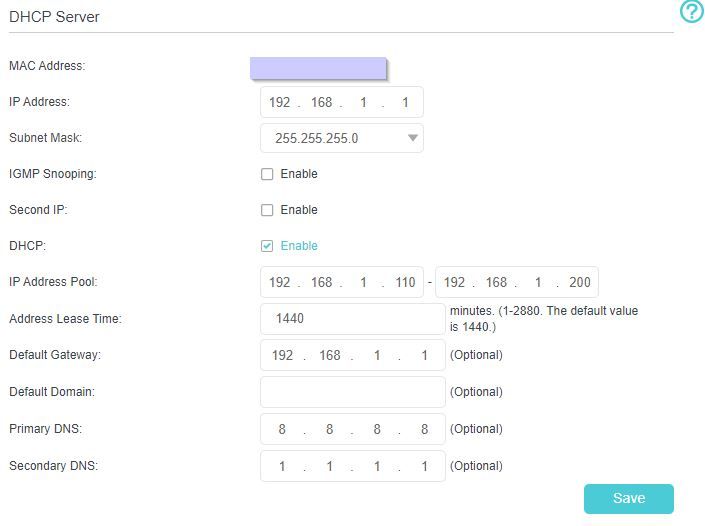
        Routereinstellung.jpg
        Offensichtlich ziehen die DNS Server Einstellungen aber nicht.
        Blöde Frage, aber wo kann ich nachschauen welches Betriebssystem drauf ist. Ich habe es laut der Anleitung von der IO-Broker Homepage gemacht. (manuelle Installation)
        Ich gehe also stark von Raspberry OS aus. Wenn ich mich mit SSH verbinde steht:
        The programs included with the Debian GNU/Linux system are free software;
        Und noch blödere Frage: Wie finde ich heraus, ob es dieses Verzeichnis gibt?
        Sollte ja auch über SSH gehen? ls bewirkt irgendwie nichts.

        UncleSamU 1 Antwort Letzte Antwort
        0
        • M Manuel001

          Der neue DNS Server: 10.122.8.126 (vom anderen Netzbetreiber)
          Hier mal die Routereinstellungen.
          Routereinstellung.jpg
          Offensichtlich ziehen die DNS Server Einstellungen aber nicht.
          Blöde Frage, aber wo kann ich nachschauen welches Betriebssystem drauf ist. Ich habe es laut der Anleitung von der IO-Broker Homepage gemacht. (manuelle Installation)
          Ich gehe also stark von Raspberry OS aus. Wenn ich mich mit SSH verbinde steht:
          The programs included with the Debian GNU/Linux system are free software;
          Und noch blödere Frage: Wie finde ich heraus, ob es dieses Verzeichnis gibt?
          Sollte ja auch über SSH gehen? ls bewirkt irgendwie nichts.

          UncleSamU Offline
          UncleSamU Offline
          UncleSam
          Developer
          schrieb am zuletzt editiert von
          #31

          @Manuel001 sagte in Adapter lassen sich nicht aktualisieren (npm Error):

          Wenn ich mich mit SSH verbinde steht:
          The programs included with the Debian GNU/Linux system are free software;

          Dann ist es wohl Raspbian.

          Und noch blödere Frage: Wie finde ich heraus, ob es dieses Verzeichnis gibt?

          ls -la /etc/resolv.conf.d

          Sollte ja auch über SSH gehen?

          Ja, klar.

          Gibt der Befehl which resolvconf etwas aus?

          Bitte bei Problemen mit meinen Adaptern, Issue auf GitHub erfassen: Loxone | I2C | Luxtronik2
          ♡-lichen Dank an meine Sponsoren

          1 Antwort Letzte Antwort
          0
          • UncleSamU Offline
            UncleSamU Offline
            UncleSam
            Developer
            schrieb am zuletzt editiert von
            #32

            Und wo hast du die fixe IP auf dem Raspi eingestellt?

            Bitte bei Problemen mit meinen Adaptern, Issue auf GitHub erfassen: Loxone | I2C | Luxtronik2
            ♡-lichen Dank an meine Sponsoren

            M 1 Antwort Letzte Antwort
            0
            • UncleSamU UncleSam

              Und wo hast du die fixe IP auf dem Raspi eingestellt?

              M Offline
              M Offline
              Manuel001
              schrieb am zuletzt editiert von
              #33
              pi@iobroker:~ $ ls -la /etc/resolv.conf.d
              ls: Zugriff auf '/etc/resolv.conf.d' nicht möglich: Datei oder Verzeichnis nicht                                                                                                                                                              gefunden
              pi@iobroker:~ $ which resolvconf
              /sbin/resolvconf
              

              Und wo hast du die fixe IP auf dem Raspi eingestellt?

              sudo nano /etc/dhcpcd.conf
              
              Thomas BraunT 1 Antwort Letzte Antwort
              0
              • M Manuel001
                pi@iobroker:~ $ ls -la /etc/resolv.conf.d
                ls: Zugriff auf '/etc/resolv.conf.d' nicht möglich: Datei oder Verzeichnis nicht                                                                                                                                                              gefunden
                pi@iobroker:~ $ which resolvconf
                /sbin/resolvconf
                

                Und wo hast du die fixe IP auf dem Raspi eingestellt?

                sudo nano /etc/dhcpcd.conf
                
                Thomas BraunT Online
                Thomas BraunT Online
                Thomas Braun
                Most Active
                schrieb am zuletzt editiert von
                #34

                @Manuel001
                Und was steht in der dhcpcd.conf nun drin?

                Linux-Werkzeugkasten:
                https://forum.iobroker.net/topic/42952/der-kleine-iobroker-linux-werkzeugkasten
                NodeJS Fixer Skript:
                https://forum.iobroker.net/topic/68035/iob-node-fix-skript
                iob_diag: curl -sLf -o diag.sh https://iobroker.net/diag.sh && bash diag.sh

                M 1 Antwort Letzte Antwort
                0
                • Thomas BraunT Thomas Braun

                  @Manuel001
                  Und was steht in der dhcpcd.conf nun drin?

                  M Offline
                  M Offline
                  Manuel001
                  schrieb am zuletzt editiert von
                  #35

                  @Thomas-Braun

                  # A sample configuration for dhcpcd.
                  # See dhcpcd.conf(5) for details.
                  
                  # Allow users of this group to interact with dhcpcd via the control socket.
                  #controlgroup wheel
                  
                  # Inform the DHCP server of our hostname for DDNS.
                  hostname
                  
                  # Use the hardware address of the interface for the Client ID.
                  clientid
                  # or
                  # Use the same DUID + IAID as set in DHCPv6 for DHCPv4 ClientID as per RFC4361.
                  # Some non-RFC compliant DHCP servers do not reply with this set.
                  # In this case, comment out duid and enable clientid above.
                  #duid
                  
                  # Persist interface configuration when dhcpcd exits.
                  persistent
                  
                  # Rapid commit support.
                  # Safe to enable by default because it requires the equivalent option set
                  # on the server to actually work.
                  option rapid_commit
                  
                  # A list of options to request from the DHCP server.
                  option domain_name_servers, domain_name, domain_search, host_name
                  option classless_static_routes
                  # Respect the network MTU. This is applied to DHCP routes.
                  option interface_mtu
                  
                  # Most distributions have NTP support.
                  #option ntp_servers
                  
                  # A ServerID is required by RFC2131.
                  require dhcp_server_identifier
                  
                  # Generate SLAAC address using the Hardware Address of the interface
                  #slaac hwaddr
                  # OR generate Stable Private IPv6 Addresses based from the DUID
                  slaac private
                  
                  # Example static IP configuration:
                  interface eth0
                  static ip_address=192.168.1.104
                  #static ip6_address=fd51:42f8:caae:d92e::ff/64
                  static routers=192.168.1.1
                  #static domain_name_servers=192.168.0.1 8.8.8.8 fd51:42f8:caae:d92e::1
                  
                  # It is possible to fall back to a static IP if DHCP fails:
                  # define static profile
                  #profile static_eth0
                  #static ip_address=192.168.1.23/24
                  #static routers=192.168.1.1
                  #static domain_name_servers=192.168.1.1
                  
                  # fallback to static profile on eth0
                  #interface eth0
                  
                  
                  Thomas BraunT 1 Antwort Letzte Antwort
                  0
                  • M Manuel001

                    @Thomas-Braun

                    # A sample configuration for dhcpcd.
                    # See dhcpcd.conf(5) for details.
                    
                    # Allow users of this group to interact with dhcpcd via the control socket.
                    #controlgroup wheel
                    
                    # Inform the DHCP server of our hostname for DDNS.
                    hostname
                    
                    # Use the hardware address of the interface for the Client ID.
                    clientid
                    # or
                    # Use the same DUID + IAID as set in DHCPv6 for DHCPv4 ClientID as per RFC4361.
                    # Some non-RFC compliant DHCP servers do not reply with this set.
                    # In this case, comment out duid and enable clientid above.
                    #duid
                    
                    # Persist interface configuration when dhcpcd exits.
                    persistent
                    
                    # Rapid commit support.
                    # Safe to enable by default because it requires the equivalent option set
                    # on the server to actually work.
                    option rapid_commit
                    
                    # A list of options to request from the DHCP server.
                    option domain_name_servers, domain_name, domain_search, host_name
                    option classless_static_routes
                    # Respect the network MTU. This is applied to DHCP routes.
                    option interface_mtu
                    
                    # Most distributions have NTP support.
                    #option ntp_servers
                    
                    # A ServerID is required by RFC2131.
                    require dhcp_server_identifier
                    
                    # Generate SLAAC address using the Hardware Address of the interface
                    #slaac hwaddr
                    # OR generate Stable Private IPv6 Addresses based from the DUID
                    slaac private
                    
                    # Example static IP configuration:
                    interface eth0
                    static ip_address=192.168.1.104
                    #static ip6_address=fd51:42f8:caae:d92e::ff/64
                    static routers=192.168.1.1
                    #static domain_name_servers=192.168.0.1 8.8.8.8 fd51:42f8:caae:d92e::1
                    
                    # It is possible to fall back to a static IP if DHCP fails:
                    # define static profile
                    #profile static_eth0
                    #static ip_address=192.168.1.23/24
                    #static routers=192.168.1.1
                    #static domain_name_servers=192.168.1.1
                    
                    # fallback to static profile on eth0
                    #interface eth0
                    
                    
                    Thomas BraunT Online
                    Thomas BraunT Online
                    Thomas Braun
                    Most Active
                    schrieb am zuletzt editiert von
                    #36

                    @Manuel001 sagte in Adapter lassen sich nicht aktualisieren (npm Error):
                    static ip_address=192.168.1.104

                    müsste soweit ich sehe
                    static ip_address=192.168.1.104/24
                    lauten.

                    static domain_name_servers=192.168.1.1
                    muss einkommentiert werden.

                    Linux-Werkzeugkasten:
                    https://forum.iobroker.net/topic/42952/der-kleine-iobroker-linux-werkzeugkasten
                    NodeJS Fixer Skript:
                    https://forum.iobroker.net/topic/68035/iob-node-fix-skript
                    iob_diag: curl -sLf -o diag.sh https://iobroker.net/diag.sh && bash diag.sh

                    M 1 Antwort Letzte Antwort
                    1
                    • Thomas BraunT Thomas Braun

                      @Manuel001 sagte in Adapter lassen sich nicht aktualisieren (npm Error):
                      static ip_address=192.168.1.104

                      müsste soweit ich sehe
                      static ip_address=192.168.1.104/24
                      lauten.

                      static domain_name_servers=192.168.1.1
                      muss einkommentiert werden.

                      M Offline
                      M Offline
                      Manuel001
                      schrieb am zuletzt editiert von
                      #37

                      @Thomas-Braun
                      Bei "static domain_name_servers=192.168.1.1" hinten auch 8.8.8.8 fd51:42f8:caae:d92e::1 anhängen?`

                      Thomas BraunT 1 Antwort Letzte Antwort
                      0
                      • M Manuel001

                        @Thomas-Braun
                        Bei "static domain_name_servers=192.168.1.1" hinten auch 8.8.8.8 fd51:42f8:caae:d92e::1 anhängen?`

                        Thomas BraunT Online
                        Thomas BraunT Online
                        Thomas Braun
                        Most Active
                        schrieb am zuletzt editiert von
                        #38

                        @Manuel001 Muss auch einfach funktionieren. Wenn du 192.168.1.1 nicht erreichen kannst hast du eh ein Problem.

                        Linux-Werkzeugkasten:
                        https://forum.iobroker.net/topic/42952/der-kleine-iobroker-linux-werkzeugkasten
                        NodeJS Fixer Skript:
                        https://forum.iobroker.net/topic/68035/iob-node-fix-skript
                        iob_diag: curl -sLf -o diag.sh https://iobroker.net/diag.sh && bash diag.sh

                        M 1 Antwort Letzte Antwort
                        0
                        • Thomas BraunT Thomas Braun

                          @Manuel001 Muss auch einfach funktionieren. Wenn du 192.168.1.1 nicht erreichen kannst hast du eh ein Problem.

                          M Offline
                          M Offline
                          Manuel001
                          schrieb am zuletzt editiert von
                          #39

                          @Thomas-Braun
                          Jetzt funktioniert es. Vielen Dank!
                          Das habe ich also schon ganz am Anfang bei der Installation verbockt.
                          Offensichtlich war das dem alten Router egal.

                          Thomas BraunT 1 Antwort Letzte Antwort
                          0
                          • M Manuel001

                            @Thomas-Braun
                            Jetzt funktioniert es. Vielen Dank!
                            Das habe ich also schon ganz am Anfang bei der Installation verbockt.
                            Offensichtlich war das dem alten Router egal.

                            Thomas BraunT Online
                            Thomas BraunT Online
                            Thomas Braun
                            Most Active
                            schrieb am zuletzt editiert von Thomas Braun
                            #40

                            @Manuel001
                            Hast du mal die Kiste neugestartet und geschaut ob das auch dann noch stimmt?

                            Linux-Werkzeugkasten:
                            https://forum.iobroker.net/topic/42952/der-kleine-iobroker-linux-werkzeugkasten
                            NodeJS Fixer Skript:
                            https://forum.iobroker.net/topic/68035/iob-node-fix-skript
                            iob_diag: curl -sLf -o diag.sh https://iobroker.net/diag.sh && bash diag.sh

                            M 1 Antwort Letzte Antwort
                            0
                            • Thomas BraunT Thomas Braun

                              @Manuel001
                              Hast du mal die Kiste neugestartet und geschaut ob das auch dann noch stimmt?

                              M Offline
                              M Offline
                              Manuel001
                              schrieb am zuletzt editiert von
                              #41

                              @Thomas-Braun
                              Ja ich habe jetzt 2x neu gebootet. Bzw. hat es überhaupt erst nach einem Reboot funktioniert.

                              1 Antwort Letzte Antwort
                              0

                              Hey! Du scheinst an dieser Unterhaltung interessiert zu sein, hast aber noch kein Konto.

                              Hast du es satt, bei jedem Besuch durch die gleichen Beiträge zu scrollen? Wenn du dich für ein Konto anmeldest, kommst du immer genau dorthin zurück, wo du zuvor warst, und kannst dich über neue Antworten benachrichtigen lassen (entweder per E-Mail oder Push-Benachrichtigung). Du kannst auch Lesezeichen speichern und Beiträge positiv bewerten, um anderen Community-Mitgliedern deine Wertschätzung zu zeigen.

                              Mit deinem Input könnte dieser Beitrag noch besser werden 💗

                              Registrieren Anmelden
                              Antworten
                              • In einem neuen Thema antworten
                              Anmelden zum Antworten
                              • Älteste zuerst
                              • Neuste zuerst
                              • Meiste Stimmen


                              Support us

                              ioBroker
                              Community Adapters
                              Donate
                              FAQ Cloud / IOT
                              HowTo: Node.js-Update
                              HowTo: Backup/Restore
                              Downloads
                              BLOG

                              613

                              Online

                              32.9k

                              Benutzer

                              83.0k

                              Themen

                              1.3m

                              Beiträge
                              Community
                              Impressum | Datenschutz-Bestimmungen | Nutzungsbedingungen | Einwilligungseinstellungen
                              ioBroker Community 2014-2025
                              logo
                              • Anmelden

                              • Du hast noch kein Konto? Registrieren

                              • Anmelden oder registrieren, um zu suchen
                              • Erster Beitrag
                                Letzter Beitrag
                              0
                              • Home
                              • Aktuell
                              • Tags
                              • Ungelesen 0
                              • Kategorien
                              • Unreplied
                              • Beliebt
                              • GitHub
                              • Docu
                              • Hilfe