



Skip to content
  • Home
  • Recent
  • Tags
  • 0 Unread 0
  • Categories
  • Unreplied
  • Popular
  • GitHub
  • Docu
  • Hilfe
Skins
  • Light
  • Brite
  • Cerulean
  • Cosmo
  • Flatly
  • Journal
  • Litera
  • Lumen
  • Lux
  • Materia
  • Minty
  • Morph
  • Pulse
  • Sandstone
  • Simplex
  • Sketchy
  • Spacelab
  • United
  • Yeti
  • Zephyr
  • Dark
  • Cyborg
  • Darkly
  • Quartz
  • Slate
  • Solar
  • Superhero
  • Vapor

  • Default (No Skin)
  • No Skin
Collapse
ioBroker Logo

Community Forum

donate donate
  1. ioBroker Community Home
  2. Deutsch
  3. ioBroker Allgemein
  4. Diskussion zum HowTo nodejs-Installation und upgrade

NEWS

  • Monatsrückblick Januar/Februar 2026 ist online!
    BluefoxB
    Bluefox
    16
    1
    278

  • Jahresrückblick 2025 – unser neuer Blogbeitrag ist online! ✨
    BluefoxB
    Bluefox
    17
    1
    4.6k

  • Neuer Blogbeitrag: Monatsrückblick - Dezember 2025 🎄
    BluefoxB
    Bluefox
    13
    1
    1.3k

Diskussion zum HowTo nodejs-Installation und upgrade

Scheduled Pinned Locked Moved ioBroker Allgemein
nodejs
844 Posts 91 Posters 250.9k Views 63 Watching
  • Oldest to Newest
  • Newest to Oldest
  • Most Votes
Reply
  • Reply as topic
Log in to reply
This topic has been deleted. Only users with topic management privileges can see it.
  • M mcreuter

    @thomas-braun

    Was meinst du damit genau?

    Der Docker Container Manager zieht sich immer das latest Image und migriert diese direkt.
    https://registry.hub.docker.com/r/iobroker/iobroker/

    Aber updaten tut sich da kein Node und npm.... Habe das immer manuell gemacht bisher...
    Nur jetzt über die neue Methode von dir, da die alte nicht mehr ging :_)

    Thomas BraunT Online
    Thomas BraunT Online
    Thomas Braun
    Most Active
    wrote on last edited by Thomas Braun
    #575

    @mcreuter sagte in Diskussion zum HowTo nodejs-Installation und upgrade:

    Aber updaten tut sich da kein Node und npm.... Habe das immer manuell gemacht bisher...

    Ich hab ja keine Aktien in den Dingern, aber die kommen eigentlich immer mit passender Umgebung vorgekocht daher. Ich glaube in der Version 9 des Docker-Images ist dann auch nodejs@18.18.0 eingebacken.

    Linux-Werkzeugkasten:
    https://forum.iobroker.net/topic/42952/der-kleine-iobroker-linux-werkzeugkasten
    NodeJS Fixer Skript:
    https://forum.iobroker.net/topic/68035/iob-node-fix-skript
    iob_diag: curl -sLf -o diag.sh https://iobroker.net/diag.sh && bash diag.sh

    M 1 Reply Last reply
    0
    • Thomas BraunT Thomas Braun

      @mcreuter sagte in Diskussion zum HowTo nodejs-Installation und upgrade:

      Aber updaten tut sich da kein Node und npm.... Habe das immer manuell gemacht bisher...

      Ich hab ja keine Aktien in den Dingern, aber die kommen eigentlich immer mit passender Umgebung vorgekocht daher. Ich glaube in der Version 9 des Docker-Images ist dann auch nodejs@18.18.0 eingebacken.

      M Offline
      M Offline
      mcreuter
      wrote on last edited by
      #576

      @thomas-braun Ok, kein Ding kann man ja buanet mal fragen...
      https://github.com/buanet/ioBroker.docker

      JA kann sein, die V9 ist als Beta pre Release schon in arbeit mit Debian 12 soweit ich das gesehen habe :-)
      https://github.com/buanet/ioBroker.docker/tree/v9.0.0-beta.1

      • Änderungen:

        remove special settings script and env for zwave (#377)
        simplify ci/ reduce gh actions
        ignore errors in "silent cleanup" on first start (#369)
        cleanup/ restructure repo
        update nodejs setup process
        update base image to debian 12 (bookworm)

        improve security by avoiding root (exept startup script itself)
        restrict iobroker commanline commands (start/ stop/ node fix)
        integrate maintenance script into iobroker command
        move container config files location

      1 Reply Last reply
      0
      • J Offline
        J Offline
        Jack01
        wrote on last edited by Jack01
        #577

        Auch bei mir hat der normale Befehl per update und upgrade nicht zum Erfolg geführt. Ich habe dann den Link von @thomas-braun genutzt und den iob node fix laufen lassen. Das hat geklappt. Verstanden habe ich es aber nicht, da die Pfade ja scheinbar richtig waren und frühere Updates immer funktioniert haben.
        Vielen Dank an alle Helfer!

        ioBroker nodejs fixer 2023-09-24
        
        Recommended nodejs-version is: 18.18.0
        Checking your installation now. Please be patient!
        
        Your current setup is:
        /usr/bin/nodejs         v18.17.1
        /usr/bin/node           v18.17.1
        /usr/bin/npm            9.6.7
        /usr/bin/npx            9.6.7
        /usr/bin/corepack       0.18.0
        
        We found these nodejs versions available for installation:
        
        nodejs:
          Installed: 18.17.1-deb-1nodesource1
          Candidate: 18.17.1-deb-1nodesource1
          Version table:
         *** 18.17.1-deb-1nodesource1 500
                500 https://deb.nodesource.com/node_18.x bullseye/main arm64 Packages
                100 /var/lib/dpkg/status
             12.22.12~dfsg-1~deb11u4 500
                500 http://security.debian.org/debian-security bullseye-security/main arm64 Packages
             12.22.12~dfsg-1~deb11u3 500
                500 http://deb.debian.org/debian bullseye/main arm64 Packages


        Nothing to do - Your installation is using the correct paths.
        
        You are running nodejs v18.17.1. Do you want to install recommended version 18.18.0?
        
        Press <y> to continue or any other key to quit
        Trying to fix your installation now. Please be patient.
        Waiting for ioBroker to shut down - Give me a minute...
        ############################################################
        
        *** These repos are active on your system:
        Hit:1 http://deb.debian.org/debian bullseye InRelease
        Get:2 http://security.debian.org/debian-security bullseye-security InRelease [48.4 kB]
        Hit:3 http://deb.debian.org/debian bullseye-updates InRelease
        Get:4 http://archive.raspberrypi.org/debian bullseye InRelease [23.6 kB]
        Hit:5 https://repos.influxdata.com/debian stable InRelease
        Get:6 http://archive.raspberrypi.org/debian bullseye/main armhf Packages [314 kB]
        Get:7 http://archive.raspberrypi.org/debian bullseye/main arm64 Packages [308 kB]
        Fetched 694 kB in 2s (399 kB/s)
        Reading package lists... Done
        
        *** Installing ca-certificates, curl and gnupg, just in case they are missing.
        
        *** Creating new /etc/apt/sources.list.d/nodesource.list and pinning source
        deb [signed-by=/etc/apt/keyrings/nodesource.gpg] https://deb.nodesource.com/node_18.x nodistro main
        Package: nodejs
        Pin: origin deb.nodesource.com
        Pin-Priority: 1001
        
        *** These repos are active after the adjustments:
        Hit:1 http://deb.debian.org/debian bullseye InRelease
        Hit:2 http://security.debian.org/debian-security bullseye-security InRelease
        Hit:3 http://deb.debian.org/debian bullseye-updates InRelease
        Hit:4 https://repos.influxdata.com/debian stable InRelease
        Hit:5 http://archive.raspberrypi.org/debian bullseye InRelease
        Get:6 https://deb.nodesource.com/node_18.x nodistro InRelease [12.1 kB]
        Get:7 https://deb.nodesource.com/node_18.x nodistro/main armhf Packages [5267 B]
        Get:8 https://deb.nodesource.com/node_18.x nodistro/main arm64 Packages [5262 B]
        Fetched 22.7 kB in 2s (9910 B/s)
        Reading package lists... Done
        
        Installing the recommended nodejs version now!
        (Reading database ... 50588 files and directories currently installed.)
        Preparing to unpack .../nodejs_18.18.0-1nodesource1_arm64.deb ...
        Detected old npm client, removing...
        Unpacking nodejs (18.18.0-1nodesource1) over (18.17.1-deb-1nodesource1) ...
        Setting up nodejs (18.18.0-1nodesource1) ...
        Processing triggers for man-db (2.9.4-2) ...
        
        We tried our best to fix your nodejs. Please run iob diag again to verify.
        
        *** RESTARTING ioBroker NOW! ***
         Please refresh or restart your browser in a few moments.
        
        pi@raspberrypi:/opt/iobroker $


        Proxmox LXC
        Node.js: V22.22.0
        NPM: 10.9.4
        JS-controller: 7.0.7

        Thomas BraunT 1 Reply Last reply
        0
        • J Jack01

          Auch bei mir hat der normale Befehl per update und upgrade nicht zum Erfolg geführt. Ich habe dann den Link von @thomas-braun genutzt und den iob node fix laufen lassen. Das hat geklappt. Verstanden habe ich es aber nicht, da die Pfade ja scheinbar richtig waren und frühere Updates immer funktioniert haben.
          Vielen Dank an alle Helfer!

          ioBroker nodejs fixer 2023-09-24
          
          Recommended nodejs-version is: 18.18.0
          Checking your installation now. Please be patient!
          
          Your current setup is:
          /usr/bin/nodejs         v18.17.1
          /usr/bin/node           v18.17.1
          /usr/bin/npm            9.6.7
          /usr/bin/npx            9.6.7
          /usr/bin/corepack       0.18.0
          
          We found these nodejs versions available for installation:
          
          nodejs:
            Installed: 18.17.1-deb-1nodesource1
            Candidate: 18.17.1-deb-1nodesource1
            Version table:
           *** 18.17.1-deb-1nodesource1 500
                  500 https://deb.nodesource.com/node_18.x bullseye/main arm64 Packages
                  100 /var/lib/dpkg/status
               12.22.12~dfsg-1~deb11u4 500
                  500 http://security.debian.org/debian-security bullseye-security/main arm64 Packages
               12.22.12~dfsg-1~deb11u3 500
                  500 http://deb.debian.org/debian bullseye/main arm64 Packages


          Nothing to do - Your installation is using the correct paths.
          
          You are running nodejs v18.17.1. Do you want to install recommended version 18.18.0?
          
          Press <y> to continue or any other key to quit
          Trying to fix your installation now. Please be patient.
          Waiting for ioBroker to shut down - Give me a minute...
          ############################################################
          
          *** These repos are active on your system:
          Hit:1 http://deb.debian.org/debian bullseye InRelease
          Get:2 http://security.debian.org/debian-security bullseye-security InRelease [48.4 kB]
          Hit:3 http://deb.debian.org/debian bullseye-updates InRelease
          Get:4 http://archive.raspberrypi.org/debian bullseye InRelease [23.6 kB]
          Hit:5 https://repos.influxdata.com/debian stable InRelease
          Get:6 http://archive.raspberrypi.org/debian bullseye/main armhf Packages [314 kB]
          Get:7 http://archive.raspberrypi.org/debian bullseye/main arm64 Packages [308 kB]
          Fetched 694 kB in 2s (399 kB/s)
          Reading package lists... Done
          
          *** Installing ca-certificates, curl and gnupg, just in case they are missing.
          
          *** Creating new /etc/apt/sources.list.d/nodesource.list and pinning source
          deb [signed-by=/etc/apt/keyrings/nodesource.gpg] https://deb.nodesource.com/node_18.x nodistro main
          Package: nodejs
          Pin: origin deb.nodesource.com
          Pin-Priority: 1001
          
          *** These repos are active after the adjustments:
          Hit:1 http://deb.debian.org/debian bullseye InRelease
          Hit:2 http://security.debian.org/debian-security bullseye-security InRelease
          Hit:3 http://deb.debian.org/debian bullseye-updates InRelease
          Hit:4 https://repos.influxdata.com/debian stable InRelease
          Hit:5 http://archive.raspberrypi.org/debian bullseye InRelease
          Get:6 https://deb.nodesource.com/node_18.x nodistro InRelease [12.1 kB]
          Get:7 https://deb.nodesource.com/node_18.x nodistro/main armhf Packages [5267 B]
          Get:8 https://deb.nodesource.com/node_18.x nodistro/main arm64 Packages [5262 B]
          Fetched 22.7 kB in 2s (9910 B/s)
          Reading package lists... Done
          
          Installing the recommended nodejs version now!
          (Reading database ... 50588 files and directories currently installed.)
          Preparing to unpack .../nodejs_18.18.0-1nodesource1_arm64.deb ...
          Detected old npm client, removing...
          Unpacking nodejs (18.18.0-1nodesource1) over (18.17.1-deb-1nodesource1) ...
          Setting up nodejs (18.18.0-1nodesource1) ...
          Processing triggers for man-db (2.9.4-2) ...
          
          We tried our best to fix your nodejs. Please run iob diag again to verify.
          
          *** RESTARTING ioBroker NOW! ***
           Please refresh or restart your browser in a few moments.
          
          pi@raspberrypi:/opt/iobroker $
          
          
          Thomas BraunT Online
          Thomas BraunT Online
          Thomas Braun
          Most Active
          wrote on last edited by
          #578

          @jack01 sagte in Diskussion zum HowTo nodejs-Installation und upgrade:

          Verstanden habe ich es aber nicht, da die Pfade ja scheinbar richtig waren und frühere Updates immer funktioniert haben.

          Der Aufbau der Paketquelle hat sich geändert und daher muss entsprechend in deinem System auch einiges umgestellt werden. Neue Versionen von nodejs kommen nur noch über das neue Repository.

          Das node-fix-Skript nimmt dir das weitgehend ab.

          Linux-Werkzeugkasten:
          https://forum.iobroker.net/topic/42952/der-kleine-iobroker-linux-werkzeugkasten
          NodeJS Fixer Skript:
          https://forum.iobroker.net/topic/68035/iob-node-fix-skript
          iob_diag: curl -sLf -o diag.sh https://iobroker.net/diag.sh && bash diag.sh

          J 1 Reply Last reply
          0
          • Thomas BraunT Thomas Braun

            @jack01 sagte in Diskussion zum HowTo nodejs-Installation und upgrade:

            Verstanden habe ich es aber nicht, da die Pfade ja scheinbar richtig waren und frühere Updates immer funktioniert haben.

            Der Aufbau der Paketquelle hat sich geändert und daher muss entsprechend in deinem System auch einiges umgestellt werden. Neue Versionen von nodejs kommen nur noch über das neue Repository.

            Das node-fix-Skript nimmt dir das weitgehend ab.

            J Offline
            J Offline
            Jack01
            wrote on last edited by
            #579

            @thomas-braun OK, Danke.
            Ist das so dann OK für künftige Updates oder muß ich jetzt noch etwas manuell anpassen?

            Proxmox LXC
            Node.js: V22.22.0
            NPM: 10.9.4
            JS-controller: 7.0.7

            Thomas BraunT 1 Reply Last reply
            0
            • J Jack01

              @thomas-braun OK, Danke.
              Ist das so dann OK für künftige Updates oder muß ich jetzt noch etwas manuell anpassen?

              Thomas BraunT Online
              Thomas BraunT Online
              Thomas Braun
              Most Active
              wrote on last edited by
              #580

              @jack01

              Künftige Updates laufen jetzt wieder wie gehabt über den üblichen

              sudo apt update
              sudo apt full-upgrade
              

              Weg mit.

              Linux-Werkzeugkasten:
              https://forum.iobroker.net/topic/42952/der-kleine-iobroker-linux-werkzeugkasten
              NodeJS Fixer Skript:
              https://forum.iobroker.net/topic/68035/iob-node-fix-skript
              iob_diag: curl -sLf -o diag.sh https://iobroker.net/diag.sh && bash diag.sh

              J 1 Reply Last reply
              1
              • Thomas BraunT Thomas Braun

                @jack01

                Künftige Updates laufen jetzt wieder wie gehabt über den üblichen

                sudo apt update
                sudo apt full-upgrade
                

                Weg mit.

                J Offline
                J Offline
                Jack01
                wrote on last edited by
                #581

                @thomas-braun Na das ist ja ein cooles Script. Kannte ich noch garnicht.

                ======================= SUMMARY =======================
                                     v.2023-06-20
                
                
                   Static hostname: raspberrypi
                         Icon name: computer
                        Machine ID: 620e922bf61543a9808841485d366ecc
                           Boot ID: 14db67d510ce44cea2db1fdd81b8c10d
                  Operating System: Debian GNU/Linux 11 (bullseye)
                            Kernel: Linux 6.1.21-v8+
                      Architecture: arm64
                
                Installation:           native
                Kernel:                 aarch64
                Userland:               arm64
                Timezone:               Europe/Berlin (CEST, +0200)
                User-ID:                1000
                X-Server:               false
                Boot Target:            multi-user.target
                
                Pending OS-Updates:     0
                Pending iob updates:    0
                
                Nodejs-Installation:    /usr/bin/nodejs         v18.18.0
                                        /usr/bin/node           v18.18.0
                                        /usr/bin/npm            9.8.1
                                        /usr/bin/npx            9.8.1
                
                Recommended versions are nodejs 18.x.y and npm 9.x.y
                Your nodejs installation is correct
                
                MEMORY:
                               total        used        free      shared  buff/cache   available
                Mem:            3.8G        1.9G        142M        0.0K        1.7G        1.8G
                Swap:            99M         26M         73M
                Total:          3.9G        1.9G        216M
                
                Active iob-Instances:   25
                Active repo(s): stable
                
                ioBroker Core:          js-controller           5.0.12
                                        admin                   6.10.1
                
                ioBroker Status:        iobroker is running on this host.
                
                
                Objects type: jsonl
                States  type: redis
                
                Status admin and web instance:
                + system.adapter.admin.0                  : admin                 : raspberrypi                              -  enabled, port: 8081, bind: 0.0.0.0, run as: admin
                + system.adapter.web.0                    : web                   : raspberrypi                              -  enabled, port: 8082, bind: 0.0.0.0, run as: admin
                
                Objects:                9583
                States:                 8935
                
                Size of iob-Database:
                
                16M     /opt/iobroker/iobroker-data/objects.jsonl
                1.8M    /opt/iobroker/iobroker-data/states.jsonl


                =================== END OF SUMMARY ====================
                

                Proxmox LXC
                Node.js: V22.22.0
                NPM: 10.9.4
                JS-controller: 7.0.7

                1 Reply Last reply
                0
                • L Offline
                  L Offline
                  LJSven
                  wrote on last edited by
                  #582

                  Ich bekomme auf meinem Tinkerboard nodejs 16 nicht installiert. Es kommt immer diese Meldung

                  Get:1 https://deb.nodesource.com/node_16.x stretch/main armhf nodejs armhf 16.20.2-1nodesource1 [24.2 MB]
                  Err:1 https://deb.nodesource.com/node_16.x stretch/main armhf nodejs armhf 16.20.2-1nodesource1
                    Writing more data than expected (24245194 > 24241614)
                    Hashes of expected file:
                  

                  Was muss ich machen? Ratlos

                  J 1 Reply Last reply
                  0
                  • L LJSven

                    Ich bekomme auf meinem Tinkerboard nodejs 16 nicht installiert. Es kommt immer diese Meldung

                    Get:1 https://deb.nodesource.com/node_16.x stretch/main armhf nodejs armhf 16.20.2-1nodesource1 [24.2 MB]
                    Err:1 https://deb.nodesource.com/node_16.x stretch/main armhf nodejs armhf 16.20.2-1nodesource1
                      Writing more data than expected (24245194 > 24241614)
                      Hashes of expected file:
                    

                    Was muss ich machen? Ratlos

                    J Offline
                    J Offline
                    Jan1
                    wrote on last edited by
                    #583

                    @ljsven

                    1. Stretch ist tot
                    2. Node 16 ist alt und 18 empfohlen

                    Somit erstmal das OS auf der Kiste auf den aktuellen Stand bringen, der Rest sollte dann automatisch laufen

                    L 1 Reply Last reply
                    0
                    • J Jan1

                      @ljsven

                      1. Stretch ist tot
                      2. Node 16 ist alt und 18 empfohlen

                      Somit erstmal das OS auf der Kiste auf den aktuellen Stand bringen, der Rest sollte dann automatisch laufen

                      L Offline
                      L Offline
                      LJSven
                      wrote on last edited by
                      #584

                      @jan1 sagte in Diskussion zum HowTo nodejs-Installation und upgrade:

                      @ljsven

                      1. Stretch ist tot
                      2. Node 16 ist alt und 18 empfohlen

                      Somit erstmal das OS auf der Kiste auf den aktuellen Stand bringen, der Rest sollte dann automatisch laufen

                      Welches Image soll ich installieren? Hast du einen Link?

                      J 1 Reply Last reply
                      0
                      • L LJSven

                        @jan1 sagte in Diskussion zum HowTo nodejs-Installation und upgrade:

                        @ljsven

                        1. Stretch ist tot
                        2. Node 16 ist alt und 18 empfohlen

                        Somit erstmal das OS auf der Kiste auf den aktuellen Stand bringen, der Rest sollte dann automatisch laufen

                        Welches Image soll ich installieren? Hast du einen Link?

                        J Offline
                        J Offline
                        Jan1
                        wrote on last edited by Jan1
                        #585

                        @ljsven
                        Ich habe kein Tinkerboard und natürlich ein aktuelles Image ;)
                        Wobei Image??? kann man das Ding nicht manuell einrichten?

                        L 1 Reply Last reply
                        0
                        • J Jan1

                          @ljsven
                          Ich habe kein Tinkerboard und natürlich ein aktuelles Image ;)
                          Wobei Image??? kann man das Ding nicht manuell einrichten?

                          L Offline
                          L Offline
                          LJSven
                          wrote on last edited by
                          #586

                          @jan1 sagte in Diskussion zum HowTo nodejs-Installation und upgrade:

                          @ljsven
                          Ich habe kein Tinkerboard und natürlich ein aktuelles Image ;)
                          Wobei Image??? kann man das Ding nicht manuell einrichten?

                          Ich meinte eher das passende OS für die Kiste. Ich war der Meinung, dass ich das aktuelle habe

                          J 1 Reply Last reply
                          0
                          • L LJSven

                            @jan1 sagte in Diskussion zum HowTo nodejs-Installation und upgrade:

                            @ljsven
                            Ich habe kein Tinkerboard und natürlich ein aktuelles Image ;)
                            Wobei Image??? kann man das Ding nicht manuell einrichten?

                            Ich meinte eher das passende OS für die Kiste. Ich war der Meinung, dass ich das aktuelle habe

                            J Offline
                            J Offline
                            Jan1
                            wrote on last edited by
                            #587

                            @ljsven
                            Du hast mit Stretch Debian 9 am Start und aktuell wäre Bookworm Debian 12. Also 3 Versionen über deinem, vermeintlich aktuellen Strech :)

                            L 1 Reply Last reply
                            0
                            • J Jan1

                              @ljsven
                              Du hast mit Stretch Debian 9 am Start und aktuell wäre Bookworm Debian 12. Also 3 Versionen über deinem, vermeintlich aktuellen Strech :)

                              L Offline
                              L Offline
                              LJSven
                              wrote on last edited by
                              #588

                              @jan1 sagte in Diskussion zum HowTo nodejs-Installation und upgrade:

                              @ljsven
                              Du hast mit Stretch Debian 9 am Start und aktuell wäre Bookworm Debian 12. Also 3 Versionen über deinem, vermeintlich aktuellen Strech :)

                              Verstehe ich ja… aber ich weiß nicht, welches Image ich genau brauche. Das ist meine Kiste ->
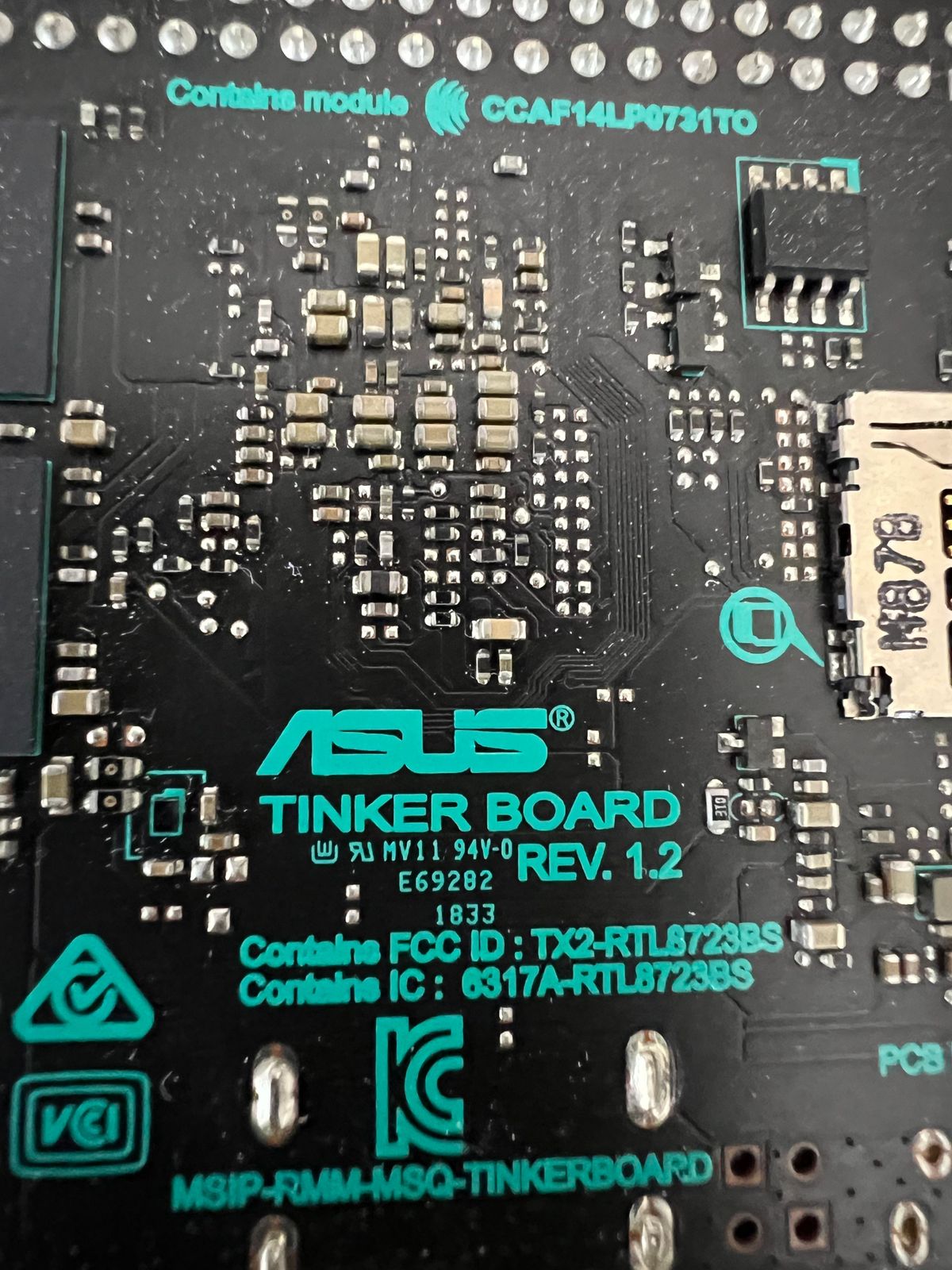
                              IMG_5205.jpeg

                              J 1 Reply Last reply
                              0
                              • L LJSven

                                @jan1 sagte in Diskussion zum HowTo nodejs-Installation und upgrade:

                                @ljsven
                                Du hast mit Stretch Debian 9 am Start und aktuell wäre Bookworm Debian 12. Also 3 Versionen über deinem, vermeintlich aktuellen Strech :)

                                Verstehe ich ja… aber ich weiß nicht, welches Image ich genau brauche. Das ist meine Kiste ->

                                IMG_5205.jpeg

                                J Offline
                                J Offline
                                Jan1
                                wrote on last edited by Jan1
                                #589

                                @ljsven
                                soll ich mich jetzt einlesen?

                                So wie es aussieht, gibts für das Ding nix aktuelles, somit dürfte dann mal neue HW anstehen, da das sonst eh nur ne Notlösung wird.
                                Edit:
                                Haben die Dinger wirklich nur 2GB RAM? Wenn ja, das ist eh zu wenig. Mindestens 4GB und das reicht oft nur bedingt.

                                HomoranH 1 Reply Last reply
                                0
                                • J Jan1

                                  @ljsven
                                  soll ich mich jetzt einlesen?

                                  So wie es aussieht, gibts für das Ding nix aktuelles, somit dürfte dann mal neue HW anstehen, da das sonst eh nur ne Notlösung wird.
                                  Edit:
                                  Haben die Dinger wirklich nur 2GB RAM? Wenn ja, das ist eh zu wenig. Mindestens 4GB und das reicht oft nur bedingt.

                                  HomoranH Offline
                                  HomoranH Offline
                                  Homoran
                                  Global Moderator Administrators
                                  wrote on last edited by Homoran
                                  #590

                                  @jan1 sagte in Diskussion zum HowTo nodejs-Installation und upgrade:

                                  So wie es aussieht, gibts für das Ding nix aktuelles

                                  quak!
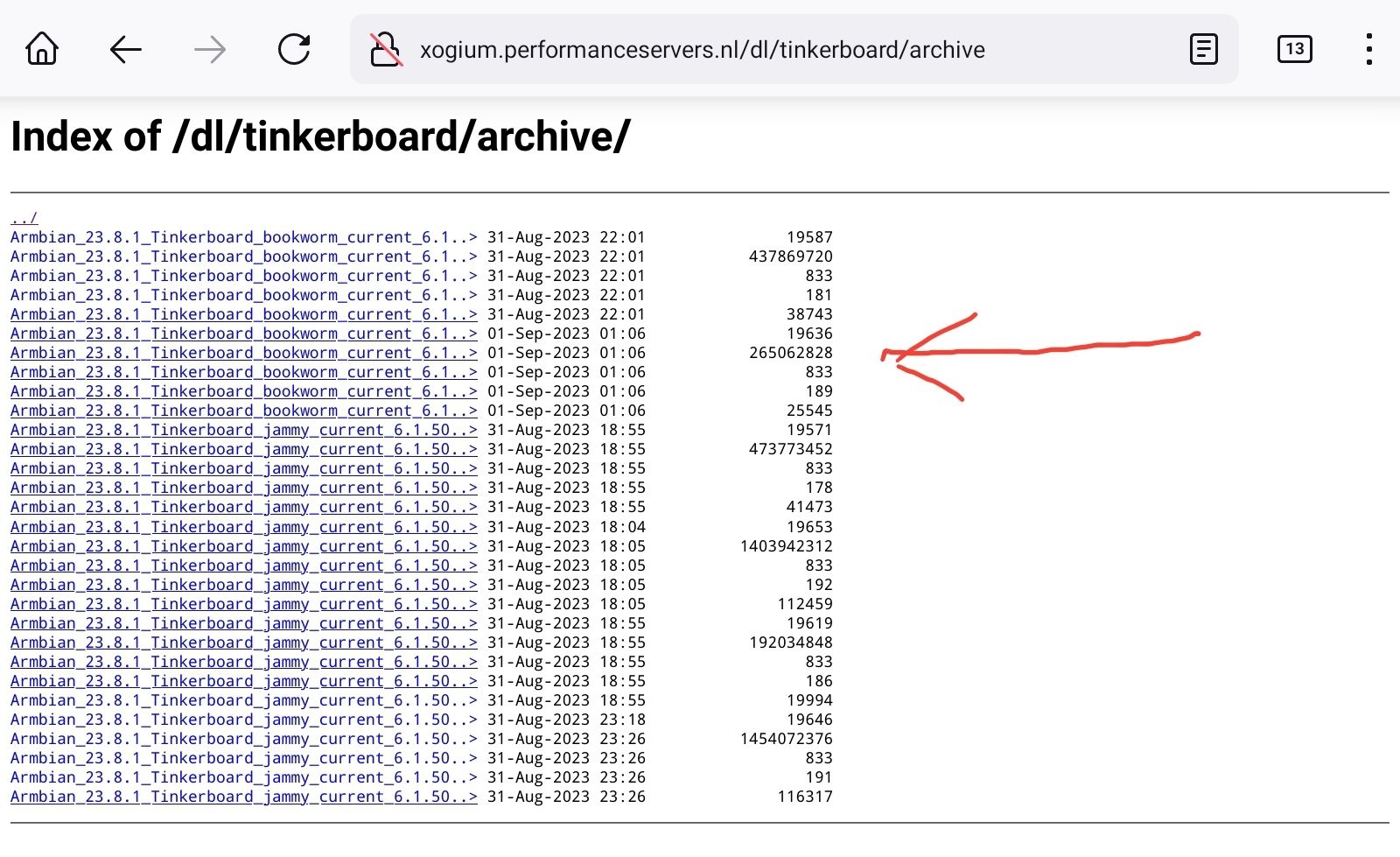
                                  reicht bookworm?

                                  dl.armbian.com leitet auf diverse Server um, dort Tinkerboard und archive. bookworm minimal ist auch dabei
                                  Screenshot_20231001-092200_Firefox.jpg

                                  kein Support per PN! - Fragen im Forum stellen -
                                  Benutzt das Voting rechts unten im Beitrag wenn er euch geholfen hat.
                                  Das Forum freut sich über eine Spende. Benutzt dazu den Spendenbutton im Header. Danke!
                                  der Installationsfixer: curl -fsL https://iobroker.net/fix.sh | bash -

                                  J 1 Reply Last reply
                                  0
                                  • HomoranH Homoran

                                    @jan1 sagte in Diskussion zum HowTo nodejs-Installation und upgrade:

                                    So wie es aussieht, gibts für das Ding nix aktuelles

                                    quak!
                                    reicht bookworm?

                                    dl.armbian.com leitet auf diverse Server um, dort Tinkerboard und archive. bookworm minimal ist auch dabei
                                    Screenshot_20231001-092200_Firefox.jpg

                                    J Offline
                                    J Offline
                                    Jan1
                                    wrote on last edited by
                                    #591

                                    @homoran
                                    Meine erste Frage an Google hat mich auf die Asus Seite gebracht und da gibts nix außer Strech, somit bin ich mit meinem Quark hier eh raus.

                                    HomoranH 1 Reply Last reply
                                    0
                                    • J Jan1

                                      @homoran
                                      Meine erste Frage an Google hat mich auf die Asus Seite gebracht und da gibts nix außer Strech, somit bin ich mit meinem Quark hier eh raus.

                                      HomoranH Offline
                                      HomoranH Offline
                                      Homoran
                                      Global Moderator Administrators
                                      wrote on last edited by
                                      #592

                                      @jan1 google dumm ist!
                                      bei ARM SBC sollte Armbian immer die erste Anlaufstelle sein.
                                      Da läuft bei mir seit Cubietruck alles mit.

                                      kein Support per PN! - Fragen im Forum stellen -
                                      Benutzt das Voting rechts unten im Beitrag wenn er euch geholfen hat.
                                      Das Forum freut sich über eine Spende. Benutzt dazu den Spendenbutton im Header. Danke!
                                      der Installationsfixer: curl -fsL https://iobroker.net/fix.sh | bash -

                                      L 1 Reply Last reply
                                      0
                                      • HomoranH Homoran

                                        @jan1 google dumm ist!
                                        bei ARM SBC sollte Armbian immer die erste Anlaufstelle sein.
                                        Da läuft bei mir seit Cubietruck alles mit.

                                        L Offline
                                        L Offline
                                        LJSven
                                        wrote on last edited by
                                        #593

                                        @homoran Danke Euch! Wie logge ich mich ein? Finde User und PW nicht … Sonntag morgen

                                        HomoranH 1 Reply Last reply
                                        0
                                        • L LJSven

                                          @homoran Danke Euch! Wie logge ich mich ein? Finde User und PW nicht … Sonntag morgen

                                          HomoranH Offline
                                          HomoranH Offline
                                          Homoran
                                          Global Moderator Administrators
                                          wrote on last edited by Homoran
                                          #594

                                          @ljsven sagte in Diskussion zum HowTo nodejs-Installation und upgrade:

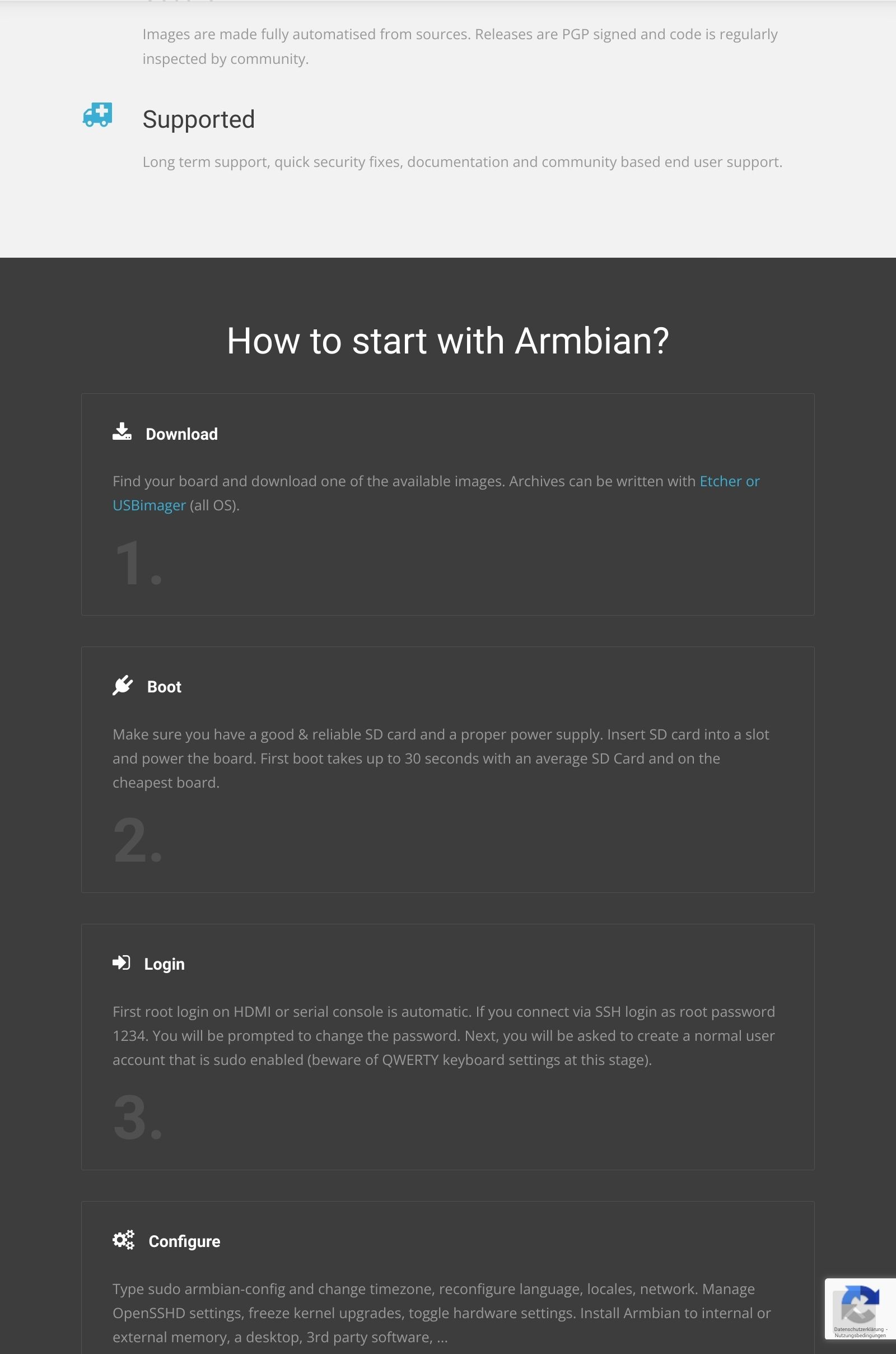
                                          Wie logge ich mich ein?

                                          bei der erstinstallation?

                                          müsste root und 1234 sein, musst du dann aber ändern!

                                          siehe armbian.com
                                          Screenshot_20231001-101956_Firefox.jpg

                                          kein Support per PN! - Fragen im Forum stellen -
                                          Benutzt das Voting rechts unten im Beitrag wenn er euch geholfen hat.
                                          Das Forum freut sich über eine Spende. Benutzt dazu den Spendenbutton im Header. Danke!
                                          der Installationsfixer: curl -fsL https://iobroker.net/fix.sh | bash -

                                          L 1 Reply Last reply
                                          0
                                          Reply
                                          • Reply as topic
                                          Log in to reply
                                          • Oldest to Newest
                                          • Newest to Oldest
                                          • Most Votes


                                          Support us

                                          ioBroker
                                          Community Adapters
                                          Donate
                                          FAQ Cloud / IOT
                                          HowTo: Node.js-Update
                                          HowTo: Backup/Restore
                                          Downloads
                                          BLOG

                                          251

                                          Online

                                          32.7k

                                          Users

                                          82.5k

                                          Topics

                                          1.3m

                                          Posts
                                          Community
                                          Impressum | Datenschutz-Bestimmungen | Nutzungsbedingungen | Einwilligungseinstellungen
                                          ioBroker Community 2014-2025
                                          logo
                                          • Login

                                          • Don't have an account? Register

                                          • Login or register to search.
                                          • First post
                                            Last post
                                          0
                                          • Home
                                          • Recent
                                          • Tags
                                          • Unread 0
                                          • Categories
                                          • Unreplied
                                          • Popular
                                          • GitHub
                                          • Docu
                                          • Hilfe
