Weiter zum Inhalt
  • Home
  • Aktuell
  • Tags
  • 0 Ungelesen 0
  • Kategorien
  • Unreplied
  • Beliebt
  • GitHub
  • Docu
  • Hilfe
Skins
  • Hell
  • Brite
  • Cerulean
  • Cosmo
  • Flatly
  • Journal
  • Litera
  • Lumen
  • Lux
  • Materia
  • Minty
  • Morph
  • Pulse
  • Sandstone
  • Simplex
  • Sketchy
  • Spacelab
  • United
  • Yeti
  • Zephyr
  • Dunkel
  • Cyborg
  • Darkly
  • Quartz
  • Slate
  • Solar
  • Superhero
  • Vapor

  • Standard: (Kein Skin)
  • Kein Skin
Einklappen
ioBroker Logo

Community Forum

donate donate
  1. ioBroker Community Home
  2. Deutsch
  3. ioBroker Allgemein
  4. [gelöst] System startet nicht mehr nach Update

NEWS

  • Neuer ioBroker-Blog online: Monatsrückblick März/April 2026
    BluefoxB
    Bluefox
    8
    1
    1.7k

  • Verwendung von KI bitte immer deutlich kennzeichnen
    HomoranH
    Homoran
    10
    1
    713

  • Monatsrückblick Januar/Februar 2026 ist online!
    BluefoxB
    Bluefox
    18
    1
    1.2k

[gelöst] System startet nicht mehr nach Update

Geplant Angeheftet Gesperrt Verschoben ioBroker Allgemein
raspi 4bsystem
22 Beiträge 3 Kommentatoren 710 Aufrufe 2 Beobachtet
  • Älteste zuerst
  • Neuste zuerst
  • Meiste Stimmen
Antworten
  • In einem neuen Thema antworten
Anmelden zum Antworten
Dieses Thema wurde gelöscht. Nur Nutzer mit entsprechenden Rechten können es sehen.
  • Thomas BraunT Thomas Braun

    @MCU
    Neuinstallieren, Backup einspielen.

    M Online
    M Online
    MCU
    schrieb am zuletzt editiert von
    #7

    @Thomas-Braun Ja versuch ich jetzt erstmal. Danke.

    NUC i7 64GB mit Proxmox ---- Jarvis Infos Aktualisierungen der Doku auf Instagram verfolgen -> mcuiobroker Instagram
    Wenn Euch mein Vorschlag geholfen hat, bitte rechts "^" klicken.

    M 1 Antwort Letzte Antwort
    0
    • M MCU

      @Thomas-Braun Ja versuch ich jetzt erstmal. Danke.

      M Online
      M Online
      MCU
      schrieb am zuletzt editiert von MCU
      #8

      @MCU Auffälligkeiten bei iot.0 Backup-Installation

      2020-12-09 14:51:42.959 - info: host.raspberrypi iobroker install iot@1.8.5 using installedFrom
      2020-12-09 14:51:45.807 - info: host.raspberrypi iobroker npm-install: NPM version: 6.14.9
      2020-12-09 14:51:45.809 - info: host.raspberrypi iobroker npm-install: npm install iobroker.iot@1.8.5 --loglevel error --prefix "/opt/iobroker" (System call)
      2020-12-09 14:52:17.627 - info: host.raspberrypi iobroker npm-install: Package pixman-1 was not found in the pkg-config search path.Perhaps you should add the directory containing `pixman-1.pc'to the PKG_CONFIG_PATH environment variableNo package 'pixman-1' found
      2020-12-09 14:52:17.629 - info: host.raspberrypi iobroker npm-install: gyp: Call to 'pkg-config pixman-1 --libs' returned exit status 1 while in binding.gyp. while trying to load binding.gyp
      2020-12-09 14:52:17.645 - info: host.raspberrypi iobroker npm-install: gyp ERR! configure error
      2020-12-09 14:52:17.646 - info: host.raspberrypi iobroker npm-install: gyp
      2020-12-09 14:52:17.648 - info: host.raspberrypi iobroker npm-install: ERR! stack Error: `gyp` failed with exit code: 1gyp ERR! stack at ChildProcess.onCpExit (/usr/local/lib/node_modules/npm/node_modules/node-gyp/lib/configure.js:351:16)gyp ERR! stack at ChildProcess.emit (events.js:314:20)gyp ERR! stack at Process.ChildProcess._handle.onexit (internal/child_process.js:276:12)gyp ERR! System Linux 5.4.79-v7l+
      2020-12-09 14:52:17.649 - info: host.raspberrypi iobroker npm-install: gyp ERR! command "/usr/bin/node" "/usr/local/lib/node_modules/npm/node_modules/node-gyp/bin/node-gyp.js" "configure" "--fallback-to-build" "--module=/opt/iobroker/node_modules/canvas/build/Release/canvas.node" "--module_name=canvas" "--module_path=/opt/iobroker/node_modules/canvas/build/Release" "--napi_version=7" "--node_abi_napi=napi" "--napi_build_version=0" "--node_napi_label=node-v72"gyp ERR! cwd /opt/iobroker/node_modules/canvasgyp ERR! node -v v12.20.0gyp ERR! node-gyp -v
      2020-12-09 14:52:17.650 - info: host.raspberrypi iobroker npm-install: v5.1.0gyp ERR! not ok
      2020-12-09 14:52:17.667 - info: host.raspberrypi iobroker npm-install: node-pre-gyp ERR! build error node-pre-gyp ERR! stack Error: Failed to execute '/usr/bin/node /usr/local/lib/node_modules/npm/node_modules/node-gyp/bin/node-gyp.js configure --fallback-to-build --module=/opt/iobroker/node_modules/canvas/build/Release/canvas.node --module_name=canvas --module_path=/opt/iobroker/node_modules/canvas/build/Release --napi_version=7 --node_abi_napi=napi --napi_build_version=0 --node_napi_label=node-v72' (1)node-pre-gyp ERR! stack at ChildProcess. (/opt/iobroker/node_modules/node-pre-gyp/lib/util/compile.js:83:29)node-pre-gyp ERR! stack at ChildProcess.emit (events.js:314:20)node-pre-gyp ERR! stack at maybeClose (internal/child_process.js:1022:16)node-pre-gyp ERR! stack at Process.ChildProcess._handle.onexit (internal/child_process.js:287:5)node-pre-gyp ERR! System Linux 5.4.79-v7l+node-pre-gyp ERR! command "/usr/bin/node" "/opt/iobroker/node_modules/.bin/node-pre-gyp" "install" "--fallback-to-build"node-pre-gyp ERR! cwd /opt/iobroker/node_modules/canvasnode-pre-gyp ERR! node -v v12.20.0node-pre-gyp ERR! node-pre-gyp -v v0.11.0node-pre-gyp ERR! not ok
      2020-12-09 14:52:18.239 - info: host.raspberrypi iobroker npm-install: info
      2020-12-09 14:52:18.241 - info: host.raspberrypi iobroker npm-install:
      2020-12-09 14:52:18.242 - info: host.raspberrypi iobroker npm-install: sharp Downloading https://github.com/lovell/sharp-libvips/releases/download/v8.10.0/libvips-8.10.0-linux-armv7.tar.br
      2020-12-09 14:53:18.896 - info: host.raspberrypi iobroker npm-install: host.raspberrypi install adapter iot@1.8.5
      2020-12-09 14:54:11.060 - info: host.raspberrypi iobroker npm-install: upload [20] iot.admin /opt/iobroker/node_modules/iobroker.iot/admin/static/js/runtime-main.8a2189fc.js.map static/js/runtime-main.8a2189fc.js.map application/json
      2020-12-09 14:54:11.130 - info: host.raspberrypi iobroker npm-install: upload [19] iot.admin /opt/iobroker/node_modules/iobroker.iot/admin/static/js/runtime-main.8a2189fc.js static/js/runtime-main.8a2189fc.js application/javascript
      2020-12-09 14:54:11.187 - info: host.raspberrypi iobroker npm-install: upload [18] iot.admin /opt/iobroker/node_modules/iobroker.iot/admin/static/js/main.195074e7.chunk.js.map static/js/main.195074e7.chunk.js.map application/json
      2020-12-09 14:54:11.253 - info: host.raspberrypi iobroker npm-install: upload [17] iot.admin /opt/iobroker/node_modules/iobroker.iot/admin/static/js/main.195074e7.chunk.js static/js/main.195074e7.chunk.js application/javascript
      2020-12-09 14:54:11.321 - info: host.raspberrypi iobroker npm-install: upload [16] iot.admin /opt/iobroker/node_modules/iobroker.iot/admin/static/js/2.30e27cff.chunk.js.map static/js/2.30e27cff.chunk.js.map application/json
      2020-12-09 14:54:12.392 - info: host.raspberrypi iobroker npm-install: upload [15] iot.admin /opt/iobroker/node_modules/iobroker.iot/admin/static/js/2.30e27cff.chunk.js.LICENSE.txt static/js/2.30e27cff.chunk.js.LICENSE.txt text/plain
      2020-12-09 14:54:12.450 - info: host.raspberrypi iobroker npm-install: upload [14] iot.admin /opt/iobroker/node_modules/iobroker.iot/admin/static/js/2.30e27cff.chunk.js static/js/2.30e27cff.chunk.js application/javascript
      2020-12-09 14:54:12.529 - info: host.raspberrypi iobroker npm-install: upload [13] iot.admin /opt/iobroker/node_modules/iobroker.iot/admin/static/css/main.d4bed9c6.chunk.css.map static/css/main.d4bed9c6.chunk.css.map application/json
      2020-12-09 14:54:12.585 - info: host.raspberrypi iobroker npm-install: upload [12] iot.admin /opt/iobroker/node_modules/iobroker.iot/admin/static/css/main.d4bed9c6.chunk.css static/css/main.d4bed9c6.chunk.css text/css
      2020-12-09 14:54:12.642 - info: host.raspberrypi iobroker npm-install: upload [11] iot.admin /opt/iobroker/node_modules/iobroker.iot/admin/static/css/2.0d046f6c.chunk.css.map static/css/2.0d046f6c.chunk.css.map application/json
      2020-12-09 14:54:12.700 - info: host.raspberrypi iobroker npm-install: upload [10] iot.admin /opt/iobroker/node_modules/iobroker.iot/admin/static/css/2.0d046f6c.chunk.css static/css/2.0d046f6c.chunk.css text/css
      2020-12-09 14:54:12.759 - info: host.raspberrypi iobroker npm-install: upload [9] iot.admin /opt/iobroker/node_modules/iobroker.iot/admin/service-worker.js service-worker.js application/javascript
      2020-12-09 14:54:12.819 - info: host.raspberrypi iobroker npm-install: upload [8] iot.admin /opt/iobroker/node_modules/iobroker.iot/admin/precache-manifest.ba20de62a6996a204dad86e6199fcf4d.js precache-manifest.ba20de62a6996a204dad86e6199fcf4d.js application/javascript
      2020-12-09 14:54:12.881 - info: host.raspberrypi iobroker npm-install: upload [7] iot.admin /opt/iobroker/node_modules/iobroker.iot/admin/manifest.json manifest.json application/json
      2020-12-09 14:54:12.943 - info: host.raspberrypi iobroker npm-install: upload [6] iot.admin /opt/iobroker/node_modules/iobroker.iot/admin/iot.png iot.png image/png
      2020-12-09 14:54:13.007 - info: host.raspberrypi iobroker npm-install: upload [5] iot.admin /opt/iobroker/node_modules/iobroker.iot/admin/index_m.html index_m.html text/html
      2020-12-09 14:54:13.068 - info: host.raspberrypi iobroker npm-install: upload [4] iot.admin /opt/iobroker/node_modules/iobroker.iot/admin/favicon.ico favicon.ico image/vnd.microsoft.icon
      2020-12-09 14:54:13.129 - info: host.raspberrypi iobroker npm-install: upload [3] iot.admin /opt/iobroker/node_modules/iobroker.iot/admin/blockly.js blockly.js application/javascript
      2020-12-09 14:54:13.188 - info: host.raspberrypi iobroker npm-install: upload [2] iot.admin /opt/iobroker/node_modules/iobroker.iot/admin/asset-manifest.json asset-manifest.json application/json
      2020-12-09 14:54:13.248 - info: host.raspberrypi iobroker npm-install: upload [1] iot.admin /opt/iobroker/node_modules/iobroker.iot/admin/alexalogo.png alexalogo.png image/png
      2020-12-09 14:54:13.310 - info: host.raspberrypi iobroker npm-install: upload [0] iot.admin /opt/iobroker/node_modules/iobroker.iot/admin/actions.js actions.js application/javascript
      2020-12-09 14:54:13.643 - info: host.raspberrypi iobroker npm-install: host.raspberrypi object system.adapter.iot created/updated
      2020-12-09 14:54:14.734 - info: host.raspberrypi iobroker npm-install: exit 0
      

      NUC i7 64GB mit Proxmox ---- Jarvis Infos Aktualisierungen der Doku auf Instagram verfolgen -> mcuiobroker Instagram
      Wenn Euch mein Vorschlag geholfen hat, bitte rechts "^" klicken.

      HomoranH 1 Antwort Letzte Antwort
      0
      • M MCU

        @MCU Auffälligkeiten bei iot.0 Backup-Installation

        2020-12-09 14:51:42.959 - info: host.raspberrypi iobroker install iot@1.8.5 using installedFrom
        2020-12-09 14:51:45.807 - info: host.raspberrypi iobroker npm-install: NPM version: 6.14.9
        2020-12-09 14:51:45.809 - info: host.raspberrypi iobroker npm-install: npm install iobroker.iot@1.8.5 --loglevel error --prefix "/opt/iobroker" (System call)
        2020-12-09 14:52:17.627 - info: host.raspberrypi iobroker npm-install: Package pixman-1 was not found in the pkg-config search path.Perhaps you should add the directory containing `pixman-1.pc'to the PKG_CONFIG_PATH environment variableNo package 'pixman-1' found
        2020-12-09 14:52:17.629 - info: host.raspberrypi iobroker npm-install: gyp: Call to 'pkg-config pixman-1 --libs' returned exit status 1 while in binding.gyp. while trying to load binding.gyp
        2020-12-09 14:52:17.645 - info: host.raspberrypi iobroker npm-install: gyp ERR! configure error
        2020-12-09 14:52:17.646 - info: host.raspberrypi iobroker npm-install: gyp
        2020-12-09 14:52:17.648 - info: host.raspberrypi iobroker npm-install: ERR! stack Error: `gyp` failed with exit code: 1gyp ERR! stack at ChildProcess.onCpExit (/usr/local/lib/node_modules/npm/node_modules/node-gyp/lib/configure.js:351:16)gyp ERR! stack at ChildProcess.emit (events.js:314:20)gyp ERR! stack at Process.ChildProcess._handle.onexit (internal/child_process.js:276:12)gyp ERR! System Linux 5.4.79-v7l+
        2020-12-09 14:52:17.649 - info: host.raspberrypi iobroker npm-install: gyp ERR! command "/usr/bin/node" "/usr/local/lib/node_modules/npm/node_modules/node-gyp/bin/node-gyp.js" "configure" "--fallback-to-build" "--module=/opt/iobroker/node_modules/canvas/build/Release/canvas.node" "--module_name=canvas" "--module_path=/opt/iobroker/node_modules/canvas/build/Release" "--napi_version=7" "--node_abi_napi=napi" "--napi_build_version=0" "--node_napi_label=node-v72"gyp ERR! cwd /opt/iobroker/node_modules/canvasgyp ERR! node -v v12.20.0gyp ERR! node-gyp -v
        2020-12-09 14:52:17.650 - info: host.raspberrypi iobroker npm-install: v5.1.0gyp ERR! not ok
        2020-12-09 14:52:17.667 - info: host.raspberrypi iobroker npm-install: node-pre-gyp ERR! build error node-pre-gyp ERR! stack Error: Failed to execute '/usr/bin/node /usr/local/lib/node_modules/npm/node_modules/node-gyp/bin/node-gyp.js configure --fallback-to-build --module=/opt/iobroker/node_modules/canvas/build/Release/canvas.node --module_name=canvas --module_path=/opt/iobroker/node_modules/canvas/build/Release --napi_version=7 --node_abi_napi=napi --napi_build_version=0 --node_napi_label=node-v72' (1)node-pre-gyp ERR! stack at ChildProcess. (/opt/iobroker/node_modules/node-pre-gyp/lib/util/compile.js:83:29)node-pre-gyp ERR! stack at ChildProcess.emit (events.js:314:20)node-pre-gyp ERR! stack at maybeClose (internal/child_process.js:1022:16)node-pre-gyp ERR! stack at Process.ChildProcess._handle.onexit (internal/child_process.js:287:5)node-pre-gyp ERR! System Linux 5.4.79-v7l+node-pre-gyp ERR! command "/usr/bin/node" "/opt/iobroker/node_modules/.bin/node-pre-gyp" "install" "--fallback-to-build"node-pre-gyp ERR! cwd /opt/iobroker/node_modules/canvasnode-pre-gyp ERR! node -v v12.20.0node-pre-gyp ERR! node-pre-gyp -v v0.11.0node-pre-gyp ERR! not ok
        2020-12-09 14:52:18.239 - info: host.raspberrypi iobroker npm-install: info
        2020-12-09 14:52:18.241 - info: host.raspberrypi iobroker npm-install:
        2020-12-09 14:52:18.242 - info: host.raspberrypi iobroker npm-install: sharp Downloading https://github.com/lovell/sharp-libvips/releases/download/v8.10.0/libvips-8.10.0-linux-armv7.tar.br
        2020-12-09 14:53:18.896 - info: host.raspberrypi iobroker npm-install: host.raspberrypi install adapter iot@1.8.5
        2020-12-09 14:54:11.060 - info: host.raspberrypi iobroker npm-install: upload [20] iot.admin /opt/iobroker/node_modules/iobroker.iot/admin/static/js/runtime-main.8a2189fc.js.map static/js/runtime-main.8a2189fc.js.map application/json
        2020-12-09 14:54:11.130 - info: host.raspberrypi iobroker npm-install: upload [19] iot.admin /opt/iobroker/node_modules/iobroker.iot/admin/static/js/runtime-main.8a2189fc.js static/js/runtime-main.8a2189fc.js application/javascript
        2020-12-09 14:54:11.187 - info: host.raspberrypi iobroker npm-install: upload [18] iot.admin /opt/iobroker/node_modules/iobroker.iot/admin/static/js/main.195074e7.chunk.js.map static/js/main.195074e7.chunk.js.map application/json
        2020-12-09 14:54:11.253 - info: host.raspberrypi iobroker npm-install: upload [17] iot.admin /opt/iobroker/node_modules/iobroker.iot/admin/static/js/main.195074e7.chunk.js static/js/main.195074e7.chunk.js application/javascript
        2020-12-09 14:54:11.321 - info: host.raspberrypi iobroker npm-install: upload [16] iot.admin /opt/iobroker/node_modules/iobroker.iot/admin/static/js/2.30e27cff.chunk.js.map static/js/2.30e27cff.chunk.js.map application/json
        2020-12-09 14:54:12.392 - info: host.raspberrypi iobroker npm-install: upload [15] iot.admin /opt/iobroker/node_modules/iobroker.iot/admin/static/js/2.30e27cff.chunk.js.LICENSE.txt static/js/2.30e27cff.chunk.js.LICENSE.txt text/plain
        2020-12-09 14:54:12.450 - info: host.raspberrypi iobroker npm-install: upload [14] iot.admin /opt/iobroker/node_modules/iobroker.iot/admin/static/js/2.30e27cff.chunk.js static/js/2.30e27cff.chunk.js application/javascript
        2020-12-09 14:54:12.529 - info: host.raspberrypi iobroker npm-install: upload [13] iot.admin /opt/iobroker/node_modules/iobroker.iot/admin/static/css/main.d4bed9c6.chunk.css.map static/css/main.d4bed9c6.chunk.css.map application/json
        2020-12-09 14:54:12.585 - info: host.raspberrypi iobroker npm-install: upload [12] iot.admin /opt/iobroker/node_modules/iobroker.iot/admin/static/css/main.d4bed9c6.chunk.css static/css/main.d4bed9c6.chunk.css text/css
        2020-12-09 14:54:12.642 - info: host.raspberrypi iobroker npm-install: upload [11] iot.admin /opt/iobroker/node_modules/iobroker.iot/admin/static/css/2.0d046f6c.chunk.css.map static/css/2.0d046f6c.chunk.css.map application/json
        2020-12-09 14:54:12.700 - info: host.raspberrypi iobroker npm-install: upload [10] iot.admin /opt/iobroker/node_modules/iobroker.iot/admin/static/css/2.0d046f6c.chunk.css static/css/2.0d046f6c.chunk.css text/css
        2020-12-09 14:54:12.759 - info: host.raspberrypi iobroker npm-install: upload [9] iot.admin /opt/iobroker/node_modules/iobroker.iot/admin/service-worker.js service-worker.js application/javascript
        2020-12-09 14:54:12.819 - info: host.raspberrypi iobroker npm-install: upload [8] iot.admin /opt/iobroker/node_modules/iobroker.iot/admin/precache-manifest.ba20de62a6996a204dad86e6199fcf4d.js precache-manifest.ba20de62a6996a204dad86e6199fcf4d.js application/javascript
        2020-12-09 14:54:12.881 - info: host.raspberrypi iobroker npm-install: upload [7] iot.admin /opt/iobroker/node_modules/iobroker.iot/admin/manifest.json manifest.json application/json
        2020-12-09 14:54:12.943 - info: host.raspberrypi iobroker npm-install: upload [6] iot.admin /opt/iobroker/node_modules/iobroker.iot/admin/iot.png iot.png image/png
        2020-12-09 14:54:13.007 - info: host.raspberrypi iobroker npm-install: upload [5] iot.admin /opt/iobroker/node_modules/iobroker.iot/admin/index_m.html index_m.html text/html
        2020-12-09 14:54:13.068 - info: host.raspberrypi iobroker npm-install: upload [4] iot.admin /opt/iobroker/node_modules/iobroker.iot/admin/favicon.ico favicon.ico image/vnd.microsoft.icon
        2020-12-09 14:54:13.129 - info: host.raspberrypi iobroker npm-install: upload [3] iot.admin /opt/iobroker/node_modules/iobroker.iot/admin/blockly.js blockly.js application/javascript
        2020-12-09 14:54:13.188 - info: host.raspberrypi iobroker npm-install: upload [2] iot.admin /opt/iobroker/node_modules/iobroker.iot/admin/asset-manifest.json asset-manifest.json application/json
        2020-12-09 14:54:13.248 - info: host.raspberrypi iobroker npm-install: upload [1] iot.admin /opt/iobroker/node_modules/iobroker.iot/admin/alexalogo.png alexalogo.png image/png
        2020-12-09 14:54:13.310 - info: host.raspberrypi iobroker npm-install: upload [0] iot.admin /opt/iobroker/node_modules/iobroker.iot/admin/actions.js actions.js application/javascript
        2020-12-09 14:54:13.643 - info: host.raspberrypi iobroker npm-install: host.raspberrypi object system.adapter.iot created/updated
        2020-12-09 14:54:14.734 - info: host.raspberrypi iobroker npm-install: exit 0
        

        HomoranH Nicht stören
        HomoranH Nicht stören
        Homoran
        Global Moderator Administrators
        schrieb am zuletzt editiert von
        #9

        @MCU sagte in System startet nicht mehr nach Update:

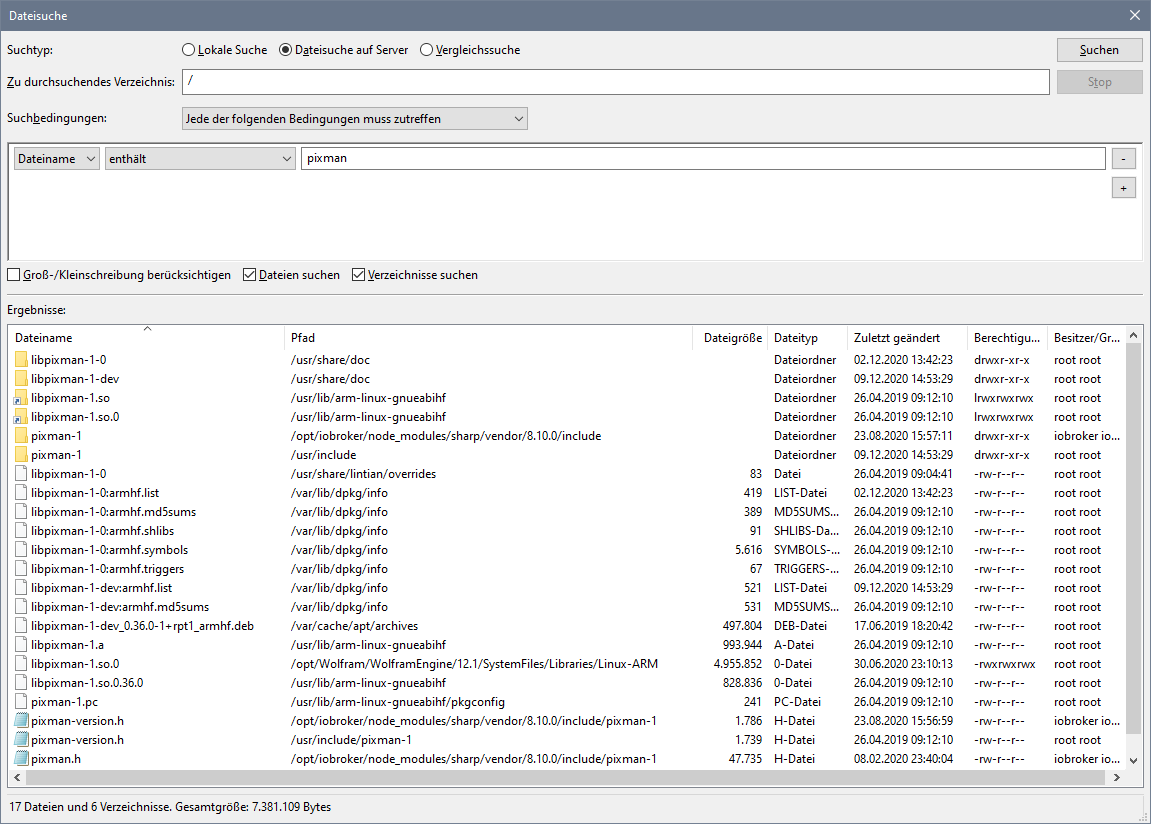
        Call to 'pkg-config pixman-1 --libs' returned exit status 1

        such mal nach pixman.
        da muss noch was installiert werden, ich weiß gerade nicht was

        kein Support per PN! - Fragen im Forum stellen -
        Benutzt das Voting rechts unten im Beitrag wenn er euch geholfen hat.
        Das Forum freut sich über eine Spende. Benutzt dazu den Spendenbutton oben rechts. Danke!
        der Installationsfixer: curl -fsL https://iobroker.net/fix.sh | bash -

        M 1 Antwort Letzte Antwort
        0
        • HomoranH Homoran

          @MCU sagte in System startet nicht mehr nach Update:

          Call to 'pkg-config pixman-1 --libs' returned exit status 1

          such mal nach pixman.
          da muss noch was installiert werden, ich weiß gerade nicht was

          M Online
          M Online
          MCU
          schrieb am zuletzt editiert von MCU
          #10

          @Homoran Installation nach Vorgabe gemacht:

          https://www.iobroker.net/#de/documentation/install/linux.md


          76fcfd5f-ba7f-4d08-a06d-467ba9a200b0-image.png

          Installiert noch die Adapter, abwarten, vielleicht startet er auch so.

          Meldet beim Starten folgende Fehler:

          2020-12-09 15:25:24.221 - error: iot.0 (10054) The password must be at least 8 characters long and have numbers, upper and lower case letters. Please change the password in the profile https://iobroker.pro/accountProfile.
          
          2020-12-09 15:27:13.203 - error: iot.0 (10075) Cannot read keys: error:0909006C:PEM routines:get_name:no start line
          

          NUC i7 64GB mit Proxmox ---- Jarvis Infos Aktualisierungen der Doku auf Instagram verfolgen -> mcuiobroker Instagram
          Wenn Euch mein Vorschlag geholfen hat, bitte rechts "^" klicken.

          Thomas BraunT HomoranH 2 Antworten Letzte Antwort
          0
          • M MCU

            @Homoran Installation nach Vorgabe gemacht:

            https://www.iobroker.net/#de/documentation/install/linux.md


            76fcfd5f-ba7f-4d08-a06d-467ba9a200b0-image.png

            Installiert noch die Adapter, abwarten, vielleicht startet er auch so.

            Meldet beim Starten folgende Fehler:

            2020-12-09 15:25:24.221 - error: iot.0 (10054) The password must be at least 8 characters long and have numbers, upper and lower case letters. Please change the password in the profile https://iobroker.pro/accountProfile.
            
            2020-12-09 15:27:13.203 - error: iot.0 (10075) Cannot read keys: error:0909006C:PEM routines:get_name:no start line
            
            Thomas BraunT Online
            Thomas BraunT Online
            Thomas Braun
            Most Active
            schrieb am zuletzt editiert von
            #11

            @MCU

            sudo apt update
            sudo apt install build-essential libcairo2-dev libpango1.0-dev libjpeg-dev libgif-dev librsvg2-dev libpixman-1-dev
            sudo apt dist-upgrade
            sudo reboot
            

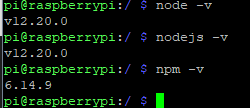
            Und bist du sicher, dass nodeJS sauber ist? Die Versionsnummer von deinem npm ist glaube ich nicht die standardmäßige von node12.

            Linux-Werkzeugkasten:
            https://forum.iobroker.net/topic/42952/der-kleine-iobroker-linux-werkzeugkasten
            NodeJS Fixer Skript:
            https://forum.iobroker.net/topic/68035/iob-node-fix-skript
            iob_diag: curl -sLf -o diag.sh https://iobroker.net/diag.sh && bash diag.sh

            M 2 Antworten Letzte Antwort
            0
            • Thomas BraunT Thomas Braun

              @MCU

              sudo apt update
              sudo apt install build-essential libcairo2-dev libpango1.0-dev libjpeg-dev libgif-dev librsvg2-dev libpixman-1-dev
              sudo apt dist-upgrade
              sudo reboot
              

              Und bist du sicher, dass nodeJS sauber ist? Die Versionsnummer von deinem npm ist glaube ich nicht die standardmäßige von node12.

              M Online
              M Online
              MCU
              schrieb am zuletzt editiert von
              #12

              @Thomas-Braun

              66f67a2d-e0cc-47e0-a679-89faa6af5f76-image.png

              NUC i7 64GB mit Proxmox ---- Jarvis Infos Aktualisierungen der Doku auf Instagram verfolgen -> mcuiobroker Instagram
              Wenn Euch mein Vorschlag geholfen hat, bitte rechts "^" klicken.

              Thomas BraunT 1 Antwort Letzte Antwort
              0
              • Thomas BraunT Thomas Braun

                @MCU

                sudo apt update
                sudo apt install build-essential libcairo2-dev libpango1.0-dev libjpeg-dev libgif-dev librsvg2-dev libpixman-1-dev
                sudo apt dist-upgrade
                sudo reboot
                

                Und bist du sicher, dass nodeJS sauber ist? Die Versionsnummer von deinem npm ist glaube ich nicht die standardmäßige von node12.

                M Online
                M Online
                MCU
                schrieb am zuletzt editiert von
                #13

                @Thomas-Braun Man musste neues Zertifikat anfordern, dann wurde die Instanz grün und ist connected. Danke.

                NUC i7 64GB mit Proxmox ---- Jarvis Infos Aktualisierungen der Doku auf Instagram verfolgen -> mcuiobroker Instagram
                Wenn Euch mein Vorschlag geholfen hat, bitte rechts "^" klicken.

                1 Antwort Letzte Antwort
                0
                • M MCU

                  @Thomas-Braun

                  66f67a2d-e0cc-47e0-a679-89faa6af5f76-image.png

                  Thomas BraunT Online
                  Thomas BraunT Online
                  Thomas Braun
                  Most Active
                  schrieb am zuletzt editiert von
                  #14

                  @MCU
                  Schau mal damit nach:

                  which nodejs && nodejs -v && which node && node -v && which npm && npm -v && apt policy nodejs
                  

                  Und bitte keine Bilder von Texten sondern den Text auch als solchen (in CodeTags) wieder hier rein.

                  Linux-Werkzeugkasten:
                  https://forum.iobroker.net/topic/42952/der-kleine-iobroker-linux-werkzeugkasten
                  NodeJS Fixer Skript:
                  https://forum.iobroker.net/topic/68035/iob-node-fix-skript
                  iob_diag: curl -sLf -o diag.sh https://iobroker.net/diag.sh && bash diag.sh

                  M 1 Antwort Letzte Antwort
                  0
                  • M MCU

                    @Homoran Installation nach Vorgabe gemacht:

                    https://www.iobroker.net/#de/documentation/install/linux.md


                    76fcfd5f-ba7f-4d08-a06d-467ba9a200b0-image.png

                    Installiert noch die Adapter, abwarten, vielleicht startet er auch so.

                    Meldet beim Starten folgende Fehler:

                    2020-12-09 15:25:24.221 - error: iot.0 (10054) The password must be at least 8 characters long and have numbers, upper and lower case letters. Please change the password in the profile https://iobroker.pro/accountProfile.
                    
                    2020-12-09 15:27:13.203 - error: iot.0 (10075) Cannot read keys: error:0909006C:PEM routines:get_name:no start line
                    
                    HomoranH Nicht stören
                    HomoranH Nicht stören
                    Homoran
                    Global Moderator Administrators
                    schrieb am zuletzt editiert von
                    #15

                    @MCU sagte in System startet nicht mehr nach Update:

                    Installiert noch die Adapter, abwarten, vielleicht startet er auch so.

                    du solltest im Forum nach dem Begriff suchen ;-)

                    kein Support per PN! - Fragen im Forum stellen -
                    Benutzt das Voting rechts unten im Beitrag wenn er euch geholfen hat.
                    Das Forum freut sich über eine Spende. Benutzt dazu den Spendenbutton oben rechts. Danke!
                    der Installationsfixer: curl -fsL https://iobroker.net/fix.sh | bash -

                    1 Antwort Letzte Antwort
                    0
                    • Thomas BraunT Thomas Braun

                      @MCU
                      Schau mal damit nach:

                      which nodejs && nodejs -v && which node && node -v && which npm && npm -v && apt policy nodejs
                      

                      Und bitte keine Bilder von Texten sondern den Text auch als solchen (in CodeTags) wieder hier rein.

                      M Online
                      M Online
                      MCU
                      schrieb am zuletzt editiert von MCU
                      #16

                      @Thomas-Braun

                      pm && npm -v && apt policy nodejs
                      /usr/bin/nodejs
                      v12.20.0
                      /usr/bin/node
                      v12.20.0
                      /usr/local/bin/npm
                      6.14.9
                      nodejs:
                        Installiert:           12.20.0-1nodesource1
                        Installationskandidat: 12.20.0-1nodesource1
                        Versionstabelle:
                       *** 12.20.0-1nodesource1 500
                              500 https://deb.nodesource.com/node_12.x buster/main armhf Packages
                              100 /var/lib/dpkg/status
                           10.21.0~dfsg-1~deb10u1+rpi1 500
                              500 http://raspbian.raspberrypi.org/raspbian buster/main armhf Packages


                      Läuft aber wieder Alles. Danke an alle.

                      Zur Info für andere, die es auch machen müssen. Ich musste beim Restore mit Backitup-Adapter einige Dinge noch nach bearbeiten.
                      iot->neues Zertifikat
                      meross -> passwort eingeben
                      sonoff-> passwort eingeben
                      pushover->API Token falsch mit Backup neu eingeben

                      NUC i7 64GB mit Proxmox ---- Jarvis Infos Aktualisierungen der Doku auf Instagram verfolgen -> mcuiobroker Instagram
                      Wenn Euch mein Vorschlag geholfen hat, bitte rechts "^" klicken.

                      Thomas BraunT 1 Antwort Letzte Antwort
                      0
                      • M MCU

                        @Thomas-Braun

                        pm && npm -v && apt policy nodejs
                        /usr/bin/nodejs
                        v12.20.0
                        /usr/bin/node
                        v12.20.0
                        /usr/local/bin/npm
                        6.14.9
                        nodejs:
                          Installiert:           12.20.0-1nodesource1
                          Installationskandidat: 12.20.0-1nodesource1
                          Versionstabelle:
                         *** 12.20.0-1nodesource1 500
                                500 https://deb.nodesource.com/node_12.x buster/main armhf Packages
                                100 /var/lib/dpkg/status
                             10.21.0~dfsg-1~deb10u1+rpi1 500
                                500 http://raspbian.raspberrypi.org/raspbian buster/main armhf Packages


                        Läuft aber wieder Alles. Danke an alle.

                        Zur Info für andere, die es auch machen müssen. Ich musste beim Restore mit Backitup-Adapter einige Dinge noch nach bearbeiten.
                        iot->neues Zertifikat
                        meross -> passwort eingeben
                        sonoff-> passwort eingeben
                        pushover->API Token falsch mit Backup neu eingeben

                        Thomas BraunT Online
                        Thomas BraunT Online
                        Thomas Braun
                        Most Active
                        schrieb am zuletzt editiert von
                        #17

                        @MCU sagte in System startet nicht mehr nach Update:

                        /usr/local/bin/npm     
                        6.14.9
                        

                        Siehste...
                        Das ist falsch.

                        Linux-Werkzeugkasten:
                        https://forum.iobroker.net/topic/42952/der-kleine-iobroker-linux-werkzeugkasten
                        NodeJS Fixer Skript:
                        https://forum.iobroker.net/topic/68035/iob-node-fix-skript
                        iob_diag: curl -sLf -o diag.sh https://iobroker.net/diag.sh && bash diag.sh

                        M 1 Antwort Letzte Antwort
                        0
                        • Thomas BraunT Thomas Braun

                          @MCU sagte in System startet nicht mehr nach Update:

                          /usr/local/bin/npm     
                          6.14.9
                          

                          Siehste...
                          Das ist falsch.

                          M Online
                          M Online
                          MCU
                          schrieb am zuletzt editiert von
                          #18

                          @Thomas-Braun Also ich hab das nicht gemacht, was soll ich da jetzt ändern?

                          NUC i7 64GB mit Proxmox ---- Jarvis Infos Aktualisierungen der Doku auf Instagram verfolgen -> mcuiobroker Instagram
                          Wenn Euch mein Vorschlag geholfen hat, bitte rechts "^" klicken.

                          Thomas BraunT 1 Antwort Letzte Antwort
                          0
                          • M MCU

                            @Thomas-Braun Also ich hab das nicht gemacht, was soll ich da jetzt ändern?

                            Thomas BraunT Online
                            Thomas BraunT Online
                            Thomas Braun
                            Most Active
                            schrieb am zuletzt editiert von
                            #19

                            @MCU

                            Vermutlich npm global aktualisiert. Der Vorschlag kommt schon mal von npm, das zu tun.
                            Sollte man aber nicht. Schau hier wie man das wieder einfängt:

                            https://forum.iobroker.net/topic/35090/howto-nodejs-installation-und-upgrades-unter-debian/3

                            Linux-Werkzeugkasten:
                            https://forum.iobroker.net/topic/42952/der-kleine-iobroker-linux-werkzeugkasten
                            NodeJS Fixer Skript:
                            https://forum.iobroker.net/topic/68035/iob-node-fix-skript
                            iob_diag: curl -sLf -o diag.sh https://iobroker.net/diag.sh && bash diag.sh

                            M 1 Antwort Letzte Antwort
                            0
                            • Thomas BraunT Thomas Braun

                              @MCU

                              Vermutlich npm global aktualisiert. Der Vorschlag kommt schon mal von npm, das zu tun.
                              Sollte man aber nicht. Schau hier wie man das wieder einfängt:

                              https://forum.iobroker.net/topic/35090/howto-nodejs-installation-und-upgrades-unter-debian/3

                              M Online
                              M Online
                              MCU
                              schrieb am zuletzt editiert von
                              #20

                              @Thomas-Braun

                              pm && npm -v && apt policy nodejs
                              /usr/bin/nodejs
                              v12.20.0
                              /usr/bin/node
                              v12.20.0
                              /usr/bin/npm
                              6.14.8
                              nodejs:
                                Installiert:           12.20.0-1nodesource1
                                Installationskandidat: 12.20.0-1nodesource1
                                Versionstabelle:
                               *** 12.20.0-1nodesource1 500
                                      500 https://deb.nodesource.com/node_12.x buster/main armhf Packages
                                      100 /var/lib/dpkg/status
                                   10.21.0~dfsg-1~deb10u1+rpi1 500
                                      500 http://raspbian.raspberrypi.org/raspbian buster/main armhf Packages


                              NUC i7 64GB mit Proxmox ---- Jarvis Infos Aktualisierungen der Doku auf Instagram verfolgen -> mcuiobroker Instagram
                              Wenn Euch mein Vorschlag geholfen hat, bitte rechts "^" klicken.

                              Thomas BraunT 1 Antwort Letzte Antwort
                              0
                              • M MCU

                                @Thomas-Braun

                                pm && npm -v && apt policy nodejs
                                /usr/bin/nodejs
                                v12.20.0
                                /usr/bin/node
                                v12.20.0
                                /usr/bin/npm
                                6.14.8
                                nodejs:
                                  Installiert:           12.20.0-1nodesource1
                                  Installationskandidat: 12.20.0-1nodesource1
                                  Versionstabelle:
                                 *** 12.20.0-1nodesource1 500
                                        500 https://deb.nodesource.com/node_12.x buster/main armhf Packages
                                        100 /var/lib/dpkg/status
                                     10.21.0~dfsg-1~deb10u1+rpi1 500
                                        500 http://raspbian.raspberrypi.org/raspbian buster/main armhf Packages
                                
                                
                                Thomas BraunT Online
                                Thomas BraunT Online
                                Thomas Braun
                                Most Active
                                schrieb am zuletzt editiert von
                                #21

                                @MCU Ja, jetzt passt es und npm kommt aus dem nodeJS-Paket so wie es von nodesource gebaut wurde.

                                Bei Updates/Upgrades von nodejs kommt dann jetzt auch immer die passende npm-Version mit.
                                In deinem Setup wäre die sonst immer auf 6.14.9 stehen geblieben.

                                Linux-Werkzeugkasten:
                                https://forum.iobroker.net/topic/42952/der-kleine-iobroker-linux-werkzeugkasten
                                NodeJS Fixer Skript:
                                https://forum.iobroker.net/topic/68035/iob-node-fix-skript
                                iob_diag: curl -sLf -o diag.sh https://iobroker.net/diag.sh && bash diag.sh

                                M 1 Antwort Letzte Antwort
                                0
                                • Thomas BraunT Thomas Braun

                                  @MCU Ja, jetzt passt es und npm kommt aus dem nodeJS-Paket so wie es von nodesource gebaut wurde.

                                  Bei Updates/Upgrades von nodejs kommt dann jetzt auch immer die passende npm-Version mit.
                                  In deinem Setup wäre die sonst immer auf 6.14.9 stehen geblieben.

                                  M Online
                                  M Online
                                  MCU
                                  schrieb am zuletzt editiert von
                                  #22

                                  @Thomas-Braun Ok.Danke.

                                  NUC i7 64GB mit Proxmox ---- Jarvis Infos Aktualisierungen der Doku auf Instagram verfolgen -> mcuiobroker Instagram
                                  Wenn Euch mein Vorschlag geholfen hat, bitte rechts "^" klicken.

                                  1 Antwort Letzte Antwort
                                  0

                                  Hey! Du scheinst an dieser Unterhaltung interessiert zu sein, hast aber noch kein Konto.

                                  Hast du es satt, bei jedem Besuch durch die gleichen Beiträge zu scrollen? Wenn du dich für ein Konto anmeldest, kommst du immer genau dorthin zurück, wo du zuvor warst, und kannst dich über neue Antworten benachrichtigen lassen (entweder per E-Mail oder Push-Benachrichtigung). Du kannst auch Lesezeichen speichern und Beiträge positiv bewerten, um anderen Community-Mitgliedern deine Wertschätzung zu zeigen.

                                  Mit deinem Input könnte dieser Beitrag noch besser werden 💗

                                  Registrieren Anmelden
                                  Antworten
                                  • In einem neuen Thema antworten
                                  Anmelden zum Antworten
                                  • Älteste zuerst
                                  • Neuste zuerst
                                  • Meiste Stimmen


                                  Support us

                                  ioBroker
                                  Community Adapters
                                  Donate
                                  FAQ Cloud / IOT
                                  HowTo: Node.js-Update
                                  HowTo: Backup/Restore
                                  Downloads
                                  BLOG

                                  336

                                  Online

                                  32.9k

                                  Benutzer

                                  83.0k

                                  Themen

                                  1.3m

                                  Beiträge
                                  Community
                                  Impressum | Datenschutz-Bestimmungen | Nutzungsbedingungen | Einwilligungseinstellungen
                                  ioBroker Community 2014-2025
                                  logo
                                  • Anmelden

                                  • Du hast noch kein Konto? Registrieren

                                  • Anmelden oder registrieren, um zu suchen
                                  • Erster Beitrag
                                    Letzter Beitrag
                                  0
                                  • Home
                                  • Aktuell
                                  • Tags
                                  • Ungelesen 0
                                  • Kategorien
                                  • Unreplied
                                  • Beliebt
                                  • GitHub
                                  • Docu
                                  • Hilfe