Skip to content
  • Home
  • Recent
  • Tags
  • 0 Unread 0
  • Categories
  • Unreplied
  • Popular
  • GitHub
  • Docu
  • Hilfe
Skins
  • Light
  • Brite
  • Cerulean
  • Cosmo
  • Flatly
  • Journal
  • Litera
  • Lumen
  • Lux
  • Materia
  • Minty
  • Morph
  • Pulse
  • Sandstone
  • Simplex
  • Sketchy
  • Spacelab
  • United
  • Yeti
  • Zephyr
  • Dark
  • Cyborg
  • Darkly
  • Quartz
  • Slate
  • Solar
  • Superhero
  • Vapor

  • Default (No Skin)
  • No Skin
Collapse
ioBroker Logo

Community Forum

donate donate
  1. ioBroker Community Home
  2. Deutsch
  3. Off Topic
  4. hygrometer (luftfeuchte) - hilfe bei integration

NEWS

  • Jahresrückblick 2025 – unser neuer Blogbeitrag ist online! ✨
    BluefoxB
    Bluefox
    17
    1
    4.0k

  • Neuer Blogbeitrag: Monatsrückblick - Dezember 2025 🎄
    BluefoxB
    Bluefox
    13
    1
    1.2k

  • Weihnachtsangebot 2025! 🎄
    BluefoxB
    Bluefox
    25
    1
    2.5k

hygrometer (luftfeuchte) - hilfe bei integration

Scheduled Pinned Locked Moved Off Topic
hygrometerluftfeuchtigkeit
112 Posts 13 Posters 15.3k Views 12 Watching
  • Oldest to Newest
  • Newest to Oldest
  • Most Votes
Reply
  • Reply as topic
Log in to reply
This topic has been deleted. Only users with topic management privileges can see it.
  • X x-traxion

    @liv-in-sky danke für den Link.
    Hab den Post schon gelesen und habe jetzt mal alle im UG+EG mit der neuen Firmware geflasht. Die behebt auch das "Problem" dass die Einstellungen nicht gespeichert werden wenn man die Batterie raus nimmt.

    Ich werde die im UG+EG jetzt mal mit den im OG+DG vergleichen.
    Mal schauen was dabei raus kommt :)

    liv-in-skyL Offline
    liv-in-skyL Offline
    liv-in-sky
    wrote on last edited by
    #89

    @x-traxion wußte garnicht, dass es eine neue version gibt - bitte um feedback, wenn nach dem flashen etwas positives rauskommt

    nach einem gelösten Thread wäre es sinnvoll dies in der Überschrift des ersten Posts einzutragen [gelöst]-... Bitte benutzt das Voting rechts unten im Beitrag wenn er euch geholfen hat. Forum-Tools: PicPick https://picpick.app/en/download/ und ScreenToGif https://www.screentogif.com/downloads.html

    X 1 Reply Last reply
    0
    • liv-in-skyL liv-in-sky

      @x-traxion wußte garnicht, dass es eine neue version gibt - bitte um feedback, wenn nach dem flashen etwas positives rauskommt

      X Offline
      X Offline
      x-traxion
      wrote on last edited by
      #90

      @liv-in-sky ist eine angepasste Version von einem Russen.
      Bis jetzt bin ich schonmal positiv überrascht was man alles einstellen kann.
      Allein dass die Settings gespeichert werden ist Gold wert.

      Man kann bei der Firmware auch den Namen ändern.
      Im moment scheint er auch deutlich seltener zu senden. Vorher ca alle 30-60 Sekunden. Jetzt ca alle 120 Sekunden.

      liv-in-skyL 1 Reply Last reply
      0
      • X x-traxion

        @liv-in-sky ist eine angepasste Version von einem Russen.
        Bis jetzt bin ich schonmal positiv überrascht was man alles einstellen kann.
        Allein dass die Settings gespeichert werden ist Gold wert.

        Man kann bei der Firmware auch den Namen ändern.
        Im moment scheint er auch deutlich seltener zu senden. Vorher ca alle 30-60 Sekunden. Jetzt ca alle 120 Sekunden.

        liv-in-skyL Offline
        liv-in-skyL Offline
        liv-in-sky
        wrote on last edited by
        #91

        @x-traxion funktionirt das mit dem flashen dann genauso, wie in dem video oder nutzt du dazu ein anderes tool ?

        nach einem gelösten Thread wäre es sinnvoll dies in der Überschrift des ersten Posts einzutragen [gelöst]-... Bitte benutzt das Voting rechts unten im Beitrag wenn er euch geholfen hat. Forum-Tools: PicPick https://picpick.app/en/download/ und ScreenToGif https://www.screentogif.com/downloads.html

        X 1 Reply Last reply
        0
        • liv-in-skyL liv-in-sky

          @x-traxion funktionirt das mit dem flashen dann genauso, wie in dem video oder nutzt du dazu ein anderes tool ?

          X Offline
          X Offline
          x-traxion
          wrote on last edited by x-traxion
          #92

          @liv-in-sky
          https://github.com/pvvx/ATC_MiThermometer
          da gibts auch die Firmware.
          Weiter unten bei "OTA and Custom Setup" ist dann auch der Link zum angepassten Flasher v1.6
          https://pvvx.github.io/ATC_MiThermometer/TelinkMiFlasher.html

          liv-in-skyL 2 Replies Last reply
          0
          • X x-traxion

            @liv-in-sky
            https://github.com/pvvx/ATC_MiThermometer
            da gibts auch die Firmware.
            Weiter unten bei "OTA and Custom Setup" ist dann auch der Link zum angepassten Flasher v1.6
            https://pvvx.github.io/ATC_MiThermometer/TelinkMiFlasher.html

            liv-in-skyL Offline
            liv-in-skyL Offline
            liv-in-sky
            wrote on last edited by
            #93

            @x-traxion
            der ersteller des youtube videos hat mich auch dahin verwiesen - aber alle 120 sekunden ist ja auch noch etwas viel

            nach einem gelösten Thread wäre es sinnvoll dies in der Überschrift des ersten Posts einzutragen [gelöst]-... Bitte benutzt das Voting rechts unten im Beitrag wenn er euch geholfen hat. Forum-Tools: PicPick https://picpick.app/en/download/ und ScreenToGif https://www.screentogif.com/downloads.html

            1 Reply Last reply
            0
            • X x-traxion

              @liv-in-sky
              https://github.com/pvvx/ATC_MiThermometer
              da gibts auch die Firmware.
              Weiter unten bei "OTA and Custom Setup" ist dann auch der Link zum angepassten Flasher v1.6
              https://pvvx.github.io/ATC_MiThermometer/TelinkMiFlasher.html

              liv-in-skyL Offline
              liv-in-skyL Offline
              liv-in-sky
              wrote on last edited by
              #94

              @x-traxion hi - habe jetzt erst zeitzum flashen der neun software gehabt - kapiere nicht, was da zum einstellen ist - hast du da erfahrung damit

              nach einem gelösten Thread wäre es sinnvoll dies in der Überschrift des ersten Posts einzutragen [gelöst]-... Bitte benutzt das Voting rechts unten im Beitrag wenn er euch geholfen hat. Forum-Tools: PicPick https://picpick.app/en/download/ und ScreenToGif https://www.screentogif.com/downloads.html

              X 1 Reply Last reply
              0
              • liv-in-skyL liv-in-sky

                @x-traxion hi - habe jetzt erst zeitzum flashen der neun software gehabt - kapiere nicht, was da zum einstellen ist - hast du da erfahrung damit

                X Offline
                X Offline
                x-traxion
                wrote on last edited by
                #95

                @liv-in-sky sorry, das mit der Benachrichtigung hier funktioniert irgendwie immer noch nicht :-/
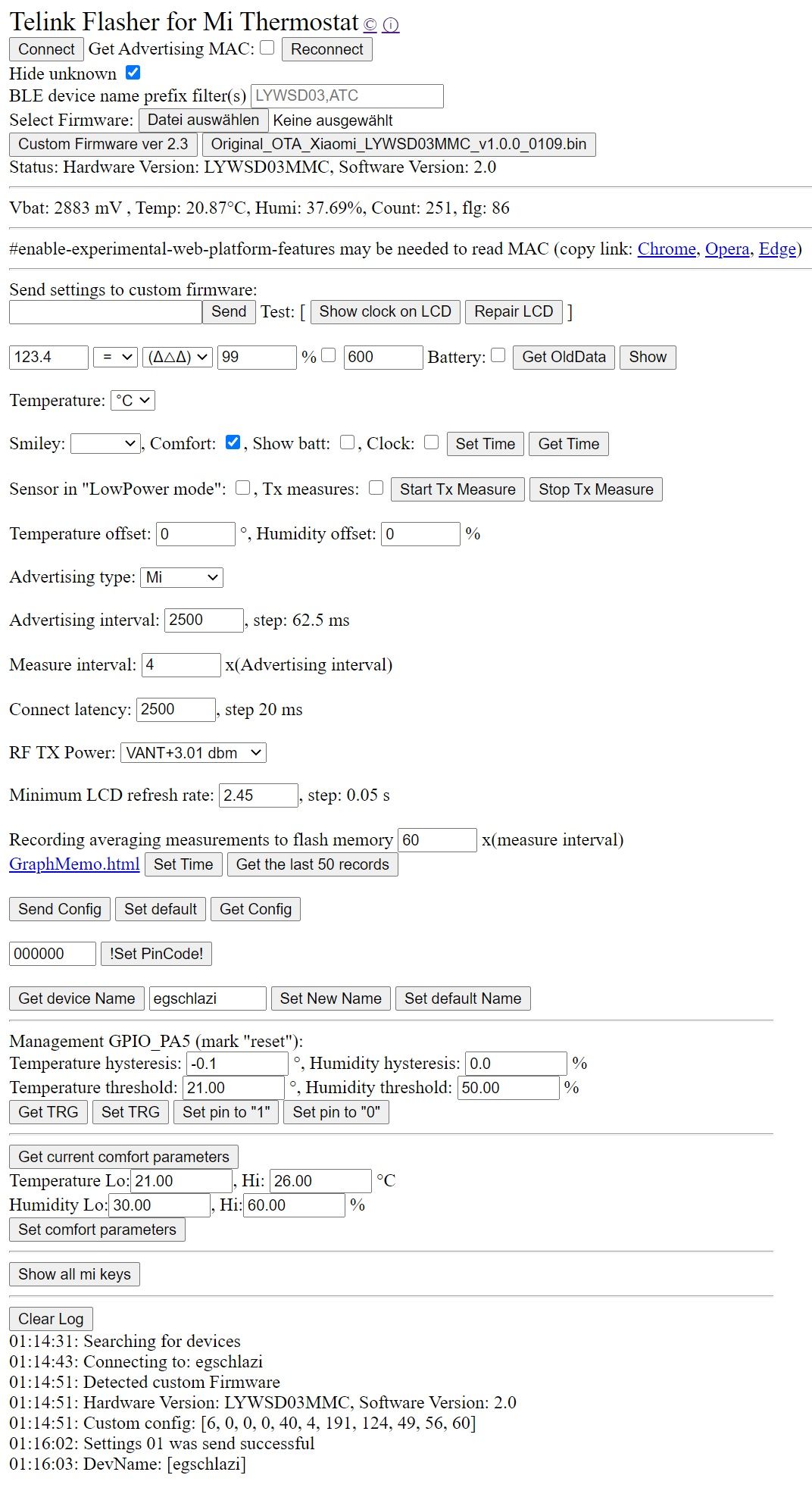
                Ja, hab jetzt alle meine umgeflasht auf die neue Firmware.

                anbei ein Screenshot vom Schlafzimmersensor:
                Flasher.jpg

                1 Reply Last reply
                0
                • OpenSourceNomadO OpenSourceNomad

                  @liv-in-sky hatte den esp32 hier bestellt: https://aliexpress.com/item/1005001627605230.html Allerdings ist er jetzt nicht mehr Versandkostenfrei. Wenn du allerdings noch ein weiteres (anderes) Produkt aus dem gleichen Shop kaufst sollten die Versandkosten nur einmal berechnet werden (ergo Stückpreis geht runter).

                  liv-in-skyL Offline
                  liv-in-skyL Offline
                  liv-in-sky
                  wrote on last edited by liv-in-sky
                  #96

                  @opensourcenomad

                  ich hätte mal eine bitte an dich - könntest du mir bei esphome helfen. ich habe ein 1637 segment anzeige angeschlossen und würde gerne über mqtt werte an das display senden. das überfordert mich gerade.

                  wie geht das, dass mqtt empfängt und dann den wert anzeigt

                  das habe ich - aber wie verbinde ich den empfang von mqtt mit dem schreiben des displays - im moment wird 33 ausgegeben

                  mqtt:
                    broker: 192.168.178.59
                    port: 1506
                    topic_prefix: esp7segment/sensors
                    id: mqtt_client


                  text_sensor:
                      - platform: wifi_info
                        ip_address:
                         name: "ESP IP Address"
                        mac_address:
                         name: "ESP Mac Wifi Address"
                  
                  
                  display:
                      platform: tm1637
                      id: tm1637_display
                      clk_pin: D6
                      dio_pin: D5
                      lambda: |-
                        it.print("33");
                  

                  nach einem gelösten Thread wäre es sinnvoll dies in der Überschrift des ersten Posts einzutragen [gelöst]-... Bitte benutzt das Voting rechts unten im Beitrag wenn er euch geholfen hat. Forum-Tools: PicPick https://picpick.app/en/download/ und ScreenToGif https://www.screentogif.com/downloads.html

                  OpenSourceNomadO 1 Reply Last reply
                  0
                  • liv-in-skyL liv-in-sky

                    @opensourcenomad

                    ich hätte mal eine bitte an dich - könntest du mir bei esphome helfen. ich habe ein 1637 segment anzeige angeschlossen und würde gerne über mqtt werte an das display senden. das überfordert mich gerade.

                    wie geht das, dass mqtt empfängt und dann den wert anzeigt

                    das habe ich - aber wie verbinde ich den empfang von mqtt mit dem schreiben des displays - im moment wird 33 ausgegeben

                    mqtt:
                      broker: 192.168.178.59
                      port: 1506
                      topic_prefix: esp7segment/sensors
                      id: mqtt_client


                    text_sensor:
                        - platform: wifi_info
                          ip_address:
                           name: "ESP IP Address"
                          mac_address:
                           name: "ESP Mac Wifi Address"
                    
                    
                    display:
                        platform: tm1637
                        id: tm1637_display
                        clk_pin: D6
                        dio_pin: D5
                        lambda: |-
                          it.print("33");
                    
                    OpenSourceNomadO Offline
                    OpenSourceNomadO Offline
                    OpenSourceNomad
                    Most Active
                    wrote on last edited by OpenSourceNomad
                    #97

                    @liv-in-sky said in hygrometer (luftfeuchte) - hilfe bei integration:

                    wie geht das, dass mqtt empfängt

                    mittels mqtt subscribe component

                    # Example configuration entry
                    sensor:
                      - platform: mqtt_subscribe
                        name: "Data from topic"
                        id: mysensor
                        topic: the/topic
                    

                    und dann den wert anzeigt

                    via lambda das display füllen wie in der tm1637 component beschrieben:

                          // Print a right-padded sensor value with 0 digits after the decimal
                          it.printf("S%3.0f", id(my_sensor).state);
                          // Result: "S 42
                    

                    „Das Widerlegen von Schwachsinn erfordert eine Größenordnung mehr Energie als dessen Produktion.“ - Alberto Brandolini (Bullshit-Asymmetrie-Prinzip)

                    liv-in-skyL 1 Reply Last reply
                    1
                    • OpenSourceNomadO OpenSourceNomad

                      @liv-in-sky said in hygrometer (luftfeuchte) - hilfe bei integration:

                      wie geht das, dass mqtt empfängt

                      mittels mqtt subscribe component

                      # Example configuration entry
                      sensor:
                        - platform: mqtt_subscribe
                          name: "Data from topic"
                          id: mysensor
                          topic: the/topic
                      

                      und dann den wert anzeigt

                      via lambda das display füllen wie in der tm1637 component beschrieben:

                            // Print a right-padded sensor value with 0 digits after the decimal
                            it.printf("S%3.0f", id(my_sensor).state);
                            // Result: "S 42
                      
                      liv-in-skyL Offline
                      liv-in-skyL Offline
                      liv-in-sky
                      wrote on last edited by liv-in-sky
                      #98

                      @opensourcenomad :star: :star: :star: :star: :star:

                      vielen dank - läuft wie eine eins

                      falls noch jmd sowas braucht - hier ein "yaml" für anzeige eines mqtt wertes auf einem TM1637-7-segment-display

                      sensor:
                       - platform: mqtt_subscribe
                         name: "Data from topic"
                         id: mysensor
                         topic: esp7segment/value
                        
                      mqtt:
                       broker: 192.168.178.59
                       port: 1506
                       topic_prefix: esp7segment/sensors
                       id: mqtt_client
                       on_message:
                        - topic: esp7segment/value
                          then:
                             - logger.log: id(mysensor).state
                      
                      
                      text_sensor:
                         - platform: wifi_info
                           ip_address:
                            name: "ESP IP Address"
                           mac_address:
                            name: "ESP Mac Wifi Address"
                      
                      
                      display:
                         platform: tm1637
                         id: tm1637_display
                         clk_pin: D3
                         dio_pin: D5
                         lambda: |-
                            it.printf("%3.0f ", id(mysensor).state);


                      nach einem gelösten Thread wäre es sinnvoll dies in der Überschrift des ersten Posts einzutragen [gelöst]-... Bitte benutzt das Voting rechts unten im Beitrag wenn er euch geholfen hat. Forum-Tools: PicPick https://picpick.app/en/download/ und ScreenToGif https://www.screentogif.com/downloads.html

                      FredFF 1 Reply Last reply
                      1
                      • liv-in-skyL liv-in-sky

                        @opensourcenomad :star: :star: :star: :star: :star:

                        vielen dank - läuft wie eine eins

                        falls noch jmd sowas braucht - hier ein "yaml" für anzeige eines mqtt wertes auf einem TM1637-7-segment-display

                        sensor:
                         - platform: mqtt_subscribe
                           name: "Data from topic"
                           id: mysensor
                           topic: esp7segment/value
                          
                        mqtt:
                         broker: 192.168.178.59
                         port: 1506
                         topic_prefix: esp7segment/sensors
                         id: mqtt_client
                         on_message:
                          - topic: esp7segment/value
                            then:
                               - logger.log: id(mysensor).state
                        
                        
                        text_sensor:
                           - platform: wifi_info
                             ip_address:
                              name: "ESP IP Address"
                             mac_address:
                              name: "ESP Mac Wifi Address"
                        
                        
                        display:
                           platform: tm1637
                           id: tm1637_display
                           clk_pin: D3
                           dio_pin: D5
                           lambda: |-
                              it.printf("%3.0f ", id(mysensor).state);


                        FredFF Online
                        FredFF Online
                        FredF
                        Most Active Forum Testing
                        wrote on last edited by
                        #99

                        @liv-in-sky
                        Da ich mich auch gerade mit den Xiaomis und ESPhome beschäftige, habe ich mir den neuen ESPhome Adapter von @Dutchman installiert...
                        Funktioniert schon super und kommt mir gelegen, da ich kein MQTT betreiben will.
                        https://github.com/iobroker-community-adapters/ioBroker.esphome

                        liv-in-skyL OpenSourceNomadO 3 Replies Last reply
                        2
                        • FredFF FredF

                          @liv-in-sky
                          Da ich mich auch gerade mit den Xiaomis und ESPhome beschäftige, habe ich mir den neuen ESPhome Adapter von @Dutchman installiert...
                          Funktioniert schon super und kommt mir gelegen, da ich kein MQTT betreiben will.
                          https://github.com/iobroker-community-adapters/ioBroker.esphome

                          liv-in-skyL Offline
                          liv-in-skyL Offline
                          liv-in-sky
                          wrote on last edited by
                          #100

                          @fredf danke - kenn ich nicht - werd ich mir absehen

                          nach einem gelösten Thread wäre es sinnvoll dies in der Überschrift des ersten Posts einzutragen [gelöst]-... Bitte benutzt das Voting rechts unten im Beitrag wenn er euch geholfen hat. Forum-Tools: PicPick https://picpick.app/en/download/ und ScreenToGif https://www.screentogif.com/downloads.html

                          1 Reply Last reply
                          0
                          • FredFF FredF

                            @liv-in-sky
                            Da ich mich auch gerade mit den Xiaomis und ESPhome beschäftige, habe ich mir den neuen ESPhome Adapter von @Dutchman installiert...
                            Funktioniert schon super und kommt mir gelegen, da ich kein MQTT betreiben will.
                            https://github.com/iobroker-community-adapters/ioBroker.esphome

                            liv-in-skyL Offline
                            liv-in-skyL Offline
                            liv-in-sky
                            wrote on last edited by
                            #101

                            @fredf

                            @Dutchman

                            kann im forum nix finden und auch leider nicht installieren - code 25

                            nach einem gelösten Thread wäre es sinnvoll dies in der Überschrift des ersten Posts einzutragen [gelöst]-... Bitte benutzt das Voting rechts unten im Beitrag wenn er euch geholfen hat. Forum-Tools: PicPick https://picpick.app/en/download/ und ScreenToGif https://www.screentogif.com/downloads.html

                            FredFF 1 Reply Last reply
                            0
                            • liv-in-skyL liv-in-sky

                              @fredf

                              @Dutchman

                              kann im forum nix finden und auch leider nicht installieren - code 25

                              FredFF Online
                              FredFF Online
                              FredF
                              Most Active Forum Testing
                              wrote on last edited by
                              #102

                              @liv-in-sky sagte in hygrometer (luftfeuchte) - hilfe bei integration:

                              kann im forum nix finden und auch leider nicht installieren - code 25

                              Stimmt im Forum finde ich auch nichts, aber auf discord hat @Dutchman das gepostet.

                              code 25

                              kA, bei mir hat die Installation geklappt :thinking_face:

                              liv-in-skyL 1 Reply Last reply
                              0
                              • FredFF FredF

                                @liv-in-sky sagte in hygrometer (luftfeuchte) - hilfe bei integration:

                                kann im forum nix finden und auch leider nicht installieren - code 25

                                Stimmt im Forum finde ich auch nichts, aber auf discord hat @Dutchman das gepostet.

                                code 25

                                kA, bei mir hat die Installation geklappt :thinking_face:

                                liv-in-skyL Offline
                                liv-in-skyL Offline
                                liv-in-sky
                                wrote on last edited by liv-in-sky
                                #103

                                @fredf über "katze" und link von github ?

                                $ ./iobroker url "https://github.com/iobroker-community-adapters/ioBroker.esphome"
                                Info: Can not get current GitHub commit, we remember master branch only. Status: 422 (No commit found for SHA: master)
                                install https://github.com/iobroker-community-adapters/ioBroker.esphome/tarball/master
                                NPM version: 6.14.8
                                npm install https://github.com/iobroker-community-adapters/ioBroker.esphome/tarball/master --loglevel error --prefix "/opt/iobroker" (System call)
                                npm 
                                ERR! code E404
                                npm 
                                ERR! 404 Not Found - GET https://codeload.github.com/iobroker-community-adapters/ioBroker.esphome/legacy.tar.gz/masternpm ERR! 404 npm ERR! 404  'https://github.com/iobroker-community-adapters/ioBroker.esphome/tarball/master' is not in the npm registry.npm 
                                ERR! 404 Your package name is not valid, because npm 
                                ERR! 404  1. name can only contain URL-friendly charactersnpm ERR!
                                404  2. name can no longer contain capital lettersnpm ERR! 404 npm ERR! 404
                                Note that you can also install from anpm ERR! 404
                                tarball, folder, http url, or git url.
                                
                                npm ERR! A complete log of this run can be found in:npm ERR!     /home/iobroker/.npm/_logs/2021-02-25T14_44_32_777Z-debug.log
                                ERROR: host.iobroker59 Cannot install https://github.com/iobroker-community-adapters/ioBroker.esphome/tarball/master: 1
                                ERROR: process exited with code 25
                                

                                nach einem gelösten Thread wäre es sinnvoll dies in der Überschrift des ersten Posts einzutragen [gelöst]-... Bitte benutzt das Voting rechts unten im Beitrag wenn er euch geholfen hat. Forum-Tools: PicPick https://picpick.app/en/download/ und ScreenToGif https://www.screentogif.com/downloads.html

                                FredFF 1 Reply Last reply
                                0
                                • liv-in-skyL liv-in-sky

                                  @fredf über "katze" und link von github ?

                                  $ ./iobroker url "https://github.com/iobroker-community-adapters/ioBroker.esphome"
                                  Info: Can not get current GitHub commit, we remember master branch only. Status: 422 (No commit found for SHA: master)
                                  install https://github.com/iobroker-community-adapters/ioBroker.esphome/tarball/master
                                  NPM version: 6.14.8
                                  npm install https://github.com/iobroker-community-adapters/ioBroker.esphome/tarball/master --loglevel error --prefix "/opt/iobroker" (System call)
                                  npm 
                                  ERR! code E404
                                  npm 
                                  ERR! 404 Not Found - GET https://codeload.github.com/iobroker-community-adapters/ioBroker.esphome/legacy.tar.gz/masternpm ERR! 404 npm ERR! 404  'https://github.com/iobroker-community-adapters/ioBroker.esphome/tarball/master' is not in the npm registry.npm 
                                  ERR! 404 Your package name is not valid, because npm 
                                  ERR! 404  1. name can only contain URL-friendly charactersnpm ERR!
                                  404  2. name can no longer contain capital lettersnpm ERR! 404 npm ERR! 404
                                  Note that you can also install from anpm ERR! 404
                                  tarball, folder, http url, or git url.
                                  
                                  npm ERR! A complete log of this run can be found in:npm ERR!     /home/iobroker/.npm/_logs/2021-02-25T14_44_32_777Z-debug.log
                                  ERROR: host.iobroker59 Cannot install https://github.com/iobroker-community-adapters/ioBroker.esphome/tarball/master: 1
                                  ERROR: process exited with code 25
                                  

                                  FredFF Online
                                  FredFF Online
                                  FredF
                                  Most Active Forum Testing
                                  wrote on last edited by
                                  #104

                                  @liv-in-sky
                                  Das ist der richtige Link für die Katze:
                                  https://github.com/iobroker-community-adapters/ioBroker.esphome.git

                                  liv-in-skyL 1 Reply Last reply
                                  0
                                  • FredFF FredF

                                    @liv-in-sky
                                    Das ist der richtige Link für die Katze:
                                    https://github.com/iobroker-community-adapters/ioBroker.esphome.git

                                    liv-in-skyL Offline
                                    liv-in-skyL Offline
                                    liv-in-sky
                                    wrote on last edited by
                                    #105

                                    @fredf sagte in hygrometer (luftfeuchte) - hilfe bei integration:

                                    https://github.com/iobroker-community-adapters/ioBroker.esphome.git

                                    danke - aber leider selbes problem mit diesem link

                                    $ ./iobroker url "https://github.com/iobroker-community-adapters/ioBroker.esphome.git"
                                    Info: Can not get current GitHub commit, we remember master branch only. Status: 422 (No commit found for SHA: master)
                                    install https://github.com/iobroker-community-adapters/ioBroker.esphome/tarball/master
                                    NPM version: 6.14.8
                                    npm install https://github.com/iobroker-community-adapters/ioBroker.esphome/tarball/master --loglevel error --prefix "/opt/iobroker" (System call)
                                    npm 
                                    ERR! code E404
                                    npm ERR!
                                    404 Not Found - GET https://codeload.github.com/iobroker-community-adapters/ioBroker.esphome/legacy.tar.gz/masternpm ERR! 404 npm 
                                    ERR! 404  'https://github.com/iobroker-community-adapters/ioBroker.esphome/tarball/master' is not in the npm registry.npm ERR! 404 Your package name is not valid, because npm ERR! 
                                    404  1. name can only contain URL-friendly charactersnpm ERR! 404
                                     2. name can no longer contain capital lettersnpm ERR! 404 npm ERR! 404 Note that you can also install from a
                                    npm ERR! 404 tarball, folder, http url, or git url.
                                    
                                    npm ERR! A complete log of this run can be found in:npm ERR!     /home/iobroker/.npm/_logs/2021-02-25T14_47_50_620Z-debug.log
                                    ERROR: host.iobroker59 Cannot install https://github.com/iobroker-community-adapters/ioBroker.esphome/tarball/master: 1
                                    ERROR: process exited with code 25
                                    

                                    nach einem gelösten Thread wäre es sinnvoll dies in der Überschrift des ersten Posts einzutragen [gelöst]-... Bitte benutzt das Voting rechts unten im Beitrag wenn er euch geholfen hat. Forum-Tools: PicPick https://picpick.app/en/download/ und ScreenToGif https://www.screentogif.com/downloads.html

                                    FredFF 1 Reply Last reply
                                    0
                                    • liv-in-skyL liv-in-sky

                                      @fredf sagte in hygrometer (luftfeuchte) - hilfe bei integration:

                                      https://github.com/iobroker-community-adapters/ioBroker.esphome.git

                                      danke - aber leider selbes problem mit diesem link

                                      $ ./iobroker url "https://github.com/iobroker-community-adapters/ioBroker.esphome.git"
                                      Info: Can not get current GitHub commit, we remember master branch only. Status: 422 (No commit found for SHA: master)
                                      install https://github.com/iobroker-community-adapters/ioBroker.esphome/tarball/master
                                      NPM version: 6.14.8
                                      npm install https://github.com/iobroker-community-adapters/ioBroker.esphome/tarball/master --loglevel error --prefix "/opt/iobroker" (System call)
                                      npm 
                                      ERR! code E404
                                      npm ERR!
                                      404 Not Found - GET https://codeload.github.com/iobroker-community-adapters/ioBroker.esphome/legacy.tar.gz/masternpm ERR! 404 npm 
                                      ERR! 404  'https://github.com/iobroker-community-adapters/ioBroker.esphome/tarball/master' is not in the npm registry.npm ERR! 404 Your package name is not valid, because npm ERR! 
                                      404  1. name can only contain URL-friendly charactersnpm ERR! 404
                                       2. name can no longer contain capital lettersnpm ERR! 404 npm ERR! 404 Note that you can also install from a
                                      npm ERR! 404 tarball, folder, http url, or git url.
                                      
                                      npm ERR! A complete log of this run can be found in:npm ERR!     /home/iobroker/.npm/_logs/2021-02-25T14_47_50_620Z-debug.log
                                      ERROR: host.iobroker59 Cannot install https://github.com/iobroker-community-adapters/ioBroker.esphome/tarball/master: 1
                                      ERROR: process exited with code 25
                                      

                                      FredFF Online
                                      FredFF Online
                                      FredF
                                      Most Active Forum Testing
                                      wrote on last edited by
                                      #106

                                      @liv-in-sky Komisch, nochmal auf einem weiteren System probiert:


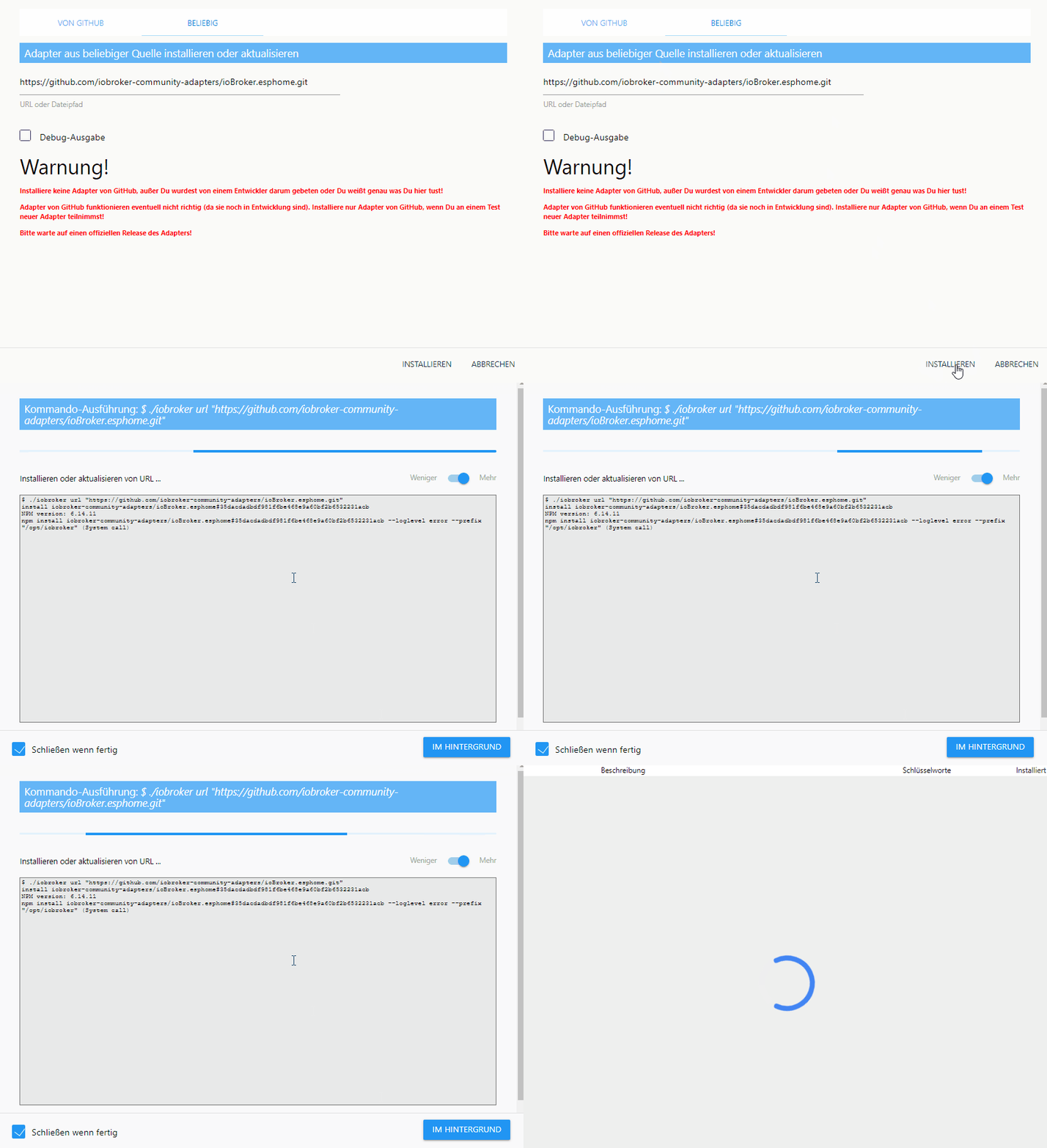
                                      ESPhome install.gif

                                      liv-in-skyL 1 Reply Last reply
                                      0
                                      • FredFF FredF

                                        @liv-in-sky Komisch, nochmal auf einem weiteren System probiert:


                                        ESPhome install.gif

                                        liv-in-skyL Offline
                                        liv-in-skyL Offline
                                        liv-in-sky
                                        wrote on last edited by
                                        #107

                                        @fredf muss da noch irgendwas anderes installiert sein ?

                                        habe mal ein paar andere adapter upgedatet - funktioniert - (um internet verbindung zu testen)

                                        @Dutchman - hast du eine idee ?

                                        nach einem gelösten Thread wäre es sinnvoll dies in der Überschrift des ersten Posts einzutragen [gelöst]-... Bitte benutzt das Voting rechts unten im Beitrag wenn er euch geholfen hat. Forum-Tools: PicPick https://picpick.app/en/download/ und ScreenToGif https://www.screentogif.com/downloads.html

                                        FredFF DutchmanD 2 Replies Last reply
                                        0
                                        • FredFF FredF

                                          @liv-in-sky
                                          Da ich mich auch gerade mit den Xiaomis und ESPhome beschäftige, habe ich mir den neuen ESPhome Adapter von @Dutchman installiert...
                                          Funktioniert schon super und kommt mir gelegen, da ich kein MQTT betreiben will.
                                          https://github.com/iobroker-community-adapters/ioBroker.esphome

                                          OpenSourceNomadO Offline
                                          OpenSourceNomadO Offline
                                          OpenSourceNomad
                                          Most Active
                                          wrote on last edited by
                                          #108

                                          @fredf said in hygrometer (luftfeuchte) - hilfe bei integration:

                                          Funktioniert schon super und kommt mir gelegen, da ich kein MQTT betreiben will.

                                          Wer einmal den Absprung von MQTT geschafft hat wird nie wieder zurück wollen :joy:

                                          „Das Widerlegen von Schwachsinn erfordert eine Größenordnung mehr Energie als dessen Produktion.“ - Alberto Brandolini (Bullshit-Asymmetrie-Prinzip)

                                          DutchmanD 1 Reply Last reply
                                          0
                                          Reply
                                          • Reply as topic
                                          Log in to reply
                                          • Oldest to Newest
                                          • Newest to Oldest
                                          • Most Votes


                                          Support us

                                          ioBroker
                                          Community Adapters
                                          Donate

                                          595

                                          Online

                                          32.7k

                                          Users

                                          82.4k

                                          Topics

                                          1.3m

                                          Posts
                                          Community
                                          Impressum | Datenschutz-Bestimmungen | Nutzungsbedingungen | Einwilligungseinstellungen
                                          ioBroker Community 2014-2025
                                          logo
                                          • Login

                                          • Don't have an account? Register

                                          • Login or register to search.
                                          • First post
                                            Last post
                                          0
                                          • Home
                                          • Recent
                                          • Tags
                                          • Unread 0
                                          • Categories
                                          • Unreplied
                                          • Popular
                                          • GitHub
                                          • Docu
                                          • Hilfe