Skip to content
  • Home
  • Recent
  • Tags
  • 0 Unread 0
  • Categories
  • Unreplied
  • Popular
  • GitHub
  • Docu
  • Hilfe
Skins
  • Light
  • Brite
  • Cerulean
  • Cosmo
  • Flatly
  • Journal
  • Litera
  • Lumen
  • Lux
  • Materia
  • Minty
  • Morph
  • Pulse
  • Sandstone
  • Simplex
  • Sketchy
  • Spacelab
  • United
  • Yeti
  • Zephyr
  • Dark
  • Cyborg
  • Darkly
  • Quartz
  • Slate
  • Solar
  • Superhero
  • Vapor

  • Default (No Skin)
  • No Skin
Collapse
ioBroker Logo

Community Forum

donate donate
  1. ioBroker Community Home
  2. Deutsch
  3. ioBroker Allgemein
  4. Raspberry installation - passwort falsch

NEWS

  • Jahresrückblick 2025 – unser neuer Blogbeitrag ist online! ✨
    BluefoxB
    Bluefox
    16
    1
    1.9k

  • Neuer Blogbeitrag: Monatsrückblick - Dezember 2025 🎄
    BluefoxB
    Bluefox
    13
    1
    911

  • Weihnachtsangebot 2025! 🎄
    BluefoxB
    Bluefox
    25
    1
    2.2k

Raspberry installation - passwort falsch

Scheduled Pinned Locked Moved ioBroker Allgemein
raspberry pi 4installationpasswort login fehlgeschlagenpasswort
43 Posts 6 Posters 7.3k Views 5 Watching
  • Oldest to Newest
  • Newest to Oldest
  • Most Votes
Reply
  • Reply as topic
Log in to reply
This topic has been deleted. Only users with topic management privileges can see it.
  • B Bolländer

    @Homoran ich logge ein über Putty. Danke dir!

    HomoranH Do not disturb
    HomoranH Do not disturb
    Homoran
    Global Moderator Administrators
    wrote on last edited by
    #6

    @Bolländer von einem deutschen Keyboard?

    kein Support per PN! - Fragen im Forum stellen - es gibt fast nichts, was nicht auch für andere interessant ist.

    Benutzt das Voting rechts unten im Beitrag wenn er euch geholfen hat.

    der Installationsfixer: curl -fsL https://iobroker.net/fix.sh | bash -

    B 1 Reply Last reply
    0
    • HomoranH Homoran

      @Thomas-Braun
      ...und ich würde kein Noobs nehmen ;-) sondern direkt das RaspiOS lite
      Raspbian war einmal :cry:

      Thomas BraunT Online
      Thomas BraunT Online
      Thomas Braun
      Most Active
      wrote on last edited by
      #7

      @Homoran Ist doch nur umbenannt. Zumindest was die 32bit-Version angeht.

      We recommend that beginners start with Raspberry Pi Imager, an easy way to install Raspberry Pi OS and other operating systems to an SD card ready to use with your Raspberry Pi. NOOBS – New Out Of the Box Software – is an alternative straightforward way to install an operating system.

      Linux-Werkzeugkasten:
      https://forum.iobroker.net/topic/42952/der-kleine-iobroker-linux-werkzeugkasten
      NodeJS Fixer Skript:
      https://forum.iobroker.net/topic/68035/iob-node-fix-skript
      iob_diag: curl -sLf -o diag.sh https://iobroker.net/diag.sh && bash diag.sh

      HomoranH 1 Reply Last reply
      0
      • HomoranH Homoran

        @Bolländer von einem deutschen Keyboard?

        B Offline
        B Offline
        Bolländer
        wrote on last edited by
        #8

        @Homoran ich habe das passwort schon getestet und eingegeben in das username feld, um zu checken ob es richtig geschrieben ist, und es stimmt. Ja Deutsche tastatur.

        Vielen Dank von ein Bayrische Holländer!
        (Rechtschreibfehler garantiert ;-))

        HomoranH 1 Reply Last reply
        0
        • Thomas BraunT Thomas Braun

          @Homoran Ist doch nur umbenannt. Zumindest was die 32bit-Version angeht.

          We recommend that beginners start with Raspberry Pi Imager, an easy way to install Raspberry Pi OS and other operating systems to an SD card ready to use with your Raspberry Pi. NOOBS – New Out Of the Box Software – is an alternative straightforward way to install an operating system.

          HomoranH Do not disturb
          HomoranH Do not disturb
          Homoran
          Global Moderator Administrators
          wrote on last edited by
          #9

          @Thomas-Braun sagte in Raspberry installation - passwort falsch:

          NOOBS – New Out Of the Box Software – is an alternative straightforward way to install an operating system.

          Hab ich ewig nicht mehr benutzt - war mir damals immer zu groß

          kein Support per PN! - Fragen im Forum stellen - es gibt fast nichts, was nicht auch für andere interessant ist.

          Benutzt das Voting rechts unten im Beitrag wenn er euch geholfen hat.

          der Installationsfixer: curl -fsL https://iobroker.net/fix.sh | bash -

          Thomas BraunT 1 Reply Last reply
          0
          • HomoranH Homoran

            @Thomas-Braun sagte in Raspberry installation - passwort falsch:

            NOOBS – New Out Of the Box Software – is an alternative straightforward way to install an operating system.

            Hab ich ewig nicht mehr benutzt - war mir damals immer zu groß

            Thomas BraunT Online
            Thomas BraunT Online
            Thomas Braun
            Most Active
            wrote on last edited by
            #10

            @Homoran NOOBS lite: 38 MB
            Also bitte... :-)

            Linux-Werkzeugkasten:
            https://forum.iobroker.net/topic/42952/der-kleine-iobroker-linux-werkzeugkasten
            NodeJS Fixer Skript:
            https://forum.iobroker.net/topic/68035/iob-node-fix-skript
            iob_diag: curl -sLf -o diag.sh https://iobroker.net/diag.sh && bash diag.sh

            HomoranH 1 Reply Last reply
            0
            • B Bolländer

              @Homoran ich habe das passwort schon getestet und eingegeben in das username feld, um zu checken ob es richtig geschrieben ist, und es stimmt. Ja Deutsche tastatur.

              HomoranH Do not disturb
              HomoranH Do not disturb
              Homoran
              Global Moderator Administrators
              wrote on last edited by
              #11

              @Bolländer verstehe ich dann nicht, außer dein System ist nicht deutsch.

              klappt es denn mit raspberrz ??

              kein Support per PN! - Fragen im Forum stellen - es gibt fast nichts, was nicht auch für andere interessant ist.

              Benutzt das Voting rechts unten im Beitrag wenn er euch geholfen hat.

              der Installationsfixer: curl -fsL https://iobroker.net/fix.sh | bash -

              B 1 Reply Last reply
              0
              • Thomas BraunT Thomas Braun

                @Homoran NOOBS lite: 38 MB
                Also bitte... :-)

                HomoranH Do not disturb
                HomoranH Do not disturb
                Homoran
                Global Moderator Administrators
                wrote on last edited by
                #12

                @Thomas-Braun sagte in Raspberry installation - passwort falsch:

                @Homoran NOOBS lite: 38 MB
                Also bitte... :-)

                ok, dann lade ich mir das auch mal runter. Ich kannte noobs immer nur als SD-Karte/Image mit allen möglichen Versionen von OSsen

                kein Support per PN! - Fragen im Forum stellen - es gibt fast nichts, was nicht auch für andere interessant ist.

                Benutzt das Voting rechts unten im Beitrag wenn er euch geholfen hat.

                der Installationsfixer: curl -fsL https://iobroker.net/fix.sh | bash -

                1 Reply Last reply
                0
                • B Offline
                  B Offline
                  Bolländer
                  wrote on last edited by
                  #13

                  ich habe jetzt mal den Raspberry Pi OS (32 bit)auf die SD karte getan über Raspberry Pi Imager. Danach auch über Putty eingelogt mit den gleiche UN/PW: gleiche fehler.

                  Vielen Dank von ein Bayrische Holländer!
                  (Rechtschreibfehler garantiert ;-))

                  HomoranH 1 Reply Last reply
                  0
                  • B Bolländer

                    ich habe jetzt mal den Raspberry Pi OS (32 bit)auf die SD karte getan über Raspberry Pi Imager. Danach auch über Putty eingelogt mit den gleiche UN/PW: gleiche fehler.

                    HomoranH Do not disturb
                    HomoranH Do not disturb
                    Homoran
                    Global Moderator Administrators
                    wrote on last edited by
                    #14

                    @Bolländer sagte in Raspberry installation - passwort falsch:

                    ich habe jetzt mal den Raspberry Pi OS (32 bit)auf die SD karte getan über Raspberry Pi Imager. Danach auch über Putty eingelogt mit den gleiche UN/PW: gleiche fehler.

                    Dann liegt es schon mal nicht an den Images

                    kein Support per PN! - Fragen im Forum stellen - es gibt fast nichts, was nicht auch für andere interessant ist.

                    Benutzt das Voting rechts unten im Beitrag wenn er euch geholfen hat.

                    der Installationsfixer: curl -fsL https://iobroker.net/fix.sh | bash -

                    1 Reply Last reply
                    0
                    • HomoranH Homoran

                      @Bolländer verstehe ich dann nicht, außer dein System ist nicht deutsch.

                      klappt es denn mit raspberrz ??

                      B Offline
                      B Offline
                      Bolländer
                      wrote on last edited by Bolländer
                      #15

                      @Homoran nein "raspberrz" geht auch nicht

                      Vielen Dank von ein Bayrische Holländer!
                      (Rechtschreibfehler garantiert ;-))

                      J 1 Reply Last reply
                      0
                      • B Bolländer

                        @Homoran nein "raspberrz" geht auch nicht

                        J Offline
                        J Offline
                        Jan1
                        wrote on last edited by Jan1
                        #16

                        @Bolländer
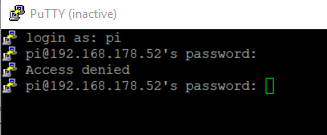
                        Deine Konsole sieht auch seltsam aus. Ich mach das auch mit Putty, allerdings habe ich keine Symbole vor dem Login.
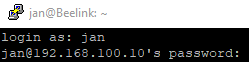
                        4b2e0381-a46e-4305-a9bb-ef595eb24ae4-grafik.png

                        B 1 Reply Last reply
                        0
                        • B Bolländer

                          Hallo,

                          als Raspberry, Debian und Terminal newby, versuche ich mein Rasberry Pi 4 (4GB) mit ioBroker zu installieren.
                          Ich hab den Raspian light Buster datei dafür genommen von 2019-11-27:
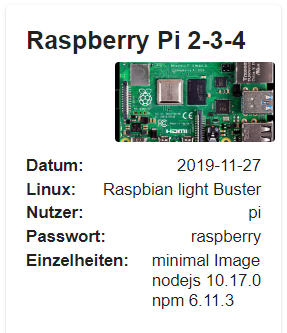
                          7377eee3-26ad-4aef-b695-276678c50e83-image.png

                          Diese habe ich entpackt und dann mit Win32 DiskImager auf ein Sandisk 64Gb MicroSD installiert.
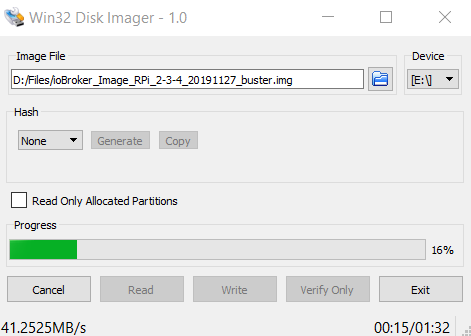
                          bc621c04-0415-4c81-86ed-9870d99173b5-image.png

                          Danach die SD karte in den RasPi und hochgefahren.

                          Danach mit Putty (Win10 x64 laptop) entfernt einloggen:
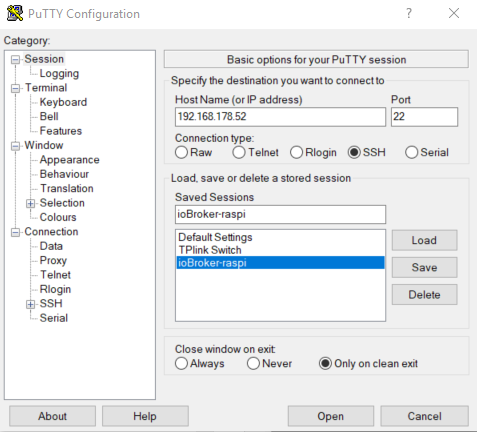
                          6c2ba9c3-38f6-4d9f-b07d-6dd61ed24cbc-image.png

                          username: pi
                          passwort: raspberry
                          (laut anleitung: https://www.iobroker.net/#de/download?ioBroker_Image_RPi_2-3-4_20191127_buster.md)

                          Leider kriege ich nur "Access denied".

                          e8500ce6-f74d-415e-96f6-9f9985afbfcf-image.png

                          Was mache ich hier flasch?
                          Ich habe schon 2x den Image datei runtergeladen und auf den SD karte installiert.
                          Wann ich eine andere Username in Putty nehme, dann passiert das gleiche.
                          Soll ich besser diese Anleitung folgen? https://www.iobroker.net/#de/documentation/install/linux.md

                          Es sind leider sehr einfache Basis schritte, die ich selbst nicht hinkriege, das verstehe ich, aber es wäre klasse wann jemand mir da ein bisschen auf den Weg helfen könnte.

                          Vielen Dank!!

                          sigi234S Online
                          sigi234S Online
                          sigi234
                          Forum Testing Most Active
                          wrote on last edited by
                          #17

                          @Bolländer

                          PuTTY inaktiv?

                          Bitte benutzt das Voting rechts unten im Beitrag wenn er euch geholfen hat.
                          Immer Daten sichern!

                          HomoranH 1 Reply Last reply
                          0
                          • sigi234S sigi234

                            @Bolländer

                            PuTTY inaktiv?

                            HomoranH Do not disturb
                            HomoranH Do not disturb
                            Homoran
                            Global Moderator Administrators
                            wrote on last edited by
                            #18

                            @sigi234 sagte in Raspberry installation - passwort falsch:

                            PuTTY inaktiv?

                            Wahrscheinlich wegn timeout weil die Anmeldung nicht klappte

                            kein Support per PN! - Fragen im Forum stellen - es gibt fast nichts, was nicht auch für andere interessant ist.

                            Benutzt das Voting rechts unten im Beitrag wenn er euch geholfen hat.

                            der Installationsfixer: curl -fsL https://iobroker.net/fix.sh | bash -

                            B 1 Reply Last reply
                            0
                            • HomoranH Homoran

                              @sigi234 sagte in Raspberry installation - passwort falsch:

                              PuTTY inaktiv?

                              Wahrscheinlich wegn timeout weil die Anmeldung nicht klappte

                              B Offline
                              B Offline
                              Bolländer
                              wrote on last edited by
                              #19

                              @Homoran sagte in Raspberry installation - passwort falsch:

                              @sigi234 sagte in Raspberry installation - passwort falsch:

                              PuTTY inaktiv?

                              Wahrscheinlich wegn timeout weil die Anmeldung nicht klappte

                              Genau, screenshot ist später gemacht

                              Vielen Dank von ein Bayrische Holländer!
                              (Rechtschreibfehler garantiert ;-))

                              HomoranH 1 Reply Last reply
                              0
                              • B Bolländer

                                @Homoran sagte in Raspberry installation - passwort falsch:

                                @sigi234 sagte in Raspberry installation - passwort falsch:

                                PuTTY inaktiv?

                                Wahrscheinlich wegn timeout weil die Anmeldung nicht klappte

                                Genau, screenshot ist später gemacht

                                HomoranH Do not disturb
                                HomoranH Do not disturb
                                Homoran
                                Global Moderator Administrators
                                wrote on last edited by
                                #20

                                @Bolländer
                                Ich habe auch keine Icons in jeder Zeile.

                                Natürlich kann innerhalb puttys eine ganze Menge verstellt sein (Zeichenkodierung/Sprache.....)
                                Das bekommen wir nie raus.

                                kein Support per PN! - Fragen im Forum stellen - es gibt fast nichts, was nicht auch für andere interessant ist.

                                Benutzt das Voting rechts unten im Beitrag wenn er euch geholfen hat.

                                der Installationsfixer: curl -fsL https://iobroker.net/fix.sh | bash -

                                1 Reply Last reply
                                0
                                • J Jan1

                                  @Bolländer
                                  Deine Konsole sieht auch seltsam aus. Ich mach das auch mit Putty, allerdings habe ich keine Symbole vor dem Login.
                                  4b2e0381-a46e-4305-a9bb-ef595eb24ae4-grafik.png

                                  B Offline
                                  B Offline
                                  Bolländer
                                  wrote on last edited by
                                  #21

                                  @Jan1 sagte in Raspberry installation - passwort falsch:

                                  @Bolländer
                                  Deine Konsole sieht auch seltsam aus. Ich mach das auch mit Putty, allerdings habe ich keine Symbole vor dem Login.
                                  4b2e0381-a46e-4305-a9bb-ef595eb24ae4-grafik.png

                                  KA. Ich hab jetzt Putty nochmal installiert (jetzt v0.73, vorher v0.72) aber keine änderung. Ich nehme den x64 version https://www.chiark.greenend.org.uk/~sgtatham/putty/latest.html
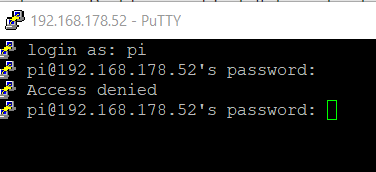
                                  7e3a7bef-4fa8-41ac-81fa-0071fe4a662c-image.png

                                  Vielen Dank von ein Bayrische Holländer!
                                  (Rechtschreibfehler garantiert ;-))

                                  harrymH 1 Reply Last reply
                                  0
                                  • B Bolländer

                                    @Jan1 sagte in Raspberry installation - passwort falsch:

                                    @Bolländer
                                    Deine Konsole sieht auch seltsam aus. Ich mach das auch mit Putty, allerdings habe ich keine Symbole vor dem Login.
                                    4b2e0381-a46e-4305-a9bb-ef595eb24ae4-grafik.png

                                    KA. Ich hab jetzt Putty nochmal installiert (jetzt v0.73, vorher v0.72) aber keine änderung. Ich nehme den x64 version https://www.chiark.greenend.org.uk/~sgtatham/putty/latest.html

                                    7e3a7bef-4fa8-41ac-81fa-0071fe4a662c-image.png

                                    harrymH Offline
                                    harrymH Offline
                                    harrym
                                    wrote on last edited by
                                    #22

                                    @Bolländer win 10 beherrscht jetzt auch ssh ... ===> https://www.heise.de/tipps-tricks/SSH-unter-Windows-10-nutzen-4224757.html

                                    ASRock FM2A88X-ITX+ mit 32GB RAM, 128GB SSD mit Proxmox, 3x1 TB SSD als RAID mit CT und VMs.

                                    B 1 Reply Last reply
                                    0
                                    • harrymH harrym

                                      @Bolländer win 10 beherrscht jetzt auch ssh ... ===> https://www.heise.de/tipps-tricks/SSH-unter-Windows-10-nutzen-4224757.html

                                      B Offline
                                      B Offline
                                      Bolländer
                                      wrote on last edited by
                                      #23

                                      @harrym sagte in Raspberry installation - passwort falsch:

                                      @Bolländer win 10 beherrscht jetzt auch ssh ... ===> https://www.heise.de/tipps-tricks/SSH-unter-Windows-10-nutzen-4224757.html

                                      auch grad probiert: gleiche Fehler;
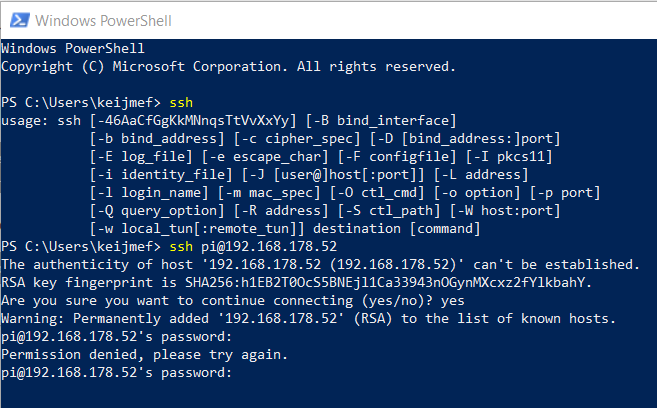
                                      26c8425c-de36-4b9e-949f-ddac4cbb7d5c-image.png

                                      Vielen Dank von ein Bayrische Holländer!
                                      (Rechtschreibfehler garantiert ;-))

                                      J 1 Reply Last reply
                                      0
                                      • B Bolländer

                                        @harrym sagte in Raspberry installation - passwort falsch:

                                        @Bolländer win 10 beherrscht jetzt auch ssh ... ===> https://www.heise.de/tipps-tricks/SSH-unter-Windows-10-nutzen-4224757.html

                                        auch grad probiert: gleiche Fehler;
                                        26c8425c-de36-4b9e-949f-ddac4cbb7d5c-image.png

                                        J Offline
                                        J Offline
                                        Jan1
                                        wrote on last edited by
                                        #24

                                        @Bolländer
                                        Oh man, deutsche Tastatur, englisch im Image. rasbeerz wäre dann das Passwort, da bin ich auch schon drüber gestolpert, kommt eben davon wenn man den Pi nicht selber einrichtet ;-)

                                        B 1 Reply Last reply
                                        0
                                        • J Jan1

                                          @Bolländer
                                          Oh man, deutsche Tastatur, englisch im Image. rasbeerz wäre dann das Passwort, da bin ich auch schon drüber gestolpert, kommt eben davon wenn man den Pi nicht selber einrichtet ;-)

                                          B Offline
                                          B Offline
                                          Bolländer
                                          wrote on last edited by
                                          #25

                                          @Jan1 habe ein Englishe Windows OS. trotzdem schon gecheckt wegen Y - Z

                                          Vielen Dank von ein Bayrische Holländer!
                                          (Rechtschreibfehler garantiert ;-))

                                          J 1 Reply Last reply
                                          0
                                          Reply
                                          • Reply as topic
                                          Log in to reply
                                          • Oldest to Newest
                                          • Newest to Oldest
                                          • Most Votes


                                          Support us

                                          ioBroker
                                          Community Adapters
                                          Donate
                                          FAQ Cloud / IOT
                                          HowTo: Node.js-Update
                                          HowTo: Backup/Restore
                                          Downloads
                                          BLOG

                                          723

                                          Online

                                          32.6k

                                          Users

                                          82.2k

                                          Topics

                                          1.3m

                                          Posts
                                          Community
                                          Impressum | Datenschutz-Bestimmungen | Nutzungsbedingungen | Einwilligungseinstellungen
                                          ioBroker Community 2014-2025
                                          logo
                                          • Login

                                          • Don't have an account? Register

                                          • Login or register to search.
                                          • First post
                                            Last post
                                          0
                                          • Home
                                          • Recent
                                          • Tags
                                          • Unread 0
                                          • Categories
                                          • Unreplied
                                          • Popular
                                          • GitHub
                                          • Docu
                                          • Hilfe