Skip to content
  • Home
  • Recent
  • Tags
  • 0 Unread 0
  • Categories
  • Unreplied
  • Popular
  • GitHub
  • Docu
  • Hilfe
Skins
  • Light
  • Brite
  • Cerulean
  • Cosmo
  • Flatly
  • Journal
  • Litera
  • Lumen
  • Lux
  • Materia
  • Minty
  • Morph
  • Pulse
  • Sandstone
  • Simplex
  • Sketchy
  • Spacelab
  • United
  • Yeti
  • Zephyr
  • Dark
  • Cyborg
  • Darkly
  • Quartz
  • Slate
  • Solar
  • Superhero
  • Vapor

  • Default (No Skin)
  • No Skin
Collapse
ioBroker Logo

Community Forum

donate donate
  1. ioBroker Community Home
  2. Deutsch
  3. ioBroker Allgemein
  4. js-controller 3.0/3.1 jetzt im Latest!

NEWS

  • UPDATE 31.10.: Amazon Alexa - ioBroker Skill läuft aus ?
    apollon77A
    apollon77
    48
    3
    8.9k

  • Monatsrückblick – September 2025
    BluefoxB
    Bluefox
    13
    1
    2.2k

  • Neues Video "KI im Smart Home" - ioBroker plus n8n
    BluefoxB
    Bluefox
    16
    1
    3.4k

js-controller 3.0/3.1 jetzt im Latest!

Scheduled Pinned Locked Moved ioBroker Allgemein
js-controller
1.3k Posts 127 Posters 497.7k Views 89 Watching
  • Oldest to Newest
  • Newest to Oldest
  • Most Votes
Reply
  • Reply as topic
Log in to reply
This topic has been deleted. Only users with topic management privileges can see it.
  • E e-s

    @apollon77
    Hattest du dir meine vorherigen posts durchgelesen, hätte iobroker die veralteten und ungenutzten deps aktualisieren oder löschen sollen, oder muss man das weiter per Hand machen?
    Oder sollte man wenn man doch häufig testet und löscht, den data Ordner in einer Neuinstallation restoren um sich von alter last zu trennen?

    apollon77A Offline
    apollon77A Offline
    apollon77
    wrote on last edited by
    #517

    @e-s Naja an sich wirft NPM Dinge weg wenn Sie nicht mehr referenziert werden, sollte also automatisch passieren. AM Ende "Finde den Adapter des das braucht"

    Beitrag hat geholfen? Votet rechts unten im Beitrag :-) https://paypal.me/Apollon77 / https://github.com/sponsors/Apollon77

    • Debug-Log für Instanz einschalten? Admin -> Instanzen -> Expertenmodus -> Instanz aufklappen - Loglevel ändern
    • Logfiles auf Platte /opt/iobroker/log/… nutzen, Admin schneidet Zeilen ab
    1 Reply Last reply
    0
    • C cybertron

      Das Update auf 3.0.19 hat heute morgen zwar geklapt, alledings rannten der Master und auch alle Slaves danach in einer Art Dauer-Reboot-Schleife.
      In der Anzeige über htop starteten die einzelnen Adapter, waren aber danach direkt wieder verschwunden.

      Da der Master gar nicht mehr auf die Füsse kam, hab ich diesen über den Snapshot wieder zurück auf 3.0.14 geholt.
      Einen Slave habe ich über ein erneutes Update dann vorhin auf 3.0.20 gebracht.
      Einen weiteren über eine Neuinstallation erst auf 2.x.x und daraus auf 3.0.20.

      Jetzt wollte ich den Master und einen 3. Slave noch machen.
      Dabei bekomme ich jedoch folgende Meldung:

      root@mh-iobroker-00:/opt/iobroker# iobroker upgrade self
      Update js-controller from @3.0.14 to @3.0.20
      NPM version: 6.14.4
      npm install iobroker.js-controller@3.0.20 --loglevel error --unsafe-perm --prefix "/opt/iobroker" (System call)
      readFile will not read this file (tts.userfiles/scifi.mp3) in future versions: sayit.0 is not an object of type "meta"
      readFile will not read this file (tts.userfiles/gong.mp3) in future versions: sayit.0 is not an object of type "meta"
      npm ERR! Unexpected end of JSON input while parsing near '...0","@sentry/utils":"5'
      
      npm ERR! A complete log of this run can be found in:
      npm ERR!     /home/iobroker/.npm/_logs/2020-04-28T13_30_05_795Z-debug.log
      Starting node restart.js


      Eine komplette Neuinstallation beim Slave endet ebenfals fehlerhaft.

      ==========================================================================
      
          Welcome to the ioBroker installer!
          Installer version: 2020-04-12
      
      ==========================================================================
      
      
      ==========================================================================
          Installing prerequisites (1/4)
      ==========================================================================
      
      OK:1 http://archive.raspberrypi.org/debian buster InRelease
      OK:2 http://raspbian.raspberrypi.org/raspbian buster InRelease
      OK:3 https://deb.nodesource.com/node_12.x buster InRelease
      Paketlisten werden gelesen... Fertig
      Changing npm registry to https://registry.npmjs.org
      Installed gcc-c++
      
      ==========================================================================
          Creating ioBroker user and directory (2/4)
      ==========================================================================
      
      Created /etc/sudoers.d/iobroker
      Directory /opt/iobroker created
      
      ==========================================================================
          Installing ioBroker (3/4)
      ==========================================================================
      
      npm ERR! Unexpected end of JSON input while parsing near '...yIFwMzo/6PwmhXvvwYnEz'
      
      npm ERR! A complete log of this run can be found in:
      npm ERR!     /root/.npm/_logs/2020-04-28T13_17_27_855Z-debug.log
      
      ==========================================================================
          Finalizing installation (4/4)
      ==========================================================================
      
      Enabling autostart...
      Autostart enabled!
      Fixing directory permissions...
      
      ==========================================================================
      
          ioBroker was installed successfully
          Open http://192.168.30.242:8081 in a browser and start configuring!
      
      ==========================================================================
      
      
      You need to re-login before doing anything else on the console!
      
      
      apollon77A Offline
      apollon77A Offline
      apollon77
      wrote on last edited by
      #518

      @cybertron Schau mal ob in /opt/iobroker eine package-lock-json liegt und wenn ja lösche die mal ... dann nochmal. Scheinbar hat es in dem File was zerbröselt - oder deine SD Karte (falls so ein System) bekommt ne macke weg

      Beitrag hat geholfen? Votet rechts unten im Beitrag :-) https://paypal.me/Apollon77 / https://github.com/sponsors/Apollon77

      • Debug-Log für Instanz einschalten? Admin -> Instanzen -> Expertenmodus -> Instanz aufklappen - Loglevel ändern
      • Logfiles auf Platte /opt/iobroker/log/… nutzen, Admin schneidet Zeilen ab
      C 1 Reply Last reply
      0
      • apollon77A apollon77

        @sigi234 Da ist auf deinem Filesystem was geblockt. Versuch nochmal

        sigi234S Online
        sigi234S Online
        sigi234
        Forum Testing Most Active
        wrote on last edited by sigi234
        #519

        @apollon77 sagte in js-controller 3.0 jetzt im Latest!:

        Da ist auf deinem Filesystem was geblockt. Versuch nochmal
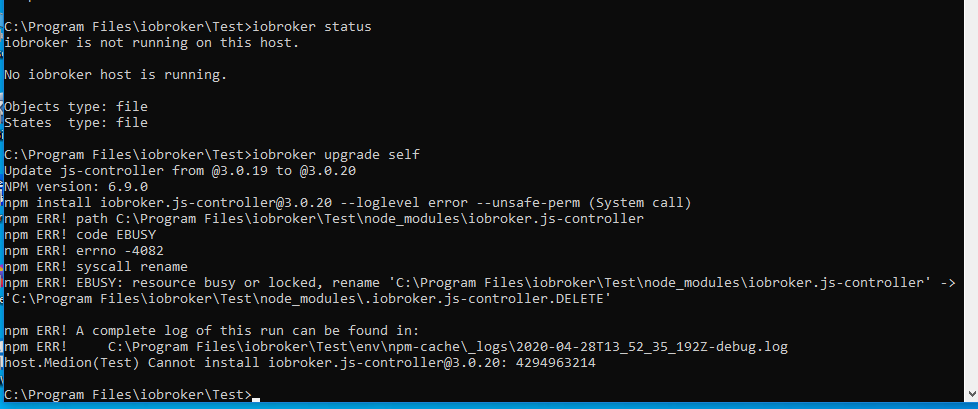
        Screenshot (2377).png

        ERLEDIGT
        Nach einen Neustart von Windows hat es funktioniert.

        Zwar mit Fehler, aber es geht.

        Screenshot (2380).png

        Bitte benutzt das Voting rechts unten im Beitrag wenn er euch geholfen hat.
        Immer Daten sichern!

        apollon77A 1 Reply Last reply
        0
        • DiginixD Diginix

          @apollon77 Seit 3.0.19 werden die Logs wieder gezippt rotiert. Mein Logrotate max 14 days hat das Update von Version 2 auf 3 überlebt aber warum das nicht-zippen nicht? Wie konnte man das in der iobroker.json abstellen?

          MaufloM Offline
          MaufloM Offline
          Mauflo
          wrote on last edited by Mauflo
          #520

          @Diginix aber das Ausschalten des Zippens ist jetzt eigentlich nicht mehr notwendig, weil beim anklicken eines gezippten Logfiles im Admin, wird dieses sofort, wie früher die ungezippten files, im Browser angezeigt. Jetzt ist also ein Fortschritt, da die Files tatsächlich kleiner werden bei vollem Funktionsumfang!

          RaspberryPi 4 4 GB - Raspbian light Buster - ARMv7 Processor rev 3 (v7l) - Node.js v12.18.0 - NPM 6.14.4 - Aktive Instanzen 18 (admin, alexa2, backitup, broadlink2, ham-wemo, harmony, history, hs100, hue, info, iot, javascript, radar2, scenes, tr-064, web [2x], wifilight) all latest and updated

          DiginixD 1 Reply Last reply
          0
          • apollon77A apollon77

            @cybertron Schau mal ob in /opt/iobroker eine package-lock-json liegt und wenn ja lösche die mal ... dann nochmal. Scheinbar hat es in dem File was zerbröselt - oder deine SD Karte (falls so ein System) bekommt ne macke weg

            C Offline
            C Offline
            cybertron
            wrote on last edited by
            #521

            @apollon77 sagte in js-controller 3.0 jetzt im Latest!:

            @cybertron Schau mal ob in /opt/iobroker eine package-lock-json liegt und wenn ja lösche die mal ... dann nochmal. Scheinbar hat es in dem File was zerbröselt - oder deine SD Karte (falls so ein System) bekommt ne macke weg

            Die Datei habe ich gerade gelöscht, jedoch komplett identisches Ergebnis.
            Das System ist eine VM-Ware auf einer Synology.
            Heute morgen hatte ja das Update auf 3.0.19 geklappt.
            Die Startvorraussetzungen sind jetzt im Moment die gleichen, wie heute morgen, da ich jetzt mit dem Snapshot von heute Nacht arbeite.
            Irretierend ist für mich, dass es auf allen Maschinen passiert, unabhängig davon, welcher Systemaufbau. (VM-Ware, Raspi4, MiniPC)

            Ich häng das Log mal hier mit dran..
            2020-04-28T13_57_45_991Z-debug.log

            apollon77A 1 Reply Last reply
            0
            • MaufloM Mauflo

              @Diginix aber das Ausschalten des Zippens ist jetzt eigentlich nicht mehr notwendig, weil beim anklicken eines gezippten Logfiles im Admin, wird dieses sofort, wie früher die ungezippten files, im Browser angezeigt. Jetzt ist also ein Fortschritt, da die Files tatsächlich kleiner werden bei vollem Funktionsumfang!

              DiginixD Offline
              DiginixD Offline
              Diginix
              wrote on last edited by Diginix
              #522

              @Mauflo Das war bei mir nie ein Problem. Ich nutze aber kein Bastelrechner mit SD Card. Plattenplatz o.ä. sind bei mir kein Flaschenhals. Wie ich schrieb, rotiere ich ja sogar 14tägig statt 7. Außerdem sind meine täglichen Logs i.d.R. nur 100kb groß. Warum sollte man das zippen? Ich möchte einfach in jedes Log direkt ohne entpacken schauen können und das nicht im Browser sondern mit einem Editor um regex usw. bei der Suche nutzen zu können.
              Das sind meine Gründe warum ich keine gezippten Logs möchte.

              ..:: So long! Tom ::..

              NUC7i3 (Ubuntu Proxmox VM) | Echo Dots 2+3. Gen | Xiaomi Sensoren | Mi Robot 1S | Yeelight | Sonoff | Shelly | H801 RGB | Gosund SP1 | NodeMCU+ESP32 | Kostal Plenticore PV+BYD | openWB

              apollon77A MaufloM 2 Replies Last reply
              0
              • sigi234S sigi234

                @apollon77 sagte in js-controller 3.0 jetzt im Latest!:

                Da ist auf deinem Filesystem was geblockt. Versuch nochmal

                Screenshot (2377).png

                ERLEDIGT
                Nach einen Neustart von Windows hat es funktioniert.

                Zwar mit Fehler, aber es geht.

                Screenshot (2380).png

                apollon77A Offline
                apollon77A Offline
                apollon77
                wrote on last edited by
                #523

                @sigi234 Windows halt duck ;-)

                Beitrag hat geholfen? Votet rechts unten im Beitrag :-) https://paypal.me/Apollon77 / https://github.com/sponsors/Apollon77

                • Debug-Log für Instanz einschalten? Admin -> Instanzen -> Expertenmodus -> Instanz aufklappen - Loglevel ändern
                • Logfiles auf Platte /opt/iobroker/log/… nutzen, Admin schneidet Zeilen ab
                sigi234S 1 Reply Last reply
                0
                • apollon77A apollon77

                  @sigi234 Windows halt duck ;-)

                  sigi234S Online
                  sigi234S Online
                  sigi234
                  Forum Testing Most Active
                  wrote on last edited by
                  #524

                  @apollon77 sagte in js-controller 3.0 jetzt im Latest!:

                  @sigi234 Windows halt duck ;-)

                  :grinning:

                  Bitte benutzt das Voting rechts unten im Beitrag wenn er euch geholfen hat.
                  Immer Daten sichern!

                  1 Reply Last reply
                  0
                  • C cybertron

                    @apollon77 sagte in js-controller 3.0 jetzt im Latest!:

                    @cybertron Schau mal ob in /opt/iobroker eine package-lock-json liegt und wenn ja lösche die mal ... dann nochmal. Scheinbar hat es in dem File was zerbröselt - oder deine SD Karte (falls so ein System) bekommt ne macke weg

                    Die Datei habe ich gerade gelöscht, jedoch komplett identisches Ergebnis.
                    Das System ist eine VM-Ware auf einer Synology.
                    Heute morgen hatte ja das Update auf 3.0.19 geklappt.
                    Die Startvorraussetzungen sind jetzt im Moment die gleichen, wie heute morgen, da ich jetzt mit dem Snapshot von heute Nacht arbeite.
                    Irretierend ist für mich, dass es auf allen Maschinen passiert, unabhängig davon, welcher Systemaufbau. (VM-Ware, Raspi4, MiniPC)

                    Ich häng das Log mal hier mit dran..
                    2020-04-28T13_57_45_991Z-debug.log

                    apollon77A Offline
                    apollon77A Offline
                    apollon77
                    wrote on last edited by
                    #525

                    @cybertron jetzt bin ich auch nur eher am raten ... "npm cache verify"

                    Beitrag hat geholfen? Votet rechts unten im Beitrag :-) https://paypal.me/Apollon77 / https://github.com/sponsors/Apollon77

                    • Debug-Log für Instanz einschalten? Admin -> Instanzen -> Expertenmodus -> Instanz aufklappen - Loglevel ändern
                    • Logfiles auf Platte /opt/iobroker/log/… nutzen, Admin schneidet Zeilen ab
                    C 1 Reply Last reply
                    0
                    • DiginixD Diginix

                      @Mauflo Das war bei mir nie ein Problem. Ich nutze aber kein Bastelrechner mit SD Card. Plattenplatz o.ä. sind bei mir kein Flaschenhals. Wie ich schrieb, rotiere ich ja sogar 14tägig statt 7. Außerdem sind meine täglichen Logs i.d.R. nur 100kb groß. Warum sollte man das zippen? Ich möchte einfach in jedes Log direkt ohne entpacken schauen können und das nicht im Browser sondern mit einem Editor um regex usw. bei der Suche nutzen zu können.
                      Das sind meine Gründe warum ich keine gezippten Logs möchte.

                      apollon77A Offline
                      apollon77A Offline
                      apollon77
                      wrote on last edited by
                      #526

                      @Diginix Du kennst "zless"? Und zcat? und zgrep? :-) Alle diese tools einfach mit z vorne dran und du kannst Sie such mit nem .gz File aufrufen

                      Beitrag hat geholfen? Votet rechts unten im Beitrag :-) https://paypal.me/Apollon77 / https://github.com/sponsors/Apollon77

                      • Debug-Log für Instanz einschalten? Admin -> Instanzen -> Expertenmodus -> Instanz aufklappen - Loglevel ändern
                      • Logfiles auf Platte /opt/iobroker/log/… nutzen, Admin schneidet Zeilen ab
                      DiginixD 1 Reply Last reply
                      0
                      • DiginixD Diginix

                        @Mauflo Das war bei mir nie ein Problem. Ich nutze aber kein Bastelrechner mit SD Card. Plattenplatz o.ä. sind bei mir kein Flaschenhals. Wie ich schrieb, rotiere ich ja sogar 14tägig statt 7. Außerdem sind meine täglichen Logs i.d.R. nur 100kb groß. Warum sollte man das zippen? Ich möchte einfach in jedes Log direkt ohne entpacken schauen können und das nicht im Browser sondern mit einem Editor um regex usw. bei der Suche nutzen zu können.
                        Das sind meine Gründe warum ich keine gezippten Logs möchte.

                        MaufloM Offline
                        MaufloM Offline
                        Mauflo
                        wrote on last edited by Mauflo
                        #527

                        @Diginix ist ja kein Problem, kann man ja schnell selbst fixen. Ich hab das nur erwähnt, weil nach der ersten Umstellung die gezippten logfiles eben nicht mehr im Browser angezeigt wurden. Ich hab's auch auf ungezippt gestellt. Blöd ist nur, dass man es jesemal nach einem Update des js-Controllers neu fixen muss? @apollon77 kann man das vielleicht mit einer einfachen flag machen, damit man sich nicht immer durch das config file arbeiten muss?

                        RaspberryPi 4 4 GB - Raspbian light Buster - ARMv7 Processor rev 3 (v7l) - Node.js v12.18.0 - NPM 6.14.4 - Aktive Instanzen 18 (admin, alexa2, backitup, broadlink2, ham-wemo, harmony, history, hs100, hue, info, iot, javascript, radar2, scenes, tr-064, web [2x], wifilight) all latest and updated

                        1 Reply Last reply
                        0
                        • apollon77A apollon77

                          @cybertron jetzt bin ich auch nur eher am raten ... "npm cache verify"

                          C Offline
                          C Offline
                          cybertron
                          wrote on last edited by
                          #528

                          @apollon77 sagte in js-controller 3.0 jetzt im Latest!:

                          npm cache verify

                          Nee, leider auch keine Lösung...

                          root@mh-iobroker-00:/opt/iobroker# npm cache verify
                          Cache verified and compressed (~/.npm/_cacache):
                          Content verified: 2177 (420013675 bytes)
                          Index entries: 3418
                          Finished in 31.503s
                          root@mh-iobroker-00:/opt/iobroker# iobroker stop
                          root@mh-iobroker-00:/opt/iobroker# iobroker upgrade self
                          Update js-controller from @3.0.14 to @3.0.20
                          NPM version: 6.14.4
                          npm install iobroker.js-controller@3.0.20 --loglevel error --unsafe-perm --prefix "/opt/iobroker" (System call)
                          npm ERR! Unexpected end of JSON input while parsing near '...0","@sentry/utils":"5'
                          
                          npm ERR! A complete log of this run can be found in:
                          npm ERR!     /home/iobroker/.npm/_logs/2020-04-28T14_26_59_515Z-debug.log
                          Starting node restart.js
                          root@mh-iobroker-00:/opt/iobroker#
                          
                          
                          apollon77A 1 Reply Last reply
                          0
                          • C cybertron

                            @apollon77 sagte in js-controller 3.0 jetzt im Latest!:

                            npm cache verify

                            Nee, leider auch keine Lösung...

                            root@mh-iobroker-00:/opt/iobroker# npm cache verify
                            Cache verified and compressed (~/.npm/_cacache):
                            Content verified: 2177 (420013675 bytes)
                            Index entries: 3418
                            Finished in 31.503s
                            root@mh-iobroker-00:/opt/iobroker# iobroker stop
                            root@mh-iobroker-00:/opt/iobroker# iobroker upgrade self
                            Update js-controller from @3.0.14 to @3.0.20
                            NPM version: 6.14.4
                            npm install iobroker.js-controller@3.0.20 --loglevel error --unsafe-perm --prefix "/opt/iobroker" (System call)
                            npm ERR! Unexpected end of JSON input while parsing near '...0","@sentry/utils":"5'
                            
                            npm ERR! A complete log of this run can be found in:
                            npm ERR!     /home/iobroker/.npm/_logs/2020-04-28T14_26_59_515Z-debug.log
                            Starting node restart.js
                            root@mh-iobroker-00:/opt/iobroker#
                            
                            
                            apollon77A Offline
                            apollon77A Offline
                            apollon77
                            wrote on last edited by
                            #529

                            @cybertron Dann letzte Idee: npm cache clean --force

                            Beitrag hat geholfen? Votet rechts unten im Beitrag :-) https://paypal.me/Apollon77 / https://github.com/sponsors/Apollon77

                            • Debug-Log für Instanz einschalten? Admin -> Instanzen -> Expertenmodus -> Instanz aufklappen - Loglevel ändern
                            • Logfiles auf Platte /opt/iobroker/log/… nutzen, Admin schneidet Zeilen ab
                            C 1 Reply Last reply
                            0
                            • 2 Offline
                              2 Offline
                              2hot4you
                              wrote on last edited by
                              #530

                              Hallo zusammen, wollte auch mal meine Erfahrung zum Update auf 3.0.20 mitteilen.
                              Habe am Wochenende einen neuen Proxmox Container aufgesetzt und den iobroker neu installiert, mit Node 12.x.x
                              und aktuellen js-controller auf 3.x.x

                              Nach einigen Problemen läuft mein System fast wie zu 100%. Aktuell habe ich mit dem Ping- und Robonect Adapter Probleme.

                              Der Ping Adapter ist grün und zeigt keine Fehler an,jedoch werden keine Adressen angepingt.

                              Der Robonect Adapter erreeicht den Mäher nicht, obwohl ich über den Browser den Mäher erreiche.
                              Auch über den Proxmox Container, auf dem der iobroker läuft kann ich den Mäher anpingen.
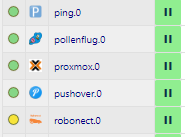
                              adap.PNG

                              iobroker@iobroker-lxc:~# ping 192.168.30.77
                              PING 192.168.30.77 (192.168.30.77) 56(84) bytes of data.
                              64 bytes from 192.168.30.77: icmp_seq=1 ttl=128 time=6.70 ms
                              64 bytes from 192.168.30.77: icmp_seq=2 ttl=128 time=4.74 ms
                              64 bytes from 192.168.30.77: icmp_seq=3 ttl=128 time=5.07 ms
                              64 bytes from 192.168.30.77: icmp_seq=4 ttl=128 time=16.2 ms
                              

                              Gruß Michael

                              apollon77A 1 Reply Last reply
                              0
                              • 2 2hot4you

                                Hallo zusammen, wollte auch mal meine Erfahrung zum Update auf 3.0.20 mitteilen.
                                Habe am Wochenende einen neuen Proxmox Container aufgesetzt und den iobroker neu installiert, mit Node 12.x.x
                                und aktuellen js-controller auf 3.x.x

                                Nach einigen Problemen läuft mein System fast wie zu 100%. Aktuell habe ich mit dem Ping- und Robonect Adapter Probleme.

                                Der Ping Adapter ist grün und zeigt keine Fehler an,jedoch werden keine Adressen angepingt.

                                Der Robonect Adapter erreeicht den Mäher nicht, obwohl ich über den Browser den Mäher erreiche.
                                Auch über den Proxmox Container, auf dem der iobroker läuft kann ich den Mäher anpingen.
                                adap.PNG

                                iobroker@iobroker-lxc:~# ping 192.168.30.77
                                PING 192.168.30.77 (192.168.30.77) 56(84) bytes of data.
                                64 bytes from 192.168.30.77: icmp_seq=1 ttl=128 time=6.70 ms
                                64 bytes from 192.168.30.77: icmp_seq=2 ttl=128 time=4.74 ms
                                64 bytes from 192.168.30.77: icmp_seq=3 ttl=128 time=5.07 ms
                                64 bytes from 192.168.30.77: icmp_seq=4 ttl=128 time=16.2 ms
                                

                                Gruß Michael

                                apollon77A Offline
                                apollon77A Offline
                                apollon77
                                wrote on last edited by
                                #531

                                @2hot4you Was sagen denn die Logs so? Und welche Versionen der Adapter sind installiert?

                                Beitrag hat geholfen? Votet rechts unten im Beitrag :-) https://paypal.me/Apollon77 / https://github.com/sponsors/Apollon77

                                • Debug-Log für Instanz einschalten? Admin -> Instanzen -> Expertenmodus -> Instanz aufklappen - Loglevel ändern
                                • Logfiles auf Platte /opt/iobroker/log/… nutzen, Admin schneidet Zeilen ab
                                2 1 Reply Last reply
                                0
                                • apollon77A apollon77

                                  @2hot4you Was sagen denn die Logs so? Und welche Versionen der Adapter sind installiert?

                                  2 Offline
                                  2 Offline
                                  2hot4you
                                  wrote on last edited by
                                  #532

                                  @apollon77

                                  ich habe den Log mal debug umgestellt, da der Pingadapter sonnst nichts angezeigt hatte
                                  Ping adapter, version 1.4.5
                                  Robonect adapter, Version 0.1.3

                                  ping.0	2020-04-28 16:54:10.139	debug	(28637) system.adapter.admin.0: logging true
                                  
                                  ping.0	2020-04-28 16:55:04.778	debug	(28637) Ping result for 192.168.30.102: false in -ms
                                  ping.0	2020-04-28 16:55:04.777	debug	(28637) STDERR: /bin/ping: socket: Operation not permitted
                                  ping.0	2020-04-28 16:55:04.774	debug	(28637) System command: /bin/ping -n -w 2 -c 1 192.168.30.102
                                  
                                  robonect.0	2020-04-28 16:56:40.348	debug	(32227) system.adapter.admin.0: logging true
                                  robonect.0	2020-04-28 16:56:36.901	error	(32227) No connection to lawn mower. Check network connection.
                                  robonect.0	2020-04-28 16:56:36.896	info	(32227) Done
                                  robonect.0	2020-04-28 16:56:36.892	debug	(32227) Object 'wlan.station.gateway' created
                                  robonect.0	2020-04-28 16:56:36.891	debug	(32227) Object 'wlan.station.netmask' created
                                  
                                  apollon77A 1 Reply Last reply
                                  0
                                  • 2 2hot4you

                                    @apollon77

                                    ich habe den Log mal debug umgestellt, da der Pingadapter sonnst nichts angezeigt hatte
                                    Ping adapter, version 1.4.5
                                    Robonect adapter, Version 0.1.3

                                    ping.0	2020-04-28 16:54:10.139	debug	(28637) system.adapter.admin.0: logging true
                                    
                                    ping.0	2020-04-28 16:55:04.778	debug	(28637) Ping result for 192.168.30.102: false in -ms
                                    ping.0	2020-04-28 16:55:04.777	debug	(28637) STDERR: /bin/ping: socket: Operation not permitted
                                    ping.0	2020-04-28 16:55:04.774	debug	(28637) System command: /bin/ping -n -w 2 -c 1 192.168.30.102
                                    
                                    robonect.0	2020-04-28 16:56:40.348	debug	(32227) system.adapter.admin.0: logging true
                                    robonect.0	2020-04-28 16:56:36.901	error	(32227) No connection to lawn mower. Check network connection.
                                    robonect.0	2020-04-28 16:56:36.896	info	(32227) Done
                                    robonect.0	2020-04-28 16:56:36.892	debug	(32227) Object 'wlan.station.gateway' created
                                    robonect.0	2020-04-28 16:56:36.891	debug	(32227) Object 'wlan.station.netmask' created
                                    
                                    apollon77A Offline
                                    apollon77A Offline
                                    apollon77
                                    wrote on last edited by apollon77
                                    #533

                                    @2hot4you ping == installation fixer (iobroker fix) ausführen. Da fehlen rechte

                                    Beitrag hat geholfen? Votet rechts unten im Beitrag :-) https://paypal.me/Apollon77 / https://github.com/sponsors/Apollon77

                                    • Debug-Log für Instanz einschalten? Admin -> Instanzen -> Expertenmodus -> Instanz aufklappen - Loglevel ändern
                                    • Logfiles auf Platte /opt/iobroker/log/… nutzen, Admin schneidet Zeilen ab
                                    2 1 Reply Last reply
                                    0
                                    • apollon77A apollon77

                                      @Diginix Du kennst "zless"? Und zcat? und zgrep? :-) Alle diese tools einfach mit z vorne dran und du kannst Sie such mit nem .gz File aufrufen

                                      DiginixD Offline
                                      DiginixD Offline
                                      Diginix
                                      wrote on last edited by
                                      #534

                                      @apollon77 Als Client läuft Windows und da nutze ich lieber Visual Studio Code o.ä. GUI Editoren. ;-)

                                      ..:: So long! Tom ::..

                                      NUC7i3 (Ubuntu Proxmox VM) | Echo Dots 2+3. Gen | Xiaomi Sensoren | Mi Robot 1S | Yeelight | Sonoff | Shelly | H801 RGB | Gosund SP1 | NodeMCU+ESP32 | Kostal Plenticore PV+BYD | openWB

                                      1 Reply Last reply
                                      0
                                      • apollon77A apollon77

                                        @2hot4you ping == installation fixer (iobroker fix) ausführen. Da fehlen rechte

                                        2 Offline
                                        2 Offline
                                        2hot4you
                                        wrote on last edited by 2hot4you
                                        #535

                                        @apollon77

                                        habe den Fix durchlaufen lassen, keine Änderung.
                                        Im Log zeigt er den Fehler an, wenn ich den Befehl in der Shell eingebe geht er

                                        ping.0 2020-04-28 17:05:48.818 debug (7517) Ping result for 192.168.30.77: false in -ms
                                        ping.0 2020-04-28 17:05:48.817 debug (7517) STDERR: /bin/ping: socket: Operation not permitted
                                        ping.0 2020-04-28 17:05:48.815 debug (7517) System command: /bin/ping -n -w 2 -c 1 192.168.30.77
                                        ping.0 2020-04-28 17:05:48.815 debug (7517) Pinging 192.168.30.77

                                        iobroker@iobroker-lxc:~# ping -n -w 2 -c 1 192.168.30.77 
                                        PING 192.168.30.77 (192.168.30.77) 56(84) bytes of data.
                                        64 bytes from 192.168.30.77: icmp_seq=1 ttl=128 time=8.15 ms
                                        
                                        --- 192.168.30.77 ping statistics ---
                                        1 packets transmitted, 1 received, 0% packet loss, time 0ms
                                        rtt min/avg/max/mdev = 8.145/8.145/8.145/0.000 ms
                                        iobroker@iobroker-lxc:~# ping 192.168.30.77
                                        PING 192.168.30.77 (192.168.30.77) 56(84) bytes of data.
                                        64 bytes from 192.168.30.77: icmp_seq=1 ttl=128 time=8.11 ms
                                        64 bytes from 192.168.30.77: icmp_seq=2 ttl=128 time=5.80 ms
                                        64 bytes from 192.168.30.77: icmp_seq=3 ttl=128 time=7.81 ms
                                        ^C
                                        --- 192.168.30.77 ping statistics ---
                                        3 packets transmitted, 3 received, 0% packet loss, time 2003ms
                                        rtt min/avg/max/mdev = 5.802/7.238/8.106/1.022 ms
                                        iobroker@iobroker-lxc:~# 
                                        
                                        robonect.0	2020-04-28 17:07:05.739	error	(7908) No connection to lawn mower. Check network connection.
                                        robonect.0	2020-04-28 17:06:05.737	error	(7908) No connection to lawn mower. Check network connection.
                                        robonect.0	2020-04-28 17:05:57.923	debug	(7908) system.adapter.admin.0: logging true
                                        
                                        Thomas BraunT 1 Reply Last reply
                                        0
                                        • 2 2hot4you

                                          @apollon77

                                          habe den Fix durchlaufen lassen, keine Änderung.
                                          Im Log zeigt er den Fehler an, wenn ich den Befehl in der Shell eingebe geht er

                                          ping.0 2020-04-28 17:05:48.818 debug (7517) Ping result for 192.168.30.77: false in -ms
                                          ping.0 2020-04-28 17:05:48.817 debug (7517) STDERR: /bin/ping: socket: Operation not permitted
                                          ping.0 2020-04-28 17:05:48.815 debug (7517) System command: /bin/ping -n -w 2 -c 1 192.168.30.77
                                          ping.0 2020-04-28 17:05:48.815 debug (7517) Pinging 192.168.30.77

                                          iobroker@iobroker-lxc:~# ping -n -w 2 -c 1 192.168.30.77 
                                          PING 192.168.30.77 (192.168.30.77) 56(84) bytes of data.
                                          64 bytes from 192.168.30.77: icmp_seq=1 ttl=128 time=8.15 ms
                                          
                                          --- 192.168.30.77 ping statistics ---
                                          1 packets transmitted, 1 received, 0% packet loss, time 0ms
                                          rtt min/avg/max/mdev = 8.145/8.145/8.145/0.000 ms
                                          iobroker@iobroker-lxc:~# ping 192.168.30.77
                                          PING 192.168.30.77 (192.168.30.77) 56(84) bytes of data.
                                          64 bytes from 192.168.30.77: icmp_seq=1 ttl=128 time=8.11 ms
                                          64 bytes from 192.168.30.77: icmp_seq=2 ttl=128 time=5.80 ms
                                          64 bytes from 192.168.30.77: icmp_seq=3 ttl=128 time=7.81 ms
                                          ^C
                                          --- 192.168.30.77 ping statistics ---
                                          3 packets transmitted, 3 received, 0% packet loss, time 2003ms
                                          rtt min/avg/max/mdev = 5.802/7.238/8.106/1.022 ms
                                          iobroker@iobroker-lxc:~# 
                                          
                                          robonect.0	2020-04-28 17:07:05.739	error	(7908) No connection to lawn mower. Check network connection.
                                          robonect.0	2020-04-28 17:06:05.737	error	(7908) No connection to lawn mower. Check network connection.
                                          robonect.0	2020-04-28 17:05:57.923	debug	(7908) system.adapter.admin.0: logging true
                                          
                                          Thomas BraunT Online
                                          Thomas BraunT Online
                                          Thomas Braun
                                          Most Active
                                          wrote on last edited by Thomas Braun
                                          #536

                                          @2hot4you

                                          ls -la /bin/ping
                                          

                                          Linux-Werkzeugkasten:
                                          https://forum.iobroker.net/topic/42952/der-kleine-iobroker-linux-werkzeugkasten
                                          NodeJS Fixer Skript:
                                          https://forum.iobroker.net/topic/68035/iob-node-fix-skript
                                          iob_diag: curl -sLf -o diag.sh https://iobroker.net/diag.sh && bash diag.sh

                                          2 1 Reply Last reply
                                          0
                                          Reply
                                          • Reply as topic
                                          Log in to reply
                                          • Oldest to Newest
                                          • Newest to Oldest
                                          • Most Votes


                                          Support us

                                          ioBroker
                                          Community Adapters
                                          Donate
                                          FAQ Cloud / IOT
                                          HowTo: Node.js-Update
                                          HowTo: Backup/Restore
                                          Downloads
                                          BLOG

                                          716

                                          Online

                                          32.4k

                                          Users

                                          81.5k

                                          Topics

                                          1.3m

                                          Posts
                                          Community
                                          Impressum | Datenschutz-Bestimmungen | Nutzungsbedingungen | Einwilligungseinstellungen
                                          ioBroker Community 2014-2025
                                          logo
                                          • Login

                                          • Don't have an account? Register

                                          • Login or register to search.
                                          • First post
                                            Last post
                                          0
                                          • Home
                                          • Recent
                                          • Tags
                                          • Unread 0
                                          • Categories
                                          • Unreplied
                                          • Popular
                                          • GitHub
                                          • Docu
                                          • Hilfe