Skip to content
  • Home
  • Recent
  • Tags
  • 0 Unread 0
  • Categories
  • Unreplied
  • Popular
  • GitHub
  • Docu
  • Hilfe
Skins
  • Light
  • Brite
  • Cerulean
  • Cosmo
  • Flatly
  • Journal
  • Litera
  • Lumen
  • Lux
  • Materia
  • Minty
  • Morph
  • Pulse
  • Sandstone
  • Simplex
  • Sketchy
  • Spacelab
  • United
  • Yeti
  • Zephyr
  • Dark
  • Cyborg
  • Darkly
  • Quartz
  • Slate
  • Solar
  • Superhero
  • Vapor

  • Default (No Skin)
  • No Skin
Collapse
ioBroker Logo

Community Forum

donate donate
  1. ioBroker Community Home
  2. Deutsch
  3. ioBroker Allgemein
  4. IoBroker.phantomjs

NEWS

  • UPDATE 31.10.: Amazon Alexa - ioBroker Skill läuft aus ?
    apollon77A
    apollon77
    48
    3
    8.8k

  • Monatsrückblick – September 2025
    BluefoxB
    Bluefox
    13
    1
    2.2k

  • Neues Video "KI im Smart Home" - ioBroker plus n8n
    BluefoxB
    Bluefox
    16
    1
    3.3k

IoBroker.phantomjs

Scheduled Pinned Locked Moved ioBroker Allgemein
148 Posts 32 Posters 24.5k Views 19 Watching
  • Oldest to Newest
  • Newest to Oldest
  • Most Votes
Reply
  • Reply as topic
Log in to reply
This topic has been deleted. Only users with topic management privileges can see it.
  • H Online
    H Online
    holgerwolf
    wrote on last edited by
    #30

    Noch nen Tip für Flot Diagramme:

    Nutze den Parameter "renderTime". Damit du nicht nur das "Zahnrad" im Screen hast ;-)

    Gruß

    Holger

    1 Reply Last reply
    0
    • chucky666C Online
      chucky666C Online
      chucky666
      wrote on last edited by
      #31

      Kannst du dein Script mal posten ?

      Ich habe es mit Blocky versucht , klappt nicht

      Gesendet von iPad mit Tapatalk Pro

      1 Reply Last reply
      0
      • H Online
        H Online
        holgerwolf
        wrote on last edited by
        #32

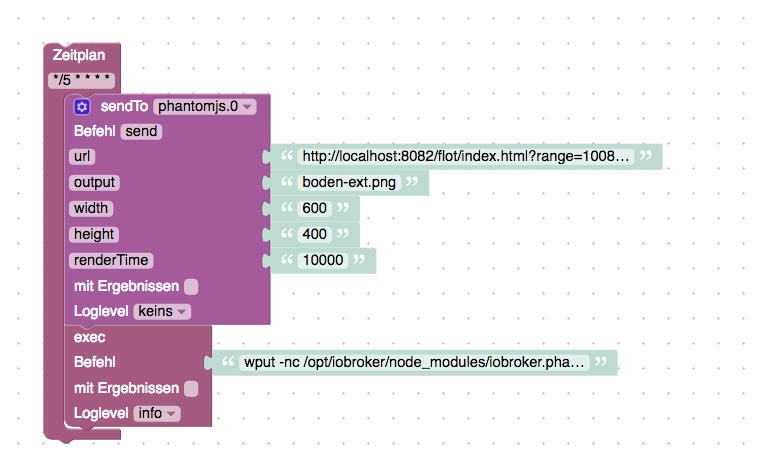
        Bitte schön. Ist aber auch aus Blockly…

        Gruß

        Holger

        schedule("*/5 * * * *", function () {
          sendTo("phantomjs.0", "send", {
             "url": 'http://localhost:8082/flot/"hier der Flot Link rein",
             "output": 'boden-ext.png',
             "width": '600',
             "height": '400',
             "renderTime": '10000'
          });
          exec('wput -nc /opt/iobroker/node_modules/iobroker.phantomjs/boden-ext.png ftp://"hier der ftp host"');
          console.log("exec: " + 'wput -nc /opt/iobroker/node_modules/iobroker.phantomjs/boden-ext.png ftp://"hier der ftp host');
        });
        
        
        1 Reply Last reply
        0
        • chucky666C Online
          chucky666C Online
          chucky666
          wrote on last edited by
          #33

          Danke aber in dem Script zeigt er mir Fehler an , mein Flot habe ich rein kopiert.

          Wenn du das Blocky mal posten könntest ? Das verstehe ich besser

          Gruß

          Gesendet von iPad mit Tapatalk Pro

          1 Reply Last reply
          0
          • H Online
            H Online
            holgerwolf
            wrote on last edited by
            #34

            Bitteschön:

            531_blockly-boden.jpeg

            J 1 Reply Last reply
            0
            • chucky666C Online
              chucky666C Online
              chucky666
              wrote on last edited by
              #35

              Ok Danke

              Aber mit was sendet er es ? Ich möchte mit Telegram arbeiten

              Gesendet von iPad mit Tapatalk Pro

              1 Reply Last reply
              0
              • H Online
                H Online
                holgerwolf
                wrote on last edited by
                #36

                OK. Ich dachte dir ginge es erstmal im phantomjs…

                Ich schicke ftp eine Datei auf nen Webserver. Nutze hier kein Telegram.

                Gruß

                Holger

                1 Reply Last reply
                0
                • chucky666C Online
                  chucky666C Online
                  chucky666
                  wrote on last edited by
                  #37

                  Machst du das auch über Blocky ?

                  Wenn ja kannst du mir eine Hilfe schicken ?

                  Gesendet von iPad mit Tapatalk Pro

                  1 Reply Last reply
                  0
                  • H Online
                    H Online
                    holgerwolf
                    wrote on last edited by
                    #38

                    Wo kommt denn bei dir welcher Fehler? Der erste Teil von dem Blockly oben sollte ja so laufen.

                    In dem zweiten Block schiebe ich die Datei per wput (das muss man oft erstmal installieren) auf einen ftp Server, Ist aber ja ein ganz anderer Usecase wie Telegram.

                    Gruß

                    Holger

                    1 Reply Last reply
                    0
                    • chucky666C Online
                      chucky666C Online
                      chucky666
                      wrote on last edited by
                      #39

                      Jetzt erstellt er den Screenshot , hatte vergessen den trigger zu stellen . Jetzt muss ich es nur noch schaffen das Bild per Telegram zu verschicken

                      Gesendet von iPad mit Tapatalk Pro

                      1 Reply Last reply
                      0
                      • chucky666C Online
                        chucky666C Online
                        chucky666
                        wrote on last edited by
                        #40

                        Hallo zusammen

                        Kann mir einer per Blocky erklären wie ich das Foto per Telegram verschicke ?

                        Gesendet von iPad mit Tapatalk Pro

                        cvidalC 1 Reply Last reply
                        0
                        • H Offline
                          H Offline
                          homecineplexx
                          wrote on last edited by
                          #41

                          hallo

                          hat jemand eine idee, warum ich den adapter nicht installieren kann?

                          RPI 3B+

                          Node.js v8.14.0

                          NPM 6.4.1

                          Raspbian GNU/Linux 9

                          Linux version 4.14.79-v7+ (dc4@dc4-XPS13-9333) (gcc version 4.9.3 (crosstool-NG crosstool-ng-1.22.0-88-g8460611)) #1159 SMP Sun Nov 4 17:50:20 GMT 2018

                          $ ./iobroker add phantomjs  --host RPI_Slave1
                          NPM version: 6.4.1
                          npm install iobroker.phantomjs --production --save --prefix "/opt/iobroker" (System call)
                          Unexpected platform or architecture: linux/armIt seems there is no binary available for your platform/architecture
                          Try to install PhantomJS globally
                          
                          npm WARN svg-inline-react@1.0.3 requires a peer of react@^0.14.0 || ^15.0.0 but none is installed. You must install peer dependencies yourself.
                          npm WARN optional SKIPPING OPTIONAL DEPENDENCY: fsevents@1.2.4 (node_modules/fsevents):npm WARN notsup SKIPPING OPTIONAL DEPENDENCY: Unsupported platform for fsevents@1.2.4: wanted {"os":"darwin","arch":"any"} (current: {"os":"linux","arch":"arm"})
                          
                          npm ERR! code ELIFECYCLEnpm ERR! errno 1
                          npm ERR! phantomjs-prebuilt@2.1.16 install: `node install.js`
                          npm ERR! Exit status 1
                          npm ERR! 
                          npm ERR! Failed at the phantomjs-prebuilt@2.1.16 install script.
                          npm ERR! This is probably not a problem with npm. There is likely additional logging output above.
                          
                          npm ERR! A complete log of this run can be found in:
                          npm ERR!     /home/iobroker/.npm/_logs/2019-01-10T16_32_48_343Z-debug.log
                          
                          host.RPI_Master install adapter phantomjs
                          NPM version: 6.4.1npm install iobroker.phantomjs --production --save --prefix "/opt/iobroker" (System call)
                          
                          Unexpected platform or architecture: linux/armIt seems there is no binary available for your platform/architecture
                          Try to install PhantomJS globally
                          
                          npm
                           WARN svg-inline-react@1.0.3 requires a peer of react@^0.14.0 || ^15.0.0 but none is installed. You must install peer dependencies yourself.
                          npm WARN optional SKIPPING OPTIONAL DEPENDENCY: fsevents@1.2.4 (node_modules/fsevents):npm WARN notsup SKIPPING OPTIONAL DEPENDENCY: Unsupported platform for fsevents@1.2.4: wanted {"os":"darwin","arch":"any"} (current: {"os":"linux","arch":"arm"})
                          
                          npm
                           ERR! code ELIFECYCLEnpm ERR! errno 1
                          
                          npm ERR! phantomjs-prebuilt@2.1.16 install: `node install.js`npm ERR! Exit status 1
                          
                          npm ERR! npm ERR! Failed at the phantomjs-prebuilt@2.1.16 install script.
                          npm ERR! This is probably not a problem with npm. There is likely additional logging output above.
                          
                          npm ERR! A complete log of this run can be found in:
                          npm ERR!     /home/iobroker/.npm/_logs/2019-01-10T16_33_39_525Z-debug.log
                          
                          host.RPI_Master install adapter phantomjs
                          NPM version: 6.4.1
                          npm install iobroker.phantomjs --production --save --prefix "/opt/iobroker" (System call)
                          Unexpected platform or architecture: linux/armIt seems there is no binary available for your platform/architecture
                          Try to install PhantomJS globally
                          
                          npm
                           WARN svg-inline-react@1.0.3 requires a peer of react@^0.14.0 || ^15.0.0 but none is installed. You must install peer dependencies yourself.
                          npm WARN optional SKIPPING OPTIONAL DEPENDENCY: fsevents@1.2.4 (node_modules/fsevents):npm WARN notsup SKIPPING OPTIONAL DEPENDENCY: Unsupported platform for fsevents@1.2.4: wanted {"os":"darwin","arch":"any"} (current: {"os":"linux","arch":"arm"})
                          
                          npm ERR! code ELIFECYCLE
                          npm ERR! errno 1npm
                           ERR! phantomjs-prebuilt@2.1.16 install: `node install.js`npm ERR! Exit status 1
                          npm ERR! 
                          npm ERR!
                           Failed at the phantomjs-prebuilt@2.1.16 install script.npm ERR! This is probably not a problem with npm. There is likely additional logging output above.
                          
                          npm ERR! A complete log of this run can be found in:npm ERR!     /home/iobroker/.npm/_logs/2019-01-10T16_34_29_877Z-debug.log
                          
                          host.RPI_Master install adapter phantomjs
                          ERROR: host.RPI_Master Cannot install phantomjs
                          ERROR: process exited with code 13
                          
                          
                          1 Reply Last reply
                          0
                          • H Offline
                            H Offline
                            homecineplexx
                            wrote on last edited by
                            #42

                            also ich hab jetzt testweise auf meinem windows pc iobroker und phantomjs aufgesetzt, aber so richtig funktioniert das nicht mit dem snapshot oder?

                            hier der testcode

                            function testSomething () {
                                sendTo('phantomjs.0', 'send', {
                                    url: 'http://192.168.1.2:8081/#tab-instances',
                                    output: 'chrk-test.png',
                                    width: 1000,
                                    height: 800,
                                   renderTime: 20000,
                                   online: true
                                }, function (result) {
                                    console.log(result.error + ' ' + result.output);
                                });
                            }
                            
                            testSomething();


                            und als anhang 2 fotos (hier werden scheinbar nicht alle daten/bilder geladen)
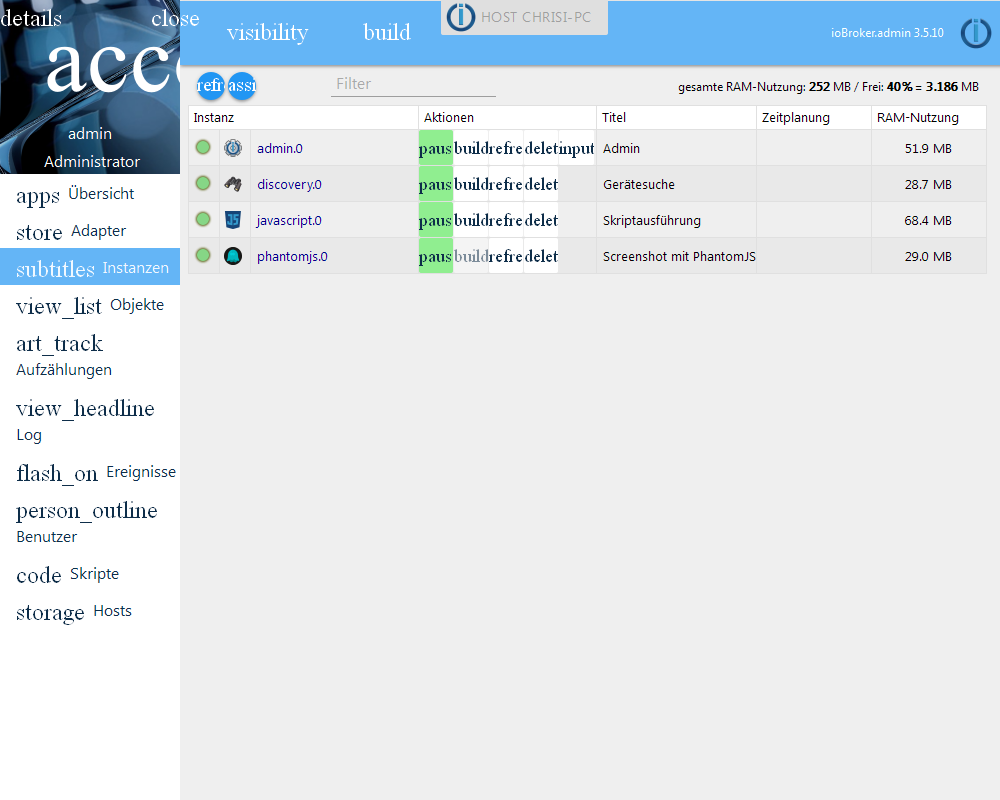
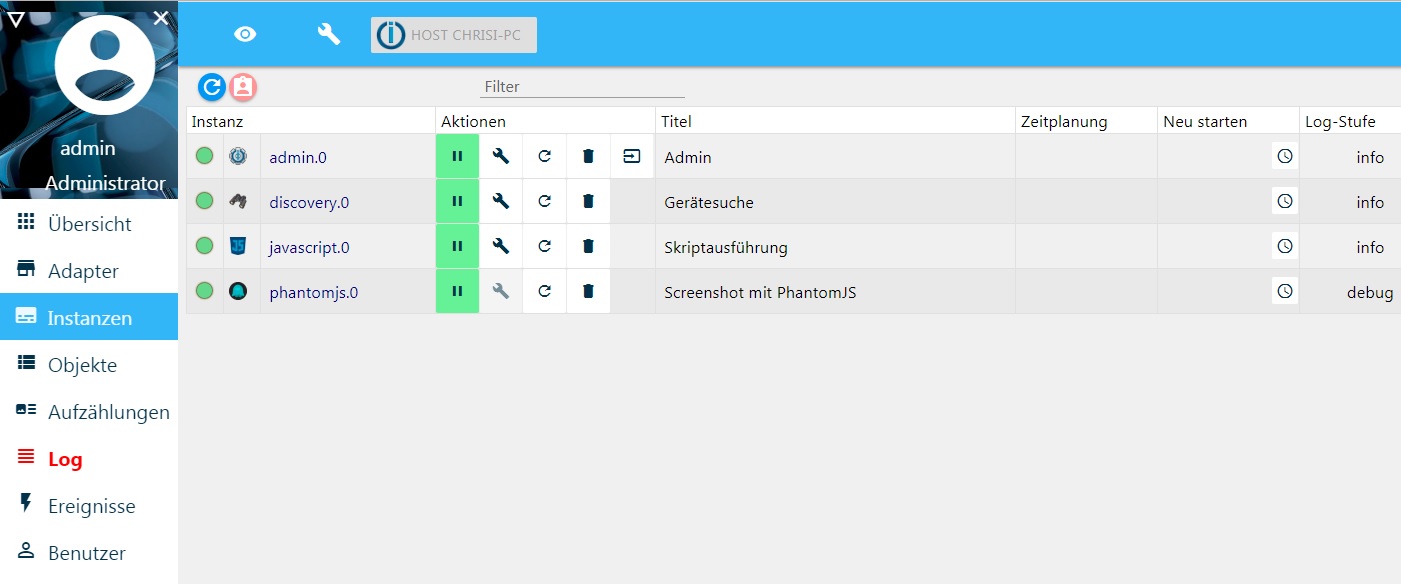
                            6704_chrk-test.png
                            6704_original_instanzenjpg.jpg

                            1 Reply Last reply
                            0
                            • H holgerwolf

                              Bitteschön:

                              531_blockly-boden.jpeg

                              J Offline
                              J Offline
                              jensus11
                              wrote on last edited by
                              #43

                              @holgerwolf

                              Hi, wie hast du die Punkte output, width usw. da hinzugefügt?
                              Bei mir fehlen die. Schaut so aus.
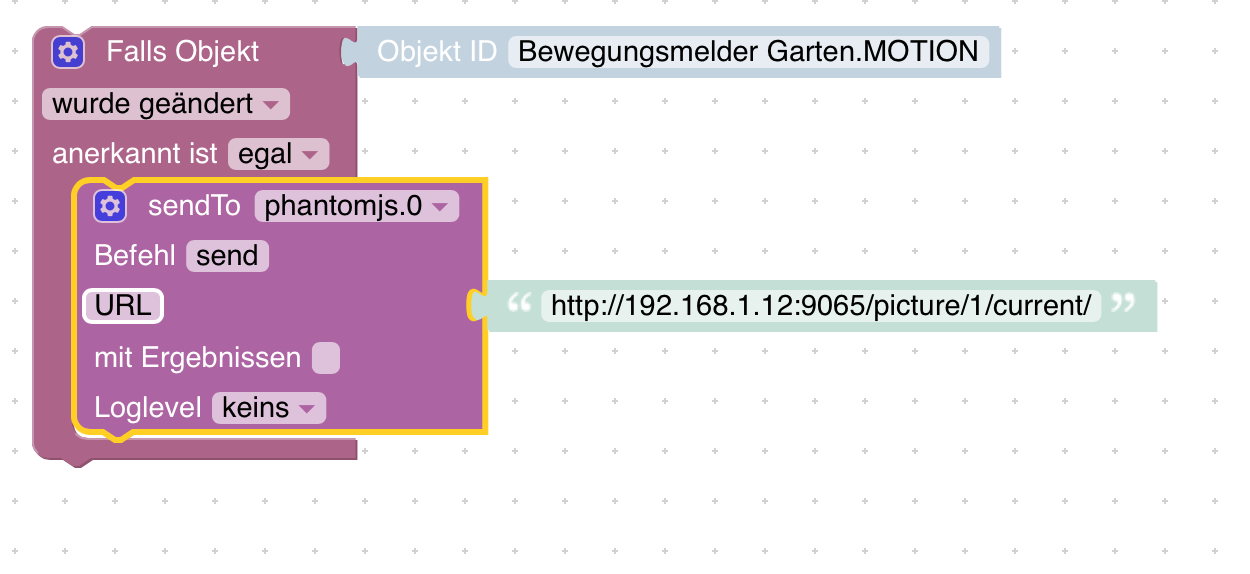
                              Bildschirmfoto 2019-03-02 um 11.07.26.png

                              1 Reply Last reply
                              0
                              • J Offline
                                J Offline
                                jensus11
                                wrote on last edited by
                                #44

                                Habe es hinbekommen mit den Punkten.
                                So sieht mein Blockly jetzt aus.
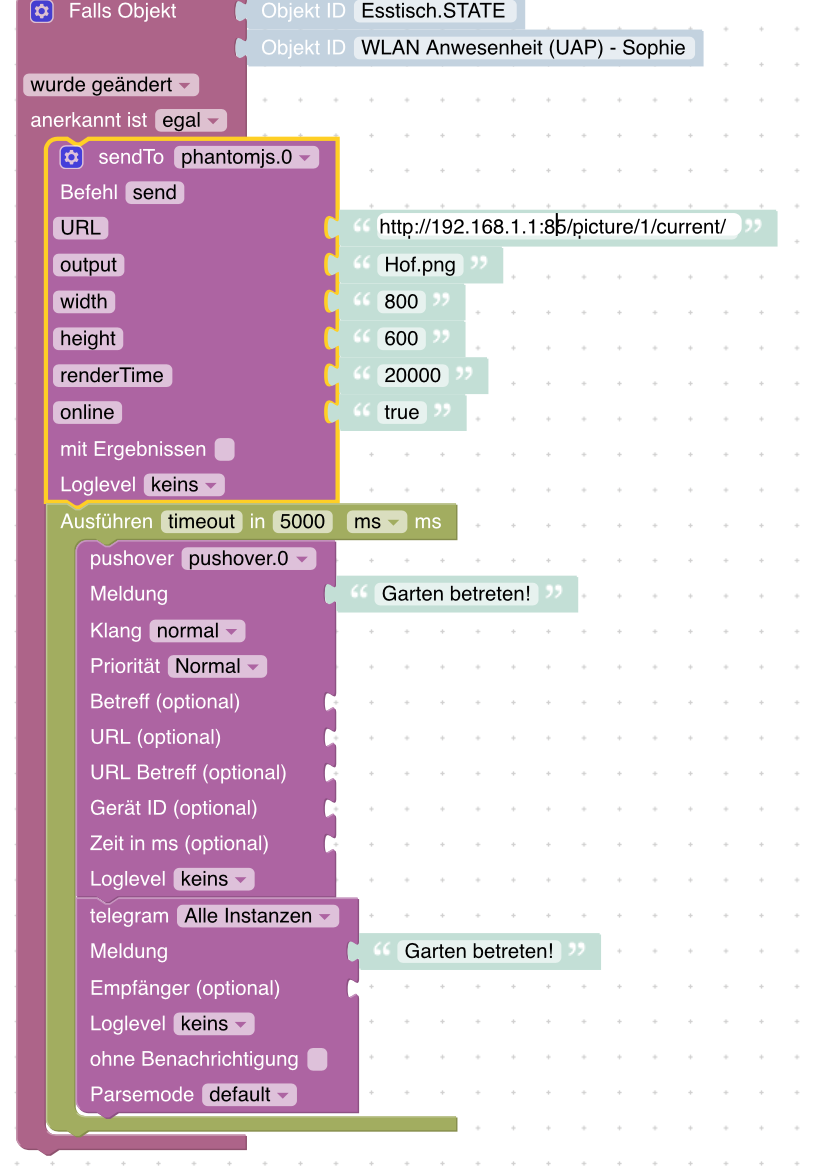
                                Bildschirmfoto 2019-03-02 um 16.20.05.png

                                Leider erhalte ich dann folgende Error Meldung.

                                {"killed":false,"code":1,"signal":null,"cmd":"/opt/iobroker/node_modules/iobroker.phantomjs/node_modules/phantomjs-prebuilt/lib/phantom/bin/phantomjs /opt/iobroker/node_modules/iobroker.phantomjs/lib/


                                Was ist damit gemeint?

                                1 Reply Last reply
                                0
                                • chucky666C chucky666

                                  Hallo zusammen

                                  Kann mir einer per Blocky erklären wie ich das Foto per Telegram verschicke ?

                                  Gesendet von iPad mit Tapatalk Pro

                                  cvidalC Online
                                  cvidalC Online
                                  cvidal
                                  Forum Testing
                                  wrote on last edited by
                                  #45

                                  @chucky666 sagte in IoBroker.phantomjs:

                                  Hallo zusammen

                                  Kann mir einer per Blocky erklären wie ich das Foto per Telegram verschicke ?

                                  Gesendet von iPad mit Tapatalk Pro

                                  Bist du schon weitergekommen? Ich bekomme das Bild wohl abgespeichert aber bei mir hackt auch das Bild per Telegram zu versenden.

                                  chucky666C 1 Reply Last reply
                                  0
                                  • cvidalC cvidal

                                    @chucky666 sagte in IoBroker.phantomjs:

                                    Hallo zusammen

                                    Kann mir einer per Blocky erklären wie ich das Foto per Telegram verschicke ?

                                    Gesendet von iPad mit Tapatalk Pro

                                    Bist du schon weitergekommen? Ich bekomme das Bild wohl abgespeichert aber bei mir hackt auch das Bild per Telegram zu versenden.

                                    chucky666C Online
                                    chucky666C Online
                                    chucky666
                                    wrote on last edited by
                                    #46

                                    @cvidal sagte in IoBroker.phantomjs:

                                    @chucky666 sagte in IoBroker.phantomjs:

                                    Hallo zusammen

                                    Kann mir einer per Blocky erklären wie ich das Foto per Telegram verschicke ?

                                    Gesendet von iPad mit Tapatalk Pro

                                    Bist du schon weitergekommen? Ich bekomme das Bild wohl abgespeichert aber bei mir hackt auch das Bild per Telegram zu versenden.

                                    Das Problem hatte ich auch , ich habe es erstmal pausiert

                                    1 Reply Last reply
                                    0
                                    • R Offline
                                      R Offline
                                      ratte-rizzo
                                      wrote on last edited by
                                      #47

                                      Moin

                                      Auf meinem Nuc mit Debian wollte ich den PhantomJS adapter installieren, was auch problemlos geklappt hat. Beim Starten des Beispiel-Skriptes gibts aber nur folgende Fehlermeldung:

                                      2020-02-08 18:28:56.728 - error: phantomjs.0 (11391) {"killed":false,"code":1,"signal":null,"cmd":"/opt/iobroker/node_modules/phantomjs-prebuilt/lib/phantom/bin/phantomjs /opt/iobroker/node_modules/iobroker.phantomjs/lib/rasterize.js --url http://google.com --output \"/opt/iobroker/node_modules/iobroker.phantomjs/image.png\" --width 300 --height 200 --timeout 10000"}
                                      

                                      Hat jemand eine Idee für die Fehlersuche?

                                      Dank & Gruß
                                      Daniel

                                      J 1 Reply Last reply
                                      0
                                      • P Offline
                                        P Offline
                                        PatrickFro
                                        wrote on last edited by
                                        #48

                                        @apollon77 @Bluefox

                                        Moin

                                        Ich versuche auf einem Raspi 4 den Adapter zu installieren, funktioniert leider nicht. Sowohl von Github als normale Installation habe ich versucht. Abbruch erfolgt immer mit folgender Meldung:

                                        $ ./iobroker url "https://github.com/ioBroker/ioBroker.phantomjs"
                                        install https://github.com/ioBroker/ioBroker.phantomjs/tarball/36433ed1245baad15f93e2b74b4b9f66eaf9a1bf
                                        NPM version: 6.13.4
                                        npm install https://github.com/ioBroker/ioBroker.phantomjs/tarball/36433ed1245baad15f93e2b74b4b9f66eaf9a1bf --loglevel error --prefix "/opt/iobroker" (System call)
                                        Unexpected platform or architecture: linux/armIt seems there is no binary available for your platform/architectureTry to install PhantomJS globally
                                        npm ERR! code ELIFECYCLE
                                        npm ERR! errno 1npm ERR! phantomjs-prebuilt@2.1.16 install: `node install.js`npm ERR! Exit status 1npm ERR! npm ERR! Failed at the phantomjs-prebuilt@2.1.16 install script.npm ERR! This is probably not a problem with npm. There is likely additional logging output above.
                                        
                                        npm ERR! A complete log of this run can be found in:npm ERR!     /home/iobroker/.npm/_logs/2020-03-17T07_33_20_311Z-debug.log
                                        ERROR: host.raspberrypi Cannot install https://github.com/ioBroker/ioBroker.phantomjs/tarball/36433ed1245baad15f93e2b74b4b9f66eaf9a1bf: 1
                                        ERROR: process exited with code 25
                                        
                                        apollon77A 1 Reply Last reply
                                        0
                                        • P PatrickFro

                                          @apollon77 @Bluefox

                                          Moin

                                          Ich versuche auf einem Raspi 4 den Adapter zu installieren, funktioniert leider nicht. Sowohl von Github als normale Installation habe ich versucht. Abbruch erfolgt immer mit folgender Meldung:

                                          $ ./iobroker url "https://github.com/ioBroker/ioBroker.phantomjs"
                                          install https://github.com/ioBroker/ioBroker.phantomjs/tarball/36433ed1245baad15f93e2b74b4b9f66eaf9a1bf
                                          NPM version: 6.13.4
                                          npm install https://github.com/ioBroker/ioBroker.phantomjs/tarball/36433ed1245baad15f93e2b74b4b9f66eaf9a1bf --loglevel error --prefix "/opt/iobroker" (System call)
                                          Unexpected platform or architecture: linux/armIt seems there is no binary available for your platform/architectureTry to install PhantomJS globally
                                          npm ERR! code ELIFECYCLE
                                          npm ERR! errno 1npm ERR! phantomjs-prebuilt@2.1.16 install: `node install.js`npm ERR! Exit status 1npm ERR! npm ERR! Failed at the phantomjs-prebuilt@2.1.16 install script.npm ERR! This is probably not a problem with npm. There is likely additional logging output above.
                                          
                                          npm ERR! A complete log of this run can be found in:npm ERR!     /home/iobroker/.npm/_logs/2020-03-17T07_33_20_311Z-debug.log
                                          ERROR: host.raspberrypi Cannot install https://github.com/ioBroker/ioBroker.phantomjs/tarball/36433ed1245baad15f93e2b74b4b9f66eaf9a1bf: 1
                                          ERROR: process exited with code 25
                                          
                                          apollon77A Offline
                                          apollon77A Offline
                                          apollon77
                                          wrote on last edited by
                                          #49

                                          @PatrickFro Ja, das liegt daran das phantomjs und raspis sich nicht wirklich mögen ... Da musst Du mal Googeln - es gibt da Wege, aber alle manuell.


                                          Beitrag hat geholfen? Votet rechts unten im Beitrag :-) https://paypal.me/Apollon77 / https://github.com/sponsors/Apollon77

                                          • Debug-Log für Instanz einschalten? Admin -> Instanzen -> Expertenmodus -> Instanz aufklappen - Loglevel ändern
                                          • Logfiles auf Platte /opt/iobroker/log/… nutzen, Admin schneidet Zeilen ab
                                          P 1 Reply Last reply
                                          1
                                          Reply
                                          • Reply as topic
                                          Log in to reply
                                          • Oldest to Newest
                                          • Newest to Oldest
                                          • Most Votes


                                          Support us

                                          ioBroker
                                          Community Adapters
                                          Donate
                                          FAQ Cloud / IOT
                                          HowTo: Node.js-Update
                                          HowTo: Backup/Restore
                                          Downloads
                                          BLOG

                                          789

                                          Online

                                          32.4k

                                          Users

                                          81.5k

                                          Topics

                                          1.3m

                                          Posts
                                          Community
                                          Impressum | Datenschutz-Bestimmungen | Nutzungsbedingungen | Einwilligungseinstellungen
                                          ioBroker Community 2014-2025
                                          logo
                                          • Login

                                          • Don't have an account? Register

                                          • Login or register to search.
                                          • First post
                                            Last post
                                          0
                                          • Home
                                          • Recent
                                          • Tags
                                          • Unread 0
                                          • Categories
                                          • Unreplied
                                          • Popular
                                          • GitHub
                                          • Docu
                                          • Hilfe