




Sonoff-Adapter
-
@crunchip
den Fixer einfach in die Konsole eingeben und vorher den IOBroker stoppen
cd /opt/iobroker
sudo iobroker stop
dann den Fixer und danach sudo iobroker start.Wenn dann der BLE Adapter nicht läuft, ist was anderes noch nicht in Ordnung.
-
Hallo Jan1, soll ich das so
curl -sL https://raw.githubusercontent.com/ioBroker/ioBroker/stable-installer/fix_installation.sh | bash -
in die Console eingeben?
noch vor dem Update von 0.5.2 zur 0.7.3 oder erst danach wenn der BLE Adapter gelb ist.
-
Hallo Jan1, soll ich das so
curl -sL https://raw.githubusercontent.com/ioBroker/ioBroker/stable-installer/fix_installation.sh | bash -
in die Console eingeben?
noch vor dem Update von 0.5.2 zur 0.7.3 oder erst danach wenn der BLE Adapter gelb ist.
@Leon111 ja mach es zuerst
-
Hallo zusammen,
ich habe heute den Sonoff-Adapter (v2.2.2) installiert. Leider bekomme ich den Adapter nicht "grün". Er bleibt ständig "gelb". Ich habe zwei Gosund-Steckdosen (Tasmota), die passend konfiguriert sind und auf den MQTT-Port 1885 lauschen. Der Adapter wurde ebenfalls entsprechend auf Port 1885 eingestellt (Port 1883 war per default eingestellt. Habe diesen geändert, da ich den Port als Fehlerquelle ausschließen wollte).
User und Passwort sind bei den Steckdosen und dem Adapter identisch.Die Log-Stufe habe ich auf "Debug" gestellt:
sonoff.0	2019-10-30 13:14:10.630	debug	stateChange sonoff.0.info.connection: {"val":"","ack":true,"ts":1572437650621,"q":0,"from":"system.adapter.sonoff.0","user":"system.user.admin","lc":1572434652804}
sonoff.0	2019-10-30 13:14:10.626	info	Starting MQTT authenticated server on port 1885
sonoff.0	2019-10-30 13:14:10.571	info	starting. Version 2.2.2 in /opt/iobroker/node_modules/iobroker.sonoff, node: v10.16.0
host.ioBroker-RasPi4	2019-10-30 13:14:09.821	info	instance system.adapter.sonoff.0 started with pid 4030
Einen Fehler lese ich aus dem Log nicht raus. Woran kann es liegen, dass der Adapter nicht auf "grün" springt?
Einen anderen MQTT-Adapter habe ich nicht laufen.
Die Installation des Adapters lieferte die Fehler, die auch @Leon111 bereits am 08.06. gepostet hat. Da der Adapter aber schlussendlich installiert wurde, glaube ich nicht, dass es daran liegt.
Mein System:
- Raspberry Pi 4
- Admin 3.6.7
- NPM 6.9.0
- Node.js 10.16.0
Kann mir jemand helfen?
-
Hallo zusammen,
ich habe heute den Sonoff-Adapter (v2.2.2) installiert. Leider bekomme ich den Adapter nicht "grün". Er bleibt ständig "gelb". Ich habe zwei Gosund-Steckdosen (Tasmota), die passend konfiguriert sind und auf den MQTT-Port 1885 lauschen. Der Adapter wurde ebenfalls entsprechend auf Port 1885 eingestellt (Port 1883 war per default eingestellt. Habe diesen geändert, da ich den Port als Fehlerquelle ausschließen wollte).
User und Passwort sind bei den Steckdosen und dem Adapter identisch.Die Log-Stufe habe ich auf "Debug" gestellt:
sonoff.0	2019-10-30 13:14:10.630	debug	stateChange sonoff.0.info.connection: {"val":"","ack":true,"ts":1572437650621,"q":0,"from":"system.adapter.sonoff.0","user":"system.user.admin","lc":1572434652804}
sonoff.0	2019-10-30 13:14:10.626	info	Starting MQTT authenticated server on port 1885
sonoff.0	2019-10-30 13:14:10.571	info	starting. Version 2.2.2 in /opt/iobroker/node_modules/iobroker.sonoff, node: v10.16.0
host.ioBroker-RasPi4	2019-10-30 13:14:09.821	info	instance system.adapter.sonoff.0 started with pid 4030
Einen Fehler lese ich aus dem Log nicht raus. Woran kann es liegen, dass der Adapter nicht auf "grün" springt?
Einen anderen MQTT-Adapter habe ich nicht laufen.
Die Installation des Adapters lieferte die Fehler, die auch @Leon111 bereits am 08.06. gepostet hat. Da der Adapter aber schlussendlich installiert wurde, glaube ich nicht, dass es daran liegt.
Mein System:
- Raspberry Pi 4
- Admin 3.6.7
- NPM 6.9.0
- Node.js 10.16.0
Kann mir jemand helfen?
-
@Jan1
Danke. Habe jetzt 2.3.2 installiert, aber leider keine Besserung. Instanz steht weiterhin auf "gelb" und es sind keine Objekte aufgelistet.Im Log sind aber ein paar Punkte hinzugekommen:
sonoff.0 2019-10-30 13:33:41.046 debug system.adapter.admin.0: logging true sonoff.0 2019-10-30 13:33:33.795 debug system.adapter.admin.0: logging false sonoff.0 2019-10-30 13:33:13.503 debug system.adapter.admin.0: logging true sonoff.0 2019-10-30 13:33:03.500 debug stateChange sonoff.0.info.connection: {"val":"","ack":true,"ts":1572438783494,"q":0,"from":"system.adapter.sonoff.0","user":"system.user.admin","lc":1572434652804} sonoff.0 2019-10-30 13:33:03.492 info Starting MQTT authenticated server on port 1885 sonoff.0 2019-10-30 13:33:03.356 info starting. Version 2.3.2 in /opt/iobroker/node_modules/iobroker.sonoff, node: v10.16.0 sonoff.0 2019-10-30 13:33:03.240 debug statesDB connected sonoff.0 2019-10-30 13:33:03.205 debug objectDB connected host.ioBroker-RasPi4 2019-10-30 13:33:02.432 info instance system.adapter.sonoff.0 started with pid 5400 -
@Jan1
Danke. Habe jetzt 2.3.2 installiert, aber leider keine Besserung. Instanz steht weiterhin auf "gelb" und es sind keine Objekte aufgelistet.Im Log sind aber ein paar Punkte hinzugekommen:
sonoff.0 2019-10-30 13:33:41.046 debug system.adapter.admin.0: logging true sonoff.0 2019-10-30 13:33:33.795 debug system.adapter.admin.0: logging false sonoff.0 2019-10-30 13:33:13.503 debug system.adapter.admin.0: logging true sonoff.0 2019-10-30 13:33:03.500 debug stateChange sonoff.0.info.connection: {"val":"","ack":true,"ts":1572438783494,"q":0,"from":"system.adapter.sonoff.0","user":"system.user.admin","lc":1572434652804} sonoff.0 2019-10-30 13:33:03.492 info Starting MQTT authenticated server on port 1885 sonoff.0 2019-10-30 13:33:03.356 info starting. Version 2.3.2 in /opt/iobroker/node_modules/iobroker.sonoff, node: v10.16.0 sonoff.0 2019-10-30 13:33:03.240 debug statesDB connected sonoff.0 2019-10-30 13:33:03.205 debug objectDB connected host.ioBroker-RasPi4 2019-10-30 13:33:02.432 info instance system.adapter.sonoff.0 started with pid 5400 -
@robson
Es wäre interessanter was für Fehler bei der Installation aufgetreten sind.
Merke, wenn die Installation nicht sauber läuft, läuft der Adapter danach zu 99,9% nicht.@Jan1
Anbei das Installations-Log:iobroker 2019-10-30 13:30:12.198 info exit 0 iobroker 2019-10-30 13:30:12.103 info upload [0] sonoff.admin /opt/iobroker/node_modules/iobroker.sonoff/admin/i18n/de/translations.json i18n/de/translations.json application/json iobroker 2019-10-30 13:30:12.042 info upload [1] sonoff.admin /opt/iobroker/node_modules/iobroker.sonoff/admin/i18n/en/translations.json i18n/en/translations.json application/json iobroker 2019-10-30 13:30:11.980 info upload [2] sonoff.admin /opt/iobroker/node_modules/iobroker.sonoff/admin/i18n/es/translations.json i18n/es/translations.json application/json iobroker 2019-10-30 13:30:11.919 info upload [3] sonoff.admin /opt/iobroker/node_modules/iobroker.sonoff/admin/i18n/fr/translations.json i18n/fr/translations.json application/json iobroker 2019-10-30 13:30:11.863 info upload [4] sonoff.admin /opt/iobroker/node_modules/iobroker.sonoff/admin/i18n/it/translations.json i18n/it/translations.json application/json iobroker 2019-10-30 13:30:11.797 info upload [5] sonoff.admin /opt/iobroker/node_modules/iobroker.sonoff/admin/i18n/nl/translations.json i18n/nl/translations.json application/json iobroker 2019-10-30 13:30:11.725 info upload [6] sonoff.admin /opt/iobroker/node_modules/iobroker.sonoff/admin/i18n/pl/translations.json i18n/pl/translations.json application/json iobroker 2019-10-30 13:30:11.667 info upload [7] sonoff.admin /opt/iobroker/node_modules/iobroker.sonoff/admin/i18n/pt/translations.json i18n/pt/translations.json application/json iobroker 2019-10-30 13:30:11.609 info upload [8] sonoff.admin /opt/iobroker/node_modules/iobroker.sonoff/admin/i18n/ru/translations.json i18n/ru/translations.json application/json iobroker 2019-10-30 13:30:11.551 info upload [9] sonoff.admin /opt/iobroker/node_modules/iobroker.sonoff/admin/index.html index.html text/html iobroker 2019-10-30 13:30:11.493 info upload [10] sonoff.admin /opt/iobroker/node_modules/iobroker.sonoff/admin/index_m.html index_m.html text/html iobroker 2019-10-30 13:30:11.414 info upload [11] sonoff.admin /opt/iobroker/node_modules/iobroker.sonoff/admin/sonoff.png sonoff.png image/png iobroker 2019-10-30 13:30:11.335 info upload [12] sonoff.admin /opt/iobroker/node_modules/iobroker.sonoff/admin/words.js words.js application/javascript iobroker 2019-10-30 13:30:11.308 info got /opt/iobroker/node_modules/iobroker.sonoff/admin iobroker 2019-10-30 13:30:11.261 info iobroker 2019-10-30 13:30:11.259 info npm WARN optional SKIPPING OPTIONAL DEPENDENCY: Exit status 1 iobroker 2019-10-30 13:30:11.259 info npm WARN optional SKIPPING OPTIONAL DEPENDENCY: node-bluetooth@1.2.6 (node_modules/node-bluetooth):npm WARN optional SKIPPING OPTIONAL DEPENDENCY: node-bluetooth@1.2.6 install: `node-gyp configure bu iobroker 2019-10-30 13:30:11.258 info WARN optional SKIPPING OPTIONAL DEPENDENCY: osx-temperature-sensor@1.0.4 (node_modules/osx-temperature-sensor):npm WARN notsup SKIPPING OPTIONAL DEPENDENCY: Unsupported platform for osx-temperature- iobroker 2019-10-30 13:30:11.257 info npm iobroker 2019-10-30 13:30:09.786 info node-gyp -v v3.8.0gyp ERR! not ok iobroker 2019-10-30 13:30:09.785 info gyp ERR! iobroker 2019-10-30 13:30:09.785 info gyp ERR! node -v v10.16.0 iobroker 2019-10-30 13:30:09.785 info gyp ERR! command "/usr/bin/node" "/usr/lib/node_modules/npm/node_modules/node-gyp/bin/node-gyp.js" "configure" "build"gyp ERR! cwd /opt/iobroker/node_modules/node-bluetooth iobroker 2019-10-30 13:30:09.784 info at Process.ChildProcess._handle.onexit (internal/child_process.js:248:12)gyp ERR! System Linux 4.19.58-v7l+ iobroker 2019-10-30 13:30:09.782 info gyp ERR! stack iobroker 2019-10-30 13:30:09.782 info gyp ERR! stack at ChildProcess.emit (events.js:198:13) iobroker 2019-10-30 13:30:09.782 info gyp ERR! stack Error: `make` failed with exit code: 2gyp ERR! stack at ChildProcess.onExit (/usr/lib/node_modules/npm/node_modules/node-gyp/lib/build.js:262:23) iobroker 2019-10-30 13:30:09.781 info ERR! build error iobroker 2019-10-30 13:30:09.780 info iobroker 2019-10-30 13:30:09.779 info gyp iobroker 2019-10-30 13:30:09.775 info make: *** [BluetoothSerialPort.target.mk:105: Release/obj.target/BluetoothSerialPort/src/linux/DeviceINQ.o] Fehler 1 iobroker 2019-10-30 13:30:09.766 info compilation terminated. iobroker 2019-10-30 13:30:09.765 info ^~~~~~~~~~~~~~~~~~~~~~~ iobroker 2019-10-30 13:30:09.765 info ../src/linux/DeviceINQ.cc:35:14: fatal error: bluetooth/bluetooth.h: Datei oder Verzeichnis nicht gefunden #include <bluetooth/bluetooth.h> iobroker 2019-10-30 13:30:09.331 info /home/iobroker/.node-gyp/10.16.0/include/node/v8.h:9502:16: warning: cast between incompatible function types from ‘v8::WeakCallbackInfo<Nan::ObjectWrap>::Callback’ {aka ‘void (*)(const v8::WeakCallba iobroker 2019-10-30 13:30:09.331 info /home/iobroker/.node-gyp/10.16.0/include/node/v8.h: In instantiation of ‘void v8::PersistentBase<T>::SetWeak(P*, typename v8::WeakCallbackInfo<P>::Callback, v8::WeakCallbackType) [with P = Nan::Objec iobroker 2019-10-30 13:30:09.307 info ^~~~~~~~~~~~~~~~~~~~~~~~~~~~~~~~~~~~ iobroker 2019-10-30 13:30:09.307 info reinterpret_cast<Callback>(callback), type); iobroker 2019-10-30 13:30:09.307 info /home/iobroker/.node-gyp/10.16.0/include/node/v8.h:9502:16: warning: cast between incompatible function types from ‘v8::WeakCallbackInfo<node::ObjectWrap>::Callback’ {aka ‘void (*)(const v8::WeakCallb iobroker 2019-10-30 13:30:09.307 info /home/iobroker/.node-gyp/10.16.0/include/node/node_object_wrap.h:84:78: required from here iobroker 2019-10-30 13:30:09.307 info /home/iobroker/.node-gyp/10.16.0/include/node/v8.h: In instantiation of ‘void v8::PersistentBase<T>::SetWeak(P*, typename v8::WeakCallbackInfo<P>::Callback, v8::WeakCallbackType) [with P = node::Objec iobroker 2019-10-30 13:30:09.307 info In file included from /home/iobroker/.node-gyp/10.16.0/include/node/node.h:63, from ../src/linux/BluetoothSerialPort.cc:12: iobroker 2019-10-30 13:30:09.241 info ^~~~~~~~~~~ iobroker 2019-10-30 13:30:09.241 info NODE_MODULE(BluetoothSerialPort, InitAll) iobroker 2019-10-30 13:30:09.241 info ../src/linux/BluetoothSerialPort.cc:23:1: note: in expansion of macro ‘NODE_MODULE’ iobroker 2019-10-30 13:30:09.241 info ^~~~~~~~~~~~~ iobroker 2019-10-30 13:30:09.241 info NODE_MODULE_X(modname, regfunc, NULL, 0) // NOLINT (readability/null_usage) iobroker 2019-10-30 13:30:09.241 info /home/iobroker/.node-gyp/10.16.0/include/node/node.h:607:3: note: in expansion of macro ‘NODE_MODULE_X’ iobroker 2019-10-30 13:30:09.241 info ^ iobroker 2019-10-30 13:30:09.241 info (node::addon_register_func) (regfunc), \ iobroker 2019-10-30 13:30:09.241 info /home/iobroker/.node-gyp/10.16.0/include/node/node.h:573:43: warning: cast between incompatible function types from ‘void (*)(v8::Handle<v8::Object>)’ {aka ‘void (*)(v8::Local<v8::Object>)’} to ‘node: iobroker 2019-10-30 13:30:09.241 info In file included from ../src/linux/BluetoothSerialPort.cc:12:../src/linux/BluetoothSerialPort.cc: At global scope: iobroker 2019-10-30 13:30:09.194 info ^ iobroker 2019-10-30 13:30:09.194 info , reinterpret_cast<uv_after_work_cb>(AsyncExecuteComplete) iobroker 2019-10-30 13:30:09.194 info ../node_modules/nan/nan.h:2298:62: warning: cast between incompatible function types from ‘void (*)(uv_work_t*)’ {aka ‘void (*)(uv_work_s*)’} to ‘uv_after_work_cb’ {aka ‘void (*)(uv_work_s*, int)’} [- iobroker 2019-10-30 13:30:09.194 info ../node_modules/nan/nan.h: In function ‘void Nan::AsyncQueueWorker(Nan::AsyncWorker*)’: iobroker 2019-10-30 13:30:09.194 info In file included from ../src/DeviceINQ.h:17, from ../src/linux/BluetoothSerialPort.cc:13: iobroker 2019-10-30 13:29:45.998 info npm install https://github.com/ioBroker/ioBroker.sonoff/tarball/master --production --save --prefix "/opt/iobroker" (System call) iobroker 2019-10-30 13:29:45.310 info install https://github.com/ioBroker/ioBroker.sonoff/tarball/master iobroker 2019-10-30 13:29:44.751 info url "https://github.com/ioBroker/ioBroker.sonoff/tarball/master" sonoffIch habe insgesamt 25 Adapter. Bisher laufen alle ohne Probleme. Dies ist der erste, der nicht will. Ich gehe daher davon aus, dass das System als solches gut aufgesetzt ist.
-
@Jan1
Anbei das Installations-Log:iobroker 2019-10-30 13:30:12.198 info exit 0 iobroker 2019-10-30 13:30:12.103 info upload [0] sonoff.admin /opt/iobroker/node_modules/iobroker.sonoff/admin/i18n/de/translations.json i18n/de/translations.json application/json iobroker 2019-10-30 13:30:12.042 info upload [1] sonoff.admin /opt/iobroker/node_modules/iobroker.sonoff/admin/i18n/en/translations.json i18n/en/translations.json application/json iobroker 2019-10-30 13:30:11.980 info upload [2] sonoff.admin /opt/iobroker/node_modules/iobroker.sonoff/admin/i18n/es/translations.json i18n/es/translations.json application/json iobroker 2019-10-30 13:30:11.919 info upload [3] sonoff.admin /opt/iobroker/node_modules/iobroker.sonoff/admin/i18n/fr/translations.json i18n/fr/translations.json application/json iobroker 2019-10-30 13:30:11.863 info upload [4] sonoff.admin /opt/iobroker/node_modules/iobroker.sonoff/admin/i18n/it/translations.json i18n/it/translations.json application/json iobroker 2019-10-30 13:30:11.797 info upload [5] sonoff.admin /opt/iobroker/node_modules/iobroker.sonoff/admin/i18n/nl/translations.json i18n/nl/translations.json application/json iobroker 2019-10-30 13:30:11.725 info upload [6] sonoff.admin /opt/iobroker/node_modules/iobroker.sonoff/admin/i18n/pl/translations.json i18n/pl/translations.json application/json iobroker 2019-10-30 13:30:11.667 info upload [7] sonoff.admin /opt/iobroker/node_modules/iobroker.sonoff/admin/i18n/pt/translations.json i18n/pt/translations.json application/json iobroker 2019-10-30 13:30:11.609 info upload [8] sonoff.admin /opt/iobroker/node_modules/iobroker.sonoff/admin/i18n/ru/translations.json i18n/ru/translations.json application/json iobroker 2019-10-30 13:30:11.551 info upload [9] sonoff.admin /opt/iobroker/node_modules/iobroker.sonoff/admin/index.html index.html text/html iobroker 2019-10-30 13:30:11.493 info upload [10] sonoff.admin /opt/iobroker/node_modules/iobroker.sonoff/admin/index_m.html index_m.html text/html iobroker 2019-10-30 13:30:11.414 info upload [11] sonoff.admin /opt/iobroker/node_modules/iobroker.sonoff/admin/sonoff.png sonoff.png image/png iobroker 2019-10-30 13:30:11.335 info upload [12] sonoff.admin /opt/iobroker/node_modules/iobroker.sonoff/admin/words.js words.js application/javascript iobroker 2019-10-30 13:30:11.308 info got /opt/iobroker/node_modules/iobroker.sonoff/admin iobroker 2019-10-30 13:30:11.261 info iobroker 2019-10-30 13:30:11.259 info npm WARN optional SKIPPING OPTIONAL DEPENDENCY: Exit status 1 iobroker 2019-10-30 13:30:11.259 info npm WARN optional SKIPPING OPTIONAL DEPENDENCY: node-bluetooth@1.2.6 (node_modules/node-bluetooth):npm WARN optional SKIPPING OPTIONAL DEPENDENCY: node-bluetooth@1.2.6 install: `node-gyp configure bu iobroker 2019-10-30 13:30:11.258 info WARN optional SKIPPING OPTIONAL DEPENDENCY: osx-temperature-sensor@1.0.4 (node_modules/osx-temperature-sensor):npm WARN notsup SKIPPING OPTIONAL DEPENDENCY: Unsupported platform for osx-temperature- iobroker 2019-10-30 13:30:11.257 info npm iobroker 2019-10-30 13:30:09.786 info node-gyp -v v3.8.0gyp ERR! not ok iobroker 2019-10-30 13:30:09.785 info gyp ERR! iobroker 2019-10-30 13:30:09.785 info gyp ERR! node -v v10.16.0 iobroker 2019-10-30 13:30:09.785 info gyp ERR! command "/usr/bin/node" "/usr/lib/node_modules/npm/node_modules/node-gyp/bin/node-gyp.js" "configure" "build"gyp ERR! cwd /opt/iobroker/node_modules/node-bluetooth iobroker 2019-10-30 13:30:09.784 info at Process.ChildProcess._handle.onexit (internal/child_process.js:248:12)gyp ERR! System Linux 4.19.58-v7l+ iobroker 2019-10-30 13:30:09.782 info gyp ERR! stack iobroker 2019-10-30 13:30:09.782 info gyp ERR! stack at ChildProcess.emit (events.js:198:13) iobroker 2019-10-30 13:30:09.782 info gyp ERR! stack Error: `make` failed with exit code: 2gyp ERR! stack at ChildProcess.onExit (/usr/lib/node_modules/npm/node_modules/node-gyp/lib/build.js:262:23) iobroker 2019-10-30 13:30:09.781 info ERR! build error iobroker 2019-10-30 13:30:09.780 info iobroker 2019-10-30 13:30:09.779 info gyp iobroker 2019-10-30 13:30:09.775 info make: *** [BluetoothSerialPort.target.mk:105: Release/obj.target/BluetoothSerialPort/src/linux/DeviceINQ.o] Fehler 1 iobroker 2019-10-30 13:30:09.766 info compilation terminated. iobroker 2019-10-30 13:30:09.765 info ^~~~~~~~~~~~~~~~~~~~~~~ iobroker 2019-10-30 13:30:09.765 info ../src/linux/DeviceINQ.cc:35:14: fatal error: bluetooth/bluetooth.h: Datei oder Verzeichnis nicht gefunden #include <bluetooth/bluetooth.h> iobroker 2019-10-30 13:30:09.331 info /home/iobroker/.node-gyp/10.16.0/include/node/v8.h:9502:16: warning: cast between incompatible function types from ‘v8::WeakCallbackInfo<Nan::ObjectWrap>::Callback’ {aka ‘void (*)(const v8::WeakCallba iobroker 2019-10-30 13:30:09.331 info /home/iobroker/.node-gyp/10.16.0/include/node/v8.h: In instantiation of ‘void v8::PersistentBase<T>::SetWeak(P*, typename v8::WeakCallbackInfo<P>::Callback, v8::WeakCallbackType) [with P = Nan::Objec iobroker 2019-10-30 13:30:09.307 info ^~~~~~~~~~~~~~~~~~~~~~~~~~~~~~~~~~~~ iobroker 2019-10-30 13:30:09.307 info reinterpret_cast<Callback>(callback), type); iobroker 2019-10-30 13:30:09.307 info /home/iobroker/.node-gyp/10.16.0/include/node/v8.h:9502:16: warning: cast between incompatible function types from ‘v8::WeakCallbackInfo<node::ObjectWrap>::Callback’ {aka ‘void (*)(const v8::WeakCallb iobroker 2019-10-30 13:30:09.307 info /home/iobroker/.node-gyp/10.16.0/include/node/node_object_wrap.h:84:78: required from here iobroker 2019-10-30 13:30:09.307 info /home/iobroker/.node-gyp/10.16.0/include/node/v8.h: In instantiation of ‘void v8::PersistentBase<T>::SetWeak(P*, typename v8::WeakCallbackInfo<P>::Callback, v8::WeakCallbackType) [with P = node::Objec iobroker 2019-10-30 13:30:09.307 info In file included from /home/iobroker/.node-gyp/10.16.0/include/node/node.h:63, from ../src/linux/BluetoothSerialPort.cc:12: iobroker 2019-10-30 13:30:09.241 info ^~~~~~~~~~~ iobroker 2019-10-30 13:30:09.241 info NODE_MODULE(BluetoothSerialPort, InitAll) iobroker 2019-10-30 13:30:09.241 info ../src/linux/BluetoothSerialPort.cc:23:1: note: in expansion of macro ‘NODE_MODULE’ iobroker 2019-10-30 13:30:09.241 info ^~~~~~~~~~~~~ iobroker 2019-10-30 13:30:09.241 info NODE_MODULE_X(modname, regfunc, NULL, 0) // NOLINT (readability/null_usage) iobroker 2019-10-30 13:30:09.241 info /home/iobroker/.node-gyp/10.16.0/include/node/node.h:607:3: note: in expansion of macro ‘NODE_MODULE_X’ iobroker 2019-10-30 13:30:09.241 info ^ iobroker 2019-10-30 13:30:09.241 info (node::addon_register_func) (regfunc), \ iobroker 2019-10-30 13:30:09.241 info /home/iobroker/.node-gyp/10.16.0/include/node/node.h:573:43: warning: cast between incompatible function types from ‘void (*)(v8::Handle<v8::Object>)’ {aka ‘void (*)(v8::Local<v8::Object>)’} to ‘node: iobroker 2019-10-30 13:30:09.241 info In file included from ../src/linux/BluetoothSerialPort.cc:12:../src/linux/BluetoothSerialPort.cc: At global scope: iobroker 2019-10-30 13:30:09.194 info ^ iobroker 2019-10-30 13:30:09.194 info , reinterpret_cast<uv_after_work_cb>(AsyncExecuteComplete) iobroker 2019-10-30 13:30:09.194 info ../node_modules/nan/nan.h:2298:62: warning: cast between incompatible function types from ‘void (*)(uv_work_t*)’ {aka ‘void (*)(uv_work_s*)’} to ‘uv_after_work_cb’ {aka ‘void (*)(uv_work_s*, int)’} [- iobroker 2019-10-30 13:30:09.194 info ../node_modules/nan/nan.h: In function ‘void Nan::AsyncQueueWorker(Nan::AsyncWorker*)’: iobroker 2019-10-30 13:30:09.194 info In file included from ../src/DeviceINQ.h:17, from ../src/linux/BluetoothSerialPort.cc:13: iobroker 2019-10-30 13:29:45.998 info npm install https://github.com/ioBroker/ioBroker.sonoff/tarball/master --production --save --prefix "/opt/iobroker" (System call) iobroker 2019-10-30 13:29:45.310 info install https://github.com/ioBroker/ioBroker.sonoff/tarball/master iobroker 2019-10-30 13:29:44.751 info url "https://github.com/ioBroker/ioBroker.sonoff/tarball/master" sonoffIch habe insgesamt 25 Adapter. Bisher laufen alle ohne Probleme. Dies ist der erste, der nicht will. Ich gehe daher davon aus, dass das System als solches gut aufgesetzt ist.
-
@Jan1
Habe es aus dem Log herauskopiert.Habe den Adapter gerade noch mal installiert:
$ ./iobroker url "https://github.com/ioBroker/ioBroker.sonoff/tarball/master" sonoff install https://github.com/ioBroker/ioBroker.sonoff/tarball/master npm install https://github.com/ioBroker/ioBroker.sonoff/tarball/master --production --save --prefix "/opt/iobroker" (System call) In file included from ../src/DeviceINQ.h:17, from ../src/linux/BluetoothSerialPort.cc:13: ../node_modules/nan/nan.h: In function ‘void Nan::AsyncQueueWorker(Nan::AsyncWorker*)’: ../node_modules/nan/nan.h:2298:62: warning: cast between incompatible function types from ‘void (*)(uv_work_t*)’ {aka ‘void (*)(uv_work_s*)’} to ‘uv_after_work_cb’ {aka ‘void (*)(uv_work_s*, int)’} [-Wcast-function-type] , reinterpret_cast<uv_after_work_cb>(AsyncExecuteComplete) ^ In file included from ../src/linux/BluetoothSerialPort.cc:12:../src/linux/BluetoothSerialPort.cc: At global scope: /home/iobroker/.node-gyp/10.16.0/include/node/node.h:573:43: warning: cast between incompatible function types from ‘void (*)(v8::Handle<v8::Object>)’ {aka ‘void (*)(v8::Local<v8::Object>)’} to ‘node::addon_register_func’ {aka ‘void (*)(v8::Local<v8::Object>, v8::Local<v8::Value>, void*)’} [-Wcast-function-type] (node::addon_register_func) (regfunc), \ ^ /home/iobroker/.node-gyp/10.16.0/include/node/node.h:607:3: note: in expansion of macro ‘NODE_MODULE_X’ NODE_MODULE_X(modname, regfunc, NULL, 0) // NOLINT (readability/null_usage) ^~~~~~~~~~~~~ ../src/linux/BluetoothSerialPort.cc:23:1: note: in expansion of macro ‘NODE_MODULE’ NODE_MODULE(BluetoothSerialPort, InitAll) ^~~~~~~~~~~ In file included from /home/iobroker/.node-gyp/10.16.0/include/node/node.h:63, from ../src/linux/BluetoothSerialPort.cc:12: /home/iobroker/.node-gyp/10.16.0/include/node/v8.h: In instantiation of ‘void v8::PersistentBase<T>::SetWeak(P*, typename v8::WeakCallbackInfo<P>::Callback, v8::WeakCallbackType) [with P = node::ObjectWrap; T = v8::Object; typename v8::WeakCallbackInfo<P>::Callback = void (*)(const v8::WeakCallbackInfo<node::ObjectWrap>&)]’: /home/iobroker/.node-gyp/10.16.0/include/node/node_object_wrap.h:84:78: required from here /home/iobroker/.node-gyp/10.16.0/include/node/v8.h:9502:16: warning: cast between incompatible function types from ‘v8::WeakCallbackInfo<node::ObjectWrap>::Callback’ {aka ‘void (*)(const v8::WeakCallbackInfo<node::ObjectWrap>&)’} to ‘Callback’ {aka ‘void (*)(const v8::WeakCallbackInfo<void>&)’} [-Wcast-function-type] reinterpret_cast<Callback>(callback), type); ^~~~~~~~~~~~~~~~~~~~~~~~~~~~~~~~~~~~ /home/iobroker/.node-gyp/10.16.0/include/node/v8.h: In instantiation of ‘void v8::PersistentBase<T>::SetWeak(P*, typename v8::WeakCallbackInfo<P>::Callback, v8::WeakCallbackType) [with P = Nan::ObjectWrap; T = v8::Object; typename v8::WeakCallbackInfo<P>::Callback = void (*)(const v8::WeakCallbackInfo<Nan::ObjectWrap>&)]’:../node_modules/nan/nan_object_wrap.h:65:61: required from here /home/iobroker/.node-gyp/10.16.0/include/node/v8.h:9502:16: warning: cast between incompatible function types from ‘v8::WeakCallbackInfo<Nan::ObjectWrap>::Callback’ {aka ‘void (*)(const v8::WeakCallbackInfo<Nan::ObjectWrap>&)’} to ‘Callback’ {aka ‘void (*)(const v8::WeakCallbackInfo<void>&)’} [-Wcast-function-type] ../src/linux/DeviceINQ.cc:35:14: fatal error: bluetooth/bluetooth.h: Datei oder Verzeichnis nicht gefunden #include <bluetooth/bluetooth.h> ^~~~~~~~~~~~~~~~~~~~~~~ compilation terminated. make: *** [BluetoothSerialPort.target.mk:105: Release/obj.target/BluetoothSerialPort/src/linux/DeviceINQ.o] Fehler 1 gyp ERR! build error gyp ERR! stack Error: `make` failed with exit code: 2gyp ERR! stack at ChildProcess.onExit (/usr/lib/node_modules/npm/node_modules/node-gyp/lib/build.js:262:23) gyp ERR! stack at ChildProcess.emit (events.js:198:13) gyp ERR! stack at Process.ChildProcess._handle.onexit (internal/child_process.js:248:12) gyp ERR! System Linux 4.19.58-v7l+gyp ERR! command "/usr/bin/node" "/usr/lib/node_modules/npm/node_modules/node-gyp/bin/node-gyp.js" "configure" "build" gyp ERR! cwd /opt/iobroker/node_modules/node-bluetoothgyp ERR! node -v v10.16.0 gyp ERR! node-gyp -v v3.8.0 gyp ERR! not ok npm WARN optional SKIPPING OPTIONAL DEPENDENCY: osx-temperature-sensor@1.0.4 (node_modules/osx-temperature-sensor):npm WARN notsup SKIPPING OPTIONAL DEPENDENCY: Unsupported platform for osx-temperature-sensor@1.0.4: wanted {"os":"darwin","arch":"any"} (current: {"os":"linux","arch":"arm"}) npm WARN optional SKIPPING OPTIONAL DEPENDENCY: node-bluetooth@1.2.6 (node_modules/node-bluetooth):npm WARN optional SKIPPING OPTIONAL DEPENDENCY: node-bluetooth@1.2.6 install: `node-gyp configure build` npm WARN optional SKIPPING OPTIONAL DEPENDENCY: Exit status 1 got /opt/iobroker/node_modules/iobroker.sonoff/admin upload [12] sonoff.admin /opt/iobroker/node_modules/iobroker.sonoff/admin/words.js words.js application/javascript upload [11] sonoff.admin /opt/iobroker/node_modules/iobroker.sonoff/admin/sonoff.png sonoff.png image/png upload [10] sonoff.admin /opt/iobroker/node_modules/iobroker.sonoff/admin/index_m.html index_m.html text/html upload [9] sonoff.admin /opt/iobroker/node_modules/iobroker.sonoff/admin/index.html index.html text/html upload [8] sonoff.admin /opt/iobroker/node_modules/iobroker.sonoff/admin/i18n/ru/translations.json i18n/ru/translations.json application/json upload [7] sonoff.admin /opt/iobroker/node_modules/iobroker.sonoff/admin/i18n/pt/translations.json i18n/pt/translations.json application/json upload [6] sonoff.admin /opt/iobroker/node_modules/iobroker.sonoff/admin/i18n/pl/translations.json i18n/pl/translations.json application/json upload [5] sonoff.admin /opt/iobroker/node_modules/iobroker.sonoff/admin/i18n/nl/translations.json i18n/nl/translations.json application/json upload [4] sonoff.admin /opt/iobroker/node_modules/iobroker.sonoff/admin/i18n/it/translations.json i18n/it/translations.json application/json upload [3] sonoff.admin /opt/iobroker/node_modules/iobroker.sonoff/admin/i18n/fr/translations.json i18n/fr/translations.json application/json upload [2] sonoff.admin /opt/iobroker/node_modules/iobroker.sonoff/admin/i18n/es/translations.json i18n/es/translations.json application/json upload [1] sonoff.admin /opt/iobroker/node_modules/iobroker.sonoff/admin/i18n/en/translations.json i18n/en/translations.json application/json upload [0] sonoff.admin /opt/iobroker/node_modules/iobroker.sonoff/admin/i18n/de/translations.json i18n/de/translations.json application/json process exited with code 0 -
@Jan1
Habe es aus dem Log herauskopiert.Habe den Adapter gerade noch mal installiert:
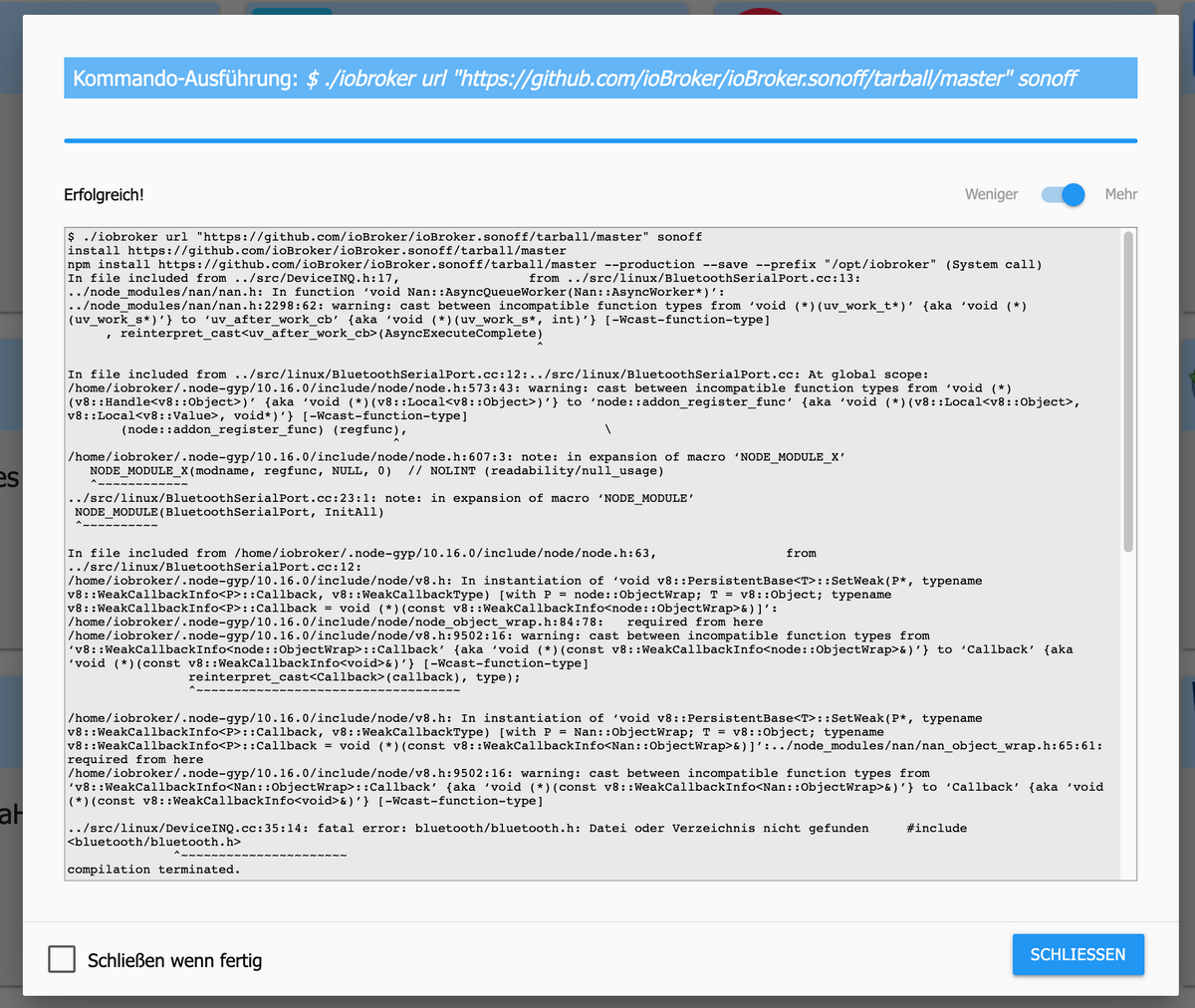
$ ./iobroker url "https://github.com/ioBroker/ioBroker.sonoff/tarball/master" sonoff install https://github.com/ioBroker/ioBroker.sonoff/tarball/master npm install https://github.com/ioBroker/ioBroker.sonoff/tarball/master --production --save --prefix "/opt/iobroker" (System call) In file included from ../src/DeviceINQ.h:17, from ../src/linux/BluetoothSerialPort.cc:13: ../node_modules/nan/nan.h: In function ‘void Nan::AsyncQueueWorker(Nan::AsyncWorker*)’: ../node_modules/nan/nan.h:2298:62: warning: cast between incompatible function types from ‘void (*)(uv_work_t*)’ {aka ‘void (*)(uv_work_s*)’} to ‘uv_after_work_cb’ {aka ‘void (*)(uv_work_s*, int)’} [-Wcast-function-type] , reinterpret_cast<uv_after_work_cb>(AsyncExecuteComplete) ^ In file included from ../src/linux/BluetoothSerialPort.cc:12:../src/linux/BluetoothSerialPort.cc: At global scope: /home/iobroker/.node-gyp/10.16.0/include/node/node.h:573:43: warning: cast between incompatible function types from ‘void (*)(v8::Handle<v8::Object>)’ {aka ‘void (*)(v8::Local<v8::Object>)’} to ‘node::addon_register_func’ {aka ‘void (*)(v8::Local<v8::Object>, v8::Local<v8::Value>, void*)’} [-Wcast-function-type] (node::addon_register_func) (regfunc), \ ^ /home/iobroker/.node-gyp/10.16.0/include/node/node.h:607:3: note: in expansion of macro ‘NODE_MODULE_X’ NODE_MODULE_X(modname, regfunc, NULL, 0) // NOLINT (readability/null_usage) ^~~~~~~~~~~~~ ../src/linux/BluetoothSerialPort.cc:23:1: note: in expansion of macro ‘NODE_MODULE’ NODE_MODULE(BluetoothSerialPort, InitAll) ^~~~~~~~~~~ In file included from /home/iobroker/.node-gyp/10.16.0/include/node/node.h:63, from ../src/linux/BluetoothSerialPort.cc:12: /home/iobroker/.node-gyp/10.16.0/include/node/v8.h: In instantiation of ‘void v8::PersistentBase<T>::SetWeak(P*, typename v8::WeakCallbackInfo<P>::Callback, v8::WeakCallbackType) [with P = node::ObjectWrap; T = v8::Object; typename v8::WeakCallbackInfo<P>::Callback = void (*)(const v8::WeakCallbackInfo<node::ObjectWrap>&)]’: /home/iobroker/.node-gyp/10.16.0/include/node/node_object_wrap.h:84:78: required from here /home/iobroker/.node-gyp/10.16.0/include/node/v8.h:9502:16: warning: cast between incompatible function types from ‘v8::WeakCallbackInfo<node::ObjectWrap>::Callback’ {aka ‘void (*)(const v8::WeakCallbackInfo<node::ObjectWrap>&)’} to ‘Callback’ {aka ‘void (*)(const v8::WeakCallbackInfo<void>&)’} [-Wcast-function-type] reinterpret_cast<Callback>(callback), type); ^~~~~~~~~~~~~~~~~~~~~~~~~~~~~~~~~~~~ /home/iobroker/.node-gyp/10.16.0/include/node/v8.h: In instantiation of ‘void v8::PersistentBase<T>::SetWeak(P*, typename v8::WeakCallbackInfo<P>::Callback, v8::WeakCallbackType) [with P = Nan::ObjectWrap; T = v8::Object; typename v8::WeakCallbackInfo<P>::Callback = void (*)(const v8::WeakCallbackInfo<Nan::ObjectWrap>&)]’:../node_modules/nan/nan_object_wrap.h:65:61: required from here /home/iobroker/.node-gyp/10.16.0/include/node/v8.h:9502:16: warning: cast between incompatible function types from ‘v8::WeakCallbackInfo<Nan::ObjectWrap>::Callback’ {aka ‘void (*)(const v8::WeakCallbackInfo<Nan::ObjectWrap>&)’} to ‘Callback’ {aka ‘void (*)(const v8::WeakCallbackInfo<void>&)’} [-Wcast-function-type] ../src/linux/DeviceINQ.cc:35:14: fatal error: bluetooth/bluetooth.h: Datei oder Verzeichnis nicht gefunden #include <bluetooth/bluetooth.h> ^~~~~~~~~~~~~~~~~~~~~~~ compilation terminated. make: *** [BluetoothSerialPort.target.mk:105: Release/obj.target/BluetoothSerialPort/src/linux/DeviceINQ.o] Fehler 1 gyp ERR! build error gyp ERR! stack Error: `make` failed with exit code: 2gyp ERR! stack at ChildProcess.onExit (/usr/lib/node_modules/npm/node_modules/node-gyp/lib/build.js:262:23) gyp ERR! stack at ChildProcess.emit (events.js:198:13) gyp ERR! stack at Process.ChildProcess._handle.onexit (internal/child_process.js:248:12) gyp ERR! System Linux 4.19.58-v7l+gyp ERR! command "/usr/bin/node" "/usr/lib/node_modules/npm/node_modules/node-gyp/bin/node-gyp.js" "configure" "build" gyp ERR! cwd /opt/iobroker/node_modules/node-bluetoothgyp ERR! node -v v10.16.0 gyp ERR! node-gyp -v v3.8.0 gyp ERR! not ok npm WARN optional SKIPPING OPTIONAL DEPENDENCY: osx-temperature-sensor@1.0.4 (node_modules/osx-temperature-sensor):npm WARN notsup SKIPPING OPTIONAL DEPENDENCY: Unsupported platform for osx-temperature-sensor@1.0.4: wanted {"os":"darwin","arch":"any"} (current: {"os":"linux","arch":"arm"}) npm WARN optional SKIPPING OPTIONAL DEPENDENCY: node-bluetooth@1.2.6 (node_modules/node-bluetooth):npm WARN optional SKIPPING OPTIONAL DEPENDENCY: node-bluetooth@1.2.6 install: `node-gyp configure build` npm WARN optional SKIPPING OPTIONAL DEPENDENCY: Exit status 1 got /opt/iobroker/node_modules/iobroker.sonoff/admin upload [12] sonoff.admin /opt/iobroker/node_modules/iobroker.sonoff/admin/words.js words.js application/javascript upload [11] sonoff.admin /opt/iobroker/node_modules/iobroker.sonoff/admin/sonoff.png sonoff.png image/png upload [10] sonoff.admin /opt/iobroker/node_modules/iobroker.sonoff/admin/index_m.html index_m.html text/html upload [9] sonoff.admin /opt/iobroker/node_modules/iobroker.sonoff/admin/index.html index.html text/html upload [8] sonoff.admin /opt/iobroker/node_modules/iobroker.sonoff/admin/i18n/ru/translations.json i18n/ru/translations.json application/json upload [7] sonoff.admin /opt/iobroker/node_modules/iobroker.sonoff/admin/i18n/pt/translations.json i18n/pt/translations.json application/json upload [6] sonoff.admin /opt/iobroker/node_modules/iobroker.sonoff/admin/i18n/pl/translations.json i18n/pl/translations.json application/json upload [5] sonoff.admin /opt/iobroker/node_modules/iobroker.sonoff/admin/i18n/nl/translations.json i18n/nl/translations.json application/json upload [4] sonoff.admin /opt/iobroker/node_modules/iobroker.sonoff/admin/i18n/it/translations.json i18n/it/translations.json application/json upload [3] sonoff.admin /opt/iobroker/node_modules/iobroker.sonoff/admin/i18n/fr/translations.json i18n/fr/translations.json application/json upload [2] sonoff.admin /opt/iobroker/node_modules/iobroker.sonoff/admin/i18n/es/translations.json i18n/es/translations.json application/json upload [1] sonoff.admin /opt/iobroker/node_modules/iobroker.sonoff/admin/i18n/en/translations.json i18n/en/translations.json application/json upload [0] sonoff.admin /opt/iobroker/node_modules/iobroker.sonoff/admin/i18n/de/translations.json i18n/de/translations.json application/json process exited with code 0 -
@robson
Kann es sein, dass Du nicht weißt wie und wo man ein Adapter installiert und deinstalliert?
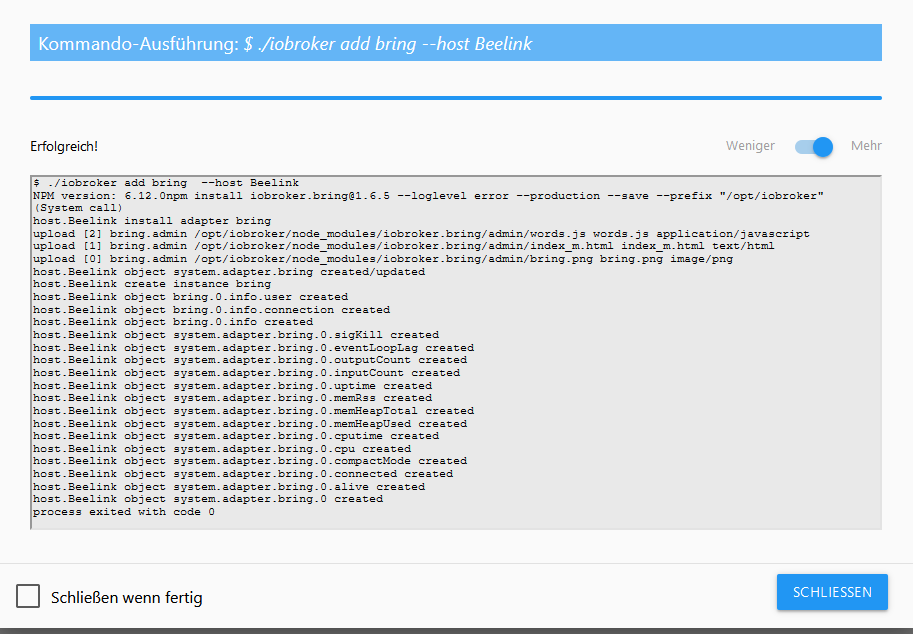
Für mich sieht das nach nem Upload eines vorhandenen Adapter aus.Was ich meine sollte so aussehen z.B.:
-
-
@robson
Kann es sein, dass Du nicht weißt wie und wo man ein Adapter installiert und deinstalliert?
Für mich sieht das nach nem Upload eines vorhandenen Adapter aus.Was ich meine sollte so aussehen z.B.:
-
@v522533
Das was er jetzt gepostet hat schon, das davor nicht.
Da steht auch nichts von Fehler bei der Installation. -
@v522533
Das was er jetzt gepostet hat schon, das davor nicht.
Da steht auch nichts von Fehler bei der Installation. -
@Jan1
Das kam aus dem System-Log. Das war nur Bottom-Up aber identisch mit dem eben geposteten Log. -
@Jan1
Danke. Habe jetzt 2.3.2 installiert, aber leider keine Besserung. Instanz steht weiterhin auf "gelb" und es sind keine Objekte aufgelistet.Im Log sind aber ein paar Punkte hinzugekommen:
sonoff.0 2019-10-30 13:33:41.046 debug system.adapter.admin.0: logging true sonoff.0 2019-10-30 13:33:33.795 debug system.adapter.admin.0: logging false sonoff.0 2019-10-30 13:33:13.503 debug system.adapter.admin.0: logging true sonoff.0 2019-10-30 13:33:03.500 debug stateChange sonoff.0.info.connection: {"val":"","ack":true,"ts":1572438783494,"q":0,"from":"system.adapter.sonoff.0","user":"system.user.admin","lc":1572434652804} sonoff.0 2019-10-30 13:33:03.492 info Starting MQTT authenticated server on port 1885 sonoff.0 2019-10-30 13:33:03.356 info starting. Version 2.3.2 in /opt/iobroker/node_modules/iobroker.sonoff, node: v10.16.0 sonoff.0 2019-10-30 13:33:03.240 debug statesDB connected sonoff.0 2019-10-30 13:33:03.205 debug objectDB connected host.ioBroker-RasPi4 2019-10-30 13:33:02.432 info instance system.adapter.sonoff.0 started with pid 5400 -
port wieder umgestellt nach neuinstallation? weil oben steht was von 1883 und auf dem letzten log steht wieder 1885
-
port wieder umgestellt nach neuinstallation? weil oben steht was von 1883 und auf dem letzten log steht wieder 1885


Hey! Du scheinst an dieser Unterhaltung interessiert zu sein, hast aber noch kein Konto.
Hast du es satt, bei jedem Besuch durch die gleichen Beiträge zu scrollen? Wenn du dich für ein Konto anmeldest, kommst du immer genau dorthin zurück, wo du zuvor warst, und kannst dich über neue Antworten benachrichtigen lassen (entweder per E-Mail oder Push-Benachrichtigung). Du kannst auch Lesezeichen speichern und Beiträge positiv bewerten, um anderen Community-Mitgliedern deine Wertschätzung zu zeigen.
Mit deinem Input könnte dieser Beitrag noch besser werden 💗
Registrieren Anmelden445
Online33.0k
Benutzende83.7k
Themen1.3m
Beiträge