Skip to content
  • Home
  • Recent
  • Tags
  • 0 Unread 0
  • Categories
  • Unreplied
  • Popular
  • GitHub
  • Docu
  • Hilfe
Skins
  • Light
  • Brite
  • Cerulean
  • Cosmo
  • Flatly
  • Journal
  • Litera
  • Lumen
  • Lux
  • Materia
  • Minty
  • Morph
  • Pulse
  • Sandstone
  • Simplex
  • Sketchy
  • Spacelab
  • United
  • Yeti
  • Zephyr
  • Dark
  • Cyborg
  • Darkly
  • Quartz
  • Slate
  • Solar
  • Superhero
  • Vapor

  • Default (No Skin)
  • No Skin
Collapse
ioBroker Logo

Community Forum

donate donate
  1. ioBroker Community Home
  2. Deutsch
  3. Visualisierung
  4. Vorlagen/Ideen MüllPlan VIEW / Widget ?

NEWS

  • Monatsrückblick Januar/Februar 2026 ist online!
    BluefoxB
    Bluefox
    6
    1
    86

  • Jahresrückblick 2025 – unser neuer Blogbeitrag ist online! ✨
    BluefoxB
    Bluefox
    17
    1
    4.2k

  • Neuer Blogbeitrag: Monatsrückblick - Dezember 2025 🎄
    BluefoxB
    Bluefox
    13
    1
    1.2k

Vorlagen/Ideen MüllPlan VIEW / Widget ?

Scheduled Pinned Locked Moved Visualisierung
vis
317 Posts 41 Posters 69.5k Views 49 Watching
  • Oldest to Newest
  • Newest to Oldest
  • Most Votes
Reply
  • Reply as topic
Log in to reply
This topic has been deleted. Only users with topic management privileges can see it.
  • liv-in-skyL liv-in-sky

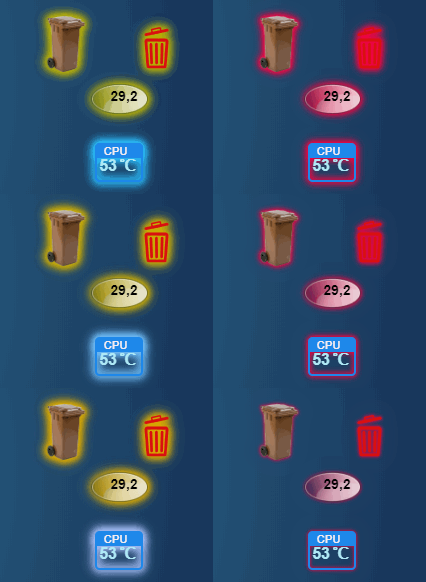
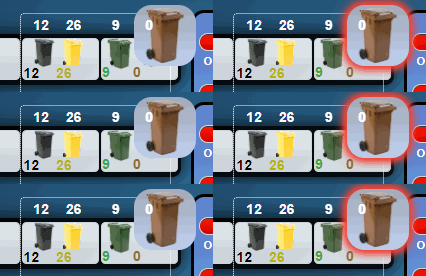
    für interessierte - blinkende rahmen:
    nochmal danke @crunchip - leicht geändert

    verschieden farbiges blinken:

    uml-ani-gif11.gif

    hier die klasse:

    kann beliebig variiert werden. zb. dir zeit verändern - oder die %-zahlen - und natürlich die farbcodes selbst

    .blink-bunt   {
      animation: mdui-bunt-blink-ani 2s linear infinite;
        
    }
    @keyframes mdui-bunt-blink-ani {
      8% {filter: drop-shadow(0px 0px 4px #AEB404) drop-shadow(0px 0px 4px #AEB404) drop-shadow(0px 0px 4px #AEB404); }
      30% {filter: drop-shadow(0px 0px 4px #DBA901) drop-shadow(0px 0px 4px #DBA901) drop-shadow(0px 0px 4px #DBA901); }
      60% {filter: drop-shadow(0px 0px 4px #FF0040) drop-shadow(0px 0px 4px #FF0040) drop-shadow(0px 0px 4px #FF0040); }
      0% {filter: none;}
    }
    .blink-bunt-blau   {
      animation: mdui-bunt-blau-blink-ani 3s linear infinite;
        
    }
    @keyframes mdui-bunt-blau-blink-ani {
      8% {filter: drop-shadow(0px 0px 4px #00BFFF) drop-shadow(0px 0px 4px #00BFFF) drop-shadow(0px 0px 4px #00BFFF); }
      30% {filter: drop-shadow(0px 0px 4px #A9BCF5) drop-shadow(0px 0px 4px #A9BCF5) drop-shadow(0px 0px 4px #A9BCF5); }
      60% {filter: drop-shadow(0px 0px 4px #FF0040) drop-shadow(0px 0px 4px #FF0040) drop-shadow(0px 0px 4px #FF0040); }
      0% {filter: none;}
    }
    
    moppel2810M Offline
    moppel2810M Offline
    moppel2810
    wrote on last edited by
    #101

    @liv-in-sky
    Kann ich das auch für Anwesendheitssteuerung nutzen? Ich würde gern 2 png Leuchten lassen wenn anwesend und nicht leuchten bei abwesendheit bzw grün anwesend und rot abwesend.

    1 Reply Last reply
    0
    • liv-in-skyL liv-in-sky

      für interessierte - blinkende rahmen:
      nochmal danke @crunchip - leicht geändert

      verschieden farbiges blinken:

      uml-ani-gif11.gif

      hier die klasse:

      kann beliebig variiert werden. zb. dir zeit verändern - oder die %-zahlen - und natürlich die farbcodes selbst

      .blink-bunt   {
        animation: mdui-bunt-blink-ani 2s linear infinite;
          
      }
      @keyframes mdui-bunt-blink-ani {
        8% {filter: drop-shadow(0px 0px 4px #AEB404) drop-shadow(0px 0px 4px #AEB404) drop-shadow(0px 0px 4px #AEB404); }
        30% {filter: drop-shadow(0px 0px 4px #DBA901) drop-shadow(0px 0px 4px #DBA901) drop-shadow(0px 0px 4px #DBA901); }
        60% {filter: drop-shadow(0px 0px 4px #FF0040) drop-shadow(0px 0px 4px #FF0040) drop-shadow(0px 0px 4px #FF0040); }
        0% {filter: none;}
      }
      .blink-bunt-blau   {
        animation: mdui-bunt-blau-blink-ani 3s linear infinite;
          
      }
      @keyframes mdui-bunt-blau-blink-ani {
        8% {filter: drop-shadow(0px 0px 4px #00BFFF) drop-shadow(0px 0px 4px #00BFFF) drop-shadow(0px 0px 4px #00BFFF); }
        30% {filter: drop-shadow(0px 0px 4px #A9BCF5) drop-shadow(0px 0px 4px #A9BCF5) drop-shadow(0px 0px 4px #A9BCF5); }
        60% {filter: drop-shadow(0px 0px 4px #FF0040) drop-shadow(0px 0px 4px #FF0040) drop-shadow(0px 0px 4px #FF0040); }
        0% {filter: none;}
      }
      
      moppel2810M Offline
      moppel2810M Offline
      moppel2810
      wrote on last edited by
      #102

      @liv-in-sky said in Vorlagen/Ideen MüllPlan VIEW / Widget ?:

      für interessierte - blinkende rahmen:
      nochmal danke @crunchip - leicht geändert

      verschieden farbiges blinken:

      uml-ani-gif11.gif

      hier die klasse:

      kann beliebig variiert werden. zb. dir zeit verändern - oder die %-zahlen - und natürlich die farbcodes selbst

      .blink-bunt   {
        animation: mdui-bunt-blink-ani 2s linear infinite;
          
      }
      @keyframes mdui-bunt-blink-ani {
        8% {filter: drop-shadow(0px 0px 4px #AEB404) drop-shadow(0px 0px 4px #AEB404) drop-shadow(0px 0px 4px #AEB404); }
        30% {filter: drop-shadow(0px 0px 4px #DBA901) drop-shadow(0px 0px 4px #DBA901) drop-shadow(0px 0px 4px #DBA901); }
        60% {filter: drop-shadow(0px 0px 4px #FF0040) drop-shadow(0px 0px 4px #FF0040) drop-shadow(0px 0px 4px #FF0040); }
        0% {filter: none;}
      }
      .blink-bunt-blau   {
        animation: mdui-bunt-blau-blink-ani 3s linear infinite;
          
      }
      @keyframes mdui-bunt-blau-blink-ani {
        8% {filter: drop-shadow(0px 0px 4px #00BFFF) drop-shadow(0px 0px 4px #00BFFF) drop-shadow(0px 0px 4px #00BFFF); }
        30% {filter: drop-shadow(0px 0px 4px #A9BCF5) drop-shadow(0px 0px 4px #A9BCF5) drop-shadow(0px 0px 4px #A9BCF5); }
        60% {filter: drop-shadow(0px 0px 4px #FF0040) drop-shadow(0px 0px 4px #FF0040) drop-shadow(0px 0px 4px #FF0040); }
        0% {filter: none;}
      }
      

      Kann ich das auch für Anwesendheitssteuerung nutzen? Ich würde gern 2 png Leuchten lassen wenn anwesend und nicht leuchten bei abwesendheit bzw grün anwesend und rot abwesend.

      liv-in-skyL 1 Reply Last reply
      0
      • moppel2810M moppel2810

        @liv-in-sky said in Vorlagen/Ideen MüllPlan VIEW / Widget ?:

        für interessierte - blinkende rahmen:
        nochmal danke @crunchip - leicht geändert

        verschieden farbiges blinken:

        uml-ani-gif11.gif

        hier die klasse:

        kann beliebig variiert werden. zb. dir zeit verändern - oder die %-zahlen - und natürlich die farbcodes selbst

        .blink-bunt   {
          animation: mdui-bunt-blink-ani 2s linear infinite;
            
        }
        @keyframes mdui-bunt-blink-ani {
          8% {filter: drop-shadow(0px 0px 4px #AEB404) drop-shadow(0px 0px 4px #AEB404) drop-shadow(0px 0px 4px #AEB404); }
          30% {filter: drop-shadow(0px 0px 4px #DBA901) drop-shadow(0px 0px 4px #DBA901) drop-shadow(0px 0px 4px #DBA901); }
          60% {filter: drop-shadow(0px 0px 4px #FF0040) drop-shadow(0px 0px 4px #FF0040) drop-shadow(0px 0px 4px #FF0040); }
          0% {filter: none;}
        }
        .blink-bunt-blau   {
          animation: mdui-bunt-blau-blink-ani 3s linear infinite;
            
        }
        @keyframes mdui-bunt-blau-blink-ani {
          8% {filter: drop-shadow(0px 0px 4px #00BFFF) drop-shadow(0px 0px 4px #00BFFF) drop-shadow(0px 0px 4px #00BFFF); }
          30% {filter: drop-shadow(0px 0px 4px #A9BCF5) drop-shadow(0px 0px 4px #A9BCF5) drop-shadow(0px 0px 4px #A9BCF5); }
          60% {filter: drop-shadow(0px 0px 4px #FF0040) drop-shadow(0px 0px 4px #FF0040) drop-shadow(0px 0px 4px #FF0040); }
          0% {filter: none;}
        }
        

        Kann ich das auch für Anwesendheitssteuerung nutzen? Ich würde gern 2 png Leuchten lassen wenn anwesend und nicht leuchten bei abwesendheit bzw grün anwesend und rot abwesend.

        liv-in-skyL Offline
        liv-in-skyL Offline
        liv-in-sky
        wrote on last edited by
        #103

        @moppel2810

        es geht mit jedem datenpunkt , welchen du abfragen kannst - egal ob boolean oder string oder zahl

        das beispiel ist ein schalter für einen lüfter - durch drücken ändert sich der wert - true false - also wie bei anwesenheit
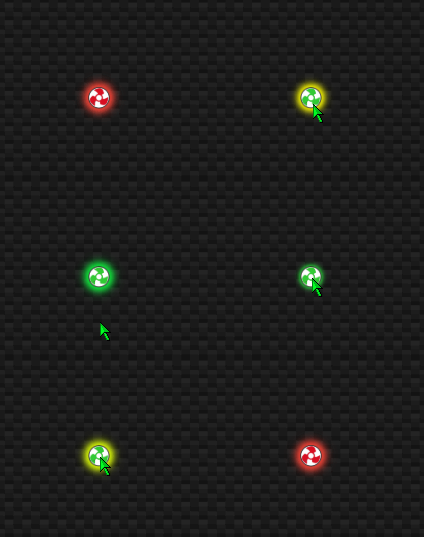
        test2.gif

        das steht in der vis:

        Image 6.png
        übersetzt: wenn controll-own.0.Luefter3 ist wahr nehme "blink-bunt" aus css-klasse - sonst "blink-red" (blink bunt entspricht bei mir grün)

        {val:controll-own.0.Luefter3;val=="true"? "blink-bunt":  "blink-red"}
        

        das "blink-bunt" und "blink-red" ist in der css klasse definiert
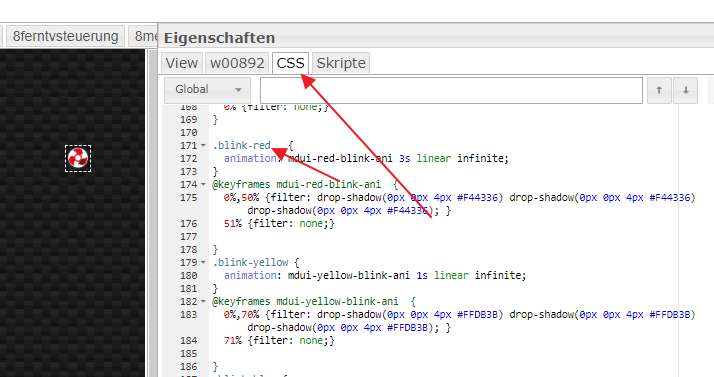
        Image 7.png

        nach einem gelösten Thread wäre es sinnvoll dies in der Überschrift des ersten Posts einzutragen [gelöst]-... Bitte benutzt das Voting rechts unten im Beitrag wenn er euch geholfen hat. Forum-Tools: PicPick https://picpick.app/en/download/ und ScreenToGif https://www.screentogif.com/downloads.html

        moppel2810M 2 Replies Last reply
        0
        • liv-in-skyL liv-in-sky

          @moppel2810

          es geht mit jedem datenpunkt , welchen du abfragen kannst - egal ob boolean oder string oder zahl

          das beispiel ist ein schalter für einen lüfter - durch drücken ändert sich der wert - true false - also wie bei anwesenheit

          test2.gif

          das steht in der vis:

          Image 6.png
          übersetzt: wenn controll-own.0.Luefter3 ist wahr nehme "blink-bunt" aus css-klasse - sonst "blink-red" (blink bunt entspricht bei mir grün)

          {val:controll-own.0.Luefter3;val=="true"? "blink-bunt":  "blink-red"}
          

          das "blink-bunt" und "blink-red" ist in der css klasse definiert
          Image 7.png

          moppel2810M Offline
          moppel2810M Offline
          moppel2810
          wrote on last edited by
          #104

          @liv-in-sky
          Geht das auch wenn ich einfach ein img in die vis einfüge oder muss ich da was spezieles nehmen?

          liv-in-skyL 1 Reply Last reply
          0
          • moppel2810M moppel2810

            @liv-in-sky
            Geht das auch wenn ich einfach ein img in die vis einfüge oder muss ich da was spezieles nehmen?

            liv-in-skyL Offline
            liv-in-skyL Offline
            liv-in-sky
            wrote on last edited by liv-in-sky
            #105

            @moppel2810 müßte auch mit image funktionieren - den css eintrag unter generell im image-widget gibt es ja dort auch

            nach einem gelösten Thread wäre es sinnvoll dies in der Überschrift des ersten Posts einzutragen [gelöst]-... Bitte benutzt das Voting rechts unten im Beitrag wenn er euch geholfen hat. Forum-Tools: PicPick https://picpick.app/en/download/ und ScreenToGif https://www.screentogif.com/downloads.html

            1 Reply Last reply
            0
            • liv-in-skyL liv-in-sky

              @moppel2810

              es geht mit jedem datenpunkt , welchen du abfragen kannst - egal ob boolean oder string oder zahl

              das beispiel ist ein schalter für einen lüfter - durch drücken ändert sich der wert - true false - also wie bei anwesenheit

              test2.gif

              das steht in der vis:

              Image 6.png
              übersetzt: wenn controll-own.0.Luefter3 ist wahr nehme "blink-bunt" aus css-klasse - sonst "blink-red" (blink bunt entspricht bei mir grün)

              {val:controll-own.0.Luefter3;val=="true"? "blink-bunt":  "blink-red"}
              

              das "blink-bunt" und "blink-red" ist in der css klasse definiert
              Image 7.png

              moppel2810M Offline
              moppel2810M Offline
              moppel2810
              wrote on last edited by
              #106

              @liv-in-sky said in Vorlagen/Ideen MüllPlan VIEW / Widget ?:

              {val:controll-own.0.Luefter3;val=="true"? "blink-bunt": "blink-red"}

              {val:controll-own.0.Luefter3;val=="true"? "blink-bunt": "blink-red"} da tausche ich einfach "controll-own.0.Luefter3" gegen meinen ping oder tr-064?

              wie bzw wo bekomm ich den blink code für die css klasse her?

              crunchipC liv-in-skyL 2 Replies Last reply
              0
              • moppel2810M moppel2810

                @liv-in-sky said in Vorlagen/Ideen MüllPlan VIEW / Widget ?:

                {val:controll-own.0.Luefter3;val=="true"? "blink-bunt": "blink-red"}

                {val:controll-own.0.Luefter3;val=="true"? "blink-bunt": "blink-red"} da tausche ich einfach "controll-own.0.Luefter3" gegen meinen ping oder tr-064?

                wie bzw wo bekomm ich den blink code für die css klasse her?

                crunchipC Away
                crunchipC Away
                crunchip
                Forum Testing Most Active
                wrote on last edited by
                #107

                @moppel2810 Das ist in dem Material Design Css Skript hinterlegt
                https://github.com/Uhula/ioBroker-Material-Design-Style

                umgestiegen von Proxmox auf Unraid

                1 Reply Last reply
                1
                • moppel2810M moppel2810

                  @liv-in-sky said in Vorlagen/Ideen MüllPlan VIEW / Widget ?:

                  {val:controll-own.0.Luefter3;val=="true"? "blink-bunt": "blink-red"}

                  {val:controll-own.0.Luefter3;val=="true"? "blink-bunt": "blink-red"} da tausche ich einfach "controll-own.0.Luefter3" gegen meinen ping oder tr-064?

                  wie bzw wo bekomm ich den blink code für die css klasse her?

                  liv-in-skyL Offline
                  liv-in-skyL Offline
                  liv-in-sky
                  wrote on last edited by liv-in-sky
                  #108

                  @moppel2810 sagte in Vorlagen/Ideen MüllPlan VIEW / Widget ?:

                  @liv-in-sky said in Vorlagen/Ideen MüllPlan VIEW / Widget ?:

                  {val:controll-own.0.Luefter3;val=="true"? "blink-bunt": "blink-red"}

                  {val:controll-own.0.Luefter3;val=="true"? "blink-bunt": "blink-red"} da tausche ich einfach "controll-own.0.Luefter3" gegen meinen ping oder tr-064?

                  wie bzw wo bekomm ich den blink code für die css klasse her?

                  mit dem austausch liegst du richtig - statt lüfter kannst du ping/tr064 benutzen

                  weiter oben ist der im post - hier nochmal:

                  für rot blinkend:

                  .blink-red   {
                   animation: mdui-red-blink-ani 3s linear infinite;
                  }
                  @keyframes mdui-red-blink-ani  {
                   0%,50% {filter: drop-shadow(0px 0px 4px #F44336) drop-shadow(0px 0px 4px #F44336) drop-shadow(0px 0px 4px #F44336); }
                   51% {filter: none;}
                  
                  }
                  .blink-yellow {
                   animation: mdui-yellow-blink-ani 1s linear infinite;
                  }
                  @keyframes mdui-yellow-blink-ani  {
                   0%,70% {filter: drop-shadow(0px 0px 4px #FFDB3B) drop-shadow(0px 0px 4px #FFDB3B) drop-shadow(0px 0px 4px #FFDB3B); }
                   71% {filter: none;}
                  
                  }


                  für gelb-grün blinkend

                  .blink-bunt   {
                   animation: mdui-bunt-blink-ani 3s linear infinite;
                     
                  }
                  @keyframes mdui-bunt-blink-ani {
                   8% {filter: drop-shadow(0px 0px 4px #FFFF00) drop-shadow(0px 0px 4px #FFFF00) drop-shadow(0px 0px 4px #FFFF00); }
                   30% {filter: drop-shadow(0px 0px 4px #01DF3A) drop-shadow(0px 0px 4px #01DF3A) drop-shadow(0px 0px 4px #01DF3A); }
                   60% {filter: drop-shadow(0px 0px 4px #2BF23F) drop-shadow(0px 0px 4px #2BF23F) drop-shadow(0px 0px 4px #2BF23F); }
                   0% {filter: none;}
                  }
                  
                  .blink-lila   {
                   animation: mdui-lila-blink-ani 3s linear infinite;
                     
                  }
                  

                  für drehend vertikal

                  
                  .anime { animation: turner 4s infinite linear !important}
                   
                  @keyframes turner{
                     from{  transform: rotateY(0deg)   }
                     to  {  transform: rotateY(360deg) }
                  }
                  

                  für drehend horizontal

                  .anime2 { animation: turner2 4s infinite linear !important}
                   
                  @keyframes turner2{
                     from{  transform: rotateX(0deg)   }
                     to  {  transform: rotateX(360deg) }
                  }
                  
                  .player {
                     background: #273B7C !important;
                  }
                  
                  .anime { animation: turner 4s infinite linear !important}
                   
                  @keyframes turner{
                     from{  transform: rotateY(0deg)   }
                     to  {  transform: rotateY(360deg) }
                  }


                  nach einem gelösten Thread wäre es sinnvoll dies in der Überschrift des ersten Posts einzutragen [gelöst]-... Bitte benutzt das Voting rechts unten im Beitrag wenn er euch geholfen hat. Forum-Tools: PicPick https://picpick.app/en/download/ und ScreenToGif https://www.screentogif.com/downloads.html

                  moppel2810M 1 Reply Last reply
                  2
                  • liv-in-skyL liv-in-sky

                    @moppel2810 sagte in Vorlagen/Ideen MüllPlan VIEW / Widget ?:

                    @liv-in-sky said in Vorlagen/Ideen MüllPlan VIEW / Widget ?:

                    {val:controll-own.0.Luefter3;val=="true"? "blink-bunt": "blink-red"}

                    {val:controll-own.0.Luefter3;val=="true"? "blink-bunt": "blink-red"} da tausche ich einfach "controll-own.0.Luefter3" gegen meinen ping oder tr-064?

                    wie bzw wo bekomm ich den blink code für die css klasse her?

                    mit dem austausch liegst du richtig - statt lüfter kannst du ping/tr064 benutzen

                    weiter oben ist der im post - hier nochmal:

                    für rot blinkend:

                    .blink-red   {
                     animation: mdui-red-blink-ani 3s linear infinite;
                    }
                    @keyframes mdui-red-blink-ani  {
                     0%,50% {filter: drop-shadow(0px 0px 4px #F44336) drop-shadow(0px 0px 4px #F44336) drop-shadow(0px 0px 4px #F44336); }
                     51% {filter: none;}
                    
                    }
                    .blink-yellow {
                     animation: mdui-yellow-blink-ani 1s linear infinite;
                    }
                    @keyframes mdui-yellow-blink-ani  {
                     0%,70% {filter: drop-shadow(0px 0px 4px #FFDB3B) drop-shadow(0px 0px 4px #FFDB3B) drop-shadow(0px 0px 4px #FFDB3B); }
                     71% {filter: none;}
                    
                    }


                    für gelb-grün blinkend

                    .blink-bunt   {
                     animation: mdui-bunt-blink-ani 3s linear infinite;
                       
                    }
                    @keyframes mdui-bunt-blink-ani {
                     8% {filter: drop-shadow(0px 0px 4px #FFFF00) drop-shadow(0px 0px 4px #FFFF00) drop-shadow(0px 0px 4px #FFFF00); }
                     30% {filter: drop-shadow(0px 0px 4px #01DF3A) drop-shadow(0px 0px 4px #01DF3A) drop-shadow(0px 0px 4px #01DF3A); }
                     60% {filter: drop-shadow(0px 0px 4px #2BF23F) drop-shadow(0px 0px 4px #2BF23F) drop-shadow(0px 0px 4px #2BF23F); }
                     0% {filter: none;}
                    }
                    
                    .blink-lila   {
                     animation: mdui-lila-blink-ani 3s linear infinite;
                       
                    }
                    

                    für drehend vertikal

                    
                    .anime { animation: turner 4s infinite linear !important}
                     
                    @keyframes turner{
                       from{  transform: rotateY(0deg)   }
                       to  {  transform: rotateY(360deg) }
                    }
                    

                    für drehend horizontal

                    .anime2 { animation: turner2 4s infinite linear !important}
                     
                    @keyframes turner2{
                       from{  transform: rotateX(0deg)   }
                       to  {  transform: rotateX(360deg) }
                    }
                    
                    .player {
                       background: #273B7C !important;
                    }
                    
                    .anime { animation: turner 4s infinite linear !important}
                     
                    @keyframes turner{
                       from{  transform: rotateY(0deg)   }
                       to  {  transform: rotateY(360deg) }
                    }


                    moppel2810M Offline
                    moppel2810M Offline
                    moppel2810
                    wrote on last edited by
                    #109

                    @liv-in-sky

                    was muss ich ändern das es nicht blinkt bzw nur leuchtet?
                    Hab gerade noch ein Problem und zwar funktioniert es in der vis vorschau auf dem PC aber nicht auf dem Tablet:face_with_rolling_eyes:

                    T liv-in-skyL 2 Replies Last reply
                    0
                    • moppel2810M moppel2810

                      @liv-in-sky

                      was muss ich ändern das es nicht blinkt bzw nur leuchtet?
                      Hab gerade noch ein Problem und zwar funktioniert es in der vis vorschau auf dem PC aber nicht auf dem Tablet:face_with_rolling_eyes:

                      T Offline
                      T Offline
                      tempestas
                      wrote on last edited by
                      #110

                      @moppel2810

                      Welches Tablet hast du?
                      Wenn es sehr alt ist, kann es sein, dass das Klassen nicht funktionieren. ZB auf meinem alten Fire HD Tablet ist das so

                      <size="85">ioBroker | 21 Adapter | Ubuntu Server | intel NUC | Homematic CCU2 | Hue | Osram Lightify| Sonos | 2x Instar Cam | Samsung Tab A 2016 im Holzrahmen| 3x Echo dot | 1x Echo | Neato Botvac D5</size>

                      1 Reply Last reply
                      0
                      • moppel2810M moppel2810

                        @liv-in-sky

                        was muss ich ändern das es nicht blinkt bzw nur leuchtet?
                        Hab gerade noch ein Problem und zwar funktioniert es in der vis vorschau auf dem PC aber nicht auf dem Tablet:face_with_rolling_eyes:

                        liv-in-skyL Offline
                        liv-in-skyL Offline
                        liv-in-sky
                        wrote on last edited by liv-in-sky
                        #111

                        @moppel2810

                        leuchte dauernd:

                        .leuchte   {
                         animation: mdui-leuchte-ani 10s linear infinite;
                           
                        }
                        @keyframes mdui-leuchte-ani {
                         0%, 100% {filter: drop-shadow(0px 0px 4px #DF013A) drop-shadow(0px 0px 4px #DF013A) drop-shadow(0px 0px 4px #DF013A); }
                        
                        }


                        wie @tempestas schon erwähnte - ich ahbe auch ein sehr altes samsung tablet - da geht es auch nicht

                        nach einem gelösten Thread wäre es sinnvoll dies in der Überschrift des ersten Posts einzutragen [gelöst]-... Bitte benutzt das Voting rechts unten im Beitrag wenn er euch geholfen hat. Forum-Tools: PicPick https://picpick.app/en/download/ und ScreenToGif https://www.screentogif.com/downloads.html

                        moppel2810M 1 Reply Last reply
                        0
                        • liv-in-skyL liv-in-sky

                          @moppel2810

                          leuchte dauernd:

                          .leuchte   {
                           animation: mdui-leuchte-ani 10s linear infinite;
                             
                          }
                          @keyframes mdui-leuchte-ani {
                           0%, 100% {filter: drop-shadow(0px 0px 4px #DF013A) drop-shadow(0px 0px 4px #DF013A) drop-shadow(0px 0px 4px #DF013A); }
                          
                          }


                          wie @tempestas schon erwähnte - ich ahbe auch ein sehr altes samsung tablet - da geht es auch nicht

                          moppel2810M Offline
                          moppel2810M Offline
                          moppel2810
                          wrote on last edited by
                          #112

                          @liv-in-sky

                          hab ein galaxy tablet a dachte eigentlich das es noch ok ist:disappointed:

                          T 1 Reply Last reply
                          0
                          • moppel2810M moppel2810

                            @liv-in-sky

                            hab ein galaxy tablet a dachte eigentlich das es noch ok ist:disappointed:

                            T Offline
                            T Offline
                            tempestas
                            wrote on last edited by tempestas
                            #113

                            @moppel2810

                            Das habe ich auch. Diese konkrete CSS Klasse habe ich nicht un Benutzung, aber andere mit blinken und co schon, geht ohne Probleme

                            Wenn du nur einen rot leuchtenden Rahmen willst, versuch mal diese css Klasse

                            .redGlow {filter: drop-shadow(0px 0px 3px #F44336)  ; }
                            

                            im Reiter CSS im Projekt so eintragen, dann beim Widet unter CSS

                            redGlow

                            eintragen

                            <size="85">ioBroker | 21 Adapter | Ubuntu Server | intel NUC | Homematic CCU2 | Hue | Osram Lightify| Sonos | 2x Instar Cam | Samsung Tab A 2016 im Holzrahmen| 3x Echo dot | 1x Echo | Neato Botvac D5</size>

                            liv-in-skyL 1 Reply Last reply
                            0
                            • T tempestas

                              @moppel2810

                              Das habe ich auch. Diese konkrete CSS Klasse habe ich nicht un Benutzung, aber andere mit blinken und co schon, geht ohne Probleme

                              Wenn du nur einen rot leuchtenden Rahmen willst, versuch mal diese css Klasse

                              .redGlow {filter: drop-shadow(0px 0px 3px #F44336)  ; }
                              

                              im Reiter CSS im Projekt so eintragen, dann beim Widet unter CSS

                              redGlow

                              eintragen

                              liv-in-skyL Offline
                              liv-in-skyL Offline
                              liv-in-sky
                              wrote on last edited by
                              #114

                              @tempestas sagte in Vorlagen/Ideen MüllPlan VIEW / Widget ?:

                              .redGlow {filter: drop-shadow(0px 0px 3px #F44336) ; }

                              das wollte ich auch benutzen, aber bei dunklen hintergrund ist der schatten kaum erkennbar - oder kennst du noch einen trick, wie der schatten etwas "satter" wird?

                              nach einem gelösten Thread wäre es sinnvoll dies in der Überschrift des ersten Posts einzutragen [gelöst]-... Bitte benutzt das Voting rechts unten im Beitrag wenn er euch geholfen hat. Forum-Tools: PicPick https://picpick.app/en/download/ und ScreenToGif https://www.screentogif.com/downloads.html

                              1 Reply Last reply
                              0
                              • moppel2810M Offline
                                moppel2810M Offline
                                moppel2810
                                wrote on last edited by
                                #115

                                Liegt an der iobroker app. Ich benutze jetzt den Fully Browser und mit dem läuft es super er zeigt alles an und hat sogar bewegungserkennung zum aktivieren des Bildschirmes.

                                1 Reply Last reply
                                0
                                • C ChrisXY

                                  diese
                                  alt text
                                  Also das sBlinken habe ich jetzt mal eingefügt Projekt CSS
                                  dann bei css class "blink" reingeschrieben.
                                  Klappt aber nicht. Im css ist was mit "block"
                                  Ich hab folgendes widget : Basic bool html.

                                  H Offline
                                  H Offline
                                  Hundefreund
                                  wrote on last edited by
                                  #116

                                  @ChrisXY
                                  ich bin neu in der Materie hier ...
                                  Kannst du mir deine Müllplan View /widget /scripte /Bilder, wie auf dem oberen Bild (gefällt mir sehr gut !!) ,die man für die VIS baucht noch mal linken ??

                                  Vielen Dank

                                  INTEL-Nuc I3 CPU,16GB RAM
                                  Promox/Iobroker /Zwave Aero-Stick
                                  PI4 incl. piVCCU3 /Deconz
                                  Vis im Aufbau...
                                  Gartenbewässerung im Aufbau mit Sonoff 4CH...

                                  1 Reply Last reply
                                  0
                                  • liv-in-skyL liv-in-sky

                                    @crunchip danke - kann ich gut gebrauchen
                                    uml-ani-gif11.gif

                                    H Offline
                                    H Offline
                                    Hundefreund
                                    wrote on last edited by
                                    #117

                                    @liv-in-sky
                                    Hallo ich bin hier neu in der ganzen
                                    Materie...
                                    Ich habe mir mal die 3 Scripte runtergeladen und in Vis eingebunden.
                                    Wo werden denn die Mülltonnen-Bilder
                                    eingebunden und wo sind die verschiedenen
                                    CSS scripte ?
                                    Danke schon mal...

                                    INTEL-Nuc I3 CPU,16GB RAM
                                    Promox/Iobroker /Zwave Aero-Stick
                                    PI4 incl. piVCCU3 /Deconz
                                    Vis im Aufbau...
                                    Gartenbewässerung im Aufbau mit Sonoff 4CH...

                                    GlasfaserG liv-in-skyL 2 Replies Last reply
                                    0
                                    • H Hundefreund

                                      @liv-in-sky
                                      Hallo ich bin hier neu in der ganzen
                                      Materie...
                                      Ich habe mir mal die 3 Scripte runtergeladen und in Vis eingebunden.
                                      Wo werden denn die Mülltonnen-Bilder
                                      eingebunden und wo sind die verschiedenen
                                      CSS scripte ?
                                      Danke schon mal...

                                      GlasfaserG Offline
                                      GlasfaserG Offline
                                      Glasfaser
                                      wrote on last edited by Glasfaser
                                      #118

                                      @Hundefreund

                                      Ich möchte jetzt keine Werbung machen ….. aber es gibt einen fertigen Adapter dafür .

                                      TrashSchedule

                                      und Widget von Sigi234

                                      Synology 918+ 16GB - ioBroker in Docker v9 , VISO auf Trekstor Primebook C13 13,3" , Hikvision Domkameras mit Surveillance Station .. CCU RaspberryMatic in Synology VM .. Zigbee CC2538+CC2592 .. Sonoff .. KNX .. Modbus ..

                                      H 1 Reply Last reply
                                      0
                                      • H Hundefreund

                                        @liv-in-sky
                                        Hallo ich bin hier neu in der ganzen
                                        Materie...
                                        Ich habe mir mal die 3 Scripte runtergeladen und in Vis eingebunden.
                                        Wo werden denn die Mülltonnen-Bilder
                                        eingebunden und wo sind die verschiedenen
                                        CSS scripte ?
                                        Danke schon mal...

                                        liv-in-skyL Offline
                                        liv-in-skyL Offline
                                        liv-in-sky
                                        wrote on last edited by liv-in-sky
                                        #119

                                        @Hundefreund ja - kann ich nur empfehlen - vereinfacht das ganze (trashschedule)

                                        nach einem gelösten Thread wäre es sinnvoll dies in der Überschrift des ersten Posts einzutragen [gelöst]-... Bitte benutzt das Voting rechts unten im Beitrag wenn er euch geholfen hat. Forum-Tools: PicPick https://picpick.app/en/download/ und ScreenToGif https://www.screentogif.com/downloads.html

                                        S 1 Reply Last reply
                                        0
                                        • GlasfaserG Glasfaser

                                          @Hundefreund

                                          Ich möchte jetzt keine Werbung machen ….. aber es gibt einen fertigen Adapter dafür .

                                          TrashSchedule

                                          und Widget von Sigi234

                                          H Offline
                                          H Offline
                                          Hundefreund
                                          wrote on last edited by
                                          #120

                                          @Glasfaser
                                          hallo erst mal danke für die Infos,
                                          ich suche jedoch das Widget mit den 4 "echten Mülltonnen" die bei Tag 0 graphisch angehoben werden und rot
                                          eingerahmt blinken..

                                          INTEL-Nuc I3 CPU,16GB RAM
                                          Promox/Iobroker /Zwave Aero-Stick
                                          PI4 incl. piVCCU3 /Deconz
                                          Vis im Aufbau...
                                          Gartenbewässerung im Aufbau mit Sonoff 4CH...

                                          GlasfaserG liv-in-skyL 2 Replies Last reply
                                          0
                                          Reply
                                          • Reply as topic
                                          Log in to reply
                                          • Oldest to Newest
                                          • Newest to Oldest
                                          • Most Votes


                                          Support us

                                          ioBroker
                                          Community Adapters
                                          Donate

                                          571

                                          Online

                                          32.7k

                                          Users

                                          82.4k

                                          Topics

                                          1.3m

                                          Posts
                                          Community
                                          Impressum | Datenschutz-Bestimmungen | Nutzungsbedingungen | Einwilligungseinstellungen
                                          ioBroker Community 2014-2025
                                          logo
                                          • Login

                                          • Don't have an account? Register

                                          • Login or register to search.
                                          • First post
                                            Last post
                                          0
                                          • Home
                                          • Recent
                                          • Tags
                                          • Unread 0
                                          • Categories
                                          • Unreplied
                                          • Popular
                                          • GitHub
                                          • Docu
                                          • Hilfe