



Weiter zum Inhalt
  • Home
  • Aktuell
  • Tags
  • 0 Ungelesen 0
  • Kategorien
  • Unreplied
  • Beliebt
  • GitHub
  • Docu
  • Hilfe
Skins
  • Hell
  • Brite
  • Cerulean
  • Cosmo
  • Flatly
  • Journal
  • Litera
  • Lumen
  • Lux
  • Materia
  • Minty
  • Morph
  • Pulse
  • Sandstone
  • Simplex
  • Sketchy
  • Spacelab
  • United
  • Yeti
  • Zephyr
  • Dunkel
  • Cyborg
  • Darkly
  • Quartz
  • Slate
  • Solar
  • Superhero
  • Vapor

  • Standard: (Kein Skin)
  • Kein Skin
Einklappen
ioBroker Logo

Community Forum

donate donate
  1. ioBroker Community Home
  2. English
  3. Scripting / Logic
  4. Blockly
  5. ASTRO function. Does not work again

NEWS

  • Neuer ioBroker-Blog online: Monatsrückblick März/April 2026
    BluefoxB
    Bluefox
    6
    1
    220

  • Verwendung von KI bitte immer deutlich kennzeichnen
    HomoranH
    Homoran
    8
    1
    217

  • Monatsrückblick Januar/Februar 2026 ist online!
    BluefoxB
    Bluefox
    18
    1
    891

ASTRO function. Does not work again

Geplant Angeheftet Gesperrt Verschoben Blockly
blockly
58 Beiträge 6 Kommentatoren 9.7k Aufrufe 7 Beobachtet
  • Älteste zuerst
  • Neuste zuerst
  • Meiste Stimmen
Antworten
  • In einem neuen Thema antworten
Anmelden zum Antworten
Dieses Thema wurde gelöscht. Nur Nutzer mit entsprechenden Rechten können es sehen.
  • iomountainI Offline
    iomountainI Offline
    iomountain
    schrieb am zuletzt editiert von
    #49

    schön das es jetzt läuft, hab noch viel Spass mit iobroker.
    Vielleicht kannst du noch Deine Version posten und den Tread auf gelöst setzen.
    Viele Grüße
    Ralph

    1 Antwort Letzte Antwort
    1
    • A Offline
      A Offline
      ap2017
      schrieb am zuletzt editiert von ap2017
      #50

      Have this issue with ASTRO again after adding few different lights to control by ASTRO. Same problem as before, function ASTRO is ignored by the system - nothing in debug log.

      Here is my script:

      schedule({astro: "goldenHour", shift: 0}, function () {
      console.log('astro_on_golden_hour');
      // Florida Room
      setState("zwave.0.NODE7.SWITCH_MULTILEVEL.Level_1"/Level/, 99);
      // Living
      setState("zwave.0.NODE2.SWITCH_BINARY.Switch_1"/Switch/, true);
      // TV Room
      setState("zigbee.0.000b57fffebcfc39.state"/TRADFRI bulb E26 W opal 1000lm Switch state/, true);
      // Office
      setState("zigbee.0.90fd9ffffe2bad6b.state"/TRADFRI bulb E26 W opal 1000lm Switch state/, true);
      });
      schedule({astro: "dusk", shift: 0}, function () {
      console.log('astro_on_sunset');
      // Outside
      setState("zwave.0.NODE11.SWITCH_BINARY.Switch_1"/Switch/, true);
      // Front Door
      setState("zigbee.0.d0cf5efffe7d475c.state"/TRADFRI bulb E26 W opal 1000lm Switch state/, true);
      });
      schedule("30 23 * * *", function () {
      console.log('schedule_off');
      // Florida Room
      setState("zwave.0.NODE7.SWITCH_MULTILEVEL.Level_1"/Level/, 0);
      // Living
      setState("zwave.0.NODE2.SWITCH_BINARY.Switch_1"/Switch/, false);
      // Outside
      setState("zwave.0.NODE11.SWITCH_BINARY.Switch_1"/Switch/, false);
      // TV Room
      setState("zigbee.0.000b57fffebcfc39.state"/TRADFRI bulb E26 W opal 1000lm Switch state/, false);
      // Office
      setState("zigbee.0.90fd9ffffe2bad6b.state"/TRADFRI bulb E26 W opal 1000lm Switch state/, false);
      // Front Door
      setState("zigbee.0.d0cf5efffe7d475c.state"/TRADFRI bulb E26 W opal 1000lm Switch state/, false);
      });
      // Basement Light
      on({id: "mysensors.0.9.3_DOOR.V_TRIPPED"/9.3_DOOR.V_TRIPPED/, val: true}, function (obj) {
      var value = obj.state.val;
      var oldValue = obj.oldState.val;
      setState("zwave.0.NODE15.SWITCH_BINARY.Switch_1"/Switch/, true);
      setState("zwave.0.NODE16.SWITCH_BINARY.Switch_1"/Switch/, true);
      });
      on({id: "mysensors.0.9.3_DOOR.V_TRIPPED"/9.3_DOOR.V_TRIPPED/, val: false}, function (obj) {
      var value = obj.state.val;
      var oldValue = obj.oldState.val;
      setState("zwave.0.NODE15.SWITCH_BINARY.Switch_1"/Switch/, false);
      setState("zwave.0.NODE16.SWITCH_BINARY.Switch_1"/Switch/, false);
      });

      1 Antwort Letzte Antwort
      0
      • C Offline
        C Offline
        cbr
        schrieb am zuletzt editiert von cbr
        #51

        Hello everybody,

        first of all I'm new to ioBroker (I installed it on a Raspberry Pi 4 just recently).
        However I'm having a similar problem.

        I have two scripts:

        Switch by ping

        var bool_NightTime;

        function HS100_switch() {
        if (bool_NightTime == true && getState("ping.0.raspberrypi.IP").val == true) {
        setState("hs100.0.IP.state"/HS100_Arbeitszimmer/, true);
        } else {
        setState("hs100.0.IP.state"/HS100_Arbeitszimmer/, false);
        }
        }

        bool_NightTime = compareTime(getAstroDate("sunrise", undefined, 0), getAstroDate("sunset", undefined, -20), "not between", null);
        console.log(('NightTime: ' + String(('' + bool_NightTime))));

        schedule({astro: "sunset", shift: -20}, function () {
        console.log('Sonne untergegangen -20 Min');
        bool_NightTime = true;
        HS100_switch();
        });

        schedule({astro: "sunrise", shift: 0}, function () {
        bool_NightTime = false;
        HS100_switch();
        });

        on({id: "ping.0.raspberrypi.IP"/Rechnername/, change: "ne"}, function (obj) {
        var value = obj.state.val;
        var oldValue = obj.oldState.val;
        HS100_switch();
        });


        Switch by power
        var _const_val_PowerLimit, bool_NightTime;

        function HS100_switch() {
        if (getState("hs100.0.IP.power").val < _const_val_PowerLimit && bool_NightTime == true && getState("fb-checkpresence.0.presence").val == true) {
        setState("hs100.0.IP.state"/HS100/, true);
        } else {
        setState("hs100.0.IP.state"/HS100/, false);
        }
        }

        _const_val_PowerLimit = 90;
        bool_NightTime = compareTime(getAstroDate("sunset", undefined, -20), '23:00', "between", null) && compareTime('22:30', null, "<", getAstroDate("sunset", undefined, -20));
        console.log(('NightTime: ' + String(('' + bool_NightTime))));

        schedule({astro: "sunset", shift: -20}, function () {
        console.log('Sonne untergegangen -20 Min');
        if (compareTime("22:30", "null", "<")) {
        bool_NightTime = true;
        }
        HS100_switch();
        });

        schedule("0 23 * * *", function () {
        bool_NightTime = false;
        HS100_switch();
        });

        on({id: "hs100.0.IP.power"/HS110/, change: "ne"}, function (obj) {
        var value = obj.state.val;
        var oldValue = obj.oldState.val;
        HS100_switch();
        });

        on({id: "fb-checkpresence.0.presence"/presence/, change: "ne"}, function (obj) {
        var value = obj.state.val;
        var oldValue = obj.oldState.val;
        HS100_switch();
        });

        In both of them I use:

        schedule({astro: "sunset", shift: -20}, function () {
          console.log('Sonne untergegangen -20 Min');
          /* additional code */
        });
        

        However the astro function today only triggered for the "Switch by ping" script- see logfile:

        2020-04-01 19:35:27.992  - ^[[32minfo^[[39m: javascript.0 (665) script.js.common.Switch_by_ping: Sonne untergegangen -20 Min
        

        Yesterday it was working for both scripts. (Also the days before it was already inconsistent - however I only had the "Switch by power" script at that time.)
        I'm restarting my raspberry every night and only added the console.log by today so I cannot tell about the recent days.

        Any idea what could cause this issue?

        A 1 Antwort Letzte Antwort
        0
        • C cbr

          Hello everybody,

          first of all I'm new to ioBroker (I installed it on a Raspberry Pi 4 just recently).
          However I'm having a similar problem.

          I have two scripts:

          Switch by ping

          var bool_NightTime;

          function HS100_switch() {
          if (bool_NightTime == true && getState("ping.0.raspberrypi.IP").val == true) {
          setState("hs100.0.IP.state"/HS100_Arbeitszimmer/, true);
          } else {
          setState("hs100.0.IP.state"/HS100_Arbeitszimmer/, false);
          }
          }

          bool_NightTime = compareTime(getAstroDate("sunrise", undefined, 0), getAstroDate("sunset", undefined, -20), "not between", null);
          console.log(('NightTime: ' + String(('' + bool_NightTime))));

          schedule({astro: "sunset", shift: -20}, function () {
          console.log('Sonne untergegangen -20 Min');
          bool_NightTime = true;
          HS100_switch();
          });

          schedule({astro: "sunrise", shift: 0}, function () {
          bool_NightTime = false;
          HS100_switch();
          });

          on({id: "ping.0.raspberrypi.IP"/Rechnername/, change: "ne"}, function (obj) {
          var value = obj.state.val;
          var oldValue = obj.oldState.val;
          HS100_switch();
          });


          Switch by power
          var _const_val_PowerLimit, bool_NightTime;

          function HS100_switch() {
          if (getState("hs100.0.IP.power").val < _const_val_PowerLimit && bool_NightTime == true && getState("fb-checkpresence.0.presence").val == true) {
          setState("hs100.0.IP.state"/HS100/, true);
          } else {
          setState("hs100.0.IP.state"/HS100/, false);
          }
          }

          _const_val_PowerLimit = 90;
          bool_NightTime = compareTime(getAstroDate("sunset", undefined, -20), '23:00', "between", null) && compareTime('22:30', null, "<", getAstroDate("sunset", undefined, -20));
          console.log(('NightTime: ' + String(('' + bool_NightTime))));

          schedule({astro: "sunset", shift: -20}, function () {
          console.log('Sonne untergegangen -20 Min');
          if (compareTime("22:30", "null", "<")) {
          bool_NightTime = true;
          }
          HS100_switch();
          });

          schedule("0 23 * * *", function () {
          bool_NightTime = false;
          HS100_switch();
          });

          on({id: "hs100.0.IP.power"/HS110/, change: "ne"}, function (obj) {
          var value = obj.state.val;
          var oldValue = obj.oldState.val;
          HS100_switch();
          });

          on({id: "fb-checkpresence.0.presence"/presence/, change: "ne"}, function (obj) {
          var value = obj.state.val;
          var oldValue = obj.oldState.val;
          HS100_switch();
          });

          In both of them I use:

          schedule({astro: "sunset", shift: -20}, function () {
            console.log('Sonne untergegangen -20 Min');
            /* additional code */
          });
          

          However the astro function today only triggered for the "Switch by ping" script- see logfile:

          2020-04-01 19:35:27.992  - ^[[32minfo^[[39m: javascript.0 (665) script.js.common.Switch_by_ping: Sonne untergegangen -20 Min
          

          Yesterday it was working for both scripts. (Also the days before it was already inconsistent - however I only had the "Switch by power" script at that time.)
          I'm restarting my raspberry every night and only added the console.log by today so I cannot tell about the recent days.

          Any idea what could cause this issue?

          A Offline
          A Offline
          ap2017
          schrieb am zuletzt editiert von
          #52

          @cbr Any luck with astro? I was not using it for a while, got back to it - same issue, works intermittent. Some days it works, some does not. Where are you located? I was thinking this is related to iobroker incorrectly interpreting my astro location settings. I am in US, most other users in Europe and they are not complaning about it.

          Thomas BraunT 1 Antwort Letzte Antwort
          0
          • A ap2017

            @cbr Any luck with astro? I was not using it for a while, got back to it - same issue, works intermittent. Some days it works, some does not. Where are you located? I was thinking this is related to iobroker incorrectly interpreting my astro location settings. I am in US, most other users in Europe and they are not complaning about it.

            Thomas BraunT Online
            Thomas BraunT Online
            Thomas Braun
            Most Active
            schrieb am zuletzt editiert von Thomas Braun
            #53

            @ap2017 You have multiple triggers in you blockly. That is not possible.

            Linux-Werkzeugkasten:
            https://forum.iobroker.net/topic/42952/der-kleine-iobroker-linux-werkzeugkasten
            NodeJS Fixer Skript:
            https://forum.iobroker.net/topic/68035/iob-node-fix-skript
            iob_diag: curl -sLf -o diag.sh https://iobroker.net/diag.sh && bash diag.sh

            A AlCalzoneA 2 Antworten Letzte Antwort
            0
            • Thomas BraunT Thomas Braun

              @ap2017 You have multiple triggers in you blockly. That is not possible.

              A Offline
              A Offline
              ap2017
              schrieb am zuletzt editiert von
              #54

              @Thomas-Braun What do you mean? Why?

              Thomas BraunT 1 Antwort Letzte Antwort
              0
              • A ap2017

                @Thomas-Braun What do you mean? Why?

                Thomas BraunT Online
                Thomas BraunT Online
                Thomas Braun
                Most Active
                schrieb am zuletzt editiert von
                #55

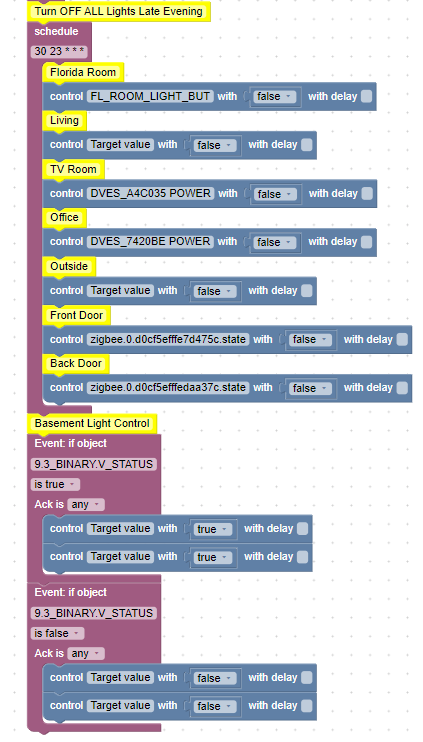
                @ap2017 Do you still have two purple blocks on the left side of your blockly? Please upload a screenshot of the current version.

                Linux-Werkzeugkasten:
                https://forum.iobroker.net/topic/42952/der-kleine-iobroker-linux-werkzeugkasten
                NodeJS Fixer Skript:
                https://forum.iobroker.net/topic/68035/iob-node-fix-skript
                iob_diag: curl -sLf -o diag.sh https://iobroker.net/diag.sh && bash diag.sh

                A 1 Antwort Letzte Antwort
                0
                • Thomas BraunT Thomas Braun

                  @ap2017 Do you still have two purple blocks on the left side of your blockly? Please upload a screenshot of the current version.

                  A Offline
                  A Offline
                  ap2017
                  schrieb am zuletzt editiert von
                  #56

                  @Thomas-Braun here we go, in two parts. Script works stable except for astro triggers.
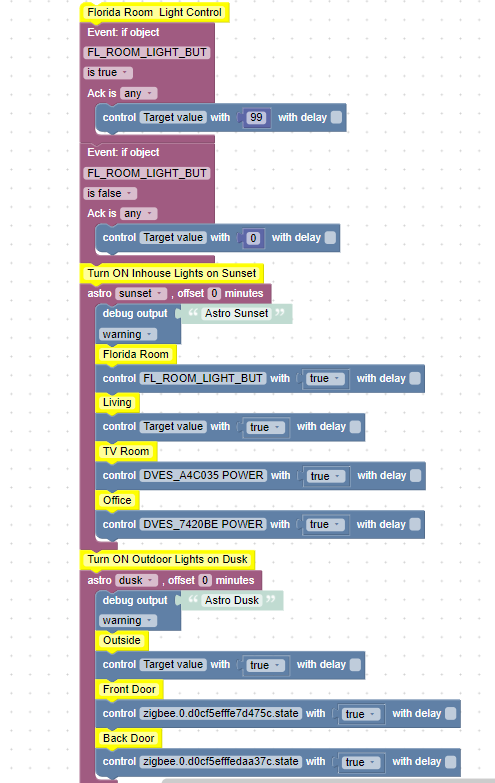
                  d7fc246b-cab0-46ee-bba4-ab191b7546ca-image.png
                  f051097f-aec2-492e-adb8-05c300c5ed46-image.png

                  Thomas BraunT 1 Antwort Letzte Antwort
                  0
                  • A ap2017

                    @Thomas-Braun here we go, in two parts. Script works stable except for astro triggers.
                    d7fc246b-cab0-46ee-bba4-ab191b7546ca-image.png
                    f051097f-aec2-492e-adb8-05c300c5ed46-image.png

                    Thomas BraunT Online
                    Thomas BraunT Online
                    Thomas Braun
                    Most Active
                    schrieb am zuletzt editiert von Thomas Braun
                    #57

                    @ap2017
                    You should have only one trigger element per action.
                    Separate it into independent blocks.

                    Linux-Werkzeugkasten:
                    https://forum.iobroker.net/topic/42952/der-kleine-iobroker-linux-werkzeugkasten
                    NodeJS Fixer Skript:
                    https://forum.iobroker.net/topic/68035/iob-node-fix-skript
                    iob_diag: curl -sLf -o diag.sh https://iobroker.net/diag.sh && bash diag.sh

                    1 Antwort Letzte Antwort
                    1
                    • Thomas BraunT Thomas Braun

                      @ap2017 You have multiple triggers in you blockly. That is not possible.

                      AlCalzoneA Offline
                      AlCalzoneA Offline
                      AlCalzone
                      Developer
                      schrieb am zuletzt editiert von
                      #58

                      @Thomas-Braun sagte in ASTRO function. Does not work again:

                      You have multiple triggers in you blockly. That is not possible.

                      That is not true. You can have as many as you like, but you should NEVER nest them.

                      Warum `sudo` böse ist: https://forum.iobroker.net/post/17109

                      1 Antwort Letzte Antwort
                      1

                      Hey! Du scheinst an dieser Unterhaltung interessiert zu sein, hast aber noch kein Konto.

                      Hast du es satt, bei jedem Besuch durch die gleichen Beiträge zu scrollen? Wenn du dich für ein Konto anmeldest, kommst du immer genau dorthin zurück, wo du zuvor warst, und kannst dich über neue Antworten benachrichtigen lassen (entweder per E-Mail oder Push-Benachrichtigung). Du kannst auch Lesezeichen speichern und Beiträge positiv bewerten, um anderen Community-Mitgliedern deine Wertschätzung zu zeigen.

                      Mit deinem Input könnte dieser Beitrag noch besser werden 💗

                      Registrieren Anmelden
                      Antworten
                      • In einem neuen Thema antworten
                      Anmelden zum Antworten
                      • Älteste zuerst
                      • Neuste zuerst
                      • Meiste Stimmen


                      Support us

                      ioBroker
                      Community Adapters
                      Donate

                      426

                      Online

                      32.8k

                      Benutzer

                      82.8k

                      Themen

                      1.3m

                      Beiträge
                      Community
                      Impressum | Datenschutz-Bestimmungen | Nutzungsbedingungen | Einwilligungseinstellungen
                      ioBroker Community 2014-2025
                      logo
                      • Anmelden

                      • Du hast noch kein Konto? Registrieren

                      • Anmelden oder registrieren, um zu suchen
                      • Erster Beitrag
                        Letzter Beitrag
                      0
                      • Home
                      • Aktuell
                      • Tags
                      • Ungelesen 0
                      • Kategorien
                      • Unreplied
                      • Beliebt
                      • GitHub
                      • Docu
                      • Hilfe
