
NEWS





-
@s-bormann
es scheint irgend ein Cache oder Puffer Problem zu sein...Ich habe eben sogar mal den html Datenpunkt geleert, oder iQontrol zeigt trotzdem noch alles an... -
@dslraser
Hi,exportier mal bitte das komplette Blockly und stelle es hier zur Verfügung. Ich importiere das mal bei mir.
-
@dslraser
Hi,exportier mal bitte das komplette Blockly und stelle es hier zur Verfügung. Ich importiere das mal bei mir.
@blackeagle998
ich Depp hatte eben noch auf Konstante, von der ganzen probiererei... Ich habe es jetzt umgestellt. Nun scheint es zu funktionieren. Das komplette Blockly ist erst "halb fertig", das poste ich gern wenn ich fertig bin.
Erstmal danke für Eure Hilfe.
Ich hatte eben übrigens mal einen Upload bei iQontrol gemacht, seit dem scheint es zu laufen... -
@blackeagle998
ich Depp hatte eben noch auf Konstante, von der ganzen probiererei... Ich habe es jetzt umgestellt. Nun scheint es zu funktionieren. Das komplette Blockly ist erst "halb fertig", das poste ich gern wenn ich fertig bin.
Erstmal danke für Eure Hilfe.
Ich hatte eben übrigens mal einen Upload bei iQontrol gemacht, seit dem scheint es zu laufen...@dslraser
Umso besser, ich hoffe es bleibt stabil. -
@blackeagle998 sagte in Test Adapter iQontrol 1.4.x:
@s-bormann
Hallo Sebastian,kannst du mir mal bitte zeigen, wie du den HTML Inhalt eines Datenpunktes im iframe darstellst (code)?
Ich habe es folgendermaßen versucht:let dp_html = getState('0_userdata.0.ioBroker.log_html').val; let str_html = '<iframe srcdoc="' + dp_html + '"</iframe>';Leider bleibt dieser iframe beim Anzeigen leer und ich weiß nicht warum :-)
Hi,
ich hab das so gelöst:var strHTML = "<h1>Test</h1>"; var iframe = document.getElementById("MyiFrameId"); var iframedoc = iframe.contentDocument || iframe.contentWindow.document; iframedoc.open(); iframedoc.write(strHTML.replace(/\\n/g, String.fromCharCode(13))); $(iframedoc).find('body').css('font-family', 'sans-serif'); iframedoc.close();VG
@s-bormann
Vielen Dank, hat funktioniert (iframe).Bei den URL Parametern kann ich die Toolbar ausblenden (&noToolbar=true).
Kannst du hier auch die Option einfügen, das Panel auszublenden?Ich habe eine Hauptview (mit Panel und Toolbar) wo ich in einem iframe einzelne Views anzeigen kann.
Genau da wäre es sinnvoll, wenn weder Panel noch Toolbar in diesen Unterviews sichtbar wären. -
@X-R4Y
Über einen Datenpunkt in Verbindung mit einem HTML Hintergrund.In den Datenpunkt muss der entsprechende HTML Code reingeschrieben werden.
ein
<html><head><style>body { background-color:#E76E54; } </style></head></html>aus
<html></html>Dort Bezug zum Datenpunkt:
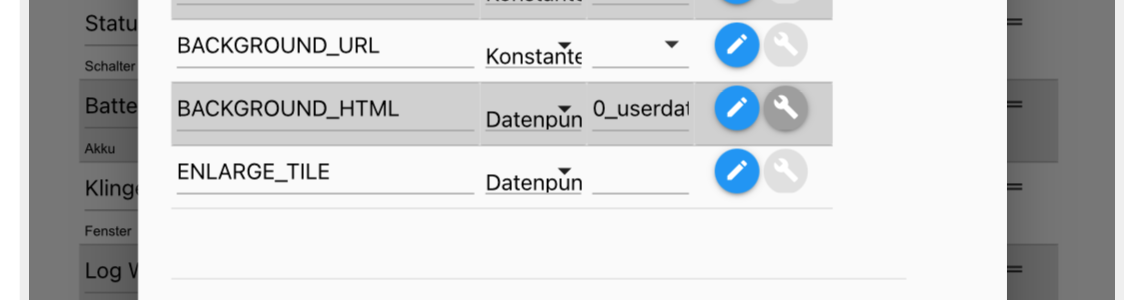
Dann sieht so aus
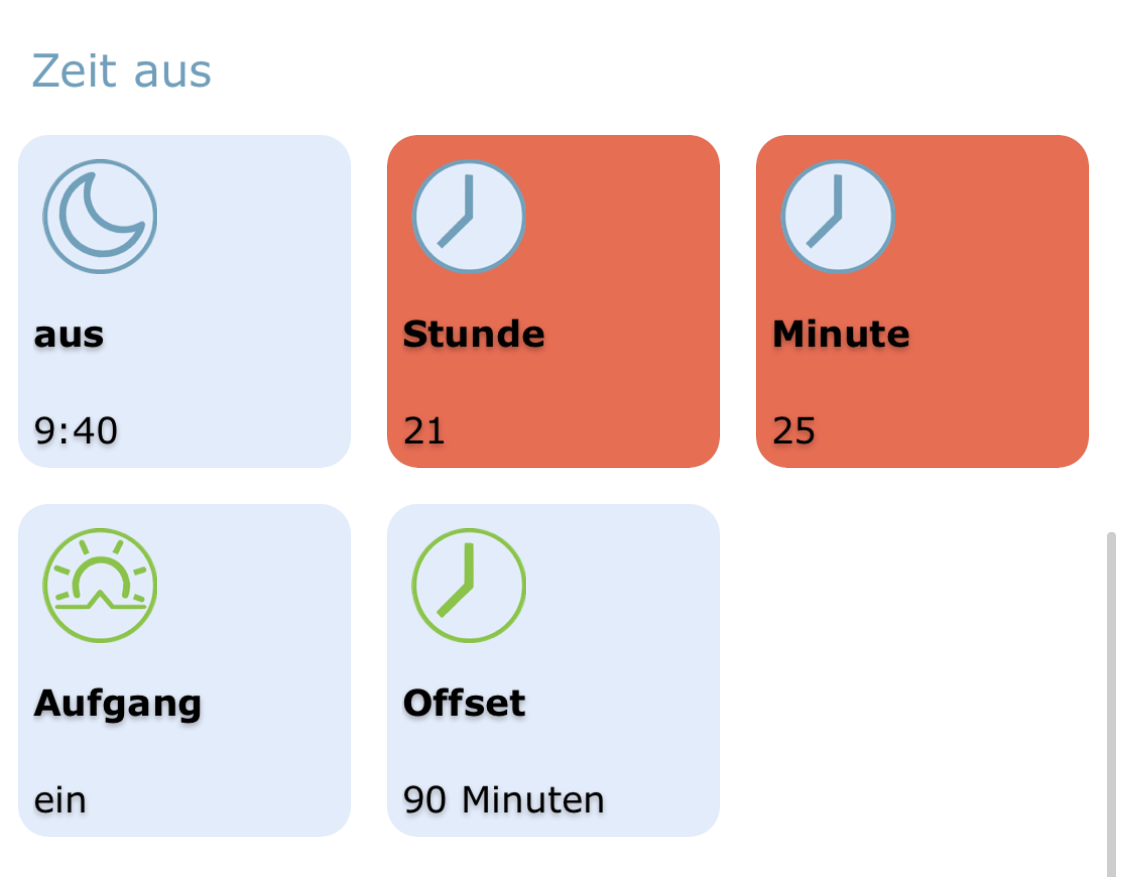
@muuulle said in Test Adapter iQontrol 1.4.x:
In den Datenpunkt muss der entsprechende HTML Code reingeschrieben werden.
ein
<html><head><style>body { background-color:#E76E54; } </style></head></html>aus
<html></html>Das ein und aus ist bezogen auf den Trigger oder ist das immer so? Das kommt alles in einen DP?
-
@muuulle said in Test Adapter iQontrol 1.4.x:
In den Datenpunkt muss der entsprechende HTML Code reingeschrieben werden.
ein
<html><head><style>body { background-color:#E76E54; } </style></head></html>aus
<html></html>Das ein und aus ist bezogen auf den Trigger oder ist das immer so? Das kommt alles in einen DP?
@X-R4Y said in Test Adapter iQontrol 1.4.x:
@muuulle said in Test Adapter iQontrol 1.4.x:
In den Datenpunkt muss der entsprechende HTML Code reingeschrieben werden.
ein
<html><head><style>body { background-color:#E76E54; } </style></head></html>aus
<html></html>Das ein und aus ist bezogen auf den Trigger oder ist das immer so? Das kommt alles in einen DP?
Richtig. Bei mir ist die Kabel beispielsweise ein Schalter. Dieser schaltet eine Lampe und gleichzeitig den Datenpunkt mit dem HTML. In Blockly mit einer wenn-dann Abfrage.
-
@X-R4Y said in Test Adapter iQontrol 1.4.x:
@muuulle said in Test Adapter iQontrol 1.4.x:
In den Datenpunkt muss der entsprechende HTML Code reingeschrieben werden.
ein
<html><head><style>body { background-color:#E76E54; } </style></head></html>aus
<html></html>Das ein und aus ist bezogen auf den Trigger oder ist das immer so? Das kommt alles in einen DP?
Richtig. Bei mir ist die Kabel beispielsweise ein Schalter. Dieser schaltet eine Lampe und gleichzeitig den Datenpunkt mit dem HTML. In Blockly mit einer wenn-dann Abfrage.
@muuulle sagte in Test Adapter iQontrol 1.4.x:
@X-R4Y said in Test Adapter iQontrol 1.4.x:
@muuulle said in Test Adapter iQontrol 1.4.x:
In den Datenpunkt muss der entsprechende HTML Code reingeschrieben werden.
ein
<html><head><style>body { background-color:#E76E54; } </style></head></html>aus
<html></html>Das ein und aus ist bezogen auf den Trigger oder ist das immer so? Das kommt alles in einen DP?
Richtig. Bei mir ist die Kabel beispielsweise ein Schalter. Dieser schaltet eine Lampe und gleichzeitig den Datenpunkt mit dem HTML. In Blockly mit einer wenn-dann Abfrage.
Cooler Ansatz, das so zu lösen :+1:
-
@s-bormann
Vielen Dank, hat funktioniert (iframe).Bei den URL Parametern kann ich die Toolbar ausblenden (&noToolbar=true).
Kannst du hier auch die Option einfügen, das Panel auszublenden?Ich habe eine Hauptview (mit Panel und Toolbar) wo ich in einem iframe einzelne Views anzeigen kann.
Genau da wäre es sinnvoll, wenn weder Panel noch Toolbar in diesen Unterviews sichtbar wären.@blackeagle998 sagte in Test Adapter iQontrol 1.4.x:
@s-bormann
Vielen Dank, hat funktioniert (iframe).Bei den URL Parametern kann ich die Toolbar ausblenden (&noToolbar=true).
Kannst du hier auch die Option einfügen, das Panel auszublenden?Ich habe eine Hauptview (mit Panel und Toolbar) wo ich in einem iframe einzelne Views anzeigen kann.
Genau da wäre es sinnvoll, wenn weder Panel noch Toolbar in diesen Unterviews sichtbar wären.Kann ich machen, sollte kein Problem sein.
Aber wenn Du den view mit dem neuen Datenpunkt BACKGROUND_VIEW einbindest, sollten Toolbar und Panel automatisch ausgeblendet sein. Funktioniert das nicht? (technisch fügt er dann den URL-Parameter &isBackgroundView=true ein, damit kannst Du auch Toolbar und Panel ausblenden lassen. Ferner sind auch die Wisch-Gesten damit außer Funktion. Außerdem ist das Timing noch etwas optimiert, der Ladebalken fehlt und der Lade-Bildschirm ist transparent.)
-
@blackeagle998 sagte in Test Adapter iQontrol 1.4.x:
@s-bormann
Vielen Dank, hat funktioniert (iframe).Bei den URL Parametern kann ich die Toolbar ausblenden (&noToolbar=true).
Kannst du hier auch die Option einfügen, das Panel auszublenden?Ich habe eine Hauptview (mit Panel und Toolbar) wo ich in einem iframe einzelne Views anzeigen kann.
Genau da wäre es sinnvoll, wenn weder Panel noch Toolbar in diesen Unterviews sichtbar wären.Kann ich machen, sollte kein Problem sein.
Aber wenn Du den view mit dem neuen Datenpunkt BACKGROUND_VIEW einbindest, sollten Toolbar und Panel automatisch ausgeblendet sein. Funktioniert das nicht? (technisch fügt er dann den URL-Parameter &isBackgroundView=true ein, damit kannst Du auch Toolbar und Panel ausblenden lassen. Ferner sind auch die Wisch-Gesten damit außer Funktion. Außerdem ist das Timing noch etwas optimiert, der Ladebalken fehlt und der Lade-Bildschirm ist transparent.)
@s-bormann sagte in Test Adapter iQontrol 1.4.x:
@blackeagle998 sagte in Test Adapter iQontrol 1.4.x:
@s-bormann
Vielen Dank, hat funktioniert (iframe).Bei den URL Parametern kann ich die Toolbar ausblenden (&noToolbar=true).
Kannst du hier auch die Option einfügen, das Panel auszublenden?Ich habe eine Hauptview (mit Panel und Toolbar) wo ich in einem iframe einzelne Views anzeigen kann.
Genau da wäre es sinnvoll, wenn weder Panel noch Toolbar in diesen Unterviews sichtbar wären.Kann ich machen, sollte kein Problem sein.
Aber wenn Du den view mit dem neuen Datenpunkt BACKGROUND_VIEW einbindest, sollten Toolbar und Panel automatisch ausgeblendet sein. Funktioniert das nicht? (technisch fügt er dann den URL-Parameter &isBackgroundView=true ein, damit kannst Du auch Toolbar und Panel ausblenden lassen. Ferner sind auch die Wisch-Gesten damit außer Funktion. Außerdem ist das Timing noch etwas optimiert, der Ladebalken fehlt und der Lade-Bildschirm ist transparent.)
Hab den Parameter noPanel in der aktuellen Github-Version hochgeladen.
-
@s-bormann sagte in Test Adapter iQontrol 1.4.x:
@blackeagle998 sagte in Test Adapter iQontrol 1.4.x:
@s-bormann
Vielen Dank, hat funktioniert (iframe).Bei den URL Parametern kann ich die Toolbar ausblenden (&noToolbar=true).
Kannst du hier auch die Option einfügen, das Panel auszublenden?Ich habe eine Hauptview (mit Panel und Toolbar) wo ich in einem iframe einzelne Views anzeigen kann.
Genau da wäre es sinnvoll, wenn weder Panel noch Toolbar in diesen Unterviews sichtbar wären.Kann ich machen, sollte kein Problem sein.
Aber wenn Du den view mit dem neuen Datenpunkt BACKGROUND_VIEW einbindest, sollten Toolbar und Panel automatisch ausgeblendet sein. Funktioniert das nicht? (technisch fügt er dann den URL-Parameter &isBackgroundView=true ein, damit kannst Du auch Toolbar und Panel ausblenden lassen. Ferner sind auch die Wisch-Gesten damit außer Funktion. Außerdem ist das Timing noch etwas optimiert, der Ladebalken fehlt und der Lade-Bildschirm ist transparent.)
Hab den Parameter noPanel in der aktuellen Github-Version hochgeladen.
Einmal mehr herzlichen Dank für die Ent- und Weiterentwicklung von iQontrol!!!
-
Einmal mehr herzlichen Dank für die Ent- und Weiterentwicklung von iQontrol!!!
@blackeagle998
hier mal inspiriert durch Dein Uhren-Wetter Script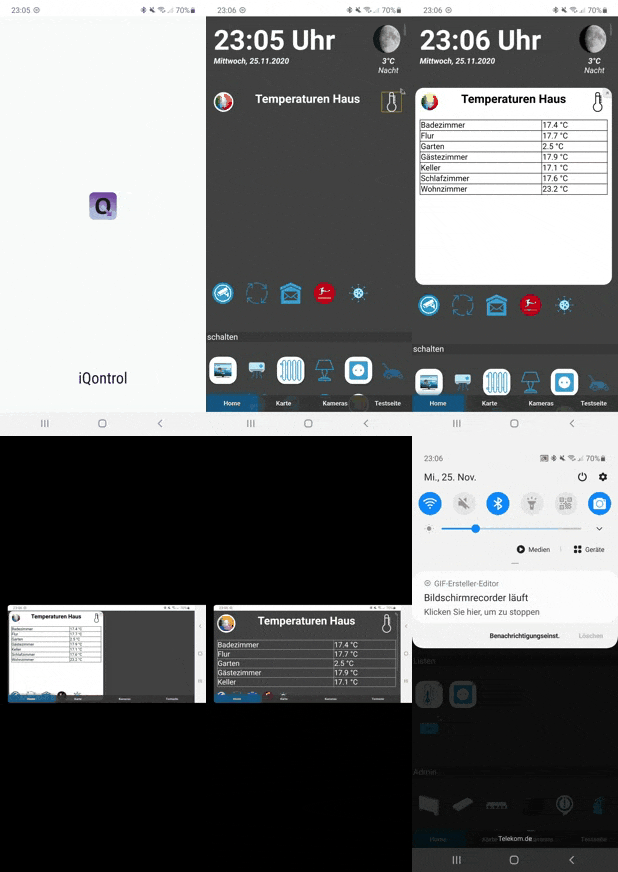
-
@Boogie2005 sagte in Test Adapter iQontrol 1.4.x:
@s-bormann habe deinen Adapter erst jetzt gefunden. Super Arbeit. Habe gleich mal angefangen paar Dinge einzustellen. Sieht auf dem Iphone schon mal gut aus!
Ein paar Dinge sind mir aber noch unklar, und ich gestehe: 194 Seiten zu lesen war ich zu faul ;-)
-
Ich nutze Fritz Detec Heizthermos => habe es irgendwie nicht hinbekommen den jeweiligen Status mir anzeigen zu lassen. Also aktuelle Temp.
-
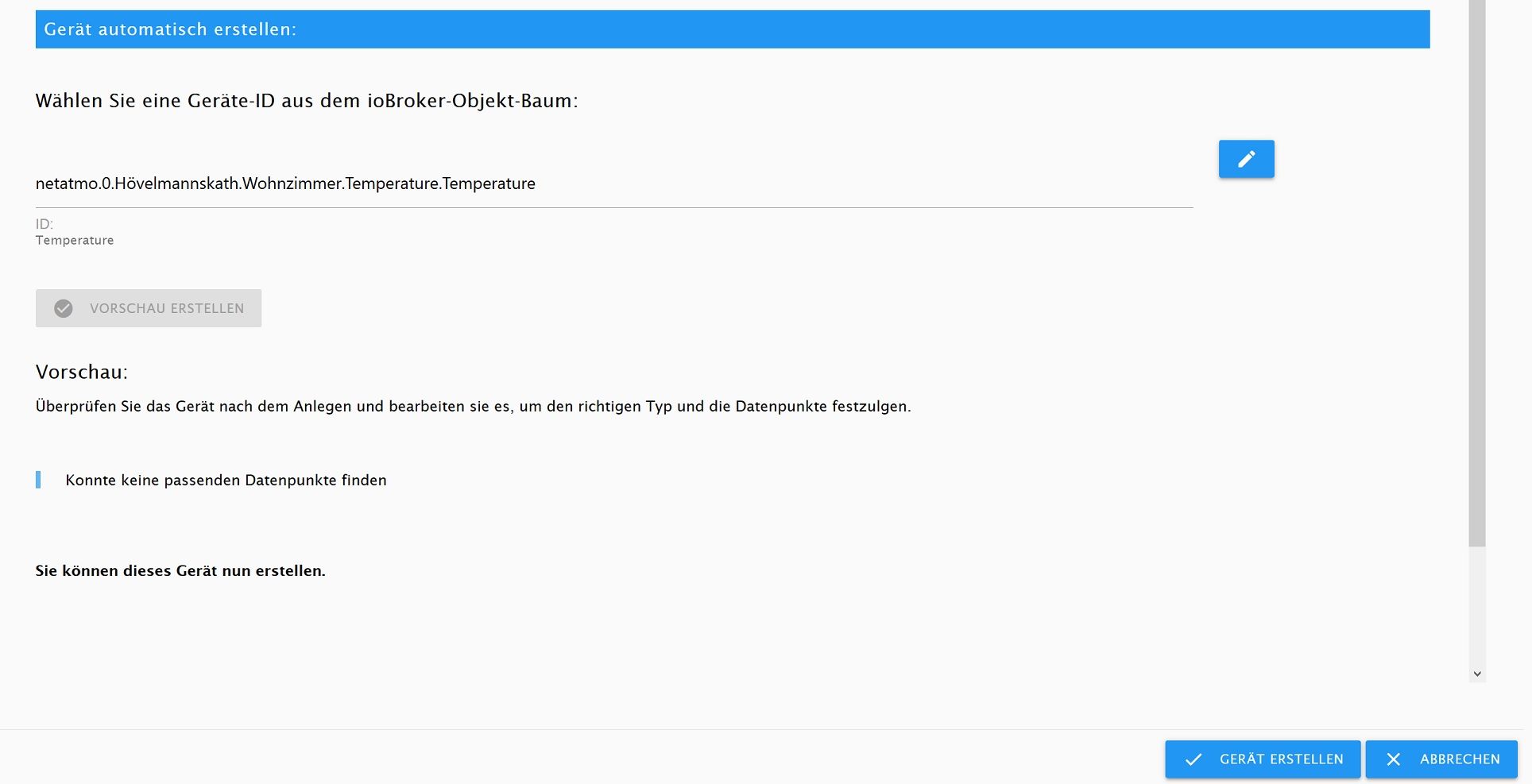
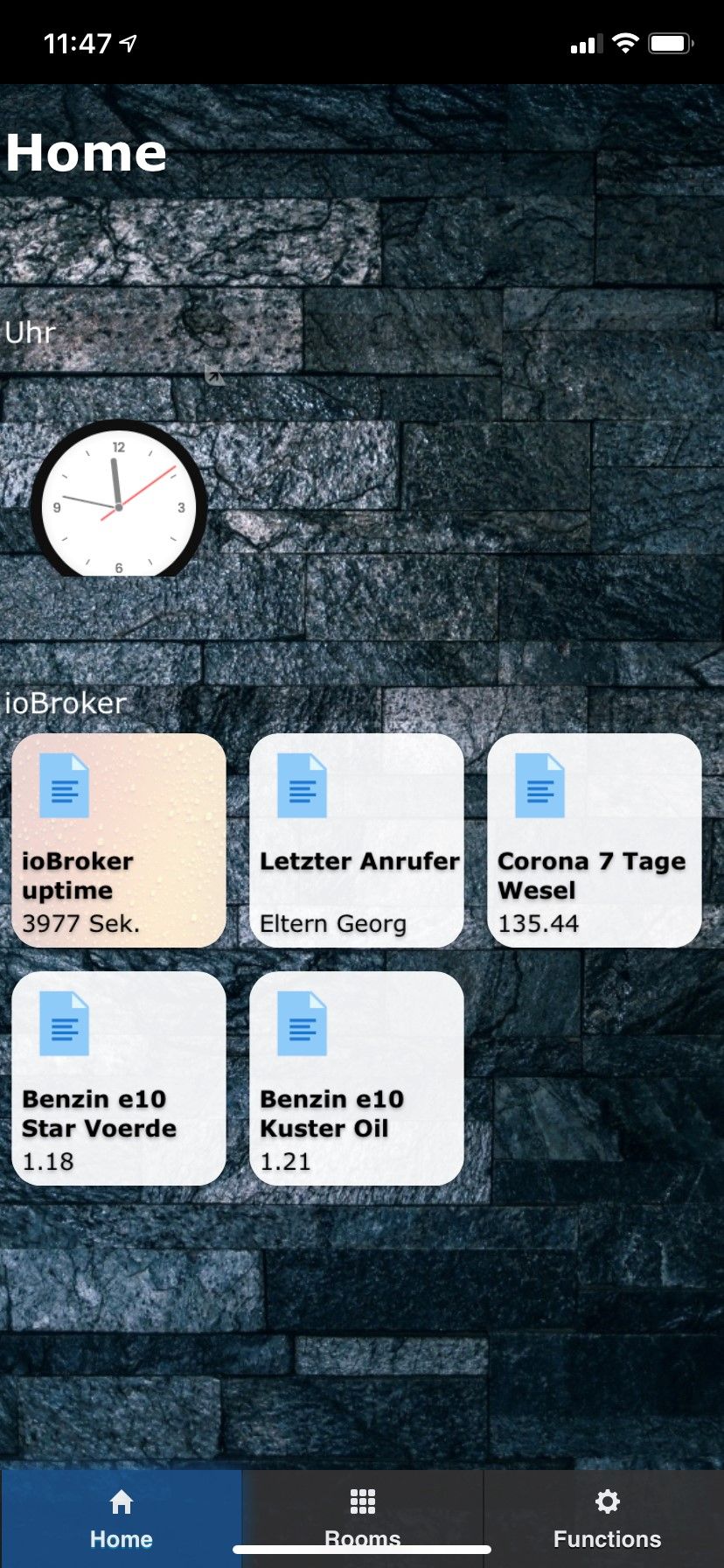
Netatmo die Temperatur im Zimmer, und auf der Terrasse => Habe ich ich nicht hinbekommen. Welchen Datenpunkt muss man da auswählen, damit diese Dinge angezeigt werden? Bekomme immer die Meldung auf dem Bild(Netatmo)
Die Oberfläche sieht schon mal so aus, also etwas habe ich schon hin bekommen :-)
Hi,
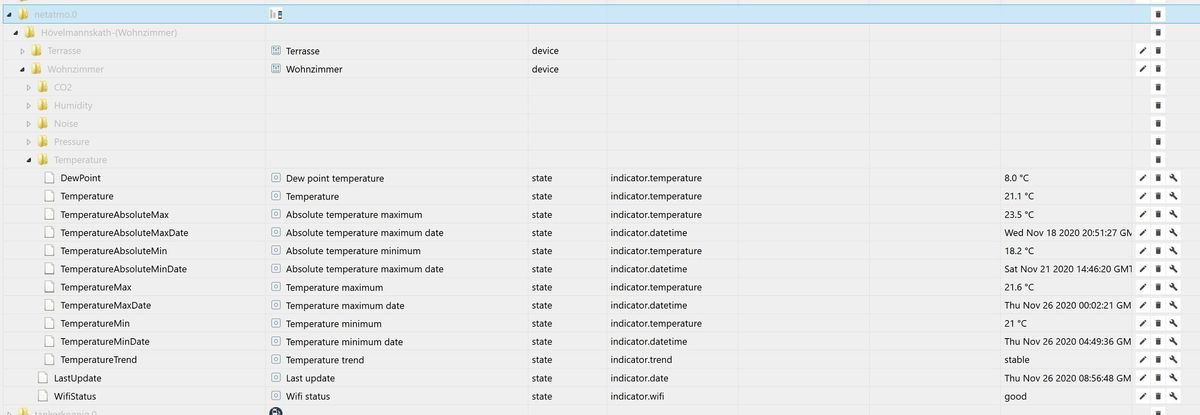
schick doch mal einen Screenshot der zur Verfügung stehenden Datenpunkte von Deinen Thermostaten und den Netatmos. Leider können nicht alle Geräte von der automatischen Zuordnung korrekt erkannt werden, in dem Fall muss man das Gerät von Hand erstellen.
VG!@s-bormann sagte in Test Adapter iQontrol 1.4.x:
@Boogie2005 sagte in Test Adapter iQontrol 1.4.x:
@s-bormann habe deinen Adapter erst jetzt gefunden. Super Arbeit. Habe gleich mal angefangen paar Dinge einzustellen. Sieht auf dem Iphone schon mal gut aus!
Ein paar Dinge sind mir aber noch unklar, und ich gestehe: 194 Seiten zu lesen war ich zu faul ;-)
-
Ich nutze Fritz Detec Heizthermos => habe es irgendwie nicht hinbekommen den jeweiligen Status mir anzeigen zu lassen. Also aktuelle Temp.
-
Netatmo die Temperatur im Zimmer, und auf der Terrasse => Habe ich ich nicht hinbekommen. Welchen Datenpunkt muss man da auswählen, damit diese Dinge angezeigt werden? Bekomme immer die Meldung auf dem Bild(Netatmo)
Die Oberfläche sieht schon mal so aus, also etwas habe ich schon hin bekommen :-)
Hi,
schick doch mal einen Screenshot der zur Verfügung stehenden Datenpunkte von Deinen Thermostaten und den Netatmos. Leider können nicht alle Geräte von der automatischen Zuordnung korrekt erkannt werden, in dem Fall muss man das Gerät von Hand erstellen.
VG!Hi, meinst du das hier?
-
-
@Gerni sagte in [Neuer Adapter] Visualisierung iQontrol:
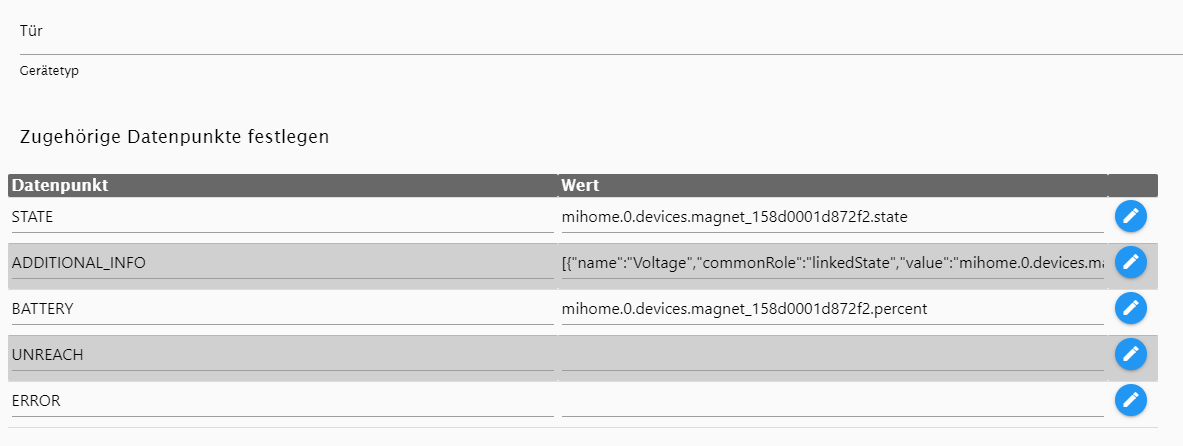
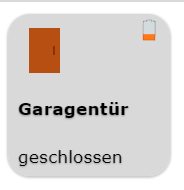
Soweit funktioniert alles ganz gut. Bei Xiaomi Tür/Fensterkontakten wird mir jedoch kein Bat% angezeigt. Ist es möglich das einzubinden? Das Akkusymbol passt auch nicht ganz; lt. ioBroker sind es 81,5%, das Symbol müsste dann ja grün sein.
Ansonsten bisher wirklich echte super Dein Adapter!!!! Endlich eine UI ohne umständliches VIS
Der BATTERY-Datenpunkt ist bislang nur als boolean (wahr/falsch) integriert. Wenn wahr, wird das Batterie leer Symbol gezeigt.
-
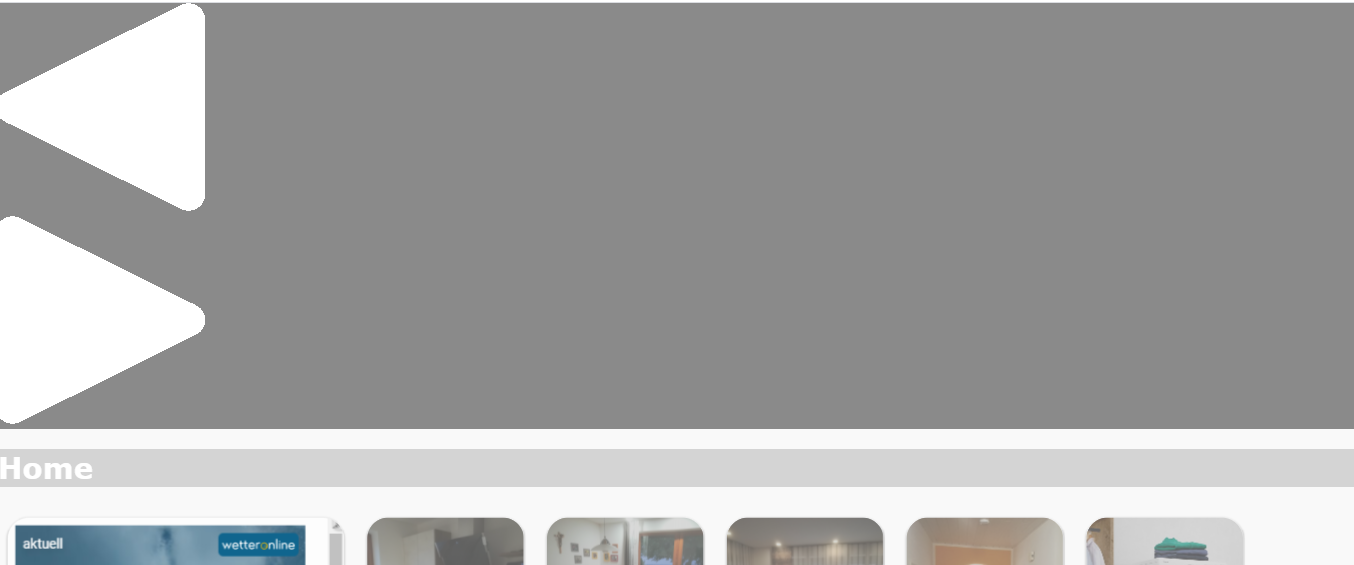
Hallo, ich hab nach einem Update auf 1.5.0 im oberen Bildschirmrand einen Rahmen mit zwei Dreiecken. Muss ich da in den Einstellungen etwas anpassen?
@mane444 sagte in Test Adapter iQontrol 1.4.x:
Hallo, ich hab nach einem Update auf 1.5.0 im oberen Bildschirmrand einen Rahmen mit zwei Dreiecken. Muss ich da in den Einstellungen etwas anpassen?
Hi, bitte mal den Cache löschen, da ist bestimmt noch die alte Styling-Datei im Speicher. (Ggf. auch ioBroker neu starten, siehe Troubleshooting auf der Github-Seite). Sag mal bitte bescheid, ob es dann geht.
VG -
@s-bormann Das erklärt meinen vollgeladenen aber orangenen Akku 😅
Gibt es mittlerweile eine Möglichkeit die prozentuale Anzeige nutzen zu können?Grüße
@splatterjoe sagte in Test Adapter iQontrol 1.4.x:
@s-bormann Das erklärt meinen vollgeladenen aber orangenen Akku 😅
Gibt es mittlerweile eine Möglichkeit die prozentuale Anzeige nutzen zu können?Grüße
Hi,
nein, leider nicht.
LG -
@mane444 sagte in Test Adapter iQontrol 1.4.x:
Hallo, ich hab nach einem Update auf 1.5.0 im oberen Bildschirmrand einen Rahmen mit zwei Dreiecken. Muss ich da in den Einstellungen etwas anpassen?
Hi, bitte mal den Cache löschen, da ist bestimmt noch die alte Styling-Datei im Speicher. (Ggf. auch ioBroker neu starten, siehe Troubleshooting auf der Github-Seite). Sag mal bitte bescheid, ob es dann geht.
VG -
@vikk88 sagte in Test Adapter iQontrol 1.4.x:
@s-bormann ich habe bei meinem Osram LED stripe das Problem, dass er mir nicht alle Schieber anzeigt.
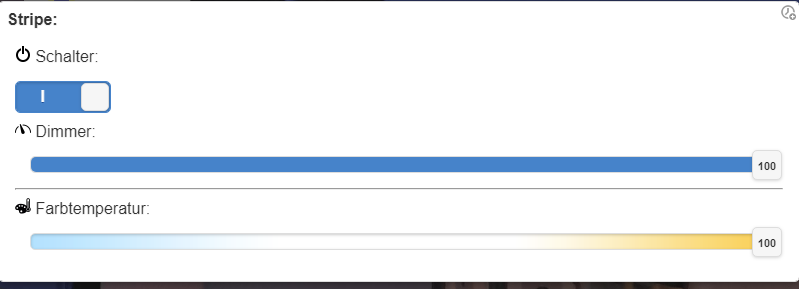
Ich muss immer erst zu einer Ansicht wechseln und nochmal zurück dann geht es.
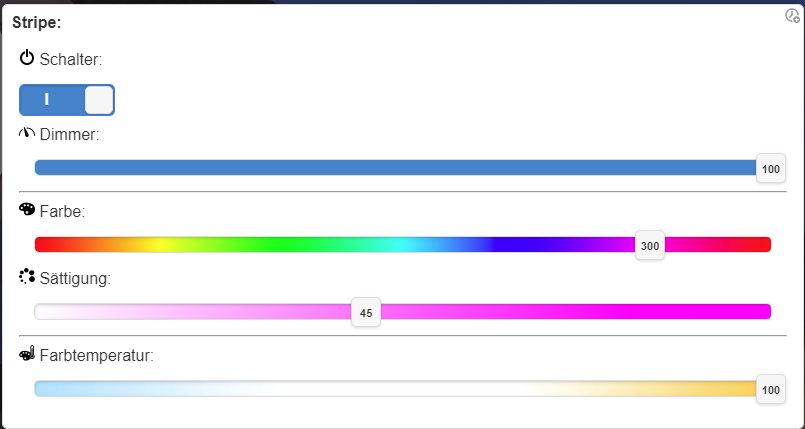
Auf Github hatte jemand auch das Problem. Bei ihm hat es gereicht die aktuelle Version von git zu installieren, bei mir leider nicht. Habe auch mehrere Browser auf verschiedenen Smartphones ausprobiert, ist aber bei allen gleich. Hast du eine Idee?
Oh no, dachte das leidige Thema mit der Farbmischung würde jetzt endlich bei allen funktionieren. Das wird echt zur neverending story...
Bitte schick mal Logs aus der Entwicklerkonsole, einmal beim ersten Aufruf (wo es nicht funktioniert) und dann noch mal vom zweiten Aufruf, wenn es funktioniert.
https://github.com/sbormann/ioBroker.iqontrol#troubleshooting
VG
@s-bormann ich hoffe das sind die Infos die du brauchst
							break;

							case "iQontrolLight":
							if (deviceLinkedStateIds["HUE"] || deviceLinkedStateIds["CT"] || deviceLinkedStateIds["ALTERNATIVE_COLORSPACE_VALUE"]){
								sliderIndex = viewInfoASliderLength[deviceIdEscaped];
								viewInfoASliderLength[deviceIdEscaped]++;
								deviceContent += "<image class='iQontrolDeviceInfoAIcon" + hideIfClasses + "' data-iQontrol-Device-ID='" + deviceIdEscaped + "' data-slider-index='" + sliderIndex + "' style='" + (sliderIndex > 0 ? "opacity: 0;" : "opacity: 1;") + " display:none;' src='./images/symbols/color.png'>";
								deviceContent += "<div class='iQontrolDeviceInfoAText" + hideIfClasses + "' data-iQontrol-Device-ID='" + deviceIdEscaped + "' data-slider-index='" + sliderIndex + "' style='" + (sliderIndex > 0 ? "opacity: 0;" : "opacity: 1;") + "'><div class='iQontrolDeviceInfoATextHue' data-iQontrol-Device-ID='" + deviceIdEscaped + "' data-slider-index='" + sliderIndex + "' style='display:none; width:1.2em; height:1.2em; margin-left:0.2em; margin-right:0.2em; float:left;'></div><div class='iQontrolDeviceInfoATextCt' data-iQontrol-Device-ID='" + deviceIdEscaped + "' data-slider-index='" + sliderIndex + "' style='display:none; width:1.2em; height:1.2em; margin-left:0.2em; margin-right:0.2em; float:left;'></div></div>";
								//Create temp-datapoints for datapoints that are only mapped via alternative colorspace
								var alternativeColorspace = getDeviceOptionValue(device, "alternativeColorspace") || "";
								(function(){ //Closure--> (everything declared inside keeps its value as ist is at the time the function is created)
									var _deviceIdEscaped = deviceIdEscaped;
									var _device = device;
									var _linkedAlternativeColorspaceValueId = deviceLinkedStateIds["ALTERNATIVE_COLORSPACE_VALUE"];
									var _linkedCtId = deviceLinkedStateIds["CT"];
									var _linkedWhiteBrightnessId = deviceLinkedStateIds["WHITE_BRIGHTNESS"];
									var _linkedSaturationId = deviceLinkedStateIds["SATURATION"];
									var _linkedColorBrightnessId = deviceLinkedStateIds["COLOR_BRIGHTNESS"];
									var _linkedHueId = deviceLinkedStateIds["HUE"];
									var _sliderIndex = sliderIndex;
									var _createColouredLightFunction = function(){
										var _deviceLinkedStateIdsToFetchAndUpdate = [];
										if (deviceLinkedStateIds["ALTERNATIVE_COLORSPACE_VALUE"]) switch(alternativeColorspace){
											case "RGBCWWW": case "#RGBCWWW": case "RGBWWCW": case "#RGBWWCW":
											if (_linkedCtId == ""){
												_linkedCtId = createTempLinkedState(deviceId + ".CT", "level", "state", _linkedAlternativeColorspaceValueId);
											}

											case "RGBW": case "#RGBW":
											if (_linkedWhiteBrightnessId == ""){
												_linkedWhiteBrightnessId = createTempLinkedState(deviceId + ".WHITE_BRIGHTNESS", "level", "state", _linkedAlternativeColorspaceValueId);
											}

											case "RGB": case "#RGB":
											if (_linkedSaturationId == ""){
												_linkedSaturationId = createTempLinkedState(deviceId + ".SATURATION", "level", "state", _linkedAlternativeColorspaceValueId);
											}
											if (_linkedColorBrightnessId == ""){
												_linkedColorBrightnessId = createTempLinkedState(deviceId + ".COLOR_BRIGHTNESS", "level", "state", _linkedAlternativeColorspaceValueId);
											}

											case "RGB_HUEONLY": case "#RGB_HUEONLY": case "HUE_MILIGHT":
											if (_linkedHueId == ""){
												_linkedHueId = createTempLinkedState(deviceId + ".HUE", "level", "state", _linkedAlternativeColorspaceValueId);
											}
											_deviceLinkedStateIdsToFetchAndUpdate.push(_linkedAlternativeColorspaceValueId);
											break;
										}
										_deviceLinkedStateIdsToFetchAndUpdate.push(_linkedCtId);
										_deviceLinkedStateIdsToFetchAndUpdate.push(_linkedWhiteBrightnessId);
										_deviceLinkedStateIdsToFetchAndUpdate.push(_linkedSaturationId);
										_deviceLinkedStateIdsToFetchAndUpdate.push(_linkedColorBrightnessId);
										_deviceLinkedStateIdsToFetchAndUpdate.push(_linkedHueId);
										if (_linkedHueId){
											var updateFunction = function(){
												var stateHue = getStateObject(_linkedHueId);
												if (stateHue && stateHue.val !== ""){
													var hueMin = stateHue.min || 0;
													var hueMax = stateHue.max || 359;
													var hue = ((stateHue.val - hueMin) / (hueMax - hueMin)) * 359;
													var	saturation = 100;
													var stateSaturation = getStateObject(_linkedSaturationId);
													if (stateSaturation && typeof stateSaturation.val != udef) {
														var saturationMin = stateSaturation.min || 0;
														var saturationMax = stateSaturation.max || 100;
														saturation = ((stateSaturation.val - saturationMin) / (saturationMax - saturationMin)) * 100;
													}
													$("[data-iQontrol-Device-ID='" + _deviceIdEscaped + "'][data-slider-index='" + _sliderIndex + "'].iQontrolDeviceInfoAIcon").show()
													$("[data-iQontrol-Device-ID='" + _deviceIdEscaped + "'][data-slider-index='" + _sliderIndex + "'].iQontrolDeviceInfoATextHue").show().css("background-color", "hsl(" + hue + ", 100%," + (100-(saturation/2)) + "%)");
												}
											};
											if (_linkedHueId) viewUpdateFunctions[_linkedHueId].push(updateFunction);
											if (_linkedSaturationId) viewUpdateFunctions[_linkedSaturationId].push(updateFunction);
										}
										if (_linkedCtId){
											var updateFunction = function(){
												var stateCt = getStateObject(_linkedCtId);
												if (stateCt  && typeof stateCt.val !== udef){
													var ctMin = stateCt.min || 0;
													var ctMax = stateCt.max || 100;
													var ct = stateCt.val;
													var invertCt = false;
													if(getDeviceOptionValue(_device, "invertCt") == "true") invertCt = !invertCt;
													var rgb = colorTemperatureToRGB(ct, ctMin, ctMax, invertCt);
													$("[data-iQontrol-Device-ID='" + _deviceIdEscaped + "'][data-slider-index='" + _sliderIndex + "'].iQontrolDeviceInfoAIcon").show()
													$("[data-iQontrol-Device-ID='" + _deviceIdEscaped + "'][data-slider-index='" + _sliderIndex + "'].iQontrolDeviceInfoATextCt").show().css("background-color", "rgb(" + rgb.r + ", " + rgb.g + ", " + rgb.b + ")");
												}
											};
											if (_linkedCtId) viewUpdateFunctions[_linkedCtId].push(updateFunction);
										}
										if (_linkedAlternativeColorspaceValueId){
											var updateFunction = function(callingStateId){ //ConvertToAlternativeColorspace
												if (states[_linkedAlternativeColorspaceValueId] && states[callingStateId] && typeof states[callingStateId].val !== udef && states[callingStateId].val !== ""){
													var ack = states[callingStateId].ack;
													var alternativeColorspace = getDeviceOptionValue(_device, "alternativeColorspace") || "";
													var alternativeColorspaceValue = convertToAlternativeColorspace(_device, _linkedHueId, _linkedSaturationId, _linkedColorBrightnessId, _linkedCtId, _linkedWhiteBrightnessId, _linkedAlternativeColorspaceValueId)
													if(alternativeColorspaceValue) {
														if ((callingStateId == _linkedCtId || callingStateId == _linkedWhiteBrightnessId) && (alternativeColorspace == "RGB" || alternativeColorspace == "#RGB" || alternativeColorspace == "RGB_HUEONLY" || alternativeColorspace == "#RGB_HUEONLY" || alternativeColorspace == "HUE_MILIGHT")){
															console.log("Not sending state, because a white value was changed, but AlternativeColorspace is without white");
														} else {
															if (typeof states[_linkedAlternativeColorspaceValueId].val == "string" && states[_linkedAlternativeColorspaceValueId].val == states[_linkedAlternativeColorspaceValueId].val.toUpperCase()) alternativeColorspaceValue = alternativeColorspaceValue.toUpperCase();
															setState(_linkedAlternativeColorspaceValueId, _deviceIdEscaped, alternativeColorspaceValue, ack);
														}
													}
												}
											};
											if (_linkedHueId) viewUpdateFunctions[_linkedHueId].push(updateFunction);
											if (_linkedSaturationId) viewUpdateFunctions[_linkedSaturationId].push(updateFunction);
											if (_linkedColorBrightnessId) viewUpdateFunctions[_linkedColorBrightnessId].push(updateFunction);
											if (_linkedCtId) viewUpdateFunctions[_linkedCtId].push(updateFunction);
											if (_linkedWhiteBrightnessId) viewUpdateFunctions[_linkedWhiteBrightnessId].push(updateFunction);
											var updateFunction = function(){ //ConvertFromAlternativeColorspace
												if (states[_linkedAlternativeColorspaceValueId]){
													var ack = states[_linkedAlternativeColorspaceValueId].ack;
													var result = convertFromAlternativeColorspace(_device, _linkedAlternativeColorspaceValueId, _linkedHueId, _linkedSaturationId, _linkedColorBrightnessId, _linkedCtId, _linkedWhiteBrightnessId);
													if(typeof usedObjects[_linkedAlternativeColorspaceValueId] == udef) usedObjects[_linkedAlternativeColorspaceValueId] = {};
													usedObjects[_linkedAlternativeColorspaceValueId].result = {};
													//To avoid a converting-loop by rounding-differences the state is only updated, if difference between old an new value is > 1
													if(result.hue != null){
														if(_linkedHueId && _linkedHueId != "" && (!states[_linkedHueId] || (states[_linkedHueId] && typeof states[_linkedHueId].val != udef && Math.abs(states[_linkedHueId].val - result.hue) > 1))) setState(_linkedHueId, _deviceIdEscaped, result.hue, ack, null, 100);
													}
													if(result.saturation != null){
														if(_linkedSaturationId && _linkedSaturationId != "" && (!states[_linkedSaturationId] || (states[_linkedSaturationId] && typeof states[_linkedSaturationId].val != udef && Math.abs(states[_linkedSaturationId].val - result.saturation) > 1))) setState(_linkedSaturationId, _deviceIdEscaped, result.saturation, ack, null, 100);
													}
													if(result.colorBrightness != null){
														if(_linkedColorBrightnessId && _linkedColorBrightnessId != "" && (!states[_linkedColorBrightnessId] || (states[_linkedColorBrightnessId] && typeof states[_linkedColorBrightnessId].val != udef && Math.abs(states[_linkedColorBrightnessId].val - result.colorBrightness) > 1))) setState(_linkedColorBrightnessId, _deviceIdEscaped, result.colorBrightness, ack, null, 100);
													}
													if(result.ct != null){
														if(_linkedCtId && _linkedCtId != "" && (!states[_linkedCtId] || (states[_linkedCtId] && typeof states[_linkedCtId].val != udef && Math.abs(states[_linkedCtId].val - result.ct) > 1))) setState(_linkedCtId, _deviceIdEscaped, result.ct, ack, null, 100);
													}
													if(result.whiteBrightness != null){
														if(_linkedWhiteBrightnessId && _linkedWhiteBrightnessId != "" && (!states[_linkedWhiteBrightnessId] || (states[_linkedWhiteBrightnessId] && typeof states[_linkedWhiteBrightnessId].val != udef && Math.abs(states[_linkedWhiteBrightnessId].val - result.whiteBrightness) > 1))) setState(_linkedWhiteBrightnessId, _deviceIdEscaped, result.whiteBrightness, ack, null, 100);
													}
												}
											};
											if (_linkedAlternativeColorspaceValueId) viewUpdateFunctions[_linkedAlternativeColorspaceValueId].push(updateFunction);
										}
										_deviceLinkedStateIdsToFetchAndUpdate = removeDuplicates(_deviceLinkedStateIdsToFetchAndUpdate);
										fetchStates(_deviceLinkedStateIdsToFetchAndUpdate, function(){
											for (var i = 0; i < _deviceLinkedStateIdsToFetchAndUpdate.length; i++){
												if (typeof usedObjects[_deviceLinkedStateIdsToFetchAndUpdate[i]] == udef) {
													fetchObject(_deviceLinkedStateIdsToFetchAndUpdate[i], function(){
														updateState(_deviceLinkedStateIdsToFetchAndUpdate[i], "ignorePreventUpdateForView");
													});
												} else {
													updateState(_deviceLinkedStateIdsToFetchAndUpdate[i], "ignorePreventUpdateForView");
												}
											}
											_deviceLinkedStateIdsToFetchAndUpdate = [];
										});
									};
									if (_linkedAlternativeColorspaceValueId) fetchObject(_linkedAlternativeColorspaceValueId, _createColouredLightFunction, true); else _createColouredLightFunction();
								})(); //<--End C
und wenn es geht
function dragElement(dragElementId, dragHandleId, cursor, resize) { //Makes an element draggable
	var dragElement = document.getElementById(dragElementId);
	if(!dragElement) return;
	dragHandle = document.getElementById(dragHandleId);
	if(!dragHandle) dragHandle = dragElement;
	if(cursor === true) if(resize) cursor = 'nw-resize'; else cursor = 'move';
	if(cursor) dragHandle.style.cursor = cursor;
	var posMoveX = 0, posMoveY = 0;
	var posOldX = 0, posOldY = 0;
	var posOffsetX = 0, posOffsetY = 0;
	var iframeStylePointerEvent;
	// otherwise, move the DIV from anywhere inside the DIV:
	dragHandle.addEventListener('mousedown', dragStart);
	dragHandle.addEventListener('touchstart', dragStart);
	function dragStart(e) {
		console.log("DRAG START");
		e = e || window.event;
		e.preventDefault();
		// Disable pointer-events for iframes
		if(dragElement.tagName = "IFRAME"){
			iframeStylePointerEvent = dragElement.style.pointerEvents;
			dragElement.style.pointerEvents = 'none';
		}
		// get the mouse cursor position at startup:
		posOldX = e.clientX || e.touches[0].clientX;
		posOldY = e.clientY || e.touches[0].clientY;
		posOffsetX = 0;
		posOffsetY = 0;
		document.addEventListener('mouseup', dragStop);
		document.addEventListener('touchend', dragStop);
		// call a function whenever the cursor moves:
		document.addEventListener('mousemove', dragMove);
		document.addEventListener('touchmove', dragMove);
	}
	function dragMove(e) {
		//console.log("DRAG MOVE");
		e = e || window.event;
		//e.preventDefault();
		if(!e.buttons && !e.touches) {
			dragStop();
			return;
		}
		// calculate the new cursor position:
		posMoveX = posOldX - (e.clientX || e.touches[0].clientX);
		posMoveY = posOldY - (e.clientY || e.touches[0].clientY);
		posOldX = e.clientX || e.touches[0].clientX;
		posOldY = e.clientY || e.touches[0].clientY;
		// set the element's new position:
		if(resize){
			if(posMoveX != 0){
				var tempPosX = dragElement.clientWidth;
				dragElement.style.width = (dragElement.clientWidth - posMoveX - posOffsetX) + "px";
				if(dragElement.clientWidth == tempPosX) posOffsetX = posOffsetX + posMoveX; else posOffsetX = 0;
			}
			if(posMoveY != 0){
				var tempPosY = dragElement.clientHeight;
				dragElement.style.height = (dragElement.clientHeight - posMoveY - posOffsetY) + "px";
				if(dragElement.clientHeight == tempPosY) posOffsetY = posOffsetY + posMoveY; else posOffsetY = 0;
			}
		} else {
			dragElement.style.left = (dragElement.offsetLeft - posMoveX) + "px";
			dragElement.style.top = (dragElement.offsetTop - posMoveY) + "px";
		}
	}
	function dragStop() {
		// stop moving when mouse button is released:
		console.log("DRAG END");
		document.removeEventListener('mouseup', dragStop);
		document.removeEventListener('touchend', dragStop);
		document.removeEventListener('mousemove', dragMove);
		document.removeEventListener('touchmove', dragMove);
		// Reenable pointer-events for iframes
		if(dragElement.tagName = "IFRAME"){
			dragElement.style.pointerEvents = iframeStylePointerEvent;
		}
	}
}

function collapsibleAnimatedInit(){ // jQuery Tweak: Für den Wrapper-Div statt data-role="collapsible-set" class="ui-collapsible-set" verwenden, allen Einträgen (also divs mit data-role="collapsible") zusätzlich class="collapsibleAnimated" hinzufügen. Muss nach pagecreate initialisiert werden.
	$(".collapsibleAnimated .ui-collapsible-content:not(.ui-collapsible-content-collapsed)").css('display', 'block');
	$(".collapsibleAnimated .ui-collapsible-content.ui-collapsible-content-collapsed").css('display', 'none');
	$(".collapsibleAnimated .ui-collapsible-heading-toggle").on("click", function (e) {
		var current = $(this).closest(".ui-collapsible");
		if (current.hasClass("ui-collapsible-collapsed")) {
			// collapse all others
			if(current.parent("div").hasClass("ui-collapsible-set")) $(".ui-collapsible").not(".ui-collapsible-collapsed").find(".ui-collapsible-heading-toggle").click();
			// and then expand this one
			$(".ui-collapsible-content", current).slideDown(300);
		} else {
			$(".ui-collapsible-content", current).slideUp(300);
		}
	});
}

function secondsToHHMMSS(seconds){
	if(isNaN(seconds)) return seconds;
	var sec_num = parseInt(seconds, 10);
	var hours   = Math.floor(sec_num / 3600);
	var minutes = Math.floor((sec_num - (hours * 3600)) / 60);
	var seconds = sec_num - (hours * 3600) - (minutes * 60);
	if (hours   < 10) {hours   = "0"+hours;}
	if (minutes < 10) {minutes = "0"+minutes;}
	if (seconds < 10) {seconds = "0"+seconds;}
	if (hours == "00") return minutes + ':' + seconds; else return hours + ':' + minutes + ':' + seconds;
}

function getTimeFromHMTimeCode(HMTimeCode){
	if(typeof HMTimeCode == udef) return udef;
	//Decodes Homematic Timecode (for example in PARTY_START_TIME)
	var HMTimeCodeTable = [0,30,60,90,120,150,180,210,240,14,44,74,104,134,164,194,224,254,28,58,88,118,148,178,208,238,268,42,72,102,132,162,192,222,252,282,56,86,116,146,176,206,236,266,296,70,100,130];
	var MinutesSinceMidnight = HMTimeCode;
	if (HMTimeCodeTable.indexOf(1 * HMTimeCode) >= 0) MinutesSinceMidnight = 30 * HMTimeCodeTable.indexOf(1 * HMTimeCode);
	var Hour = Math.floor(MinutesSinceMidnight / 60);
	var Minutes = MinutesSinceMidnight - (Hour * 60);
	return Hour + ":" + Minutes;
}

function colorTemperatureToRGB(value,  min,  max, invertCt){
	var rgbWW = {r: 255, g: 204, b: 82};
	var rgbCW = {r: 174, g: 228, b: 255};
	value = (Math.max(min, Math.min(value, max)) - min) / (max - min); //0...1
	if(invertCt) value = 1 - value;
	if(value >0.5){
		var rgb = {r: rgbWW.r + (((1-value)/0.5) * 255), g: rgbWW.g + (((1-value)/0.5) * 255), b: rgbWW.b + (((1-value)/0.5) * 255)};
	} else {
		var rgb = {r: rgbCW.r + ((value/0.5) * 255), g: rgbCW.g + ((value/0.5) * 255), b: rgbCW.b + ((value/0.5) * 255)};
	}
	return rgb;
}

function convertToAlternativeColorspace(device, linkedHueId, linkedSaturationId, linkedColorBrightnessId, linkedCtId, linkedWhiteBrightnessId, linkedAlternativeColorspaceValueId, overwrite){
	var invertCt = false;
	if(getDeviceOptionValue(device, "invertCt") == "true") invertCt = !invertCt;
	var alternativeColorspace = getDeviceOptionValue(device, "alternativeColorspace") || "";
	var alternativeColorspaceResult = convertFromAlternativeColorspace(device, linkedAlternativeColorspaceValueId, linkedHueId, linkedSaturationId, linkedColorBrightnessId, linkedCtId, linkedWhiteBrightnessId);
	var hue = null;
	var stateHue = getStateObject(linkedHueId);
	if (stateHue && typeof stateHue.val != udef) {
		var hueMin = stateHue.min || 0;
		var hueMax = stateHue.max || 359;
		hue = ((stateHue.val - hueMin) / (hueMax - hueMin)) * 359;
	} else if (alternativeColorspaceResult.hue !== null) hue = alternativeColorspaceResult.hue;
	var	saturation = null;
	var stateSaturation = getStateObject(linkedSaturationId);
	if (stateSaturation && typeof stateSaturation.val != udef) {
		var saturationMin = stateSaturation.min || 0;
		var saturationMax = stateSaturation.max || 100;
		saturation = ((stateSaturation.val - saturationMin) / (saturationMax - saturationMin)) * 100;
	} else if (alternativeColorspaceResult.saturation !== null) saturation = alternativeColorspaceResult.saturation;
	var	colorBrightness = null;
	var stateColorBrightness = getStateObject(linkedColorBrightnessId);
	if (stateColorBrightness && typeof stateColorBrightness.val != udef) {
		var colorBrightnessMin = stateColorBrightness.min || 0;
		var colorBrightnessMax = stateColorBrightness.max || 100;
		colorBrightness = ((stateColorBrightness.val - colorBrightnessMin) / (colorBrightnessMax - colorBrightnessMin)) * 100;
	} else if (alternativeColorspaceResult.colorBrightness !== null) colorBrightness = alternativeColorspaceResult.colorBrightness;
	var	ct = null;
	var stateCt = getStateObject(linkedCtId);
	if (stateCt && typeof stateCt.val != udef) {
		var ctMin = stateCt.min || 0;
		var ctMax = stateCt.max || 100;
		ct = ((stateCt.val - ctMin) / (ctMax - ctMin)) * 100;
	} else if (alternativeColorspaceResult.ct !== null) ct = alternativeColorspaceResult.ct;
	var	whiteBrightness = null;
	var stateWhiteBrightness = getStateObject(linkedWhiteBrightnessId);
	if (stateWhiteBrightness && typeof stateWhiteBrightness.val != udef) {
		var whiteBrightnessMin = stateWhiteBrightness.min || 0;
		var whiteBrightnessMax = stateWhiteBrightness.max || 100;
		whiteBrightness = ((stateWhiteBrightness.val - whiteBrightnessMin) / (whiteBrightnessMax - whiteBrightnessMin)) * 100;
	} else if (alternativeColorspaceResult.whiteBrightness !== null) whiteBrightness = alternativeColorspaceResult.whiteBrightness;
	if (overwrite && Array.isArray(overwrite)) overwrite.forEach(function(element){
		if (typeof element.type !== udef && element.val !== udef) switch(element.type){
			case "hue": hue = element.val; break;
			case "saturation": saturation = element.val; break;
			case "colorBrightness": colorBrightness = element.val; break;
			case "ct": ct = element.val; break;
			case "whiteBrightness": whiteBrightness = element.val; break;
		}
	});
	console.log("Converting H|S|B/CT|B from " + hue + "|" + saturation + "|" + colorBrightness + "/" + ct + "|" + whiteBrightness + " to " + alternativeColorspace + "...");
	var alternativeColorspaceValue = null;
	switch(alternativeColorspace){
		case "RGB": case "#RGB":
		if (hue == null) break;
		var rgb = hsvToRgb(hue, (saturation == null?100:saturation), (colorBrightness == null?100:colorBrightness));
		alternativeColorspaceValue = (("0" + Math.round(rgb.r).toString(16)).slice(-2)) + (("0" + Math.round(rgb.g).toString(16)).slice(-2)) + (("0" + Math.round(rgb.b).toString(16)).slice(-2));
		break;

		case "RGBW": case "#RGBW":
		if (hue == null) break;
		var rgb = hsvToRgb(hue, (saturation == null?100:saturation), (colorBrightness == null?100:colorBrightness));
		alternativeColorspaceValue = (("0" + Math.round(rgb.r).toString(16)).slice(-2)) + (("0" + Math.round(rgb.g).toString(16)).slice(-2)) + (("0" + Math.round(rgb.b).toString(16)).slice(-2)) + (("0" + Math.round(whiteBrightness/100 * 255).toString(16)).slice(-2));
		break;

		case "RGBCWWW": case "#RGBCWWW":
		invertCt = !invertCt;
		case "RGBWWCW": case "#RGBWWCW":
		if (hue == null || ct == null) break;
		var rgb = hsvToRgb(hue, (saturation == null?100:saturation), (colorBrightness == null?100:colorBrightness));
		if(!invertCt){
			var w1 = ct/100 * whiteBrightness/100 * 255;
			var w2 = (100-ct)/100 * whiteBrightness/100 * 255;
		} else {
			var w2 = ct/100 * whiteBrightness/100 * 255;
			var w1 = (100-ct)/100 * whiteBrightness/100 * 255;
		}
		alternativeColorspaceValue = (("0" + Math.round(rgb.r).toString(16)).slice(-2)) + (("0" + Math.round(rgb.g).toString(16)).slice(-2)) + (("0" + Math.round(rgb.b).toString(16)).slice(-2)) + (("0" + Math.round(w1).toString(16)).slice(-2)) + (("0" + Math.round(w2).toString(16)).slice(-2));
		break;

		case "RGB_HUEONLY": case "#RGB_HUEONLY":
		if (hue == null) break;
		var rgb = hsvToRgb(hue, 100, 100);
		alternativeColorspaceValue = (("0" + Math.round(rgb.r).toString(16)).slice(-2)) + (("0" + Math.round(rgb.g).toString(16)).slice(-2)) + (("0" + Math.round(rgb.b).toString(16)).slice(-2));
		break;

		case "HUE_MILIGHT":
		if (hue == null) break;
		alternativeColorspaceValue = Math.round(modulo(66 - (hue / 3.60), 100) * 2.55);
		break;
	}
	if(alternativeColorspaceValue !== null && alternativeColorspace.substring(0, 1) == "#") alternativeColorspaceValue = "#" + alternativeColorspaceValue;
	console.log("...result is " + alternativeColorspaceValue);
	return alternativeColorspaceValue;
}

function convertFromAlternativeColorspace(device, linkedAlternativeColorspaceValueId, linkedHueId, linkedSaturationId, linkedColorBrightnessId, linkedCtId, linkedWhiteBrightnessId){
	var alternativeColorspaceValue = states[linkedAlternativeColorspaceValueId].val || "";
	var invertCt = false;
	if(getDeviceOptionValue(device, "invertCt") == "true") invertCt = !invertCt;
	var alternativeColorspace = getDeviceOptionValue(device, "alternativeColorspace") || "";
	console.log("Converting " + alternativeColorspace + " from " + alternativeColorspaceValue + " to H|S|B/CT|B...");
	if(alternativeColorspaceValue.toString().substring(0, 1) == "#") alternativeColorspaceValue = alternativeColorspaceValue.substring(1);
	var result = {hue: null, saturation: null, colorBrightness: null, ct: null, whiteBrightness: null};
	var r, g, b, w, ww, cw;
	switch(alternativeColorspace){
		case "RGB": case "#RGB": case "RGB_HUEONLY": case "#RGB_HUEONLY":
		if(alternativeColorspaceValue.length <= 3){
			r = +("0x" + alternativeColorspaceValue[0] + alternativeColorspaceValue[0]);
			g = +("0x" + alternativeColorspaceValue[1] + alternativeColorspaceValue[1]);
			b = +("0x" + alternativeColorspaceValue[2] + alternativeColorspaceValue[2]);
		} else {
			r = +("0x" + alternativeColorspaceValue[0] + alternativeColorspaceValue[1]);
			g = +("0x" + alternativeColorspaceValue[2] + alternativeColorspaceValue[3]);
			b = +("0x" + alternativeColorspaceValue[4] + alternativeColorspaceValue[5]);
		}
		var hsv = rgbToHsv(r, g, b);
		result.hue = hsv.h;
		result.saturation = hsv.s;
		result.colorBrightness = hsv.v;
		break;

		case "RGBW": case "#RGBW":
		if(alternativeColorspaceValue.length <= 4){
			r = +("0x" + alternativeColorspaceValue[0] + alternativeColorspaceValue[0]);
			g = +("0x" + alternativeColorspaceValue[1] + alternativeColorspaceValue[1]);
			b = +("0x" + alternativeColorspaceValue[2] + alternativeColorspaceValue[2]);
			w = +("0x" + alternativeColorspaceValue[3] + alternativeColorspaceValue[3]);
		} else {
			r = +("0x" + alternativeColorspaceValue[0] + alternativeColorspaceValue[1]);
			g = +("0x" + alternativeColorspaceValue[2] + alternativeColorspaceValue[3]);
			b = +("0x" + alternativeColorspaceValue[4] + alternativeColorspaceValue[5]);
			w = +("0x" + alternativeColorspaceValue[6] + alternativeColorspaceValue[7]);
		}
		var hsv = rgbToHsv(r, g, b);
		result.hue = hsv.h;
		result.saturation = hsv.s;
		result.colorBrightness = hsv.v;
		result.whiteBrightness = w / 2.55;
		break;

		case "RGBCWWW": case "#RGBCWWW":
		invertCt = !invertCt;
		case "RGBWWCW": case "#RGBWWCW":
		if(alternativeColorspaceValue.length <= 5){
			r = +("0x" + alternativeColorspaceValue[0] + alternativeColorspaceValue[0]);
			g = +("0x" + alternativeColorspaceValue[1] + alternativeColorspaceValue[1]);
			b = +("0x" + alternativeColorspaceValue[2] + alternativeColorspaceValue[2]);
			w1 = +("0x" + alternativeColorspaceValue[3] + alternativeColorspaceValue[3]);
			w2 = +("0x" + alternativeColorspaceValue[4] + alternativeColorspaceValue[4]);
		} else {
			r = +("0x" + alternativeColorspaceValue[0] + alternativeColorspaceValue[1]);
			g = +("0x" + alternativeColorspaceValue[2] + alternativeColorspaceValue[3]);
			b = +("0x" + alternativeColorspaceValue[4] + alternativeColorspaceValue[5]);
			w1 = +("0x" + alternativeColorspaceValue[6] + alternativeColorspaceValue[7]);
			w2 = +("0x" + alternativeColorspaceValue[8] + alternativeColorspaceValue[9]);
		}
		var hsv = rgbToHsv(r, g, b);
		result.hue = hsv.h;
		result.saturation = hsv.s;
		result.colorBrightness = hsv.v;
		result.whiteBrightness = (w1 + w2) / 2.55;
		if(!invertCt){
			result.ct = w1/2.55 / result.whiteBrightness * 100;
		} else {
			result.ct = w2/2.55 / result.whiteBrightness * 100;
		}
		break;

		case "HUE_MILIGHT":
		if(alternativeColorspaceValue == "") alternativeColorspaceValue = "0";
		result.hue = Math.round(modulo(-3.60 * (parseFloat(alternativeColorspaceValue/2.55) - 66), 360));
		break;
	}
	if(result.hue != null){
		var stateHue = getStateObject(linkedHueId);
		var hueMin = stateHue && stateHue.min || 0;
		var hueMax = stateHue && stateHue.max || 359;
		result.hue = Math.round((result.hue/359 * (hueMax - hueMin)) + hueMin);
	}
	if(result.saturation != null){
		var stateSaturation = getStateObject(linkedSaturationId);
		var saturationMin = stateSaturation && stateSaturation.min || 0;
		var saturationMax = stateSaturation && stateSaturation.max || 100;
		result.saturation = Math.round((result.saturation/100 * (saturationMax - saturationMin)) + saturationMin);
	}
	if(result.colorBrightness != null){
		var stateColorBrightness = getStateObject(linkedColorBrightnessId);
		var colorBrightnessMin = stateColorBrightness && stateColorBrightness.min || 0;
		var colorBrightnessMax = stateColorBrightness && stateColorBrightness.max || 100;
		result.colorBrightness = Math.round((result.colorBrightness/100 * (colorBrightnessMax - colorBrightnessMin)) + colorBrightnessMin);
	}
	if(result.ct != null){
		var stateCt = getStateObject(linkedCtId);
		var ctMin = stateCt && stateCt.min || 0;
		var ctMax = stateCt && stateCt.max || 100;
		result.ct = Math.round((result.ct/100 * (ctMax - ctMin)) + ctMin);
	}
	if(result.whiteBrightness != null){
		var stateWhiteBrightness = getStateObject(linkedWhiteBrightnessId);
		var whiteBrightnessMin = stateWhiteBrightness && stateWhiteBrightness.min || 0;
		var whiteBrightnessMax = stateWhiteBrightness && stateWhiteBrightness.max || 100;
		result.whiteBrightness = Math.round((result.whiteBrightness/100 * (whiteBrightnessMax - whiteBrightnessMin)) + whiteBrightnessMin);
	}
	console.log("...result is " + result.hue + "|" + result.saturation + "|" + result.colorBrightness + "/" + result.ct + "|" + result.whiteBrightness);
	return result;
}

function hsvToRgb(h, s, v){
	h /= 360, s /= 100, v /= 100;
	var r, g, b;
	var i = Math.floor(h * 6);
	var f = h * 6 - i;
	var p = v * (1 - s);
	var q = v * (1 - f * s);
	var t = v * (1 - (1 - f) * s);
	switch (i % 6) {
		case 0: r = v, g = t, b = p; break;
		case 1: r = q, g = v, b = p; break;
		case 2: r = p, g = v, b = t; break;
		case 3: r = p, g = q, b = v; break;
		case 4: r = t, g = p, b = v; break;
		case 5: r = v, g = p, b = q; break;
	}
	return {r: r * 255, g: g * 255, b: b * 255};
}

function rgbToHsv(r, g, b){
	r /= 255, g /= 255, b /= 255;
	var max = Math.max(r, g, b), min = Math.min(r, g, b);
	var h, s, v = max;
	var d = max - min;
	if (v == 0) {
		console.log("...result is BLACK...");
		s = null; // black
	} else {
		s = (max == 0 ? 0 : d / max);
	}
	if (max == min) {
		console.log("...result is ACHROMATIC...");
		h = null; // achromatic
	} else {
		switch (max) {
			case r: h = (g - b) / d + (g < b ? 6 : 0); break;
			case g: h = (b - r) / d + 2; break;
			case b: h = (r - g) / d + 4; break;
		}
		h /= 6;
	}
	return {h: (h == null ? null : h * 360), s: (s == null ? null : s * 100), v: v * 100};
}

function modulo(n, m){
	return ((n % m) + m) %m;
}
mir wird kein Error angezeigt daher weiß ich leider nicht ob das die richtigen Infos sind
-
Hi Leute,
ich bin gestern auf Iqontrol gestossen und habe es über Adapter installiert, heute morgen aus den "Latest" die V 1.4.1
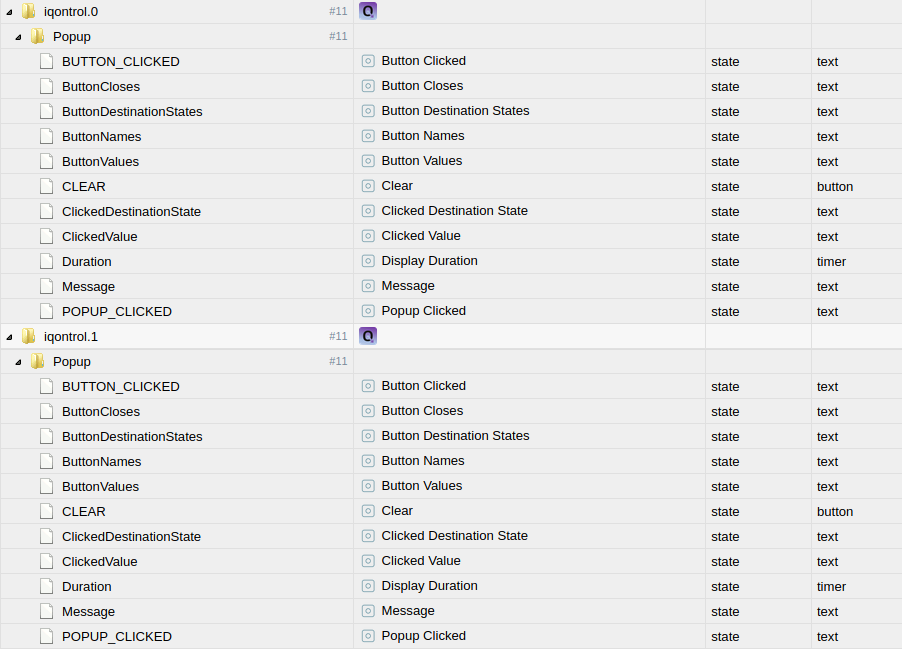
Habe ein paar Ansichten erstellt und musste feststellen, dass keine Objekte gespeichert werden!? Die Anzeigen funktionieren aber soweit...
Anbei screenshot von Objekte...
Habe schon den Fixer laufen lassen, ohne Erfolg!
Auch kommt immer ein Popup bei speichern von neuen Einstellungen, egal von wo ich speichere, Ansichten, Geräte usw...
Wer hat eine Lösung?
Ansonsten: @s-bormann : Gute Arbeit! Weiter so...
Gruss
Onno

Support us
611
Online32.4k
Users81.5k
Topics1.3m
Posts