



Skip to content
  • Home
  • Recent
  • Tags
  • 0 Unread 0
  • Categories
  • Unreplied
  • Popular
  • GitHub
  • Docu
  • Hilfe
Skins
  • Light
  • Brite
  • Cerulean
  • Cosmo
  • Flatly
  • Journal
  • Litera
  • Lumen
  • Lux
  • Materia
  • Minty
  • Morph
  • Pulse
  • Sandstone
  • Simplex
  • Sketchy
  • Spacelab
  • United
  • Yeti
  • Zephyr
  • Dark
  • Cyborg
  • Darkly
  • Quartz
  • Slate
  • Solar
  • Superhero
  • Vapor

  • Default (No Skin)
  • No Skin
Collapse
ioBroker Logo

Community Forum

donate donate
  1. ioBroker Community Home
  2. Deutsch
  3. ioBroker Allgemein
  4. Und wieder einmal Harmony... Firmware 4.15.250...

NEWS

  • Monatsrückblick Januar/Februar 2026 ist online!
    BluefoxB
    Bluefox
    17
    1
    408

  • Jahresrückblick 2025 – unser neuer Blogbeitrag ist online! ✨
    BluefoxB
    Bluefox
    17
    1
    5.0k

  • Neuer Blogbeitrag: Monatsrückblick - Dezember 2025 🎄
    BluefoxB
    Bluefox
    13
    1
    1.4k

Und wieder einmal Harmony... Firmware 4.15.250...

Scheduled Pinned Locked Moved ioBroker Allgemein
101 Posts 29 Posters 15.0k Views 30 Watching
  • Oldest to Newest
  • Newest to Oldest
  • Most Votes
Reply
  • Reply as topic
Log in to reply
This topic has been deleted. Only users with topic management privileges can see it.
  • D danw

    @Bertilax Beides 4.15.250, geht leider nicht. App-Version ist auch auf 5.6, wie im Logitech Artikel erwähnt

    //edit: Anderes Handy ging, warum auch immer.

    So gehts mit V1.0.0, sodass die Leerzeichen/Unterstrich Problematik nicht entsteht

    Instanz stoppen
    
    cd /opt/iobroker
    npm install iobroker.harmony@1.0.0 --production
    cd /opt/iobroker/node_modues/iobroker.harmony
    npm install @harmonyhub/client@1.0.6
    cd /opt/iobroker
    iobroker upload harmony
    
    Instanz starten
    

    Credits dafür an @Bertilax und @foxriver76 , wollte nur mal alle Befehle zusammenschreiben

    K Offline
    K Offline
    kukoratsch
    wrote on last edited by
    #65

    @danw said in Und wieder einmal Harmony... Firmware 4.15.250...:

    @Bertilax Beides 4.15.250, geht leider nicht. App-Version ist auch auf 5.6, wie im Logitech Artikel erwähnt
    //edit: Anderes Handy ging, warum auch immer.
    So gehts mit V1.0.0, sodass die Leerzeichen/Unterstrich Problematik nicht entsteht
    Instanz stoppen

    cd /opt/iobroker
    npm install iobroker.harmony@1.0.0 --production
    npm install @harmonyhub/client@1.0.6
    cd /opt/iobroker
    iobroker upload harmony

    Instanz starten

    Credits dafür an @Bertilax und @foxriver76 , wollte nur mal alle Befehle zusammenschreiben

    Habe nach diese Anleitung gemacht. Jetzt Kann ich keine instnz hinzufügen
    log

    $ ./iobroker add harmony --host rock64
    host.rock64 install adapter harmony
    npm install --production (System call) in "/opt/iobroker/node_modules/iobroker.harmony"
    npm
    WARN deprecated gulp-util@3.0.8: gulp-util is deprecated - replace it, following the guidelines at https://medium.com/gulpjs/gulp-util-ca3b1f9f9ac5
    npm
    WARN deprecated node-xmpp-stanza@1.1.1: use @xmpp/xml package https://www.npmjs.com/package/@xmpp/xml
    npm
    WARN deprecated graceful-fs@3.0.11: please upgrade to graceful-fs 4 for compatibility with current and future versions of Node.js
    npm
    WARN deprecated minimatch@2.0.10: Please update to minimatch 3.0.2 or higher to avoid a RegExp DoS issue
    npm
    WARN deprecated minimatch@0.2.14: Please update to minimatch 3.0.2 or higher to avoid a RegExp DoS issue
    npm
    WARN deprecated graceful-fs@1.2.3: please upgrade to graceful-fs 4 for compatibility with current and future versions of Node.js
    npm WARN checkPermissions Missing write access to /opt/iobroker/node_modules/iobroker.harmony
    npm
    ERR! path /opt/iobroker/node_modules/iobroker.harmonynpm ERR! code EACCES

    npm ERR! errno -13npm ERR! syscall access

    npm
    ERR! Error: EACCES: permission denied, access '/opt/iobroker/node_modules/iobroker.harmony'npm ERR! { Error: EACCES: permission denied, access '/opt/iobroker/node_modules/iobroker.harmony'
    npm ERR! stack: 'Error: EACCES: permission denied, access '/opt/iobroker/node_modules/iobroker.harmony'',
    npm ERR! errno: -13,
    npm ERR! code: 'EACCES',
    npm ERR! syscall: 'access',
    npm ERR! path: '/opt/iobroker/node_modules/iobroker.harmony' }

    npm ERR! npm ERR! The operation was rejected by your operating system.
    npm ERR! It is likely you do not have the permissions to access this file as the current user
    npm ERR!
    npm ERR! If you believe this might be a permissions issue, please double-check the
    npm ERR! permissions of the file and its containing directories, or try running
    npm ERR!
    the command again as root/Administrator (though this is not recommended).

    npm ERR! A complete log of this run can be found in:npm ERR! /home/iobroker/.npm/_logs/2019-02-21T18_03_10_633Z-debug.log

    Cannot install iobroker.harmony: 243
    ERROR: process exited with code 25


    kann mir jemand helfen?

    D 1 Reply Last reply
    0
    • T Offline
      T Offline
      Thespeedsurfer
      wrote on last edited by Thespeedsurfer
      #66

      Ich habe das gleiche Problem. Bin auch nach dem Workaround gegangen.
      Wie füge ich eine Instanz zu?

      1 Reply Last reply
      0
      • W Offline
        W Offline
        wizzardking
        wrote on last edited by
        #67

        Ich habe ebenfalls diese Anleitung befolgt und über die Objekte kann ich nun wieder ganz normal ein Kommando senden.

        Leider funktioniert die Steuerung per Script aber nicht mehr. Hat hier einer eine Ahnung, wie ich das beheben kann?

        Log:

        Screenshot_6.png

        Script:
        Screenshot_9.png

        (Mit debug getestet. Das Script läuft gut bis zum Ausführen dieses Befehls, deswegen spare ich es hier das komplette Script zu posten)

        1 Reply Last reply
        0
        • M Offline
          M Offline
          Marty56
          wrote on last edited by
          #68

          @foxriver76
          Es wäre super, wenn Du eine Einschätzung geben würdest, ob und vielleicht auch wann Du einen Update des Adapters machen kannst.
          Diese Downgraderei und Aktivierung des (unsicheren) XMPP Verfahren würde ich gerne vermeiden und wenn ich wüsste, dass es in ein paar Wochen wieder geht, dann würde ich die Fehlfunktion einfach aussitzen.

          HW:NUC (16 GB Ram)
          OS: Debian Bullseye, Promox V7, node v16.x npm 8.19.3

          1 Reply Last reply
          0
          • K kukoratsch

            @danw said in Und wieder einmal Harmony... Firmware 4.15.250...:

            @Bertilax Beides 4.15.250, geht leider nicht. App-Version ist auch auf 5.6, wie im Logitech Artikel erwähnt
            //edit: Anderes Handy ging, warum auch immer.
            So gehts mit V1.0.0, sodass die Leerzeichen/Unterstrich Problematik nicht entsteht
            Instanz stoppen

            cd /opt/iobroker
            npm install iobroker.harmony@1.0.0 --production
            npm install @harmonyhub/client@1.0.6
            cd /opt/iobroker
            iobroker upload harmony

            Instanz starten

            Credits dafür an @Bertilax und @foxriver76 , wollte nur mal alle Befehle zusammenschreiben

            Habe nach diese Anleitung gemacht. Jetzt Kann ich keine instnz hinzufügen
            log

            $ ./iobroker add harmony --host rock64
            host.rock64 install adapter harmony
            npm install --production (System call) in "/opt/iobroker/node_modules/iobroker.harmony"
            npm
            WARN deprecated gulp-util@3.0.8: gulp-util is deprecated - replace it, following the guidelines at https://medium.com/gulpjs/gulp-util-ca3b1f9f9ac5
            npm
            WARN deprecated node-xmpp-stanza@1.1.1: use @xmpp/xml package https://www.npmjs.com/package/@xmpp/xml
            npm
            WARN deprecated graceful-fs@3.0.11: please upgrade to graceful-fs 4 for compatibility with current and future versions of Node.js
            npm
            WARN deprecated minimatch@2.0.10: Please update to minimatch 3.0.2 or higher to avoid a RegExp DoS issue
            npm
            WARN deprecated minimatch@0.2.14: Please update to minimatch 3.0.2 or higher to avoid a RegExp DoS issue
            npm
            WARN deprecated graceful-fs@1.2.3: please upgrade to graceful-fs 4 for compatibility with current and future versions of Node.js
            npm WARN checkPermissions Missing write access to /opt/iobroker/node_modules/iobroker.harmony
            npm
            ERR! path /opt/iobroker/node_modules/iobroker.harmonynpm ERR! code EACCES

            npm ERR! errno -13npm ERR! syscall access

            npm
            ERR! Error: EACCES: permission denied, access '/opt/iobroker/node_modules/iobroker.harmony'npm ERR! { Error: EACCES: permission denied, access '/opt/iobroker/node_modules/iobroker.harmony'
            npm ERR! stack: 'Error: EACCES: permission denied, access '/opt/iobroker/node_modules/iobroker.harmony'',
            npm ERR! errno: -13,
            npm ERR! code: 'EACCES',
            npm ERR! syscall: 'access',
            npm ERR! path: '/opt/iobroker/node_modules/iobroker.harmony' }

            npm ERR! npm ERR! The operation was rejected by your operating system.
            npm ERR! It is likely you do not have the permissions to access this file as the current user
            npm ERR!
            npm ERR! If you believe this might be a permissions issue, please double-check the
            npm ERR! permissions of the file and its containing directories, or try running
            npm ERR!
            the command again as root/Administrator (though this is not recommended).

            npm ERR! A complete log of this run can be found in:npm ERR! /home/iobroker/.npm/_logs/2019-02-21T18_03_10_633Z-debug.log

            Cannot install iobroker.harmony: 243
            ERROR: process exited with code 25


            kann mir jemand helfen?

            D Offline
            D Offline
            danw
            wrote on last edited by
            #69

            @kukoratsch Vorher mit "sudo su -" zum root machen.
            @wizzardking Nur eine Warnung, sollte, wenn die neue Version wieder kommt, automatisch verschwinden.

            It's not a Bug, it's a Feature

            1 Reply Last reply
            0
            • C Offline
              C Offline
              csamaggi
              wrote on last edited by
              #70

              Ist zwar schade das der Adapter derzeit in der Version 1.0 nicht läuft aber ich denke Foxriver wird so schnell er kann ein Update bringen.

              @Marty56 Ohne das öffnen der XMPP auf deinem Hub wird es garnicht gehen dass misst du schon machen sonst läuft auch die neue Adapterversion nicht die Foxriver mal bringen wird.

              MFG Maggi

              D M 2 Replies Last reply
              0
              • C csamaggi

                Ist zwar schade das der Adapter derzeit in der Version 1.0 nicht läuft aber ich denke Foxriver wird so schnell er kann ein Update bringen.

                @Marty56 Ohne das öffnen der XMPP auf deinem Hub wird es garnicht gehen dass misst du schon machen sonst läuft auch die neue Adapterversion nicht die Foxriver mal bringen wird.

                MFG Maggi

                D Offline
                D Offline
                danw
                wrote on last edited by
                #71

                @csamaggi Es läuft in 1.0. Siehe Workaround oben.

                It's not a Bug, it's a Feature

                1 Reply Last reply
                0
                • ? Offline
                  ? Offline
                  A Former User
                  wrote on last edited by A Former User
                  #72

                  Ich kann es auch nochmal bestätigen, das bei mir der Workaround mit sämtlichen Scripten und Szenen seit 2 Tagen läuft...ich erkenne auch keine Nachteile.

                  @wizzardking, die WarnMeldungen sind normal...die habe ich auch.
                  Einfach mal den Befehl im script neu anlegen....würde ich sagen.
                  ...und umschalten mit dem Befehl ist auch komisch.

                  Vielleicht wäre es so besser...das betrifft aber die Lautstärke vom AVR.
                  Nur ein Beispiel...

                  on({id: "system.adapter.javascript.0.AVR.AVR:LEISER"/*AVR:LEISER*/, change: "any"}, function (obj) {
                    var value = obj.state.val;
                    var oldValue = obj.oldState.val;
                    if (getState("system.adapter.javascript.0.AVR.AVR:LEISER").val === true) {
                      for (var count = 0; count < 6; count++) {
                        setState("harmony.0.Harmony_Hub.AVR.VolumeDown"/*AVR:VolumeDown*/, true);
                      }
                    }
                  });
                  
                  1 Reply Last reply
                  0
                  • K Kuddel

                    @Menne

                    Struktur unter Adapter Version 0.9.3:

                    harmony.0.Harmony Hub
                    

                    Struktur unter Adapter Version 1.x.x

                    harmony.0.Harmony_Hub
                    

                    In meinen Skript ist überall "Harmony_Hub" eingebaut.

                    Somit muss ich einfach nur den Wert Syncen:

                    1. neues Datenobjekt anlegen
                      -> harmony.0.Harmony_Hub.activities.currentActivity
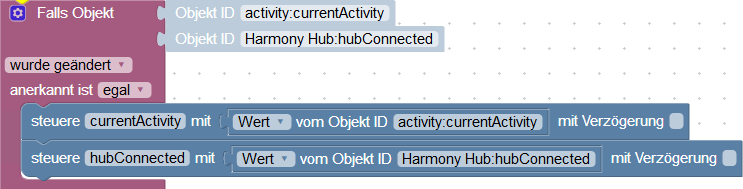
                    HarmonyHubSync.PNG

                    D Offline
                    D Offline
                    davincino
                    wrote on last edited by
                    #73

                    @Kuddel
                    Noch einfacher sind solche Dinge mit dem Blockly "Binde"-Elemente unter dem Menü "System".

                    1 Reply Last reply
                    0
                    • J Offline
                      J Offline
                      jupzup
                      wrote on last edited by
                      #74

                      Auf github gibt es nun auch ein Adapter Update von foxriver76 in der Version 1.2.1.

                      1 Reply Last reply
                      0
                      • JohGreJ Offline
                        JohGreJ Offline
                        JohGre
                        wrote on last edited by
                        #75

                        Und die neue Adapterversion funktioniert bei mir.
                        DANKE :wave:

                        nuc i5: RaspberryMatic, ioBroker, pi-hole, SQL-Server, OMV-NAS, Influx-DB & Grafana, OpenHab, tasmoadmin

                        1 Reply Last reply
                        0
                        • C csamaggi

                          Ist zwar schade das der Adapter derzeit in der Version 1.0 nicht läuft aber ich denke Foxriver wird so schnell er kann ein Update bringen.

                          @Marty56 Ohne das öffnen der XMPP auf deinem Hub wird es garnicht gehen dass misst du schon machen sonst läuft auch die neue Adapterversion nicht die Foxriver mal bringen wird.

                          MFG Maggi

                          M Offline
                          M Offline
                          Marty56
                          wrote on last edited by
                          #76

                          @csamaggi
                          Die neue Version funktioniert ohne das Freischalten von XMPP.
                          @foxriver76
                          Danke für die super schnelle Reaktion!!

                          HW:NUC (16 GB Ram)
                          OS: Debian Bullseye, Promox V7, node v16.x npm 8.19.3

                          1 Reply Last reply
                          0
                          • SRo769S Offline
                            SRo769S Offline
                            SRo769
                            wrote on last edited by
                            #77

                            hatte vorher kurzzeitig die 1.0-Variante installiert und wollte updaten. Der Vorgang wurde leider mit einer Fehlermeldung beendet. Hab dann mal im iobroker-Ordner nach den Berechtigungen geschaut. Dort war der Harmony-Adapter mit Root eingetragen - hab ihn da gelöscht und einfach im iobroker neu installiert. Das hat geklappt. Die Verbindung zum Hub ist auch sofort da. Perfekt, auch von mir ein großes Danke!

                            M 1 Reply Last reply
                            0
                            • R Offline
                              R Offline
                              Reese1
                              wrote on last edited by
                              #78

                              super, läuft wieder alles bestens, danke foxriver76 :relaxed: :relaxed: :relaxed: :relaxed:

                              1 Reply Last reply
                              0
                              • SRo769S SRo769

                                hatte vorher kurzzeitig die 1.0-Variante installiert und wollte updaten. Der Vorgang wurde leider mit einer Fehlermeldung beendet. Hab dann mal im iobroker-Ordner nach den Berechtigungen geschaut. Dort war der Harmony-Adapter mit Root eingetragen - hab ihn da gelöscht und einfach im iobroker neu installiert. Das hat geklappt. Die Verbindung zum Hub ist auch sofort da. Perfekt, auch von mir ein großes Danke!

                                M Offline
                                M Offline
                                Master77
                                wrote on last edited by
                                #79

                                @SRo769 sagte in Und wieder einmal Harmony... Firmware 4.15.250...:

                                hatte vorher kurzzeitig die 1.0-Variante installiert und wollte updaten. Der Vorgang wurde leider mit einer Fehlermeldung beendet. Hab dann mal im iobroker-Ordner nach den Berechtigungen geschaut. Dort war der Harmony-Adapter mit Root eingetragen - hab ihn da gelöscht und einfach im iobroker neu installiert. Das hat geklappt. Die Verbindung zum Hub ist auch sofort da. Perfekt, auch von mir ein großes Danke!

                                Hallo.
                                War ebenfalls kurzfristig auf der Version 1.0 und habe ebenfalls die besagte Fehlermeldung beim Versuch das Update durchzuführen. Kannst du mir sagen wo ich genau was machen muss damit ich das Update durchführen kann. Die Instanz könnte ich löschen aber nicht den Adapter. Danke im voraus für die Hilfe.

                                Gruß Markus

                                SRo769S 1 Reply Last reply
                                0
                                • M Master77

                                  @SRo769 sagte in Und wieder einmal Harmony... Firmware 4.15.250...:

                                  hatte vorher kurzzeitig die 1.0-Variante installiert und wollte updaten. Der Vorgang wurde leider mit einer Fehlermeldung beendet. Hab dann mal im iobroker-Ordner nach den Berechtigungen geschaut. Dort war der Harmony-Adapter mit Root eingetragen - hab ihn da gelöscht und einfach im iobroker neu installiert. Das hat geklappt. Die Verbindung zum Hub ist auch sofort da. Perfekt, auch von mir ein großes Danke!

                                  Hallo.
                                  War ebenfalls kurzfristig auf der Version 1.0 und habe ebenfalls die besagte Fehlermeldung beim Versuch das Update durchzuführen. Kannst du mir sagen wo ich genau was machen muss damit ich das Update durchführen kann. Die Instanz könnte ich löschen aber nicht den Adapter. Danke im voraus für die Hilfe.

                                  Gruß Markus

                                  SRo769S Offline
                                  SRo769S Offline
                                  SRo769
                                  wrote on last edited by
                                  #80

                                  @Master77

                                  ja, im Ordner /opt/iobroker/node_modules/ den Ordner harmony... einfach löschen und dann im iobroker die V1.2.1 installieren.

                                  Grüße SRo769

                                  M 1 Reply Last reply
                                  0
                                  • Dr. BakteriusD Offline
                                    Dr. BakteriusD Offline
                                    Dr. Bakterius
                                    Most Active
                                    wrote on last edited by
                                    #81

                                    Auch von meiner Seite vielen Dank an @foxriver76! :+1:

                                    1.2.1 funktioniert ohne XMPP wieder bestens (bis Logitech wieder herum pfuscht). Ich musste auch keine Ordner löschen, einfach über 1.0.0 installiert.

                                    1 Reply Last reply
                                    0
                                    • M Offline
                                      M Offline
                                      miwe
                                      wrote on last edited by miwe
                                      #82

                                      Moin,

                                      ich kann das UPDATE leider nicht installieren.

                                      $ ./iobroker upgrade harmony
                                      Update harmony from @1.0.0 to @1.2.1
                                      NPM version: 6.4.1
                                      npm install iobroker.harmony@1.2.1 --production --save --prefix "/opt/iobroker" (System call)
                                      npm
                                       WARN checkPermissions Missing write access to /opt/iobroker/node_modules/iobroker.harmony
                                      npm 
                                      WARN babel-eslint@5.0.4 requires a peer of eslint@<2.3.0 but none is installed. You must install peer dependencies yourself.
                                      
                                      npm 
                                      ERR! path /opt/iobroker/node_modules/iobroker.harmonynpm ERR! code EACCES
                                      
                                      npm ERR! errno -13npm
                                       ERR! syscall access
                                      npm ERR! Error: EACCES: permission denied, access '/opt/iobroker/node_modules/iobroker.harmony'npm ERR!  { Error: EACCES: permission denied, access '/opt/iobroker/node_modules/iobroker.harmony'
                                      npm ERR!   stack: 'Error: EACCES: permission denied, access \'/opt/iobroker/node_modules/iobroker.harmony\'',
                                      npm ERR!   errno: -13,
                                      npm ERR!   code: 'EACCES',
                                      npm ERR!   syscall: 'access',
                                      npm ERR!   path: '/opt/iobroker/node_modules/iobroker.harmony' }
                                      npm ERR! 
                                      npm ERR! The operation was rejected by your operating system.
                                      npm ERR! It is likely you do not have the permissions to access this file as the current user
                                      npm ERR! 
                                      npm ERR! If you believe this might be a permissions issue, please double-check the
                                      npm ERR! permissions of the file and its containing directories, or try running
                                      npm ERR! the command again as root/Administrator (though this is not recommended).
                                      
                                      
                                      npm ERR! A complete log of this run can be found in:npm ERR!     /home/iobroker/.npm/_logs/2019-02-23T11_31_13_888Z-debug.log
                                      
                                      ERROR: host.iobroker Cannot install iobroker.harmony@1.2.1: 243
                                      ERROR: process exited with code 25
                                      

                                      Wie bekomme ich das hingebogen? Offenbar ein Benutzerrechteproblem? Ich will lieber hier fragen bevor ich irgendwelchen Mist baue und gar nichts mhr läuft.
                                      UPDATE: In der Konsole mit "Su" gehts. Wie bekomme ich es hin dass es wieder über die WEBGUI geht?

                                      Danke

                                      HomoranH 1 Reply Last reply
                                      0
                                      • M miwe

                                        Moin,

                                        ich kann das UPDATE leider nicht installieren.

                                        $ ./iobroker upgrade harmony
                                        Update harmony from @1.0.0 to @1.2.1
                                        NPM version: 6.4.1
                                        npm install iobroker.harmony@1.2.1 --production --save --prefix "/opt/iobroker" (System call)
                                        npm
                                         WARN checkPermissions Missing write access to /opt/iobroker/node_modules/iobroker.harmony
                                        npm 
                                        WARN babel-eslint@5.0.4 requires a peer of eslint@<2.3.0 but none is installed. You must install peer dependencies yourself.
                                        
                                        npm 
                                        ERR! path /opt/iobroker/node_modules/iobroker.harmonynpm ERR! code EACCES
                                        
                                        npm ERR! errno -13npm
                                         ERR! syscall access
                                        npm ERR! Error: EACCES: permission denied, access '/opt/iobroker/node_modules/iobroker.harmony'npm ERR!  { Error: EACCES: permission denied, access '/opt/iobroker/node_modules/iobroker.harmony'
                                        npm ERR!   stack: 'Error: EACCES: permission denied, access \'/opt/iobroker/node_modules/iobroker.harmony\'',
                                        npm ERR!   errno: -13,
                                        npm ERR!   code: 'EACCES',
                                        npm ERR!   syscall: 'access',
                                        npm ERR!   path: '/opt/iobroker/node_modules/iobroker.harmony' }
                                        npm ERR! 
                                        npm ERR! The operation was rejected by your operating system.
                                        npm ERR! It is likely you do not have the permissions to access this file as the current user
                                        npm ERR! 
                                        npm ERR! If you believe this might be a permissions issue, please double-check the
                                        npm ERR! permissions of the file and its containing directories, or try running
                                        npm ERR! the command again as root/Administrator (though this is not recommended).
                                        
                                        
                                        npm ERR! A complete log of this run can be found in:npm ERR!     /home/iobroker/.npm/_logs/2019-02-23T11_31_13_888Z-debug.log
                                        
                                        ERROR: host.iobroker Cannot install iobroker.harmony@1.2.1: 243
                                        ERROR: process exited with code 25
                                        

                                        Wie bekomme ich das hingebogen? Offenbar ein Benutzerrechteproblem? Ich will lieber hier fragen bevor ich irgendwelchen Mist baue und gar nichts mhr läuft.
                                        UPDATE: In der Konsole mit "Su" gehts. Wie bekomme ich es hin dass es wieder über die WEBGUI geht?

                                        Danke

                                        HomoranH Do not disturb
                                        HomoranH Do not disturb
                                        Homoran
                                        Global Moderator Administrators
                                        wrote on last edited by
                                        #83

                                        @miwe
                                        Wann und wie hast du IoBroker installiert.

                                        Ggf. Bist du ein Kandidat für den Fixer

                                        kein Support per PN! - Fragen im Forum stellen -
                                        Benutzt das Voting rechts unten im Beitrag wenn er euch geholfen hat.
                                        Das Forum freut sich über eine Spende. Benutzt dazu den Spendenbutton im Header. Danke!
                                        der Installationsfixer: curl -fsL https://iobroker.net/fix.sh | bash -

                                        M 1 Reply Last reply
                                        0
                                        • HomoranH Homoran

                                          @miwe
                                          Wann und wie hast du IoBroker installiert.

                                          Ggf. Bist du ein Kandidat für den Fixer

                                          M Offline
                                          M Offline
                                          miwe
                                          wrote on last edited by
                                          #84

                                          @Homoran

                                          Moin!

                                          IOBROKER läuft hier auf Proxmox. Wie ich es installiert habe kann ich Dir nicht mehr sagen :) Ich habe irgendne Anleitung im Internet bemüht.
                                          Installiert vor 2 bis 3 Monaten?
                                          Wie gesagt - in der Konsole unter "su" gehts - aus der GUI nicht. Ich tippe auf ein Benutzerrechteproblem.

                                          D HomoranH 2 Replies Last reply
                                          0
                                          Reply
                                          • Reply as topic
                                          Log in to reply
                                          • Oldest to Newest
                                          • Newest to Oldest
                                          • Most Votes


                                          Support us

                                          ioBroker
                                          Community Adapters
                                          Donate
                                          FAQ Cloud / IOT
                                          HowTo: Node.js-Update
                                          HowTo: Backup/Restore
                                          Downloads
                                          BLOG

                                          520

                                          Online

                                          32.7k

                                          Users

                                          82.5k

                                          Topics

                                          1.3m

                                          Posts
                                          Community
                                          Impressum | Datenschutz-Bestimmungen | Nutzungsbedingungen | Einwilligungseinstellungen
                                          ioBroker Community 2014-2025
                                          logo
                                          • Login

                                          • Don't have an account? Register

                                          • Login or register to search.
                                          • First post
                                            Last post
                                          0
                                          • Home
                                          • Recent
                                          • Tags
                                          • Unread 0
                                          • Categories
                                          • Unreplied
                                          • Popular
                                          • GitHub
                                          • Docu
                                          • Hilfe


