Skip to content
  • Home
  • Recent
  • Tags
  • 0 Unread 0
  • Categories
  • Unreplied
  • Popular
  • GitHub
  • Docu
  • Hilfe
Skins
  • Light
  • Brite
  • Cerulean
  • Cosmo
  • Flatly
  • Journal
  • Litera
  • Lumen
  • Lux
  • Materia
  • Minty
  • Morph
  • Pulse
  • Sandstone
  • Simplex
  • Sketchy
  • Spacelab
  • United
  • Yeti
  • Zephyr
  • Dark
  • Cyborg
  • Darkly
  • Quartz
  • Slate
  • Solar
  • Superhero
  • Vapor

  • Default (No Skin)
  • No Skin
Collapse
ioBroker Logo

Community Forum

donate donate
  1. ioBroker Community Home
  2. Deutsch
  3. ioBroker Allgemein
  4. Adapter: iobroker.backitup (stable Release)

NEWS

  • Monatsrückblick Januar/Februar 2026 ist online!
    BluefoxB
    Bluefox
    16
    1
    244

  • Jahresrückblick 2025 – unser neuer Blogbeitrag ist online! ✨
    BluefoxB
    Bluefox
    17
    1
    4.5k

  • Neuer Blogbeitrag: Monatsrückblick - Dezember 2025 🎄
    BluefoxB
    Bluefox
    13
    1
    1.3k

Adapter: iobroker.backitup (stable Release)

Scheduled Pinned Locked Moved ioBroker Allgemein
adapterbackitupiobroker backupbackupiobroker.backitup
2.3k Posts 185 Posters 1.2m Views 50 Watching
  • Oldest to Newest
  • Newest to Oldest
  • Most Votes
Reply
  • Reply as topic
Log in to reply
This topic has been deleted. Only users with topic management privileges can see it.
  • SegwayS Offline
    SegwayS Offline
    Segway
    wrote on last edited by
    #1784

    auch beim Downgrade gleiches Bild. Hier mal was da alles kam beim install

    Update backitup from @1.1.1 to @1.0.9
    NPM version: 6.4.1
    npm install iobroker.backitup@1.0.9 --production --save --prefix "/opt/iobroker" (System call)
    gyp WARN EACCES user "root" does not have permission to access the dev dir "/root/.node-gyp/8.15.0"
    gyp WARN EACCES attempting to reinstall using temporary dev dir "/opt/iobroker/node_modules/epoll/.node-gyp"
    gyp WARN install got an error, rolling back install
    gyp WARN install got an error, rolling back install
    gyp ERR! configure error
    gyp ERR! stack Error: EACCES: permission denied, mkdir '/opt/iobroker/node_modules/epoll/.node-gyp'
    gyp ERR! System Linux 4.9.0-8-amd64
    gyp ERR! command "/usr/bin/node" "/usr/lib/node_modules/npm/node_modules/node-gyp/bin/node-gyp.js" "rebuild"
    gyp ERR! cwd /opt/iobroker/node_modules/epoll
    gyp ERR! node -v v8.15.0
    gyp ERR! node-gyp -v v3.8.0
    gyp ERR! not ok
    gyp WARN EACCES user "root" does not have permission to access the dev dir "/root/.node-gyp/8.15.0"
    gyp WARN EACCES attempting to reinstall using temporary dev dir "/opt/iobroker/node_modules/unix-dgram/.node-gyp"
    gyp WARN install got an error, rolling back install
    gyp WARN install got an error, rolling back install
    gyp ERR! configure error
    gyp ERR! stack Error: EACCES: permission denied, mkdir '/opt/iobroker/node_modules/unix-dgram/.node-gyp'
    gyp ERR! System Linux 4.9.0-8-amd64
    gyp ERR! command "/usr/bin/node" "/usr/lib/node_modules/npm/node_modules/node-gyp/bin/node-gyp.js" "rebuild"
    gyp ERR! cwd /opt/iobroker/node_modules/unix-dgram
    gyp ERR! node -v v8.15.0
    gyp ERR! node-gyp -v v3.8.0
    gyp ERR! not ok
    node-pre-gyp WARN Using request for node-pre-gyp https download
    node-pre-gyp WARN Tried to download(404): https://github.com/tessel/node-usb/releases/download/1.5.0/usb_bindings-v1.5.0-node-v57-linux-x64.tar.gz
    node-pre-gyp WARN Pre-built binaries not found for usb@1.5.0 and node@8.15.0 (node-v57 ABI, glibc) (falling back to source compile with node-gyp)
    gyp WARN EACCES user "root" does not have permission to access the dev dir "/root/.node-gyp/8.15.0"
    gyp WARN EACCES attempting to reinstall using temporary dev dir "/opt/iobroker/node_modules/usb/.node-gyp"
    gyp WARN install got an error, rolling back install
    gyp WARN install got an error, rolling back install
    gyp ERR! configure error
    gyp ERR! stack Error: EACCES: permission denied, mkdir '/opt/iobroker/node_modules/usb/.node-gyp'
    gyp ERR! System Linux 4.9.0-8-amd64
    gyp ERR! command "/usr/bin/node" "/usr/lib/node_modules/npm/node_modules/node-gyp/bin/node-gyp.js" "configure" "--fallback-to-build" "--module=/opt/iobroker/node_modules/usb/src/binding/usb_bindings.node" "--module_name=usb_bindings" "--module_path=/opt/iobroker/node_modules/usb/src/binding" "--napi_version=3" "--node_abi_napi=napi" "--napi_build_version=0" "--node_napi_label=node-v57"
    gyp ERR! cwd /opt/iobroker/node_modules/usb
    gyp ERR! node -v v8.15.0
    gyp ERR! node-gyp -v v3.8.0
    gyp ERR! not ok
    node-pre-gyp ERR! build error
    node-pre-gyp ERR! stack Error: Failed to execute '/usr/bin/node /usr/lib/node_modules/npm/node_modules/node-gyp/bin/node-gyp.js configure --fallback-to-build --module=/opt/iobroker/node_modules/usb/src/binding/usb_bindings.node --module_name=usb_bindings --module_path=/opt/iobroker/node_modules/usb/src/binding --napi_version=3 --node_abi_napi=napi --napi_build_version=0 --node_napi_label=node-v57' (1)
    node-pre-gyp ERR! stack at ChildProcess.<anonymous> (/opt/iobroker/node_modules/usb/node_modules/node-pre-gyp/lib/util/compile.js:83:29)
    node-pre-gyp ERR! stack at emitTwo (events.js:126:13)
    node-pre-gyp ERR! stack at ChildProcess.emit (events.js:214:7)
    node-pre-gyp ERR! stack at maybeClose (internal/child_process.js:915:16)
    node-pre-gyp ERR! stack at Process.ChildProcess._handle.onexit (internal/child_process.js:209:5)
    node-pre-gyp ERR! System Linux 4.9.0-8-amd64
    node-pre-gyp ERR! command "/usr/bin/node" "/opt/iobroker/node_modules/usb/node_modules/.bin/node-pre-gyp" "install" "--fallback-to-build"
    node-pre-gyp ERR! cwd /opt/iobroker/node_modules/usb
    node-pre-gyp ERR! node -v v8.15.0
    node-pre-gyp ERR! node-pre-gyp -v v0.11.0
    node-pre-gyp ERR! not ok
    gyp WARN EACCES user "root" does not have permission to access the dev dir "/root/.node-gyp/8.15.0"
    gyp WARN EACCES attempting to reinstall using temporary dev dir "/opt/iobroker/node_modules/bluetooth-hci-socket/.node-gyp"
    gyp WARN install got an error, rolling back install
    gyp WARN install got an error, rolling back install
    gyp ERR! configure error
    gyp ERR! stack Error: EACCES: permission denied, mkdir '/opt/iobroker/node_modules/bluetooth-hci-socket/.node-gyp'
    gyp ERR! System Linux 4.9.0-8-amd64
    gyp ERR! command "/usr/bin/node" "/usr/lib/node_modules/npm/node_modules/node-gyp/bin/node-gyp.js" "rebuild"
    gyp ERR! cwd /opt/iobroker/node_modules/bluetooth-hci-socket
    gyp ERR! node -v v8.15.0
    gyp ERR! node-gyp -v v3.8.0
    gyp ERR! not ok
    npm WARN optional SKIPPING OPTIONAL DEPENDENCY: xpc-connection@0.1.4 (node_modules/xpc-connection):
    npm WARN notsup SKIPPING OPTIONAL DEPENDENCY: Unsupported platform for xpc-connection@0.1.4: wanted {"os":"darwin","arch":"any"} (current: {"os":"linux","arch":"x64"})
    npm WARN optional SKIPPING OPTIONAL DEPENDENCY: epoll@0.1.22 (node_modules/epoll):
    npm WARN optional SKIPPING OPTIONAL DEPENDENCY: epoll@0.1.22 install: node-gyp rebuild
    npm WARN optional SKIPPING OPTIONAL DEPENDENCY: Exit status 1
    npm WARN optional SKIPPING OPTIONAL DEPENDENCY: unix-dgram@0.2.3 (node_modules/unix-dgram):
    npm WARN optional SKIPPING OPTIONAL DEPENDENCY: unix-dgram@0.2.3 install: node-gyp rebuild
    npm WARN optional SKIPPING OPTIONAL DEPENDENCY: Exit status 1
    npm WARN optional SKIPPING OPTIONAL DEPENDENCY: usb@1.5.0 (node_modules/usb):
    npm WARN optional SKIPPING OPTIONAL DEPENDENCY: usb@1.5.0 install: node-pre-gyp install --fallback-to-build
    npm WARN optional SKIPPING OPTIONAL DEPENDENCY: Exit status 1
    npm WARN optional SKIPPING OPTIONAL DEPENDENCY: bluetooth-hci-socket@0.5.1 (node_modules/bluetooth-hci-socket):
    npm WARN optional SKIPPING OPTIONAL DEPENDENCY: bluetooth-hci-socket@0.5.1 install: node-gyp rebuild
    npm WARN optional SKIPPING OPTIONAL DEPENDENCY: Exit status 1

    npm install --production (System call) in "/opt/iobroker/node_modules/iobroker.backitup"
    npm WARN deprecated gulp-util@3.0.8: gulp-util is deprecated - replace it, following the guidelines at https://medium.com/gulpjs/gulp-util-ca3b1f9f9ac5
    npm WARN deprecated graceful-fs@3.0.11: please upgrade to graceful-fs 4 for compatibility with current and future versions of Node.js
    npm WARN deprecated minimatch@2.0.10: Please update to minimatch 3.0.2 or higher to avoid a RegExp DoS issue
    npm WARN deprecated minimatch@0.2.14: Please update to minimatch 3.0.2 or higher to avoid a RegExp DoS issue
    npm WARN deprecated graceful-fs@1.2.3: please upgrade to graceful-fs 4 for compatibility with current and future versions of Node.js
    npm notice created a lockfile as package-lock.json. You should commit this file.
    got /opt/iobroker/node_modules/iobroker.backitup/admin
    upload [3] backitup.admin /opt/iobroker/node_modules/iobroker.backitup/admin/words.js words.js application/javascript
    Update "system.adapter.backitup.0"
    upload [2] backitup.admin /opt/iobroker/node_modules/iobroker.backitup/admin/index_m.html index_m.html text/html
    upload [1] backitup.admin /opt/iobroker/node_modules/iobroker.backitup/admin/index.html index.html text/html
    upload [0] backitup.admin /opt/iobroker/node_modules/iobroker.backitup/admin/backitup.png backitup.png image/png
    Adapter "backitup" updated

    Gruß Dirk
    Intel Proxmox Cluster (3x NUC) mit Debian & Proxmox / IoB als VM unter Debian / 60+ Adapter installiert

    1 Reply Last reply
    0
    • simatecS Online
      simatecS Online
      simatec
      Developer Most Active
      wrote on last edited by
      #1785

      Dein Problem liegt definitiv nicht an backitup.
      Hast du js-controller 1.5.7 laufen?

      Dein System hat ein Problem.

      • Besuche meine Github Seite
      • Beitrag hat geholfen oder willst du mich unterstützen
      • HowTo Restore ioBroker
      SegwayS 1 Reply Last reply
      0
      • simatecS simatec

        Dein Problem liegt definitiv nicht an backitup.
        Hast du js-controller 1.5.7 laufen?

        Dein System hat ein Problem.

        SegwayS Offline
        SegwayS Offline
        Segway
        wrote on last edited by
        #1786

        @simatec

        jscontroller 1.4.2
        BEVOR ich das update gemacht hatte lief hier alles ohne ERROR in den Logs.

        Gruß Dirk
        Intel Proxmox Cluster (3x NUC) mit Debian & Proxmox / IoB als VM unter Debian / 60+ Adapter installiert

        1 Reply Last reply
        0
        • simatecS Online
          simatecS Online
          simatec
          Developer Most Active
          wrote on last edited by
          #1787

          Starte mal komplett neu und mache das Update erneut.

          • Besuche meine Github Seite
          • Beitrag hat geholfen oder willst du mich unterstützen
          • HowTo Restore ioBroker
          SegwayS 1 Reply Last reply
          0
          • simatecS simatec

            Starte mal komplett neu und mache das Update erneut.

            SegwayS Offline
            SegwayS Offline
            Segway
            wrote on last edited by
            #1788

            @simatec sagte in Adapter: iobroker.backitup (stable Release):

            Starte mal komplett neu und mache das Update erneut.

            also ich habe downgrade auf 1.0.8 gemacht dann ging es wieder.

            Also dann folgendes gemacht:

            • IoB korrekt gestoppt
            • Host runtergefahren
            • VM runtergefahren
            • wieder gestartet alles OHNE Fehler im LOG
            • auf 1.1.1 upgedatet

            Bisher läufts........das erklär mir mal einer :unamused:

            Gruß Dirk
            Intel Proxmox Cluster (3x NUC) mit Debian & Proxmox / IoB als VM unter Debian / 60+ Adapter installiert

            1 Reply Last reply
            0
            • simatecS Online
              simatecS Online
              simatec
              Developer Most Active
              wrote on last edited by
              #1789

              Da hing irgendwas an deiner IOB Installation.

              • Besuche meine Github Seite
              • Beitrag hat geholfen oder willst du mich unterstützen
              • HowTo Restore ioBroker
              1 Reply Last reply
              0
              • simatecS Online
                simatecS Online
                simatec
                Developer Most Active
                wrote on last edited by
                #1790

                Ab sofort ist die Version 1.1.2 im Github und ab heute Nacht im latest verfügbar.

                1.1.2 (21.02.2019)

                • (simatec) exec Start for iobroker
                • (simatec) Fix umount before Restore

                Hier an dieser Stelle auch noch einmal der Hinweis, dass es für den neuen Installerscript von iobroker jetzt einen Fix gibt, für alle, die Probleme mit der Rechtevergabe haben und dadurch backitup und auch andere Adapter nur eingeschränkt nutzen können.

                1. Wenn euer iobroker System mit dem neuen Installer Script installiert wurde, kann es vorkommen, dass ihr nicht alle Rechte für den neuen User iobroker habt.
                  Dies betrifft dann leider auch backitup, da backitup einige systemrelevante Befehle benutzt.

                  Um das Problem mit fehlenden Rechten zu beheben, gibt es inzwischen einen Fix für den Installerscript von iobroker.
                  Führt bitte folgende Befehle auf eure Iobrokerumgebung in der Konsole aus:

                  curl -sL https://raw.githubusercontent.com/ioBroker/ioBroker/master/fix_installation.sh | bash 
                  sudo reboot
                  
                2. Solltet Ihr eine Fehlermeldung beim erstellen der Redis Datenbank bekommen, prüft bitte, ob euer User iobroker die Rechte hat und ob er in der User-Gruppe Redis vorhanden ist.
                  Wenn dies nicht der Fall ist, könnt ihr das mit folgenden Befehl in der Konsole beheben.

                  sudo usermod -a -G redis iobroker
                  sudo reboot
                  

                  Wenn ihr nicht mit dem Installerscript eure Iobroker Installation aufgesetzt habt und euer User einen anderen Namen hat, bitte in dem Befehl "iobroker" durch euren User ersetzen.

                • Besuche meine Github Seite
                • Beitrag hat geholfen oder willst du mich unterstützen
                • HowTo Restore ioBroker
                AlCalzoneA 1 Reply Last reply
                0
                • simatecS simatec

                  Ab sofort ist die Version 1.1.2 im Github und ab heute Nacht im latest verfügbar.

                  1.1.2 (21.02.2019)

                  • (simatec) exec Start for iobroker
                  • (simatec) Fix umount before Restore

                  Hier an dieser Stelle auch noch einmal der Hinweis, dass es für den neuen Installerscript von iobroker jetzt einen Fix gibt, für alle, die Probleme mit der Rechtevergabe haben und dadurch backitup und auch andere Adapter nur eingeschränkt nutzen können.

                  1. Wenn euer iobroker System mit dem neuen Installer Script installiert wurde, kann es vorkommen, dass ihr nicht alle Rechte für den neuen User iobroker habt.
                    Dies betrifft dann leider auch backitup, da backitup einige systemrelevante Befehle benutzt.

                    Um das Problem mit fehlenden Rechten zu beheben, gibt es inzwischen einen Fix für den Installerscript von iobroker.
                    Führt bitte folgende Befehle auf eure Iobrokerumgebung in der Konsole aus:

                    curl -sL https://raw.githubusercontent.com/ioBroker/ioBroker/master/fix_installation.sh | bash 
                    sudo reboot
                    
                  2. Solltet Ihr eine Fehlermeldung beim erstellen der Redis Datenbank bekommen, prüft bitte, ob euer User iobroker die Rechte hat und ob er in der User-Gruppe Redis vorhanden ist.
                    Wenn dies nicht der Fall ist, könnt ihr das mit folgenden Befehl in der Konsole beheben.

                    sudo usermod -a -G redis iobroker
                    sudo reboot
                    

                    Wenn ihr nicht mit dem Installerscript eure Iobroker Installation aufgesetzt habt und euer User einen anderen Namen hat, bitte in dem Befehl "iobroker" durch euren User ersetzen.

                  AlCalzoneA Offline
                  AlCalzoneA Offline
                  AlCalzone
                  Developer
                  wrote on last edited by
                  #1791

                  @simatec sagte in Adapter: iobroker.backitup (stable Release):

                  Wenn euer iobroker System mit dem neuen Installer Script installiert wurde, kann es vorkommen, dass ihr nicht alle Rechte für den neuen User iobroker habt.

                  Zur Info: Dies sollte nicht die neueste Version von Ende Januar betreffen. Bei ganz alten Installationen, bei denen noch viel mit sudo npm gearbeitet wurde, kann das Fix-Skript auch nötig sein.

                  Warum `sudo` böse ist: https://forum.iobroker.net/post/17109

                  simatecS 1 Reply Last reply
                  0
                  • AlCalzoneA AlCalzone

                    @simatec sagte in Adapter: iobroker.backitup (stable Release):

                    Wenn euer iobroker System mit dem neuen Installer Script installiert wurde, kann es vorkommen, dass ihr nicht alle Rechte für den neuen User iobroker habt.

                    Zur Info: Dies sollte nicht die neueste Version von Ende Januar betreffen. Bei ganz alten Installationen, bei denen noch viel mit sudo npm gearbeitet wurde, kann das Fix-Skript auch nötig sein.

                    simatecS Online
                    simatecS Online
                    simatec
                    Developer Most Active
                    wrote on last edited by
                    #1792

                    @AlCalzone

                    Maximal der Fix, dass der User iobroker der Redis Gruppe hinzugefügt wird sollte mit dem Fix auch die Installationen ab Ende Januar betreffen.
                    Alles andere ist dort bereits im Installerscript gefixt.

                    • Besuche meine Github Seite
                    • Beitrag hat geholfen oder willst du mich unterstützen
                    • HowTo Restore ioBroker
                    1 Reply Last reply
                    0
                    • AlCalzoneA AlCalzone

                      In dem Fall dürfte es reichen, den User zur redis-Gruppe hinzuzufügen
                      sudo usermod -a -G redis iobroker

                      P Offline
                      P Offline
                      pix
                      wrote on last edited by
                      #1793

                      @AlCalzone sagte in Adapter: iobroker.backitup (stable Release):

                      sudo usermod -a -G redis iobroker

                      Gibt es auch einen Befehl für OS X Terminal? Dort existiert usermod nicht.

                      Gruß
                      Pix

                      ioBroker auf Ubuntu in Proxmox (früher Mac mini (bis OS X 10.12.6 Sierra), VIS via iOS; angeschlossen: Homematic CCU2, Homepilot 1, ConBee II, einige Wemos, Sonos, Unifi CK+Protect, Homekit, Homebridge; KEIN blockly! Github-Profil

                      AlCalzoneA 1 Reply Last reply
                      0
                      • P Offline
                        P Offline
                        pix
                        wrote on last edited by
                        #1794

                        Etwa so?

                        sudo chown iobroker:redis FILENAME
                        

                        Aber welche Datei?

                        ioBroker auf Ubuntu in Proxmox (früher Mac mini (bis OS X 10.12.6 Sierra), VIS via iOS; angeschlossen: Homematic CCU2, Homepilot 1, ConBee II, einige Wemos, Sonos, Unifi CK+Protect, Homekit, Homebridge; KEIN blockly! Github-Profil

                        1 Reply Last reply
                        0
                        • simatecS Online
                          simatecS Online
                          simatec
                          Developer Most Active
                          wrote on last edited by
                          #1795

                          Unter Linux sieht das wie folgt aus ...

                          @iobroker-dev:~$ sudo ls /var/lib/redis
                          dump.rdb
                          
                          
                          • Besuche meine Github Seite
                          • Beitrag hat geholfen oder willst du mich unterstützen
                          • HowTo Restore ioBroker
                          1 Reply Last reply
                          0
                          • P pix

                            @AlCalzone sagte in Adapter: iobroker.backitup (stable Release):

                            sudo usermod -a -G redis iobroker

                            Gibt es auch einen Befehl für OS X Terminal? Dort existiert usermod nicht.

                            Gruß
                            Pix

                            AlCalzoneA Offline
                            AlCalzoneA Offline
                            AlCalzone
                            Developer
                            wrote on last edited by
                            #1796

                            @pix sagte in Adapter: iobroker.backitup (stable Release):

                            Gibt es auch einen Befehl für OS X Terminal? Dort existiert usermod nicht.

                            http://lmgtfy.com/?q=osx+add+user+to+group

                            Auf OSX wird ioBroker derzeit noch unter dem Account des Users ausgeführt, der es installiert hat. Im Zweifel muss also der eigene Account zur Redis-Gruppe hinzugefügt werden.

                            Warum `sudo` böse ist: https://forum.iobroker.net/post/17109

                            1 Reply Last reply
                            0
                            • P Offline
                              P Offline
                              pix
                              wrote on last edited by
                              #1797

                              Also kurz zum Nachmachen
                              Terminal Befehle für OS X

                              • Listenpunktredis Datenbank finden
                              mdfind dump.rdb
                              
                              • Den Pfad ohne dump.rdb in den Adapter-Einstellungen unter "Redis Backup" als Pfad eintragen

                              • In das Verzeichnis von dump.rdb wechseln oder Pfad verwenden und den eigenen OS X Benutzernamen der Rechteliste der Redis Datenbank hinzufügen

                              sudo chown osxusername dump.rdb
                              
                              • Dann manuell ein Standard Backup manuell starten und in der Ausgabe müsste sowas erscheinen
                              [DEBUG] [redis] start with {"type":"creator","path":"/Users/pix/"}
                              [DEBUG] [redis] - Packed 66MB so far...
                              [DEBUG] [redis] - Packed 135MB so far...
                              [DEBUG] [redis] - Packed 178MB so far...
                              [DEBUG] [redis] - Packed 218MB so far...
                              [DEBUG] [redis] - Packed 266MB so far...
                              [DEBUG] [redis] - Packed 327MB so far...
                              [DEBUG] [redis] - Packed 377MB so far...
                              [DEBUG] [redis] - Packed 476MB so far...
                              [DEBUG] [redis] - Packed 524MB so far...
                              [DEBUG] [redis] - Packed 577MB so far...
                              

                              Dann klappt's auch wieder mit dem OS X Redis Backup :+1:

                              Gruß
                              Pix

                              ioBroker auf Ubuntu in Proxmox (früher Mac mini (bis OS X 10.12.6 Sierra), VIS via iOS; angeschlossen: Homematic CCU2, Homepilot 1, ConBee II, einige Wemos, Sonos, Unifi CK+Protect, Homekit, Homebridge; KEIN blockly! Github-Profil

                              AlCalzoneA 1 Reply Last reply
                              2
                              • P pix

                                Also kurz zum Nachmachen
                                Terminal Befehle für OS X

                                • Listenpunktredis Datenbank finden
                                mdfind dump.rdb
                                
                                • Den Pfad ohne dump.rdb in den Adapter-Einstellungen unter "Redis Backup" als Pfad eintragen

                                • In das Verzeichnis von dump.rdb wechseln oder Pfad verwenden und den eigenen OS X Benutzernamen der Rechteliste der Redis Datenbank hinzufügen

                                sudo chown osxusername dump.rdb
                                
                                • Dann manuell ein Standard Backup manuell starten und in der Ausgabe müsste sowas erscheinen
                                [DEBUG] [redis] start with {"type":"creator","path":"/Users/pix/"}
                                [DEBUG] [redis] - Packed 66MB so far...
                                [DEBUG] [redis] - Packed 135MB so far...
                                [DEBUG] [redis] - Packed 178MB so far...
                                [DEBUG] [redis] - Packed 218MB so far...
                                [DEBUG] [redis] - Packed 266MB so far...
                                [DEBUG] [redis] - Packed 327MB so far...
                                [DEBUG] [redis] - Packed 377MB so far...
                                [DEBUG] [redis] - Packed 476MB so far...
                                [DEBUG] [redis] - Packed 524MB so far...
                                [DEBUG] [redis] - Packed 577MB so far...
                                

                                Dann klappt's auch wieder mit dem OS X Redis Backup :+1:

                                Gruß
                                Pix

                                AlCalzoneA Offline
                                AlCalzoneA Offline
                                AlCalzone
                                Developer
                                wrote on last edited by
                                #1798

                                @pix sagte in Adapter: iobroker.backitup (stable Release):

                                und den eigenen OS X Benutzernamen der Rechteliste der Redis Datenbank hinzufügen

                                Kann danach redis selbst noch darauf zugreifen?

                                Warum `sudo` böse ist: https://forum.iobroker.net/post/17109

                                1 Reply Last reply
                                0
                                • P Offline
                                  P Offline
                                  pix
                                  wrote on last edited by
                                  #1799

                                  Denke schon. Konsole sagt

                                  1882:M 21 Feb 18:13:37.503 * Background saving started by pid 90133
                                  90133:C 21 Feb 18:13:37.616 * DB saved on disk
                                  1882:M 21 Feb 18:13:37.705 * Background saving terminated with success
                                  

                                  ioBroker auf Ubuntu in Proxmox (früher Mac mini (bis OS X 10.12.6 Sierra), VIS via iOS; angeschlossen: Homematic CCU2, Homepilot 1, ConBee II, einige Wemos, Sonos, Unifi CK+Protect, Homekit, Homebridge; KEIN blockly! Github-Profil

                                  1 Reply Last reply
                                  0
                                  • S Offline
                                    S Offline
                                    Saschag
                                    wrote on last edited by
                                    #1800

                                    Hallo zusammen,

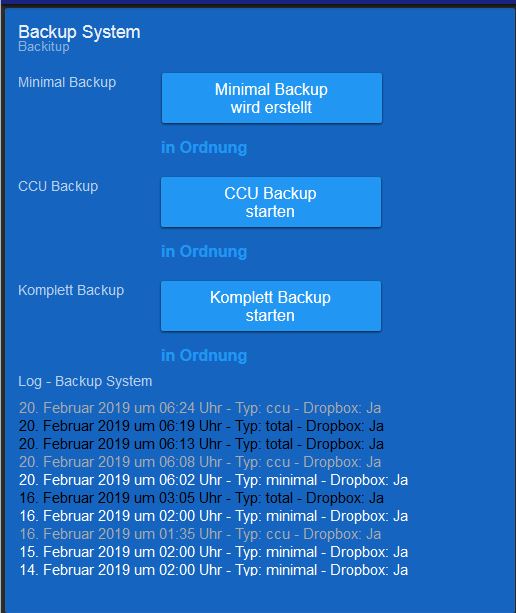
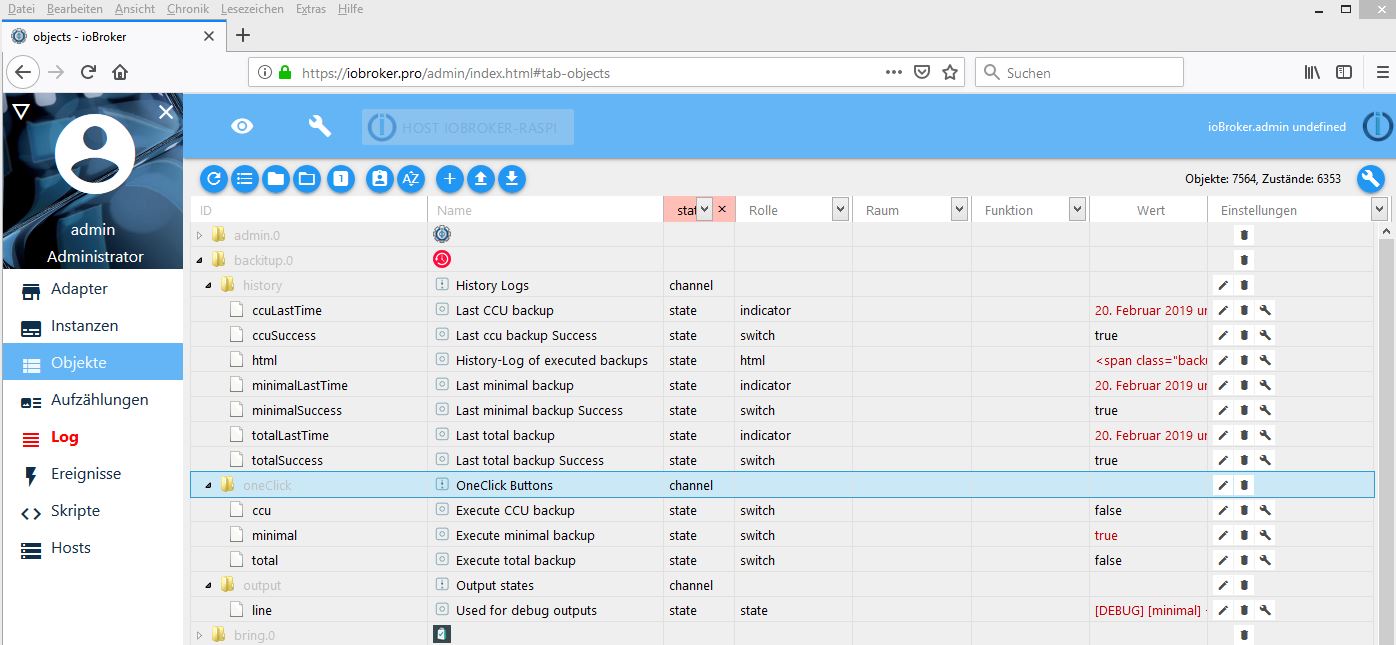
                                    ich habe das Problem das ab und an :white_frowning_face: das Backup (hier z.B. miniaml) nicht beendet wird. Der Datenpunkt oneclick bleibt auf true stehen.

                                    Wenn ich den Butten im Vis drücke (obwohl das Backup gerade erstellt wird wird) wird das Backup ordnungsgemäß gemacht.

                                    Hat einer eine Idee??

                                    Danke und Grüße

                                    [DEBUG] [minimal] - undefined Error: websocket error    at WS.Transport.onError (/opt/iobroker/node_modules/engine.io-client/lib/transport.js:64:13)    at WebSocket.ws.onerror (/opt/iobroker/node_modules/engine.io-client/lib/transports/websocket.js:150:10)    at WebSocket.onError (/opt/iobroker/node_modules/ws/lib/EventTarget.js:109:16)    at emitOne (events.js:116:13)    at WebSocket.emit (events.js:211:7)    at WebSocket.finalize (/opt/iobroker/node_modules/ws/lib/WebSocket.js:182:41)    at emitOne (events.js:116:13)    at Socket.emit (events.js:211:7)    at emitErrorNT (internal/streams/destroy.js:66:8)    at _combinedTickCallback (internal/process/next_tick.js:139:11)
                                    

                                    ![Bild Text]Vis.JPG Admin.JPG (Bild Link)

                                    1 Reply Last reply
                                    0
                                    • simatecS Online
                                      simatecS Online
                                      simatec
                                      Developer Most Active
                                      wrote on last edited by
                                      #1801

                                      Tritt der Fehler sporadisch auf und wenn ja nur beim minimal?

                                      • Besuche meine Github Seite
                                      • Beitrag hat geholfen oder willst du mich unterstützen
                                      • HowTo Restore ioBroker
                                      1 Reply Last reply
                                      0
                                      • S Offline
                                        S Offline
                                        Saschag
                                        wrote on last edited by
                                        #1802

                                        Leider ja. Sporadisch! :white_frowning_face: bis jetzt nur beim minimal

                                        1 Reply Last reply
                                        0
                                        • simatecS Online
                                          simatecS Online
                                          simatec
                                          Developer Most Active
                                          wrote on last edited by
                                          #1803

                                          Poste hier mal bitte den Log, wenn es auftritt.

                                          • Besuche meine Github Seite
                                          • Beitrag hat geholfen oder willst du mich unterstützen
                                          • HowTo Restore ioBroker
                                          1 Reply Last reply
                                          0
                                          Reply
                                          • Reply as topic
                                          Log in to reply
                                          • Oldest to Newest
                                          • Newest to Oldest
                                          • Most Votes


                                          Support us

                                          ioBroker
                                          Community Adapters
                                          Donate
                                          FAQ Cloud / IOT
                                          HowTo: Node.js-Update
                                          HowTo: Backup/Restore
                                          Downloads
                                          BLOG

                                          578

                                          Online

                                          32.7k

                                          Users

                                          82.5k

                                          Topics

                                          1.3m

                                          Posts
                                          Community
                                          Impressum | Datenschutz-Bestimmungen | Nutzungsbedingungen | Einwilligungseinstellungen
                                          ioBroker Community 2014-2025
                                          logo
                                          • Login

                                          • Don't have an account? Register

                                          • Login or register to search.
                                          • First post
                                            Last post
                                          0
                                          • Home
                                          • Recent
                                          • Tags
                                          • Unread 0
                                          • Categories
                                          • Unreplied
                                          • Popular
                                          • GitHub
                                          • Docu
                                          • Hilfe