




iobroker lässt sich nicht mehr starten
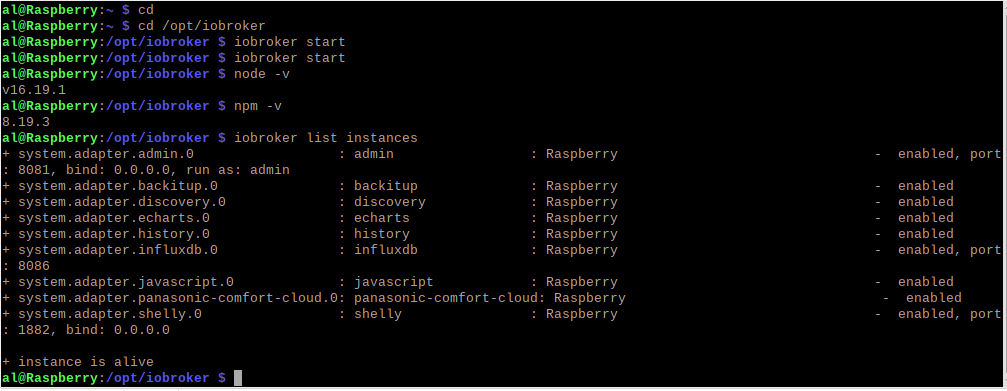
-
@thomas-braun said in iobroker lässt sich nicht mehr starten:
sagt?
Skript v.2023-04-16 *** BASE SYSTEM *** Model : Raspberry Pi 4 Model B Rev 1.5 Architecture : aarch64 Docker : false Virtualization : none Distributor ID: Debian Description: Debian GNU/Linux 11 (bullseye) Release: 11 Codename: bullseye PRETTY_NAME="Debian GNU/Linux 11 (bullseye)" NAME="Debian GNU/Linux" VERSION_ID="11" VERSION="11 (bullseye)" VERSION_CODENAME=bullseye ID=debian HOME_URL="https://www.debian.org/" SUPPORT_URL="https://www.debian.org/support" BUG_REPORT_URL="https://bugs.debian.org/" Systemuptime and Load: 20:02:09 up 4 min, 2 users, load average: 0.35, 0.55, 0.29 CPU threads: 4 Raspberry only: throttled=0x0 Other values than 0x0 hint to temperature/voltage problems temp=44.3'C volt=0.9460V *** Time and Time Zones *** Local time: Sun 2023-04-23 20:02:10 CEST Universal time: Sun 2023-04-23 18:02:10 UTC RTC time: n/a Time zone: Europe/Berlin (CEST, +0200) System clock synchronized: yes NTP service: active RTC in local TZ: no *** User and Groups *** al /home/al al adm dialout cdrom sudo audio video plugdev games users input render netdev lpadmin gpio i2c spi iobroker *** X-Server-Setup *** X-Server: true Desktop: LXDE-pi Terminal: x11 Boot Target: graphical.target *** MEMORY *** total used free shared buff/cache available Mem: 3.8G 908M 2.2G 36M 667M 2.8G Swap: 99M 0B 99M Total: 3.9G 908M 2.3G 3794 M total memory 908 M used memory 127 M active memory 1298 M inactive memory 2218 M free memory 43 M buffer memory 624 M swap cache 99 M total swap 0 M used swap 99 M free swap Raspberry only: oom events: 0 lifetime oom required: 0 Mbytes total time in oom handler: 0 ms max time spent in oom handler: 0 ms *** FILESYSTEM *** Filesystem Type Size Used Avail Use% Mounted on /dev/root ext4 29G 9.4G 19G 34% / devtmpfs devtmpfs 1.7G 0 1.7G 0% /dev tmpfs tmpfs 1.9G 0 1.9G 0% /dev/shm tmpfs tmpfs 759M 1.3M 758M 1% /run tmpfs tmpfs 5.0M 4.0K 5.0M 1% /run/lock /dev/mmcblk0p1 vfat 255M 31M 225M 12% /boot tmpfs tmpfs 380M 20K 380M 1% /run/user/1000 Messages concerning ext4 filesystem in dmesg: [Sun Apr 23 19:57:28 2023] Kernel command line: coherent_pool=1M 8250.nr_uarts=0 snd_bcm2835.enable_compat_alsa=0 snd_bcm2835.enable_hdmi=1 smsc95xx.macaddr=E4:5F:01:FD:FE:39 vc_mem.mem_base=0x3ec00000 vc_mem.mem_size=0x40000000 console=ttyS0,115200 console=tty1 root=PARTUUID=9be8b122-02 rootfstype=ext4 fsck.repair=yes rootwait quiet splash plymouth.ignore-serial-consoles [Sun Apr 23 19:57:29 2023] EXT4-fs (mmcblk0p2): mounted filesystem with ordered data mode. Opts: (null). Quota mode: none. [Sun Apr 23 19:57:29 2023] VFS: Mounted root (ext4 filesystem) readonly on device 179:2. [Sun Apr 23 19:57:31 2023] EXT4-fs (mmcblk0p2): re-mounted. Opts: (null). Quota mode: none. Show mounted filesystems (real ones only): TARGET SOURCE FSTYPE OPTIONS / /dev/mmcblk0p2 ext4 rw,noatime `-/boot /dev/mmcblk0p1 vfat rw,relatime,fmask=0022,dmask=0022,codepage=437,iocharset=ascii,shortname=mixed,errors=remount-ro Files in neuralgic directories: /var: 3.9G /var/ 3.4G /var/log 3.0G /var/log/journal/20caf098a3be48108459316835c16c60 3.0G /var/log/journal 274M /var/lib Archived and active journals take up 2.9G in the file system. /opt/iobroker/backups: 24M /opt/iobroker/backups/ /opt/iobroker/iobroker-data: 585M /opt/iobroker/iobroker-data/ 446M /opt/iobroker/iobroker-data/history 99M /opt/iobroker/iobroker-data/files 59M /opt/iobroker/iobroker-data/history/20230328 58M /opt/iobroker/iobroker-data/history/20230329 The five largest files in iobroker-data are: 12M /opt/iobroker/iobroker-data/objects.jsonl 9.4M /opt/iobroker/iobroker-data/history/20230401/history.shelly.0.SHEM#244CAB418C05#1.Emeter0.Power.json 9.3M /opt/iobroker/iobroker-data/history/20230406/history.shelly.0.SHEM#244CAB418C05#1.Emeter0.Power.json 9.3M /opt/iobroker/iobroker-data/history/20230405/history.shelly.0.SHEM#244CAB418C05#1.Emeter0.Power.json 9.3M /opt/iobroker/iobroker-data/history/20230404/history.shelly.0.SHEM#244CAB418C05#1.Emeter0.Power.json *** NodeJS-Installation *** /usr/bin/nodejs v16.19.1 /usr/bin/node v16.19.1 /usr/bin/npm 8.19.3 /usr/bin/npx 8.19.3 nodejs: Installed: 16.19.1-deb-1nodesource1 Candidate: 16.20.0-deb-1nodesource1 Version table: 16.20.0-deb-1nodesource1 500 500 https://deb.nodesource.com/node_16.x bullseye/main arm64 Packages *** 16.19.1-deb-1nodesource1 100 100 /var/lib/dpkg/status 12.22.12~dfsg-1~deb11u3 500 500 http://security.debian.org/debian-security bullseye-security/main arm64 Packages 12.22.5~dfsg-2~11u1 500 500 http://deb.debian.org/debian bullseye/main arm64 Packages Temp directories causing npm8 problem: 0 No problems detected *** ioBroker-Installation *** ioBroker Status iobroker is running on this host. Objects type: jsonl States type: jsonl MULTIHOSTSERVICE/enabled: false Core adapters versions js-controller: 4.0.24 admin: 6.3.5 javascript: 6.1.4 Adapters from github: 0 Adapter State + system.adapter.admin.0 : admin : Raspberry - enabled, port: 8081, bind: 0.0.0.0, run as: admin + system.adapter.backitup.0 : backitup : Raspberry - enabled + system.adapter.discovery.0 : discovery : Raspberry - enabled + system.adapter.echarts.0 : echarts : Raspberry - enabled + system.adapter.history.0 : history : Raspberry - enabled + system.adapter.influxdb.0 : influxdb : Raspberry - enabled, port: 8086 + system.adapter.javascript.0 : javascript : Raspberry - enabled + system.adapter.panasonic-comfort-cloud.0: panasonic-comfort-cloud: Raspberry - enabled + system.adapter.shelly.0 : shelly : Raspberry - enabled, port: 1882, bind: 0.0.0.0 + instance is alive Enabled adapters with bindings + system.adapter.admin.0 : admin : Raspberry - enabled, port: 8081, bind: 0.0.0.0, run as: admin + system.adapter.influxdb.0 : influxdb : Raspberry - enabled, port: 8086 + system.adapter.shelly.0 : shelly : Raspberry - enabled, port: 1882, bind: 0.0.0.0 ioBroker-Repositories stable : http://download.iobroker.net/sources-dist.json beta : http://download.iobroker.net/sources-dist-latest.json Active repo(s): stable Installed ioBroker-Instances Used repository: stable Adapter "admin" : 6.3.5 , installed 6.3.5 Adapter "backitup" : 2.6.16 , installed 2.5.12 [Updatable] Adapter "discovery" : 3.1.0 , installed 3.1.0 Adapter "echarts" : 1.0.12 , installed 1.0.12 Adapter "history" : 2.2.4 , installed 2.2.4 Adapter "influxdb" : 3.2.0 , installed 3.2.0 Adapter "javascript" : 6.1.4 , installed 6.1.4 Controller "js-controller": 4.0.24 , installed 4.0.24 Adapter "panasonic-comfort-cloud": 2.1.0, installed 2.1.0 Adapter "shelly" : 6.3.1 , installed 6.3.1 Objects and States Please stand by - This may take a while Objects: 548 States: 426 *** OS-Repositories and Updates *** W: GPG error: https://repos.influxdata.com/debian stretch InRelease: The following signatures couldn't be verified because the public key is not available: NO_PUBKEY D8FF8E1F7DF8B07E E: The repository 'https://repos.influxdata.com/debian stretch InRelease' is not signed. Pending Updates: 40 *** Listening Ports *** Active Internet connections (only servers) Proto Recv-Q Send-Q Local Address Foreign Address State User Inode PID/Program name tcp 0 0 127.0.0.1:8088 0.0.0.0:* LISTEN 116 13646 544/influxd tcp 0 0 0.0.0.0:1882 0.0.0.0:* LISTEN 1001 17929 2143/io.shelly.0 tcp 0 0 0.0.0.0:5900 0.0.0.0:* LISTEN 0 12873 563/vncserver-x11-c tcp 0 0 0.0.0.0:22 0.0.0.0:* LISTEN 0 12797 574/sshd: /usr/sbin tcp 0 0 127.0.0.1:9000 0.0.0.0:* LISTEN 1001 14191 545/iobroker.js-con tcp 0 0 127.0.0.1:9001 0.0.0.0:* LISTEN 1001 14178 545/iobroker.js-con tcp 0 0 127.0.0.1:631 0.0.0.0:* LISTEN 0 15810 538/cupsd tcp6 0 0 ::1:631 :::* LISTEN 0 15809 538/cupsd tcp6 0 0 :::8081 :::* LISTEN 1001 17038 1420/io.admin.0 tcp6 0 0 :::8086 :::* LISTEN 116 13764 544/influxd tcp6 0 0 :::5900 :::* LISTEN 0 12872 563/vncserver-x11-c tcp6 0 0 :::22 :::* LISTEN 0 12799 574/sshd: /usr/sbin tcp6 0 0 :::3000 :::* LISTEN 117 14255 540/grafana udp 0 0 0.0.0.0:68 0.0.0.0:* 0 15841 476/dhcpcd udp 0 0 0.0.0.0:55596 0.0.0.0:* 108 13470 397/avahi-daemon: r udp 0 0 0.0.0.0:631 0.0.0.0:* 0 15823 602/cups-browsed udp 0 0 0.0.0.0:5353 0.0.0.0:* 108 13468 397/avahi-daemon: r udp6 0 0 :::546 :::* 0 15852 476/dhcpcd udp6 0 0 :::40008 :::* 108 13471 397/avahi-daemon: r udp6 0 0 :::5353 :::* 108 13469 397/avahi-daemon: r *** Log File - Last 25 Lines *** 2023-04-23 19:58:17.450 - info: host.Raspberry instance system.adapter.shelly.0 started with pid 2143 2023-04-23 19:58:18.819 - info: javascript.0 (2092) starting. Version 6.1.4 in /opt/iobroker/node_modules/iobroker.javascript, node: v16.19.1, js-controller: 4.0.24 2023-04-23 19:58:19.233 - info: javascript.0 (2092) requesting all states 2023-04-23 19:58:19.234 - info: javascript.0 (2092) requesting all objects 2023-04-23 19:58:19.618 - info: javascript.0 (2092) received all objects 2023-04-23 19:58:19.631 - info: javascript.0 (2092) received all states 2023-04-23 19:58:19.742 - info: javascript.0 (2092) Start javascript script.js.Test 2023-04-23 19:58:19.819 - info: javascript.0 (2092) script.js.Test: registered 1 subscription, 0 schedules, 0 messages, 0 logs and 0 file subscriptions 2023-04-23 19:58:20.596 - info: shelly.0 (2143) starting. Version 6.3.1 in /opt/iobroker/node_modules/iobroker.shelly, node: v16.19.1, js-controller: 4.0.24 2023-04-23 19:58:20.838 - info: shelly.0 (2143) Starting in MQTT mode. Listening on 0.0.0.0:1882 (QoS 0) 2023-04-23 19:58:21.436 - info: host.Raspberry instance system.adapter.discovery.0 started with pid 2212 2023-04-23 19:58:23.333 - info: discovery.0 (2212) starting. Version 3.1.0 in /opt/iobroker/node_modules/iobroker.discovery, node: v16.19.1, js-controller: 4.0.24 2023-04-23 19:58:25.433 - info: host.Raspberry instance system.adapter.backitup.0 started with pid 2227 2023-04-23 19:58:27.498 - info: backitup.0 (2227) starting. Version 2.5.12 in /opt/iobroker/node_modules/iobroker.backitup, node: v16.19.1, js-controller: 4.0.24 2023-04-23 19:58:27.720 - info: backitup.0 (2227) [iobroker] backup was activated at 02:40 every 1 day(s) 2023-04-23 19:58:29.423 - info: host.Raspberry instance system.adapter.echarts.0 started with pid 2242 2023-04-23 19:58:31.022 - info: shelly.0 (2143) [MQTT] Device with client id "shellyem-244CAB418C05" connected! 2023-04-23 19:58:31.254 - info: echarts.0 (2242) starting. Version 1.0.12 in /opt/iobroker/node_modules/iobroker.echarts, node: v16.19.1, js-controller: 4.0.24 2023-04-23 19:58:33.431 - info: host.Raspberry instance system.adapter.panasonic-comfort-cloud.0 started with pid 2257 2023-04-23 19:58:34.777 - info: shelly.0 (2143) [MQTT] Device with client id "shellyplus1pm-a8032ab5f934" connected! 2023-04-23 19:58:35.382 - info: panasonic-comfort-cloud.0 (2257) starting. Version 2.1.0 in /opt/iobroker/node_modules/iobroker.panasonic-comfort-cloud, node: v16.19.1, js-controller: 4.0.24 2023-04-23 19:58:35.558 - info: panasonic-comfort-cloud.0 (2257) state panasonic-comfort-cloud.0.info.connection changed: false (ack = true) 2023-04-23 19:58:36.564 - info: shelly.0 (2143) [MQTT] Device with client id "shellyplug-s-4022D880D8D8" connected! 2023-04-23 19:58:37.126 - info: panasonic-comfort-cloud.0 (2257) Login successful. 2023-04-23 19:58:37.150 - info: panasonic-comfort-cloud.0 (2257) state panasonic-comfort-cloud.0.info.connection changed: true (ack = true)@balu67 sagte in iobroker lässt sich nicht mehr starten:
GPG error: https://repos.influxdata.com/debian stretch InRelease:
debian stretch
-
@thomas-braun said in iobroker lässt sich nicht mehr starten:
sagt?
Skript v.2023-04-16 *** BASE SYSTEM *** Model : Raspberry Pi 4 Model B Rev 1.5 Architecture : aarch64 Docker : false Virtualization : none Distributor ID: Debian Description: Debian GNU/Linux 11 (bullseye) Release: 11 Codename: bullseye PRETTY_NAME="Debian GNU/Linux 11 (bullseye)" NAME="Debian GNU/Linux" VERSION_ID="11" VERSION="11 (bullseye)" VERSION_CODENAME=bullseye ID=debian HOME_URL="https://www.debian.org/" SUPPORT_URL="https://www.debian.org/support" BUG_REPORT_URL="https://bugs.debian.org/" Systemuptime and Load: 20:02:09 up 4 min, 2 users, load average: 0.35, 0.55, 0.29 CPU threads: 4 Raspberry only: throttled=0x0 Other values than 0x0 hint to temperature/voltage problems temp=44.3'C volt=0.9460V *** Time and Time Zones *** Local time: Sun 2023-04-23 20:02:10 CEST Universal time: Sun 2023-04-23 18:02:10 UTC RTC time: n/a Time zone: Europe/Berlin (CEST, +0200) System clock synchronized: yes NTP service: active RTC in local TZ: no *** User and Groups *** al /home/al al adm dialout cdrom sudo audio video plugdev games users input render netdev lpadmin gpio i2c spi iobroker *** X-Server-Setup *** X-Server: true Desktop: LXDE-pi Terminal: x11 Boot Target: graphical.target *** MEMORY *** total used free shared buff/cache available Mem: 3.8G 908M 2.2G 36M 667M 2.8G Swap: 99M 0B 99M Total: 3.9G 908M 2.3G 3794 M total memory 908 M used memory 127 M active memory 1298 M inactive memory 2218 M free memory 43 M buffer memory 624 M swap cache 99 M total swap 0 M used swap 99 M free swap Raspberry only: oom events: 0 lifetime oom required: 0 Mbytes total time in oom handler: 0 ms max time spent in oom handler: 0 ms *** FILESYSTEM *** Filesystem Type Size Used Avail Use% Mounted on /dev/root ext4 29G 9.4G 19G 34% / devtmpfs devtmpfs 1.7G 0 1.7G 0% /dev tmpfs tmpfs 1.9G 0 1.9G 0% /dev/shm tmpfs tmpfs 759M 1.3M 758M 1% /run tmpfs tmpfs 5.0M 4.0K 5.0M 1% /run/lock /dev/mmcblk0p1 vfat 255M 31M 225M 12% /boot tmpfs tmpfs 380M 20K 380M 1% /run/user/1000 Messages concerning ext4 filesystem in dmesg: [Sun Apr 23 19:57:28 2023] Kernel command line: coherent_pool=1M 8250.nr_uarts=0 snd_bcm2835.enable_compat_alsa=0 snd_bcm2835.enable_hdmi=1 smsc95xx.macaddr=E4:5F:01:FD:FE:39 vc_mem.mem_base=0x3ec00000 vc_mem.mem_size=0x40000000 console=ttyS0,115200 console=tty1 root=PARTUUID=9be8b122-02 rootfstype=ext4 fsck.repair=yes rootwait quiet splash plymouth.ignore-serial-consoles [Sun Apr 23 19:57:29 2023] EXT4-fs (mmcblk0p2): mounted filesystem with ordered data mode. Opts: (null). Quota mode: none. [Sun Apr 23 19:57:29 2023] VFS: Mounted root (ext4 filesystem) readonly on device 179:2. [Sun Apr 23 19:57:31 2023] EXT4-fs (mmcblk0p2): re-mounted. Opts: (null). Quota mode: none. Show mounted filesystems (real ones only): TARGET SOURCE FSTYPE OPTIONS / /dev/mmcblk0p2 ext4 rw,noatime `-/boot /dev/mmcblk0p1 vfat rw,relatime,fmask=0022,dmask=0022,codepage=437,iocharset=ascii,shortname=mixed,errors=remount-ro Files in neuralgic directories: /var: 3.9G /var/ 3.4G /var/log 3.0G /var/log/journal/20caf098a3be48108459316835c16c60 3.0G /var/log/journal 274M /var/lib Archived and active journals take up 2.9G in the file system. /opt/iobroker/backups: 24M /opt/iobroker/backups/ /opt/iobroker/iobroker-data: 585M /opt/iobroker/iobroker-data/ 446M /opt/iobroker/iobroker-data/history 99M /opt/iobroker/iobroker-data/files 59M /opt/iobroker/iobroker-data/history/20230328 58M /opt/iobroker/iobroker-data/history/20230329 The five largest files in iobroker-data are: 12M /opt/iobroker/iobroker-data/objects.jsonl 9.4M /opt/iobroker/iobroker-data/history/20230401/history.shelly.0.SHEM#244CAB418C05#1.Emeter0.Power.json 9.3M /opt/iobroker/iobroker-data/history/20230406/history.shelly.0.SHEM#244CAB418C05#1.Emeter0.Power.json 9.3M /opt/iobroker/iobroker-data/history/20230405/history.shelly.0.SHEM#244CAB418C05#1.Emeter0.Power.json 9.3M /opt/iobroker/iobroker-data/history/20230404/history.shelly.0.SHEM#244CAB418C05#1.Emeter0.Power.json *** NodeJS-Installation *** /usr/bin/nodejs v16.19.1 /usr/bin/node v16.19.1 /usr/bin/npm 8.19.3 /usr/bin/npx 8.19.3 nodejs: Installed: 16.19.1-deb-1nodesource1 Candidate: 16.20.0-deb-1nodesource1 Version table: 16.20.0-deb-1nodesource1 500 500 https://deb.nodesource.com/node_16.x bullseye/main arm64 Packages *** 16.19.1-deb-1nodesource1 100 100 /var/lib/dpkg/status 12.22.12~dfsg-1~deb11u3 500 500 http://security.debian.org/debian-security bullseye-security/main arm64 Packages 12.22.5~dfsg-2~11u1 500 500 http://deb.debian.org/debian bullseye/main arm64 Packages Temp directories causing npm8 problem: 0 No problems detected *** ioBroker-Installation *** ioBroker Status iobroker is running on this host. Objects type: jsonl States type: jsonl MULTIHOSTSERVICE/enabled: false Core adapters versions js-controller: 4.0.24 admin: 6.3.5 javascript: 6.1.4 Adapters from github: 0 Adapter State + system.adapter.admin.0 : admin : Raspberry - enabled, port: 8081, bind: 0.0.0.0, run as: admin + system.adapter.backitup.0 : backitup : Raspberry - enabled + system.adapter.discovery.0 : discovery : Raspberry - enabled + system.adapter.echarts.0 : echarts : Raspberry - enabled + system.adapter.history.0 : history : Raspberry - enabled + system.adapter.influxdb.0 : influxdb : Raspberry - enabled, port: 8086 + system.adapter.javascript.0 : javascript : Raspberry - enabled + system.adapter.panasonic-comfort-cloud.0: panasonic-comfort-cloud: Raspberry - enabled + system.adapter.shelly.0 : shelly : Raspberry - enabled, port: 1882, bind: 0.0.0.0 + instance is alive Enabled adapters with bindings + system.adapter.admin.0 : admin : Raspberry - enabled, port: 8081, bind: 0.0.0.0, run as: admin + system.adapter.influxdb.0 : influxdb : Raspberry - enabled, port: 8086 + system.adapter.shelly.0 : shelly : Raspberry - enabled, port: 1882, bind: 0.0.0.0 ioBroker-Repositories stable : http://download.iobroker.net/sources-dist.json beta : http://download.iobroker.net/sources-dist-latest.json Active repo(s): stable Installed ioBroker-Instances Used repository: stable Adapter "admin" : 6.3.5 , installed 6.3.5 Adapter "backitup" : 2.6.16 , installed 2.5.12 [Updatable] Adapter "discovery" : 3.1.0 , installed 3.1.0 Adapter "echarts" : 1.0.12 , installed 1.0.12 Adapter "history" : 2.2.4 , installed 2.2.4 Adapter "influxdb" : 3.2.0 , installed 3.2.0 Adapter "javascript" : 6.1.4 , installed 6.1.4 Controller "js-controller": 4.0.24 , installed 4.0.24 Adapter "panasonic-comfort-cloud": 2.1.0, installed 2.1.0 Adapter "shelly" : 6.3.1 , installed 6.3.1 Objects and States Please stand by - This may take a while Objects: 548 States: 426 *** OS-Repositories and Updates *** W: GPG error: https://repos.influxdata.com/debian stretch InRelease: The following signatures couldn't be verified because the public key is not available: NO_PUBKEY D8FF8E1F7DF8B07E E: The repository 'https://repos.influxdata.com/debian stretch InRelease' is not signed. Pending Updates: 40 *** Listening Ports *** Active Internet connections (only servers) Proto Recv-Q Send-Q Local Address Foreign Address State User Inode PID/Program name tcp 0 0 127.0.0.1:8088 0.0.0.0:* LISTEN 116 13646 544/influxd tcp 0 0 0.0.0.0:1882 0.0.0.0:* LISTEN 1001 17929 2143/io.shelly.0 tcp 0 0 0.0.0.0:5900 0.0.0.0:* LISTEN 0 12873 563/vncserver-x11-c tcp 0 0 0.0.0.0:22 0.0.0.0:* LISTEN 0 12797 574/sshd: /usr/sbin tcp 0 0 127.0.0.1:9000 0.0.0.0:* LISTEN 1001 14191 545/iobroker.js-con tcp 0 0 127.0.0.1:9001 0.0.0.0:* LISTEN 1001 14178 545/iobroker.js-con tcp 0 0 127.0.0.1:631 0.0.0.0:* LISTEN 0 15810 538/cupsd tcp6 0 0 ::1:631 :::* LISTEN 0 15809 538/cupsd tcp6 0 0 :::8081 :::* LISTEN 1001 17038 1420/io.admin.0 tcp6 0 0 :::8086 :::* LISTEN 116 13764 544/influxd tcp6 0 0 :::5900 :::* LISTEN 0 12872 563/vncserver-x11-c tcp6 0 0 :::22 :::* LISTEN 0 12799 574/sshd: /usr/sbin tcp6 0 0 :::3000 :::* LISTEN 117 14255 540/grafana udp 0 0 0.0.0.0:68 0.0.0.0:* 0 15841 476/dhcpcd udp 0 0 0.0.0.0:55596 0.0.0.0:* 108 13470 397/avahi-daemon: r udp 0 0 0.0.0.0:631 0.0.0.0:* 0 15823 602/cups-browsed udp 0 0 0.0.0.0:5353 0.0.0.0:* 108 13468 397/avahi-daemon: r udp6 0 0 :::546 :::* 0 15852 476/dhcpcd udp6 0 0 :::40008 :::* 108 13471 397/avahi-daemon: r udp6 0 0 :::5353 :::* 108 13469 397/avahi-daemon: r *** Log File - Last 25 Lines *** 2023-04-23 19:58:17.450 - info: host.Raspberry instance system.adapter.shelly.0 started with pid 2143 2023-04-23 19:58:18.819 - info: javascript.0 (2092) starting. Version 6.1.4 in /opt/iobroker/node_modules/iobroker.javascript, node: v16.19.1, js-controller: 4.0.24 2023-04-23 19:58:19.233 - info: javascript.0 (2092) requesting all states 2023-04-23 19:58:19.234 - info: javascript.0 (2092) requesting all objects 2023-04-23 19:58:19.618 - info: javascript.0 (2092) received all objects 2023-04-23 19:58:19.631 - info: javascript.0 (2092) received all states 2023-04-23 19:58:19.742 - info: javascript.0 (2092) Start javascript script.js.Test 2023-04-23 19:58:19.819 - info: javascript.0 (2092) script.js.Test: registered 1 subscription, 0 schedules, 0 messages, 0 logs and 0 file subscriptions 2023-04-23 19:58:20.596 - info: shelly.0 (2143) starting. Version 6.3.1 in /opt/iobroker/node_modules/iobroker.shelly, node: v16.19.1, js-controller: 4.0.24 2023-04-23 19:58:20.838 - info: shelly.0 (2143) Starting in MQTT mode. Listening on 0.0.0.0:1882 (QoS 0) 2023-04-23 19:58:21.436 - info: host.Raspberry instance system.adapter.discovery.0 started with pid 2212 2023-04-23 19:58:23.333 - info: discovery.0 (2212) starting. Version 3.1.0 in /opt/iobroker/node_modules/iobroker.discovery, node: v16.19.1, js-controller: 4.0.24 2023-04-23 19:58:25.433 - info: host.Raspberry instance system.adapter.backitup.0 started with pid 2227 2023-04-23 19:58:27.498 - info: backitup.0 (2227) starting. Version 2.5.12 in /opt/iobroker/node_modules/iobroker.backitup, node: v16.19.1, js-controller: 4.0.24 2023-04-23 19:58:27.720 - info: backitup.0 (2227) [iobroker] backup was activated at 02:40 every 1 day(s) 2023-04-23 19:58:29.423 - info: host.Raspberry instance system.adapter.echarts.0 started with pid 2242 2023-04-23 19:58:31.022 - info: shelly.0 (2143) [MQTT] Device with client id "shellyem-244CAB418C05" connected! 2023-04-23 19:58:31.254 - info: echarts.0 (2242) starting. Version 1.0.12 in /opt/iobroker/node_modules/iobroker.echarts, node: v16.19.1, js-controller: 4.0.24 2023-04-23 19:58:33.431 - info: host.Raspberry instance system.adapter.panasonic-comfort-cloud.0 started with pid 2257 2023-04-23 19:58:34.777 - info: shelly.0 (2143) [MQTT] Device with client id "shellyplus1pm-a8032ab5f934" connected! 2023-04-23 19:58:35.382 - info: panasonic-comfort-cloud.0 (2257) starting. Version 2.1.0 in /opt/iobroker/node_modules/iobroker.panasonic-comfort-cloud, node: v16.19.1, js-controller: 4.0.24 2023-04-23 19:58:35.558 - info: panasonic-comfort-cloud.0 (2257) state panasonic-comfort-cloud.0.info.connection changed: false (ack = true) 2023-04-23 19:58:36.564 - info: shelly.0 (2143) [MQTT] Device with client id "shellyplug-s-4022D880D8D8" connected! 2023-04-23 19:58:37.126 - info: panasonic-comfort-cloud.0 (2257) Login successful. 2023-04-23 19:58:37.150 - info: panasonic-comfort-cloud.0 (2257) state panasonic-comfort-cloud.0.info.connection changed: true (ack = true)@balu67 sagte in iobroker lässt sich nicht mehr starten:
X-Server: true
Ausschalten.
Installed: 16.19.1-deb-1nodesource1
Nodejs 18 installieren.
iobroker und die Adapter aktuell halten.
The repository 'https://repos.influxdata.com/debian stretch InRelease' is not signed.
Stretch ist eh falsch und die Keys müssen neuangelegt werden. Zieh das repo nochmal aktuell neu rein.
-
@thomas-braun said in iobroker lässt sich nicht mehr starten:
mal ausgeführt?
ja,
    Welcome to the ioBroker installation fixer!
    Script version: 2023-04-02

    You might need to enter your password a couple of times.

==========================================================================


==========================================================================
    Installing prerequisites (1/5)
==========================================================================

OK:1 http://deb.debian.org/debian bullseye InRelease
OK:2 http://deb.debian.org/debian bullseye-updates InRelease
OK:3 http://security.debian.org/debian-security bullseye-security InRelease
OK:4 https://packages.grafana.com/oss/deb stable InRelease
OK:5 http://archive.raspberrypi.org/debian bullseye InRelease
OK:6 https://deb.nodesource.com/node_16.x bullseye InRelease
Holen:7 https://repos.influxdata.com/debian stretch InRelease [7.030 B]
Fehl:7 https://repos.influxdata.com/debian stretch InRelease
  Die folgenden Signaturen konnten nicht überprüft werden, weil ihr öffentlicher Schlüssel nicht verfügbar ist: NO_PUBKEY D8FF8E1F7DF8B07E
Paketlisten werden gelesen... Fertig
W: GPG-Fehler: https://repos.influxdata.com/debian stretch InRelease: Die folgenden Signaturen konnten nicht überprüft werden, weil ihr öffentlicher Schlüssel nicht verfügbar ist: NO_PUBKEY D8FF8E1F7DF8B07E
E: Das Depot »https://repos.influxdata.com/debian stretch InRelease« ist nicht signiert.
N: Eine Aktualisierung von solch einem Depot kann nicht auf eine sichere Art durchgeführt werden, daher ist es standardmäßig deaktiviert.
N: Weitere Details zur Erzeugung von Paketdepots sowie zu deren Benutzerkonfiguration finden Sie in der Handbuchseite apt-secure(8).
Installed gcc-c++

==========================================================================
    Checking ioBroker user and directory permissions (2/5)
==========================================================================

Created /etc/sudoers.d/iobroker
Fixing directory permissions...

==========================================================================
    Check and cleanup npm temporary directories (3/5)
==========================================================================

Done.

==========================================================================
    Database maintenance (4/5)
==========================================================================

Checking for uncompressed JSONL databases... This might take a while!

Compressing /opt/iobroker/iobroker-data/states.jsonl
Compressing /opt/iobroker/iobroker-data/objects.jsonl
Compressed 2 JSONL files. Done

==========================================================================
    Checking autostart (5/5)
==========================================================================

Enabling autostart...
Autostart enabled!

==========================================================================

    Your installation was fixed successfully
    Run iobroker start to start ioBroker again!
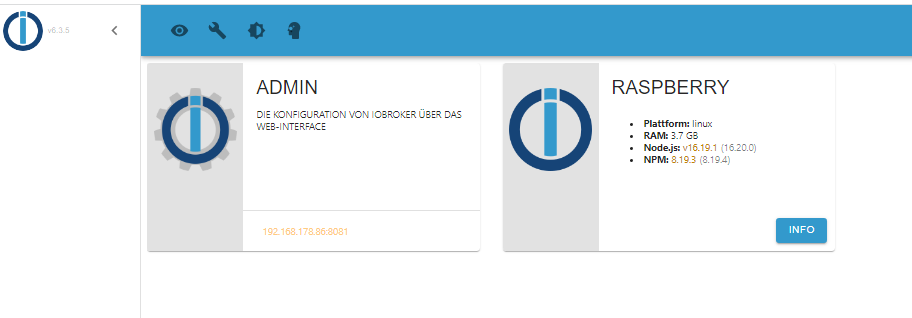
keine Veränderung, es kommt nur das Intro
@balu67 sagte in iobroker lässt sich nicht mehr starten:
ich hab aber PC und Raspberry neu gestartet und nichts geöffnet
PC ist irrelevant und iobroker startet automatisch nach reboot des Raspi!
also
iob stop! -
@balu67 sagte in iobroker lässt sich nicht mehr starten:
GPG error: https://repos.influxdata.com/debian stretch InRelease:
debian stretch
-
@balu67 sagte in iobroker lässt sich nicht mehr starten:
X-Server: true
Ausschalten.
Installed: 16.19.1-deb-1nodesource1
Nodejs 18 installieren.
iobroker und die Adapter aktuell halten.
The repository 'https://repos.influxdata.com/debian stretch InRelease' is not signed.
Stretch ist eh falsch und die Keys müssen neuangelegt werden. Zieh das repo nochmal aktuell neu rein.
@thomas-braun said in iobroker lässt sich nicht mehr starten:
X-Server: true
Ausschalten.
wie mach ich das?
-
@balu67 sagte in iobroker lässt sich nicht mehr starten:
was meinst du ?
Damit ist gemeint, das du Ersatzteile vom Modell 'Stretch' in deinen 'Bullseye' schraubst. Funktioniert aber nicht (immer) und daher verbaut man auch zu seiner Version passende Teile.
-
@thomas-braun said in iobroker lässt sich nicht mehr starten:
X-Server: true
Ausschalten.
wie mach ich das?
@balu67 sagte in iobroker lässt sich nicht mehr starten:
wie mach ich das?
sudo raspi-configMenüpunkte:
1 System Options
S5 Boot / Auto Login
B1 Console
Alternativ:
sudo systemctl set-default multi-user.target -
@balu67 sagte in iobroker lässt sich nicht mehr starten:
wie mach ich das?
sudo raspi-configMenüpunkte:
1 System Options
S5 Boot / Auto Login
B1 Console
Alternativ:
sudo systemctl set-default multi-user.target@thomas-braun said in iobroker lässt sich nicht mehr starten:
@balu67 sagte in iobroker lässt sich nicht mehr starten:
wie mach ich das?
sudo raspi-configMenüpunkte:
1 System Options
S5 Boot / Auto Login
B1 Console
Alternativ:
sudo systemctl set-default multi-user.targetok, hab ich gemacht. Und jetzt soll ich Nodejs18 installieren?
-
@thomas-braun said in iobroker lässt sich nicht mehr starten:
@balu67 sagte in iobroker lässt sich nicht mehr starten:
wie mach ich das?
sudo raspi-configMenüpunkte:
1 System Options
S5 Boot / Auto Login
B1 Console
Alternativ:
sudo systemctl set-default multi-user.targetok, hab ich gemacht. Und jetzt soll ich Nodejs18 installieren?
Zuerst musst du die influxdb-Quelle richtig einbinden, sonst blockt auch die nodejs-Installation.
sudo rm /etc/apt/sources.list.d/influ* wget -q https://repos.influxdata.com/influxdata-archive_compat.key echo '393e8779c89ac8d958f81f942f9ad7fb82a25e133faddaf92e15b16e6ac9ce4c influxdata-archive_compat.key' | sha256sum -c && cat influxdata-archive_compat.key | gpg --dearmor | sudo tee /usr/share/keyrings/influxdata-archive_compat.gpg > /dev/null echo 'deb [signed-by=/usr/share/keyrings/influxdata-archive_compat.gpg] https://repos.influxdata.com/debian stable main' | sudo tee /etc/apt/sources.list.d/influxdata.list -
Zuerst musst du die influxdb-Quelle richtig einbinden, sonst blockt auch die nodejs-Installation.
sudo rm /etc/apt/sources.list.d/influ* wget -q https://repos.influxdata.com/influxdata-archive_compat.key echo '393e8779c89ac8d958f81f942f9ad7fb82a25e133faddaf92e15b16e6ac9ce4c influxdata-archive_compat.key' | sha256sum -c && cat influxdata-archive_compat.key | gpg --dearmor | sudo tee /usr/share/keyrings/influxdata-archive_compat.gpg > /dev/null echo 'deb [signed-by=/usr/share/keyrings/influxdata-archive_compat.gpg] https://repos.influxdata.com/debian stable main' | sudo tee /etc/apt/sources.list.d/influxdata.list@thomas-braun

das Verzeichnis gibt es scheinbar nicht
es gibt direkt unter "apt" einen Ordnenr mit dem Namen influxdb und darin ist eine Datei "influxdb.conf" -
@thomas-braun
das Verzeichnis gibt es scheinbar nicht
es gibt direkt unter "apt" einen Ordnenr mit dem Namen influxdb und darin ist eine Datei "influxdb.conf"@balu67 text bitte als Text in code-tags posten
Hier steht warum
https://forum.iobroker.net/topic/51555/hinweise-für-gute-forenbeiträge/1 -
@thomas-braun
das Verzeichnis gibt es scheinbar nicht
es gibt direkt unter "apt" einen Ordnenr mit dem Namen influxdb und darin ist eine Datei "influxdb.conf"grep -rnw '/etc/apt/' -e 'stretch' -
@thomas-braun
das Verzeichnis gibt es scheinbar nicht
es gibt direkt unter "apt" einen Ordnenr mit dem Namen influxdb und darin ist eine Datei "influxdb.conf"@balu67 sagte in iobroker lässt sich nicht mehr starten:
es gibt direkt unter "apt" einen Ordnenr mit dem Namen influxdb und darin ist eine Datei "influxdb.conf"
Das ist auch falsch. Eine influxdb.conf hat in /etc/apt nix zu suchen.
-
grep -rnw '/etc/apt/' -e 'stretch'@thomas-braun said in iobroker lässt sich nicht mehr starten:
grep -rnw '/etc/apt/' -e 'stretch'grep -rnw '/etc/apt/' -e 'stretch' grep: /etc/apt/trusted.gpg.d/debian-archive-stretch-security-automatic.gpg: Übereinstimmungen in Binärdatei grep: /etc/apt/trusted.gpg.d/debian-archive-stretch-automatic.gpg: Übereinstimmungen in Binärdatei grep: /etc/apt/trusted.gpg.d/debian-archive-stretch-stable.gpg: Übereinstimmungen in Binärdatei -
@balu67 sagte in iobroker lässt sich nicht mehr starten:
es gibt direkt unter "apt" einen Ordnenr mit dem Namen influxdb und darin ist eine Datei "influxdb.conf"
Das ist auch falsch. Eine influxdb.conf hat in /etc/apt nix zu suchen.
@thomas-braun said in iobroker lässt sich nicht mehr starten:
Das ist auch falsch. Eine influxdb.conf hat in /etc/apt nix zu suchen.
ich hab da nichts gemacht, wurde so bei der Installation abgelegt
-
@thomas-braun said in iobroker lässt sich nicht mehr starten:
Das ist auch falsch. Eine influxdb.conf hat in /etc/apt nix zu suchen.
ich hab da nichts gemacht, wurde so bei der Installation abgelegt
sudo apt update wget -q https://repos.influxdata.com/influxdata-archive_compat.key echo '393e8779c89ac8d958f81f942f9ad7fb82a25e133faddaf92e15b16e6ac9ce4c influxdata-archive_compat.key' | sha256sum -c && cat influxdata-archive_compat.key | gpg --dearmor | sudo tee /usr/share/keyrings/influxdata-archive_compat.gpg > /dev/null echo 'deb [signed-by=/usr/share/keyrings/influxdata-archive_compat.gpg] https://repos.influxdata.com/debian stable main' | sudo tee /etc/apt/sources.list.d/influxdata.list sudo apt update apt policy influxdb* -
sudo apt update wget -q https://repos.influxdata.com/influxdata-archive_compat.key echo '393e8779c89ac8d958f81f942f9ad7fb82a25e133faddaf92e15b16e6ac9ce4c influxdata-archive_compat.key' | sha256sum -c && cat influxdata-archive_compat.key | gpg --dearmor | sudo tee /usr/share/keyrings/influxdata-archive_compat.gpg > /dev/null echo 'deb [signed-by=/usr/share/keyrings/influxdata-archive_compat.gpg] https://repos.influxdata.com/debian stable main' | sudo tee /etc/apt/sources.list.d/influxdata.list sudo apt update apt policy influxdb*al@Raspberry:~ $ sudo apt update OK:1 http://deb.debian.org/debian bullseye InRelease OK:2 http://deb.debian.org/debian bullseye-updates InRelease OK:3 http://security.debian.org/debian-security bullseye-security InRelease OK:4 http://archive.raspberrypi.org/debian bullseye InRelease OK:5 https://packages.grafana.com/oss/deb stable InRelease OK:6 https://deb.nodesource.com/node_16.x bullseye InRelease Paketlisten werden gelesen... Fertig Abhängigkeitsbaum wird aufgebaut... Fertig Statusinformationen werden eingelesen... Fertig Aktualisierung für 40 Pakete verfügbar. Führen Sie »apt list --upgradable« aus, um sie anzuzeigen. al@Raspberry:~ $ wget -q https://repos.influxdata.com/influxdata-archive_compat.key al@Raspberry:~ $ sudo apt update OK:1 http://archive.raspberrypi.org/debian bullseye InRelease OK:2 https://deb.nodesource.com/node_16.x bullseye InRelease OK:3 http://deb.debian.org/debian bullseye InRelease OK:4 http://deb.debian.org/debian bullseye-updates InRelease OK:5 https://packages.grafana.com/oss/deb stable InRelease OK:6 http://security.debian.org/debian-security bullseye-security InRelease Paketlisten werden gelesen... Fertig Abhängigkeitsbaum wird aufgebaut... Fertig Statusinformationen werden eingelesen... Fertig Aktualisierung für 40 Pakete verfügbar. Führen Sie »apt list --upgradable« aus, um sie anzuzeigen. al@Raspberry:~ $ apt policy influxdb* influxdb-client: Installiert: (keine) Installationskandidat: 1.6.7~rc0-1+b5 Versionstabelle: 1.6.7~rc0-1+b5 500 500 http://deb.debian.org/debian bullseye/main arm64 Packages influxdb-dev: Installiert: (keine) Installationskandidat: (keine) Versionstabelle: influxdb: Installiert: 1.6.7~rc0-1+b5 Installationskandidat: 1.6.7~rc0-1+b5 Versionstabelle: *** 1.6.7~rc0-1+b5 500 500 http://deb.debian.org/debian bullseye/main arm64 Packages 100 /var/lib/dpkg/status -
al@Raspberry:~ $ sudo apt update OK:1 http://deb.debian.org/debian bullseye InRelease OK:2 http://deb.debian.org/debian bullseye-updates InRelease OK:3 http://security.debian.org/debian-security bullseye-security InRelease OK:4 http://archive.raspberrypi.org/debian bullseye InRelease OK:5 https://packages.grafana.com/oss/deb stable InRelease OK:6 https://deb.nodesource.com/node_16.x bullseye InRelease Paketlisten werden gelesen... Fertig Abhängigkeitsbaum wird aufgebaut... Fertig Statusinformationen werden eingelesen... Fertig Aktualisierung für 40 Pakete verfügbar. Führen Sie »apt list --upgradable« aus, um sie anzuzeigen. al@Raspberry:~ $ wget -q https://repos.influxdata.com/influxdata-archive_compat.key al@Raspberry:~ $ sudo apt update OK:1 http://archive.raspberrypi.org/debian bullseye InRelease OK:2 https://deb.nodesource.com/node_16.x bullseye InRelease OK:3 http://deb.debian.org/debian bullseye InRelease OK:4 http://deb.debian.org/debian bullseye-updates InRelease OK:5 https://packages.grafana.com/oss/deb stable InRelease OK:6 http://security.debian.org/debian-security bullseye-security InRelease Paketlisten werden gelesen... Fertig Abhängigkeitsbaum wird aufgebaut... Fertig Statusinformationen werden eingelesen... Fertig Aktualisierung für 40 Pakete verfügbar. Führen Sie »apt list --upgradable« aus, um sie anzuzeigen. al@Raspberry:~ $ apt policy influxdb* influxdb-client: Installiert: (keine) Installationskandidat: 1.6.7~rc0-1+b5 Versionstabelle: 1.6.7~rc0-1+b5 500 500 http://deb.debian.org/debian bullseye/main arm64 Packages influxdb-dev: Installiert: (keine) Installationskandidat: (keine) Versionstabelle: influxdb: Installiert: 1.6.7~rc0-1+b5 Installationskandidat: 1.6.7~rc0-1+b5 Versionstabelle: *** 1.6.7~rc0-1+b5 500 500 http://deb.debian.org/debian bullseye/main arm64 Packages 100 /var/lib/dpkg/statusUnd warum hast du jetzt
echo '393e8779c89ac8d958f81f942f9ad7fb82a25e133faddaf92e15b16e6ac9ce4c influxdata-archive_compat.key' | sha256sum -c && cat influxdata-archive_compat.key | gpg --dearmor | sudo tee /usr/share/keyrings/influxdata-archive_compat.gpg > /dev/null


echo 'deb [signed-by=/usr/share/keyrings/influxdata-archive_compat.gpg] https://repos.influxdata.com/debian stable main' | sudo tee /etc/apt/sources.list.d/influxdata.list
ausgelassen?
Danachsudo apt update apt policy influxdb* -
Und warum hast du jetzt
echo '393e8779c89ac8d958f81f942f9ad7fb82a25e133faddaf92e15b16e6ac9ce4c influxdata-archive_compat.key' | sha256sum -c && cat influxdata-archive_compat.key | gpg --dearmor | sudo tee /usr/share/keyrings/influxdata-archive_compat.gpg > /dev/null


echo 'deb [signed-by=/usr/share/keyrings/influxdata-archive_compat.gpg] https://repos.influxdata.com/debian stable main' | sudo tee /etc/apt/sources.list.d/influxdata.list
ausgelassen?
Danachsudo apt update apt policy influxdb* -
@thomas-braun
hab ich gemacht


Hey! Du scheinst an dieser Unterhaltung interessiert zu sein, hast aber noch kein Konto.
Hast du es satt, bei jedem Besuch durch die gleichen Beiträge zu scrollen? Wenn du dich für ein Konto anmeldest, kommst du immer genau dorthin zurück, wo du zuvor warst, und kannst dich über neue Antworten benachrichtigen lassen (entweder per E-Mail oder Push-Benachrichtigung). Du kannst auch Lesezeichen speichern und Beiträge positiv bewerten, um anderen Community-Mitgliedern deine Wertschätzung zu zeigen.
Mit deinem Input könnte dieser Beitrag noch besser werden 💗
Registrieren AnmeldenSupport us
397
Online33.0k
Benutzer83.6k
Themen1.3m
Beiträge