




Speicherbelegung Proxmox
-
Danke für eure Unterstützung!
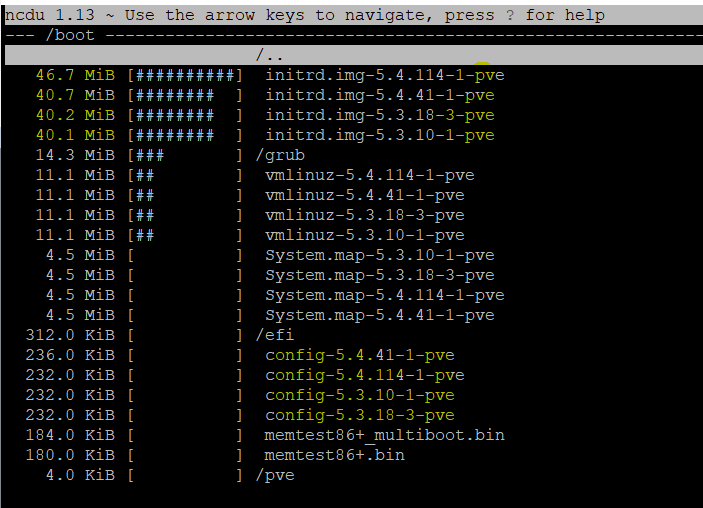
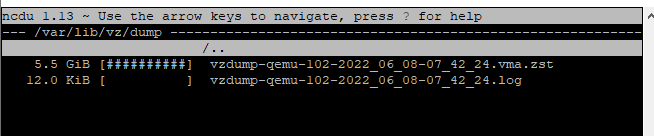
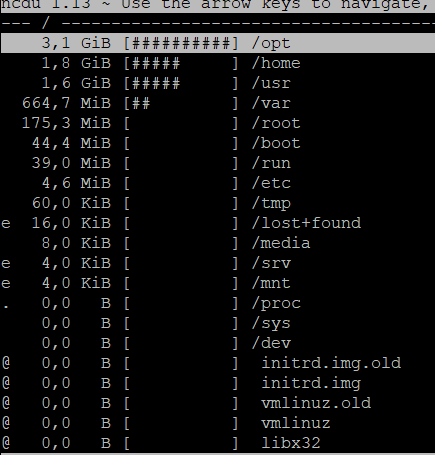
Hier im VA Verzeichnis liegt das monatliche Backup mit 5GB. Das ist das größte in var.
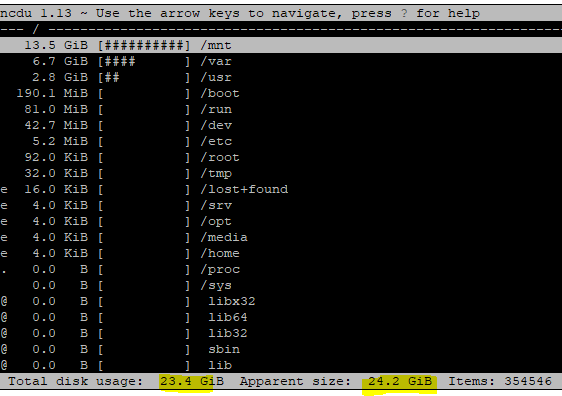
Da ist die volle Proxmox Disk:
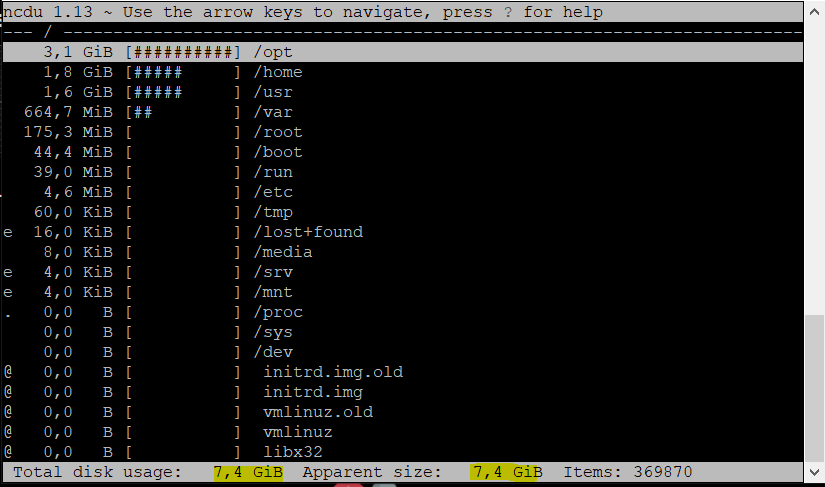
Das hier ist die ioBroker VM:
root@iobrokerNUC1:~# du -sh /opt/iobroker
3,2G    /opt/iobroker
Hier der knappe iobroker Speicher
Moin,
sorry ich bin verwirrt und verstehe Dich nicht :(
Wo genau befindest Du Dich?
Reden wir jetzt von einer VM / LXC Container, der voll ist oder davon, dass Dir der gesamte
proxmoxServer aus allen Nähten platzt?Was ist denn in
/mnt?Mach doch mal ein
df -himPVEund/oder in der VM/LXC Container.VG
Bernd -
Moin,
sorry ich bin verwirrt und verstehe Dich nicht :(
Wo genau befindest Du Dich?
Reden wir jetzt von einer VM / LXC Container, der voll ist oder davon, dass Dir der gesamte
proxmoxServer aus allen Nähten platzt?Was ist denn in
/mnt?Mach doch mal ein
df -himPVEund/oder in der VM/LXC Container.VG
Bernd@dp20eic said in Speicherbelegung Proxmox:
df -h
Beide Disk sind am Anschlag
Das hier ist von Proxmox:
root@proxmox:~# /mnt
-bash: /mnt: Is a directory
root@proxmox:~# df -h
Filesystem                        Size  Used Avail Use% Mounted on
udev                              3.7G     0  3.7G   0% /dev
tmpfs                             755M   82M  674M  11% /run
/dev/mapper/pve-root               59G  9.9G   46G  18% /
tmpfs                             3.7G   43M  3.7G   2% /dev/shm
tmpfs                             5.0M     0  5.0M   0% /run/lock
tmpfs                             3.7G     0  3.7G   0% /sys/fs/cgroup
/dev/sda2                         511M  312K  511M   1% /boot/efi
/dev/fuse                          30M   24K   30M   1% /etc/pve
192.168.0.100:/volume1/NetBackup  3.6T  3.6T  9.1G 100% /mnt/pve/NAS
tmpfs                             755M     0  755M   0% /run/user/0
root@proxmox:~#
Und das hier im ioBroker VM:
root@iobrokerNUC1:~# /mnt
-bash: /mnt: Ist ein Verzeichnis
root@iobrokerNUC1:~# df -h
Dateisystem    Größe Benutzt Verf. Verw% Eingehängt auf
udev            1,9G       0  1,9G    0% /dev
tmpfs           386M     40M  347M   11% /run
/dev/sda1        31G    7,5G   22G   26% /
tmpfs           1,9G       0  1,9G    0% /dev/shm
tmpfs           5,0M       0  5,0M    0% /run/lock
tmpfs           1,9G       0  1,9G    0% /sys/fs/cgroup
tmpfs           386M       0  386M    0% /run/user/0
root@iobrokerNUC1:~# root@iobrokerNUC1:~# /mnt
tmpfs           1,9G       0  1,9G    0% /dev/shm
tmpfs           5,0M       0  5,0M    0% /run/lock
tmpfs           1,9G       0  1,9G    0% /sys/fs/cgroup
tmpfs           386M       0  386M    0% /run/user/0
root@iobrokerNUC1:~#
NUC, PROXMOX, Grafana, Influx, Unify
-
@toki1973 sagte in Speicherbelegung Proxmox:
Da ist die volle Proxmox Disk:
also ist nicht deine iobroker VM voll, sondern dein Proxmox root, oder täusche ich mich da jetzt
@toki1973 sagte in Speicherbelegung Proxmox:
Kann ich dann einigermaßen gefahrlos apt autoremove auf beiden Disks ausführen
ja
-
@dp20eic said in Speicherbelegung Proxmox:
df -h
Beide Disk sind am Anschlag
Das hier ist von Proxmox:
root@proxmox:~# /mnt
-bash: /mnt: Is a directory
root@proxmox:~# df -h
Filesystem                        Size  Used Avail Use% Mounted on
udev                              3.7G     0  3.7G   0% /dev
tmpfs                             755M   82M  674M  11% /run
/dev/mapper/pve-root               59G  9.9G   46G  18% /
tmpfs                             3.7G   43M  3.7G   2% /dev/shm
tmpfs                             5.0M     0  5.0M   0% /run/lock
tmpfs                             3.7G     0  3.7G   0% /sys/fs/cgroup
/dev/sda2                         511M  312K  511M   1% /boot/efi
/dev/fuse                          30M   24K   30M   1% /etc/pve
192.168.0.100:/volume1/NetBackup  3.6T  3.6T  9.1G 100% /mnt/pve/NAS
tmpfs                             755M     0  755M   0% /run/user/0
root@proxmox:~#
Und das hier im ioBroker VM:
root@iobrokerNUC1:~# /mnt -bash: /mnt: Ist ein Verzeichnis root@iobrokerNUC1:~# df -h Dateisystem Größe Benutzt Verf. Verw% Eingehängt auf udev 1,9G 0 1,9G 0% /dev tmpfs 386M 40M 347M 11% /run /dev/sda1 31G 7,5G 22G 26% / tmpfs 1,9G 0 1,9G 0% /dev/shm tmpfs 5,0M 0 5,0M 0% /run/lock tmpfs 1,9G 0 1,9G 0% /sys/fs/cgroup tmpfs 386M 0 386M 0% /run/user/0 root@iobrokerNUC1:~# root@iobrokerNUC1:~# /mnt tmpfs 1,9G 0 1,9G 0% /dev/shm tmpfs 5,0M 0 5,0M 0% /run/lock tmpfs 1,9G 0 1,9G 0% /sys/fs/cgroup tmpfs 386M 0 386M 0% /run/user/0 root@iobrokerNUC1:~#@toki1973 sagte in Speicherbelegung Proxmox:
Beide Disk sind am Anschlag
nö
@toki1973 sagte in Speicherbelegung Proxmox:
dev/mapper/pve-root 59G 9.9G 46G 18% /
nur 18% belegt, also 46GB frei
@toki1973 sagte in Speicherbelegung Proxmox:
/dev/sda1 31G 7,5G 22G 26% /
hier dein iobroker, auch nur 26% belegt
umgestiegen von Proxmox auf Unraid
-
@toki1973 sagte in Speicherbelegung Proxmox:
Beide Disk sind am Anschlag
nö
@toki1973 sagte in Speicherbelegung Proxmox:
dev/mapper/pve-root 59G 9.9G 46G 18% /
nur 18% belegt, also 46GB frei
@toki1973 sagte in Speicherbelegung Proxmox:
/dev/sda1 31G 7,5G 22G 26% /
hier dein iobroker, auch nur 26% belegt
Das ist allerdings dicht:
192.168.0.100:/volume1/NetBackup 3.6T 3.6T 9.1G 100% /mnt/pve/NAS -
Das ist allerdings dicht:
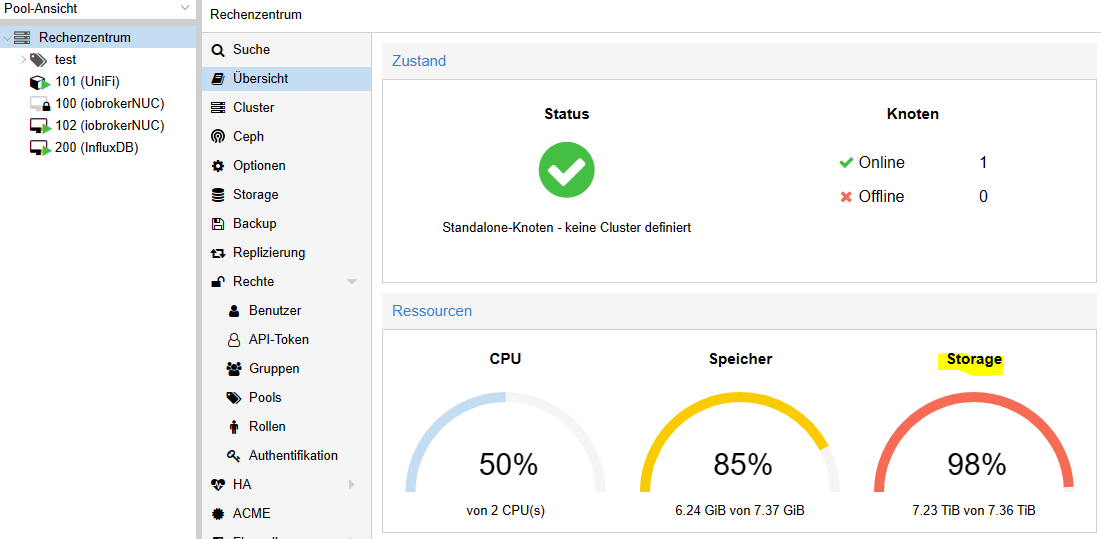
192.168.0.100:/volume1/NetBackup 3.6T 3.6T 9.1G 100% /mnt/pve/NASHm und wo kommen die 98% her?
Und beim Update von Adaptern bekomme ich ```
$ ./iobroker upgrade history
ERROR: spawn ENOMEMUnd bei starten von Instanzen ``` instance system.adapter.javascript.0 could not be started: Error: spawn ENOMEMUnd wie interpretiert man die Disk Size die ich oben über ncdu / bekommen habe?
Wo klemmt es denn? Bin verwirrt :(
NUC, PROXMOX, Grafana, Influx, Unify
-
@dp20eic said in Speicherbelegung Proxmox:
df -h
Beide Disk sind am Anschlag
Das hier ist von Proxmox:
root@proxmox:~# /mnt
-bash: /mnt: Is a directory
root@proxmox:~# df -h
Filesystem                        Size  Used Avail Use% Mounted on
udev                              3.7G     0  3.7G   0% /dev
tmpfs                             755M   82M  674M  11% /run
/dev/mapper/pve-root               59G  9.9G   46G  18% /
tmpfs                             3.7G   43M  3.7G   2% /dev/shm
tmpfs                             5.0M     0  5.0M   0% /run/lock
tmpfs                             3.7G     0  3.7G   0% /sys/fs/cgroup
/dev/sda2                         511M  312K  511M   1% /boot/efi
/dev/fuse                          30M   24K   30M   1% /etc/pve
192.168.0.100:/volume1/NetBackup  3.6T  3.6T  9.1G 100% /mnt/pve/NAS
tmpfs                             755M     0  755M   0% /run/user/0
root@proxmox:~#
Und das hier im ioBroker VM:
root@iobrokerNUC1:~# /mnt -bash: /mnt: Ist ein Verzeichnis root@iobrokerNUC1:~# df -h Dateisystem Größe Benutzt Verf. Verw% Eingehängt auf udev 1,9G 0 1,9G 0% /dev tmpfs 386M 40M 347M 11% /run /dev/sda1 31G 7,5G 22G 26% / tmpfs 1,9G 0 1,9G 0% /dev/shm tmpfs 5,0M 0 5,0M 0% /run/lock tmpfs 1,9G 0 1,9G 0% /sys/fs/cgroup tmpfs 386M 0 386M 0% /run/user/0 root@iobrokerNUC1:~# root@iobrokerNUC1:~# /mnt tmpfs 1,9G 0 1,9G 0% /dev/shm tmpfs 5,0M 0 5,0M 0% /run/lock tmpfs 1,9G 0 1,9G 0% /sys/fs/cgroup tmpfs 386M 0 386M 0% /run/user/0 root@iobrokerNUC1:~#@toki1973 sagte in Speicherbelegung Proxmox:
@dp20eic said in Speicherbelegung Proxmox:
df -h
Beide Disk sind am Anschlag
Nein sind Sie nicht, wurde ja auch schon von anderen bestätigt.
Erst einmal, es gibt kein Befehl
/mnt, um in ein Verzeichnis zu wechseln, musst Ducd /mnt cd /usr/bin cd /opt/iobrokerDann ist dieses Verzeichnis ein Mount, von Deinem NAS.
192.168.0.100:/volume1/NetBackup 3.6T 3.6T 9.1G 100% /mnt/pve/NASDu hast sicher lich den Mount auch in der VM und legst dort irgendetwas ab. Was sagt den wenn Du in der PVE Konsole bist,
root@proxmox:~# ls -la /mnt/VG
Bernd -
@toki1973 sagte in Speicherbelegung Proxmox:
@dp20eic said in Speicherbelegung Proxmox:
df -h
Beide Disk sind am Anschlag
Nein sind Sie nicht, wurde ja auch schon von anderen bestätigt.
Erst einmal, es gibt kein Befehl
/mnt, um in ein Verzeichnis zu wechseln, musst Ducd /mnt cd /usr/bin cd /opt/iobrokerDann ist dieses Verzeichnis ein Mount, von Deinem NAS.
192.168.0.100:/volume1/NetBackup 3.6T 3.6T 9.1G 100% /mnt/pve/NASDu hast sicher lich den Mount auch in der VM und legst dort irgendetwas ab. Was sagt den wenn Du in der PVE Konsole bist,
root@proxmox:~# ls -la /mnt/VG
Bernd@dp20eic Danke für die Geduld!
Ja die NAS ist am Anschlag. Aber warum bekomme ich denn den ENOMEM Fehler? Und warum wir in der Proxmox Oberfläche 98% Speicher angezeigt?
Übrigens hat apt autoremove hat nichts entfernt.
root@proxmox:~# ls -la /mnt/ total 20 drwxr-xr-x 5 root root 4096 Jun 20 2020 . drwxr-xr-x 18 root root 4096 Mar 14 2020 .. drwxr-xr-x 2 root root 4096 Mar 14 2020 hostrun drwxr-xr-x 4 root root 4096 Jul 30 2020 pve drwxr-xr-x 2 root root 4096 Jun 20 2020 vzsnap0 root@proxmox:~# -
Hm und wo kommen die 98% her?
Und beim Update von Adaptern bekomme ich ```
$ ./iobroker upgrade history
ERROR: spawn ENOMEMUnd bei starten von Instanzen ``` instance system.adapter.javascript.0 could not be started: Error: spawn ENOMEMUnd wie interpretiert man die Disk Size die ich oben über ncdu / bekommen habe?
Wo klemmt es denn? Bin verwirrt :(
@toki1973
Da muss mMn noch was faul sein.
Dein Screenshot zeigt 7,2 T und dasdf -hauf dem Server zeigt in Summe weniger an.
Außerdem ist laut df -t dein NAS voll. Was zeigt das NAS auf dem NAS selber an? -
@toki1973
Da muss mMn noch was faul sein.
Dein Screenshot zeigt 7,2 T und dasdf -hauf dem Server zeigt in Summe weniger an.
Außerdem ist laut df -t dein NAS voll. Was zeigt das NAS auf dem NAS selber an?@ostfrieseunterwegs
Ja genau irgendwas ist faul. Ich weiß nur nicht wo. Gibt es noch weitere Ideen?
Das die NAS voll ist weiß ich - das macht ja bzgl. der Probleme mit ioBroker Proxmox nichts aus.NUC, PROXMOX, Grafana, Influx, Unify
-
@ostfrieseunterwegs
Ja genau irgendwas ist faul. Ich weiß nur nicht wo. Gibt es noch weitere Ideen?
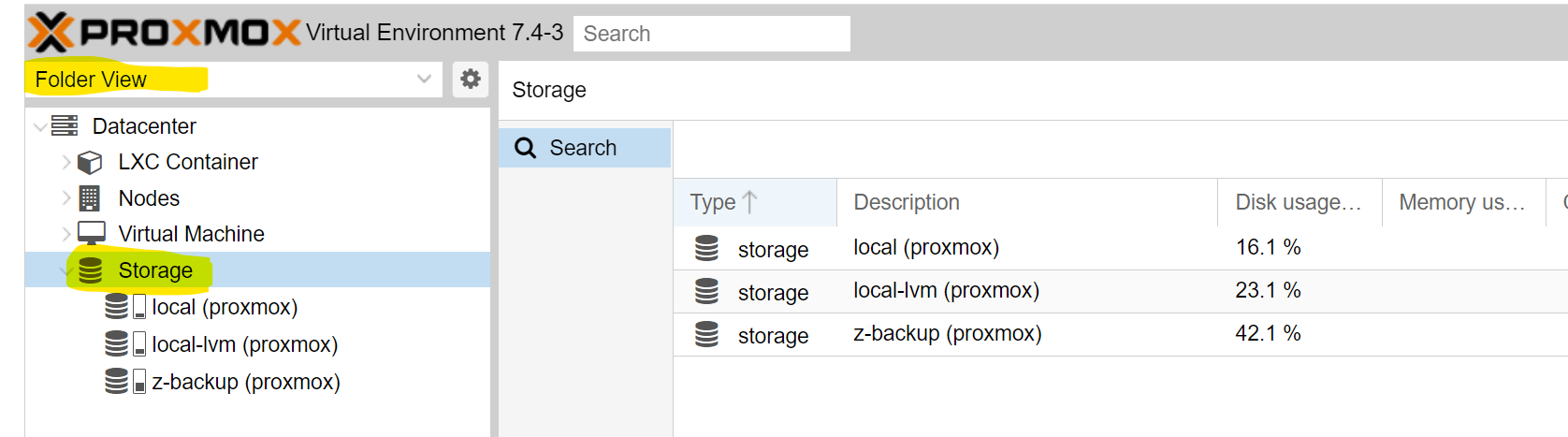
Das die NAS voll ist weiß ich - das macht ja bzgl. der Probleme mit ioBroker Proxmox nichts aus.Schau mal, was da für Storages eingebunden sind.
-
Schau mal, was da für Storages eingebunden sind.
-
@ostfrieseunterwegs
Hm okay dann sieht es lokal ja eigentlich ganz gut aus und nur die NAS ist voll. Erklärt aber immer noch nicht das ioBroke ENOMEM Problem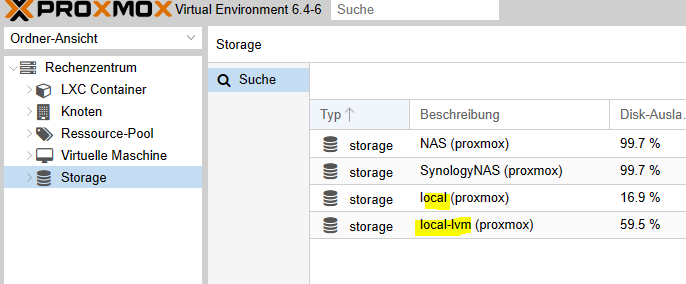
@toki1973
Ja das volle NAS hat möglicherweise nichts mit dem ENOMEM Problem zu tun.
Aber ich dachte du suchtest eine Erklärung für die 98% ??
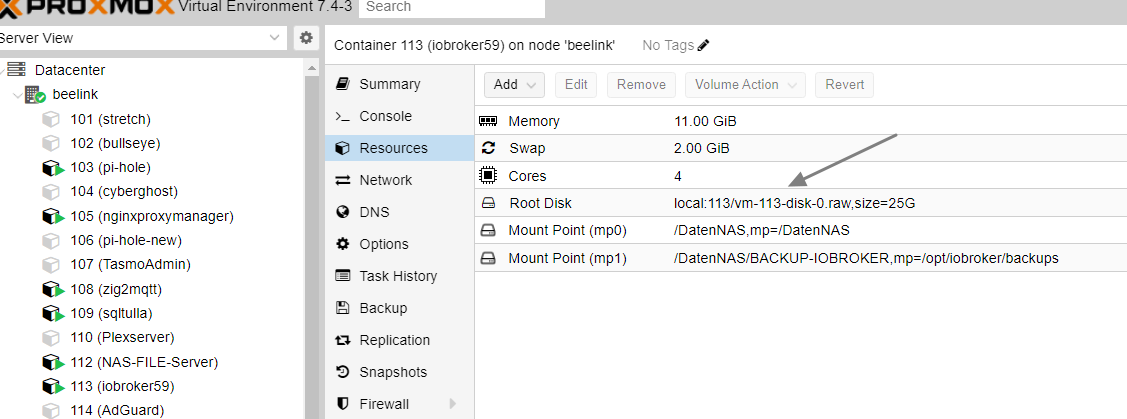
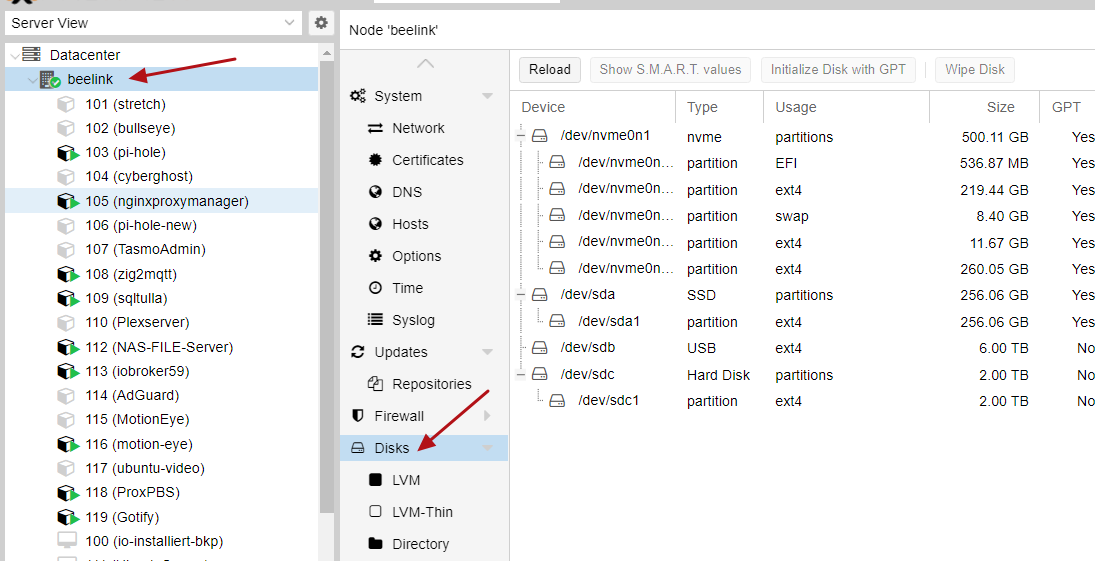
Auf jeden Fall scheinst Du das NAS doppelt in Proxmox eingebunden zu haben. Daher die 7.2 Tera.
Du musst dich mal durch die Menüs von Proxmox hangeln und schauen, was du auf den beiden Storage Volumes speicherst bzw wo die eingebunden sind. Irgendwelche Backups der VM/Container ? -
@dp20eic Danke für die Geduld!
Ja die NAS ist am Anschlag. Aber warum bekomme ich denn den ENOMEM Fehler? Und warum wir in der Proxmox Oberfläche 98% Speicher angezeigt?
Übrigens hat apt autoremove hat nichts entfernt.
root@proxmox:~# ls -la /mnt/ total 20 drwxr-xr-x 5 root root 4096 Jun 20 2020 . drwxr-xr-x 18 root root 4096 Mar 14 2020 .. drwxr-xr-x 2 root root 4096 Mar 14 2020 hostrun drwxr-xr-x 4 root root 4096 Jul 30 2020 pve drwxr-xr-x 2 root root 4096 Jun 20 2020 vzsnap0 root@proxmox:~#@toki1973 sagte in Speicherbelegung Proxmox:
@dp20eic Danke für die Geduld!
Ja die NAS ist am Anschlag. Aber warum bekomme ich denn den ENOMEM Fehler? Und warum wir in der Proxmox Oberfläche 98% Speicher angezeigt?
Übrigens hat apt autoremove hat nichts entfernt.
root@proxmox:~# ls -la /mnt/
total 20
drwxr-xr-x  5 root root 4096 Jun 20  2020 .
drwxr-xr-x 18 root root 4096 Mar 14  2020 ..
drwxr-xr-x  2 root root 4096 Mar 14  2020 hostrun
drwxr-xr-x  4 root root 4096 Jul 30  2020 pve
drwxr-xr-x  2 root root 4096 Jun 20  2020 vzsnap0
root@proxmox:~#
Moin,
mach es Dir doch nicht so schwer! Du hast alle Befehle schon, Du musst sie nur noch richtig anwenden :)
Geh doch mal tiefer in die Verzeichnisse und schau wo, es kneift.
root@proxmox:~# ncdu /mnt

ls -la /mnt/*
Hör auf etwas Löschen zu wollen, wenn Du noch nicht mal weißt, was klemmt, finde doch erstmal raus was vorgeht, um dann dafür eine Lösung zu suchen.
Wie @OstfrieseUnterwegs schon fragte, liegen da Backups, Images etc. und wie er sagte, Du mountest das NAS zweimal.root@proxmox:~# mount | grep -i mntVG
Bernd -
@toki1973 sagte in Speicherbelegung Proxmox:
@dp20eic Danke für die Geduld!
Ja die NAS ist am Anschlag. Aber warum bekomme ich denn den ENOMEM Fehler? Und warum wir in der Proxmox Oberfläche 98% Speicher angezeigt?
Übrigens hat apt autoremove hat nichts entfernt.
root@proxmox:~# ls -la /mnt/
total 20
drwxr-xr-x  5 root root 4096 Jun 20  2020 .
drwxr-xr-x 18 root root 4096 Mar 14  2020 ..
drwxr-xr-x  2 root root 4096 Mar 14  2020 hostrun
drwxr-xr-x  4 root root 4096 Jul 30  2020 pve
drwxr-xr-x  2 root root 4096 Jun 20  2020 vzsnap0
root@proxmox:~#
Moin,
mach es Dir doch nicht so schwer! Du hast alle Befehle schon, Du musst sie nur noch richtig anwenden :)
Geh doch mal tiefer in die Verzeichnisse und schau wo, es kneift.
root@proxmox:~# ncdu /mnt

ls -la /mnt/*
Hör auf etwas Löschen zu wollen, wenn Du noch nicht mal weißt, was klemmt, finde doch erstmal raus was vorgeht, um dann dafür eine Lösung zu suchen.
Wie @OstfrieseUnterwegs schon fragte, liegen da Backups, Images etc. und wie er sagte, Du mountest das NAS zweimal.root@proxmox:~# mount | grep -i mntVG
BerndJa ein Backup liegt da in der proxmox Umgebung von 5,5gb rum wie oben im screeshot gezeigt.
Okay dann schaue ich mal weches NAS mountig ich entfernen kann.Ich habe mal das RAM von 4 auf 6GB für die iobroker VM erhöht. Sieht schon besser aus....
NUC, PROXMOX, Grafana, Influx, Unify
-
Ja ein Backup liegt da in der proxmox Umgebung von 5,5gb rum wie oben im screeshot gezeigt.
Okay dann schaue ich mal weches NAS mountig ich entfernen kann.Ich habe mal das RAM von 4 auf 6GB für die iobroker VM erhöht. Sieht schon besser aus....
@toki1973 sagte in Speicherbelegung Proxmox:
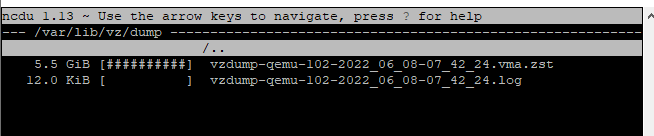
Ja ein Backup liegt da in der proxmox Umgebung von 5,5gb rum wie oben im screeshot gezeigt.
Moin,
das liegt aber nicht da wo das NAS gemountet ist, das liegt unter
/var/lib/vz/dump/
Also das hat nichts mit Deinem Problem unter
/mntzu tun.Du vermischst zwei Probleme, hast Du auch Probleme mit
ioBroker, dann lieber einen eigenen Thread aufmachen, ansonsten weiß man nicht mehr, wo jetzt Hilfe gebraucht wird.
Du redest die ganze Zeit von Speicher (HDD/SDD) und jetzt erweiterst Du RAM in der VM, das ist vielleicht auch wieder nur ein Pflaster, sodass es gerade funktioniert und in ein paar Tagen plötzlich wieder knallt.Wenn Du Dich in der VM anmeldest und als
ioBrokerUser, das ausführst, dann mal die lange Ausführung hier rein in Code Tags </>.iobroker@iobroker:/opt/iobroker$ iob diagPoste mal von Deiner Installation etwas mehr Informationen, !!!Achtung!!! ich habe nur LXC Container, sollte aber bei VMs auch nicht anders aussehen, Beispiel:
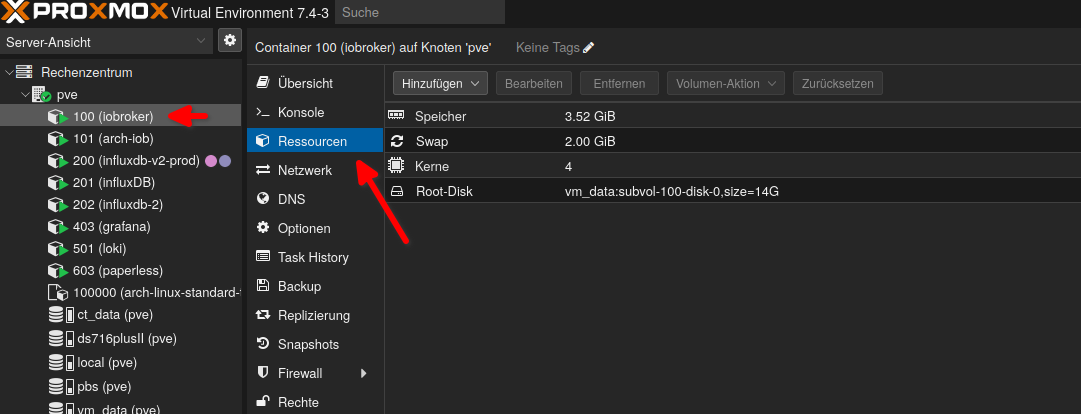
VG
Bernd -
@toki1973 sagte in Speicherbelegung Proxmox:
Ja ein Backup liegt da in der proxmox Umgebung von 5,5gb rum wie oben im screeshot gezeigt.
Moin,
das liegt aber nicht da wo das NAS gemountet ist, das liegt unter
/var/lib/vz/dump/
Also das hat nichts mit Deinem Problem unter
/mntzu tun.Du vermischst zwei Probleme, hast Du auch Probleme mit
ioBroker, dann lieber einen eigenen Thread aufmachen, ansonsten weiß man nicht mehr, wo jetzt Hilfe gebraucht wird.
Du redest die ganze Zeit von Speicher (HDD/SDD) und jetzt erweiterst Du RAM in der VM, das ist vielleicht auch wieder nur ein Pflaster, sodass es gerade funktioniert und in ein paar Tagen plötzlich wieder knallt.Wenn Du Dich in der VM anmeldest und als
ioBrokerUser, das ausführst, dann mal die lange Ausführung hier rein in Code Tags </>.iobroker@iobroker:/opt/iobroker$ iob diagPoste mal von Deiner Installation etwas mehr Informationen, !!!Achtung!!! ich habe nur LXC Container, sollte aber bei VMs auch nicht anders aussehen, Beispiel:
VG
BerndIch habe in einen anderen Thread das diag schon gepostet und daher geht nun der Verdacht zu den Problemen zum RAM. Ursprünglich dachte ich das des der Diskspace local bei Proxmox oder in der VM das Problem ist. Aber das wurde ja oben schon geklärt.
Die NAS ist voll das weiß ich. Lediglich das monatliche Backup liegt lokal.
NUC, PROXMOX, Grafana, Influx, Unify
-
Ich habe in einen anderen Thread das diag schon gepostet und daher geht nun der Verdacht zu den Problemen zum RAM. Ursprünglich dachte ich das des der Diskspace local bei Proxmox oder in der VM das Problem ist. Aber das wurde ja oben schon geklärt.
Die NAS ist voll das weiß ich. Lediglich das monatliche Backup liegt lokal.
mount | sortjeweils im Host und im iobroker-System sagen?
Ich glaube du hast da irgendwas doppelt hin- und her gemountet. -
Ja ein Backup liegt da in der proxmox Umgebung von 5,5gb rum wie oben im screeshot gezeigt.
Okay dann schaue ich mal weches NAS mountig ich entfernen kann.Ich habe mal das RAM von 4 auf 6GB für die iobroker VM erhöht. Sieht schon besser aus....
-
mount | sortjeweils im Host und im iobroker-System sagen?
Ich glaube du hast da irgendwas doppelt hin- und her gemountet.@thomas-braun said in Speicherbelegung Proxmox:
mount | sort
ioBrkerVM
root@iobrokerNUC1:~# mount | sort
binfmt_misc on /proc/sys/fs/binfmt_misc type binfmt_misc (rw,relatime)
bpf on /sys/fs/bpf type bpf (rw,nosuid,nodev,noexec,relatime,mode=700)
cgroup2 on /sys/fs/cgroup/unified type cgroup2 (rw,nosuid,nodev,noexec,relatime,nsdelegate)
cgroup on /sys/fs/cgroup/blkio type cgroup (rw,nosuid,nodev,noexec,relatime,blkio)
cgroup on /sys/fs/cgroup/cpu,cpuacct type cgroup (rw,nosuid,nodev,noexec,relatime,cpu,cpuacct)
cgroup on /sys/fs/cgroup/cpuset type cgroup (rw,nosuid,nodev,noexec,relatime,cpuset)
cgroup on /sys/fs/cgroup/devices type cgroup (rw,nosuid,nodev,noexec,relatime,devices)
cgroup on /sys/fs/cgroup/freezer type cgroup (rw,nosuid,nodev,noexec,relatime,freezer)
cgroup on /sys/fs/cgroup/memory type cgroup (rw,nosuid,nodev,noexec,relatime,memory)
cgroup on /sys/fs/cgroup/net_cls,net_prio type cgroup (rw,nosuid,nodev,noexec,relatime,net_cls,net_prio)
cgroup on /sys/fs/cgroup/perf_event type cgroup (rw,nosuid,nodev,noexec,relatime,perf_event)
cgroup on /sys/fs/cgroup/pids type cgroup (rw,nosuid,nodev,noexec,relatime,pids)
cgroup on /sys/fs/cgroup/rdma type cgroup (rw,nosuid,nodev,noexec,relatime,rdma)
cgroup on /sys/fs/cgroup/systemd type cgroup (rw,nosuid,nodev,noexec,relatime,xattr,name=systemd)
debugfs on /sys/kernel/debug type debugfs (rw,relatime)
devpts on /dev/pts type devpts (rw,nosuid,noexec,relatime,gid=5,mode=620,ptmxmode=000)
/dev/sda1 on / type ext4 (rw,relatime,errors=remount-ro)
hugetlbfs on /dev/hugepages type hugetlbfs (rw,relatime,pagesize=2M)
mqueue on /dev/mqueue type mqueue (rw,relatime)
proc on /proc type proc (rw,nosuid,nodev,noexec,relatime)
pstore on /sys/fs/pstore type pstore (rw,nosuid,nodev,noexec,relatime)
securityfs on /sys/kernel/security type securityfs (rw,nosuid,nodev,noexec,relatime)
sunrpc on /run/rpc_pipefs type rpc_pipefs (rw,relatime)
sysfs on /sys type sysfs (rw,nosuid,nodev,noexec,relatime)
systemd-1 on /proc/sys/fs/binfmt_misc type autofs (rw,relatime,fd=42,pgrp=1,timeout=0,minproto=5,maxproto=5,direct,pipe_ino=11324)
tmpfs on /dev/shm type tmpfs (rw,nosuid,nodev)
tmpfs on /run/lock type tmpfs (rw,nosuid,nodev,noexec,relatime,size=5120k)
tmpfs on /run type tmpfs (rw,nosuid,noexec,relatime,size=596044k,mode=755)
tmpfs on /run/user/0 type tmpfs (rw,nosuid,nodev,relatime,size=596040k,mode=700)
tmpfs on /sys/fs/cgroup type tmpfs (ro,nosuid,nodev,noexec,mode=755)
tracefs on /sys/kernel/debug/tracing type tracefs (rw,relatime)
udev on /dev type devtmpfs (rw,nosuid,relatime,size=2965348k,nr_inodes=741337,mode=755)
root@iobrokerNUC1:~# mount | sort
binfmt_misc on /proc/sys/fs/binfmt_misc type binfmt_misc (rw,relatime)
bpf on /sys/fs/bpf type bpf (rw,nosuid,nodev,noexec,relatime,mode=700)
cgroup2 on /sys/fs/cgroup/unified type cgroup2 (rw,nosuid,nodev,noexec,relatime,nsdelegate)
cgroup on /sys/fs/cgroup/blkio type cgroup (rw,nosuid,nodev,noexec,relatime,blkio)
cgroup on /sys/fs/cgroup/cpu,cpuacct type cgroup (rw,nosuid,nodev,noexec,relatime,cpu,cpuacct)
cgroup on /sys/fs/cgroup/cpuset type cgroup (rw,nosuid,nodev,noexec,relatime,cpuset)
cgroup on /sys/fs/cgroup/devices type cgroup (rw,nosuid,nodev,noexec,relatime,devices)
cgroup on /sys/fs/cgroup/freezer type cgroup (rw,nosuid,nodev,noexec,relatime,freezer)
cgroup on /sys/fs/cgroup/memory type cgroup (rw,nosuid,nodev,noexec,relatime,memory)
cgroup on /sys/fs/cgroup/net_cls,net_prio type cgroup (rw,nosuid,nodev,noexec,relatime,net_cls,net_prio)
cgroup on /sys/fs/cgroup/perf_event type cgroup (rw,nosuid,nodev,noexec,relatime,perf_event)
cgroup on /sys/fs/cgroup/pids type cgroup (rw,nosuid,nodev,noexec,relatime,pids)
cgroup on /sys/fs/cgroup/rdma type cgroup (rw,nosuid,nodev,noexec,relatime,rdma)
cgroup on /sys/fs/cgroup/systemd type cgroup (rw,nosuid,nodev,noexec,relatime,xattr,name=systemd)
debugfs on /sys/kernel/debug type debugfs (rw,relatime)
devpts on /dev/pts type devpts (rw,nosuid,noexec,relatime,gid=5,mode=620,ptmxmode=000)
/dev/sda1 on / type ext4 (rw,relatime,errors=remount-ro)
hugetlbfs on /dev/hugepages type hugetlbfs (rw,relatime,pagesize=2M)
mqueue on /dev/mqueue type mqueue (rw,relatime)
proc on /proc type proc (rw,nosuid,nodev,noexec,relatime)
pstore on /sys/fs/pstore type pstore (rw,nosuid,nodev,noexec,relatime)
securityfs on /sys/kernel/security type securityfs (rw,nosuid,nodev,noexec,relatime)
sunrpc on /run/rpc_pipefs type rpc_pipefs (rw,relatime)
sysfs on /sys type sysfs (rw,nosuid,nodev,noexec,relatime)
systemd-1 on /proc/sys/fs/binfmt_misc type autofs (rw,relatime,fd=42,pgrp=1,timeout=0,minproto=5,maxproto=5,direct,pipe_ino=11324)
tmpfs on /dev/shm type tmpfs (rw,nosuid,nodev)
tmpfs on /run/lock type tmpfs (rw,nosuid,nodev,noexec,relatime,size=5120k)
tmpfs on /run type tmpfs (rw,nosuid,noexec,relatime,size=596044k,mode=755)
tmpfs on /run/user/0 type tmpfs (rw,nosuid,nodev,relatime,size=596040k,mode=700)
tmpfs on /sys/fs/cgroup type tmpfs (ro,nosuid,nodev,noexec,mode=755)
tracefs on /sys/kernel/debug/tracing type tracefs (rw,relatime)
udev on /dev type devtmpfs (rw,nosuid,relatime,size=2965348k,nr_inodes=741337,mode=755)
und hier proxmox:
root@proxmox:~# mount | sort
192.168.0.100:/volume1/NetBackup on /mnt/pve/NAS type nfs4 (rw,relatime,vers=4.0,rsize=131072,wsize=131072,namlen=255,hard,proto=tcp,timeo=600,retrans=2,sec=sys,clientaddr=192.168.0.250,local_lock=none,addr=192.168.0.100)
192.168.0.100:/volume1/NetBackup on /mnt/pve/SynologyNAS type nfs4 (rw,relatime,vers=4.0,rsize=131072,wsize=131072,namlen=255,hard,proto=tcp,timeo=600,retrans=2,sec=sys,clientaddr=192.168.0.250,local_lock=none,addr=192.168.0.100)
binfmt_misc on /proc/sys/fs/binfmt_misc type binfmt_misc (rw,relatime)
cgroup2 on /sys/fs/cgroup/unified type cgroup2 (rw,nosuid,nodev,noexec,relatime)
cgroup on /sys/fs/cgroup/blkio type cgroup (rw,nosuid,nodev,noexec,relatime,blkio)
cgroup on /sys/fs/cgroup/cpu,cpuacct type cgroup (rw,nosuid,nodev,noexec,relatime,cpu,cpuacct)
cgroup on /sys/fs/cgroup/cpuset type cgroup (rw,nosuid,nodev,noexec,relatime,cpuset)
cgroup on /sys/fs/cgroup/devices type cgroup (rw,nosuid,nodev,noexec,relatime,devices)
cgroup on /sys/fs/cgroup/freezer type cgroup (rw,nosuid,nodev,noexec,relatime,freezer)
cgroup on /sys/fs/cgroup/hugetlb type cgroup (rw,nosuid,nodev,noexec,relatime,hugetlb)
cgroup on /sys/fs/cgroup/memory type cgroup (rw,nosuid,nodev,noexec,relatime,memory)
cgroup on /sys/fs/cgroup/net_cls,net_prio type cgroup (rw,nosuid,nodev,noexec,relatime,net_cls,net_prio)
cgroup on /sys/fs/cgroup/perf_event type cgroup (rw,nosuid,nodev,noexec,relatime,perf_event)
cgroup on /sys/fs/cgroup/pids type cgroup (rw,nosuid,nodev,noexec,relatime,pids)
cgroup on /sys/fs/cgroup/rdma type cgroup (rw,nosuid,nodev,noexec,relatime,rdma)
cgroup on /sys/fs/cgroup/systemd type cgroup (rw,nosuid,nodev,noexec,relatime,xattr,name=systemd)
configfs on /sys/kernel/config type configfs (rw,relatime)
debugfs on /sys/kernel/debug type debugfs (rw,relatime)
/dev/fuse on /etc/pve type fuse (rw,nosuid,nodev,relatime,user_id=0,group_id=0,default_permissions,allow_other)
/dev/mapper/pve-root on / type ext4 (rw,relatime,errors=remount-ro)
devpts on /dev/pts type devpts (rw,nosuid,noexec,relatime,gid=5,mode=620,ptmxmode=000)
/dev/sda2 on /boot/efi type vfat (rw,relatime,fmask=0022,dmask=0022,codepage=437,iocharset=iso8859-1,shortname=mixed,errors=remount-ro)
efivarfs on /sys/firmware/efi/efivars type efivarfs (rw,nosuid,nodev,noexec,relatime)
fusectl on /sys/fs/fuse/connections type fusectl (rw,relatime)
hugetlbfs on /dev/hugepages type hugetlbfs (rw,relatime,pagesize=2M)
lxcfs on /var/lib/lxcfs type fuse.lxcfs (rw,nosuid,nodev,relatime,user_id=0,group_id=0,allow_other)
mqueue on /dev/mqueue type mqueue (rw,relatime)
none on /sys/fs/bpf type bpf (rw,nosuid,nodev,noexec,relatime,mode=700)
proc on /proc type proc (rw,relatime)
pstore on /sys/fs/pstore type pstore (rw,nosuid,nodev,noexec,relatime)
securityfs on /sys/kernel/security type securityfs (rw,nosuid,nodev,noexec,relatime)
sunrpc on /run/rpc_pipefs type rpc_pipefs (rw,relatime)
sysfs on /sys type sysfs (rw,nosuid,nodev,noexec,relatime)
systemd-1 on /proc/sys/fs/binfmt_misc type autofs (rw,relatime,fd=41,pgrp=1,timeout=0,minproto=5,maxproto=5,direct,pipe_ino=16725)
tmpfs on /dev/shm type tmpfs (rw,nosuid,nodev)
tmpfs on /run/lock type tmpfs (rw,nosuid,nodev,noexec,relatime,size=5120k)
tmpfs on /run type tmpfs (rw,nosuid,noexec,relatime,size=772676k,mode=755)
tmpfs on /run/user/0 type tmpfs (rw,nosuid,nodev,relatime,size=772676k,mode=700)
tmpfs on /sys/fs/cgroup type tmpfs (ro,nosuid,nodev,noexec,mode=755)
tracefs on /sys/kernel/debug/tracing type tracefs (rw,relatime)
udev on /dev type devtmpfs (rw,nosuid,relatime,size=3835496k,nr_inodes=958874,mode=755)
root@proxmox:~#




Hey! Du scheinst an dieser Unterhaltung interessiert zu sein, hast aber noch kein Konto.
Hast du es satt, bei jedem Besuch durch die gleichen Beiträge zu scrollen? Wenn du dich für ein Konto anmeldest, kommst du immer genau dorthin zurück, wo du zuvor warst, und kannst dich über neue Antworten benachrichtigen lassen (entweder per E-Mail oder Push-Benachrichtigung). Du kannst auch Lesezeichen speichern und Beiträge positiv bewerten, um anderen Community-Mitgliedern deine Wertschätzung zu zeigen.
Mit deinem Input könnte dieser Beitrag noch besser werden 💗
Registrieren Anmelden225
Online33.0k
Benutzer83.6k
Themen1.3m
Beiträge