




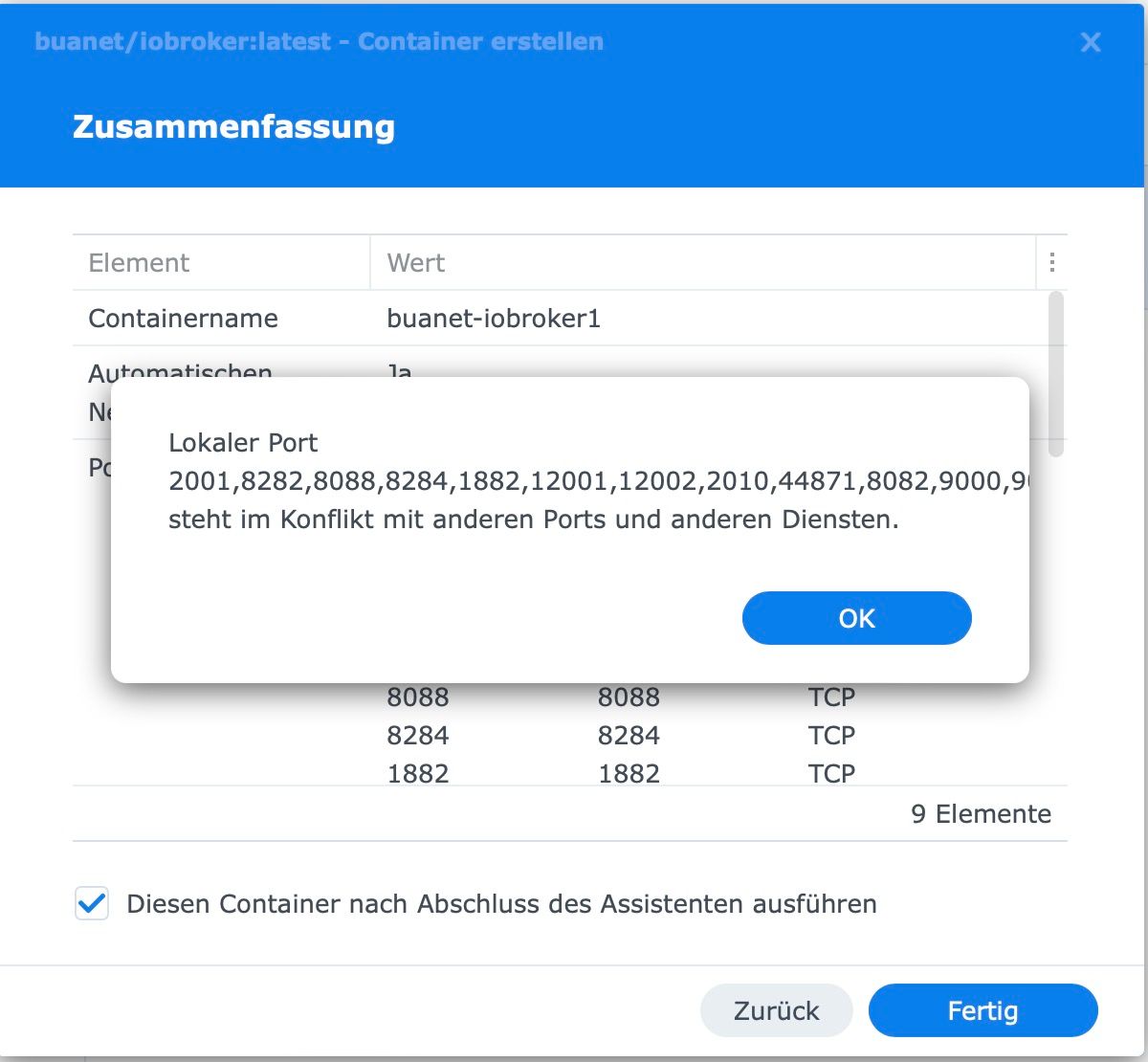
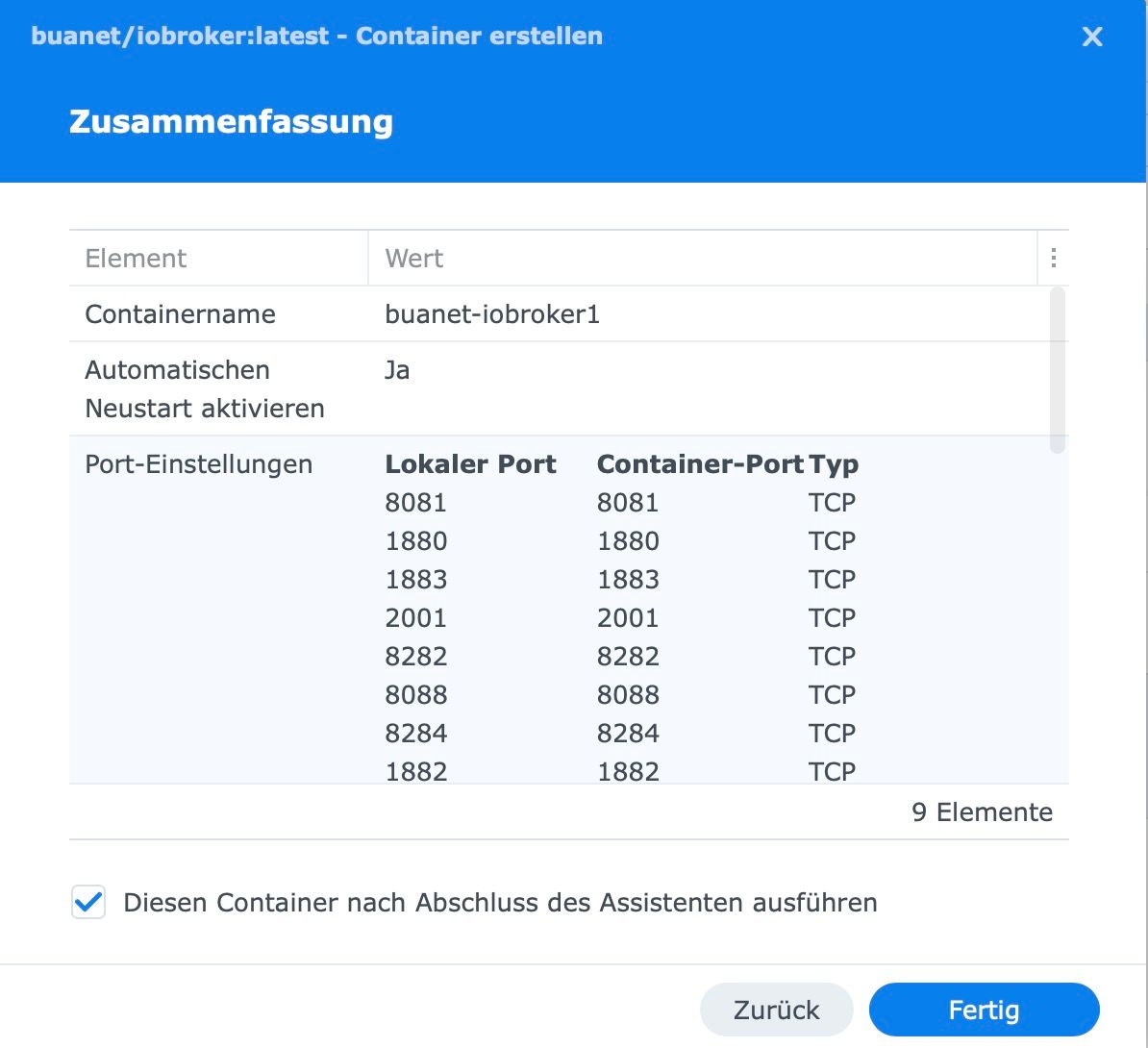
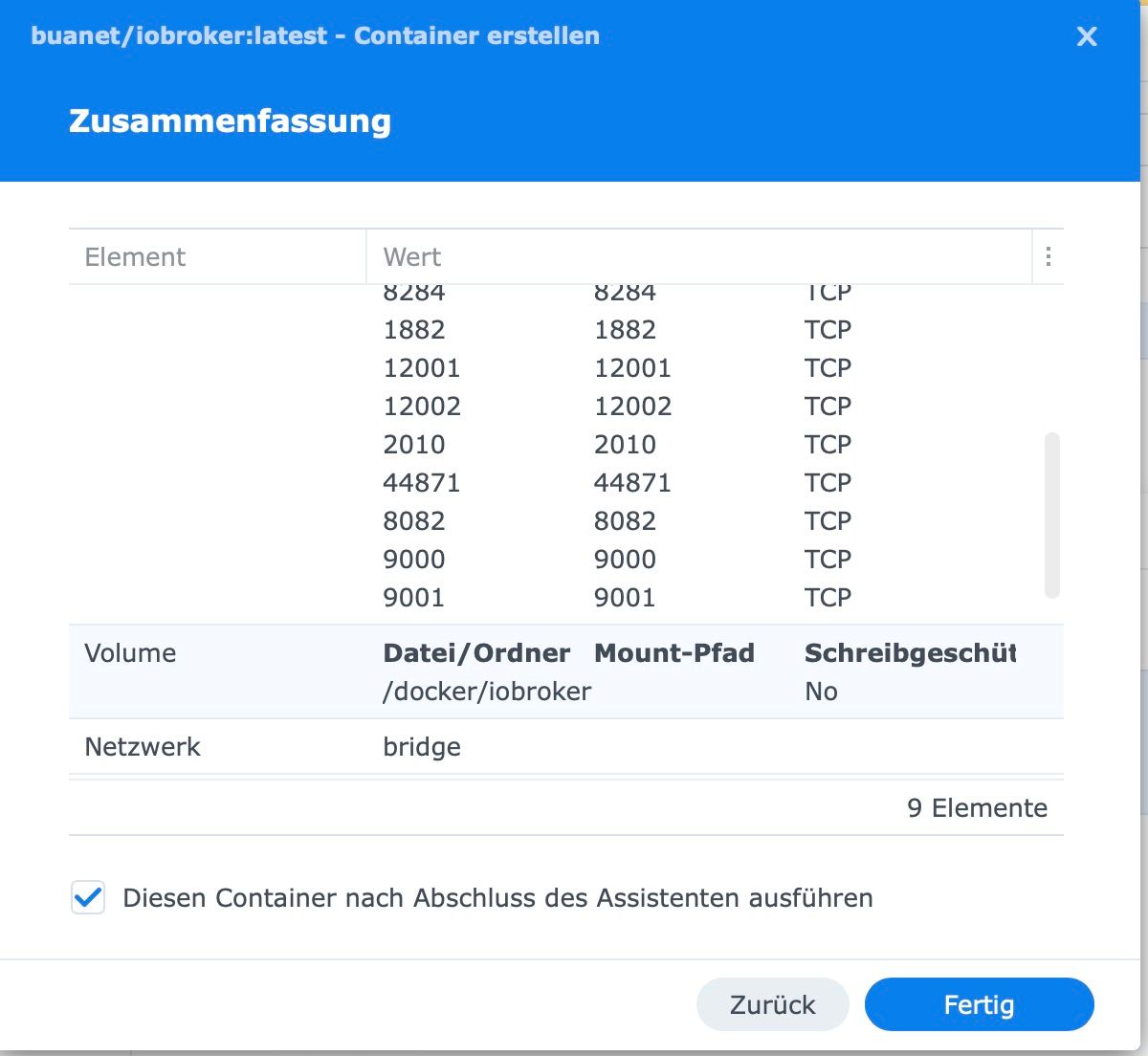
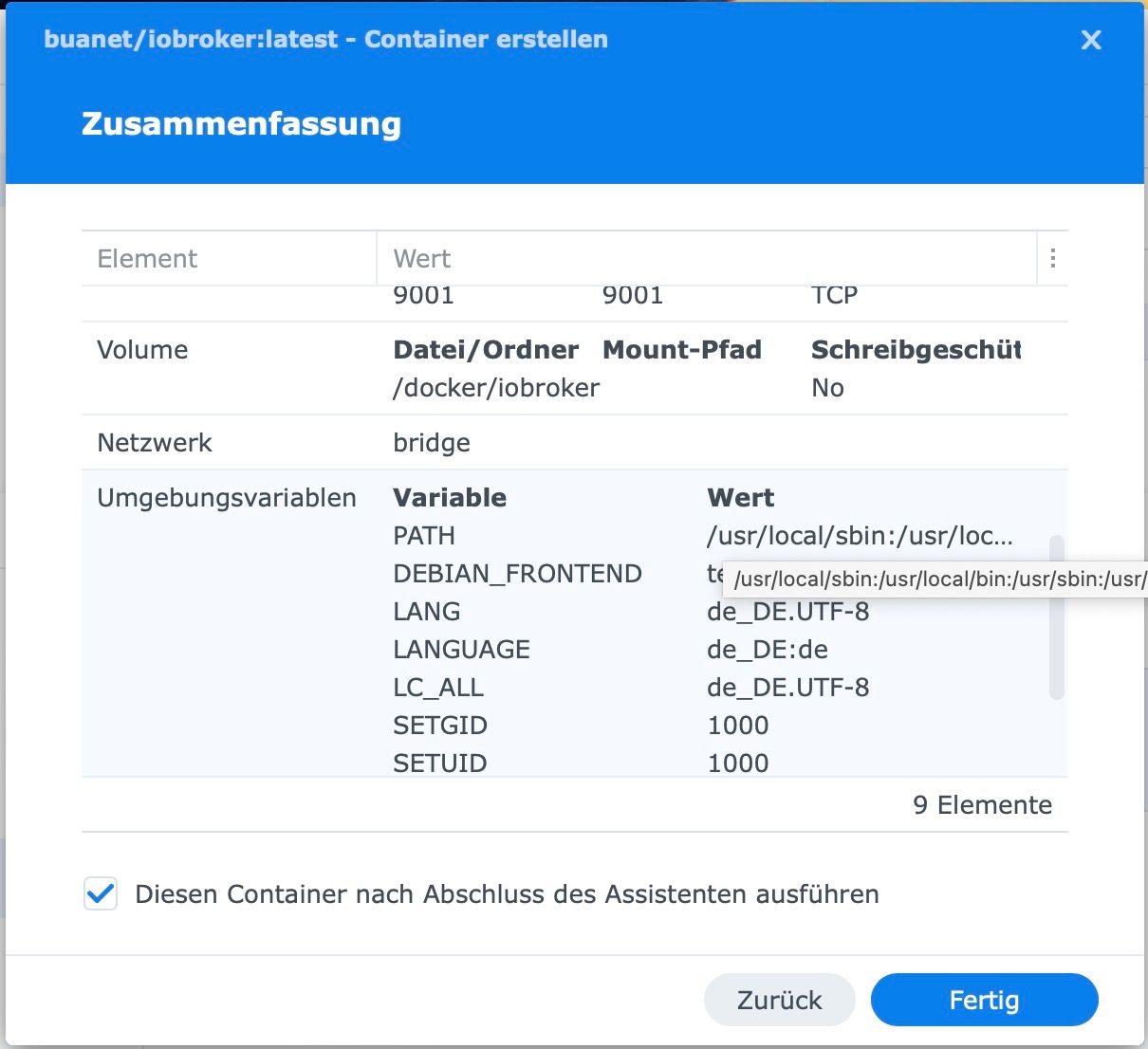
iobroker mit Docker: Kann keine Ports mehr durchschleifen
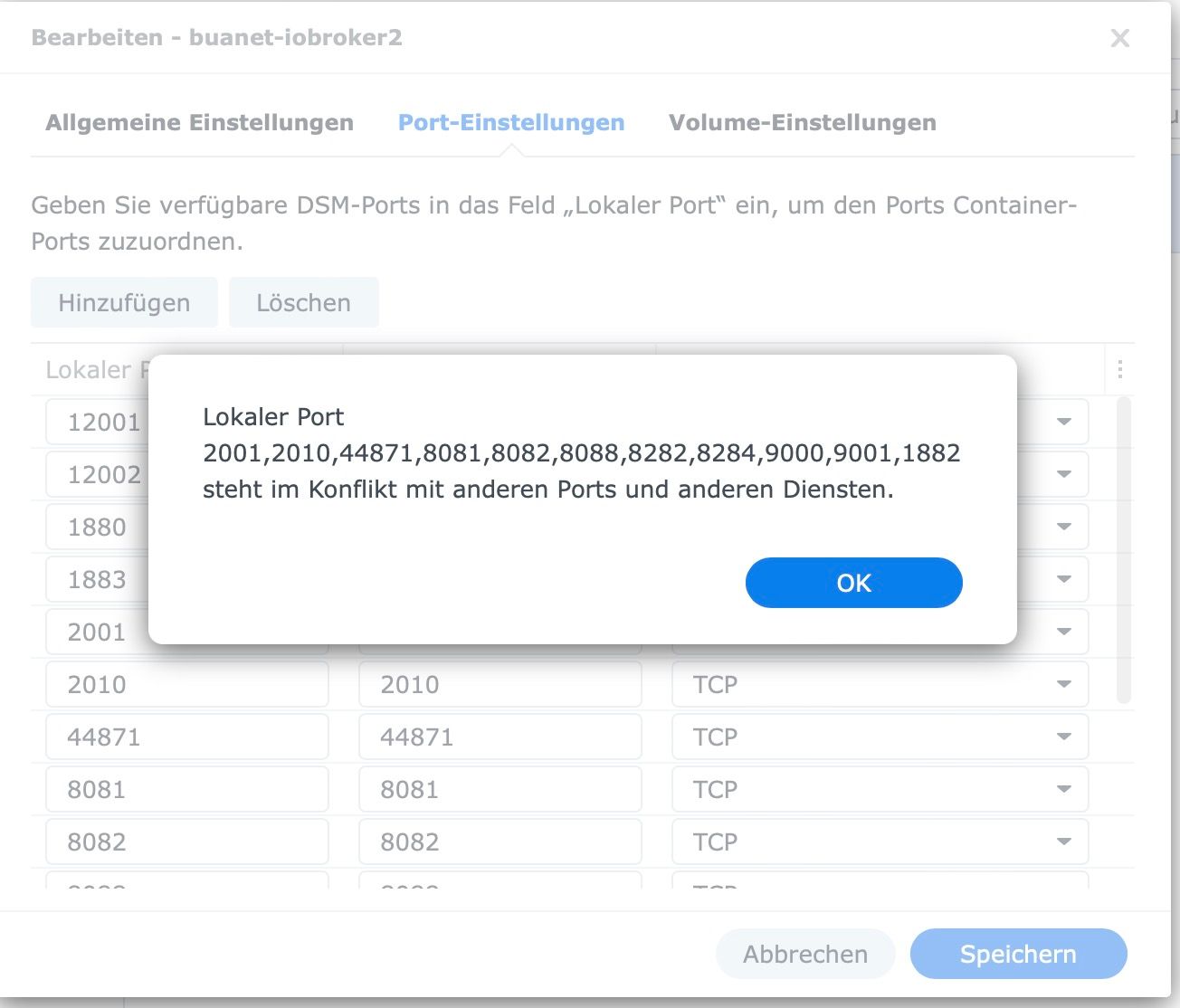
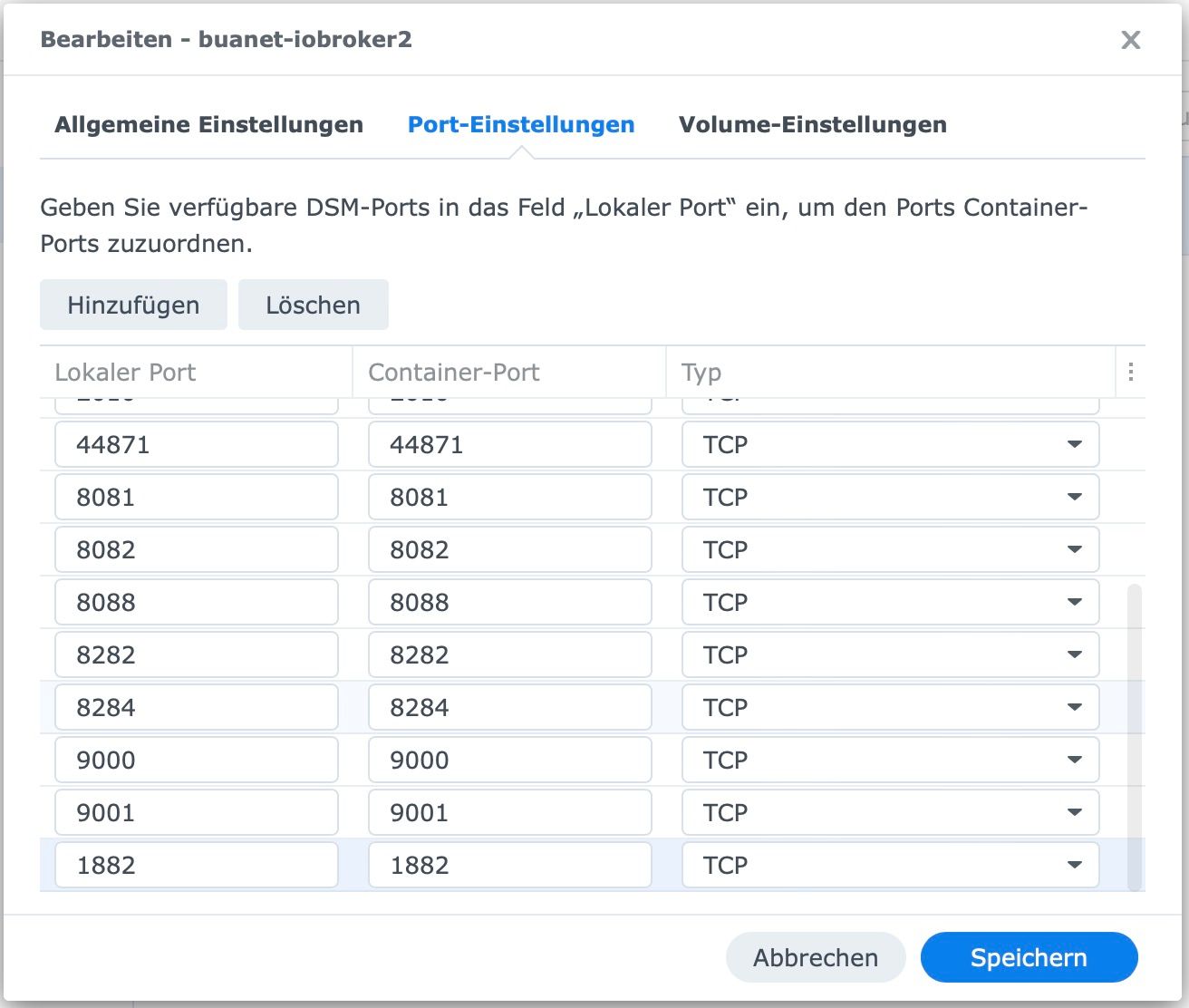
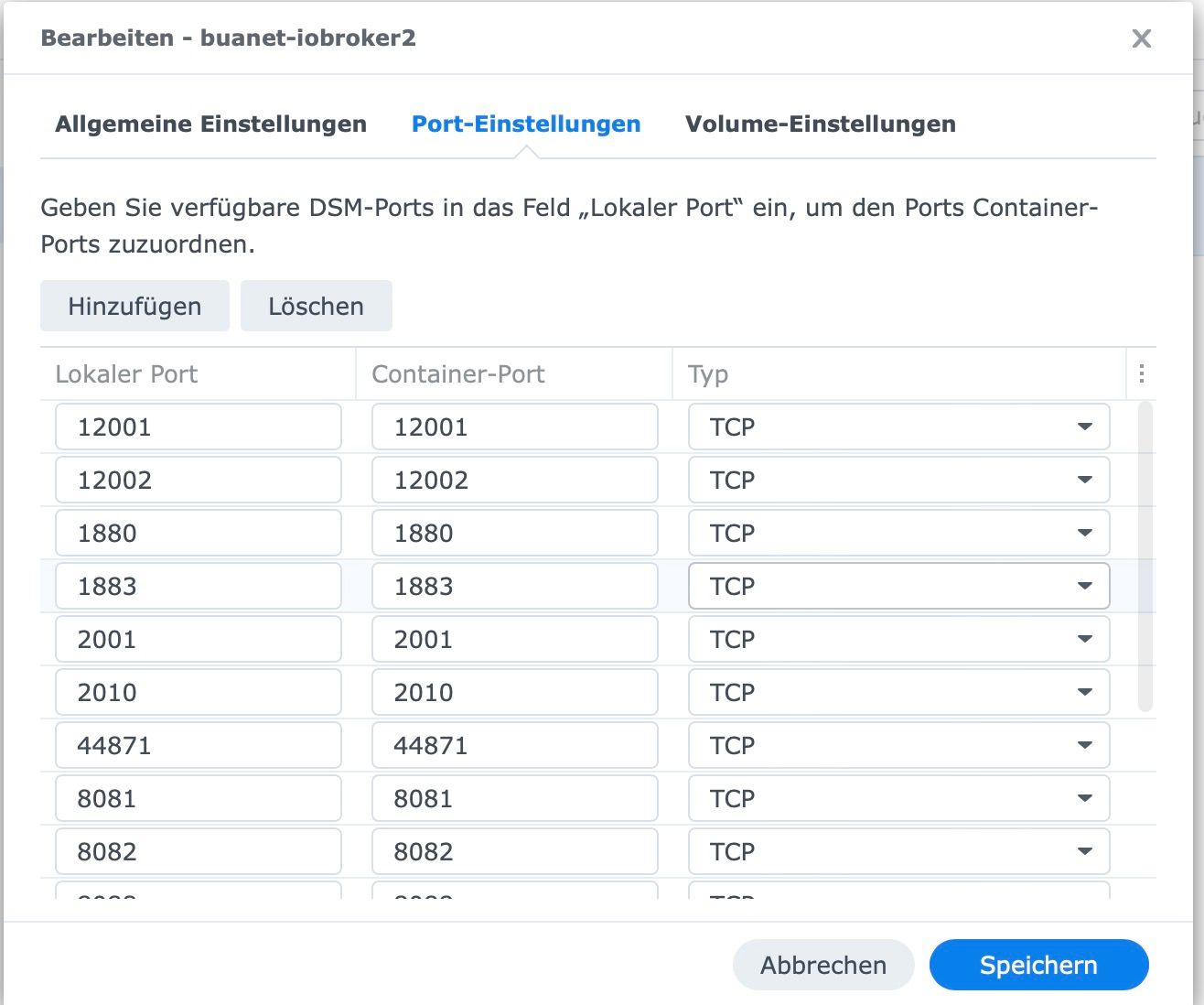
-
Das liest sich für mich, als nicht sehr erfahrener User sehr bedrohlich:
Aktuell läuft ja iobroker prima. Ich kann nur den MQTT-Server nicht nutzen.Gibt es keinen Weg, der weniger riskant als eine Neuinstallation oder die Portainerlösung ist?
Ist denn vielleicht einer der bereits durchgeschliffenen Ports frei und kann statt 1882 benutzt werden?du müsstest 1883 nutzen können.
der ist auf jeden fall vom container zum host gemappt.
was mich wundert ist, das im container 1882 als LISTEN aufgeführt ist.
gehe mal in deine mqtt konfiguration (adapter?) IM container und schaue ob du du da den falschen port eingetragen hast.die fehlermeldung würde ich nicht auf die goldwage legen. dsm nutzt im hintergrund auch nur den docker befehl. wenn nun eine fehlermeldung falsch interpretiert oder missverständlich ausgegeben wird, kann das schon sein.
ich sehe container richtig gemappt, aber imm container hört ein programm auf port 1882
da du schon einmal die beiden ports verwechselt hast und ich im internet für 1882 keine passende applikation gefunden habe (https://de.adminsub.net/tcp-udp-port-finder/1882 ist nur so ein zertifikatsservice den du wahrscheinlich innerhalb iobroker nicht einsetzt :) ), vermute ich das du da was falsch konfiguriert hast.
alternativ den mqtt adapter entfernen, iobroker durchstarten und dann mqtt wieder hinzufügen (mit dem richtigen port bzw weg lassen, da das eigentlich schon im default vorgegeben sein müsste) -
Das liest sich für mich, als nicht sehr erfahrener User sehr bedrohlich:
Aktuell läuft ja iobroker prima. Ich kann nur den MQTT-Server nicht nutzen.Gibt es keinen Weg, der weniger riskant als eine Neuinstallation oder die Portainerlösung ist?
Ist denn vielleicht einer der bereits durchgeschliffenen Ports frei und kann statt 1882 benutzt werden?@pingo said in iobroker mit Docker: Kann keine Ports mehr durchschleifen:
Gibt es keinen Weg, der weniger riskant als eine Neuinstallation oder die Portainerlösung ist?
docker direkt auf der shell nutzen
portainer als container zu installieren ist nicht riskant -
du müsstest 1883 nutzen können.
der ist auf jeden fall vom container zum host gemappt.
was mich wundert ist, das im container 1882 als LISTEN aufgeführt ist.
gehe mal in deine mqtt konfiguration (adapter?) IM container und schaue ob du du da den falschen port eingetragen hast.die fehlermeldung würde ich nicht auf die goldwage legen. dsm nutzt im hintergrund auch nur den docker befehl. wenn nun eine fehlermeldung falsch interpretiert oder missverständlich ausgegeben wird, kann das schon sein.
ich sehe container richtig gemappt, aber imm container hört ein programm auf port 1882
da du schon einmal die beiden ports verwechselt hast und ich im internet für 1882 keine passende applikation gefunden habe (https://de.adminsub.net/tcp-udp-port-finder/1882 ist nur so ein zertifikatsservice den du wahrscheinlich innerhalb iobroker nicht einsetzt :) ), vermute ich das du da was falsch konfiguriert hast.
alternativ den mqtt adapter entfernen, iobroker durchstarten und dann mqtt wieder hinzufügen (mit dem richtigen port bzw weg lassen, da das eigentlich schon im default vorgegeben sein müsste) -
@OliverIO: Das hat seine Richtigkeit, weil ich ja 1882 im Shelly Adapter eingetragen habe. Leider kann ich 1882 aber nicht durchschleifen. Siehe oben.
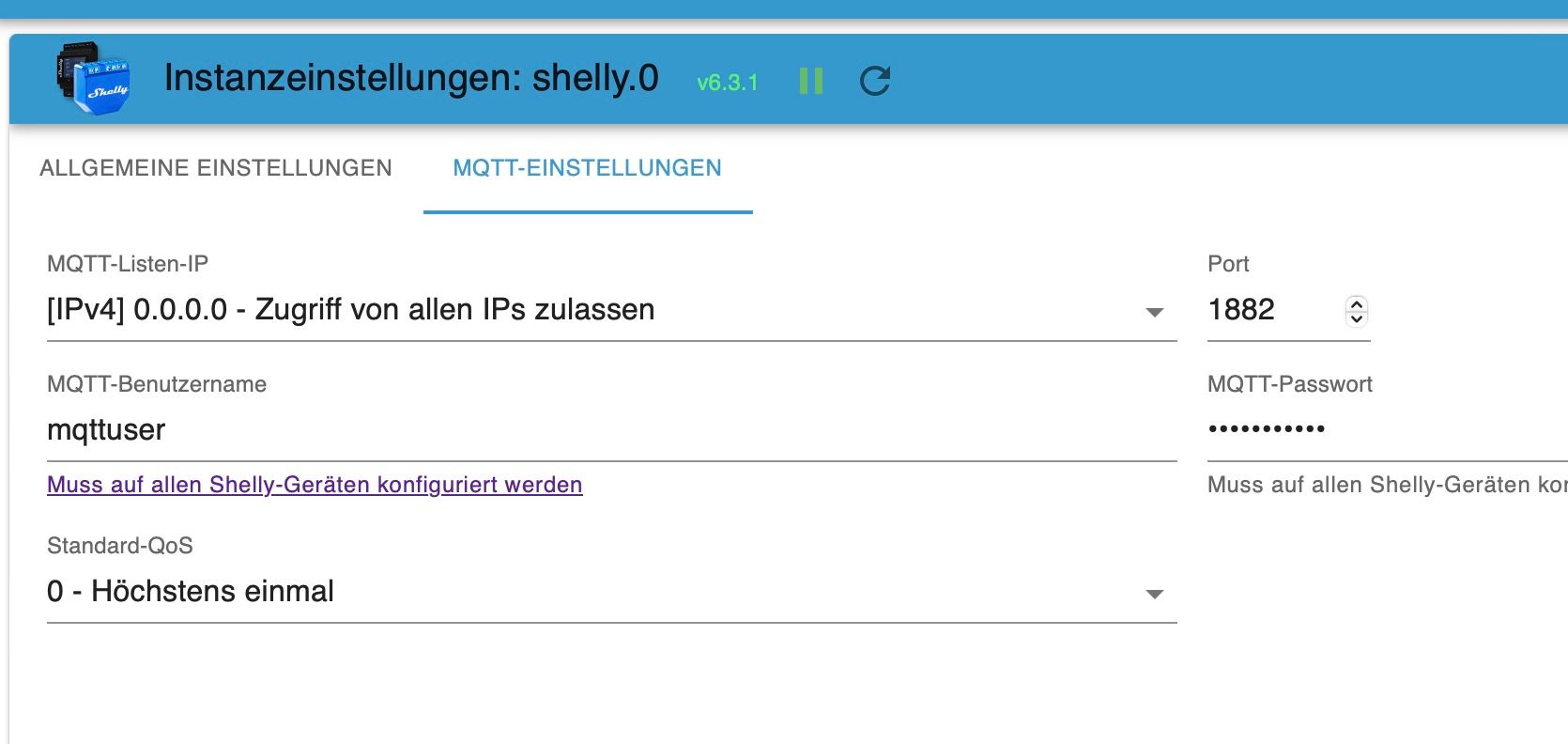
Kann ich denn vielleicht statt 1882 einen der bereits durchgeschliffenen Ports verwenden?
@pingo
und warum nicht den standard port?
dann musst du das bestehenede mapping 1883 erst mal wieder aufheben, da hat sich wohl was verhakt, evtl auch deswegen die fehlermeldung.
vor der bearbeitung der mappings den container am besten stoppen.
aber wie gesagt nochmal der hinweis auf den hinweis von buanet /er hat das nicht ohne grund geschrieben), ansonsten dann mal per discord direkt an ihn wenden (Andre buanet), da gibt es eine docker sektion und ich habe gesehen, das er dort auch mit anwesend ist -
@pingo
und warum nicht den standard port?
dann musst du das bestehenede mapping 1883 erst mal wieder aufheben, da hat sich wohl was verhakt, evtl auch deswegen die fehlermeldung.
vor der bearbeitung der mappings den container am besten stoppen.
aber wie gesagt nochmal der hinweis auf den hinweis von buanet /er hat das nicht ohne grund geschrieben), ansonsten dann mal per discord direkt an ihn wenden (Andre buanet), da gibt es eine docker sektion und ich habe gesehen, das er dort auch mit anwesend ist@oliverio said in iobroker mit Docker: Kann keine Ports mehr durchschleifen:
@pingo
und warum nicht den standard port?
dann musst du das bestehenede mapping 1883 erst mal wieder aufheben, da hat sich wohl was verhakt, evtl auch deswegen die fehlermeldungSoll ich 1883 in der Adaptereinstellung nehmen? (Edit: der Shelly Adapter funktioniert damit auch nicht)
-
@oliverio said in iobroker mit Docker: Kann keine Ports mehr durchschleifen:
@pingo
und warum nicht den standard port?
dann musst du das bestehenede mapping 1883 erst mal wieder aufheben, da hat sich wohl was verhakt, evtl auch deswegen die fehlermeldungSoll ich 1883 in der Adaptereinstellung nehmen? (Edit: der Shelly Adapter funktioniert damit auch nicht)
Lieben Dank für die Versuche mir zu helfen. Die Lösungsvorschläge überfordern mich doch gewaltig.
Ich wollte eigentlich nur den Shelly Adapter zum Laufen bringen: siehe hier
Wenn ich dafür jetzt meinen funktionsfähigen IOBroker neu aufsetzen muss oder in den Portainer packen muss, dann kann das wahrscheinlich auch richtig schief gehen. Ich bin jetzt ziemlich frustriert. -
Lieben Dank für die Versuche mir zu helfen. Die Lösungsvorschläge überfordern mich doch gewaltig.
Ich wollte eigentlich nur den Shelly Adapter zum Laufen bringen: siehe hier
Wenn ich dafür jetzt meinen funktionsfähigen IOBroker neu aufsetzen muss oder in den Portainer packen muss, dann kann das wahrscheinlich auch richtig schief gehen. Ich bin jetzt ziemlich frustriert.@pingo sagte in iobroker mit Docker: Kann keine Ports mehr durchschleifen:
Portainer packen muss, dann kann das wahrscheinlich auch richtig schief gehen. Ich bin jetzt ziemlich frustriert.
Nööö .
Portainer ist ein Image ... da passiert nichts !
-
@pingo sagte in iobroker mit Docker: Kann keine Ports mehr durchschleifen:
Portainer packen muss, dann kann das wahrscheinlich auch richtig schief gehen. Ich bin jetzt ziemlich frustriert.
Nööö .
Portainer ist ein Image ... da passiert nichts !
@glasfaser : Ok dann versuche ich mich mal damit

-
Lieben Dank für die Versuche mir zu helfen. Die Lösungsvorschläge überfordern mich doch gewaltig.
Ich wollte eigentlich nur den Shelly Adapter zum Laufen bringen: siehe hier
Wenn ich dafür jetzt meinen funktionsfähigen IOBroker neu aufsetzen muss oder in den Portainer packen muss, dann kann das wahrscheinlich auch richtig schief gehen. Ich bin jetzt ziemlich frustriert.@pingo sagte in iobroker mit Docker: Kann keine Ports mehr durchschleifen:
Wenn ich dafür jetzt meinen funktionsfähigen IOBroker
Er ist ja nicht voll funktionsfähig.
-
@pingo sagte in iobroker mit Docker: Kann keine Ports mehr durchschleifen:
Wenn ich dafür jetzt meinen funktionsfähigen IOBroker
Er ist ja nicht voll funktionsfähig.
@thomas-braun said in iobroker mit Docker: Kann keine Ports mehr durchschleifen:
@pingo sagte in iobroker mit Docker: Kann keine Ports mehr durchschleifen:
Wenn ich dafür jetzt meinen funktionsfähigen IOBroker
Er ist ja nicht voll funktionsfähig.
Stimmt, aber bis auf den Shelly Adapter läuft er prima.
-
@thomas-braun said in iobroker mit Docker: Kann keine Ports mehr durchschleifen:
@pingo sagte in iobroker mit Docker: Kann keine Ports mehr durchschleifen:
Wenn ich dafür jetzt meinen funktionsfähigen IOBroker
Er ist ja nicht voll funktionsfähig.
Stimmt, aber bis auf den Shelly Adapter läuft er prima.
-
@pingo sagte in iobroker mit Docker: Kann keine Ports mehr durchschleifen:
Stimmt, aber bis auf den Shelly Adapter läuft er prima.
zeige mal die Ausgabe von
iob diag@glasfaser :
<root@buanet-iobroker2:/opt/iobroker# iob diag
iobroker [command]Commands:
iobroker setup Setup ioBroker
iobroker start [all|<adapter>.<instance>] Starts the js-controller or a specified adapter instance
iobroker stop [<adapter>.<instance>] stops the js-controller or a specified adapter instance
iobroker restart [<adapter>.<instance>] Restarts js-controller or a specified adapter instance [aliases: r]
iobroker debug <adapter>[.<instance>] Starts a Node.js debugging session for the adapter instance
iobroker info Shows the host info
iobroker logs [<adapter>] Monitor log
iobroker add <adapter> [desiredNumber] Add instance of adapter [aliases: a]
iobroker install <adapter> Installs a specified adapter [aliases: i]
iobroker rebuild [<module>] Rebuild all native modules or path
iobroker url <url> [<name>] Install adapter from specified url, e.g. GitHub
iobroker del <adapter> Remove adapter and all instances from this host [aliases: delete]
iobroker del <adapter>.<instance> Remove adapter instance [aliases: delete]
iobroker update [<repositoryUrl>] Update repository and list adapters
iobroker upgrade Upgrade management
iobroker upload [all|<adapter>] Upload management [aliases: u]
iobroker object Object management [aliases: o]
iobroker state State management [aliases: s]
iobroker message <adapter>[.instance] <command> [<message>] Send message to adapter instance/s
iobroker list <type> [<filter>] List all entries, like objects
iobroker chmod <mode> <file> Change file rights
iobroker chown <user> <group> <file> Change file ownership
iobroker touch <file> Touch file
iobroker rm <file> Remove file
iobroker file File management
iobroker user User commands
iobroker group group management
iobroker host <hostname> Set host to given hostname
iobroker set <adapter>.<instance> Change settings of adapter config
iobroker license <license.file or license.text> Update license by given file
iobroker cert Certificate management
iobroker clean <yes> Clears all objects and states
iobroker backup Create backup
iobroker restore <backup name or path> Restore a specified backup
iobroker validate <backup name or path> Validate a specified backup
iobroker status [all|<adapter>.<instance>] Status of ioBroker or adapter instance [aliases: isrun]
iobroker repo [<name>] Show repo information
iobroker uuid Show uuid of the installation [aliases: id]
iobroker unsetup Reset license, installation secret and language
iobroker fix Execute the installation fixer script, this updates your ioBroker installation
iobroker multihost Multihost management
iobroker compact compact group management
iobroker plugin Plugin management
iobroker version [<adapter>] Show version of js-controller or specified adapter [aliases: v]Options:
--help Show help [boolean]> -
@glasfaser :
<root@buanet-iobroker2:/opt/iobroker# iob diag
iobroker [command]Commands:
iobroker setup Setup ioBroker
iobroker start [all|<adapter>.<instance>] Starts the js-controller or a specified adapter instance
iobroker stop [<adapter>.<instance>] stops the js-controller or a specified adapter instance
iobroker restart [<adapter>.<instance>] Restarts js-controller or a specified adapter instance [aliases: r]
iobroker debug <adapter>[.<instance>] Starts a Node.js debugging session for the adapter instance
iobroker info Shows the host info
iobroker logs [<adapter>] Monitor log
iobroker add <adapter> [desiredNumber] Add instance of adapter [aliases: a]
iobroker install <adapter> Installs a specified adapter [aliases: i]
iobroker rebuild [<module>] Rebuild all native modules or path
iobroker url <url> [<name>] Install adapter from specified url, e.g. GitHub
iobroker del <adapter> Remove adapter and all instances from this host [aliases: delete]
iobroker del <adapter>.<instance> Remove adapter instance [aliases: delete]
iobroker update [<repositoryUrl>] Update repository and list adapters
iobroker upgrade Upgrade management
iobroker upload [all|<adapter>] Upload management [aliases: u]
iobroker object Object management [aliases: o]
iobroker state State management [aliases: s]
iobroker message <adapter>[.instance] <command> [<message>] Send message to adapter instance/s
iobroker list <type> [<filter>] List all entries, like objects
iobroker chmod <mode> <file> Change file rights
iobroker chown <user> <group> <file> Change file ownership
iobroker touch <file> Touch file
iobroker rm <file> Remove file
iobroker file File management
iobroker user User commands
iobroker group group management
iobroker host <hostname> Set host to given hostname
iobroker set <adapter>.<instance> Change settings of adapter config
iobroker license <license.file or license.text> Update license by given file
iobroker cert Certificate management
iobroker clean <yes> Clears all objects and states
iobroker backup Create backup
iobroker restore <backup name or path> Restore a specified backup
iobroker validate <backup name or path> Validate a specified backup
iobroker status [all|<adapter>.<instance>] Status of ioBroker or adapter instance [aliases: isrun]
iobroker repo [<name>] Show repo information
iobroker uuid Show uuid of the installation [aliases: id]
iobroker unsetup Reset license, installation secret and language
iobroker fix Execute the installation fixer script, this updates your ioBroker installation
iobroker multihost Multihost management
iobroker compact compact group management
iobroker plugin Plugin management
iobroker version [<adapter>] Show version of js-controller or specified adapter [aliases: v]Options:
--help Show help [boolean]> -
@glasfaser said in iobroker mit Docker: Kann keine Ports mehr durchschleifen:
curl -sLf -o diag.sh https://iobroker.net/diag.sh && bash diag.sh
<Skript v.2023-01-02
*** BASE SYSTEM ***
Architecture: x86_64
Docker: false
Virtualization: Unknown (buanet/Synology?)
diag.sh: line 66: lsb_release: command not foundcat: /etc/os-release: No such file or directory
Systemuptime and Load:
15:19:58 up 1 day, 20:09, 1 user, load average: 0.88, 0.86, 0.69 [IO: 0.71, 0.57, 0.37 CPU: 0.17, 0.27, 0.27]
CPU threads: 4*** Time and Time Zones ***
Sun Mar 19 14:19:58 UTC 2023
Sun Mar 19 15:19:58 CET 2023
CET +0100
cat: /etc/timezone: No such file or directory*** User and Groups ***
root
/root
diag.sh: line 83: groups: command not found*** X-Server-Setup ***
X-Server: false
Desktop:
Terminal:
Boot Target: syno-bootup-done.target*** MEMORY ***
total used free shared buff/cache available
Mem: 3.8G 2.0G 120M 22M 1.6G 1.5G
Swap: 4.3G 554M 3.8G
Total: 8.1G 2.6G 3.9Gdiag.sh: line 100: vmstat: command not found
*** FILESYSTEM ***
Filesystem Type Size Used Avail Use% Mounted on
/dev/md0 ext4 2.3G 2.0G 252M 89% /
devtmpfs devtmpfs 1.9G 0 1.9G 0% /dev
tmpfs tmpfs 1.9G 2.2M 1.9G 1% /dev/shm
tmpfs tmpfs 1.9G 17M 1.9G 1% /run
tmpfs tmpfs 1.9G 0 1.9G 0% /sys/fs/cgroup
tmpfs tmpfs 1.9G 1.7M 1.9G 1% /tmp
/dev/mapper/cachedev_0 ext4 28T 22T 6.0T 78% /volume1
/dev/usb1p1 hfsplus 1.9T 206G 1.7T 12% /volumeUSB1/usbshare
none aufs 28T 22T 6.0T 78% /volume1/@docker/aufs/mnt/f63aaf1ee160276583588147957dc0ab8ed509048905b85f90e0d8804b430cc2Messages in dmesg:
[Fri Mar 17 19:11:01 2023] EXT4-fs (md0): couldn't mount as ext3 due to feature incompatibilities
[Fri Mar 17 19:11:01 2023] EXT4-fs (md0): mounted filesystem with ordered data mode. Opts: (null)
[Fri Mar 17 19:11:02 2023] EXT4-fs (md0): couldn't mount as ext3 due to feature incompatibilities
[Fri Mar 17 19:11:02 2023] EXT4-fs (md0): mounted filesystem with ordered data mode. Opts: (null)
[Fri Mar 17 19:11:02 2023] EXT4-fs (loop0): couldn't mount as ext3 due to feature incompatibilities
[Fri Mar 17 19:11:02 2023] EXT4-fs (loop0): mounted filesystem with ordered data mode. Opts: (null)
[Fri Mar 17 19:11:06 2023] EXT4-fs (md0): couldn't mount as ext3 due to feature incompatibilities
[Fri Mar 17 19:11:06 2023] EXT4-fs (md0): mounted filesystem with ordered data mode. Opts: (null)
[Fri Mar 17 19:11:07 2023] EXT4-fs (md0): couldn't mount as ext3 due to feature incompatibilities
[Fri Mar 17 19:11:07 2023] EXT4-fs (md0): mounted filesystem with ordered data mode. Opts: barrier=1
[Fri Mar 17 19:11:26 2023] EXT4-fs (dm-2): barriers disabled
[Fri Mar 17 19:11:27 2023] EXT4-fs (dm-2): mounted filesystem with writeback data mode. Opts: usrjquota=aquota.user,grpjquota=aquota.group,jqfmt=vfsv0,synoacl
[Fri Mar 17 19:11:34 2023] EXT4-fs (loop0): mounted filesystem with ordered data mode. Opts: (null)Show mounted filesystems (real ones only):
diag.sh: line 109: findmnt: command not foundFiles in neuralgic directories:
/var:
168M /var/
79M /var/db
77M /var/db/geoip-database
49M /var/log
21M /var/lib/opt/iobroker/backups:
du: cannot access '/opt/iobroker/backups/': No such file or directory/opt/iobroker/iobroker-data:
du: cannot access '/opt/iobroker/iobroker-data/': No such file or directoryThe five largest files in iobroker-data are:
find: `/opt/iobroker/iobroker-data': No such file or directory*** NodeJS-Installation ***
diag.sh: line 132: nodejs: command not found
/usr/local/bin/node v12.22.12
/usr/local/bin/npm 6.14.16
diag.sh: line 135: npx: command not founddiag.sh: line 137: apt-cache: command not found
find: `/opt/iobroker/node_modules': No such file or directory
Temp directories causing npm8 problem: 0*** ioBroker-Installation ***
ioBroker Status
diag.sh: line 152: iobroker: command not foundCore adapters versions
diag.sh: line 155: iob: command not found
js-controller:
diag.sh: line 156: iob: command not found
admin:
diag.sh: line 157: iob: command not found
javascript:diag.sh: line 159: cd: /opt/iobroker: No such file or directory
Adapters from github:Adapter State
diag.sh: line 162: iob: command not foundEnabled adapters with bindings
diag.sh: line 165: iob: command not foundioBroker-Repositories
diag.sh: line 168: iob: command not foundInstalled ioBroker-Instances
diag.sh: line 171: iob: command not foundObjects and States
Please stand by - This may take a while
Objects: 0
States: 0*** OS-Repositories and Updates ***
sudo: apt-get: command not found
diag.sh: line 182: apt-get: command not found
Pending Updates:*** Listening Ports ***
Active Internet connections (only servers)
Proto Recv-Q Send-Q Local Address Foreign Address State User Inode PID/Program name
tcp 0 0 127.0.0.1:143 0.0.0.0:* LISTEN 0 96027 20977/dovecot
tcp 0 0 0.0.0.0:80 0.0.0.0:* LISTEN 0 39198 6000/nginx: worker
tcp 0 0 0.0.0.0:2001 0.0.0.0:* LISTEN 0 10414849 722/docker-proxy
tcp 0 0 0.0.0.0:8081 0.0.0.0:* LISTEN 0 10415616 679/docker-proxy
tcp 0 0 0.0.0.0:8082 0.0.0.0:* LISTEN 0 10416312 658/docker-proxy
tcp 0 0 127.0.0.1:914 0.0.0.0:* LISTEN 0 90667 5917/fcgi-pm
tcp 0 0 127.0.0.1:915 0.0.0.0:* LISTEN 0 89594 6179/httpd24
tcp 0 0 0.0.0.0:21 0.0.0.0:* LISTEN 0 38790 11463/ftpd
tcp 0 0 0.0.0.0:22 0.0.0.0:* LISTEN 0 23450 8452/sshd: /usr/bin
tcp 0 0 0.0.0.0:631 0.0.0.0:* LISTEN 0 42711 11868/cupsd
tcp 0 0 0.0.0.0:1880 0.0.0.0:* LISTEN 0 10411894 762/docker-proxy
tcp 0 0 0.0.0.0:8088 0.0.0.0:* LISTEN 0 10411822 640/docker-proxy
tcp 0 0 127.0.0.1:5432 0.0.0.0:* LISTEN 55 66882 14817/postgres
tcp 0 0 0.0.0.0:2010 0.0.0.0:* LISTEN 0 10416341 699/docker-proxy
tcp 0 0 0.0.0.0:8282 0.0.0.0:* LISTEN 0 10416297 620/docker-proxy
tcp 0 0 0.0.0.0:1883 0.0.0.0:* LISTEN 0 10415672 743/docker-proxy
tcp 0 0 0.0.0.0:443 0.0.0.0:* LISTEN 0 39200 6000/nginx: worker
tcp 0 0 0.0.0.0:8284 0.0.0.0:* LISTEN 0 10415537 601/docker-proxy
tcp 0 0 127.0.0.1:4700 0.0.0.0:* LISTEN 0 40096 11551/cnid_metad
tcp 0 0 0.0.0.0:445 0.0.0.0:* LISTEN 0 41343 11450/smbd
tcp 0 0 0.0.0.0:4190 0.0.0.0:* LISTEN 0 95984 20977/dovecot
tcp 0 0 127.0.0.1:512 0.0.0.0:* LISTEN 0 98185 21178/termd
tcp 0 0 0.0.0.0:12001 0.0.0.0:* LISTEN 0 10416267 546/docker-proxy
tcp 0 0 127.0.0.1:161 0.0.0.0:* LISTEN 0 36329 11020/snmpd
tcp 0 0 0.0.0.0:12002 0.0.0.0:* LISTEN 0 10411751 526/docker-proxy
tcp 0 0 0.0.0.0:3493 0.0.0.0:* LISTEN 0 101790 21460/upsd
tcp 0 0 0.0.0.0:50022 0.0.0.0:* LISTEN 0 23454 8452/sshd: /usr/bin
tcp 0 0 0.0.0.0:44871 0.0.0.0:* LISTEN 0 10415415 506/docker-proxy
tcp 0 0 0.0.0.0:9000 0.0.0.0:* LISTEN 0 10415504 582/docker-proxy
tcp 0 0 0.0.0.0:5000 0.0.0.0:* LISTEN 0 39194 6000/nginx: worker
tcp 0 0 0.0.0.0:9001 0.0.0.0:* LISTEN 0 10411780 564/docker-proxy
tcp 0 0 0.0.0.0:5001 0.0.0.0:* LISTEN 0 39196 6000/nginx: worker
tcp 0 0 0.0.0.0:3307 0.0.0.0:* LISTEN 66 1700649 5364/mysqld
tcp 0 0 0.0.0.0:139 0.0.0.0:* LISTEN 0 41344 11450/smbd
tcp 0 0 0.0.0.0:5357 0.0.0.0:* LISTEN 0 39377 6000/nginx: worker
tcp6 0 0 :::80 :::* LISTEN 0 39199 6000/nginx: worker
tcp6 0 0 :::21 :::* LISTEN 0 38791 11463/ftpd
tcp6 0 0 :::22 :::* LISTEN 0 23452 8452/sshd: /usr/bin
tcp6 0 0 :::631 :::* LISTEN 0 42712 11868/cupsd
tcp6 0 0 :::443 :::* LISTEN 0 39201 6000/nginx: worker
tcp6 0 0 :::3261 :::* LISTEN 0 44823 -
tcp6 0 0 :::445 :::* LISTEN 0 41341 11450/smbd
tcp6 0 0 :::4190 :::* LISTEN 0 95985 20977/dovecot
tcp6 0 0 :::3263 :::* LISTEN 0 44821 -
tcp6 0 0 :::3264 :::* LISTEN 0 46116 -
tcp6 0 0 :::3265 :::* LISTEN 0 48499 12581/scsi_plugin_s
tcp6 0 0 :::515 :::* LISTEN 0 39882 1/init
tcp6 0 0 :::548 :::* LISTEN 0 40185 11550/afpd
tcp6 0 0 :::50022 :::* LISTEN 0 23456 8452/sshd: /usr/bin
tcp6 0 0 :::5000 :::* LISTEN 0 39195 6000/nginx: worker
tcp6 0 0 :::6281 :::* LISTEN 0 81032 17419/img_backupd
tcp6 0 0 :::5001 :::* LISTEN 0 39197 6000/nginx: worker
tcp6 0 0 :::139 :::* LISTEN 0 41342 11450/smbd
tcp6 0 0 :::5357 :::* LISTEN 0 39378 6000/nginx: worker
udp 0 0 0.0.0.0:5353 0.0.0.0:* 0 73684 16976/avahi-daemon:
udp 0 0 0.0.0.0:44343 0.0.0.0:* 0 73686 16976/avahi-daemon:
udp 0 0 0.0.0.0:3702 0.0.0.0:* 99 34843 10620/synowsdiscove
udp 0 0 0.0.0.0:9997 0.0.0.0:* 0 26087 8468/findhostd
udp 0 0 0.0.0.0:9998 0.0.0.0:* 0 26086 8468/findhostd
udp 0 0 0.0.0.0:9999 0.0.0.0:* 0 26085 8468/findhostd
udp 0 0 0.0.0.0:1900 0.0.0.0:* 0 78468 17664/minissdpd
udp 0 0 0.0.0.0:36787 0.0.0.0:* 0 1704353 11830/synorelayd
udp 213248 0 0.0.0.0:68 0.0.0.0:* 0 30841 9763/dhclient
udp 0 0 0.0.0.0:68 0.0.0.0:* 0 24988 8145/dhclient
udp 0 0 172.18.0.1:123 0.0.0.0:* 87 10417186 8459/ntpd
udp 0 0 192.168.178.144:123 0.0.0.0:* 87 34195 8459/ntpd
udp 0 0 127.0.0.1:123 0.0.0.0:* 0 23387 8459/ntpd
udp 0 0 0.0.0.0:123 0.0.0.0:* 0 23383 8459/ntpd
udp 0 0 192.168.178.255:137 0.0.0.0:* 0 76335 17172/nmbd
udp 0 0 192.168.178.144:137 0.0.0.0:* 0 76334 17172/nmbd
udp 0 0 0.0.0.0:137 0.0.0.0:* 0 78007 17172/nmbd
udp 0 0 192.168.178.255:138 0.0.0.0:* 0 76337 17172/nmbd
udp 0 0 192.168.178.144:138 0.0.0.0:* 0 76336 17172/nmbd
udp 0 0 0.0.0.0:138 0.0.0.0:* 0 78008 17172/nmbd
udp 0 0 127.0.0.1:161 0.0.0.0:* 0 36328 11020/snmpd
udp6 0 0 :::5353 :::* 0 73685 16976/avahi-daemon:
udp6 0 0 :::3702 :::* 99 34845 10620/synowsdiscove
udp6 0 0 fe80::e44e:4aff:fe3:123 :::* 87 10417192 8459/ntpd
udp6 0 0 fe80::42:7aff:fea0::123 :::* 87 10417190 8459/ntpd
udp6 0 0 fe80::9209:d0ff:fe0:123 :::* 87 34198 8459/ntpd
udp6 0 0 ::1:123 :::* 0 23389 8459/ntpd
udp6 0 0 :::123 :::* 0 23380 8459/ntpd
udp6 0 0 :::52099 :::* 0 73687 16976/avahi-daemon:*** Log File - Last 25 Lines ***
tail: cannot open '/opt/iobroker/log/iobroker.current.log' for reading: No such file or directory
============ Mark until here for C&P =============

iob diag has finished.
======================= SUMMARY =======================
v.2023-01-02diag.sh: line 215: lsb_release: command not found
Operatingsystem:
Installation:
cat: /etc/timezone: No such file or directory
Timezone:
User-ID: 0
X-Server: false
Boot Target: syno-bootup-done.targetPending OS-Updates:
diag.sh: line 239: nodejs: command not found
Nodejs-Installation:
/usr/local/bin/node v12.22.12
/usr/local/bin/npm 6.14.16
diag.sh: line 242: npx: command not founddiag.sh: line 244: iob: command not found
ioBroker Core: js-controller
diag.sh: line 245: iob: command not found
admindiag.sh: line 247: iobroker: command not found
ioBroker Status:Status admin:
diag.sh: line 251: iobroker: command not founddiag.sh: line 253: iob: command not found
Pending iob updates: 0diag.sh: line 255: iob: command not found
Objects: 0
States: 0Size of iob-Database:
find:
/opt/iobroker/iobroker-data': No such file or directory find:/opt/iobroker/iobroker-data': No such file or directory=================== END OF SUMMARY ====================>
Der Portainerversuch ist m.E. gescheitert:
<root@Diskstation920:~# docker run -d -p 9000:9000 --name portainer --restart always -v /var/run/docker.sock:/var/run/docker.sock -v /volume1/docker/portainer_data:/data portainer/portainer-ce
Unable to find image 'portainer/portainer-ce:latest' locally
latest: Pulling from portainer/portainer-ce
772227786281: Pull complete
96fd13befc87: Pull complete
b733663f020c: Pull complete
9fbfa87be55d: Pull complete
Digest: sha256:9fa1ec78b4e29d83593cf9720674b72829c9cdc0db7083a962bc30e64e27f64e
Status: Downloaded newer image for portainer/portainer-ce:latest
42538ba0f62d1644098d8eeea2b54c57c1bc3a0d2a7fb1a30f81e5e521d44c4d
docker: Error response from daemon: driver failed programming external connectivity on endpoint portainer (3728dc0bcf157c19a93766fef7892f83600fcb8f8baa191899ab809a8fe199ad): Bind for 0.0.0.0:9000 failed: port is already allocated.> -
@glasfaser said in iobroker mit Docker: Kann keine Ports mehr durchschleifen:
curl -sLf -o diag.sh https://iobroker.net/diag.sh && bash diag.sh
<Skript v.2023-01-02
*** BASE SYSTEM ***
Architecture: x86_64
Docker: false
Virtualization: Unknown (buanet/Synology?)
diag.sh: line 66: lsb_release: command not foundcat: /etc/os-release: No such file or directory
Systemuptime and Load:
15:19:58 up 1 day, 20:09, 1 user, load average: 0.88, 0.86, 0.69 [IO: 0.71, 0.57, 0.37 CPU: 0.17, 0.27, 0.27]
CPU threads: 4*** Time and Time Zones ***
Sun Mar 19 14:19:58 UTC 2023
Sun Mar 19 15:19:58 CET 2023
CET +0100
cat: /etc/timezone: No such file or directory*** User and Groups ***
root
/root
diag.sh: line 83: groups: command not found*** X-Server-Setup ***
X-Server: false
Desktop:
Terminal:
Boot Target: syno-bootup-done.target*** MEMORY ***
total used free shared buff/cache available
Mem: 3.8G 2.0G 120M 22M 1.6G 1.5G
Swap: 4.3G 554M 3.8G
Total: 8.1G 2.6G 3.9Gdiag.sh: line 100: vmstat: command not found
*** FILESYSTEM ***
Filesystem Type Size Used Avail Use% Mounted on
/dev/md0 ext4 2.3G 2.0G 252M 89% /
devtmpfs devtmpfs 1.9G 0 1.9G 0% /dev
tmpfs tmpfs 1.9G 2.2M 1.9G 1% /dev/shm
tmpfs tmpfs 1.9G 17M 1.9G 1% /run
tmpfs tmpfs 1.9G 0 1.9G 0% /sys/fs/cgroup
tmpfs tmpfs 1.9G 1.7M 1.9G 1% /tmp
/dev/mapper/cachedev_0 ext4 28T 22T 6.0T 78% /volume1
/dev/usb1p1 hfsplus 1.9T 206G 1.7T 12% /volumeUSB1/usbshare
none aufs 28T 22T 6.0T 78% /volume1/@docker/aufs/mnt/f63aaf1ee160276583588147957dc0ab8ed509048905b85f90e0d8804b430cc2Messages in dmesg:
[Fri Mar 17 19:11:01 2023] EXT4-fs (md0): couldn't mount as ext3 due to feature incompatibilities
[Fri Mar 17 19:11:01 2023] EXT4-fs (md0): mounted filesystem with ordered data mode. Opts: (null)
[Fri Mar 17 19:11:02 2023] EXT4-fs (md0): couldn't mount as ext3 due to feature incompatibilities
[Fri Mar 17 19:11:02 2023] EXT4-fs (md0): mounted filesystem with ordered data mode. Opts: (null)
[Fri Mar 17 19:11:02 2023] EXT4-fs (loop0): couldn't mount as ext3 due to feature incompatibilities
[Fri Mar 17 19:11:02 2023] EXT4-fs (loop0): mounted filesystem with ordered data mode. Opts: (null)
[Fri Mar 17 19:11:06 2023] EXT4-fs (md0): couldn't mount as ext3 due to feature incompatibilities
[Fri Mar 17 19:11:06 2023] EXT4-fs (md0): mounted filesystem with ordered data mode. Opts: (null)
[Fri Mar 17 19:11:07 2023] EXT4-fs (md0): couldn't mount as ext3 due to feature incompatibilities
[Fri Mar 17 19:11:07 2023] EXT4-fs (md0): mounted filesystem with ordered data mode. Opts: barrier=1
[Fri Mar 17 19:11:26 2023] EXT4-fs (dm-2): barriers disabled
[Fri Mar 17 19:11:27 2023] EXT4-fs (dm-2): mounted filesystem with writeback data mode. Opts: usrjquota=aquota.user,grpjquota=aquota.group,jqfmt=vfsv0,synoacl
[Fri Mar 17 19:11:34 2023] EXT4-fs (loop0): mounted filesystem with ordered data mode. Opts: (null)Show mounted filesystems (real ones only):
diag.sh: line 109: findmnt: command not foundFiles in neuralgic directories:
/var:
168M /var/
79M /var/db
77M /var/db/geoip-database
49M /var/log
21M /var/lib/opt/iobroker/backups:
du: cannot access '/opt/iobroker/backups/': No such file or directory/opt/iobroker/iobroker-data:
du: cannot access '/opt/iobroker/iobroker-data/': No such file or directoryThe five largest files in iobroker-data are:
find: `/opt/iobroker/iobroker-data': No such file or directory*** NodeJS-Installation ***
diag.sh: line 132: nodejs: command not found
/usr/local/bin/node v12.22.12
/usr/local/bin/npm 6.14.16
diag.sh: line 135: npx: command not founddiag.sh: line 137: apt-cache: command not found
find: `/opt/iobroker/node_modules': No such file or directory
Temp directories causing npm8 problem: 0*** ioBroker-Installation ***
ioBroker Status
diag.sh: line 152: iobroker: command not foundCore adapters versions
diag.sh: line 155: iob: command not found
js-controller:
diag.sh: line 156: iob: command not found
admin:
diag.sh: line 157: iob: command not found
javascript:diag.sh: line 159: cd: /opt/iobroker: No such file or directory
Adapters from github:Adapter State
diag.sh: line 162: iob: command not foundEnabled adapters with bindings
diag.sh: line 165: iob: command not foundioBroker-Repositories
diag.sh: line 168: iob: command not foundInstalled ioBroker-Instances
diag.sh: line 171: iob: command not foundObjects and States
Please stand by - This may take a while
Objects: 0
States: 0*** OS-Repositories and Updates ***
sudo: apt-get: command not found
diag.sh: line 182: apt-get: command not found
Pending Updates:*** Listening Ports ***
Active Internet connections (only servers)
Proto Recv-Q Send-Q Local Address Foreign Address State User Inode PID/Program name
tcp 0 0 127.0.0.1:143 0.0.0.0:* LISTEN 0 96027 20977/dovecot
tcp 0 0 0.0.0.0:80 0.0.0.0:* LISTEN 0 39198 6000/nginx: worker
tcp 0 0 0.0.0.0:2001 0.0.0.0:* LISTEN 0 10414849 722/docker-proxy
tcp 0 0 0.0.0.0:8081 0.0.0.0:* LISTEN 0 10415616 679/docker-proxy
tcp 0 0 0.0.0.0:8082 0.0.0.0:* LISTEN 0 10416312 658/docker-proxy
tcp 0 0 127.0.0.1:914 0.0.0.0:* LISTEN 0 90667 5917/fcgi-pm
tcp 0 0 127.0.0.1:915 0.0.0.0:* LISTEN 0 89594 6179/httpd24
tcp 0 0 0.0.0.0:21 0.0.0.0:* LISTEN 0 38790 11463/ftpd
tcp 0 0 0.0.0.0:22 0.0.0.0:* LISTEN 0 23450 8452/sshd: /usr/bin
tcp 0 0 0.0.0.0:631 0.0.0.0:* LISTEN 0 42711 11868/cupsd
tcp 0 0 0.0.0.0:1880 0.0.0.0:* LISTEN 0 10411894 762/docker-proxy
tcp 0 0 0.0.0.0:8088 0.0.0.0:* LISTEN 0 10411822 640/docker-proxy
tcp 0 0 127.0.0.1:5432 0.0.0.0:* LISTEN 55 66882 14817/postgres
tcp 0 0 0.0.0.0:2010 0.0.0.0:* LISTEN 0 10416341 699/docker-proxy
tcp 0 0 0.0.0.0:8282 0.0.0.0:* LISTEN 0 10416297 620/docker-proxy
tcp 0 0 0.0.0.0:1883 0.0.0.0:* LISTEN 0 10415672 743/docker-proxy
tcp 0 0 0.0.0.0:443 0.0.0.0:* LISTEN 0 39200 6000/nginx: worker
tcp 0 0 0.0.0.0:8284 0.0.0.0:* LISTEN 0 10415537 601/docker-proxy
tcp 0 0 127.0.0.1:4700 0.0.0.0:* LISTEN 0 40096 11551/cnid_metad
tcp 0 0 0.0.0.0:445 0.0.0.0:* LISTEN 0 41343 11450/smbd
tcp 0 0 0.0.0.0:4190 0.0.0.0:* LISTEN 0 95984 20977/dovecot
tcp 0 0 127.0.0.1:512 0.0.0.0:* LISTEN 0 98185 21178/termd
tcp 0 0 0.0.0.0:12001 0.0.0.0:* LISTEN 0 10416267 546/docker-proxy
tcp 0 0 127.0.0.1:161 0.0.0.0:* LISTEN 0 36329 11020/snmpd
tcp 0 0 0.0.0.0:12002 0.0.0.0:* LISTEN 0 10411751 526/docker-proxy
tcp 0 0 0.0.0.0:3493 0.0.0.0:* LISTEN 0 101790 21460/upsd
tcp 0 0 0.0.0.0:50022 0.0.0.0:* LISTEN 0 23454 8452/sshd: /usr/bin
tcp 0 0 0.0.0.0:44871 0.0.0.0:* LISTEN 0 10415415 506/docker-proxy
tcp 0 0 0.0.0.0:9000 0.0.0.0:* LISTEN 0 10415504 582/docker-proxy
tcp 0 0 0.0.0.0:5000 0.0.0.0:* LISTEN 0 39194 6000/nginx: worker
tcp 0 0 0.0.0.0:9001 0.0.0.0:* LISTEN 0 10411780 564/docker-proxy
tcp 0 0 0.0.0.0:5001 0.0.0.0:* LISTEN 0 39196 6000/nginx: worker
tcp 0 0 0.0.0.0:3307 0.0.0.0:* LISTEN 66 1700649 5364/mysqld
tcp 0 0 0.0.0.0:139 0.0.0.0:* LISTEN 0 41344 11450/smbd
tcp 0 0 0.0.0.0:5357 0.0.0.0:* LISTEN 0 39377 6000/nginx: worker
tcp6 0 0 :::80 :::* LISTEN 0 39199 6000/nginx: worker
tcp6 0 0 :::21 :::* LISTEN 0 38791 11463/ftpd
tcp6 0 0 :::22 :::* LISTEN 0 23452 8452/sshd: /usr/bin
tcp6 0 0 :::631 :::* LISTEN 0 42712 11868/cupsd
tcp6 0 0 :::443 :::* LISTEN 0 39201 6000/nginx: worker
tcp6 0 0 :::3261 :::* LISTEN 0 44823 -
tcp6 0 0 :::445 :::* LISTEN 0 41341 11450/smbd
tcp6 0 0 :::4190 :::* LISTEN 0 95985 20977/dovecot
tcp6 0 0 :::3263 :::* LISTEN 0 44821 -
tcp6 0 0 :::3264 :::* LISTEN 0 46116 -
tcp6 0 0 :::3265 :::* LISTEN 0 48499 12581/scsi_plugin_s
tcp6 0 0 :::515 :::* LISTEN 0 39882 1/init
tcp6 0 0 :::548 :::* LISTEN 0 40185 11550/afpd
tcp6 0 0 :::50022 :::* LISTEN 0 23456 8452/sshd: /usr/bin
tcp6 0 0 :::5000 :::* LISTEN 0 39195 6000/nginx: worker
tcp6 0 0 :::6281 :::* LISTEN 0 81032 17419/img_backupd
tcp6 0 0 :::5001 :::* LISTEN 0 39197 6000/nginx: worker
tcp6 0 0 :::139 :::* LISTEN 0 41342 11450/smbd
tcp6 0 0 :::5357 :::* LISTEN 0 39378 6000/nginx: worker
udp 0 0 0.0.0.0:5353 0.0.0.0:* 0 73684 16976/avahi-daemon:
udp 0 0 0.0.0.0:44343 0.0.0.0:* 0 73686 16976/avahi-daemon:
udp 0 0 0.0.0.0:3702 0.0.0.0:* 99 34843 10620/synowsdiscove
udp 0 0 0.0.0.0:9997 0.0.0.0:* 0 26087 8468/findhostd
udp 0 0 0.0.0.0:9998 0.0.0.0:* 0 26086 8468/findhostd
udp 0 0 0.0.0.0:9999 0.0.0.0:* 0 26085 8468/findhostd
udp 0 0 0.0.0.0:1900 0.0.0.0:* 0 78468 17664/minissdpd
udp 0 0 0.0.0.0:36787 0.0.0.0:* 0 1704353 11830/synorelayd
udp 213248 0 0.0.0.0:68 0.0.0.0:* 0 30841 9763/dhclient
udp 0 0 0.0.0.0:68 0.0.0.0:* 0 24988 8145/dhclient
udp 0 0 172.18.0.1:123 0.0.0.0:* 87 10417186 8459/ntpd
udp 0 0 192.168.178.144:123 0.0.0.0:* 87 34195 8459/ntpd
udp 0 0 127.0.0.1:123 0.0.0.0:* 0 23387 8459/ntpd
udp 0 0 0.0.0.0:123 0.0.0.0:* 0 23383 8459/ntpd
udp 0 0 192.168.178.255:137 0.0.0.0:* 0 76335 17172/nmbd
udp 0 0 192.168.178.144:137 0.0.0.0:* 0 76334 17172/nmbd
udp 0 0 0.0.0.0:137 0.0.0.0:* 0 78007 17172/nmbd
udp 0 0 192.168.178.255:138 0.0.0.0:* 0 76337 17172/nmbd
udp 0 0 192.168.178.144:138 0.0.0.0:* 0 76336 17172/nmbd
udp 0 0 0.0.0.0:138 0.0.0.0:* 0 78008 17172/nmbd
udp 0 0 127.0.0.1:161 0.0.0.0:* 0 36328 11020/snmpd
udp6 0 0 :::5353 :::* 0 73685 16976/avahi-daemon:
udp6 0 0 :::3702 :::* 99 34845 10620/synowsdiscove
udp6 0 0 fe80::e44e:4aff:fe3:123 :::* 87 10417192 8459/ntpd
udp6 0 0 fe80::42:7aff:fea0::123 :::* 87 10417190 8459/ntpd
udp6 0 0 fe80::9209:d0ff:fe0:123 :::* 87 34198 8459/ntpd
udp6 0 0 ::1:123 :::* 0 23389 8459/ntpd
udp6 0 0 :::123 :::* 0 23380 8459/ntpd
udp6 0 0 :::52099 :::* 0 73687 16976/avahi-daemon:*** Log File - Last 25 Lines ***
tail: cannot open '/opt/iobroker/log/iobroker.current.log' for reading: No such file or directory
============ Mark until here for C&P =============

iob diag has finished.
======================= SUMMARY =======================
v.2023-01-02diag.sh: line 215: lsb_release: command not found
Operatingsystem:
Installation:
cat: /etc/timezone: No such file or directory
Timezone:
User-ID: 0
X-Server: false
Boot Target: syno-bootup-done.targetPending OS-Updates:
diag.sh: line 239: nodejs: command not found
Nodejs-Installation:
/usr/local/bin/node v12.22.12
/usr/local/bin/npm 6.14.16
diag.sh: line 242: npx: command not founddiag.sh: line 244: iob: command not found
ioBroker Core: js-controller
diag.sh: line 245: iob: command not found
admindiag.sh: line 247: iobroker: command not found
ioBroker Status:Status admin:
diag.sh: line 251: iobroker: command not founddiag.sh: line 253: iob: command not found
Pending iob updates: 0diag.sh: line 255: iob: command not found
Objects: 0
States: 0Size of iob-Database:
find:
/opt/iobroker/iobroker-data': No such file or directory find:/opt/iobroker/iobroker-data': No such file or directory=================== END OF SUMMARY ====================>
Der Portainerversuch ist m.E. gescheitert:
<root@Diskstation920:~# docker run -d -p 9000:9000 --name portainer --restart always -v /var/run/docker.sock:/var/run/docker.sock -v /volume1/docker/portainer_data:/data portainer/portainer-ce
Unable to find image 'portainer/portainer-ce:latest' locally
latest: Pulling from portainer/portainer-ce
772227786281: Pull complete
96fd13befc87: Pull complete
b733663f020c: Pull complete
9fbfa87be55d: Pull complete
Digest: sha256:9fa1ec78b4e29d83593cf9720674b72829c9cdc0db7083a962bc30e64e27f64e
Status: Downloaded newer image for portainer/portainer-ce:latest
42538ba0f62d1644098d8eeea2b54c57c1bc3a0d2a7fb1a30f81e5e521d44c4d
docker: Error response from daemon: driver failed programming external connectivity on endpoint portainer (3728dc0bcf157c19a93766fef7892f83600fcb8f8baa191899ab809a8fe199ad): Bind for 0.0.0.0:9000 failed: port is already allocated.>@pingo sagte in iobroker mit Docker: Kann keine Ports mehr durchschleifen:
*** NodeJS-Installation ***
diag.sh: line 132: nodejs: command not found
/usr/local/bin/node v12.22.12
/usr/local/bin/npm 6.14.16
diag.sh: line 135: npx: command not foundschon mal ein Fehler von xxxx , weiter lese ich nicht !!!
Nimm meinen Vorschlag von ganz oben !!!!
-
@glasfaser said in iobroker mit Docker: Kann keine Ports mehr durchschleifen:
curl -sLf -o diag.sh https://iobroker.net/diag.sh && bash diag.sh
<Skript v.2023-01-02
*** BASE SYSTEM ***
Architecture: x86_64
Docker: false
Virtualization: Unknown (buanet/Synology?)
diag.sh: line 66: lsb_release: command not foundcat: /etc/os-release: No such file or directory
Systemuptime and Load:
15:19:58 up 1 day, 20:09, 1 user, load average: 0.88, 0.86, 0.69 [IO: 0.71, 0.57, 0.37 CPU: 0.17, 0.27, 0.27]
CPU threads: 4*** Time and Time Zones ***
Sun Mar 19 14:19:58 UTC 2023
Sun Mar 19 15:19:58 CET 2023
CET +0100
cat: /etc/timezone: No such file or directory*** User and Groups ***
root
/root
diag.sh: line 83: groups: command not found*** X-Server-Setup ***
X-Server: false
Desktop:
Terminal:
Boot Target: syno-bootup-done.target*** MEMORY ***
total used free shared buff/cache available
Mem: 3.8G 2.0G 120M 22M 1.6G 1.5G
Swap: 4.3G 554M 3.8G
Total: 8.1G 2.6G 3.9Gdiag.sh: line 100: vmstat: command not found
*** FILESYSTEM ***
Filesystem Type Size Used Avail Use% Mounted on
/dev/md0 ext4 2.3G 2.0G 252M 89% /
devtmpfs devtmpfs 1.9G 0 1.9G 0% /dev
tmpfs tmpfs 1.9G 2.2M 1.9G 1% /dev/shm
tmpfs tmpfs 1.9G 17M 1.9G 1% /run
tmpfs tmpfs 1.9G 0 1.9G 0% /sys/fs/cgroup
tmpfs tmpfs 1.9G 1.7M 1.9G 1% /tmp
/dev/mapper/cachedev_0 ext4 28T 22T 6.0T 78% /volume1
/dev/usb1p1 hfsplus 1.9T 206G 1.7T 12% /volumeUSB1/usbshare
none aufs 28T 22T 6.0T 78% /volume1/@docker/aufs/mnt/f63aaf1ee160276583588147957dc0ab8ed509048905b85f90e0d8804b430cc2Messages in dmesg:
[Fri Mar 17 19:11:01 2023] EXT4-fs (md0): couldn't mount as ext3 due to feature incompatibilities
[Fri Mar 17 19:11:01 2023] EXT4-fs (md0): mounted filesystem with ordered data mode. Opts: (null)
[Fri Mar 17 19:11:02 2023] EXT4-fs (md0): couldn't mount as ext3 due to feature incompatibilities
[Fri Mar 17 19:11:02 2023] EXT4-fs (md0): mounted filesystem with ordered data mode. Opts: (null)
[Fri Mar 17 19:11:02 2023] EXT4-fs (loop0): couldn't mount as ext3 due to feature incompatibilities
[Fri Mar 17 19:11:02 2023] EXT4-fs (loop0): mounted filesystem with ordered data mode. Opts: (null)
[Fri Mar 17 19:11:06 2023] EXT4-fs (md0): couldn't mount as ext3 due to feature incompatibilities
[Fri Mar 17 19:11:06 2023] EXT4-fs (md0): mounted filesystem with ordered data mode. Opts: (null)
[Fri Mar 17 19:11:07 2023] EXT4-fs (md0): couldn't mount as ext3 due to feature incompatibilities
[Fri Mar 17 19:11:07 2023] EXT4-fs (md0): mounted filesystem with ordered data mode. Opts: barrier=1
[Fri Mar 17 19:11:26 2023] EXT4-fs (dm-2): barriers disabled
[Fri Mar 17 19:11:27 2023] EXT4-fs (dm-2): mounted filesystem with writeback data mode. Opts: usrjquota=aquota.user,grpjquota=aquota.group,jqfmt=vfsv0,synoacl
[Fri Mar 17 19:11:34 2023] EXT4-fs (loop0): mounted filesystem with ordered data mode. Opts: (null)Show mounted filesystems (real ones only):
diag.sh: line 109: findmnt: command not foundFiles in neuralgic directories:
/var:
168M /var/
79M /var/db
77M /var/db/geoip-database
49M /var/log
21M /var/lib/opt/iobroker/backups:
du: cannot access '/opt/iobroker/backups/': No such file or directory/opt/iobroker/iobroker-data:
du: cannot access '/opt/iobroker/iobroker-data/': No such file or directoryThe five largest files in iobroker-data are:
find: `/opt/iobroker/iobroker-data': No such file or directory*** NodeJS-Installation ***
diag.sh: line 132: nodejs: command not found
/usr/local/bin/node v12.22.12
/usr/local/bin/npm 6.14.16
diag.sh: line 135: npx: command not founddiag.sh: line 137: apt-cache: command not found
find: `/opt/iobroker/node_modules': No such file or directory
Temp directories causing npm8 problem: 0*** ioBroker-Installation ***
ioBroker Status
diag.sh: line 152: iobroker: command not foundCore adapters versions
diag.sh: line 155: iob: command not found
js-controller:
diag.sh: line 156: iob: command not found
admin:
diag.sh: line 157: iob: command not found
javascript:diag.sh: line 159: cd: /opt/iobroker: No such file or directory
Adapters from github:Adapter State
diag.sh: line 162: iob: command not foundEnabled adapters with bindings
diag.sh: line 165: iob: command not foundioBroker-Repositories
diag.sh: line 168: iob: command not foundInstalled ioBroker-Instances
diag.sh: line 171: iob: command not foundObjects and States
Please stand by - This may take a while
Objects: 0
States: 0*** OS-Repositories and Updates ***
sudo: apt-get: command not found
diag.sh: line 182: apt-get: command not found
Pending Updates:*** Listening Ports ***
Active Internet connections (only servers)
Proto Recv-Q Send-Q Local Address Foreign Address State User Inode PID/Program name
tcp 0 0 127.0.0.1:143 0.0.0.0:* LISTEN 0 96027 20977/dovecot
tcp 0 0 0.0.0.0:80 0.0.0.0:* LISTEN 0 39198 6000/nginx: worker
tcp 0 0 0.0.0.0:2001 0.0.0.0:* LISTEN 0 10414849 722/docker-proxy
tcp 0 0 0.0.0.0:8081 0.0.0.0:* LISTEN 0 10415616 679/docker-proxy
tcp 0 0 0.0.0.0:8082 0.0.0.0:* LISTEN 0 10416312 658/docker-proxy
tcp 0 0 127.0.0.1:914 0.0.0.0:* LISTEN 0 90667 5917/fcgi-pm
tcp 0 0 127.0.0.1:915 0.0.0.0:* LISTEN 0 89594 6179/httpd24
tcp 0 0 0.0.0.0:21 0.0.0.0:* LISTEN 0 38790 11463/ftpd
tcp 0 0 0.0.0.0:22 0.0.0.0:* LISTEN 0 23450 8452/sshd: /usr/bin
tcp 0 0 0.0.0.0:631 0.0.0.0:* LISTEN 0 42711 11868/cupsd
tcp 0 0 0.0.0.0:1880 0.0.0.0:* LISTEN 0 10411894 762/docker-proxy
tcp 0 0 0.0.0.0:8088 0.0.0.0:* LISTEN 0 10411822 640/docker-proxy
tcp 0 0 127.0.0.1:5432 0.0.0.0:* LISTEN 55 66882 14817/postgres
tcp 0 0 0.0.0.0:2010 0.0.0.0:* LISTEN 0 10416341 699/docker-proxy
tcp 0 0 0.0.0.0:8282 0.0.0.0:* LISTEN 0 10416297 620/docker-proxy
tcp 0 0 0.0.0.0:1883 0.0.0.0:* LISTEN 0 10415672 743/docker-proxy
tcp 0 0 0.0.0.0:443 0.0.0.0:* LISTEN 0 39200 6000/nginx: worker
tcp 0 0 0.0.0.0:8284 0.0.0.0:* LISTEN 0 10415537 601/docker-proxy
tcp 0 0 127.0.0.1:4700 0.0.0.0:* LISTEN 0 40096 11551/cnid_metad
tcp 0 0 0.0.0.0:445 0.0.0.0:* LISTEN 0 41343 11450/smbd
tcp 0 0 0.0.0.0:4190 0.0.0.0:* LISTEN 0 95984 20977/dovecot
tcp 0 0 127.0.0.1:512 0.0.0.0:* LISTEN 0 98185 21178/termd
tcp 0 0 0.0.0.0:12001 0.0.0.0:* LISTEN 0 10416267 546/docker-proxy
tcp 0 0 127.0.0.1:161 0.0.0.0:* LISTEN 0 36329 11020/snmpd
tcp 0 0 0.0.0.0:12002 0.0.0.0:* LISTEN 0 10411751 526/docker-proxy
tcp 0 0 0.0.0.0:3493 0.0.0.0:* LISTEN 0 101790 21460/upsd
tcp 0 0 0.0.0.0:50022 0.0.0.0:* LISTEN 0 23454 8452/sshd: /usr/bin
tcp 0 0 0.0.0.0:44871 0.0.0.0:* LISTEN 0 10415415 506/docker-proxy
tcp 0 0 0.0.0.0:9000 0.0.0.0:* LISTEN 0 10415504 582/docker-proxy
tcp 0 0 0.0.0.0:5000 0.0.0.0:* LISTEN 0 39194 6000/nginx: worker
tcp 0 0 0.0.0.0:9001 0.0.0.0:* LISTEN 0 10411780 564/docker-proxy
tcp 0 0 0.0.0.0:5001 0.0.0.0:* LISTEN 0 39196 6000/nginx: worker
tcp 0 0 0.0.0.0:3307 0.0.0.0:* LISTEN 66 1700649 5364/mysqld
tcp 0 0 0.0.0.0:139 0.0.0.0:* LISTEN 0 41344 11450/smbd
tcp 0 0 0.0.0.0:5357 0.0.0.0:* LISTEN 0 39377 6000/nginx: worker
tcp6 0 0 :::80 :::* LISTEN 0 39199 6000/nginx: worker
tcp6 0 0 :::21 :::* LISTEN 0 38791 11463/ftpd
tcp6 0 0 :::22 :::* LISTEN 0 23452 8452/sshd: /usr/bin
tcp6 0 0 :::631 :::* LISTEN 0 42712 11868/cupsd
tcp6 0 0 :::443 :::* LISTEN 0 39201 6000/nginx: worker
tcp6 0 0 :::3261 :::* LISTEN 0 44823 -
tcp6 0 0 :::445 :::* LISTEN 0 41341 11450/smbd
tcp6 0 0 :::4190 :::* LISTEN 0 95985 20977/dovecot
tcp6 0 0 :::3263 :::* LISTEN 0 44821 -
tcp6 0 0 :::3264 :::* LISTEN 0 46116 -
tcp6 0 0 :::3265 :::* LISTEN 0 48499 12581/scsi_plugin_s
tcp6 0 0 :::515 :::* LISTEN 0 39882 1/init
tcp6 0 0 :::548 :::* LISTEN 0 40185 11550/afpd
tcp6 0 0 :::50022 :::* LISTEN 0 23456 8452/sshd: /usr/bin
tcp6 0 0 :::5000 :::* LISTEN 0 39195 6000/nginx: worker
tcp6 0 0 :::6281 :::* LISTEN 0 81032 17419/img_backupd
tcp6 0 0 :::5001 :::* LISTEN 0 39197 6000/nginx: worker
tcp6 0 0 :::139 :::* LISTEN 0 41342 11450/smbd
tcp6 0 0 :::5357 :::* LISTEN 0 39378 6000/nginx: worker
udp 0 0 0.0.0.0:5353 0.0.0.0:* 0 73684 16976/avahi-daemon:
udp 0 0 0.0.0.0:44343 0.0.0.0:* 0 73686 16976/avahi-daemon:
udp 0 0 0.0.0.0:3702 0.0.0.0:* 99 34843 10620/synowsdiscove
udp 0 0 0.0.0.0:9997 0.0.0.0:* 0 26087 8468/findhostd
udp 0 0 0.0.0.0:9998 0.0.0.0:* 0 26086 8468/findhostd
udp 0 0 0.0.0.0:9999 0.0.0.0:* 0 26085 8468/findhostd
udp 0 0 0.0.0.0:1900 0.0.0.0:* 0 78468 17664/minissdpd
udp 0 0 0.0.0.0:36787 0.0.0.0:* 0 1704353 11830/synorelayd
udp 213248 0 0.0.0.0:68 0.0.0.0:* 0 30841 9763/dhclient
udp 0 0 0.0.0.0:68 0.0.0.0:* 0 24988 8145/dhclient
udp 0 0 172.18.0.1:123 0.0.0.0:* 87 10417186 8459/ntpd
udp 0 0 192.168.178.144:123 0.0.0.0:* 87 34195 8459/ntpd
udp 0 0 127.0.0.1:123 0.0.0.0:* 0 23387 8459/ntpd
udp 0 0 0.0.0.0:123 0.0.0.0:* 0 23383 8459/ntpd
udp 0 0 192.168.178.255:137 0.0.0.0:* 0 76335 17172/nmbd
udp 0 0 192.168.178.144:137 0.0.0.0:* 0 76334 17172/nmbd
udp 0 0 0.0.0.0:137 0.0.0.0:* 0 78007 17172/nmbd
udp 0 0 192.168.178.255:138 0.0.0.0:* 0 76337 17172/nmbd
udp 0 0 192.168.178.144:138 0.0.0.0:* 0 76336 17172/nmbd
udp 0 0 0.0.0.0:138 0.0.0.0:* 0 78008 17172/nmbd
udp 0 0 127.0.0.1:161 0.0.0.0:* 0 36328 11020/snmpd
udp6 0 0 :::5353 :::* 0 73685 16976/avahi-daemon:
udp6 0 0 :::3702 :::* 99 34845 10620/synowsdiscove
udp6 0 0 fe80::e44e:4aff:fe3:123 :::* 87 10417192 8459/ntpd
udp6 0 0 fe80::42:7aff:fea0::123 :::* 87 10417190 8459/ntpd
udp6 0 0 fe80::9209:d0ff:fe0:123 :::* 87 34198 8459/ntpd
udp6 0 0 ::1:123 :::* 0 23389 8459/ntpd
udp6 0 0 :::123 :::* 0 23380 8459/ntpd
udp6 0 0 :::52099 :::* 0 73687 16976/avahi-daemon:*** Log File - Last 25 Lines ***
tail: cannot open '/opt/iobroker/log/iobroker.current.log' for reading: No such file or directory
============ Mark until here for C&P =============

iob diag has finished.
======================= SUMMARY =======================
v.2023-01-02diag.sh: line 215: lsb_release: command not found
Operatingsystem:
Installation:
cat: /etc/timezone: No such file or directory
Timezone:
User-ID: 0
X-Server: false
Boot Target: syno-bootup-done.targetPending OS-Updates:
diag.sh: line 239: nodejs: command not found
Nodejs-Installation:
/usr/local/bin/node v12.22.12
/usr/local/bin/npm 6.14.16
diag.sh: line 242: npx: command not founddiag.sh: line 244: iob: command not found
ioBroker Core: js-controller
diag.sh: line 245: iob: command not found
admindiag.sh: line 247: iobroker: command not found
ioBroker Status:Status admin:
diag.sh: line 251: iobroker: command not founddiag.sh: line 253: iob: command not found
Pending iob updates: 0diag.sh: line 255: iob: command not found
Objects: 0
States: 0Size of iob-Database:
find:
/opt/iobroker/iobroker-data': No such file or directory find:/opt/iobroker/iobroker-data': No such file or directory=================== END OF SUMMARY ====================>
Der Portainerversuch ist m.E. gescheitert:
<root@Diskstation920:~# docker run -d -p 9000:9000 --name portainer --restart always -v /var/run/docker.sock:/var/run/docker.sock -v /volume1/docker/portainer_data:/data portainer/portainer-ce
Unable to find image 'portainer/portainer-ce:latest' locally
latest: Pulling from portainer/portainer-ce
772227786281: Pull complete
96fd13befc87: Pull complete
b733663f020c: Pull complete
9fbfa87be55d: Pull complete
Digest: sha256:9fa1ec78b4e29d83593cf9720674b72829c9cdc0db7083a962bc30e64e27f64e
Status: Downloaded newer image for portainer/portainer-ce:latest
42538ba0f62d1644098d8eeea2b54c57c1bc3a0d2a7fb1a30f81e5e521d44c4d
docker: Error response from daemon: driver failed programming external connectivity on endpoint portainer (3728dc0bcf157c19a93766fef7892f83600fcb8f8baa191899ab809a8fe199ad): Bind for 0.0.0.0:9000 failed: port is already allocated.>Nodejs falsch installiert, irgendwas ist mit den mounts und das Kommando 'iobroker' bzw. 'iob' wird auch nicht richtig gefunden.
So viel zum 'einwandfrei laufenden ioBroker'
Setz die Kiste neu und gescheit auf. -
@glasfaser said in iobroker mit Docker: Kann keine Ports mehr durchschleifen:
curl -sLf -o diag.sh https://iobroker.net/diag.sh && bash diag.sh
<Skript v.2023-01-02
*** BASE SYSTEM ***
Architecture: x86_64
Docker: false
Virtualization: Unknown (buanet/Synology?)
diag.sh: line 66: lsb_release: command not foundcat: /etc/os-release: No such file or directory
Systemuptime and Load:
15:19:58 up 1 day, 20:09, 1 user, load average: 0.88, 0.86, 0.69 [IO: 0.71, 0.57, 0.37 CPU: 0.17, 0.27, 0.27]
CPU threads: 4*** Time and Time Zones ***
Sun Mar 19 14:19:58 UTC 2023
Sun Mar 19 15:19:58 CET 2023
CET +0100
cat: /etc/timezone: No such file or directory*** User and Groups ***
root
/root
diag.sh: line 83: groups: command not found*** X-Server-Setup ***
X-Server: false
Desktop:
Terminal:
Boot Target: syno-bootup-done.target*** MEMORY ***
total used free shared buff/cache available
Mem: 3.8G 2.0G 120M 22M 1.6G 1.5G
Swap: 4.3G 554M 3.8G
Total: 8.1G 2.6G 3.9Gdiag.sh: line 100: vmstat: command not found
*** FILESYSTEM ***
Filesystem Type Size Used Avail Use% Mounted on
/dev/md0 ext4 2.3G 2.0G 252M 89% /
devtmpfs devtmpfs 1.9G 0 1.9G 0% /dev
tmpfs tmpfs 1.9G 2.2M 1.9G 1% /dev/shm
tmpfs tmpfs 1.9G 17M 1.9G 1% /run
tmpfs tmpfs 1.9G 0 1.9G 0% /sys/fs/cgroup
tmpfs tmpfs 1.9G 1.7M 1.9G 1% /tmp
/dev/mapper/cachedev_0 ext4 28T 22T 6.0T 78% /volume1
/dev/usb1p1 hfsplus 1.9T 206G 1.7T 12% /volumeUSB1/usbshare
none aufs 28T 22T 6.0T 78% /volume1/@docker/aufs/mnt/f63aaf1ee160276583588147957dc0ab8ed509048905b85f90e0d8804b430cc2Messages in dmesg:
[Fri Mar 17 19:11:01 2023] EXT4-fs (md0): couldn't mount as ext3 due to feature incompatibilities
[Fri Mar 17 19:11:01 2023] EXT4-fs (md0): mounted filesystem with ordered data mode. Opts: (null)
[Fri Mar 17 19:11:02 2023] EXT4-fs (md0): couldn't mount as ext3 due to feature incompatibilities
[Fri Mar 17 19:11:02 2023] EXT4-fs (md0): mounted filesystem with ordered data mode. Opts: (null)
[Fri Mar 17 19:11:02 2023] EXT4-fs (loop0): couldn't mount as ext3 due to feature incompatibilities
[Fri Mar 17 19:11:02 2023] EXT4-fs (loop0): mounted filesystem with ordered data mode. Opts: (null)
[Fri Mar 17 19:11:06 2023] EXT4-fs (md0): couldn't mount as ext3 due to feature incompatibilities
[Fri Mar 17 19:11:06 2023] EXT4-fs (md0): mounted filesystem with ordered data mode. Opts: (null)
[Fri Mar 17 19:11:07 2023] EXT4-fs (md0): couldn't mount as ext3 due to feature incompatibilities
[Fri Mar 17 19:11:07 2023] EXT4-fs (md0): mounted filesystem with ordered data mode. Opts: barrier=1
[Fri Mar 17 19:11:26 2023] EXT4-fs (dm-2): barriers disabled
[Fri Mar 17 19:11:27 2023] EXT4-fs (dm-2): mounted filesystem with writeback data mode. Opts: usrjquota=aquota.user,grpjquota=aquota.group,jqfmt=vfsv0,synoacl
[Fri Mar 17 19:11:34 2023] EXT4-fs (loop0): mounted filesystem with ordered data mode. Opts: (null)Show mounted filesystems (real ones only):
diag.sh: line 109: findmnt: command not foundFiles in neuralgic directories:
/var:
168M /var/
79M /var/db
77M /var/db/geoip-database
49M /var/log
21M /var/lib/opt/iobroker/backups:
du: cannot access '/opt/iobroker/backups/': No such file or directory/opt/iobroker/iobroker-data:
du: cannot access '/opt/iobroker/iobroker-data/': No such file or directoryThe five largest files in iobroker-data are:
find: `/opt/iobroker/iobroker-data': No such file or directory*** NodeJS-Installation ***
diag.sh: line 132: nodejs: command not found
/usr/local/bin/node v12.22.12
/usr/local/bin/npm 6.14.16
diag.sh: line 135: npx: command not founddiag.sh: line 137: apt-cache: command not found
find: `/opt/iobroker/node_modules': No such file or directory
Temp directories causing npm8 problem: 0*** ioBroker-Installation ***
ioBroker Status
diag.sh: line 152: iobroker: command not foundCore adapters versions
diag.sh: line 155: iob: command not found
js-controller:
diag.sh: line 156: iob: command not found
admin:
diag.sh: line 157: iob: command not found
javascript:diag.sh: line 159: cd: /opt/iobroker: No such file or directory
Adapters from github:Adapter State
diag.sh: line 162: iob: command not foundEnabled adapters with bindings
diag.sh: line 165: iob: command not foundioBroker-Repositories
diag.sh: line 168: iob: command not foundInstalled ioBroker-Instances
diag.sh: line 171: iob: command not foundObjects and States
Please stand by - This may take a while
Objects: 0
States: 0*** OS-Repositories and Updates ***
sudo: apt-get: command not found
diag.sh: line 182: apt-get: command not found
Pending Updates:*** Listening Ports ***
Active Internet connections (only servers)
Proto Recv-Q Send-Q Local Address Foreign Address State User Inode PID/Program name
tcp 0 0 127.0.0.1:143 0.0.0.0:* LISTEN 0 96027 20977/dovecot
tcp 0 0 0.0.0.0:80 0.0.0.0:* LISTEN 0 39198 6000/nginx: worker
tcp 0 0 0.0.0.0:2001 0.0.0.0:* LISTEN 0 10414849 722/docker-proxy
tcp 0 0 0.0.0.0:8081 0.0.0.0:* LISTEN 0 10415616 679/docker-proxy
tcp 0 0 0.0.0.0:8082 0.0.0.0:* LISTEN 0 10416312 658/docker-proxy
tcp 0 0 127.0.0.1:914 0.0.0.0:* LISTEN 0 90667 5917/fcgi-pm
tcp 0 0 127.0.0.1:915 0.0.0.0:* LISTEN 0 89594 6179/httpd24
tcp 0 0 0.0.0.0:21 0.0.0.0:* LISTEN 0 38790 11463/ftpd
tcp 0 0 0.0.0.0:22 0.0.0.0:* LISTEN 0 23450 8452/sshd: /usr/bin
tcp 0 0 0.0.0.0:631 0.0.0.0:* LISTEN 0 42711 11868/cupsd
tcp 0 0 0.0.0.0:1880 0.0.0.0:* LISTEN 0 10411894 762/docker-proxy
tcp 0 0 0.0.0.0:8088 0.0.0.0:* LISTEN 0 10411822 640/docker-proxy
tcp 0 0 127.0.0.1:5432 0.0.0.0:* LISTEN 55 66882 14817/postgres
tcp 0 0 0.0.0.0:2010 0.0.0.0:* LISTEN 0 10416341 699/docker-proxy
tcp 0 0 0.0.0.0:8282 0.0.0.0:* LISTEN 0 10416297 620/docker-proxy
tcp 0 0 0.0.0.0:1883 0.0.0.0:* LISTEN 0 10415672 743/docker-proxy
tcp 0 0 0.0.0.0:443 0.0.0.0:* LISTEN 0 39200 6000/nginx: worker
tcp 0 0 0.0.0.0:8284 0.0.0.0:* LISTEN 0 10415537 601/docker-proxy
tcp 0 0 127.0.0.1:4700 0.0.0.0:* LISTEN 0 40096 11551/cnid_metad
tcp 0 0 0.0.0.0:445 0.0.0.0:* LISTEN 0 41343 11450/smbd
tcp 0 0 0.0.0.0:4190 0.0.0.0:* LISTEN 0 95984 20977/dovecot
tcp 0 0 127.0.0.1:512 0.0.0.0:* LISTEN 0 98185 21178/termd
tcp 0 0 0.0.0.0:12001 0.0.0.0:* LISTEN 0 10416267 546/docker-proxy
tcp 0 0 127.0.0.1:161 0.0.0.0:* LISTEN 0 36329 11020/snmpd
tcp 0 0 0.0.0.0:12002 0.0.0.0:* LISTEN 0 10411751 526/docker-proxy
tcp 0 0 0.0.0.0:3493 0.0.0.0:* LISTEN 0 101790 21460/upsd
tcp 0 0 0.0.0.0:50022 0.0.0.0:* LISTEN 0 23454 8452/sshd: /usr/bin
tcp 0 0 0.0.0.0:44871 0.0.0.0:* LISTEN 0 10415415 506/docker-proxy
tcp 0 0 0.0.0.0:9000 0.0.0.0:* LISTEN 0 10415504 582/docker-proxy
tcp 0 0 0.0.0.0:5000 0.0.0.0:* LISTEN 0 39194 6000/nginx: worker
tcp 0 0 0.0.0.0:9001 0.0.0.0:* LISTEN 0 10411780 564/docker-proxy
tcp 0 0 0.0.0.0:5001 0.0.0.0:* LISTEN 0 39196 6000/nginx: worker
tcp 0 0 0.0.0.0:3307 0.0.0.0:* LISTEN 66 1700649 5364/mysqld
tcp 0 0 0.0.0.0:139 0.0.0.0:* LISTEN 0 41344 11450/smbd
tcp 0 0 0.0.0.0:5357 0.0.0.0:* LISTEN 0 39377 6000/nginx: worker
tcp6 0 0 :::80 :::* LISTEN 0 39199 6000/nginx: worker
tcp6 0 0 :::21 :::* LISTEN 0 38791 11463/ftpd
tcp6 0 0 :::22 :::* LISTEN 0 23452 8452/sshd: /usr/bin
tcp6 0 0 :::631 :::* LISTEN 0 42712 11868/cupsd
tcp6 0 0 :::443 :::* LISTEN 0 39201 6000/nginx: worker
tcp6 0 0 :::3261 :::* LISTEN 0 44823 -
tcp6 0 0 :::445 :::* LISTEN 0 41341 11450/smbd
tcp6 0 0 :::4190 :::* LISTEN 0 95985 20977/dovecot
tcp6 0 0 :::3263 :::* LISTEN 0 44821 -
tcp6 0 0 :::3264 :::* LISTEN 0 46116 -
tcp6 0 0 :::3265 :::* LISTEN 0 48499 12581/scsi_plugin_s
tcp6 0 0 :::515 :::* LISTEN 0 39882 1/init
tcp6 0 0 :::548 :::* LISTEN 0 40185 11550/afpd
tcp6 0 0 :::50022 :::* LISTEN 0 23456 8452/sshd: /usr/bin
tcp6 0 0 :::5000 :::* LISTEN 0 39195 6000/nginx: worker
tcp6 0 0 :::6281 :::* LISTEN 0 81032 17419/img_backupd
tcp6 0 0 :::5001 :::* LISTEN 0 39197 6000/nginx: worker
tcp6 0 0 :::139 :::* LISTEN 0 41342 11450/smbd
tcp6 0 0 :::5357 :::* LISTEN 0 39378 6000/nginx: worker
udp 0 0 0.0.0.0:5353 0.0.0.0:* 0 73684 16976/avahi-daemon:
udp 0 0 0.0.0.0:44343 0.0.0.0:* 0 73686 16976/avahi-daemon:
udp 0 0 0.0.0.0:3702 0.0.0.0:* 99 34843 10620/synowsdiscove
udp 0 0 0.0.0.0:9997 0.0.0.0:* 0 26087 8468/findhostd
udp 0 0 0.0.0.0:9998 0.0.0.0:* 0 26086 8468/findhostd
udp 0 0 0.0.0.0:9999 0.0.0.0:* 0 26085 8468/findhostd
udp 0 0 0.0.0.0:1900 0.0.0.0:* 0 78468 17664/minissdpd
udp 0 0 0.0.0.0:36787 0.0.0.0:* 0 1704353 11830/synorelayd
udp 213248 0 0.0.0.0:68 0.0.0.0:* 0 30841 9763/dhclient
udp 0 0 0.0.0.0:68 0.0.0.0:* 0 24988 8145/dhclient
udp 0 0 172.18.0.1:123 0.0.0.0:* 87 10417186 8459/ntpd
udp 0 0 192.168.178.144:123 0.0.0.0:* 87 34195 8459/ntpd
udp 0 0 127.0.0.1:123 0.0.0.0:* 0 23387 8459/ntpd
udp 0 0 0.0.0.0:123 0.0.0.0:* 0 23383 8459/ntpd
udp 0 0 192.168.178.255:137 0.0.0.0:* 0 76335 17172/nmbd
udp 0 0 192.168.178.144:137 0.0.0.0:* 0 76334 17172/nmbd
udp 0 0 0.0.0.0:137 0.0.0.0:* 0 78007 17172/nmbd
udp 0 0 192.168.178.255:138 0.0.0.0:* 0 76337 17172/nmbd
udp 0 0 192.168.178.144:138 0.0.0.0:* 0 76336 17172/nmbd
udp 0 0 0.0.0.0:138 0.0.0.0:* 0 78008 17172/nmbd
udp 0 0 127.0.0.1:161 0.0.0.0:* 0 36328 11020/snmpd
udp6 0 0 :::5353 :::* 0 73685 16976/avahi-daemon:
udp6 0 0 :::3702 :::* 99 34845 10620/synowsdiscove
udp6 0 0 fe80::e44e:4aff:fe3:123 :::* 87 10417192 8459/ntpd
udp6 0 0 fe80::42:7aff:fea0::123 :::* 87 10417190 8459/ntpd
udp6 0 0 fe80::9209:d0ff:fe0:123 :::* 87 34198 8459/ntpd
udp6 0 0 ::1:123 :::* 0 23389 8459/ntpd
udp6 0 0 :::123 :::* 0 23380 8459/ntpd
udp6 0 0 :::52099 :::* 0 73687 16976/avahi-daemon:*** Log File - Last 25 Lines ***
tail: cannot open '/opt/iobroker/log/iobroker.current.log' for reading: No such file or directory
============ Mark until here for C&P =============

iob diag has finished.
======================= SUMMARY =======================
v.2023-01-02diag.sh: line 215: lsb_release: command not found
Operatingsystem:
Installation:
cat: /etc/timezone: No such file or directory
Timezone:
User-ID: 0
X-Server: false
Boot Target: syno-bootup-done.targetPending OS-Updates:
diag.sh: line 239: nodejs: command not found
Nodejs-Installation:
/usr/local/bin/node v12.22.12
/usr/local/bin/npm 6.14.16
diag.sh: line 242: npx: command not founddiag.sh: line 244: iob: command not found
ioBroker Core: js-controller
diag.sh: line 245: iob: command not found
admindiag.sh: line 247: iobroker: command not found
ioBroker Status:Status admin:
diag.sh: line 251: iobroker: command not founddiag.sh: line 253: iob: command not found
Pending iob updates: 0diag.sh: line 255: iob: command not found
Objects: 0
States: 0Size of iob-Database:
find:
/opt/iobroker/iobroker-data': No such file or directory find:/opt/iobroker/iobroker-data': No such file or directory=================== END OF SUMMARY ====================>
Der Portainerversuch ist m.E. gescheitert:
<root@Diskstation920:~# docker run -d -p 9000:9000 --name portainer --restart always -v /var/run/docker.sock:/var/run/docker.sock -v /volume1/docker/portainer_data:/data portainer/portainer-ce
Unable to find image 'portainer/portainer-ce:latest' locally
latest: Pulling from portainer/portainer-ce
772227786281: Pull complete
96fd13befc87: Pull complete
b733663f020c: Pull complete
9fbfa87be55d: Pull complete
Digest: sha256:9fa1ec78b4e29d83593cf9720674b72829c9cdc0db7083a962bc30e64e27f64e
Status: Downloaded newer image for portainer/portainer-ce:latest
42538ba0f62d1644098d8eeea2b54c57c1bc3a0d2a7fb1a30f81e5e521d44c4d
docker: Error response from daemon: driver failed programming external connectivity on endpoint portainer (3728dc0bcf157c19a93766fef7892f83600fcb8f8baa191899ab809a8fe199ad): Bind for 0.0.0.0:9000 failed: port is already allocated.> -
Kurzfassung
Dein ioBroker Container ist schrott ( nicht gepflegt )
und was mich auch wunder ist
/docker-proxy@glasfaser : Ja ok. Ich werde versuche mit Deinem Vorschlag alles neu aufzusetzen. Hoffentlich geht es gut
-
@glasfaser : Ja ok. Ich werde versuche mit Deinem Vorschlag alles neu aufzusetzen. Hoffentlich geht es gut




Hey! Du scheinst an dieser Unterhaltung interessiert zu sein, hast aber noch kein Konto.
Hast du es satt, bei jedem Besuch durch die gleichen Beiträge zu scrollen? Wenn du dich für ein Konto anmeldest, kommst du immer genau dorthin zurück, wo du zuvor warst, und kannst dich über neue Antworten benachrichtigen lassen (entweder per E-Mail oder Push-Benachrichtigung). Du kannst auch Lesezeichen speichern und Beiträge positiv bewerten, um anderen Community-Mitgliedern deine Wertschätzung zu zeigen.
Mit deinem Input könnte dieser Beitrag noch besser werden 💗
Registrieren Anmelden337
Online33.0k
Benutzende83.7k
Themen1.3m
Beiträge