Skip to content
  • Home
  • Aktuell
  • Tags
  • 0 Ungelesen 0
  • Kategorien
  • Unreplied
  • Beliebt
  • GitHub
  • Docu
  • Hilfe
Skins
  • Light
  • Brite
  • Cerulean
  • Cosmo
  • Flatly
  • Journal
  • Litera
  • Lumen
  • Lux
  • Materia
  • Minty
  • Morph
  • Pulse
  • Sandstone
  • Simplex
  • Sketchy
  • Spacelab
  • United
  • Yeti
  • Zephyr
  • Dark
  • Cyborg
  • Darkly
  • Quartz
  • Slate
  • Solar
  • Superhero
  • Vapor

  • Standard: (Kein Skin)
  • Kein Skin
Einklappen
ioBroker Logo

Community Forum

donate donate
  1. ioBroker Community Home
  2. Deutsch
  3. ioBroker Allgemein
  4. iob diag - Skript

NEWS

  • UPDATE 31.10.: Amazon Alexa - ioBroker Skill läuft aus ?
    apollon77A
    apollon77
    48
    3
    8.8k

  • Monatsrückblick – September 2025
    BluefoxB
    Bluefox
    13
    1
    2.2k

  • Neues Video "KI im Smart Home" - ioBroker plus n8n
    BluefoxB
    Bluefox
    16
    1
    3.2k

iob diag - Skript

Geplant Angeheftet Gesperrt Verschoben ioBroker Allgemein
738 Beiträge 49 Kommentatoren 208.0k Aufrufe 38 Watching
  • Älteste zuerst
  • Neuste zuerst
  • Meiste Stimmen
Antworten
  • In einem neuen Thema antworten
Anmelden zum Antworten
Dieses Thema wurde gelöscht. Nur Nutzer mit entsprechenden Rechten können es sehen.
  • HomoranH Homoran

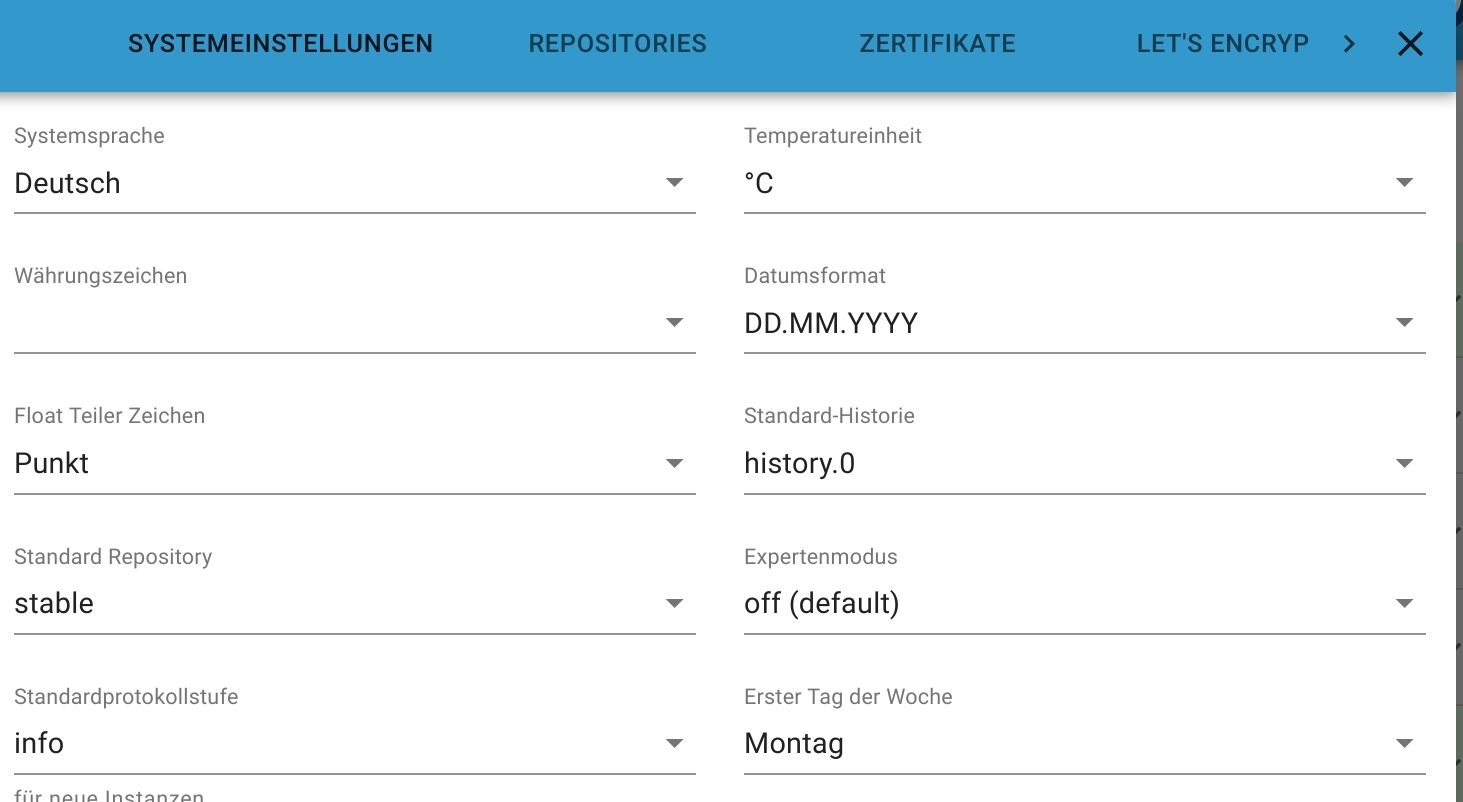
    @glasfaser sagte in iob diag - Skript:

    Vermutlich Spracheinstellung ...

    nope

    Screenshot_20221103-204951_Firefox.jpg

    GlasfaserG Offline
    GlasfaserG Offline
    Glasfaser
    schrieb am zuletzt editiert von
    #116

    @homoran

    Ändere es mal ... auf eine andere Sprache , speichern und dann wieder zurück auf Deutsch :)

    sudo reboot
    

    eventuell noch

    Synology 918+ 16GB - ioBroker in Docker v9 , VISO auf Trekstor Primebook C13 13,3" , Hikvision Domkameras mit Surveillance Station .. CCU RaspberryMatic in Synology VM .. Zigbee CC2538+CC2592 .. Sonoff .. KNX .. Modbus ..

    HomoranH 1 Antwort Letzte Antwort
    0
    • HomoranH Homoran

      @thomas-braun

      pi@iobroker-VM03:~$ iob list objects | wc -l
      /opt/iobroker/node_modules/iobroker.js-controller/lib/setup/setupList.js:284
                                      name = name[lang] || name.en;
                                                 ^
      
      TypeError: Cannot read property 'de' of null
          at Immediate.<anonymous> (/opt/iobroker/node_modules/iobroker.js-controller/lib/setup/setupList.js:284:44)
          at processImmediate (internal/timers.js:466:21)
      8523
      
      F Offline
      F Offline
      fastfoot
      schrieb am zuletzt editiert von
      #117

      @homoran es wird ja gezählt, siehe letzte Zeile 8523. Fehler werden nicht an wc gepiped, sondern gehen nach stderr. Abhilfe zur Unterdrückung der Fehler:
      iob list objects 2>/dev/null | wc -l

      iobroker läuft unter Docker auf QNAP TS-451+
      SkriptRecovery: https://forum.iobroker.net/post/930558

      HomoranH Thomas BraunT 2 Antworten Letzte Antwort
      2
      • GlasfaserG Glasfaser

        @homoran

        Ändere es mal ... auf eine andere Sprache , speichern und dann wieder zurück auf Deutsch :)

        sudo reboot
        

        eventuell noch

        HomoranH Nicht stören
        HomoranH Nicht stören
        Homoran
        Global Moderator Administrators
        schrieb am zuletzt editiert von
        #118

        @glasfaser sagte in iob diag - Skript:

        auf eine andere Sprache , speichern und dann wieder zurück auf Deutsch

        keine Änderung. reboot kostet im Moment meinen Kopf

        kein Support per PN! - Fragen im Forum stellen - es gibt fast nichts, was nicht auch für andere interessant ist.

        Benutzt das Voting rechts unten im Beitrag wenn er euch geholfen hat.

        der Installationsfixer: curl -fsL https://iobroker.net/fix.sh | bash -

        GlasfaserG 1 Antwort Letzte Antwort
        0
        • HomoranH Homoran

          @glasfaser sagte in iob diag - Skript:

          auf eine andere Sprache , speichern und dann wieder zurück auf Deutsch

          keine Änderung. reboot kostet im Moment meinen Kopf

          GlasfaserG Offline
          GlasfaserG Offline
          Glasfaser
          schrieb am zuletzt editiert von
          #119

          @homoran sagte in iob diag - Skript:

          keine Änderung. reboot kostet im Moment meinen Kopf

          Naja ... was luppt das luppt ..

          SORRY :)

          Teste mal den Befehl von @fastfoot

          Synology 918+ 16GB - ioBroker in Docker v9 , VISO auf Trekstor Primebook C13 13,3" , Hikvision Domkameras mit Surveillance Station .. CCU RaspberryMatic in Synology VM .. Zigbee CC2538+CC2592 .. Sonoff .. KNX .. Modbus ..

          1 Antwort Letzte Antwort
          0
          • F fastfoot

            @homoran es wird ja gezählt, siehe letzte Zeile 8523. Fehler werden nicht an wc gepiped, sondern gehen nach stderr. Abhilfe zur Unterdrückung der Fehler:
            iob list objects 2>/dev/null | wc -l

            HomoranH Nicht stören
            HomoranH Nicht stören
            Homoran
            Global Moderator Administrators
            schrieb am zuletzt editiert von
            #120

            @fastfoot sagte in iob diag - Skript:

            @homoran es wird ja gezählt, siehe letzte Zeile 8523. Fehler werden nicht an wc gepiped, sondern gehen nach stderr. Abhilfe zur Unterdrückung der Fehler:
            iob list objects 2>/dev/null | wc -l

            
            pi@iobroker-VM03:~$ iob list objects 2>/dev/null | wc -l
            8523
            pi@iobroker-VM03:~$


            kein Support per PN! - Fragen im Forum stellen - es gibt fast nichts, was nicht auch für andere interessant ist.

            Benutzt das Voting rechts unten im Beitrag wenn er euch geholfen hat.

            der Installationsfixer: curl -fsL https://iobroker.net/fix.sh | bash -

            1 Antwort Letzte Antwort
            0
            • F fastfoot

              @homoran es wird ja gezählt, siehe letzte Zeile 8523. Fehler werden nicht an wc gepiped, sondern gehen nach stderr. Abhilfe zur Unterdrückung der Fehler:
              iob list objects 2>/dev/null | wc -l

              Thomas BraunT Online
              Thomas BraunT Online
              Thomas Braun
              Most Active
              schrieb am zuletzt editiert von
              #121

              @fastfoot

              Arrrgh! Natürlich!
              STDERR ist mir unheimlich! g

              Linux-Werkzeugkasten:
              https://forum.iobroker.net/topic/42952/der-kleine-iobroker-linux-werkzeugkasten
              NodeJS Fixer Skript:
              https://forum.iobroker.net/topic/68035/iob-node-fix-skript
              iob_diag: curl -sLf -o diag.sh https://iobroker.net/diag.sh && bash diag.sh

              1 Antwort Letzte Antwort
              1
              • liv-in-skyL Offline
                liv-in-skyL Offline
                liv-in-sky
                schrieb am zuletzt editiert von
                #122

                mal ne frage zwischendurch - 58000 states und 50000 objects - wo kommt der unterschied her ?

                die 8000 sates müßten doch datenleichen sein - oder nicht ?

                nach einem gelösten Thread wäre es sinnvoll dies in der Überschrift des ersten Posts einzutragen [gelöst]-... Bitte benutzt das Voting rechts unten im Beitrag wenn er euch geholfen hat. Forum-Tools: PicPick https://picpick.app/en/download/ und ScreenToGif https://www.screentogif.com/downloads.html

                GlasfaserG 1 Antwort Letzte Antwort
                0
                • liv-in-skyL liv-in-sky

                  mal ne frage zwischendurch - 58000 states und 50000 objects - wo kommt der unterschied her ?

                  die 8000 sates müßten doch datenleichen sein - oder nicht ?

                  GlasfaserG Offline
                  GlasfaserG Offline
                  Glasfaser
                  schrieb am zuletzt editiert von
                  #123

                  @liv-in-sky sagte in iob diag - Skript:

                  oder nicht ?

                  ich kenne da ein sehr gutes Skript ...

                  Klick mich :)

                  Synology 918+ 16GB - ioBroker in Docker v9 , VISO auf Trekstor Primebook C13 13,3" , Hikvision Domkameras mit Surveillance Station .. CCU RaspberryMatic in Synology VM .. Zigbee CC2538+CC2592 .. Sonoff .. KNX .. Modbus ..

                  liv-in-skyL 1 Antwort Letzte Antwort
                  0
                  • GlasfaserG Glasfaser

                    @liv-in-sky sagte in iob diag - Skript:

                    oder nicht ?

                    ich kenne da ein sehr gutes Skript ...

                    Klick mich :)

                    liv-in-skyL Offline
                    liv-in-skyL Offline
                    liv-in-sky
                    schrieb am zuletzt editiert von
                    #124

                    @glasfaser

                    wow - cooles script :-)

                    aber wie sieht den z.b. dein vergleich aus

                    nach einem gelösten Thread wäre es sinnvoll dies in der Überschrift des ersten Posts einzutragen [gelöst]-... Bitte benutzt das Voting rechts unten im Beitrag wenn er euch geholfen hat. Forum-Tools: PicPick https://picpick.app/en/download/ und ScreenToGif https://www.screentogif.com/downloads.html

                    1 Antwort Letzte Antwort
                    0
                    • GlasfaserG Offline
                      GlasfaserG Offline
                      Glasfaser
                      schrieb am zuletzt editiert von Glasfaser
                      #125

                      @liv-in-sky

                      Zahl der Objekte:       41902
                      Zahl der Zustände:      39290
                      

                      EDIT:

                      08191146-3f8e-4abe-8223-54b608fc8ae7-grafik.png

                      Synology 918+ 16GB - ioBroker in Docker v9 , VISO auf Trekstor Primebook C13 13,3" , Hikvision Domkameras mit Surveillance Station .. CCU RaspberryMatic in Synology VM .. Zigbee CC2538+CC2592 .. Sonoff .. KNX .. Modbus ..

                      liv-in-skyL 1 Antwort Letzte Antwort
                      0
                      • GlasfaserG Glasfaser

                        @liv-in-sky

                        Zahl der Objekte:       41902
                        Zahl der Zustände:      39290
                        

                        EDIT:

                        08191146-3f8e-4abe-8223-54b608fc8ae7-grafik.png

                        liv-in-skyL Offline
                        liv-in-skyL Offline
                        liv-in-sky
                        schrieb am zuletzt editiert von
                        #126

                        @glasfaser mehr objekte als states versteh ich noch - aber mehr states als objekte (wie bei mir) hört sich falsch an - aber evtl sollten wir das nicht hier machen

                        nach einem gelösten Thread wäre es sinnvoll dies in der Überschrift des ersten Posts einzutragen [gelöst]-... Bitte benutzt das Voting rechts unten im Beitrag wenn er euch geholfen hat. Forum-Tools: PicPick https://picpick.app/en/download/ und ScreenToGif https://www.screentogif.com/downloads.html

                        Thomas BraunT 1 Antwort Letzte Antwort
                        0
                        • liv-in-skyL liv-in-sky

                          @glasfaser mehr objekte als states versteh ich noch - aber mehr states als objekte (wie bei mir) hört sich falsch an - aber evtl sollten wir das nicht hier machen

                          Thomas BraunT Online
                          Thomas BraunT Online
                          Thomas Braun
                          Most Active
                          schrieb am zuletzt editiert von
                          #127

                          NOTIZ an mich selbst:

                          Zusammenfassung und ggf. Problemlösungshinweise am Ende des Skripts hinzufügen.

                          Linux-Werkzeugkasten:
                          https://forum.iobroker.net/topic/42952/der-kleine-iobroker-linux-werkzeugkasten
                          NodeJS Fixer Skript:
                          https://forum.iobroker.net/topic/68035/iob-node-fix-skript
                          iob_diag: curl -sLf -o diag.sh https://iobroker.net/diag.sh && bash diag.sh

                          Jey CeeJ 1 Antwort Letzte Antwort
                          0
                          • Thomas BraunT Thomas Braun

                            NOTIZ an mich selbst:

                            Zusammenfassung und ggf. Problemlösungshinweise am Ende des Skripts hinzufügen.

                            Jey CeeJ Online
                            Jey CeeJ Online
                            Jey Cee
                            Developer
                            schrieb am zuletzt editiert von
                            #128

                            @thomas-braun sagte in iob diag - Skript:

                            Problemlösungshinweise am Ende des Skripts hinzufügen.

                            Vielleicht besser ein Link? Die Ausgabe ist ohnehin schon sehr lang.
                            Das Dokument kann man ja in der Allgemeinen Doku ablegen, dann ist es beisammen.

                            Persönlicher Support
                            Spenden -> paypal.me/J3YC33

                            Thomas BraunT 1 Antwort Letzte Antwort
                            0
                            • Jey CeeJ Jey Cee

                              @thomas-braun sagte in iob diag - Skript:

                              Problemlösungshinweise am Ende des Skripts hinzufügen.

                              Vielleicht besser ein Link? Die Ausgabe ist ohnehin schon sehr lang.
                              Das Dokument kann man ja in der Allgemeinen Doku ablegen, dann ist es beisammen.

                              Thomas BraunT Online
                              Thomas BraunT Online
                              Thomas Braun
                              Most Active
                              schrieb am zuletzt editiert von
                              #129

                              @jey-cee sagte in iob diag - Skript:

                              Die Ausgabe ist ohnehin schon sehr lang.

                              Ja, Zusammenfassung und Links zu Lösungsansätzen.
                              Auf keinen Fall werde ich da im Skript versuchen Dinge 'auf Tastendruck' zu korrigieren. Das geht zu oft schief.

                              Linux-Werkzeugkasten:
                              https://forum.iobroker.net/topic/42952/der-kleine-iobroker-linux-werkzeugkasten
                              NodeJS Fixer Skript:
                              https://forum.iobroker.net/topic/68035/iob-node-fix-skript
                              iob_diag: curl -sLf -o diag.sh https://iobroker.net/diag.sh && bash diag.sh

                              1 Antwort Letzte Antwort
                              0
                              • Thomas BraunT Thomas Braun

                                WIP: Übersetzung auf Deutsch in Arbeit. Wird aber nur teilweise möglich sein.
                                Skript einfach mal mit der Option '--de' starten. Also ./iob_diag.sh --de

                                TEST-Version:

                                curl https://raw.githubusercontent.com/Grothesk242/ioBroker/refs/heads/is_node_vulnerable/diag.sh > iob_diag.sh
                                chmod 744 iob_diag.sh
                                ./iob_diag.sh
                                
                                Weitere Optionen: 
                                ./iob_diag.sh --unmask           <--- Zeigt maskierte Ausgaben im Klartext 
                                ./iob_diag.sh --de               <--- Ausgabe tw. auf deutsch
                                ./iob_diag.sh --de --unmask      <--- Kombination aus deutsch und Klartext 
                                

                                Mit Ausgabe in eine Logdatei namens iob_diag.log sähe der Aufruf so aus:

                                ./iob_diag.sh | tee iob_diag.log
                                

                                Vielleicht mag ja jemand mit Docker oder LXC das mal ausführen und den Output zeigen?

                                Hier werden die üblichen Dinge relativ kompakt aufgelistet, die immer wieder bei Anfragen im Forum vermisst werden.

                                Hier mal als ersten Einblick, vielleicht fällt ja noch etwas ein, was auch interessant zu wissen wäre, bevor man im Nebel stochert:

                                *** ioBroker Diagnose ***
                                
                                Bitte das Fenster von puTTY breit ziehen oder auf Vollbild setzen
                                Den nachfolgenden Output 1:1 in das ioBroker-Forum unter
                                https://forum.iobroker.net
                                vollständig posten ,inkl der jeweils drei Steuerzeichen ``` am Anfang und Ende:
                                
                                ===========Ab hier kopieren =========
                                
                                *** BASISSYSTEM ***
                                CPU-Architektur: aarch64
                                Docker: Nein
                                No LSB modules are available.
                                Distributor ID: Debian
                                Description:    Debian GNU/Linux 11 (bullseye)
                                Release:        11
                                Codename:       bullseye
                                
                                *** Zeit und Zeitzonen ***
                                               Local time: Tue 2022-11-01 16:53:39 CET
                                           Universal time: Tue 2022-11-01 15:53:39 UTC
                                                 RTC time: n/a
                                                Time zone: Europe/Berlin (CET, +0100)
                                System clock synchronized: yes
                                              NTP service: active
                                          RTC in local TZ: no
                                
                                *** ARBEITSSPEICHER ***
                                               total        used        free      shared  buff/cache   available
                                Mem:           7.7Gi       2.3Gi       3.2Gi       0.0Ki       2.2Gi       5.2Gi
                                Swap:           99Mi          0B        99Mi
                                Total:         7.8Gi       2.3Gi       3.3Gi
                                
                                *** Nodejs-Installation ***
                                /usr/bin/nodejs         v18.12.0
                                /usr/bin/node           v18.12.0
                                /usr/bin/npm            8.19.2
                                
                                *** ioBroker-Installation ***
                                js-controller:  4.0.23
                                Updates + Repos:
                                Used repository: beta
                                
                                *** User und Gruppen ***
                                echad
                                /home/echad
                                echad adm dialout cdrom sudo audio video plugdev games users input render netdev gpio i2c spi iobroker
                                
                                *** Server-Setup ***
                                Konsole: tty
                                Desktop:
                                
                                *** Repositories und OS-Updates ***
                                Hit:1 http://deb.debian.org/debian bullseye InRelease
                                Hit:2 http://deb.debian.org/debian bullseye-updates InRelease
                                Hit:3 http://security.debian.org/debian-security bullseye-security InRelease
                                Hit:4 http://phoscon.de/apt/deconz bullseye InRelease
                                Hit:5 http://deb.debian.org/debian bullseye-backports InRelease
                                Hit:6 http://archive.raspberrypi.org/debian bullseye InRelease
                                Hit:7 http://packages.azlux.fr/debian bullseye InRelease
                                Hit:8 https://packages.grafana.com/oss/deb stable InRelease
                                Hit:9 https://deb.nodesource.com/node_10.x bullseye InRelease
                                Hit:10 https://repos.influxdata.com/debian bullseye InRelease
                                Hit:11 https://deb.nodesource.com/node_12.x bullseye InRelease
                                Hit:12 https://deb.nodesource.com/node_14.x bullseye InRelease
                                Hit:13 https://deb.nodesource.com/node_16.x bullseye InRelease
                                Hit:14 https://packages.redis.io/deb bullseye InRelease
                                Hit:15 https://deb.volian.org/volian scar InRelease
                                Hit:16 https://deb.nodesource.com/node_18.x bullseye InRelease
                                Hit:18 https://deb.nodesource.com/node_19.x bullseye InRelease
                                Get:19 https://pkgs.tailscale.com/stable/debian bullseye InRelease
                                Hit:17 https://packagecloud.io/ookla/speedtest-cli/debian bullseye InRelease
                                Fetched 5,545 B in 3s (1,694 B/s)
                                Reading package lists... Done
                                Building dependency tree... Done
                                Reading state information... Done
                                All packages are up to date.
                                nodejs:
                                  Installed: 18.12.0-deb-1nodesource1
                                  Candidate: 18.12.0-deb-1nodesource1
                                  Version table:
                                     19.0.0-deb-1nodesource1 500
                                        500 https://deb.nodesource.com/node_19.x bullseye/main arm64 Packages
                                 *** 18.12.0-deb-1nodesource1 501
                                        500 https://deb.nodesource.com/node_18.x bullseye/main arm64 Packages
                                        100 /var/lib/dpkg/status
                                     16.18.0-deb-1nodesource1 500
                                        500 https://deb.nodesource.com/node_16.x bullseye/main arm64 Packages
                                     14.20.1-deb-1nodesource1 500
                                        500 https://deb.nodesource.com/node_14.x bullseye/main arm64 Packages
                                     12.22.12-deb-1nodesource1 500
                                        500 https://deb.nodesource.com/node_12.x bullseye/main arm64 Packages
                                     12.22.12~dfsg-1~deb11u1 500
                                        500 http://security.debian.org/debian-security bullseye-security/main arm64 Packages
                                     12.22.5~dfsg-2~11u1 500
                                        500 http://deb.debian.org/debian bullseye/main arm64 Packages
                                     10.24.1-deb-1nodesource1 500
                                        500 https://deb.nodesource.com/node_10.x bullseye/main arm64 Packages
                                
                                ========== Bis hier kopieren ===========
                                
                                iob diag wurde beendet.
                                

                                Bitte nicht über den wilden Zoo an Repos wundern, das ist mein Test/Frickel-System, das soll so! :-D

                                ? Offline
                                ? Offline
                                Ein ehemaliger Benutzer
                                schrieb am zuletzt editiert von
                                #130

                                @thomas-braun

                                Klasse Script! :+1: , sollte hier im Forum in die Support-Formulare eingebaut werden, damit man nicht jedesmal nachfragen muss..

                                Als Icon wuerd ich ne Glaskugel empfehlen :-)

                                Hier mal meine Ausgabe vom Prime (Multihost):

                                *** BASISSYSTEM ***
                                CPU-Architektur: x86_64
                                Docker: Nein
                                LXC: lxc
                                Distributor ID: Debian
                                Description:    Debian GNU/Linux 10 (buster)
                                Release:        10
                                Codename:       buster
                                
                                Systemuptime und Load:
                                 12:45:30 up 18:48,  2 users,  load average: 6.89, 6.25, 6.05
                                CPU threads: 4
                                
                                *** Zeit und Zeitzonen ***
                                Fri Nov  4 11:45:30 UTC 2022
                                Fri Nov  4 12:45:30 CET 2022
                                CET +0100
                                Europe/Berlin
                                
                                *** User und Gruppen ***
                                ilovegym
                                /opt/iobroker
                                ilovegym iobroker
                                
                                *** X-Server-Setup ***
                                X-Server: Nein
                                Desktop:
                                Konsole: tty
                                
                                *** ARBEITSSPEICHER ***
                                              total        used        free      shared  buff/cache   available
                                Mem:          8.0Gi       4.7Gi       2.2Gi        24Mi       1.0Gi       3.2Gi
                                Swap:         2.0Gi       3.0Mi       2.0Gi
                                Total:          9Gi       4.7Gi       4.2Gi
                                
                                *** DATEISYSTEM ***
                                Filesystem                       Type   Size  Used Avail Use% Mounted on
                                /dev/mapper/pve-vm--113--disk--0 ext4    59G   18G   38G  33% /
                                none                             tmpfs  492K  4.0K  488K   1% /dev
                                tmpfs                            tmpfs   63G     0   63G   0% /dev/shm
                                tmpfs                            tmpfs   63G   25M   63G   1% /run
                                tmpfs                            tmpfs  5.0M     0  5.0M   0% /run/lock
                                //10.10.2.2/daten                cifs    11T  6.2T  4.4T  59% /mnt/daten
                                //10.10.2.2/photo                cifs    11T  6.2T  4.4T  59% /mnt/photo
                                tmpfs                            tmpfs   13G     0   13G   0% /run/user/1000
                                
                                Daten in neuralgischen Verzeichnissen:
                                
                                /var:
                                4.6G    /var/
                                2.5G    /var/log
                                1.9G    /var/lib
                                1.7G    /var/lib/redis
                                186M    /var/cache
                                
                                /opt/iobroker/backups:
                                36M     /opt/iobroker/backups/
                                
                                /opt/iobroker/iobroker-data:
                                77M     /opt/iobroker/iobroker-data/
                                16M     /opt/iobroker/iobroker-data/files
                                12M     /opt/iobroker/iobroker-data/files/vis.0
                                5.4M    /opt/iobroker/iobroker-data/files/vis.0/MD_Demo
                                2.8M    /opt/iobroker/iobroker-data/files/info.admin
                                
                                Die 5 größten Dateien in iobroker-data:
                                 35M objects.json
                                 24M states.json
                                1.9M objects.json.bak
                                312K states.json.bak
                                8.0K iobroker.json
                                
                                *** Nodejs-Installation ***
                                /usr/bin/nodejs         v16.18.0
                                /usr/bin/node           v16.18.0
                                /usr/bin/npm            8.19.2
                                
                                nodejs:
                                  Installed: 16.18.0-deb-1nodesource1
                                  Candidate: 16.18.0-deb-1nodesource1
                                  Version table:
                                 *** 16.18.0-deb-1nodesource1 500
                                        500 https://deb.nodesource.com/node_16.x buster/main amd64 Packages
                                        100 /var/lib/dpkg/status
                                     10.24.0~dfsg-1~deb10u2 500
                                        500 http://security.debian.org buster/updates/main amd64 Packages
                                     10.24.0~dfsg-1~deb10u1 500
                                        500 http://ftp.debian.org/debian buster/main amd64 Packages
                                
                                *** ioBroker-Installation ***
                                
                                Versionsnummern der Kern-Adapter
                                js-controller:  4.0.23
                                Admin-Adapter:  6.2.23
                                
                                ioBroker-Repos und Updates
                                Stable (default): http://download.iobroker.net/sources-dist.json
                                Beta (latest) : http://download.iobroker.net/sources-dist-latest.json
                                Live-Beta     : http://iobroker.live/repo/sources-dist-latest.json
                                Live-Stable   : http://iobroker.live/repo/sources-dist.json
                                
                                Active repo(s): Beta (latest)
                                
                                Used repository: Beta (latest)
                                Adapter    "mihome-vacuum": 3.8.3    , installed 3.6.0  [Updatable]
                                
                                Objekte und Zustände
                                werden ermittelt - Dies kann einen Moment dauern.
                                Objekte:        91808
                                Zustände:       79782
                                
                                *** Repositories und OS-Updates ***
                                Hit:1 http://security.debian.org buster/updates InRelease
                                Hit:2 http://ftp.debian.org/debian buster InRelease
                                Hit:3 http://ftp.debian.org/debian buster-updates InRelease
                                Hit:4 https://deb.nodesource.com/node_16.x buster InRelease
                                Hit:5 https://packagecloud.io/ookla/speedtest-cli/debian buster InRelease
                                Reading package lists... Done
                                Ausstehende Updates: 4
                                
                                *** Lauschende Ports ***
                                Active Internet connections (only servers)
                                Proto Recv-Q Send-Q Local Address           Foreign Address         State       User       Inode      PID/Program name
                                tcp        0      0 127.0.0.1:5037          0.0.0.0:*               LISTEN      0          66149      311/adb
                                tcp        0      0 127.0.0.1:25            0.0.0.0:*               LISTEN      0          56203      370/master
                                tcp        0      0 0.0.0.0:43655           0.0.0.0:*               LISTEN      1001       145925     2711/io.yahka.0
                                tcp        0      0 127.0.0.1:34983         0.0.0.0:*               LISTEN      1001       4977871    2711/io.yahka.0
                                tcp        0      0 0.0.0.0:1886            0.0.0.0:*               LISTEN      1001       88475      519/io.mqtt.0
                                tcp        0      0 0.0.0.0:1884            0.0.0.0:*               LISTEN      1001       95796      710/io.mqtt.1
                                tcp        0      0 0.0.0.0:1883            0.0.0.0:*               LISTEN      1001       10431477   840584/io.sonoff.0
                                tcp        0      0 0.0.0.0:111             0.0.0.0:*               LISTEN      0          65657      1/init
                                tcp        0      0 0.0.0.0:22              0.0.0.0:*               LISTEN      0          65887      169/sshd
                                tcp        0      0 0.0.0.0:6010            0.0.0.0:*               LISTEN      1000       176368     5598/sshd: ilovegym
                                tcp        0      0 0.0.0.0:8188            0.0.0.0:*               LISTEN      1000       10867840   877640/nc
                                tcp        0      0 0.0.0.0:6379            0.0.0.0:*               LISTEN      107        43469      224/redis-server 0.
                                tcp6       0      0 :::8880                 :::*                    LISTEN      1001       147934     2727/io.rest-api.0
                                tcp6       0      0 :::111                  :::*                    LISTEN      0          52997      1/init
                                tcp6       0      0 :::81                   :::*                    LISTEN      1001       10045770   803237/io.web.0
                                tcp6       0      0 :::22                   :::*                    LISTEN      0          65889      169/sshd
                                tcp6       0      0 :::6010                 :::*                    LISTEN      1000       176369     5598/sshd: ilovegym
                                tcp6       0      0 :::8087                 :::*                    LISTEN      1001       94828      779/io.simple-api.0
                                tcp6       0      0 :::8081                 :::*                    LISTEN      1001       91541      396/io.admin.0
                                udp        0      0 0.0.0.0:53030           0.0.0.0:*                           1001       133613     3133/io.snmp.0
                                udp        0      0 0.0.0.0:53421           0.0.0.0:*                           1001       88616      617/io.mihome-vacuu
                                udp        0      0 0.0.0.0:53422           0.0.0.0:*                           1001       94542      605/io.mihome-vacuu
                                udp        0      0 0.0.0.0:53423           0.0.0.0:*                           1001       91385      562/io.mihome-vacuu
                                udp        0      0 0.0.0.0:53424           0.0.0.0:*                           1001       95339      501/io.mihome-vacuu
                                udp        0      0 0.0.0.0:111             0.0.0.0:*                           0          52994      1/init
                                udp        0      0 192.168.3.41:123        0.0.0.0:*                           0          55952      171/ntpd
                                udp        0      0 127.0.0.1:123           0.0.0.0:*                           0          55950      171/ntpd
                                udp        0      0 0.0.0.0:123             0.0.0.0:*                           0          55946      171/ntpd
                                udp        0      0 0.0.0.0:5353            0.0.0.0:*                           1001       145922     2711/io.yahka.0
                                udp6       0      0 :::111                  :::*                                0          53000      1/init
                                udp6       0      0 :::123                  :::*                                0          55943      171/ntpd


                                haette noch Client-Raspi4 und 3x LXC Client verteilt auf andere Nodes anzubieten.. ? :)

                                Thomas BraunT 1 Antwort Letzte Antwort
                                0
                                • ? Ein ehemaliger Benutzer

                                  @thomas-braun

                                  Klasse Script! :+1: , sollte hier im Forum in die Support-Formulare eingebaut werden, damit man nicht jedesmal nachfragen muss..

                                  Als Icon wuerd ich ne Glaskugel empfehlen :-)

                                  Hier mal meine Ausgabe vom Prime (Multihost):

                                  *** BASISSYSTEM ***
                                  CPU-Architektur: x86_64
                                  Docker: Nein
                                  LXC: lxc
                                  Distributor ID: Debian
                                  Description:    Debian GNU/Linux 10 (buster)
                                  Release:        10
                                  Codename:       buster
                                  
                                  Systemuptime und Load:
                                   12:45:30 up 18:48,  2 users,  load average: 6.89, 6.25, 6.05
                                  CPU threads: 4
                                  
                                  *** Zeit und Zeitzonen ***
                                  Fri Nov  4 11:45:30 UTC 2022
                                  Fri Nov  4 12:45:30 CET 2022
                                  CET +0100
                                  Europe/Berlin
                                  
                                  *** User und Gruppen ***
                                  ilovegym
                                  /opt/iobroker
                                  ilovegym iobroker
                                  
                                  *** X-Server-Setup ***
                                  X-Server: Nein
                                  Desktop:
                                  Konsole: tty
                                  
                                  *** ARBEITSSPEICHER ***
                                                total        used        free      shared  buff/cache   available
                                  Mem:          8.0Gi       4.7Gi       2.2Gi        24Mi       1.0Gi       3.2Gi
                                  Swap:         2.0Gi       3.0Mi       2.0Gi
                                  Total:          9Gi       4.7Gi       4.2Gi
                                  
                                  *** DATEISYSTEM ***
                                  Filesystem                       Type   Size  Used Avail Use% Mounted on
                                  /dev/mapper/pve-vm--113--disk--0 ext4    59G   18G   38G  33% /
                                  none                             tmpfs  492K  4.0K  488K   1% /dev
                                  tmpfs                            tmpfs   63G     0   63G   0% /dev/shm
                                  tmpfs                            tmpfs   63G   25M   63G   1% /run
                                  tmpfs                            tmpfs  5.0M     0  5.0M   0% /run/lock
                                  //10.10.2.2/daten                cifs    11T  6.2T  4.4T  59% /mnt/daten
                                  //10.10.2.2/photo                cifs    11T  6.2T  4.4T  59% /mnt/photo
                                  tmpfs                            tmpfs   13G     0   13G   0% /run/user/1000
                                  
                                  Daten in neuralgischen Verzeichnissen:
                                  
                                  /var:
                                  4.6G    /var/
                                  2.5G    /var/log
                                  1.9G    /var/lib
                                  1.7G    /var/lib/redis
                                  186M    /var/cache
                                  
                                  /opt/iobroker/backups:
                                  36M     /opt/iobroker/backups/
                                  
                                  /opt/iobroker/iobroker-data:
                                  77M     /opt/iobroker/iobroker-data/
                                  16M     /opt/iobroker/iobroker-data/files
                                  12M     /opt/iobroker/iobroker-data/files/vis.0
                                  5.4M    /opt/iobroker/iobroker-data/files/vis.0/MD_Demo
                                  2.8M    /opt/iobroker/iobroker-data/files/info.admin
                                  
                                  Die 5 größten Dateien in iobroker-data:
                                   35M objects.json
                                   24M states.json
                                  1.9M objects.json.bak
                                  312K states.json.bak
                                  8.0K iobroker.json
                                  
                                  *** Nodejs-Installation ***
                                  /usr/bin/nodejs         v16.18.0
                                  /usr/bin/node           v16.18.0
                                  /usr/bin/npm            8.19.2
                                  
                                  nodejs:
                                    Installed: 16.18.0-deb-1nodesource1
                                    Candidate: 16.18.0-deb-1nodesource1
                                    Version table:
                                   *** 16.18.0-deb-1nodesource1 500
                                          500 https://deb.nodesource.com/node_16.x buster/main amd64 Packages
                                          100 /var/lib/dpkg/status
                                       10.24.0~dfsg-1~deb10u2 500
                                          500 http://security.debian.org buster/updates/main amd64 Packages
                                       10.24.0~dfsg-1~deb10u1 500
                                          500 http://ftp.debian.org/debian buster/main amd64 Packages
                                  
                                  *** ioBroker-Installation ***
                                  
                                  Versionsnummern der Kern-Adapter
                                  js-controller:  4.0.23
                                  Admin-Adapter:  6.2.23
                                  
                                  ioBroker-Repos und Updates
                                  Stable (default): http://download.iobroker.net/sources-dist.json
                                  Beta (latest) : http://download.iobroker.net/sources-dist-latest.json
                                  Live-Beta     : http://iobroker.live/repo/sources-dist-latest.json
                                  Live-Stable   : http://iobroker.live/repo/sources-dist.json
                                  
                                  Active repo(s): Beta (latest)
                                  
                                  Used repository: Beta (latest)
                                  Adapter    "mihome-vacuum": 3.8.3    , installed 3.6.0  [Updatable]
                                  
                                  Objekte und Zustände
                                  werden ermittelt - Dies kann einen Moment dauern.
                                  Objekte:        91808
                                  Zustände:       79782
                                  
                                  *** Repositories und OS-Updates ***
                                  Hit:1 http://security.debian.org buster/updates InRelease
                                  Hit:2 http://ftp.debian.org/debian buster InRelease
                                  Hit:3 http://ftp.debian.org/debian buster-updates InRelease
                                  Hit:4 https://deb.nodesource.com/node_16.x buster InRelease
                                  Hit:5 https://packagecloud.io/ookla/speedtest-cli/debian buster InRelease
                                  Reading package lists... Done
                                  Ausstehende Updates: 4
                                  
                                  *** Lauschende Ports ***
                                  Active Internet connections (only servers)
                                  Proto Recv-Q Send-Q Local Address           Foreign Address         State       User       Inode      PID/Program name
                                  tcp        0      0 127.0.0.1:5037          0.0.0.0:*               LISTEN      0          66149      311/adb
                                  tcp        0      0 127.0.0.1:25            0.0.0.0:*               LISTEN      0          56203      370/master
                                  tcp        0      0 0.0.0.0:43655           0.0.0.0:*               LISTEN      1001       145925     2711/io.yahka.0
                                  tcp        0      0 127.0.0.1:34983         0.0.0.0:*               LISTEN      1001       4977871    2711/io.yahka.0
                                  tcp        0      0 0.0.0.0:1886            0.0.0.0:*               LISTEN      1001       88475      519/io.mqtt.0
                                  tcp        0      0 0.0.0.0:1884            0.0.0.0:*               LISTEN      1001       95796      710/io.mqtt.1
                                  tcp        0      0 0.0.0.0:1883            0.0.0.0:*               LISTEN      1001       10431477   840584/io.sonoff.0
                                  tcp        0      0 0.0.0.0:111             0.0.0.0:*               LISTEN      0          65657      1/init
                                  tcp        0      0 0.0.0.0:22              0.0.0.0:*               LISTEN      0          65887      169/sshd
                                  tcp        0      0 0.0.0.0:6010            0.0.0.0:*               LISTEN      1000       176368     5598/sshd: ilovegym
                                  tcp        0      0 0.0.0.0:8188            0.0.0.0:*               LISTEN      1000       10867840   877640/nc
                                  tcp        0      0 0.0.0.0:6379            0.0.0.0:*               LISTEN      107        43469      224/redis-server 0.
                                  tcp6       0      0 :::8880                 :::*                    LISTEN      1001       147934     2727/io.rest-api.0
                                  tcp6       0      0 :::111                  :::*                    LISTEN      0          52997      1/init
                                  tcp6       0      0 :::81                   :::*                    LISTEN      1001       10045770   803237/io.web.0
                                  tcp6       0      0 :::22                   :::*                    LISTEN      0          65889      169/sshd
                                  tcp6       0      0 :::6010                 :::*                    LISTEN      1000       176369     5598/sshd: ilovegym
                                  tcp6       0      0 :::8087                 :::*                    LISTEN      1001       94828      779/io.simple-api.0
                                  tcp6       0      0 :::8081                 :::*                    LISTEN      1001       91541      396/io.admin.0
                                  udp        0      0 0.0.0.0:53030           0.0.0.0:*                           1001       133613     3133/io.snmp.0
                                  udp        0      0 0.0.0.0:53421           0.0.0.0:*                           1001       88616      617/io.mihome-vacuu
                                  udp        0      0 0.0.0.0:53422           0.0.0.0:*                           1001       94542      605/io.mihome-vacuu
                                  udp        0      0 0.0.0.0:53423           0.0.0.0:*                           1001       91385      562/io.mihome-vacuu
                                  udp        0      0 0.0.0.0:53424           0.0.0.0:*                           1001       95339      501/io.mihome-vacuu
                                  udp        0      0 0.0.0.0:111             0.0.0.0:*                           0          52994      1/init
                                  udp        0      0 192.168.3.41:123        0.0.0.0:*                           0          55952      171/ntpd
                                  udp        0      0 127.0.0.1:123           0.0.0.0:*                           0          55950      171/ntpd
                                  udp        0      0 0.0.0.0:123             0.0.0.0:*                           0          55946      171/ntpd
                                  udp        0      0 0.0.0.0:5353            0.0.0.0:*                           1001       145922     2711/io.yahka.0
                                  udp6       0      0 :::111                  :::*                                0          53000      1/init
                                  udp6       0      0 :::123                  :::*                                0          55943      171/ntpd


                                  haette noch Client-Raspi4 und 3x LXC Client verteilt auf andere Nodes anzubieten.. ? :)

                                  Thomas BraunT Online
                                  Thomas BraunT Online
                                  Thomas Braun
                                  Most Active
                                  schrieb am zuletzt editiert von
                                  #131

                                  @ilovegym sagte in iob diag - Skript:

                                  haette noch Client-Raspi4 und 3x LXC Client verteilt auf andere Nodes anzubieten.. ?

                                  Kannst ja mal überall laufen lassen. Ausgaben aber nur noch wenn da was 'krummes' oder 'unerwartetes' oder 'falsches' zurückgegeben wird.
                                  So Unschönheiten wie die Fehlermeldung bei @Homoran z. B.

                                  Linux-Werkzeugkasten:
                                  https://forum.iobroker.net/topic/42952/der-kleine-iobroker-linux-werkzeugkasten
                                  NodeJS Fixer Skript:
                                  https://forum.iobroker.net/topic/68035/iob-node-fix-skript
                                  iob_diag: curl -sLf -o diag.sh https://iobroker.net/diag.sh && bash diag.sh

                                  1 Antwort Letzte Antwort
                                  0
                                  • FeuersturmF Online
                                    FeuersturmF Online
                                    Feuersturm
                                    schrieb am zuletzt editiert von
                                    #132

                                    @Thomas-Braun Danke für das Skript.

                                    Beeinflusst du die Farbe in der Ausgabe auf der Konsole mit deinem Skript oder ist das eher ein Thema was man lokal in putty anpassen muss. Das dunkel Blau ist sehr schlecht lesbar.
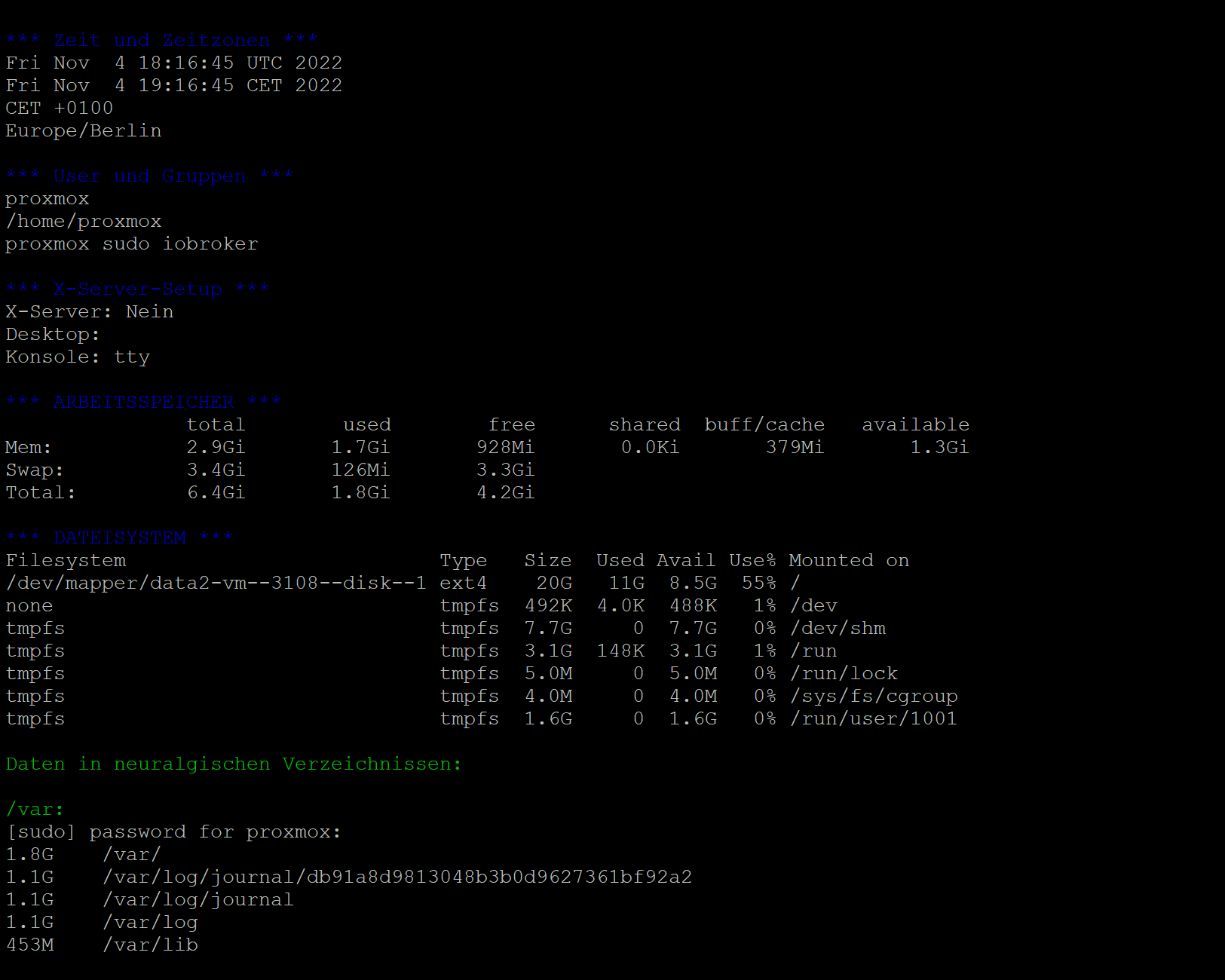
                                    2114906b-965b-4060-9644-1bfa2889210f-grafik.png

                                    Thomas BraunT 1 Antwort Letzte Antwort
                                    1
                                    • FeuersturmF Feuersturm

                                      @Thomas-Braun Danke für das Skript.

                                      Beeinflusst du die Farbe in der Ausgabe auf der Konsole mit deinem Skript oder ist das eher ein Thema was man lokal in putty anpassen muss. Das dunkel Blau ist sehr schlecht lesbar.

                                      2114906b-965b-4060-9644-1bfa2889210f-grafik.png

                                      Thomas BraunT Online
                                      Thomas BraunT Online
                                      Thomas Braun
                                      Most Active
                                      schrieb am zuletzt editiert von
                                      #133

                                      @feuersturm sagte in iob diag - Skript:

                                      Beeinflusst du die Farbe in der Ausgabe auf der Konsole mit deinem Skript

                                      Das ist so im Skript.
                                      Wollte die 'Hausfarben' vom ioBroker einfangen...
                                      War mir aber auch schon aufgefallen, dass der Kontrast da etwas zu gering ist.
                                      Stell ich bei Gelegenheit mal auf was anderes um.

                                      Linux-Werkzeugkasten:
                                      https://forum.iobroker.net/topic/42952/der-kleine-iobroker-linux-werkzeugkasten
                                      NodeJS Fixer Skript:
                                      https://forum.iobroker.net/topic/68035/iob-node-fix-skript
                                      iob_diag: curl -sLf -o diag.sh https://iobroker.net/diag.sh && bash diag.sh

                                      Thomas BraunT 1 Antwort Letzte Antwort
                                      2
                                      • Thomas BraunT Thomas Braun

                                        @feuersturm sagte in iob diag - Skript:

                                        Beeinflusst du die Farbe in der Ausgabe auf der Konsole mit deinem Skript

                                        Das ist so im Skript.
                                        Wollte die 'Hausfarben' vom ioBroker einfangen...
                                        War mir aber auch schon aufgefallen, dass der Kontrast da etwas zu gering ist.
                                        Stell ich bei Gelegenheit mal auf was anderes um.

                                        Thomas BraunT Online
                                        Thomas BraunT Online
                                        Thomas Braun
                                        Most Active
                                        schrieb am zuletzt editiert von Thomas Braun
                                        #134

                                        Soll ich mal solche eine Zusammenfassung ans Ende schreiben?

                                        Bitte die Zusammenfassung zum Forenposting hinzufügen:
                                        
                                        KOPIER MICH:
                                        
                                        
                                        =============== ÜBERSICHT ======================
                                        
                                        Betriebssystem: Debian 11 'Bullseye'
                                        Virt          : Docker // Nativ // LXC
                                        Zeitzone      : Europe/Berlin
                                        root shell    : aktiv
                                        X-Server      : aktiv
                                        RAM verfügbar : 65%
                                        SWAP-Nutzung  : 0%
                                        
                                        nodeJS        : /usr/bin/nodejs         v19.0.1
                                                        /usr/bin/node           v19.0.1
                                                        /usr/bin/npm            8.19.2
                                        
                                        ioBroker core : js-controller           4.0.23
                                                        Admin-Adapter           6.2.23
                                        Active repo(s): beta
                                        Objekte:        8463
                                        Zustände:       6610
                                        Datenbanken   : objects.jsonl  34M
                                                        states.jsonl   6.8M
                                        
                                        
                                        ^^ Bis hier kopieren, Danke! ^^


                                        Linux-Werkzeugkasten:
                                        https://forum.iobroker.net/topic/42952/der-kleine-iobroker-linux-werkzeugkasten
                                        NodeJS Fixer Skript:
                                        https://forum.iobroker.net/topic/68035/iob-node-fix-skript
                                        iob_diag: curl -sLf -o diag.sh https://iobroker.net/diag.sh && bash diag.sh

                                        ? 1 Antwort Letzte Antwort
                                        1
                                        • Thomas BraunT Thomas Braun

                                          Soll ich mal solche eine Zusammenfassung ans Ende schreiben?

                                          Bitte die Zusammenfassung zum Forenposting hinzufügen:
                                          
                                          KOPIER MICH:
                                          
                                          
                                          =============== ÜBERSICHT ======================
                                          
                                          Betriebssystem: Debian 11 'Bullseye'
                                          Virt          : Docker // Nativ // LXC
                                          Zeitzone      : Europe/Berlin
                                          root shell    : aktiv
                                          X-Server      : aktiv
                                          RAM verfügbar : 65%
                                          SWAP-Nutzung  : 0%
                                          
                                          nodeJS        : /usr/bin/nodejs         v19.0.1
                                                          /usr/bin/node           v19.0.1
                                                          /usr/bin/npm            8.19.2
                                          
                                          ioBroker core : js-controller           4.0.23
                                                          Admin-Adapter           6.2.23
                                          Active repo(s): beta
                                          Objekte:        8463
                                          Zustände:       6610
                                          Datenbanken   : objects.jsonl  34M
                                                          states.jsonl   6.8M
                                          
                                          
                                          ^^ Bis hier kopieren, Danke! ^^


                                          ? Offline
                                          ? Offline
                                          Ein ehemaliger Benutzer
                                          schrieb am zuletzt editiert von
                                          #135

                                          @thomas-braun

                                          Vielleicht ne gute Idee!!

                                          Thomas BraunT 2 Antworten Letzte Antwort
                                          0
                                          Antworten
                                          • In einem neuen Thema antworten
                                          Anmelden zum Antworten
                                          • Älteste zuerst
                                          • Neuste zuerst
                                          • Meiste Stimmen


                                          Support us

                                          ioBroker
                                          Community Adapters
                                          Donate
                                          FAQ Cloud / IOT
                                          HowTo: Node.js-Update
                                          HowTo: Backup/Restore
                                          Downloads
                                          BLOG

                                          546

                                          Online

                                          32.4k

                                          Benutzer

                                          81.5k

                                          Themen

                                          1.3m

                                          Beiträge
                                          Community
                                          Impressum | Datenschutz-Bestimmungen | Nutzungsbedingungen | Einwilligungseinstellungen
                                          ioBroker Community 2014-2025
                                          logo
                                          • Anmelden

                                          • Du hast noch kein Konto? Registrieren

                                          • Anmelden oder registrieren, um zu suchen
                                          • Erster Beitrag
                                            Letzter Beitrag
                                          0
                                          • Home
                                          • Aktuell
                                          • Tags
                                          • Ungelesen 0
                                          • Kategorien
                                          • Unreplied
                                          • Beliebt
                                          • GitHub
                                          • Docu
                                          • Hilfe