




Ältere iob Version installieren möglich?
-
Hallo,
kann man, und wenn ja wie, eine ältere Version des ioBrokers installieren?
Älter heißt, eine Version, die vor dem 01.02.2022 akturll war.
Danke@atticus
https://forum.iobroker.net/topic/52886/js-controller-4-0-x-jetzt-für-alle-user-im-stable
Da steht drinn wie man veraltete Versionen installieren würde.
Aber es stellt sich bei Alt-Versionen immer die Frage nach dem Sinn. -
@atticus
https://forum.iobroker.net/topic/52886/js-controller-4-0-x-jetzt-für-alle-user-im-stable
Da steht drinn wie man veraltete Versionen installieren würde.
Aber es stellt sich bei Alt-Versionen immer die Frage nach dem Sinn.@thomas-braun Der sinn ist, das ich ein Backup wiederherstellen möchte, um die Scripte daraus zu extrahieren. Ich habe den iobroker in der aktuellen Version auf einem Testsystem aufgesetzt, ein Backup von Anfang Februar eingespielt, und es geht nichts mehr, der iobroker startet nicht. Beim wiederherstellen des Backups bemängelt backitup die aktuelle Adapter Version
pi@raspberrypi:~ $ cd /opt/iobroker pi@raspberrypi:/opt/iobroker $ iob restore backups/iobroker_2022_02_06-16_32_02_rettung_backupiobroker.tar.gz - iobroker controller daemon is not running host.raspberrypi OK. The current version of js-controller differs from the version in the backup. The js-controller version of the backup can not be restored automatically. To restore the js-controller version of the backup, execute "npm i iobroker.js-controller@3.3.22 --production" inside your ioBroker directory If you really want to restore the backup with the current installed js-controller, execute the restore command with the --force flag -
@thomas-braun Der sinn ist, das ich ein Backup wiederherstellen möchte, um die Scripte daraus zu extrahieren. Ich habe den iobroker in der aktuellen Version auf einem Testsystem aufgesetzt, ein Backup von Anfang Februar eingespielt, und es geht nichts mehr, der iobroker startet nicht. Beim wiederherstellen des Backups bemängelt backitup die aktuelle Adapter Version
pi@raspberrypi:~ $ cd /opt/iobroker pi@raspberrypi:/opt/iobroker $ iob restore backups/iobroker_2022_02_06-16_32_02_rettung_backupiobroker.tar.gz - iobroker controller daemon is not running host.raspberrypi OK. The current version of js-controller differs from the version in the backup. The js-controller version of the backup can not be restored automatically. To restore the js-controller version of the backup, execute "npm i iobroker.js-controller@3.3.22 --production" inside your ioBroker directory If you really want to restore the backup with the current installed js-controller, execute the restore command with the --force flag@atticus
Der Befehl steht in der Meldung drin.
-
@atticus
Der Befehl steht in der Meldung drin.
@thomas-braun ja, hab ich gelesen und auch ausgeführt, leider mit wenig erfolg. Also der Befehl wird ausgeführt, auch erfolgreich, nur startet der iobroker am ende nicht.
-
@thomas-braun ja, hab ich gelesen und auch ausgeführt, leider mit wenig erfolg. Also der Befehl wird ausgeführt, auch erfolgreich, nur startet der iobroker am ende nicht.
Ich habe folgendes gemacht:
Auf einem neuen Raspbian Buster den iobroker mit-curl -sLf https://deb.nodesource.com/setup_12.x | sudo -E bash -
-sudo apt-get install -y nodejs-curl -sLf https://iobroker.net/install.sh | bash -
installiert.
Den iobroker soweit eingerichtet, das er startet.
Dann ein Backup von Anfang Februar wiederhergestellt,
Danach startet der iobroker nicht mehr. -
Ich habe folgendes gemacht:
Auf einem neuen Raspbian Buster den iobroker mit-curl -sLf https://deb.nodesource.com/setup_12.x | sudo -E bash -
-sudo apt-get install -y nodejs-curl -sLf https://iobroker.net/install.sh | bash -
installiert.
Den iobroker soweit eingerichtet, das er startet.
Dann ein Backup von Anfang Februar wiederhergestellt,
Danach startet der iobroker nicht mehr.@atticus warum node 12.x ?
und warum überhaupt node installieren, das mach der iobroker Installer automatischspiel dein buster drauf, danach nur den iobroker installer ausführen, anschließend backup zurück spielen, wenn iobroker nicht startet, nachsehen ob die admin Instanz läuft
-
@atticus warum node 12.x ?
und warum überhaupt node installieren, das mach der iobroker Installer automatischspiel dein buster drauf, danach nur den iobroker installer ausführen, anschließend backup zurück spielen, wenn iobroker nicht startet, nachsehen ob die admin Instanz läuft
-
@crunchip ja, ich bin jetzt nicht so tief in der Matrie drin, dei Befehle hab ich mir auf diversen Webseiten gesucht.
Wie soll ich den iobroker dann am besten installieren?@atticus sagte in Ältere iob Version installieren möglich?:
Wie soll ich den iobroker dann am besten installieren?
z.b so
https://forum.iobroker.net/topic/51869/installation-auf-raspi-einfacher-geht-s-nicht?_=1650357365574 -
@atticus warum node 12.x ?
und warum überhaupt node installieren, das mach der iobroker Installer automatischspiel dein buster drauf, danach nur den iobroker installer ausführen, anschließend backup zurück spielen, wenn iobroker nicht startet, nachsehen ob die admin Instanz läuft
-
@atticus warum node 12.x ?
und warum überhaupt node installieren, das mach der iobroker Installer automatischspiel dein buster drauf, danach nur den iobroker installer ausführen, anschließend backup zurück spielen, wenn iobroker nicht startet, nachsehen ob die admin Instanz läuft
-
@atticus
Nachschauen.
Und mit
iobroker start adminnachhelfen.
-
@atticus
Nachschauen.
Und mit
iobroker start adminnachhelfen.
@thomas-braun :-) ok
-
@thomas-braun :-) ok
Hallo, ich hab es so gemacht, wie oben beschrieben, mit dem Ergebnis, das es es nicht funktioniert.
login as: pi
pi@192.168.2.38's password:
Linux raspberrypi 5.10.103-v7l+ #1529 SMP Tue Mar 8 12:24:00 GMT 2022 armv7l

The programs included with the Debian GNU/Linux system are free software;
the exact distribution terms for each program are described in the
individual files in /usr/share/doc/*/copyright.

Debian GNU/Linux comes with ABSOLUTELY NO WARRANTY, to the extent
permitted by applicable law.
Last login: Wed Apr 13 19:53:10 2022 from 192.168.2.196

Wi-Fi is currently blocked by rfkill.
Use raspi-config to set the country before use.

pi@raspberrypi:~ $ curl -sLf https://iobroker.net/install.sh | bash -
library: loaded
Library version=2022-02-10

==========================================================================

    Welcome to the ioBroker installer!
    Installer version: 2022-02-13

    You might need to enter your password a couple of times.

==========================================================================


==========================================================================
    Installing prerequisites (1/4)
==========================================================================

OK:1 http://archive.raspberrypi.org/debian buster InRelease
Holen:2 http://raspbian.raspberrypi.org/raspbian buster InRelease [15,0 kB]
Holen:3 http://raspbian.raspberrypi.org/raspbian buster/main armhf Packages [13,                                                                                                              0 MB]
Es wurden 13,0 MB in 8 s geholt (1.657 kB/s).
Paketlisten werden gelesen... Fertig

==========================================================================

    Node.js not found. Installing...

==========================================================================


## Installing the NodeSource Node.js 14.x repo...


## Populating apt-get cache...

+ apt-get update
OK:1 http://archive.raspberrypi.org/debian buster InRelease
OK:2 http://raspbian.raspberrypi.org/raspbian buster InRelease
Paketlisten werden gelesen... Fertig

## Confirming "buster" is supported...

+ curl -sLf -o /dev/null 'https://deb.nodesource.com/node_14.x/dists/buster/Rele                                                                                                              ase'

## Adding the NodeSource signing key to your keyring...

+ curl -s https://deb.nodesource.com/gpgkey/nodesource.gpg.key | gpg --dearmor |                                                                                                               tee /usr/share/keyrings/nodesource.gpg >/dev/null
gpg: WARNUNG: Unsicheres Besitzverhältnis des Home-Verzeichnis `/home/pi/.gnupg'

## Creating apt sources list file for the NodeSource Node.js 14.x repo...

+ echo 'deb [signed-by=/usr/share/keyrings/nodesource.gpg] https://deb.nodesourc                                                                                                              e.com/node_14.x buster main' > /etc/apt/sources.list.d/nodesource.list
+ echo 'deb-src [signed-by=/usr/share/keyrings/nodesource.gpg] https://deb.nodes                                                                                                              ource.com/node_14.x buster main' >> /etc/apt/sources.list.d/nodesource.list

## Running `apt-get update` for you...

+ apt-get update
OK:1 http://archive.raspberrypi.org/debian buster InRelease
OK:2 http://raspbian.raspberrypi.org/raspbian buster InRelease
Holen:3 https://deb.nodesource.com/node_14.x buster InRelease [4.584 B]
Holen:4 https://deb.nodesource.com/node_14.x buster/main armhf Packages [780 B]
Es wurden 5.364 B in 1 s geholt (4.016 B/s).
Paketlisten werden gelesen... Fertig

## Run `sudo apt-get install -y nodejs` to install Node.js 14.x and npm
## You may also need development tools to build native addons:
     sudo apt-get install gcc g++ make
## To install the Yarn package manager, run:
     curl -sL https://dl.yarnpkg.com/debian/pubkey.gpg | gpg --dearmor | sudo te                                                                                                              e /usr/share/keyrings/yarnkey.gpg >/dev/null
     echo "deb [signed-by=/usr/share/keyrings/yarnkey.gpg] https://dl.yarnpkg.co                                                                                                              m/debian stable main" | sudo tee /etc/apt/sources.list.d/yarn.list
     sudo apt-get update && sudo apt-get install yarn


Installed nodejs
Node.js Installed successfully!
Changing npm registry to https://registry.npmjs.org
Installed acl
Installed gcc-c++
Installed libavahi-compat-libdnssd-dev
Installed libudev-dev
Installed libpam0g-dev
Installed git
Installed libcairo2-dev
Installed libpango1.0-dev
Installed libjpeg-dev
Installed libgif-dev
Installed librsvg2-dev
Installed python-dev
Installed cmake

==========================================================================
    Creating ioBroker user and directory (2/4)
==========================================================================

User iobroker created
Created /etc/sudoers.d/iobroker
Directory /opt/iobroker created

==========================================================================
    Installing ioBroker (3/4)
==========================================================================

In file included from ../../nan/nan.h:58,
                 from ../src/main.cpp:3:
/home/pi/.cache/node-gyp/14.19.1/include/node/node.h:793:43: warning: cast betwe                                                                                                              en incompatible function types from ‘void (*)(v8::Local<v8::Object>)’ to ‘node::                                                                                                              addon_register_func’ {aka ‘void (*)(v8::Local<v8::Object>, v8::Local<v8::Value>,                                                                                                               void*)’} [-Wcast-function-type]
       (node::addon_register_func) (regfunc),                          \
                                           ^
/home/pi/.cache/node-gyp/14.19.1/include/node/node.h:827:3: note: in expansion o                                                                                                              f macro ‘NODE_MODULE_X’
   NODE_MODULE_X(modname, regfunc, NULL, 0)  // NOLINT (readability/null_usage)
   ^~~~~~~~~~~~~
../src/main.cpp:42:1: note: in expansion of macro ‘NODE_MODULE’
 NODE_MODULE(diskusage, Init)
 ^~~~~~~~~~~
In file included from ../../nan/nan.h:58,
                 from ../src/unix_dgram.cc:5:
/home/pi/.cache/node-gyp/14.19.1/include/node/node.h:793:43: warning: cast betwe                                                                                                              en incompatible function types from ‘void (*)(v8::Local<v8::Object>)’ to ‘node::                                                                                                              addon_register_func’ {aka ‘void (*)(v8::Local<v8::Object>, v8::Local<v8::Value>,                                                                                                               void*)’} [-Wcast-function-type]
       (node::addon_register_func) (regfunc),                          \
                                           ^
/home/pi/.cache/node-gyp/14.19.1/include/node/node.h:827:3: note: in expansion o                                                                                                              f macro ‘NODE_MODULE_X’
   NODE_MODULE_X(modname, regfunc, NULL, 0)  // NOLINT (readability/null_usage)
   ^~~~~~~~~~~~~
../src/unix_dgram.cc:404:1: note: in expansion of macro ‘NODE_MODULE’
 NODE_MODULE(unix_dgram, Initialize)
 ^~~~~~~~~~~

==========================================================================
    Finalizing installation (4/4)
==========================================================================

Enabling autostart...
Created symlink /etc/systemd/system/multi-user.target.wants/iobroker.service → /                                                                                                              lib/systemd/system/iobroker.service.
Autostart enabled!
Fixing directory permissions...

==========================================================================

    ioBroker was installed successfully
    Open http://192.168.2.38:8081 in a browser and start configuring!

==========================================================================


You need to re-login before doing anything else on the console!

pi@raspberrypi:~ $ iob status
iobroker is running on this host.


Objects type: jsonl
States  type: jsonl
pi@raspberrypi:~ $ sudo reboot now
login as: pi
pi@192.168.2.38's password:
Linux raspberrypi 5.10.103-v7l+ #1529 SMP Tue Mar 8 12:24:00 GMT 2022 armv7l

The programs included with the Debian GNU/Linux system are free software;
the exact distribution terms for each program are described in the
individual files in /usr/share/doc/*/copyright.

Debian GNU/Linux comes with ABSOLUTELY NO WARRANTY, to the extent
permitted by applicable law.
Last login: Tue Apr 19 11:37:36 2022 from 192.168.2.196

Wi-Fi is currently blocked by rfkill.
Use raspi-config to set the country before use.

pi@raspberrypi:~ $ iob restore backups/iobroker_2022_02_06-16_32_02_rettung_back                                                                                                              upiobroker.tar.gz -
Stop iobroker first!
pi@raspberrypi:~ $ iob stop
pi@raspberrypi:~ $ iob restore backups/iobroker_2022_02_06-16_32_02_rettung_back                                                                                                              upiobroker.tar.gz -
host.raspberrypi Cannot find backups/iobroker_2022_02_06-16_32_02_rettung_backup                                                                                                              iobroker.tar.gz
pi@raspberrypi:~ $ cd /opt /iobroker
-bash: cd: Zu viele Argumente.
pi@raspberrypi:~ $ cd /opt/iobroker
pi@raspberrypi:/opt/iobroker $ iob restore backups/iobroker_2022_02_06-16_32_02_                                                                                                              rettung_backupiobroker.tar.gz -
iobroker controller daemon is not running
host.raspberrypi OK.
The current version of js-controller differs from the version in the backup.
The js-controller version of the backup can not be restored automatically.
To restore the js-controller version of the backup, execute "npm i iobroker.js-c                                                                                                              ontroller@3.3.22 --production" inside your ioBroker directory
If you really want to restore the backup with the current installed js-controlle                                                                                                              r, execute the restore command with the --force flag
pi@raspberrypi:/opt/iobroker $ iob restore backups/iobroker_2022_02_06-16_32_02_rettung_backupiobroker.tar.gz -force
iobroker controller daemon is not running
host.raspberrypi OK.
The current version of js-controller differs from the version in the backup.
The js-controller version of the backup can not be restored automatically.
Note, that your backup might differ in behavior due to this version change!
Removing current installation of iobroker.admin
removed 27 packages in 9.184s

38 packages are looking for funding
  run `npm fund` for details

Removing current installation of iobroker.backitup
removed 125 packages in 7.686s

30 packages are looking for funding
  run `npm fund` for details

Removing current installation of iobroker.discovery
removed 43 packages in 6.044s

18 packages are looking for funding
  run `npm fund` for details

host.raspberrypi Clear all objects and states...
clean 133 objects...
clean 95 states...
host.raspberrypi done.
host.raspberrypi Processed 0/9459 objects
host.raspberrypi Processed 200/9459 objects
host.raspberrypi Processed 400/9459 objects
host.raspberrypi Processed 600/9459 objects
host.raspberrypi Processed 800/9459 objects
host.raspberrypi Processed 1000/9459 objects
host.raspberrypi Processed 1200/9459 objects
host.raspberrypi Processed 1400/9459 objects
host.raspberrypi Processed 1600/9459 objects
host.raspberrypi Processed 1800/9459 objects
host.raspberrypi Processed 2000/9459 objects
host.raspberrypi Processed 2200/9459 objects
host.raspberrypi Processed 2400/9459 objects
host.raspberrypi Processed 2600/9459 objects
host.raspberrypi Processed 2800/9459 objects
host.raspberrypi Processed 3000/9459 objects
host.raspberrypi Processed 3200/9459 objects
host.raspberrypi Processed 3400/9459 objects
host.raspberrypi Processed 3600/9459 objects
host.raspberrypi Processed 3800/9459 objects
host.raspberrypi Processed 4000/9459 objects
host.raspberrypi Processed 4200/9459 objects
host.raspberrypi Processed 4400/9459 objects
host.raspberrypi Processed 4600/9459 objects
host.raspberrypi Processed 4800/9459 objects
host.raspberrypi Processed 5000/9459 objects
host.raspberrypi Processed 5200/9459 objects
host.raspberrypi Processed 5400/9459 objects
host.raspberrypi Processed 5600/9459 objects
host.raspberrypi Processed 5800/9459 objects
host.raspberrypi Processed 6000/9459 objects
host.raspberrypi Processed 6200/9459 objects
host.raspberrypi Processed 6400/9459 objects
host.raspberrypi Processed 6600/9459 objects
host.raspberrypi Processed 6800/9459 objects
host.raspberrypi Processed 7000/9459 objects
host.raspberrypi Processed 7200/9459 objects
host.raspberrypi Processed 7400/9459 objects
host.raspberrypi Processed 7600/9459 objects
host.raspberrypi Processed 7800/9459 objects
host.raspberrypi Processed 8000/9459 objects
host.raspberrypi Processed 8200/9459 objects
host.raspberrypi Processed 8400/9459 objects
host.raspberrypi Processed 8600/9459 objects
host.raspberrypi Processed 8800/9459 objects
host.raspberrypi Processed 9000/9459 objects
host.raspberrypi Processed 9200/9459 objects
host.raspberrypi Processed 9400/9459 objects
9459 objects restored.
host.raspberrypi Processed 0/8243 states
host.raspberrypi Processed 200/8243 states
host.raspberrypi Processed 400/8243 states
host.raspberrypi Processed 600/8243 states
host.raspberrypi Processed 800/8243 states
host.raspberrypi Processed 1000/8243 states
host.raspberrypi Processed 1200/8243 states
host.raspberrypi Processed 1400/8243 states
host.raspberrypi Processed 1600/8243 states
host.raspberrypi Processed 1800/8243 states
host.raspberrypi Processed 2000/8243 states
host.raspberrypi Processed 2200/8243 states
host.raspberrypi Processed 2400/8243 states
host.raspberrypi Processed 2600/8243 states
host.raspberrypi Processed 2800/8243 states
host.raspberrypi Processed 3000/8243 states
host.raspberrypi Processed 3200/8243 states
host.raspberrypi Processed 3400/8243 states
host.raspberrypi Processed 3600/8243 states
host.raspberrypi Processed 3800/8243 states
host.raspberrypi Processed 4000/8243 states
host.raspberrypi Processed 4200/8243 states
host.raspberrypi Processed 4400/8243 states
host.raspberrypi Processed 4600/8243 states
host.raspberrypi Processed 4800/8243 states
host.raspberrypi Processed 5000/8243 states
host.raspberrypi Processed 5200/8243 states
host.raspberrypi Processed 5400/8243 states
host.raspberrypi Processed 5600/8243 states
host.raspberrypi Processed 5800/8243 states
host.raspberrypi Processed 6000/8243 states
host.raspberrypi Processed 6200/8243 states
host.raspberrypi Processed 6400/8243 states
host.raspberrypi Processed 6600/8243 states
host.raspberrypi Processed 6800/8243 states
host.raspberrypi Processed 7000/8243 states
host.raspberrypi Processed 7200/8243 states
host.raspberrypi Processed 7400/8243 states
host.raspberrypi Processed 7600/8243 states
host.raspberrypi Processed 7800/8243 states
host.raspberrypi Processed 8000/8243 states
host.raspberrypi Processed 8200/8243 states
8243 states restored.
host.raspberrypi Upload user file "vis.0/AmRoa/vis-views.json
host.raspberrypi Upload user file "vis.0/main/vis-views.json
host.raspberrypi object system.licenses created
Reinstalling adapter "admin" from "iobroker.admin@5.2.3"
+ iobroker.admin@5.2.3
added 84 packages from 91 contributors in 24.073s

23 packages are looking for funding
  run `npm fund` for details

Reinstalling adapter "backitup" from "iobroker.backitup@2.2.4"
+ iobroker.backitup@2.2.4
added 71 packages from 53 contributors in 17.024s

27 packages are looking for funding
  run `npm fund` for details

Forced restore - executing setup ...
System successfully restored!
pi@raspberrypi:/opt/iobroker $ iob start admin
pi@raspberrypi:/opt/iobroker $ iob status
iobroker is not running on this host.


Objects type: jsonl
States  type: jsonl
pi@raspberrypi:/opt/iobroker $
Ich hab den Admin angeschoben. leider ohne Erfolg.
Was geht noch? -
Hallo, ich hab es so gemacht, wie oben beschrieben, mit dem Ergebnis, das es es nicht funktioniert.
login as: pi
pi@192.168.2.38's password:
Linux raspberrypi 5.10.103-v7l+ #1529 SMP Tue Mar 8 12:24:00 GMT 2022 armv7l

The programs included with the Debian GNU/Linux system are free software;
the exact distribution terms for each program are described in the
individual files in /usr/share/doc/*/copyright.

Debian GNU/Linux comes with ABSOLUTELY NO WARRANTY, to the extent
permitted by applicable law.
Last login: Wed Apr 13 19:53:10 2022 from 192.168.2.196

Wi-Fi is currently blocked by rfkill.
Use raspi-config to set the country before use.

pi@raspberrypi:~ $ curl -sLf https://iobroker.net/install.sh | bash -
library: loaded
Library version=2022-02-10

==========================================================================

    Welcome to the ioBroker installer!
    Installer version: 2022-02-13

    You might need to enter your password a couple of times.

==========================================================================


==========================================================================
    Installing prerequisites (1/4)
==========================================================================

OK:1 http://archive.raspberrypi.org/debian buster InRelease
Holen:2 http://raspbian.raspberrypi.org/raspbian buster InRelease [15,0 kB]
Holen:3 http://raspbian.raspberrypi.org/raspbian buster/main armhf Packages [13,                                                                                                              0 MB]
Es wurden 13,0 MB in 8 s geholt (1.657 kB/s).
Paketlisten werden gelesen... Fertig

==========================================================================

    Node.js not found. Installing...

==========================================================================


## Installing the NodeSource Node.js 14.x repo...


## Populating apt-get cache...

+ apt-get update
OK:1 http://archive.raspberrypi.org/debian buster InRelease
OK:2 http://raspbian.raspberrypi.org/raspbian buster InRelease
Paketlisten werden gelesen... Fertig

## Confirming "buster" is supported...

+ curl -sLf -o /dev/null 'https://deb.nodesource.com/node_14.x/dists/buster/Rele                                                                                                              ase'

## Adding the NodeSource signing key to your keyring...

+ curl -s https://deb.nodesource.com/gpgkey/nodesource.gpg.key | gpg --dearmor |                                                                                                               tee /usr/share/keyrings/nodesource.gpg >/dev/null
gpg: WARNUNG: Unsicheres Besitzverhältnis des Home-Verzeichnis `/home/pi/.gnupg'

## Creating apt sources list file for the NodeSource Node.js 14.x repo...

+ echo 'deb [signed-by=/usr/share/keyrings/nodesource.gpg] https://deb.nodesourc                                                                                                              e.com/node_14.x buster main' > /etc/apt/sources.list.d/nodesource.list
+ echo 'deb-src [signed-by=/usr/share/keyrings/nodesource.gpg] https://deb.nodes                                                                                                              ource.com/node_14.x buster main' >> /etc/apt/sources.list.d/nodesource.list

## Running `apt-get update` for you...

+ apt-get update
OK:1 http://archive.raspberrypi.org/debian buster InRelease
OK:2 http://raspbian.raspberrypi.org/raspbian buster InRelease
Holen:3 https://deb.nodesource.com/node_14.x buster InRelease [4.584 B]
Holen:4 https://deb.nodesource.com/node_14.x buster/main armhf Packages [780 B]
Es wurden 5.364 B in 1 s geholt (4.016 B/s).
Paketlisten werden gelesen... Fertig

## Run `sudo apt-get install -y nodejs` to install Node.js 14.x and npm
## You may also need development tools to build native addons:
     sudo apt-get install gcc g++ make
## To install the Yarn package manager, run:
     curl -sL https://dl.yarnpkg.com/debian/pubkey.gpg | gpg --dearmor | sudo te                                                                                                              e /usr/share/keyrings/yarnkey.gpg >/dev/null
     echo "deb [signed-by=/usr/share/keyrings/yarnkey.gpg] https://dl.yarnpkg.co                                                                                                              m/debian stable main" | sudo tee /etc/apt/sources.list.d/yarn.list
     sudo apt-get update && sudo apt-get install yarn


Installed nodejs
Node.js Installed successfully!
Changing npm registry to https://registry.npmjs.org
Installed acl
Installed gcc-c++
Installed libavahi-compat-libdnssd-dev
Installed libudev-dev
Installed libpam0g-dev
Installed git
Installed libcairo2-dev
Installed libpango1.0-dev
Installed libjpeg-dev
Installed libgif-dev
Installed librsvg2-dev
Installed python-dev
Installed cmake

==========================================================================
    Creating ioBroker user and directory (2/4)
==========================================================================

User iobroker created
Created /etc/sudoers.d/iobroker
Directory /opt/iobroker created

==========================================================================
    Installing ioBroker (3/4)
==========================================================================

In file included from ../../nan/nan.h:58,
                 from ../src/main.cpp:3:
/home/pi/.cache/node-gyp/14.19.1/include/node/node.h:793:43: warning: cast betwe                                                                                                              en incompatible function types from ‘void (*)(v8::Local<v8::Object>)’ to ‘node::                                                                                                              addon_register_func’ {aka ‘void (*)(v8::Local<v8::Object>, v8::Local<v8::Value>,                                                                                                               void*)’} [-Wcast-function-type]
       (node::addon_register_func) (regfunc),                          \
                                           ^
/home/pi/.cache/node-gyp/14.19.1/include/node/node.h:827:3: note: in expansion o                                                                                                              f macro ‘NODE_MODULE_X’
   NODE_MODULE_X(modname, regfunc, NULL, 0)  // NOLINT (readability/null_usage)
   ^~~~~~~~~~~~~
../src/main.cpp:42:1: note: in expansion of macro ‘NODE_MODULE’
 NODE_MODULE(diskusage, Init)
 ^~~~~~~~~~~
In file included from ../../nan/nan.h:58,
                 from ../src/unix_dgram.cc:5:
/home/pi/.cache/node-gyp/14.19.1/include/node/node.h:793:43: warning: cast betwe                                                                                                              en incompatible function types from ‘void (*)(v8::Local<v8::Object>)’ to ‘node::                                                                                                              addon_register_func’ {aka ‘void (*)(v8::Local<v8::Object>, v8::Local<v8::Value>,                                                                                                               void*)’} [-Wcast-function-type]
       (node::addon_register_func) (regfunc),                          \
                                           ^
/home/pi/.cache/node-gyp/14.19.1/include/node/node.h:827:3: note: in expansion o                                                                                                              f macro ‘NODE_MODULE_X’
   NODE_MODULE_X(modname, regfunc, NULL, 0)  // NOLINT (readability/null_usage)
   ^~~~~~~~~~~~~
../src/unix_dgram.cc:404:1: note: in expansion of macro ‘NODE_MODULE’
 NODE_MODULE(unix_dgram, Initialize)
 ^~~~~~~~~~~

==========================================================================
    Finalizing installation (4/4)
==========================================================================

Enabling autostart...
Created symlink /etc/systemd/system/multi-user.target.wants/iobroker.service → /                                                                                                              lib/systemd/system/iobroker.service.
Autostart enabled!
Fixing directory permissions...

==========================================================================

    ioBroker was installed successfully
    Open http://192.168.2.38:8081 in a browser and start configuring!

==========================================================================


You need to re-login before doing anything else on the console!

pi@raspberrypi:~ $ iob status
iobroker is running on this host.


Objects type: jsonl
States  type: jsonl
pi@raspberrypi:~ $ sudo reboot now
login as: pi
pi@192.168.2.38's password:
Linux raspberrypi 5.10.103-v7l+ #1529 SMP Tue Mar 8 12:24:00 GMT 2022 armv7l

The programs included with the Debian GNU/Linux system are free software;
the exact distribution terms for each program are described in the
individual files in /usr/share/doc/*/copyright.

Debian GNU/Linux comes with ABSOLUTELY NO WARRANTY, to the extent
permitted by applicable law.
Last login: Tue Apr 19 11:37:36 2022 from 192.168.2.196

Wi-Fi is currently blocked by rfkill.
Use raspi-config to set the country before use.

pi@raspberrypi:~ $ iob restore backups/iobroker_2022_02_06-16_32_02_rettung_back                                                                                                              upiobroker.tar.gz -
Stop iobroker first!
pi@raspberrypi:~ $ iob stop
pi@raspberrypi:~ $ iob restore backups/iobroker_2022_02_06-16_32_02_rettung_back                                                                                                              upiobroker.tar.gz -
host.raspberrypi Cannot find backups/iobroker_2022_02_06-16_32_02_rettung_backup                                                                                                              iobroker.tar.gz
pi@raspberrypi:~ $ cd /opt /iobroker
-bash: cd: Zu viele Argumente.
pi@raspberrypi:~ $ cd /opt/iobroker
pi@raspberrypi:/opt/iobroker $ iob restore backups/iobroker_2022_02_06-16_32_02_                                                                                                              rettung_backupiobroker.tar.gz -
iobroker controller daemon is not running
host.raspberrypi OK.
The current version of js-controller differs from the version in the backup.
The js-controller version of the backup can not be restored automatically.
To restore the js-controller version of the backup, execute "npm i iobroker.js-c                                                                                                              ontroller@3.3.22 --production" inside your ioBroker directory
If you really want to restore the backup with the current installed js-controlle                                                                                                              r, execute the restore command with the --force flag
pi@raspberrypi:/opt/iobroker $ iob restore backups/iobroker_2022_02_06-16_32_02_rettung_backupiobroker.tar.gz -force
iobroker controller daemon is not running
host.raspberrypi OK.
The current version of js-controller differs from the version in the backup.
The js-controller version of the backup can not be restored automatically.
Note, that your backup might differ in behavior due to this version change!
Removing current installation of iobroker.admin
removed 27 packages in 9.184s

38 packages are looking for funding
  run `npm fund` for details

Removing current installation of iobroker.backitup
removed 125 packages in 7.686s

30 packages are looking for funding
  run `npm fund` for details

Removing current installation of iobroker.discovery
removed 43 packages in 6.044s

18 packages are looking for funding
  run `npm fund` for details

host.raspberrypi Clear all objects and states...
clean 133 objects...
clean 95 states...
host.raspberrypi done.
host.raspberrypi Processed 0/9459 objects
host.raspberrypi Processed 200/9459 objects
host.raspberrypi Processed 400/9459 objects
host.raspberrypi Processed 600/9459 objects
host.raspberrypi Processed 800/9459 objects
host.raspberrypi Processed 1000/9459 objects
host.raspberrypi Processed 1200/9459 objects
host.raspberrypi Processed 1400/9459 objects
host.raspberrypi Processed 1600/9459 objects
host.raspberrypi Processed 1800/9459 objects
host.raspberrypi Processed 2000/9459 objects
host.raspberrypi Processed 2200/9459 objects
host.raspberrypi Processed 2400/9459 objects
host.raspberrypi Processed 2600/9459 objects
host.raspberrypi Processed 2800/9459 objects
host.raspberrypi Processed 3000/9459 objects
host.raspberrypi Processed 3200/9459 objects
host.raspberrypi Processed 3400/9459 objects
host.raspberrypi Processed 3600/9459 objects
host.raspberrypi Processed 3800/9459 objects
host.raspberrypi Processed 4000/9459 objects
host.raspberrypi Processed 4200/9459 objects
host.raspberrypi Processed 4400/9459 objects
host.raspberrypi Processed 4600/9459 objects
host.raspberrypi Processed 4800/9459 objects
host.raspberrypi Processed 5000/9459 objects
host.raspberrypi Processed 5200/9459 objects
host.raspberrypi Processed 5400/9459 objects
host.raspberrypi Processed 5600/9459 objects
host.raspberrypi Processed 5800/9459 objects
host.raspberrypi Processed 6000/9459 objects
host.raspberrypi Processed 6200/9459 objects
host.raspberrypi Processed 6400/9459 objects
host.raspberrypi Processed 6600/9459 objects
host.raspberrypi Processed 6800/9459 objects
host.raspberrypi Processed 7000/9459 objects
host.raspberrypi Processed 7200/9459 objects
host.raspberrypi Processed 7400/9459 objects
host.raspberrypi Processed 7600/9459 objects
host.raspberrypi Processed 7800/9459 objects
host.raspberrypi Processed 8000/9459 objects
host.raspberrypi Processed 8200/9459 objects
host.raspberrypi Processed 8400/9459 objects
host.raspberrypi Processed 8600/9459 objects
host.raspberrypi Processed 8800/9459 objects
host.raspberrypi Processed 9000/9459 objects
host.raspberrypi Processed 9200/9459 objects
host.raspberrypi Processed 9400/9459 objects
9459 objects restored.
host.raspberrypi Processed 0/8243 states
host.raspberrypi Processed 200/8243 states
host.raspberrypi Processed 400/8243 states
host.raspberrypi Processed 600/8243 states
host.raspberrypi Processed 800/8243 states
host.raspberrypi Processed 1000/8243 states
host.raspberrypi Processed 1200/8243 states
host.raspberrypi Processed 1400/8243 states
host.raspberrypi Processed 1600/8243 states
host.raspberrypi Processed 1800/8243 states
host.raspberrypi Processed 2000/8243 states
host.raspberrypi Processed 2200/8243 states
host.raspberrypi Processed 2400/8243 states
host.raspberrypi Processed 2600/8243 states
host.raspberrypi Processed 2800/8243 states
host.raspberrypi Processed 3000/8243 states
host.raspberrypi Processed 3200/8243 states
host.raspberrypi Processed 3400/8243 states
host.raspberrypi Processed 3600/8243 states
host.raspberrypi Processed 3800/8243 states
host.raspberrypi Processed 4000/8243 states
host.raspberrypi Processed 4200/8243 states
host.raspberrypi Processed 4400/8243 states
host.raspberrypi Processed 4600/8243 states
host.raspberrypi Processed 4800/8243 states
host.raspberrypi Processed 5000/8243 states
host.raspberrypi Processed 5200/8243 states
host.raspberrypi Processed 5400/8243 states
host.raspberrypi Processed 5600/8243 states
host.raspberrypi Processed 5800/8243 states
host.raspberrypi Processed 6000/8243 states
host.raspberrypi Processed 6200/8243 states
host.raspberrypi Processed 6400/8243 states
host.raspberrypi Processed 6600/8243 states
host.raspberrypi Processed 6800/8243 states
host.raspberrypi Processed 7000/8243 states
host.raspberrypi Processed 7200/8243 states
host.raspberrypi Processed 7400/8243 states
host.raspberrypi Processed 7600/8243 states
host.raspberrypi Processed 7800/8243 states
host.raspberrypi Processed 8000/8243 states
host.raspberrypi Processed 8200/8243 states
8243 states restored.
host.raspberrypi Upload user file "vis.0/AmRoa/vis-views.json
host.raspberrypi Upload user file "vis.0/main/vis-views.json
host.raspberrypi object system.licenses created
Reinstalling adapter "admin" from "iobroker.admin@5.2.3"
+ iobroker.admin@5.2.3
added 84 packages from 91 contributors in 24.073s

23 packages are looking for funding
  run `npm fund` for details

Reinstalling adapter "backitup" from "iobroker.backitup@2.2.4"
+ iobroker.backitup@2.2.4
added 71 packages from 53 contributors in 17.024s

27 packages are looking for funding
  run `npm fund` for details

Forced restore - executing setup ...
System successfully restored!
pi@raspberrypi:/opt/iobroker $ iob start admin
pi@raspberrypi:/opt/iobroker $ iob status
iobroker is not running on this host.


Objects type: jsonl
States  type: jsonl
pi@raspberrypi:/opt/iobroker $
Ich hab den Admin angeschoben. leider ohne Erfolg.
Was geht noch?@atticus sagte in Ältere iob Version installieren möglich?:
, ich hab es so gemacht, wie oben beschrieben,
hast du auch beachtet was der Fixer sagt
@atticus sagte in Ältere iob Version installieren möglich?:
You need to re-login before doing anything else on the console!
-
@atticus sagte in Ältere iob Version installieren möglich?:
, ich hab es so gemacht, wie oben beschrieben,
hast du auch beachtet was der Fixer sagt
@atticus sagte in Ältere iob Version installieren möglich?:
You need to re-login before doing anything else on the console!
@homoran ja, sorry, leichte entwarnung, ich das Gerät jetzt zwei mal neu gestartet, und siehe da, der iobroker läuft, die Scripte sind zu sehen. War nur lieder in zu frühes BAckup, muss noch ein anderes wiederherstellen. Aber jetzt weiß ich ja, wie es geht.
Nur noch ein winzig kleines Problem:
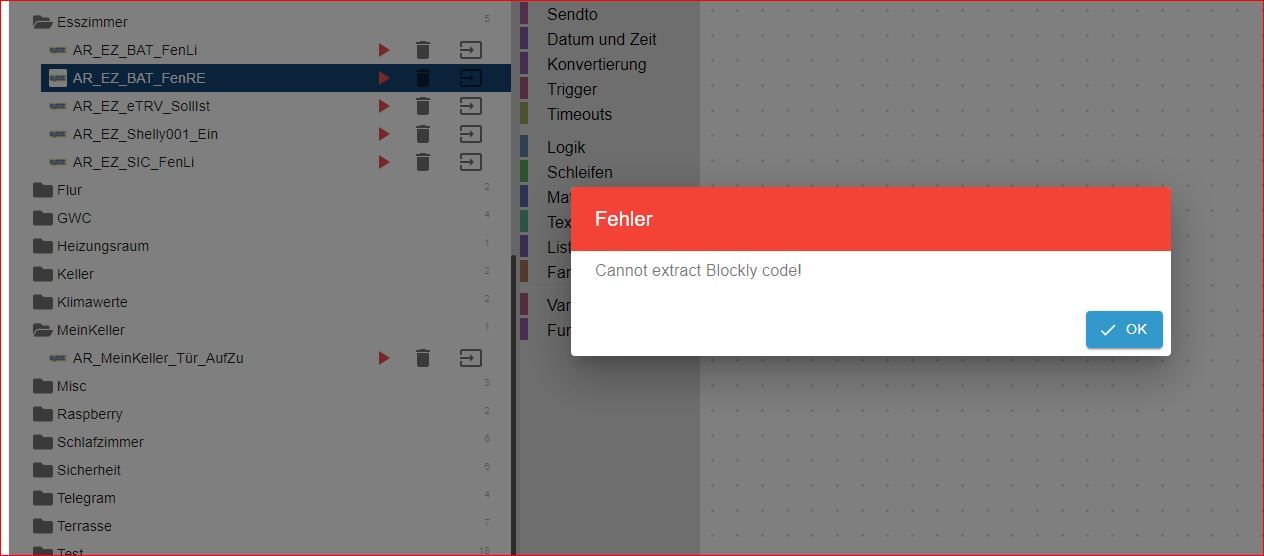
Was mach ich dagegen?
-
@homoran ja, sorry, leichte entwarnung, ich das Gerät jetzt zwei mal neu gestartet, und siehe da, der iobroker läuft, die Scripte sind zu sehen. War nur lieder in zu frühes BAckup, muss noch ein anderes wiederherstellen. Aber jetzt weiß ich ja, wie es geht.
Nur noch ein winzig kleines Problem:
Was mach ich dagegen?
-
@rushmed ja, kann man nicht.


Hey! Du scheinst an dieser Unterhaltung interessiert zu sein, hast aber noch kein Konto.
Hast du es satt, bei jedem Besuch durch die gleichen Beiträge zu scrollen? Wenn du dich für ein Konto anmeldest, kommst du immer genau dorthin zurück, wo du zuvor warst, und kannst dich über neue Antworten benachrichtigen lassen (entweder per E-Mail oder Push-Benachrichtigung). Du kannst auch Lesezeichen speichern und Beiträge positiv bewerten, um anderen Community-Mitgliedern deine Wertschätzung zu zeigen.
Mit deinem Input könnte dieser Beitrag noch besser werden 💗
Registrieren Anmelden410
Online33.0k
Benutzer83.5k
Themen1.3m
Beiträge