
NEWS




js-controller 4.0 jetzt im BETA/LATEST!
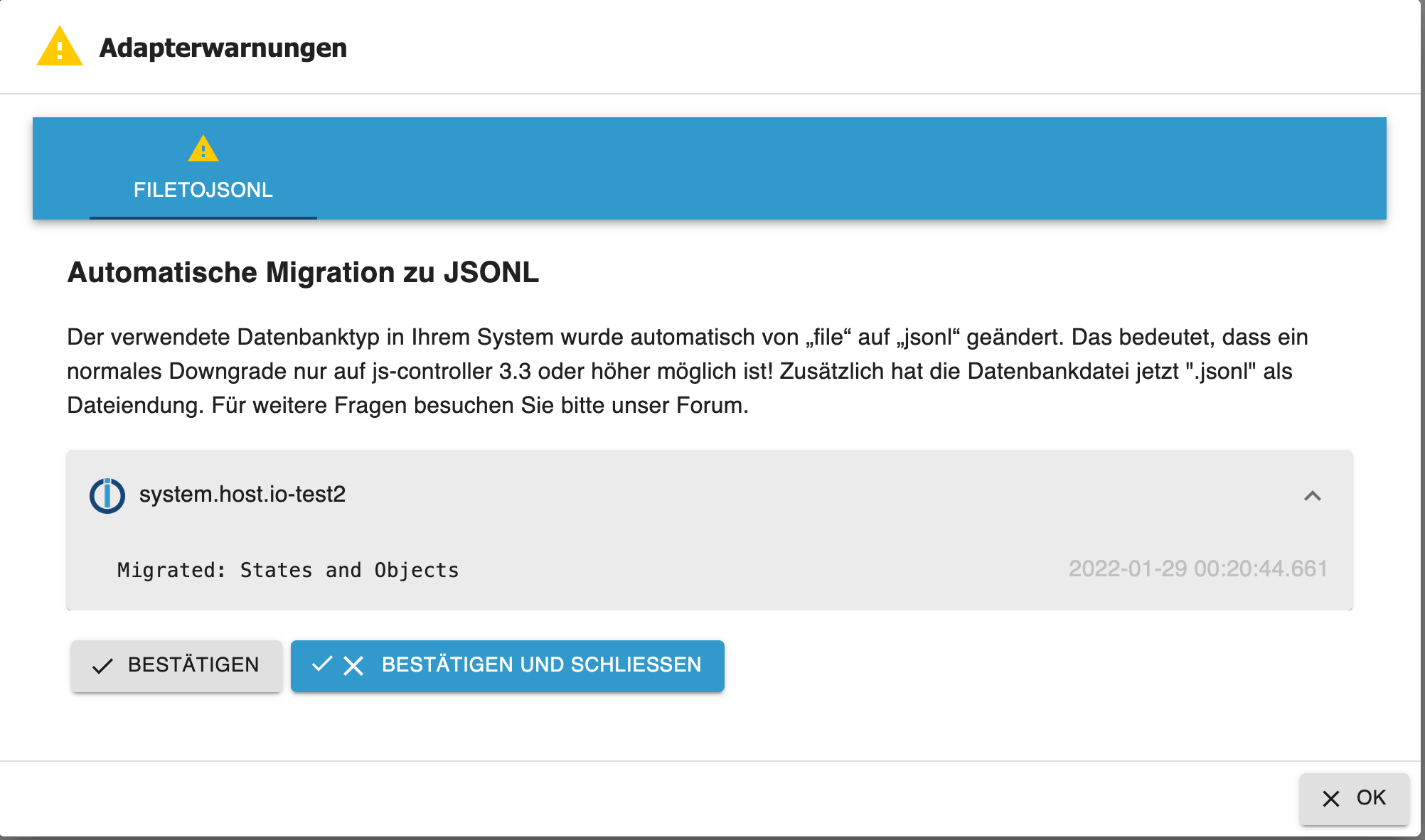
-
@apollon77 es gibt nicht meeeeeeeeeeehr, das ist genau das was ausgegeben wurde nachdem ich das update gemacht habe. Nicht mehr und nicht weniger.
Kann nichts her zaubern was es nicht gibt.Im übrigen hab ich auch noch
metro widgetundìQontrolein update gemacht, find ich aber ebenfalls nichts dazu im log!!@crunchip ich würde gern das update im
Log sehen (an sich ist das immer mit drin) und auch die zeitlichen Zusammenhänge des Updates mit dem Adapter start der da gezickt hat.Beitrag hat geholfen? Votet rechts unten im Beitrag :-) https://paypal.me/Apollon77 / https://github.com/sponsors/Apollon77
- Debug-Log für Instanz einschalten? Admin -> Instanzen -> Expertenmodus -> Instanz aufklappen - Loglevel ändern
- Logfiles auf Platte /opt/iobroker/log/… nutzen, Admin schneidet Zeilen ab
-
@crunchip ich würde gern das update im
Log sehen (an sich ist das immer mit drin) und auch die zeitlichen Zusammenhänge des Updates mit dem Adapter start der da gezickt hat.@apollon77 ich kann dir das ganze log vom Tag schicken
habe gerade vis update gemacht um 21:33 habe ich den aktualisieren Button gedrückt
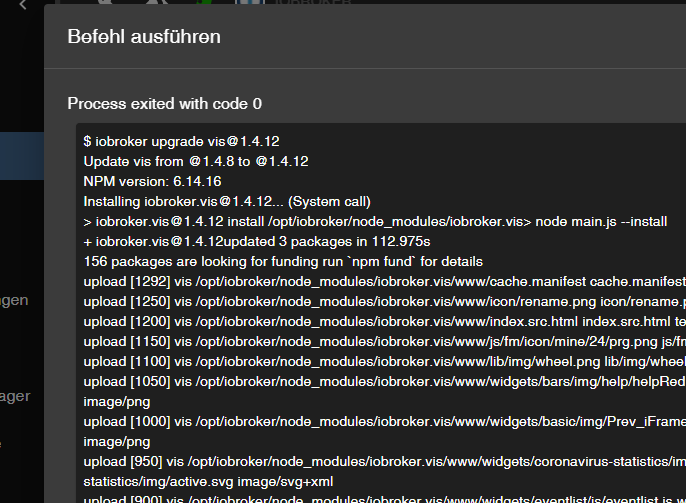
log dazu
2022-02-13 21:25:12.293 - info: vis.0 (10029) starting. Version 1.4.12 in /opt/iobroker/node_modules/iobroker.vis, node: v14.19.0, js-controller: 4.0.8
2022-02-13 21:25:12.451 - info: vis.0 (10029) vis license is OK.
2022-02-13 21:25:19.794 - info: vis.0 (10029) Changes in index.html detected => update cache.manifest
2022-02-13 21:25:20.195 - info: vis.0 (10029) Upload vis anew, while changes detected...
2022-02-13 21:25:26.571 - info: javascript.0 (17194) script.js.common.System.Statusmeldungen.Status_Lichtzählen1: Auslösender Schalter: zigbee.0.00158d0005062d72.state: true
2022-02-13 21:25:26.574 - info: javascript.0 (17194) script.js.common.System.Statusmeldungen.Status_Lichtzählen1: Text: Buerolicht ,Esstisch ,Flur,Garten,Kueche ,Noel-Wandlicht ,Sofa ,Terrasse
2022-02-13 21:25:26.575 - info: javascript.0 (17194) script.js.common.System.Statusmeldungen.Status_Lichtzählen1: Anzahl Lichter: 20 # davon Lichter an: 8
2022-02-13 21:25:31.456 - info: javascript.0 (17194) script.js.common.System.Statusmeldungen.Status_Lichtzählen1: Auslösender Schalter: sonoff.0.WC-Licht.POWER: true
2022-02-13 21:25:31.459 - info: javascript.0 (17194) script.js.common.System.Statusmeldungen.Status_Lichtzählen1: Text: Buerolicht ,Esstisch ,Flur,Garten,Kueche ,Noel-Wandlicht ,Sofa ,Terrasse,WC-Licht
2022-02-13 21:25:31.460 - info: javascript.0 (17194) script.js.common.System.Statusmeldungen.Status_Lichtzählen1: Anzahl Lichter: 20 # davon Lichter an: 9
2022-02-13 21:25:53.194 - info: vis.0 (10029) Uploaded. 0
2022-02-13 21:25:53.706 - info: vis.0 (10029) Terminated (NO_ERROR): Without reason
2022-02-13 21:26:39.217 - info: vis.0 (10545) starting. Version 1.4.12 in /opt/iobroker/node_modules/iobroker.vis, node: v14.19.0, js-controller: 4.0.8
2022-02-13 21:26:39.507 - info: vis.0 (10545) vis license is OK.
2022-02-13 21:26:41.307 - info: vis.0 (10545) Terminated (NO_ERROR): Without reason
umgestiegen von Proxmox auf Unraid
-
@apollon77 ich kann dir das ganze log vom Tag schicken
habe gerade vis update gemacht um 21:33 habe ich den aktualisieren Button gedrückt
log dazu
2022-02-13 21:25:12.293 - info: vis.0 (10029) starting. Version 1.4.12 in /opt/iobroker/node_modules/iobroker.vis, node: v14.19.0, js-controller: 4.0.8 2022-02-13 21:25:12.451 - info: vis.0 (10029) vis license is OK. 2022-02-13 21:25:19.794 - info: vis.0 (10029) Changes in index.html detected => update cache.manifest 2022-02-13 21:25:20.195 - info: vis.0 (10029) Upload vis anew, while changes detected... 2022-02-13 21:25:26.571 - info: javascript.0 (17194) script.js.common.System.Statusmeldungen.Status_Lichtzählen1: Auslösender Schalter: zigbee.0.00158d0005062d72.state: true 2022-02-13 21:25:26.574 - info: javascript.0 (17194) script.js.common.System.Statusmeldungen.Status_Lichtzählen1: Text: Buerolicht ,Esstisch ,Flur,Garten,Kueche ,Noel-Wandlicht ,Sofa ,Terrasse 2022-02-13 21:25:26.575 - info: javascript.0 (17194) script.js.common.System.Statusmeldungen.Status_Lichtzählen1: Anzahl Lichter: 20 # davon Lichter an: 8 2022-02-13 21:25:31.456 - info: javascript.0 (17194) script.js.common.System.Statusmeldungen.Status_Lichtzählen1: Auslösender Schalter: sonoff.0.WC-Licht.POWER: true 2022-02-13 21:25:31.459 - info: javascript.0 (17194) script.js.common.System.Statusmeldungen.Status_Lichtzählen1: Text: Buerolicht ,Esstisch ,Flur,Garten,Kueche ,Noel-Wandlicht ,Sofa ,Terrasse,WC-Licht 2022-02-13 21:25:31.460 - info: javascript.0 (17194) script.js.common.System.Statusmeldungen.Status_Lichtzählen1: Anzahl Lichter: 20 # davon Lichter an: 9 2022-02-13 21:25:53.194 - info: vis.0 (10029) Uploaded. 0 2022-02-13 21:25:53.706 - info: vis.0 (10029) Terminated (NO_ERROR): Without reason 2022-02-13 21:26:39.217 - info: vis.0 (10545) starting. Version 1.4.12 in /opt/iobroker/node_modules/iobroker.vis, node: v14.19.0, js-controller: 4.0.8 2022-02-13 21:26:39.507 - info: vis.0 (10545) vis license is OK. 2022-02-13 21:26:41.307 - info: vis.0 (10545) Terminated (NO_ERROR): Without reason@crunchip Ist dad das Log aus dem Admin? Kannst Du bitte mal schauen ob im Logfile auf der Platte mehr steht unter /opt/iobroker/logs/...
Beitrag hat geholfen? Votet rechts unten im Beitrag :-) https://paypal.me/Apollon77 / https://github.com/sponsors/Apollon77
- Debug-Log für Instanz einschalten? Admin -> Instanzen -> Expertenmodus -> Instanz aufklappen - Loglevel ändern
- Logfiles auf Platte /opt/iobroker/log/… nutzen, Admin schneidet Zeilen ab
-
@crunchip Ist dad das Log aus dem Admin? Kannst Du bitte mal schauen ob im Logfile auf der Platte mehr steht unter /opt/iobroker/logs/...
@apollon77 sagte in js-controller 4.0 jetzt im BETA/LATEST!:
Ist dad das Log aus dem Admin?
log herunterladen Button und dann herauskopiert
auf der Platte steht auch nicht mehr
umgestiegen von Proxmox auf Unraid
-
@apollon77 sagte in js-controller 4.0 jetzt im BETA/LATEST!:
Ist dad das Log aus dem Admin?
log herunterladen Button und dann herauskopiert
auf der Platte steht auch nicht mehr
-
@apollon77 mach ich morgen vormittag, sehe gerade, es kamen ein paar Adapter updates, dann teste ich das in aller Ruhe
Edit:
hängt aber nicht damit zusammen, das die Logstufe vom Host aufwarnsteht?umgestiegen von Proxmox auf Unraid
-
@apollon77 mach ich morgen vormittag, sehe gerade, es kamen ein paar Adapter updates, dann teste ich das in aller Ruhe
Edit:
hängt aber nicht damit zusammen, das die Logstufe vom Host aufwarnsteht?@crunchip sagte in js-controller 4.0 jetzt im BETA/LATEST!:
hängt aber nicht damit zusammen, das die Logstufe vom Host auf warn steht?
hehe ... ja klar, damit fehlen alle info logs ... damit fehlen einige Infos zum Debuggen
Beitrag hat geholfen? Votet rechts unten im Beitrag :-) https://paypal.me/Apollon77 / https://github.com/sponsors/Apollon77
- Debug-Log für Instanz einschalten? Admin -> Instanzen -> Expertenmodus -> Instanz aufklappen - Loglevel ändern
- Logfiles auf Platte /opt/iobroker/log/… nutzen, Admin schneidet Zeilen ab
-
@crunchip sagte in js-controller 4.0 jetzt im BETA/LATEST!:
hängt aber nicht damit zusammen, das die Logstufe vom Host auf warn steht?
hehe ... ja klar, damit fehlen alle info logs ... damit fehlen einige Infos zum Debuggen
@apollon77 sagte in js-controller 4.0 jetzt im BETA/LATEST!:
ja klar, damit fehlen alle info logs
da bin ich mir aber nicht sicher, host hab ich schon ewig auf warn stehen, aber wenn mich nicht alles täuscht, sah man trotzdem die Meldungen... update version x auf version y
-
So, wir nähern uns dem Ende ... die 4.0.9, damit Stable RC1, mit letzten Optimierungen und Fixes ist auf dem Weg ins Latest Repo:
4.0.9 (2022-02-13)
- (foxriver76) dependency check on instance deletion: hostname has to be relative to instance if single instance is deleted
- (foxriver76) fix setInterval method for adapters
- (AlCalzone) Prevent db-file-locking issues for jsonl database; the connectTimeout ro databases is now minimum 5s (overrides lower values from configuration)
Beitrag hat geholfen? Votet rechts unten im Beitrag :-) https://paypal.me/Apollon77 / https://github.com/sponsors/Apollon77
- Debug-Log für Instanz einschalten? Admin -> Instanzen -> Expertenmodus -> Instanz aufklappen - Loglevel ändern
- Logfiles auf Platte /opt/iobroker/log/… nutzen, Admin schneidet Zeilen ab
-
So, wir nähern uns dem Ende ... die 4.0.9, damit Stable RC1, mit letzten Optimierungen und Fixes ist auf dem Weg ins Latest Repo:
4.0.9 (2022-02-13)
- (foxriver76) dependency check on instance deletion: hostname has to be relative to instance if single instance is deleted
- (foxriver76) fix setInterval method for adapters
- (AlCalzone) Prevent db-file-locking issues for jsonl database; the connectTimeout ro databases is now minimum 5s (overrides lower values from configuration)
@apollon77 Update auf Master und Slave mit der 4.0.9 verlief ohne Probleme.
-
Ich habe mir beim letzten Upgrade nix dabei gedacht, kann ja immer mal passieren, aber jetzt wieder:
iob upgrade self
Update js-controller from @4.0.8 to @4.0.9
Stopped Objects DB
Stopped States DB
NPM version: 6.14.16
Installing iobroker.js-controller@4.0.9... (System call)

> iobroker.js-controller@4.0.9 preinstall /opt/iobroker/node_modules/iobroker.js-controller
> node lib/preinstallCheck.js

NPM version: 6.14.16

> iobroker.js-controller@4.0.9 install /opt/iobroker/node_modules/iobroker.js-controller
> node iobroker.js setup first

Successfully migrated 15599 objects to Redis Sets
object _design/system updated


 States database error: connect ECONNREFUSED 127.0.0.1:9000
 States database error: connect ECONNREFUSED 127.0.0.1:9000
 States database error: connect ECONNREFUSED 127.0.0.1:9000
 States database error: connect ECONNREFUSED 127.0.0.1:9000
 States database error: connect ECONNREFUSED 127.0.0.1:9000
 States database error: connect ECONNREFUSED 127.0.0.1:9000
 States database error: connect ECONNREFUSED 127.0.0.1:9000
 States database error: connect ECONNREFUSED 127.0.0.1:9000
 States database error: connect ECONNREFUSED 127.0.0.1:9000
^C
Nach
npm i iobroker.js-controller@4.0.9 --productionläuft es dann (iob upgrade self meldet dann nur wäre schon aktuell ;) )LG SBorg ( SBorg auf GitHub)
Projekte: Lebensmittelwarnung.de | WLAN-Wetterstation | PimpMyStation -
Ich habe mir beim letzten Upgrade nix dabei gedacht, kann ja immer mal passieren, aber jetzt wieder:
iob upgrade self
Update js-controller from @4.0.8 to @4.0.9
Stopped Objects DB
Stopped States DB
NPM version: 6.14.16
Installing iobroker.js-controller@4.0.9... (System call)

> iobroker.js-controller@4.0.9 preinstall /opt/iobroker/node_modules/iobroker.js-controller
> node lib/preinstallCheck.js

NPM version: 6.14.16

> iobroker.js-controller@4.0.9 install /opt/iobroker/node_modules/iobroker.js-controller
> node iobroker.js setup first

Successfully migrated 15599 objects to Redis Sets
object _design/system updated


 States database error: connect ECONNREFUSED 127.0.0.1:9000
 States database error: connect ECONNREFUSED 127.0.0.1:9000
 States database error: connect ECONNREFUSED 127.0.0.1:9000
 States database error: connect ECONNREFUSED 127.0.0.1:9000
 States database error: connect ECONNREFUSED 127.0.0.1:9000
 States database error: connect ECONNREFUSED 127.0.0.1:9000
 States database error: connect ECONNREFUSED 127.0.0.1:9000
 States database error: connect ECONNREFUSED 127.0.0.1:9000
 States database error: connect ECONNREFUSED 127.0.0.1:9000
^C
Nach
npm i iobroker.js-controller@4.0.9 --productionläuft es dann (iob upgrade self meldet dann nur wäre schon aktuell ;) )@sborg sagte in js-controller 4.0 jetzt im BETA/LATEST!:
Stopped States DB
Ist das ein SingleHost System oder Multihost?
Beitrag hat geholfen? Votet rechts unten im Beitrag :-) https://paypal.me/Apollon77 / https://github.com/sponsors/Apollon77
- Debug-Log für Instanz einschalten? Admin -> Instanzen -> Expertenmodus -> Instanz aufklappen - Loglevel ändern
- Logfiles auf Platte /opt/iobroker/log/… nutzen, Admin schneidet Zeilen ab
-
@sborg sagte in js-controller 4.0 jetzt im BETA/LATEST!:
Stopped States DB
Ist das ein SingleHost System oder Multihost?
@apollon77 sagte in js-controller 4.0 jetzt im BETA/LATEST!:
@sborg sagte in js-controller 4.0 jetzt im BETA/LATEST!:
Stopped States DB
Ist das ein SingleHost System oder Multihost?
Normaler SingleHost, kein Redis, NPM 6.14.16, Nodejs 14.19.0, also alles Standard, nix Extravagantes.
Bis (glaube 4.0.6) lief es problemlos.
Wenn ich mal wieder ( ;) ) der Einzige bin, kann ich mir ja mittels "npm i ..." helfen.
Ich setze den "npm i..." übrigens dann direkt nach "iob upgrade self" ab, keine weiteren Aktionen nötig. -
@alcalzone k, wüsste zwar nicht wo da ein timer laufen sollte, werds aber später testen. erklärt aber auch nicht, warums mit 3.3.22 funktioniert.
unterm helm rauchts seit tagen... ;) werd mal nahrung zu mir nehmen und dann weiterlinsen... :)
nochwas zu @Matt77CHE hab ja schon die VM zurückgespielt, nach updaten aller adapter auf l8est war das prob ja wieder da...Sooo, habe jetzt auch mal alles auf die beta hochgezogen (produktives System)
DB ist auf Redis/Redis.
socket.IO und web auch auf die beta geupdatet.Upgrade Prozess:
coyote@ioBroker:~$ iobroker stop
coyote@ioBroker:~$ iobroker upgrade self
Update js-controller from @3.3.22 to @4.0.9
NPM version: 6.14.16
npm install iobroker.js-controller@4.0.9 --loglevel error --unsafe-perm --prefix "/opt/iobroker" (System call)
In file included from ../../nan/nan.h:58,
                 from ../src/unix_dgram.cc:5:
/home/iobroker/.cache/node-gyp/14.19.0/include/node/node.h:793:7: warning: cast between incompatible function types from ‘void (*)(v8::Local<v8::Object>)’ to ‘node::addon_register_func’ {aka ‘void (*)(v8::Local<v8::Object>, v8::Local<v8::Value>, void*)’} [-Wcast-function-type]
  793 |       (node::addon_register_func) (regfunc),                          \
      |       ^~~~~~~~~~~~~~~~~~~~~~~~~~~~~~~~~~~~~
/home/iobroker/.cache/node-gyp/14.19.0/include/node/node.h:827:3: note: in expansion of macro ‘NODE_MODULE_X’
  827 |   NODE_MODULE_X(modname, regfunc, NULL, 0)  // NOLINT (readability/null_usage)
      |   ^~~~~~~~~~~~~
../src/unix_dgram.cc:404:1: note: in expansion of macro ‘NODE_MODULE’
  404 | NODE_MODULE(unix_dgram, Initialize)
      | ^~~~~~~~~~~
coyote@ioBroker:~$ iobroker update
Alle Adapter sind soweit durchgestartet bis auf den ble Adapter. Der wollte "npm install --production" in Adapter Directory.
Habe ich dann auch gemacht, dann ist er gestartet.Einzig das hier hab ich noch beim Start:
host.ioBroker	2022-02-14 16:19:49.573	error	instance system.adapter.smartmeter.0 terminated with code 1 (JS_CONTROLLER_STOPPED)
host.ioBroker	2022-02-14 16:19:49.573	error	Caught by controller[0]: }
host.ioBroker	2022-02-14 16:19:49.572	error	Caught by controller[0]: code: 'ERR_DLOPEN_FAILED'
host.ioBroker	2022-02-14 16:19:49.572	error	Caught by controller[0]: at Module.load (internal/modules/cjs/loader.js:950:32) {
host.ioBroker	2022-02-14 16:19:49.572	error	Caught by controller[0]: at Object.Module._extensions..js (internal/modules/cjs/loader.js:1114:10)
host.ioBroker	2022-02-14 16:19:49.571	error	Caught by controller[0]: at Module._compile (internal/modules/cjs/loader.js:1085:14)
host.ioBroker	2022-02-14 16:19:49.571	error	Caught by controller[0]: at Object.<anonymous> (/opt/iobroker/node_modules/@serialport/bindings/lib/linux.js:2:36)
host.ioBroker	2022-02-14 16:19:49.571	error	Caught by controller[0]: at bindings (/opt/iobroker/node_modules/bindings/bindings.js:112:48)
host.ioBroker	2022-02-14 16:19:49.570	error	Caught by controller[0]: at require (internal/modules/cjs/helpers.js:101:18)
host.ioBroker	2022-02-14 16:19:49.570	error	Caught by controller[0]: at Module.require (internal/modules/cjs/loader.js:974:19)
host.ioBroker	2022-02-14 16:19:49.570	error	Caught by controller[0]: at Function.Module._load (internal/modules/cjs/loader.js:790:12)
host.ioBroker	2022-02-14 16:19:49.569	error	Caught by controller[0]: at Module.load (internal/modules/cjs/loader.js:950:32)
host.ioBroker	2022-02-14 16:19:49.569	error	Caught by controller[0]: at Object.Module._extensions..node (internal/modules/cjs/loader.js:1144:18)
host.ioBroker	2022-02-14 16:19:49.569	error	Caught by controller[0]: the module (for instance, using `npm rebuild` or `npm install`).
host.ioBroker	2022-02-14 16:19:49.569	error	Caught by controller[0]: NODE_MODULE_VERSION 83. Please try re-compiling or re-installing
host.ioBroker	2022-02-14 16:19:49.568	error	Caught by controller[0]: NODE_MODULE_VERSION 72. This version of Node.js requires
host.ioBroker	2022-02-14 16:19:49.568	error	Caught by controller[0]: was compiled against a different Node.js version using
host.ioBroker	2022-02-14 16:19:49.567	error	Caught by controller[0]: Error: The module '/opt/iobroker/node_modules/@serialport/bindings/build/Release/bindings.node'
host.ioBroker	2022-02-14 16:19:49.560	error	Caught by controller[0]: ^
host.ioBroker	2022-02-14 16:19:49.559	error	Caught by controller[0]: throw e;
host.ioBroker	2022-02-14 16:19:49.559	error	Caught by controller[0]: /opt/iobroker/node_modules/bindings/bindings.js:121
Gibts da noch ein Problem?
-
Sooo, habe jetzt auch mal alles auf die beta hochgezogen (produktives System)
DB ist auf Redis/Redis.
socket.IO und web auch auf die beta geupdatet.Upgrade Prozess:
coyote@ioBroker:~$ iobroker stop
coyote@ioBroker:~$ iobroker upgrade self
Update js-controller from @3.3.22 to @4.0.9
NPM version: 6.14.16
npm install iobroker.js-controller@4.0.9 --loglevel error --unsafe-perm --prefix "/opt/iobroker" (System call)
In file included from ../../nan/nan.h:58,
                 from ../src/unix_dgram.cc:5:
/home/iobroker/.cache/node-gyp/14.19.0/include/node/node.h:793:7: warning: cast between incompatible function types from ‘void (*)(v8::Local<v8::Object>)’ to ‘node::addon_register_func’ {aka ‘void (*)(v8::Local<v8::Object>, v8::Local<v8::Value>, void*)’} [-Wcast-function-type]
  793 |       (node::addon_register_func) (regfunc),                          \
      |       ^~~~~~~~~~~~~~~~~~~~~~~~~~~~~~~~~~~~~
/home/iobroker/.cache/node-gyp/14.19.0/include/node/node.h:827:3: note: in expansion of macro ‘NODE_MODULE_X’
  827 |   NODE_MODULE_X(modname, regfunc, NULL, 0)  // NOLINT (readability/null_usage)
      |   ^~~~~~~~~~~~~
../src/unix_dgram.cc:404:1: note: in expansion of macro ‘NODE_MODULE’
  404 | NODE_MODULE(unix_dgram, Initialize)
      | ^~~~~~~~~~~
coyote@ioBroker:~$ iobroker update
Alle Adapter sind soweit durchgestartet bis auf den ble Adapter. Der wollte "npm install --production" in Adapter Directory.
Habe ich dann auch gemacht, dann ist er gestartet.Einzig das hier hab ich noch beim Start:
host.ioBroker	2022-02-14 16:19:49.573	error	instance system.adapter.smartmeter.0 terminated with code 1 (JS_CONTROLLER_STOPPED)
host.ioBroker	2022-02-14 16:19:49.573	error	Caught by controller[0]: }
host.ioBroker	2022-02-14 16:19:49.572	error	Caught by controller[0]: code: 'ERR_DLOPEN_FAILED'
host.ioBroker	2022-02-14 16:19:49.572	error	Caught by controller[0]: at Module.load (internal/modules/cjs/loader.js:950:32) {
host.ioBroker	2022-02-14 16:19:49.572	error	Caught by controller[0]: at Object.Module._extensions..js (internal/modules/cjs/loader.js:1114:10)
host.ioBroker	2022-02-14 16:19:49.571	error	Caught by controller[0]: at Module._compile (internal/modules/cjs/loader.js:1085:14)
host.ioBroker	2022-02-14 16:19:49.571	error	Caught by controller[0]: at Object.<anonymous> (/opt/iobroker/node_modules/@serialport/bindings/lib/linux.js:2:36)
host.ioBroker	2022-02-14 16:19:49.571	error	Caught by controller[0]: at bindings (/opt/iobroker/node_modules/bindings/bindings.js:112:48)
host.ioBroker	2022-02-14 16:19:49.570	error	Caught by controller[0]: at require (internal/modules/cjs/helpers.js:101:18)
host.ioBroker	2022-02-14 16:19:49.570	error	Caught by controller[0]: at Module.require (internal/modules/cjs/loader.js:974:19)
host.ioBroker	2022-02-14 16:19:49.570	error	Caught by controller[0]: at Function.Module._load (internal/modules/cjs/loader.js:790:12)
host.ioBroker	2022-02-14 16:19:49.569	error	Caught by controller[0]: at Module.load (internal/modules/cjs/loader.js:950:32)
host.ioBroker	2022-02-14 16:19:49.569	error	Caught by controller[0]: at Object.Module._extensions..node (internal/modules/cjs/loader.js:1144:18)
host.ioBroker	2022-02-14 16:19:49.569	error	Caught by controller[0]: the module (for instance, using `npm rebuild` or `npm install`).
host.ioBroker	2022-02-14 16:19:49.569	error	Caught by controller[0]: NODE_MODULE_VERSION 83. Please try re-compiling or re-installing
host.ioBroker	2022-02-14 16:19:49.568	error	Caught by controller[0]: NODE_MODULE_VERSION 72. This version of Node.js requires
host.ioBroker	2022-02-14 16:19:49.568	error	Caught by controller[0]: was compiled against a different Node.js version using
host.ioBroker	2022-02-14 16:19:49.567	error	Caught by controller[0]: Error: The module '/opt/iobroker/node_modules/@serialport/bindings/build/Release/bindings.node'
host.ioBroker	2022-02-14 16:19:49.560	error	Caught by controller[0]: ^
host.ioBroker	2022-02-14 16:19:49.559	error	Caught by controller[0]: throw e;
host.ioBroker	2022-02-14 16:19:49.559	error	Caught by controller[0]: /opt/iobroker/node_modules/bindings/bindings.js:121
Gibts da noch ein Problem?
@coyote Jetzt zeit mal mehr Log ... also an sich sollte er nach der Meldung sagen "Adapter needs rebuild" und dann rebuild machen und dann den adapter neu starten der da gecrasht ist ... Wenn es tat ist rum. Wenn nicht versucht er nochmal gezielter zu rebuilden. Also was genau sagt denn das log so?
Und ja bei Ble ist es bekannt ... da haben wir bei einem noble-Modul einen PR offen ... dann geht das in Zukunft vllt besser
-
@alcalzone Jo ok
@da_Woody Was ist es denn für ein Host? Also Hardware? Und mich würde auch malinteressieren wieviele State changes da so durchfliessen. Also mal bitte im Admin (wenn der wieder geht) unterInstanzen mit Expertenmodus aktiv schauen wieviele nachrichten da so aus welchem Adapter raus und in welchen Adapter rein gehen
@apollon77 hm, was brauchst noch mehr vom Log. Da is nicht viel mehr, zumindest nix mit Fehler. Es läuft ja auch danach, hier nochmal:
2022-02-14 16:21:25.079 - info: host.ioBroker instance system.adapter.ble.0 started with pid 952193
2022-02-14 16:21:25.792 - info: iqontrol.0 (952176) Plugin sentry Sentry Plugin disabled for this process because sending of statistic data is disabled for the system
2022-02-14 16:21:25.900 - info: iqontrol.0 (952176) starting. Version 2.0.0-rc2.0 in /opt/iobroker/node_modules/iobroker.iqontrol, node: v14.19.0, js-controller: 4.0.9
2022-02-14 16:21:25.975 - info: iqontrol.0 (952176) systemLanguage = de
2022-02-14 16:21:25.976 - info: iqontrol.0 (952176) Creating Popup States...
2022-02-14 16:21:26.056 - info: iqontrol.0 (952176) Creating Widget States...
2022-02-14 16:21:26.057 - info: iqontrol.0 (952176) Lists deactivated.
2022-02-14 16:21:26.057 - info: iqontrol.0 (952176) Deleting unused Objects...
2022-02-14 16:21:26.058 - info: iqontrol.0 (952176) Subscribing to states...
2022-02-14 16:21:26.059 - info: iqontrol.0 (952176) iQontrol ready.
2022-02-14 16:21:26.356 - error: host.ioBroker Caught by controller[0]: /opt/iobroker/node_modules/bindings/bindings.js:121
2022-02-14 16:21:26.357 - error: host.ioBroker Caught by controller[0]: throw e;
2022-02-14 16:21:26.357 - error: host.ioBroker Caught by controller[0]: ^
2022-02-14 16:21:26.358 - error: host.ioBroker Caught by controller[0]: Error: The module '/opt/iobroker/node_modules/@serialport/bindings/build/Release/bindings.node'
2022-02-14 16:21:26.358 - error: host.ioBroker Caught by controller[0]: was compiled against a different Node.js version using
2022-02-14 16:21:26.358 - error: host.ioBroker Caught by controller[0]: NODE_MODULE_VERSION 72. This version of Node.js requires
2022-02-14 16:21:26.358 - error: host.ioBroker Caught by controller[0]: NODE_MODULE_VERSION 83. Please try re-compiling or re-installing
2022-02-14 16:21:26.359 - error: host.ioBroker Caught by controller[0]: the module (for instance, using `npm rebuild` or `npm install`).
2022-02-14 16:21:26.359 - error: host.ioBroker Caught by controller[0]: at Object.Module._extensions..node (internal/modules/cjs/loader.js:1144:18)
2022-02-14 16:21:26.359 - error: host.ioBroker Caught by controller[0]: at Module.load (internal/modules/cjs/loader.js:950:32)
2022-02-14 16:21:26.359 - error: host.ioBroker Caught by controller[0]: at Function.Module._load (internal/modules/cjs/loader.js:790:12)
2022-02-14 16:21:26.372 - error: host.ioBroker Caught by controller[0]: at Module.require (internal/modules/cjs/loader.js:974:19)
2022-02-14 16:21:26.372 - error: host.ioBroker Caught by controller[0]: at require (internal/modules/cjs/helpers.js:101:18)
2022-02-14 16:21:26.372 - error: host.ioBroker Caught by controller[0]: at bindings (/opt/iobroker/node_modules/bindings/bindings.js:112:48)
2022-02-14 16:21:26.372 - error: host.ioBroker Caught by controller[0]: at Object. (/opt/iobroker/node_modules/@serialport/bindings/lib/linux.js:2:36)
2022-02-14 16:21:26.373 - error: host.ioBroker Caught by controller[0]: at Module._compile (internal/modules/cjs/loader.js:1085:14)
2022-02-14 16:21:26.373 - error: host.ioBroker Caught by controller[0]: at Object.Module._extensions..js (internal/modules/cjs/loader.js:1114:10)
2022-02-14 16:21:26.373 - error: host.ioBroker Caught by controller[0]: at Module.load (internal/modules/cjs/loader.js:950:32) {
2022-02-14 16:21:26.373 - error: host.ioBroker Caught by controller[0]: code: 'ERR_DLOPEN_FAILED'
2022-02-14 16:21:26.374 - error: host.ioBroker Caught by controller[0]: }
2022-02-14 16:21:26.374 - error: host.ioBroker instance system.adapter.smartmeter.0 terminated with code 1 (JS_CONTROLLER_STOPPED)
2022-02-14 16:21:26.374 - info: host.ioBroker Adapter system.adapter.smartmeter.0 needs rebuild of @serialport/bindings and will be restarted afterwards.
2022-02-14 16:21:26.375 - info: host.ioBroker system.adapter.smartmeter.0 will be rebuilt (Args: {"path":"/opt/iobroker/node_modules/@serialport","module":"@serialport/bindings","version":"9.2.3"})
2022-02-14 16:21:26.375 - warn: host.ioBroker adapter "smartmeter" seems to be installed for a different version of Node.js. Trying to rebuild it... 2 attempt
2022-02-14 16:21:26.375 - info: host.ioBroker iobroker rebuild @serialport/bindings@9.2.3
2022-02-14 16:21:26.635 - info: ble.0 (952193) starting. Version 0.12.0 in /opt/iobroker/node_modules/iobroker.ble, node: v14.19.0, js-controller: 4.0.9
2022-02-14 16:21:26.702 - info: ble.0 (952193) loaded plugins: Xiaomi, mi-flora, ruuvi-tag, _default
2022-02-14 16:21:26.704 - info: ble.0 (952193) enabled plugins: mi-flora, _default
2022-02-14 16:21:26.705 - info: ble.0 (952193) monitored services: fe95
2022-02-14 16:21:26.707 - info: ble.0 (952193) starting scanner process...
2022-02-14 16:21:27.062 - error: ble.0 (952193) Terminating because A dependency requires a rebuild.
2022-02-14 16:21:27.131 - info: host.ioBroker instance system.adapter.ble.0 requested a rebuild of its dependencies and will be restarted after that is done.
2022-02-14 16:21:27.132 - info: host.ioBroker Adapter system.adapter.ble.0 needs rebuild and will be restarted afterwards.
2022-02-14 16:21:27.133 - info: host.ioBroker system.adapter.ble.0 will be rebuilt
2022-02-14 16:21:27.251 - info: host.ioBroker iobroker npm-rebuild: Path argument needs to be an absolute path!
2022-02-14 16:21:28.261 - info: host.ioBroker iobroker npm-rebuild: exit 33
2022-02-14 16:21:28.396 - info: host.ioBroker instance system.adapter.smartmeter.0 started with pid 952230
2022-02-14 16:21:28.513 - info: host.ioBroker instance system.adapter.ble.0 started with pid 952237
2022-02-14 16:21:28.542 - info: host.ioBroker instance system.adapter.mytime.0 started with pid 952244
2022-02-14 16:21:29.703 - error: host.ioBroker Caught by controller[0]: /opt/iobroker/node_modules/bindings/bindings.js:121
2022-02-14 16:21:29.704 - error: host.ioBroker Caught by controller[0]: throw e;
2022-02-14 16:21:29.704 - error: host.ioBroker Caught by controller[0]: ^
2022-02-14 16:21:29.705 - error: host.ioBroker Caught by controller[0]: Error: The module '/opt/iobroker/node_modules/@serialport/bindings/build/Release/bindings.node'
2022-02-14 16:21:29.705 - error: host.ioBroker Caught by controller[0]: was compiled against a different Node.js version using
2022-02-14 16:21:29.705 - error: host.ioBroker Caught by controller[0]: NODE_MODULE_VERSION 72. This version of Node.js requires
2022-02-14 16:21:29.706 - error: host.ioBroker Caught by controller[0]: NODE_MODULE_VERSION 83. Please try re-compiling or re-installing
2022-02-14 16:21:29.706 - error: host.ioBroker Caught by controller[0]: the module (for instance, using `npm rebuild` or `npm install`).
2022-02-14 16:21:29.706 - error: host.ioBroker Caught by controller[0]: at Object.Module._extensions..node (internal/modules/cjs/loader.js:1144:18)
2022-02-14 16:21:29.706 - error: host.ioBroker Caught by controller[0]: at Module.load (internal/modules/cjs/loader.js:950:32)
2022-02-14 16:21:29.706 - error: host.ioBroker Caught by controller[0]: at Function.Module._load (internal/modules/cjs/loader.js:790:12)
2022-02-14 16:21:29.707 - error: host.ioBroker Caught by controller[0]: at Module.require (internal/modules/cjs/loader.js:974:19)
2022-02-14 16:21:29.707 - error: host.ioBroker Caught by controller[0]: at require (internal/modules/cjs/helpers.js:101:18)
2022-02-14 16:21:29.707 - error: host.ioBroker Caught by controller[0]: at bindings (/opt/iobroker/node_modules/bindings/bindings.js:112:48)
2022-02-14 16:21:29.707 - error: host.ioBroker Caught by controller[0]: at Object. (/opt/iobroker/node_modules/@serialport/bindings/lib/linux.js:2:36)
2022-02-14 16:21:29.707 - error: host.ioBroker Caught by controller[0]: at Module._compile (internal/modules/cjs/loader.js:1085:14)
2022-02-14 16:21:29.708 - error: host.ioBroker Caught by controller[0]: at Object.Module._extensions..js (internal/modules/cjs/loader.js:1114:10)
2022-02-14 16:21:29.708 - error: host.ioBroker Caught by controller[0]: at Module.load (internal/modules/cjs/loader.js:950:32) {
2022-02-14 16:21:29.708 - error: host.ioBroker Caught by controller[0]: code: 'ERR_DLOPEN_FAILED'
2022-02-14 16:21:29.708 - error: host.ioBroker Caught by controller[0]: }
2022-02-14 16:21:29.709 - error: host.ioBroker instance system.adapter.smartmeter.0 terminated with code 1 (JS_CONTROLLER_STOPPED)
2022-02-14 16:21:29.709 - info: host.ioBroker Adapter system.adapter.smartmeter.0 needs rebuild and will be restarted afterwards.
2022-02-14 16:21:29.709 - info: host.ioBroker system.adapter.smartmeter.0 will be rebuilt
2022-02-14 16:21:29.709 - warn: host.ioBroker adapter "smartmeter" seems to be installed for a different version of Node.js. Trying to rebuild it... 3 attempt
2022-02-14 16:21:29.710 - info: host.ioBroker iobroker rebuild
2022-02-14 16:21:30.024 - info: ble.0 (952237) starting. Version 0.12.0 in /opt/iobroker/node_modules/iobroker.ble, node: v14.19.0, js-controller: 4.0.9
2022-02-14 16:21:30.097 - info: ble.0 (952237) loaded plugins: Xiaomi, mi-flora, ruuvi-tag, _default
2022-02-14 16:21:30.098 - info: ble.0 (952237) enabled plugins: mi-flora, _default
2022-02-14 16:21:30.099 - info: ble.0 (952237) monitored services: fe95
2022-02-14 16:21:30.100 - info: ble.0 (952237) starting scanner process...
2022-02-14 16:21:30.381 - error: ble.0 (952237) Terminating because A dependency requires a rebuild.
EDIT:
Das hier hätte ich noch, danach ist dann Ruhe:
2022-02-14 16:22:57.067 - info: host.ioBroker iobroker npm-rebuild: 2022-02-14 16:22:57.069 - info: host.ioBroker iobroker npm-rebuild: > @serialport/bindings@9.2.8 install /opt/iobroker/node_modules/zigbee-herdsman/node_modules/@serialport/bindings> prebuild-install --tag-prefix @serialport/bindings@ || node-gyp rebuild 2022-02-14 16:22:57.727 - info: web.0 (952599) ==> Connected system.user.admin from 192.168.66.146 2022-02-14 16:22:59.129 - info: javascript.0 (950889) Stop script script.js.Foto_Telegram_schicken 2022-02-14 16:23:06.661 - info: host.ioBroker iobroker npm-rebuild: > @serialport/bindings@9.2.8 install /opt/iobroker/node_modules/zigbee-herdsman-converters/node_modules/zigbee-herdsman/node_modules/@serialport/bindings> prebuild-install --tag-prefix @serialport/bindings@ || node-gyp rebuild 2022-02-14 16:23:12.717 - info: host.ioBroker iobroker npm-rebuild: > @root/acme@3.1.0 postinstall /opt/iobroker/node_modules/@root/acme> node scripts/postinstall 2022-02-14 16:23:12.881 - info: host.ioBroker iobroker npm-rebuild: > abstract-socket@2.1.1 install /opt/iobroker/node_modules/abstract-socket> node-gyp rebuild 2022-02-14 16:23:13.619 - info: host.ioBroker iobroker npm-rebuild: make: Verzeichnis „/opt/iobroker/node_modules/abstract-socket/build“ wird betreten 2022-02-14 16:23:13.621 - info: host.ioBroker iobroker npm-rebuild: CXX(target) Release/obj.target/bindings/src/abstract_socket.o 2022-02-14 16:23:13.636 - info: jarvis.0 (951750) Client with IP 192.168.66.146 connected. 2022-02-14 16:23:15.023 - info: host.ioBroker iobroker npm-rebuild: SOLINK_MODULE(target) Release/obj.target/bindings.node 2022-02-14 16:23:15.101 - info: host.ioBroker iobroker npm-rebuild: COPY Release/bindings.node 2022-02-14 16:23:15.114 - info: host.ioBroker iobroker npm-rebuild: make: Verzeichnis „/opt/iobroker/node_modules/abstract-socket/build“ wird verlassen 2022-02-14 16:23:15.203 - info: host.ioBroker iobroker npm-rebuild: > protobufjs@6.11.2 postinstall /opt/iobroker/node_modules/protobufjs> node scripts/postinstall 2022-02-14 16:23:15.318 - info: host.ioBroker iobroker npm-rebuild: > cpu-features@0.0.2 install /opt/iobroker/node_modules/cpu-features> node-gyp rebuild 2022-02-14 16:23:16.097 - info: host.ioBroker iobroker npm-rebuild: make: Verzeichnis „/opt/iobroker/node_modules/cpu-features/build“ wird betreten 2022-02-14 16:23:16.102 - info: host.ioBroker iobroker npm-rebuild: ACTION Configuring dependencies /opt/iobroker/node_modules/cpu-features/deps/cpu_features/build/Makefile 2022-02-14 16:23:16.297 - info: host.ioBroker iobroker npm-rebuild: make: Verzeichnis „/opt/iobroker/node_modules/cpu-features/build“ wird verlassen 2022-02-14 16:23:17.453 - info: host.ioBroker iobroker npm-rebuild: exit 0 2022-02-14 16:23:17.698 - info: host.ioBroker instance system.adapter.smartmeter.0 started with pid 953383 2022-02-14 16:23:17.708 - info: host.ioBroker instance system.adapter.ble.0 started with pid 953389 -
@apollon77 hm, was brauchst noch mehr vom Log. Da is nicht viel mehr, zumindest nix mit Fehler. Es läuft ja auch danach, hier nochmal:
2022-02-14 16:21:25.079 - info: host.ioBroker instance system.adapter.ble.0 started with pid 952193
2022-02-14 16:21:25.792 - info: iqontrol.0 (952176) Plugin sentry Sentry Plugin disabled for this process because sending of statistic data is disabled for the system
2022-02-14 16:21:25.900 - info: iqontrol.0 (952176) starting. Version 2.0.0-rc2.0 in /opt/iobroker/node_modules/iobroker.iqontrol, node: v14.19.0, js-controller: 4.0.9
2022-02-14 16:21:25.975 - info: iqontrol.0 (952176) systemLanguage = de
2022-02-14 16:21:25.976 - info: iqontrol.0 (952176) Creating Popup States...
2022-02-14 16:21:26.056 - info: iqontrol.0 (952176) Creating Widget States...
2022-02-14 16:21:26.057 - info: iqontrol.0 (952176) Lists deactivated.
2022-02-14 16:21:26.057 - info: iqontrol.0 (952176) Deleting unused Objects...
2022-02-14 16:21:26.058 - info: iqontrol.0 (952176) Subscribing to states...
2022-02-14 16:21:26.059 - info: iqontrol.0 (952176) iQontrol ready.
2022-02-14 16:21:26.356 - error: host.ioBroker Caught by controller[0]: /opt/iobroker/node_modules/bindings/bindings.js:121
2022-02-14 16:21:26.357 - error: host.ioBroker Caught by controller[0]: throw e;
2022-02-14 16:21:26.357 - error: host.ioBroker Caught by controller[0]: ^
2022-02-14 16:21:26.358 - error: host.ioBroker Caught by controller[0]: Error: The module '/opt/iobroker/node_modules/@serialport/bindings/build/Release/bindings.node'
2022-02-14 16:21:26.358 - error: host.ioBroker Caught by controller[0]: was compiled against a different Node.js version using
2022-02-14 16:21:26.358 - error: host.ioBroker Caught by controller[0]: NODE_MODULE_VERSION 72. This version of Node.js requires
2022-02-14 16:21:26.358 - error: host.ioBroker Caught by controller[0]: NODE_MODULE_VERSION 83. Please try re-compiling or re-installing
2022-02-14 16:21:26.359 - error: host.ioBroker Caught by controller[0]: the module (for instance, using `npm rebuild` or `npm install`).
2022-02-14 16:21:26.359 - error: host.ioBroker Caught by controller[0]: at Object.Module._extensions..node (internal/modules/cjs/loader.js:1144:18)
2022-02-14 16:21:26.359 - error: host.ioBroker Caught by controller[0]: at Module.load (internal/modules/cjs/loader.js:950:32)
2022-02-14 16:21:26.359 - error: host.ioBroker Caught by controller[0]: at Function.Module._load (internal/modules/cjs/loader.js:790:12)
2022-02-14 16:21:26.372 - error: host.ioBroker Caught by controller[0]: at Module.require (internal/modules/cjs/loader.js:974:19)
2022-02-14 16:21:26.372 - error: host.ioBroker Caught by controller[0]: at require (internal/modules/cjs/helpers.js:101:18)
2022-02-14 16:21:26.372 - error: host.ioBroker Caught by controller[0]: at bindings (/opt/iobroker/node_modules/bindings/bindings.js:112:48)
2022-02-14 16:21:26.372 - error: host.ioBroker Caught by controller[0]: at Object. (/opt/iobroker/node_modules/@serialport/bindings/lib/linux.js:2:36)
2022-02-14 16:21:26.373 - error: host.ioBroker Caught by controller[0]: at Module._compile (internal/modules/cjs/loader.js:1085:14)
2022-02-14 16:21:26.373 - error: host.ioBroker Caught by controller[0]: at Object.Module._extensions..js (internal/modules/cjs/loader.js:1114:10)
2022-02-14 16:21:26.373 - error: host.ioBroker Caught by controller[0]: at Module.load (internal/modules/cjs/loader.js:950:32) {
2022-02-14 16:21:26.373 - error: host.ioBroker Caught by controller[0]: code: 'ERR_DLOPEN_FAILED'
2022-02-14 16:21:26.374 - error: host.ioBroker Caught by controller[0]: }
2022-02-14 16:21:26.374 - error: host.ioBroker instance system.adapter.smartmeter.0 terminated with code 1 (JS_CONTROLLER_STOPPED)
2022-02-14 16:21:26.374 - info: host.ioBroker Adapter system.adapter.smartmeter.0 needs rebuild of @serialport/bindings and will be restarted afterwards.
2022-02-14 16:21:26.375 - info: host.ioBroker system.adapter.smartmeter.0 will be rebuilt (Args: {"path":"/opt/iobroker/node_modules/@serialport","module":"@serialport/bindings","version":"9.2.3"})
2022-02-14 16:21:26.375 - warn: host.ioBroker adapter "smartmeter" seems to be installed for a different version of Node.js. Trying to rebuild it... 2 attempt
2022-02-14 16:21:26.375 - info: host.ioBroker iobroker rebuild @serialport/bindings@9.2.3
2022-02-14 16:21:26.635 - info: ble.0 (952193) starting. Version 0.12.0 in /opt/iobroker/node_modules/iobroker.ble, node: v14.19.0, js-controller: 4.0.9
2022-02-14 16:21:26.702 - info: ble.0 (952193) loaded plugins: Xiaomi, mi-flora, ruuvi-tag, _default
2022-02-14 16:21:26.704 - info: ble.0 (952193) enabled plugins: mi-flora, _default
2022-02-14 16:21:26.705 - info: ble.0 (952193) monitored services: fe95
2022-02-14 16:21:26.707 - info: ble.0 (952193) starting scanner process...
2022-02-14 16:21:27.062 - error: ble.0 (952193) Terminating because A dependency requires a rebuild.
2022-02-14 16:21:27.131 - info: host.ioBroker instance system.adapter.ble.0 requested a rebuild of its dependencies and will be restarted after that is done.
2022-02-14 16:21:27.132 - info: host.ioBroker Adapter system.adapter.ble.0 needs rebuild and will be restarted afterwards.
2022-02-14 16:21:27.133 - info: host.ioBroker system.adapter.ble.0 will be rebuilt
2022-02-14 16:21:27.251 - info: host.ioBroker iobroker npm-rebuild: Path argument needs to be an absolute path!
2022-02-14 16:21:28.261 - info: host.ioBroker iobroker npm-rebuild: exit 33
2022-02-14 16:21:28.396 - info: host.ioBroker instance system.adapter.smartmeter.0 started with pid 952230
2022-02-14 16:21:28.513 - info: host.ioBroker instance system.adapter.ble.0 started with pid 952237
2022-02-14 16:21:28.542 - info: host.ioBroker instance system.adapter.mytime.0 started with pid 952244
2022-02-14 16:21:29.703 - error: host.ioBroker Caught by controller[0]: /opt/iobroker/node_modules/bindings/bindings.js:121
2022-02-14 16:21:29.704 - error: host.ioBroker Caught by controller[0]: throw e;
2022-02-14 16:21:29.704 - error: host.ioBroker Caught by controller[0]: ^
2022-02-14 16:21:29.705 - error: host.ioBroker Caught by controller[0]: Error: The module '/opt/iobroker/node_modules/@serialport/bindings/build/Release/bindings.node'
2022-02-14 16:21:29.705 - error: host.ioBroker Caught by controller[0]: was compiled against a different Node.js version using
2022-02-14 16:21:29.705 - error: host.ioBroker Caught by controller[0]: NODE_MODULE_VERSION 72. This version of Node.js requires
2022-02-14 16:21:29.706 - error: host.ioBroker Caught by controller[0]: NODE_MODULE_VERSION 83. Please try re-compiling or re-installing
2022-02-14 16:21:29.706 - error: host.ioBroker Caught by controller[0]: the module (for instance, using `npm rebuild` or `npm install`).
2022-02-14 16:21:29.706 - error: host.ioBroker Caught by controller[0]: at Object.Module._extensions..node (internal/modules/cjs/loader.js:1144:18)
2022-02-14 16:21:29.706 - error: host.ioBroker Caught by controller[0]: at Module.load (internal/modules/cjs/loader.js:950:32)
2022-02-14 16:21:29.706 - error: host.ioBroker Caught by controller[0]: at Function.Module._load (internal/modules/cjs/loader.js:790:12)
2022-02-14 16:21:29.707 - error: host.ioBroker Caught by controller[0]: at Module.require (internal/modules/cjs/loader.js:974:19)
2022-02-14 16:21:29.707 - error: host.ioBroker Caught by controller[0]: at require (internal/modules/cjs/helpers.js:101:18)
2022-02-14 16:21:29.707 - error: host.ioBroker Caught by controller[0]: at bindings (/opt/iobroker/node_modules/bindings/bindings.js:112:48)
2022-02-14 16:21:29.707 - error: host.ioBroker Caught by controller[0]: at Object. (/opt/iobroker/node_modules/@serialport/bindings/lib/linux.js:2:36)
2022-02-14 16:21:29.707 - error: host.ioBroker Caught by controller[0]: at Module._compile (internal/modules/cjs/loader.js:1085:14)
2022-02-14 16:21:29.708 - error: host.ioBroker Caught by controller[0]: at Object.Module._extensions..js (internal/modules/cjs/loader.js:1114:10)
2022-02-14 16:21:29.708 - error: host.ioBroker Caught by controller[0]: at Module.load (internal/modules/cjs/loader.js:950:32) {
2022-02-14 16:21:29.708 - error: host.ioBroker Caught by controller[0]: code: 'ERR_DLOPEN_FAILED'
2022-02-14 16:21:29.708 - error: host.ioBroker Caught by controller[0]: }
2022-02-14 16:21:29.709 - error: host.ioBroker instance system.adapter.smartmeter.0 terminated with code 1 (JS_CONTROLLER_STOPPED)
2022-02-14 16:21:29.709 - info: host.ioBroker Adapter system.adapter.smartmeter.0 needs rebuild and will be restarted afterwards.
2022-02-14 16:21:29.709 - info: host.ioBroker system.adapter.smartmeter.0 will be rebuilt
2022-02-14 16:21:29.709 - warn: host.ioBroker adapter "smartmeter" seems to be installed for a different version of Node.js. Trying to rebuild it... 3 attempt
2022-02-14 16:21:29.710 - info: host.ioBroker iobroker rebuild
2022-02-14 16:21:30.024 - info: ble.0 (952237) starting. Version 0.12.0 in /opt/iobroker/node_modules/iobroker.ble, node: v14.19.0, js-controller: 4.0.9
2022-02-14 16:21:30.097 - info: ble.0 (952237) loaded plugins: Xiaomi, mi-flora, ruuvi-tag, _default
2022-02-14 16:21:30.098 - info: ble.0 (952237) enabled plugins: mi-flora, _default
2022-02-14 16:21:30.099 - info: ble.0 (952237) monitored services: fe95
2022-02-14 16:21:30.100 - info: ble.0 (952237) starting scanner process...
2022-02-14 16:21:30.381 - error: ble.0 (952237) Terminating because A dependency requires a rebuild.
EDIT:
Das hier hätte ich noch, danach ist dann Ruhe:
2022-02-14 16:22:57.067 - info: host.ioBroker iobroker npm-rebuild: 2022-02-14 16:22:57.069 - info: host.ioBroker iobroker npm-rebuild: > @serialport/bindings@9.2.8 install /opt/iobroker/node_modules/zigbee-herdsman/node_modules/@serialport/bindings> prebuild-install --tag-prefix @serialport/bindings@ || node-gyp rebuild 2022-02-14 16:22:57.727 - info: web.0 (952599) ==> Connected system.user.admin from 192.168.66.146 2022-02-14 16:22:59.129 - info: javascript.0 (950889) Stop script script.js.Foto_Telegram_schicken 2022-02-14 16:23:06.661 - info: host.ioBroker iobroker npm-rebuild: > @serialport/bindings@9.2.8 install /opt/iobroker/node_modules/zigbee-herdsman-converters/node_modules/zigbee-herdsman/node_modules/@serialport/bindings> prebuild-install --tag-prefix @serialport/bindings@ || node-gyp rebuild 2022-02-14 16:23:12.717 - info: host.ioBroker iobroker npm-rebuild: > @root/acme@3.1.0 postinstall /opt/iobroker/node_modules/@root/acme> node scripts/postinstall 2022-02-14 16:23:12.881 - info: host.ioBroker iobroker npm-rebuild: > abstract-socket@2.1.1 install /opt/iobroker/node_modules/abstract-socket> node-gyp rebuild 2022-02-14 16:23:13.619 - info: host.ioBroker iobroker npm-rebuild: make: Verzeichnis „/opt/iobroker/node_modules/abstract-socket/build“ wird betreten 2022-02-14 16:23:13.621 - info: host.ioBroker iobroker npm-rebuild: CXX(target) Release/obj.target/bindings/src/abstract_socket.o 2022-02-14 16:23:13.636 - info: jarvis.0 (951750) Client with IP 192.168.66.146 connected. 2022-02-14 16:23:15.023 - info: host.ioBroker iobroker npm-rebuild: SOLINK_MODULE(target) Release/obj.target/bindings.node 2022-02-14 16:23:15.101 - info: host.ioBroker iobroker npm-rebuild: COPY Release/bindings.node 2022-02-14 16:23:15.114 - info: host.ioBroker iobroker npm-rebuild: make: Verzeichnis „/opt/iobroker/node_modules/abstract-socket/build“ wird verlassen 2022-02-14 16:23:15.203 - info: host.ioBroker iobroker npm-rebuild: > protobufjs@6.11.2 postinstall /opt/iobroker/node_modules/protobufjs> node scripts/postinstall 2022-02-14 16:23:15.318 - info: host.ioBroker iobroker npm-rebuild: > cpu-features@0.0.2 install /opt/iobroker/node_modules/cpu-features> node-gyp rebuild 2022-02-14 16:23:16.097 - info: host.ioBroker iobroker npm-rebuild: make: Verzeichnis „/opt/iobroker/node_modules/cpu-features/build“ wird betreten 2022-02-14 16:23:16.102 - info: host.ioBroker iobroker npm-rebuild: ACTION Configuring dependencies /opt/iobroker/node_modules/cpu-features/deps/cpu_features/build/Makefile 2022-02-14 16:23:16.297 - info: host.ioBroker iobroker npm-rebuild: make: Verzeichnis „/opt/iobroker/node_modules/cpu-features/build“ wird verlassen 2022-02-14 16:23:17.453 - info: host.ioBroker iobroker npm-rebuild: exit 0 2022-02-14 16:23:17.698 - info: host.ioBroker instance system.adapter.smartmeter.0 started with pid 953383 2022-02-14 16:23:17.708 - info: host.ioBroker instance system.adapter.ble.0 started with pid 953389@coyote Ok, und danach tat alles ohne das Du was manuell gemacht hast bei smartmeter? Trotzdem was komisch ... wir checken
Beitrag hat geholfen? Votet rechts unten im Beitrag :-) https://paypal.me/Apollon77 / https://github.com/sponsors/Apollon77
- Debug-Log für Instanz einschalten? Admin -> Instanzen -> Expertenmodus -> Instanz aufklappen - Loglevel ändern
- Logfiles auf Platte /opt/iobroker/log/… nutzen, Admin schneidet Zeilen ab
-
@coyote Ok, und danach tat alles ohne das Du was manuell gemacht hast bei smartmeter? Trotzdem was komisch ... wir checken
@apollon77 genau, hab nur den ble von Hand nachinstalliert, da der nach 3 Versuchen auf gab :-)
smartmeter hab ich nichts gemacht, der ist grün und ich habe auch aktuelle Werte. -
So heute unter Windows auch mal das Update auf js-controller 4.0.9 gemacht. Versionsstand wurde angehoben und so wie es aussieht funktioniert ioB einwandfrei. Allerdings wurden in der Konsole die folgenden Meldungen ausgegeben. Windows bedingt?
C:\iobroker\GLT>iobroker upgrade self
Update js-controller from @3.3.22 to @4.0.9
NPM version: 6.14.11
npm install iobroker.js-controller@4.0.9 --loglevel error --unsafe-perm (System call)
Server Objects 127.0.0.1:61428 Error from InMemDB: Error: GET-UNSUPPORTED for namespace cfg.: Data=["meta.objects.features.useSets"]
Server States 127.0.0.1:61429 Error from InMemDB: Error: GET-UNSUPPORTED for namespace meta.: Data=["meta.states.protocolVersion"]
Server Objects 127.0.0.1:61428 Error from InMemDB: Error: GET-UNSUPPORTED for namespace cfg.: Data=["meta.objects.protocolVersion"]
Server States 127.0.0.1:61430 Error from InMemDB: Error: PSUBSCRIBE-UNSUPPORTED for namespace meta.: Data=["meta.*"]
Server Objects 127.0.0.1:61428 Error from InMemDB: Error: Unknown LUA script load
Server Objects 127.0.0.1:61428 Error from InMemDB: Error: Unknown LUA script load
Server Objects 127.0.0.1:61428 Error from InMemDB: Error: Unknown LUA script load
Server Objects 127.0.0.1:61428 Error from InMemDB: Error: SET-UNSUPPORTED for namespace cfg.: Data=["meta.objects.features.useSets",{"type":"Buffer","data":[49]}]
Could not migrate objects to corresponding sets: Error SET-UNSUPPORTED for namespace cfg.: Data=["meta.objects.features.useSets",{"type":"Buffer","data":[49]}]
ioBroker (since 2018) auf Intel Core i3-5005U NUC und Windwos10 Pro
-
So heute unter Windows auch mal das Update auf js-controller 4.0.9 gemacht. Versionsstand wurde angehoben und so wie es aussieht funktioniert ioB einwandfrei. Allerdings wurden in der Konsole die folgenden Meldungen ausgegeben. Windows bedingt?
C:\iobroker\GLT>iobroker upgrade self Update js-controller from @3.3.22 to @4.0.9 NPM version: 6.14.11 npm install iobroker.js-controller@4.0.9 --loglevel error --unsafe-perm (System call) Server Objects 127.0.0.1:61428 Error from InMemDB: Error: GET-UNSUPPORTED for namespace cfg.: Data=["meta.objects.features.useSets"] Server States 127.0.0.1:61429 Error from InMemDB: Error: GET-UNSUPPORTED for namespace meta.: Data=["meta.states.protocolVersion"] Server Objects 127.0.0.1:61428 Error from InMemDB: Error: GET-UNSUPPORTED for namespace cfg.: Data=["meta.objects.protocolVersion"] Server States 127.0.0.1:61430 Error from InMemDB: Error: PSUBSCRIBE-UNSUPPORTED for namespace meta.: Data=["meta.*"] Server Objects 127.0.0.1:61428 Error from InMemDB: Error: Unknown LUA script load Server Objects 127.0.0.1:61428 Error from InMemDB: Error: Unknown LUA script load Server Objects 127.0.0.1:61428 Error from InMemDB: Error: Unknown LUA script load Server Objects 127.0.0.1:61428 Error from InMemDB: Error: SET-UNSUPPORTED for namespace cfg.: Data=["meta.objects.features.useSets",{"type":"Buffer","data":[49]}] Could not migrate objects to corresponding sets: Error SET-UNSUPPORTED for namespace cfg.: Data=["meta.objects.features.useSets",{"type":"Buffer","data":[49]}]@jb_sullivan ne, Meldungen sind korrekt so, siehe auch oben erster Post







Hey! Du scheinst an dieser Unterhaltung interessiert zu sein, hast aber noch kein Konto.
Hast du es satt, bei jedem Besuch durch die gleichen Beiträge zu scrollen? Wenn du dich für ein Konto anmeldest, kommst du immer genau dorthin zurück, wo du zuvor warst, und kannst dich über neue Antworten benachrichtigen lassen (entweder per E-Mail oder Push-Benachrichtigung). Du kannst auch Lesezeichen speichern und Beiträge positiv bewerten, um anderen Community-Mitgliedern deine Wertschätzung zu zeigen.
Mit deinem Input könnte dieser Beitrag noch besser werden 💗
Registrieren Anmelden194
Online33.1k
Benutzende83.7k
Themen1.3m
Beiträge