
NEWS




Test Adapter ioBroker.backitup v3.1.x
-
Ab sofort steht die Version 2.1.17 auf Github und in kürze auch im latest zum testen bereit.
Changelog
2.1.17 (15.08.2021)
- (simatec) dependencies updated
- (simatec) Preparation for dark design by Admin 5
-
@humidor
Ja. Halte die Versionen aktuell, ich vermute es hat da Anpassungen gegeben.backitup github: 2.1.17 for 13 days latest: 2.1.17 for 13 days stable: 2.1.13 for 75 daysLinux-Werkzeugkasten:
https://forum.iobroker.net/topic/42952/der-kleine-iobroker-linux-werkzeugkasten
NodeJS Fixer Skript:
https://forum.iobroker.net/topic/68035/iob-node-fix-skript
iob_diag: curl -sLf -o diag.sh https://iobroker.net/diag.sh && bash diag.sh -
@humidor
Ja. Halte die Versionen aktuell, ich vermute es hat da Anpassungen gegeben.backitup github: 2.1.17 for 13 days latest: 2.1.17 for 13 days stable: 2.1.13 for 75 days@thomas-braun hab das Update auf 2.1.13 gemacht
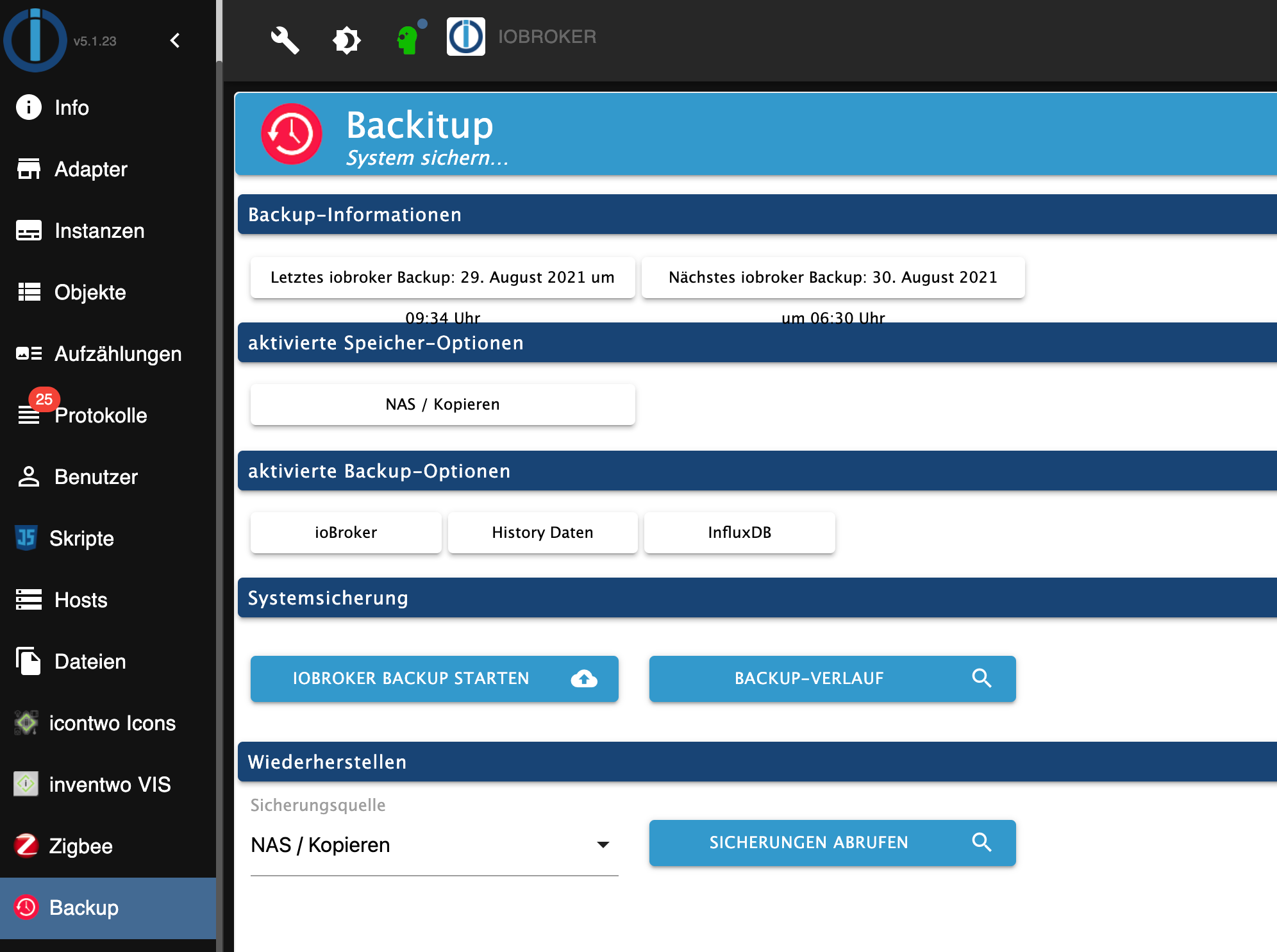
hat alles wunderbar geklapptStarted iobroker ... [DEBUG] [mount] - noserverino option: false [DEBUG] [mount] - cifs-mount command: "sudo mount -t cifs -o username=xxx,password=****,domain=ds1621,rw,file_mode=0777,dir_mode=0777,vers=2.0 //192.168.0.20/backup/iobrokerUbuntu /opt/iobroker/backups" [DEBUG] [mount] - mount successfully completed [DEBUG] [mount] - done [DEBUG] [iobroker] - host.iobroker 4259 states saved [DEBUG] [iobroker] - host.iobroker 4934 objects saved [DEBUG] [iobroker] - Backup created: /opt/iobroker/backups/iobroker_2021_08_29-09_33_28_ioBrokerPVUbuntu_backupiobroker.tar.gz [DEBUG] [iobroker] - done [DEBUG] [influxDB] - Start InfluxDB Backup ... [DEBUG] [influxDB] - InfluxDB Backup tmp directory created [DEBUG] [influxDB] - Packed 108MB so far... [DEBUG] [influxDB] - Packed 217MB so far... [DEBUG] [influxDB] - Backup created: /opt/iobroker/backups/influxDB_2021_08_29-09_33_33_ioBrokerPVUbuntu_backupiobroker.tar.gz [DEBUG] [influxDB] - Try deleting the InfluxDB tmp directory [DEBUG] [influxDB] - InfluxDB tmp directory was successfully deleted [DEBUG] [influxDB] - done [DEBUG] [historyDB] - compress from historyDB started ... [DEBUG] [historyDB] - Backup created: /opt/iobroker/backups/historyDB_2021_08_29-09_34_16_backupiobroker.tar.gz [DEBUG] [historyDB] - done [DEBUG] [cifs] - done [DEBUG] [clean] - done [DEBUG] [telegram] - done [DEBUG] [historyHTML] - new history html values created [DEBUG] [historyHTML] - done [DEBUG] [historyJSON] - new history json values created [DEBUG] [historyJSON] - done [DEBUG] [umount] - mount activ, umount is started ... [DEBUG] [umount] - umount successfully completed [DEBUG] [umount] - done [EXIT] 0nun sehe ich auch was im ioBroker ;)
BG
-
@thomas-braun hab das Update auf 2.1.13 gemacht
hat alles wunderbar geklapptStarted iobroker ... [DEBUG] [mount] - noserverino option: false [DEBUG] [mount] - cifs-mount command: "sudo mount -t cifs -o username=xxx,password=****,domain=ds1621,rw,file_mode=0777,dir_mode=0777,vers=2.0 //192.168.0.20/backup/iobrokerUbuntu /opt/iobroker/backups" [DEBUG] [mount] - mount successfully completed [DEBUG] [mount] - done [DEBUG] [iobroker] - host.iobroker 4259 states saved [DEBUG] [iobroker] - host.iobroker 4934 objects saved [DEBUG] [iobroker] - Backup created: /opt/iobroker/backups/iobroker_2021_08_29-09_33_28_ioBrokerPVUbuntu_backupiobroker.tar.gz [DEBUG] [iobroker] - done [DEBUG] [influxDB] - Start InfluxDB Backup ... [DEBUG] [influxDB] - InfluxDB Backup tmp directory created [DEBUG] [influxDB] - Packed 108MB so far... [DEBUG] [influxDB] - Packed 217MB so far... [DEBUG] [influxDB] - Backup created: /opt/iobroker/backups/influxDB_2021_08_29-09_33_33_ioBrokerPVUbuntu_backupiobroker.tar.gz [DEBUG] [influxDB] - Try deleting the InfluxDB tmp directory [DEBUG] [influxDB] - InfluxDB tmp directory was successfully deleted [DEBUG] [influxDB] - done [DEBUG] [historyDB] - compress from historyDB started ... [DEBUG] [historyDB] - Backup created: /opt/iobroker/backups/historyDB_2021_08_29-09_34_16_backupiobroker.tar.gz [DEBUG] [historyDB] - done [DEBUG] [cifs] - done [DEBUG] [clean] - done [DEBUG] [telegram] - done [DEBUG] [historyHTML] - new history html values created [DEBUG] [historyHTML] - done [DEBUG] [historyJSON] - new history json values created [DEBUG] [historyJSON] - done [DEBUG] [umount] - mount activ, umount is started ... [DEBUG] [umount] - umount successfully completed [DEBUG] [umount] - done [EXIT] 0nun sehe ich auch was im ioBroker ;)
@humidor
Eigentlich der erste Weg wenn man ein Problem hat, ein Update des Adapter auf die jeweils letzte Version des Repo und den Rest natürlich auch. Weil nix unübersichtlicheres als ein bunter Haufen an Versionen.Wenn das nix bringt, hast ein echtes Problem ;)
-
@humidor
Eigentlich der erste Weg wenn man ein Problem hat, ein Update des Adapter auf die jeweils letzte Version des Repo und den Rest natürlich auch. Weil nix unübersichtlicheres als ein bunter Haufen an Versionen.Wenn das nix bringt, hast ein echtes Problem ;)
-
@thomas-braun hab das Update auf 2.1.13 gemacht
hat alles wunderbar geklapptStarted iobroker ... [DEBUG] [mount] - noserverino option: false [DEBUG] [mount] - cifs-mount command: "sudo mount -t cifs -o username=xxx,password=****,domain=ds1621,rw,file_mode=0777,dir_mode=0777,vers=2.0 //192.168.0.20/backup/iobrokerUbuntu /opt/iobroker/backups" [DEBUG] [mount] - mount successfully completed [DEBUG] [mount] - done [DEBUG] [iobroker] - host.iobroker 4259 states saved [DEBUG] [iobroker] - host.iobroker 4934 objects saved [DEBUG] [iobroker] - Backup created: /opt/iobroker/backups/iobroker_2021_08_29-09_33_28_ioBrokerPVUbuntu_backupiobroker.tar.gz [DEBUG] [iobroker] - done [DEBUG] [influxDB] - Start InfluxDB Backup ... [DEBUG] [influxDB] - InfluxDB Backup tmp directory created [DEBUG] [influxDB] - Packed 108MB so far... [DEBUG] [influxDB] - Packed 217MB so far... [DEBUG] [influxDB] - Backup created: /opt/iobroker/backups/influxDB_2021_08_29-09_33_33_ioBrokerPVUbuntu_backupiobroker.tar.gz [DEBUG] [influxDB] - Try deleting the InfluxDB tmp directory [DEBUG] [influxDB] - InfluxDB tmp directory was successfully deleted [DEBUG] [influxDB] - done [DEBUG] [historyDB] - compress from historyDB started ... [DEBUG] [historyDB] - Backup created: /opt/iobroker/backups/historyDB_2021_08_29-09_34_16_backupiobroker.tar.gz [DEBUG] [historyDB] - done [DEBUG] [cifs] - done [DEBUG] [clean] - done [DEBUG] [telegram] - done [DEBUG] [historyHTML] - new history html values created [DEBUG] [historyHTML] - done [DEBUG] [historyJSON] - new history json values created [DEBUG] [historyJSON] - done [DEBUG] [umount] - mount activ, umount is started ... [DEBUG] [umount] - umount successfully completed [DEBUG] [umount] - done [EXIT] 0nun sehe ich auch was im ioBroker ;)
@humidor
Siehste.
Und deswegen macht es keinen Sinn für veraltete Versionen Fragen zu stellen. Also zuerst sein System durchpatchen, dann schauen. -
@jan1 schon klar, aber das letzte Mal hat es dann nicht funktioniert, drum habe ich mit dem Update da jetzt gewartet
-
@humidor sagte in Test Adapter Backitup v2.1.x:
@jan1 schon klar, aber das letzte Mal hat es dann nicht funktioniert, drum habe ich mit dem Update da jetzt gewartet
Dann war das letzte mal schon was faul.
@jan1 jain, der Login ging nicht mehr auf der Synology. Fehlereintrag im Log. das wars dann auch, mit dieser Version fkt. es wieder einwandfrei. Und nein, ich habe da nichts gemacht.
Schon klar wegen dem Update, war nur eine Frage, da ich ioBroker selbst das Update verpasst habe und nun der Reiter aufgetaucht ist. -
@humidor sagte in Test Adapter Backitup v2.1.x:
@simatec Hallo, frage, sollte hier etwas kommen ? (installiert ist 2.1.6)
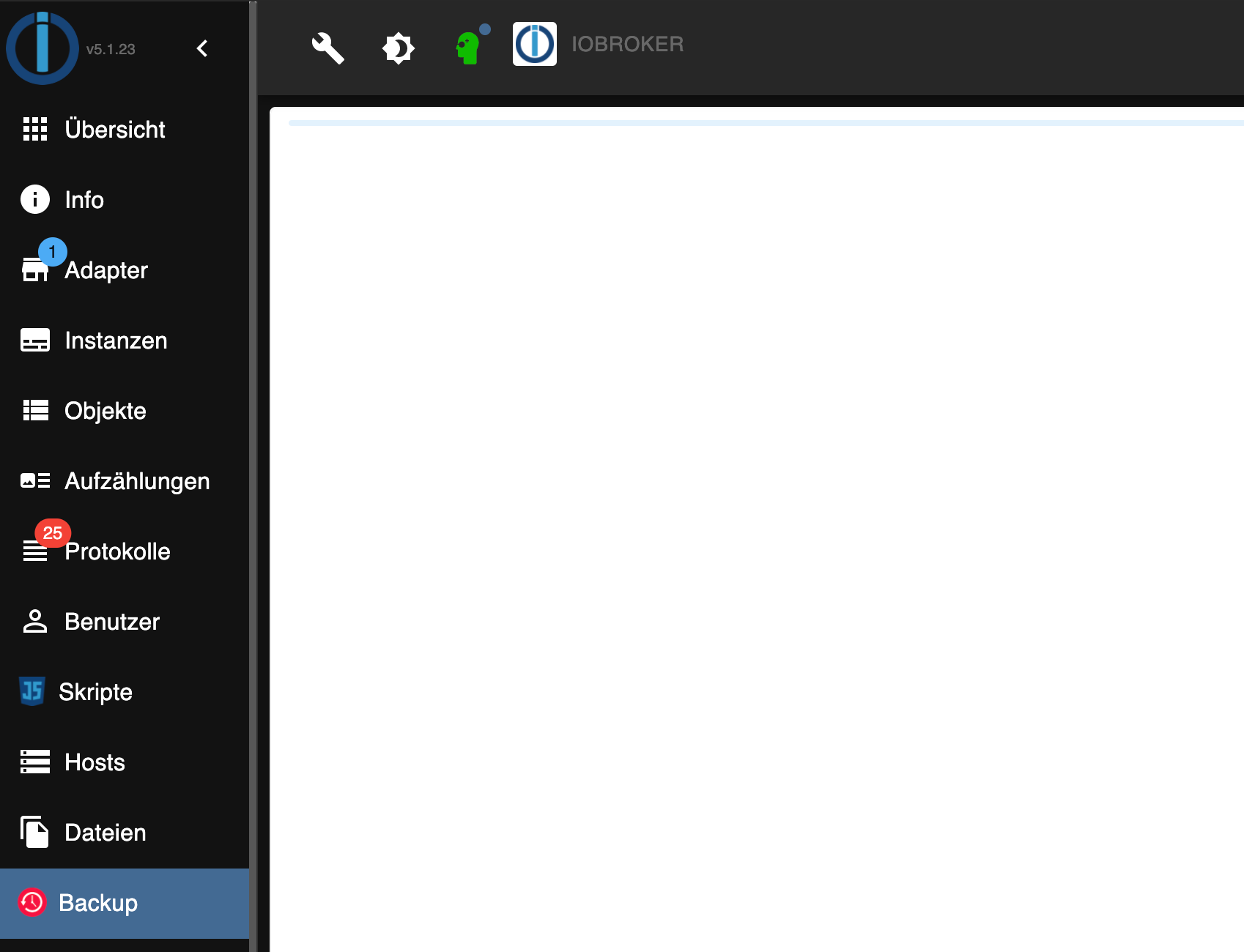
Ja da hat sich im Admin etwas geändert, so dass mit Admin 5.x diese version nicht mehr läuft.
Aktuell ist die Version 2.1.17, welche heute auch ins Stable geht. -
@humidor sagte in Test Adapter Backitup v2.1.x:
@simatec Hallo, frage, sollte hier etwas kommen ? (installiert ist 2.1.6)
Ja da hat sich im Admin etwas geändert, so dass mit Admin 5.x diese version nicht mehr läuft.
Aktuell ist die Version 2.1.17, welche heute auch ins Stable geht.Hallo. Ich komme nicht weiter. Habe das Fix Script mehrmals laufen lassen. ich bekomme jedoch immer folgende Fehlermeldung:
Started iobroker ...
[DEBUG] [mount] - nfs-mount command: "sudo mount 192.168.150.200:/volume1/Backup/smarthome_backup /opt/iobroker/backups"
[DEBUG] [mount] - mount successfully completed
[DEBUG] [mount] - done
[DEBUG] [iobroker] - host.rasppi4-iob 14804 states saved

[DEBUG] [iobroker] - host.rasppi4-iob 17432 objects saved

[ERROR] [iobroker] - host.rasppi4-iob Cannot pack directory /opt/iobroker/node_modules/iobroker.js-controller/tmp/backup: Error: EACCES: permission denied, open '/opt/iobroker/backups/iobroker_2021_09_22-01_34_40_backupiobroker.tar.gz'

[ERROR] [iobroker] - host.rasppi4-iob Cannot pack directory /opt/iobroker/node_modules/iobroker.js-controller/tmp/backup: Error [ERR_STREAM_DESTROYED]: Cannot call write after a stream was destroyed

[DEBUG] [iobroker] - done
[ERROR] [mysql] - [IGNORED] Error: Command failed: mysqldump  -u rasppi4-iob -** rasppi4-iob -h 192.168.150.200 -P 3307 > /opt/iobroker/backups/mysql_2021_09_22-01_35_06_backupiobroker.sql
/bin/sh: 1: cannot create /opt/iobroker/backups/mysql_2021_09_22-01_35_06_backupiobroker.sql: Permission denied
/bin/sh: 1: A7: not found
/bin/sh: 1: mysqldump: not found

[ERROR] [javascripts] - [IGNORED] Error: EACCES: permission denied, open '/opt/iobroker/backups/javascripts_2021_09_22-01_35_07_backupiobroker.tar.gz'
[DEBUG] [cifs] - done
[ERROR] [clean] - Backup files not deleted from /opt/iobroker/backups because some errors.
[DEBUG] [clean] - done
[DEBUG] [historyHTML] - new history html values created
[DEBUG] [historyHTML] - done
[DEBUG] [historyJSON] - new history json values created
[DEBUG] [historyJSON] - done
[DEBUG] [umount] - mount activ, umount is started ...
[DEBUG] [umount] - umount successfully completed
[DEBUG] [umount] - done
[EXIT] 9
Was kann das sein? wenn ich mich nicht verguckt habe hat der Backup Ordner Rchte für Iobroker...
Danke schonmal für eure Hilfe.
Gruß
Pascal -
Hallo. Ich komme nicht weiter. Habe das Fix Script mehrmals laufen lassen. ich bekomme jedoch immer folgende Fehlermeldung:
Started iobroker ...
[DEBUG] [mount] - nfs-mount command: "sudo mount 192.168.150.200:/volume1/Backup/smarthome_backup /opt/iobroker/backups"
[DEBUG] [mount] - mount successfully completed
[DEBUG] [mount] - done
[DEBUG] [iobroker] - host.rasppi4-iob 14804 states saved

[DEBUG] [iobroker] - host.rasppi4-iob 17432 objects saved

[ERROR] [iobroker] - host.rasppi4-iob Cannot pack directory /opt/iobroker/node_modules/iobroker.js-controller/tmp/backup: Error: EACCES: permission denied, open '/opt/iobroker/backups/iobroker_2021_09_22-01_34_40_backupiobroker.tar.gz'

[ERROR] [iobroker] - host.rasppi4-iob Cannot pack directory /opt/iobroker/node_modules/iobroker.js-controller/tmp/backup: Error [ERR_STREAM_DESTROYED]: Cannot call write after a stream was destroyed

[DEBUG] [iobroker] - done
[ERROR] [mysql] - [IGNORED] Error: Command failed: mysqldump  -u rasppi4-iob -** rasppi4-iob -h 192.168.150.200 -P 3307 > /opt/iobroker/backups/mysql_2021_09_22-01_35_06_backupiobroker.sql
/bin/sh: 1: cannot create /opt/iobroker/backups/mysql_2021_09_22-01_35_06_backupiobroker.sql: Permission denied
/bin/sh: 1: A7: not found
/bin/sh: 1: mysqldump: not found

[ERROR] [javascripts] - [IGNORED] Error: EACCES: permission denied, open '/opt/iobroker/backups/javascripts_2021_09_22-01_35_07_backupiobroker.tar.gz'
[DEBUG] [cifs] - done
[ERROR] [clean] - Backup files not deleted from /opt/iobroker/backups because some errors.
[DEBUG] [clean] - done
[DEBUG] [historyHTML] - new history html values created
[DEBUG] [historyHTML] - done
[DEBUG] [historyJSON] - new history json values created
[DEBUG] [historyJSON] - done
[DEBUG] [umount] - mount activ, umount is started ...
[DEBUG] [umount] - umount successfully completed
[DEBUG] [umount] - done
[EXIT] 9
Was kann das sein? wenn ich mich nicht verguckt habe hat der Backup Ordner Rchte für Iobroker...
Danke schonmal für eure Hilfe.
Gruß
Pascal@maduuto Kann es sein, dass du ein Synology NAS mit DSM 7 benutzt? Mit DSM 7 wurden die Nfs Richtlinien verschärft. Nervt mich auch.
Ich konnte es bei mir nur wieder ans Laufen bringen indem ich dem Backup Ordner 777 Rechte vergeben haben.
Das finde ich zwar sehr unbefriedigend und es soll auch nur eine Zwischenlösung sein bis ich einen anderen Weg gefunden habe, aber immerhin läuft es so erstmal. -
Hallo. Ich komme nicht weiter. Habe das Fix Script mehrmals laufen lassen. ich bekomme jedoch immer folgende Fehlermeldung:
Started iobroker ...
[DEBUG] [mount] - nfs-mount command: "sudo mount 192.168.150.200:/volume1/Backup/smarthome_backup /opt/iobroker/backups"
[DEBUG] [mount] - mount successfully completed
[DEBUG] [mount] - done
[DEBUG] [iobroker] - host.rasppi4-iob 14804 states saved

[DEBUG] [iobroker] - host.rasppi4-iob 17432 objects saved

[ERROR] [iobroker] - host.rasppi4-iob Cannot pack directory /opt/iobroker/node_modules/iobroker.js-controller/tmp/backup: Error: EACCES: permission denied, open '/opt/iobroker/backups/iobroker_2021_09_22-01_34_40_backupiobroker.tar.gz'

[ERROR] [iobroker] - host.rasppi4-iob Cannot pack directory /opt/iobroker/node_modules/iobroker.js-controller/tmp/backup: Error [ERR_STREAM_DESTROYED]: Cannot call write after a stream was destroyed

[DEBUG] [iobroker] - done
[ERROR] [mysql] - [IGNORED] Error: Command failed: mysqldump  -u rasppi4-iob -** rasppi4-iob -h 192.168.150.200 -P 3307 > /opt/iobroker/backups/mysql_2021_09_22-01_35_06_backupiobroker.sql
/bin/sh: 1: cannot create /opt/iobroker/backups/mysql_2021_09_22-01_35_06_backupiobroker.sql: Permission denied
/bin/sh: 1: A7: not found
/bin/sh: 1: mysqldump: not found

[ERROR] [javascripts] - [IGNORED] Error: EACCES: permission denied, open '/opt/iobroker/backups/javascripts_2021_09_22-01_35_07_backupiobroker.tar.gz'
[DEBUG] [cifs] - done
[ERROR] [clean] - Backup files not deleted from /opt/iobroker/backups because some errors.
[DEBUG] [clean] - done
[DEBUG] [historyHTML] - new history html values created
[DEBUG] [historyHTML] - done
[DEBUG] [historyJSON] - new history json values created
[DEBUG] [historyJSON] - done
[DEBUG] [umount] - mount activ, umount is started ...
[DEBUG] [umount] - umount successfully completed
[DEBUG] [umount] - done
[EXIT] 9
Was kann das sein? wenn ich mich nicht verguckt habe hat der Backup Ordner Rchte für Iobroker...
Danke schonmal für eure Hilfe.
Gruß
Pascal@maduuto Ist ja schön, dass du so ein sicheres Passwort gewählt hast. Aber dann hier öffentlich stellen ist weniger klug.

-
@maduuto Ist ja schön, dass du so ein sicheres Passwort gewählt hast. Aber dann hier öffentlich stellen ist weniger klug.
@dr-bakterius oh ist das Kauderwelsch beiMYSQL ein Passwort? Habe mich schon gewundert was das ist. Habe ich aber nicht festgelegt

Danke für den Hinweis.Ja ist eine Synology. Habe es nun hinbekommen. Es lag nicht an den Userrechten an Raspberry sondern an NFS. Ist ja beknackt da wäre ich nie draufgekommen. Musste in der Synology NAS bei den NFS Einstellungen den Squash everyone to Admin o.ä. einstellen. Nu geht es.
-
@dr-bakterius oh ist das Kauderwelsch beiMYSQL ein Passwort? Habe mich schon gewundert was das ist. Habe ich aber nicht festgelegt
Danke für den Hinweis.Ja ist eine Synology. Habe es nun hinbekommen. Es lag nicht an den Userrechten an Raspberry sondern an NFS. Ist ja beknackt da wäre ich nie draufgekommen. Musste in der Synology NAS bei den NFS Einstellungen den Squash everyone to Admin o.ä. einstellen. Nu geht es.
@maduuto
Oder auf beiden Systemen die gleiche User ID haben. -
@dr-bakterius oh ist das Kauderwelsch beiMYSQL ein Passwort? Habe mich schon gewundert was das ist. Habe ich aber nicht festgelegt
Danke für den Hinweis.Ja ist eine Synology. Habe es nun hinbekommen. Es lag nicht an den Userrechten an Raspberry sondern an NFS. Ist ja beknackt da wäre ich nie draufgekommen. Musste in der Synology NAS bei den NFS Einstellungen den Squash everyone to Admin o.ä. einstellen. Nu geht es.
@maduuto sagte in Test Adapter Backitup v2.1.x:
wäre
Das klappt bei mir leider auch nicht, weil ich den Standard Admin deaktiviert habe und dafür einen anderen angelegt habe. Das wird ja seit DSM 6 so von Synology penetrant empfohlen und es kommt immer die Hinweis Melung dazu, wenn der Admin noch aktiv ist.
-
Ab sofort steht die Version 2.1.17 auf Github und in kürze auch im latest zum testen bereit.
Changelog
2.1.17 (15.08.2021)
- (simatec) dependencies updated
- (simatec) Preparation for dark design by Admin 5
@simatec ich habe seit ein paar Tagen Probleme mit dem Backup.
Mein Backup läuft täglich um 05:05 Uhr. Der läuft auch durch nur ist danach die Weboberfläche von iobroker nicht mehr zu erreichen und es werden auch keine Daten mehr in meine influx db geschrieben. Nach einem iobrocker restart läuft wieder alles.Möglicherweise hängt es mit dem verfügbaren Speicher zusammen. Ich habe im log alle Meldungen die nicht vom backitup adapter stammen gelöscht, bis auf die zum Speicher ( Zeile 8 + 10 )
2021-09-28 05:05:10.259 - debug: backitup.0 (2721) Backup has started ...
2021-09-28 05:05:20.261 - debug: backitup.0 (2721) [iobroker/mount] noserverino option: false
2021-09-28 05:05:20.263 - debug: backitup.0 (2721) [iobroker/mount] cifs-mount command: "sudo mount -t cifs -o username=***,password=****,rw,file_mode=0777,dir_mode=0777,vers=3.0 //***/*** /opt/iobroker/backups"
2021-09-28 05:05:20.491 - debug: backitup.0 (2721) [iobroker/mount] mount successfully completed
2021-09-28 05:05:20.494 - debug: backitup.0 (2721) [iobroker/mount] done
2021-09-28 05:05:25.052 - debug: backitup.0 (2721) [iobroker/iobroker] host.tinkerboard 8984 states saved
2021-09-28 05:05:25.122 - debug: backitup.0 (2721) [iobroker/iobroker] host.tinkerboard 12563 objects saved
2021-09-28 05:10:01.620 - warn: host.tinkerboard Your system has only 53 MB RAM left available and an additional adapter process is started. Please check your system, settings and active instances to prevent swapping and Out-Of-Memory situations!
2021-09-28 05:10:04.157 - debug: backitup.0 (2721) system.adapter.javascript.0: logging false
2021-09-28 05:11:24.722 - warn: host.tinkerboard Your system has only 67 MB RAM left available and an additional adapter process is started. Please check your system, settings and active instances to prevent swapping and Out-Of-Memory situations!
2021-09-28 05:13:50.493 - debug: backitup.0 (2721) [iobroker/iobroker] Backup created: /opt/iobroker/backups/iobroker_2021_09_28-05_05_20_TinkerS_backupiobroker.tar.gz
2021-09-28 05:13:51.578 - debug: backitup.0 (2721) [iobroker/iobroker] done
2021-09-28 05:13:51.733 - debug: backitup.0 (2721) [iobroker/influxDB] Start InfluxDB Backup ...
2021-09-28 05:13:51.748 - debug: backitup.0 (2721) [iobroker/influxDB] InfluxDB Backup tmp directory created
2021-09-28 05:15:04.628 - debug: backitup.0 (2721) [iobroker/influxDB] Packed 51MB so far...
2021-09-28 05:15:14.628 - debug: backitup.0 (2721) [iobroker/influxDB] Packed 79MB so far...
2021-09-28 05:15:24.630 - debug: backitup.0 (2721) [iobroker/influxDB] Packed 105MB so far...
2021-09-28 05:15:34.632 - debug: backitup.0 (2721) [iobroker/influxDB] Packed 132MB so far...
2021-09-28 05:15:44.631 - debug: backitup.0 (2721) [iobroker/influxDB] Packed 158MB so far...
2021-09-28 05:15:54.631 - debug: backitup.0 (2721) [iobroker/influxDB] Packed 185MB so far...
2021-09-28 05:16:04.637 - debug: backitup.0 (2721) [iobroker/influxDB] Packed 209MB so far...
2021-09-28 05:16:14.631 - debug: backitup.0 (2721) [iobroker/influxDB] Packed 236MB so far...
2021-09-28 05:16:18.902 - debug: backitup.0 (2721) [iobroker/influxDB] Backup created: /opt/iobroker/backups/influxDB_2021_09_28-05_13_51_TinkerS_backupiobroker.tar.gz
2021-09-28 05:16:18.975 - debug: backitup.0 (2721) [iobroker/influxDB] Try deleting the InfluxDB tmp directory
2021-09-28 05:16:19.514 - debug: backitup.0 (2721) [iobroker/influxDB] InfluxDB tmp directory was successfully deleted
2021-09-28 05:16:19.515 - debug: backitup.0 (2721) [iobroker/influxDB] done
2021-09-28 05:16:20.426 - debug: backitup.0 (2721) [iobroker/grafana] Start Grafana Backup ...
2021-09-28 05:16:20.441 - debug: backitup.0 (2721) [iobroker/grafana] Created grafana_tmp directory: "/opt/iobroker/backups/grafana_tmp"
2021-09-28 05:16:20.452 - debug: backitup.0 (2721) [iobroker/grafana] Created dashboard directory
2021-09-28 05:16:20.465 - debug: backitup.0 (2721) [iobroker/grafana] Created dashboards_manually_restore directory
2021-09-28 05:16:20.478 - debug: backitup.0 (2721) [iobroker/grafana] Created datasource directory
2021-09-28 05:16:20.483 - debug: backitup.0 (2721) [iobroker/grafana] start Grafana request ...
2021-09-28 05:16:20.819 - debug: backitup.0 (2721) [iobroker/grafana] Grafana is available ... Status: 200
2021-09-28 05:16:21.254 - debug: backitup.0 (2721) [iobroker/grafana] Error on Grafana Dashoard Request: Error: Request failed with status code 401
2021-09-28 05:16:21.255 - debug: backitup.0 (2721) [iobroker/grafana] start Grafana backup compress ...
2021-09-28 05:16:21.268 - debug: backitup.0 (2721) [iobroker/grafana] Try deleting the Grafana tmp directory: "/opt/iobroker/backups/grafana_tmp"
2021-09-28 05:16:21.337 - debug: backitup.0 (2721) [iobroker/grafana] Grafana tmp directory "/opt/iobroker/backups/grafana_tmp" successfully deleted
2021-09-28 05:16:21.338 - debug: backitup.0 (2721) [iobroker/grafana] cannot found Grafana Backup files
2021-09-28 05:16:21.338 - debug: backitup.0 (2721) [iobroker/grafana] done
2021-09-28 05:16:22.828 - debug: backitup.0 (2721) [iobroker/javascripts] Backup created: /opt/iobroker/backups/javascripts_2021_09_28-05_16_21_backupiobroker.tar.gz
2021-09-28 05:16:22.829 - debug: backitup.0 (2721) [iobroker/javascripts] done
2021-09-28 05:16:23.133 - debug: backitup.0 (2721) [iobroker/cifs] done
2021-09-28 05:16:23.824 - debug: backitup.0 (2721) [iobroker/clean] delete /opt/iobroker/backups/iobroker_2021_09_23-05_05_20_TinkerS_backupiobroker.tar.gz
2021-09-28 05:16:23.886 - debug: backitup.0 (2721) [iobroker/clean] delete /opt/iobroker/backups/influxDB_2021_09_25-05_05_49_TinkerS_backupiobroker.tar.gz
2021-09-28 05:16:23.899 - debug: backitup.0 (2721) [iobroker/clean] delete /opt/iobroker/backups/javascripts_2021_09_23-05_08_03_backupiobroker.tar.gz
2021-09-28 05:16:23.906 - debug: backitup.0 (2721) [iobroker/clean] done
2021-09-28 05:16:24.702 - debug: backitup.0 (2721) [iobroker/historyHTML] new history html values created
2021-09-28 05:16:24.704 - debug: backitup.0 (2721) [iobroker/historyHTML] done
2021-09-28 05:16:24.867 - debug: backitup.0 (2721) [iobroker/historyJSON] new history json values created
2021-09-28 05:16:24.868 - debug: backitup.0 (2721) [iobroker/historyJSON] done
2021-09-28 05:16:25.050 - debug: backitup.0 (2721) [iobroker/umount] mount activ, umount is started ...
2021-09-28 05:16:30.236 - debug: backitup.0 (2721) [iobroker/umount] umount successfully completed
2021-09-28 05:16:30.242 - debug: backitup.0 (2721) [iobroker/umount] done
2021-09-28 05:16:30.394 - debug: backitup.0 (2721) [iobroker] exec: done
Was könnte den Fehler verursachen ?
Alle Raspberry ( 5 ) gegen NUC (N100, 16GB Ram und 500GB M2 SSD, extern 2TB SSD ) mit Proxmox 8.3.3 gewechselt. Läuft absolut super !
(Iobroker, Grafana, Teslalogger, Nextcloud, go2rtc, PiHole, IOB-VIS2, Teslamate, homeassistant nur als test) -
@simatec ich habe seit ein paar Tagen Probleme mit dem Backup.
Mein Backup läuft täglich um 05:05 Uhr. Der läuft auch durch nur ist danach die Weboberfläche von iobroker nicht mehr zu erreichen und es werden auch keine Daten mehr in meine influx db geschrieben. Nach einem iobrocker restart läuft wieder alles.Möglicherweise hängt es mit dem verfügbaren Speicher zusammen. Ich habe im log alle Meldungen die nicht vom backitup adapter stammen gelöscht, bis auf die zum Speicher ( Zeile 8 + 10 )
2021-09-28 05:05:10.259 - debug: backitup.0 (2721) Backup has started ...
2021-09-28 05:05:20.261 - debug: backitup.0 (2721) [iobroker/mount] noserverino option: false
2021-09-28 05:05:20.263 - debug: backitup.0 (2721) [iobroker/mount] cifs-mount command: "sudo mount -t cifs -o username=***,password=****,rw,file_mode=0777,dir_mode=0777,vers=3.0 //***/*** /opt/iobroker/backups"
2021-09-28 05:05:20.491 - debug: backitup.0 (2721) [iobroker/mount] mount successfully completed
2021-09-28 05:05:20.494 - debug: backitup.0 (2721) [iobroker/mount] done
2021-09-28 05:05:25.052 - debug: backitup.0 (2721) [iobroker/iobroker] host.tinkerboard 8984 states saved
2021-09-28 05:05:25.122 - debug: backitup.0 (2721) [iobroker/iobroker] host.tinkerboard 12563 objects saved
2021-09-28 05:10:01.620 - warn: host.tinkerboard Your system has only 53 MB RAM left available and an additional adapter process is started. Please check your system, settings and active instances to prevent swapping and Out-Of-Memory situations!
2021-09-28 05:10:04.157 - debug: backitup.0 (2721) system.adapter.javascript.0: logging false
2021-09-28 05:11:24.722 - warn: host.tinkerboard Your system has only 67 MB RAM left available and an additional adapter process is started. Please check your system, settings and active instances to prevent swapping and Out-Of-Memory situations!
2021-09-28 05:13:50.493 - debug: backitup.0 (2721) [iobroker/iobroker] Backup created: /opt/iobroker/backups/iobroker_2021_09_28-05_05_20_TinkerS_backupiobroker.tar.gz
2021-09-28 05:13:51.578 - debug: backitup.0 (2721) [iobroker/iobroker] done
2021-09-28 05:13:51.733 - debug: backitup.0 (2721) [iobroker/influxDB] Start InfluxDB Backup ...
2021-09-28 05:13:51.748 - debug: backitup.0 (2721) [iobroker/influxDB] InfluxDB Backup tmp directory created
2021-09-28 05:15:04.628 - debug: backitup.0 (2721) [iobroker/influxDB] Packed 51MB so far...
2021-09-28 05:15:14.628 - debug: backitup.0 (2721) [iobroker/influxDB] Packed 79MB so far...
2021-09-28 05:15:24.630 - debug: backitup.0 (2721) [iobroker/influxDB] Packed 105MB so far...
2021-09-28 05:15:34.632 - debug: backitup.0 (2721) [iobroker/influxDB] Packed 132MB so far...
2021-09-28 05:15:44.631 - debug: backitup.0 (2721) [iobroker/influxDB] Packed 158MB so far...
2021-09-28 05:15:54.631 - debug: backitup.0 (2721) [iobroker/influxDB] Packed 185MB so far...
2021-09-28 05:16:04.637 - debug: backitup.0 (2721) [iobroker/influxDB] Packed 209MB so far...
2021-09-28 05:16:14.631 - debug: backitup.0 (2721) [iobroker/influxDB] Packed 236MB so far...
2021-09-28 05:16:18.902 - debug: backitup.0 (2721) [iobroker/influxDB] Backup created: /opt/iobroker/backups/influxDB_2021_09_28-05_13_51_TinkerS_backupiobroker.tar.gz
2021-09-28 05:16:18.975 - debug: backitup.0 (2721) [iobroker/influxDB] Try deleting the InfluxDB tmp directory
2021-09-28 05:16:19.514 - debug: backitup.0 (2721) [iobroker/influxDB] InfluxDB tmp directory was successfully deleted
2021-09-28 05:16:19.515 - debug: backitup.0 (2721) [iobroker/influxDB] done
2021-09-28 05:16:20.426 - debug: backitup.0 (2721) [iobroker/grafana] Start Grafana Backup ...
2021-09-28 05:16:20.441 - debug: backitup.0 (2721) [iobroker/grafana] Created grafana_tmp directory: "/opt/iobroker/backups/grafana_tmp"
2021-09-28 05:16:20.452 - debug: backitup.0 (2721) [iobroker/grafana] Created dashboard directory
2021-09-28 05:16:20.465 - debug: backitup.0 (2721) [iobroker/grafana] Created dashboards_manually_restore directory
2021-09-28 05:16:20.478 - debug: backitup.0 (2721) [iobroker/grafana] Created datasource directory
2021-09-28 05:16:20.483 - debug: backitup.0 (2721) [iobroker/grafana] start Grafana request ...
2021-09-28 05:16:20.819 - debug: backitup.0 (2721) [iobroker/grafana] Grafana is available ... Status: 200
2021-09-28 05:16:21.254 - debug: backitup.0 (2721) [iobroker/grafana] Error on Grafana Dashoard Request: Error: Request failed with status code 401
2021-09-28 05:16:21.255 - debug: backitup.0 (2721) [iobroker/grafana] start Grafana backup compress ...
2021-09-28 05:16:21.268 - debug: backitup.0 (2721) [iobroker/grafana] Try deleting the Grafana tmp directory: "/opt/iobroker/backups/grafana_tmp"
2021-09-28 05:16:21.337 - debug: backitup.0 (2721) [iobroker/grafana] Grafana tmp directory "/opt/iobroker/backups/grafana_tmp" successfully deleted
2021-09-28 05:16:21.338 - debug: backitup.0 (2721) [iobroker/grafana] cannot found Grafana Backup files
2021-09-28 05:16:21.338 - debug: backitup.0 (2721) [iobroker/grafana] done
2021-09-28 05:16:22.828 - debug: backitup.0 (2721) [iobroker/javascripts] Backup created: /opt/iobroker/backups/javascripts_2021_09_28-05_16_21_backupiobroker.tar.gz
2021-09-28 05:16:22.829 - debug: backitup.0 (2721) [iobroker/javascripts] done
2021-09-28 05:16:23.133 - debug: backitup.0 (2721) [iobroker/cifs] done
2021-09-28 05:16:23.824 - debug: backitup.0 (2721) [iobroker/clean] delete /opt/iobroker/backups/iobroker_2021_09_23-05_05_20_TinkerS_backupiobroker.tar.gz
2021-09-28 05:16:23.886 - debug: backitup.0 (2721) [iobroker/clean] delete /opt/iobroker/backups/influxDB_2021_09_25-05_05_49_TinkerS_backupiobroker.tar.gz
2021-09-28 05:16:23.899 - debug: backitup.0 (2721) [iobroker/clean] delete /opt/iobroker/backups/javascripts_2021_09_23-05_08_03_backupiobroker.tar.gz
2021-09-28 05:16:23.906 - debug: backitup.0 (2721) [iobroker/clean] done
2021-09-28 05:16:24.702 - debug: backitup.0 (2721) [iobroker/historyHTML] new history html values created
2021-09-28 05:16:24.704 - debug: backitup.0 (2721) [iobroker/historyHTML] done
2021-09-28 05:16:24.867 - debug: backitup.0 (2721) [iobroker/historyJSON] new history json values created
2021-09-28 05:16:24.868 - debug: backitup.0 (2721) [iobroker/historyJSON] done
2021-09-28 05:16:25.050 - debug: backitup.0 (2721) [iobroker/umount] mount activ, umount is started ...
2021-09-28 05:16:30.236 - debug: backitup.0 (2721) [iobroker/umount] umount successfully completed
2021-09-28 05:16:30.242 - debug: backitup.0 (2721) [iobroker/umount] done
2021-09-28 05:16:30.394 - debug: backitup.0 (2721) [iobroker] exec: done
Was könnte den Fehler verursachen ?
Die Meldungen sind ja mehr als eindeutig.
Zuwenig RAM für den speicherhungrigen Backup-Prozess.Wie viel ist da überhaupt verfügbar?
free -htLinux-Werkzeugkasten:
https://forum.iobroker.net/topic/42952/der-kleine-iobroker-linux-werkzeugkasten
NodeJS Fixer Skript:
https://forum.iobroker.net/topic/68035/iob-node-fix-skript
iob_diag: curl -sLf -o diag.sh https://iobroker.net/diag.sh && bash diag.sh -
Die Meldungen sind ja mehr als eindeutig.
Zuwenig RAM für den speicherhungrigen Backup-Prozess.Wie viel ist da überhaupt verfügbar?
free -ht@thomas-braun sagte in Test Adapter Backitup v2.1.x:
Die Meldungen sind ja mehr als eindeutig.
Zuwenig RAM für den speicherhungrigen Backup-Prozess.Wie viel ist da überhaupt verfügbar?
free -htpi@tinkerboard:~$ free -ht total used free shared buff/cache available Mem: 2,0G 841M 759M 11M 407M 1,1G Swap: 99M 0B 99M Total: 2,1G 841M 859MAlle Raspberry ( 5 ) gegen NUC (N100, 16GB Ram und 500GB M2 SSD, extern 2TB SSD ) mit Proxmox 8.3.3 gewechselt. Läuft absolut super !
(Iobroker, Grafana, Teslalogger, Nextcloud, go2rtc, PiHole, IOB-VIS2, Teslamate, homeassistant nur als test) -
@thomas-braun sagte in Test Adapter Backitup v2.1.x:
Die Meldungen sind ja mehr als eindeutig.
Zuwenig RAM für den speicherhungrigen Backup-Prozess.Wie viel ist da überhaupt verfügbar?
free -htpi@tinkerboard:~$ free -ht total used free shared buff/cache available Mem: 2,0G 841M 759M 11M 407M 1,1G Swap: 99M 0B 99M Total: 2,1G 841M 859MDas sieht eigentlich grundsätzlich nicht verkehrt aus.
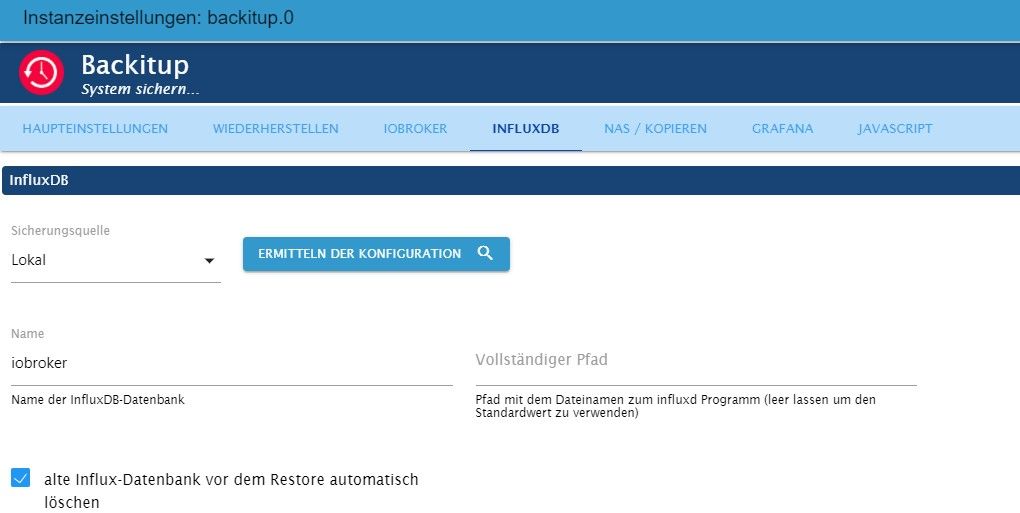
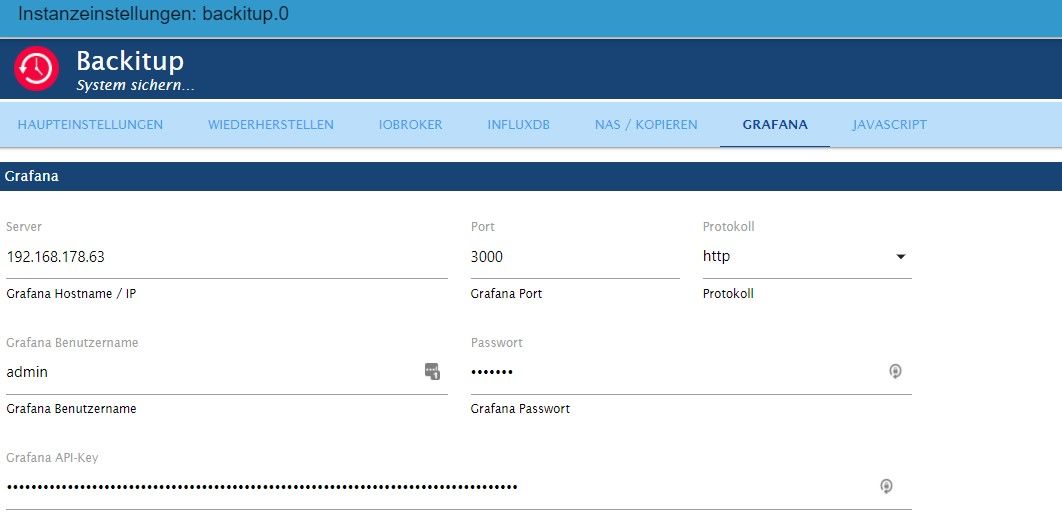
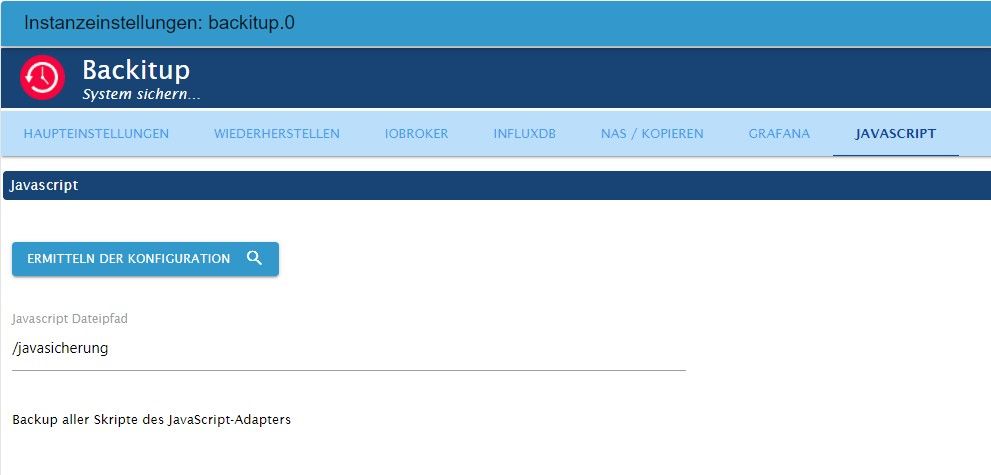
Wie sehen die einzelnen Einstellungen für die jeweiligen Backups im Backitup-Adapter aus?Linux-Werkzeugkasten:
https://forum.iobroker.net/topic/42952/der-kleine-iobroker-linux-werkzeugkasten
NodeJS Fixer Skript:
https://forum.iobroker.net/topic/68035/iob-node-fix-skript
iob_diag: curl -sLf -o diag.sh https://iobroker.net/diag.sh && bash diag.sh -
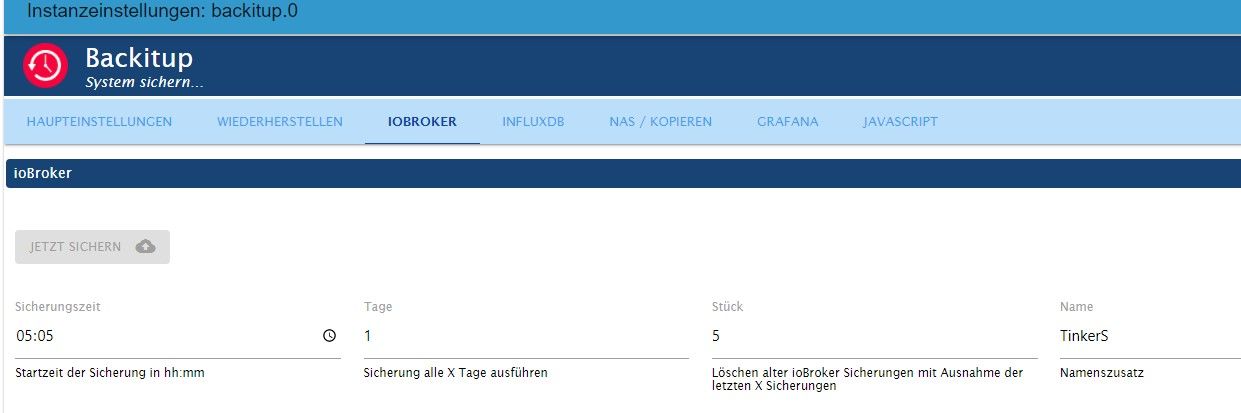
Das sieht eigentlich grundsätzlich nicht verkehrt aus.
Wie sehen die einzelnen Einstellungen für die jeweiligen Backups im Backitup-Adapter aus?Alle Raspberry ( 5 ) gegen NUC (N100, 16GB Ram und 500GB M2 SSD, extern 2TB SSD ) mit Proxmox 8.3.3 gewechselt. Läuft absolut super !
(Iobroker, Grafana, Teslalogger, Nextcloud, go2rtc, PiHole, IOB-VIS2, Teslamate, homeassistant nur als test)





Hey! Du scheinst an dieser Unterhaltung interessiert zu sein, hast aber noch kein Konto.
Hast du es satt, bei jedem Besuch durch die gleichen Beiträge zu scrollen? Wenn du dich für ein Konto anmeldest, kommst du immer genau dorthin zurück, wo du zuvor warst, und kannst dich über neue Antworten benachrichtigen lassen (entweder per E-Mail oder Push-Benachrichtigung). Du kannst auch Lesezeichen speichern und Beiträge positiv bewerten, um anderen Community-Mitgliedern deine Wertschätzung zu zeigen.
Mit deinem Input könnte dieser Beitrag noch besser werden 💗
Registrieren AnmeldenSupport us
526
Online33.1k
Benutzende83.7k
Themen1.3m
Beiträge