




[gelöst] Backupit - keine iobroker Backups möglich
-
ich habe jetzt soeben nochmal probiert, das Backup über Backupit manuell anzustoßen.
Nachfolgend das Log dazu.
Zuerst habe ich das Backup der CCU angestoßen, welches ja erfolgreich durchläuft. Im Anschluss habe ich nochmal das Backup vom iobroker durchlaufen lassen, welches wie gehabt keine Daten ablegt. Für das iobroker Backup habe ich auch alle Instanzen bis auf Admin und Backupit angehalten.Ich hatte es ja ja glaube ich auch oben schon einmal geschrieben, aber hier nur nochmal zur Vollständigkeit, mein System läuft im Multihost. Ich habe gestern auch schon den Slave vom Multihost getrennt, was keine Änderungen brachte. Master sowie Slave sind auch beide Stand jetzt auf dem aktuellsten identischen Stand.
Ich will euch aber auch nicht länger eurer Zeit dafür berauben... Irgendwie denke ich, dass ich hier nicht weiterkomme. Ich meine das System an sich läuft ja (zumindest Augenscheinlich), aber ganz ohne Backup in die Zukunft zu steuern ist mir dann irgendwie zu unsicher. Ggf. muss ich dann parallel irgendwie auf ein neues System umziehen, was mir zwar nicht ganz schmeckt, aber so ist es halt manchmal :-)
Deswegen nochmals an dieser Stelle, VIELEN VIELEN DANK für den Klasse Support :-)
2021-08-02 11:52:02.096 - info: host.iobrokerSSD062021master instance system.adapter.backitup.0 terminated with code 11 (ADAPTER_REQUESTED_TERMINATION) 2021-08-02 11:52:04.509 - info: host.iobrokerSSD062021master instance system.adapter.backitup.0 started with pid 4389 2021-08-02 11:52:07.621 - debug: backitup.0 (4389) Redis Objects: Use Redis connection: 0.0.0.0:9001 2021-08-02 11:52:07.659 - debug: backitup.0 (4389) Objects client ready ... initialize now 2021-08-02 11:52:07.672 - debug: backitup.0 (4389) Objects create System PubSub Client 2021-08-02 11:52:07.674 - debug: backitup.0 (4389) Objects create User PubSub Client 2021-08-02 11:52:07.675 - debug: backitup.0 (4389) Objects client initialize lua scripts 2021-08-02 11:52:07.704 - debug: backitup.0 (4389) Objects connected to redis: 0.0.0.0:9001 2021-08-02 11:52:07.714 - debug: backitup.0 (4389) objectDB connected 2021-08-02 11:52:07.716 - debug: backitup.0 (4389) Redis States: Use Redis connection: 0.0.0.0:9000 2021-08-02 11:52:07.726 - debug: backitup.0 (4389) States create System PubSub Client 2021-08-02 11:52:07.728 - debug: backitup.0 (4389) States create User PubSub Client 2021-08-02 11:52:07.738 - debug: backitup.0 (4389) States connected to redis: 0.0.0.0:9000 2021-08-02 11:52:07.739 - debug: backitup.0 (4389) statesDB connected 2021-08-02 11:52:07.987 - debug: backitup.0 (4389) Plugin sentry Do not initialize Plugin (enabled=false) 2021-08-02 11:52:07.994 - debug: backitup.0 (4389) Plugin sentry destroyed because not initialized correctly 2021-08-02 11:52:08.002 - info: backitup.0 (4389) starting. Version 2.1.13 in /opt/iobroker/node_modules/iobroker.backitup, node: v12.22.4, js-controller: 3.3.15 2021-08-02 11:52:08.078 - info: backitup.0 (4389) [iobroker] backup was activated at 02:30 every 1 day(s) 2021-08-02 11:52:08.115 - debug: backitup.0 (4389) [iobroker] 10 30 02 */1 * * 2021-08-02 11:52:08.115 - info: backitup.0 (4389) [ccu] backup was activated at 01:30 every 3 day(s) 2021-08-02 11:52:08.127 - debug: backitup.0 (4389) [ccu] 10 30 01 */3 * * 2021-08-02 11:52:08.170 - debug: backitup.0 (4389) noserverino option: false 2021-08-02 11:52:08.171 - debug: backitup.0 (4389) cifs-mount command: "sudo mount -t cifs -o username=xxx,password=****,rw,file_mode=0777,dir_mode=0777,vers=3.0 //192.168.123.5/Eigene_Backups/04_Backup_Hausautomation/ioBroker /opt/iobroker/backups" 2021-08-02 11:52:08.341 - debug: backitup.0 (4389) mount successfully completed 2021-08-02 11:52:10.349 - debug: backitup.0 (4389) detect backup file 1 from cifs: iobroker_2021_07_05-15_28_41_Backup_ioBroker_backupiobroker.tar.gz 2021-08-02 11:52:10.352 - debug: backitup.0 (4389) detect last backup file: iobroker_2021_07_05-15_28_41_Backup_ioBroker_backupiobroker.tar.gz 2021-08-02 11:52:18.109 - debug: backitup.0 (4389) mount activ... umount in 2 Seconds!! 2021-08-02 11:52:20.295 - debug: backitup.0 (4389) umount successfully completed 2021-08-02 11:53:13.887 - debug: backitup.0 (4389) telegram-instance: telegram.0 2021-08-02 11:53:13.932 - debug: backitup.0 (4389) sendTo "getTelegramUser" to system.adapter.admin.0 from system.adapter.backitup.0: {"1434310860":{"firstName":"Willi"}} 2021-08-02 11:53:13.887 - debug: backitup.0 (4389) telegram-instance: telegram.0 2021-08-02 11:53:13.932 - debug: backitup.0 (4389) sendTo "getTelegramUser" to system.adapter.admin.0 from system.adapter.backitup.0: {"1434310860":{"firstName":"Willi"}} 2021-08-02 11:53:18.619 - debug: backitup.0 (4389) system.adapter.admin.0: logging false 2021-08-02 11:53:18.619 - debug: backitup.0 (4389) system.adapter.admin.0: logging false 2021-08-02 11:53:23.954 - debug: backitup.0 (4389) Backup has started ... 2021-08-02 11:53:23.954 - debug: backitup.0 (4389) Backup has started ... 2021-08-02 11:53:33.957 - debug: backitup.0 (4389) [ccu/mount] noserverino option: false 2021-08-02 11:53:33.959 - debug: backitup.0 (4389) [ccu/mount] cifs-mount command: "sudo mount -t cifs -o username=xxx,password=****,rw,file_mode=0777,dir_mode=0777,vers=3.0 //192.168.123.5/Eigene_Backups/04_Backup_Hausautomation/CCU3 /opt/iobroker/backups" 2021-08-02 11:53:34.186 - debug: backitup.0 (4389) [ccu/mount] mount successfully completed 2021-08-02 11:53:34.188 - debug: backitup.0 (4389) [ccu/mount] done 2021-08-02 11:53:33.957 - debug: backitup.0 (4389) [ccu/mount] noserverino option: false 2021-08-02 11:53:33.959 - debug: backitup.0 (4389) [ccu/mount] cifs-mount command: "sudo mount -t cifs -o username=xxx,password=****,rw,file_mode=0777,dir_mode=0777,vers=3.0 //192.168.123.5/Eigene_Backups/04_Backup_Hausautomation/CCU3 /opt/iobroker/backups" 2021-08-02 11:53:34.186 - debug: backitup.0 (4389) [ccu/mount] mount successfully completed 2021-08-02 11:53:34.188 - debug: backitup.0 (4389) [ccu/mount] done 2021-08-02 11:53:35.858 - debug: backitup.0 (4389) [ccu/ccu] CCU Version: 3.59.6 2021-08-02 11:53:35.859 - debug: backitup.0 (4389) [ccu/ccu] Requesting backup from CCU 2021-08-02 11:53:35.858 - debug: backitup.0 (4389) [ccu/ccu] CCU Version: 3.59.6 2021-08-02 11:53:35.859 - debug: backitup.0 (4389) [ccu/ccu] Requesting backup from CCU 2021-08-02 11:53:56.722 - debug: backitup.0 (4389) [ccu/ccu] done 2021-08-02 11:53:57.175 - debug: backitup.0 (4389) [ccu/cifs] done 2021-08-02 11:53:56.722 - debug: backitup.0 (4389) [ccu/ccu] done 2021-08-02 11:53:57.175 - debug: backitup.0 (4389) [ccu/cifs] done 2021-08-02 11:53:57.777 - debug: backitup.0 (4389) [ccu/clean] done 2021-08-02 11:53:58.237 - debug: backitup.0 (4389) [ccu/telegram] [ccu] used Telegram-Instance: telegram.0 2021-08-02 11:53:58.243 - debug: backitup.0 (4389) sendTo "send" to system.adapter.telegram.0 from system.adapter.backitup.0 2021-08-02 11:53:58.246 - debug: backitup.0 (4389) [ccu/telegram] done 2021-08-02 11:53:58.553 - debug: backitup.0 (4389) [ccu/historyHTML] new history html values created 2021-08-02 11:53:58.554 - debug: backitup.0 (4389) [ccu/historyHTML] done 2021-08-02 11:53:58.730 - debug: backitup.0 (4389) [ccu/historyJSON] new history json values created 2021-08-02 11:53:58.732 - debug: backitup.0 (4389) [ccu/historyJSON] done 2021-08-02 11:53:58.924 - debug: backitup.0 (4389) [ccu/umount] mount activ, umount is started ... 2021-08-02 11:53:57.777 - debug: backitup.0 (4389) [ccu/clean] done 2021-08-02 11:53:58.237 - debug: backitup.0 (4389) [ccu/telegram] [ccu] used Telegram-Instance: telegram.0 2021-08-02 11:53:58.243 - debug: backitup.0 (4389) sendTo "send" to system.adapter.telegram.0 from system.adapter.backitup.0 2021-08-02 11:53:58.246 - debug: backitup.0 (4389) [ccu/telegram] done 2021-08-02 11:53:58.553 - debug: backitup.0 (4389) [ccu/historyHTML] new history html values created 2021-08-02 11:53:58.554 - debug: backitup.0 (4389) [ccu/historyHTML] done 2021-08-02 11:53:58.730 - debug: backitup.0 (4389) [ccu/historyJSON] new history json values created 2021-08-02 11:53:58.732 - debug: backitup.0 (4389) [ccu/historyJSON] done 2021-08-02 11:53:58.924 - debug: backitup.0 (4389) [ccu/umount] mount activ, umount is started ... 2021-08-02 11:54:04.034 - debug: backitup.0 (4389) [ccu/umount] umount successfully completed 2021-08-02 11:54:04.036 - debug: backitup.0 (4389) [ccu/umount] done 2021-08-02 11:54:04.187 - debug: backitup.0 (4389) [ccu] exec: done 2021-08-02 11:54:04.034 - debug: backitup.0 (4389) [ccu/umount] umount successfully completed 2021-08-02 11:54:04.036 - debug: backitup.0 (4389) [ccu/umount] done 2021-08-02 11:54:04.187 - debug: backitup.0 (4389) [ccu] exec: done 2021-08-02 11:54:22.295 - debug: backitup.0 (4389) Backup has started ... 2021-08-02 11:54:22.295 - debug: backitup.0 (4389) Backup has started ... 2021-08-02 11:54:32.294 - debug: backitup.0 (4389) [iobroker/mount] noserverino option: false 2021-08-02 11:54:32.296 - debug: backitup.0 (4389) [iobroker/mount] cifs-mount command: "sudo mount -t cifs -o username=xxx,password=****,rw,file_mode=0777,dir_mode=0777,vers=3.0 //192.168.123.5/Eigene_Backups/04_Backup_Hausautomation/ioBroker /opt/iobroker/backups" 2021-08-02 11:54:32.499 - debug: backitup.0 (4389) [iobroker/mount] mount successfully completed 2021-08-02 11:54:32.502 - debug: backitup.0 (4389) [iobroker/mount] done 2021-08-02 11:54:32.294 - debug: backitup.0 (4389) [iobroker/mount] noserverino option: false 2021-08-02 11:54:32.296 - debug: backitup.0 (4389) [iobroker/mount] cifs-mount command: "sudo mount -t cifs -o username=xxx,password=****,rw,file_mode=0777,dir_mode=0777,vers=3.0 //192.168.123.5/Eigene_Backups/04_Backup_Hausautomation/ioBroker /opt/iobroker/backups" 2021-08-02 11:54:32.499 - debug: backitup.0 (4389) [iobroker/mount] mount successfully completed 2021-08-02 11:54:32.502 - debug: backitup.0 (4389) [iobroker/mount] done 2021-08-02 11:54:35.948 - debug: backitup.0 (4389) [iobroker/iobroker] host.iobrokerSSD062021master 5716 states saved 2021-08-02 11:54:36.100 - debug: backitup.0 (4389) [iobroker/iobroker] host.iobrokerSSD062021master 7057 objects saved 2021-08-02 11:54:35.948 - debug: backitup.0 (4389) [iobroker/iobroker] host.iobrokerSSD062021master 5716 states saved 2021-08-02 11:54:36.100 - debug: backitup.0 (4389) [iobroker/iobroker] host.iobrokerSSD062021master 7057 objects saved 2021-08-02 11:54:59.907 - error: host.iobrokerSSD062021master uncaught exception: Array buffer allocation failed 2021-08-02 11:54:59.907 - error: host.iobrokerSSD062021master uncaught exception: Array buffer allocation failed 2021-08-02 11:55:01.442 - info: admin.0 (4310) terminating http server on port 8081 2021-08-02 11:55:01.440 - info: backitup.0 (4389) cleaned everything up... 2021-08-02 11:55:01.442 - info: admin.0 (4310) terminating http server on port 8081 2021-08-02 11:55:01.440 - info: backitup.0 (4389) cleaned everything up... 2021-08-02 11:55:02.689 - info: host.iobrokerSSD062021master iobroker.js-controller version 3.3.15 js-controller starting 2021-08-02 11:55:02.695 - info: host.iobrokerSSD062021master Copyright (c) 2014-2021 bluefox, 2014 hobbyquaker 2021-08-02 11:55:02.696 - info: host.iobrokerSSD062021master hostname: iobrokerSSD062021master, node: v12.22.4 2021-08-02 11:55:02.696 - info: host.iobrokerSSD062021master ip addresses: 192.168.123.22 2b21:c22:a457:2304:cd5f:6dd3:b78e:3db5 fa80::326d:c1cc:754b:3864 2021-08-02 11:55:02.689 - info: host.iobrokerSSD062021master iobroker.js-controller version 3.3.15 js-controller starting 2021-08-02 11:55:02.695 - info: host.iobrokerSSD062021master Copyright (c) 2014-2021 bluefox, 2014 hobbyquaker 2021-08-02 11:55:02.696 - info: host.iobrokerSSD062021master hostname: iobrokerSSD062021master, node: v12.22.4 2021-08-02 11:55:02.696 - info: host.iobrokerSSD062021master ip addresses: 192.168.123.22 2b21:c22:a457:2304:cd5f:6dd3:b78e:3db5 fa80::326d:c1cc:754b:3864 2021-08-02 11:55:03.566 - info: host.iobrokerSSD062021master connected to Objects and States 2021-08-02 11:55:03.657 - info: host.iobrokerSSD062021master added notifications configuration of host 2021-08-02 11:55:03.846 - info: host.iobrokerSSD062021master Plugin sentry Sentry Plugin disabled for this process because sending of statistic data is disabled for the system 2021-08-02 11:55:03.978 - info: host.iobrokerSSD062021master 56 instances found 2021-08-02 11:55:04.049 - info: host.iobrokerSSD062021master starting 4 instances 2021-08-02 11:55:04.203 - info: host.iobrokerSSD062021master instance system.adapter.admin.0 started with pid 4501 2021-08-02 11:55:03.566 - info: host.iobrokerSSD062021master connected to Objects and States 2021-08-02 11:55:03.657 - info: host.iobrokerSSD062021master added notifications configuration of host 2021-08-02 11:55:03.846 - info: host.iobrokerSSD062021master Plugin sentry Sentry Plugin disabled for this process because sending of statistic data is disabled for the system 2021-08-02 11:55:03.978 - info: host.iobrokerSSD062021master 56 instances found 2021-08-02 11:55:04.049 - info: host.iobrokerSSD062021master starting 4 instances 2021-08-02 11:55:04.203 - info: host.iobrokerSSD062021master instance system.adapter.admin.0 started with pid 4501 2021-08-02 11:55:05.879 - error: admin.0 (4501) admin.0 already running 2021-08-02 11:55:05.883 - warn: admin.0 (4501) Terminated (ADAPTER_ALREADY_RUNNING): Without reason 2021-08-02 11:55:05.879 - error: admin.0 (4501) admin.0 already running 2021-08-02 11:55:05.883 - warn: admin.0 (4501) Terminated (ADAPTER_ALREADY_RUNNING): Without reason 2021-08-02 11:55:06.596 - error: host.iobrokerSSD062021master instance system.adapter.admin.0 terminated with code 7 (ADAPTER_ALREADY_RUNNING) 2021-08-02 11:55:06.597 - info: host.iobrokerSSD062021master Restart adapter system.adapter.admin.0 because enabled 2021-08-02 11:55:06.596 - error: host.iobrokerSSD062021master instance system.adapter.admin.0 terminated with code 7 (ADAPTER_ALREADY_RUNNING) 2021-08-02 11:55:06.597 - info: host.iobrokerSSD062021master Restart adapter system.adapter.admin.0 because enabled 2021-08-02 11:55:08.284 - info: host.iobrokerSSD062021master instance system.adapter.backitup.0 started with pid 4512 2021-08-02 11:55:08.284 - info: host.iobrokerSSD062021master instance system.adapter.backitup.0 started with pid 4512 2021-08-02 11:55:11.818 - debug: backitup.0 (4512) Redis Objects: Use Redis connection: 0.0.0.0:9001 2021-08-02 11:55:11.859 - debug: backitup.0 (4512) Objects client ready ... initialize now 2021-08-02 11:55:11.862 - debug: backitup.0 (4512) Objects create System PubSub Client 2021-08-02 11:55:11.864 - debug: backitup.0 (4512) Objects create User PubSub Client 2021-08-02 11:55:11.866 - debug: backitup.0 (4512) Objects client initialize lua scripts 2021-08-02 11:55:11.886 - debug: backitup.0 (4512) Objects connected to redis: 0.0.0.0:9001 2021-08-02 11:55:11.898 - debug: backitup.0 (4512) objectDB connected 2021-08-02 11:55:11.901 - debug: backitup.0 (4512) Redis States: Use Redis connection: 0.0.0.0:9000 2021-08-02 11:55:11.940 - debug: backitup.0 (4512) States create System PubSub Client 2021-08-02 11:55:11.942 - debug: backitup.0 (4512) States create User PubSub Client 2021-08-02 11:55:11.955 - debug: backitup.0 (4512) States connected to redis: 0.0.0.0:9000 2021-08-02 11:55:11.956 - debug: backitup.0 (4512) statesDB connected 2021-08-02 11:55:11.963 - error: backitup.0 (4512) backitup.0 already running 2021-08-02 11:55:11.965 - debug: backitup.0 (4512) Plugin sentry destroyed 2021-08-02 11:55:11.966 - warn: backitup.0 (4512) Terminated (ADAPTER_ALREADY_RUNNING): Without reason 2021-08-02 11:55:11.818 - debug: backitup.0 (4512) Redis Objects: Use Redis connection: 0.0.0.0:9001 2021-08-02 11:55:11.859 - debug: backitup.0 (4512) Objects client ready ... initialize now 2021-08-02 11:55:11.862 - debug: backitup.0 (4512) Objects create System PubSub Client 2021-08-02 11:55:11.864 - debug: backitup.0 (4512) Objects create User PubSub Client 2021-08-02 11:55:11.866 - debug: backitup.0 (4512) Objects client initialize lua scripts 2021-08-02 11:55:11.886 - debug: backitup.0 (4512) Objects connected to redis: 0.0.0.0:9001 2021-08-02 11:55:11.898 - debug: backitup.0 (4512) objectDB connected 2021-08-02 11:55:11.901 - debug: backitup.0 (4512) Redis States: Use Redis connection: 0.0.0.0:9000 2021-08-02 11:55:11.940 - debug: backitup.0 (4512) States create System PubSub Client 2021-08-02 11:55:11.942 - debug: backitup.0 (4512) States create User PubSub Client 2021-08-02 11:55:11.955 - debug: backitup.0 (4512) States connected to redis: 0.0.0.0:9000 2021-08-02 11:55:11.956 - debug: backitup.0 (4512) statesDB connected 2021-08-02 11:55:11.963 - error: backitup.0 (4512) backitup.0 already running 2021-08-02 11:55:11.965 - debug: backitup.0 (4512) Plugin sentry destroyed 2021-08-02 11:55:11.966 - warn: backitup.0 (4512) Terminated (ADAPTER_ALREADY_RUNNING): Without reason 2021-08-02 11:55:12.634 - error: host.iobrokerSSD062021master instance system.adapter.backitup.0 terminated with code 7 (ADAPTER_ALREADY_RUNNING) 2021-08-02 11:55:12.635 - info: host.iobrokerSSD062021master Restart adapter system.adapter.backitup.0 because enabled 2021-08-02 11:55:12.634 - error: host.iobrokerSSD062021master instance system.adapter.backitup.0 terminated with code 7 (ADAPTER_ALREADY_RUNNING) 2021-08-02 11:55:12.635 - info: host.iobrokerSSD062021master Restart adapter system.adapter.backitup.0 because enabled 2021-08-02 11:55:36.649 - info: host.iobrokerSSD062021master instance system.adapter.admin.0 started with pid 4524 2021-08-02 11:55:36.649 - info: host.iobrokerSSD062021master instance system.adapter.admin.0 started with pid 4524 2021-08-02 11:55:38.404 - info: admin.0 (4524) Plugin sentry Sentry Plugin disabled for this process because sending of statistic data is disabled for the system 2021-08-02 11:55:38.419 - info: admin.0 (4524) starting. Version 5.1.19 in /opt/iobroker/node_modules/iobroker.admin, node: v12.22.4, js-controller: 3.3.15 2021-08-02 11:55:38.471 - info: admin.0 (4524) requesting all states 2021-08-02 11:55:38.472 - info: admin.0 (4524) requesting all objects 2021-08-02 11:55:38.404 - info: admin.0 (4524) Plugin sentry Sentry Plugin disabled for this process because sending of statistic data is disabled for the system 2021-08-02 11:55:38.419 - info: admin.0 (4524) starting. Version 5.1.19 in /opt/iobroker/node_modules/iobroker.admin, node: v12.22.4, js-controller: 3.3.15 2021-08-02 11:55:38.471 - info: admin.0 (4524) requesting all states 2021-08-02 11:55:38.472 - info: admin.0 (4524) requesting all objects 2021-08-02 11:55:40.155 - info: admin.0 (4524) received all objects 2021-08-02 11:55:40.655 - info: admin.0 (4524) http server listening on port 8081 2021-08-02 11:55:40.656 - info: admin.0 (4524) Use link "http://localhost:8081" to configure. 2021-08-02 11:55:40.155 - info: admin.0 (4524) received all objects 2021-08-02 11:55:40.655 - info: admin.0 (4524) http server listening on port 8081 2021-08-02 11:55:40.656 - info: admin.0 (4524) Use link "http://localhost:8081" to configure. 2021-08-02 11:55:42.692 - info: host.iobrokerSSD062021master instance system.adapter.backitup.0 started with pid 4539 2021-08-02 11:55:42.692 - info: host.iobrokerSSD062021master instance system.adapter.backitup.0 started with pid 4539 2021-08-02 11:55:45.767 - debug: backitup.0 (4539) Redis Objects: Use Redis connection: 0.0.0.0:9001 2021-08-02 11:55:45.808 - debug: backitup.0 (4539) Objects client ready ... initialize now 2021-08-02 11:55:45.812 - debug: backitup.0 (4539) Objects create System PubSub Client 2021-08-02 11:55:45.813 - debug: backitup.0 (4539) Objects create User PubSub Client 2021-08-02 11:55:45.815 - debug: backitup.0 (4539) Objects client initialize lua scripts 2021-08-02 11:55:45.836 - debug: backitup.0 (4539) Objects connected to redis: 0.0.0.0:9001 2021-08-02 11:55:45.847 - debug: backitup.0 (4539) objectDB connected 2021-08-02 11:55:45.850 - debug: backitup.0 (4539) Redis States: Use Redis connection: 0.0.0.0:9000 2021-08-02 11:55:45.873 - debug: backitup.0 (4539) States create System PubSub Client 2021-08-02 11:55:45.875 - debug: backitup.0 (4539) States create User PubSub Client 2021-08-02 11:55:45.888 - debug: backitup.0 (4539) States connected to redis: 0.0.0.0:9000 2021-08-02 11:55:45.889 - debug: backitup.0 (4539) statesDB connected 2021-08-02 11:55:46.154 - debug: backitup.0 (4539) Plugin sentry Do not initialize Plugin (enabled=false) 2021-08-02 11:55:46.162 - debug: backitup.0 (4539) Plugin sentry destroyed because not initialized correctly 2021-08-02 11:55:46.170 - info: backitup.0 (4539) starting. Version 2.1.13 in /opt/iobroker/node_modules/iobroker.backitup, node: v12.22.4, js-controller: 3.3.15 2021-08-02 11:55:46.249 - info: backitup.0 (4539) [iobroker] backup was activated at 02:30 every 1 day(s) 2021-08-02 11:55:46.286 - debug: backitup.0 (4539) [iobroker] 10 30 02 */1 * * 2021-08-02 11:55:46.287 - info: backitup.0 (4539) [ccu] backup was activated at 01:30 every 3 day(s) 2021-08-02 11:55:46.298 - debug: backitup.0 (4539) [ccu] 10 30 01 */3 * * 2021-08-02 11:55:46.360 - debug: backitup.0 (4539) noserverino option: false 2021-08-02 11:55:46.362 - debug: backitup.0 (4539) cifs-mount command: "sudo mount -t cifs -o username=xxx,password=****,rw,file_mode=0777,dir_mode=0777,vers=3.0 //192.168.123.5/Eigene_Backups/04_Backup_Hausautomation/ioBroker /opt/iobroker/backups" 2021-08-02 11:55:46.431 - debug: backitup.0 (4539) first mount attempt with smb option failed. try next mount attempt without smb option ... 2021-08-02 11:55:46.432 - debug: backitup.0 (4539) cifs-mount command: "sudo mount -t cifs -o username=xxx,password=****,rw,file_mode=0777,dir_mode=0777 //192.168.123.5/Eigene_Backups/04_Backup_Hausautomation/ioBroker /opt/iobroker/backups" 2021-08-02 11:55:46.610 - debug: backitup.0 (4539) mount successfully completed 2021-08-02 11:55:45.767 - debug: backitup.0 (4539) Redis Objects: Use Redis connection: 0.0.0.0:9001 2021-08-02 11:55:45.808 - debug: backitup.0 (4539) Objects client ready ... initialize now 2021-08-02 11:55:45.812 - debug: backitup.0 (4539) Objects create System PubSub Client 2021-08-02 11:55:45.813 - debug: backitup.0 (4539) Objects create User PubSub Client 2021-08-02 11:55:45.815 - debug: backitup.0 (4539) Objects client initialize lua scripts 2021-08-02 11:55:45.836 - debug: backitup.0 (4539) Objects connected to redis: 0.0.0.0:9001 2021-08-02 11:55:45.847 - debug: backitup.0 (4539) objectDB connected 2021-08-02 11:55:45.850 - debug: backitup.0 (4539) Redis States: Use Redis connection: 0.0.0.0:9000 2021-08-02 11:55:45.873 - debug: backitup.0 (4539) States create System PubSub Client 2021-08-02 11:55:45.875 - debug: backitup.0 (4539) States create User PubSub Client 2021-08-02 11:55:45.888 - debug: backitup.0 (4539) States connected to redis: 0.0.0.0:9000 2021-08-02 11:55:45.889 - debug: backitup.0 (4539) statesDB connected 2021-08-02 11:55:46.154 - debug: backitup.0 (4539) Plugin sentry Do not initialize Plugin (enabled=false) 2021-08-02 11:55:46.162 - debug: backitup.0 (4539) Plugin sentry destroyed because not initialized correctly 2021-08-02 11:55:46.170 - info: backitup.0 (4539) starting. Version 2.1.13 in /opt/iobroker/node_modules/iobroker.backitup, node: v12.22.4, js-controller: 3.3.15 2021-08-02 11:55:46.249 - info: backitup.0 (4539) [iobroker] backup was activated at 02:30 every 1 day(s) 2021-08-02 11:55:46.286 - debug: backitup.0 (4539) [iobroker] 10 30 02 */1 * * 2021-08-02 11:55:46.287 - info: backitup.0 (4539) [ccu] backup was activated at 01:30 every 3 day(s) 2021-08-02 11:55:46.298 - debug: backitup.0 (4539) [ccu] 10 30 01 */3 * * 2021-08-02 11:55:46.360 - debug: backitup.0 (4539) noserverino option: false 2021-08-02 11:55:46.362 - debug: backitup.0 (4539) cifs-mount command: "sudo mount -t cifs -o username=xxx=****,rw,file_mode=0777,dir_mode=0777,vers=3.0 //192.168.123.5/Eigene_Backups/04_Backup_Hausautomation/ioBroker /opt/iobroker/backups" 2021-08-02 11:55:46.431 - debug: backitup.0 (4539) first mount attempt with smb option failed. try next mount attempt without smb option ... 2021-08-02 11:55:46.432 - debug: backitup.0 (4539) cifs-mount command: "sudo mount -t cifs -o username=xxx,password=****,rw,file_mode=0777,dir_mode=0777 //192.168.123.5/Eigene_Backups/04_Backup_Hausautomation/ioBroker /opt/iobroker/backups" 2021-08-02 11:55:46.610 - debug: backitup.0 (4539) mount successfully completed 2021-08-02 11:55:48.621 - debug: backitup.0 (4539) detect backup file 1 from cifs: iobroker_2021_07_05-15_28_41_Backup_ioBroker_backupiobroker.tar.gz 2021-08-02 11:55:48.623 - debug: backitup.0 (4539) detect last backup file: iobroker_2021_07_05-15_28_41_Backup_ioBroker_backupiobroker.tar.gz 2021-08-02 11:55:48.621 - debug: backitup.0 (4539) detect backup file 1 from cifs: iobroker_2021_07_05-15_28_41_Backup_ioBroker_backupiobroker.tar.gz 2021-08-02 11:55:48.623 - debug: backitup.0 (4539) detect last backup file: iobroker_2021_07_05-15_28_41_Backup_ioBroker_backupiobroker.tar.gz 2021-08-02 11:55:56.283 - debug: backitup.0 (4539) mount activ... umount in 2 Seconds!! 2021-08-02 11:55:56.283 - debug: backitup.0 (4539) mount activ... umount in 2 Seconds!! 2021-08-02 11:55:58.481 - debug: backitup.0 (4539) umount successfully completed 2021-08-02 11:55:58.481 - debug: backitup.0 (4539) umount successfully completed@heisenberg0709 Das du ein Mulithostsystem hast, war mir nicht bekannt.
Sind dort eventuell unterschiedliche Softwarestände von node, nodejs, npm und dem js-controller?Dies könnte zu Problemen führen.
-
@heisenberg0709 Das du ein Mulithostsystem hast, war mir nicht bekannt.
Sind dort eventuell unterschiedliche Softwarestände von node, nodejs, npm und dem js-controller?Dies könnte zu Problemen führen.
deswegen wollte ich es lieber nochmal erwähnen :-)
Master:
Node.js v12.22.4 /// NPM 6.14.14pi@iobrokerSSD062021master:~ $ iobroker -v 3.3.15Slave:
Node.js v12.22.4 /// NPM 6.14.14pi@iobrokerSD062021slave1:~ $ iobroker -v 3.3.15 -
ich habe jetzt soeben nochmal probiert, das Backup über Backupit manuell anzustoßen.
Nachfolgend das Log dazu.
Zuerst habe ich das Backup der CCU angestoßen, welches ja erfolgreich durchläuft. Im Anschluss habe ich nochmal das Backup vom iobroker durchlaufen lassen, welches wie gehabt keine Daten ablegt. Für das iobroker Backup habe ich auch alle Instanzen bis auf Admin und Backupit angehalten.Ich hatte es ja ja glaube ich auch oben schon einmal geschrieben, aber hier nur nochmal zur Vollständigkeit, mein System läuft im Multihost. Ich habe gestern auch schon den Slave vom Multihost getrennt, was keine Änderungen brachte. Master sowie Slave sind auch beide Stand jetzt auf dem aktuellsten identischen Stand.
Ich will euch aber auch nicht länger eurer Zeit dafür berauben... Irgendwie denke ich, dass ich hier nicht weiterkomme. Ich meine das System an sich läuft ja (zumindest Augenscheinlich), aber ganz ohne Backup in die Zukunft zu steuern ist mir dann irgendwie zu unsicher. Ggf. muss ich dann parallel irgendwie auf ein neues System umziehen, was mir zwar nicht ganz schmeckt, aber so ist es halt manchmal :-)
Deswegen nochmals an dieser Stelle, VIELEN VIELEN DANK für den Klasse Support :-)
2021-08-02 11:52:02.096 - info: host.iobrokerSSD062021master instance system.adapter.backitup.0 terminated with code 11 (ADAPTER_REQUESTED_TERMINATION) 2021-08-02 11:52:04.509 - info: host.iobrokerSSD062021master instance system.adapter.backitup.0 started with pid 4389 2021-08-02 11:52:07.621 - debug: backitup.0 (4389) Redis Objects: Use Redis connection: 0.0.0.0:9001 2021-08-02 11:52:07.659 - debug: backitup.0 (4389) Objects client ready ... initialize now 2021-08-02 11:52:07.672 - debug: backitup.0 (4389) Objects create System PubSub Client 2021-08-02 11:52:07.674 - debug: backitup.0 (4389) Objects create User PubSub Client 2021-08-02 11:52:07.675 - debug: backitup.0 (4389) Objects client initialize lua scripts 2021-08-02 11:52:07.704 - debug: backitup.0 (4389) Objects connected to redis: 0.0.0.0:9001 2021-08-02 11:52:07.714 - debug: backitup.0 (4389) objectDB connected 2021-08-02 11:52:07.716 - debug: backitup.0 (4389) Redis States: Use Redis connection: 0.0.0.0:9000 2021-08-02 11:52:07.726 - debug: backitup.0 (4389) States create System PubSub Client 2021-08-02 11:52:07.728 - debug: backitup.0 (4389) States create User PubSub Client 2021-08-02 11:52:07.738 - debug: backitup.0 (4389) States connected to redis: 0.0.0.0:9000 2021-08-02 11:52:07.739 - debug: backitup.0 (4389) statesDB connected 2021-08-02 11:52:07.987 - debug: backitup.0 (4389) Plugin sentry Do not initialize Plugin (enabled=false) 2021-08-02 11:52:07.994 - debug: backitup.0 (4389) Plugin sentry destroyed because not initialized correctly 2021-08-02 11:52:08.002 - info: backitup.0 (4389) starting. Version 2.1.13 in /opt/iobroker/node_modules/iobroker.backitup, node: v12.22.4, js-controller: 3.3.15 2021-08-02 11:52:08.078 - info: backitup.0 (4389) [iobroker] backup was activated at 02:30 every 1 day(s) 2021-08-02 11:52:08.115 - debug: backitup.0 (4389) [iobroker] 10 30 02 */1 * * 2021-08-02 11:52:08.115 - info: backitup.0 (4389) [ccu] backup was activated at 01:30 every 3 day(s) 2021-08-02 11:52:08.127 - debug: backitup.0 (4389) [ccu] 10 30 01 */3 * * 2021-08-02 11:52:08.170 - debug: backitup.0 (4389) noserverino option: false 2021-08-02 11:52:08.171 - debug: backitup.0 (4389) cifs-mount command: "sudo mount -t cifs -o username=xxx,password=****,rw,file_mode=0777,dir_mode=0777,vers=3.0 //192.168.123.5/Eigene_Backups/04_Backup_Hausautomation/ioBroker /opt/iobroker/backups" 2021-08-02 11:52:08.341 - debug: backitup.0 (4389) mount successfully completed 2021-08-02 11:52:10.349 - debug: backitup.0 (4389) detect backup file 1 from cifs: iobroker_2021_07_05-15_28_41_Backup_ioBroker_backupiobroker.tar.gz 2021-08-02 11:52:10.352 - debug: backitup.0 (4389) detect last backup file: iobroker_2021_07_05-15_28_41_Backup_ioBroker_backupiobroker.tar.gz 2021-08-02 11:52:18.109 - debug: backitup.0 (4389) mount activ... umount in 2 Seconds!! 2021-08-02 11:52:20.295 - debug: backitup.0 (4389) umount successfully completed 2021-08-02 11:53:13.887 - debug: backitup.0 (4389) telegram-instance: telegram.0 2021-08-02 11:53:13.932 - debug: backitup.0 (4389) sendTo "getTelegramUser" to system.adapter.admin.0 from system.adapter.backitup.0: {"1434310860":{"firstName":"Willi"}} 2021-08-02 11:53:13.887 - debug: backitup.0 (4389) telegram-instance: telegram.0 2021-08-02 11:53:13.932 - debug: backitup.0 (4389) sendTo "getTelegramUser" to system.adapter.admin.0 from system.adapter.backitup.0: {"1434310860":{"firstName":"Willi"}} 2021-08-02 11:53:18.619 - debug: backitup.0 (4389) system.adapter.admin.0: logging false 2021-08-02 11:53:18.619 - debug: backitup.0 (4389) system.adapter.admin.0: logging false 2021-08-02 11:53:23.954 - debug: backitup.0 (4389) Backup has started ... 2021-08-02 11:53:23.954 - debug: backitup.0 (4389) Backup has started ... 2021-08-02 11:53:33.957 - debug: backitup.0 (4389) [ccu/mount] noserverino option: false 2021-08-02 11:53:33.959 - debug: backitup.0 (4389) [ccu/mount] cifs-mount command: "sudo mount -t cifs -o username=xxx,password=****,rw,file_mode=0777,dir_mode=0777,vers=3.0 //192.168.123.5/Eigene_Backups/04_Backup_Hausautomation/CCU3 /opt/iobroker/backups" 2021-08-02 11:53:34.186 - debug: backitup.0 (4389) [ccu/mount] mount successfully completed 2021-08-02 11:53:34.188 - debug: backitup.0 (4389) [ccu/mount] done 2021-08-02 11:53:33.957 - debug: backitup.0 (4389) [ccu/mount] noserverino option: false 2021-08-02 11:53:33.959 - debug: backitup.0 (4389) [ccu/mount] cifs-mount command: "sudo mount -t cifs -o username=xxx,password=****,rw,file_mode=0777,dir_mode=0777,vers=3.0 //192.168.123.5/Eigene_Backups/04_Backup_Hausautomation/CCU3 /opt/iobroker/backups" 2021-08-02 11:53:34.186 - debug: backitup.0 (4389) [ccu/mount] mount successfully completed 2021-08-02 11:53:34.188 - debug: backitup.0 (4389) [ccu/mount] done 2021-08-02 11:53:35.858 - debug: backitup.0 (4389) [ccu/ccu] CCU Version: 3.59.6 2021-08-02 11:53:35.859 - debug: backitup.0 (4389) [ccu/ccu] Requesting backup from CCU 2021-08-02 11:53:35.858 - debug: backitup.0 (4389) [ccu/ccu] CCU Version: 3.59.6 2021-08-02 11:53:35.859 - debug: backitup.0 (4389) [ccu/ccu] Requesting backup from CCU 2021-08-02 11:53:56.722 - debug: backitup.0 (4389) [ccu/ccu] done 2021-08-02 11:53:57.175 - debug: backitup.0 (4389) [ccu/cifs] done 2021-08-02 11:53:56.722 - debug: backitup.0 (4389) [ccu/ccu] done 2021-08-02 11:53:57.175 - debug: backitup.0 (4389) [ccu/cifs] done 2021-08-02 11:53:57.777 - debug: backitup.0 (4389) [ccu/clean] done 2021-08-02 11:53:58.237 - debug: backitup.0 (4389) [ccu/telegram] [ccu] used Telegram-Instance: telegram.0 2021-08-02 11:53:58.243 - debug: backitup.0 (4389) sendTo "send" to system.adapter.telegram.0 from system.adapter.backitup.0 2021-08-02 11:53:58.246 - debug: backitup.0 (4389) [ccu/telegram] done 2021-08-02 11:53:58.553 - debug: backitup.0 (4389) [ccu/historyHTML] new history html values created 2021-08-02 11:53:58.554 - debug: backitup.0 (4389) [ccu/historyHTML] done 2021-08-02 11:53:58.730 - debug: backitup.0 (4389) [ccu/historyJSON] new history json values created 2021-08-02 11:53:58.732 - debug: backitup.0 (4389) [ccu/historyJSON] done 2021-08-02 11:53:58.924 - debug: backitup.0 (4389) [ccu/umount] mount activ, umount is started ... 2021-08-02 11:53:57.777 - debug: backitup.0 (4389) [ccu/clean] done 2021-08-02 11:53:58.237 - debug: backitup.0 (4389) [ccu/telegram] [ccu] used Telegram-Instance: telegram.0 2021-08-02 11:53:58.243 - debug: backitup.0 (4389) sendTo "send" to system.adapter.telegram.0 from system.adapter.backitup.0 2021-08-02 11:53:58.246 - debug: backitup.0 (4389) [ccu/telegram] done 2021-08-02 11:53:58.553 - debug: backitup.0 (4389) [ccu/historyHTML] new history html values created 2021-08-02 11:53:58.554 - debug: backitup.0 (4389) [ccu/historyHTML] done 2021-08-02 11:53:58.730 - debug: backitup.0 (4389) [ccu/historyJSON] new history json values created 2021-08-02 11:53:58.732 - debug: backitup.0 (4389) [ccu/historyJSON] done 2021-08-02 11:53:58.924 - debug: backitup.0 (4389) [ccu/umount] mount activ, umount is started ... 2021-08-02 11:54:04.034 - debug: backitup.0 (4389) [ccu/umount] umount successfully completed 2021-08-02 11:54:04.036 - debug: backitup.0 (4389) [ccu/umount] done 2021-08-02 11:54:04.187 - debug: backitup.0 (4389) [ccu] exec: done 2021-08-02 11:54:04.034 - debug: backitup.0 (4389) [ccu/umount] umount successfully completed 2021-08-02 11:54:04.036 - debug: backitup.0 (4389) [ccu/umount] done 2021-08-02 11:54:04.187 - debug: backitup.0 (4389) [ccu] exec: done 2021-08-02 11:54:22.295 - debug: backitup.0 (4389) Backup has started ... 2021-08-02 11:54:22.295 - debug: backitup.0 (4389) Backup has started ... 2021-08-02 11:54:32.294 - debug: backitup.0 (4389) [iobroker/mount] noserverino option: false 2021-08-02 11:54:32.296 - debug: backitup.0 (4389) [iobroker/mount] cifs-mount command: "sudo mount -t cifs -o username=xxx,password=****,rw,file_mode=0777,dir_mode=0777,vers=3.0 //192.168.123.5/Eigene_Backups/04_Backup_Hausautomation/ioBroker /opt/iobroker/backups" 2021-08-02 11:54:32.499 - debug: backitup.0 (4389) [iobroker/mount] mount successfully completed 2021-08-02 11:54:32.502 - debug: backitup.0 (4389) [iobroker/mount] done 2021-08-02 11:54:32.294 - debug: backitup.0 (4389) [iobroker/mount] noserverino option: false 2021-08-02 11:54:32.296 - debug: backitup.0 (4389) [iobroker/mount] cifs-mount command: "sudo mount -t cifs -o username=xxx,password=****,rw,file_mode=0777,dir_mode=0777,vers=3.0 //192.168.123.5/Eigene_Backups/04_Backup_Hausautomation/ioBroker /opt/iobroker/backups" 2021-08-02 11:54:32.499 - debug: backitup.0 (4389) [iobroker/mount] mount successfully completed 2021-08-02 11:54:32.502 - debug: backitup.0 (4389) [iobroker/mount] done 2021-08-02 11:54:35.948 - debug: backitup.0 (4389) [iobroker/iobroker] host.iobrokerSSD062021master 5716 states saved 2021-08-02 11:54:36.100 - debug: backitup.0 (4389) [iobroker/iobroker] host.iobrokerSSD062021master 7057 objects saved 2021-08-02 11:54:35.948 - debug: backitup.0 (4389) [iobroker/iobroker] host.iobrokerSSD062021master 5716 states saved 2021-08-02 11:54:36.100 - debug: backitup.0 (4389) [iobroker/iobroker] host.iobrokerSSD062021master 7057 objects saved 2021-08-02 11:54:59.907 - error: host.iobrokerSSD062021master uncaught exception: Array buffer allocation failed 2021-08-02 11:54:59.907 - error: host.iobrokerSSD062021master uncaught exception: Array buffer allocation failed 2021-08-02 11:55:01.442 - info: admin.0 (4310) terminating http server on port 8081 2021-08-02 11:55:01.440 - info: backitup.0 (4389) cleaned everything up... 2021-08-02 11:55:01.442 - info: admin.0 (4310) terminating http server on port 8081 2021-08-02 11:55:01.440 - info: backitup.0 (4389) cleaned everything up... 2021-08-02 11:55:02.689 - info: host.iobrokerSSD062021master iobroker.js-controller version 3.3.15 js-controller starting 2021-08-02 11:55:02.695 - info: host.iobrokerSSD062021master Copyright (c) 2014-2021 bluefox, 2014 hobbyquaker 2021-08-02 11:55:02.696 - info: host.iobrokerSSD062021master hostname: iobrokerSSD062021master, node: v12.22.4 2021-08-02 11:55:02.696 - info: host.iobrokerSSD062021master ip addresses: 192.168.123.22 2b21:c22:a457:2304:cd5f:6dd3:b78e:3db5 fa80::326d:c1cc:754b:3864 2021-08-02 11:55:02.689 - info: host.iobrokerSSD062021master iobroker.js-controller version 3.3.15 js-controller starting 2021-08-02 11:55:02.695 - info: host.iobrokerSSD062021master Copyright (c) 2014-2021 bluefox, 2014 hobbyquaker 2021-08-02 11:55:02.696 - info: host.iobrokerSSD062021master hostname: iobrokerSSD062021master, node: v12.22.4 2021-08-02 11:55:02.696 - info: host.iobrokerSSD062021master ip addresses: 192.168.123.22 2b21:c22:a457:2304:cd5f:6dd3:b78e:3db5 fa80::326d:c1cc:754b:3864 2021-08-02 11:55:03.566 - info: host.iobrokerSSD062021master connected to Objects and States 2021-08-02 11:55:03.657 - info: host.iobrokerSSD062021master added notifications configuration of host 2021-08-02 11:55:03.846 - info: host.iobrokerSSD062021master Plugin sentry Sentry Plugin disabled for this process because sending of statistic data is disabled for the system 2021-08-02 11:55:03.978 - info: host.iobrokerSSD062021master 56 instances found 2021-08-02 11:55:04.049 - info: host.iobrokerSSD062021master starting 4 instances 2021-08-02 11:55:04.203 - info: host.iobrokerSSD062021master instance system.adapter.admin.0 started with pid 4501 2021-08-02 11:55:03.566 - info: host.iobrokerSSD062021master connected to Objects and States 2021-08-02 11:55:03.657 - info: host.iobrokerSSD062021master added notifications configuration of host 2021-08-02 11:55:03.846 - info: host.iobrokerSSD062021master Plugin sentry Sentry Plugin disabled for this process because sending of statistic data is disabled for the system 2021-08-02 11:55:03.978 - info: host.iobrokerSSD062021master 56 instances found 2021-08-02 11:55:04.049 - info: host.iobrokerSSD062021master starting 4 instances 2021-08-02 11:55:04.203 - info: host.iobrokerSSD062021master instance system.adapter.admin.0 started with pid 4501 2021-08-02 11:55:05.879 - error: admin.0 (4501) admin.0 already running 2021-08-02 11:55:05.883 - warn: admin.0 (4501) Terminated (ADAPTER_ALREADY_RUNNING): Without reason 2021-08-02 11:55:05.879 - error: admin.0 (4501) admin.0 already running 2021-08-02 11:55:05.883 - warn: admin.0 (4501) Terminated (ADAPTER_ALREADY_RUNNING): Without reason 2021-08-02 11:55:06.596 - error: host.iobrokerSSD062021master instance system.adapter.admin.0 terminated with code 7 (ADAPTER_ALREADY_RUNNING) 2021-08-02 11:55:06.597 - info: host.iobrokerSSD062021master Restart adapter system.adapter.admin.0 because enabled 2021-08-02 11:55:06.596 - error: host.iobrokerSSD062021master instance system.adapter.admin.0 terminated with code 7 (ADAPTER_ALREADY_RUNNING) 2021-08-02 11:55:06.597 - info: host.iobrokerSSD062021master Restart adapter system.adapter.admin.0 because enabled 2021-08-02 11:55:08.284 - info: host.iobrokerSSD062021master instance system.adapter.backitup.0 started with pid 4512 2021-08-02 11:55:08.284 - info: host.iobrokerSSD062021master instance system.adapter.backitup.0 started with pid 4512 2021-08-02 11:55:11.818 - debug: backitup.0 (4512) Redis Objects: Use Redis connection: 0.0.0.0:9001 2021-08-02 11:55:11.859 - debug: backitup.0 (4512) Objects client ready ... initialize now 2021-08-02 11:55:11.862 - debug: backitup.0 (4512) Objects create System PubSub Client 2021-08-02 11:55:11.864 - debug: backitup.0 (4512) Objects create User PubSub Client 2021-08-02 11:55:11.866 - debug: backitup.0 (4512) Objects client initialize lua scripts 2021-08-02 11:55:11.886 - debug: backitup.0 (4512) Objects connected to redis: 0.0.0.0:9001 2021-08-02 11:55:11.898 - debug: backitup.0 (4512) objectDB connected 2021-08-02 11:55:11.901 - debug: backitup.0 (4512) Redis States: Use Redis connection: 0.0.0.0:9000 2021-08-02 11:55:11.940 - debug: backitup.0 (4512) States create System PubSub Client 2021-08-02 11:55:11.942 - debug: backitup.0 (4512) States create User PubSub Client 2021-08-02 11:55:11.955 - debug: backitup.0 (4512) States connected to redis: 0.0.0.0:9000 2021-08-02 11:55:11.956 - debug: backitup.0 (4512) statesDB connected 2021-08-02 11:55:11.963 - error: backitup.0 (4512) backitup.0 already running 2021-08-02 11:55:11.965 - debug: backitup.0 (4512) Plugin sentry destroyed 2021-08-02 11:55:11.966 - warn: backitup.0 (4512) Terminated (ADAPTER_ALREADY_RUNNING): Without reason 2021-08-02 11:55:11.818 - debug: backitup.0 (4512) Redis Objects: Use Redis connection: 0.0.0.0:9001 2021-08-02 11:55:11.859 - debug: backitup.0 (4512) Objects client ready ... initialize now 2021-08-02 11:55:11.862 - debug: backitup.0 (4512) Objects create System PubSub Client 2021-08-02 11:55:11.864 - debug: backitup.0 (4512) Objects create User PubSub Client 2021-08-02 11:55:11.866 - debug: backitup.0 (4512) Objects client initialize lua scripts 2021-08-02 11:55:11.886 - debug: backitup.0 (4512) Objects connected to redis: 0.0.0.0:9001 2021-08-02 11:55:11.898 - debug: backitup.0 (4512) objectDB connected 2021-08-02 11:55:11.901 - debug: backitup.0 (4512) Redis States: Use Redis connection: 0.0.0.0:9000 2021-08-02 11:55:11.940 - debug: backitup.0 (4512) States create System PubSub Client 2021-08-02 11:55:11.942 - debug: backitup.0 (4512) States create User PubSub Client 2021-08-02 11:55:11.955 - debug: backitup.0 (4512) States connected to redis: 0.0.0.0:9000 2021-08-02 11:55:11.956 - debug: backitup.0 (4512) statesDB connected 2021-08-02 11:55:11.963 - error: backitup.0 (4512) backitup.0 already running 2021-08-02 11:55:11.965 - debug: backitup.0 (4512) Plugin sentry destroyed 2021-08-02 11:55:11.966 - warn: backitup.0 (4512) Terminated (ADAPTER_ALREADY_RUNNING): Without reason 2021-08-02 11:55:12.634 - error: host.iobrokerSSD062021master instance system.adapter.backitup.0 terminated with code 7 (ADAPTER_ALREADY_RUNNING) 2021-08-02 11:55:12.635 - info: host.iobrokerSSD062021master Restart adapter system.adapter.backitup.0 because enabled 2021-08-02 11:55:12.634 - error: host.iobrokerSSD062021master instance system.adapter.backitup.0 terminated with code 7 (ADAPTER_ALREADY_RUNNING) 2021-08-02 11:55:12.635 - info: host.iobrokerSSD062021master Restart adapter system.adapter.backitup.0 because enabled 2021-08-02 11:55:36.649 - info: host.iobrokerSSD062021master instance system.adapter.admin.0 started with pid 4524 2021-08-02 11:55:36.649 - info: host.iobrokerSSD062021master instance system.adapter.admin.0 started with pid 4524 2021-08-02 11:55:38.404 - info: admin.0 (4524) Plugin sentry Sentry Plugin disabled for this process because sending of statistic data is disabled for the system 2021-08-02 11:55:38.419 - info: admin.0 (4524) starting. Version 5.1.19 in /opt/iobroker/node_modules/iobroker.admin, node: v12.22.4, js-controller: 3.3.15 2021-08-02 11:55:38.471 - info: admin.0 (4524) requesting all states 2021-08-02 11:55:38.472 - info: admin.0 (4524) requesting all objects 2021-08-02 11:55:38.404 - info: admin.0 (4524) Plugin sentry Sentry Plugin disabled for this process because sending of statistic data is disabled for the system 2021-08-02 11:55:38.419 - info: admin.0 (4524) starting. Version 5.1.19 in /opt/iobroker/node_modules/iobroker.admin, node: v12.22.4, js-controller: 3.3.15 2021-08-02 11:55:38.471 - info: admin.0 (4524) requesting all states 2021-08-02 11:55:38.472 - info: admin.0 (4524) requesting all objects 2021-08-02 11:55:40.155 - info: admin.0 (4524) received all objects 2021-08-02 11:55:40.655 - info: admin.0 (4524) http server listening on port 8081 2021-08-02 11:55:40.656 - info: admin.0 (4524) Use link "http://localhost:8081" to configure. 2021-08-02 11:55:40.155 - info: admin.0 (4524) received all objects 2021-08-02 11:55:40.655 - info: admin.0 (4524) http server listening on port 8081 2021-08-02 11:55:40.656 - info: admin.0 (4524) Use link "http://localhost:8081" to configure. 2021-08-02 11:55:42.692 - info: host.iobrokerSSD062021master instance system.adapter.backitup.0 started with pid 4539 2021-08-02 11:55:42.692 - info: host.iobrokerSSD062021master instance system.adapter.backitup.0 started with pid 4539 2021-08-02 11:55:45.767 - debug: backitup.0 (4539) Redis Objects: Use Redis connection: 0.0.0.0:9001 2021-08-02 11:55:45.808 - debug: backitup.0 (4539) Objects client ready ... initialize now 2021-08-02 11:55:45.812 - debug: backitup.0 (4539) Objects create System PubSub Client 2021-08-02 11:55:45.813 - debug: backitup.0 (4539) Objects create User PubSub Client 2021-08-02 11:55:45.815 - debug: backitup.0 (4539) Objects client initialize lua scripts 2021-08-02 11:55:45.836 - debug: backitup.0 (4539) Objects connected to redis: 0.0.0.0:9001 2021-08-02 11:55:45.847 - debug: backitup.0 (4539) objectDB connected 2021-08-02 11:55:45.850 - debug: backitup.0 (4539) Redis States: Use Redis connection: 0.0.0.0:9000 2021-08-02 11:55:45.873 - debug: backitup.0 (4539) States create System PubSub Client 2021-08-02 11:55:45.875 - debug: backitup.0 (4539) States create User PubSub Client 2021-08-02 11:55:45.888 - debug: backitup.0 (4539) States connected to redis: 0.0.0.0:9000 2021-08-02 11:55:45.889 - debug: backitup.0 (4539) statesDB connected 2021-08-02 11:55:46.154 - debug: backitup.0 (4539) Plugin sentry Do not initialize Plugin (enabled=false) 2021-08-02 11:55:46.162 - debug: backitup.0 (4539) Plugin sentry destroyed because not initialized correctly 2021-08-02 11:55:46.170 - info: backitup.0 (4539) starting. Version 2.1.13 in /opt/iobroker/node_modules/iobroker.backitup, node: v12.22.4, js-controller: 3.3.15 2021-08-02 11:55:46.249 - info: backitup.0 (4539) [iobroker] backup was activated at 02:30 every 1 day(s) 2021-08-02 11:55:46.286 - debug: backitup.0 (4539) [iobroker] 10 30 02 */1 * * 2021-08-02 11:55:46.287 - info: backitup.0 (4539) [ccu] backup was activated at 01:30 every 3 day(s) 2021-08-02 11:55:46.298 - debug: backitup.0 (4539) [ccu] 10 30 01 */3 * * 2021-08-02 11:55:46.360 - debug: backitup.0 (4539) noserverino option: false 2021-08-02 11:55:46.362 - debug: backitup.0 (4539) cifs-mount command: "sudo mount -t cifs -o username=xxx,password=****,rw,file_mode=0777,dir_mode=0777,vers=3.0 //192.168.123.5/Eigene_Backups/04_Backup_Hausautomation/ioBroker /opt/iobroker/backups" 2021-08-02 11:55:46.431 - debug: backitup.0 (4539) first mount attempt with smb option failed. try next mount attempt without smb option ... 2021-08-02 11:55:46.432 - debug: backitup.0 (4539) cifs-mount command: "sudo mount -t cifs -o username=xxx,password=****,rw,file_mode=0777,dir_mode=0777 //192.168.123.5/Eigene_Backups/04_Backup_Hausautomation/ioBroker /opt/iobroker/backups" 2021-08-02 11:55:46.610 - debug: backitup.0 (4539) mount successfully completed 2021-08-02 11:55:45.767 - debug: backitup.0 (4539) Redis Objects: Use Redis connection: 0.0.0.0:9001 2021-08-02 11:55:45.808 - debug: backitup.0 (4539) Objects client ready ... initialize now 2021-08-02 11:55:45.812 - debug: backitup.0 (4539) Objects create System PubSub Client 2021-08-02 11:55:45.813 - debug: backitup.0 (4539) Objects create User PubSub Client 2021-08-02 11:55:45.815 - debug: backitup.0 (4539) Objects client initialize lua scripts 2021-08-02 11:55:45.836 - debug: backitup.0 (4539) Objects connected to redis: 0.0.0.0:9001 2021-08-02 11:55:45.847 - debug: backitup.0 (4539) objectDB connected 2021-08-02 11:55:45.850 - debug: backitup.0 (4539) Redis States: Use Redis connection: 0.0.0.0:9000 2021-08-02 11:55:45.873 - debug: backitup.0 (4539) States create System PubSub Client 2021-08-02 11:55:45.875 - debug: backitup.0 (4539) States create User PubSub Client 2021-08-02 11:55:45.888 - debug: backitup.0 (4539) States connected to redis: 0.0.0.0:9000 2021-08-02 11:55:45.889 - debug: backitup.0 (4539) statesDB connected 2021-08-02 11:55:46.154 - debug: backitup.0 (4539) Plugin sentry Do not initialize Plugin (enabled=false) 2021-08-02 11:55:46.162 - debug: backitup.0 (4539) Plugin sentry destroyed because not initialized correctly 2021-08-02 11:55:46.170 - info: backitup.0 (4539) starting. Version 2.1.13 in /opt/iobroker/node_modules/iobroker.backitup, node: v12.22.4, js-controller: 3.3.15 2021-08-02 11:55:46.249 - info: backitup.0 (4539) [iobroker] backup was activated at 02:30 every 1 day(s) 2021-08-02 11:55:46.286 - debug: backitup.0 (4539) [iobroker] 10 30 02 */1 * * 2021-08-02 11:55:46.287 - info: backitup.0 (4539) [ccu] backup was activated at 01:30 every 3 day(s) 2021-08-02 11:55:46.298 - debug: backitup.0 (4539) [ccu] 10 30 01 */3 * * 2021-08-02 11:55:46.360 - debug: backitup.0 (4539) noserverino option: false 2021-08-02 11:55:46.362 - debug: backitup.0 (4539) cifs-mount command: "sudo mount -t cifs -o username=xxx=****,rw,file_mode=0777,dir_mode=0777,vers=3.0 //192.168.123.5/Eigene_Backups/04_Backup_Hausautomation/ioBroker /opt/iobroker/backups" 2021-08-02 11:55:46.431 - debug: backitup.0 (4539) first mount attempt with smb option failed. try next mount attempt without smb option ... 2021-08-02 11:55:46.432 - debug: backitup.0 (4539) cifs-mount command: "sudo mount -t cifs -o username=xxx,password=****,rw,file_mode=0777,dir_mode=0777 //192.168.123.5/Eigene_Backups/04_Backup_Hausautomation/ioBroker /opt/iobroker/backups" 2021-08-02 11:55:46.610 - debug: backitup.0 (4539) mount successfully completed 2021-08-02 11:55:48.621 - debug: backitup.0 (4539) detect backup file 1 from cifs: iobroker_2021_07_05-15_28_41_Backup_ioBroker_backupiobroker.tar.gz 2021-08-02 11:55:48.623 - debug: backitup.0 (4539) detect last backup file: iobroker_2021_07_05-15_28_41_Backup_ioBroker_backupiobroker.tar.gz 2021-08-02 11:55:48.621 - debug: backitup.0 (4539) detect backup file 1 from cifs: iobroker_2021_07_05-15_28_41_Backup_ioBroker_backupiobroker.tar.gz 2021-08-02 11:55:48.623 - debug: backitup.0 (4539) detect last backup file: iobroker_2021_07_05-15_28_41_Backup_ioBroker_backupiobroker.tar.gz 2021-08-02 11:55:56.283 - debug: backitup.0 (4539) mount activ... umount in 2 Seconds!! 2021-08-02 11:55:56.283 - debug: backitup.0 (4539) mount activ... umount in 2 Seconds!! 2021-08-02 11:55:58.481 - debug: backitup.0 (4539) umount successfully completed 2021-08-02 11:55:58.481 - debug: backitup.0 (4539) umount successfully completed@simatec
@heisenberg0709
bis dahin läuft es ja anscheinend noch2021-08-02 11:54:35.948 - debug: backitup.0 (4389) [iobroker/iobroker] host.iobrokerSSD062021master 5716 states saved 2021-08-02 11:54:36.100 - debug: backitup.0 (4389) [iobroker/iobroker] host.iobrokerSSD062021master 7057 objects saved 2021-08-02 11:54:35.948 - debug: backitup.0 (4389) [iobroker/iobroker] host.iobrokerSSD062021master 5716 states saved 2021-08-02 11:54:36.100 - debug: backitup.0 (4389) [iobroker/iobroker] host.iobrokerSSD062021master 7057 objects saveddeutet die nachfolgende Meldung nicht auf ein Speicherproblem?
@heisenberg0709 sagte in Backupit - keine iobroker Backups möglich:
2021-08-02 11:54:59.907  - error: host.iobrokerSSD062021master uncaught exception: Array buffer allocation failed
2021-08-02 11:54:59.907  - error: host.iobrokerSSD062021master uncaught exception: Array buffer allocation failed
und dann steigt der admin aus:
-
@simatec
@heisenberg0709
bis dahin läuft es ja anscheinend noch2021-08-02 11:54:35.948 - debug: backitup.0 (4389) [iobroker/iobroker] host.iobrokerSSD062021master 5716 states saved 2021-08-02 11:54:36.100 - debug: backitup.0 (4389) [iobroker/iobroker] host.iobrokerSSD062021master 7057 objects saved 2021-08-02 11:54:35.948 - debug: backitup.0 (4389) [iobroker/iobroker] host.iobrokerSSD062021master 5716 states saved 2021-08-02 11:54:36.100 - debug: backitup.0 (4389) [iobroker/iobroker] host.iobrokerSSD062021master 7057 objects saveddeutet die nachfolgende Meldung nicht auf ein Speicherproblem?
@heisenberg0709 sagte in Backupit - keine iobroker Backups möglich:
2021-08-02 11:54:59.907  - error: host.iobrokerSSD062021master uncaught exception: Array buffer allocation failed
2021-08-02 11:54:59.907  - error: host.iobrokerSSD062021master uncaught exception: Array buffer allocation failed
und dann steigt der admin aus:
-
deswegen hatte ich ja vor diesem Backup alle Adapter bis auf Admin und auf Backupit angehalten.
Meinst du es ist ein Hardwaredefekt?
@heisenberg0709 sagte in Backupit - keine iobroker Backups möglich:
deswegen hatte ich ja vor diesem Backup alle Adapter bis auf Admin und auf Backupit angehalten.
Meinst du es ist ein Hardwaredefekt?
keine Ahnung.
da sollte mal jemand drübersehen der diesem Fehler etwas mehr anfangen kann.Vielleicht sagt die Meldung ja @Thomas-Braun , @simatec oder @apollon77 etwas.
kein Support per PN! - Fragen im Forum stellen - Benutzt das Voting rechts unten im Beitrag wenn er euch geholfen hat.
Das Forum freut sich über eine Spende. Benutzt dazu den Spendenbutton oben rechts. Danke!
der Installationsfixer: curl -fsL https://iobroker.net/fix.sh | bash - -
@heisenberg0709 sagte in Backupit - keine iobroker Backups möglich:
deswegen hatte ich ja vor diesem Backup alle Adapter bis auf Admin und auf Backupit angehalten.
Meinst du es ist ein Hardwaredefekt?
keine Ahnung.
da sollte mal jemand drübersehen der diesem Fehler etwas mehr anfangen kann.Vielleicht sagt die Meldung ja @Thomas-Braun , @simatec oder @apollon77 etwas.
Ich stocher da auch nur im Nebel.
-
Ich stocher da auch nur im Nebel.
@thomas-braun
@Homoran
ok, ich glaube ich komme um einen kompletten "Neustart" im Sinne vom kompletten Platt machen und neu aufsetzen nicht drum herum.Jetzt vielleicht nur noch kurz eine Frage, was eurer Meinung nach die beste Vorgehensweise wäre.
Aktuell stehen mir ein Raspi 4 4GB (aktuell läuft da der Master drauf), eine Raspi 3B (hier läuft der Slave drauf) sowie eine Synology DS920+ zur Verfügung.
Bei einem kompletten Neubeginn und alles von Grund auf neu erzeugen würde ich ungern vermeiden. Arbeit wird dadurch sicher trotzdem entstehen, aber das ist dann halt so. Ich gehe stark davon aus, dass die ganzen Geräte bei einem neuen iobrokersystem dann auch alle neue Geräte IDs bekommen. Das heißt, ich muss ich VIS definitiv alles neu abklicken. Kann man ggf. auf der Synology parallel ein System aufbauen, versuchen dort in irgendeiner Form die Skripte, vis, Einstellungen etc. dort herzustellen, dann ein Backup machen und dieses sauber auf einem sauber neu installierten Raspi aufsetzen, oder macht das eher weniger Sinn?
Oder kann ggf. das, was der Backupit Adapter und die das backup machen, "händisch" rauskopieren, ein sauberes neues System erzeugen und dann nach und nach alles wieder reinbringen?
Allgemein: Würde es funktionieren, auf einem Raspi 2 iobrokersysteme laufen zu lassen?
Oder wie würdet ihr vorgehen?
Vielen Dank euch.
-
@thomas-braun
@Homoran
ok, ich glaube ich komme um einen kompletten "Neustart" im Sinne vom kompletten Platt machen und neu aufsetzen nicht drum herum.Jetzt vielleicht nur noch kurz eine Frage, was eurer Meinung nach die beste Vorgehensweise wäre.
Aktuell stehen mir ein Raspi 4 4GB (aktuell läuft da der Master drauf), eine Raspi 3B (hier läuft der Slave drauf) sowie eine Synology DS920+ zur Verfügung.
Bei einem kompletten Neubeginn und alles von Grund auf neu erzeugen würde ich ungern vermeiden. Arbeit wird dadurch sicher trotzdem entstehen, aber das ist dann halt so. Ich gehe stark davon aus, dass die ganzen Geräte bei einem neuen iobrokersystem dann auch alle neue Geräte IDs bekommen. Das heißt, ich muss ich VIS definitiv alles neu abklicken. Kann man ggf. auf der Synology parallel ein System aufbauen, versuchen dort in irgendeiner Form die Skripte, vis, Einstellungen etc. dort herzustellen, dann ein Backup machen und dieses sauber auf einem sauber neu installierten Raspi aufsetzen, oder macht das eher weniger Sinn?
Oder kann ggf. das, was der Backupit Adapter und die das backup machen, "händisch" rauskopieren, ein sauberes neues System erzeugen und dann nach und nach alles wieder reinbringen?
Allgemein: Würde es funktionieren, auf einem Raspi 2 iobrokersysteme laufen zu lassen?
Oder wie würdet ihr vorgehen?
Vielen Dank euch.
@heisenberg0709 sagte in Backupit - keine iobroker Backups möglich:
Ich gehe stark davon aus, dass die ganzen Geräte bei einem neuen iobrokersystem dann auch alle neue Geräte IDs bekommen
eigentlich nicht - wieso sollten sie?
@heisenberg0709 sagte in Backupit - keine iobroker Backups möglich:
Kann man ggf. auf der Synology parallel ein System aufbauen
kann man, muss man aber höllisch aufpassen, dass es da nicht zu Problemen kommt
@heisenberg0709 sagte in Backupit - keine iobroker Backups möglich:
Aktuell stehen mir ein Raspi 4 4GB (aktuell läuft da der Master drauf),
unter 2-4GB solltest du es gar nicht erst versuchen.
was spricht denn dagegen, eine neue Karte zu nehmen und erst einmal versuchen ob dann die Grundinstallation auf dem Pi incl. Backup sauber läuft. Die andere Karte hast du dann als Hardware-Backup und kannst sie jederzeit wieder einstecken und hast den aktuellen (defekten) stand
Im Prinzip sollte man auch alle Konfigurationen einzeln aus den Instanzen ziehen können. Anders macht backitup das auch nicht.
ich weiß aber gerade nicht wie das genau geht -
@heisenberg0709 sagte in Backupit - keine iobroker Backups möglich:
Ich gehe stark davon aus, dass die ganzen Geräte bei einem neuen iobrokersystem dann auch alle neue Geräte IDs bekommen
eigentlich nicht - wieso sollten sie?
@heisenberg0709 sagte in Backupit - keine iobroker Backups möglich:
Kann man ggf. auf der Synology parallel ein System aufbauen
kann man, muss man aber höllisch aufpassen, dass es da nicht zu Problemen kommt
@heisenberg0709 sagte in Backupit - keine iobroker Backups möglich:
Aktuell stehen mir ein Raspi 4 4GB (aktuell läuft da der Master drauf),
unter 2-4GB solltest du es gar nicht erst versuchen.
was spricht denn dagegen, eine neue Karte zu nehmen und erst einmal versuchen ob dann die Grundinstallation auf dem Pi incl. Backup sauber läuft. Die andere Karte hast du dann als Hardware-Backup und kannst sie jederzeit wieder einstecken und hast den aktuellen (defekten) stand
Im Prinzip sollte man auch alle Konfigurationen einzeln aus den Instanzen ziehen können. Anders macht backitup das auch nicht.
ich weiß aber gerade nicht wie das genau gehtich habe ein neues System aufgesetzt und den iobroker aufgespielt.
Habe es vorerst nur mit dem "iobroker backup" probiert, ist tadellos durchgelaufen :-)
Das Backup wurde wie gewohnt abgelegt.dann muss ich jetzt nur nach und nach alle Instanzen wieder installieren und Schritt für Schritt wiederherstellen.
@simatec: kannst du mir ggf. einen Tip geben, auf was ich beim wiederherstellen eventuell achten soll/muss?
Oder ist das "händisch" alles nicht so einfach umzusetzen?Vielen Dank euch
-
ich habe ein neues System aufgesetzt und den iobroker aufgespielt.
Habe es vorerst nur mit dem "iobroker backup" probiert, ist tadellos durchgelaufen :-)
Das Backup wurde wie gewohnt abgelegt.dann muss ich jetzt nur nach und nach alle Instanzen wieder installieren und Schritt für Schritt wiederherstellen.
@simatec: kannst du mir ggf. einen Tip geben, auf was ich beim wiederherstellen eventuell achten soll/muss?
Oder ist das "händisch" alles nicht so einfach umzusetzen?Vielen Dank euch
@heisenberg0709
Konfiguriere Backitup, lege das letzte Backup in den Ordner /opt/iobrokerbackups und starte den Restore.Alle Adapter werden im Anschluss automatisch installiert und die Einstellungen übernommen.
Skripte etc. Sind danach auch wieder da -
@heisenberg0709
Konfiguriere Backitup, lege das letzte Backup in den Ordner /opt/iobrokerbackups und starte den Restore.Alle Adapter werden im Anschluss automatisch installiert und die Einstellungen übernommen.
Skripte etc. Sind danach auch wieder davielen Dank für deine Antwort.
Mein Vorhaben wäre leider, der Situation verschuldet, ein bissel anders.
Von meinem aktuellen Hauptsystem kann ich weder über backupit noch über die Konsole über iobroker backup ein backup schreiben.
Mich würde jetzt interessieren, ob, und wenn ja wie, es möglich ist, dass ich diesen Prozess des Backups der sonst automatisch passiert, auch händisch von jeder Instanz vornehmen kann.
Weißt wie ich das meine?Neue Situation:
Altsystem => keine Backups mehr möglich.
Ich habe jetzt den iobroker auf eine neue SD Karte neu aufgesetzt und hätte jetzt gerne, insofern das möglich ist, alles einzeln wiederhergestellt, da ein komplettbackup nicht funktioniert. -
vielen Dank für deine Antwort.
Mein Vorhaben wäre leider, der Situation verschuldet, ein bissel anders.
Von meinem aktuellen Hauptsystem kann ich weder über backupit noch über die Konsole über iobroker backup ein backup schreiben.
Mich würde jetzt interessieren, ob, und wenn ja wie, es möglich ist, dass ich diesen Prozess des Backups der sonst automatisch passiert, auch händisch von jeder Instanz vornehmen kann.
Weißt wie ich das meine?Neue Situation:
Altsystem => keine Backups mehr möglich.
Ich habe jetzt den iobroker auf eine neue SD Karte neu aufgesetzt und hätte jetzt gerne, insofern das möglich ist, alles einzeln wiederhergestellt, da ein komplettbackup nicht funktioniert.@heisenberg0709
Du könntest dein altes System stoppen und den Ordner iobroker-data kopieren.
Dann das neue System stoppen und dort den Ordner iobroker-data sichern und im Anschluss durch den aus deinem alten System tauschen.Danach
iobroker upload all iobroker start -
@heisenberg0709
Du könntest dein altes System stoppen und den Ordner iobroker-data kopieren.
Dann das neue System stoppen und dort den Ordner iobroker-data sichern und im Anschluss durch den aus deinem alten System tauschen.Danach
iobroker upload all iobroker startvielen Dank, das hat funktioniert. es war zwar alles sehr träge, aber irgendwann kam dann scheinbar alles wieder in schwung und das system lief wieder flüssig:-)
auf der neuen SD Karte ,mit dem system welches ich händisch gebackupt bzw. dort wiederhergestellt habe, bleibt aber das szenario gleich, das ich keine Backups machen kann.
ich habe mir das ganze dann mal näher angeschaut mit
htopdas brachte dann schon ein bissel mehr licht ins dunkel... man kann dort eindeutig beobachten, dass solange das system noch normal läuft alles noch i.o. ist. Sobald ich aber das backup anstoße, steigt der RAM (vom js-controller) soweit an, bis schließlich der admin good bye sagt und der RAM ans limit kommt...
das habe ich beobachtet als ich das backup angestoßen habe, als alle Instanzen aktiv waren und auch als ich nur die backupit Instanz und der admin aktiv waren. ich habe dann begonnen nach und nach Instanzen zu löschen.
ein erfolgreiches backup konnte ich erst wieder schreiben (bzw. ist dann der RAM nicht mehr so hoch angestiegen, bis der admin hops ging) als ich die Javascript Instanz und die History Instanz gelöscht habe.@Homoran
@Thomas-Braun
kann man anhand irgendwelcher konsolenbefehle, oder gar auch "zu fuß" herausfinden, was beim backup so den Rahmen des RAMS sprengt? so wie ich das verstehe müssen das ja auch dateien sein, welche den RAM beim backup auch überlasten, ohne das die jeweilige Instanz überhaupt läuft..habt ihr hierfür für mich nochmal einen tip?
-
vielen Dank, das hat funktioniert. es war zwar alles sehr träge, aber irgendwann kam dann scheinbar alles wieder in schwung und das system lief wieder flüssig:-)
auf der neuen SD Karte ,mit dem system welches ich händisch gebackupt bzw. dort wiederhergestellt habe, bleibt aber das szenario gleich, das ich keine Backups machen kann.
ich habe mir das ganze dann mal näher angeschaut mit
htopdas brachte dann schon ein bissel mehr licht ins dunkel... man kann dort eindeutig beobachten, dass solange das system noch normal läuft alles noch i.o. ist. Sobald ich aber das backup anstoße, steigt der RAM (vom js-controller) soweit an, bis schließlich der admin good bye sagt und der RAM ans limit kommt...
das habe ich beobachtet als ich das backup angestoßen habe, als alle Instanzen aktiv waren und auch als ich nur die backupit Instanz und der admin aktiv waren. ich habe dann begonnen nach und nach Instanzen zu löschen.
ein erfolgreiches backup konnte ich erst wieder schreiben (bzw. ist dann der RAM nicht mehr so hoch angestiegen, bis der admin hops ging) als ich die Javascript Instanz und die History Instanz gelöscht habe.@Homoran
@Thomas-Braun
kann man anhand irgendwelcher konsolenbefehle, oder gar auch "zu fuß" herausfinden, was beim backup so den Rahmen des RAMS sprengt? so wie ich das verstehe müssen das ja auch dateien sein, welche den RAM beim backup auch überlasten, ohne das die jeweilige Instanz überhaupt läuft..habt ihr hierfür für mich nochmal einen tip?
@heisenberg0709 sagte in Backupit - keine iobroker Backups möglich:
kann man anhand irgendwelcher konsolenbefehle, oder gar auch "zu fuß" herausfinden, was beim backup so den Rahmen des RAMS sprengt?
Memory leaks zu finden ist extrem schwer. Das übersteigt meine Kenntnisse zugegeben.
-
vielen Dank, das hat funktioniert. es war zwar alles sehr träge, aber irgendwann kam dann scheinbar alles wieder in schwung und das system lief wieder flüssig:-)
auf der neuen SD Karte ,mit dem system welches ich händisch gebackupt bzw. dort wiederhergestellt habe, bleibt aber das szenario gleich, das ich keine Backups machen kann.
ich habe mir das ganze dann mal näher angeschaut mit
htopdas brachte dann schon ein bissel mehr licht ins dunkel... man kann dort eindeutig beobachten, dass solange das system noch normal läuft alles noch i.o. ist. Sobald ich aber das backup anstoße, steigt der RAM (vom js-controller) soweit an, bis schließlich der admin good bye sagt und der RAM ans limit kommt...
das habe ich beobachtet als ich das backup angestoßen habe, als alle Instanzen aktiv waren und auch als ich nur die backupit Instanz und der admin aktiv waren. ich habe dann begonnen nach und nach Instanzen zu löschen.
ein erfolgreiches backup konnte ich erst wieder schreiben (bzw. ist dann der RAM nicht mehr so hoch angestiegen, bis der admin hops ging) als ich die Javascript Instanz und die History Instanz gelöscht habe.@Homoran
@Thomas-Braun
kann man anhand irgendwelcher konsolenbefehle, oder gar auch "zu fuß" herausfinden, was beim backup so den Rahmen des RAMS sprengt? so wie ich das verstehe müssen das ja auch dateien sein, welche den RAM beim backup auch überlasten, ohne das die jeweilige Instanz überhaupt läuft..habt ihr hierfür für mich nochmal einen tip?
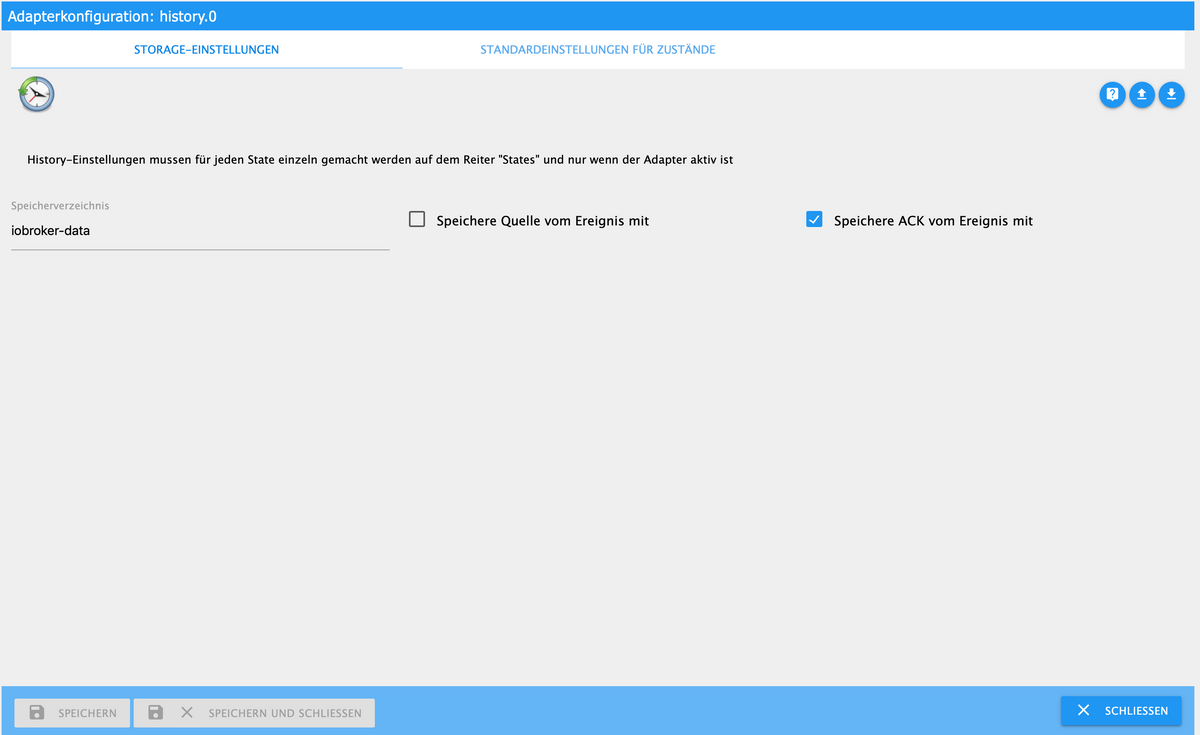
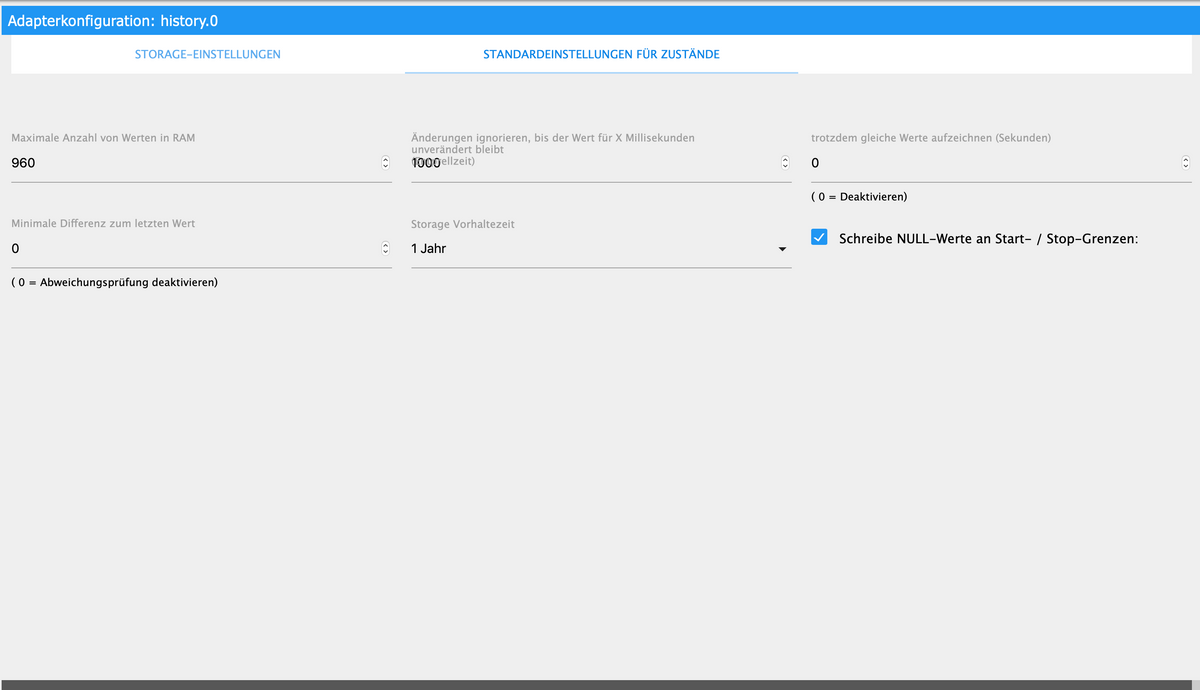
@heisenberg0709 In welchen Pfad liegen deine History Daten?
JavaScript könnte eventuell auch irgendwo was mit fehlerhaften Scripten sein. -
@heisenberg0709 In welchen Pfad liegen deine History Daten?
JavaScript könnte eventuell auch irgendwo was mit fehlerhaften Scripten sein. -
@heisenberg0709
Da könnte die Ursache liegen. Du schreibst die History Daten in iobroker-data
Ändere den mal auf ein anderes Verzeichnis.Kannst du z.B. in dein Homeverzeichnis legen.
Die Historydaten dann mit in das neue Verzeichnis legen und aus iobroker-data entfernen.Im Anschluss nochmal das Backup versuchen
-
@heisenberg0709
Da könnte die Ursache liegen. Du schreibst die History Daten in iobroker-data
Ändere den mal auf ein anderes Verzeichnis.Kannst du z.B. in dein Homeverzeichnis legen.
Die Historydaten dann mit in das neue Verzeichnis legen und aus iobroker-data entfernen.Im Anschluss nochmal das Backup versuchen
@simatec
@Homoran
@Thomas-Braunalso egal welche Wege ich versucht habe, ich habe kein Backup mehr hinbekommen.
Ich habe mir jetzt noch einen RPI4 8GB zugelegt, den iobroker noch neu und sauber aufgesetzt und ziehe gerade alles händisch um.
Vielen Dank nochmals an euch alle für den super Support!
-
@heisenberg0709
Da könnte die Ursache liegen. Du schreibst die History Daten in iobroker-data
Ändere den mal auf ein anderes Verzeichnis.Kannst du z.B. in dein Homeverzeichnis legen.
Die Historydaten dann mit in das neue Verzeichnis legen und aus iobroker-data entfernen.Im Anschluss nochmal das Backup versuchen
ich habe nochmal eine Frage bzgl. des Pfades vom Historieadapter.
Auf meinem neuen System habe ich diesen vom Standard auf:/home/pi/Historie-Instanz-iobrokergelegt. Allerdings bekommt der Historieadapter dort keine Schreibberechtigung.
Weißt du zufällig, wie ich dem User: pi dort Schreibberechtigungen geben kann?
Oder wo kann man ggf. einen eigenen Ordner am besten hinplatzieren, dass diese vom Backup ausgeschlossen sind aber der iobroker bzw. der User pi dort Schreibrechte hat??Zum Beispiel hier:
/opt/iobroker/oder wäre das eher ungünstig?
Mir geht es auch noch um andere Instanzen wie beispielsweise der Ring-Instanz etc. wo ich ggf. nicht zwingend ein Backup davon benötige. -
ich habe nochmal eine Frage bzgl. des Pfades vom Historieadapter.
Auf meinem neuen System habe ich diesen vom Standard auf:/home/pi/Historie-Instanz-iobrokergelegt. Allerdings bekommt der Historieadapter dort keine Schreibberechtigung.
Weißt du zufällig, wie ich dem User: pi dort Schreibberechtigungen geben kann?
Oder wo kann man ggf. einen eigenen Ordner am besten hinplatzieren, dass diese vom Backup ausgeschlossen sind aber der iobroker bzw. der User pi dort Schreibrechte hat??Zum Beispiel hier:
/opt/iobroker/oder wäre das eher ungünstig?
Mir geht es auch noch um andere Instanzen wie beispielsweise der Ring-Instanz etc. wo ich ggf. nicht zwingend ein Backup davon benötige.Warum nimmst du nicht einfach das Home vom User iobroker?
/home/iobroker/
Dann musst du da auch keine Klimmzüge mit den Rechten für pi oder iobroker machen.
Hättest du die komische Konstruktion schon am Start als das Backup nicht möglich war? Da hast du dir vermutlich eine Endlosschleife gebastelt.
Warum man das aber überhaupt so machen möchte ist mir ein Rätsel...


Hey! Du scheinst an dieser Unterhaltung interessiert zu sein, hast aber noch kein Konto.
Hast du es satt, bei jedem Besuch durch die gleichen Beiträge zu scrollen? Wenn du dich für ein Konto anmeldest, kommst du immer genau dorthin zurück, wo du zuvor warst, und kannst dich über neue Antworten benachrichtigen lassen (entweder per E-Mail oder Push-Benachrichtigung). Du kannst auch Lesezeichen speichern und Beiträge positiv bewerten, um anderen Community-Mitgliedern deine Wertschätzung zu zeigen.
Mit deinem Input könnte dieser Beitrag noch besser werden 💗
Registrieren Anmelden211
Online33.0k
Benutzer83.6k
Themen1.3m
Beiträge