Skip to content
  • Home
  • Aktuell
  • Tags
  • 0 Ungelesen 0
  • Kategorien
  • Unreplied
  • Beliebt
  • GitHub
  • Docu
  • Hilfe
Skins
  • Light
  • Brite
  • Cerulean
  • Cosmo
  • Flatly
  • Journal
  • Litera
  • Lumen
  • Lux
  • Materia
  • Minty
  • Morph
  • Pulse
  • Sandstone
  • Simplex
  • Sketchy
  • Spacelab
  • United
  • Yeti
  • Zephyr
  • Dark
  • Cyborg
  • Darkly
  • Quartz
  • Slate
  • Solar
  • Superhero
  • Vapor

  • Standard: (Kein Skin)
  • Kein Skin
Einklappen
ioBroker Logo

Community Forum

donate donate
  1. ioBroker Community Home
  2. Deutsch
  3. ioBroker Allgemein
  4. Anfänger sucht Hilfe bei Install. proxmox auf INTELNUC8i3BEK
NEWS

  • Weihnachtsangebot 2025! 🎄
    BluefoxB
    Bluefox
    23
    1
    1.3k

  • UPDATE 31.10.: Amazon Alexa - ioBroker Skill läuft aus ?
    apollon77A
    apollon77
    48
    3
    9.2k

  • Monatsrückblick – September 2025
    BluefoxB
    Bluefox
    14
    1
    2.5k

Anfänger sucht Hilfe bei Install. proxmox auf INTELNUC8i3BEK

Geplant Angeheftet Gesperrt Verschoben ioBroker Allgemein
1.0k Beiträge 16 Kommentatoren 247.4k Aufrufe 15 Watching
  • Älteste zuerst
  • Neuste zuerst
  • Meiste Stimmen
Antworten
  • In einem neuen Thema antworten
Anmelden zum Antworten
Dieses Thema wurde gelöscht. Nur Nutzer mit entsprechenden Rechten können es sehen.
  • crunchipC crunchip

    @goetschhofer sagte in Anfänger sucht Hilfe bei Install. proxmox auf INTELNUC8i3BEK:

    ext4 kann man nicht auswählen ?

    du kannst doch auch ntfs auswählen und den haken bei schnellformatierung entfernen

    @goetschhofer sagte in Anfänger sucht Hilfe bei Install. proxmox auf INTELNUC8i3BEK:

    Hat mich nur etwas verwirrt, da du vorhin geschrieben hast....

    war ja auch der Meinung das du dich mit karl einloggst
    kam mir aber gerade, auf dem proxmox Host hast du gar keinen Benutzer eingerichtet

    G Offline
    G Offline
    GOETSCHHOFER
    schrieb am zuletzt editiert von GOETSCHHOFER
    #556

    @crunchip said in Anfänger sucht Hilfe bei Install. proxmox auf INTELNUC8i3BEK:

    @goetschhofer sagte in Anfänger sucht Hilfe bei Install. proxmox auf INTELNUC8i3BEK:

    ext4 kann man nicht auswählen ?

    du kannst doch auch ntfs auswählen und den haken bei schnellformatierung entfernen

    @goetschhofer sagte in Anfänger sucht Hilfe bei Install. proxmox auf INTELNUC8i3BEK:

    Hat mich nur etwas verwirrt, da du vorhin geschrieben hast....

    war ja auch der Meinung das du dich mit karl einloggst
    kam mir aber gerade, auf dem proxmox Host hast du gar keinen Benutzer eingerichtet

    Ja, dies ist korrekt.
    Und ich war mit meinem Stehsatz unterwegs, "ein root braucht kein sudo".
    Sollte ich tunlichst nachholen. :grinning:

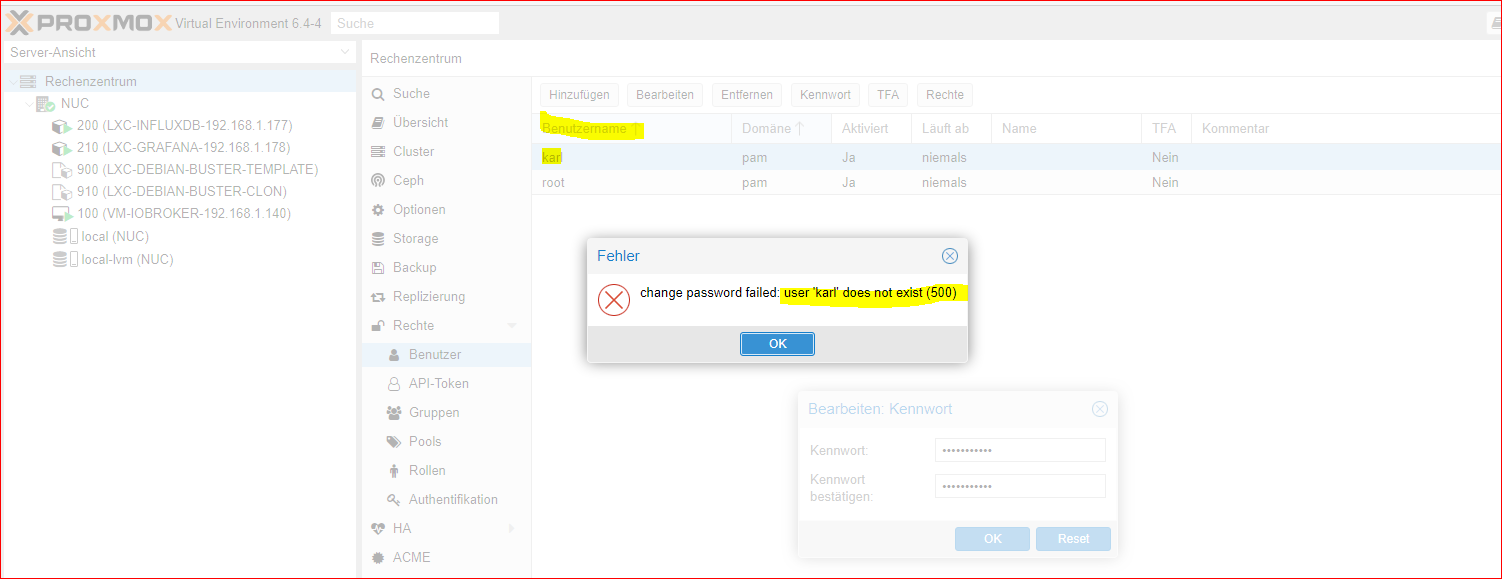
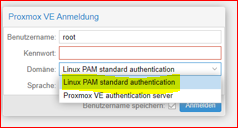
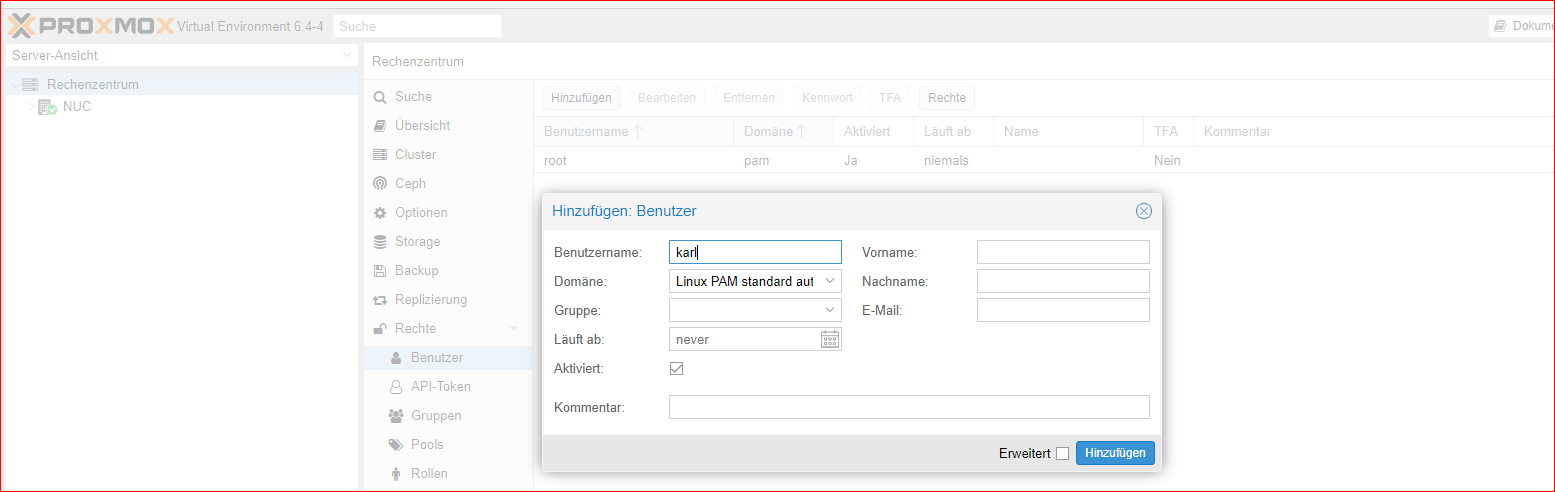
    Bei root melde ich mich in proxmox bei der Domäne mit Linux PAM standard authentication an, ist dies bei der Anlage BN=karl das Gleiche ?

    Anlage funktioniert, aber bei anschließender Vergabe PW, Fehlermeldung ?
    059a396c-51e1-4160-a5b5-223de3fdc8d3-image.png

    a489cd6d-9956-4657-ad60-a9a4a9edb40d-image.png

    673f1607-e1a7-4663-9baf-6e39a3cbc9e5-image.png

    crunchipC 1 Antwort Letzte Antwort
    0
    • G GOETSCHHOFER

      @crunchip said in Anfänger sucht Hilfe bei Install. proxmox auf INTELNUC8i3BEK:

      @goetschhofer sagte in Anfänger sucht Hilfe bei Install. proxmox auf INTELNUC8i3BEK:

      ext4 kann man nicht auswählen ?

      du kannst doch auch ntfs auswählen und den haken bei schnellformatierung entfernen

      @goetschhofer sagte in Anfänger sucht Hilfe bei Install. proxmox auf INTELNUC8i3BEK:

      Hat mich nur etwas verwirrt, da du vorhin geschrieben hast....

      war ja auch der Meinung das du dich mit karl einloggst
      kam mir aber gerade, auf dem proxmox Host hast du gar keinen Benutzer eingerichtet

      Ja, dies ist korrekt.
      Und ich war mit meinem Stehsatz unterwegs, "ein root braucht kein sudo".
      Sollte ich tunlichst nachholen. :grinning:

      Bei root melde ich mich in proxmox bei der Domäne mit Linux PAM standard authentication an, ist dies bei der Anlage BN=karl das Gleiche ?

      Anlage funktioniert, aber bei anschließender Vergabe PW, Fehlermeldung ?
      059a396c-51e1-4160-a5b5-223de3fdc8d3-image.png

      a489cd6d-9956-4657-ad60-a9a4a9edb40d-image.png

      673f1607-e1a7-4663-9baf-6e39a3cbc9e5-image.png

      crunchipC Abwesend
      crunchipC Abwesend
      crunchip
      Forum Testing Most Active
      schrieb am zuletzt editiert von crunchip
      #557

      @goetschhofer ich meinte eine Anmeldung im terminal(putty) bist du mit root auf deinem Host
      falls du dich erinnerst, bei deiner VM warst du auch root und hast dir einen Benutzer angelegt.

      immer wenn du etwas mehr Details benötigst im jeweiligen Proxmox Fenster, oben rechts die Hilfe anklicken, da findest du die Erklärung/Bechreibung

      umgestiegen von Proxmox auf Unraid

      G 1 Antwort Letzte Antwort
      1
      • crunchipC crunchip

        @goetschhofer ich meinte eine Anmeldung im terminal(putty) bist du mit root auf deinem Host
        falls du dich erinnerst, bei deiner VM warst du auch root und hast dir einen Benutzer angelegt.

        immer wenn du etwas mehr Details benötigst im jeweiligen Proxmox Fenster, oben rechts die Hilfe anklicken, da findest du die Erklärung/Bechreibung

        G Offline
        G Offline
        GOETSCHHOFER
        schrieb am zuletzt editiert von
        #558

        @crunchip said in Anfänger sucht Hilfe bei Install. proxmox auf INTELNUC8i3BEK:

        @goetschhofer ich meinte eine Anmeldung im terminal(putty) bist du mit root auf deinem Host
        falls du dich erinnerst, bei deiner VM warst du auch root und hast dir einen Benutzer angelegt.

        immer wenn du etwas mehr Details benötigst im jeweiligen Proxmox Fenster, oben rechts die Hilfe anklicken, da findest du die Erklärung/Bechreibung

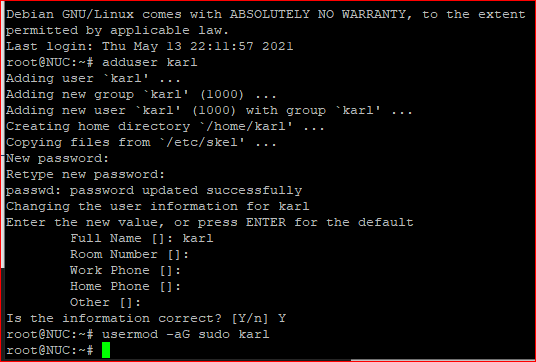
        Habe den BN?=karl jetzt über putty-NUC-proxmox-192.-168.1.140 angelegt, kann mich auch anschließend in putty damit anmelden.
        Wenn ich mich dann in proxmox mit BN=karl anmelde, habe ich keine Berechtigung meine VM+LXC zu sehen ?
        55740b53-04d2-4901-8822-7b4c1f50f940-image.png

        c7a973ea-80e5-4b61-ad48-2cf5ccddc869-image.png

        Anmeldung mit BN=karl:
        b13ff6e9-c2f5-4333-953c-fb4dc2576971-image.png

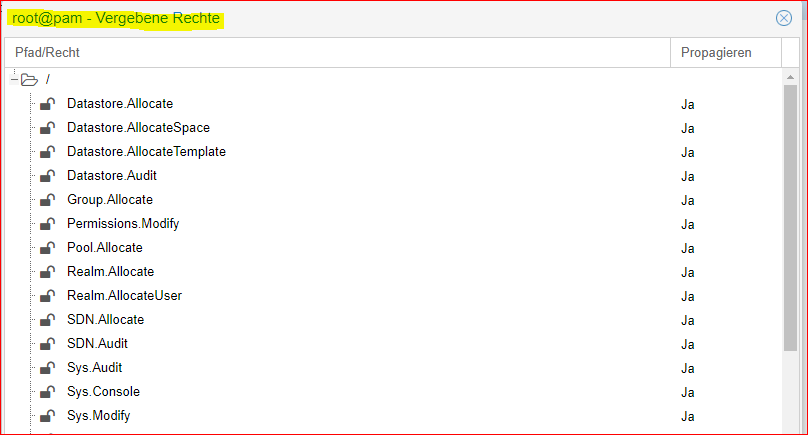
        Wie bekomme ich die gleichen Rechte als BN=karl wir root ?
        38442fd2-4d80-4406-8b21-c839d842c296-image.png
        83be042d-b5a2-44ae-bb71-499b53ec5980-image.png

        Danke

        crunchipC Meister MopperM 2 Antworten Letzte Antwort
        0
        • G GOETSCHHOFER

          @crunchip said in Anfänger sucht Hilfe bei Install. proxmox auf INTELNUC8i3BEK:

          @goetschhofer ich meinte eine Anmeldung im terminal(putty) bist du mit root auf deinem Host
          falls du dich erinnerst, bei deiner VM warst du auch root und hast dir einen Benutzer angelegt.

          immer wenn du etwas mehr Details benötigst im jeweiligen Proxmox Fenster, oben rechts die Hilfe anklicken, da findest du die Erklärung/Bechreibung

          Habe den BN?=karl jetzt über putty-NUC-proxmox-192.-168.1.140 angelegt, kann mich auch anschließend in putty damit anmelden.
          Wenn ich mich dann in proxmox mit BN=karl anmelde, habe ich keine Berechtigung meine VM+LXC zu sehen ?

          55740b53-04d2-4901-8822-7b4c1f50f940-image.png

          c7a973ea-80e5-4b61-ad48-2cf5ccddc869-image.png

          Anmeldung mit BN=karl:
          b13ff6e9-c2f5-4333-953c-fb4dc2576971-image.png

          Wie bekomme ich die gleichen Rechte als BN=karl wir root ?
          38442fd2-4d80-4406-8b21-c839d842c296-image.png
          83be042d-b5a2-44ae-bb71-499b53ec5980-image.png

          Danke

          crunchipC Abwesend
          crunchipC Abwesend
          crunchip
          Forum Testing Most Active
          schrieb am zuletzt editiert von
          #559

          @goetschhofer sagte in Anfänger sucht Hilfe bei Install. proxmox auf INTELNUC8i3BEK:

          Wie bekomme ich die gleichen Rechte als BN=karl wir root ?

          wie geschrieben, ist in der Hilfe erklärt, siehe Permission Management
          eigentlich brauchst du da in Proxmox selbst keine Benutzer, bist ja alleinig auf deinem Server und teilst Proxmox nicht mit anderen Usern.

          ging ja einzig und allein, Benutzer anzulegen, für das terminal, damit du dich da nicht mit root anmeldest

          umgestiegen von Proxmox auf Unraid

          1 Antwort Letzte Antwort
          1
          • G GOETSCHHOFER

            @crunchip said in Anfänger sucht Hilfe bei Install. proxmox auf INTELNUC8i3BEK:

            @goetschhofer ich meinte eine Anmeldung im terminal(putty) bist du mit root auf deinem Host
            falls du dich erinnerst, bei deiner VM warst du auch root und hast dir einen Benutzer angelegt.

            immer wenn du etwas mehr Details benötigst im jeweiligen Proxmox Fenster, oben rechts die Hilfe anklicken, da findest du die Erklärung/Bechreibung

            Habe den BN?=karl jetzt über putty-NUC-proxmox-192.-168.1.140 angelegt, kann mich auch anschließend in putty damit anmelden.
            Wenn ich mich dann in proxmox mit BN=karl anmelde, habe ich keine Berechtigung meine VM+LXC zu sehen ?

            55740b53-04d2-4901-8822-7b4c1f50f940-image.png

            c7a973ea-80e5-4b61-ad48-2cf5ccddc869-image.png

            Anmeldung mit BN=karl:
            b13ff6e9-c2f5-4333-953c-fb4dc2576971-image.png

            Wie bekomme ich die gleichen Rechte als BN=karl wir root ?
            38442fd2-4d80-4406-8b21-c839d842c296-image.png
            83be042d-b5a2-44ae-bb71-499b53ec5980-image.png

            Danke

            Meister MopperM Online
            Meister MopperM Online
            Meister Mopper
            schrieb am zuletzt editiert von
            #560

            @goetschhofer
            Du kannst in der bash von Proxmox pve Usergruppen erstellen:
            z. B.

            pveum groupadd user -comment "Anwender"
            pveum groupadd system -comment "Netzwerk, systemrelevant"
            pveum groupadd media -comment "Entertainment und Multimedia"
            pveum groupadd cam -comment "Video Kameras"
            pveum groupadd IoT -comment "Hausautomation"
            pveum groupadd admin -comment "System Administrators"
            pveum aclmod / -group admin -role Administrator


            anschließend kannst Du den Gruppen den entsprechenden User zuordnen:
            z. B.

            pveum useradd Backup@pve -group system -firstname "Backup" -comment "Systemuser für Datensicherungen" # -password
            pveum useradd Entertain@pve -group media -firstname "Entertain" -comment "Zugriff auf Multimedia" # -password
            pveum useradd Video@pve -group cam -firstname "Video" -comment "Zugriff auf die IPCams" # -password
            pveum useradd ioBroker@pve -group IoT -firstname "ioBroker" - comment "user für ioBroker" # -password
            pveum useradd YourUser@pve -group admin -firstname "YourUser" -comment "Superuser" # -password
            

            Proxmox und HA

            G 1 Antwort Letzte Antwort
            1
            • Meister MopperM Meister Mopper

              @goetschhofer
              Du kannst in der bash von Proxmox pve Usergruppen erstellen:
              z. B.

              pveum groupadd user -comment "Anwender"
              pveum groupadd system -comment "Netzwerk, systemrelevant"
              pveum groupadd media -comment "Entertainment und Multimedia"
              pveum groupadd cam -comment "Video Kameras"
              pveum groupadd IoT -comment "Hausautomation"
              pveum groupadd admin -comment "System Administrators"
              pveum aclmod / -group admin -role Administrator


              anschließend kannst Du den Gruppen den entsprechenden User zuordnen:
              z. B.

              pveum useradd Backup@pve -group system -firstname "Backup" -comment "Systemuser für Datensicherungen" # -password
              pveum useradd Entertain@pve -group media -firstname "Entertain" -comment "Zugriff auf Multimedia" # -password
              pveum useradd Video@pve -group cam -firstname "Video" -comment "Zugriff auf die IPCams" # -password
              pveum useradd ioBroker@pve -group IoT -firstname "ioBroker" - comment "user für ioBroker" # -password
              pveum useradd YourUser@pve -group admin -firstname "YourUser" -comment "Superuser" # -password
              

              G Offline
              G Offline
              GOETSCHHOFER
              schrieb am zuletzt editiert von GOETSCHHOFER
              #561

              @meister-mopper @crunchip

              Danke für den Hinweis.
              D. h. du machst dies wie von dir gezeigt über putty ?

              Gleich vorab ein Frage: Wie macht man dies hier im Forum, dass man wie meister-mopper z. b. einen Spoiler macht zum Aufklappen ?

              Habe es jetzt eben jetzt mal als Anfänger nach diesem Video gemacht, da ich dies ehrlich gesagt nicht durchschaut habe.

              Ab Min. 13:41.
              https://www.youtube.com/watch?v=sy2Gi4oYmWc

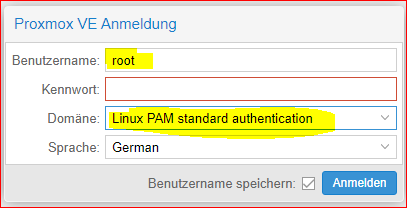
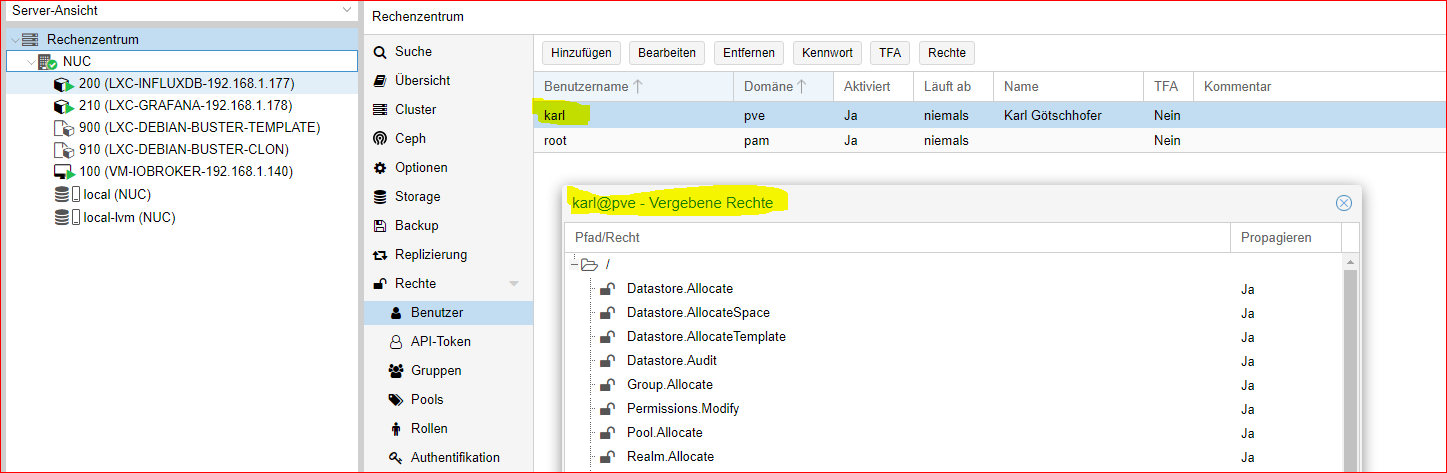
              Jetzt habe ich auch alle Berechtigungen wie der root.

              Ein Unterschied ist mir noch aufgefallen.
              Anmeldung ist nur mit der jeweiligen Domäne möglich.
              Ich weiß nicht, ob dies von Bedeutung ist ? Wahrscheinlich nicht ?
              9225b1f7-ba23-4d72-be48-0a4e87cef7f0-image.png
              88446336-3ce5-48e2-859f-e71272cdf7d1-image.png

              f426b11b-247f-4106-8d9a-3df45728c79a-image.png

              Meister MopperM 2 Antworten Letzte Antwort
              0
              • dslraserD Offline
                dslraserD Offline
                dslraser
                Forum Testing Most Active
                schrieb am zuletzt editiert von dslraser
                #562

                Zum Thema Backup. Ich habe mein NAS als Backup eingerichtet (über-NFS) Die VM kann ich darüber problemlos sichern, aber die LXC nicht. (ERROR Meldung) Gibt es da besondere Einstellungen ?
                Ich habe schon nach der Fehlermeldung gegoogelt, aber komme nicht wirklich weiter...

                INFO: starting new backup job: vzdump 200 --compress zstd --remove 0 --mode snapshot --node proxmox --storage Proxmox_Backup
                INFO: Starting Backup of VM 200 (lxc)
                INFO: Backup started at 2021-05-14 12:18:19
                INFO: status = running
                INFO: CT Name: influxdb
                INFO: including mount point rootfs ('/') in backup
                INFO: backup mode: snapshot
                INFO: ionice priority: 7
                INFO: create storage snapshot 'vzdump'
                 WARNING: You have not turned on protection against thin pools running out of space.
                 WARNING: Set activation/thin_pool_autoextend_threshold below 100 to trigger automatic extension of thin pools before they get full.
                 Logical volume "snap_vm-200-disk-0_vzdump" created.
                 WARNING: Sum of all thin volume sizes (489.88 GiB) exceeds the size of thin pool pve/data and the size of whole volume group (237.97 GiB).
                INFO: creating vzdump archive '/mnt/pve/Proxmox_Backup/dump/vzdump-lxc-200-2021_05_14-12_18_19.tar.zst'
                INFO: tar: /mnt/pve/Proxmox_Backup/dump/vzdump-lxc-200-2021_05_14-12_18_19.tmp: Cannot open: Permission denied
                INFO: tar: Error is not recoverable: exiting now
                INFO: cleanup temporary 'vzdump' snapshot
                 Logical volume "snap_vm-200-disk-0_vzdump" successfully removed
                ERROR: Backup of VM 200 failed - command 'set -o pipefail && lxc-usernsexec -m u:0:100000:65536 -m g:0:100000:65536 -- tar cpf - --totals --one-file-system -p --sparse --numeric-owner --acls --xattrs '--xattrs-include=user.*' '--xattrs-include=security.capability' '--warning=no-file-ignored' '--warning=no-xattr-write' --one-file-system '--warning=no-file-ignored' '--directory=/mnt/pve/Proxmox_Backup/dump/vzdump-lxc-200-2021_05_14-12_18_19.tmp' ./etc/vzdump/pct.conf ./etc/vzdump/pct.fw '--directory=/mnt/vzsnap0' --no-anchored '--exclude=lost+found' --anchored '--exclude=./tmp/?*' '--exclude=./var/tmp/?*' '--exclude=./var/run/?*.pid' ./ | zstd --rsyncable '--threads=1' >/mnt/pve/Proxmox_Backup/dump/vzdump-lxc-200-2021_05_14-12_18_19.tar.dat' failed: exit code 2
                INFO: Failed at 2021-05-14 12:18:19
                INFO: Backup job finished with errors
                TASK ERROR: job errors
                

                Proxmox
                Virtual Environment 6.4-6
                Suche
                Container 201 (grafana) auf Knoten 'proxmox'
                Proxmox_Backup
                Filter VMID
                Server-Ansicht
                Logs
                ()
                INFO: starting new backup job: vzdump 101 --mode snapshot --node proxmox --storage Proxmox_Backup --compress zstd --remove 0
                INFO: Starting Backup of VM 101 (qemu)
                INFO: Backup started at 2021-05-14 12:15:20
                INFO: status = running
                INFO: VM Name: iobroker-produktiv
                INFO: include disk 'scsi0' 'local-lvm:vm-101-disk-0' 50G
                INFO: backup mode: snapshot
                INFO: ionice priority: 7
                INFO: snapshots found (not included into backup)
                INFO: creating vzdump archive '/mnt/pve/Proxmox_Backup/dump/vzdump-qemu-101-2021_05_14-12_15_20.vma.zst'
                INFO: skipping guest-agent 'fs-freeze', agent configured but not running?
                INFO: started backup task 'bb0fe7e2-ca5b-4998-87b2-4051b2b25db4'
                INFO: resuming VM again
                INFO:   1% (680.9 MiB of 50.0 GiB) in 3s, read: 227.0 MiB/s, write: 156.7 MiB/s
                INFO:   2% (1.2 GiB of 50.0 GiB) in 6s, read: 175.4 MiB/s, write: 158.4 MiB/s
                INFO:   3% (1.7 GiB of 50.0 GiB) in 9s, read: 185.4 MiB/s, write: 165.3 MiB/s
                INFO:   4% (2.4 GiB of 50.0 GiB) in 12s, read: 247.8 MiB/s, write: 207.5 MiB/s
                INFO:   6% (3.1 GiB of 50.0 GiB) in 15s, read: 208.4 MiB/s, write: 204.3 MiB/s
                INFO:  12% (6.1 GiB of 50.0 GiB) in 18s, read: 1.0 GiB/s, write: 117.2 MiB/s
                INFO:  21% (10.7 GiB of 50.0 GiB) in 21s, read: 1.5 GiB/s, write: 69.3 MiB/s
                INFO:  34% (17.2 GiB of 50.0 GiB) in 24s, read: 2.2 GiB/s, write: 8.2 MiB/s
                INFO:  44% (22.0 GiB of 50.0 GiB) in 27s, read: 1.6 GiB/s, write: 47.1 MiB/s
                INFO:  48% (24.4 GiB of 50.0 GiB) in 30s, read: 812.2 MiB/s, write: 118.9 MiB/s
                INFO:  60% (30.0 GiB of 50.0 GiB) in 33s, read: 1.9 GiB/s, write: 36.1 MiB/s
                INFO:  64% (32.4 GiB of 50.0 GiB) in 36s, read: 802.4 MiB/s, write: 117.0 MiB/s
                INFO:  65% (32.9 GiB of 50.0 GiB) in 39s, read: 199.4 MiB/s, write: 197.9 MiB/s
                INFO:  67% (33.6 GiB of 50.0 GiB) in 42s, read: 211.5 MiB/s, write: 208.0 MiB/s
                INFO:  68% (34.2 GiB of 50.0 GiB) in 45s, read: 232.6 MiB/s, write: 191.3 MiB/s
                INFO:  69% (34.9 GiB of 50.0 GiB) in 48s, read: 222.9 MiB/s, write: 219.1 MiB/s
                INFO:  72% (36.2 GiB of 50.0 GiB) in 51s, read: 460.1 MiB/s, write: 151.9 MiB/s
                INFO:  80% (40.4 GiB of 50.0 GiB) in 54s, read: 1.4 GiB/s, write: 72.8 MiB/s
                INFO:  88% (44.2 GiB of 50.0 GiB) in 57s, read: 1.3 GiB/s, write: 84.3 MiB/s
                INFO: 100% (50.0 GiB of 50.0 GiB) in 1m, read: 1.9 GiB/s, write: 8.9 MiB/s
                INFO: backup is sparse: 42.56 GiB (85%) total zero data
                INFO: transferred 50.00 GiB in 60 seconds (853.3 MiB/s)
                INFO: archive file size: 1.93GB
                INFO: Finished Backup of VM 101 (00:01:04)
                INFO: Backup finished at 2021-05-14 12:16:24
                INFO: Backup job finished successfully
                TASK OK
                

                BBTownB crunchipC 3 Antworten Letzte Antwort
                0
                • G GOETSCHHOFER

                  @meister-mopper @crunchip

                  Danke für den Hinweis.
                  D. h. du machst dies wie von dir gezeigt über putty ?

                  Gleich vorab ein Frage: Wie macht man dies hier im Forum, dass man wie meister-mopper z. b. einen Spoiler macht zum Aufklappen ?

                  Habe es jetzt eben jetzt mal als Anfänger nach diesem Video gemacht, da ich dies ehrlich gesagt nicht durchschaut habe.

                  Ab Min. 13:41.
                  https://www.youtube.com/watch?v=sy2Gi4oYmWc

                  Jetzt habe ich auch alle Berechtigungen wie der root.

                  Ein Unterschied ist mir noch aufgefallen.
                  Anmeldung ist nur mit der jeweiligen Domäne möglich.
                  Ich weiß nicht, ob dies von Bedeutung ist ? Wahrscheinlich nicht ?
                  9225b1f7-ba23-4d72-be48-0a4e87cef7f0-image.png
                  88446336-3ce5-48e2-859f-e71272cdf7d1-image.png

                  f426b11b-247f-4106-8d9a-3df45728c79a-image.png

                  Meister MopperM Online
                  Meister MopperM Online
                  Meister Mopper
                  schrieb am zuletzt editiert von
                  #563

                  @goetschhofer sagte in Anfänger sucht Hilfe bei Install. proxmox auf INTELNUC8i3BEK:

                  D. h. du machst dies wie von dir gezeigt über putty ?

                  Nein, nicht über putty sondern über die Proxmox-Konsole (mit root Rechten). Geht auch über putty mit sudo su -

                  Proxmox und HA

                  1 Antwort Letzte Antwort
                  1
                  • dslraserD dslraser

                    Zum Thema Backup. Ich habe mein NAS als Backup eingerichtet (über-NFS) Die VM kann ich darüber problemlos sichern, aber die LXC nicht. (ERROR Meldung) Gibt es da besondere Einstellungen ?
                    Ich habe schon nach der Fehlermeldung gegoogelt, aber komme nicht wirklich weiter...

                    INFO: starting new backup job: vzdump 200 --compress zstd --remove 0 --mode snapshot --node proxmox --storage Proxmox_Backup
                    INFO: Starting Backup of VM 200 (lxc)
                    INFO: Backup started at 2021-05-14 12:18:19
                    INFO: status = running
                    INFO: CT Name: influxdb
                    INFO: including mount point rootfs ('/') in backup
                    INFO: backup mode: snapshot
                    INFO: ionice priority: 7
                    INFO: create storage snapshot 'vzdump'
                     WARNING: You have not turned on protection against thin pools running out of space.
                     WARNING: Set activation/thin_pool_autoextend_threshold below 100 to trigger automatic extension of thin pools before they get full.
                     Logical volume "snap_vm-200-disk-0_vzdump" created.
                     WARNING: Sum of all thin volume sizes (489.88 GiB) exceeds the size of thin pool pve/data and the size of whole volume group (237.97 GiB).
                    INFO: creating vzdump archive '/mnt/pve/Proxmox_Backup/dump/vzdump-lxc-200-2021_05_14-12_18_19.tar.zst'
                    INFO: tar: /mnt/pve/Proxmox_Backup/dump/vzdump-lxc-200-2021_05_14-12_18_19.tmp: Cannot open: Permission denied
                    INFO: tar: Error is not recoverable: exiting now
                    INFO: cleanup temporary 'vzdump' snapshot
                     Logical volume "snap_vm-200-disk-0_vzdump" successfully removed
                    ERROR: Backup of VM 200 failed - command 'set -o pipefail && lxc-usernsexec -m u:0:100000:65536 -m g:0:100000:65536 -- tar cpf - --totals --one-file-system -p --sparse --numeric-owner --acls --xattrs '--xattrs-include=user.*' '--xattrs-include=security.capability' '--warning=no-file-ignored' '--warning=no-xattr-write' --one-file-system '--warning=no-file-ignored' '--directory=/mnt/pve/Proxmox_Backup/dump/vzdump-lxc-200-2021_05_14-12_18_19.tmp' ./etc/vzdump/pct.conf ./etc/vzdump/pct.fw '--directory=/mnt/vzsnap0' --no-anchored '--exclude=lost+found' --anchored '--exclude=./tmp/?*' '--exclude=./var/tmp/?*' '--exclude=./var/run/?*.pid' ./ | zstd --rsyncable '--threads=1' >/mnt/pve/Proxmox_Backup/dump/vzdump-lxc-200-2021_05_14-12_18_19.tar.dat' failed: exit code 2
                    INFO: Failed at 2021-05-14 12:18:19
                    INFO: Backup job finished with errors
                    TASK ERROR: job errors
                    

                    Proxmox
                    Virtual Environment 6.4-6
                    Suche
                    Container 201 (grafana) auf Knoten 'proxmox'
                    Proxmox_Backup
                    Filter VMID
                    Server-Ansicht
                    Logs
                    ()
                    INFO: starting new backup job: vzdump 101 --mode snapshot --node proxmox --storage Proxmox_Backup --compress zstd --remove 0
                    INFO: Starting Backup of VM 101 (qemu)
                    INFO: Backup started at 2021-05-14 12:15:20
                    INFO: status = running
                    INFO: VM Name: iobroker-produktiv
                    INFO: include disk 'scsi0' 'local-lvm:vm-101-disk-0' 50G
                    INFO: backup mode: snapshot
                    INFO: ionice priority: 7
                    INFO: snapshots found (not included into backup)
                    INFO: creating vzdump archive '/mnt/pve/Proxmox_Backup/dump/vzdump-qemu-101-2021_05_14-12_15_20.vma.zst'
                    INFO: skipping guest-agent 'fs-freeze', agent configured but not running?
                    INFO: started backup task 'bb0fe7e2-ca5b-4998-87b2-4051b2b25db4'
                    INFO: resuming VM again
                    INFO:   1% (680.9 MiB of 50.0 GiB) in 3s, read: 227.0 MiB/s, write: 156.7 MiB/s
                    INFO:   2% (1.2 GiB of 50.0 GiB) in 6s, read: 175.4 MiB/s, write: 158.4 MiB/s
                    INFO:   3% (1.7 GiB of 50.0 GiB) in 9s, read: 185.4 MiB/s, write: 165.3 MiB/s
                    INFO:   4% (2.4 GiB of 50.0 GiB) in 12s, read: 247.8 MiB/s, write: 207.5 MiB/s
                    INFO:   6% (3.1 GiB of 50.0 GiB) in 15s, read: 208.4 MiB/s, write: 204.3 MiB/s
                    INFO:  12% (6.1 GiB of 50.0 GiB) in 18s, read: 1.0 GiB/s, write: 117.2 MiB/s
                    INFO:  21% (10.7 GiB of 50.0 GiB) in 21s, read: 1.5 GiB/s, write: 69.3 MiB/s
                    INFO:  34% (17.2 GiB of 50.0 GiB) in 24s, read: 2.2 GiB/s, write: 8.2 MiB/s
                    INFO:  44% (22.0 GiB of 50.0 GiB) in 27s, read: 1.6 GiB/s, write: 47.1 MiB/s
                    INFO:  48% (24.4 GiB of 50.0 GiB) in 30s, read: 812.2 MiB/s, write: 118.9 MiB/s
                    INFO:  60% (30.0 GiB of 50.0 GiB) in 33s, read: 1.9 GiB/s, write: 36.1 MiB/s
                    INFO:  64% (32.4 GiB of 50.0 GiB) in 36s, read: 802.4 MiB/s, write: 117.0 MiB/s
                    INFO:  65% (32.9 GiB of 50.0 GiB) in 39s, read: 199.4 MiB/s, write: 197.9 MiB/s
                    INFO:  67% (33.6 GiB of 50.0 GiB) in 42s, read: 211.5 MiB/s, write: 208.0 MiB/s
                    INFO:  68% (34.2 GiB of 50.0 GiB) in 45s, read: 232.6 MiB/s, write: 191.3 MiB/s
                    INFO:  69% (34.9 GiB of 50.0 GiB) in 48s, read: 222.9 MiB/s, write: 219.1 MiB/s
                    INFO:  72% (36.2 GiB of 50.0 GiB) in 51s, read: 460.1 MiB/s, write: 151.9 MiB/s
                    INFO:  80% (40.4 GiB of 50.0 GiB) in 54s, read: 1.4 GiB/s, write: 72.8 MiB/s
                    INFO:  88% (44.2 GiB of 50.0 GiB) in 57s, read: 1.3 GiB/s, write: 84.3 MiB/s
                    INFO: 100% (50.0 GiB of 50.0 GiB) in 1m, read: 1.9 GiB/s, write: 8.9 MiB/s
                    INFO: backup is sparse: 42.56 GiB (85%) total zero data
                    INFO: transferred 50.00 GiB in 60 seconds (853.3 MiB/s)
                    INFO: archive file size: 1.93GB
                    INFO: Finished Backup of VM 101 (00:01:04)
                    INFO: Backup finished at 2021-05-14 12:16:24
                    INFO: Backup job finished successfully
                    TASK OK
                    

                    BBTownB Online
                    BBTownB Online
                    BBTown
                    schrieb am zuletzt editiert von
                    #564

                    @dslraser sagte in Anfänger sucht Hilfe bei Install. proxmox auf INTELNUC8i3BEK:

                    Die VM kann ich darüber problemlos sichern, aber die LXC nicht

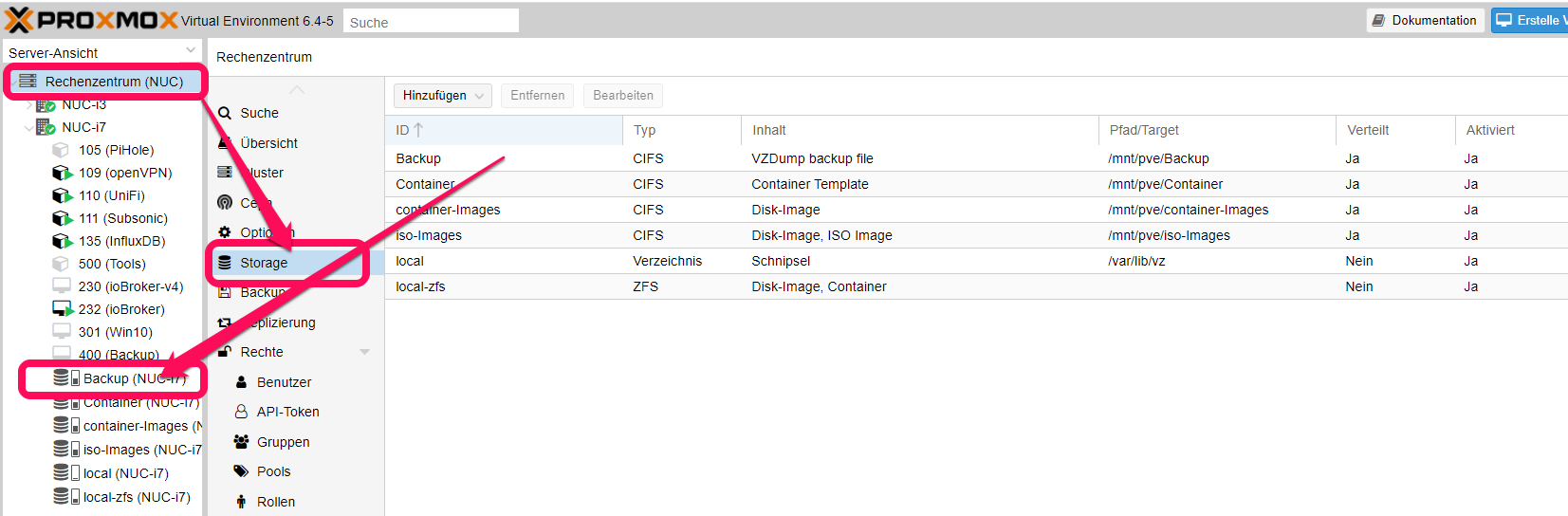
                    Wie hast Du die/das Laufwerk/e denn eingebudnen?
                    Bei mir stehts das Backup Laufwerk (Verzeichnis) global zur Verfügung
                    883de90b-43dd-47e3-b015-78783cc51ce6-image.png

                    ioBroker auf NUC (VM debian v13 (Trixie ), node v22.21.0 npm v10.9.4, js-controller v7.1.0 jsonl/jsonl / HomeMatic CCU-2 (Wired und Funk) / Philips HUE / echo.DOT / Broadlink RM pro / SONOS

                    dslraserD 1 Antwort Letzte Antwort
                    1
                    • G GOETSCHHOFER

                      @meister-mopper @crunchip

                      Danke für den Hinweis.
                      D. h. du machst dies wie von dir gezeigt über putty ?

                      Gleich vorab ein Frage: Wie macht man dies hier im Forum, dass man wie meister-mopper z. b. einen Spoiler macht zum Aufklappen ?

                      Habe es jetzt eben jetzt mal als Anfänger nach diesem Video gemacht, da ich dies ehrlich gesagt nicht durchschaut habe.

                      Ab Min. 13:41.
                      https://www.youtube.com/watch?v=sy2Gi4oYmWc

                      Jetzt habe ich auch alle Berechtigungen wie der root.

                      Ein Unterschied ist mir noch aufgefallen.
                      Anmeldung ist nur mit der jeweiligen Domäne möglich.
                      Ich weiß nicht, ob dies von Bedeutung ist ? Wahrscheinlich nicht ?

                      9225b1f7-ba23-4d72-be48-0a4e87cef7f0-image.png
                      88446336-3ce5-48e2-859f-e71272cdf7d1-image.png

                      f426b11b-247f-4106-8d9a-3df45728c79a-image.png

                      Meister MopperM Online
                      Meister MopperM Online
                      Meister Mopper
                      schrieb am zuletzt editiert von
                      #565

                      @goetschhofer sagte in Anfänger sucht Hilfe bei Install. proxmox auf INTELNUC8i3BEK:

                      Gleich vorab ein Frage: Wie macht man dies hier im Forum, dass man wie meister-mopper z. b. einen Spoiler macht zum Aufklappen ?

                      Gespoilert wird hier:


                      32b2c08b-350d-4470-9054-6995d0167a6c-grafik.png

                      Proxmox und HA

                      1 Antwort Letzte Antwort
                      1
                      • dslraserD dslraser

                        Zum Thema Backup. Ich habe mein NAS als Backup eingerichtet (über-NFS) Die VM kann ich darüber problemlos sichern, aber die LXC nicht. (ERROR Meldung) Gibt es da besondere Einstellungen ?
                        Ich habe schon nach der Fehlermeldung gegoogelt, aber komme nicht wirklich weiter...

                        INFO: starting new backup job: vzdump 200 --compress zstd --remove 0 --mode snapshot --node proxmox --storage Proxmox_Backup
                        INFO: Starting Backup of VM 200 (lxc)
                        INFO: Backup started at 2021-05-14 12:18:19
                        INFO: status = running
                        INFO: CT Name: influxdb
                        INFO: including mount point rootfs ('/') in backup
                        INFO: backup mode: snapshot
                        INFO: ionice priority: 7
                        INFO: create storage snapshot 'vzdump'
                         WARNING: You have not turned on protection against thin pools running out of space.
                         WARNING: Set activation/thin_pool_autoextend_threshold below 100 to trigger automatic extension of thin pools before they get full.
                         Logical volume "snap_vm-200-disk-0_vzdump" created.
                         WARNING: Sum of all thin volume sizes (489.88 GiB) exceeds the size of thin pool pve/data and the size of whole volume group (237.97 GiB).
                        INFO: creating vzdump archive '/mnt/pve/Proxmox_Backup/dump/vzdump-lxc-200-2021_05_14-12_18_19.tar.zst'
                        INFO: tar: /mnt/pve/Proxmox_Backup/dump/vzdump-lxc-200-2021_05_14-12_18_19.tmp: Cannot open: Permission denied
                        INFO: tar: Error is not recoverable: exiting now
                        INFO: cleanup temporary 'vzdump' snapshot
                         Logical volume "snap_vm-200-disk-0_vzdump" successfully removed
                        ERROR: Backup of VM 200 failed - command 'set -o pipefail && lxc-usernsexec -m u:0:100000:65536 -m g:0:100000:65536 -- tar cpf - --totals --one-file-system -p --sparse --numeric-owner --acls --xattrs '--xattrs-include=user.*' '--xattrs-include=security.capability' '--warning=no-file-ignored' '--warning=no-xattr-write' --one-file-system '--warning=no-file-ignored' '--directory=/mnt/pve/Proxmox_Backup/dump/vzdump-lxc-200-2021_05_14-12_18_19.tmp' ./etc/vzdump/pct.conf ./etc/vzdump/pct.fw '--directory=/mnt/vzsnap0' --no-anchored '--exclude=lost+found' --anchored '--exclude=./tmp/?*' '--exclude=./var/tmp/?*' '--exclude=./var/run/?*.pid' ./ | zstd --rsyncable '--threads=1' >/mnt/pve/Proxmox_Backup/dump/vzdump-lxc-200-2021_05_14-12_18_19.tar.dat' failed: exit code 2
                        INFO: Failed at 2021-05-14 12:18:19
                        INFO: Backup job finished with errors
                        TASK ERROR: job errors
                        

                        Proxmox
                        Virtual Environment 6.4-6
                        Suche
                        Container 201 (grafana) auf Knoten 'proxmox'
                        Proxmox_Backup
                        Filter VMID
                        Server-Ansicht
                        Logs
                        ()
                        INFO: starting new backup job: vzdump 101 --mode snapshot --node proxmox --storage Proxmox_Backup --compress zstd --remove 0
                        INFO: Starting Backup of VM 101 (qemu)
                        INFO: Backup started at 2021-05-14 12:15:20
                        INFO: status = running
                        INFO: VM Name: iobroker-produktiv
                        INFO: include disk 'scsi0' 'local-lvm:vm-101-disk-0' 50G
                        INFO: backup mode: snapshot
                        INFO: ionice priority: 7
                        INFO: snapshots found (not included into backup)
                        INFO: creating vzdump archive '/mnt/pve/Proxmox_Backup/dump/vzdump-qemu-101-2021_05_14-12_15_20.vma.zst'
                        INFO: skipping guest-agent 'fs-freeze', agent configured but not running?
                        INFO: started backup task 'bb0fe7e2-ca5b-4998-87b2-4051b2b25db4'
                        INFO: resuming VM again
                        INFO:   1% (680.9 MiB of 50.0 GiB) in 3s, read: 227.0 MiB/s, write: 156.7 MiB/s
                        INFO:   2% (1.2 GiB of 50.0 GiB) in 6s, read: 175.4 MiB/s, write: 158.4 MiB/s
                        INFO:   3% (1.7 GiB of 50.0 GiB) in 9s, read: 185.4 MiB/s, write: 165.3 MiB/s
                        INFO:   4% (2.4 GiB of 50.0 GiB) in 12s, read: 247.8 MiB/s, write: 207.5 MiB/s
                        INFO:   6% (3.1 GiB of 50.0 GiB) in 15s, read: 208.4 MiB/s, write: 204.3 MiB/s
                        INFO:  12% (6.1 GiB of 50.0 GiB) in 18s, read: 1.0 GiB/s, write: 117.2 MiB/s
                        INFO:  21% (10.7 GiB of 50.0 GiB) in 21s, read: 1.5 GiB/s, write: 69.3 MiB/s
                        INFO:  34% (17.2 GiB of 50.0 GiB) in 24s, read: 2.2 GiB/s, write: 8.2 MiB/s
                        INFO:  44% (22.0 GiB of 50.0 GiB) in 27s, read: 1.6 GiB/s, write: 47.1 MiB/s
                        INFO:  48% (24.4 GiB of 50.0 GiB) in 30s, read: 812.2 MiB/s, write: 118.9 MiB/s
                        INFO:  60% (30.0 GiB of 50.0 GiB) in 33s, read: 1.9 GiB/s, write: 36.1 MiB/s
                        INFO:  64% (32.4 GiB of 50.0 GiB) in 36s, read: 802.4 MiB/s, write: 117.0 MiB/s
                        INFO:  65% (32.9 GiB of 50.0 GiB) in 39s, read: 199.4 MiB/s, write: 197.9 MiB/s
                        INFO:  67% (33.6 GiB of 50.0 GiB) in 42s, read: 211.5 MiB/s, write: 208.0 MiB/s
                        INFO:  68% (34.2 GiB of 50.0 GiB) in 45s, read: 232.6 MiB/s, write: 191.3 MiB/s
                        INFO:  69% (34.9 GiB of 50.0 GiB) in 48s, read: 222.9 MiB/s, write: 219.1 MiB/s
                        INFO:  72% (36.2 GiB of 50.0 GiB) in 51s, read: 460.1 MiB/s, write: 151.9 MiB/s
                        INFO:  80% (40.4 GiB of 50.0 GiB) in 54s, read: 1.4 GiB/s, write: 72.8 MiB/s
                        INFO:  88% (44.2 GiB of 50.0 GiB) in 57s, read: 1.3 GiB/s, write: 84.3 MiB/s
                        INFO: 100% (50.0 GiB of 50.0 GiB) in 1m, read: 1.9 GiB/s, write: 8.9 MiB/s
                        INFO: backup is sparse: 42.56 GiB (85%) total zero data
                        INFO: transferred 50.00 GiB in 60 seconds (853.3 MiB/s)
                        INFO: archive file size: 1.93GB
                        INFO: Finished Backup of VM 101 (00:01:04)
                        INFO: Backup finished at 2021-05-14 12:16:24
                        INFO: Backup job finished successfully
                        TASK OK
                        

                        crunchipC Abwesend
                        crunchipC Abwesend
                        crunchip
                        Forum Testing Most Active
                        schrieb am zuletzt editiert von
                        #566

                        @dslraser sagte in Anfänger sucht Hilfe bei Install. proxmox auf INTELNUC8i3BEK:

                        Die VM kann ich darüber problemlos sichern, aber die LXC nicht.

                        bin nur gerade aufn Sprung, deshalb nicht genau gelesen, kann es sein das das Laufwerk in die CT cfg eingetragen werden muss?

                        umgestiegen von Proxmox auf Unraid

                        dslraserD G 2 Antworten Letzte Antwort
                        0
                        • BBTownB BBTown

                          @dslraser sagte in Anfänger sucht Hilfe bei Install. proxmox auf INTELNUC8i3BEK:

                          Die VM kann ich darüber problemlos sichern, aber die LXC nicht

                          Wie hast Du die/das Laufwerk/e denn eingebudnen?
                          Bei mir stehts das Backup Laufwerk (Verzeichnis) global zur Verfügung
                          883de90b-43dd-47e3-b015-78783cc51ce6-image.png

                          dslraserD Offline
                          dslraserD Offline
                          dslraser
                          Forum Testing Most Active
                          schrieb am zuletzt editiert von dslraser
                          #567

                          @bbtown
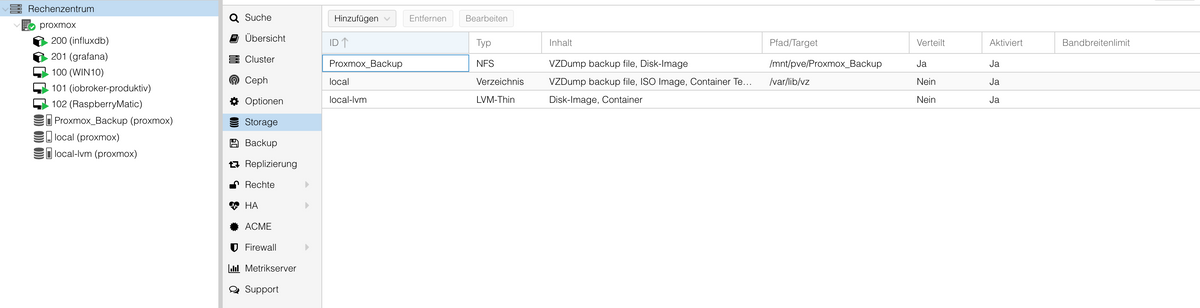
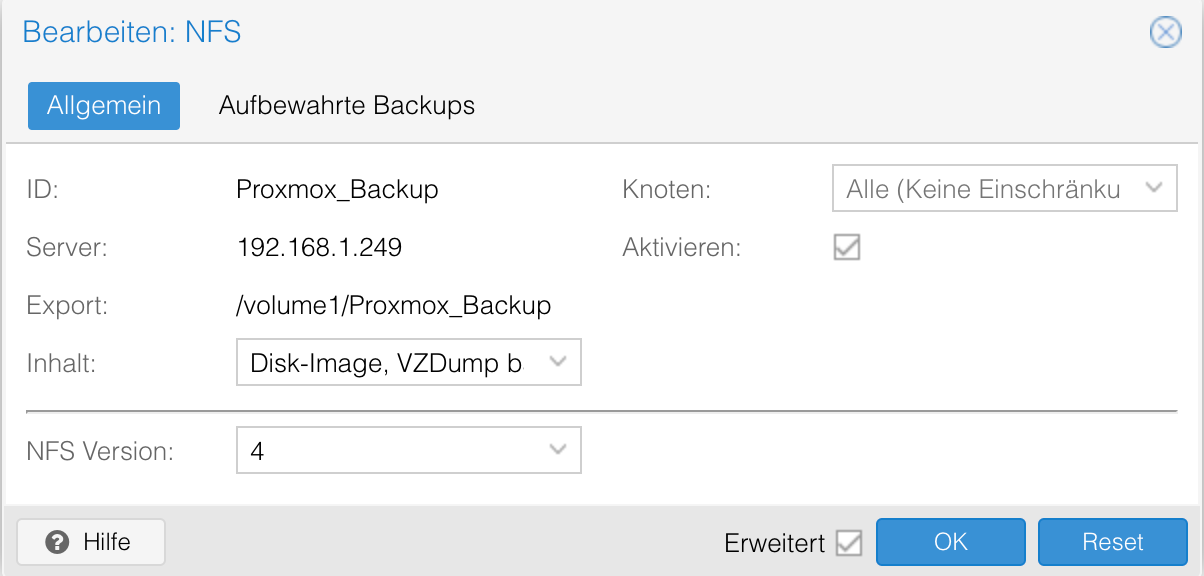
                          sieht so aus (ich habe Proxmox erst einige Tage und keine Erfahrung damit)

                          Bildschirmfoto 2021-05-14 um 12.43.22.png

                          EDIT:

                          Bildschirmfoto 2021-05-14 um 12.46.14.png

                          1 Antwort Letzte Antwort
                          0
                          • crunchipC crunchip

                            @dslraser sagte in Anfänger sucht Hilfe bei Install. proxmox auf INTELNUC8i3BEK:

                            Die VM kann ich darüber problemlos sichern, aber die LXC nicht.

                            bin nur gerade aufn Sprung, deshalb nicht genau gelesen, kann es sein das das Laufwerk in die CT cfg eingetragen werden muss?

                            dslraserD Offline
                            dslraserD Offline
                            dslraser
                            Forum Testing Most Active
                            schrieb am zuletzt editiert von
                            #568

                            @crunchip sagte in Anfänger sucht Hilfe bei Install. proxmox auf INTELNUC8i3BEK:

                            bin nur gerade aufn Sprung, deshalb nicht genau gelesen, kann es sein das das Laufwerk in die CT cfg eingetragen werden muss?

                            Wie mach ich das ?

                            BBTownB 1 Antwort Letzte Antwort
                            0
                            • dslraserD dslraser

                              @crunchip sagte in Anfänger sucht Hilfe bei Install. proxmox auf INTELNUC8i3BEK:

                              bin nur gerade aufn Sprung, deshalb nicht genau gelesen, kann es sein das das Laufwerk in die CT cfg eingetragen werden muss?

                              Wie mach ich das ?

                              BBTownB Online
                              BBTownB Online
                              BBTown
                              schrieb am zuletzt editiert von BBTown
                              #569

                              @dslraser sagte in Anfänger sucht Hilfe bei Install. proxmox auf INTELNUC8i3BEK:

                              Wie mach ich das ?

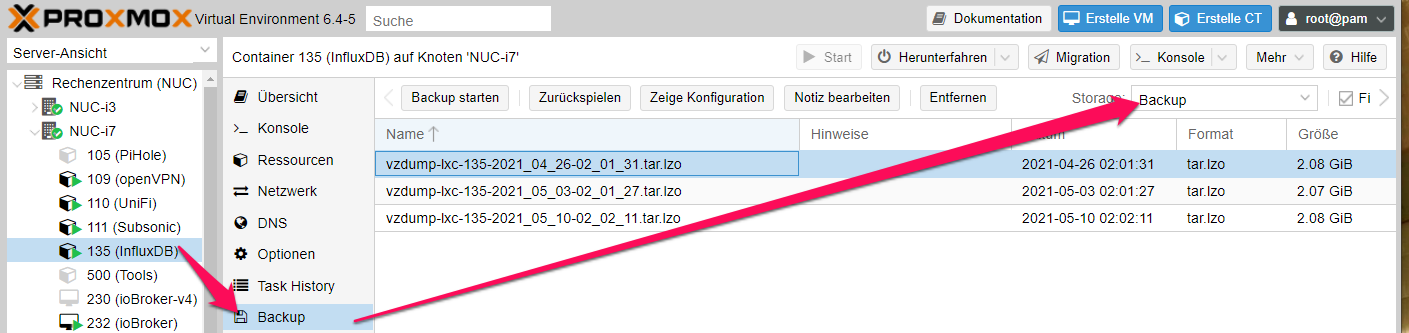
                              Du hast ja mehrere Laufwerke als Backup-Möglichkeit eingestellt (Proxmox_Backup und local), daher mußt Du explizit sagen wohin Du sichern willst.
                              [EDIT]
                              bc4dbd15-a4c9-4dc4-9699-f90ab6a4bf3e-image.png

                              4b7e941d-1f09-42c3-843d-4112ad47f20c-image.png

                              ioBroker auf NUC (VM debian v13 (Trixie ), node v22.21.0 npm v10.9.4, js-controller v7.1.0 jsonl/jsonl / HomeMatic CCU-2 (Wired und Funk) / Philips HUE / echo.DOT / Broadlink RM pro / SONOS

                              dslraserD 1 Antwort Letzte Antwort
                              1
                              • BBTownB BBTown

                                @dslraser sagte in Anfänger sucht Hilfe bei Install. proxmox auf INTELNUC8i3BEK:

                                Wie mach ich das ?

                                Du hast ja mehrere Laufwerke als Backup-Möglichkeit eingestellt (Proxmox_Backup und local), daher mußt Du explizit sagen wohin Du sichern willst.
                                [EDIT]
                                bc4dbd15-a4c9-4dc4-9699-f90ab6a4bf3e-image.png

                                4b7e941d-1f09-42c3-843d-4112ad47f20c-image.png

                                dslraserD Offline
                                dslraserD Offline
                                dslraser
                                Forum Testing Most Active
                                schrieb am zuletzt editiert von dslraser
                                #570

                                @bbtown
                                ist aber auch so eingestellt

                                Bildschirmfoto 2021-05-14 um 13.03.42.png

                                EDIT: und bei den VM klappt es ja

                                Bildschirmfoto 2021-05-14 um 13.05.06.png

                                Meister MopperM 1 Antwort Letzte Antwort
                                0
                                • dslraserD dslraser

                                  Zum Thema Backup. Ich habe mein NAS als Backup eingerichtet (über-NFS) Die VM kann ich darüber problemlos sichern, aber die LXC nicht. (ERROR Meldung) Gibt es da besondere Einstellungen ?
                                  Ich habe schon nach der Fehlermeldung gegoogelt, aber komme nicht wirklich weiter...

                                  INFO: starting new backup job: vzdump 200 --compress zstd --remove 0 --mode snapshot --node proxmox --storage Proxmox_Backup
                                  INFO: Starting Backup of VM 200 (lxc)
                                  INFO: Backup started at 2021-05-14 12:18:19
                                  INFO: status = running
                                  INFO: CT Name: influxdb
                                  INFO: including mount point rootfs ('/') in backup
                                  INFO: backup mode: snapshot
                                  INFO: ionice priority: 7
                                  INFO: create storage snapshot 'vzdump'
                                   WARNING: You have not turned on protection against thin pools running out of space.
                                   WARNING: Set activation/thin_pool_autoextend_threshold below 100 to trigger automatic extension of thin pools before they get full.
                                   Logical volume "snap_vm-200-disk-0_vzdump" created.
                                   WARNING: Sum of all thin volume sizes (489.88 GiB) exceeds the size of thin pool pve/data and the size of whole volume group (237.97 GiB).
                                  INFO: creating vzdump archive '/mnt/pve/Proxmox_Backup/dump/vzdump-lxc-200-2021_05_14-12_18_19.tar.zst'
                                  INFO: tar: /mnt/pve/Proxmox_Backup/dump/vzdump-lxc-200-2021_05_14-12_18_19.tmp: Cannot open: Permission denied
                                  INFO: tar: Error is not recoverable: exiting now
                                  INFO: cleanup temporary 'vzdump' snapshot
                                   Logical volume "snap_vm-200-disk-0_vzdump" successfully removed
                                  ERROR: Backup of VM 200 failed - command 'set -o pipefail && lxc-usernsexec -m u:0:100000:65536 -m g:0:100000:65536 -- tar cpf - --totals --one-file-system -p --sparse --numeric-owner --acls --xattrs '--xattrs-include=user.*' '--xattrs-include=security.capability' '--warning=no-file-ignored' '--warning=no-xattr-write' --one-file-system '--warning=no-file-ignored' '--directory=/mnt/pve/Proxmox_Backup/dump/vzdump-lxc-200-2021_05_14-12_18_19.tmp' ./etc/vzdump/pct.conf ./etc/vzdump/pct.fw '--directory=/mnt/vzsnap0' --no-anchored '--exclude=lost+found' --anchored '--exclude=./tmp/?*' '--exclude=./var/tmp/?*' '--exclude=./var/run/?*.pid' ./ | zstd --rsyncable '--threads=1' >/mnt/pve/Proxmox_Backup/dump/vzdump-lxc-200-2021_05_14-12_18_19.tar.dat' failed: exit code 2
                                  INFO: Failed at 2021-05-14 12:18:19
                                  INFO: Backup job finished with errors
                                  TASK ERROR: job errors
                                  

                                  Proxmox
                                  Virtual Environment 6.4-6
                                  Suche
                                  Container 201 (grafana) auf Knoten 'proxmox'
                                  Proxmox_Backup
                                  Filter VMID
                                  Server-Ansicht
                                  Logs
                                  ()
                                  INFO: starting new backup job: vzdump 101 --mode snapshot --node proxmox --storage Proxmox_Backup --compress zstd --remove 0
                                  INFO: Starting Backup of VM 101 (qemu)
                                  INFO: Backup started at 2021-05-14 12:15:20
                                  INFO: status = running
                                  INFO: VM Name: iobroker-produktiv
                                  INFO: include disk 'scsi0' 'local-lvm:vm-101-disk-0' 50G
                                  INFO: backup mode: snapshot
                                  INFO: ionice priority: 7
                                  INFO: snapshots found (not included into backup)
                                  INFO: creating vzdump archive '/mnt/pve/Proxmox_Backup/dump/vzdump-qemu-101-2021_05_14-12_15_20.vma.zst'
                                  INFO: skipping guest-agent 'fs-freeze', agent configured but not running?
                                  INFO: started backup task 'bb0fe7e2-ca5b-4998-87b2-4051b2b25db4'
                                  INFO: resuming VM again
                                  INFO:   1% (680.9 MiB of 50.0 GiB) in 3s, read: 227.0 MiB/s, write: 156.7 MiB/s
                                  INFO:   2% (1.2 GiB of 50.0 GiB) in 6s, read: 175.4 MiB/s, write: 158.4 MiB/s
                                  INFO:   3% (1.7 GiB of 50.0 GiB) in 9s, read: 185.4 MiB/s, write: 165.3 MiB/s
                                  INFO:   4% (2.4 GiB of 50.0 GiB) in 12s, read: 247.8 MiB/s, write: 207.5 MiB/s
                                  INFO:   6% (3.1 GiB of 50.0 GiB) in 15s, read: 208.4 MiB/s, write: 204.3 MiB/s
                                  INFO:  12% (6.1 GiB of 50.0 GiB) in 18s, read: 1.0 GiB/s, write: 117.2 MiB/s
                                  INFO:  21% (10.7 GiB of 50.0 GiB) in 21s, read: 1.5 GiB/s, write: 69.3 MiB/s
                                  INFO:  34% (17.2 GiB of 50.0 GiB) in 24s, read: 2.2 GiB/s, write: 8.2 MiB/s
                                  INFO:  44% (22.0 GiB of 50.0 GiB) in 27s, read: 1.6 GiB/s, write: 47.1 MiB/s
                                  INFO:  48% (24.4 GiB of 50.0 GiB) in 30s, read: 812.2 MiB/s, write: 118.9 MiB/s
                                  INFO:  60% (30.0 GiB of 50.0 GiB) in 33s, read: 1.9 GiB/s, write: 36.1 MiB/s
                                  INFO:  64% (32.4 GiB of 50.0 GiB) in 36s, read: 802.4 MiB/s, write: 117.0 MiB/s
                                  INFO:  65% (32.9 GiB of 50.0 GiB) in 39s, read: 199.4 MiB/s, write: 197.9 MiB/s
                                  INFO:  67% (33.6 GiB of 50.0 GiB) in 42s, read: 211.5 MiB/s, write: 208.0 MiB/s
                                  INFO:  68% (34.2 GiB of 50.0 GiB) in 45s, read: 232.6 MiB/s, write: 191.3 MiB/s
                                  INFO:  69% (34.9 GiB of 50.0 GiB) in 48s, read: 222.9 MiB/s, write: 219.1 MiB/s
                                  INFO:  72% (36.2 GiB of 50.0 GiB) in 51s, read: 460.1 MiB/s, write: 151.9 MiB/s
                                  INFO:  80% (40.4 GiB of 50.0 GiB) in 54s, read: 1.4 GiB/s, write: 72.8 MiB/s
                                  INFO:  88% (44.2 GiB of 50.0 GiB) in 57s, read: 1.3 GiB/s, write: 84.3 MiB/s
                                  INFO: 100% (50.0 GiB of 50.0 GiB) in 1m, read: 1.9 GiB/s, write: 8.9 MiB/s
                                  INFO: backup is sparse: 42.56 GiB (85%) total zero data
                                  INFO: transferred 50.00 GiB in 60 seconds (853.3 MiB/s)
                                  INFO: archive file size: 1.93GB
                                  INFO: Finished Backup of VM 101 (00:01:04)
                                  INFO: Backup finished at 2021-05-14 12:16:24
                                  INFO: Backup job finished successfully
                                  TASK OK
                                  

                                  crunchipC Abwesend
                                  crunchipC Abwesend
                                  crunchip
                                  Forum Testing Most Active
                                  schrieb am zuletzt editiert von
                                  #571

                                  @dslraser sagte in Anfänger sucht Hilfe bei Install. proxmox auf INTELNUC8i3BEK:

                                                                                                                                       WARNING: Sum of all thin volume sizes (489.88 GiB) exceeds the size of thin pool pve/data and the size of whole volume group (237.97 GiB).
                                  

                                  umgestiegen von Proxmox auf Unraid

                                  dslraserD 1 Antwort Letzte Antwort
                                  1
                                  • crunchipC crunchip

                                    @dslraser sagte in Anfänger sucht Hilfe bei Install. proxmox auf INTELNUC8i3BEK:

                                                                                                                                         WARNING: Sum of all thin volume sizes (489.88 GiB) exceeds the size of thin pool pve/data and the size of whole volume group (237.97 GiB).
                                    
                                    dslraserD Offline
                                    dslraserD Offline
                                    dslraser
                                    Forum Testing Most Active
                                    schrieb am zuletzt editiert von dslraser
                                    #572

                                    @crunchip
                                    und das kommt nur bei den LXC Backups.

                                    EDIT: das lese ich gerade

                                    https://forum.iobroker.net/topic/22355/gelöst-proxmox-konfiguration

                                    crunchipC BBTownB 2 Antworten Letzte Antwort
                                    0
                                    • dslraserD dslraser

                                      @crunchip
                                      und das kommt nur bei den LXC Backups.

                                      EDIT: das lese ich gerade

                                      https://forum.iobroker.net/topic/22355/gelöst-proxmox-konfiguration

                                      crunchipC Abwesend
                                      crunchipC Abwesend
                                      crunchip
                                      Forum Testing Most Active
                                      schrieb am zuletzt editiert von
                                      #573

                                      @dslraser dein local-lvm ist ja schon recht voll?
                                      Müsste man mal genauer schauen, was du da im einzelnen hast, Größe deiner VM /CT , ob du noch Laufwerke mit eingebunden hast an einzelnen Maschinen, die mit includiert sind beim backup.
                                      Bin aber unterwegs und nur am Handy

                                      umgestiegen von Proxmox auf Unraid

                                      1 Antwort Letzte Antwort
                                      1
                                      • dslraserD dslraser

                                        @crunchip
                                        und das kommt nur bei den LXC Backups.

                                        EDIT: das lese ich gerade

                                        https://forum.iobroker.net/topic/22355/gelöst-proxmox-konfiguration

                                        BBTownB Online
                                        BBTownB Online
                                        BBTown
                                        schrieb am zuletzt editiert von BBTown
                                        #574

                                        @dslraser macht es einen Unterscheid ob Du "VZDump backup files" aus "local entfernst?

                                        Sonst habe ich das hier gefunden
                                        https://forum.proxmox.com/threads/backup-fehlgeschlagen-free-space-in-thin-pool-pve-data-reached.58271/

                                        ioBroker auf NUC (VM debian v13 (Trixie ), node v22.21.0 npm v10.9.4, js-controller v7.1.0 jsonl/jsonl / HomeMatic CCU-2 (Wired und Funk) / Philips HUE / echo.DOT / Broadlink RM pro / SONOS

                                        1 Antwort Letzte Antwort
                                        1
                                        • dslraserD dslraser

                                          @bbtown
                                          ist aber auch so eingestellt

                                          Bildschirmfoto 2021-05-14 um 13.03.42.png

                                          EDIT: und bei den VM klappt es ja

                                          Bildschirmfoto 2021-05-14 um 13.05.06.png

                                          Meister MopperM Online
                                          Meister MopperM Online
                                          Meister Mopper
                                          schrieb am zuletzt editiert von
                                          #575

                                          @dslraser
                                          Wie sieht denn bei Dir die local-lvm Übersicht aus? Wie voll ist die Platte?


                                          4cd52410-4ce1-4660-9f36-31599bd54700-grafik.png

                                          Proxmox und HA

                                          dslraserD 1 Antwort Letzte Antwort
                                          0
                                          Antworten
                                          • In einem neuen Thema antworten
                                          Anmelden zum Antworten
                                          • Älteste zuerst
                                          • Neuste zuerst
                                          • Meiste Stimmen


                                          Support us

                                          ioBroker
                                          Community Adapters
                                          Donate
                                          FAQ Cloud / IOT
                                          HowTo: Node.js-Update
                                          HowTo: Backup/Restore
                                          Downloads
                                          BLOG

                                          826

                                          Online

                                          32.5k

                                          Benutzer

                                          81.7k

                                          Themen

                                          1.3m

                                          Beiträge
                                          Community
                                          Impressum | Datenschutz-Bestimmungen | Nutzungsbedingungen | Einwilligungseinstellungen
                                          ioBroker Community 2014-2025
                                          logo
                                          • Anmelden

                                          • Du hast noch kein Konto? Registrieren

                                          • Anmelden oder registrieren, um zu suchen
                                          • Erster Beitrag
                                            Letzter Beitrag
                                          0
                                          • Home
                                          • Aktuell
                                          • Tags
                                          • Ungelesen 0
                                          • Kategorien
                                          • Unreplied
                                          • Beliebt
                                          • GitHub
                                          • Docu
                                          • Hilfe