Weiter zum Inhalt
  • Home
  • Aktuell
  • Tags
  • 0 Ungelesen 0
  • Kategorien
  • Unreplied
  • Beliebt
  • GitHub
  • Docu
  • Hilfe
Skins
  • Hell
  • Brite
  • Cerulean
  • Cosmo
  • Flatly
  • Journal
  • Litera
  • Lumen
  • Lux
  • Materia
  • Minty
  • Morph
  • Pulse
  • Sandstone
  • Simplex
  • Sketchy
  • Spacelab
  • United
  • Yeti
  • Zephyr
  • Dunkel
  • Cyborg
  • Darkly
  • Quartz
  • Slate
  • Solar
  • Superhero
  • Vapor

  • Standard: (Kein Skin)
  • Kein Skin
Einklappen
ioBroker Logo

Community Forum

donate donate
  1. ioBroker Community Home
  2. Deutsch
  3. ioBroker Allgemein
  4. Iobroker neuinstallation startet nicht

NEWS

  • Neues YouTube-Video: Visualisierung im Devices-Adapter
    BluefoxB
    Bluefox
    10
    1
    233

  • Neuer ioBroker-Blog online: Monatsrückblick März/April 2026
    BluefoxB
    Bluefox
    8
    1
    1.8k

  • Verwendung von KI bitte immer deutlich kennzeichnen
    HomoranH
    Homoran
    11
    1
    769

Iobroker neuinstallation startet nicht

Geplant Angeheftet Gesperrt Verschoben ioBroker Allgemein
installation iobroker
47 Beiträge 4 Kommentatoren 2.0k Aufrufe 3 Beobachtet
  • Älteste zuerst
  • Neuste zuerst
  • Meiste Stimmen
Antworten
  • In einem neuen Thema antworten
Anmelden zum Antworten
Dieses Thema wurde gelöscht. Nur Nutzer mit entsprechenden Rechten können es sehen.
  • HomoranH Homoran

    @fraenki23 sagte in Iobroker neuinstallation startet nicht:

    curl --silent --location https://deb.nodesource.com/setup_12.x | sudo bash -
    sudo apt install --assume-yes nodejs
    nodejs -v
    curl -sLf https://iobroker.net/install.sh | bash -
    Dies ist der Link von Iobroker.Net --- zeigte Fehler
    curl -sL https://iobroker.net/install.sh | bash -

    das brauchst du alles nicht

    node wird korrekt(!!) über den installer mit ioBroker installiert

    @fraenki23 sagte in Iobroker neuinstallation startet nicht:

    Dies ist der Link von Iobroker.Net --- zeigte Fehler

    ??
    welche Fehler?


    nur noch die raspberryOS INstallation und die Konfi von Timezone und locales

    dann nur curl -sLf https://iobroker.net/install.sh | bash -

    und fertig ist die Laube

    F Offline
    F Offline
    Fraenki23
    schrieb am zuletzt editiert von Homoran
    #6

    @homoran Hallo
    Danke . Ich werde alles nochmal installieren so wie Du es geschrieben hast. Dann schau ich mal weiter.

    Hier die Fehler bin mir aber nicht la sicher ob diese direkt nach dem Iobroker waren. Hab den Überblick verloren.

    Mache es nochmals. Danke

    npm ERR! code ELIFECYCLE
    npm ERR! errno 25
    npm ERR! iobroker.js-controller@3.2.16 install: `node iobroker.js setup first`
    npm ERR! Exit status 25
    npm ERR!
    npm ERR! Failed at the iobroker.js-controller@3.2.16 install script.
    npm ERR! This is probably not a problem with npm. There is likely additional logging output above.
    
    ==========================================================================
        Finalizing installation (4/4)
    ==========================================================================
    
    bash: line 965: /opt/iobroker/INSTALLER_INFO.txt: Input/output error
    bash: line 1013: cannot create temp file for here-document: Input/output error
    bash: line 1022: /usr/bin/sudo: Input/output error
    bash: line 1023: /usr/bin/sudo: Input/output error
    bash: line 1025: /usr/bin/sudo: Input/output error
    main: line 569: /usr/bin/sudo: Input/output error
    Unsupported init system, cannot enable autostart!
    bash: line 1255: /opt/iobroker/INSTALLER_INFO.txt: Input/output error
    main: line 539: cannot create temp file for here-document: Input/output error
    main: line 545: cannot create temp file for here-document: Input/output error
    main: line 547: mkdir: command not found
    main: line 550: /home/pi/.iobroker/iobroker_completions: Input/output error
    main: line 553: /usr/bin/touch: Input/output error
    main: line 557: /home/pi/.bashrc: Input/output error
    main: line 103: uname: command not found
    Unsupported platform
    pi@raspberrypi:~ $
    
    
    pi@raspberrypi:~ $ sudo reboot
    -bash: /usr/bin/sudo: Input/output error
    pi@raspberrypi:~ $
    

    MOD-Edit: Code in code-tags gesetzt!

    1 Antwort Letzte Antwort
    0
    • HomoranH Homoran

      @fraenki23 sagte in Iobroker neuinstallation startet nicht:

      curl --silent --location https://deb.nodesource.com/setup_12.x | sudo bash -
      sudo apt install --assume-yes nodejs
      nodejs -v
      curl -sLf https://iobroker.net/install.sh | bash -
      Dies ist der Link von Iobroker.Net --- zeigte Fehler
      curl -sL https://iobroker.net/install.sh | bash -

      das brauchst du alles nicht

      node wird korrekt(!!) über den installer mit ioBroker installiert

      @fraenki23 sagte in Iobroker neuinstallation startet nicht:

      Dies ist der Link von Iobroker.Net --- zeigte Fehler

      ??
      welche Fehler?


      nur noch die raspberryOS INstallation und die Konfi von Timezone und locales

      dann nur curl -sLf https://iobroker.net/install.sh | bash -

      und fertig ist die Laube

      wendy2702W Offline
      wendy2702W Offline
      wendy2702
      schrieb am zuletzt editiert von
      #7

      @homoran sagte in Iobroker neuinstallation startet nicht:

      nur noch die raspberryOS INstallation und die Konfi von Timezone und locales

      Ich habe schon lange keine Raspi Installation mehr gemacht, aber „Expand file System“ muss doch auch noch, oder?

      Bitte keine Fragen per PN, die gehören ins Forum!

      Benutzt das Voting rechts unten im Beitrag wenn er euch geholfen hat.

      HomoranH 1 Antwort Letzte Antwort
      0
      • wendy2702W wendy2702

        @homoran sagte in Iobroker neuinstallation startet nicht:

        nur noch die raspberryOS INstallation und die Konfi von Timezone und locales

        Ich habe schon lange keine Raspi Installation mehr gemacht, aber „Expand file System“ muss doch auch noch, oder?

        HomoranH Nicht stören
        HomoranH Nicht stören
        Homoran
        Global Moderator Administrators
        schrieb am zuletzt editiert von
        #8

        @wendy2702 sagte in Iobroker neuinstallation startet nicht:

        Expand file System“ muss doch auch noch, oder?

        nö, läuft beim ersten mal automatisch
        dann rebootet er auch nochmal

        kein Support per PN! - Fragen im Forum stellen -
        Benutzt das Voting rechts unten im Beitrag wenn er euch geholfen hat.
        Das Forum freut sich über eine Spende. Benutzt dazu den Spendenbutton oben rechts. Danke!
        der Installationsfixer: curl -fsL https://iobroker.net/fix.sh | bash -

        wendy2702W 1 Antwort Letzte Antwort
        0
        • HomoranH Homoran

          @wendy2702 sagte in Iobroker neuinstallation startet nicht:

          Expand file System“ muss doch auch noch, oder?

          nö, läuft beim ersten mal automatisch
          dann rebootet er auch nochmal

          wendy2702W Offline
          wendy2702W Offline
          wendy2702
          schrieb am zuletzt editiert von
          #9

          @homoran OK.

          Ich sag ja..... lange nicht mehr gemacht.

          Bitte keine Fragen per PN, die gehören ins Forum!

          Benutzt das Voting rechts unten im Beitrag wenn er euch geholfen hat.

          F 1 Antwort Letzte Antwort
          0
          • wendy2702W wendy2702

            @homoran OK.

            Ich sag ja..... lange nicht mehr gemacht.

            F Offline
            F Offline
            Fraenki23
            schrieb am zuletzt editiert von
            #10

            @wendy2702 Hallo
            Kurze Frage an die Fachmänner.

            Muss ich die Karte bei einer Neuinstallation formatieren oder macht das der Raspberry Imager 1.5 alles selbst.
            Hab schon alles versucht und mit efat formatiert.?

            Muss ich zwingen Upgrade machen wenn ich das neuste direkt von der Seite nehme?
            wenn ja welcher befehl ist der richtige

            Danke Frank

            HomoranH wendy2702W 2 Antworten Letzte Antwort
            0
            • F Fraenki23

              @wendy2702 Hallo
              Kurze Frage an die Fachmänner.

              Muss ich die Karte bei einer Neuinstallation formatieren oder macht das der Raspberry Imager 1.5 alles selbst.
              Hab schon alles versucht und mit efat formatiert.?

              Muss ich zwingen Upgrade machen wenn ich das neuste direkt von der Seite nehme?
              wenn ja welcher befehl ist der richtige

              Danke Frank

              HomoranH Nicht stören
              HomoranH Nicht stören
              Homoran
              Global Moderator Administrators
              schrieb am zuletzt editiert von Homoran
              #11

              @fraenki23 sagte in Iobroker neuinstallation startet nicht:

              Muss ich die Karte bei einer Neuinstallation formatieren oder macht das der Raspberry Imager 1.5 alles selbst.

              eigentlich nicht, aber ich kenne den Imager nicht

              @fraenki23 sagte in Iobroker neuinstallation startet nicht:

              Hab schon alles versucht und mit efat formatiert.?

              ich würde wenn, den SDFormatter nehmen. Der ist speziell für SD-Karten

              @fraenki23 sagte in Iobroker neuinstallation startet nicht:

              Muss ich zwingen Upgrade machen wenn ich das neuste direkt von der Seite nehme?
              wenn ja welcher befehl ist der richtige

              sollte man machen!

              deine Befehle waren richtig:

              sudo apt update
              sudo apt upgrade
              

              ich denke nicht, dass da schon ein Kernel Update dabei ist. Das würde länger brauchen und einen reboot

              Diu hängst doch hoffentlich nicht am WLAN?

              kein Support per PN! - Fragen im Forum stellen -
              Benutzt das Voting rechts unten im Beitrag wenn er euch geholfen hat.
              Das Forum freut sich über eine Spende. Benutzt dazu den Spendenbutton oben rechts. Danke!
              der Installationsfixer: curl -fsL https://iobroker.net/fix.sh | bash -

              F 1 Antwort Letzte Antwort
              0
              • F Fraenki23

                @wendy2702 Hallo
                Kurze Frage an die Fachmänner.

                Muss ich die Karte bei einer Neuinstallation formatieren oder macht das der Raspberry Imager 1.5 alles selbst.
                Hab schon alles versucht und mit efat formatiert.?

                Muss ich zwingen Upgrade machen wenn ich das neuste direkt von der Seite nehme?
                wenn ja welcher befehl ist der richtige

                Danke Frank

                wendy2702W Offline
                wendy2702W Offline
                wendy2702
                schrieb am zuletzt editiert von
                #12

                @fraenki23 Formatieren ist normalerweise nicht nötig.

                Bitte keine Fragen per PN, die gehören ins Forum!

                Benutzt das Voting rechts unten im Beitrag wenn er euch geholfen hat.

                1 Antwort Letzte Antwort
                0
                • HomoranH Homoran

                  @fraenki23 sagte in Iobroker neuinstallation startet nicht:

                  Muss ich die Karte bei einer Neuinstallation formatieren oder macht das der Raspberry Imager 1.5 alles selbst.

                  eigentlich nicht, aber ich kenne den Imager nicht

                  @fraenki23 sagte in Iobroker neuinstallation startet nicht:

                  Hab schon alles versucht und mit efat formatiert.?

                  ich würde wenn, den SDFormatter nehmen. Der ist speziell für SD-Karten

                  @fraenki23 sagte in Iobroker neuinstallation startet nicht:

                  Muss ich zwingen Upgrade machen wenn ich das neuste direkt von der Seite nehme?
                  wenn ja welcher befehl ist der richtige

                  sollte man machen!

                  deine Befehle waren richtig:

                  sudo apt update
                  sudo apt upgrade
                  

                  ich denke nicht, dass da schon ein Kernel Update dabei ist. Das würde länger brauchen und einen reboot

                  Diu hängst doch hoffentlich nicht am WLAN?

                  F Offline
                  F Offline
                  Fraenki23
                  schrieb am zuletzt editiert von
                  #13

                  @homoran Hallo
                  Natürlich mit dem Netzwerkabel.

                  Bin gerade am neu installieren.

                  F 1 Antwort Letzte Antwort
                  0
                  • F Fraenki23

                    @homoran Hallo
                    Natürlich mit dem Netzwerkabel.

                    Bin gerade am neu installieren.

                    F Offline
                    F Offline
                    Fraenki23
                    schrieb am zuletzt editiert von Homoran
                    #14

                    @fraenki23 Hallo
                    Hab gestern Abend noch das Update und Upgrade genmacht. Hab es über Nacht laufen lassen da das Upgrade sehr lange gebraucht hat.
                    Nun läuft er wieder nicht und der Verlauf sieht so aus wie unter dem Text
                    Nachdem ich mit dem Befehl:
                    curl -sL https://iobroker.net/install.sh | bash -
                    Nun startet es.
                    Schade nur dass es gefühlt wieder kein sauberes System ist

                    pi@raspberrypi:~ $ curl -sLf https://iobroker.net/install.sh | bash -
                    library: loaded
                    Library version=2021-01-23
                    
                    ==========================================================================
                    
                        Welcome to the ioBroker installer!
                        Installer version: 2020-12-07
                    
                        You might need to enter your password a couple of times.
                    
                    ==========================================================================
                    
                    
                    ==========================================================================
                        Installing prerequisites (1/4)
                    ==========================================================================
                    
                    Get:1 http://raspbian.raspberrypi.org/raspbian buster InRelease [15.0 kB]
                    Hit:2 http://archive.raspberrypi.org/debian buster InRelease
                    Get:3 http://packages.microsoft.com/repos/code stable InRelease [10.4 kB]
                    Get:4 http://packages.microsoft.com/repos/code stable/main armhf Packages [16.8                                                                              kB]
                    Get:5 http://packages.microsoft.com/repos/code stable/main amd64 Packages [16.3                                                                              kB]
                    Get:6 http://packages.microsoft.com/repos/code stable/main arm64 Packages [16.8                                                                              kB]
                    Fetched 75.3 kB in 1s (54.9 kB/s)
                    Reading package lists... Done
                    
                    ==========================================================================
                    
                        Node.js not found. Installing...
                    
                    ==========================================================================
                    
                    
                    ## Installing the NodeSource Node.js 12.x repo...
                    
                    
                    ## Populating apt-get cache...
                    
                    + apt-get update
                    Hit:1 http://archive.raspberrypi.org/debian buster InRelease
                    Hit:2 http://packages.microsoft.com/repos/code stable InRelease
                    Hit:3 http://raspbian.raspberrypi.org/raspbian buster InRelease
                    Reading package lists... Done
                    
                    ## Confirming "buster" is supported...
                    
                    + curl -sLf -o /dev/null 'https://deb.nodesource.com/node_12.x/dists/buster/Rele                                                                             ase'
                    
                    ## Adding the NodeSource signing key to your keyring...
                    
                    + curl -s https://deb.nodesource.com/gpgkey/nodesource.gpg.key | apt-key add -
                    OK
                    
                    ## Creating apt sources list file for the NodeSource Node.js 12.x repo...
                    
                    + echo 'deb https://deb.nodesource.com/node_12.x buster main' > /etc/apt/sources                                                                             .list.d/nodesource.list
                    + echo 'deb-src https://deb.nodesource.com/node_12.x buster main' >> /etc/apt/so                                                                             urces.list.d/nodesource.list
                    
                    ## Running `apt-get update` for you...
                    
                    + apt-get update
                    Hit:1 http://archive.raspberrypi.org/debian buster InRelease
                    Hit:2 http://raspbian.raspberrypi.org/raspbian buster InRelease
                    Hit:3 http://packages.microsoft.com/repos/code stable InRelease
                    Get:4 https://deb.nodesource.com/node_12.x buster InRelease [4584 B]
                    Get:5 https://deb.nodesource.com/node_12.x buster/main armhf Packages [774 B]
                    Fetched 5358 B in 1s (4018 B/s)
                    Reading package lists... Done
                    
                    ## Run `sudo apt-get install -y nodejs` to install Node.js 12.x and npm
                    ## You may also need development tools to build native addons:
                         sudo apt-get install gcc g++ make
                    ## To install the Yarn package manager, run:
                         curl -sL https://dl.yarnpkg.com/debian/pubkey.gpg | sudo apt-key add -
                         echo "deb https://dl.yarnpkg.com/debian/ stable main" | sudo tee /etc/apt/s                                                                             ources.list.d/yarn.list
                         sudo apt-get update && sudo apt-get install yarn
                    
                    
                    Installed nodejs
                    Node.js Installed successfully!
                    Changing npm registry to https://registry.npmjs.org
                    Installed acl
                    Installed gcc-c++
                    Installed libavahi-compat-libdnssd-dev
                    Installed libudev-dev
                    Installed libpam0g-dev
                    Installed git
                    Installed libcairo2-dev
                    Installed libpango1.0-dev
                    Installed libjpeg-dev
                    Installed libgif-dev
                    Installed librsvg2-dev
                    Installed python-dev
                    
                    ==========================================================================
                        Creating ioBroker user and directory (2/4)
                    ==========================================================================
                    
                    User iobroker created
                    Created /etc/sudoers.d/iobroker
                    Directory /opt/iobroker created
                    
                    ==========================================================================
                        Installing ioBroker (3/4)
                    ==========================================================================
                    
                    In file included from ../../nan/nan.h:56,
                                     from ../src/main.cpp:3:
                    /home/pi/.cache/node-gyp/12.21.0/include/node/node.h:737:43: warning: cast betwe                                                                             en incompatible function types from 'void (*)(v8::Local<v8::Object>)' to 'node::                                                                             addon_register_func' {aka 'void (*)(v8::Local<v8::Object>, v8::Local<v8::Value>,                                                                              void*)'} [-Wcast-function-type]
                           (node::addon_register_func) (regfunc),                          \
                                                               ^
                    /home/pi/.cache/node-gyp/12.21.0/include/node/node.h:771:3: note: in expansion o                                                                             f macro 'NODE_MODULE_X'
                       NODE_MODULE_X(modname, regfunc, NULL, 0)  // NOLINT (readability/null_usage)
                       ^~~~~~~~~~~~~
                    ../src/main.cpp:42:1: note: in expansion of macro 'NODE_MODULE'
                     NODE_MODULE(diskusage, Init)
                     ^~~~~~~~~~~
                    In file included from ../../nan/nan.h:56,
                                     from ../src/unix_dgram.cc:5:
                    /home/pi/.cache/node-gyp/12.21.0/include/node/node.h:737:43: warning: cast betwe                                                                             en incompatible function types from 'void (*)(v8::Local<v8::Object>)' to 'node::                                                                             addon_register_func' {aka 'void (*)(v8::Local<v8::Object>, v8::Local<v8::Value>,                                                                              void*)'} [-Wcast-function-type]
                           (node::addon_register_func) (regfunc),                          \
                                                               ^
                    /home/pi/.cache/node-gyp/12.21.0/include/node/node.h:771:3: note: in expansion o                                                                             f macro 'NODE_MODULE_X'
                       NODE_MODULE_X(modname, regfunc, NULL, 0)  // NOLINT (readability/null_usage)
                       ^~~~~~~~~~~~~
                    ../src/unix_dgram.cc:404:1: note: in expansion of macro 'NODE_MODULE'
                     NODE_MODULE(unix_dgram, Initialize)
                     ^~~~~~~~~~~
                    ../src/serialport.cpp: In function 'Nan::NAN_METHOD_RETURN_TYPE Open(Nan::NAN_ME                                                                             THOD_ARGS_TYPE)':
                    ../src/serialport.cpp:78:69: warning: cast between incompatible function types f                                                                             rom 'void (*)(uv_work_t*)' {aka 'void (*)(uv_work_s*)'} to 'uv_after_work_cb' {a                                                                             ka 'void (*)(uv_work_s*, int)'} [-Wcast-function-type]
                       uv_queue_work(uv_default_loop(), req, EIO_Open, (uv_after_work_cb)EIO_AfterOp                                                                             en);
                                                                                         ^~~~~~~~~~~                                                                             ~~
                    ../src/serialport.cpp: In function 'Nan::NAN_METHOD_RETURN_TYPE Update(Nan::NAN_                                                                             METHOD_ARGS_TYPE)':
                    ../src/serialport.cpp:135:71: warning: cast between incompatible function types                                                                              from 'void (*)(uv_work_t*)' {aka 'void (*)(uv_work_s*)'} to 'uv_after_work_cb' {                                                                             aka 'void (*)(uv_work_s*, int)'} [-Wcast-function-type]
                       uv_queue_work(uv_default_loop(), req, EIO_Update, (uv_after_work_cb)EIO_After                                                                             Update);
                                                                                           ^~~~~~~~~                                                                             ~~~~~~
                    ../src/serialport.cpp: In function 'Nan::NAN_METHOD_RETURN_TYPE Close(Nan::NAN_M                                                                             ETHOD_ARGS_TYPE)':
                    ../src/serialport.cpp:175:70: warning: cast between incompatible function types                                                                              from 'void (*)(uv_work_t*)' {aka 'void (*)(uv_work_s*)'} to 'uv_after_work_cb' {                                                                             aka 'void (*)(uv_work_s*, int)'} [-Wcast-function-type]
                       uv_queue_work(uv_default_loop(), req, EIO_Close, (uv_after_work_cb)EIO_AfterC                                                                             lose);
                                                                                          ^~~~~~~~~~                                                                             ~~~~
                    ../src/serialport.cpp: In function 'Nan::NAN_METHOD_RETURN_TYPE Flush(Nan::NAN_M                                                                             ETHOD_ARGS_TYPE)':
                    ../src/serialport.cpp:215:70: warning: cast between incompatible function types                                                                              from 'void (*)(uv_work_t*)' {aka 'void (*)(uv_work_s*)'} to 'uv_after_work_cb' {                                                                             aka 'void (*)(uv_work_s*, int)'} [-Wcast-function-type]
                       uv_queue_work(uv_default_loop(), req, EIO_Flush, (uv_after_work_cb)EIO_AfterF                                                                             lush);
                                                                                          ^~~~~~~~~~                                                                             ~~~~
                    ../src/serialport.cpp: In function 'Nan::NAN_METHOD_RETURN_TYPE Set(Nan::NAN_MET                                                                             HOD_ARGS_TYPE)':
                    ../src/serialport.cpp:271:68: warning: cast between incompatible function types                                                                              from 'void (*)(uv_work_t*)' {aka 'void (*)(uv_work_s*)'} to 'uv_after_work_cb' {                                                                             aka 'void (*)(uv_work_s*, int)'} [-Wcast-function-type]
                       uv_queue_work(uv_default_loop(), req, EIO_Set, (uv_after_work_cb)EIO_AfterSet                                                                             );
                                                                                        ^~~~~~~~~~~~
                    ../src/serialport.cpp: In function 'Nan::NAN_METHOD_RETURN_TYPE Get(Nan::NAN_MET                                                                             HOD_ARGS_TYPE)':
                    ../src/serialport.cpp:316:68: warning: cast between incompatible function types                                                                              from 'void (*)(uv_work_t*)' {aka 'void (*)(uv_work_s*)'} to 'uv_after_work_cb' {                                                                             aka 'void (*)(uv_work_s*, int)'} [-Wcast-function-type]
                       uv_queue_work(uv_default_loop(), req, EIO_Get, (uv_after_work_cb)EIO_AfterGet                                                                             );
                                                                                        ^~~~~~~~~~~~
                    ../src/serialport.cpp: In function 'Nan::NAN_METHOD_RETURN_TYPE GetBaudRate(Nan:                                                                             :NAN_METHOD_ARGS_TYPE)':
                    ../src/serialport.cpp:366:76: warning: cast between incompatible function types                                                                              from 'void (*)(uv_work_t*)' {aka 'void (*)(uv_work_s*)'} to 'uv_after_work_cb' {                                                                             aka 'void (*)(uv_work_s*, int)'} [-Wcast-function-type]
                       uv_queue_work(uv_default_loop(), req, EIO_GetBaudRate, (uv_after_work_cb)EIO_                                                                             AfterGetBaudRate);
                                                                                                ^~~~                                                                             ~~~~~~~~~~~~~~~~
                    ../src/serialport.cpp: In function 'Nan::NAN_METHOD_RETURN_TYPE Drain(Nan::NAN_M                                                                             ETHOD_ARGS_TYPE)':
                    ../src/serialport.cpp:412:70: warning: cast between incompatible function types                                                                              from 'void (*)(uv_work_t*)' {aka 'void (*)(uv_work_s*)'} to 'uv_after_work_cb' {                                                                             aka 'void (*)(uv_work_s*, int)'} [-Wcast-function-type]
                       uv_queue_work(uv_default_loop(), req, EIO_Drain, (uv_after_work_cb)EIO_AfterD                                                                             rain);
                                                                                          ^~~~~~~~~~                                                                             ~~~~
                    ../src/serialport.cpp: At global scope:
                    ../src/serialport.cpp:433:28: warning: unnecessary parentheses in declaration of                                                                              'ToParityEnum' [-Wparentheses]
                     SerialPortParity NAN_INLINE(ToParityEnum(const v8::Local<v8::String>& v8str)) {
                                                ^
                    ../src/serialport.cpp:452:30: warning: unnecessary parentheses in declaration of                                                                              'ToStopBitEnum' [-Wparentheses]
                     SerialPortStopBits NAN_INLINE(ToStopBitEnum(double stopBits)) {
                                                  ^
                    In file included from ../../../nan/nan.h:56,
                                     from ../src/./serialport.h:6,
                                     from ../src/serialport.cpp:1:
                    /home/pi/.cache/node-gyp/12.21.0/include/node/node.h:737:43: warning: cast betwe                                                                             en incompatible function types from 'void (*)(Nan::ADDON_REGISTER_FUNCTION_ARGS_                                                                             TYPE)' {aka 'void (*)(v8::Local<v8::Object>)'} to 'node::addon_register_func' {a                                                                             ka 'void (*)(v8::Local<v8::Object>, v8::Local<v8::Value>, void*)'} [-Wcast-funct                                                                             ion-type]
                           (node::addon_register_func) (regfunc),                          \
                                                               ^
                    /home/pi/.cache/node-gyp/12.21.0/include/node/node.h:771:3: note: in expansion o                                                                             f macro 'NODE_MODULE_X'
                       NODE_MODULE_X(modname, regfunc, NULL, 0)  // NOLINT (readability/null_usage)
                       ^~~~~~~~~~~~~
                    ../src/serialport.cpp:486:1: note: in expansion of macro 'NODE_MODULE'
                     NODE_MODULE(serialport, init);
                     ^~~~~~~~~~~
                    ../src/serialport_unix.cpp: In function 'int setup(int, OpenBaton*)':
                    ../src/serialport_unix.cpp:176:60: warning: '%s' directive output may be truncat                                                                             ed writing up to 1023 bytes into a region of size 1005 [-Wformat-truncation=]
                         snprintf(data->errorString, sizeof(data->errorString), "Error %s Cannot ope                                                                             n %s", strerror(errno), data->path);
                                                                                ^~~~~~~~~~~~~~~~~~~~                                                                             ~~~~~
                    ../src/serialport_unix.cpp:176:13: note: 'snprintf' output 20 or more bytes (ass                                                                             uming 1043) into a destination of size 1024
                         snprintf(data->errorString, sizeof(data->errorString), "Error %s Cannot ope                                                                             n %s", strerror(errno), data->path);
                         ~~~~~~~~^~~~~~~~~~~~~~~~~~~~~~~~~~~~~~~~~~~~~~~~~~~~~~~~~~~~~~~~~~~~~~~~~~~                                                                             ~~~~~~~~~~~~~~~~~~~~~~~~~~~~~~~~~~~
                    ../src/serialport_unix.cpp: In function 'void EIO_Open(uv_work_t*)':
                    ../src/serialport_unix.cpp:86:60: warning: '%s' directive output may be truncate                                                                             d writing up to 1023 bytes into a region of size 1003 [-Wformat-truncation=]
                         snprintf(data->errorString, sizeof(data->errorString), "Error: %s, cannot o                                                                             pen %s", strerror(errno), data->path);
                                                                                ^~~~~~~~~~~~~~~~~~~~                                                                             ~~~~~~~
                    ../src/serialport_unix.cpp:86:13: note: 'snprintf' output 22 or more bytes (assu                                                                             ming 1045) into a destination of size 1024
                         snprintf(data->errorString, sizeof(data->errorString), "Error: %s, cannot o                                                                             pen %s", strerror(errno), data->path);
                         ~~~~~~~~^~~~~~~~~~~~~~~~~~~~~~~~~~~~~~~~~~~~~~~~~~~~~~~~~~~~~~~~~~~~~~~~~~~                                                                             ~~~~~~~~~~~~~~~~~~~~~~~~~~~~~~~~~~~~~
                    
                    ATTENTION: Error reporting via Sentry will be activated on next start of ioBroke                                                                             r
                    
                    ioBroker wants to make sure to deliver the most stable smart home system.
                    To allow this we decided to implement an automatic error and crash reporting sol                                                                             ution into the js-controller and also into adapters.
                    
                    THIS REPORTING WILL BE ENABLED WITH THE NEXT START OF YOUR IOBROKER!
                    
                    For any error that leads to the crash of the js-controller or one of the relevan                                                                             t adapters the error details are send to a server. For the js-controller and cor                                                                             e adapters this server is located and operated in germany. For community adapter                                                                             s please check the Github Readme of the affected adapter for details which Sentr                                                                             y server is used.
                    
                    If you want to disable the error reporting you can use the command
                    'iobroker plugin disable sentry'
                    This command will also make sure that no adapter that runs on this host will sen                                                                             d crash reporting data to sentry.
                    ------------------------------------------------------------------------------
                    
                    Nochmals mit anderem Befehl drüber installiert:
                    
                    pi@raspberrypi:~ $ curl -sL https://iobroker.net/install.sh | bash -
                    library: loaded
                    Library version=2021-01-23
                    
                    ==========================================================================
                    
                        Welcome to the ioBroker installer!
                        Installer version: 2020-12-07
                    
                        You might need to enter your password a couple of times.
                    
                    ==========================================================================
                    
                    
                    ==========================================================================
                        Installing prerequisites (1/4)
                    ==========================================================================
                    
                    Hit:1 http://raspbian.raspberrypi.org/raspbian buster InRelease
                    Hit:2 http://archive.raspberrypi.org/debian buster InRelease
                    Hit:3 http://packages.microsoft.com/repos/code stable InRelease
                    Hit:4 https://deb.nodesource.com/node_12.x buster InRelease
                    Reading package lists... Done
                    Changing npm registry to https://registry.npmjs.org
                    Installed gcc-c++
                    
                    ==========================================================================
                        Creating ioBroker user and directory (2/4)
                    ==========================================================================
                    
                    Created /etc/sudoers.d/iobroker
                    Directory /opt/iobroker created
                    
                    ==========================================================================
                        Installing ioBroker (3/4)
                    ==========================================================================
                    
                    
                    ==========================================================================
                        Finalizing installation (4/4)
                    ==========================================================================
                    
                    Enabling autostart...
                    Created symlink /etc/systemd/system/multi-user.target.wants/iobroker.service → /lib/systemd/system/iobroker.service.
                    Autostart enabled!
                    Fixing directory permissions...
                    
                    ==========================================================================
                    
                        ioBroker was installed successfully
                        Open http://192.168.178.22:8081 in a browser and start configuring!
                    
                    ==========================================================================
                    
                    
                    You need to re-login before doing anything else on the console!
                    
                    pi@raspberrypi:~ $


                    MOD-Edit: Code in code-tags gesetzt!

                    HomoranH 1 Antwort Letzte Antwort
                    0
                    • F Fraenki23

                      @fraenki23 Hallo
                      Hab gestern Abend noch das Update und Upgrade genmacht. Hab es über Nacht laufen lassen da das Upgrade sehr lange gebraucht hat.
                      Nun läuft er wieder nicht und der Verlauf sieht so aus wie unter dem Text
                      Nachdem ich mit dem Befehl:
                      curl -sL https://iobroker.net/install.sh | bash -
                      Nun startet es.
                      Schade nur dass es gefühlt wieder kein sauberes System ist

                      pi@raspberrypi:~ $ curl -sLf https://iobroker.net/install.sh | bash -
                      library: loaded
                      Library version=2021-01-23
                      
                      ==========================================================================
                      
                          Welcome to the ioBroker installer!
                          Installer version: 2020-12-07
                      
                          You might need to enter your password a couple of times.
                      
                      ==========================================================================
                      
                      
                      ==========================================================================
                          Installing prerequisites (1/4)
                      ==========================================================================
                      
                      Get:1 http://raspbian.raspberrypi.org/raspbian buster InRelease [15.0 kB]
                      Hit:2 http://archive.raspberrypi.org/debian buster InRelease
                      Get:3 http://packages.microsoft.com/repos/code stable InRelease [10.4 kB]
                      Get:4 http://packages.microsoft.com/repos/code stable/main armhf Packages [16.8                                                                              kB]
                      Get:5 http://packages.microsoft.com/repos/code stable/main amd64 Packages [16.3                                                                              kB]
                      Get:6 http://packages.microsoft.com/repos/code stable/main arm64 Packages [16.8                                                                              kB]
                      Fetched 75.3 kB in 1s (54.9 kB/s)
                      Reading package lists... Done
                      
                      ==========================================================================
                      
                          Node.js not found. Installing...
                      
                      ==========================================================================
                      
                      
                      ## Installing the NodeSource Node.js 12.x repo...
                      
                      
                      ## Populating apt-get cache...
                      
                      + apt-get update
                      Hit:1 http://archive.raspberrypi.org/debian buster InRelease
                      Hit:2 http://packages.microsoft.com/repos/code stable InRelease
                      Hit:3 http://raspbian.raspberrypi.org/raspbian buster InRelease
                      Reading package lists... Done
                      
                      ## Confirming "buster" is supported...
                      
                      + curl -sLf -o /dev/null 'https://deb.nodesource.com/node_12.x/dists/buster/Rele                                                                             ase'
                      
                      ## Adding the NodeSource signing key to your keyring...
                      
                      + curl -s https://deb.nodesource.com/gpgkey/nodesource.gpg.key | apt-key add -
                      OK
                      
                      ## Creating apt sources list file for the NodeSource Node.js 12.x repo...
                      
                      + echo 'deb https://deb.nodesource.com/node_12.x buster main' > /etc/apt/sources                                                                             .list.d/nodesource.list
                      + echo 'deb-src https://deb.nodesource.com/node_12.x buster main' >> /etc/apt/so                                                                             urces.list.d/nodesource.list
                      
                      ## Running `apt-get update` for you...
                      
                      + apt-get update
                      Hit:1 http://archive.raspberrypi.org/debian buster InRelease
                      Hit:2 http://raspbian.raspberrypi.org/raspbian buster InRelease
                      Hit:3 http://packages.microsoft.com/repos/code stable InRelease
                      Get:4 https://deb.nodesource.com/node_12.x buster InRelease [4584 B]
                      Get:5 https://deb.nodesource.com/node_12.x buster/main armhf Packages [774 B]
                      Fetched 5358 B in 1s (4018 B/s)
                      Reading package lists... Done
                      
                      ## Run `sudo apt-get install -y nodejs` to install Node.js 12.x and npm
                      ## You may also need development tools to build native addons:
                           sudo apt-get install gcc g++ make
                      ## To install the Yarn package manager, run:
                           curl -sL https://dl.yarnpkg.com/debian/pubkey.gpg | sudo apt-key add -
                           echo "deb https://dl.yarnpkg.com/debian/ stable main" | sudo tee /etc/apt/s                                                                             ources.list.d/yarn.list
                           sudo apt-get update && sudo apt-get install yarn
                      
                      
                      Installed nodejs
                      Node.js Installed successfully!
                      Changing npm registry to https://registry.npmjs.org
                      Installed acl
                      Installed gcc-c++
                      Installed libavahi-compat-libdnssd-dev
                      Installed libudev-dev
                      Installed libpam0g-dev
                      Installed git
                      Installed libcairo2-dev
                      Installed libpango1.0-dev
                      Installed libjpeg-dev
                      Installed libgif-dev
                      Installed librsvg2-dev
                      Installed python-dev
                      
                      ==========================================================================
                          Creating ioBroker user and directory (2/4)
                      ==========================================================================
                      
                      User iobroker created
                      Created /etc/sudoers.d/iobroker
                      Directory /opt/iobroker created
                      
                      ==========================================================================
                          Installing ioBroker (3/4)
                      ==========================================================================
                      
                      In file included from ../../nan/nan.h:56,
                                       from ../src/main.cpp:3:
                      /home/pi/.cache/node-gyp/12.21.0/include/node/node.h:737:43: warning: cast betwe                                                                             en incompatible function types from 'void (*)(v8::Local<v8::Object>)' to 'node::                                                                             addon_register_func' {aka 'void (*)(v8::Local<v8::Object>, v8::Local<v8::Value>,                                                                              void*)'} [-Wcast-function-type]
                             (node::addon_register_func) (regfunc),                          \
                                                                 ^
                      /home/pi/.cache/node-gyp/12.21.0/include/node/node.h:771:3: note: in expansion o                                                                             f macro 'NODE_MODULE_X'
                         NODE_MODULE_X(modname, regfunc, NULL, 0)  // NOLINT (readability/null_usage)
                         ^~~~~~~~~~~~~
                      ../src/main.cpp:42:1: note: in expansion of macro 'NODE_MODULE'
                       NODE_MODULE(diskusage, Init)
                       ^~~~~~~~~~~
                      In file included from ../../nan/nan.h:56,
                                       from ../src/unix_dgram.cc:5:
                      /home/pi/.cache/node-gyp/12.21.0/include/node/node.h:737:43: warning: cast betwe                                                                             en incompatible function types from 'void (*)(v8::Local<v8::Object>)' to 'node::                                                                             addon_register_func' {aka 'void (*)(v8::Local<v8::Object>, v8::Local<v8::Value>,                                                                              void*)'} [-Wcast-function-type]
                             (node::addon_register_func) (regfunc),                          \
                                                                 ^
                      /home/pi/.cache/node-gyp/12.21.0/include/node/node.h:771:3: note: in expansion o                                                                             f macro 'NODE_MODULE_X'
                         NODE_MODULE_X(modname, regfunc, NULL, 0)  // NOLINT (readability/null_usage)
                         ^~~~~~~~~~~~~
                      ../src/unix_dgram.cc:404:1: note: in expansion of macro 'NODE_MODULE'
                       NODE_MODULE(unix_dgram, Initialize)
                       ^~~~~~~~~~~
                      ../src/serialport.cpp: In function 'Nan::NAN_METHOD_RETURN_TYPE Open(Nan::NAN_ME                                                                             THOD_ARGS_TYPE)':
                      ../src/serialport.cpp:78:69: warning: cast between incompatible function types f                                                                             rom 'void (*)(uv_work_t*)' {aka 'void (*)(uv_work_s*)'} to 'uv_after_work_cb' {a                                                                             ka 'void (*)(uv_work_s*, int)'} [-Wcast-function-type]
                         uv_queue_work(uv_default_loop(), req, EIO_Open, (uv_after_work_cb)EIO_AfterOp                                                                             en);
                                                                                           ^~~~~~~~~~~                                                                             ~~
                      ../src/serialport.cpp: In function 'Nan::NAN_METHOD_RETURN_TYPE Update(Nan::NAN_                                                                             METHOD_ARGS_TYPE)':
                      ../src/serialport.cpp:135:71: warning: cast between incompatible function types                                                                              from 'void (*)(uv_work_t*)' {aka 'void (*)(uv_work_s*)'} to 'uv_after_work_cb' {                                                                             aka 'void (*)(uv_work_s*, int)'} [-Wcast-function-type]
                         uv_queue_work(uv_default_loop(), req, EIO_Update, (uv_after_work_cb)EIO_After                                                                             Update);
                                                                                             ^~~~~~~~~                                                                             ~~~~~~
                      ../src/serialport.cpp: In function 'Nan::NAN_METHOD_RETURN_TYPE Close(Nan::NAN_M                                                                             ETHOD_ARGS_TYPE)':
                      ../src/serialport.cpp:175:70: warning: cast between incompatible function types                                                                              from 'void (*)(uv_work_t*)' {aka 'void (*)(uv_work_s*)'} to 'uv_after_work_cb' {                                                                             aka 'void (*)(uv_work_s*, int)'} [-Wcast-function-type]
                         uv_queue_work(uv_default_loop(), req, EIO_Close, (uv_after_work_cb)EIO_AfterC                                                                             lose);
                                                                                            ^~~~~~~~~~                                                                             ~~~~
                      ../src/serialport.cpp: In function 'Nan::NAN_METHOD_RETURN_TYPE Flush(Nan::NAN_M                                                                             ETHOD_ARGS_TYPE)':
                      ../src/serialport.cpp:215:70: warning: cast between incompatible function types                                                                              from 'void (*)(uv_work_t*)' {aka 'void (*)(uv_work_s*)'} to 'uv_after_work_cb' {                                                                             aka 'void (*)(uv_work_s*, int)'} [-Wcast-function-type]
                         uv_queue_work(uv_default_loop(), req, EIO_Flush, (uv_after_work_cb)EIO_AfterF                                                                             lush);
                                                                                            ^~~~~~~~~~                                                                             ~~~~
                      ../src/serialport.cpp: In function 'Nan::NAN_METHOD_RETURN_TYPE Set(Nan::NAN_MET                                                                             HOD_ARGS_TYPE)':
                      ../src/serialport.cpp:271:68: warning: cast between incompatible function types                                                                              from 'void (*)(uv_work_t*)' {aka 'void (*)(uv_work_s*)'} to 'uv_after_work_cb' {                                                                             aka 'void (*)(uv_work_s*, int)'} [-Wcast-function-type]
                         uv_queue_work(uv_default_loop(), req, EIO_Set, (uv_after_work_cb)EIO_AfterSet                                                                             );
                                                                                          ^~~~~~~~~~~~
                      ../src/serialport.cpp: In function 'Nan::NAN_METHOD_RETURN_TYPE Get(Nan::NAN_MET                                                                             HOD_ARGS_TYPE)':
                      ../src/serialport.cpp:316:68: warning: cast between incompatible function types                                                                              from 'void (*)(uv_work_t*)' {aka 'void (*)(uv_work_s*)'} to 'uv_after_work_cb' {                                                                             aka 'void (*)(uv_work_s*, int)'} [-Wcast-function-type]
                         uv_queue_work(uv_default_loop(), req, EIO_Get, (uv_after_work_cb)EIO_AfterGet                                                                             );
                                                                                          ^~~~~~~~~~~~
                      ../src/serialport.cpp: In function 'Nan::NAN_METHOD_RETURN_TYPE GetBaudRate(Nan:                                                                             :NAN_METHOD_ARGS_TYPE)':
                      ../src/serialport.cpp:366:76: warning: cast between incompatible function types                                                                              from 'void (*)(uv_work_t*)' {aka 'void (*)(uv_work_s*)'} to 'uv_after_work_cb' {                                                                             aka 'void (*)(uv_work_s*, int)'} [-Wcast-function-type]
                         uv_queue_work(uv_default_loop(), req, EIO_GetBaudRate, (uv_after_work_cb)EIO_                                                                             AfterGetBaudRate);
                                                                                                  ^~~~                                                                             ~~~~~~~~~~~~~~~~
                      ../src/serialport.cpp: In function 'Nan::NAN_METHOD_RETURN_TYPE Drain(Nan::NAN_M                                                                             ETHOD_ARGS_TYPE)':
                      ../src/serialport.cpp:412:70: warning: cast between incompatible function types                                                                              from 'void (*)(uv_work_t*)' {aka 'void (*)(uv_work_s*)'} to 'uv_after_work_cb' {                                                                             aka 'void (*)(uv_work_s*, int)'} [-Wcast-function-type]
                         uv_queue_work(uv_default_loop(), req, EIO_Drain, (uv_after_work_cb)EIO_AfterD                                                                             rain);
                                                                                            ^~~~~~~~~~                                                                             ~~~~
                      ../src/serialport.cpp: At global scope:
                      ../src/serialport.cpp:433:28: warning: unnecessary parentheses in declaration of                                                                              'ToParityEnum' [-Wparentheses]
                       SerialPortParity NAN_INLINE(ToParityEnum(const v8::Local<v8::String>& v8str)) {
                                                  ^
                      ../src/serialport.cpp:452:30: warning: unnecessary parentheses in declaration of                                                                              'ToStopBitEnum' [-Wparentheses]
                       SerialPortStopBits NAN_INLINE(ToStopBitEnum(double stopBits)) {
                                                    ^
                      In file included from ../../../nan/nan.h:56,
                                       from ../src/./serialport.h:6,
                                       from ../src/serialport.cpp:1:
                      /home/pi/.cache/node-gyp/12.21.0/include/node/node.h:737:43: warning: cast betwe                                                                             en incompatible function types from 'void (*)(Nan::ADDON_REGISTER_FUNCTION_ARGS_                                                                             TYPE)' {aka 'void (*)(v8::Local<v8::Object>)'} to 'node::addon_register_func' {a                                                                             ka 'void (*)(v8::Local<v8::Object>, v8::Local<v8::Value>, void*)'} [-Wcast-funct                                                                             ion-type]
                             (node::addon_register_func) (regfunc),                          \
                                                                 ^
                      /home/pi/.cache/node-gyp/12.21.0/include/node/node.h:771:3: note: in expansion o                                                                             f macro 'NODE_MODULE_X'
                         NODE_MODULE_X(modname, regfunc, NULL, 0)  // NOLINT (readability/null_usage)
                         ^~~~~~~~~~~~~
                      ../src/serialport.cpp:486:1: note: in expansion of macro 'NODE_MODULE'
                       NODE_MODULE(serialport, init);
                       ^~~~~~~~~~~
                      ../src/serialport_unix.cpp: In function 'int setup(int, OpenBaton*)':
                      ../src/serialport_unix.cpp:176:60: warning: '%s' directive output may be truncat                                                                             ed writing up to 1023 bytes into a region of size 1005 [-Wformat-truncation=]
                           snprintf(data->errorString, sizeof(data->errorString), "Error %s Cannot ope                                                                             n %s", strerror(errno), data->path);
                                                                                  ^~~~~~~~~~~~~~~~~~~~                                                                             ~~~~~
                      ../src/serialport_unix.cpp:176:13: note: 'snprintf' output 20 or more bytes (ass                                                                             uming 1043) into a destination of size 1024
                           snprintf(data->errorString, sizeof(data->errorString), "Error %s Cannot ope                                                                             n %s", strerror(errno), data->path);
                           ~~~~~~~~^~~~~~~~~~~~~~~~~~~~~~~~~~~~~~~~~~~~~~~~~~~~~~~~~~~~~~~~~~~~~~~~~~~                                                                             ~~~~~~~~~~~~~~~~~~~~~~~~~~~~~~~~~~~
                      ../src/serialport_unix.cpp: In function 'void EIO_Open(uv_work_t*)':
                      ../src/serialport_unix.cpp:86:60: warning: '%s' directive output may be truncate                                                                             d writing up to 1023 bytes into a region of size 1003 [-Wformat-truncation=]
                           snprintf(data->errorString, sizeof(data->errorString), "Error: %s, cannot o                                                                             pen %s", strerror(errno), data->path);
                                                                                  ^~~~~~~~~~~~~~~~~~~~                                                                             ~~~~~~~
                      ../src/serialport_unix.cpp:86:13: note: 'snprintf' output 22 or more bytes (assu                                                                             ming 1045) into a destination of size 1024
                           snprintf(data->errorString, sizeof(data->errorString), "Error: %s, cannot o                                                                             pen %s", strerror(errno), data->path);
                           ~~~~~~~~^~~~~~~~~~~~~~~~~~~~~~~~~~~~~~~~~~~~~~~~~~~~~~~~~~~~~~~~~~~~~~~~~~~                                                                             ~~~~~~~~~~~~~~~~~~~~~~~~~~~~~~~~~~~~~
                      
                      ATTENTION: Error reporting via Sentry will be activated on next start of ioBroke                                                                             r
                      
                      ioBroker wants to make sure to deliver the most stable smart home system.
                      To allow this we decided to implement an automatic error and crash reporting sol                                                                             ution into the js-controller and also into adapters.
                      
                      THIS REPORTING WILL BE ENABLED WITH THE NEXT START OF YOUR IOBROKER!
                      
                      For any error that leads to the crash of the js-controller or one of the relevan                                                                             t adapters the error details are send to a server. For the js-controller and cor                                                                             e adapters this server is located and operated in germany. For community adapter                                                                             s please check the Github Readme of the affected adapter for details which Sentr                                                                             y server is used.
                      
                      If you want to disable the error reporting you can use the command
                      'iobroker plugin disable sentry'
                      This command will also make sure that no adapter that runs on this host will sen                                                                             d crash reporting data to sentry.
                      ------------------------------------------------------------------------------
                      
                      Nochmals mit anderem Befehl drüber installiert:
                      
                      pi@raspberrypi:~ $ curl -sL https://iobroker.net/install.sh | bash -
                      library: loaded
                      Library version=2021-01-23
                      
                      ==========================================================================
                      
                          Welcome to the ioBroker installer!
                          Installer version: 2020-12-07
                      
                          You might need to enter your password a couple of times.
                      
                      ==========================================================================
                      
                      
                      ==========================================================================
                          Installing prerequisites (1/4)
                      ==========================================================================
                      
                      Hit:1 http://raspbian.raspberrypi.org/raspbian buster InRelease
                      Hit:2 http://archive.raspberrypi.org/debian buster InRelease
                      Hit:3 http://packages.microsoft.com/repos/code stable InRelease
                      Hit:4 https://deb.nodesource.com/node_12.x buster InRelease
                      Reading package lists... Done
                      Changing npm registry to https://registry.npmjs.org
                      Installed gcc-c++
                      
                      ==========================================================================
                          Creating ioBroker user and directory (2/4)
                      ==========================================================================
                      
                      Created /etc/sudoers.d/iobroker
                      Directory /opt/iobroker created
                      
                      ==========================================================================
                          Installing ioBroker (3/4)
                      ==========================================================================
                      
                      
                      ==========================================================================
                          Finalizing installation (4/4)
                      ==========================================================================
                      
                      Enabling autostart...
                      Created symlink /etc/systemd/system/multi-user.target.wants/iobroker.service → /lib/systemd/system/iobroker.service.
                      Autostart enabled!
                      Fixing directory permissions...
                      
                      ==========================================================================
                      
                          ioBroker was installed successfully
                          Open http://192.168.178.22:8081 in a browser and start configuring!
                      
                      ==========================================================================
                      
                      
                      You need to re-login before doing anything else on the console!
                      
                      pi@raspberrypi:~ $


                      MOD-Edit: Code in code-tags gesetzt!

                      HomoranH Nicht stören
                      HomoranH Nicht stören
                      Homoran
                      Global Moderator Administrators
                      schrieb am zuletzt editiert von
                      #15

                      @fraenki23 sagte in Iobroker neuinstallation startet nicht:

                      Hab es über Nacht laufen lassen da das Upgrade sehr lange gebraucht hat.

                      Das ist nicht normal.

                      @fraenki23 sagte in Iobroker neuinstallation startet nicht:

                      Nun läuft er wieder nicht

                      Wie äußert sich das?

                      @fraenki23 sagte in Iobroker neuinstallation startet nicht:

                      Nun startet es.

                      Ääähm - das widerspricht der letzten Aussage

                      @fraenki23 sagte in Iobroker neuinstallation startet nicht:

                      dass es gefühlt wieder kein sauberes System ist

                      was löst dieses Feeling aus?
                      das log enthält IMHO nur die üblichen serialport Warnungen

                      Wenn du aber nochmal Lust hast, versuch es bitte mit dem RaspberryOS lite download und z.B. Balena Etcher, da ich den Imager und dessen mögliche Schwachstellen nicht kenne.

                      Bis auf das ewige Upgrade sehe ich keine wirklichen Probleme
                      Das upgrade kann lange dauern, wenn es da ein Kernel-Update gab

                      kein Support per PN! - Fragen im Forum stellen -
                      Benutzt das Voting rechts unten im Beitrag wenn er euch geholfen hat.
                      Das Forum freut sich über eine Spende. Benutzt dazu den Spendenbutton oben rechts. Danke!
                      der Installationsfixer: curl -fsL https://iobroker.net/fix.sh | bash -

                      F 1 Antwort Letzte Antwort
                      0
                      • HomoranH Homoran

                        @fraenki23 sagte in Iobroker neuinstallation startet nicht:

                        Hab es über Nacht laufen lassen da das Upgrade sehr lange gebraucht hat.

                        Das ist nicht normal.

                        @fraenki23 sagte in Iobroker neuinstallation startet nicht:

                        Nun läuft er wieder nicht

                        Wie äußert sich das?

                        @fraenki23 sagte in Iobroker neuinstallation startet nicht:

                        Nun startet es.

                        Ääähm - das widerspricht der letzten Aussage

                        @fraenki23 sagte in Iobroker neuinstallation startet nicht:

                        dass es gefühlt wieder kein sauberes System ist

                        was löst dieses Feeling aus?
                        das log enthält IMHO nur die üblichen serialport Warnungen

                        Wenn du aber nochmal Lust hast, versuch es bitte mit dem RaspberryOS lite download und z.B. Balena Etcher, da ich den Imager und dessen mögliche Schwachstellen nicht kenne.

                        Bis auf das ewige Upgrade sehe ich keine wirklichen Probleme
                        Das upgrade kann lange dauern, wenn es da ein Kernel-Update gab

                        F Offline
                        F Offline
                        Fraenki23
                        schrieb am zuletzt editiert von
                        #16

                        @homoran Hallo
                        Danke dass Du Dir die Zeit für mich nimmst.

                        Befehl: curl -sLf https://iobroker.net/install.sh | bash -
                        Nach der installation vom Iobroker startete dieser nicht. Ich habe auch nicht die Meldung bekommen dass ich mit der Ip starten kann

                        Nun einfach nochmals diesen Befehl ausgeführt.
                        Da steht -sL im ersten -sLf

                        Befehl der funktioniert:curl -sL https://iobroker.net/install.sh | bash -
                        Nachdem ich diesen ausgeführt habe startet der Iobroker im Browser und ich kann damit arbeiten

                        Daher das gute Gefühl.
                        Schade ist nur dass es mit dem ersten Befehl nicht funktioniert Was sagt das "Da steht -sL im ersten -sLf"

                        Für mich war es wichtig einmal jeden Schritt zur installation ausgeführt und ohne Fehler abgeschlossen.

                        Danke Frank

                        HomoranH 2 Antworten Letzte Antwort
                        0
                        • F Fraenki23

                          @homoran Hallo
                          Danke dass Du Dir die Zeit für mich nimmst.

                          Befehl: curl -sLf https://iobroker.net/install.sh | bash -
                          Nach der installation vom Iobroker startete dieser nicht. Ich habe auch nicht die Meldung bekommen dass ich mit der Ip starten kann

                          Nun einfach nochmals diesen Befehl ausgeführt.
                          Da steht -sL im ersten -sLf

                          Befehl der funktioniert:curl -sL https://iobroker.net/install.sh | bash -
                          Nachdem ich diesen ausgeführt habe startet der Iobroker im Browser und ich kann damit arbeiten

                          Daher das gute Gefühl.
                          Schade ist nur dass es mit dem ersten Befehl nicht funktioniert Was sagt das "Da steht -sL im ersten -sLf"

                          Für mich war es wichtig einmal jeden Schritt zur installation ausgeführt und ohne Fehler abgeschlossen.

                          Danke Frank

                          HomoranH Nicht stören
                          HomoranH Nicht stören
                          Homoran
                          Global Moderator Administrators
                          schrieb am zuletzt editiert von
                          #17

                          @fraenki23 sagte in Iobroker neuinstallation startet nicht:

                          Nun einfach nochmals diesen Befehl ausgeführt.

                          du hast im Prinzip damit die Installation ein zweites mal durchgeführt

                          woher hast du den "mit ohne" f

                          kein Support per PN! - Fragen im Forum stellen -
                          Benutzt das Voting rechts unten im Beitrag wenn er euch geholfen hat.
                          Das Forum freut sich über eine Spende. Benutzt dazu den Spendenbutton oben rechts. Danke!
                          der Installationsfixer: curl -fsL https://iobroker.net/fix.sh | bash -

                          F 1 Antwort Letzte Antwort
                          0
                          • HomoranH Homoran

                            @fraenki23 sagte in Iobroker neuinstallation startet nicht:

                            Nun einfach nochmals diesen Befehl ausgeführt.

                            du hast im Prinzip damit die Installation ein zweites mal durchgeführt

                            woher hast du den "mit ohne" f

                            F Offline
                            F Offline
                            Fraenki23
                            schrieb am zuletzt editiert von
                            #18

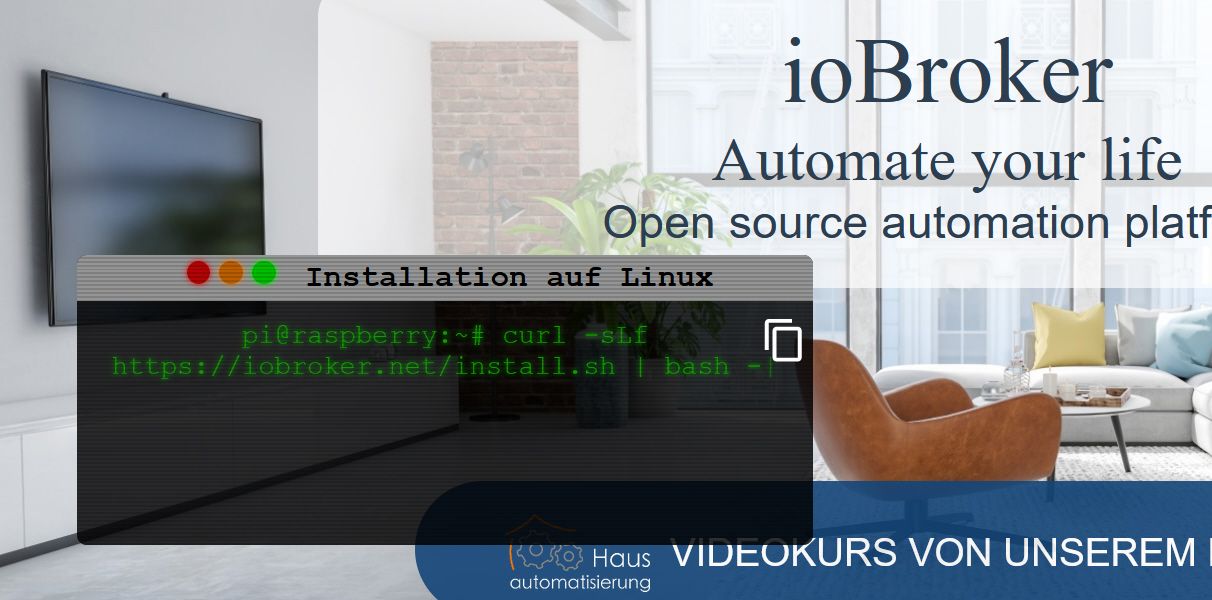
                            @homoran ohne f aus dem internet von anderen usern.
                            mit f von der Iobroker Hauptseite dass man es ab sofort so machen soll.neue.jpg

                            gruß Frank

                            1 Antwort Letzte Antwort
                            0
                            • F Fraenki23

                              @homoran Hallo
                              Danke dass Du Dir die Zeit für mich nimmst.

                              Befehl: curl -sLf https://iobroker.net/install.sh | bash -
                              Nach der installation vom Iobroker startete dieser nicht. Ich habe auch nicht die Meldung bekommen dass ich mit der Ip starten kann

                              Nun einfach nochmals diesen Befehl ausgeführt.
                              Da steht -sL im ersten -sLf

                              Befehl der funktioniert:curl -sL https://iobroker.net/install.sh | bash -
                              Nachdem ich diesen ausgeführt habe startet der Iobroker im Browser und ich kann damit arbeiten

                              Daher das gute Gefühl.
                              Schade ist nur dass es mit dem ersten Befehl nicht funktioniert Was sagt das "Da steht -sL im ersten -sLf"

                              Für mich war es wichtig einmal jeden Schritt zur installation ausgeführt und ohne Fehler abgeschlossen.

                              Danke Frank

                              HomoranH Nicht stören
                              HomoranH Nicht stören
                              Homoran
                              Global Moderator Administrators
                              schrieb am zuletzt editiert von
                              #19

                              @fraenki23 sagte in Iobroker neuinstallation startet nicht:

                              Ich habe auch nicht die Meldung bekommen dass ich mit der Ip starten kann

                              dann war er noch nicht fertig
                              irgendetwas bremst deinen RasPi massiv aus

                              kein Support per PN! - Fragen im Forum stellen -
                              Benutzt das Voting rechts unten im Beitrag wenn er euch geholfen hat.
                              Das Forum freut sich über eine Spende. Benutzt dazu den Spendenbutton oben rechts. Danke!
                              der Installationsfixer: curl -fsL https://iobroker.net/fix.sh | bash -

                              F 1 Antwort Letzte Antwort
                              0
                              • HomoranH Homoran

                                @fraenki23 sagte in Iobroker neuinstallation startet nicht:

                                Ich habe auch nicht die Meldung bekommen dass ich mit der Ip starten kann

                                dann war er noch nicht fertig
                                irgendetwas bremst deinen RasPi massiv aus

                                F Offline
                                F Offline
                                Fraenki23
                                schrieb am zuletzt editiert von
                                #20

                                @homoran kann ich mit einem zweiten geöffneten Putty mit einem Befehl die Geschwindigkeit beim Download testen?
                                Oder allgemein die geschwindigkeit des Raspi.

                                Wenn ich andere sehe läuft das rasend schnell.
                                Ich hatte auch schon das Gefühl dass die Installation auf dem Raspi 2 und 3 schneller geht
                                Gruß Frank

                                Thomas BraunT 1 Antwort Letzte Antwort
                                0
                                • F Fraenki23

                                  @homoran kann ich mit einem zweiten geöffneten Putty mit einem Befehl die Geschwindigkeit beim Download testen?
                                  Oder allgemein die geschwindigkeit des Raspi.

                                  Wenn ich andere sehe läuft das rasend schnell.
                                  Ich hatte auch schon das Gefühl dass die Installation auf dem Raspi 2 und 3 schneller geht
                                  Gruß Frank

                                  Thomas BraunT Online
                                  Thomas BraunT Online
                                  Thomas Braun
                                  Most Active
                                  schrieb am zuletzt editiert von
                                  #21

                                  @fraenki23
                                  Acker mal den kleinen Linux-Werkzeugkasten aus meiner Signatur durch.

                                  Linux-Werkzeugkasten:
                                  https://forum.iobroker.net/topic/42952/der-kleine-iobroker-linux-werkzeugkasten
                                  NodeJS Fixer Skript:
                                  https://forum.iobroker.net/topic/68035/iob-node-fix-skript
                                  iob_diag: curl -sLf -o diag.sh https://iobroker.net/diag.sh && bash diag.sh

                                  HomoranH F 2 Antworten Letzte Antwort
                                  0
                                  • Thomas BraunT Thomas Braun

                                    @fraenki23
                                    Acker mal den kleinen Linux-Werkzeugkasten aus meiner Signatur durch.

                                    HomoranH Nicht stören
                                    HomoranH Nicht stören
                                    Homoran
                                    Global Moderator Administrators
                                    schrieb am zuletzt editiert von
                                    #22

                                    @thomas-braun sagte in Iobroker neuinstallation startet nicht:

                                    @fraenki23
                                    Acker mal den kleinen Linux-Werkzeugkasten aus meiner Signatur durch.

                                    ich denke nicht, dass es hier am node liegt, wenn schon das apt-upgrade Stunden dauert

                                    @fraenki23 sagte in Iobroker neuinstallation startet nicht:

                                    kann ich mit einem zweiten geöffneten Putty mit einem Befehl die Geschwindigkeit beim Download testen?
                                    Oder allgemein die geschwindigkeit des Raspi.

                                    zumindest, ob irgendetwas den RasPi in seiner Arbeit stört, kann man das mit top sehen

                                    kein Support per PN! - Fragen im Forum stellen -
                                    Benutzt das Voting rechts unten im Beitrag wenn er euch geholfen hat.
                                    Das Forum freut sich über eine Spende. Benutzt dazu den Spendenbutton oben rechts. Danke!
                                    der Installationsfixer: curl -fsL https://iobroker.net/fix.sh | bash -

                                    Thomas BraunT 1 Antwort Letzte Antwort
                                    0
                                    • HomoranH Homoran

                                      @thomas-braun sagte in Iobroker neuinstallation startet nicht:

                                      @fraenki23
                                      Acker mal den kleinen Linux-Werkzeugkasten aus meiner Signatur durch.

                                      ich denke nicht, dass es hier am node liegt, wenn schon das apt-upgrade Stunden dauert

                                      @fraenki23 sagte in Iobroker neuinstallation startet nicht:

                                      kann ich mit einem zweiten geöffneten Putty mit einem Befehl die Geschwindigkeit beim Download testen?
                                      Oder allgemein die geschwindigkeit des Raspi.

                                      zumindest, ob irgendetwas den RasPi in seiner Arbeit stört, kann man das mit top sehen

                                      Thomas BraunT Online
                                      Thomas BraunT Online
                                      Thomas Braun
                                      Most Active
                                      schrieb am zuletzt editiert von
                                      #23

                                      @homoran sagte in Iobroker neuinstallation startet nicht:

                                      ich denke nicht, dass es hier am node liegt, wenn schon das apt-upgrade Stunden dauert

                                      Da ist ja auch noch anderes Werkzeug drin.

                                      Linux-Werkzeugkasten:
                                      https://forum.iobroker.net/topic/42952/der-kleine-iobroker-linux-werkzeugkasten
                                      NodeJS Fixer Skript:
                                      https://forum.iobroker.net/topic/68035/iob-node-fix-skript
                                      iob_diag: curl -sLf -o diag.sh https://iobroker.net/diag.sh && bash diag.sh

                                      HomoranH 1 Antwort Letzte Antwort
                                      2
                                      • Thomas BraunT Thomas Braun

                                        @homoran sagte in Iobroker neuinstallation startet nicht:

                                        ich denke nicht, dass es hier am node liegt, wenn schon das apt-upgrade Stunden dauert

                                        Da ist ja auch noch anderes Werkzeug drin.

                                        HomoranH Nicht stören
                                        HomoranH Nicht stören
                                        Homoran
                                        Global Moderator Administrators
                                        schrieb am zuletzt editiert von Homoran
                                        #24

                                        @thomas-braun sagte in Iobroker neuinstallation startet nicht:

                                        @homoran sagte in Iobroker neuinstallation startet nicht:

                                        ich denke nicht, dass es hier am node liegt, wenn schon das apt-upgrade Stunden dauert

                                        Da ist ja auch noch anderes Werkzeug drin.

                                        WOW!

                                        Wann hast du denn den noch aufgefüllt?
                                        OBI hat doch zu

                                        kein Support per PN! - Fragen im Forum stellen -
                                        Benutzt das Voting rechts unten im Beitrag wenn er euch geholfen hat.
                                        Das Forum freut sich über eine Spende. Benutzt dazu den Spendenbutton oben rechts. Danke!
                                        der Installationsfixer: curl -fsL https://iobroker.net/fix.sh | bash -

                                        1 Antwort Letzte Antwort
                                        0
                                        • Thomas BraunT Thomas Braun

                                          @fraenki23
                                          Acker mal den kleinen Linux-Werkzeugkasten aus meiner Signatur durch.

                                          F Offline
                                          F Offline
                                          Fraenki23
                                          schrieb am zuletzt editiert von Homoran
                                          #25

                                          @thomas-braun Hallo
                                          Kannst Du mal drauf schauen. Bin zwar nicht durch hat aber ein paar fragwürdige Stellen. Bin mir nicht sicher ob ich einfach weiter machen soll.

                                          pi@raspberrypi:~ $ sudo
                                          usage: sudo -h | -K | -k | -V
                                          usage: sudo -v [-AknS] [-g group] [-h host] [-p prompt] [-u user]
                                          usage: sudo -l [-AknS] [-g group] [-h host] [-p prompt] [-U user] [-u user]
                                                      [command]
                                          usage: sudo [-AbEHknPS] [-r role] [-t type] [-C num] [-g group] [-h host] [-p
                                                      prompt] [-T timeout] [-u user] [VAR=value] [-i|-s] [<command>]
                                          usage: sudo -e [-AknS] [-r role] [-t type] [-C num] [-g group] [-h host] [-p
                                                      prompt] [-T timeout] [-u user] file ...
                                          pi@raspberrypi:~ $ groups
                                          pi adm dialout cdrom sudo audio video plugdev games users input netdev gpio i2c                                                                              spi iobroker
                                          pi@raspberrypi:~ $ who -r
                                                   run-level 5  Mar 10 09:15
                                          pi@raspberrypi:~ $ sudo raspi-config
                                          Created symlink /etc/systemd/system/default.target → /lib/systemd/system/multi-user.target.
                                          rm: cannot remove '/etc/systemd/system/getty@tty1.service.d/autologin.conf': No such file or directory
                                          pi@raspberrypi:~ $ sudo apt update
                                          Hit:1 http://packages.microsoft.com/repos/code stable InRelease
                                          Hit:2 http://raspbian.raspberrypi.org/raspbian buster InRelease
                                          Hit:3 http://archive.raspberrypi.org/debian buster InRelease
                                          Hit:4 https://deb.nodesource.com/node_12.x buster InRelease
                                          Reading package lists... Done
                                          Building dependency tree
                                          Reading state information... Done
                                          All packages are up to date.
                                          pi@raspberrypi:~ $ sudo apt dist-upgrade
                                          Reading package lists... Done
                                          Building dependency tree
                                          Reading state information... Done
                                          Calculating upgrade... Done
                                          0 upgraded, 0 newly installed, 0 to remove and 0 not upgraded.
                                          pi@raspberrypi:~ $
                                          
                                          sudo reboot
                                          
                                          pi@raspberrypi:~ $ sudo apt update
                                          Hit:1 http://archive.raspberrypi.org/debian buster InRelease
                                          Hit:2 http://raspbian.raspberrypi.org/raspbian buster InRelease
                                          Hit:3 http://packages.microsoft.com/repos/code stable InRelease
                                          Hit:4 https://deb.nodesource.com/node_12.x buster InRelease
                                          Reading package lists... Done
                                          Building dependency tree
                                          Reading state information... Done
                                          All packages are up to date.
                                          pi@raspberrypi:~ $
                                          
                                          pi@raspberrypi:~ $ sudo apt update
                                          Hit:1 http://archive.raspberrypi.org/debian buster InRelease
                                          Hit:2 http://raspbian.raspberrypi.org/raspbian buster InRelease
                                          Hit:3 http://packages.microsoft.com/repos/code stable InRelease
                                          Hit:4 https://deb.nodesource.com/node_12.x buster InRelease
                                          Reading package lists... Done
                                          Building dependency tree
                                          Reading state information... Done
                                          All packages are up to date.
                                          pi@raspberrypi:~ $ ^C
                                          pi@raspberrypi:~ $ sudo apt update
                                          Hit:1 http://packages.microsoft.com/repos/code stable InRelease
                                          Get:2 http://raspbian.raspberrypi.org/raspbian buster InRelease [15.0 kB]
                                          Hit:3 http://archive.raspberrypi.org/debian buster InRelease
                                          Hit:4 https://deb.nodesource.com/node_12.x buster InRelease
                                          Fetched 15.0 kB in 1s (11.1 kB/s)
                                          Reading package lists... Done
                                          Building dependency tree
                                          Reading state information... Done
                                          All packages are up to date.
                                          

                                          Nun reagiert er nicht auf sudo reboot springt ins normale Fenster pi@raspberrypi:~ $
                                          Nach ca 1 Minute ist denn doch in den reboot Modus gegangen

                                          pi@raspberrypi:~ $ sudo reboot
                                          pi@raspberrypi:~ $
                                          
                                          
                                          pi@raspberrypi:~ $ which nodejs && nodejs -v && which node && node -v && which npm && npm -v && apt policy nodejs
                                          /usr/bin/nodejs
                                          v12.21.0
                                          /usr/bin/node
                                          v12.21.0
                                          npm erscheint nicht
                                          
                                          
                                          pi@raspberrypi:~ $ iobroker repo list
                                          default     : http://download.iobroker.net/sources-dist.json
                                          latest      : http://download.iobroker.net/sources-dist-latest.json
                                          
                                          Active repo: default
                                          pi@raspberrypi:~ $
                                          

                                          MOD-Edit: Code in code-tags gesetzt!

                                          Thomas BraunT 2 Antworten Letzte Antwort
                                          0

                                          Hey! Du scheinst an dieser Unterhaltung interessiert zu sein, hast aber noch kein Konto.

                                          Hast du es satt, bei jedem Besuch durch die gleichen Beiträge zu scrollen? Wenn du dich für ein Konto anmeldest, kommst du immer genau dorthin zurück, wo du zuvor warst, und kannst dich über neue Antworten benachrichtigen lassen (entweder per E-Mail oder Push-Benachrichtigung). Du kannst auch Lesezeichen speichern und Beiträge positiv bewerten, um anderen Community-Mitgliedern deine Wertschätzung zu zeigen.

                                          Mit deinem Input könnte dieser Beitrag noch besser werden 💗

                                          Registrieren Anmelden
                                          Antworten
                                          • In einem neuen Thema antworten
                                          Anmelden zum Antworten
                                          • Älteste zuerst
                                          • Neuste zuerst
                                          • Meiste Stimmen


                                          Support us

                                          ioBroker
                                          Community Adapters
                                          Donate
                                          FAQ Cloud / IOT
                                          HowTo: Node.js-Update
                                          HowTo: Backup/Restore
                                          Downloads
                                          BLOG

                                          311

                                          Online

                                          32.9k

                                          Benutzer

                                          83.0k

                                          Themen

                                          1.3m

                                          Beiträge
                                          Community
                                          Impressum | Datenschutz-Bestimmungen | Nutzungsbedingungen | Einwilligungseinstellungen
                                          ioBroker Community 2014-2025
                                          logo
                                          • Anmelden

                                          • Du hast noch kein Konto? Registrieren

                                          • Anmelden oder registrieren, um zu suchen
                                          • Erster Beitrag
                                            Letzter Beitrag
                                          0
                                          • Home
                                          • Aktuell
                                          • Tags
                                          • Ungelesen 0
                                          • Kategorien
                                          • Unreplied
                                          • Beliebt
                                          • GitHub
                                          • Docu
                                          • Hilfe