




Tut-OpenVPN Server im Container unter Proxmox
-
@lemuba
so wie es ausschaut, hast Du 2 verschiedene IP-Bereiche angegeben bei der Installation. In einer Videoanleitung die ich mal gesehen habe, wurde gesagt, dass die gleich sein können. Habe ich dann bei mir auch so gemacht.Für deinen Fall, wenn sie unterschiedlich sind (ungetestet!)
nano /etc/openvpn/server.conf
zu deiner vorhandenen server.conf hinzufügenpush "route 192.168.12.0 255.255.255.0" push "dhcp-options DNS 192.168.12.1"Ich gehe davon aus, dass deine Fritzbox auch den DNS macht.
FRITZ.Box--> Heimnetz/Netzwerk/Netzwerkeinstellungen/IPv4-Routen
neue Route anlegen:IPv4Netzwerk: 10.55.75.0 --> IP vom virtuellen Netz Subnetzmaske: 255.255.255.0 --> Sub vom virtuellen Netz Gateway: 192.168.12.8 --> IP von OpenVPN-Server@Lenny-CB sagte in Tut-OpenVPN Server im Container unter Proxmox:
@lemuba
so wie es ausschaut, hast Du 2 verschiedene IP-Bereiche angegeben bei der Installation. In einer Videoanleitung die ich mal gesehen habe, wurde gesagt, dass die gleich sein können. Habe ich dann bei mir auch so gemacht.Diese Videoanleitung hatte ich auch schon durch... kein Erfolg, dann wurde noch nichtmal die Client-Verbindung auf dem Iphone Grün.:
Die von Dir vorgeschlagne server.conf Settings und Routings auch ohne Erfolg bisher.
Ich schaue nochmal in Ruhe am Wochenende. Ich denke ich werde aber auch nochmal direkt ein Debian OpenVpn/nicht Turnkey aufsetzen/testen.
Ich bin eigentlich Weltmeister im Googeln ;-) Aber die Turnkey VPN Doku ist armselig - dachte erst, weil als Proxmox Template angeboten, dass da mehr hinter steht... offentsichlich nicht.Bei meiner vorheringen Lösung, Dietpi/Open VPN (nun abgeschaltet), brauchte ich überhaupt kein Routing auf meiner Fritte einstellen. Kam über Jahre so problemlos in mein Heimnetz - kann aber sein, dass ich "damals" DHCP-technisch, etc. noch was an der Diskstation selber einstellen musste - nur kann ich mich da nicht mehr dran erinnern ;-)
Das ist nun auch das Tolle an Proxmox, den einzelnen Containern und VMs - man kann überall seine Notizen/Links reinschreiben...
-
@Lenny-CB sagte in Tut-OpenVPN Server im Container unter Proxmox:
@lemuba
so wie es ausschaut, hast Du 2 verschiedene IP-Bereiche angegeben bei der Installation. In einer Videoanleitung die ich mal gesehen habe, wurde gesagt, dass die gleich sein können. Habe ich dann bei mir auch so gemacht.Diese Videoanleitung hatte ich auch schon durch... kein Erfolg, dann wurde noch nichtmal die Client-Verbindung auf dem Iphone Grün.:
Die von Dir vorgeschlagne server.conf Settings und Routings auch ohne Erfolg bisher.
Ich schaue nochmal in Ruhe am Wochenende. Ich denke ich werde aber auch nochmal direkt ein Debian OpenVpn/nicht Turnkey aufsetzen/testen.
Ich bin eigentlich Weltmeister im Googeln ;-) Aber die Turnkey VPN Doku ist armselig - dachte erst, weil als Proxmox Template angeboten, dass da mehr hinter steht... offentsichlich nicht.Bei meiner vorheringen Lösung, Dietpi/Open VPN (nun abgeschaltet), brauchte ich überhaupt kein Routing auf meiner Fritte einstellen. Kam über Jahre so problemlos in mein Heimnetz - kann aber sein, dass ich "damals" DHCP-technisch, etc. noch was an der Diskstation selber einstellen musste - nur kann ich mich da nicht mehr dran erinnern ;-)
Das ist nun auch das Tolle an Proxmox, den einzelnen Containern und VMs - man kann überall seine Notizen/Links reinschreiben...
@lemuba sagte in Tut-OpenVPN Server im Container unter Proxmox:
Diese Videoanleitung hatte ich auch schon durch.
welche war das?
vllt hilft das hier
https://administrator.de/wissen/openvpn-server-installieren-pfsense-firewall-mikrotik-dd-wrt-gl-inet-router-123285.html#toc-17 -
@lemuba sagte in Tut-OpenVPN Server im Container unter Proxmox:
Diese Videoanleitung hatte ich auch schon durch.
welche war das?
vllt hilft das hier
https://administrator.de/wissen/openvpn-server-installieren-pfsense-firewall-mikrotik-dd-wrt-gl-inet-router-123285.html#toc-17 -
@lemuba
 dacht ich mir
habs bissher auch nicht hinbekommen, scheiter am unifi
aber irgendwo hab ich mal was mitbekommen, dasTunim Video fehlt, das muss noch gesetzt/aktiviert werden, ohne gehts nicht,
kenn mich damit selbst nicht aus -
@lemuba sagte in Tut-OpenVPN Server im Container unter Proxmox:
Die hier:
genau das meine ich. Danach habe ich das auch gemacht. Verbindung war dann OK. Nur aufs interne Netz ging es nicht.
@crunchip sagte in Tut-OpenVPN Server im Container unter Proxmox:
@lemuba sagte in Tut-OpenVPN Server im Container unter Proxmox:
Diese Videoanleitung hatte ich auch schon durch.
welche war das?
vllt hilft das hier
https://administrator.de/wissen/openvpn-server-installieren-pfsense-firewall-mikrotik-dd-wrt-gl-inet-router-123285.html#toc-17und dieser Link brachte mich dann zur den push-Routen und der IPv4-Route.
Ist schon sehr merkwürdig.

-
Hallo @H4lunkE
So, dann hier weiter ;-)
Ich erkläre das kurz auf meine Hardware bezogen - musst Du ggf. für Deine anpassen...
- Benötigst Du einen DynDns Account, die Daten werden dann entsprechend im Router eingetragen.
Sieht dann nach erfolgreicher Eingabe der Daten und Anmeldung meines Routers (Fritzbox 7590) so aus:
DynDNS: aktiviert, "meinName".selfhost.eu, IPv4-Status: erfolgreich angemeldet, IPv6-Status: unbekannt
-
DynDns war zu meiner Zeit kostenlos über selfhost.eu zu bekommen und gibt es wohl immer noch:
http://selfhost.eu/cgi-bin/selfhost?p=cms&article=free&CGISESSID=f5b53416172e611211362f0eb7c5942e -
Danach installierst Du von den Proxmox Container Templates:
turnkey-openvpn
Dafür reicht ne Minimalinstallation mit wenig Resourcen, schaust Du bei mir:
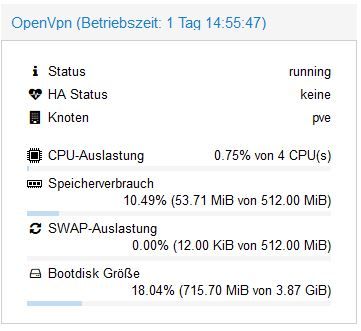
-
Nachdem der Container läuft, seine IP-Adresse ermitteln, wenn Du keine feste IP vergeben hast (sollte aber eine Feste sein...).
-
Zurück zu Deinem Router und eine Port-Forwarding Regel für OpenVPN anlegen:
Port: 1194, UDP auf die IP Adresse Deines OpenVPN Containers -
Danach gehst Du im Browser auf das TurnKey OpenVPN Webinterface, einfach per Eingabe der IP - es sollte dann das kommen:
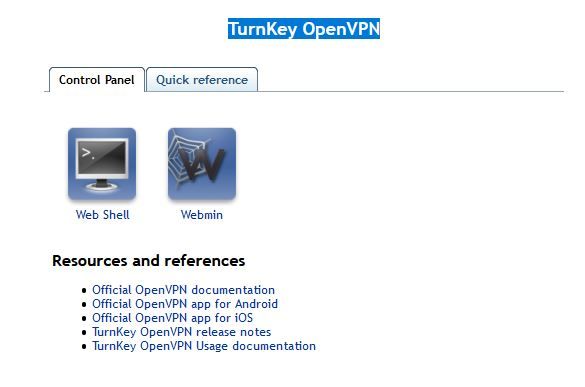
-
Klicke da im Menü zur Info auf: Quick Referenece
-
Erstelle in der Proxmox Open VPN Konsole dann Dein eigenes Schlüsselfile pro gewünschtem Client (z.b. für ein Tablet):
Beispiel:
root@OpenVpn ~# openvpn-addclient mydevice info@test.de- Sollte dann Folgendes bei rauskommen:
Debian GNU/Linux 9 OpenVpn tty1

OpenVpn login: root
Password:
Last login: Fri Sep 11 23:11:38 CEST 2020 on tty1
Welcome to Openvpn, TurnKey GNU/Linux 15.1 / TurnKey 9.7 Stretch

  System information (as of Wed Sep 16 23:49:35 2020)

    System load:  0.70              Memory usage:  25%
    Processes:    25                Swap usage:    0%
    Usage of /:   18.0% of 3.87GB   IP address for eth0:  192.168.12.8
                                    IP address for tun0:  10.207.137.1

  TKLBAM (Backup and Migration):  NOT INITIALIZED

    To initialize TKLBAM, run the "tklbam-init" command to link this
    system to your TurnKey Hub account. For details see the man page or
    go to:

        https://www.turnkeylinux.org/tklbam

Linux OpenVpn 5.4.60-1-pve #1 SMP PVE 5.4.60-2 (Fri, 04 Sep 2020 10:24:50 +0200) x86_64
root@OpenVpn ~# openvpn-addclient meintablet info@test.de
Using Common Name: meintablet
Generating a RSA private key
..................................................................................................................................................................................................................................................................................................+++++
...........+++++
writing new private key to 'meintablet.key'
-----
Using configuration from /etc/openvpn/easy-rsa/openssl.cnf
Check that the request matches the signature
Signature ok
The Subject's Distinguished Name is as follows
countryName           :PRINTABLE:'US'
stateOrProvinceName   :PRINTABLE:'CA'
localityName          :PRINTABLE:'San Francisco'
organizationName      :PRINTABLE:'TurnKey Linux'
organizationalUnitName:PRINTABLE:'OpenVPN'
commonName            :PRINTABLE:'meintablet'
name                  :PRINTABLE:'openvpn'
emailAddress          :IA5STRING:'info@test.de'
Certificate is to be certified until Sep 14 21:52:12 2030 GMT (3650 days)

Write out database with 1 new entries
Data Base Updated

INFO: generated /etc/openvpn/easy-rsa/keys/meintablet.ovpn
root@OpenVpn ~# openvpn-addclient mydevice info@test.de
Using Common Name: mydevice
Generating a RSA private key
...................................................................................................................................................................................+++++
....................................................+++++
writing new private key to 'mydevice.key'
-----
Using configuration from /etc/openvpn/easy-rsa/openssl.cnf
Check that the request matches the signature
Signature ok
The Subject's Distinguished Name is as follows
countryName           :PRINTABLE:'US'
stateOrProvinceName   :PRINTABLE:'CA'
localityName          :PRINTABLE:'San Francisco'
organizationName      :PRINTABLE:'TurnKey Linux'
organizationalUnitName:PRINTABLE:'OpenVPN'
commonName            :PRINTABLE:'mydevice'
name                  :PRINTABLE:'openvpn'
emailAddress          :IA5STRING:'info@test.de'
Certificate is to be certified until Sep 14 21:57:21 2030 GMT (3650 days)

Write out database with 1 new entries
Data Base Updated

INFO: generated /etc/openvpn/easy-rsa/keys/mydevice.ovpn
root@OpenVpn ~
10: Dieses Key-File (mydevice.ovpn) benötigst Du nun, ziehe ich z.B. mit Filezilla, per SFTP, runter: INFO: generated /etc/openvpn/easy-rsa/keys/mydevice.ovpn
11. Auf meinem Iphone und IPad habe ich OpenVPN Connect installiert - klick mich:
- Öffne dort die Key Datei mit OpenVPN Connect - das sollte es dann gewesen sein, der Rest erklärt sich selber.
Falls ich aufgrund Demenz etwas vergessen habe, oder nicht funktioniert, melde Dich nochmal. Viele Wege führen nach Rom, vielleicht wissens auch Andere hier noch besser...
Ich habe einen 500/100MBit - Glasfaseranschluss - die Begrenzung war bisher nur das Unterwegs-Gastnetzwerk in dem ich eingeloggt war, aber nie mehr die VPN Verbindung als Solche. VPN direkt eingerichtet über eine Fritzbox oder anderen schwachen Router/Hardware begrenzt da teilweise ganz gewaltig. Sofern VPN über einen potenten NUC (wie unseren ;-) ) eingerichtet, sicherlich eine sehr gute Option.
Hoffe ich konnte helfen,
Gruß,
Matthias
Edit/Generelle Info: Einige Hotel Wlans, aber auch Fritzbox Gastnetztwerke erlauben nur das reine Surfen und Email abbrufen - also nicht wundern, wenn Du aus einem solchem Wlan nicht per VPN nach Hause kommst, sich keine Verbindung aufbaut... Sofern ich dann alternativ auf meinem Iphone ne gute LTE Verbindung übers Mübilfunknetz habe, deaktiviere ich das Gastnetz-Wlan und OpenVpneeee per LTE nach Hause... Es gibt (gab?) aber auch wohl Mobilfunktarife, die ganz billgen, bei denen auch VPN gesperrt ist/war - tbc...
Lohnt sich immer man nachzuschauen falls man einen günstigen NUC/MiniPc sucht - klick mich.
-
danke für das Tut

Ich kann leider in meinem Proxmox (6.2-11) kein turnkey-openvpn Template finden.
Kann ich das irgendwo runterladen?@H4lunkE sagte in Tut-OpenVPN Server im Container unter Proxmox:
Kann ich das irgendwo runterladen?
Ja:
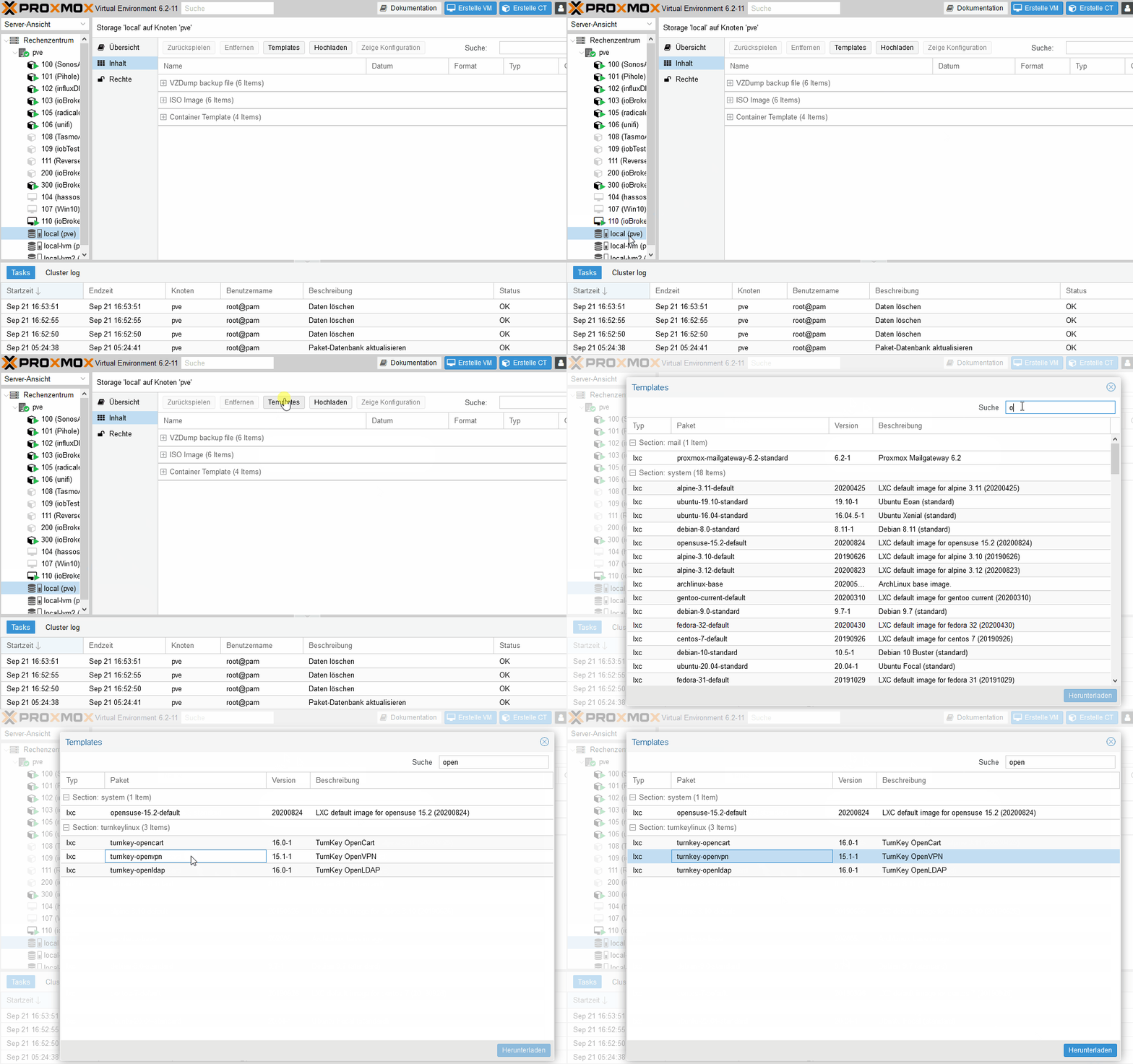
-
@H4lunkE sagte in Tut-OpenVPN Server im Container unter Proxmox:
Kann ich das irgendwo runterladen?
Ja:
-
So, nach einer endlosen Odysse habe ich nun anscheinend einen funktionierenden OpenVpn Container hinbekommen - wer Ihn testen möchte, anbei der Download Link - ich lasse den ein paar Tage aktiv...:
Download Link.... Klick mich. Edit 12. Oktober: Habe den DL entfernt. Falls noch jemand testen möchte, schickt mir bitte ne PM für einen Link.
Beim Zurückspielen über Proxmox Backup/Restore den Haken bei "Priviligierter Container" rausnehmen, sonst gibt es eine Fehlermeldung/geht es nicht...
Einiges vorab - eingeflossen in den Container sind Infos und Settings aus:
https://www.hungred.com/how-to/setup-openvpn-on-proxmox-lxc/
https://bugs.debian.org/cgi-bin/bugreport.cgi?bug=939903
(Hi, enabling the lxc nesting feature for the container solved the issue for me...)
https://forum.proxmox.com/threads/lxc-als-openvpn-server-keine-netzwerkverbindung.52546/
https://www.cyberciti.biz/faq/debian-10-set-up-openvpn-server-in-5-minutes/
Was Ihr nach dem Import des Containers machen müsst:
Eure eigene IPv4 und Gateway Adresse eintragen.
Den Container starten - über die Proxmox Konsole einloggen:User: root
Pw: root(PW danach gerne ändern;-) )
In der Konsole dann:
Debian GNU/Linux 10 VPNBackup tty1

VPNBackup login: root
Password:
Last login: Tue Oct  6 14:34:54 CEST 2020 on tty1
Linux VPNBackup 5.4.60-1-pve #1 SMP PVE 5.4.60-2 (Fri, 04 Sep 2020 10:24:50 +0200) x86_64

The programs included with the Debian GNU/Linux system are free software;
the exact distribution terms for each program are described in the
individual files in /usr/share/doc/*/copyright.

Debian GNU/Linux comes with ABSOLUTELY NO WARRANTY, to the extent
permitted by applicable law.
root@VPNBackup:~#  sudo ./debian10-vpn.sh
Welcome to the OpenVPN installer!
The git repository is available at: https://github.com/angristan/openvpn-install

I need to ask you a few questions before starting the setup.
You can leave the default options and just press enter if you are ok with them.

I need to know the IPv4 address of the network interface you want OpenVPN listening to.
Unless your server is behind NAT, it should be your public IPv4 address.
IP address: 192.168.12.80

It seems this server is behind NAT. What is its public IPv4 address or hostname?
We need it for the clients to connect to the server.
Public IPv4 address or hostname: DeinDynDnsAccount

Checking for IPv6 connectivity...

Your host appears to have IPv6 connectivity.

Do you want to enable IPv6 support (NAT)? [y/n]: n

What port do you want OpenVPN to listen to?
   1) Default: 1194
   2) Custom
   3) Random [49152-65535]
Port choice [1-3]: 1

What protocol do you want OpenVPN to use?
UDP is faster. Unless it is not available, you shouldn't use TCP.
   1) UDP
   2) TCP
Protocol [1-2]: 1

What DNS resolvers do you want to use with the VPN?
   1) Current system resolvers (from /etc/resolv.conf)
   2) Self-hosted DNS Resolver (Unbound)
   3) Cloudflare (Anycast: worldwide)
   4) Quad9 (Anycast: worldwide)
   5) Quad9 uncensored (Anycast: worldwide)
   6) FDN (France)
   7) DNS.WATCH (Germany)
   8) OpenDNS (Anycast: worldwide)
   9) Google (Anycast: worldwide)
   10) Yandex Basic (Russia)
   11) AdGuard DNS (Anycast: worldwide)
   12) NextDNS (Anycast: worldwide)
   13) Custom
DNS [1-12]: 9

Do you want to use compression? It is not recommended since the VORACLE attack make use of it.
Enable compression? [y/n]: n

Do you want to customize encryption settings?
Unless you know what you're doing, you should stick with the default parameters provided by the script.
Note that whatever you choose, all the choices presented in the script are safe. (Unlike OpenVPN's defaults)
See https://github.com/angristan/openvpn-install#security-and-encryption to learn more.

Customize encryption settings? [y/n]: n

Okay, that was all I needed. We are ready to setup your OpenVPN server now.
You will be able to generate a client at the end of the installation.
Press any key to continue...
Hit:1 http://security.debian.org buster/updates InRelease
Hit:2 http://ftp.debian.org/debian buster InRelease
Hit:3 http://ftp.debian.org/debian buster-updates InRelease
Hit:4 https://deb.nodesource.com/node_12.x buster InRelease
Reading package lists... Done
Reading package lists... Done
Building dependency tree
Reading state information... Done
gnupg is already the newest version (2.2.12-1+deb10u1).
ca-certificates is already the newest version (20200601~deb10u1).
0 upgraded, 0 newly installed, 0 to remove and 0 not upgraded.
Reading package lists... Done
Building dependency tree
Reading state information... Done
curl is already the newest version (7.64.0-4+deb10u1).
iptables is already the newest version (1.8.2-4).
openssl is already the newest version (1.1.1d-0+deb10u3).
wget is already the newest version (1.20.1-1.1).
ca-certificates is already the newest version (20200601~deb10u1).
The following additional packages will be installed:
  easy-rsa libccid libglib2.0-0 libglib2.0-data liblzo2-2 libpcsclite1 libpkcs11-helper1 libusb-1.0-0 opensc opensc-pkcs11 pcscd shared-mime-info xdg-user-dirs
Suggested packages:
  pcmciautils resolvconf openvpn-systemd-resolved
The following NEW packages will be installed:
  easy-rsa libccid libglib2.0-0 libglib2.0-data liblzo2-2 libpcsclite1 libpkcs11-helper1 libusb-1.0-0 opensc opensc-pkcs11 openvpn pcscd shared-mime-info
  xdg-user-dirs
0 upgraded, 14 newly installed, 0 to remove and 0 not upgraded.
Need to get 0 B/5493 kB of archives.
After this operation, 24.3 MB of additional disk space will be used.
Preconfiguring packages ...
Selecting previously unselected package easy-rsa.
(Reading database ... 30802 files and directories currently installed.)
Preparing to unpack .../00-easy-rsa_3.0.6-1_all.deb ...
Unpacking easy-rsa (3.0.6-1) ...
Selecting previously unselected package libusb-1.0-0:amd64.
Preparing to unpack .../01-libusb-1.0-0_2%3a1.0.22-2_amd64.deb ...
Unpacking libusb-1.0-0:amd64 (2:1.0.22-2) ...
Selecting previously unselected package libccid.
Preparing to unpack .../02-libccid_1.4.30-1_amd64.deb ...
Unpacking libccid (1.4.30-1) ...
Selecting previously unselected package libglib2.0-0:amd64.
Preparing to unpack .../03-libglib2.0-0_2.58.3-2+deb10u2_amd64.deb ...
Unpacking libglib2.0-0:amd64 (2.58.3-2+deb10u2) ...
Selecting previously unselected package libglib2.0-data.
Preparing to unpack .../04-libglib2.0-data_2.58.3-2+deb10u2_all.deb ...
Unpacking libglib2.0-data (2.58.3-2+deb10u2) ...
Selecting previously unselected package liblzo2-2:amd64.
Preparing to unpack .../05-liblzo2-2_2.10-0.1_amd64.deb ...
Unpacking liblzo2-2:amd64 (2.10-0.1) ...
Selecting previously unselected package libpcsclite1:amd64.
Preparing to unpack .../06-libpcsclite1_1.8.24-1_amd64.deb ...
Unpacking libpcsclite1:amd64 (1.8.24-1) ...
Selecting previously unselected package libpkcs11-helper1:amd64.
Preparing to unpack .../07-libpkcs11-helper1_1.25.1-1_amd64.deb ...
Unpacking libpkcs11-helper1:amd64 (1.25.1-1) ...
Selecting previously unselected package opensc-pkcs11:amd64.
Preparing to unpack .../08-opensc-pkcs11_0.19.0-1_amd64.deb ...
Unpacking opensc-pkcs11:amd64 (0.19.0-1) ...
Selecting previously unselected package opensc.
Preparing to unpack .../09-opensc_0.19.0-1_amd64.deb ...
Unpacking opensc (0.19.0-1) ...
Selecting previously unselected package openvpn.
Preparing to unpack .../10-openvpn_2.4.7-1_amd64.deb ...
Unpacking openvpn (2.4.7-1) ...
Selecting previously unselected package pcscd.
Preparing to unpack .../11-pcscd_1.8.24-1_amd64.deb ...
Unpacking pcscd (1.8.24-1) ...
Selecting previously unselected package shared-mime-info.
Preparing to unpack .../12-shared-mime-info_1.10-1_amd64.deb ...
Unpacking shared-mime-info (1.10-1) ...
Selecting previously unselected package xdg-user-dirs.
Preparing to unpack .../13-xdg-user-dirs_0.17-2_amd64.deb ...
Unpacking xdg-user-dirs (0.17-2) ...
Setting up xdg-user-dirs (0.17-2) ...
Setting up libglib2.0-0:amd64 (2.58.3-2+deb10u2) ...
No schema files found: doing nothing.
Setting up liblzo2-2:amd64 (2.10-0.1) ...
Setting up libpkcs11-helper1:amd64 (1.25.1-1) ...
Setting up opensc-pkcs11:amd64 (0.19.0-1) ...
Setting up libglib2.0-data (2.58.3-2+deb10u2) ...
Setting up shared-mime-info (1.10-1) ...
Setting up libpcsclite1:amd64 (1.8.24-1) ...
Setting up libusb-1.0-0:amd64 (2:1.0.22-2) ...
Setting up easy-rsa (3.0.6-1) ...
Setting up openvpn (2.4.7-1) ...
[ ok ] Restarting virtual private network daemon.:.
Created symlink /etc/systemd/system/multi-user.target.wants/openvpn.service -> /lib/systemd/system/openvpn.service.
Setting up libccid (1.4.30-1) ...
Setting up opensc (0.19.0-1) ...
Setting up pcscd (1.8.24-1) ...
Created symlink /etc/systemd/system/sockets.target.wants/pcscd.socket -> /lib/systemd/system/pcscd.socket.
Processing triggers for man-db (2.8.5-2) ...
Processing triggers for mime-support (3.62) ...
Processing triggers for libc-bin (2.28-10) ...
Processing triggers for systemd (241-7~deb10u4) ...
--2020-10-06 16:16:34--  https://github.com/OpenVPN/easy-rsa/releases/download/v3.0.7/EasyRSA-3.0.7.tgz
Resolving github.com (github.com)... 140.82.121.3
Connecting to github.com (github.com)|140.82.121.3|:443... connected.
HTTP request sent, awaiting response... 302 Found
Location: https://github-production-release-asset-2e65be.s3.amazonaws.com/4519663/0fa24e00-72ba-11ea-9afe-6e5829eec4a4?X-Amz-Algorithm=AWS4-HMAC-SHA256&X-Amz-Credential=AKIAIWNJYAX4CSVEH53A%2F20201006%2Fus-east-1%2Fs3%2Faws4_request&X-Amz-Date=20201006T141635Z&X-Amz-Expires=300&X-Amz-Signature=53ef2b9f47cccd429051264b13a8d71588d021632a22cc5c74ce954ffa6b1225&X-Amz-SignedHeaders=host&actor_id=0&key_id=0&repo_id=4519663&response-content-disposition=attachment%3B%20filename%3DEasyRSA-3.0.7.tgz&response-content-type=application%2Foctet-stream [following]
--2020-10-06 16:16:35--  https://github-production-release-asset-2e65be.s3.amazonaws.com/4519663/0fa24e00-72ba-11ea-9afe-6e5829eec4a4?X-Amz-Algorithm=AWS4-HMAC-SHA256&X-Amz-Credential=AKIAIWNJYAX4CSVEH53A%2F20201006%2Fus-east-1%2Fs3%2Faws4_request&X-Amz-Date=20201006T141635Z&X-Amz-Expires=300&X-Amz-Signature=53ef2b9f47cccd429051264b13a8d71588d021632a22cc5c74ce954ffa6b1225&X-Amz-SignedHeaders=host&actor_id=0&key_id=0&repo_id=4519663&response-content-disposition=attachment%3B%20filename%3DEasyRSA-3.0.7.tgz&response-content-type=application%2Foctet-stream
Resolving github-production-release-asset-2e65be.s3.amazonaws.com (github-production-release-asset-2e65be.s3.amazonaws.com)... 52.216.177.179
Connecting to github-production-release-asset-2e65be.s3.amazonaws.com (github-production-release-asset-2e65be.s3.amazonaws.com)|52.216.177.179|:443... connected.
HTTP request sent, awaiting response... 200 OK
Length: 48215 (47K) [application/octet-stream]
Saving to: '/root/easy-rsa.tgz'

/root/easy-rsa.tgz                       100%[================================================================================>]  47.08K  --.-KB/s    in 0.1s

2020-10-06 16:16:35 (453 KB/s) - '/root/easy-rsa.tgz' saved [48215/48215]


Note: using Easy-RSA configuration from: /etc/openvpn/easy-rsa/vars

init-pki complete; you may now create a CA or requests.
Your newly created PKI dir is: /etc/openvpn/easy-rsa/pki


Using SSL: openssl OpenSSL 1.1.1d  10 Sep 2019
read EC key
writing EC key


Note: using Easy-RSA configuration from: /etc/openvpn/easy-rsa/vars
Using SSL: openssl OpenSSL 1.1.1d  10 Sep 2019
Generating an EC private key
writing new private key to '/etc/openvpn/easy-rsa/pki/easy-rsa-1203.Mwocmp/tmp.7OMflM'
-----
Using configuration from /etc/openvpn/easy-rsa/pki/easy-rsa-1203.Mwocmp/tmp.3hKpRm
Check that the request matches the signature
Signature ok
The Subject's Distinguished Name is as follows
commonName            :ASN.1 12:'server_bWsPvqZkUF7zn7cQ'
Certificate is to be certified until Jan  9 14:16:35 2023 GMT (825 days)

Write out database with 1 new entries
Data Base Updated


Note: using Easy-RSA configuration from: /etc/openvpn/easy-rsa/vars
Using SSL: openssl OpenSSL 1.1.1d  10 Sep 2019
Using configuration from /etc/openvpn/easy-rsa/pki/easy-rsa-1280.A1dm2S/tmp.hNgPl1

An updated CRL has been created.
CRL file: /etc/openvpn/easy-rsa/pki/crl.pem


* Applying /etc/sysctl.d/20-openvpn.conf ...
net.ipv4.ip_forward = 1
* Applying /etc/sysctl.d/99-sysctl.conf ...
net.ipv4.ip_forward = 1
* Applying /etc/sysctl.d/protect-links.conf ...
sysctl: setting key "fs.protected_hardlinks": Read-only file system
sysctl: setting key "fs.protected_symlinks": Read-only file system
* Applying /etc/sysctl.conf ...
net.ipv4.ip_forward = 1
Created symlink /etc/systemd/system/multi-user.target.wants/openvpn@server.service -> /etc/systemd/system/openvpn@.service.
Created symlink /etc/systemd/system/multi-user.target.wants/iptables-openvpn.service -> /etc/systemd/system/iptables-openvpn.service.

Tell me a name for the client.
The name must consist of alphanumeric character. It may also include an underscore or a dash.
Client name: testaccount

Do you want to protect the configuration file with a password?
(e.g. encrypt the private key with a password)
   1) Add a passwordless client
   2) Use a password for the client
Select an option [1-2]: 1

Note: using Easy-RSA configuration from: /etc/openvpn/easy-rsa/vars
Using SSL: openssl OpenSSL 1.1.1d  10 Sep 2019
Generating an EC private key
writing new private key to '/etc/openvpn/easy-rsa/pki/easy-rsa-1416.IsenCe/tmp.mXm78Y'
-----
Using configuration from /etc/openvpn/easy-rsa/pki/easy-rsa-1416.IsenCe/tmp.QuQ2SU
Check that the request matches the signature
Signature ok
The Subject's Distinguished Name is as follows
commonName            :ASN.1 12:'testaccount'
Certificate is to be certified until Jan  9 14:16:53 2023 GMT (825 days)

Write out database with 1 new entries
Data Base Updated

Client testaccount added.

The configuration file has been written to /home/root/testaccount.ovpn.
Download the .ovpn file and import it in your OpenVPN client.
root@VPNBackup:~#
Falls was schiefgelaufen ist bei der Eingabe, oder geändert werden soll, am besten wieder Eingeben:
root@VPNBackup:~#  sudo ./debian10-vpn.sh
Welcome to OpenVPN-install!
The git repository is available at: https://github.com/angristan/openvpn-install

It looks like OpenVPN is already installed.

What do you want to do?
   1) Add a new user
   2) Revoke existing user
   3) Remove OpenVPN
   4) Exit
Select an option [1-4]: 3

Do you really want to remove OpenVPN? [y/n]: y
Removed /etc/systemd/system/multi-user.target.wants/openvpn@server.service.
Removed /etc/systemd/system/multi-user.target.wants/iptables-openvpn.service.
Reading package lists... Done
Building dependency tree
Reading state information... Done
The following packages will be REMOVED:
  easy-rsa* libccid* libglib2.0-0* libglib2.0-data* liblzo2-2* libpcsclite1* libpkcs11-helper1* libusb-1.0-0* opensc* opensc-pkcs11* openvpn* pcscd*
  shared-mime-info* xdg-user-dirs*
0 upgraded, 0 newly installed, 14 to remove and 0 not upgraded.
After this operation, 24.3 MB disk space will be freed.
(Reading database ... 31413 files and directories currently installed.)
Removing easy-rsa (3.0.6-1) ...
Removing pcscd (1.8.24-1) ...
Warning: Stopping pcscd.service, but it can still be activated by:
  pcscd.socket
Removing libccid (1.4.30-1) ...
Removing shared-mime-info (1.10-1) ...
Removing opensc (0.19.0-1) ...
Removing opensc-pkcs11:amd64 (0.19.0-1) ...
Removing libglib2.0-0:amd64 (2.58.3-2+deb10u2) ...
Removing libglib2.0-data (2.58.3-2+deb10u2) ...
Removing openvpn (2.4.7-1) ...
Removing liblzo2-2:amd64 (2.10-0.1) ...
Removing libpcsclite1:amd64 (1.8.24-1) ...
Removing libpkcs11-helper1:amd64 (1.25.1-1) ...
Removing libusb-1.0-0:amd64 (2:1.0.22-2) ...
Removing xdg-user-dirs (0.17-2) ...
Processing triggers for libc-bin (2.28-10) ...
Processing triggers for man-db (2.8.5-2) ...
Processing triggers for mime-support (3.62) ...
(Reading database ... 30819 files and directories currently installed.)
Purging configuration files for openvpn (2.4.7-1) ...
dpkg: warning: while removing openvpn, directory '/var/log/openvpn' not empty so not removed
dpkg: warning: while removing openvpn, directory '/etc/openvpn' not empty so not removed
Purging configuration files for xdg-user-dirs (0.17-2) ...
Purging configuration files for libccid (1.4.30-1) ...
Purging configuration files for libglib2.0-0:amd64 (2.58.3-2+deb10u2) ...
Purging configuration files for opensc (0.19.0-1) ...
Purging configuration files for pcscd (1.8.24-1) ...
Purging configuration files for shared-mime-info (1.10-1) ...
Processing triggers for systemd (241-7~deb10u4) ...

OpenVPN removed!
root@VPNBackup:~#
Und Oben neu starten....
Der Container ist schon so eingestellt, dass er SSH über root erlaubt.
https://pits-online.info/2010/09/03/anmeldung-als-root-per-ssh-zulassen/
Damit könnt Ihr Euch dann auch entsprechend für Eure Clients das ovpn-File runterladen, z.B. mit WinSCP...:The configuration file has been written to /home/root/testaccount.ovpn.
Auf meiner Fritzbox musste ich dann nur noch den Port 1194 auf die IP des Container weiterleiten.
Ich musste kein zusätzliches Routing auf der Fritzbox eintragen...!Über mein Iphone mit LTE Verbindung komme ich nun auch auf jedes Gerät in meinem Netzwerk.
Happy Testing!
-
So, nach einer endlosen Odysse habe ich nun anscheinend einen funktionierenden OpenVpn Container hinbekommen - wer Ihn testen möchte, anbei der Download Link - ich lasse den ein paar Tage aktiv...:
Download Link.... Klick mich. Edit 12. Oktober: Habe den DL entfernt. Falls noch jemand testen möchte, schickt mir bitte ne PM für einen Link.
Beim Zurückspielen über Proxmox Backup/Restore den Haken bei "Priviligierter Container" rausnehmen, sonst gibt es eine Fehlermeldung/geht es nicht...
Einiges vorab - eingeflossen in den Container sind Infos und Settings aus:
https://www.hungred.com/how-to/setup-openvpn-on-proxmox-lxc/
https://bugs.debian.org/cgi-bin/bugreport.cgi?bug=939903
(Hi, enabling the lxc nesting feature for the container solved the issue for me...)
https://forum.proxmox.com/threads/lxc-als-openvpn-server-keine-netzwerkverbindung.52546/
https://www.cyberciti.biz/faq/debian-10-set-up-openvpn-server-in-5-minutes/
Was Ihr nach dem Import des Containers machen müsst:
Eure eigene IPv4 und Gateway Adresse eintragen.
Den Container starten - über die Proxmox Konsole einloggen:User: root
Pw: root(PW danach gerne ändern;-) )
In der Konsole dann:
Debian GNU/Linux 10 VPNBackup tty1

VPNBackup login: root
Password:
Last login: Tue Oct  6 14:34:54 CEST 2020 on tty1
Linux VPNBackup 5.4.60-1-pve #1 SMP PVE 5.4.60-2 (Fri, 04 Sep 2020 10:24:50 +0200) x86_64

The programs included with the Debian GNU/Linux system are free software;
the exact distribution terms for each program are described in the
individual files in /usr/share/doc/*/copyright.

Debian GNU/Linux comes with ABSOLUTELY NO WARRANTY, to the extent
permitted by applicable law.
root@VPNBackup:~#  sudo ./debian10-vpn.sh
Welcome to the OpenVPN installer!
The git repository is available at: https://github.com/angristan/openvpn-install

I need to ask you a few questions before starting the setup.
You can leave the default options and just press enter if you are ok with them.

I need to know the IPv4 address of the network interface you want OpenVPN listening to.
Unless your server is behind NAT, it should be your public IPv4 address.
IP address: 192.168.12.80

It seems this server is behind NAT. What is its public IPv4 address or hostname?
We need it for the clients to connect to the server.
Public IPv4 address or hostname: DeinDynDnsAccount

Checking for IPv6 connectivity...

Your host appears to have IPv6 connectivity.

Do you want to enable IPv6 support (NAT)? [y/n]: n

What port do you want OpenVPN to listen to?
   1) Default: 1194
   2) Custom
   3) Random [49152-65535]
Port choice [1-3]: 1

What protocol do you want OpenVPN to use?
UDP is faster. Unless it is not available, you shouldn't use TCP.
   1) UDP
   2) TCP
Protocol [1-2]: 1

What DNS resolvers do you want to use with the VPN?
   1) Current system resolvers (from /etc/resolv.conf)
   2) Self-hosted DNS Resolver (Unbound)
   3) Cloudflare (Anycast: worldwide)
   4) Quad9 (Anycast: worldwide)
   5) Quad9 uncensored (Anycast: worldwide)
   6) FDN (France)
   7) DNS.WATCH (Germany)
   8) OpenDNS (Anycast: worldwide)
   9) Google (Anycast: worldwide)
   10) Yandex Basic (Russia)
   11) AdGuard DNS (Anycast: worldwide)
   12) NextDNS (Anycast: worldwide)
   13) Custom
DNS [1-12]: 9

Do you want to use compression? It is not recommended since the VORACLE attack make use of it.
Enable compression? [y/n]: n

Do you want to customize encryption settings?
Unless you know what you're doing, you should stick with the default parameters provided by the script.
Note that whatever you choose, all the choices presented in the script are safe. (Unlike OpenVPN's defaults)
See https://github.com/angristan/openvpn-install#security-and-encryption to learn more.

Customize encryption settings? [y/n]: n

Okay, that was all I needed. We are ready to setup your OpenVPN server now.
You will be able to generate a client at the end of the installation.
Press any key to continue...
Hit:1 http://security.debian.org buster/updates InRelease
Hit:2 http://ftp.debian.org/debian buster InRelease
Hit:3 http://ftp.debian.org/debian buster-updates InRelease
Hit:4 https://deb.nodesource.com/node_12.x buster InRelease
Reading package lists... Done
Reading package lists... Done
Building dependency tree
Reading state information... Done
gnupg is already the newest version (2.2.12-1+deb10u1).
ca-certificates is already the newest version (20200601~deb10u1).
0 upgraded, 0 newly installed, 0 to remove and 0 not upgraded.
Reading package lists... Done
Building dependency tree
Reading state information... Done
curl is already the newest version (7.64.0-4+deb10u1).
iptables is already the newest version (1.8.2-4).
openssl is already the newest version (1.1.1d-0+deb10u3).
wget is already the newest version (1.20.1-1.1).
ca-certificates is already the newest version (20200601~deb10u1).
The following additional packages will be installed:
  easy-rsa libccid libglib2.0-0 libglib2.0-data liblzo2-2 libpcsclite1 libpkcs11-helper1 libusb-1.0-0 opensc opensc-pkcs11 pcscd shared-mime-info xdg-user-dirs
Suggested packages:
  pcmciautils resolvconf openvpn-systemd-resolved
The following NEW packages will be installed:
  easy-rsa libccid libglib2.0-0 libglib2.0-data liblzo2-2 libpcsclite1 libpkcs11-helper1 libusb-1.0-0 opensc opensc-pkcs11 openvpn pcscd shared-mime-info
  xdg-user-dirs
0 upgraded, 14 newly installed, 0 to remove and 0 not upgraded.
Need to get 0 B/5493 kB of archives.
After this operation, 24.3 MB of additional disk space will be used.
Preconfiguring packages ...
Selecting previously unselected package easy-rsa.
(Reading database ... 30802 files and directories currently installed.)
Preparing to unpack .../00-easy-rsa_3.0.6-1_all.deb ...
Unpacking easy-rsa (3.0.6-1) ...
Selecting previously unselected package libusb-1.0-0:amd64.
Preparing to unpack .../01-libusb-1.0-0_2%3a1.0.22-2_amd64.deb ...
Unpacking libusb-1.0-0:amd64 (2:1.0.22-2) ...
Selecting previously unselected package libccid.
Preparing to unpack .../02-libccid_1.4.30-1_amd64.deb ...
Unpacking libccid (1.4.30-1) ...
Selecting previously unselected package libglib2.0-0:amd64.
Preparing to unpack .../03-libglib2.0-0_2.58.3-2+deb10u2_amd64.deb ...
Unpacking libglib2.0-0:amd64 (2.58.3-2+deb10u2) ...
Selecting previously unselected package libglib2.0-data.
Preparing to unpack .../04-libglib2.0-data_2.58.3-2+deb10u2_all.deb ...
Unpacking libglib2.0-data (2.58.3-2+deb10u2) ...
Selecting previously unselected package liblzo2-2:amd64.
Preparing to unpack .../05-liblzo2-2_2.10-0.1_amd64.deb ...
Unpacking liblzo2-2:amd64 (2.10-0.1) ...
Selecting previously unselected package libpcsclite1:amd64.
Preparing to unpack .../06-libpcsclite1_1.8.24-1_amd64.deb ...
Unpacking libpcsclite1:amd64 (1.8.24-1) ...
Selecting previously unselected package libpkcs11-helper1:amd64.
Preparing to unpack .../07-libpkcs11-helper1_1.25.1-1_amd64.deb ...
Unpacking libpkcs11-helper1:amd64 (1.25.1-1) ...
Selecting previously unselected package opensc-pkcs11:amd64.
Preparing to unpack .../08-opensc-pkcs11_0.19.0-1_amd64.deb ...
Unpacking opensc-pkcs11:amd64 (0.19.0-1) ...
Selecting previously unselected package opensc.
Preparing to unpack .../09-opensc_0.19.0-1_amd64.deb ...
Unpacking opensc (0.19.0-1) ...
Selecting previously unselected package openvpn.
Preparing to unpack .../10-openvpn_2.4.7-1_amd64.deb ...
Unpacking openvpn (2.4.7-1) ...
Selecting previously unselected package pcscd.
Preparing to unpack .../11-pcscd_1.8.24-1_amd64.deb ...
Unpacking pcscd (1.8.24-1) ...
Selecting previously unselected package shared-mime-info.
Preparing to unpack .../12-shared-mime-info_1.10-1_amd64.deb ...
Unpacking shared-mime-info (1.10-1) ...
Selecting previously unselected package xdg-user-dirs.
Preparing to unpack .../13-xdg-user-dirs_0.17-2_amd64.deb ...
Unpacking xdg-user-dirs (0.17-2) ...
Setting up xdg-user-dirs (0.17-2) ...
Setting up libglib2.0-0:amd64 (2.58.3-2+deb10u2) ...
No schema files found: doing nothing.
Setting up liblzo2-2:amd64 (2.10-0.1) ...
Setting up libpkcs11-helper1:amd64 (1.25.1-1) ...
Setting up opensc-pkcs11:amd64 (0.19.0-1) ...
Setting up libglib2.0-data (2.58.3-2+deb10u2) ...
Setting up shared-mime-info (1.10-1) ...
Setting up libpcsclite1:amd64 (1.8.24-1) ...
Setting up libusb-1.0-0:amd64 (2:1.0.22-2) ...
Setting up easy-rsa (3.0.6-1) ...
Setting up openvpn (2.4.7-1) ...
[ ok ] Restarting virtual private network daemon.:.
Created symlink /etc/systemd/system/multi-user.target.wants/openvpn.service -> /lib/systemd/system/openvpn.service.
Setting up libccid (1.4.30-1) ...
Setting up opensc (0.19.0-1) ...
Setting up pcscd (1.8.24-1) ...
Created symlink /etc/systemd/system/sockets.target.wants/pcscd.socket -> /lib/systemd/system/pcscd.socket.
Processing triggers for man-db (2.8.5-2) ...
Processing triggers for mime-support (3.62) ...
Processing triggers for libc-bin (2.28-10) ...
Processing triggers for systemd (241-7~deb10u4) ...
--2020-10-06 16:16:34--  https://github.com/OpenVPN/easy-rsa/releases/download/v3.0.7/EasyRSA-3.0.7.tgz
Resolving github.com (github.com)... 140.82.121.3
Connecting to github.com (github.com)|140.82.121.3|:443... connected.
HTTP request sent, awaiting response... 302 Found
Location: https://github-production-release-asset-2e65be.s3.amazonaws.com/4519663/0fa24e00-72ba-11ea-9afe-6e5829eec4a4?X-Amz-Algorithm=AWS4-HMAC-SHA256&X-Amz-Credential=AKIAIWNJYAX4CSVEH53A%2F20201006%2Fus-east-1%2Fs3%2Faws4_request&X-Amz-Date=20201006T141635Z&X-Amz-Expires=300&X-Amz-Signature=53ef2b9f47cccd429051264b13a8d71588d021632a22cc5c74ce954ffa6b1225&X-Amz-SignedHeaders=host&actor_id=0&key_id=0&repo_id=4519663&response-content-disposition=attachment%3B%20filename%3DEasyRSA-3.0.7.tgz&response-content-type=application%2Foctet-stream [following]
--2020-10-06 16:16:35--  https://github-production-release-asset-2e65be.s3.amazonaws.com/4519663/0fa24e00-72ba-11ea-9afe-6e5829eec4a4?X-Amz-Algorithm=AWS4-HMAC-SHA256&X-Amz-Credential=AKIAIWNJYAX4CSVEH53A%2F20201006%2Fus-east-1%2Fs3%2Faws4_request&X-Amz-Date=20201006T141635Z&X-Amz-Expires=300&X-Amz-Signature=53ef2b9f47cccd429051264b13a8d71588d021632a22cc5c74ce954ffa6b1225&X-Amz-SignedHeaders=host&actor_id=0&key_id=0&repo_id=4519663&response-content-disposition=attachment%3B%20filename%3DEasyRSA-3.0.7.tgz&response-content-type=application%2Foctet-stream
Resolving github-production-release-asset-2e65be.s3.amazonaws.com (github-production-release-asset-2e65be.s3.amazonaws.com)... 52.216.177.179
Connecting to github-production-release-asset-2e65be.s3.amazonaws.com (github-production-release-asset-2e65be.s3.amazonaws.com)|52.216.177.179|:443... connected.
HTTP request sent, awaiting response... 200 OK
Length: 48215 (47K) [application/octet-stream]
Saving to: '/root/easy-rsa.tgz'

/root/easy-rsa.tgz                       100%[================================================================================>]  47.08K  --.-KB/s    in 0.1s

2020-10-06 16:16:35 (453 KB/s) - '/root/easy-rsa.tgz' saved [48215/48215]


Note: using Easy-RSA configuration from: /etc/openvpn/easy-rsa/vars

init-pki complete; you may now create a CA or requests.
Your newly created PKI dir is: /etc/openvpn/easy-rsa/pki


Using SSL: openssl OpenSSL 1.1.1d  10 Sep 2019
read EC key
writing EC key


Note: using Easy-RSA configuration from: /etc/openvpn/easy-rsa/vars
Using SSL: openssl OpenSSL 1.1.1d  10 Sep 2019
Generating an EC private key
writing new private key to '/etc/openvpn/easy-rsa/pki/easy-rsa-1203.Mwocmp/tmp.7OMflM'
-----
Using configuration from /etc/openvpn/easy-rsa/pki/easy-rsa-1203.Mwocmp/tmp.3hKpRm
Check that the request matches the signature
Signature ok
The Subject's Distinguished Name is as follows
commonName            :ASN.1 12:'server_bWsPvqZkUF7zn7cQ'
Certificate is to be certified until Jan  9 14:16:35 2023 GMT (825 days)

Write out database with 1 new entries
Data Base Updated


Note: using Easy-RSA configuration from: /etc/openvpn/easy-rsa/vars
Using SSL: openssl OpenSSL 1.1.1d  10 Sep 2019
Using configuration from /etc/openvpn/easy-rsa/pki/easy-rsa-1280.A1dm2S/tmp.hNgPl1

An updated CRL has been created.
CRL file: /etc/openvpn/easy-rsa/pki/crl.pem


* Applying /etc/sysctl.d/20-openvpn.conf ...
net.ipv4.ip_forward = 1
* Applying /etc/sysctl.d/99-sysctl.conf ...
net.ipv4.ip_forward = 1
* Applying /etc/sysctl.d/protect-links.conf ...
sysctl: setting key "fs.protected_hardlinks": Read-only file system
sysctl: setting key "fs.protected_symlinks": Read-only file system
* Applying /etc/sysctl.conf ...
net.ipv4.ip_forward = 1
Created symlink /etc/systemd/system/multi-user.target.wants/openvpn@server.service -> /etc/systemd/system/openvpn@.service.
Created symlink /etc/systemd/system/multi-user.target.wants/iptables-openvpn.service -> /etc/systemd/system/iptables-openvpn.service.

Tell me a name for the client.
The name must consist of alphanumeric character. It may also include an underscore or a dash.
Client name: testaccount

Do you want to protect the configuration file with a password?
(e.g. encrypt the private key with a password)
   1) Add a passwordless client
   2) Use a password for the client
Select an option [1-2]: 1

Note: using Easy-RSA configuration from: /etc/openvpn/easy-rsa/vars
Using SSL: openssl OpenSSL 1.1.1d  10 Sep 2019
Generating an EC private key
writing new private key to '/etc/openvpn/easy-rsa/pki/easy-rsa-1416.IsenCe/tmp.mXm78Y'
-----
Using configuration from /etc/openvpn/easy-rsa/pki/easy-rsa-1416.IsenCe/tmp.QuQ2SU
Check that the request matches the signature
Signature ok
The Subject's Distinguished Name is as follows
commonName            :ASN.1 12:'testaccount'
Certificate is to be certified until Jan  9 14:16:53 2023 GMT (825 days)

Write out database with 1 new entries
Data Base Updated

Client testaccount added.

The configuration file has been written to /home/root/testaccount.ovpn.
Download the .ovpn file and import it in your OpenVPN client.
root@VPNBackup:~#
Falls was schiefgelaufen ist bei der Eingabe, oder geändert werden soll, am besten wieder Eingeben:
root@VPNBackup:~#  sudo ./debian10-vpn.sh
Welcome to OpenVPN-install!
The git repository is available at: https://github.com/angristan/openvpn-install

It looks like OpenVPN is already installed.

What do you want to do?
   1) Add a new user
   2) Revoke existing user
   3) Remove OpenVPN
   4) Exit
Select an option [1-4]: 3

Do you really want to remove OpenVPN? [y/n]: y
Removed /etc/systemd/system/multi-user.target.wants/openvpn@server.service.
Removed /etc/systemd/system/multi-user.target.wants/iptables-openvpn.service.
Reading package lists... Done
Building dependency tree
Reading state information... Done
The following packages will be REMOVED:
  easy-rsa* libccid* libglib2.0-0* libglib2.0-data* liblzo2-2* libpcsclite1* libpkcs11-helper1* libusb-1.0-0* opensc* opensc-pkcs11* openvpn* pcscd*
  shared-mime-info* xdg-user-dirs*
0 upgraded, 0 newly installed, 14 to remove and 0 not upgraded.
After this operation, 24.3 MB disk space will be freed.
(Reading database ... 31413 files and directories currently installed.)
Removing easy-rsa (3.0.6-1) ...
Removing pcscd (1.8.24-1) ...
Warning: Stopping pcscd.service, but it can still be activated by:
  pcscd.socket
Removing libccid (1.4.30-1) ...
Removing shared-mime-info (1.10-1) ...
Removing opensc (0.19.0-1) ...
Removing opensc-pkcs11:amd64 (0.19.0-1) ...
Removing libglib2.0-0:amd64 (2.58.3-2+deb10u2) ...
Removing libglib2.0-data (2.58.3-2+deb10u2) ...
Removing openvpn (2.4.7-1) ...
Removing liblzo2-2:amd64 (2.10-0.1) ...
Removing libpcsclite1:amd64 (1.8.24-1) ...
Removing libpkcs11-helper1:amd64 (1.25.1-1) ...
Removing libusb-1.0-0:amd64 (2:1.0.22-2) ...
Removing xdg-user-dirs (0.17-2) ...
Processing triggers for libc-bin (2.28-10) ...
Processing triggers for man-db (2.8.5-2) ...
Processing triggers for mime-support (3.62) ...
(Reading database ... 30819 files and directories currently installed.)
Purging configuration files for openvpn (2.4.7-1) ...
dpkg: warning: while removing openvpn, directory '/var/log/openvpn' not empty so not removed
dpkg: warning: while removing openvpn, directory '/etc/openvpn' not empty so not removed
Purging configuration files for xdg-user-dirs (0.17-2) ...
Purging configuration files for libccid (1.4.30-1) ...
Purging configuration files for libglib2.0-0:amd64 (2.58.3-2+deb10u2) ...
Purging configuration files for opensc (0.19.0-1) ...
Purging configuration files for pcscd (1.8.24-1) ...
Purging configuration files for shared-mime-info (1.10-1) ...
Processing triggers for systemd (241-7~deb10u4) ...

OpenVPN removed!
root@VPNBackup:~#
Und Oben neu starten....
Der Container ist schon so eingestellt, dass er SSH über root erlaubt.
https://pits-online.info/2010/09/03/anmeldung-als-root-per-ssh-zulassen/
Damit könnt Ihr Euch dann auch entsprechend für Eure Clients das ovpn-File runterladen, z.B. mit WinSCP...:The configuration file has been written to /home/root/testaccount.ovpn.
Auf meiner Fritzbox musste ich dann nur noch den Port 1194 auf die IP des Container weiterleiten.
Ich musste kein zusätzliches Routing auf der Fritzbox eintragen...!Über mein Iphone mit LTE Verbindung komme ich nun auch auf jedes Gerät in meinem Netzwerk.
Happy Testing!
@lemuba
Hi,
danke, OpenVPN stand schon länger auf meiner ToDo, funktioniert einwandfrei!Supi!
-
@lemuba
Hi,
danke, OpenVPN stand schon länger auf meiner ToDo, funktioniert einwandfrei!Supi!
-
Danke für Dein Feedback, dann hat sich der Aufwand ja gelohnt... Sind ab dem Wochenende eine Woche in Dänemark im Urlaub und dann wollte ich auch mal nach Hause telefonieren...
@lemuba ja, macht Sinn!
Vor allem per UDP schön schnell und es funktioniert wirklich alles, hatte mit dem Synology-OpenVPN dauernd Probleme, mit PPTP zu unsicher, und das Fritzbox IPSec überträgt nicht alles..Von daher: Super!
-
@lemuba ja, macht Sinn!
Vor allem per UDP schön schnell und es funktioniert wirklich alles, hatte mit dem Synology-OpenVPN dauernd Probleme, mit PPTP zu unsicher, und das Fritzbox IPSec überträgt nicht alles..Von daher: Super!
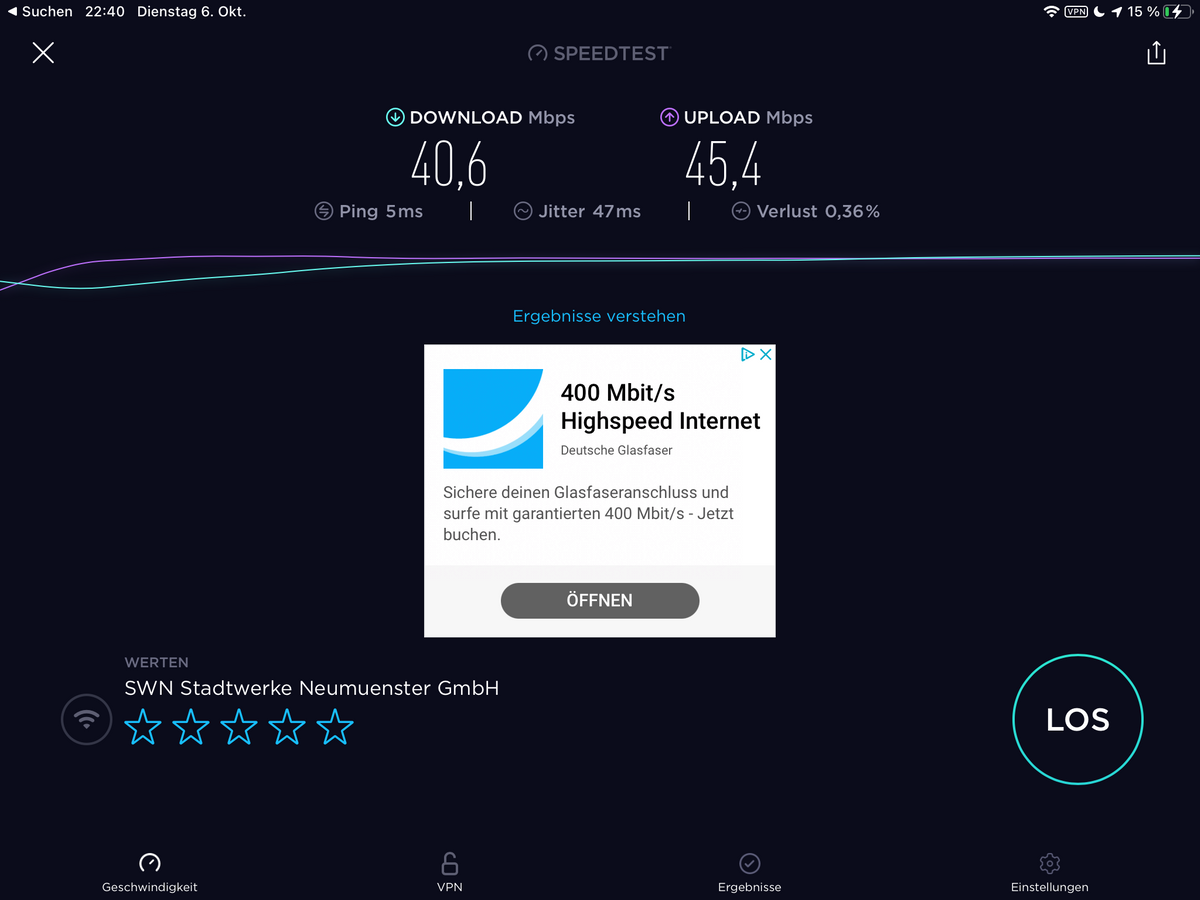
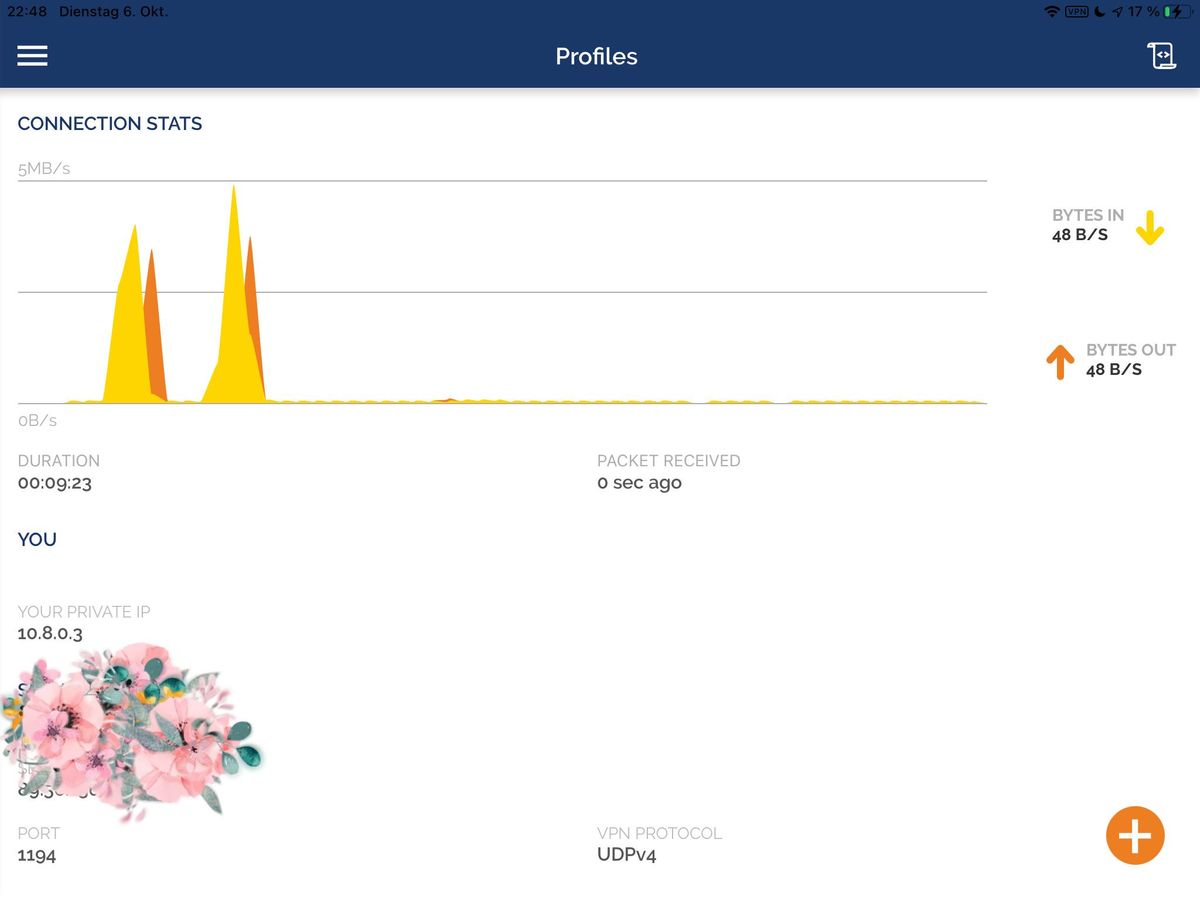
Mal schauen, in Dänemark haben wir auch Glasfaser Breitband... Teste dann da mal. Im eigenen Wlan Netz lief es mit 55MBit im Download und über 60 Mbit im Upload - Proxmox auf altem Esprimo Q920 I5. Aber keine Ahnung wie repräsentativ ein Test im eigenen Netz ist... LTE IPhone 1-2 Balken war aber hier auf dem Dorfe deutlich weniger, sprich 5/2 MBit.
Edit: Mein altes IPad Pro am Ubiquiti AP:
-
So, nach einer endlosen Odysse habe ich nun anscheinend einen funktionierenden OpenVpn Container hinbekommen - wer Ihn testen möchte, anbei der Download Link - ich lasse den ein paar Tage aktiv...:
Download Link.... Klick mich. Edit 12. Oktober: Habe den DL entfernt. Falls noch jemand testen möchte, schickt mir bitte ne PM für einen Link.
Beim Zurückspielen über Proxmox Backup/Restore den Haken bei "Priviligierter Container" rausnehmen, sonst gibt es eine Fehlermeldung/geht es nicht...
Einiges vorab - eingeflossen in den Container sind Infos und Settings aus:
https://www.hungred.com/how-to/setup-openvpn-on-proxmox-lxc/
https://bugs.debian.org/cgi-bin/bugreport.cgi?bug=939903
(Hi, enabling the lxc nesting feature for the container solved the issue for me...)
https://forum.proxmox.com/threads/lxc-als-openvpn-server-keine-netzwerkverbindung.52546/
https://www.cyberciti.biz/faq/debian-10-set-up-openvpn-server-in-5-minutes/
Was Ihr nach dem Import des Containers machen müsst:
Eure eigene IPv4 und Gateway Adresse eintragen.
Den Container starten - über die Proxmox Konsole einloggen:User: root
Pw: root(PW danach gerne ändern;-) )
In der Konsole dann:
Debian GNU/Linux 10 VPNBackup tty1

VPNBackup login: root
Password:
Last login: Tue Oct  6 14:34:54 CEST 2020 on tty1
Linux VPNBackup 5.4.60-1-pve #1 SMP PVE 5.4.60-2 (Fri, 04 Sep 2020 10:24:50 +0200) x86_64

The programs included with the Debian GNU/Linux system are free software;
the exact distribution terms for each program are described in the
individual files in /usr/share/doc/*/copyright.

Debian GNU/Linux comes with ABSOLUTELY NO WARRANTY, to the extent
permitted by applicable law.
root@VPNBackup:~#  sudo ./debian10-vpn.sh
Welcome to the OpenVPN installer!
The git repository is available at: https://github.com/angristan/openvpn-install

I need to ask you a few questions before starting the setup.
You can leave the default options and just press enter if you are ok with them.

I need to know the IPv4 address of the network interface you want OpenVPN listening to.
Unless your server is behind NAT, it should be your public IPv4 address.
IP address: 192.168.12.80

It seems this server is behind NAT. What is its public IPv4 address or hostname?
We need it for the clients to connect to the server.
Public IPv4 address or hostname: DeinDynDnsAccount

Checking for IPv6 connectivity...

Your host appears to have IPv6 connectivity.

Do you want to enable IPv6 support (NAT)? [y/n]: n

What port do you want OpenVPN to listen to?
   1) Default: 1194
   2) Custom
   3) Random [49152-65535]
Port choice [1-3]: 1

What protocol do you want OpenVPN to use?
UDP is faster. Unless it is not available, you shouldn't use TCP.
   1) UDP
   2) TCP
Protocol [1-2]: 1

What DNS resolvers do you want to use with the VPN?
   1) Current system resolvers (from /etc/resolv.conf)
   2) Self-hosted DNS Resolver (Unbound)
   3) Cloudflare (Anycast: worldwide)
   4) Quad9 (Anycast: worldwide)
   5) Quad9 uncensored (Anycast: worldwide)
   6) FDN (France)
   7) DNS.WATCH (Germany)
   8) OpenDNS (Anycast: worldwide)
   9) Google (Anycast: worldwide)
   10) Yandex Basic (Russia)
   11) AdGuard DNS (Anycast: worldwide)
   12) NextDNS (Anycast: worldwide)
   13) Custom
DNS [1-12]: 9

Do you want to use compression? It is not recommended since the VORACLE attack make use of it.
Enable compression? [y/n]: n

Do you want to customize encryption settings?
Unless you know what you're doing, you should stick with the default parameters provided by the script.
Note that whatever you choose, all the choices presented in the script are safe. (Unlike OpenVPN's defaults)
See https://github.com/angristan/openvpn-install#security-and-encryption to learn more.

Customize encryption settings? [y/n]: n

Okay, that was all I needed. We are ready to setup your OpenVPN server now.
You will be able to generate a client at the end of the installation.
Press any key to continue...
Hit:1 http://security.debian.org buster/updates InRelease
Hit:2 http://ftp.debian.org/debian buster InRelease
Hit:3 http://ftp.debian.org/debian buster-updates InRelease
Hit:4 https://deb.nodesource.com/node_12.x buster InRelease
Reading package lists... Done
Reading package lists... Done
Building dependency tree
Reading state information... Done
gnupg is already the newest version (2.2.12-1+deb10u1).
ca-certificates is already the newest version (20200601~deb10u1).
0 upgraded, 0 newly installed, 0 to remove and 0 not upgraded.
Reading package lists... Done
Building dependency tree
Reading state information... Done
curl is already the newest version (7.64.0-4+deb10u1).
iptables is already the newest version (1.8.2-4).
openssl is already the newest version (1.1.1d-0+deb10u3).
wget is already the newest version (1.20.1-1.1).
ca-certificates is already the newest version (20200601~deb10u1).
The following additional packages will be installed:
  easy-rsa libccid libglib2.0-0 libglib2.0-data liblzo2-2 libpcsclite1 libpkcs11-helper1 libusb-1.0-0 opensc opensc-pkcs11 pcscd shared-mime-info xdg-user-dirs
Suggested packages:
  pcmciautils resolvconf openvpn-systemd-resolved
The following NEW packages will be installed:
  easy-rsa libccid libglib2.0-0 libglib2.0-data liblzo2-2 libpcsclite1 libpkcs11-helper1 libusb-1.0-0 opensc opensc-pkcs11 openvpn pcscd shared-mime-info
  xdg-user-dirs
0 upgraded, 14 newly installed, 0 to remove and 0 not upgraded.
Need to get 0 B/5493 kB of archives.
After this operation, 24.3 MB of additional disk space will be used.
Preconfiguring packages ...
Selecting previously unselected package easy-rsa.
(Reading database ... 30802 files and directories currently installed.)
Preparing to unpack .../00-easy-rsa_3.0.6-1_all.deb ...
Unpacking easy-rsa (3.0.6-1) ...
Selecting previously unselected package libusb-1.0-0:amd64.
Preparing to unpack .../01-libusb-1.0-0_2%3a1.0.22-2_amd64.deb ...
Unpacking libusb-1.0-0:amd64 (2:1.0.22-2) ...
Selecting previously unselected package libccid.
Preparing to unpack .../02-libccid_1.4.30-1_amd64.deb ...
Unpacking libccid (1.4.30-1) ...
Selecting previously unselected package libglib2.0-0:amd64.
Preparing to unpack .../03-libglib2.0-0_2.58.3-2+deb10u2_amd64.deb ...
Unpacking libglib2.0-0:amd64 (2.58.3-2+deb10u2) ...
Selecting previously unselected package libglib2.0-data.
Preparing to unpack .../04-libglib2.0-data_2.58.3-2+deb10u2_all.deb ...
Unpacking libglib2.0-data (2.58.3-2+deb10u2) ...
Selecting previously unselected package liblzo2-2:amd64.
Preparing to unpack .../05-liblzo2-2_2.10-0.1_amd64.deb ...
Unpacking liblzo2-2:amd64 (2.10-0.1) ...
Selecting previously unselected package libpcsclite1:amd64.
Preparing to unpack .../06-libpcsclite1_1.8.24-1_amd64.deb ...
Unpacking libpcsclite1:amd64 (1.8.24-1) ...
Selecting previously unselected package libpkcs11-helper1:amd64.
Preparing to unpack .../07-libpkcs11-helper1_1.25.1-1_amd64.deb ...
Unpacking libpkcs11-helper1:amd64 (1.25.1-1) ...
Selecting previously unselected package opensc-pkcs11:amd64.
Preparing to unpack .../08-opensc-pkcs11_0.19.0-1_amd64.deb ...
Unpacking opensc-pkcs11:amd64 (0.19.0-1) ...
Selecting previously unselected package opensc.
Preparing to unpack .../09-opensc_0.19.0-1_amd64.deb ...
Unpacking opensc (0.19.0-1) ...
Selecting previously unselected package openvpn.
Preparing to unpack .../10-openvpn_2.4.7-1_amd64.deb ...
Unpacking openvpn (2.4.7-1) ...
Selecting previously unselected package pcscd.
Preparing to unpack .../11-pcscd_1.8.24-1_amd64.deb ...
Unpacking pcscd (1.8.24-1) ...
Selecting previously unselected package shared-mime-info.
Preparing to unpack .../12-shared-mime-info_1.10-1_amd64.deb ...
Unpacking shared-mime-info (1.10-1) ...
Selecting previously unselected package xdg-user-dirs.
Preparing to unpack .../13-xdg-user-dirs_0.17-2_amd64.deb ...
Unpacking xdg-user-dirs (0.17-2) ...
Setting up xdg-user-dirs (0.17-2) ...
Setting up libglib2.0-0:amd64 (2.58.3-2+deb10u2) ...
No schema files found: doing nothing.
Setting up liblzo2-2:amd64 (2.10-0.1) ...
Setting up libpkcs11-helper1:amd64 (1.25.1-1) ...
Setting up opensc-pkcs11:amd64 (0.19.0-1) ...
Setting up libglib2.0-data (2.58.3-2+deb10u2) ...
Setting up shared-mime-info (1.10-1) ...
Setting up libpcsclite1:amd64 (1.8.24-1) ...
Setting up libusb-1.0-0:amd64 (2:1.0.22-2) ...
Setting up easy-rsa (3.0.6-1) ...
Setting up openvpn (2.4.7-1) ...
[ ok ] Restarting virtual private network daemon.:.
Created symlink /etc/systemd/system/multi-user.target.wants/openvpn.service -> /lib/systemd/system/openvpn.service.
Setting up libccid (1.4.30-1) ...
Setting up opensc (0.19.0-1) ...
Setting up pcscd (1.8.24-1) ...
Created symlink /etc/systemd/system/sockets.target.wants/pcscd.socket -> /lib/systemd/system/pcscd.socket.
Processing triggers for man-db (2.8.5-2) ...
Processing triggers for mime-support (3.62) ...
Processing triggers for libc-bin (2.28-10) ...
Processing triggers for systemd (241-7~deb10u4) ...
--2020-10-06 16:16:34--  https://github.com/OpenVPN/easy-rsa/releases/download/v3.0.7/EasyRSA-3.0.7.tgz
Resolving github.com (github.com)... 140.82.121.3
Connecting to github.com (github.com)|140.82.121.3|:443... connected.
HTTP request sent, awaiting response... 302 Found
Location: https://github-production-release-asset-2e65be.s3.amazonaws.com/4519663/0fa24e00-72ba-11ea-9afe-6e5829eec4a4?X-Amz-Algorithm=AWS4-HMAC-SHA256&X-Amz-Credential=AKIAIWNJYAX4CSVEH53A%2F20201006%2Fus-east-1%2Fs3%2Faws4_request&X-Amz-Date=20201006T141635Z&X-Amz-Expires=300&X-Amz-Signature=53ef2b9f47cccd429051264b13a8d71588d021632a22cc5c74ce954ffa6b1225&X-Amz-SignedHeaders=host&actor_id=0&key_id=0&repo_id=4519663&response-content-disposition=attachment%3B%20filename%3DEasyRSA-3.0.7.tgz&response-content-type=application%2Foctet-stream [following]
--2020-10-06 16:16:35--  https://github-production-release-asset-2e65be.s3.amazonaws.com/4519663/0fa24e00-72ba-11ea-9afe-6e5829eec4a4?X-Amz-Algorithm=AWS4-HMAC-SHA256&X-Amz-Credential=AKIAIWNJYAX4CSVEH53A%2F20201006%2Fus-east-1%2Fs3%2Faws4_request&X-Amz-Date=20201006T141635Z&X-Amz-Expires=300&X-Amz-Signature=53ef2b9f47cccd429051264b13a8d71588d021632a22cc5c74ce954ffa6b1225&X-Amz-SignedHeaders=host&actor_id=0&key_id=0&repo_id=4519663&response-content-disposition=attachment%3B%20filename%3DEasyRSA-3.0.7.tgz&response-content-type=application%2Foctet-stream
Resolving github-production-release-asset-2e65be.s3.amazonaws.com (github-production-release-asset-2e65be.s3.amazonaws.com)... 52.216.177.179
Connecting to github-production-release-asset-2e65be.s3.amazonaws.com (github-production-release-asset-2e65be.s3.amazonaws.com)|52.216.177.179|:443... connected.
HTTP request sent, awaiting response... 200 OK
Length: 48215 (47K) [application/octet-stream]
Saving to: '/root/easy-rsa.tgz'

/root/easy-rsa.tgz                       100%[================================================================================>]  47.08K  --.-KB/s    in 0.1s

2020-10-06 16:16:35 (453 KB/s) - '/root/easy-rsa.tgz' saved [48215/48215]


Note: using Easy-RSA configuration from: /etc/openvpn/easy-rsa/vars

init-pki complete; you may now create a CA or requests.
Your newly created PKI dir is: /etc/openvpn/easy-rsa/pki


Using SSL: openssl OpenSSL 1.1.1d  10 Sep 2019
read EC key
writing EC key


Note: using Easy-RSA configuration from: /etc/openvpn/easy-rsa/vars
Using SSL: openssl OpenSSL 1.1.1d  10 Sep 2019
Generating an EC private key
writing new private key to '/etc/openvpn/easy-rsa/pki/easy-rsa-1203.Mwocmp/tmp.7OMflM'
-----
Using configuration from /etc/openvpn/easy-rsa/pki/easy-rsa-1203.Mwocmp/tmp.3hKpRm
Check that the request matches the signature
Signature ok
The Subject's Distinguished Name is as follows
commonName            :ASN.1 12:'server_bWsPvqZkUF7zn7cQ'
Certificate is to be certified until Jan  9 14:16:35 2023 GMT (825 days)

Write out database with 1 new entries
Data Base Updated


Note: using Easy-RSA configuration from: /etc/openvpn/easy-rsa/vars
Using SSL: openssl OpenSSL 1.1.1d  10 Sep 2019
Using configuration from /etc/openvpn/easy-rsa/pki/easy-rsa-1280.A1dm2S/tmp.hNgPl1

An updated CRL has been created.
CRL file: /etc/openvpn/easy-rsa/pki/crl.pem


* Applying /etc/sysctl.d/20-openvpn.conf ...
net.ipv4.ip_forward = 1
* Applying /etc/sysctl.d/99-sysctl.conf ...
net.ipv4.ip_forward = 1
* Applying /etc/sysctl.d/protect-links.conf ...
sysctl: setting key "fs.protected_hardlinks": Read-only file system
sysctl: setting key "fs.protected_symlinks": Read-only file system
* Applying /etc/sysctl.conf ...
net.ipv4.ip_forward = 1
Created symlink /etc/systemd/system/multi-user.target.wants/openvpn@server.service -> /etc/systemd/system/openvpn@.service.
Created symlink /etc/systemd/system/multi-user.target.wants/iptables-openvpn.service -> /etc/systemd/system/iptables-openvpn.service.

Tell me a name for the client.
The name must consist of alphanumeric character. It may also include an underscore or a dash.
Client name: testaccount

Do you want to protect the configuration file with a password?
(e.g. encrypt the private key with a password)
   1) Add a passwordless client
   2) Use a password for the client
Select an option [1-2]: 1

Note: using Easy-RSA configuration from: /etc/openvpn/easy-rsa/vars
Using SSL: openssl OpenSSL 1.1.1d  10 Sep 2019
Generating an EC private key
writing new private key to '/etc/openvpn/easy-rsa/pki/easy-rsa-1416.IsenCe/tmp.mXm78Y'
-----
Using configuration from /etc/openvpn/easy-rsa/pki/easy-rsa-1416.IsenCe/tmp.QuQ2SU
Check that the request matches the signature
Signature ok
The Subject's Distinguished Name is as follows
commonName            :ASN.1 12:'testaccount'
Certificate is to be certified until Jan  9 14:16:53 2023 GMT (825 days)

Write out database with 1 new entries
Data Base Updated

Client testaccount added.

The configuration file has been written to /home/root/testaccount.ovpn.
Download the .ovpn file and import it in your OpenVPN client.
root@VPNBackup:~#
Falls was schiefgelaufen ist bei der Eingabe, oder geändert werden soll, am besten wieder Eingeben:
root@VPNBackup:~#  sudo ./debian10-vpn.sh
Welcome to OpenVPN-install!
The git repository is available at: https://github.com/angristan/openvpn-install

It looks like OpenVPN is already installed.

What do you want to do?
   1) Add a new user
   2) Revoke existing user
   3) Remove OpenVPN
   4) Exit
Select an option [1-4]: 3

Do you really want to remove OpenVPN? [y/n]: y
Removed /etc/systemd/system/multi-user.target.wants/openvpn@server.service.
Removed /etc/systemd/system/multi-user.target.wants/iptables-openvpn.service.
Reading package lists... Done
Building dependency tree
Reading state information... Done
The following packages will be REMOVED:
  easy-rsa* libccid* libglib2.0-0* libglib2.0-data* liblzo2-2* libpcsclite1* libpkcs11-helper1* libusb-1.0-0* opensc* opensc-pkcs11* openvpn* pcscd*
  shared-mime-info* xdg-user-dirs*
0 upgraded, 0 newly installed, 14 to remove and 0 not upgraded.
After this operation, 24.3 MB disk space will be freed.
(Reading database ... 31413 files and directories currently installed.)
Removing easy-rsa (3.0.6-1) ...
Removing pcscd (1.8.24-1) ...
Warning: Stopping pcscd.service, but it can still be activated by:
  pcscd.socket
Removing libccid (1.4.30-1) ...
Removing shared-mime-info (1.10-1) ...
Removing opensc (0.19.0-1) ...
Removing opensc-pkcs11:amd64 (0.19.0-1) ...
Removing libglib2.0-0:amd64 (2.58.3-2+deb10u2) ...
Removing libglib2.0-data (2.58.3-2+deb10u2) ...
Removing openvpn (2.4.7-1) ...
Removing liblzo2-2:amd64 (2.10-0.1) ...
Removing libpcsclite1:amd64 (1.8.24-1) ...
Removing libpkcs11-helper1:amd64 (1.25.1-1) ...
Removing libusb-1.0-0:amd64 (2:1.0.22-2) ...
Removing xdg-user-dirs (0.17-2) ...
Processing triggers for libc-bin (2.28-10) ...
Processing triggers for man-db (2.8.5-2) ...
Processing triggers for mime-support (3.62) ...
(Reading database ... 30819 files and directories currently installed.)
Purging configuration files for openvpn (2.4.7-1) ...
dpkg: warning: while removing openvpn, directory '/var/log/openvpn' not empty so not removed
dpkg: warning: while removing openvpn, directory '/etc/openvpn' not empty so not removed
Purging configuration files for xdg-user-dirs (0.17-2) ...
Purging configuration files for libccid (1.4.30-1) ...
Purging configuration files for libglib2.0-0:amd64 (2.58.3-2+deb10u2) ...
Purging configuration files for opensc (0.19.0-1) ...
Purging configuration files for pcscd (1.8.24-1) ...
Purging configuration files for shared-mime-info (1.10-1) ...
Processing triggers for systemd (241-7~deb10u4) ...

OpenVPN removed!
root@VPNBackup:~#
Und Oben neu starten....
Der Container ist schon so eingestellt, dass er SSH über root erlaubt.
https://pits-online.info/2010/09/03/anmeldung-als-root-per-ssh-zulassen/
Damit könnt Ihr Euch dann auch entsprechend für Eure Clients das ovpn-File runterladen, z.B. mit WinSCP...:The configuration file has been written to /home/root/testaccount.ovpn.
Auf meiner Fritzbox musste ich dann nur noch den Port 1194 auf die IP des Container weiterleiten.
Ich musste kein zusätzliches Routing auf der Fritzbox eintragen...!Über mein Iphone mit LTE Verbindung komme ich nun auch auf jedes Gerät in meinem Netzwerk.
Happy Testing!
@lemuba schau ich mir heut oder morgen mal an, bleibt dann nur noch, wie ich es dem USG bei bringe, da ich keine Fritzbox mehr verwende.
-
@lemuba schau ich mir heut oder morgen mal an, bleibt dann nur noch, wie ich es dem USG bei bringe, da ich keine Fritzbox mehr verwende.
-
Hallo @H4lunkE
So, dann hier weiter ;-)
Ich erkläre das kurz auf meine Hardware bezogen - musst Du ggf. für Deine anpassen...
- Benötigst Du einen DynDns Account, die Daten werden dann entsprechend im Router eingetragen.
Sieht dann nach erfolgreicher Eingabe der Daten und Anmeldung meines Routers (Fritzbox 7590) so aus:
DynDNS: aktiviert, "meinName".selfhost.eu, IPv4-Status: erfolgreich angemeldet, IPv6-Status: unbekannt
-
DynDns war zu meiner Zeit kostenlos über selfhost.eu zu bekommen und gibt es wohl immer noch:
http://selfhost.eu/cgi-bin/selfhost?p=cms&article=free&CGISESSID=f5b53416172e611211362f0eb7c5942e -
Danach installierst Du von den Proxmox Container Templates:
turnkey-openvpn
Dafür reicht ne Minimalinstallation mit wenig Resourcen, schaust Du bei mir:
-
Nachdem der Container läuft, seine IP-Adresse ermitteln, wenn Du keine feste IP vergeben hast (sollte aber eine Feste sein...).
-
Zurück zu Deinem Router und eine Port-Forwarding Regel für OpenVPN anlegen:
Port: 1194, UDP auf die IP Adresse Deines OpenVPN Containers -
Danach gehst Du im Browser auf das TurnKey OpenVPN Webinterface, einfach per Eingabe der IP - es sollte dann das kommen:
-
Klicke da im Menü zur Info auf: Quick Referenece
-
Erstelle in der Proxmox Open VPN Konsole dann Dein eigenes Schlüsselfile pro gewünschtem Client (z.b. für ein Tablet):
Beispiel:
root@OpenVpn ~# openvpn-addclient mydevice info@test.de- Sollte dann Folgendes bei rauskommen:
Debian GNU/Linux 9 OpenVpn tty1

OpenVpn login: root
Password:
Last login: Fri Sep 11 23:11:38 CEST 2020 on tty1
Welcome to Openvpn, TurnKey GNU/Linux 15.1 / TurnKey 9.7 Stretch

  System information (as of Wed Sep 16 23:49:35 2020)

    System load:  0.70              Memory usage:  25%
    Processes:    25                Swap usage:    0%
    Usage of /:   18.0% of 3.87GB   IP address for eth0:  192.168.12.8
                                    IP address for tun0:  10.207.137.1

  TKLBAM (Backup and Migration):  NOT INITIALIZED

    To initialize TKLBAM, run the "tklbam-init" command to link this
    system to your TurnKey Hub account. For details see the man page or
    go to:

        https://www.turnkeylinux.org/tklbam

Linux OpenVpn 5.4.60-1-pve #1 SMP PVE 5.4.60-2 (Fri, 04 Sep 2020 10:24:50 +0200) x86_64
root@OpenVpn ~# openvpn-addclient meintablet info@test.de
Using Common Name: meintablet
Generating a RSA private key
..................................................................................................................................................................................................................................................................................................+++++
...........+++++
writing new private key to 'meintablet.key'
-----
Using configuration from /etc/openvpn/easy-rsa/openssl.cnf
Check that the request matches the signature
Signature ok
The Subject's Distinguished Name is as follows
countryName           :PRINTABLE:'US'
stateOrProvinceName   :PRINTABLE:'CA'
localityName          :PRINTABLE:'San Francisco'
organizationName      :PRINTABLE:'TurnKey Linux'
organizationalUnitName:PRINTABLE:'OpenVPN'
commonName            :PRINTABLE:'meintablet'
name                  :PRINTABLE:'openvpn'
emailAddress          :IA5STRING:'info@test.de'
Certificate is to be certified until Sep 14 21:52:12 2030 GMT (3650 days)

Write out database with 1 new entries
Data Base Updated

INFO: generated /etc/openvpn/easy-rsa/keys/meintablet.ovpn
root@OpenVpn ~# openvpn-addclient mydevice info@test.de
Using Common Name: mydevice
Generating a RSA private key
...................................................................................................................................................................................+++++
....................................................+++++
writing new private key to 'mydevice.key'
-----
Using configuration from /etc/openvpn/easy-rsa/openssl.cnf
Check that the request matches the signature
Signature ok
The Subject's Distinguished Name is as follows
countryName           :PRINTABLE:'US'
stateOrProvinceName   :PRINTABLE:'CA'
localityName          :PRINTABLE:'San Francisco'
organizationName      :PRINTABLE:'TurnKey Linux'
organizationalUnitName:PRINTABLE:'OpenVPN'
commonName            :PRINTABLE:'mydevice'
name                  :PRINTABLE:'openvpn'
emailAddress          :IA5STRING:'info@test.de'
Certificate is to be certified until Sep 14 21:57:21 2030 GMT (3650 days)

Write out database with 1 new entries
Data Base Updated

INFO: generated /etc/openvpn/easy-rsa/keys/mydevice.ovpn
root@OpenVpn ~
10: Dieses Key-File (mydevice.ovpn) benötigst Du nun, ziehe ich z.B. mit Filezilla, per SFTP, runter: INFO: generated /etc/openvpn/easy-rsa/keys/mydevice.ovpn
11. Auf meinem Iphone und IPad habe ich OpenVPN Connect installiert - klick mich:
- Öffne dort die Key Datei mit OpenVPN Connect - das sollte es dann gewesen sein, der Rest erklärt sich selber.
Falls ich aufgrund Demenz etwas vergessen habe, oder nicht funktioniert, melde Dich nochmal. Viele Wege führen nach Rom, vielleicht wissens auch Andere hier noch besser...
Ich habe einen 500/100MBit - Glasfaseranschluss - die Begrenzung war bisher nur das Unterwegs-Gastnetzwerk in dem ich eingeloggt war, aber nie mehr die VPN Verbindung als Solche. VPN direkt eingerichtet über eine Fritzbox oder anderen schwachen Router/Hardware begrenzt da teilweise ganz gewaltig. Sofern VPN über einen potenten NUC (wie unseren ;-) ) eingerichtet, sicherlich eine sehr gute Option.
Hoffe ich konnte helfen,
Gruß,
Matthias
Edit/Generelle Info: Einige Hotel Wlans, aber auch Fritzbox Gastnetztwerke erlauben nur das reine Surfen und Email abbrufen - also nicht wundern, wenn Du aus einem solchem Wlan nicht per VPN nach Hause kommst, sich keine Verbindung aufbaut... Sofern ich dann alternativ auf meinem Iphone ne gute LTE Verbindung übers Mübilfunknetz habe, deaktiviere ich das Gastnetz-Wlan und OpenVpneeee per LTE nach Hause... Es gibt (gab?) aber auch wohl Mobilfunktarife, die ganz billgen, bei denen auch VPN gesperrt ist/war - tbc...
Lohnt sich immer man nachzuschauen falls man einen günstigen NUC/MiniPc sucht - klick mich.
-
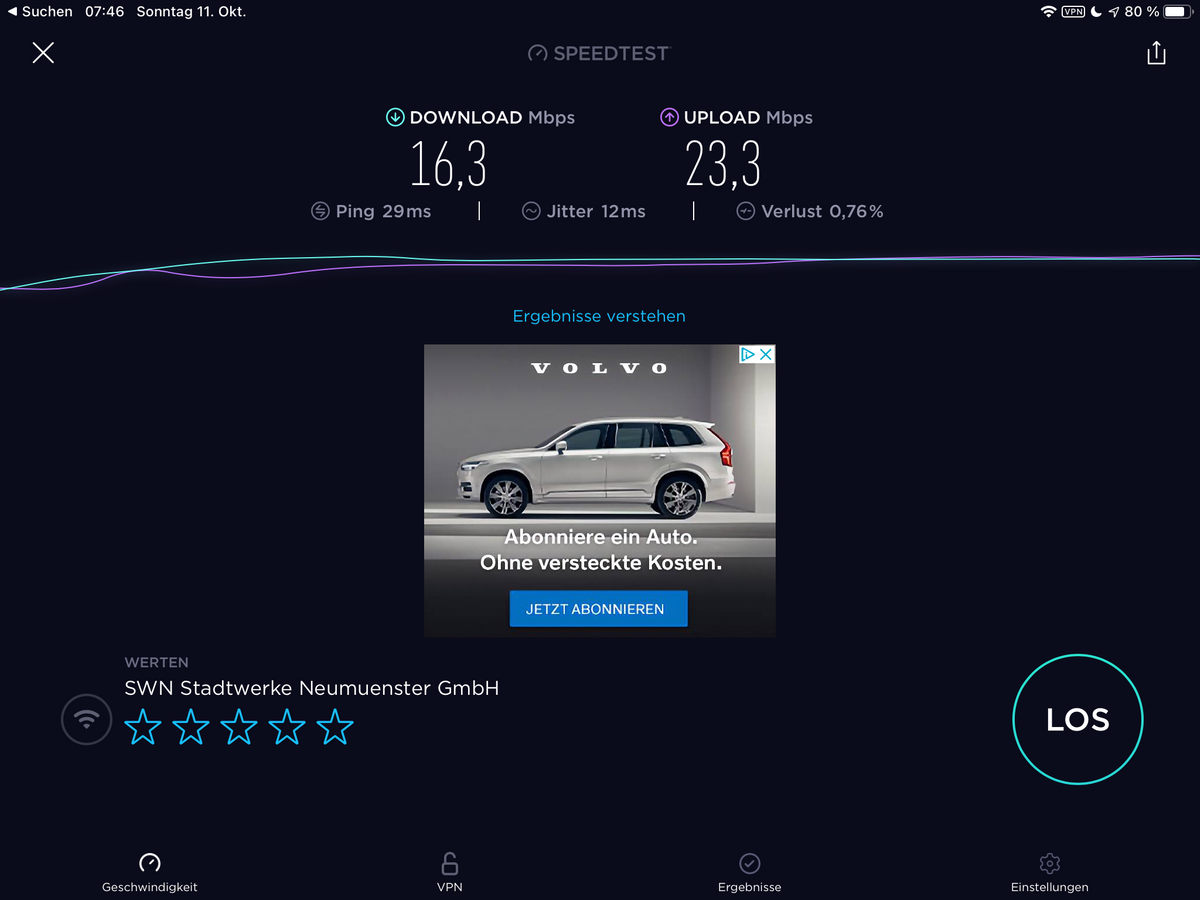
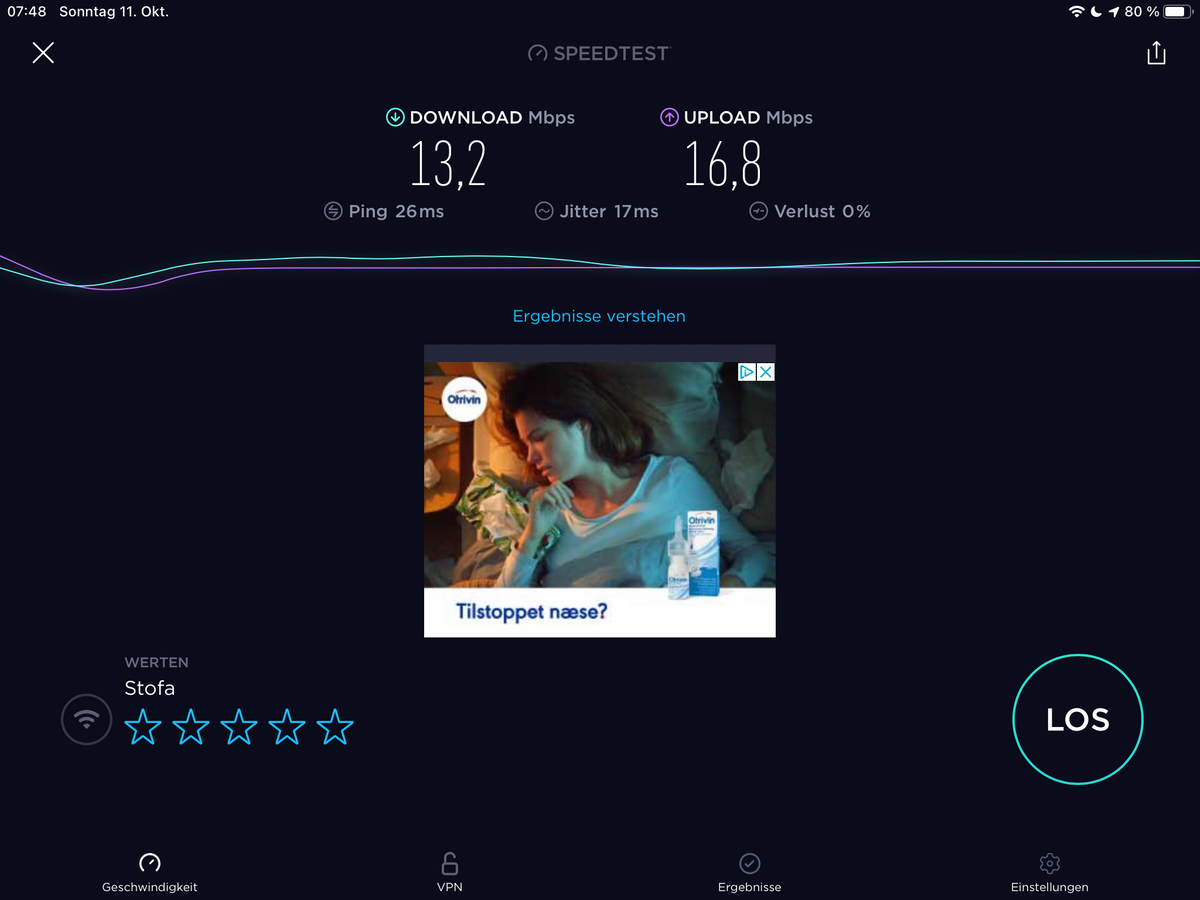
Bin nun in Dänemark. Also über Openvpn funktioniert hier Alles. Sogar SFTP nach Hause. Habe darüber gerade ein Drittes Client-File für den Laptop eingerichtet und heruntergeladen. Speed im Wlan wackelt hier. Teilweise gehts mit VPN schneller als ohne...
-
Bin nun in Dänemark. Also über Openvpn funktioniert hier Alles. Sogar SFTP nach Hause. Habe darüber gerade ein Drittes Client-File für den Laptop eingerichtet und heruntergeladen. Speed im Wlan wackelt hier. Teilweise gehts mit VPN schneller als ohne...
@lemuba Ja, danke nochmals, läuft bei mir auch richtig schnell, durch UDP kann man die VPN immer aktiv lassen, es läuft echt alles, auch Banking-Apps etc..
-
@lemuba Ja, danke nochmals, läuft bei mir auch richtig schnell, durch UDP kann man die VPN immer aktiv lassen, es läuft echt alles, auch Banking-Apps etc..
-
@Lenny-CB
Tja, ich bringe es leider nicht hin.
Mit turnkey-init kann man das Teil ja sozusagen resetten und die Installationsroutine neu starten. Dabei die Adressen wieder eingeben.
Ich habe letztendlich die voreigestellten 10er (10.x.x.x Adressen) genommen. So oder so, ich komme leider mit keinem Routing in der Fritzbox hin.Mein Router: 192.168.12.1
Mein TKVPN: 192.168.12.8Meine Server Config:
# PUBLIC_ADDRESS: ich.selfhost.eu (used by openvpn-addclient)

port 1194
proto udp
dev tun

comp-lzo
keepalive 10 120

persist-key
persist-tun
user nobody
group nogroup

chroot /etc/openvpn/easy-rsa/keys/crl.jail
crl-verify crl.pem

ca /etc/openvpn/easy-rsa/keys/ca.crt
dh /etc/openvpn/easy-rsa/keys/dh2048.pem
tls-auth /etc/openvpn/easy-rsa/keys/ta.key 0
key /etc/openvpn/easy-rsa/keys/server.key
cert /etc/openvpn/easy-rsa/keys/server.crt

ifconfig-pool-persist /var/lib/openvpn/server.ipp
client-config-dir /etc/openvpn/server.ccd
status /var/log/openvpn/server.log
verb 4

# virtual subnet unique for openvpn to draw client addresses from
# the server will be configured with x.x.x.1
# important: must not be used on your network
server 10.55.75.0 255.255.255.0


# push routes to clients to allow them to reach private subnets
push "route 10.0.1.0 255.255.255.0"
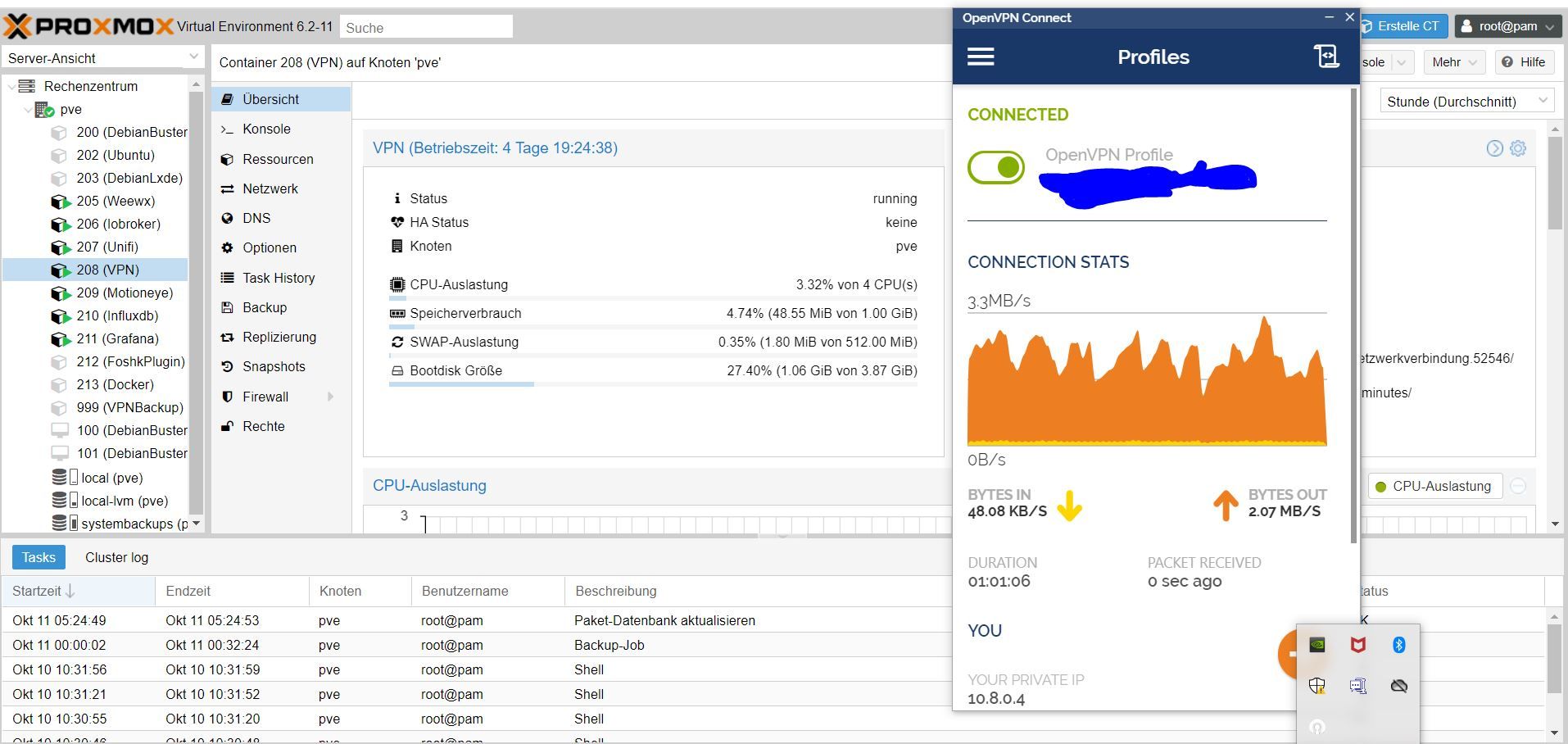
Ich glaube ich haue das Ding (Container) in die Tonne und suche was besser dokumentiertes. Hatte mir nun auch schon die Finger wund gegoogelt.




Hey! Du scheinst an dieser Unterhaltung interessiert zu sein, hast aber noch kein Konto.
Hast du es satt, bei jedem Besuch durch die gleichen Beiträge zu scrollen? Wenn du dich für ein Konto anmeldest, kommst du immer genau dorthin zurück, wo du zuvor warst, und kannst dich über neue Antworten benachrichtigen lassen (entweder per E-Mail oder Push-Benachrichtigung). Du kannst auch Lesezeichen speichern und Beiträge positiv bewerten, um anderen Community-Mitgliedern deine Wertschätzung zu zeigen.
Mit deinem Input könnte dieser Beitrag noch besser werden 💗
Registrieren AnmeldenSupport us
412
Online33.1k
Benutzende83.7k
Themen1.3m
Beiträge