




ioBroker/Proxmox LXC Container: Kein Restore möglich
-
@Kaiman55 sagte in ioBroker/Proxmox LXC Container: Kein Restore möglich:
Der Befehl
sudo systemctl stop iobrokerHat ihn gestoppt.
dann ist das aber eine ältere Installation, die noch keinen Fixer gesehen hat, oder?
@Homoran
Ich benutze ioBroker seit 2 Jahren.
Die letzten Adapter Updates habe ich im März 2020 gemacht. Da war Hosts und Admin aktuell.Keine Ahnung was Du mit Fixer meinst. Muss ich noch etwas vorher starten (fixen)
wäre toll, wenn Du mir das erklären kannst.
Bitte nicht so kompliert :-) -
@Homoran
Ich benutze ioBroker seit 2 Jahren.
Die letzten Adapter Updates habe ich im März 2020 gemacht. Da war Hosts und Admin aktuell.Keine Ahnung was Du mit Fixer meinst. Muss ich noch etwas vorher starten (fixen)
wäre toll, wenn Du mir das erklären kannst.
Bitte nicht so kompliert :-)@Kaiman55 sagte in ioBroker/Proxmox LXC Container: Kein Restore möglich:
Muss ich noch etwas vorher starten (fixen)
steht bei mir in der Signatur
@Kaiman55 sagte in ioBroker/Proxmox LXC Container: Kein Restore möglich:
Bitte nicht so kompliert
dann machst du
iobroker fix -
@Kaiman55 sagte in ioBroker/Proxmox LXC Container: Kein Restore möglich:
Muss ich noch etwas vorher starten (fixen)
steht bei mir in der Signatur
@Kaiman55 sagte in ioBroker/Proxmox LXC Container: Kein Restore möglich:
Bitte nicht so kompliert
dann machst du
iobroker fix -
@Kaiman55 sorry - ja!
-
Hat dieses "fix" jetzt etwas ausgeführt?
Die Ausgabe sieht so nach Papametern aus, die ich machen kann.root@iobroker-1804:/opt/iobroker# iobroker fix Commands: iobroker setup [--objects <host>] [--states <host>] [custom] iobroker start - starts the js-controller iobroker stop - stops the js-controller iobroker start <adapter>[.instance] - starts a specified adapter instance iobroker stop <adapter>.[instance] - stops a specified adapter instance iobroker start all - starts js-controller and all adapters iobroker restart - restarts the js-controller iobroker restart <adapter>[.instance] - restarts a specified adapter iobroker debug <adapter> [--ip=<ip>] [--port=<port>] [--wait] - Starts a Node.js debugging session for the adapter --wait stops the execution until the debugger is attached. --ip and --port can be used to change the listen IP and port. Use IP 0.0.0.0 for remote debugging. iobroker info - shows the host info iobroker logs [adapter] [--watch] [--lines=1000] iobroker add <adapter> [desiredNumber] [--enabled] [--host <host>] [--port <port>] iobroker install <adapter> - installs a specified adapter iobroker rebuild <adapter>|self [--install] iobroker url <url> [<name>] - install adapter from specified url, e.g. GitHub iobroker del <adapter> - remove adapter from system iobroker del <adapter>.<instance> - remove adapter instance iobroker update [repository url] [--updatable/--u] [--installed/--i] [--force/--f] - update repository and optionally filter installed/updateable adapters, use --force to bypass hash check iobroker upgrade [repository url] iobroker upgrade self [repository url] - upgrade js-controller and all adapters, optionally you can specify the repository url iobroker upgrade <adapter> [repository url] - upgrade specified adapter, optionally you can specify the repository url iobroker upload <pathToLocalFile> <pathIniobroker> iobroker upload all - upload all adapter files to make them available for instances iobroker upload <adapter> - upload specified adapter files to make them available for instances iobroker object get <id> - get object specified by id iobroker object set <id> <json-value> - set object with the given id by providing a new json object iobroker object set <id> propertyname=<value or json-value> - update part of the object by providing a new value or partial object iobroker object extend <id> <json-value> - extend object with the given id by providing a new json object iobroker object del <id|pattern> [--yes] iobroker object chmod <object-mode> [state-mode] <id> iobroker object chown <user> <group> <id> iobroker object list <id> iobroker state get <id> - get state, specified by id iobroker state getplain <id> [--pretty] iobroker state getvalue <id> iobroker state set <id> <value> [ack] iobroker state del <id> iobroker message <adapter>[.instance] <command> [<message>] iobroker list <type> [filter] iobroker chmod <mode> <file> iobroker chown <user> <group> <file> iobroker touch <file> iobroker rm <file> iobroker file read <iobroker-path-to-read> [<filesystem-path-to-write>] iobroker file write <filesystem-path-to-read> <iobroker-path-to-write> iobroker file rm <iobroker-path-to-delete> iobroker file sync iobroker user add <user> [--ingroup group] [--password pass] iobroker user del <user> iobroker user passwd <user> [--password pass] iobroker user enable <user> iobroker user disable <user> iobroker user get <user> iobroker user check <user> [--password pass] iobroker group add <group> iobroker group del <group> iobroker group list <group> iobroker group enable <group> iobroker group disable <group> iobroker group get <group> iobroker group adduser <group> <user> iobroker group deluser <group> <user> iobroker host this iobroker host <hostname> iobroker host set <hostname> iobroker host remove <hostname> iobroker set <adapter>.<instance> [--port port] [--ip address] [--ssl true|false] iobroker license <license.file or license.text> iobroker cert create iobroker cert view [<certificate name>] iobroker clean iobroker backup iobroker restore <backup name or path> - restore a specified backup iobroker validate <backup name or path> - validate a specified backup iobroker <command> --timeout 5000 iobroker status [all|<adapter>.<instance>] iobroker repo [name] iobroker repo add <name> <path or url> iobroker repo set <name> iobroker repo del <name> iobroker uuid iobroker unsetup iobroker fix - execute the installation fixer script, this updates your ioBroker installation iobroker multihost <enable|disable> [--secure true|false] iobroker multihost browse iobroker multihost connect iobroker compact status - show if compact mode is enabled in general iobroker compact <enable|on|disable|off> - enable or disable compact mode in general iobroker compact <adapter>.<instance> status - show if compact mode is enabled for a specific instance iobroker compact <adapter>.<instance> group <group-id> - define compact group of a specific adapter iobroker compact <adapter>.<instance> <disable|off> - enable or disable compact mode for specified adapter instance iobroker compact <adapter>.<instance> <enable|on> [group-id] - enable or disable compact mode for specified adapter instance and set comapct group optionally iobroker plugin enable <pluginname> [--host <hostname>] - enables a plugin for the specified host. If no host is specified, the current one is used iobroker plugin disable <pluginname> [--host <hostname>] - disables a plugin for the specified host. If no host is specified, the current one is used iobroker plugin status <pluginname> [--host <hostname>] - checks if a plugin is enabled for the specified host. If no host is specified, the current one is used iobroker plugin enable <pluginname> --instance <adapter>[.<nr>] - enables a plugin for the specified adapter instance (defaults to instance 0) iobroker plugin disable <pluginname> --instance <adapter>[.<nr>] - disables a plugin for the specified adapter instance (defaults to instance 0) iobroker plugin status <pluginname> --instance <adapter>[.<nr>] - checks if a plugin is enabled for the specified adapter instance (defaults to instance 0) iobroker version [adapter] - show version of js-controller or specified adapter iobroker [adapter] -v - show version of js-controller or specified adapter Options: --help Show help [boolean] --version Show version number [boolean] root@iobroker-1804:/opt/iobroker# -
Hat dieses "fix" jetzt etwas ausgeführt?
Die Ausgabe sieht so nach Papametern aus, die ich machen kann.root@iobroker-1804:/opt/iobroker# iobroker fix Commands: iobroker setup [--objects <host>] [--states <host>] [custom] iobroker start - starts the js-controller iobroker stop - stops the js-controller iobroker start <adapter>[.instance] - starts a specified adapter instance iobroker stop <adapter>.[instance] - stops a specified adapter instance iobroker start all - starts js-controller and all adapters iobroker restart - restarts the js-controller iobroker restart <adapter>[.instance] - restarts a specified adapter iobroker debug <adapter> [--ip=<ip>] [--port=<port>] [--wait] - Starts a Node.js debugging session for the adapter --wait stops the execution until the debugger is attached. --ip and --port can be used to change the listen IP and port. Use IP 0.0.0.0 for remote debugging. iobroker info - shows the host info iobroker logs [adapter] [--watch] [--lines=1000] iobroker add <adapter> [desiredNumber] [--enabled] [--host <host>] [--port <port>] iobroker install <adapter> - installs a specified adapter iobroker rebuild <adapter>|self [--install] iobroker url <url> [<name>] - install adapter from specified url, e.g. GitHub iobroker del <adapter> - remove adapter from system iobroker del <adapter>.<instance> - remove adapter instance iobroker update [repository url] [--updatable/--u] [--installed/--i] [--force/--f] - update repository and optionally filter installed/updateable adapters, use --force to bypass hash check iobroker upgrade [repository url] iobroker upgrade self [repository url] - upgrade js-controller and all adapters, optionally you can specify the repository url iobroker upgrade <adapter> [repository url] - upgrade specified adapter, optionally you can specify the repository url iobroker upload <pathToLocalFile> <pathIniobroker> iobroker upload all - upload all adapter files to make them available for instances iobroker upload <adapter> - upload specified adapter files to make them available for instances iobroker object get <id> - get object specified by id iobroker object set <id> <json-value> - set object with the given id by providing a new json object iobroker object set <id> propertyname=<value or json-value> - update part of the object by providing a new value or partial object iobroker object extend <id> <json-value> - extend object with the given id by providing a new json object iobroker object del <id|pattern> [--yes] iobroker object chmod <object-mode> [state-mode] <id> iobroker object chown <user> <group> <id> iobroker object list <id> iobroker state get <id> - get state, specified by id iobroker state getplain <id> [--pretty] iobroker state getvalue <id> iobroker state set <id> <value> [ack] iobroker state del <id> iobroker message <adapter>[.instance] <command> [<message>] iobroker list <type> [filter] iobroker chmod <mode> <file> iobroker chown <user> <group> <file> iobroker touch <file> iobroker rm <file> iobroker file read <iobroker-path-to-read> [<filesystem-path-to-write>] iobroker file write <filesystem-path-to-read> <iobroker-path-to-write> iobroker file rm <iobroker-path-to-delete> iobroker file sync iobroker user add <user> [--ingroup group] [--password pass] iobroker user del <user> iobroker user passwd <user> [--password pass] iobroker user enable <user> iobroker user disable <user> iobroker user get <user> iobroker user check <user> [--password pass] iobroker group add <group> iobroker group del <group> iobroker group list <group> iobroker group enable <group> iobroker group disable <group> iobroker group get <group> iobroker group adduser <group> <user> iobroker group deluser <group> <user> iobroker host this iobroker host <hostname> iobroker host set <hostname> iobroker host remove <hostname> iobroker set <adapter>.<instance> [--port port] [--ip address] [--ssl true|false] iobroker license <license.file or license.text> iobroker cert create iobroker cert view [<certificate name>] iobroker clean iobroker backup iobroker restore <backup name or path> - restore a specified backup iobroker validate <backup name or path> - validate a specified backup iobroker <command> --timeout 5000 iobroker status [all|<adapter>.<instance>] iobroker repo [name] iobroker repo add <name> <path or url> iobroker repo set <name> iobroker repo del <name> iobroker uuid iobroker unsetup iobroker fix - execute the installation fixer script, this updates your ioBroker installation iobroker multihost <enable|disable> [--secure true|false] iobroker multihost browse iobroker multihost connect iobroker compact status - show if compact mode is enabled in general iobroker compact <enable|on|disable|off> - enable or disable compact mode in general iobroker compact <adapter>.<instance> status - show if compact mode is enabled for a specific instance iobroker compact <adapter>.<instance> group <group-id> - define compact group of a specific adapter iobroker compact <adapter>.<instance> <disable|off> - enable or disable compact mode for specified adapter instance iobroker compact <adapter>.<instance> <enable|on> [group-id] - enable or disable compact mode for specified adapter instance and set comapct group optionally iobroker plugin enable <pluginname> [--host <hostname>] - enables a plugin for the specified host. If no host is specified, the current one is used iobroker plugin disable <pluginname> [--host <hostname>] - disables a plugin for the specified host. If no host is specified, the current one is used iobroker plugin status <pluginname> [--host <hostname>] - checks if a plugin is enabled for the specified host. If no host is specified, the current one is used iobroker plugin enable <pluginname> --instance <adapter>[.<nr>] - enables a plugin for the specified adapter instance (defaults to instance 0) iobroker plugin disable <pluginname> --instance <adapter>[.<nr>] - disables a plugin for the specified adapter instance (defaults to instance 0) iobroker plugin status <pluginname> --instance <adapter>[.<nr>] - checks if a plugin is enabled for the specified adapter instance (defaults to instance 0) iobroker version [adapter] - show version of js-controller or specified adapter iobroker [adapter] -v - show version of js-controller or specified adapter Options: --help Show help [boolean] --version Show version number [boolean] root@iobroker-1804:/opt/iobroker#@Kaiman55 er sollte die rechte fixen.
ich sehe aber jetzt erst, dass du einen Container nutzst. Da ist vielleicht alles anders - keine Ahnung -
@Kaiman55 er sollte die rechte fixen.
ich sehe aber jetzt erst, dass du einen Container nutzst. Da ist vielleicht alles anders - keine AhnungHabe jetzt nochmal die Zeile auf deiner Signatur ausgeführt:
curl -fsL https://iobroker.net/fix.sh | bash -Jetzt wurde etwas gemacht:
root@iobroker-1804:/opt/iobroker# curl -fsL https://iobroker.net/fix.sh | bash - library: loaded Library version=2020-06-12 ========================================================================== Welcome to the ioBroker installation fixer! Script version: 2020-06-15 ========================================================================== ========================================================================== Installing prerequisites (1/3) ========================================================================== Hit:1 http://archive.ubuntu.com/ubuntu bionic InRelease Get:2 https://deb.nodesource.com/node_10.x bionic InRelease [4584 B] Get:3 http://archive.ubuntu.com/ubuntu bionic-updates InRelease [88.7 kB] Get:4 http://archive.ubuntu.com/ubuntu bionic-security InRelease [88.7 kB] Get:5 http://archive.ubuntu.com/ubuntu bionic-updates/main amd64 Packages [1038 kB] Get:6 https://deb.nodesource.com/node_10.x bionic/main amd64 Packages [766 B] Get:7 http://archive.ubuntu.com/ubuntu bionic-updates/main Translation-en [348 kB] Get:8 http://archive.ubuntu.com/ubuntu bionic-updates/restricted amd64 Packages [85.5 kB] Get:9 http://archive.ubuntu.com/ubuntu bionic-updates/restricted Translation-en [18.8 kB] Get:10 http://archive.ubuntu.com/ubuntu bionic-updates/universe amd64 Packages [1101 kB] Get:11 http://archive.ubuntu.com/ubuntu bionic-updates/universe Translation-en [342 kB] Get:12 http://archive.ubuntu.com/ubuntu bionic-updates/multiverse amd64 Packages [19.4 kB] Get:13 http://archive.ubuntu.com/ubuntu bionic-updates/multiverse Translation-en [6740 B] Get:14 http://archive.ubuntu.com/ubuntu bionic-security/main amd64 Packages [814 kB] Get:15 http://archive.ubuntu.com/ubuntu bionic-security/main Translation-en [256 kB] Get:16 http://archive.ubuntu.com/ubuntu bionic-security/restricted amd64 Packages [76.4 kB] Get:17 http://archive.ubuntu.com/ubuntu bionic-security/restricted Translation-en [16.7 kB] Get:18 http://archive.ubuntu.com/ubuntu bionic-security/universe amd64 Packages [695 kB] Get:19 http://archive.ubuntu.com/ubuntu bionic-security/universe Translation-en [230 kB] Get:20 http://archive.ubuntu.com/ubuntu bionic-security/multiverse amd64 Packages [8312 B] Get:21 http://archive.ubuntu.com/ubuntu bionic-security/multiverse Translation-en [2880 B] Fetched 5241 kB in 4s (1407 kB/s) Reading package lists... Done Installed gcc-c++ ========================================================================== Checking ioBroker user and directory permissions (2/3) ========================================================================== Created /etc/sudoers.d/iobroker Fixing directory permissions... ========================================================================== Checking autostart (3/3) ========================================================================== Enabling autostart... Autostart enabled! ========================================================================== Your installation was fixed successfully Run iobroker start to start ioBroker again! ========================================================================== -
Habe jetzt nochmal die Zeile auf deiner Signatur ausgeführt:
curl -fsL https://iobroker.net/fix.sh | bash -Jetzt wurde etwas gemacht:
root@iobroker-1804:/opt/iobroker# curl -fsL https://iobroker.net/fix.sh | bash - library: loaded Library version=2020-06-12 ========================================================================== Welcome to the ioBroker installation fixer! Script version: 2020-06-15 ========================================================================== ========================================================================== Installing prerequisites (1/3) ========================================================================== Hit:1 http://archive.ubuntu.com/ubuntu bionic InRelease Get:2 https://deb.nodesource.com/node_10.x bionic InRelease [4584 B] Get:3 http://archive.ubuntu.com/ubuntu bionic-updates InRelease [88.7 kB] Get:4 http://archive.ubuntu.com/ubuntu bionic-security InRelease [88.7 kB] Get:5 http://archive.ubuntu.com/ubuntu bionic-updates/main amd64 Packages [1038 kB] Get:6 https://deb.nodesource.com/node_10.x bionic/main amd64 Packages [766 B] Get:7 http://archive.ubuntu.com/ubuntu bionic-updates/main Translation-en [348 kB] Get:8 http://archive.ubuntu.com/ubuntu bionic-updates/restricted amd64 Packages [85.5 kB] Get:9 http://archive.ubuntu.com/ubuntu bionic-updates/restricted Translation-en [18.8 kB] Get:10 http://archive.ubuntu.com/ubuntu bionic-updates/universe amd64 Packages [1101 kB] Get:11 http://archive.ubuntu.com/ubuntu bionic-updates/universe Translation-en [342 kB] Get:12 http://archive.ubuntu.com/ubuntu bionic-updates/multiverse amd64 Packages [19.4 kB] Get:13 http://archive.ubuntu.com/ubuntu bionic-updates/multiverse Translation-en [6740 B] Get:14 http://archive.ubuntu.com/ubuntu bionic-security/main amd64 Packages [814 kB] Get:15 http://archive.ubuntu.com/ubuntu bionic-security/main Translation-en [256 kB] Get:16 http://archive.ubuntu.com/ubuntu bionic-security/restricted amd64 Packages [76.4 kB] Get:17 http://archive.ubuntu.com/ubuntu bionic-security/restricted Translation-en [16.7 kB] Get:18 http://archive.ubuntu.com/ubuntu bionic-security/universe amd64 Packages [695 kB] Get:19 http://archive.ubuntu.com/ubuntu bionic-security/universe Translation-en [230 kB] Get:20 http://archive.ubuntu.com/ubuntu bionic-security/multiverse amd64 Packages [8312 B] Get:21 http://archive.ubuntu.com/ubuntu bionic-security/multiverse Translation-en [2880 B] Fetched 5241 kB in 4s (1407 kB/s) Reading package lists... Done Installed gcc-c++ ========================================================================== Checking ioBroker user and directory permissions (2/3) ========================================================================== Created /etc/sudoers.d/iobroker Fixing directory permissions... ========================================================================== Checking autostart (3/3) ========================================================================== Enabling autostart... Autostart enabled! ========================================================================== Your installation was fixed successfully Run iobroker start to start ioBroker again! ==========================================================================@Kaiman55 sagte in ioBroker/Proxmox LXC Container: Kein Restore möglich:
Your installation was fixed successfully
sieht doch schon mal gut aus
jetzt müsste
iobroker stopauch wieder funktionieren -
Habe jetzt nochmal die Zeile auf deiner Signatur ausgeführt:
curl -fsL https://iobroker.net/fix.sh | bash -Jetzt wurde etwas gemacht:
root@iobroker-1804:/opt/iobroker# curl -fsL https://iobroker.net/fix.sh | bash - library: loaded Library version=2020-06-12 ========================================================================== Welcome to the ioBroker installation fixer! Script version: 2020-06-15 ========================================================================== ========================================================================== Installing prerequisites (1/3) ========================================================================== Hit:1 http://archive.ubuntu.com/ubuntu bionic InRelease Get:2 https://deb.nodesource.com/node_10.x bionic InRelease [4584 B] Get:3 http://archive.ubuntu.com/ubuntu bionic-updates InRelease [88.7 kB] Get:4 http://archive.ubuntu.com/ubuntu bionic-security InRelease [88.7 kB] Get:5 http://archive.ubuntu.com/ubuntu bionic-updates/main amd64 Packages [1038 kB] Get:6 https://deb.nodesource.com/node_10.x bionic/main amd64 Packages [766 B] Get:7 http://archive.ubuntu.com/ubuntu bionic-updates/main Translation-en [348 kB] Get:8 http://archive.ubuntu.com/ubuntu bionic-updates/restricted amd64 Packages [85.5 kB] Get:9 http://archive.ubuntu.com/ubuntu bionic-updates/restricted Translation-en [18.8 kB] Get:10 http://archive.ubuntu.com/ubuntu bionic-updates/universe amd64 Packages [1101 kB] Get:11 http://archive.ubuntu.com/ubuntu bionic-updates/universe Translation-en [342 kB] Get:12 http://archive.ubuntu.com/ubuntu bionic-updates/multiverse amd64 Packages [19.4 kB] Get:13 http://archive.ubuntu.com/ubuntu bionic-updates/multiverse Translation-en [6740 B] Get:14 http://archive.ubuntu.com/ubuntu bionic-security/main amd64 Packages [814 kB] Get:15 http://archive.ubuntu.com/ubuntu bionic-security/main Translation-en [256 kB] Get:16 http://archive.ubuntu.com/ubuntu bionic-security/restricted amd64 Packages [76.4 kB] Get:17 http://archive.ubuntu.com/ubuntu bionic-security/restricted Translation-en [16.7 kB] Get:18 http://archive.ubuntu.com/ubuntu bionic-security/universe amd64 Packages [695 kB] Get:19 http://archive.ubuntu.com/ubuntu bionic-security/universe Translation-en [230 kB] Get:20 http://archive.ubuntu.com/ubuntu bionic-security/multiverse amd64 Packages [8312 B] Get:21 http://archive.ubuntu.com/ubuntu bionic-security/multiverse Translation-en [2880 B] Fetched 5241 kB in 4s (1407 kB/s) Reading package lists... Done Installed gcc-c++ ========================================================================== Checking ioBroker user and directory permissions (2/3) ========================================================================== Created /etc/sudoers.d/iobroker Fixing directory permissions... ========================================================================== Checking autostart (3/3) ========================================================================== Enabling autostart... Autostart enabled! ========================================================================== Your installation was fixed successfully Run iobroker start to start ioBroker again! ==========================================================================@Kaiman55 sagte in ioBroker/Proxmox LXC Container: Kein Restore möglich:
root@iobroker
Auf Ubuntu wird sich nicht mit root eingeloggt.
-
@Kaiman55 sagte in ioBroker/Proxmox LXC Container: Kein Restore möglich:
Your installation was fixed successfully
sieht doch schon mal gut aus
jetzt müsste
iobroker stopauch wieder funktionieren -
@Thomas-Braun
Ich kann dir nicht sagen ob ich im Autostart etwas habe.
Wüsste nicht, wo ich da gucken muss.Nutze das System schon 2 Jahre.
Und dieses iobroker stop habe ich schon einige Male durchgeführt.Trotzdem vielen Dank für Deine Mühe.
Vielleicht hat ja noch jemand eine Idee.@Kaiman55 Hi, mal in der crontab geschaut?
als user einfach "crontab -e" eingebeben, das ist bei jedem User verschieden, also für root dann auch "sudo su" und "crontab -e" , wenn du noch mehr user eingerichtet hast.. dann da auch kontrollieren.Es gab mal n Script, das hat den iobroker Process abgefragt und dann nach 30sek automatisch gestartet.. vielleicht ist da sowas aktiv..
Sonst hat das nix mit Proxmox und Container zu tun, das läuft da wie aufm Raspi auch ( zumindest von den Commandos und der Installation)
-
@Kaiman55 Hi, mal in der crontab geschaut?
als user einfach "crontab -e" eingebeben, das ist bei jedem User verschieden, also für root dann auch "sudo su" und "crontab -e" , wenn du noch mehr user eingerichtet hast.. dann da auch kontrollieren.Es gab mal n Script, das hat den iobroker Process abgefragt und dann nach 30sek automatisch gestartet.. vielleicht ist da sowas aktiv..
Sonst hat das nix mit Proxmox und Container zu tun, das läuft da wie aufm Raspi auch ( zumindest von den Commandos und der Installation)
@ilovegym
vielen Dank für deinen Hinweis.
Es funktioniert ja jetzt.Habe den Befehl trotzdem aufgerufen:
Choose 1-4 [1]: iobroker@iobroker-1804:~$ crontab -e
no crontab for iobroker - using an empty one

Select an editor.  To change later, run 'select-editor'.
  1. /bin/nano        <---- easiest
  2. /usr/bin/mcedit
  3. /usr/bin/vim.tiny
  4. /bin/ed

Choose 1-4 [1]:

# minute (m), hour (h), day of month (dom), month (mon),
# and day of week (dow) or use '*' in these fields (for 'any').#
# Notice that tasks will be started based on the cron's system
# daemon's notion of time and timezones.
#
# Output of the crontab jobs (including errors) is sent through
# email to the user the crontab file belongs to (unless redirected).
#
# For example, you can run a backup of all your user accounts
# at 5 a.m every week with:
# 0 5 * * 1 tar -zcf /var/backups/home.tgz /home/
#
# email to the user the crontab file belongs to (unless redirected).
#
# For example, you can run a backup of all your user accounts
# at 5 a.m every week with:
# 0 5 * * 1 tar -zcf /var/backups/home.tgz /home/
#
# For more information see the manual pages of crontab(5) and cron(8)
Was sagt mir das jetzt?
-
@ilovegym
vielen Dank für deinen Hinweis.
Es funktioniert ja jetzt.Habe den Befehl trotzdem aufgerufen:
Choose 1-4 [1]: iobroker@iobroker-1804:~$ crontab -e
no crontab for iobroker - using an empty one

Select an editor.  To change later, run 'select-editor'.
  1. /bin/nano        <---- easiest
  2. /usr/bin/mcedit
  3. /usr/bin/vim.tiny
  4. /bin/ed

Choose 1-4 [1]:

# minute (m), hour (h), day of month (dom), month (mon),
# and day of week (dow) or use '*' in these fields (for 'any').#
# Notice that tasks will be started based on the cron's system
# daemon's notion of time and timezones.
#
# Output of the crontab jobs (including errors) is sent through
# email to the user the crontab file belongs to (unless redirected).
#
# For example, you can run a backup of all your user accounts
# at 5 a.m every week with:
# 0 5 * * 1 tar -zcf /var/backups/home.tgz /home/
#
# email to the user the crontab file belongs to (unless redirected).
#
# For example, you can run a backup of all your user accounts
# at 5 a.m every week with:
# 0 5 * * 1 tar -zcf /var/backups/home.tgz /home/
#
# For more information see the manual pages of crontab(5) and cron(8)
Was sagt mir das jetzt?
@Kaiman55
da steht nix in der crontab, alles gut.
Der Text mit den # bewirkt nur, dass es Kommentare sind, da passiert nix. -
@Kaiman55
da steht nix in der crontab, alles gut.
Der Text mit den # bewirkt nur, dass es Kommentare sind, da passiert nix. -
@Kaiman55 yes
-
@ilovegym
Nachdem der Restore ja Anfangs nicht ging (Checkbox unpriviledged musste aus sein)
und er meinen Hauptcontainer Container 101 (iobroker-1804) gelöscht hatte,
habe ich versucht meinen zweiten Container 105 (iobroker-1804-master) mit einem ioBroker Master von März als CT 101 zu clonen.
So dass ich das CT 101 wiederbekomme.
Die Fassung lief dann auch. Aber halt mit Stand März aus dem Master CT 105.Nachdem ich dann den Hinweis bekam, dass die Checkbox unpriviledged beim Restore aus sein muss, habe ich nochmal einen Restore vom letzten Vollbackup der CT 101 gemacht.
Das hat dann auch geklappt.
Allerdings sah ich dann, dass alle Snapshots weg waren.
Diese haben nämlich immer funktioniert.Bei dem C T105 Master waren sie noch da.
Nun wollte ich mal testen ob ich in dem CT 105 Master den letzten Snapshot löschen kann.
Dabei kam diese Fehlermeldung:
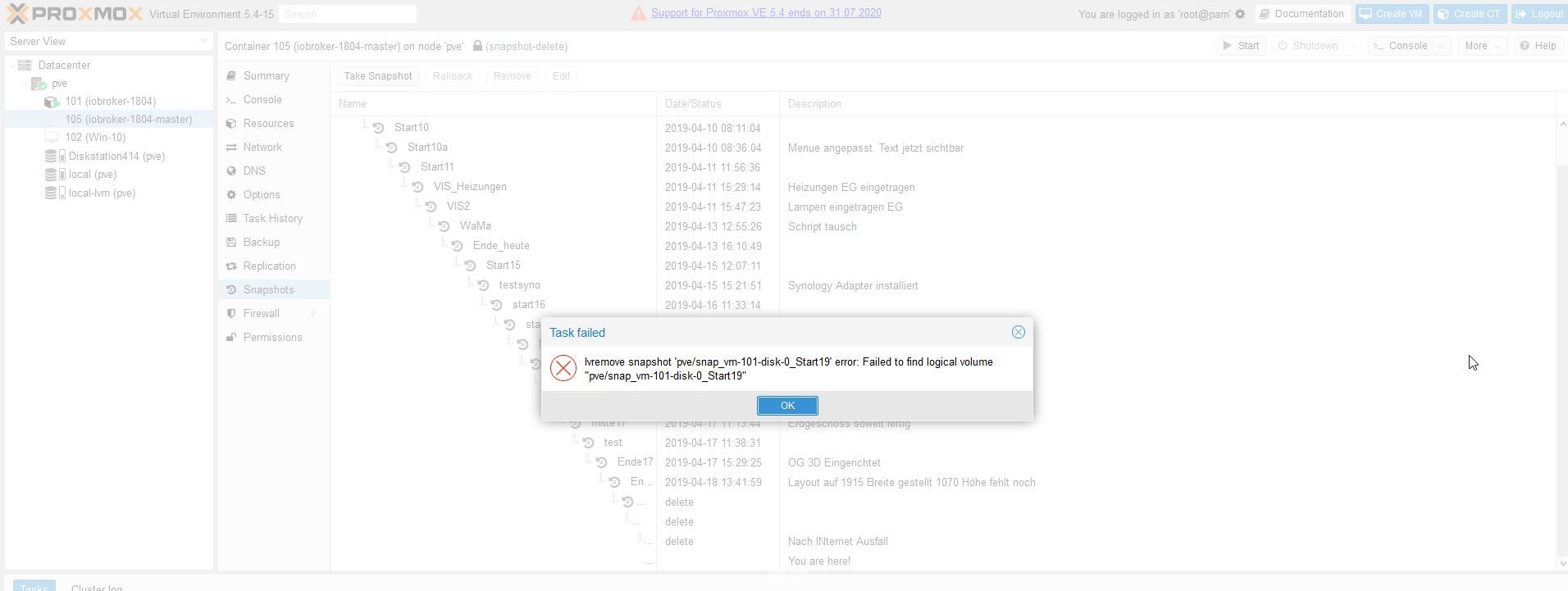
Was mich wundert dass er in dem CT 105 scheinbar auf VM101 verweist. Oder ist da etwas anderes gemeint.
Wie Du unten siehst, steht der Snapshot dann nur auf delete.In dem CT 101 kann ich gar keine Snapshots mehr machen.
Das ging vorher.
So sieht es da aus:
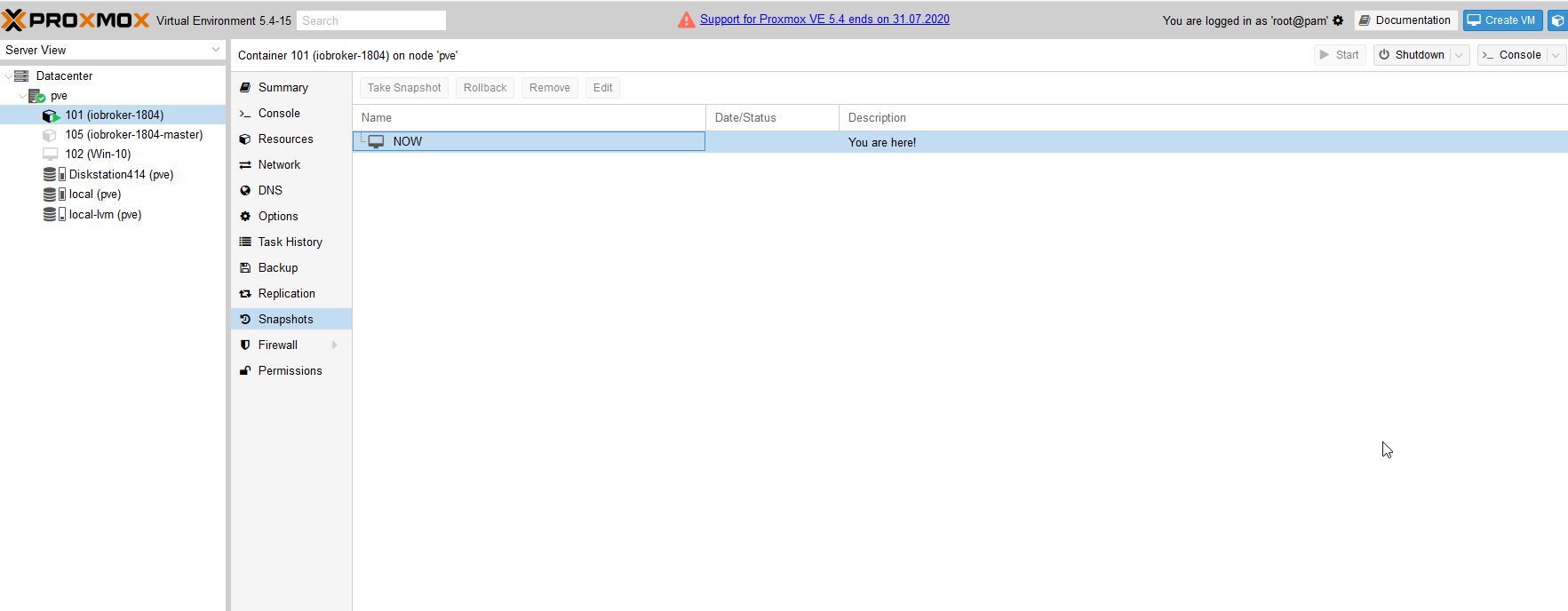
An der Hardware hat sich nichts geändert.Wollte den CT 105 Master löschen und dann aus dem CT 101 einen neuen Clone machen.
Hab aber Angst, dass diese Fehlermeldung mit dem Verweis auf VM101 alles zerschiesst.Vielleicht ist diese Anzeige noch nützlich:
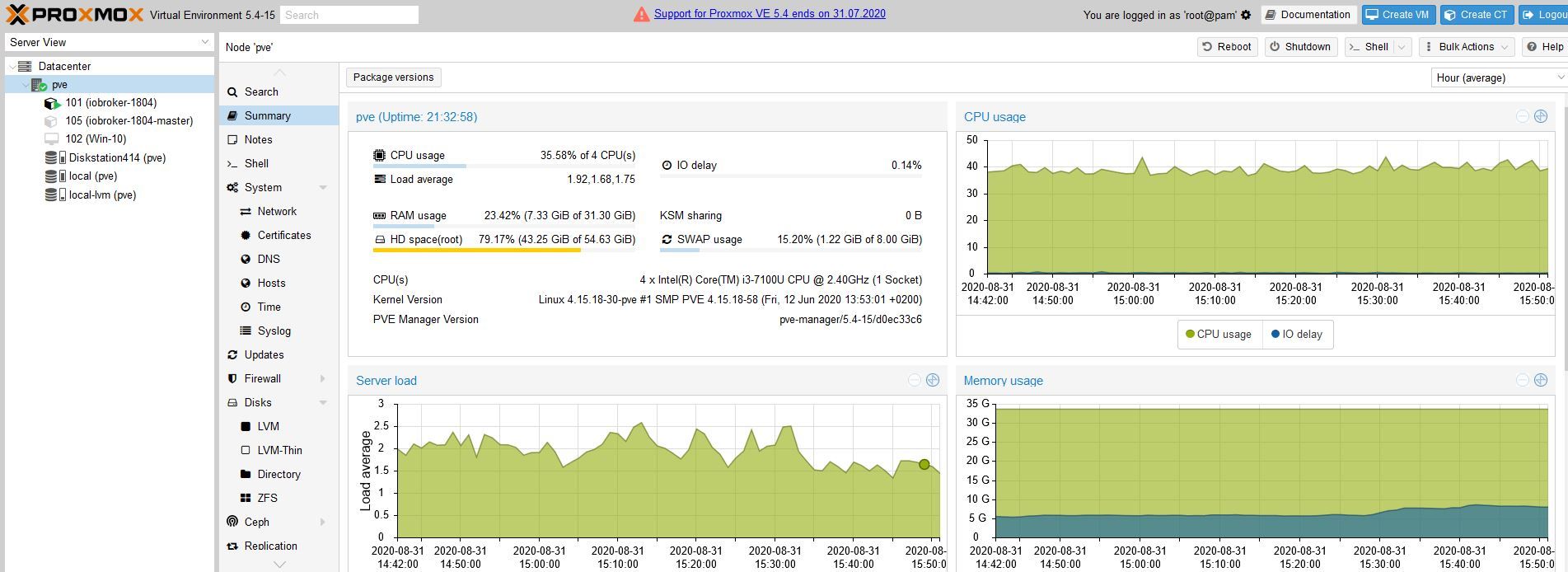
Hoffe ich habe die Bilder richtig angehängt und es nicht zu kompliziert beschrieben.
LG Kai -
@ilovegym
Nachdem der Restore ja Anfangs nicht ging (Checkbox unpriviledged musste aus sein)
und er meinen Hauptcontainer Container 101 (iobroker-1804) gelöscht hatte,
habe ich versucht meinen zweiten Container 105 (iobroker-1804-master) mit einem ioBroker Master von März als CT 101 zu clonen.
So dass ich das CT 101 wiederbekomme.
Die Fassung lief dann auch. Aber halt mit Stand März aus dem Master CT 105.Nachdem ich dann den Hinweis bekam, dass die Checkbox unpriviledged beim Restore aus sein muss, habe ich nochmal einen Restore vom letzten Vollbackup der CT 101 gemacht.
Das hat dann auch geklappt.
Allerdings sah ich dann, dass alle Snapshots weg waren.
Diese haben nämlich immer funktioniert.Bei dem C T105 Master waren sie noch da.
Nun wollte ich mal testen ob ich in dem CT 105 Master den letzten Snapshot löschen kann.
Dabei kam diese Fehlermeldung:
Was mich wundert dass er in dem CT 105 scheinbar auf VM101 verweist. Oder ist da etwas anderes gemeint.
Wie Du unten siehst, steht der Snapshot dann nur auf delete.In dem CT 101 kann ich gar keine Snapshots mehr machen.
Das ging vorher.
So sieht es da aus:
An der Hardware hat sich nichts geändert.Wollte den CT 105 Master löschen und dann aus dem CT 101 einen neuen Clone machen.
Hab aber Angst, dass diese Fehlermeldung mit dem Verweis auf VM101 alles zerschiesst.Vielleicht ist diese Anzeige noch nützlich:
Hoffe ich habe die Bilder richtig angehängt und es nicht zu kompliziert beschrieben.
LG Kai@Kaiman55 snapshot's sind KEIN BACKUP und bleiben auch nur für die aktuelle Version bestehen, sobald ein Backup zurück gespielt wird, werden diese mit entfernt.
wenn du 20- 30 Snapshot's anlegst macht das auch keinen Sinn und unnötige Speicherverbrauch, da bei jedem Snapshot ein komplettes Speicherabbild incl. Ram abgelegt wird.@Kaiman55 sagte in ioBroker/Proxmox LXC Container: Kein Restore möglich:
In dem CT 101 kann ich gar keine Snapshots mehr machen.
kommt drauf an, wohin du deinen CT gelegt hast, wenn der auf local liegt, geht kein snapshot, dann musst ihn auf local-lvm legen
klick dazu mal deinen CT an und gehe auf Ressourcen, bei Root-Disk, siehst du wo deine RAW liegtÜbrigens, dein root Laufwerk weist 43Gb auf???
-
Hallo zusammen,
heute Morgen merkte ich, dass mein ioBroker scheinbar nicht mehr lief.
Wie im Betreff betreibe ich ihn seit langem unter Proxmox als LXC Container.Ich konnte die IP des Containers 192.168.0.16 nicht mehr erreichen.
Habe auch versucht per SSH draufzukommen und iobroker von Hand zu starten. Da kam eine Fehlermeldung, die ich leider nicht notiert habe.Da ich vor dem probieren ein Backup unter Proxmox mit "STOP" gemacht habe, dachte ich, dass ich ja jederzeit zurück könnte.
Und in der Vergangenheit habe ich so das System auch immer wieder zurücksetzen können.
Beim PVE hatte die Nummer 101
Leider brach der Restore ab. Die Log davon hänge ich mal unten in den Spoiler.Dann stellte ich fest, dass das PVE 101 in der Proxmox Struktur ganz verschwunden war.
Ich habe noch einige andere Vollbackups von dem LXC. Habe auch welche auf meiner Diskstation. Aber auch da kann ich nicht restoren. Es kommt die gleiche Fehlermeldung.Bin jetzt mit meinem Latein am Ende und hoffe, dass ihr mir helfen könnt.
Vielen Dank im vorraus.
Hier die Log:
@Kaiman55
Hi,
dem Hinweis von @crunchip ist nichts hinzufügen.Achja, da du nur eine VM hast, würde ich empfehlen, am besten die ganze Kiste mal platt zu machen, und mit nem aktuellen Proxmox 6.x zu bespielen, für deins gibts keine Updates mehr, das ist uralt.
Sicher dir am besten dein iobroker mit dem backitup Adapter und nochmal sicherheitshalber mit der iobroker Backup funktion auf n externen Stick oder so.
Dann kannst du das nochmal von vorne aufsetzen. Man kann auch upgraden von 5.x auf 6.x aber nicht empfehlenswert.
-
Hallo zusammen,
heute Morgen merkte ich, dass mein ioBroker scheinbar nicht mehr lief.
Wie im Betreff betreibe ich ihn seit langem unter Proxmox als LXC Container.Ich konnte die IP des Containers 192.168.0.16 nicht mehr erreichen.
Habe auch versucht per SSH draufzukommen und iobroker von Hand zu starten. Da kam eine Fehlermeldung, die ich leider nicht notiert habe.Da ich vor dem probieren ein Backup unter Proxmox mit "STOP" gemacht habe, dachte ich, dass ich ja jederzeit zurück könnte.
Und in der Vergangenheit habe ich so das System auch immer wieder zurücksetzen können.
Beim PVE hatte die Nummer 101
Leider brach der Restore ab. Die Log davon hänge ich mal unten in den Spoiler.Dann stellte ich fest, dass das PVE 101 in der Proxmox Struktur ganz verschwunden war.
Ich habe noch einige andere Vollbackups von dem LXC. Habe auch welche auf meiner Diskstation. Aber auch da kann ich nicht restoren. Es kommt die gleiche Fehlermeldung.Bin jetzt mit meinem Latein am Ende und hoffe, dass ihr mir helfen könnt.
Vielen Dank im vorraus.
Hier die Log:
Noch eins, hilfreich bei Proxmox sind auch die config dateien, wie bei linux üblich, als text file..
also für die VM's in /etc/pve/qemu-server/ als vm101.conf etc..
da stehen die ganz wichtigen Dinge drin.
Ne Sicherung davon ist auch nie verkehrt.Für Container liegts in /etc/pve/nodes...
-
Hallo zusammen,
heute Morgen merkte ich, dass mein ioBroker scheinbar nicht mehr lief.
Wie im Betreff betreibe ich ihn seit langem unter Proxmox als LXC Container.Ich konnte die IP des Containers 192.168.0.16 nicht mehr erreichen.
Habe auch versucht per SSH draufzukommen und iobroker von Hand zu starten. Da kam eine Fehlermeldung, die ich leider nicht notiert habe.Da ich vor dem probieren ein Backup unter Proxmox mit "STOP" gemacht habe, dachte ich, dass ich ja jederzeit zurück könnte.
Und in der Vergangenheit habe ich so das System auch immer wieder zurücksetzen können.
Beim PVE hatte die Nummer 101
Leider brach der Restore ab. Die Log davon hänge ich mal unten in den Spoiler.Dann stellte ich fest, dass das PVE 101 in der Proxmox Struktur ganz verschwunden war.
Ich habe noch einige andere Vollbackups von dem LXC. Habe auch welche auf meiner Diskstation. Aber auch da kann ich nicht restoren. Es kommt die gleiche Fehlermeldung.Bin jetzt mit meinem Latein am Ende und hoffe, dass ihr mir helfen könnt.
Vielen Dank im vorraus.
Hier die Log:
wie Crunchip schon gesehen hat, Root-Verzeichnis mit 43Gb ist viel zu groß gewählt, da dort wirklich nur die Dateien von Proxmox selbst liegen, da reichen normal 8Gb, höchstens 16. Da passiert nicht viel ausser ab und zu n update, und für sonstiges kannst du das Verzeichnis nicht nutzen.
Ist n typischer Fehler, hab ich am Anfang auch gemacht, glaub mir, da setzt du Proxmox evtl. n paarmal auf, bis man alles hat.. Solange da nur ein oder zwei VMs laufen, ist das ja nicht so schlimm.
Schau dir mal das Video z.bsp. an, hier nicht nur gute Tipps, wie man es installiert, sondern auch wegen IOMMU etc..
( wir wollen ja die volle Hardwareleistung nutzen..)
https://www.youtube.com/watch?v=DHpkD5N6HC0


Hey! Du scheinst an dieser Unterhaltung interessiert zu sein, hast aber noch kein Konto.
Hast du es satt, bei jedem Besuch durch die gleichen Beiträge zu scrollen? Wenn du dich für ein Konto anmeldest, kommst du immer genau dorthin zurück, wo du zuvor warst, und kannst dich über neue Antworten benachrichtigen lassen (entweder per E-Mail oder Push-Benachrichtigung). Du kannst auch Lesezeichen speichern und Beiträge positiv bewerten, um anderen Community-Mitgliedern deine Wertschätzung zu zeigen.
Mit deinem Input könnte dieser Beitrag noch besser werden 💗
Registrieren Anmelden305
Online33.0k
Benutzende83.7k
Themen1.3m
Beiträge