Skip to content
  • Home
  • Aktuell
  • Tags
  • 0 Ungelesen 0
  • Kategorien
  • Unreplied
  • Beliebt
  • GitHub
  • Docu
  • Hilfe
Skins
  • Light
  • Brite
  • Cerulean
  • Cosmo
  • Flatly
  • Journal
  • Litera
  • Lumen
  • Lux
  • Materia
  • Minty
  • Morph
  • Pulse
  • Sandstone
  • Simplex
  • Sketchy
  • Spacelab
  • United
  • Yeti
  • Zephyr
  • Dark
  • Cyborg
  • Darkly
  • Quartz
  • Slate
  • Solar
  • Superhero
  • Vapor

  • Standard: (Kein Skin)
  • Kein Skin
Einklappen
ioBroker Logo

Community Forum

donate donate
  1. ioBroker Community Home
  2. Deutsch
  3. ioBroker Allgemein
  4. [gelöst] Installation iobroker auf QNAP 251+ in docker
NEWS

  • UPDATE 31.10.: Amazon Alexa - ioBroker Skill läuft aus ?
    apollon77A
    apollon77
    48
    3
    8.8k

  • Monatsrückblick – September 2025
    BluefoxB
    Bluefox
    13
    1
    2.2k

  • Neues Video "KI im Smart Home" - ioBroker plus n8n
    BluefoxB
    Bluefox
    16
    1
    3.2k

[gelöst] Installation iobroker auf QNAP 251+ in docker
Geplant Angeheftet Gesperrt Verschoben ioBroker Allgemein
94 Beiträge 13 Kommentatoren 21.6k Aufrufe 8 Watching
  • Älteste zuerst
  • Neuste zuerst
  • Meiste Stimmen
Antworten
  • In einem neuen Thema antworten
Anmelden zum Antworten
Dieses Thema wurde gelöscht. Nur Nutzer mit entsprechenden Rechten können es sehen.
  • P Offline
    P Offline
    piccobello
    schrieb am zuletzt editiert von
    #36

    Guten Abend ich habe ein nas qnap 251a mein iobroker Find den zigbee nicht.
    wenn ich mit den putty such finde ich den stick ls -la /dev/serial/by-id/

    /root$ ls -la /dev/serial/by-id/
    total 0
    drwxr-xr-x 2 admin administrators 60 Nov 18 23:49 .
    drwxr-xr-x 4 admin administrators 80 Nov 18 23:49 ..
    lrwxrwxrwx 1 admin administrators 13 Nov 18 23:49 usb-Texas_Instruments_TI_CC2531_USB_CDC___0X00124B000BE5AB9C-if00 -> ../../ttyACM0

    mit lsusb auch
    /root$ lsusb
    Bus 002 Device 001: ID 1d6b:0003 Linux Foundation 3.0 root hub
    Bus 001 Device 002: ID 0451:16a8 Texas Instruments, Inc.
    Bus 001 Device 001: ID 1d6b:0002 Linux Foundation 2.0 root hub

    aber wenn ich denn Pfad bei Adapter zigbee iobroker ein gebe bekomme ich einen felher habe die drei ausprobiert

    /dev/serial/by-id/

    /dev/ttyACM0

    /dev/serial/by-id/Texas_Instruments_TI_CC2531_USB_CDC___0X00124B000BE5AB9C-if00

    der Fehler ist Error while starting zigbee-shepherd!. Error: Error: No such file or directory, cannot open /dev/ttyACM0.

    c11ce266f3a9

    Betriebssystem
    linux
    Architektur
    x64
    CPUs
    2
    Geschwindigkeit
    2480 MHz
    Modell
    Intel(R) Celeron(R) CPU N3060 @ 1.60GHz
    RAM
    3.76 GB
    System Betriebszeit
    00:39:27
    Node.js
    v10.17.0
    NPM
    6.11.3
    Festplatte Größe
    534.13 GB
    Festplatte frei
    461.62 GB
    Anzahl der Adapter
    302
    Betriebszeit
    00:31:49
    Aktive Instanzen
    13
    Hostname
    c11ce266f3a9

    kann mir einer helfen??'
    danke

    GlasfaserG 1 Antwort Letzte Antwort
    0
    • P piccobello

      Guten Abend ich habe ein nas qnap 251a mein iobroker Find den zigbee nicht.
      wenn ich mit den putty such finde ich den stick ls -la /dev/serial/by-id/

      /root$ ls -la /dev/serial/by-id/
      total 0
      drwxr-xr-x 2 admin administrators 60 Nov 18 23:49 .
      drwxr-xr-x 4 admin administrators 80 Nov 18 23:49 ..
      lrwxrwxrwx 1 admin administrators 13 Nov 18 23:49 usb-Texas_Instruments_TI_CC2531_USB_CDC___0X00124B000BE5AB9C-if00 -> ../../ttyACM0

      mit lsusb auch
      /root$ lsusb
      Bus 002 Device 001: ID 1d6b:0003 Linux Foundation 3.0 root hub
      Bus 001 Device 002: ID 0451:16a8 Texas Instruments, Inc.
      Bus 001 Device 001: ID 1d6b:0002 Linux Foundation 2.0 root hub

      aber wenn ich denn Pfad bei Adapter zigbee iobroker ein gebe bekomme ich einen felher habe die drei ausprobiert

      /dev/serial/by-id/

      /dev/ttyACM0

      /dev/serial/by-id/Texas_Instruments_TI_CC2531_USB_CDC___0X00124B000BE5AB9C-if00

      der Fehler ist Error while starting zigbee-shepherd!. Error: Error: No such file or directory, cannot open /dev/ttyACM0.

      c11ce266f3a9

      Betriebssystem
      linux
      Architektur
      x64
      CPUs
      2
      Geschwindigkeit
      2480 MHz
      Modell
      Intel(R) Celeron(R) CPU N3060 @ 1.60GHz
      RAM
      3.76 GB
      System Betriebszeit
      00:39:27
      Node.js
      v10.17.0
      NPM
      6.11.3
      Festplatte Größe
      534.13 GB
      Festplatte frei
      461.62 GB
      Anzahl der Adapter
      302
      Betriebszeit
      00:31:49
      Aktive Instanzen
      13
      Hostname
      c11ce266f3a9

      kann mir einer helfen??'
      danke

      GlasfaserG Offline
      GlasfaserG Offline
      Glasfaser
      schrieb am zuletzt editiert von
      #37

      @piccobello

      Link Text

      Link Text

      Synology 918+ 16GB - ioBroker in Docker v9 , VISO auf Trekstor Primebook C13 13,3" , Hikvision Domkameras mit Surveillance Station .. CCU RaspberryMatic in Synology VM .. Zigbee CC2538+CC2592 .. Sonoff .. KNX .. Modbus ..

      P 1 Antwort Letzte Antwort
      0
      • GlasfaserG Glasfaser

        @piccobello

        Link Text

        Link Text

        P Offline
        P Offline
        piccobello
        schrieb am zuletzt editiert von
        #38

        @Glasfaser
        habe die rechte 777 ausprobiert geht auch nicht (habe iobroker auf win 10 installiert da läuft der stick )

        zigbee.0 2019-11-20 12:05:14.525 info (7132) Shepherd ready. {"state":"Coordinator","channel":"11","panId":6754,"extPanId":[221,221,221,221,221,221,221,221],"ieeeAddr":"0x00124b000be5ab9c","nwkAddr":0}
        zigbee.0 2019-11-20 12:05:14.524 info (7132) Zigbee-shepherd ready. Firmware version: 2.6.3 rev 20190608
        zigbee.0 2019-11-20 12:05:14.522 info (7132) zigbee-shepherd started!
        zigbee.0 2019-11-20 12:05:09.097 info (7132) Reset coordinator
        zigbee.0 2019-11-20 12:05:09.066 info (7132) Queue is: true
        zigbee.0 2019-11-20 12:05:09.065 info (7132) Start on port: com3 channel 11
        zigbee.0 2019-11-20 12:05:09.044 info (7132) starting. Version 0.11.5 in C:/iobroker/node_modules/iobroker.zigbee, node: v12.13.1
        host.DESKTOP-UV3OKR2 2019-11-20 12:05:08.284 info instance system.adapter.zigbee.0 started with pid 7132
        host.DESKTOP-UV3OKR2 2019-11-20 12:05:06.285 info instance system.adapter.zigbee.0 terminated with code 4294967196 (START_IMMEDIATELY_AFTER_STOP_HEX)
        zigbee.0 2019-11-20 12:05:05.752 info (2660) Terminated (START_IMMEDIATELY_AFTER_STOP): Without reason
        zigbee.0 2019-11-20 12:05:05.751 info (2660) terminating
        zigbee.0 2019-11-20 12:05:05.749 info (2660) Got terminate signal TERMINATE_YOURSELF
        host.DESKTOP-UV3OKR2 2019-11-20 12:05:05.744 info stopInstance system.adapter.zigbee.0 send kill signal
        host.DESKTOP-UV3OKR2 2019-11-20 12:05:05.743 info stopInstance system.adapter.zigbee.0 (force=false, process=true)

        GlasfaserG 1 Antwort Letzte Antwort
        0
        • P piccobello

          @Glasfaser
          habe die rechte 777 ausprobiert geht auch nicht (habe iobroker auf win 10 installiert da läuft der stick )

          zigbee.0 2019-11-20 12:05:14.525 info (7132) Shepherd ready. {"state":"Coordinator","channel":"11","panId":6754,"extPanId":[221,221,221,221,221,221,221,221],"ieeeAddr":"0x00124b000be5ab9c","nwkAddr":0}
          zigbee.0 2019-11-20 12:05:14.524 info (7132) Zigbee-shepherd ready. Firmware version: 2.6.3 rev 20190608
          zigbee.0 2019-11-20 12:05:14.522 info (7132) zigbee-shepherd started!
          zigbee.0 2019-11-20 12:05:09.097 info (7132) Reset coordinator
          zigbee.0 2019-11-20 12:05:09.066 info (7132) Queue is: true
          zigbee.0 2019-11-20 12:05:09.065 info (7132) Start on port: com3 channel 11
          zigbee.0 2019-11-20 12:05:09.044 info (7132) starting. Version 0.11.5 in C:/iobroker/node_modules/iobroker.zigbee, node: v12.13.1
          host.DESKTOP-UV3OKR2 2019-11-20 12:05:08.284 info instance system.adapter.zigbee.0 started with pid 7132
          host.DESKTOP-UV3OKR2 2019-11-20 12:05:06.285 info instance system.adapter.zigbee.0 terminated with code 4294967196 (START_IMMEDIATELY_AFTER_STOP_HEX)
          zigbee.0 2019-11-20 12:05:05.752 info (2660) Terminated (START_IMMEDIATELY_AFTER_STOP): Without reason
          zigbee.0 2019-11-20 12:05:05.751 info (2660) terminating
          zigbee.0 2019-11-20 12:05:05.749 info (2660) Got terminate signal TERMINATE_YOURSELF
          host.DESKTOP-UV3OKR2 2019-11-20 12:05:05.744 info stopInstance system.adapter.zigbee.0 send kill signal
          host.DESKTOP-UV3OKR2 2019-11-20 12:05:05.743 info stopInstance system.adapter.zigbee.0 (force=false, process=true)

          GlasfaserG Offline
          GlasfaserG Offline
          Glasfaser
          schrieb am zuletzt editiert von Glasfaser
          #39

          @piccobello

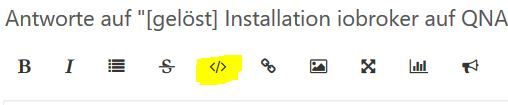
          Bitte packe deine Ausgaben im </> Code .
          1.JPG

          Zeige deine aktuelle Ausgabe von deiner Qnap , ab Start der Instanze .

          Synology 918+ 16GB - ioBroker in Docker v9 , VISO auf Trekstor Primebook C13 13,3" , Hikvision Domkameras mit Surveillance Station .. CCU RaspberryMatic in Synology VM .. Zigbee CC2538+CC2592 .. Sonoff .. KNX .. Modbus ..

          P 1 Antwort Letzte Antwort
          0
          • GlasfaserG Glasfaser

            @piccobello

            Bitte packe deine Ausgaben im </> Code .

            1.JPG

            Zeige deine aktuelle Ausgabe von deiner Qnap , ab Start der Instanze .

            P Offline
            P Offline
            piccobello
            schrieb am zuletzt editiert von
            #40

            @Glasfaser
            guten abend es tut mir leiht ich weiß nicht genau was ich machen soll

            Ausgabe von deiner Qnap , ab Start der Instanze

            ich bin so begabt mit der qnap...

            BBTownB GlasfaserG 2 Antworten Letzte Antwort
            0
            • P piccobello

              @Glasfaser
              guten abend es tut mir leiht ich weiß nicht genau was ich machen soll

              Ausgabe von deiner Qnap , ab Start der Instanze

              ich bin so begabt mit der qnap...

              BBTownB Offline
              BBTownB Offline
              BBTown
              schrieb am zuletzt editiert von BBTown
              #41

              @piccobello
              @Glasfaser wollte dich darauf hinweisen, dass Du logs und anderen code in die "code-tags" packen sollst, damit man das vernünftig lesen kann ...:sunglasses:

              ioBroker auf NUC (VM debian v13 (Trixie ), node v22.21.0 npm v10.9.4, js-controller v7.0.7 jsonl/jsonl / HomeMatic CCU-2 (Wired und Funk) / Philips HUE / echo.DOT / Broadlink RM pro / SONOS

              1 Antwort Letzte Antwort
              0
              • P piccobello

                @Glasfaser
                guten abend es tut mir leiht ich weiß nicht genau was ich machen soll

                Ausgabe von deiner Qnap , ab Start der Instanze

                ich bin so begabt mit der qnap...

                GlasfaserG Offline
                GlasfaserG Offline
                Glasfaser
                schrieb am zuletzt editiert von
                #42

                @piccobello sagte in [gelöst] Installation iobroker auf QNAP 251+ in docker:

                @Glasfaser
                guten abend es tut mir leiht ich weiß nicht genau was ich machen soll

                Ausgabe von deiner Qnap , ab Start der Instanze

                Instanze aus / an schalten
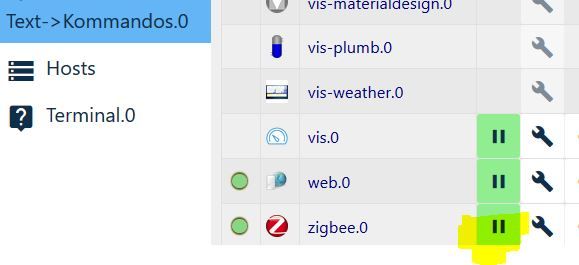
                2.JPG

                dann den log posten

                1.JPG

                Synology 918+ 16GB - ioBroker in Docker v9 , VISO auf Trekstor Primebook C13 13,3" , Hikvision Domkameras mit Surveillance Station .. CCU RaspberryMatic in Synology VM .. Zigbee CC2538+CC2592 .. Sonoff .. KNX .. Modbus ..

                1 Antwort Letzte Antwort
                0
                • P Offline
                  P Offline
                  piccobello
                  schrieb am zuletzt editiert von
                  #43
                  zigbee.0	2019-11-20 20:14:20.798	info	(1388) Error while starting zigbee-shepherd, attempting to fix... (takes 60 seconds)
                  zigbee.0	2019-11-20 20:14:13.737	info	(1388) Reset coordinator
                  zigbee.0	2019-11-20 20:14:13.692	info	(1388) Queue is: true
                  zigbee.0	2019-11-20 20:14:13.691	info	(1388) Start on port: /dev/tty channel 11
                  zigbee.0	2019-11-20 20:14:13.646	info	(1388) starting. Version 0.11.5 in /opt/iobroker/node_modules/iobroker.zigbee, node: v10.17.0
                  host.8862f2d30733	2019-11-20 20:14:11.329	info	instance system.adapter.zigbee.0 started with pid 1388
                  host.8862f2d30733	2019-11-20 20:14:11.314	info	"system.adapter.zigbee.0" enabled
                  host.8862f2d30733	2019-11-20 20:14:01.209	info	instance system.adapter.zigbee.0 terminated with code 156 (156)
                  host.8862f2d30733	2019-11-20 20:14:00.676	info	stopInstance system.adapter.zigbee.0 send kill signal
                  zigbee.0	2019-11-20 20:14:00.682	info	(1372) Terminated (START_IMMEDIATELY_AFTER_STOP): Without reason
                  zigbee.0	2019-11-20 20:14:00.681	info	(1372) terminating
                  zigbee.0	2019-11-20 20:14:00.678	info	(1372) Got terminate signal TERMINATE_YOURSELF
                  host.8862f2d30733	2019-11-20 20:14:00.676	info	stopInstance system.adapter.zigbee.0 (force=false, process=true)
                  host.8862f2d30733	2019-11-20 20:14:00.675	info	"system.adapter.zigbee.0" disabled
                  
                  GlasfaserG 1 Antwort Letzte Antwort
                  0
                  • P piccobello
                    zigbee.0	2019-11-20 20:14:20.798	info	(1388) Error while starting zigbee-shepherd, attempting to fix... (takes 60 seconds)
                    zigbee.0	2019-11-20 20:14:13.737	info	(1388) Reset coordinator
                    zigbee.0	2019-11-20 20:14:13.692	info	(1388) Queue is: true
                    zigbee.0	2019-11-20 20:14:13.691	info	(1388) Start on port: /dev/tty channel 11
                    zigbee.0	2019-11-20 20:14:13.646	info	(1388) starting. Version 0.11.5 in /opt/iobroker/node_modules/iobroker.zigbee, node: v10.17.0
                    host.8862f2d30733	2019-11-20 20:14:11.329	info	instance system.adapter.zigbee.0 started with pid 1388
                    host.8862f2d30733	2019-11-20 20:14:11.314	info	"system.adapter.zigbee.0" enabled
                    host.8862f2d30733	2019-11-20 20:14:01.209	info	instance system.adapter.zigbee.0 terminated with code 156 (156)
                    host.8862f2d30733	2019-11-20 20:14:00.676	info	stopInstance system.adapter.zigbee.0 send kill signal
                    zigbee.0	2019-11-20 20:14:00.682	info	(1372) Terminated (START_IMMEDIATELY_AFTER_STOP): Without reason
                    zigbee.0	2019-11-20 20:14:00.681	info	(1372) terminating
                    zigbee.0	2019-11-20 20:14:00.678	info	(1372) Got terminate signal TERMINATE_YOURSELF
                    host.8862f2d30733	2019-11-20 20:14:00.676	info	stopInstance system.adapter.zigbee.0 (force=false, process=true)
                    host.8862f2d30733	2019-11-20 20:14:00.675	info	"system.adapter.zigbee.0" disabled
                    
                    GlasfaserG Offline
                    GlasfaserG Offline
                    Glasfaser
                    schrieb am zuletzt editiert von
                    #44

                    @piccobello

                    Bitte den log nach den 60 sek. Wait zeigen !!!

                    Synology 918+ 16GB - ioBroker in Docker v9 , VISO auf Trekstor Primebook C13 13,3" , Hikvision Domkameras mit Surveillance Station .. CCU RaspberryMatic in Synology VM .. Zigbee CC2538+CC2592 .. Sonoff .. KNX .. Modbus ..

                    1 Antwort Letzte Antwort
                    0
                    • P Offline
                      P Offline
                      piccobello
                      schrieb am zuletzt editiert von
                      #45
                      zigbee.0	2019-11-20 20:15:27.818	error	(1388) Error while starting zigbee-shepherd!. Error: request timeout
                      zigbee.0	2019-11-20 20:15:20.800	info	(1388) Starting zigbee-shepherd
                      zigbee.0	2019-11-20 20:14:20.798	info	(1388) Error while starting zigbee-shepherd, attempting to fix... (takes 60 seconds)
                      zigbee.0	2019-11-20 20:14:13.737	info	(1388) Reset coordinator
                      zigbee.0	2019-11-20 20:14:13.692	info	(1388) Queue is: true
                      zigbee.0	2019-11-20 20:14:13.691	info	(1388) Start on port: /dev/tty channel 11
                      zigbee.0	2019-11-20 20:14:13.646	info	(1388) starting. Version 0.11.5 in /opt/iobroker/node_modules/iobroker.zigbee, node: v10.17.0
                      host.8862f2d30733	2019-11-20 20:14:11.329	info	instance system.adapter.zigbee.0 started with pid 1388
                      host.8862f2d30733	2019-11-20 20:14:11.314	info	"system.adapter.zigbee.0" enabled
                      host.8862f2d30733	2019-11-20 20:14:01.209	info	instance system.adapter.zigbee.0 terminated with code 156 (156)
                      host.8862f2d30733	2019-11-20 20:14:00.676	info	stopInstance system.adapter.zigbee.0 send kill signal
                      zigbee.0	2019-11-20 20:14:00.682	info	(1372) Terminated (START_IMMEDIATELY_AFTER_STOP): Without reason
                      zigbee.0	2019-11-20 20:14:00.681	info	(1372) terminating
                      zigbee.0	2019-11-20 20:14:00.678	info	(1372) Got terminate signal TERMINATE_YOURSELF
                      host.8862f2d30733	2019-11-20 20:14:00.676	info	stopInstance system.adapter.zigbee.0 (force=false, process=true)
                      host.8862f2d30733	2019-11-20 20:14:00.675	info	"system.adapter.zigbee.0" disabled
                      
                      GlasfaserG 1 Antwort Letzte Antwort
                      0
                      • P piccobello
                        zigbee.0	2019-11-20 20:15:27.818	error	(1388) Error while starting zigbee-shepherd!. Error: request timeout
                        zigbee.0	2019-11-20 20:15:20.800	info	(1388) Starting zigbee-shepherd
                        zigbee.0	2019-11-20 20:14:20.798	info	(1388) Error while starting zigbee-shepherd, attempting to fix... (takes 60 seconds)
                        zigbee.0	2019-11-20 20:14:13.737	info	(1388) Reset coordinator
                        zigbee.0	2019-11-20 20:14:13.692	info	(1388) Queue is: true
                        zigbee.0	2019-11-20 20:14:13.691	info	(1388) Start on port: /dev/tty channel 11
                        zigbee.0	2019-11-20 20:14:13.646	info	(1388) starting. Version 0.11.5 in /opt/iobroker/node_modules/iobroker.zigbee, node: v10.17.0
                        host.8862f2d30733	2019-11-20 20:14:11.329	info	instance system.adapter.zigbee.0 started with pid 1388
                        host.8862f2d30733	2019-11-20 20:14:11.314	info	"system.adapter.zigbee.0" enabled
                        host.8862f2d30733	2019-11-20 20:14:01.209	info	instance system.adapter.zigbee.0 terminated with code 156 (156)
                        host.8862f2d30733	2019-11-20 20:14:00.676	info	stopInstance system.adapter.zigbee.0 send kill signal
                        zigbee.0	2019-11-20 20:14:00.682	info	(1372) Terminated (START_IMMEDIATELY_AFTER_STOP): Without reason
                        zigbee.0	2019-11-20 20:14:00.681	info	(1372) terminating
                        zigbee.0	2019-11-20 20:14:00.678	info	(1372) Got terminate signal TERMINATE_YOURSELF
                        host.8862f2d30733	2019-11-20 20:14:00.676	info	stopInstance system.adapter.zigbee.0 (force=false, process=true)
                        host.8862f2d30733	2019-11-20 20:14:00.675	info	"system.adapter.zigbee.0" disabled
                        
                        GlasfaserG Offline
                        GlasfaserG Offline
                        Glasfaser
                        schrieb am zuletzt editiert von
                        #46

                        @piccobello

                        Versuche mal im Zigbee

                        /dev/ttyACM0
                        

                        Synology 918+ 16GB - ioBroker in Docker v9 , VISO auf Trekstor Primebook C13 13,3" , Hikvision Domkameras mit Surveillance Station .. CCU RaspberryMatic in Synology VM .. Zigbee CC2538+CC2592 .. Sonoff .. KNX .. Modbus ..

                        1 Antwort Letzte Antwort
                        0
                        • P Offline
                          P Offline
                          piccobello
                          schrieb am zuletzt editiert von
                          #47

                          geht auch nicht

                          zigbee.0	2019-11-20 20:21:31.321	error	(1404) Error while starting zigbee-shepherd!. Error: Error: No such file or directory, cannot open /dev/ttyACM0
                          zigbee.0	2019-11-20 20:21:31.310	info	(1404) Starting zigbee-shepherd
                          info.0	2019-11-20 20:20:32.256	info	(431) Popup news was read...
                          zigbee.0	2019-11-20 20:20:31.309	info	(1404) Error while starting zigbee-shepherd, attempting to fix... (takes 60 seconds)
                          zigbee.0	2019-11-20 20:20:31.293	info	(1404) Reset coordinator
                          zigbee.0	2019-11-20 20:20:31.249	info	(1404) Queue is: true
                          zigbee.0	2019-11-20 20:20:31.248	info	(1404) Start on port: /dev/ttyACM0 channel 11
                          zigbee.0	2019-11-20 20:20:31.202	info	(1404) starting. Version 0.11.5 in /opt/iobroker/node_modules/iobroker.zigbee, node: v10.17.0
                          host.8862f2d30733	2019-11-20 20:20:29.117	info	instance system.adapter.zigbee.0 started with pid 1404
                          host.8862f2d30733	2019-11-20 20:20:27.153	info	instance system.adapter.zigbee.0 terminated with code 156 (156)
                          zigbee.0	2019-11-20 20:20:26.623	info	(1388) Terminated (START_IMMEDIATELY_AFTER_STOP): Without reason
                          zigbee.0	2019-11-20 20:20:26.622	info	(1388) terminating
                          zigbee.0	2019-11-20 20:20:26.614	info	(1388) Got terminate signal TERMINATE_YOURSELF
                          host.8862f2d30733	2019-11-20 20:20:26.604	info	stopInstance system.adapter.zigbee.0 send kill signal
                          host.8862f2d30733	2019-11-20 20:20:26.603	info	stopInstance system.adapter.zigbee.0 (force=false, process=true)
                          
                          GlasfaserG 1 Antwort Letzte Antwort
                          0
                          • P Offline
                            P Offline
                            piccobello
                            schrieb am zuletzt editiert von
                            #48

                            wen ich das im terminal an gebe kommt das raus ls -la /dev/

                            insgesamt 4                                                                                                                                                                                                                                                                     
                            drwxr-xr-x 5 root root    360 Nov 20 15:42 .                                                                                                                                                                                                                                    
                            drwxr-xr-x 1 root root   4096 Nov 20 15:42 ..                                                                                                                                                                                                                                   
                            crw--w---- 1 root tty  136, 0 Nov 20 20:14 console                                                                                                                                                                                                                              
                            lrwxrwxrwx 1 root root     11 Nov 20 15:42 core -> /proc/kcore                                                                                                                                                                                                                  
                            lrwxrwxrwx 1 root root     13 Nov 20 15:42 fd -> /proc/self/fd                                                                                                                                                                                                                  
                            crw-rw-rw- 1 root root   1, 7 Nov 20 15:42 full                                                                                                                                                                                                                                 
                            drwxrwxrwt 2 root root     40 Nov 20 15:42 mqueue                                                                                                                                                                                                                               
                            crw-rw-rw- 1 root root   1, 3 Nov 20 15:42 null                                                                                                                                                                                                                                 
                            lrwxrwxrwx 1 root root      8 Nov 20 15:42 ptmx -> pts/ptmx                                                                                                                                                                                                                     
                            drwxr-xr-x 2 root root      0 Nov 20 15:42 pts                                                                                                                                                                                                                                  
                            crw-rw-rw- 1 root root   1, 8 Nov 20 15:42 random                                                                                                                                                                                                                               
                            drwxrwxrwt 2 root root     40 Nov 20 15:42 shm                                                                                                                                                                                                                                  
                            lrwxrwxrwx 1 root root     15 Nov 20 15:42 stderr -> /proc/self/fd/2                                                                                                                                                                                                            
                            lrwxrwxrwx 1 root root     15 Nov 20 15:42 stdin -> /proc/self/fd/0                                                                                                                                                                                                             
                            lrwxrwxrwx 1 root root     15 Nov 20 15:42 stdout -> /proc/self/fd/1                                                                                                                                                                                                            
                            crwxrwxrwx 1 root root   5, 0 Nov 20 20:15 tty                                                                                                                                                                                                                                  
                            crw-rw-rw- 1 root root   1, 9 Nov 20 15:42 urandom                                                                                                                                                                                                                              
                            crw-rw-rw- 1 root root   1, 5 Nov 20 15:42 zero     
                            
                            1 Antwort Letzte Antwort
                            0
                            • P piccobello

                              geht auch nicht

                              zigbee.0	2019-11-20 20:21:31.321	error	(1404) Error while starting zigbee-shepherd!. Error: Error: No such file or directory, cannot open /dev/ttyACM0
                              zigbee.0	2019-11-20 20:21:31.310	info	(1404) Starting zigbee-shepherd
                              info.0	2019-11-20 20:20:32.256	info	(431) Popup news was read...
                              zigbee.0	2019-11-20 20:20:31.309	info	(1404) Error while starting zigbee-shepherd, attempting to fix... (takes 60 seconds)
                              zigbee.0	2019-11-20 20:20:31.293	info	(1404) Reset coordinator
                              zigbee.0	2019-11-20 20:20:31.249	info	(1404) Queue is: true
                              zigbee.0	2019-11-20 20:20:31.248	info	(1404) Start on port: /dev/ttyACM0 channel 11
                              zigbee.0	2019-11-20 20:20:31.202	info	(1404) starting. Version 0.11.5 in /opt/iobroker/node_modules/iobroker.zigbee, node: v10.17.0
                              host.8862f2d30733	2019-11-20 20:20:29.117	info	instance system.adapter.zigbee.0 started with pid 1404
                              host.8862f2d30733	2019-11-20 20:20:27.153	info	instance system.adapter.zigbee.0 terminated with code 156 (156)
                              zigbee.0	2019-11-20 20:20:26.623	info	(1388) Terminated (START_IMMEDIATELY_AFTER_STOP): Without reason
                              zigbee.0	2019-11-20 20:20:26.622	info	(1388) terminating
                              zigbee.0	2019-11-20 20:20:26.614	info	(1388) Got terminate signal TERMINATE_YOURSELF
                              host.8862f2d30733	2019-11-20 20:20:26.604	info	stopInstance system.adapter.zigbee.0 send kill signal
                              host.8862f2d30733	2019-11-20 20:20:26.603	info	stopInstance system.adapter.zigbee.0 (force=false, process=true)
                              
                              GlasfaserG Offline
                              GlasfaserG Offline
                              Glasfaser
                              schrieb am zuletzt editiert von
                              #49

                              @piccobello
                              Zeige mal :

                              ls -l /dev/serial/by-id
                              

                              Synology 918+ 16GB - ioBroker in Docker v9 , VISO auf Trekstor Primebook C13 13,3" , Hikvision Domkameras mit Surveillance Station .. CCU RaspberryMatic in Synology VM .. Zigbee CC2538+CC2592 .. Sonoff .. KNX .. Modbus ..

                              1 Antwort Letzte Antwort
                              0
                              • P Offline
                                P Offline
                                piccobello
                                schrieb am zuletzt editiert von
                                #50

                                @Glasfaser said in [gelöst] Installation iobroker auf QNAP 251+ in docker:

                                ls -l /dev/serial/by-id

                                ls: Zugriff auf '/dev/serial/by-id' nicht möglich: Datei oder Verzeichnis nicht gefunden  
                                
                                
                                GlasfaserG 1 Antwort Letzte Antwort
                                0
                                • P piccobello

                                  @Glasfaser said in [gelöst] Installation iobroker auf QNAP 251+ in docker:

                                  ls -l /dev/serial/by-id

                                  ls: Zugriff auf '/dev/serial/by-id' nicht möglich: Datei oder Verzeichnis nicht gefunden  
                                  
                                  
                                  GlasfaserG Offline
                                  GlasfaserG Offline
                                  Glasfaser
                                  schrieb am zuletzt editiert von
                                  #51

                                  @piccobello

                                  Sorry

                                  ls -la /dev/serial/by-id/
                                  

                                  Synology 918+ 16GB - ioBroker in Docker v9 , VISO auf Trekstor Primebook C13 13,3" , Hikvision Domkameras mit Surveillance Station .. CCU RaspberryMatic in Synology VM .. Zigbee CC2538+CC2592 .. Sonoff .. KNX .. Modbus ..

                                  1 Antwort Letzte Antwort
                                  0
                                  • P Offline
                                    P Offline
                                    piccobello
                                    schrieb am zuletzt editiert von
                                    #52

                                    ls -la /dev/serial/by-id/

                                    ls: Zugriff auf '/dev/serial/by-id/' nicht möglich: Datei oder Verzeichnis nicht gefunden  
                                    
                                    GlasfaserG 1 Antwort Letzte Antwort
                                    0
                                    • P piccobello

                                      ls -la /dev/serial/by-id/

                                      ls: Zugriff auf '/dev/serial/by-id/' nicht möglich: Datei oder Verzeichnis nicht gefunden  
                                      
                                      GlasfaserG Offline
                                      GlasfaserG Offline
                                      Glasfaser
                                      schrieb am zuletzt editiert von
                                      #53

                                      @piccobello

                                      Das mußt du mir mal erklären !????
                                      ...

                                      1.JPG

                                      Synology 918+ 16GB - ioBroker in Docker v9 , VISO auf Trekstor Primebook C13 13,3" , Hikvision Domkameras mit Surveillance Station .. CCU RaspberryMatic in Synology VM .. Zigbee CC2538+CC2592 .. Sonoff .. KNX .. Modbus ..

                                      1 Antwort Letzte Antwort
                                      0
                                      • P Offline
                                        P Offline
                                        piccobello
                                        schrieb am zuletzt editiert von
                                        #54

                                        mit winscp geht das (aber mit terminal von qnap geht das nicht)

                                        /$ ls -la /dev/serial/by-id/
                                        total 0
                                        drwxr-xr-x 2 admin administrators 60 Nov 20 12:37 .
                                        drwxr-xr-x 4 admin administrators 80 Nov 20 12:37 ..
                                        lrwxrwxrwx 1 admin administrators 13 Nov 20 12:37 usb-Texas_Instruments_TI_CC2531_USB_CDC___0X00124B000BE5AB9C-if00 -> ../../ttyACM0

                                        
                                        GlasfaserG 1 Antwort Letzte Antwort
                                        0
                                        • P piccobello

                                          mit winscp geht das (aber mit terminal von qnap geht das nicht)

                                          /$ ls -la /dev/serial/by-id/
                                          total 0
                                          drwxr-xr-x 2 admin administrators 60 Nov 20 12:37 .
                                          drwxr-xr-x 4 admin administrators 80 Nov 20 12:37 ..
                                          lrwxrwxrwx 1 admin administrators 13 Nov 20 12:37 usb-Texas_Instruments_TI_CC2531_USB_CDC___0X00124B000BE5AB9C-if00 -> ../../ttyACM0

                                          
                                          GlasfaserG Offline
                                          GlasfaserG Offline
                                          Glasfaser
                                          schrieb am zuletzt editiert von
                                          #55

                                          @piccobello

                                          und was kommt bei

                                          ls -la /dev/ttyACM0
                                          

                                          Synology 918+ 16GB - ioBroker in Docker v9 , VISO auf Trekstor Primebook C13 13,3" , Hikvision Domkameras mit Surveillance Station .. CCU RaspberryMatic in Synology VM .. Zigbee CC2538+CC2592 .. Sonoff .. KNX .. Modbus ..

                                          1 Antwort Letzte Antwort
                                          0
                                          Antworten
                                          • In einem neuen Thema antworten
                                          Anmelden zum Antworten
                                          • Älteste zuerst
                                          • Neuste zuerst
                                          • Meiste Stimmen


                                          Support us

                                          ioBroker
                                          Community Adapters
                                          Donate
                                          FAQ Cloud / IOT
                                          HowTo: Node.js-Update
                                          HowTo: Backup/Restore
                                          Downloads
                                          BLOG

                                          918

                                          Online

                                          32.4k

                                          Benutzer

                                          81.5k

                                          Themen

                                          1.3m

                                          Beiträge
                                          Community
                                          Impressum | Datenschutz-Bestimmungen | Nutzungsbedingungen | Einwilligungseinstellungen
                                          ioBroker Community 2014-2025
                                          logo
                                          • Anmelden

                                          • Du hast noch kein Konto? Registrieren

                                          • Anmelden oder registrieren, um zu suchen
                                          • Erster Beitrag
                                            Letzter Beitrag
                                          0
                                          • Home
                                          • Aktuell
                                          • Tags
                                          • Ungelesen 0
                                          • Kategorien
                                          • Unreplied
                                          • Beliebt
                                          • GitHub
                                          • Docu
                                          • Hilfe