Skip to content
  • Home
  • Aktuell
  • Tags
  • 0 Ungelesen 0
  • Kategorien
  • Unreplied
  • Beliebt
  • GitHub
  • Docu
  • Hilfe
Skins
  • Light
  • Brite
  • Cerulean
  • Cosmo
  • Flatly
  • Journal
  • Litera
  • Lumen
  • Lux
  • Materia
  • Minty
  • Morph
  • Pulse
  • Sandstone
  • Simplex
  • Sketchy
  • Spacelab
  • United
  • Yeti
  • Zephyr
  • Dark
  • Cyborg
  • Darkly
  • Quartz
  • Slate
  • Solar
  • Superhero
  • Vapor

  • Standard: (Kein Skin)
  • Kein Skin
Einklappen
ioBroker Logo

Community Forum

donate donate
  1. ioBroker Community Home
  2. Deutsch
  3. ioBroker Allgemein
  4. 3 Shelly RGBW Terrassenbeleuchtung synchronisieren

NEWS

  • Jahresrückblick 2025 – unser neuer Blogbeitrag ist online! ✨
    BluefoxB
    Bluefox
    17
    1
    2.0k

  • Neuer Blogbeitrag: Monatsrückblick - Dezember 2025 🎄
    BluefoxB
    Bluefox
    13
    1
    927

  • Weihnachtsangebot 2025! 🎄
    BluefoxB
    Bluefox
    25
    1
    2.2k

3 Shelly RGBW Terrassenbeleuchtung synchronisieren
Geplant Angeheftet Gesperrt Verschoben ioBroker Allgemein
shelly rgbw
18 Beiträge 4 Kommentatoren 4.6k Aufrufe 6 Watching
  • Älteste zuerst
  • Neuste zuerst
  • Meiste Stimmen
Antworten
  • In einem neuen Thema antworten
Anmelden zum Antworten
Dieses Thema wurde gelöscht. Nur Nutzer mit entsprechenden Rechten können es sehen.
  • siggi85S siggi85

    @maniac Wegen der Gruppierung:
    Ich habe sowas mit 4 RGBW2 am laufen und funktioniert gut. Ich habe die Datenpunkte eines Shellys exportiert und den JSON export etwas angepasst (Datenstruktur in custom.0.XXX geändert) und wieder importiert. Alternativ kann man sich die Gruppendatenpunkte auch per Hand erstellen.
    Dann habe ich in Blockly die Regeln erstellt. Hierbei habe ich meine Vorstellungen der Abhängigkeiten einfließen lassen (wenn bspw. 1 von 4 RGBW2 Switch auf true steht, ist der Gruppen Switch Datenpunkt bereits auf true, wenn die einzelnen Helligkeiten sich unterscheiden, wird ein Durchschnitt auf dem Gain Gruppen Datenpunkt gebildet, etc). Vielleicht kannst du diese ja nutzen um sie auf deine Bedürfnisse anzupassen.

    Anbei die Exporte der beiden Blocklys.


    <xml xmlns="http://www.w3.org/1999/xhtml">
    <variables>
    <variable type="undefined" id="timeout">timeout</variable>
    <variable type="undefined" id="timeout2">timeout2</variable>
    <variable type="undefined" id="timeout3">timeout3</variable>
    <variable type="undefined" id="timeout4">timeout4</variable>
    </variables>
    <block type="on_ext" id="jW;@r2mW)MO4xvzQZK%|" x="138" y="-362">
    <mutation items="1"></mutation>
    <field name="CONDITION">any</field>
    <field name="ACK_CONDITION">false</field>
    <value name="OID0">
    <shadow type="field_oid" id="V3e316_DoYC1c/=iHo|">
    <field name="oid">custom.0.licht.wohnzimmer.Vouten.Switch</field>
    </shadow>
    </value>
    <statement name="STATEMENT">
    <block type="control" id="pN10HTPZ^C95S`?I}5"> <mutation delay_input="false"></mutation> <field name="OID">shelly.0.SHRGBW2#2B8EBC#1.color.Switch</field> <field name="WITH_DELAY">FALSE</field> <value name="VALUE"> <block type="on_source" id="URK#f9No;Obp,mcQiv]p"> <field name="ATTR">state.val</field> </block> </value> <next> <block type="control" id="`y,Bjsr/OlI!8cT!h7.|"> <mutation delay_input="false"></mutation> <field name="OID">shelly.0.SHRGBW2#2B8EEB#1.color.Switch</field> <field name="WITH_DELAY">FALSE</field> <value name="VALUE"> <block type="on_source" id="oW-1Pv_(4W*`Eu[nvYVw"> <field name="ATTR">state.val</field> </block> </value> <next> <block type="control" id="0VjWC=ay}nZFr{m0(N.o"> <mutation delay_input="false"></mutation> <field name="OID">shelly.0.SHRGBW2#2B8F05#1.color.Switch</field> <field name="WITH_DELAY">FALSE</field> <value name="VALUE"> <block type="on_source" id=";!z*?5wCw!Hch7/.PG!n"> <field name="ATTR">state.val</field> </block> </value> <next> <block type="control" id="cdjr_fdVha+%_]VcH7(/"> <mutation delay_input="false"></mutation> <field name="OID">shelly.0.SHRGBW2#2B92FB#1.color.Switch</field> <field name="WITH_DELAY">FALSE</field> <value name="VALUE"> <block type="on_source" id="U@O(E_XvU#5_TMAD.[k^"> <field name="ATTR">state.val</field> </block> </value> </block> </next> </block> </next> </block> </next> </block> </statement> <next> <block type="on_ext" id="`Yr#y%X_Lt?,Fa)ZbEk5"> <mutation items="1"></mutation> <field name="CONDITION">any</field> <field name="ACK_CONDITION">false</field> <value name="OID0"> <shadow type="field_oid" id="d#W2;h5%HQZ+qB1pWuI1"> <field name="oid">custom.0.licht.wohnzimmer.Vouten.gain</field> </shadow> </value> <statement name="STATEMENT"> <block type="controls_if" id="6k!x8fyRL/1A.JFmZ)oo" disabled="true"> <mutation else="1"></mutation> <value name="IF0"> <block type="logic_operation" id="K5;ex/URGt|#s+ArLC!#"> <field name="OP">AND</field> <value name="A"> <block type="logic_compare" id="3][!J4f)SN?B;YZ92P_("> <field name="OP">NEQ</field> <value name="A"> <block type="get_value" id="{*y:vMXc@i6z7#ba|*WZ"> <field name="ATTR">val</field> <field name="OID">custom.0.licht.wohnzimmer.Vouten_White</field> </block> </value> <value name="B"> <block type="logic_boolean" id="|p:-nMdf|yu{@sDX|Cu2"> <field name="BOOL">FALSE</field> </block> </value> </block> </value> <value name="B"> <block type="logic_compare" id="4=QKJ.pd/XR5@.Br.A()"> <field name="OP">GT</field> <value name="A"> <block type="get_value" id=":%N1[^g,)bN[yX7~R@{m"> <field name="ATTR">val</field> <field name="OID">custom.0.licht.wohnzimmer.Vouten_White</field> </block> </value> <value name="B"> <block type="math_number" id="zr!^JKz2l9mpYTCTh`6b"> <field name="NUM">0</field> </block> </value> </block> </value> </block> </value> <statement name="DO0"> <block type="control" id="t{--7(55==l^~O,QDhP4"> <mutation delay_input="false"></mutation> <field name="OID">custom.0.licht.wohnzimmer.Vouten_White</field> <field name="WITH_DELAY">FALSE</field> <value name="VALUE"> <block type="math_round" id="8^`DT.hxrYU)K8aDK9Qp"> <field name="OP">ROUND</field> <value name="NUM"> <shadow type="math_number" id="^o-}Zk3p+GBeC]C_9qin"> <field name="NUM">3.1</field> </shadow> <block type="math_arithmetic" id="HZMTIeoE_Ku.h2{SgHS:"> <field name="OP">MULTIPLY</field> <value name="A"> <shadow type="math_number" id="+AU`n94)2Fj36o6vC/!~"> <field name="NUM">1</field> </shadow> <block type="on_source" id="]8X[I7xS*8|aY*0JzJLv"> <field name="ATTR">state.val</field> </block> </value> <value name="B"> <shadow type="math_number" id="U!5tvgzaAxvnqyo=.Eg."> <field name="NUM">2.54</field> </shadow> </value> </block> </value> </block> </value> </block> </statement> <statement name="ELSE"> <block type="control" id="7iKt,U%RGq({w]p-SVJy"> <mutation delay_input="false"></mutation> <field name="OID">shelly.0.SHRGBW2#2B8EBC#1.color.gain</field> <field name="WITH_DELAY">FALSE</field> <value name="VALUE"> <block type="on_source" id="..8;PfeJYpQJFtAgxA;k"> <field name="ATTR">state.val</field> </block> </value> <next> <block type="control" id="*xjiWudWW.H00gQ3rWTi"> <mutation delay_input="false"></mutation> <field name="OID">shelly.0.SHRGBW2#2B8EEB#1.color.gain</field> <field name="WITH_DELAY">FALSE</field> <value name="VALUE"> <block type="on_source" id="fJcb}lc`on~X.vggWVfn"> <field name="ATTR">state.val</field> </block> </value> <next> <block type="control" id="cT?AGtdXP-zW;0G_c]NB"> <mutation delay_input="false"></mutation> <field name="OID">shelly.0.SHRGBW2#2B8F05#1.color.gain</field> <field name="WITH_DELAY">FALSE</field> <value name="VALUE"> <block type="on_source" id="w.gOYv5/3KPKavP,E,Pz"> <field name="ATTR">state.val</field> </block> </value> <next> <block type="control" id="XaOL)SlW[hzNk*NrRI(}"> <mutation delay_input="false"></mutation> <field name="OID">shelly.0.SHRGBW2#2B92FB#1.color.gain</field> <field name="WITH_DELAY">FALSE</field> <value name="VALUE"> <block type="on_source" id="D7{h_3([`.|jx^|D#
    ">
    <field name="ATTR">state.val</field>
    </block>
    </value>
    </block>
    </next>
    </block>
    </next>
    </block>
    </next>
    </block>
    </statement>
    <next>
    <block type="control" id=";8y#?{Mk.VAHH,EhK5bj">
    <mutation delay_input="false"></mutation>
    <field name="OID">shelly.0.SHRGBW2#2B8EBC#1.color.gain</field>
    <field name="WITH_DELAY">FALSE</field>
    <value name="VALUE">
    <block type="on_source" id="I|)k6]0PbX[rBxB%F(XZ">
    <field name="ATTR">state.val</field>
    </block>
    </value>
    <next>
    <block type="control" id="w/gskIJr|U/GKsF6@AzA">
    <mutation delay_input="false"></mutation>
    <field name="OID">shelly.0.SHRGBW2#2B8EEB#1.color.gain</field>
    <field name="WITH_DELAY">FALSE</field>
    <value name="VALUE">
    <block type="on_source" id="WZt+(ioeIChDR?aR6^Y"> <field name="ATTR">state.val</field> </block> </value> <next> <block type="control" id="VedxVX%K6(/f741~JOfk"> <mutation delay_input="false"></mutation> <field name="OID">shelly.0.SHRGBW2#2B8F05#1.color.gain</field> <field name="WITH_DELAY">FALSE</field> <value name="VALUE"> <block type="on_source" id="knfC{PsAmG1eRs}V3h26"> <field name="ATTR">state.val</field> </block> </value> <next> <block type="control" id="Z3bGj;ABqL,$S{B(g+it"> <mutation delay_input="false"></mutation> <field name="OID">shelly.0.SHRGBW2#2B92FB#1.color.gain</field> <field name="WITH_DELAY">FALSE</field> <value name="VALUE"> <block type="on_source" id="p.UW*Z74]nD[W$o_Ui(!"> <field name="ATTR">state.val</field> </block> </value> <next> <block type="controls_if" id="Elo7}Wn20[~lUfd+fzB."> <mutation elseif="1"></mutation> <value name="IF0"> <block type="logic_compare" id="7tEian~6HG#^8~XpC]BA"> <field name="OP">GT</field> <value name="A"> <block type="on_source" id="67bEaB)|,GVz~sqUxWnl"> <field name="ATTR">state.val</field> </block> </value> <value name="B"> <block type="math_number" id="Z]+Qy{diC/0#SS]/PM=x"> <field name="NUM">0</field> </block> </value> </block> </value> <statement name="DO0"> <block type="timeouts_settimeout" id="G98l/bk7J#Cvb|8f,vBt"> <field name="NAME">timeout</field> <field name="DELAY">1000</field> <field name="UNIT">ms</field> <statement name="STATEMENT"> <block type="control" id="m/kkz.FvrI-#r3Mv)">
    <mutation delay_input="false"></mutation>
    <field name="OID">custom.0.licht.wohnzimmer.Vouten.Switch</field>
    <field name="WITH_DELAY">FALSE</field>
    <value name="VALUE">
    <block type="logic_boolean" id=",R_rTxr_7.:mWOxgIEm?">
    <field name="BOOL">TRUE</field>
    </block>
    </value>
    </block>
    </statement>
    </block>
    </statement>
    <value name="IF1">
    <block type="logic_compare" id="{Bu%q;0pNGALF]W,0VxO">
    <field name="OP">EQ</field>
    <value name="A">
    <block type="get_value" id="aH_Np};tNSG6Q+=KCGH}">
    <field name="ATTR">val</field>
    <field name="OID">custom.0.licht.wohnzimmer.Vouten_White</field>
    </block>
    </value>
    <value name="B">
    <block type="math_number" id=")K-fTS~4fC~:0@pWE
    b)">
    <field name="NUM">0</field>
    </block>
    </value>
    </block>
    </value>
    <statement name="DO1">
    <block type="timeouts_settimeout" id="Ijf?~IHXAtE2]S}M3:G">
    <field name="NAME">timeout2</field>
    <field name="DELAY">1000</field>
    <field name="UNIT">ms</field>
    <statement name="STATEMENT">
    <block type="control" id="G-A3b;y0s(y2oZM%d87^">
    <mutation delay_input="false"></mutation>
    <field name="OID">custom.0.licht.wohnzimmer.Vouten.Switch</field>
    <field name="WITH_DELAY">FALSE</field>
    <value name="VALUE">
    <block type="logic_boolean" id="X3~v)E^{[f(x;=2ssNS"> <field name="BOOL">FALSE</field> </block> </value> </block> </statement> </block> </statement> </block> </next> </block> </next> </block> </next> </block> </next> </block> </next> </block> </statement> <next> <block type="on_ext" id="|q6b3Q9;1xAgM_1ln%^">
    <mutation items="1"></mutation>
    <field name="CONDITION">any</field>
    <field name="ACK_CONDITION">false</field>
    <value name="OID0">
    <shadow type="field_oid" id="P4x]Xw!B60W{%G)p(!lx">
    <field name="oid">custom.0.licht.wohnzimmer.Vouten.white</field>
    </shadow>
    </value>
    <statement name="STATEMENT">
    <block type="control" id="60(nS/bvo!q///@=j9Dn">
    <mutation delay_input="false"></mutation>
    <field name="OID">shelly.0.SHRGBW2#2B8EBC#1.color.white</field>
    <field name="WITH_DELAY">FALSE</field>
    <value name="VALUE">
    <block type="on_source" id="Vjvw8lV%-0K0G!;WINlW">
    <field name="ATTR">state.val</field>
    </block>
    </value>
    <next>
    <block type="control" id="A{65F(QvC-/tY2T(KD-F">
    <mutation delay_input="false"></mutation>
    <field name="OID">shelly.0.SHRGBW2#2B8EEB#1.color.white</field>
    <field name="WITH_DELAY">FALSE</field>
    <value name="VALUE">
    <block type="on_source" id="TXEvkRCrX2GTr6+*S0hp">
    <field name="ATTR">state.val</field>
    </block>
    </value>
    <next>
    <block type="control" id="6|3hY6,w-k9r3^epKjqJ">
    <mutation delay_input="false"></mutation>
    <field name="OID">shelly.0.SHRGBW2#2B8F05#1.color.white</field>
    <field name="WITH_DELAY">FALSE</field>
    <value name="VALUE">
    <block type="on_source" id="oPe3d9LNko_FE2
    #Fn~T">
    <field name="ATTR">state.val</field>
    </block>
    </value>
    <next>
    <block type="control" id=",v|@#5wsyMb#mAG8yV6)">
    <mutation delay_input="false"></mutation>
    <field name="OID">shelly.0.SHRGBW2#2B92FB#1.color.white</field>
    <field name="WITH_DELAY">FALSE</field>
    <value name="VALUE">
    <block type="on_source" id="Y3)W.925|*LR
    [W~~PY{">
    <field name="ATTR">state.val</field>
    </block>
    </value>
    <next>
    <block type="controls_if" id="inC@0bi:}q=B6r{q=05o">
    <mutation elseif="1" else="1"></mutation>
    <value name="IF0">
    <block type="logic_compare" id="mXoHT]3Qh9TYGCexjT4M">
    <field name="OP">GT</field>
    <value name="A">
    <block type="on_source" id="LN8VNUy]|2DC4wUdxzr">
    <field name="ATTR">state.val</field>
    </block>
    </value>
    <value name="B">
    <block type="math_number" id="gzl{-zu6cg#VqFbdxn#8">
    <field name="NUM">0</field>
    </block>
    </value>
    </block>
    </value>
    <statement name="DO0">
    <block type="timeouts_settimeout" id="i;n[X@MA}BpoBFkvRZvh">
    <field name="NAME">timeout3</field>
    <field name="DELAY">1000</field>
    <field name="UNIT">ms</field>
    <statement name="STATEMENT">
    <block type="control" id="JN3D,tOFdp;d0/7Uh3=u">
    <mutation delay_input="false"></mutation>
    <field name="OID">custom.0.licht.wohnzimmer.Vouten.Switch</field>
    <field name="WITH_DELAY">FALSE</field>
    <value name="VALUE">
    <block type="logic_boolean" id="@T,2.DNIjCHYy+tMMGw"> <field name="BOOL">TRUE</field> </block> </value> </block> </statement> </block> </statement> <value name="IF1"> <block type="logic_compare" id="_Jl*=lA+wRQ+o14O#|41"> <field name="OP">EQ</field> <value name="A"> <block type="get_value" id="J(O,T.)YiTXuqmTUEfl#"> <field name="ATTR">val</field> <field name="OID">custom.0.licht.wohnzimmer.Vouten_Helligkeit</field> </block> </value> <value name="B"> <block type="math_number" id="vY0%pf)Nx9}dO7fNCJ92"> <field name="NUM">0</field> </block> </value> </block> </value> <statement name="DO1"> <block type="timeouts_settimeout" id="Yy6b7|q[zu5SCh5Rrl.F"> <field name="NAME">timeout4</field> <field name="DELAY">1000</field> <field name="UNIT">ms</field> <statement name="STATEMENT"> <block type="control" id="MF!(}#PLV--CPX=cSs~)"> <mutation delay_input="false"></mutation> <field name="OID">custom.0.licht.wohnzimmer.Vouten.Switch</field> <field name="WITH_DELAY">FALSE</field> <value name="VALUE"> <block type="logic_boolean" id="O;bkJ/86J6(v.~,A0:iT"> <field name="BOOL">FALSE</field> </block> </value> </block> </statement> </block> </statement> </block> </next> </block> </next> </block> </next> </block> </next> </block> </statement> <next> <block type="on_ext" id="pz^HWHavB5O)U=,qe0~h"> <mutation items="1"></mutation> <field name="CONDITION">any</field> <field name="ACK_CONDITION">false</field> <value name="OID0"> <shadow type="field_oid" id="Q5b{hYqABSfi(fKoyg_e"> <field name="oid">custom.0.licht.wohnzimmer.Vouten.rgbw</field> </shadow> </value> <statement name="STATEMENT"> <block type="control" id="||YhG|S^0eJ}UQ{_lkyJ"> <mutation delay_input="false"></mutation> <field name="OID">shelly.0.SHRGBW2#2B8EBC#1.color.rgbw</field> <field name="WITH_DELAY">FALSE</field> <value name="VALUE"> <block type="on_source" id="-IOYU46{HY9~wYp==rCd"> <field name="ATTR">state.val</field> </block> </value> <next> <block type="control" id="z+rxti_IABZJo!:@.Bw9"> <mutation delay_input="false"></mutation> <field name="OID">shelly.0.SHRGBW2#2B8EEB#1.color.rgbw</field> <field name="WITH_DELAY">FALSE</field> <value name="VALUE"> <block type="on_source" id="v}hxGpJsb5=SZ=;q6kd">
    <field name="ATTR">state.val</field>
    </block>
    </value>
    <next>
    <block type="control" id="}kp%IKg~V@]8mO^1gk:"> <mutation delay_input="false"></mutation> <field name="OID">shelly.0.SHRGBW2#2B8F05#1.color.rgbw</field> <field name="WITH_DELAY">FALSE</field> <value name="VALUE"> <block type="on_source" id="y0O;m*b[lbmU,.,fv9*g"> <field name="ATTR">state.val</field> </block> </value> <next> <block type="control" id="-My*RI*?Yg*HSz}5J+_7"> <mutation delay_input="false"></mutation> <field name="OID">shelly.0.SHRGBW2#2B92FB#1.color.rgbw</field> <field name="WITH_DELAY">FALSE</field> <value name="VALUE"> <block type="on_source" id="wGUHDi64i.JjCNQgx_{q"> <field name="ATTR">state.val</field> </block> </value> </block> </next> </block> </next> </block> </next> </block> </statement> <next> <block type="on_ext" id="Jglkfv=wrAM%GgdqEt^">
    <mutation items="1"></mutation>
    <field name="CONDITION">any</field>
    <field name="ACK_CONDITION">false</field>
    <value name="OID0">
    <shadow type="field_oid" id="5k7hJFX9nT2-@IYuV9N9">
    <field name="oid">custom.0.licht.wohnzimmer.Vouten.red</field>
    </shadow>
    </value>
    <statement name="STATEMENT">
    <block type="control" id="}KQO2^I[Knuo5Kzc{w">
    <mutation delay_input="false"></mutation>
    <field name="OID">shelly.0.SHRGBW2#2B8EBC#1.color.red</field>
    <field name="WITH_DELAY">FALSE</field>
    <value name="VALUE">
    <block type="on_source" id="4!u_+pmWzB-5)T_;;fcM">
    <field name="ATTR">state.val</field>
    </block>
    </value>
    <next>
    <block type="control" id="?c^:QRar8hV
    .U6rU{2%">
    <mutation delay_input="false"></mutation>
    <field name="OID">shelly.0.SHRGBW2#2B8EEB#1.color.red</field>
    <field name="WITH_DELAY">FALSE</field>
    <value name="VALUE">
    <block type="on_source" id="7m(zzu!;2TjsqUIMD9zd">
    <field name="ATTR">state.val</field>
    </block>
    </value>
    <next>
    <block type="control" id="8SJ5CV;lrJqUYjOACg-x">
    <mutation delay_input="false"></mutation>
    <field name="OID">shelly.0.SHRGBW2#2B8F05#1.color.red</field>
    <field name="WITH_DELAY">FALSE</field>
    <value name="VALUE">
    <block type="on_source" id="f0W/b0to8r!W+E}@Jg!{">
    <field name="ATTR">state.val</field>
    </block>
    </value>
    <next>
    <block type="control" id="B(OyJrB~3Jw#@;2KHnsa">
    <mutation delay_input="false"></mutation>
    <field name="OID">shelly.0.SHRGBW2#2B92FB#1.color.red</field>
    <field name="WITH_DELAY">FALSE</field>
    <value name="VALUE">
    <block type="on_source" id="VQiSLnnhd96v%6t?lz%"> <field name="ATTR">state.val</field> </block> </value> </block> </next> </block> </next> </block> </next> </block> </statement> <next> <block type="on_ext" id="GLsZrcwF*}9j#R;{Tjp:"> <mutation items="1"></mutation> <field name="CONDITION">any</field> <field name="ACK_CONDITION">false</field> <value name="OID0"> <shadow type="field_oid" id="aP,?6ljge5IC[w1wOL:z"> <field name="oid">custom.0.licht.wohnzimmer.Vouten.green</field> </shadow> </value> <statement name="STATEMENT"> <block type="control" id="aDg6eg,gA}Ld-#xxafIu"> <mutation delay_input="false"></mutation> <field name="OID">shelly.0.SHRGBW2#2B8EBC#1.color.green</field> <field name="WITH_DELAY">FALSE</field> <value name="VALUE"> <block type="on_source" id="2+VyvAn,!zKzsN*6+g}#"> <field name="ATTR">state.val</field> </block> </value> <next> <block type="control" id="Ad8T6iPg;KOq^NUbkx0v"> <mutation delay_input="false"></mutation> <field name="OID">shelly.0.SHRGBW2#2B8EEB#1.color.green</field> <field name="WITH_DELAY">FALSE</field> <value name="VALUE"> <block type="on_source" id="Gkj4-HW;z?YM@=HjAWx)"> <field name="ATTR">state.val</field> </block> </value> <next> <block type="control" id="Njry+)/[!r24%zR/nCc9"> <mutation delay_input="false"></mutation> <field name="OID">shelly.0.SHRGBW2#2B8F05#1.color.green</field> <field name="WITH_DELAY">FALSE</field> <value name="VALUE"> <block type="on_source" id="?lOICZ@G^LunV=5jSjAk"> <field name="ATTR">state.val</field> </block> </value> <next> <block type="control" id="OW(|q@e4oU/Oe~{+Pq">
    <mutation delay_input="false"></mutation>
    <field name="OID">shelly.0.SHRGBW2#2B92FB#1.color.green</field>
    <field name="WITH_DELAY">FALSE</field>
    <value name="VALUE">
    <block type="on_source" id="[9aC5pCSnm2x1#l?SM]x">
    <field name="ATTR">state.val</field>
    </block>
    </value>
    </block>
    </next>
    </block>
    </next>
    </block>
    </next>
    </block>
    </statement>
    <next>
    <block type="on_ext" id="dITn3])-Q{rA_gf;_iCt">
    <mutation items="1"></mutation>
    <field name="CONDITION">any</field>
    <field name="ACK_CONDITION">false</field>
    <value name="OID0">
    <shadow type="field_oid" id="@:GF=cir;cL^CC|b5t3@">
    <field name="oid">custom.0.licht.wohnzimmer.Vouten.blue</field>
    </shadow>
    </value>
    <statement name="STATEMENT">
    <block type="control" id=")xZViePn:KjPNEbU:P5E">
    <mutation delay_input="false"></mutation>
    <field name="OID">shelly.0.SHRGBW2#2B8EBC#1.color.blue</field>
    <field name="WITH_DELAY">FALSE</field>
    <value name="VALUE">
    <block type="on_source" id="-fOv):E,[5vGTe
    5)KiE">
    <field name="ATTR">state.val</field>
    </block>
    </value>
    <next>
    <block type="control" id="EM*ij8+q)=xZ1yhCP#fX">
    <mutation delay_input="false"></mutation>
    <field name="OID">shelly.0.SHRGBW2#2B8EEB#1.color.blue</field>
    <field name="WITH_DELAY">FALSE</field>
    <value name="VALUE">
    <block type="on_source" id="2Cht@BjYFaJ?fhP+R06Y">
    <field name="ATTR">state.val</field>
    </block>
    </value>
    <next>
    <block type="control" id=".Urka+g?%/d.X5@Tg2s@">
    <mutation delay_input="false"></mutation>
    <field name="OID">shelly.0.SHRGBW2#2B8F05#1.color.blue</field>
    <field name="WITH_DELAY">FALSE</field>
    <value name="VALUE">
    <block type="on_source" id="~:tE/uUswjY7,53Cl+:d">
    <field name="ATTR">state.val</field>
    </block>
    </value>
    <next>
    <block type="control" id="B{Fz)6d#}4(b5)YeA[vx">
    <mutation delay_input="false"></mutation>
    <field name="OID">shelly.0.SHRGBW2#2B92FB#1.color.blue</field>
    <field name="WITH_DELAY">FALSE</field>
    <value name="VALUE">
    <block type="on_source" id="o?Jo%^QE=3a#%upm:*0(">
    <field name="ATTR">state.val</field>
    </block>
    </value>
    </block>
    </next>
    </block>
    </next>
    </block>
    </next>
    </block>
    </statement>
    </block>
    </next>
    </block>
    </next>
    </block>
    </next>
    </block>
    </next>
    </block>
    </next>
    </block>
    </next>
    </block>
    </xml>

    M Offline
    M Offline
    maniac
    schrieb am zuletzt editiert von
    #7

    @siggi85 sagte in 3 Shelly RGBW Terrassenbeleuchtung synchronisieren:

    Dann habe ich in Blockly die Regeln erstellt. Hierbei habe ich meine Vorstellungen der Abhängigkeiten einfließen lassen (wenn bspw. 1 von 4 RGBW2 Switch auf true steht, ist der Gruppen Switch Datenpunkt bereits auf true, wenn die einzelnen Helligkeiten sich unterscheiden, wird ein Durchschnitt auf dem Gain Gruppen Datenpunkt gebildet, etc). Vielleicht kannst du diese ja nutzen um sie auf deine Bedürfnisse anzupassen.

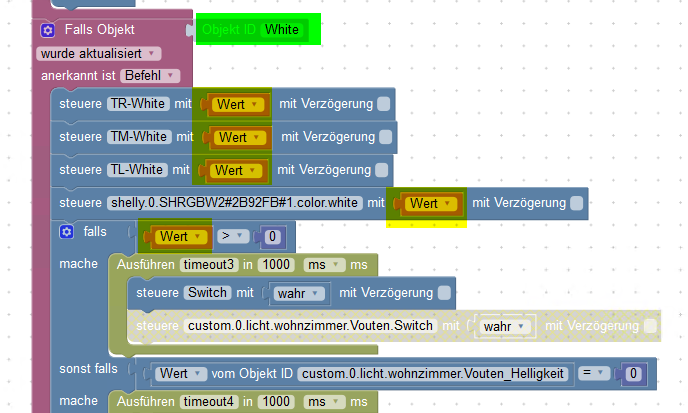
    Ich habe das jetzt soweit angepasst auf meine Objekte. Eines ist mir noch nicht ganz klar.
    Welchen "Wert" setzt das Script denn? Bezieht das auf den Wert aus dem "Falls Objekt"?
    Also wenn dieser Wert geändert wird, setze die Objekte auf diesen neuen Wert?
    b250a408-518a-45e8-a7be-19425a6edde8-grafik.png

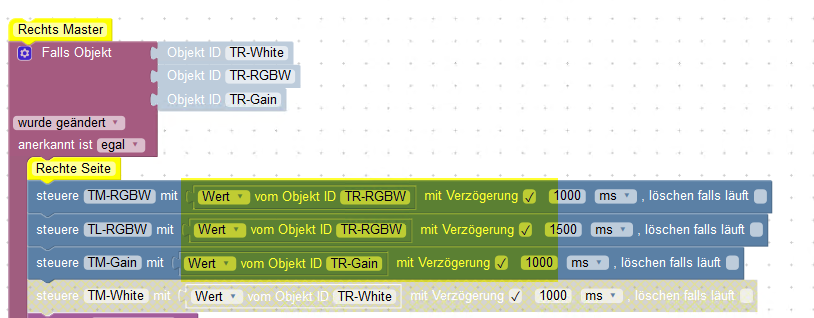
    Ich hatte das bisher immer noch so gemacht.
    7aa0c566-e093-4cb0-b28e-59631f6f7743-grafik.png

    Gruß Frank…

    siggi85S 1 Antwort Letzte Antwort
    0
    • M maniac

      @siggi85 sagte in 3 Shelly RGBW Terrassenbeleuchtung synchronisieren:

      Dann habe ich in Blockly die Regeln erstellt. Hierbei habe ich meine Vorstellungen der Abhängigkeiten einfließen lassen (wenn bspw. 1 von 4 RGBW2 Switch auf true steht, ist der Gruppen Switch Datenpunkt bereits auf true, wenn die einzelnen Helligkeiten sich unterscheiden, wird ein Durchschnitt auf dem Gain Gruppen Datenpunkt gebildet, etc). Vielleicht kannst du diese ja nutzen um sie auf deine Bedürfnisse anzupassen.

      Ich habe das jetzt soweit angepasst auf meine Objekte. Eines ist mir noch nicht ganz klar.
      Welchen "Wert" setzt das Script denn? Bezieht das auf den Wert aus dem "Falls Objekt"?
      Also wenn dieser Wert geändert wird, setze die Objekte auf diesen neuen Wert?
      b250a408-518a-45e8-a7be-19425a6edde8-grafik.png

      Ich hatte das bisher immer noch so gemacht.

      7aa0c566-e093-4cb0-b28e-59631f6f7743-grafik.png

      siggi85S Offline
      siggi85S Offline
      siggi85
      schrieb am zuletzt editiert von siggi85
      #8

      @maniac
      Der grünmarkierte Datenpunkt in deiner Grafik ist der Gruppen White Datenpunkt.
      Das eine Skript setzte die Werte der einzelnen Shellys, wenn der Gruppenwert gesetzt wird. Das andere Skript setzt die Gruppenwerte, wenn eines der einzelnen Werte verändert wird. (ohne dass der Gruppenwert ausgeführt sind)

      Beispiel:
      Ausgangszustand 1: Alle Shellys sind aus
      einer Shelly wird separat an gemacht. Dann geht der Switchdatenpunkt der Gruppe auf true. die anderen beiden Shelly bleiben aber auf false.
      Ausgangszustand 2: Alle Shellys sind aus.
      Der Gruppendatenpunkt Switch wird auf true geschaltet. Alle 3 Shellys gehen bei switch auf true.

      EDIT: Bei dir wird anscheinend jedes Mal alles gesetzt wenn sich einer der Gruppen-Datenpunkte ändert. Ich habe für jeden Datenpunkt einen einzelnen Trigger, die sich dann auch nur um die jeweils geänderten Datenpunkte kümmern.

      1 Antwort Letzte Antwort
      0
      • M Offline
        M Offline
        maniac
        schrieb am zuletzt editiert von
        #9

        Ich habe es jetzt soweit hinbekommen. Allerdings hab ich manchmal noch das Problem, dass die LEDs resetten, bzw. die Shelly. Kann es sein, dass die Shelly manchmal etwas träge sind?
        Wenn ich mehrfach direkt nacheinander Farbe oder Helligkeit wechsle, gehen die LED aus und kurz danach wieder an mit einem Farb-/Helligkeitswert den ich nicht zuordnen kann.

        Als Beispiel möchte ich ein "Lauflicht" erstellen. Dazu habe ich jetzt eine Verzögerung von 100ms eingebaut:
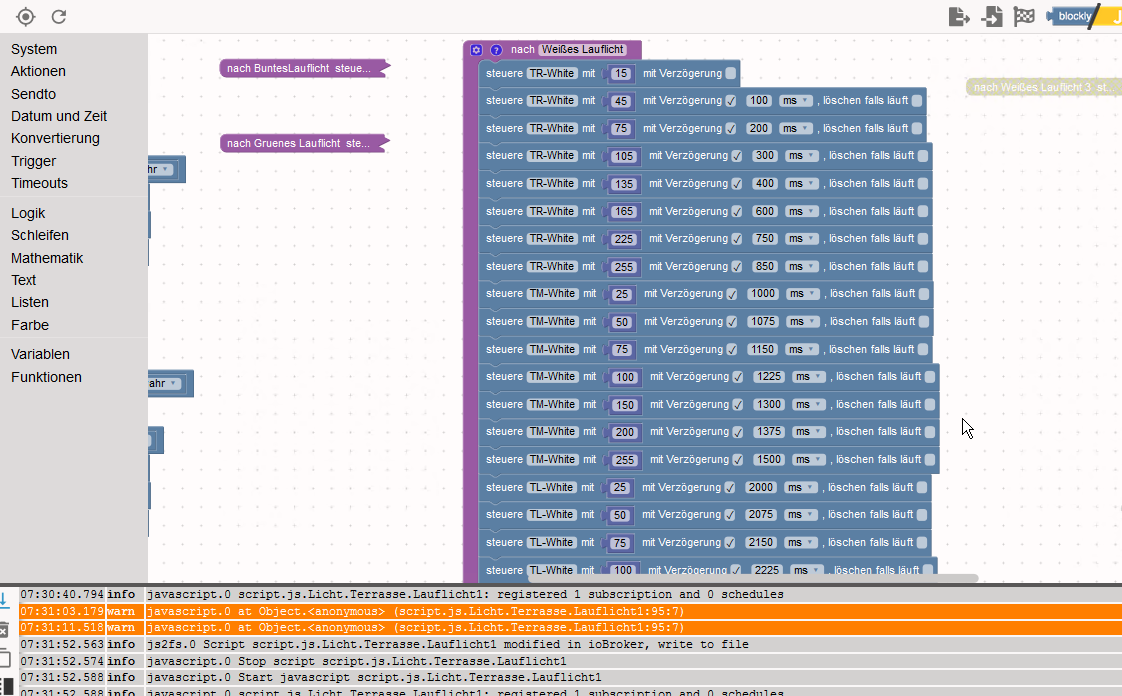
        cfc36e77-b0e6-4ff2-936d-4866ec9b21aa-grafik.png

        Damit funktioniert es meistens, aber ab und an bekomme ich im Script die Warnung:

        07:31:03.179	warn	javascript.0 at Object.<anonymous> (script.js.Licht.Terrasse.Lauflicht1:95:7)
        07:31:11.518	warn	javascript.0 at Object.<anonymous> (script.js.Licht.Terrasse.Lauflicht1:95:7)
        

        Danach kann ich auch in der VIS den Datenpunkt "White" nicht mehr ändern. Ich muss VIS neu laden.

        Frage: Was bedeutet die Warnung?

        Gruß Frank…

        siggi85S 1 Antwort Letzte Antwort
        0
        • M maniac

          Ich habe es jetzt soweit hinbekommen. Allerdings hab ich manchmal noch das Problem, dass die LEDs resetten, bzw. die Shelly. Kann es sein, dass die Shelly manchmal etwas träge sind?
          Wenn ich mehrfach direkt nacheinander Farbe oder Helligkeit wechsle, gehen die LED aus und kurz danach wieder an mit einem Farb-/Helligkeitswert den ich nicht zuordnen kann.

          Als Beispiel möchte ich ein "Lauflicht" erstellen. Dazu habe ich jetzt eine Verzögerung von 100ms eingebaut:
          cfc36e77-b0e6-4ff2-936d-4866ec9b21aa-grafik.png

          Damit funktioniert es meistens, aber ab und an bekomme ich im Script die Warnung:

          07:31:03.179	warn	javascript.0 at Object.<anonymous> (script.js.Licht.Terrasse.Lauflicht1:95:7)
          07:31:11.518	warn	javascript.0 at Object.<anonymous> (script.js.Licht.Terrasse.Lauflicht1:95:7)
          

          Danach kann ich auch in der VIS den Datenpunkt "White" nicht mehr ändern. Ich muss VIS neu laden.

          Frage: Was bedeutet die Warnung?

          siggi85S Offline
          siggi85S Offline
          siggi85
          schrieb am zuletzt editiert von
          #10

          @maniac sagte in 3 Shelly RGBW Terrassenbeleuchtung synchronisieren:

          Ich habe es jetzt soweit hinbekommen. Allerdings hab ich manchmal noch das Problem, dass die LEDs resetten, bzw. die Shelly. Kann es sein, dass die Shelly manchmal etwas träge sind?
          Wenn ich mehrfach direkt nacheinander Farbe oder Helligkeit wechsle, gehen die LED aus und kurz danach wieder an mit einem Farb-/Helligkeitswert den ich nicht zuordnen kann.

          So ein ähnliches Verhalten habe ich auch. Da es bisher relativ selten passiert, kann ich aktuell damit leben.
          Ob hier das Skript optimiert werden kann, oder ob ggf. der Shelly Adapter sowas abfangen sollte, habe ich bisher nicht weiter verfolgt.

          1 Antwort Letzte Antwort
          0
          • M Offline
            M Offline
            maniac
            schrieb am zuletzt editiert von
            #11

            So langsam läuft es wie es soll. Brauche aber bitte einen Denkanstoß.

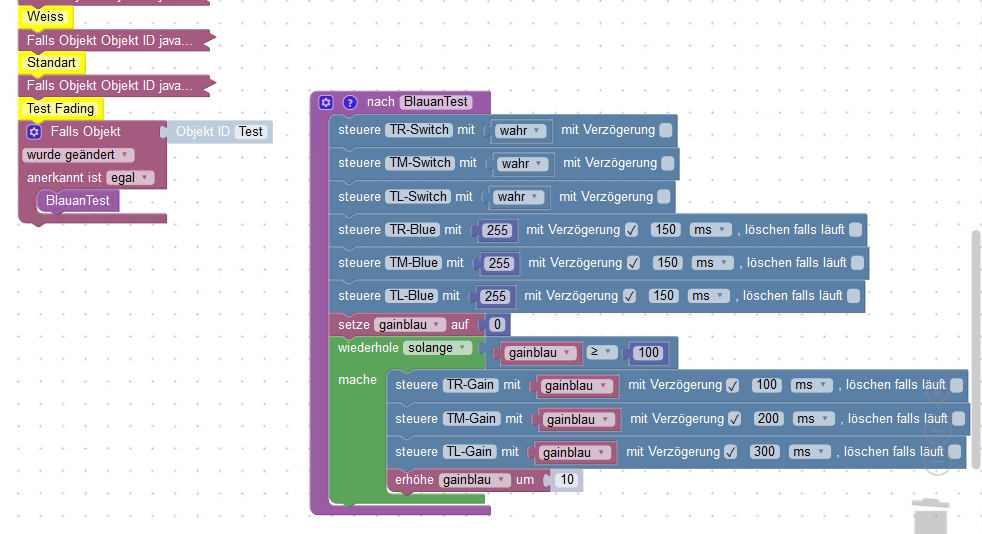
            Ich habe mal versucht die LED mit einer anderen(kürzeren) Funktion langsam heller werden zu lassen.

            Mein Ansatz sieht jetzt so aus.
            2723413d-f710-4afe-b9e8-33d5516bce2b-grafik.png

            Das funktioniert aber aber nicht :(

            Ich hatte jetzt angenommen, dass die Variable "gainblau" so lange erhöht wird bis sie 100 erreicht hat und dadurch die LED in 10% Schritten heller werden.
            Es passiert aber gar nichts innerhalb der Schleife. Switch und xx-Blue werden richtig gesetzt wenn ich den Trigger auslöse.

            Wo liegt mein Fehler?

            Gruß Frank…

            siggi85S E 2 Antworten Letzte Antwort
            0
            • M maniac

              So langsam läuft es wie es soll. Brauche aber bitte einen Denkanstoß.

              Ich habe mal versucht die LED mit einer anderen(kürzeren) Funktion langsam heller werden zu lassen.

              Mein Ansatz sieht jetzt so aus.
              2723413d-f710-4afe-b9e8-33d5516bce2b-grafik.png

              Das funktioniert aber aber nicht :(

              Ich hatte jetzt angenommen, dass die Variable "gainblau" so lange erhöht wird bis sie 100 erreicht hat und dadurch die LED in 10% Schritten heller werden.
              Es passiert aber gar nichts innerhalb der Schleife. Switch und xx-Blue werden richtig gesetzt wenn ich den Trigger auslöse.

              Wo liegt mein Fehler?

              siggi85S Offline
              siggi85S Offline
              siggi85
              schrieb am zuletzt editiert von
              #12

              @maniac Bau Mal einen Timeout Block innerhalb deiner Schleife, statt der Verzögerungen. Lass den Timeout mal auf min. 1sek konfiguriert. Funktioniert das besser? (Erstmal unabhängig ob der 10sek Fade erst Mal zu lange dauert)

              1 Antwort Letzte Antwort
              0
              • M maniac

                So langsam läuft es wie es soll. Brauche aber bitte einen Denkanstoß.

                Ich habe mal versucht die LED mit einer anderen(kürzeren) Funktion langsam heller werden zu lassen.

                Mein Ansatz sieht jetzt so aus.
                2723413d-f710-4afe-b9e8-33d5516bce2b-grafik.png

                Das funktioniert aber aber nicht :(

                Ich hatte jetzt angenommen, dass die Variable "gainblau" so lange erhöht wird bis sie 100 erreicht hat und dadurch die LED in 10% Schritten heller werden.
                Es passiert aber gar nichts innerhalb der Schleife. Switch und xx-Blue werden richtig gesetzt wenn ich den Trigger auslöse.

                Wo liegt mein Fehler?

                E Offline
                E Offline
                el_malto
                schrieb am zuletzt editiert von
                #13

                @maniac sagte in 3 Shelly RGBW Terrassenbeleuchtung synchronisieren:

                So langsam läuft es wie es soll. Brauche aber bitte einen Denkanstoß.

                Ich habe mal versucht die LED mit einer anderen(kürzeren) Funktion langsam heller werden zu lassen.

                Mein Ansatz sieht jetzt so aus.
                2723413d-f710-4afe-b9e8-33d5516bce2b-grafik.png

                Das funktioniert aber aber nicht :(

                Ich hatte jetzt angenommen, dass die Variable "gainblau" so lange erhöht wird bis sie 100 erreicht hat und dadurch die LED in 10% Schritten heller werden.
                Es passiert aber gar nichts innerhalb der Schleife. Switch und xx-Blue werden richtig gesetzt wenn ich den Trigger auslöse.

                Wo liegt mein Fehler?

                Du hast einen Denkfehler wie das „wiederhole solange“ funktioniert. Du musst <= 100 wählen. Du setzt „gainblau“ davor ja auf 0 und dann wiederholt der das so lange wie „gainblue“ <= 100 ist. Bei dir würde er das jetzt so lange machen wie „gainblue“ >= 100 ist. Da du aber vorher „gainblue“ auf 0 setzt wiederholt der nichts.

                1 Antwort Letzte Antwort
                1
                • M Offline
                  M Offline
                  maniac
                  schrieb am zuletzt editiert von maniac
                  #14

                  @el_malto sagte in 3 Shelly RGBW Terrassenbeleuchtung synchronisieren:

                  nen De

                  Danke Euch.

                  Ich habe es jetzt ganz anders gelöst hoffe ich. Zumindest funktioniert es meistens.
                  Irgendwie spinnen die Shelly aber ab und zu und gehen einfach ganz aus und stellen nicht definierbare Farben ein.

                  Ich triggere jetzt auf ein Objekt und wenn dieses true ist, setze ich XXX_Verzögerung auf einen bestimmten Wert (dieser ist dann die Geschwingkeit mit der das ganze abläuft)
                  Dann wird gainXXX auf 0 gesetzt und um einen bestimmten Wert erhöht (Dies sind dann die Stufen mit denen es heller wird).
                  So lange die Helligkeit keine 100 erreicht hat, wird der Block neu aufgerufen.
                  Beim ausschalten praktisch das Gleiche nur anders herum.
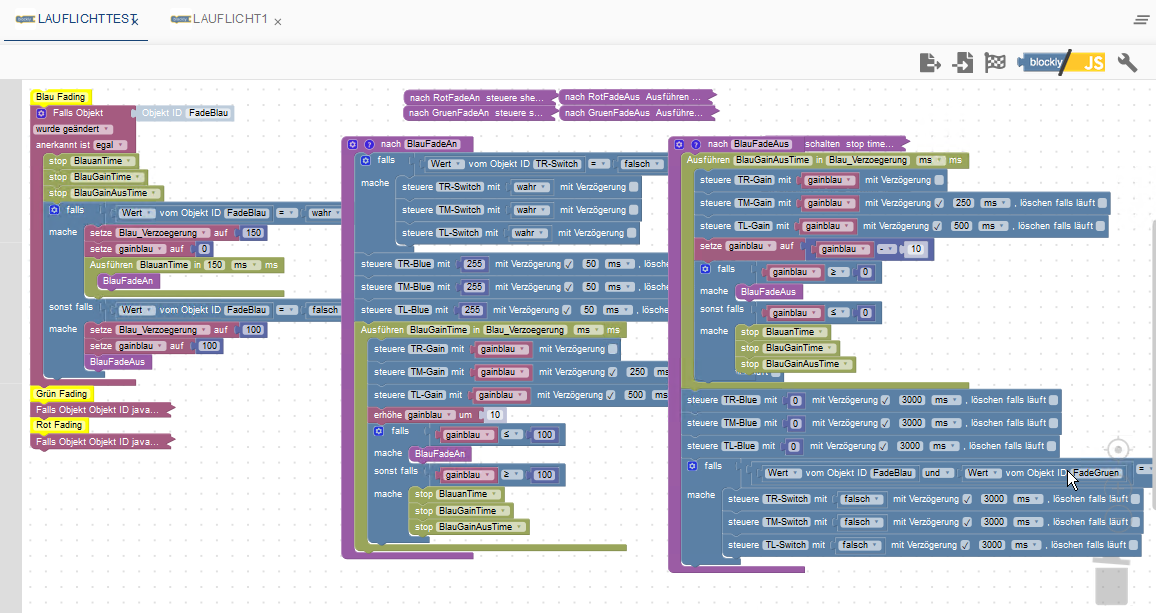
                  825cea41-4c86-4ee8-bab0-9934166666f5-grafik.png

                  Aber wie gesagt, manchmal klappt es nicht und die Shelly spinnen. Da bin ich noch nicht ganz zufrieden.

                  Gruß Frank…

                  siggi85S 1 Antwort Letzte Antwort
                  0
                  • M maniac

                    @el_malto sagte in 3 Shelly RGBW Terrassenbeleuchtung synchronisieren:

                    nen De

                    Danke Euch.

                    Ich habe es jetzt ganz anders gelöst hoffe ich. Zumindest funktioniert es meistens.
                    Irgendwie spinnen die Shelly aber ab und zu und gehen einfach ganz aus und stellen nicht definierbare Farben ein.

                    Ich triggere jetzt auf ein Objekt und wenn dieses true ist, setze ich XXX_Verzögerung auf einen bestimmten Wert (dieser ist dann die Geschwingkeit mit der das ganze abläuft)
                    Dann wird gainXXX auf 0 gesetzt und um einen bestimmten Wert erhöht (Dies sind dann die Stufen mit denen es heller wird).
                    So lange die Helligkeit keine 100 erreicht hat, wird der Block neu aufgerufen.
                    Beim ausschalten praktisch das Gleiche nur anders herum.

                    825cea41-4c86-4ee8-bab0-9934166666f5-grafik.png

                    Aber wie gesagt, manchmal klappt es nicht und die Shelly spinnen. Da bin ich noch nicht ganz zufrieden.

                    siggi85S Offline
                    siggi85S Offline
                    siggi85
                    schrieb am zuletzt editiert von
                    #15

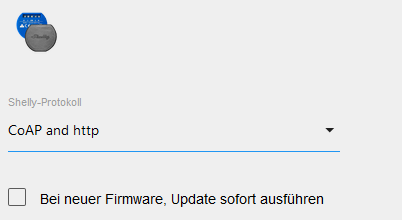
                    @maniac Nutzt du http oder mqtt über den Shelly Adapter? Ich nutze http und habe manchmal ähnliche Probleme. Ggf. Könnte mqtt hier besser funktionieren?!

                    1 Antwort Letzte Antwort
                    0
                    • M Offline
                      M Offline
                      maniac
                      schrieb am zuletzt editiert von
                      #16

                      70de94ed-8e70-4dbb-b1ad-a79bb6f047fe-grafik.png

                      CoAP

                      Gruß Frank…

                      siggi85S 1 Antwort Letzte Antwort
                      0
                      • M maniac

                        70de94ed-8e70-4dbb-b1ad-a79bb6f047fe-grafik.png

                        CoAP

                        siggi85S Offline
                        siggi85S Offline
                        siggi85
                        schrieb am zuletzt editiert von
                        #17

                        @maniac sagte in 3 Shelly RGBW Terrassenbeleuchtung synchronisieren:

                        70de94ed-8e70-4dbb-b1ad-a79bb6f047fe-grafik.png

                        CoAP

                        Ich auch. Ggf. ist mqtt hier etwas performanter und wird von den Shelly besser verarbeitet?!? :thinking_face:

                        1 Antwort Letzte Antwort
                        0
                        • SKBS Offline
                          SKBS Offline
                          SKB
                          Developer Most Active
                          schrieb am zuletzt editiert von
                          #18

                          Hallo, sollte dieses Thema noch aktuell sein, so habe ich hier eine Anleitung verfasst :)

                          https://www.kreyenborg.koeln/shelly-rgbw2-synchronisieren/

                          ... wer nicht mit der Zeit geht, geht mit der Zeit ...

                          Aktuelle Entwicklung: Energiefluss - erweitert (https://forum.iobroker.net/topic/64734)

                          1 Antwort Letzte Antwort
                          0
                          Antworten
                          • In einem neuen Thema antworten
                          Anmelden zum Antworten
                          • Älteste zuerst
                          • Neuste zuerst
                          • Meiste Stimmen


                          Support us

                          ioBroker
                          Community Adapters
                          Donate
                          FAQ Cloud / IOT
                          HowTo: Node.js-Update
                          HowTo: Backup/Restore
                          Downloads
                          BLOG

                          344

                          Online

                          32.6k

                          Benutzer

                          82.2k

                          Themen

                          1.3m

                          Beiträge
                          Community
                          Impressum | Datenschutz-Bestimmungen | Nutzungsbedingungen | Einwilligungseinstellungen
                          ioBroker Community 2014-2025
                          logo
                          • Anmelden

                          • Du hast noch kein Konto? Registrieren

                          • Anmelden oder registrieren, um zu suchen
                          • Erster Beitrag
                            Letzter Beitrag
                          0
                          • Home
                          • Aktuell
                          • Tags
                          • Ungelesen 0
                          • Kategorien
                          • Unreplied
                          • Beliebt
                          • GitHub
                          • Docu
                          • Hilfe