Weiter zum Inhalt
  • Home
  • Aktuell
  • Tags
  • 0 Ungelesen 0
  • Kategorien
  • Unreplied
  • Beliebt
  • GitHub
  • Docu
  • Hilfe
Skins
  • Hell
  • Brite
  • Cerulean
  • Cosmo
  • Flatly
  • Journal
  • Litera
  • Lumen
  • Lux
  • Materia
  • Minty
  • Morph
  • Pulse
  • Sandstone
  • Simplex
  • Sketchy
  • Spacelab
  • United
  • Yeti
  • Zephyr
  • Dunkel
  • Cyborg
  • Darkly
  • Quartz
  • Slate
  • Solar
  • Superhero
  • Vapor

  • Standard: (Kein Skin)
  • Kein Skin
Einklappen
ioBroker Logo

Community Forum

donate donate
  1. ioBroker Community Home
  2. Deutsch
  3. ioBroker Allgemein
  4. Nicht erklärbare Fehler im Log FB tr-064

NEWS

  • Neuer ioBroker-Blog online: Monatsrückblick März/April 2026
    BluefoxB
    Bluefox
    8
    1
    368

  • Verwendung von KI bitte immer deutlich kennzeichnen
    HomoranH
    Homoran
    10
    1
    325

  • Monatsrückblick Januar/Februar 2026 ist online!
    BluefoxB
    Bluefox
    18
    1
    945

Nicht erklärbare Fehler im Log FB tr-064

Geplant Angeheftet Gesperrt Verschoben ioBroker Allgemein
tr-064 adapter fehlerlogfehler
15 Beiträge 5 Kommentatoren 1.5k Aufrufe 4 Beobachtet
  • Älteste zuerst
  • Neuste zuerst
  • Meiste Stimmen
Antworten
  • In einem neuen Thema antworten
Anmelden zum Antworten
Dieses Thema wurde gelöscht. Nur Nutzer mit entsprechenden Rechten können es sehen.
  • GregorSG Offline
    GregorSG Offline
    GregorS
    schrieb am zuletzt editiert von GregorS
    #1

    Hallo,
    bekomme seit heute immer wieder diese Fehler.
    Der TR-064 läuft nicht mehr.
    Hatte gestern nur einen Neustart des ioBroker durchgeführt.
    Neustart des Adapters bringt auch nichts.
    Kann mir jemand einen Tipp geben, wo der Fehler zu suchen ist, bzw. was die Ursache zu sein scheint.
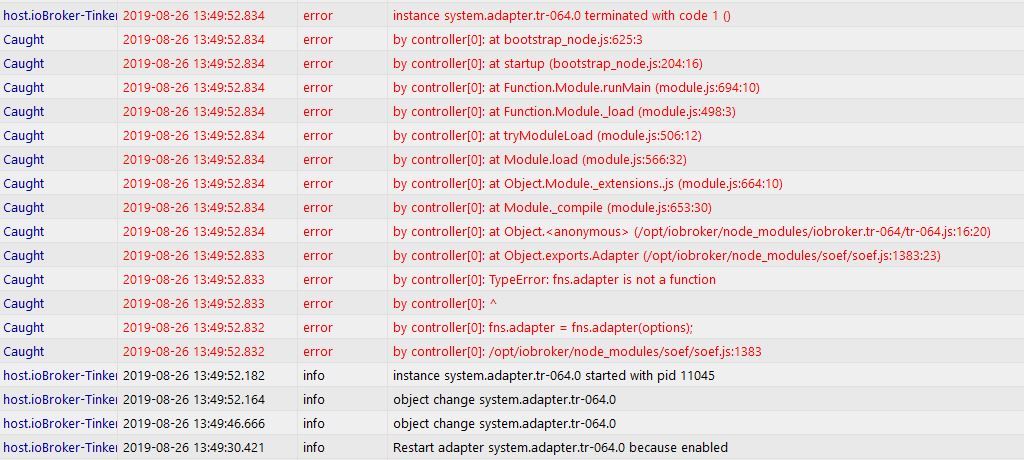
    Unbenannt.JPG

    Vielen Dank

    INTEL NUC i7, Sonoff, hmIP, AVM, Jeelink, T-Link, Alexa, Saia-Burgess, uvm.

    D 1 Antwort Letzte Antwort
    0
    • GregorSG GregorS

      Hallo,
      bekomme seit heute immer wieder diese Fehler.
      Der TR-064 läuft nicht mehr.
      Hatte gestern nur einen Neustart des ioBroker durchgeführt.
      Neustart des Adapters bringt auch nichts.
      Kann mir jemand einen Tipp geben, wo der Fehler zu suchen ist, bzw. was die Ursache zu sein scheint.

      Unbenannt.JPG

      Vielen Dank

      D Offline
      D Offline
      dna909
      schrieb am zuletzt editiert von
      #2

      @GregorS Probier mal folgendes in der Konsole:

      cd /opt/iobroker/
      iobroker stop tr-064
      cd /opt/iobroker/node_modules/iobroker.tr-064
      npm install soef

      Gruß

      dna909

      Intel NUC7PJYH mit Proxmox, Odroid U2, CCU2, Philips Hue, ESP8266, Xiaomi Robot, Google Chromecast Audio, Instar 6012HD, Bosch HNG6764S6

      1 Antwort Letzte Antwort
      0
      • andiko2A Offline
        andiko2A Offline
        andiko2
        schrieb am zuletzt editiert von
        #3

        Ich habe das selbe Problem.
        Habe das nach deiner Anleitung in der Konsole eingegeben und folgende Meldungen erhalten.
        Bin leider etwas neu und unerfahren mit Linux.


        npm WARN deprecated dgram@1.0.1: npm is holding this package for security reasons. As it's a core Node module, we will not transfer it over to other users. You may safely remove the package from your dependencies.
        npm WARN checkPermissions Missing write access to /opt/iobroker/node_modules/iobroker.tr-064/node_modules
        npm ERR! path /opt/iobroker/node_modules/iobroker.tr-064/node_modules
        npm ERR! code EACCES
        npm ERR! errno -13
        npm ERR! syscall access
        npm ERR! Error: EACCES: permission denied, access '/opt/iobroker/node_modules/iobroker.tr-064/node_modules'
        npm ERR! { [Error: EACCES: permission denied, access '/opt/iobroker/node_modules/iobroker.tr-064/node_modules']
        npm ERR! stack:
        npm ERR! 'Error: EACCES: permission denied, access '/opt/iobroker/node_modules/iobroker.tr-064/node_modules'',
        npm ERR! errno: -13,
        npm ERR! code: 'EACCES',
        npm ERR! syscall: 'access',
        npm ERR! path: '/opt/iobroker/node_modules/iobroker.tr-064/node_modules' }
        npm ERR!
        npm ERR! The operation was rejected by your operating system.
        npm ERR! It is likely you do not have the permissions to access this file as the current user
        npm ERR!
        npm ERR! If you believe this might be a permissions issue, please double-check the
        npm ERR! permissions of the file and its containing directories, or try running
        npm ERR! the command again as root/Administrator (though this is not recommended).

        npm ERR! A complete log of this run can be found in:
        npm ERR! /home/andiko2/.npm/_logs/2019-08-26T14_03_03_135Z-debug.log
        *******@ioBrokerPC:/opt/iobroker/node_modules/iobroker.tr-064$

        sigi234S 1 Antwort Letzte Antwort
        0
        • andiko2A andiko2

          Ich habe das selbe Problem.
          Habe das nach deiner Anleitung in der Konsole eingegeben und folgende Meldungen erhalten.
          Bin leider etwas neu und unerfahren mit Linux.


          npm WARN deprecated dgram@1.0.1: npm is holding this package for security reasons. As it's a core Node module, we will not transfer it over to other users. You may safely remove the package from your dependencies.
          npm WARN checkPermissions Missing write access to /opt/iobroker/node_modules/iobroker.tr-064/node_modules
          npm ERR! path /opt/iobroker/node_modules/iobroker.tr-064/node_modules
          npm ERR! code EACCES
          npm ERR! errno -13
          npm ERR! syscall access
          npm ERR! Error: EACCES: permission denied, access '/opt/iobroker/node_modules/iobroker.tr-064/node_modules'
          npm ERR! { [Error: EACCES: permission denied, access '/opt/iobroker/node_modules/iobroker.tr-064/node_modules']
          npm ERR! stack:
          npm ERR! 'Error: EACCES: permission denied, access '/opt/iobroker/node_modules/iobroker.tr-064/node_modules'',
          npm ERR! errno: -13,
          npm ERR! code: 'EACCES',
          npm ERR! syscall: 'access',
          npm ERR! path: '/opt/iobroker/node_modules/iobroker.tr-064/node_modules' }
          npm ERR!
          npm ERR! The operation was rejected by your operating system.
          npm ERR! It is likely you do not have the permissions to access this file as the current user
          npm ERR!
          npm ERR! If you believe this might be a permissions issue, please double-check the
          npm ERR! permissions of the file and its containing directories, or try running
          npm ERR! the command again as root/Administrator (though this is not recommended).

          npm ERR! A complete log of this run can be found in:
          npm ERR! /home/andiko2/.npm/_logs/2019-08-26T14_03_03_135Z-debug.log
          *******@ioBrokerPC:/opt/iobroker/node_modules/iobroker.tr-064$

          sigi234S Online
          sigi234S Online
          sigi234
          Forum Testing Most Active
          schrieb am zuletzt editiert von
          #4

          @andiko2 sagte in Nicht erklärbare Fehler im Log FB tr-064:

          It is likely you do not have the permissions to access this file as the current user

          Keine Berechtigung!

          Hast du schon mal das gemacht?

          curl -sL https://iobroker.net/fix.sh | bash -

          Bitte benutzt das Voting rechts unten im Beitrag wenn er euch geholfen hat.
          Immer Daten sichern!

          1 Antwort Letzte Antwort
          1
          • andiko2A Offline
            andiko2A Offline
            andiko2
            schrieb am zuletzt editiert von
            #5

            so wie das dort steht in der Konsole ausführen?

            sigi234S 1 Antwort Letzte Antwort
            0
            • andiko2A andiko2

              so wie das dort steht in der Konsole ausführen?

              sigi234S Online
              sigi234S Online
              sigi234
              Forum Testing Most Active
              schrieb am zuletzt editiert von
              #6

              @andiko2 sagte in Nicht erklärbare Fehler im Log FB tr-064:

              so wie das dort steht in der Konsole ausführen?

              Ja unter deinen Host........

              Bitte benutzt das Voting rechts unten im Beitrag wenn er euch geholfen hat.
              Immer Daten sichern!

              1 Antwort Letzte Antwort
              1
              • andiko2A Offline
                andiko2A Offline
                andiko2
                schrieb am zuletzt editiert von
                #7

                dann passiert folgendes:

                andiko2@ioBrokerPC:~$ curl -sL https://iobroker.net/fix.sh | bash -
                ioBroker or some processes are still running:
                io.admin.0
                io.discovery.0
                io.history.0
                io.netatmo.0
                io.rpi2.0
                io.opi.0
                io.virtualpowermeter.0
                io.javascript.0
                io.systeminfo.0
                io.scenes.0
                io.fullcalendar.0
                io.pollenflug.0
                io.info.0
                io.moma.0
                io.alexa2.0
                io.sql.0
                io.places.0
                io.web.0
                io.ping.0
                io.meteoalarm.0
                io.iot.0
                io.terminal.0
                io.meross.0
                io.radar2.0
                io.nina.0
                io.backitup.0
                io.cloud.0
                io.bring.0
                io.lightify.0
                Please stop them first and try again!

                sigi234S 1 Antwort Letzte Antwort
                0
                • andiko2A andiko2

                  dann passiert folgendes:

                  andiko2@ioBrokerPC:~$ curl -sL https://iobroker.net/fix.sh | bash -
                  ioBroker or some processes are still running:
                  io.admin.0
                  io.discovery.0
                  io.history.0
                  io.netatmo.0
                  io.rpi2.0
                  io.opi.0
                  io.virtualpowermeter.0
                  io.javascript.0
                  io.systeminfo.0
                  io.scenes.0
                  io.fullcalendar.0
                  io.pollenflug.0
                  io.info.0
                  io.moma.0
                  io.alexa2.0
                  io.sql.0
                  io.places.0
                  io.web.0
                  io.ping.0
                  io.meteoalarm.0
                  io.iot.0
                  io.terminal.0
                  io.meross.0
                  io.radar2.0
                  io.nina.0
                  io.backitup.0
                  io.cloud.0
                  io.bring.0
                  io.lightify.0
                  Please stop them first and try again!

                  sigi234S Online
                  sigi234S Online
                  sigi234
                  Forum Testing Most Active
                  schrieb am zuletzt editiert von
                  #8

                  @andiko2

                  https://forum.iobroker.net/topic/20211/iobroker-installation-fixer-beta-verfügbar

                  Bitte benutzt das Voting rechts unten im Beitrag wenn er euch geholfen hat.
                  Immer Daten sichern!

                  1 Antwort Letzte Antwort
                  1
                  • andiko2A Offline
                    andiko2A Offline
                    andiko2
                    schrieb am zuletzt editiert von
                    #9

                    so habe iobroker gestoppt den befehl ausgeführt und bekam die Meldung "Your installation was fixed successfully
                    Run iobroker start to start ioBroker again!"
                    ioBroker gestartet aber das problem ist das selbe mit dem tr-064

                    sigi234S 1 Antwort Letzte Antwort
                    0
                    • andiko2A andiko2

                      so habe iobroker gestoppt den befehl ausgeführt und bekam die Meldung "Your installation was fixed successfully
                      Run iobroker start to start ioBroker again!"
                      ioBroker gestartet aber das problem ist das selbe mit dem tr-064

                      sigi234S Online
                      sigi234S Online
                      sigi234
                      Forum Testing Most Active
                      schrieb am zuletzt editiert von
                      #10

                      @andiko2 sagte in Nicht erklärbare Fehler im Log FB tr-064:

                      so habe iobroker gestoppt den befehl ausgeführt und bekam die Meldung "Your installation was fixed successfully
                      Run iobroker start to start ioBroker again!"
                      ioBroker gestartet aber das problem ist das selbe mit dem tr-064

                      Nochmal:

                      cd /opt/iobroker/
                      iobroker stop tr-064
                      cd /opt/iobroker/node_modules/iobroker.tr-064
                      npm install soef

                      Bitte benutzt das Voting rechts unten im Beitrag wenn er euch geholfen hat.
                      Immer Daten sichern!

                      1 Antwort Letzte Antwort
                      1
                      • andiko2A Offline
                        andiko2A Offline
                        andiko2
                        schrieb am zuletzt editiert von andiko2
                        #11

                        jetzt ist er grün, und zeigt aber noch folgenden Logfehler im iobroker Log:

                        tr-064.0 2019-08-26 16:55:50.551 error Cannot start callmonitor: Error: connect ECONNREFUSED xxx.xxx.xxx.1:1012
                        tr-064.0 2019-08-26 16:55:50.549 error --- To use the callmonitor, enable connects to port 1012 on FritsBox by dialing #965 and restart this adapter

                        sigi234S 1 Antwort Letzte Antwort
                        0
                        • andiko2A andiko2

                          jetzt ist er grün, und zeigt aber noch folgenden Logfehler im iobroker Log:

                          tr-064.0 2019-08-26 16:55:50.551 error Cannot start callmonitor: Error: connect ECONNREFUSED xxx.xxx.xxx.1:1012
                          tr-064.0 2019-08-26 16:55:50.549 error --- To use the callmonitor, enable connects to port 1012 on FritsBox by dialing #965 and restart this adapter

                          sigi234S Online
                          sigi234S Online
                          sigi234
                          Forum Testing Most Active
                          schrieb am zuletzt editiert von
                          #12

                          @andiko2 sagte in Nicht erklärbare Fehler im Log FB tr-064:

                          dialing #965 and restart this adapter

                          Mach das...........

                          Bitte benutzt das Voting rechts unten im Beitrag wenn er euch geholfen hat.
                          Immer Daten sichern!

                          1 Antwort Letzte Antwort
                          1
                          • andiko2A Offline
                            andiko2A Offline
                            andiko2
                            schrieb am zuletzt editiert von andiko2
                            #13

                            ah jetzt fange ich an zu verstehen. das ist für Telefon. Dann kann das alles nicht gehen, da dort kein Telefon dran ist.
                            Grün ist der Adapter jetzt.

                            1 Antwort Letzte Antwort
                            0
                            • GregorSG Offline
                              GregorSG Offline
                              GregorS
                              schrieb am zuletzt editiert von
                              #14

                              Danke !!
                              Bei mir läuft es jetzt wieder alles.

                              Brauchte nur:

                              cd /opt/iobroker/
                              iobroker stop tr-064
                              cd /opt/iobroker/node_modules/iobroker.tr-064
                              npm install soef

                              Woran lag es?

                              INTEL NUC i7, Sonoff, hmIP, AVM, Jeelink, T-Link, Alexa, Saia-Burgess, uvm.

                              IssiI 1 Antwort Letzte Antwort
                              0
                              • GregorSG GregorS

                                Danke !!
                                Bei mir läuft es jetzt wieder alles.

                                Brauchte nur:

                                cd /opt/iobroker/
                                iobroker stop tr-064
                                cd /opt/iobroker/node_modules/iobroker.tr-064
                                npm install soef

                                Woran lag es?

                                IssiI Offline
                                IssiI Offline
                                Issi
                                Developer
                                schrieb am zuletzt editiert von Issi
                                #15

                                @GregorS der Tr-064 Adapter ist alt und wird nicht mehr gepflegt da der Entwickler aufgehört hat es gibt aber mittlerweile ein Community Version die sollte man nutzen hier der link https://github.com/iobroker-community-adapters/ioBroker.tr-064-community
                                https://forum.iobroker.net/topic/22782/aufruf-test-community-version-vom-tr-064-adapter
                                Bitte benutzt das Voting rechts unten im Beitrag wenn er euch geholfen hat.

                                1 Antwort Letzte Antwort
                                0

                                Hey! Du scheinst an dieser Unterhaltung interessiert zu sein, hast aber noch kein Konto.

                                Hast du es satt, bei jedem Besuch durch die gleichen Beiträge zu scrollen? Wenn du dich für ein Konto anmeldest, kommst du immer genau dorthin zurück, wo du zuvor warst, und kannst dich über neue Antworten benachrichtigen lassen (entweder per E-Mail oder Push-Benachrichtigung). Du kannst auch Lesezeichen speichern und Beiträge positiv bewerten, um anderen Community-Mitgliedern deine Wertschätzung zu zeigen.

                                Mit deinem Input könnte dieser Beitrag noch besser werden 💗

                                Registrieren Anmelden
                                Antworten
                                • In einem neuen Thema antworten
                                Anmelden zum Antworten
                                • Älteste zuerst
                                • Neuste zuerst
                                • Meiste Stimmen


                                Support us

                                ioBroker
                                Community Adapters
                                Donate
                                FAQ Cloud / IOT
                                HowTo: Node.js-Update
                                HowTo: Backup/Restore
                                Downloads
                                BLOG

                                603

                                Online

                                32.8k

                                Benutzer

                                82.8k

                                Themen

                                1.3m

                                Beiträge
                                Community
                                Impressum | Datenschutz-Bestimmungen | Nutzungsbedingungen | Einwilligungseinstellungen
                                ioBroker Community 2014-2025
                                logo
                                • Anmelden

                                • Du hast noch kein Konto? Registrieren

                                • Anmelden oder registrieren, um zu suchen
                                • Erster Beitrag
                                  Letzter Beitrag
                                0
                                • Home
                                • Aktuell
                                • Tags
                                • Ungelesen 0
                                • Kategorien
                                • Unreplied
                                • Beliebt
                                • GitHub
                                • Docu
                                • Hilfe