
NEWS




EVCC wird nicht grün
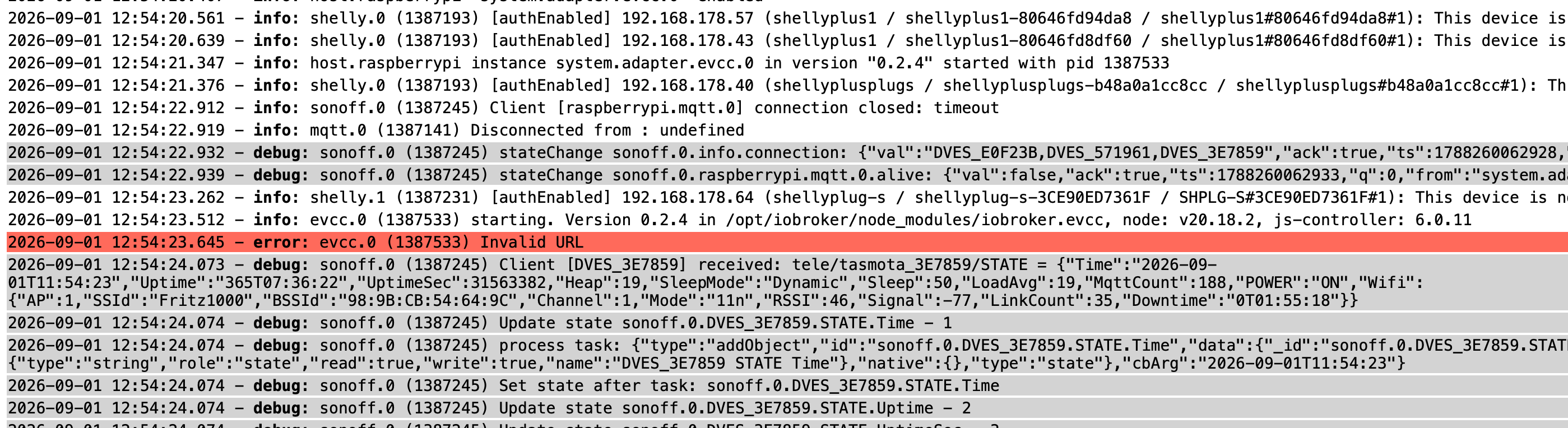
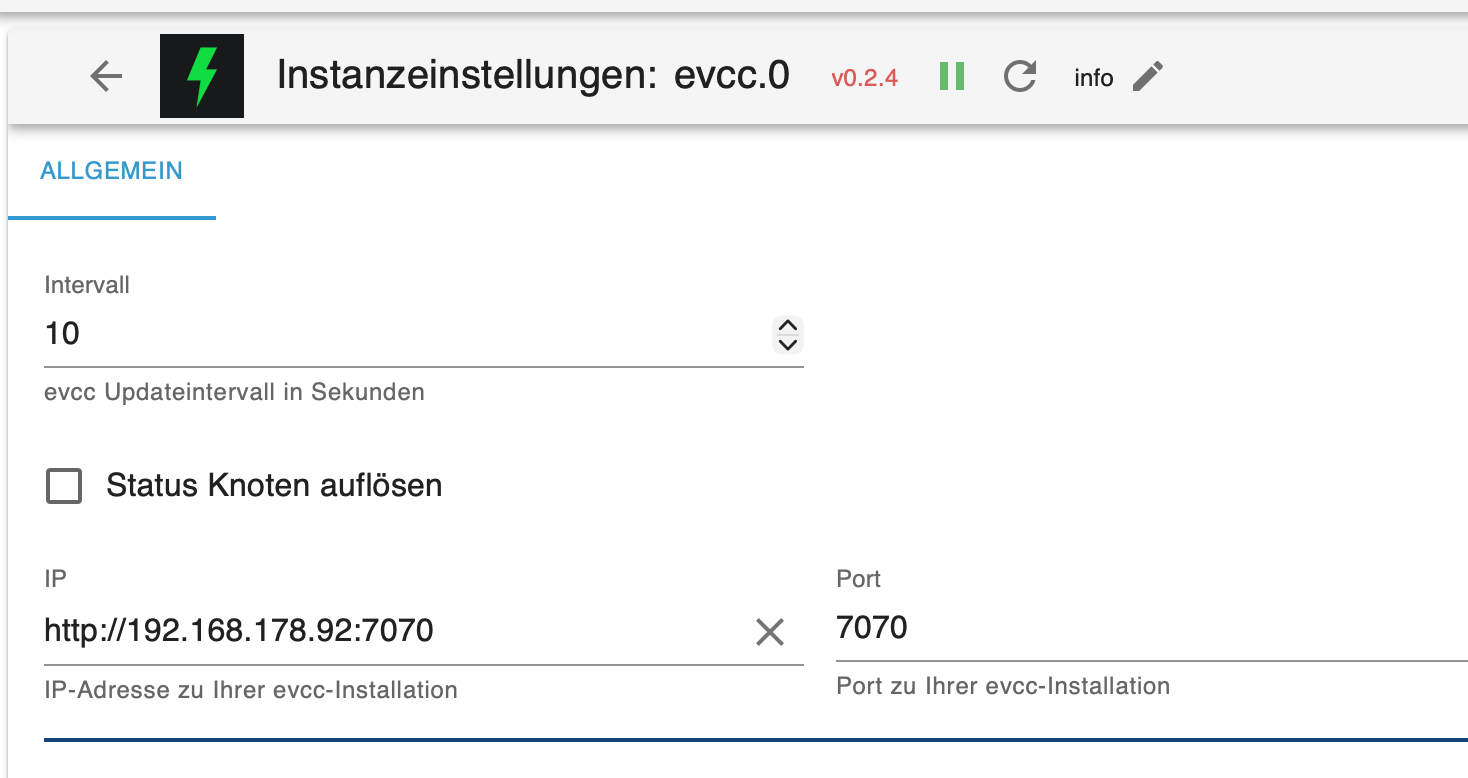
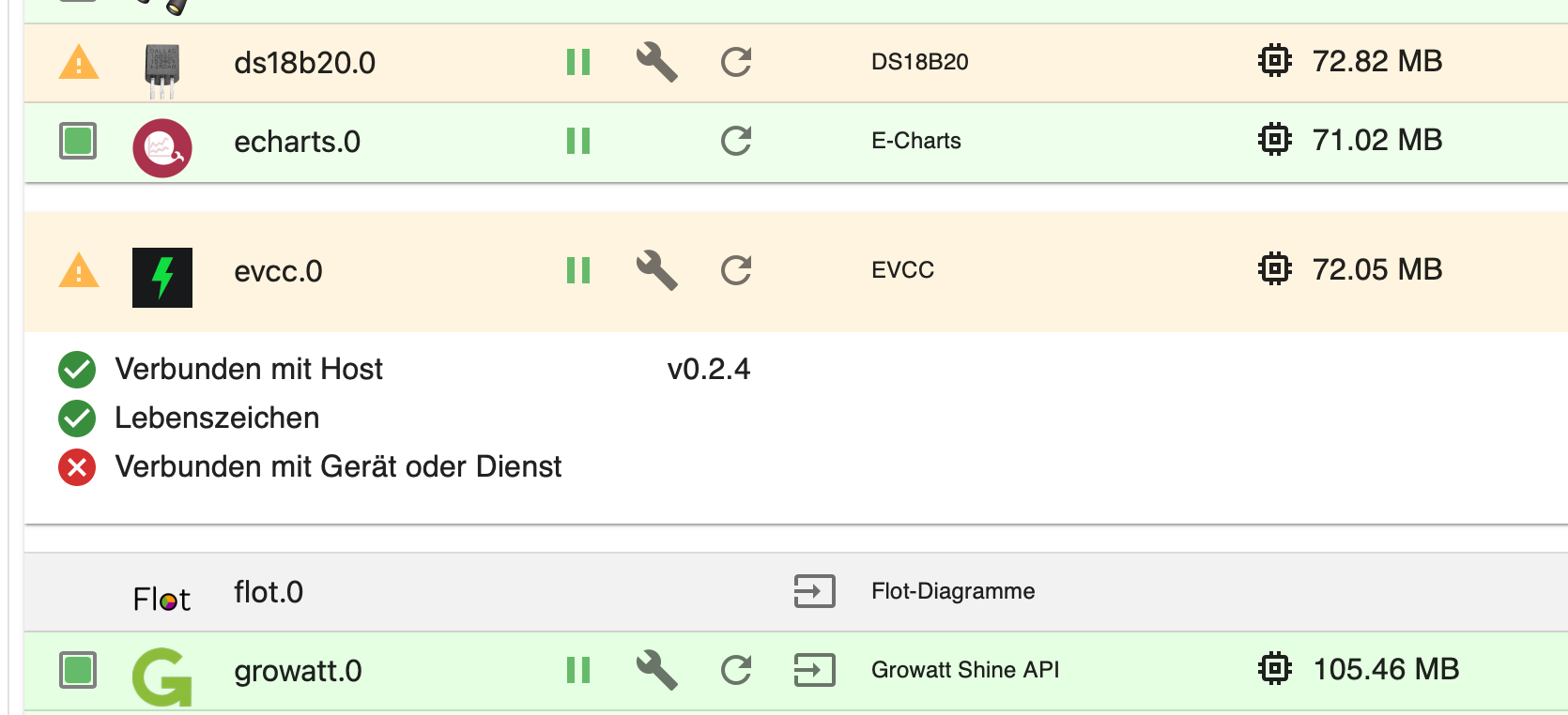
-
Jetzt startet der iobroker nicht mehr.
pi@raspberrypi:~ $ sudo reboot
Connection to 192.168.178.92 closed by remote host.
Connection to 192.168.178.92 closed.
euronicsxxlwunstorf@MacBook-Air-188 ~ % ssh pi@192.168.178.92
** WARNING: connection is not using a post-quantum key exchange algorithm.
** This session may be vulnerable to "store now, decrypt later" attacks.
** The server may need to be upgraded. See https://openssh.com/pq.html
pi@192.168.178.92's password:
Linux raspberrypi 6.1.21-v8+ #1642 SMP PREEMPT Mon Apr 3 17:24:16 BST 2023 aarch64The programs included with the Debian GNU/Linux system are free software;
the exact distribution terms for each program are described in the
individual files in /usr/share/doc/*/copyright.Debian GNU/Linux comes with ABSOLUTELY NO WARRANTY, to the extent
permitted by applicable law.
Last login: Fri Sep 4 10:26:56 2026Jetzt startet der iobroker nicht mehr.
Das sieht man aber da nicht.
iob diagsagt?
-
-
Der iobroker startet nicht mehr.
-
Script v.2026-08-30 *** BASE SYSTEM *** Operating System: Debian GNU/Linux 11 (bullseye) Static hostname: raspberrypi Icon name: computer Kernel: Linux 6.1.21-v8+ Architecture: arm64 OS is similar to: Model : Raspberry Pi 400 Rev 1.1 Docker : false Virtualization : none Unknown Kernel : aarch64 Userland : 64bit System was installed 1443 days ago (on 2022-09-22). Systemuptime and Load: 13:44:49 up 3:16, 2 users, load average: 0.08, 0.15, 0.15 CPU threads : 4 *** LIFE CYCLE STATUS *** Debian Release codenamed 'bullseye' reached its END OF LIFE and needs to be updated to the latest stable release 'trixie' NOW! *** RASPBERRY THROTTLING *** Current issues: No throttling issues detected. Previously detected issues: No throttling issues detected. *** TIME AND TIMEZONES *** Local time: Fri 2026-09-04 13:44:49 CEST Universal time: Fri 2026-09-04 11:44:49 UTC RTC time: n/a Time zone: Europe/Berlin (CEST, +0200) System clock synchronized: yes NTP service: active RTC in local TZ: no *** Users and Groups *** User that called 'iob diag': pi HOME=/home/pi GROUPS=pi adm dialout cdrom sudo audio video plugdev games users input render netdev lpadmin gpio i2c spi iobroker User that is running 'js-controller': js-controller is not running *** DISPLAY-SERVER SETUP *** Display-Server: Unknown Display-Manager: * lightdm.service - Light Display Manager Desktop: Session: tty Boot Target: multi-user.target *** MEMORY *** total used free shared buff/cache available Mem: 3.8G 156M 3.3G 1.0M 344M 3.6G Swap: 99M 0B 99M Total: 3.9G 156M 3.4G Active iob-Instances: 0 3794 M total memory 156 M used memory 348 M active memory 62 M inactive memory 3293 M free memory 29 M buffer memory 314 M swap cache 99 M total swap 0 M used swap 99 M free swap *** top - Table Of Processes *** top - 13:44:51 up 3:16, 2 users, load average: 0.15, 0.17, 0.15 Tasks: 169 total, 1 running, 168 sleeping, 0 stopped, 0 zombie %Cpu(s): 0.0 us, 4.3 sy, 0.0 ni, 95.7 id, 0.0 wa, 0.0 hi, 0.0 si, 0.0 st MiB Mem : 3794.3 total, 3293.5 free, 156.3 used, 344.6 buff/cache MiB Swap: 100.0 total, 100.0 free, 0.0 used. 3569.1 avail Mem *** FAILED SERVICES *** UNIT LOAD ACTIVE SUB DESCRIPTION 0 loaded units listed. *** DMESG CRITICAL ERRORS *** No critical errors detected *** FILESYSTEM *** Filesystem Type Size Used Avail Use% Mounted on /dev/root ext4 29G 17G 12G 60% / devtmpfs devtmpfs 1.7G 0 1.7G 0% /dev tmpfs tmpfs 1.9G 0 1.9G 0% /dev/shm tmpfs tmpfs 759M 1.3M 758M 1% /run tmpfs tmpfs 5.0M 4.0K 5.0M 1% /run/lock /dev/mmcblk0p1 vfat 255M 32M 223M 13% /boot tmpfs tmpfs 380M 16K 380M 1% /run/user/1000 Messages concerning filesystems in dmesg (Last 15 lines only): Show mounted filesystems: TARGET SOURCE FSTYPE OPTIONS / /dev/mmcblk0p2 ext4 rw,noatime,commit=600 `-/boot /dev/mmcblk0p1 vfat rw,relatime,fmask=0022,dmask=0022,codepage=437,iocharset=ascii,shortname=mixed,errors=remount-ro Files in neuralgic directories: /var: 4.1G /var/ 3.1G /var/log 2.9G /var/log/journal/79e438becaf044e4ab8664814f73dec8 2.9G /var/log/journal 757M /var/cache Archived and active journals take up 2.8G in the file system. /opt/iobroker/backups: 170M /opt/iobroker/backups/ /opt/iobroker/iobroker-data: 4.6G /opt/iobroker/iobroker-data/ 3.5G /opt/iobroker/iobroker-data/history 994M /opt/iobroker/iobroker-data/files 493M /opt/iobroker/iobroker-data/files/javascript.admin 461M /opt/iobroker/iobroker-data/files/javascript.admin/static The five largest files in iobroker-data are: 43M /opt/iobroker/iobroker-data/files/iot.admin/static/js/main.c9e0f545.js.map 33M /opt/iobroker/iobroker-data/objects.jsonl 26M /opt/iobroker/iobroker-data/files/echarts/static/js/main.41cee985.js.map 26M /opt/iobroker/iobroker-data/files/echarts.admin/chart/static/js/main.41cee985.js.map 24M /opt/iobroker/iobroker-data/files/modbus.admin/static/js/main.6a71b34c.js.map USB-Devices by-id: USB-Sticks - Avoid direct links to /dev/tty* in your adapter setups, please always prefer the links 'by-id': /dev/serial/by-id/usb-FTDI_FT232R_USB_UART_B0043WH9-if00-port0 /dev/serial/by-id/usb-1a86_USB_Serial-if00-port0 /dev/serial/by-id/usb-FTDI_FT232R_USB_UART_B00332GV-if00-port0 /dev/serial/by-id/usb-FTDI_USB_Serial_Converter_FTB6SPL3-if00-port0 No nvbackup.json found. *** NodeJS-Installation *** *** Node.js is NOT correctly installed *** Issues: nodejs path x node path x npm path x npx path Execute 'iob nodejs-update' in your terminal. nodejs: Installed: (none) Candidate: 12.22.12~dfsg-1~deb11u8 Version table: 12.22.12~dfsg-1~deb11u8 500 500 http://security.debian.org/debian-security bullseye-security/main arm64 Packages 12.22.12~dfsg-1~deb11u4 500 500 http://deb.debian.org/debian bullseye/main arm64 Packages Temp directories causing deletion problem: 0 No problems detected Errors in npm tree: 0 No problems detected *** ioBroker-Installation *** ioBroker Status sudo: node: command not found Hosts: sudo: node: command not found Core adapters versionssudo: node: command not found js-controller: sudo: node: command not found admin: sudo: node: command not found javascript: nodejs modules from github: 0 Adapter State Enabled adapters with bindings ioBroker-Repositories sudo: node: command not found Installed ioBroker-Adapters sudo: node: command not found ioBroker-Adapter Versions and update status sudo: node: command not found Objects and States Please stand by - This may take a while Objects: 0 States: 0 *** OS-Repositories and Updates *** Hit:1 http://security.debian.org/debian-security bullseye-security InRelease Hit:2 http://deb.debian.org/debian bullseye InRelease Hit:3 http://deb.debian.org/debian bullseye-updates InRelease Hit:4 http://archive.raspberrypi.org/debian bullseye InRelease Get:5 https://dl.evcc.io/public/evcc/stable/deb/debian bullseye InRelease Fetched 11.7 kB in 1s (9463 B/s) Reading package lists... Pending systemupdates: 0 *** Listening Ports *** Netid State Recv-Q Send-Q Local Address:Port Peer Address:PortProcess udp UNCONN 0 0 0.0.0.0:35997 0.0.0.0:* users:(("avahi-daemon",pid=416,fd=14)) udp UNCONN 0 0 0.0.0.0:mdns 0.0.0.0:* users:(("evcc",pid=636,fd=21)) udp UNCONN 0 0 0.0.0.0:mdns 0.0.0.0:* users:(("evcc",pid=636,fd=3)) udp UNCONN 0 0 0.0.0.0:mdns 0.0.0.0:* users:(("avahi-daemon",pid=416,fd=12)) udp UNCONN 0 0 0.0.0.0:1900 0.0.0.0:* users:(("evcc",pid=636,fd=25)) udp UNCONN 0 0 0.0.0.0:1900 0.0.0.0:* users:(("evcc",pid=636,fd=24)) udp UNCONN 0 0 0.0.0.0:1900 0.0.0.0:* users:(("evcc",pid=636,fd=23)) udp UNCONN 0 0 0.0.0.0:bootpc 0.0.0.0:* users:(("dhcpcd",pid=531,fd=13)) udp UNCONN 0 0 *:55910 *:* users:(("avahi-daemon",pid=416,fd=15)) udp UNCONN 0 0 *:mdns *:* users:(("evcc",pid=636,fd=22)) udp UNCONN 0 0 *:mdns *:* users:(("evcc",pid=636,fd=6)) udp UNCONN 0 0 *:mdns *:* users:(("avahi-daemon",pid=416,fd=13)) udp UNCONN 0 0 *:dhcpv6-client *:* users:(("dhcpcd",pid=531,fd=16)) tcp LISTEN 0 5 0.0.0.0:5900 0.0.0.0:* users:(("vncserver-x11-c",pid=671,fd=12)) tcp LISTEN 0 128 127.0.0.1:ipp 0.0.0.0:* users:(("cupsd",pid=634,fd=7)) tcp LISTEN 0 128 0.0.0.0:ssh 0.0.0.0:* users:(("sshd",pid=692,fd=3)) tcp LISTEN 0 5 [::]:5900 [::]:* users:(("vncserver-x11-c",pid=671,fd=11)) tcp LISTEN 0 128 [::1]:ipp [::]:* users:(("cupsd",pid=634,fd=6)) tcp LISTEN 0 128 [::]:ssh [::]:* users:(("sshd",pid=692,fd=4)) tcp LISTEN 0 4096 *:7070 *:* users:(("evcc",pid=636,fd=12)) tcp LISTEN 0 4096 *:8887 *:* users:(("evcc",pid=636,fd=8)) tcp LISTEN 0 4096 *:4712 *:* users:(("evcc",pid=636,fd=9)) *** Log File - Last 25 Lines *** 2026-09-04 09:51:22.503 - info: host.raspberrypi instance system.adapter.modbus.0 terminated with code 0 (NO_ERROR) 2026-09-04 09:51:22.753 - info: host.raspberrypi instance system.adapter.history.0 terminated with code 0 (NO_ERROR) 2026-09-04 09:51:22.753 - info: host.raspberrypi All instances are stopped. 2026-09-04 09:51:22.753 - warn: host.raspberrypi instance system.adapter.sonoff.0 terminated due to SIGKILL 2026-09-04 09:51:22.754 - info: host.raspberrypi instance system.adapter.sonoff.0 terminated with code null () 2026-09-04 09:51:22.754 - info: host.raspberrypi All instances are stopped. 2026-09-04 09:51:22.754 - warn: host.raspberrypi instance system.adapter.discovery.0 terminated due to SIGKILL 2026-09-04 09:51:22.754 - info: host.raspberrypi instance system.adapter.discovery.0 terminated with code null () 2026-09-04 09:51:22.754 - info: host.raspberrypi All instances are stopped. 2026-09-04 09:51:22.755 - warn: host.raspberrypi instance system.adapter.ds18b20.0 terminated due to SIGKILL 2026-09-04 09:51:22.755 - info: host.raspberrypi instance system.adapter.ds18b20.0 terminated with code null () 2026-09-04 09:51:22.755 - info: host.raspberrypi All instances are stopped. 2026-09-04 09:51:22.756 - warn: host.raspberrypi instance system.adapter.iot.0 terminated due to SIGKILL 2026-09-04 09:51:22.756 - info: host.raspberrypi instance system.adapter.iot.0 terminated with code null () 2026-09-04 09:51:22.756 - info: host.raspberrypi All instances are stopped. 2026-09-04 09:51:22.756 - warn: host.raspberrypi instance system.adapter.web.0 terminated due to SIGKILL 2026-09-04 09:51:22.757 - info: host.raspberrypi instance system.adapter.web.0 terminated with code null () 2026-09-04 09:51:22.757 - info: host.raspberrypi All instances are stopped. 2026-09-04 09:51:22.757 - warn: host.raspberrypi instance system.adapter.pushover.0 terminated due to SIGKILL 2026-09-04 09:51:22.757 - info: host.raspberrypi instance system.adapter.pushover.0 terminated with code null () 2026-09-04 09:51:22.757 - info: host.raspberrypi All instances are stopped. 2026-09-04 09:51:22.757 - warn: host.raspberrypi instance system.adapter.echarts.0 terminated due to SIGKILL 2026-09-04 09:51:22.758 - info: host.raspberrypi instance system.adapter.echarts.0 terminated with code null () 2026-09-04 09:51:22.758 - info: host.raspberrypi All instances are stopped. 2026-09-04 09:51:22.936 - info: host.raspberrypi terminated -
Script v.2026-08-30 *** BASE SYSTEM *** Operating System: Debian GNU/Linux 11 (bullseye) Static hostname: raspberrypi Icon name: computer Kernel: Linux 6.1.21-v8+ Architecture: arm64 OS is similar to: Model : Raspberry Pi 400 Rev 1.1 Docker : false Virtualization : none Unknown Kernel : aarch64 Userland : 64bit System was installed 1443 days ago (on 2022-09-22). Systemuptime and Load: 13:44:49 up 3:16, 2 users, load average: 0.08, 0.15, 0.15 CPU threads : 4 *** LIFE CYCLE STATUS *** Debian Release codenamed 'bullseye' reached its END OF LIFE and needs to be updated to the latest stable release 'trixie' NOW! *** RASPBERRY THROTTLING *** Current issues: No throttling issues detected. Previously detected issues: No throttling issues detected. *** TIME AND TIMEZONES *** Local time: Fri 2026-09-04 13:44:49 CEST Universal time: Fri 2026-09-04 11:44:49 UTC RTC time: n/a Time zone: Europe/Berlin (CEST, +0200) System clock synchronized: yes NTP service: active RTC in local TZ: no *** Users and Groups *** User that called 'iob diag': pi HOME=/home/pi GROUPS=pi adm dialout cdrom sudo audio video plugdev games users input render netdev lpadmin gpio i2c spi iobroker User that is running 'js-controller': js-controller is not running *** DISPLAY-SERVER SETUP *** Display-Server: Unknown Display-Manager: * lightdm.service - Light Display Manager Desktop: Session: tty Boot Target: multi-user.target *** MEMORY *** total used free shared buff/cache available Mem: 3.8G 156M 3.3G 1.0M 344M 3.6G Swap: 99M 0B 99M Total: 3.9G 156M 3.4G Active iob-Instances: 0 3794 M total memory 156 M used memory 348 M active memory 62 M inactive memory 3293 M free memory 29 M buffer memory 314 M swap cache 99 M total swap 0 M used swap 99 M free swap *** top - Table Of Processes *** top - 13:44:51 up 3:16, 2 users, load average: 0.15, 0.17, 0.15 Tasks: 169 total, 1 running, 168 sleeping, 0 stopped, 0 zombie %Cpu(s): 0.0 us, 4.3 sy, 0.0 ni, 95.7 id, 0.0 wa, 0.0 hi, 0.0 si, 0.0 st MiB Mem : 3794.3 total, 3293.5 free, 156.3 used, 344.6 buff/cache MiB Swap: 100.0 total, 100.0 free, 0.0 used. 3569.1 avail Mem *** FAILED SERVICES *** UNIT LOAD ACTIVE SUB DESCRIPTION 0 loaded units listed. *** DMESG CRITICAL ERRORS *** No critical errors detected *** FILESYSTEM *** Filesystem Type Size Used Avail Use% Mounted on /dev/root ext4 29G 17G 12G 60% / devtmpfs devtmpfs 1.7G 0 1.7G 0% /dev tmpfs tmpfs 1.9G 0 1.9G 0% /dev/shm tmpfs tmpfs 759M 1.3M 758M 1% /run tmpfs tmpfs 5.0M 4.0K 5.0M 1% /run/lock /dev/mmcblk0p1 vfat 255M 32M 223M 13% /boot tmpfs tmpfs 380M 16K 380M 1% /run/user/1000 Messages concerning filesystems in dmesg (Last 15 lines only): Show mounted filesystems: TARGET SOURCE FSTYPE OPTIONS / /dev/mmcblk0p2 ext4 rw,noatime,commit=600 `-/boot /dev/mmcblk0p1 vfat rw,relatime,fmask=0022,dmask=0022,codepage=437,iocharset=ascii,shortname=mixed,errors=remount-ro Files in neuralgic directories: /var: 4.1G /var/ 3.1G /var/log 2.9G /var/log/journal/79e438becaf044e4ab8664814f73dec8 2.9G /var/log/journal 757M /var/cache Archived and active journals take up 2.8G in the file system. /opt/iobroker/backups: 170M /opt/iobroker/backups/ /opt/iobroker/iobroker-data: 4.6G /opt/iobroker/iobroker-data/ 3.5G /opt/iobroker/iobroker-data/history 994M /opt/iobroker/iobroker-data/files 493M /opt/iobroker/iobroker-data/files/javascript.admin 461M /opt/iobroker/iobroker-data/files/javascript.admin/static The five largest files in iobroker-data are: 43M /opt/iobroker/iobroker-data/files/iot.admin/static/js/main.c9e0f545.js.map 33M /opt/iobroker/iobroker-data/objects.jsonl 26M /opt/iobroker/iobroker-data/files/echarts/static/js/main.41cee985.js.map 26M /opt/iobroker/iobroker-data/files/echarts.admin/chart/static/js/main.41cee985.js.map 24M /opt/iobroker/iobroker-data/files/modbus.admin/static/js/main.6a71b34c.js.map USB-Devices by-id: USB-Sticks - Avoid direct links to /dev/tty* in your adapter setups, please always prefer the links 'by-id': /dev/serial/by-id/usb-FTDI_FT232R_USB_UART_B0043WH9-if00-port0 /dev/serial/by-id/usb-1a86_USB_Serial-if00-port0 /dev/serial/by-id/usb-FTDI_FT232R_USB_UART_B00332GV-if00-port0 /dev/serial/by-id/usb-FTDI_USB_Serial_Converter_FTB6SPL3-if00-port0 No nvbackup.json found. *** NodeJS-Installation *** *** Node.js is NOT correctly installed *** Issues: nodejs path x node path x npm path x npx path Execute 'iob nodejs-update' in your terminal. nodejs: Installed: (none) Candidate: 12.22.12~dfsg-1~deb11u8 Version table: 12.22.12~dfsg-1~deb11u8 500 500 http://security.debian.org/debian-security bullseye-security/main arm64 Packages 12.22.12~dfsg-1~deb11u4 500 500 http://deb.debian.org/debian bullseye/main arm64 Packages Temp directories causing deletion problem: 0 No problems detected Errors in npm tree: 0 No problems detected *** ioBroker-Installation *** ioBroker Status sudo: node: command not found Hosts: sudo: node: command not found Core adapters versionssudo: node: command not found js-controller: sudo: node: command not found admin: sudo: node: command not found javascript: nodejs modules from github: 0 Adapter State Enabled adapters with bindings ioBroker-Repositories sudo: node: command not found Installed ioBroker-Adapters sudo: node: command not found ioBroker-Adapter Versions and update status sudo: node: command not found Objects and States Please stand by - This may take a while Objects: 0 States: 0 *** OS-Repositories and Updates *** Hit:1 http://security.debian.org/debian-security bullseye-security InRelease Hit:2 http://deb.debian.org/debian bullseye InRelease Hit:3 http://deb.debian.org/debian bullseye-updates InRelease Hit:4 http://archive.raspberrypi.org/debian bullseye InRelease Get:5 https://dl.evcc.io/public/evcc/stable/deb/debian bullseye InRelease Fetched 11.7 kB in 1s (9463 B/s) Reading package lists... Pending systemupdates: 0 *** Listening Ports *** Netid State Recv-Q Send-Q Local Address:Port Peer Address:PortProcess udp UNCONN 0 0 0.0.0.0:35997 0.0.0.0:* users:(("avahi-daemon",pid=416,fd=14)) udp UNCONN 0 0 0.0.0.0:mdns 0.0.0.0:* users:(("evcc",pid=636,fd=21)) udp UNCONN 0 0 0.0.0.0:mdns 0.0.0.0:* users:(("evcc",pid=636,fd=3)) udp UNCONN 0 0 0.0.0.0:mdns 0.0.0.0:* users:(("avahi-daemon",pid=416,fd=12)) udp UNCONN 0 0 0.0.0.0:1900 0.0.0.0:* users:(("evcc",pid=636,fd=25)) udp UNCONN 0 0 0.0.0.0:1900 0.0.0.0:* users:(("evcc",pid=636,fd=24)) udp UNCONN 0 0 0.0.0.0:1900 0.0.0.0:* users:(("evcc",pid=636,fd=23)) udp UNCONN 0 0 0.0.0.0:bootpc 0.0.0.0:* users:(("dhcpcd",pid=531,fd=13)) udp UNCONN 0 0 *:55910 *:* users:(("avahi-daemon",pid=416,fd=15)) udp UNCONN 0 0 *:mdns *:* users:(("evcc",pid=636,fd=22)) udp UNCONN 0 0 *:mdns *:* users:(("evcc",pid=636,fd=6)) udp UNCONN 0 0 *:mdns *:* users:(("avahi-daemon",pid=416,fd=13)) udp UNCONN 0 0 *:dhcpv6-client *:* users:(("dhcpcd",pid=531,fd=16)) tcp LISTEN 0 5 0.0.0.0:5900 0.0.0.0:* users:(("vncserver-x11-c",pid=671,fd=12)) tcp LISTEN 0 128 127.0.0.1:ipp 0.0.0.0:* users:(("cupsd",pid=634,fd=7)) tcp LISTEN 0 128 0.0.0.0:ssh 0.0.0.0:* users:(("sshd",pid=692,fd=3)) tcp LISTEN 0 5 [::]:5900 [::]:* users:(("vncserver-x11-c",pid=671,fd=11)) tcp LISTEN 0 128 [::1]:ipp [::]:* users:(("cupsd",pid=634,fd=6)) tcp LISTEN 0 128 [::]:ssh [::]:* users:(("sshd",pid=692,fd=4)) tcp LISTEN 0 4096 *:7070 *:* users:(("evcc",pid=636,fd=12)) tcp LISTEN 0 4096 *:8887 *:* users:(("evcc",pid=636,fd=8)) tcp LISTEN 0 4096 *:4712 *:* users:(("evcc",pid=636,fd=9)) *** Log File - Last 25 Lines *** 2026-09-04 09:51:22.503 - info: host.raspberrypi instance system.adapter.modbus.0 terminated with code 0 (NO_ERROR) 2026-09-04 09:51:22.753 - info: host.raspberrypi instance system.adapter.history.0 terminated with code 0 (NO_ERROR) 2026-09-04 09:51:22.753 - info: host.raspberrypi All instances are stopped. 2026-09-04 09:51:22.753 - warn: host.raspberrypi instance system.adapter.sonoff.0 terminated due to SIGKILL 2026-09-04 09:51:22.754 - info: host.raspberrypi instance system.adapter.sonoff.0 terminated with code null () 2026-09-04 09:51:22.754 - info: host.raspberrypi All instances are stopped. 2026-09-04 09:51:22.754 - warn: host.raspberrypi instance system.adapter.discovery.0 terminated due to SIGKILL 2026-09-04 09:51:22.754 - info: host.raspberrypi instance system.adapter.discovery.0 terminated with code null () 2026-09-04 09:51:22.754 - info: host.raspberrypi All instances are stopped. 2026-09-04 09:51:22.755 - warn: host.raspberrypi instance system.adapter.ds18b20.0 terminated due to SIGKILL 2026-09-04 09:51:22.755 - info: host.raspberrypi instance system.adapter.ds18b20.0 terminated with code null () 2026-09-04 09:51:22.755 - info: host.raspberrypi All instances are stopped. 2026-09-04 09:51:22.756 - warn: host.raspberrypi instance system.adapter.iot.0 terminated due to SIGKILL 2026-09-04 09:51:22.756 - info: host.raspberrypi instance system.adapter.iot.0 terminated with code null () 2026-09-04 09:51:22.756 - info: host.raspberrypi All instances are stopped. 2026-09-04 09:51:22.756 - warn: host.raspberrypi instance system.adapter.web.0 terminated due to SIGKILL 2026-09-04 09:51:22.757 - info: host.raspberrypi instance system.adapter.web.0 terminated with code null () 2026-09-04 09:51:22.757 - info: host.raspberrypi All instances are stopped. 2026-09-04 09:51:22.757 - warn: host.raspberrypi instance system.adapter.pushover.0 terminated due to SIGKILL 2026-09-04 09:51:22.757 - info: host.raspberrypi instance system.adapter.pushover.0 terminated with code null () 2026-09-04 09:51:22.757 - info: host.raspberrypi All instances are stopped. 2026-09-04 09:51:22.757 - warn: host.raspberrypi instance system.adapter.echarts.0 terminated due to SIGKILL 2026-09-04 09:51:22.758 - info: host.raspberrypi instance system.adapter.echarts.0 terminated with code null () 2026-09-04 09:51:22.758 - info: host.raspberrypi All instances are stopped. 2026-09-04 09:51:22.936 - info: host.raspberrypi terminatediob nodejs-update 22 -
Danke, jetzt läuft der iobroker wieder.
Jetzt Backup mit Backitup.0 ?
da ist bei mir in den Einstellung ein Haken bei iobroker und bei Javascript
sonst nichts.
Ist das OK -
Danke, jetzt läuft der iobroker wieder.
Jetzt Backup mit Backitup.0 ?
da ist bei mir in den Einstellung ein Haken bei iobroker und bei Javascript
sonst nichts.
Ist das OKIst das OK
Keine Ahnung, was du da alles laufen hast und sichern musst.
-
Ich habe nur den iobroker und evcc für Solarüberschussladen, sonst keine Software. Die Shelly`s steuere ich über den iobroker und die sonoff Adapter lese ich nur aus.
-
Danke, jetzt läuft der iobroker wieder.
Jetzt Backup mit Backitup.0 ?
da ist bei mir in den Einstellung ein Haken bei iobroker und bei Javascript
sonst nichts.
Ist das OK -
Ich habe jetzt bei History und influxdb einen haken gemacht. Aber mich interessiert eigentlich nichts was vor 1 Jahr war. Und Monatsverbrauch, Tag und Jahr speichere ich in eigens erstellten Datenpunkten für 1 Jahr.
-
Ich habe jetzt alles soweit durchgeführt.
Mir ist jetzt aber nicht klar, wie jetzt weiter. Eine neu Installation laut Doku macht doch den Speicherchip leer, dann ist meine Datensicherung weg und auch EVCC.
Wie muss ich jetzt weiter machen. -
Ich habe jetzt alles soweit durchgeführt.
Mir ist jetzt aber nicht klar, wie jetzt weiter. Eine neu Installation laut Doku macht doch den Speicherchip leer, dann ist meine Datensicherung weg und auch EVCC.
Wie muss ich jetzt weiter machen.Eine neu Installation laut Doku macht doch den Speicherchip leer, dann ist meine Datensicherung weg und auch EVCC.
Backups immer auf externe Medien, damit man die dann von dort auch zurückspielen kann.
-
Leider habe ich zuwenig Zeit. Da fehlen mir Grundlagen, weil ich nicht so einfach weiss wie ich die Dateien finde und wie ich die auf meinen Mac bekomme. Ich blicke nicht durch die Linux Dateistruktur durch bzw. was da so auf dem Bildschirm steht das dauert jetzt erst mal.
-
Leider habe ich zuwenig Zeit. Da fehlen mir Grundlagen, weil ich nicht so einfach weiss wie ich die Dateien finde und wie ich die auf meinen Mac bekomme. Ich blicke nicht durch die Linux Dateistruktur durch bzw. was da so auf dem Bildschirm steht das dauert jetzt erst mal.
Da fehlen mir Grundlagen
Die solltest du dir aneignen. Wie sicherst du denn derzeitig deine Daten?
Wenn nichts anderes eingestellt ist liegen die Backups im Verzeichnis /opt/iobroker/backups/
Man kann und sollte die allerdings auf ein externes Medium schieben. Da gibt es verschiedene Ansätze.
Ich mounte z. B. eine Freigabe auf der FritzBox und schreibe dann direkt dorthin.Was ist eigentlich dein Plan für einen Hardwaredefekt? Kann ja auch jederzeit eintreten.
-
ich habe jetzt laut Doku einen neuen Speicherchip erstellt. Leider komme ich nicht weiter Nachdem Eingabe ssh pi@192.XXXXX erfolgt die Passwort Abfrage mit dem Ergebnis Permission denied, please try again.
Ich habe die Erstellung nach der Doku gemacht.
ssh mit ja Passwörter auch eingeben und schon mehrfach neu versucht.
Passwörter nur mit Buchstaben und Zahlen ohne Sonderzeichen, leider alles ohne Erfolg. -
ich habe jetzt laut Doku einen neuen Speicherchip erstellt. Leider komme ich nicht weiter Nachdem Eingabe ssh pi@192.XXXXX erfolgt die Passwort Abfrage mit dem Ergebnis Permission denied, please try again.
Ich habe die Erstellung nach der Doku gemacht.
ssh mit ja Passwörter auch eingeben und schon mehrfach neu versucht.
Passwörter nur mit Buchstaben und Zahlen ohne Sonderzeichen, leider alles ohne Erfolg.@Karl-Heinz1
Hast du auch SSH bei der Installation aktiviert? -
Ja ssh habe ich aktiviert
-
Und auch einen eigene User angelegt?
Womöglich nicht als "pi"? -
ich habe nicht alles dokumentiert. Ich bin einfach nur der Doku
"Einfacher gehts nicht"
Ich versuche es jetzt noch einmal und wenn ich unsicher bin frage ich dann hier. -
ich habe nicht alles dokumentiert. Ich bin einfach nur der Doku
"Einfacher gehts nicht"
Ich versuche es jetzt noch einmal und wenn ich unsicher bin frage ich dann hier.wenn ich unsicher bin frage ich dann hier.
Richtig!


Hey! Du scheinst an dieser Unterhaltung interessiert zu sein, hast aber noch kein Konto.
Hast du es satt, bei jedem Besuch durch die gleichen Beiträge zu scrollen? Wenn du dich für ein Konto anmeldest, kommst du immer genau dorthin zurück, wo du zuvor warst, und kannst dich über neue Antworten benachrichtigen lassen (entweder per E-Mail oder Push-Benachrichtigung). Du kannst auch Lesezeichen speichern und Beiträge positiv bewerten, um anderen Community-Mitgliedern deine Wertschätzung zu zeigen.
Mit deinem Input könnte dieser Beitrag noch besser werden 💗
Registrieren Anmelden176
Online33.1k
Benutzende83.7k
Themen1.3m
Beiträge