



Influxdb fehler mit backitup
-
So sieht das jetzt aus, wenn das Backup erstellt wurde. Eine Datei ist auf dem usb Stick in der Fritz.Box vorhanden. Das steht in dem Backup Protokoll:
DEBUG] [influxDB] Start InfluxDB Backup ...
[DEBUG] [influxDB] InfluxDB Backup tmp directory created
[DEBUG] [influxDB] Try deleting the InfluxDB tmp directory: "/opt/iobroker/backups/influxDB_2026_05_01-06_59_26_backupiobroker"
[DEBUG] [influxDB] Try deleting the InfluxDB tmp directory: "/opt/iobroker/backups/influxDB_2026_05_01-06_59_26_backupiobroker"
[DEBUG] [influxDB] InfluxDB tmp directory "/opt/iobroker/backups/influxDB_2026_05_01-06_59_26_backupiobroker" successfully deleted
[ERROR] [influxDB] Error: Unknown system error -116: Unknown system error -116, open '/opt/iobroker/backups/influxDB_2026_05_01-06_59_26_backupiobroker/20260501T045926Z.1.tar.gz'
[DEBUG] [influxDB] InfluxDB-Backup for is finish
[DEBUG] [influxDB] done
[DEBUG] [influxDB] InfluxDB tmp directory "/opt/iobroker/backups/influxDB_2026_05_01-06_59_26_backupiobroker" successfully deleted
[DEBUG] [cifs] used copy path: /fritz.nas/iobrokerbackup/sda1
[DEBUG] [cifs] done
[ERROR] [clean] Backup files not deleted from /opt/iobroker/backups because some errors.
[DEBUG] [clean] done
[DEBUG] [historyHTML] new history html values created
[DEBUG] [historyHTML] done
[DEBUG] [historyJSON] new history json values created
[DEBUG] [historyJSON] done
[DEBUG] [umount] mount active, umount is started ...
[DEBUG] [umount] device is busy... wait 2 Minutes!!
[DEBUG] [umount] umount successfully completed
[DEBUG] [umount] done
[DEBUG] [notification] Admin notification will be sent
[DEBUG] [notification] done
Was läuft nicht richtig, weiß das jemand ? -
So sieht das jetzt aus, wenn das Backup erstellt wurde. Eine Datei ist auf dem usb Stick in der Fritz.Box vorhanden. Das steht in dem Backup Protokoll:
DEBUG] [influxDB] Start InfluxDB Backup ...
[DEBUG] [influxDB] InfluxDB Backup tmp directory created
[DEBUG] [influxDB] Try deleting the InfluxDB tmp directory: "/opt/iobroker/backups/influxDB_2026_05_01-06_59_26_backupiobroker"
[DEBUG] [influxDB] Try deleting the InfluxDB tmp directory: "/opt/iobroker/backups/influxDB_2026_05_01-06_59_26_backupiobroker"
[DEBUG] [influxDB] InfluxDB tmp directory "/opt/iobroker/backups/influxDB_2026_05_01-06_59_26_backupiobroker" successfully deleted
[ERROR] [influxDB] Error: Unknown system error -116: Unknown system error -116, open '/opt/iobroker/backups/influxDB_2026_05_01-06_59_26_backupiobroker/20260501T045926Z.1.tar.gz'
[DEBUG] [influxDB] InfluxDB-Backup for is finish
[DEBUG] [influxDB] done
[DEBUG] [influxDB] InfluxDB tmp directory "/opt/iobroker/backups/influxDB_2026_05_01-06_59_26_backupiobroker" successfully deleted
[DEBUG] [cifs] used copy path: /fritz.nas/iobrokerbackup/sda1
[DEBUG] [cifs] done
[ERROR] [clean] Backup files not deleted from /opt/iobroker/backups because some errors.
[DEBUG] [clean] done
[DEBUG] [historyHTML] new history html values created
[DEBUG] [historyHTML] done
[DEBUG] [historyJSON] new history json values created
[DEBUG] [historyJSON] done
[DEBUG] [umount] mount active, umount is started ...
[DEBUG] [umount] device is busy... wait 2 Minutes!!
[DEBUG] [umount] umount successfully completed
[DEBUG] [umount] done
[DEBUG] [notification] Admin notification will be sent
[DEBUG] [notification] done
Was läuft nicht richtig, weiß das jemand ?Eine Datei ist auf dem usb Stick in der Fritz.Box vorhanden.
Mit welchen Optionen wird der Datenträger eingehängt?
Stell da mal 'noserverino' und 'cache loose' ein oder um.Bei mir sähe das so aus:
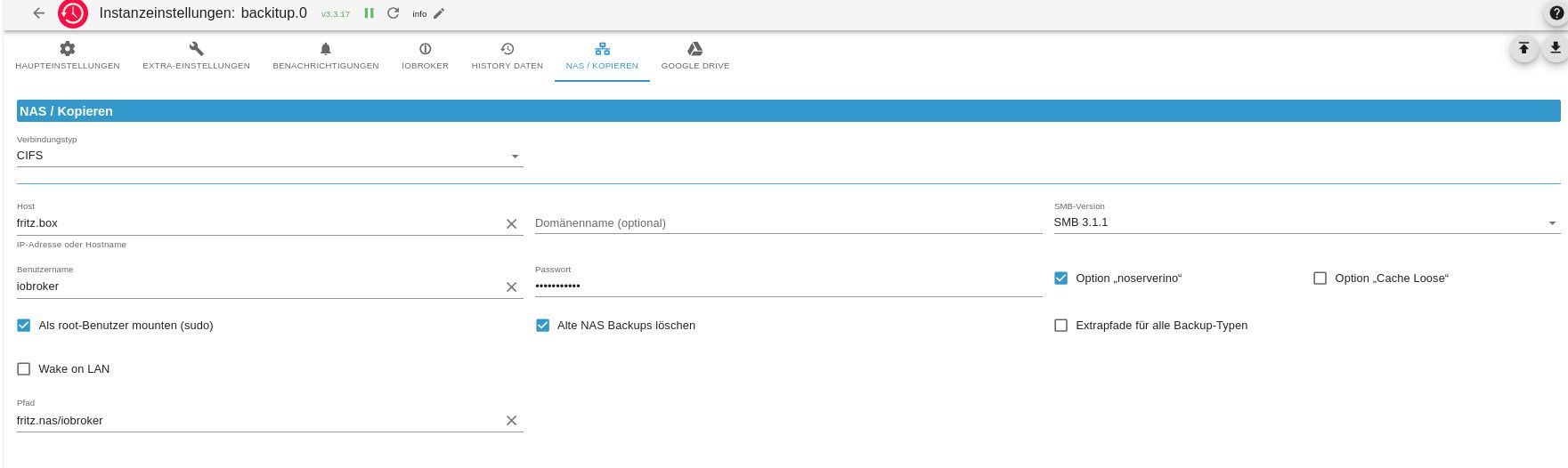
-
backitup.0
NAS / Kopieren
Verbindungstyp
CIFS
Host
192.168.178.1
IP-Adresse oder HostnameDomänenname (optional)
SMB-Version
vers=3.1.1
Benutzername
iobroker
Passwort
•••••••••••
Option „noserverino“
Option „Cache Loose“
Als root-Benutzer mounten (sudo)
Alte NAS Backups löschen
Extrapfade für alle Backup-Typen
Wake on LAN
Pfad
fritz.nas/iobrokerbackup/sda1
Sorry, ich mach das gerade über Handy, kann ich nicht besser -
backitup.0
NAS / Kopieren
Verbindungstyp
CIFS
Host
192.168.178.1
IP-Adresse oder HostnameDomänenname (optional)
SMB-Version
vers=3.1.1
Benutzername
iobroker
Passwort
•••••••••••
Option „noserverino“
Option „Cache Loose“
Als root-Benutzer mounten (sudo)
Alte NAS Backups löschen
Extrapfade für alle Backup-Typen
Wake on LAN
Pfad
fritz.nas/iobrokerbackup/sda1
Sorry, ich mach das gerade über Handy, kann ich nicht besserSorry, ich mach das gerade über Handy, kann ich nicht besser
Dann mach es später gescheit.
-
So ich weß nicht weiter. habe den Token nach der Anleitung erneuert, aber trotzdem diesen Fehler
Ihr Backup wurde nicht vollständig erstellt. Bitte überprüfen Sie die Fehler!!influxDB: Error: Command failed: influx backup --bucket privat -t kfR3_NWf_E0utULPDs850FvajeXi09e5AR_Pvg1mcdx_px2WyH_U2lgid3gBXhSns7FWjCQCGPbPoS2segXucw== "/opt/iobroker/backups/influxDB_2026_05_02-17_48_43_backupiobroker"
2026/05/02 17:48:43 INFO: Downloading metadata snapshot
Error: failed to backup metadata: failed to download metadata snapshot: 401 Unauthorized: read:authorizations is unauthorized
woran liegt das ich nicht autoresiert bin ? -
Kann man den Token auf der Consolenebene kontrollieren. Wenn ja wie ? Ich kenne mich da nicht aus.
Kann man den Token auf der Consolenebene kontrollieren. Wenn ja wie ?
Nicht Konsole, aber Browser:
http://<ip-adresse>:8086/api/v2/authorizations
Vorher an der Gui anmelden.



Hey! Du scheinst an dieser Unterhaltung interessiert zu sein, hast aber noch kein Konto.
Hast du es satt, bei jedem Besuch durch die gleichen Beiträge zu scrollen? Wenn du dich für ein Konto anmeldest, kommst du immer genau dorthin zurück, wo du zuvor warst, und kannst dich über neue Antworten benachrichtigen lassen (entweder per E-Mail oder Push-Benachrichtigung). Du kannst auch Lesezeichen speichern und Beiträge positiv bewerten, um anderen Community-Mitgliedern deine Wertschätzung zu zeigen.
Mit deinem Input könnte dieser Beitrag noch besser werden 💗
Registrieren AnmeldenSupport us
387
Online33.1k
Benutzende83.9k
Themen1.4m
Beiträge