




Tuya-Adapter wird nach kurzer Zeit Orange (Status Gelb)
-
Hmm also Double NAT muss es nicht gewesen sein, deine Tapo Devices sind auch nicht erreichbar vom ioBroker, und dein filesystem ist immer noch crashed..
einige Services laufen nicht.. das System ist im Prinzip geschossen…Setz doch einfach mal neu auf, spiel das Backup von ioBroker zurück und teste nochmal.
Schau nach dem Netzwerk, dass das richtig configuriert ist und die Devices auch erreichbar sind@ilovegym ja das kann ich aber erst heute abend machen muss leider zur arbeit
-
Ok allen neu und Backup ist drin und gleich mal auf Trixi umgestiegen jetzt sein es zu gehen
Tuya Adapter schaltet die Geräte wenn er sich diese geholt hat und danach aber orange schalten geht aber
========== Start marking the full check here =========== ```bash Script v.2026-01-31 *** BASE SYSTEM *** Operating System: Debian GNU/Linux 13 (trixie) Static hostname: iob Icon name: computer-container Chassis: container ☐ Virtualization: lxc Kernel: Linux 6.17.13-2-pve Architecture: x86-64 OS is similar to: model name : Intel(R) Core(TM) i5-6500T CPU @ 2.50GHz Docker : false Virtualization : lxc Kernel : x86_64 Userland : 64 bit Systemuptime and Load: 20:34:40 up 23:42, 0 users, load average: 0.34, 0.34, 0.30 CPU threads: 2 *** LIFE CYCLE STATUS *** Operating System is the current Debian stable version codenamed 'trixie'! *** TIME AND TIMEZONES *** Local time: Wed 2026-03-25 20:34:40 CET Universal time: Wed 2026-03-25 19:34:40 UTC RTC time: n/a Time zone: Europe/Berlin (CET, +0100) System clock synchronized: yes NTP service: inactive RTC in local TZ: no *** Users and Groups *** User that called 'iob diag': iob HOME=/home/iob GROUPS=iob sudo users iobroker User that is running 'js-controller': iobroker HOME=/home/iobroker SUDO_HOME=/home/iob GROUPS=iobroker tty dialout audio video plugdev *** DISPLAY-SERVER SETUP *** Display-Server: false Unit display-manager.service could not be found. Display-Manager: Desktop: Session: *** MEMORY *** total used free shared buff/cache available Mem: 5.2G 2.4G 2.4G 2.9M 422M 2.9G Swap: 5.2G 811M 4.4G Total: 10G 3.2G 6.9G Active iob-Instances: 26 5000 M total memory 2274 M used memory 803 M active memory 1689 M inactive memory 2324 M free memory 0 M buffer memory 402 M swap cache 5000 M total swap 773 M used swap 4226 M free swap *** top - Table Of Processes *** top - 20:34:41 up 23:42, 0 users, load average: 0.34, 0.34, 0.30 Tasks: 52 total, 1 running, 51 sleeping, 0 stopped, 0 zombie %Cpu(s): 4.8 us, 4.8 sy, 0.0 ni, 90.5 id, 0.0 wa, 0.0 hi, 0.0 si, 0.0 st MiB Mem : 5000.0 total, 2323.4 free, 2276.3 used, 403.1 buff/cache MiB Swap: 5000.0 total, 4226.3 free, 773.7 used. 2723.7 avail Mem *** FAILED SERVICES *** UNIT LOAD ACTIVE SUB DESCRIPTION * run-rpc_pipefs.mount loaded failed failed RPC Pipe File System Legend: LOAD -> Reflects whether the unit definition was properly loaded. ACTIVE -> The high-level unit activation state, i.e. generalization of SUB. SUB -> The low-level unit activation state, values depend on unit type. 1 loaded units listed. *** DMESG CRITICAL ERRORS *** dmesg: read kernel buffer failed: Operation not permitted No critical errors detected *** FILESYSTEM *** Filesystem Type Size Used Avail Use% Mounted on /dev/mapper/pve-vm--105--disk--0 ext4 9.8G 5.3G 4.0G 57% / none tmpfs 492K 4.0K 488K 1% /dev udev devtmpfs 3.8G 0 3.8G 0% /dev/tty tmpfs tmpfs 3.8G 0 3.8G 0% /dev/shm tmpfs tmpfs 1.6G 104K 1.6G 1% /run tmpfs tmpfs 3.8G 2.9M 3.8G 1% /tmp tmpfs tmpfs 5.0M 0 5.0M 0% /run/lock Messages concerning ext4 filesystem in dmesg: dmesg: read kernel buffer failed: Operation not permitted Show mounted filesystems: TARGET SOURCE FSTYPE OPTIONS / /dev/mapper/pve-vm--105--disk--0 ext4 rw,relatime,stripe=16 Files in neuralgic directories: /var: 498M /var/ 312M /var/cache 308M /var/cache/apt 218M /var/cache/apt/archives 161M /var/lib Hint: You are currently not seeing messages from other users and the system. Users in groups 'adm', 'systemd-journal' can see all messages. Pass -q to turn off this notice. Archived and active journals take up 8M in the file system. /opt/iobroker/backups: 40M /opt/iobroker/backups/ 20K /opt/iobroker/backups/zigbee2mqtt_tmp /opt/iobroker/iobroker-data: 1.2G /opt/iobroker/iobroker-data/ 534M /opt/iobroker/iobroker-data/files 349M /opt/iobroker/iobroker-data/history 68M /opt/iobroker/iobroker-data/files/vis 67M /opt/iobroker/iobroker-data/files/echarts.admin The five largest files in iobroker-data are: 130M /opt/iobroker/iobroker-data/objects.jsonl 80M /opt/iobroker/iobroker-data/states.jsonl 30M /opt/iobroker/iobroker-data/files/notification-manager.admin/build/index.js.map 27M /opt/iobroker/iobroker-data/files/tankerkoenig.admin/build/index.js.map 26M /opt/iobroker/iobroker-data/files/echarts/static/js/main.41cee985.js.map USB-Devices by-id: USB-Sticks - Avoid direct links to /dev/tty* in your adapter setups, please always prefer the links 'by-id': No Devices found 'by-id' No nvbackup.json found. *** NodeJS-Installation *** /usr/bin/nodejs v22.22.1 /usr/bin/node v22.22.1 /usr/bin/npm 10.9.4 /usr/bin/npx 10.9.4 ✓ Node.js installation is correct nodejs: Installed: 22.22.1-1nodesource1 Candidate: 22.22.1-1nodesource1 Version table: *** 22.22.1-1nodesource1 1001 500 https://deb.nodesource.com/node_22.x nodistro/main amd64 Packages 100 /var/lib/dpkg/status 22.22.0-1nodesource1 1001 500 https://deb.nodesource.com/node_22.x nodistro/main amd64 Packages 22.21.0-1nodesource1 1001 500 https://deb.nodesource.com/node_22.x nodistro/main amd64 Packages 22.20.0-1nodesource1 1001 500 https://deb.nodesource.com/node_22.x nodistro/main amd64 Packages 22.19.0-1nodesource1 1001 500 https://deb.nodesource.com/node_22.x nodistro/main amd64 Packages 22.18.0-1nodesource1 1001 500 https://deb.nodesource.com/node_22.x nodistro/main amd64 Packages 22.17.1-1nodesource1 1001 500 https://deb.nodesource.com/node_22.x nodistro/main amd64 Packages 22.17.0-1nodesource1 1001 500 https://deb.nodesource.com/node_22.x nodistro/main amd64 Packages 22.16.0-1nodesource1 1001 500 https://deb.nodesource.com/node_22.x nodistro/main amd64 Packages 22.15.1-1nodesource1 1001 500 https://deb.nodesource.com/node_22.x nodistro/main amd64 Packages 22.15.0-1nodesource1 1001 500 https://deb.nodesource.com/node_22.x nodistro/main amd64 Packages 22.14.0-1nodesource1 1001 500 https://deb.nodesource.com/node_22.x nodistro/main amd64 Packages 22.13.1-1nodesource1 1001 500 https://deb.nodesource.com/node_22.x nodistro/main amd64 Packages 22.13.0-1nodesource1 1001 500 https://deb.nodesource.com/node_22.x nodistro/main amd64 Packages 22.12.0-1nodesource1 1001 500 https://deb.nodesource.com/node_22.x nodistro/main amd64 Packages 22.11.0-1nodesource1 1001 500 https://deb.nodesource.com/node_22.x nodistro/main amd64 Packages 22.10.0-1nodesource1 1001 500 https://deb.nodesource.com/node_22.x nodistro/main amd64 Packages 22.9.0-1nodesource1 1001 500 https://deb.nodesource.com/node_22.x nodistro/main amd64 Packages 22.8.0-1nodesource1 1001 500 https://deb.nodesource.com/node_22.x nodistro/main amd64 Packages 22.7.0-1nodesource1 1001 500 https://deb.nodesource.com/node_22.x nodistro/main amd64 Packages 22.6.0-1nodesource1 1001 500 https://deb.nodesource.com/node_22.x nodistro/main amd64 Packages 22.5.1-1nodesource1 1001 500 https://deb.nodesource.com/node_22.x nodistro/main amd64 Packages 22.5.0-1nodesource1 1001 500 https://deb.nodesource.com/node_22.x nodistro/main amd64 Packages 22.4.1-1nodesource1 1001 500 https://deb.nodesource.com/node_22.x nodistro/main amd64 Packages 22.4.0-1nodesource1 1001 500 https://deb.nodesource.com/node_22.x nodistro/main amd64 Packages 22.3.0-1nodesource1 1001 500 https://deb.nodesource.com/node_22.x nodistro/main amd64 Packages 22.2.0-1nodesource1 1001 500 https://deb.nodesource.com/node_22.x nodistro/main amd64 Packages 22.1.0-1nodesource1 1001 500 https://deb.nodesource.com/node_22.x nodistro/main amd64 Packages 22.0.0-1nodesource1 1001 500 https://deb.nodesource.com/node_22.x nodistro/main amd64 Packages 20.19.2+dfsg-1+deb13u1 500 500 http://security.debian.org trixie-security/main amd64 Packages 20.19.2+dfsg-1 500 500 http://deb.debian.org/debian trixie/main amd64 Packages Temp directories causing deletion problem: 0 No problems detected Errors in npm tree: 0 No problems detected Checking for nodejs vulnerability: █████ ██ ██ ██████ ██████ ██████ ██████ ██ ██ ██ ██ ██ ██ ██ ██ ██ ██ ██ ██ ██ ██ ███████ ██ ██ ██ ███ ██ ██ ██ ██ ██ ██ ██ ██ ██ ██ ██ ██ ██ ██ ██ ██ ██ ██ ██ ██ ██ ██ ██ ███████ ███████ ██████ ██████ ██████ ██████ ██ *** ioBroker-Installation *** ioBroker Status iobroker is running on this host. Objects type: jsonl States type: jsonl Hosts: iob iob (version: 7.0.7, hostname: iob , alive, uptime: 58925) Core adapters versions js-controller: 7.0.7 admin: 7.7.22 javascript: 9.0.18 nodejs modules from github: 4 +-- iobroker.info@2.0.0 (git+ssh://git@github.com/iobroker-community-adapters/ioBroker.info.git#863fada0c02d8c0f718022943bb783f40514f059) +-- iobroker.sourceanalytix@0.4.15-alpha.1 (git+ssh://git@github.com/DrozmotiX/ioBroker.sourceanalytix.git#1010e11d126dc2e9639b70f17b79d082dead83ba) +-- iobroker.tapo@0.4.8 (git+ssh://git@github.com/TA2k/ioBroker.tapo.git#615315d4bae5c77b153ac5067bdca8ba3ad3996f) +-- iobroker.unifi-network@1.3.4 (git+ssh://git@github.com/Scrounger/ioBroker.unifi-network.git#3989edbb0f48ca1fe5666054de88eb495aaf7b43) Adapter State system.adapter.accuweather.0 : accuweather : iob - disabled + system.adapter.admin.0 : admin : iob - enabled, port: 8081, bind: 0.0.0.0, run as: admin system.adapter.alexa2.0 : alexa2 : iob - disabled + system.adapter.backitup.0 : backitup : iob - enabled + system.adapter.chromecast.0 : chromecast : iob - enabled system.adapter.device-reminder.0 : device-reminder : iob - disabled system.adapter.devices.0 : devices : iob - disabled system.adapter.discovergy.0 : discovergy : iob - enabled system.adapter.discovery.0 : discovery : iob - enabled system.adapter.echarts.0 : echarts : iob - enabled system.adapter.energiefluss-erweitert.0 : energiefluss-erweitert: iob - disabled system.adapter.feiertage.0 : feiertage : iob - enabled system.adapter.flexcharts.0 : flexcharts : iob - enabled + system.adapter.history.0 : history : iob - enabled + system.adapter.hm-rega.0 : hm-rega : iob - enabled + system.adapter.hm-rpc.0 : hm-rpc : iob - enabled, port: 0 system.adapter.homekit-controller.0 : homekit-controller : iob - disabled system.adapter.ical.0 : ical : iob - disabled system.adapter.ical.1 : ical : iob - disabled system.adapter.ical.2 : ical : iob - disabled system.adapter.ical.3 : ical : iob - disabled system.adapter.ical.4 : ical : iob - disabled system.adapter.icons-mfd-png.0 : icons-mfd-png : iob - disabled system.adapter.icons-mfd-svg.0 : icons-mfd-svg : iob - disabled + system.adapter.influxdb.0 : influxdb : iob - enabled, port: 8086 + system.adapter.info.0 : info : iob - enabled + system.adapter.iot.0 : iot : iob - enabled + system.adapter.javascript.0 : javascript : iob - enabled system.adapter.net-tools.0 : net-tools : iob - disabled + system.adapter.nuki-extended.0 : nuki-extended : iob - enabled system.adapter.openweathermap.0 : openweathermap : iob - enabled + system.adapter.pushover.0 : pushover : iob - enabled + system.adapter.radar2.0 : radar2 : iob - enabled + system.adapter.rssfeed.0 : rssfeed : iob - enabled + system.adapter.sayit.0 : sayit : iob - enabled + system.adapter.shelly.0 : shelly : iob - enabled, port: 1882, bind: 0.0.0.0 + system.adapter.simple-api.0 : simple-api : iob - enabled, port: 8087, bind: 0.0.0.0, run as: admin + system.adapter.sourceanalytix.0 : sourceanalytix : iob - enabled + system.adapter.systeminfo.0 : systeminfo : iob - enabled + system.adapter.tankerkoenig.0 : tankerkoenig : iob - enabled system.adapter.tapo.0 : tapo : iob - disabled + system.adapter.telegram.0 : telegram : iob - enabled, port: 8443, bind: 0.0.0.0 + system.adapter.tuya.0 : tuya : iob - enabled system.adapter.twinkly.0 : twinkly : iob - disabled system.adapter.unifi-network.0 : unifi-network : iob - disabled, port: 11443 system.adapter.unifi.0 : unifi : iob - disabled system.adapter.upnp.0 : upnp : iob - enabled system.adapter.vis-2-widgets-inventwo.0 : vis-2-widgets-inventwo: iob - disabled system.adapter.vis-canvas-gauges.0 : vis-canvas-gauges : iob - disabled system.adapter.vis-inventwo.0 : vis-inventwo : iob - enabled system.adapter.vis-timeandweather.0 : vis-timeandweather : iob - disabled system.adapter.vis.0 : vis : iob - enabled + system.adapter.weather-warnings.0 : weather-warnings : iob - enabled system.adapter.weatherunderground.0 : weatherunderground : iob - disabled + system.adapter.web.0 : web : iob - enabled, port: 8082, bind: 0.0.0.0, run as: admin system.adapter.whatsapp-cmb.0 : whatsapp-cmb : iob - disabled + system.adapter.zigbee2mqtt.0 : zigbee2mqtt : iob - enabled + instance is alive Enabled adapters with bindings + system.adapter.admin.0 : admin : iob - enabled, port: 8081, bind: 0.0.0.0, run as: admin + system.adapter.hm-rpc.0 : hm-rpc : iob - enabled, port: 0 + system.adapter.influxdb.0 : influxdb : iob - enabled, port: 8086 + system.adapter.shelly.0 : shelly : iob - enabled, port: 1882, bind: 0.0.0.0 + system.adapter.simple-api.0 : simple-api : iob - enabled, port: 8087, bind: 0.0.0.0, run as: admin + system.adapter.telegram.0 : telegram : iob - enabled, port: 8443, bind: 0.0.0.0 + system.adapter.web.0 : web : iob - enabled, port: 8082, bind: 0.0.0.0, run as: admin ioBroker-Repositories ┌─────────┬──────────┬─────────────────────────────────────────────────────────┬──────────────┐ │ (index) │ name │ url │ auto upgrade │ ├─────────┼──────────┼─────────────────────────────────────────────────────────┼──────────────┤ │ 0 │ 'stable' │ 'http://download.iobroker.net/sources-dist.json' │ true │ │ 1 │ 'beta' │ 'http://download.iobroker.net/sources-dist-latest.json' │ true │ └─────────┴──────────┴─────────────────────────────────────────────────────────┴──────────────┘ Active repo(s): stable Upgrade policy: none Installed ioBroker-Adapters Used repository: stable Adapter "accuweather" : 2.2.0 , installed 2.2.0 Adapter "admin" : 7.7.22 , installed 7.7.22 Adapter "alexa2" : 3.27.4 , installed 3.27.4 Adapter "alias-manager": 2.1.0 , installed 2.1.0 Adapter "backitup" : 3.3.14 , installed 3.3.14 Adapter "chromecast" : 4.1.1 , installed 4.1.1 Adapter "device-reminder": 3.1.2 , installed 3.1.2 Adapter "devices" : 1.2.14 , installed 1.2.14 Adapter "discovergy" : 0.6.0 , installed 0.6.0 Adapter "discovery" : 5.0.0 , installed 5.0.0 Adapter "echarts" : 1.9.2 , installed 1.9.2 Adapter "energiefluss-erweitert": 0.8.1, installed 0.8.1 Adapter "feiertage" : 1.3.0 , installed 1.3.0 Adapter "flexcharts" : 0.6.1 , installed 0.6.1 Adapter "history" : 3.0.1 , installed 3.0.1 Adapter "hm-rega" : 5.1.0 , installed 5.1.0 Adapter "hm-rpc" : 2.0.2 , installed 2.0.2 Adapter "ical" : 1.19.7 , installed 1.19.7 Adapter "icons-mfd-png": 1.2.1 , installed 1.2.1 Adapter "icons-mfd-svg": 1.2.0 , installed 1.2.0 Adapter "influxdb" : 4.0.2 , installed 4.0.2 Adapter "iot" : 5.0.7 , installed 5.0.7 Adapter "javascript" : 9.0.18 , installed 9.0.18 Controller "js-controller": 7.0.7 , installed 7.0.7 Adapter "net-tools" : 1.2.3 , installed 1.2.3 Adapter "nuki-extended": 2.7.0 , installed 2.7.0 Adapter "openweathermap": 1.1.2 , installed 1.3.0 Adapter "pushover" : 4.1.0 , installed 4.1.0 Adapter "radar2" : 2.4.0 , installed 2.4.0 Adapter "rssfeed" : 3.6.1 , installed 3.6.1 Adapter "sayit" : 5.0.0 , installed 5.0.0 Adapter "shelly" : 10.5.2 , installed 10.5.2 Adapter "simple-api" : 2.8.0 , installed 2.8.0 Adapter "socketio" : 6.7.1 , installed 7.0.8 Adapter "systeminfo" : 1.3.0 , installed 1.3.0 Adapter "tankerkoenig" : 3.4.0 , installed 3.4.0 Adapter "telegram" : 4.1.0 , installed 4.1.0 Adapter "tuya" : 3.16.0 , installed 3.16.0 Adapter "twinkly" : 1.0.14 , installed 1.0.14 Adapter "unifi-network": 1.3.1 , installed 1.3.4 Adapter "upnp" : 1.1.0 , installed 1.1.0 Adapter "vis" : 1.5.6 , installed 1.5.6 Adapter "vis-2-widgets-inventwo": 0.5.5, installed 0.5.5 Adapter "vis-canvas-gauges": 1.0.1, installed 1.0.1 Adapter "vis-inventwo" : 3.3.5 , installed 3.3.5 Adapter "vis-timeandweather": 1.2.2, installed 1.2.2 Adapter "weather-warnings": 0.10.0, installed 0.10.0 Adapter "weatherunderground": 3.7.0, installed 3.7.0 Adapter "web" : 7.0.8 , installed 7.0.9 Adapter "whatsapp-cmb" : 0.3.0 , installed 0.3.0 Adapter "ws" : 2.6.2 , installed 3.0.19 Adapter "zigbee2mqtt" : 3.0.21 , installed 3.0.21 Objects and States Please stand by - This may take a while Objects: 84083 States: 63491 *** OS-Repositories and Updates *** Hit:1 http://deb.debian.org/debian trixie InRelease Hit:2 http://security.debian.org trixie-security InRelease Hit:3 http://deb.debian.org/debian trixie-updates InRelease Hit:4 https://deb.nodesource.com/node_22.x nodistro InRelease Reading package lists... Pending systemupdates: 1 *** Listening Ports *** Active Internet connections (only servers) Proto Recv-Q Send-Q Local Address Foreign Address State User Inode PID/Program name tcp 0 0 127.0.0.1:25 0.0.0.0:* LISTEN 0 2053665 288/master tcp 0 0 0.0.0.0:1882 0.0.0.0:* LISTEN 1001 4213707 10153/io.shelly.0 tcp 0 0 127.0.0.1:9000 0.0.0.0:* LISTEN 1001 4079761 3783/iobroker.js-co tcp 0 0 127.0.0.1:9001 0.0.0.0:* LISTEN 1001 4079753 3783/iobroker.js-co tcp 0 0 0.0.0.0:111 0.0.0.0:* LISTEN 0 2049816 1/init tcp 0 0 127.0.0.1:9292 0.0.0.0:* LISTEN 1001 4100129 5140/io.hm-rpc.0 tcp6 0 0 ::1:25 :::* LISTEN 0 2053666 288/master tcp6 0 0 :::111 :::* LISTEN 0 2049818 1/init tcp6 0 0 :::22 :::* LISTEN 0 2051641 1/init tcp6 0 0 :::8087 :::* LISTEN 1001 4213701 10161/io.simple-api tcp6 0 0 :::8081 :::* LISTEN 1001 4077300 3811/io.admin.0 tcp6 0 0 :::8082 :::* LISTEN 1001 4133658 9214/io.web.0 udp 0 0 0.0.0.0:6666 0.0.0.0:* 1001 4152394 9871/io.tuya.0 udp 0 0 0.0.0.0:6667 0.0.0.0:* 1001 4152395 9871/io.tuya.0 udp 0 0 0.0.0.0:67 0.0.0.0:* 1001 4216069 10117/io.radar2.0 udp 0 0 0.0.0.0:68 0.0.0.0:* 0 2051880 192/dhclient udp 0 0 0.0.0.0:111 0.0.0.0:* 0 2049817 1/init udp 0 0 0.0.0.0:5353 0.0.0.0:* 1001 4092446 4654/io.chromecast. udp6 0 0 :::111 :::* 0 2049819 1/init *** Log File - Last 25 Lines *** 2026-03-25 20:24:42.609 - info: admin.0 (3811) ==> Connected system.user.admin from ::ffff:192.168.20.19 2026-03-25 20:24:44.407 - info: admin.0 (3811) <== Disconnect system.user.admin from ::ffff:192.168.20.19 admin============ Mark until here for C&P =============
iob diag has finished.
iob@iob:/opt/iobroker$
-
orange ? zeig doch bitte das log vom tuya adapter beim starten, bis er orange wird.. da steht bestimmt, wo es haengt.
Und update denselben bitte auf die aktuelle Version 3.17, falls die noch nicht im stable ist, schalte mal kurz auf beta repo um und nach dem update wieder zurueck.
-
kann aber auch an Trix liegen hab bei einen anderen auch ganz krasse Probleme
hab jetzt auf die 3.17 aktualisiert

tuya.0
2026-03-29 20:24:54.143	info	bf69c9cb6e8b29050enrqt: Connect locally to device

tuya.0
2026-03-29 20:24:54.143	info	854560468cce4e2b75c9: Connect locally to device

tuya.0
2026-03-29 20:24:54.143	info	bfd2494109784809ddntef: Connect locally to device

tuya.0
2026-03-29 20:24:54.101	info	bf73c5e2e4e7bed70f34bx: Connect locally to device

tuya.0
2026-03-29 20:24:54.062	info	4530056170039f47f981: Connect locally to device

tuya.0
2026-03-29 20:24:54.058	info	bf9ae250213f3d5d915nv4: Connect locally to device

tuya.0
2026-03-29 20:24:54.057	info	bf030150d46da26483qfxh: Connect locally to device

tuya.0
2026-03-29 20:24:54.053	info	24300621c4dd5715010d: Connect locally to device

tuya.0
2026-03-29 20:24:54.048	info	bfbad50c821dc5105cetog: Connect locally to device

tuya.0
2026-03-29 20:24:54.048	info	bf7fc60a662c018abcpxgy: Connect locally to device

tuya.0
2026-03-29 20:24:54.048	info	0478272848551959bf4f: Connect locally to device

tuya.0
2026-03-29 20:24:54.048	info	bf12e9bd1526f64831nlog: Connect locally to device

tuya.0
2026-03-29 20:24:54.044	info	4530056170039f4b4878: Connect locally to device

tuya.0
2026-03-29 20:24:53.819	info	Cloud MQTT connection established successfully.

tuya.0
2026-03-29 20:24:52.712	info	Listen for encrypted local Tuya devices on port 6667

tuya.0
2026-03-29 20:24:52.711	info	Listen for local Tuya devices on port 6666

tuya.0
2026-03-29 20:24:52.615	info	Try to sync devices from Cloud using stored cloud credentials

tuya.0
2026-03-29 20:24:52.613	info	Existing devices initialized

tuya.0
2026-03-29 20:24:52.613	info	0478272848551959bf4f: Connect locally to device

tuya.0
2026-03-29 20:24:52.612	info	854560468cce4e2b75c9: Connect locally to device

tuya.0
2026-03-29 20:24:52.570	info	4530056170039f47f981: Connect locally to device

tuya.0
2026-03-29 20:24:52.569	info	bf12e9bd1526f64831nlog: Connect locally to device

tuya.0
2026-03-29 20:24:52.569	info	4530056170039f4b4878: Connect locally to device

tuya.0
2026-03-29 20:24:52.565	info	bfd2494109784809ddntef: Connect locally to device

tuya.0
2026-03-29 20:24:52.564	info	bf69c9cb6e8b29050enrqt: Connect locally to device

tuya.0
2026-03-29 20:24:52.564	info	bf7fc60a662c018abcpxgy: Connect locally to device

tuya.0
2026-03-29 20:24:52.564	info	bf9ae250213f3d5d915nv4: Connect locally to device

tuya.0
2026-03-29 20:24:52.564	info	bf030150d46da26483qfxh: Connect locally to device

tuya.0
2026-03-29 20:24:52.563	info	bf73c5e2e4e7bed70f34bx: Connect locally to device

tuya.0
2026-03-29 20:24:52.563	info	bfbad50c821dc5105cetog: Connect locally to device

tuya.0
2026-03-29 20:24:52.516	info	24300621c4dd5715010d: Connect locally to device

tuya.0
2026-03-29 20:24:51.837	info	starting. Version 3.17.0 in /opt/iobroker/node_modules/iobroker.tuya, node: v20.20.2, js-controller: 7.0.7
ioBroker auf Proxmox (Debian) auf LENOVO PC Thinkcentre als Produktivsystem
-
kann aber auch an Trix liegen hab bei einen anderen auch ganz krasse Probleme
hab jetzt auf die 3.17 aktualisiert
tuya.0 2026-03-29 20:24:54.143 info bf69c9cb6e8b29050enrqt: Connect locally to device tuya.0 2026-03-29 20:24:54.143 info 854560468cce4e2b75c9: Connect locally to device tuya.0 2026-03-29 20:24:54.143 info bfd2494109784809ddntef: Connect locally to device tuya.0 2026-03-29 20:24:54.101 info bf73c5e2e4e7bed70f34bx: Connect locally to device tuya.0 2026-03-29 20:24:54.062 info 4530056170039f47f981: Connect locally to device tuya.0 2026-03-29 20:24:54.058 info bf9ae250213f3d5d915nv4: Connect locally to device tuya.0 2026-03-29 20:24:54.057 info bf030150d46da26483qfxh: Connect locally to device tuya.0 2026-03-29 20:24:54.053 info 24300621c4dd5715010d: Connect locally to device tuya.0 2026-03-29 20:24:54.048 info bfbad50c821dc5105cetog: Connect locally to device tuya.0 2026-03-29 20:24:54.048 info bf7fc60a662c018abcpxgy: Connect locally to device tuya.0 2026-03-29 20:24:54.048 info 0478272848551959bf4f: Connect locally to device tuya.0 2026-03-29 20:24:54.048 info bf12e9bd1526f64831nlog: Connect locally to device tuya.0 2026-03-29 20:24:54.044 info 4530056170039f4b4878: Connect locally to device tuya.0 2026-03-29 20:24:53.819 info Cloud MQTT connection established successfully. tuya.0 2026-03-29 20:24:52.712 info Listen for encrypted local Tuya devices on port 6667 tuya.0 2026-03-29 20:24:52.711 info Listen for local Tuya devices on port 6666 tuya.0 2026-03-29 20:24:52.615 info Try to sync devices from Cloud using stored cloud credentials tuya.0 2026-03-29 20:24:52.613 info Existing devices initialized tuya.0 2026-03-29 20:24:52.613 info 0478272848551959bf4f: Connect locally to device tuya.0 2026-03-29 20:24:52.612 info 854560468cce4e2b75c9: Connect locally to device tuya.0 2026-03-29 20:24:52.570 info 4530056170039f47f981: Connect locally to device tuya.0 2026-03-29 20:24:52.569 info bf12e9bd1526f64831nlog: Connect locally to device tuya.0 2026-03-29 20:24:52.569 info 4530056170039f4b4878: Connect locally to device tuya.0 2026-03-29 20:24:52.565 info bfd2494109784809ddntef: Connect locally to device tuya.0 2026-03-29 20:24:52.564 info bf69c9cb6e8b29050enrqt: Connect locally to device tuya.0 2026-03-29 20:24:52.564 info bf7fc60a662c018abcpxgy: Connect locally to device tuya.0 2026-03-29 20:24:52.564 info bf9ae250213f3d5d915nv4: Connect locally to device tuya.0 2026-03-29 20:24:52.564 info bf030150d46da26483qfxh: Connect locally to device tuya.0 2026-03-29 20:24:52.563 info bf73c5e2e4e7bed70f34bx: Connect locally to device tuya.0 2026-03-29 20:24:52.563 info bfbad50c821dc5105cetog: Connect locally to device tuya.0 2026-03-29 20:24:52.516 info 24300621c4dd5715010d: Connect locally to device tuya.0 2026-03-29 20:24:51.837 info starting. Version 3.17.0 in /opt/iobroker/node_modules/iobroker.tuya, node: v20.20.2, js-controller: 7.0.7@Horst-Böttcher sagte in Tuya-Adapter wird nach kurzer Zeit Orange (Status Gelb):
node: v20.20.2,
Liegt eher an deiner alten nodejs-Version...
UPDATEN!!!Linux-Werkzeugkasten:
https://forum.iobroker.net/topic/42952/der-kleine-iobroker-linux-werkzeugkasten
NodeJS Fixer Skript:
https://forum.iobroker.net/topic/68035/iob-node-fix-skript
iob_diag: curl -sLf -o diag.sh https://iobroker.net/diag.sh && bash diag.sh -
@Horst-Böttcher sagte in Tuya-Adapter wird nach kurzer Zeit Orange (Status Gelb):
node: v20.20.2,
Liegt eher an deiner alten nodejs-Version...
UPDATEN!!!@Thomas-Braun nee hat nix gebracht
ioBroker auf Proxmox (Debian) auf LENOVO PC Thinkcentre als Produktivsystem
-
@Thomas-Braun nee hat nix gebracht
@Horst-Böttcher sagte in Tuya-Adapter wird nach kurzer Zeit Orange (Status Gelb):
nee hat nix gebracht
Hab ich auch nicht behauptet. Nur das deine Version 20 zu alt ist und in ein paar Wochen abgekündigt werden wird.
BTW: Hier läuft der Adapter auf Trixie ganz wunderbar in aktueller Version. Liegt also nicht grundsätzlich am Betriebssystem.
Eher an deinem komplexen Netzwerk, würde ich behaupten. -
kann aber auch an Trix liegen hab bei einen anderen auch ganz krasse Probleme
hab jetzt auf die 3.17 aktualisiert
tuya.0 2026-03-29 20:24:54.143 info bf69c9cb6e8b29050enrqt: Connect locally to device tuya.0 2026-03-29 20:24:54.143 info 854560468cce4e2b75c9: Connect locally to device tuya.0 2026-03-29 20:24:54.143 info bfd2494109784809ddntef: Connect locally to device tuya.0 2026-03-29 20:24:54.101 info bf73c5e2e4e7bed70f34bx: Connect locally to device tuya.0 2026-03-29 20:24:54.062 info 4530056170039f47f981: Connect locally to device tuya.0 2026-03-29 20:24:54.058 info bf9ae250213f3d5d915nv4: Connect locally to device tuya.0 2026-03-29 20:24:54.057 info bf030150d46da26483qfxh: Connect locally to device tuya.0 2026-03-29 20:24:54.053 info 24300621c4dd5715010d: Connect locally to device tuya.0 2026-03-29 20:24:54.048 info bfbad50c821dc5105cetog: Connect locally to device tuya.0 2026-03-29 20:24:54.048 info bf7fc60a662c018abcpxgy: Connect locally to device tuya.0 2026-03-29 20:24:54.048 info 0478272848551959bf4f: Connect locally to device tuya.0 2026-03-29 20:24:54.048 info bf12e9bd1526f64831nlog: Connect locally to device tuya.0 2026-03-29 20:24:54.044 info 4530056170039f4b4878: Connect locally to device tuya.0 2026-03-29 20:24:53.819 info Cloud MQTT connection established successfully. tuya.0 2026-03-29 20:24:52.712 info Listen for encrypted local Tuya devices on port 6667 tuya.0 2026-03-29 20:24:52.711 info Listen for local Tuya devices on port 6666 tuya.0 2026-03-29 20:24:52.615 info Try to sync devices from Cloud using stored cloud credentials tuya.0 2026-03-29 20:24:52.613 info Existing devices initialized tuya.0 2026-03-29 20:24:52.613 info 0478272848551959bf4f: Connect locally to device tuya.0 2026-03-29 20:24:52.612 info 854560468cce4e2b75c9: Connect locally to device tuya.0 2026-03-29 20:24:52.570 info 4530056170039f47f981: Connect locally to device tuya.0 2026-03-29 20:24:52.569 info bf12e9bd1526f64831nlog: Connect locally to device tuya.0 2026-03-29 20:24:52.569 info 4530056170039f4b4878: Connect locally to device tuya.0 2026-03-29 20:24:52.565 info bfd2494109784809ddntef: Connect locally to device tuya.0 2026-03-29 20:24:52.564 info bf69c9cb6e8b29050enrqt: Connect locally to device tuya.0 2026-03-29 20:24:52.564 info bf7fc60a662c018abcpxgy: Connect locally to device tuya.0 2026-03-29 20:24:52.564 info bf9ae250213f3d5d915nv4: Connect locally to device tuya.0 2026-03-29 20:24:52.564 info bf030150d46da26483qfxh: Connect locally to device tuya.0 2026-03-29 20:24:52.563 info bf73c5e2e4e7bed70f34bx: Connect locally to device tuya.0 2026-03-29 20:24:52.563 info bfbad50c821dc5105cetog: Connect locally to device tuya.0 2026-03-29 20:24:52.516 info 24300621c4dd5715010d: Connect locally to device tuya.0 2026-03-29 20:24:51.837 info starting. Version 3.17.0 in /opt/iobroker/node_modules/iobroker.tuya, node: v20.20.2, js-controller: 7.0.7@Horst-Böttcher sagte in Tuya-Adapter wird nach kurzer Zeit Orange (Status Gelb):
node: v20.20.2
frag mich eher, woher die plötzlich kommt, denn vor 4 Tagen war da noch
@Horst-Böttcher sagte in Tuya-Adapter wird nach kurzer Zeit Orange (Status Gelb):
/usr/bin/nodejs v22.22.1
/usr/bin/node v22.22.1
/usr/bin/npm 10.9.4
/usr/bin/npx 10.9.4@Horst-Böttcher sagte in Tuya-Adapter wird nach kurzer Zeit Orange (Status Gelb):
hab jetzt auf die 3.17 aktualisiert
und in der Instanzeinstellung alles korrekt, passend zur App?
-
im log das du zeigst, sind keine Fehler vom Tuya adapter, also wird er nach Start gruen und geht spaeter auf gelb, weil ein Fehler auftritt oder er ist noch nicht fertig mit der Initialisierung und du hast zuwenig vom Log gezeigt.. ??
Ich denke auch, deine Grundinstallation ist broken - weil error 25 bei npm .. ist ja bekannt - und den Info-Adapter schmeiss raus, der wurde doch abgekuendigt soviel ich weiss.. den haste von git installiert, wie auch andere.. warum ? -
Hab dem adapter mal auf debug laufen lassen neu 2.txt
ioBroker auf Proxmox (Debian) auf LENOVO PC Thinkcentre als Produktivsystem
-
wie gehabt Netzwerkprobleme, kein udp zu den devices... aber auch in dem log kein fehler, warum der adapter stoppt, wenn lokal kein zugriff, versucht er es ja ueber die Cloud.. wenn der Adapter auf Error geht, muss was im Log stehen.. oder es ist was anderes..
-
das ist das ganze debug .-(
ioBroker auf Proxmox (Debian) auf LENOVO PC Thinkcentre als Produktivsystem
-
das ist das ganze debug .-(
Bitte verwende doch das gescheite log aus
iob logsDas ist besser formatiert und man kann es auch chronologisch von oben nach unten lesen...
Und verwende endlich nodejs@22... -
Hab dem adapter mal auf debug laufen lassen neu 2.txt
@Horst-Böttcher und oben hatte ich nach Instanz Einstellung gefragt.
Ist LAN Zugriff in der App aktiv bei deinen Lampen, nicht das aus irgendwelchen Gründen deaktiviert. -
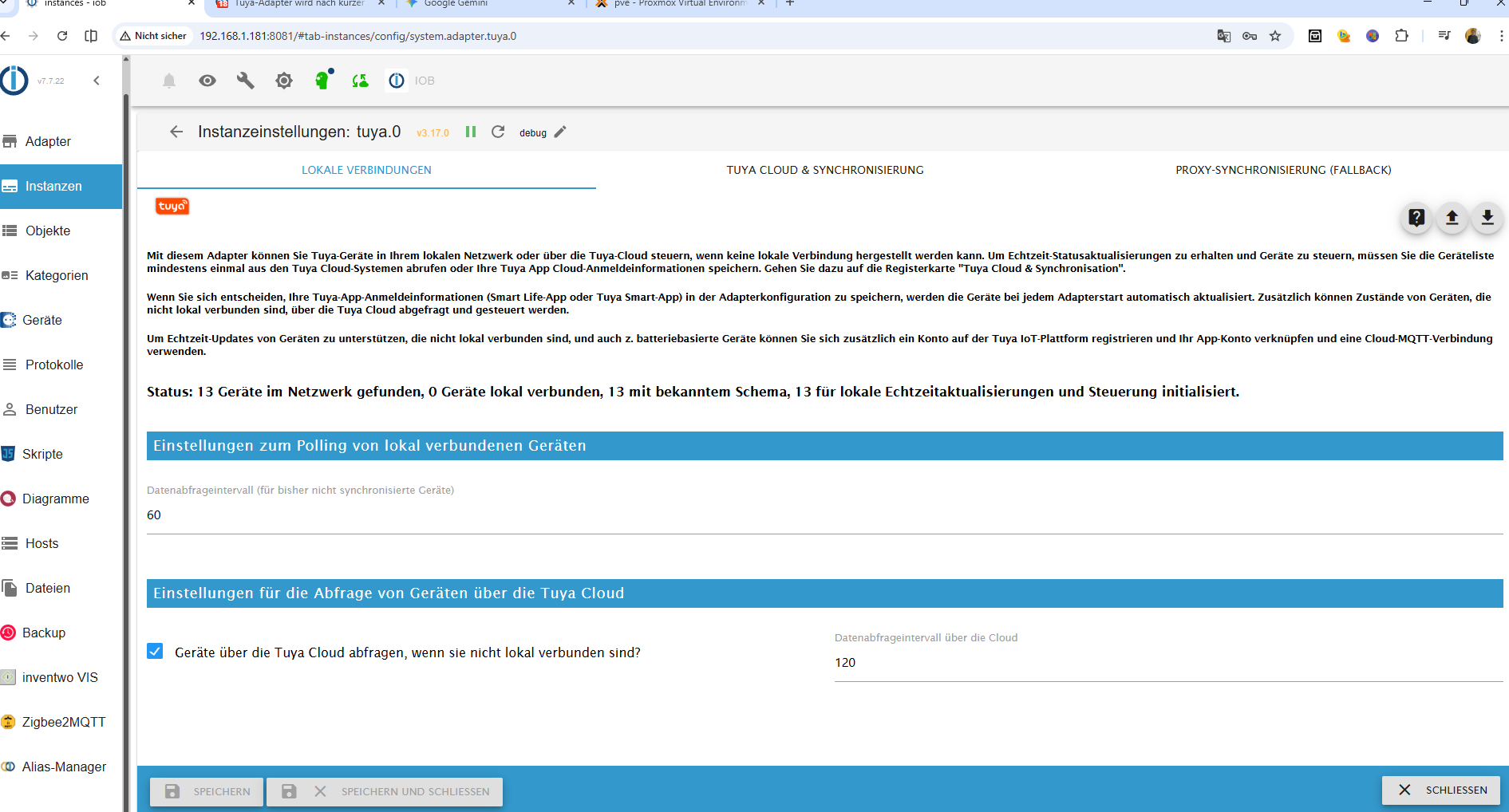
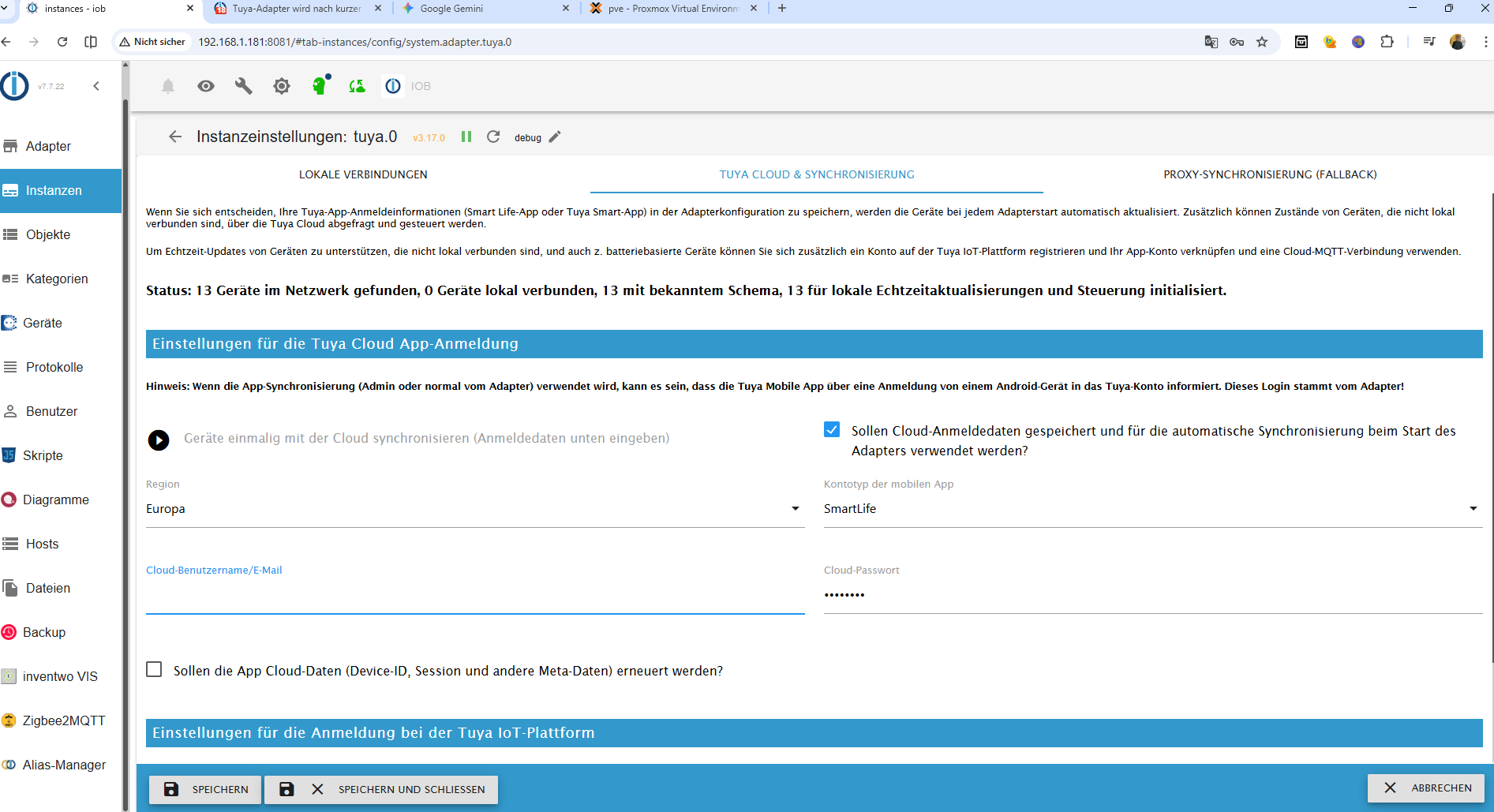
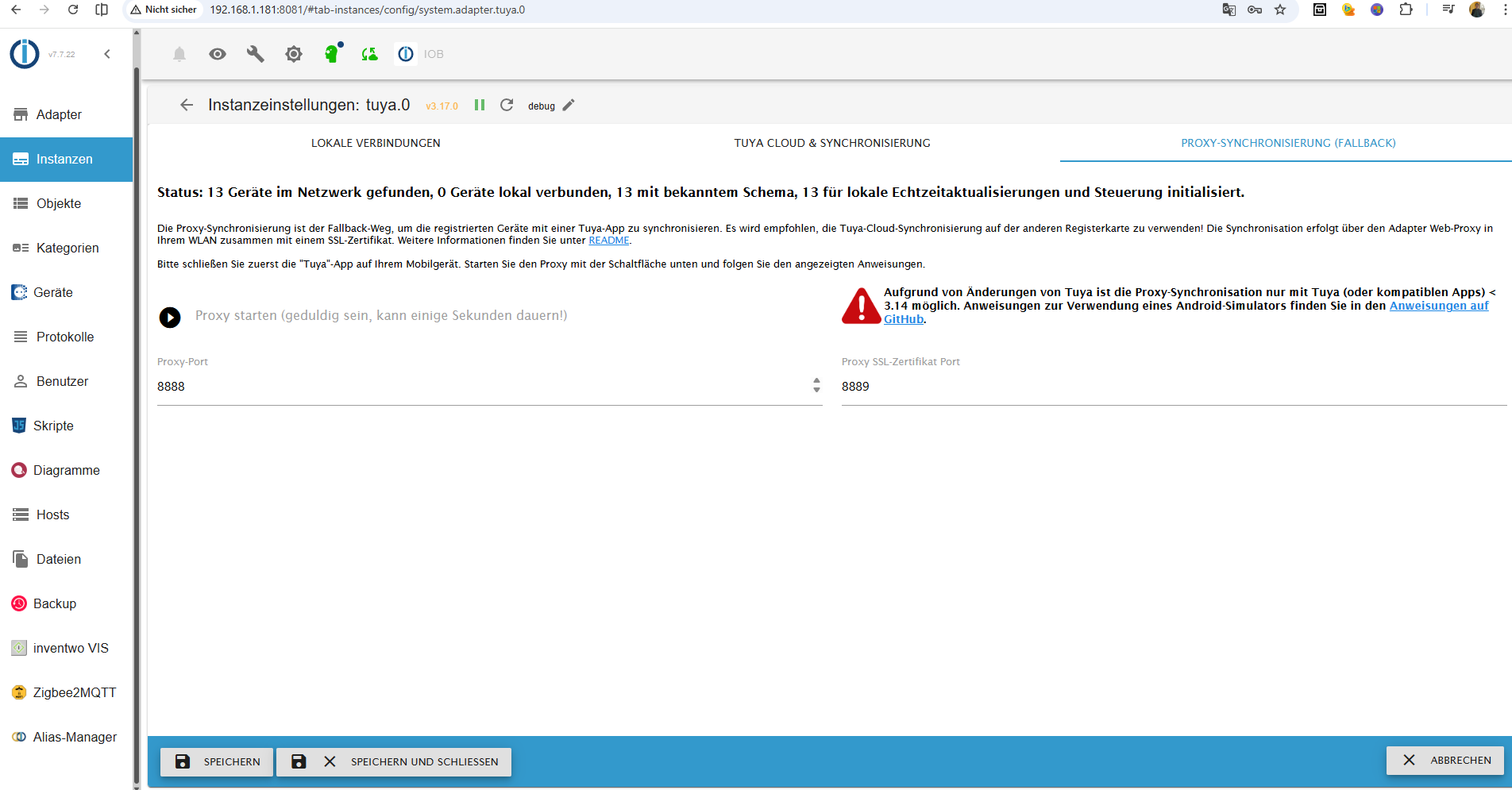
iob logs neu 2.txt -
Bei Cloud Benutzername ist nichts eingetragen... ?? da haben wir es doch..der Adapter versucht nur lokal, kann nicht connecten, weil device nicht erreichbar und online geht auch nicht, weil kein benutzername drin ist.. und da MUSS was im log stehen.. wenn er auf dann auf error geht
-
Bei Cloud Benutzername ist nichts eingetragen... ?? da haben wir es doch..der Adapter versucht nur lokal, kann nicht connecten, weil device nicht erreichbar und online geht auch nicht, weil kein benutzername drin ist.. und da MUSS was im log stehen.. wenn er auf dann auf error geht
@ilovegym ich geh mal davon aus, die hat er rausgelöscht für den screen, deshalb der blaue Strich und unten der Speicher Schließen Button
-
ja die email hab ich rausgenommen :-)
-
ja die email hab ich rausgenommen :-)
@Horst-Böttcher
Konntest du das Problem lösen ?
Bei mir genau das selbe Verhalten. Der Adapter wird kurz grün und bleibt dann gelb ohne einer Fehlermeldung im log. Auch wenn ich auf Debug umstelle. Habe nur ein Gerät über Tuya laufen. Dieses läuft aber ohne Probleme auch wenn der Adapter dauerhaft auf gelb steht.
Danke eve11 -
@Horst-Böttcher
Konntest du das Problem lösen ?
Bei mir genau das selbe Verhalten. Der Adapter wird kurz grün und bleibt dann gelb ohne einer Fehlermeldung im log. Auch wenn ich auf Debug umstelle. Habe nur ein Gerät über Tuya laufen. Dieses läuft aber ohne Probleme auch wenn der Adapter dauerhaft auf gelb steht.
Danke eve11





Hey! Du scheinst an dieser Unterhaltung interessiert zu sein, hast aber noch kein Konto.
Hast du es satt, bei jedem Besuch durch die gleichen Beiträge zu scrollen? Wenn du dich für ein Konto anmeldest, kommst du immer genau dorthin zurück, wo du zuvor warst, und kannst dich über neue Antworten benachrichtigen lassen (entweder per E-Mail oder Push-Benachrichtigung). Du kannst auch Lesezeichen speichern und Beiträge positiv bewerten, um anderen Community-Mitgliedern deine Wertschätzung zu zeigen.
Mit deinem Input könnte dieser Beitrag noch besser werden 💗
Registrieren Anmelden474
Online33.1k
Benutzende84.0k
Themen1.4m
Beiträge