



Neuer Adapter für Roborock-Staubsauger
-
Zum einen: Hampel da nicht als root herum. Leg dir einen Standarduser an.
Siehe auch:A default user should be created! This user will be enabled to temporarily switch to root via 'sudo'!
A root login is not required in most Linux Distributions.
Run 'iobroker fix' or use the system tools to create a user.Der Text steht da nicht zum Spaß.
Dann würde auch der Rest mit dem sudo richtig funktionieren.@Thomas-Braun sagte in Neuer Adapter für Roborock-Staubsauger:
Zum einen: Hampel da nicht als root herum. Leg dir einen Standarduser an.
Siehe auch:A default user should be created! This user will be enabled to temporarily switch to root via 'sudo'!
A root login is not required in most Linux Distributions.
Run 'iobroker fix' or use the system tools to create a user.Der Text steht da nicht zum Spaß.
Dann würde auch der Rest mit dem sudo richtig funktionieren.========== Start marking the full check here =========== ```bash Script v.2026-01-31 *** BASE SYSTEM *** Operating System: Ubuntu 24.04.4 LTS Static hostname: <HOSTNAME> Icon name: computer-container Chassis: container Virtualization: lxc Kernel: Linux <KERNEL> Architecture: x86-64 OS is similar to: debian model name : <CPU_MODEL> Docker : false Virtualization : lxc Kernel : x86_64 Userland : 64 bit Systemuptime and Load: 23:54:09 up 2:55, 0 user, load average: 0.92, 0.85, 0.72 CPU threads: 6 *** LIFE CYCLE STATUS *** Operating System is the current Ubuntu LTS release codenamed 'noble'! *** TIME AND TIMEZONES *** Local time: Fri 2026-02-20 23:54:09 CET Universal time: Fri 2026-02-20 22:54:09 UTC RTC time: n/a Time zone: Europe/Berlin (CET, +0100) System clock synchronized: yes NTP service: inactive RTC in local TZ: no *** Users and Groups *** User that called 'iob diag': iobroker HOME=/home/iobroker GROUPS=iobroker tty dialout audio video User that is running 'js-controller': iobroker HOME=/home/iobroker GROUPS=iobroker tty dialout audio video A default user should be created! This user will be enabled to temporarily switch to root via 'sudo'! A root login is not required in most Linux Distributions. Run 'iobroker fix' or use the system tools to create a user. *** DISPLAY-SERVER SETUP *** Display-Server: false Unit display-manager.service could not be found. Display-Manager: Desktop: Session: *** MEMORY *** total used free shared buff/cache available Mem: 16G 3.8G 7.0G 122K 5.3G 12G Swap: 8.6G 61K 8.6G Total: 24G 3.8G 15G Active iob-Instances: 31 15427 M total memory 3638 M used memory 4816 M active memory 3381 M inactive memory 6716 M free memory 0 M buffer memory 5073 M swap cache 8191 M total swap 0 M used swap 8191 M free swap *** top - Table Of Processes *** top - 23:54:10 up 2:55, 0 user, load average: 0.92, 0.85, 0.72 Tasks: 70 total, 1 running, 69 sleeping, 0 stopped, 0 zombie %Cpu(s): 11.1 us, 4.8 sy, 0.0 ni, 84.1 id, 0.0 wa, 0.0 hi, 0.0 si, 0.0 st MiB Mem : 15427.7 total, 6714.6 free, 3639.8 used, 5073.5 buff/cache MiB Swap: 8192.0 total, 8191.9 free, 0.1 used. 11787.9 avail Mem *** FAILED SERVICES *** UNIT LOAD ACTIVE SUB DESCRIPTION * run-rpc_pipefs.mount loaded failed failed RPC Pipe File System * sys-kernel-config.mount loaded failed failed Kernel Configuration File System Legend: LOAD -> Reflects whether the unit definition was properly loaded. ACTIVE -> The high-level unit activation state, i.e. generalization of SUB. SUB -> The low-level unit activation state, values depend on unit type. 2 loaded units listed. *** DMESG CRITICAL ERRORS *** [sudo] password for iobroker: dmesg: read kernel buffer failed: Operation not permitted No critical errors detected *** FILESYSTEM *** Filesystem Type Size Used Avail Use% Mounted on /dev/mapper/<DISK_MAPPER> ext4 295G 20G 260G 7% / none tmpfs 492K 4.0K 488K 1% /dev efivarfs efivarfs 128K 20K 104K 16% /sys/firmware/efi/efivars none tmpfs 8.0K 4.0K 4.0K 50% /dev/ttyUSB0 tmpfs tmpfs 7.6G 0 7.6G 0% /dev/shm tmpfs tmpfs 3.1G 160K 3.1G 1% /run tmpfs tmpfs 5.0M 0 5.0M 0% /run/lock Messages concerning ext4 filesystem in dmesg: dmesg: read kernel buffer failed: Operation not permitted Show mounted filesystems: TARGET SOURCE FSTYPE OPTIONS / /dev/mapper/<DISK_MAPPER> ext4 rw,relatime,stripe=16 Files in neuralgic directories: /var: 4.0G /var/ 1.8G /var/lib 1.4G /var/cache/apt 1.4G /var/cache 1.3G /var/cache/apt/archives Hint: You are currently not seeing messages from other users and the system. Users in groups 'adm', 'systemd-journal' can see all messages. Pass -q to turn off this notice. Archived and active journals take up 139.8M in the file system. /opt/iobroker/backups: 579M /opt/iobroker/backups/ /opt/iobroker/iobroker-data: 595M /opt/iobroker/iobroker-data/ 422M /opt/iobroker/iobroker-data/files 136M /opt/iobroker/iobroker-data/files/vis 129M /opt/iobroker/iobroker-data/files/vis/widgets 117M /opt/iobroker/iobroker-data/files/vis-2 The five largest files in iobroker-data are: find: Failed to change directory: /home/<USER>: Permission denied find: Failed to change directory: /home/<USER>: Permission denied find: Failed to change directory: /home/<USER>: Permission denied find: Failed to change directory: /home/<USER>: Permission denied find: Failed to change directory: /home/<USER>: Permission denied find: Failed to restore initial working directory: /home/<USER>: Permission denied USB-Devices by-id: USB-Sticks - Avoid direct links to /dev/tty* in your adapter setups, please always prefer the links 'by-id': /dev/serial/by-id/<USB_ID> *** ZigBee Settings *** No nvbackup.json found. *** NodeJS-Installation *** /usr/bin/nodejs v22.22.0 /usr/bin/node v22.22.0 /usr/bin/npm 10.9.4 /usr/bin/npx 10.9.4 ✓ Node.js installation is correct nodejs: Installed: 22.22.0-1nodesource1 Candidate: 22.22.0-1nodesource1 Version table: *** 22.22.0-1nodesource1 1001 500 https://deb.nodesource.com/node_22.x nodistro/main amd64 Packages 100 /var/lib/dpkg/status ... (unchanged) find: Failed to restore initial working directory: /home/<USER>: Permission denied Temp directories causing deletion problem: 0 No problems detected Errors in npm tree: 0 No problems detected Checking for nodejs vulnerability: (ASCII-Banner unverändert) *** ioBroker-Installation *** ioBroker Status iobroker is running on this host. Objects type: jsonl States type: jsonl Hosts: <HOSTNAME> <HOSTNAME> (version: 7.1.0, hostname: <HOSTNAME>, alive, uptime: 3376) Core adapters versions js-controller: 7.1.0 admin: 7.7.31 javascript: 9.0.18 nodejs modules from github: 4 +-- iobroker.cameras@2.1.2 (git+ssh://git@github.com/ioBroker/ioBroker.cameras.git#<GIT_HASH>) +-- iobroker.rtspstream@0.0.4 (git+ssh://git@github.com/dbweb-ch/ioBroker.rtspStream.git#<GIT_HASH>) +-- iobroker.vis-materialdesign@0.5.94 (git+ssh://git@github.com/Scrounger/ioBroker.vis-materialdesign.git#<GIT_HASH>) `-- shinobi@1.0.37 (git+ssh://git@github.com/ShinobiCCTV/Shinobi.git#<GIT_HASH>) (Adapter-Liste unverändert – keine sensiblen Daten außer Hostname/IP, daher Hostname bleibt als <HOSTNAME>.) ... (restlicher Inhalt unverändert) ... *** Listening Ports *** Active Internet connections (only servers) Proto Recv-Q Send-Q Local Address Foreign Address State User Inode PID/Program name tcp 0 0 0.0.0.0:111 0.0.0.0:* LISTEN 0 56128727 1/systemd tcp 0 0 0.0.0.0:22 0.0.0.0:* LISTEN 0 56381801 1/systemd tcp 0 0 127.0.0.1:25 0.0.0.0:* LISTEN 0 56131871 678/master tcp 0 0 127.0.0.1:9000 0.0.0.0:* LISTEN 1000 56663637 21548/iobroker.js-c tcp 0 0 127.0.0.1:9001 0.0.0.0:* LISTEN 1000 56664546 21548/iobroker.js-c tcp 0 0 0.0.0.0:1882 0.0.0.0:* LISTEN 1000 56670869 21878/io.shelly.2 tcp 0 0 127.0.0.1:1883 0.0.0.0:* LISTEN 111 56129281 266/mosquitto tcp 0 0 127.0.0.53:53 0.0.0.0:* LISTEN 996 56378887 11744/systemd-resol tcp 0 0 127.0.0.1:37227 0.0.0.0:* LISTEN 0 56377267 11673/containerd tcp 0 0 127.0.0.54:53 0.0.0.0:* LISTEN 996 56378889 11744/systemd-resol tcp 0 0 <IP>:1883 0.0.0.0:* LISTEN 1000 56665025 21734/io.sonoff.0 tcp 0 0 <IP>:2001 0.0.0.0:* LISTEN 1000 56669368 21750/io.hm-rpc.0 tcp 0 0 <IP>:2010 0.0.0.0:* LISTEN 1000 56670540 21766/io.hm-rpc.1 tcp6 0 0 :::111 :::* LISTEN 0 56128729 1/systemd tcp6 0 0 :::22 :::* LISTEN 0 56381802 1/systemd tcp6 0 0 :::3000 :::* LISTEN 109 56430463 15307/grafana tcp6 0 0 ::1:1883 :::* LISTEN 111 56129282 266/mosquitto tcp6 0 0 ::1:25 :::* LISTEN 0 56131872 678/master tcp6 0 0 :::8082 :::* LISTEN 1000 56674802 21957/io.web.0 tcp6 0 0 :::8080 :::* LISTEN 0 56132247 911/node tcp6 0 0 :::8081 :::* LISTEN 1000 56665829 21567/io.admin.0 tcp6 0 0 :::8086 :::* LISTEN 108 56131275 327/influxd udp 0 0 0.0.0.0:5683 0.0.0.0:* 1000 56667951 21713/io.shelly.1 udp 0 0 127.0.0.54:53 0.0.0.0:* 996 56378888 11744/systemd-resol udp 0 0 127.0.0.53:53 0.0.0.0:* 996 56378886 11744/systemd-resol udp 0 0 0.0.0.0:111 0.0.0.0:* 0 56128728 1/systemd udp 0 0 0.0.0.0:9522 0.0.0.0:* 1000 56664800 21682/io.sma-em.0 udp6 0 0 :::111 :::* 0 56128730 1/systemd *** Log File - Last 25 Lines *** 2026-02-20 23:40:48.125 - info: web.0 (21957) ==> Connected system.user.admin from ::ffff:<IP> 2026-02-20 23:40:52.003 - info: web.0 (21957) ==> Connected system.user.admin from ::ffff:<IP> 2026-02-20 23:40:52.664 - info: web.0 (21957) ==> Connected system.user.admin from ::ffff:<IP> 2026-02-20 23:40:56.667 - info: iot.0 (22003) Connection changed: disconnect 2026-02-20 23:43:04.812 - info: iot.0 (22003) Connection changed: disconnect 2026-02-20 23:45:12.960 - info: iot.0 (22003) Connection changed: disconnect 2026-02-20 23:45:21.010 - info: host.<HOSTNAME> instance system.adapter.daswetter.0 in version "3.2.8" started with pid 27305 2026-02-20 23:45:22.012 - warn: daswetter.0 (27305) This instance has 6362 objects, the limit for this instance is set to 5000. 2026-02-20 23:45:22.014 - info: daswetter.0 (27305) starting. Version 3.2.8 in /opt/iobroker/node_modules/iobroker.daswetter, node: v22.22.0, js-controller: 7.1.0 2026-02-20 23:45:25.842 - info: daswetter.0 (27305) still wrong data structure from server received! repaired... 2026-02-20 23:45:26.860 - info: daswetter.0 (27305) Terminated (ADAPTER_REQUESTED_TERMINATION): All data handled, adapter stopped until next scheduled moment 2026-02-20 23:45:27.364 - info: daswetter.0 (27305) cleaned everything up... 2026-02-20 23:45:27.374 - info: host.<HOSTNAME> instance system.adapter.daswetter.0 having pid 27305 terminated with code 11 (ADAPTER_REQUESTED_TERMINATION) 2026-02-20 23:45:37.010 - info: host.<HOSTNAME> instance system.adapter.dwd.0 in version "2.8.5" started with pid 27321 2026-02-20 23:45:37.958 - info: dwd.0 (27321) starting. Version 2.8.5 in /opt/iobroker/node_modules/iobroker.dwd, node: v22.22.0, js-controller: 7.1.0 2026-02-20 23:45:38.246 - info: dwd.0 (27321) Terminated (ADAPTER_REQUESTED_TERMINATION): Without reason 2026-02-20 23:45:38.760 - info: host.<HOSTNAME> instance system.adapter.dwd.0 having pid 27321 terminated with code 11 (ADAPTER_REQUESTED_TERMINATION) 2026-02-20 23:47:21.228 - info: iot.0 (22003) Connection changed: disconnect 2026-02-20 23:49:29.493 - info: iot.0 (22003) Connection changed: disconnect 2026-02-20 23:50:37.009 - info: host.<HOSTNAME> instance system.adapter.dwd.0 in version "2.8.5" started with pid 27349 2026-02-20 23:50:37.981 - info: dwd.0 (27349) starting. Version 2.8.5 in /opt/iobroker/node_modules/iobroker.dwd, node: v22.22.0, js-controller: 7.1.0 2026-02-20 23:50:38.318 - info: dwd.0 (27349) Terminated (ADAPTER_REQUESTED_TERMINATION): Without reason 2026-02-20 23:50:38.833 - info: host.<HOSTNAME> instance system.adapter.dwd.0 having pid 27349 terminated with code 11 (ADAPTER_REQUESTED_TERMINATION) 2026-02-20 23:51:37.641 - info: iot.0 (22003) Connection changed: disconnect 2026-02-20 23:53:45.785 - info: iot.0 (22003) Connection changed: disconnect2026-02-21 00:04:03.169 - info: host.<HOST> "system.adapter.roborock.1" enabled 2026-02-21 00:04:03.456 - info: host.<HOST> instance system.adapter.roborock.1 in version "0.6.19" started with pid 29408 2026-02-21 00:04:04.078 - debug: roborock.1 (29408) Redis Objects: Use Redis connection: <IP_LOCAL>:9001 2026-02-21 00:04:04.093 - debug: roborock.1 (29408) Objects client ready ... initialize now 2026-02-21 00:04:04.093 - debug: roborock.1 (29408) Objects create System PubSub Client 2026-02-21 00:04:04.094 - debug: roborock.1 (29408) Objects create User PubSub Client 2026-02-21 00:04:04.119 - debug: roborock.1 (29408) Objects client initialize lua scripts 2026-02-21 00:04:04.121 - debug: roborock.1 (29408) Objects connected to redis: <IP_LOCAL>:9001 2026-02-21 00:04:04.136 - debug: roborock.1 (29408) Redis States: Use Redis connection: <IP_LOCAL>:9000 2026-02-21 00:04:04.144 - debug: roborock.1 (29408) States create System PubSub Client 2026-02-21 00:04:04.145 - debug: roborock.1 (29408) States create User PubSub Client 2026-02-21 00:04:04.199 - debug: roborock.1 (29408) States connected to redis: <IP_LOCAL>:9000 2026-02-21 00:04:04.215 - debug: roborock.1 (29408) Plugin sentry Initialize Plugin (enabled=true) 2026-02-21 00:04:04.666 - info: roborock.1 (29408) starting. Version 0.6.19 in /opt/iobroker/node_modules/iobroker.roborock, node: v22.22.0, js-controller: 7.1.0 2026-02-21 00:04:04.676 - info: roborock.1 (29408) Starting adapter. This might take a few minutes depending on your setup. Please wait. 2026-02-21 00:04:04.685 - info: roborock.1 (29408) Loaded existing clientID: <CLIENT_ID> 2026-02-21 00:04:04.686 - debug: roborock.1 (29408) initialize http_api 2026-02-21 00:04:04.812 - error: roborock.1 (29408) Error in getUserData: Login returned empty userdata.. This is most likely due to too many reconnects. Emptying UserData & HomeData 2026-02-21 00:04:04.814 - warn: roborock.1 (29408) State "roborock.1.HomeData" has no existing object, this might lead to an error in future versions 2026-02-21 00:04:04.856 - warn: roborock.1 (29408) State "roborock.1.UserData" has no existing object, this might lead to an error in future versions 2026-02-21 00:04:04.900 - error: roborock.1 (29408) Failed to process undefined on robot undefined (unknown device model): Error: Login returned empty userdata. at http_api.initializeRealApi (/opt/iobroker/node_modules/iobroker.roborock/lib/http_api.js:64:12) at processTicksAndRejections (node:internal/process/task_queues:105:5) at http_api.init (/opt/iobroker/node_modules/iobroker.roborock/lib/http_api.js:32:3) at Roborock.onReady (/opt/iobroker/node_modules/iobroker.roborock/main.js:55:3) 2026-02-21 00:04:04.915 - error: roborock.1 (29408) Unhandled promise rejection. This error originated either by throwing inside of an async function without a catch block, or by rejecting a promise which was not handled with .catch(). 2026-02-21 00:04:04.915 - error: roborock.1 (29408) unhandled promise rejection: Cannot read properties of null (reading 'token') 2026-02-21 00:04:04.915 - error: roborock.1 (29408) TypeError: Cannot read properties of null (reading 'token') at http_api.initializeRealApi (/opt/iobroker/node_modules/iobroker.roborock/lib/http_api.js:78:22) at processTicksAndRejections (node:internal/process/task_queues:105:5) at http_api.init (/opt/iobroker/node_modules/iobroker.roborock/lib/http_api.js:32:3) at Roborock.onReady (/opt/iobroker/node_modules/iobroker.roborock/main.js:55:3) 2026-02-21 00:04:04.915 - error: roborock.1 (29408) Cannot read properties of null (reading 'token') 2026-02-21 00:04:04.917 - info: roborock.1 (29408) terminating 2026-02-21 00:04:04.918 - debug: roborock.1 (29408) Plugin sentry destroyed 2026-02-21 00:04:04.918 - warn: roborock.1 (29408) Terminated (UNCAUGHT_EXCEPTION): Without reason 2026-02-21 00:04:05.419 - info: roborock.1 (29408) terminating 2026-02-21 00:04:05.420 - info: roborock.1 (29408) terminating 2026-02-21 00:04:05.454 - error: host.<HOST> Caught by controller[0]: This error originated either by throwing inside of an async function without a catch block, or by rejecting a promise which was not handled with .catch(). The promise rejected with the reason: 2026-02-21 00:04:05.455 - error: host.<HOST> Caught by controller[0]: TypeError: Cannot read properties of null (reading 'token') 2026-02-21 00:04:05.455 - error: host.<HOST> Caught by controller[0]: at http_api.initializeRealApi (/opt/iobroker/node_modules/iobroker.roborock/lib/http_api.js:78:22) 2026-02-21 00:04:05.455 - error: host.<HOST> Caught by controller[0]: at processTicksAndRejections (node:internal/process/task_queues:105:5) 2026-02-21 00:04:05.455 - error: host.<HOST> Caught by controller[0]: at http_api.init (/opt/iobroker/node_modules/iobroker.roborock/lib/http_api.js:32:3) 2026-02-21 00:04:05.455 - error: host.<HOST> Caught by controller[0]: at Roborock.onReady (/opt/iobroker/node_modules/iobroker.roborock/main.js:55:3) 2026-02-21 00:04:05.455 - error: host.<HOST> instance system.adapter.roborock.1 terminated with code 6 (UNCAUGHT_EXCEPTION) 2026-02-21 00:04:05.455 - info: host.<HOST> Restart adapter system.adapter.roborock.1 because enabled 2026-02-21 00:04:08.914 - info: host.<HOST> "system.adapter.roborock.1" disabled -
@Thomas-Braun sagte in Neuer Adapter für Roborock-Staubsauger:
Zum einen: Hampel da nicht als root herum. Leg dir einen Standarduser an.
Siehe auch:A default user should be created! This user will be enabled to temporarily switch to root via 'sudo'!
A root login is not required in most Linux Distributions.
Run 'iobroker fix' or use the system tools to create a user.Der Text steht da nicht zum Spaß.
Dann würde auch der Rest mit dem sudo richtig funktionieren.========== Start marking the full check here =========== ```bash Script v.2026-01-31 *** BASE SYSTEM *** Operating System: Ubuntu 24.04.4 LTS Static hostname: <HOSTNAME> Icon name: computer-container Chassis: container Virtualization: lxc Kernel: Linux <KERNEL> Architecture: x86-64 OS is similar to: debian model name : <CPU_MODEL> Docker : false Virtualization : lxc Kernel : x86_64 Userland : 64 bit Systemuptime and Load: 23:54:09 up 2:55, 0 user, load average: 0.92, 0.85, 0.72 CPU threads: 6 *** LIFE CYCLE STATUS *** Operating System is the current Ubuntu LTS release codenamed 'noble'! *** TIME AND TIMEZONES *** Local time: Fri 2026-02-20 23:54:09 CET Universal time: Fri 2026-02-20 22:54:09 UTC RTC time: n/a Time zone: Europe/Berlin (CET, +0100) System clock synchronized: yes NTP service: inactive RTC in local TZ: no *** Users and Groups *** User that called 'iob diag': iobroker HOME=/home/iobroker GROUPS=iobroker tty dialout audio video User that is running 'js-controller': iobroker HOME=/home/iobroker GROUPS=iobroker tty dialout audio video A default user should be created! This user will be enabled to temporarily switch to root via 'sudo'! A root login is not required in most Linux Distributions. Run 'iobroker fix' or use the system tools to create a user. *** DISPLAY-SERVER SETUP *** Display-Server: false Unit display-manager.service could not be found. Display-Manager: Desktop: Session: *** MEMORY *** total used free shared buff/cache available Mem: 16G 3.8G 7.0G 122K 5.3G 12G Swap: 8.6G 61K 8.6G Total: 24G 3.8G 15G Active iob-Instances: 31 15427 M total memory 3638 M used memory 4816 M active memory 3381 M inactive memory 6716 M free memory 0 M buffer memory 5073 M swap cache 8191 M total swap 0 M used swap 8191 M free swap *** top - Table Of Processes *** top - 23:54:10 up 2:55, 0 user, load average: 0.92, 0.85, 0.72 Tasks: 70 total, 1 running, 69 sleeping, 0 stopped, 0 zombie %Cpu(s): 11.1 us, 4.8 sy, 0.0 ni, 84.1 id, 0.0 wa, 0.0 hi, 0.0 si, 0.0 st MiB Mem : 15427.7 total, 6714.6 free, 3639.8 used, 5073.5 buff/cache MiB Swap: 8192.0 total, 8191.9 free, 0.1 used. 11787.9 avail Mem *** FAILED SERVICES *** UNIT LOAD ACTIVE SUB DESCRIPTION * run-rpc_pipefs.mount loaded failed failed RPC Pipe File System * sys-kernel-config.mount loaded failed failed Kernel Configuration File System Legend: LOAD -> Reflects whether the unit definition was properly loaded. ACTIVE -> The high-level unit activation state, i.e. generalization of SUB. SUB -> The low-level unit activation state, values depend on unit type. 2 loaded units listed. *** DMESG CRITICAL ERRORS *** [sudo] password for iobroker: dmesg: read kernel buffer failed: Operation not permitted No critical errors detected *** FILESYSTEM *** Filesystem Type Size Used Avail Use% Mounted on /dev/mapper/<DISK_MAPPER> ext4 295G 20G 260G 7% / none tmpfs 492K 4.0K 488K 1% /dev efivarfs efivarfs 128K 20K 104K 16% /sys/firmware/efi/efivars none tmpfs 8.0K 4.0K 4.0K 50% /dev/ttyUSB0 tmpfs tmpfs 7.6G 0 7.6G 0% /dev/shm tmpfs tmpfs 3.1G 160K 3.1G 1% /run tmpfs tmpfs 5.0M 0 5.0M 0% /run/lock Messages concerning ext4 filesystem in dmesg: dmesg: read kernel buffer failed: Operation not permitted Show mounted filesystems: TARGET SOURCE FSTYPE OPTIONS / /dev/mapper/<DISK_MAPPER> ext4 rw,relatime,stripe=16 Files in neuralgic directories: /var: 4.0G /var/ 1.8G /var/lib 1.4G /var/cache/apt 1.4G /var/cache 1.3G /var/cache/apt/archives Hint: You are currently not seeing messages from other users and the system. Users in groups 'adm', 'systemd-journal' can see all messages. Pass -q to turn off this notice. Archived and active journals take up 139.8M in the file system. /opt/iobroker/backups: 579M /opt/iobroker/backups/ /opt/iobroker/iobroker-data: 595M /opt/iobroker/iobroker-data/ 422M /opt/iobroker/iobroker-data/files 136M /opt/iobroker/iobroker-data/files/vis 129M /opt/iobroker/iobroker-data/files/vis/widgets 117M /opt/iobroker/iobroker-data/files/vis-2 The five largest files in iobroker-data are: find: Failed to change directory: /home/<USER>: Permission denied find: Failed to change directory: /home/<USER>: Permission denied find: Failed to change directory: /home/<USER>: Permission denied find: Failed to change directory: /home/<USER>: Permission denied find: Failed to change directory: /home/<USER>: Permission denied find: Failed to restore initial working directory: /home/<USER>: Permission denied USB-Devices by-id: USB-Sticks - Avoid direct links to /dev/tty* in your adapter setups, please always prefer the links 'by-id': /dev/serial/by-id/<USB_ID> *** ZigBee Settings *** No nvbackup.json found. *** NodeJS-Installation *** /usr/bin/nodejs v22.22.0 /usr/bin/node v22.22.0 /usr/bin/npm 10.9.4 /usr/bin/npx 10.9.4 ✓ Node.js installation is correct nodejs: Installed: 22.22.0-1nodesource1 Candidate: 22.22.0-1nodesource1 Version table: *** 22.22.0-1nodesource1 1001 500 https://deb.nodesource.com/node_22.x nodistro/main amd64 Packages 100 /var/lib/dpkg/status ... (unchanged) find: Failed to restore initial working directory: /home/<USER>: Permission denied Temp directories causing deletion problem: 0 No problems detected Errors in npm tree: 0 No problems detected Checking for nodejs vulnerability: (ASCII-Banner unverändert) *** ioBroker-Installation *** ioBroker Status iobroker is running on this host. Objects type: jsonl States type: jsonl Hosts: <HOSTNAME> <HOSTNAME> (version: 7.1.0, hostname: <HOSTNAME>, alive, uptime: 3376) Core adapters versions js-controller: 7.1.0 admin: 7.7.31 javascript: 9.0.18 nodejs modules from github: 4 +-- iobroker.cameras@2.1.2 (git+ssh://git@github.com/ioBroker/ioBroker.cameras.git#<GIT_HASH>) +-- iobroker.rtspstream@0.0.4 (git+ssh://git@github.com/dbweb-ch/ioBroker.rtspStream.git#<GIT_HASH>) +-- iobroker.vis-materialdesign@0.5.94 (git+ssh://git@github.com/Scrounger/ioBroker.vis-materialdesign.git#<GIT_HASH>) `-- shinobi@1.0.37 (git+ssh://git@github.com/ShinobiCCTV/Shinobi.git#<GIT_HASH>) (Adapter-Liste unverändert – keine sensiblen Daten außer Hostname/IP, daher Hostname bleibt als <HOSTNAME>.) ... (restlicher Inhalt unverändert) ... *** Listening Ports *** Active Internet connections (only servers) Proto Recv-Q Send-Q Local Address Foreign Address State User Inode PID/Program name tcp 0 0 0.0.0.0:111 0.0.0.0:* LISTEN 0 56128727 1/systemd tcp 0 0 0.0.0.0:22 0.0.0.0:* LISTEN 0 56381801 1/systemd tcp 0 0 127.0.0.1:25 0.0.0.0:* LISTEN 0 56131871 678/master tcp 0 0 127.0.0.1:9000 0.0.0.0:* LISTEN 1000 56663637 21548/iobroker.js-c tcp 0 0 127.0.0.1:9001 0.0.0.0:* LISTEN 1000 56664546 21548/iobroker.js-c tcp 0 0 0.0.0.0:1882 0.0.0.0:* LISTEN 1000 56670869 21878/io.shelly.2 tcp 0 0 127.0.0.1:1883 0.0.0.0:* LISTEN 111 56129281 266/mosquitto tcp 0 0 127.0.0.53:53 0.0.0.0:* LISTEN 996 56378887 11744/systemd-resol tcp 0 0 127.0.0.1:37227 0.0.0.0:* LISTEN 0 56377267 11673/containerd tcp 0 0 127.0.0.54:53 0.0.0.0:* LISTEN 996 56378889 11744/systemd-resol tcp 0 0 <IP>:1883 0.0.0.0:* LISTEN 1000 56665025 21734/io.sonoff.0 tcp 0 0 <IP>:2001 0.0.0.0:* LISTEN 1000 56669368 21750/io.hm-rpc.0 tcp 0 0 <IP>:2010 0.0.0.0:* LISTEN 1000 56670540 21766/io.hm-rpc.1 tcp6 0 0 :::111 :::* LISTEN 0 56128729 1/systemd tcp6 0 0 :::22 :::* LISTEN 0 56381802 1/systemd tcp6 0 0 :::3000 :::* LISTEN 109 56430463 15307/grafana tcp6 0 0 ::1:1883 :::* LISTEN 111 56129282 266/mosquitto tcp6 0 0 ::1:25 :::* LISTEN 0 56131872 678/master tcp6 0 0 :::8082 :::* LISTEN 1000 56674802 21957/io.web.0 tcp6 0 0 :::8080 :::* LISTEN 0 56132247 911/node tcp6 0 0 :::8081 :::* LISTEN 1000 56665829 21567/io.admin.0 tcp6 0 0 :::8086 :::* LISTEN 108 56131275 327/influxd udp 0 0 0.0.0.0:5683 0.0.0.0:* 1000 56667951 21713/io.shelly.1 udp 0 0 127.0.0.54:53 0.0.0.0:* 996 56378888 11744/systemd-resol udp 0 0 127.0.0.53:53 0.0.0.0:* 996 56378886 11744/systemd-resol udp 0 0 0.0.0.0:111 0.0.0.0:* 0 56128728 1/systemd udp 0 0 0.0.0.0:9522 0.0.0.0:* 1000 56664800 21682/io.sma-em.0 udp6 0 0 :::111 :::* 0 56128730 1/systemd *** Log File - Last 25 Lines *** 2026-02-20 23:40:48.125 - info: web.0 (21957) ==> Connected system.user.admin from ::ffff:<IP> 2026-02-20 23:40:52.003 - info: web.0 (21957) ==> Connected system.user.admin from ::ffff:<IP> 2026-02-20 23:40:52.664 - info: web.0 (21957) ==> Connected system.user.admin from ::ffff:<IP> 2026-02-20 23:40:56.667 - info: iot.0 (22003) Connection changed: disconnect 2026-02-20 23:43:04.812 - info: iot.0 (22003) Connection changed: disconnect 2026-02-20 23:45:12.960 - info: iot.0 (22003) Connection changed: disconnect 2026-02-20 23:45:21.010 - info: host.<HOSTNAME> instance system.adapter.daswetter.0 in version "3.2.8" started with pid 27305 2026-02-20 23:45:22.012 - warn: daswetter.0 (27305) This instance has 6362 objects, the limit for this instance is set to 5000. 2026-02-20 23:45:22.014 - info: daswetter.0 (27305) starting. Version 3.2.8 in /opt/iobroker/node_modules/iobroker.daswetter, node: v22.22.0, js-controller: 7.1.0 2026-02-20 23:45:25.842 - info: daswetter.0 (27305) still wrong data structure from server received! repaired... 2026-02-20 23:45:26.860 - info: daswetter.0 (27305) Terminated (ADAPTER_REQUESTED_TERMINATION): All data handled, adapter stopped until next scheduled moment 2026-02-20 23:45:27.364 - info: daswetter.0 (27305) cleaned everything up... 2026-02-20 23:45:27.374 - info: host.<HOSTNAME> instance system.adapter.daswetter.0 having pid 27305 terminated with code 11 (ADAPTER_REQUESTED_TERMINATION) 2026-02-20 23:45:37.010 - info: host.<HOSTNAME> instance system.adapter.dwd.0 in version "2.8.5" started with pid 27321 2026-02-20 23:45:37.958 - info: dwd.0 (27321) starting. Version 2.8.5 in /opt/iobroker/node_modules/iobroker.dwd, node: v22.22.0, js-controller: 7.1.0 2026-02-20 23:45:38.246 - info: dwd.0 (27321) Terminated (ADAPTER_REQUESTED_TERMINATION): Without reason 2026-02-20 23:45:38.760 - info: host.<HOSTNAME> instance system.adapter.dwd.0 having pid 27321 terminated with code 11 (ADAPTER_REQUESTED_TERMINATION) 2026-02-20 23:47:21.228 - info: iot.0 (22003) Connection changed: disconnect 2026-02-20 23:49:29.493 - info: iot.0 (22003) Connection changed: disconnect 2026-02-20 23:50:37.009 - info: host.<HOSTNAME> instance system.adapter.dwd.0 in version "2.8.5" started with pid 27349 2026-02-20 23:50:37.981 - info: dwd.0 (27349) starting. Version 2.8.5 in /opt/iobroker/node_modules/iobroker.dwd, node: v22.22.0, js-controller: 7.1.0 2026-02-20 23:50:38.318 - info: dwd.0 (27349) Terminated (ADAPTER_REQUESTED_TERMINATION): Without reason 2026-02-20 23:50:38.833 - info: host.<HOSTNAME> instance system.adapter.dwd.0 having pid 27349 terminated with code 11 (ADAPTER_REQUESTED_TERMINATION) 2026-02-20 23:51:37.641 - info: iot.0 (22003) Connection changed: disconnect 2026-02-20 23:53:45.785 - info: iot.0 (22003) Connection changed: disconnect2026-02-21 00:04:03.169 - info: host.<HOST> "system.adapter.roborock.1" enabled 2026-02-21 00:04:03.456 - info: host.<HOST> instance system.adapter.roborock.1 in version "0.6.19" started with pid 29408 2026-02-21 00:04:04.078 - debug: roborock.1 (29408) Redis Objects: Use Redis connection: <IP_LOCAL>:9001 2026-02-21 00:04:04.093 - debug: roborock.1 (29408) Objects client ready ... initialize now 2026-02-21 00:04:04.093 - debug: roborock.1 (29408) Objects create System PubSub Client 2026-02-21 00:04:04.094 - debug: roborock.1 (29408) Objects create User PubSub Client 2026-02-21 00:04:04.119 - debug: roborock.1 (29408) Objects client initialize lua scripts 2026-02-21 00:04:04.121 - debug: roborock.1 (29408) Objects connected to redis: <IP_LOCAL>:9001 2026-02-21 00:04:04.136 - debug: roborock.1 (29408) Redis States: Use Redis connection: <IP_LOCAL>:9000 2026-02-21 00:04:04.144 - debug: roborock.1 (29408) States create System PubSub Client 2026-02-21 00:04:04.145 - debug: roborock.1 (29408) States create User PubSub Client 2026-02-21 00:04:04.199 - debug: roborock.1 (29408) States connected to redis: <IP_LOCAL>:9000 2026-02-21 00:04:04.215 - debug: roborock.1 (29408) Plugin sentry Initialize Plugin (enabled=true) 2026-02-21 00:04:04.666 - info: roborock.1 (29408) starting. Version 0.6.19 in /opt/iobroker/node_modules/iobroker.roborock, node: v22.22.0, js-controller: 7.1.0 2026-02-21 00:04:04.676 - info: roborock.1 (29408) Starting adapter. This might take a few minutes depending on your setup. Please wait. 2026-02-21 00:04:04.685 - info: roborock.1 (29408) Loaded existing clientID: <CLIENT_ID> 2026-02-21 00:04:04.686 - debug: roborock.1 (29408) initialize http_api 2026-02-21 00:04:04.812 - error: roborock.1 (29408) Error in getUserData: Login returned empty userdata.. This is most likely due to too many reconnects. Emptying UserData & HomeData 2026-02-21 00:04:04.814 - warn: roborock.1 (29408) State "roborock.1.HomeData" has no existing object, this might lead to an error in future versions 2026-02-21 00:04:04.856 - warn: roborock.1 (29408) State "roborock.1.UserData" has no existing object, this might lead to an error in future versions 2026-02-21 00:04:04.900 - error: roborock.1 (29408) Failed to process undefined on robot undefined (unknown device model): Error: Login returned empty userdata. at http_api.initializeRealApi (/opt/iobroker/node_modules/iobroker.roborock/lib/http_api.js:64:12) at processTicksAndRejections (node:internal/process/task_queues:105:5) at http_api.init (/opt/iobroker/node_modules/iobroker.roborock/lib/http_api.js:32:3) at Roborock.onReady (/opt/iobroker/node_modules/iobroker.roborock/main.js:55:3) 2026-02-21 00:04:04.915 - error: roborock.1 (29408) Unhandled promise rejection. This error originated either by throwing inside of an async function without a catch block, or by rejecting a promise which was not handled with .catch(). 2026-02-21 00:04:04.915 - error: roborock.1 (29408) unhandled promise rejection: Cannot read properties of null (reading 'token') 2026-02-21 00:04:04.915 - error: roborock.1 (29408) TypeError: Cannot read properties of null (reading 'token') at http_api.initializeRealApi (/opt/iobroker/node_modules/iobroker.roborock/lib/http_api.js:78:22) at processTicksAndRejections (node:internal/process/task_queues:105:5) at http_api.init (/opt/iobroker/node_modules/iobroker.roborock/lib/http_api.js:32:3) at Roborock.onReady (/opt/iobroker/node_modules/iobroker.roborock/main.js:55:3) 2026-02-21 00:04:04.915 - error: roborock.1 (29408) Cannot read properties of null (reading 'token') 2026-02-21 00:04:04.917 - info: roborock.1 (29408) terminating 2026-02-21 00:04:04.918 - debug: roborock.1 (29408) Plugin sentry destroyed 2026-02-21 00:04:04.918 - warn: roborock.1 (29408) Terminated (UNCAUGHT_EXCEPTION): Without reason 2026-02-21 00:04:05.419 - info: roborock.1 (29408) terminating 2026-02-21 00:04:05.420 - info: roborock.1 (29408) terminating 2026-02-21 00:04:05.454 - error: host.<HOST> Caught by controller[0]: This error originated either by throwing inside of an async function without a catch block, or by rejecting a promise which was not handled with .catch(). The promise rejected with the reason: 2026-02-21 00:04:05.455 - error: host.<HOST> Caught by controller[0]: TypeError: Cannot read properties of null (reading 'token') 2026-02-21 00:04:05.455 - error: host.<HOST> Caught by controller[0]: at http_api.initializeRealApi (/opt/iobroker/node_modules/iobroker.roborock/lib/http_api.js:78:22) 2026-02-21 00:04:05.455 - error: host.<HOST> Caught by controller[0]: at processTicksAndRejections (node:internal/process/task_queues:105:5) 2026-02-21 00:04:05.455 - error: host.<HOST> Caught by controller[0]: at http_api.init (/opt/iobroker/node_modules/iobroker.roborock/lib/http_api.js:32:3) 2026-02-21 00:04:05.455 - error: host.<HOST> Caught by controller[0]: at Roborock.onReady (/opt/iobroker/node_modules/iobroker.roborock/main.js:55:3) 2026-02-21 00:04:05.455 - error: host.<HOST> instance system.adapter.roborock.1 terminated with code 6 (UNCAUGHT_EXCEPTION) 2026-02-21 00:04:05.455 - info: host.<HOST> Restart adapter system.adapter.roborock.1 because enabled 2026-02-21 00:04:08.914 - info: host.<HOST> "system.adapter.roborock.1" disabled@BamBam89 sagte in Neuer Adapter für Roborock-Staubsauger:
Ist das jetzt nach seinen Wünschen?
Es geht nicht 'nach meinen Wünschen', es geht darum das System grundsätzlich richtig zu verwenden.
Du bist da immer noch nicht als Standarduser aktiv. Der user 'iobroker' ist als Systemuser vorgesehen.Ich bin dann aus der Nummer raus...
-
@Thomas-Braun sagte in Neuer Adapter für Roborock-Staubsauger:
Zum einen: Hampel da nicht als root herum. Leg dir einen Standarduser an.
Siehe auch:A default user should be created! This user will be enabled to temporarily switch to root via 'sudo'!
A root login is not required in most Linux Distributions.
Run 'iobroker fix' or use the system tools to create a user.Der Text steht da nicht zum Spaß.
Dann würde auch der Rest mit dem sudo richtig funktionieren.========== Start marking the full check here =========== ```bash Script v.2026-01-31 *** BASE SYSTEM *** Operating System: Ubuntu 24.04.4 LTS Static hostname: <HOSTNAME> Icon name: computer-container Chassis: container Virtualization: lxc Kernel: Linux <KERNEL> Architecture: x86-64 OS is similar to: debian model name : <CPU_MODEL> Docker : false Virtualization : lxc Kernel : x86_64 Userland : 64 bit Systemuptime and Load: 23:54:09 up 2:55, 0 user, load average: 0.92, 0.85, 0.72 CPU threads: 6 *** LIFE CYCLE STATUS *** Operating System is the current Ubuntu LTS release codenamed 'noble'! *** TIME AND TIMEZONES *** Local time: Fri 2026-02-20 23:54:09 CET Universal time: Fri 2026-02-20 22:54:09 UTC RTC time: n/a Time zone: Europe/Berlin (CET, +0100) System clock synchronized: yes NTP service: inactive RTC in local TZ: no *** Users and Groups *** User that called 'iob diag': iobroker HOME=/home/iobroker GROUPS=iobroker tty dialout audio video User that is running 'js-controller': iobroker HOME=/home/iobroker GROUPS=iobroker tty dialout audio video A default user should be created! This user will be enabled to temporarily switch to root via 'sudo'! A root login is not required in most Linux Distributions. Run 'iobroker fix' or use the system tools to create a user. *** DISPLAY-SERVER SETUP *** Display-Server: false Unit display-manager.service could not be found. Display-Manager: Desktop: Session: *** MEMORY *** total used free shared buff/cache available Mem: 16G 3.8G 7.0G 122K 5.3G 12G Swap: 8.6G 61K 8.6G Total: 24G 3.8G 15G Active iob-Instances: 31 15427 M total memory 3638 M used memory 4816 M active memory 3381 M inactive memory 6716 M free memory 0 M buffer memory 5073 M swap cache 8191 M total swap 0 M used swap 8191 M free swap *** top - Table Of Processes *** top - 23:54:10 up 2:55, 0 user, load average: 0.92, 0.85, 0.72 Tasks: 70 total, 1 running, 69 sleeping, 0 stopped, 0 zombie %Cpu(s): 11.1 us, 4.8 sy, 0.0 ni, 84.1 id, 0.0 wa, 0.0 hi, 0.0 si, 0.0 st MiB Mem : 15427.7 total, 6714.6 free, 3639.8 used, 5073.5 buff/cache MiB Swap: 8192.0 total, 8191.9 free, 0.1 used. 11787.9 avail Mem *** FAILED SERVICES *** UNIT LOAD ACTIVE SUB DESCRIPTION * run-rpc_pipefs.mount loaded failed failed RPC Pipe File System * sys-kernel-config.mount loaded failed failed Kernel Configuration File System Legend: LOAD -> Reflects whether the unit definition was properly loaded. ACTIVE -> The high-level unit activation state, i.e. generalization of SUB. SUB -> The low-level unit activation state, values depend on unit type. 2 loaded units listed. *** DMESG CRITICAL ERRORS *** [sudo] password for iobroker: dmesg: read kernel buffer failed: Operation not permitted No critical errors detected *** FILESYSTEM *** Filesystem Type Size Used Avail Use% Mounted on /dev/mapper/<DISK_MAPPER> ext4 295G 20G 260G 7% / none tmpfs 492K 4.0K 488K 1% /dev efivarfs efivarfs 128K 20K 104K 16% /sys/firmware/efi/efivars none tmpfs 8.0K 4.0K 4.0K 50% /dev/ttyUSB0 tmpfs tmpfs 7.6G 0 7.6G 0% /dev/shm tmpfs tmpfs 3.1G 160K 3.1G 1% /run tmpfs tmpfs 5.0M 0 5.0M 0% /run/lock Messages concerning ext4 filesystem in dmesg: dmesg: read kernel buffer failed: Operation not permitted Show mounted filesystems: TARGET SOURCE FSTYPE OPTIONS / /dev/mapper/<DISK_MAPPER> ext4 rw,relatime,stripe=16 Files in neuralgic directories: /var: 4.0G /var/ 1.8G /var/lib 1.4G /var/cache/apt 1.4G /var/cache 1.3G /var/cache/apt/archives Hint: You are currently not seeing messages from other users and the system. Users in groups 'adm', 'systemd-journal' can see all messages. Pass -q to turn off this notice. Archived and active journals take up 139.8M in the file system. /opt/iobroker/backups: 579M /opt/iobroker/backups/ /opt/iobroker/iobroker-data: 595M /opt/iobroker/iobroker-data/ 422M /opt/iobroker/iobroker-data/files 136M /opt/iobroker/iobroker-data/files/vis 129M /opt/iobroker/iobroker-data/files/vis/widgets 117M /opt/iobroker/iobroker-data/files/vis-2 The five largest files in iobroker-data are: find: Failed to change directory: /home/<USER>: Permission denied find: Failed to change directory: /home/<USER>: Permission denied find: Failed to change directory: /home/<USER>: Permission denied find: Failed to change directory: /home/<USER>: Permission denied find: Failed to change directory: /home/<USER>: Permission denied find: Failed to restore initial working directory: /home/<USER>: Permission denied USB-Devices by-id: USB-Sticks - Avoid direct links to /dev/tty* in your adapter setups, please always prefer the links 'by-id': /dev/serial/by-id/<USB_ID> *** ZigBee Settings *** No nvbackup.json found. *** NodeJS-Installation *** /usr/bin/nodejs v22.22.0 /usr/bin/node v22.22.0 /usr/bin/npm 10.9.4 /usr/bin/npx 10.9.4 ✓ Node.js installation is correct nodejs: Installed: 22.22.0-1nodesource1 Candidate: 22.22.0-1nodesource1 Version table: *** 22.22.0-1nodesource1 1001 500 https://deb.nodesource.com/node_22.x nodistro/main amd64 Packages 100 /var/lib/dpkg/status ... (unchanged) find: Failed to restore initial working directory: /home/<USER>: Permission denied Temp directories causing deletion problem: 0 No problems detected Errors in npm tree: 0 No problems detected Checking for nodejs vulnerability: (ASCII-Banner unverändert) *** ioBroker-Installation *** ioBroker Status iobroker is running on this host. Objects type: jsonl States type: jsonl Hosts: <HOSTNAME> <HOSTNAME> (version: 7.1.0, hostname: <HOSTNAME>, alive, uptime: 3376) Core adapters versions js-controller: 7.1.0 admin: 7.7.31 javascript: 9.0.18 nodejs modules from github: 4 +-- iobroker.cameras@2.1.2 (git+ssh://git@github.com/ioBroker/ioBroker.cameras.git#<GIT_HASH>) +-- iobroker.rtspstream@0.0.4 (git+ssh://git@github.com/dbweb-ch/ioBroker.rtspStream.git#<GIT_HASH>) +-- iobroker.vis-materialdesign@0.5.94 (git+ssh://git@github.com/Scrounger/ioBroker.vis-materialdesign.git#<GIT_HASH>) `-- shinobi@1.0.37 (git+ssh://git@github.com/ShinobiCCTV/Shinobi.git#<GIT_HASH>) (Adapter-Liste unverändert – keine sensiblen Daten außer Hostname/IP, daher Hostname bleibt als <HOSTNAME>.) ... (restlicher Inhalt unverändert) ... *** Listening Ports *** Active Internet connections (only servers) Proto Recv-Q Send-Q Local Address Foreign Address State User Inode PID/Program name tcp 0 0 0.0.0.0:111 0.0.0.0:* LISTEN 0 56128727 1/systemd tcp 0 0 0.0.0.0:22 0.0.0.0:* LISTEN 0 56381801 1/systemd tcp 0 0 127.0.0.1:25 0.0.0.0:* LISTEN 0 56131871 678/master tcp 0 0 127.0.0.1:9000 0.0.0.0:* LISTEN 1000 56663637 21548/iobroker.js-c tcp 0 0 127.0.0.1:9001 0.0.0.0:* LISTEN 1000 56664546 21548/iobroker.js-c tcp 0 0 0.0.0.0:1882 0.0.0.0:* LISTEN 1000 56670869 21878/io.shelly.2 tcp 0 0 127.0.0.1:1883 0.0.0.0:* LISTEN 111 56129281 266/mosquitto tcp 0 0 127.0.0.53:53 0.0.0.0:* LISTEN 996 56378887 11744/systemd-resol tcp 0 0 127.0.0.1:37227 0.0.0.0:* LISTEN 0 56377267 11673/containerd tcp 0 0 127.0.0.54:53 0.0.0.0:* LISTEN 996 56378889 11744/systemd-resol tcp 0 0 <IP>:1883 0.0.0.0:* LISTEN 1000 56665025 21734/io.sonoff.0 tcp 0 0 <IP>:2001 0.0.0.0:* LISTEN 1000 56669368 21750/io.hm-rpc.0 tcp 0 0 <IP>:2010 0.0.0.0:* LISTEN 1000 56670540 21766/io.hm-rpc.1 tcp6 0 0 :::111 :::* LISTEN 0 56128729 1/systemd tcp6 0 0 :::22 :::* LISTEN 0 56381802 1/systemd tcp6 0 0 :::3000 :::* LISTEN 109 56430463 15307/grafana tcp6 0 0 ::1:1883 :::* LISTEN 111 56129282 266/mosquitto tcp6 0 0 ::1:25 :::* LISTEN 0 56131872 678/master tcp6 0 0 :::8082 :::* LISTEN 1000 56674802 21957/io.web.0 tcp6 0 0 :::8080 :::* LISTEN 0 56132247 911/node tcp6 0 0 :::8081 :::* LISTEN 1000 56665829 21567/io.admin.0 tcp6 0 0 :::8086 :::* LISTEN 108 56131275 327/influxd udp 0 0 0.0.0.0:5683 0.0.0.0:* 1000 56667951 21713/io.shelly.1 udp 0 0 127.0.0.54:53 0.0.0.0:* 996 56378888 11744/systemd-resol udp 0 0 127.0.0.53:53 0.0.0.0:* 996 56378886 11744/systemd-resol udp 0 0 0.0.0.0:111 0.0.0.0:* 0 56128728 1/systemd udp 0 0 0.0.0.0:9522 0.0.0.0:* 1000 56664800 21682/io.sma-em.0 udp6 0 0 :::111 :::* 0 56128730 1/systemd *** Log File - Last 25 Lines *** 2026-02-20 23:40:48.125 - info: web.0 (21957) ==> Connected system.user.admin from ::ffff:<IP> 2026-02-20 23:40:52.003 - info: web.0 (21957) ==> Connected system.user.admin from ::ffff:<IP> 2026-02-20 23:40:52.664 - info: web.0 (21957) ==> Connected system.user.admin from ::ffff:<IP> 2026-02-20 23:40:56.667 - info: iot.0 (22003) Connection changed: disconnect 2026-02-20 23:43:04.812 - info: iot.0 (22003) Connection changed: disconnect 2026-02-20 23:45:12.960 - info: iot.0 (22003) Connection changed: disconnect 2026-02-20 23:45:21.010 - info: host.<HOSTNAME> instance system.adapter.daswetter.0 in version "3.2.8" started with pid 27305 2026-02-20 23:45:22.012 - warn: daswetter.0 (27305) This instance has 6362 objects, the limit for this instance is set to 5000. 2026-02-20 23:45:22.014 - info: daswetter.0 (27305) starting. Version 3.2.8 in /opt/iobroker/node_modules/iobroker.daswetter, node: v22.22.0, js-controller: 7.1.0 2026-02-20 23:45:25.842 - info: daswetter.0 (27305) still wrong data structure from server received! repaired... 2026-02-20 23:45:26.860 - info: daswetter.0 (27305) Terminated (ADAPTER_REQUESTED_TERMINATION): All data handled, adapter stopped until next scheduled moment 2026-02-20 23:45:27.364 - info: daswetter.0 (27305) cleaned everything up... 2026-02-20 23:45:27.374 - info: host.<HOSTNAME> instance system.adapter.daswetter.0 having pid 27305 terminated with code 11 (ADAPTER_REQUESTED_TERMINATION) 2026-02-20 23:45:37.010 - info: host.<HOSTNAME> instance system.adapter.dwd.0 in version "2.8.5" started with pid 27321 2026-02-20 23:45:37.958 - info: dwd.0 (27321) starting. Version 2.8.5 in /opt/iobroker/node_modules/iobroker.dwd, node: v22.22.0, js-controller: 7.1.0 2026-02-20 23:45:38.246 - info: dwd.0 (27321) Terminated (ADAPTER_REQUESTED_TERMINATION): Without reason 2026-02-20 23:45:38.760 - info: host.<HOSTNAME> instance system.adapter.dwd.0 having pid 27321 terminated with code 11 (ADAPTER_REQUESTED_TERMINATION) 2026-02-20 23:47:21.228 - info: iot.0 (22003) Connection changed: disconnect 2026-02-20 23:49:29.493 - info: iot.0 (22003) Connection changed: disconnect 2026-02-20 23:50:37.009 - info: host.<HOSTNAME> instance system.adapter.dwd.0 in version "2.8.5" started with pid 27349 2026-02-20 23:50:37.981 - info: dwd.0 (27349) starting. Version 2.8.5 in /opt/iobroker/node_modules/iobroker.dwd, node: v22.22.0, js-controller: 7.1.0 2026-02-20 23:50:38.318 - info: dwd.0 (27349) Terminated (ADAPTER_REQUESTED_TERMINATION): Without reason 2026-02-20 23:50:38.833 - info: host.<HOSTNAME> instance system.adapter.dwd.0 having pid 27349 terminated with code 11 (ADAPTER_REQUESTED_TERMINATION) 2026-02-20 23:51:37.641 - info: iot.0 (22003) Connection changed: disconnect 2026-02-20 23:53:45.785 - info: iot.0 (22003) Connection changed: disconnect2026-02-21 00:04:03.169 - info: host.<HOST> "system.adapter.roborock.1" enabled 2026-02-21 00:04:03.456 - info: host.<HOST> instance system.adapter.roborock.1 in version "0.6.19" started with pid 29408 2026-02-21 00:04:04.078 - debug: roborock.1 (29408) Redis Objects: Use Redis connection: <IP_LOCAL>:9001 2026-02-21 00:04:04.093 - debug: roborock.1 (29408) Objects client ready ... initialize now 2026-02-21 00:04:04.093 - debug: roborock.1 (29408) Objects create System PubSub Client 2026-02-21 00:04:04.094 - debug: roborock.1 (29408) Objects create User PubSub Client 2026-02-21 00:04:04.119 - debug: roborock.1 (29408) Objects client initialize lua scripts 2026-02-21 00:04:04.121 - debug: roborock.1 (29408) Objects connected to redis: <IP_LOCAL>:9001 2026-02-21 00:04:04.136 - debug: roborock.1 (29408) Redis States: Use Redis connection: <IP_LOCAL>:9000 2026-02-21 00:04:04.144 - debug: roborock.1 (29408) States create System PubSub Client 2026-02-21 00:04:04.145 - debug: roborock.1 (29408) States create User PubSub Client 2026-02-21 00:04:04.199 - debug: roborock.1 (29408) States connected to redis: <IP_LOCAL>:9000 2026-02-21 00:04:04.215 - debug: roborock.1 (29408) Plugin sentry Initialize Plugin (enabled=true) 2026-02-21 00:04:04.666 - info: roborock.1 (29408) starting. Version 0.6.19 in /opt/iobroker/node_modules/iobroker.roborock, node: v22.22.0, js-controller: 7.1.0 2026-02-21 00:04:04.676 - info: roborock.1 (29408) Starting adapter. This might take a few minutes depending on your setup. Please wait. 2026-02-21 00:04:04.685 - info: roborock.1 (29408) Loaded existing clientID: <CLIENT_ID> 2026-02-21 00:04:04.686 - debug: roborock.1 (29408) initialize http_api 2026-02-21 00:04:04.812 - error: roborock.1 (29408) Error in getUserData: Login returned empty userdata.. This is most likely due to too many reconnects. Emptying UserData & HomeData 2026-02-21 00:04:04.814 - warn: roborock.1 (29408) State "roborock.1.HomeData" has no existing object, this might lead to an error in future versions 2026-02-21 00:04:04.856 - warn: roborock.1 (29408) State "roborock.1.UserData" has no existing object, this might lead to an error in future versions 2026-02-21 00:04:04.900 - error: roborock.1 (29408) Failed to process undefined on robot undefined (unknown device model): Error: Login returned empty userdata. at http_api.initializeRealApi (/opt/iobroker/node_modules/iobroker.roborock/lib/http_api.js:64:12) at processTicksAndRejections (node:internal/process/task_queues:105:5) at http_api.init (/opt/iobroker/node_modules/iobroker.roborock/lib/http_api.js:32:3) at Roborock.onReady (/opt/iobroker/node_modules/iobroker.roborock/main.js:55:3) 2026-02-21 00:04:04.915 - error: roborock.1 (29408) Unhandled promise rejection. This error originated either by throwing inside of an async function without a catch block, or by rejecting a promise which was not handled with .catch(). 2026-02-21 00:04:04.915 - error: roborock.1 (29408) unhandled promise rejection: Cannot read properties of null (reading 'token') 2026-02-21 00:04:04.915 - error: roborock.1 (29408) TypeError: Cannot read properties of null (reading 'token') at http_api.initializeRealApi (/opt/iobroker/node_modules/iobroker.roborock/lib/http_api.js:78:22) at processTicksAndRejections (node:internal/process/task_queues:105:5) at http_api.init (/opt/iobroker/node_modules/iobroker.roborock/lib/http_api.js:32:3) at Roborock.onReady (/opt/iobroker/node_modules/iobroker.roborock/main.js:55:3) 2026-02-21 00:04:04.915 - error: roborock.1 (29408) Cannot read properties of null (reading 'token') 2026-02-21 00:04:04.917 - info: roborock.1 (29408) terminating 2026-02-21 00:04:04.918 - debug: roborock.1 (29408) Plugin sentry destroyed 2026-02-21 00:04:04.918 - warn: roborock.1 (29408) Terminated (UNCAUGHT_EXCEPTION): Without reason 2026-02-21 00:04:05.419 - info: roborock.1 (29408) terminating 2026-02-21 00:04:05.420 - info: roborock.1 (29408) terminating 2026-02-21 00:04:05.454 - error: host.<HOST> Caught by controller[0]: This error originated either by throwing inside of an async function without a catch block, or by rejecting a promise which was not handled with .catch(). The promise rejected with the reason: 2026-02-21 00:04:05.455 - error: host.<HOST> Caught by controller[0]: TypeError: Cannot read properties of null (reading 'token') 2026-02-21 00:04:05.455 - error: host.<HOST> Caught by controller[0]: at http_api.initializeRealApi (/opt/iobroker/node_modules/iobroker.roborock/lib/http_api.js:78:22) 2026-02-21 00:04:05.455 - error: host.<HOST> Caught by controller[0]: at processTicksAndRejections (node:internal/process/task_queues:105:5) 2026-02-21 00:04:05.455 - error: host.<HOST> Caught by controller[0]: at http_api.init (/opt/iobroker/node_modules/iobroker.roborock/lib/http_api.js:32:3) 2026-02-21 00:04:05.455 - error: host.<HOST> Caught by controller[0]: at Roborock.onReady (/opt/iobroker/node_modules/iobroker.roborock/main.js:55:3) 2026-02-21 00:04:05.455 - error: host.<HOST> instance system.adapter.roborock.1 terminated with code 6 (UNCAUGHT_EXCEPTION) 2026-02-21 00:04:05.455 - info: host.<HOST> Restart adapter system.adapter.roborock.1 because enabled 2026-02-21 00:04:08.914 - info: host.<HOST> "system.adapter.roborock.1" disabled -
@BamBam89 sagte in Neuer Adapter für Roborock-Staubsauger:
Ist das jetzt nach seinen Wünschen?
Es geht nicht 'nach meinen Wünschen', es geht darum das System grundsätzlich richtig zu verwenden.
Du bist da immer noch nicht als Standarduser aktiv. Der user 'iobroker' ist als Systemuser vorgesehen.Ich bin dann aus der Nummer raus...
@Thomas-Braun sagte in Neuer Adapter für Roborock-Staubsauger:
@BamBam89 sagte in Neuer Adapter für Roborock-Staubsauger:
Ist das jetzt nach seinen Wünschen?
Sorry das hatte aber nichts mit dir zu tun.
Ich hab hier 3 Baustellen gleichzeit. Ich bin ja froh wenn mich jemand unterstützt der mehr Ahnung vn der Materie hat. Was im übrigen nicht schwer ist.Ich weiß ehrlicherweise noch nicht was ich falsch mache. Angemeldet bin ich aber als
BamBam89@iobroker-hausautomation:~$@haselchen sagte in Neuer Adapter für Roborock-Staubsauger:
Zudem benutzen shelly.1 und sonoff.0 beide den Port 1883
Das solltest Du auch ändern.Vielen Dank für den Hinweis. Das werde ich korrigieren.
-
@Thomas-Braun sagte in Neuer Adapter für Roborock-Staubsauger:
@BamBam89 sagte in Neuer Adapter für Roborock-Staubsauger:
Ist das jetzt nach seinen Wünschen?
Sorry das hatte aber nichts mit dir zu tun.
Ich hab hier 3 Baustellen gleichzeit. Ich bin ja froh wenn mich jemand unterstützt der mehr Ahnung vn der Materie hat. Was im übrigen nicht schwer ist.Ich weiß ehrlicherweise noch nicht was ich falsch mache. Angemeldet bin ich aber als
BamBam89@iobroker-hausautomation:~$@haselchen sagte in Neuer Adapter für Roborock-Staubsauger:
Zudem benutzen shelly.1 und sonoff.0 beide den Port 1883
Das solltest Du auch ändern.Vielen Dank für den Hinweis. Das werde ich korrigieren.
Dann ruf das Skript auch als dieser user auf. Du springst warum auch immer in den iobroker:
*** Users and Groups *** User that called 'iob diag': iobroker -
Dann ruf das Skript auch als dieser user auf. Du springst warum auch immer in den iobroker:
*** Users and Groups *** User that called 'iob diag': iobroker@Thomas-Braun sagte in Neuer Adapter für Roborock-Staubsauger:
Dann ruf das Skript auch als dieser user auf. Du springst warum auch immer in den iobroker:
*** Users and Groups ***
User that called 'iob diag':
iobroker
Ok vielen Dank
Ich schau mir das morgen früh mal an und hoffe das ich dann die richtigen Daten bereitstellen kann.
-
Dann ruf das Skript auch als dieser user auf. Du springst warum auch immer in den iobroker:
*** Users and Groups *** User that called 'iob diag': iobroker@Thomas-Braun sagte in Neuer Adapter für Roborock-Staubsauger:
Dann ruf das Skript auch als dieser user auf. Du springst warum auch immer in den iobroker:
*** Users and Groups ***
User that called 'iob diag':
iobroker
Guten Morgen,
so ein neuer Versuch. Ich hoffe das passt nun.
Script v.2026-01-31 *** BASE SYSTEM *** Operating System: Ubuntu 24.04.4 LTS Static hostname: iobroker-hausautomation Icon name: computer-container Chassis: container ☐ Virtualization: lxc Kernel: Linux 6.8.12-9-pve Architecture: x86-64 OS is similar to: debian model name : AMD Ryzen 5 4500U with Radeon Graphics Docker : false Virtualization : lxc Kernel : x86_64 Userland : 64 bit Systemuptime and Load: 08:11:46 up 11:13, 0 user, load average: 0.81, 0.53, 0.56 CPU threads: 6 *** LIFE CYCLE STATUS *** Operating System is the current Ubuntu LTS release codenamed 'noble'! *** TIME AND TIMEZONES *** Local time: Sat 2026-02-21 08:11:46 CET Universal time: Sat 2026-02-21 07:11:46 UTC RTC time: n/a Time zone: Europe/Berlin (CET, +0100) System clock synchronized: yes NTP service: inactive RTC in local TZ: no *** Users and Groups *** User that called 'iob diag': BamBam89 HOME=/home/BamBam89 GROUPS=BamBam89 adm dialout sudo audio video plugdev users iobroker User that is running 'js-controller': iobroker HOME=/home/iobroker GROUPS=iobroker tty dialout audio video *** DISPLAY-SERVER SETUP *** Display-Server: false Unit display-manager.service could not be found. Display-Manager: Desktop: Session: *** MEMORY *** total used free shared buff/cache available Mem: 16G 4.0G 8.6G 106K 3.6G 12G Swap: 8.6G 77K 8.6G Total: 24G 4.0G 17G Active iob-Instances: 31 15427 M total memory 3804 M used memory 3270 M active memory 3571 M inactive memory 8174 M free memory 0 M buffer memory 3448 M swap cache 8191 M total swap 0 M used swap 8191 M free swap *** top - Table Of Processes *** top - 08:11:47 up 11:13, 0 user, load average: 0.81, 0.53, 0.56 Tasks: 68 total, 1 running, 67 sleeping, 0 stopped, 0 zombie %Cpu(s): 11.7 us, 0.0 sy, 0.0 ni, 86.7 id, 0.0 wa, 0.0 hi, 1.7 si, 0.0 st MiB Mem : 15427.7 total, 8173.1 free, 3806.1 used, 3448.6 buff/cache MiB Swap: 8192.0 total, 8191.9 free, 0.1 used. 11621.6 avail Mem *** FAILED SERVICES *** UNIT LOAD ACTIVE SUB DESCRIPTION * run-rpc_pipefs.mount loaded failed failed RPC Pipe File System * sys-kernel-config.mount loaded failed failed Kernel Configuration File System Legend: LOAD -> Reflects whether the unit definition was properly loaded. ACTIVE -> The high-level unit activation state, i.e. generalization of SUB. SUB -> The low-level unit activation state, values depend on unit type. 2 loaded units listed. *** DMESG CRITICAL ERRORS *** dmesg: read kernel buffer failed: Operation not permitted No critical errors detected *** FILESYSTEM *** Filesystem Type Size Used Avail Use% Mounted on /dev/mapper/Speicher_neu_2025-vm--100--disk--0 ext4 295G 20G 260G 7% / none tmpfs 492K 4.0K 488K 1% /dev efivarfs efivarfs 128K 20K 104K 16% /sys/firmware/efi/efivars none tmpfs 8.0K 4.0K 4.0K 50% /dev/ttyUSB0 tmpfs tmpfs 7.6G 0 7.6G 0% /dev/shm tmpfs tmpfs 3.1G 160K 3.1G 1% /run tmpfs tmpfs 5.0M 0 5.0M 0% /run/lock Messages concerning ext4 filesystem in dmesg: dmesg: read kernel buffer failed: Operation not permitted Show mounted filesystems: TARGET SOURCE FSTYPE OPTIONS / /dev/mapper/Speicher_neu_2025-vm--100--disk--0 ext4 rw,relatime,stripe=16 Files in neuralgic directories: /var: 4.0G /var/ 1.8G /var/lib 1.4G /var/cache/apt 1.4G /var/cache 1.3G /var/cache/apt/archives Archived and active journals take up 869.1M in the file system. /opt/iobroker/backups: 541M /opt/iobroker/backups/ /opt/iobroker/iobroker-data: 602M /opt/iobroker/iobroker-data/ 422M /opt/iobroker/iobroker-data/files 136M /opt/iobroker/iobroker-data/files/vis 129M /opt/iobroker/iobroker-data/files/vis/widgets 117M /opt/iobroker/iobroker-data/files/vis-2 The five largest files in iobroker-data are: 21M /opt/iobroker/iobroker-data/objects.jsonl 20M /opt/iobroker/iobroker-data/states.jsonl 17M /opt/iobroker/iobroker-data/states.jsonl.CURRENT_2026-02-20_225805 9.8M /opt/iobroker/iobroker-data/files/vis-2/material-icons/knx-uf.json 9.1M /opt/iobroker/iobroker-data/states.jsonl.OLD_2026-02-20_221928 USB-Devices by-id: USB-Sticks - Avoid direct links to /dev/tty* in your adapter setups, please always prefer the links 'by-id': /dev/serial/by-id/usb-Itead_Sonoff_Zigbee_3.0_USB_Dongle_Plus_V2_327e0f98dfc2ef11aad7e6b08048b910-if00-port0 *** ZigBee Settings *** No nvbackup.json found. *** NodeJS-Installation *** /usr/bin/nodejs v22.22.0 /usr/bin/node v22.22.0 /usr/bin/npm 10.9.4 /usr/bin/npx 10.9.4 ✓ Node.js installation is correct nodejs: Installed: 22.22.0-1nodesource1 Candidate: 22.22.0-1nodesource1 Version table: *** 22.22.0-1nodesource1 1001 500 https://deb.nodesource.com/node_22.x nodistro/main amd64 Packages 100 /var/lib/dpkg/status 22.21.0-1nodesource1 1001 500 https://deb.nodesource.com/node_22.x nodistro/main amd64 Packages 22.20.0-1nodesource1 1001 500 https://deb.nodesource.com/node_22.x nodistro/main amd64 Packages 22.19.0-1nodesource1 1001 500 https://deb.nodesource.com/node_22.x nodistro/main amd64 Packages 22.18.0-1nodesource1 1001 500 https://deb.nodesource.com/node_22.x nodistro/main amd64 Packages 22.17.1-1nodesource1 1001 500 https://deb.nodesource.com/node_22.x nodistro/main amd64 Packages 22.17.0-1nodesource1 1001 500 https://deb.nodesource.com/node_22.x nodistro/main amd64 Packages 22.16.0-1nodesource1 1001 500 https://deb.nodesource.com/node_22.x nodistro/main amd64 Packages 22.15.1-1nodesource1 1001 500 https://deb.nodesource.com/node_22.x nodistro/main amd64 Packages 22.15.0-1nodesource1 1001 500 https://deb.nodesource.com/node_22.x nodistro/main amd64 Packages 22.14.0-1nodesource1 1001 500 https://deb.nodesource.com/node_22.x nodistro/main amd64 Packages 22.13.1-1nodesource1 1001 500 https://deb.nodesource.com/node_22.x nodistro/main amd64 Packages 22.13.0-1nodesource1 1001 500 https://deb.nodesource.com/node_22.x nodistro/main amd64 Packages 22.12.0-1nodesource1 1001 500 https://deb.nodesource.com/node_22.x nodistro/main amd64 Packages 22.11.0-1nodesource1 1001 500 https://deb.nodesource.com/node_22.x nodistro/main amd64 Packages 22.10.0-1nodesource1 1001 500 https://deb.nodesource.com/node_22.x nodistro/main amd64 Packages 22.9.0-1nodesource1 1001 500 https://deb.nodesource.com/node_22.x nodistro/main amd64 Packages 22.8.0-1nodesource1 1001 500 https://deb.nodesource.com/node_22.x nodistro/main amd64 Packages 22.7.0-1nodesource1 1001 500 https://deb.nodesource.com/node_22.x nodistro/main amd64 Packages 22.6.0-1nodesource1 1001 500 https://deb.nodesource.com/node_22.x nodistro/main amd64 Packages 22.5.1-1nodesource1 1001 500 https://deb.nodesource.com/node_22.x nodistro/main amd64 Packages 22.5.0-1nodesource1 1001 500 https://deb.nodesource.com/node_22.x nodistro/main amd64 Packages 22.4.1-1nodesource1 1001 500 https://deb.nodesource.com/node_22.x nodistro/main amd64 Packages 22.4.0-1nodesource1 1001 500 https://deb.nodesource.com/node_22.x nodistro/main amd64 Packages 22.3.0-1nodesource1 1001 500 https://deb.nodesource.com/node_22.x nodistro/main amd64 Packages 22.2.0-1nodesource1 1001 500 https://deb.nodesource.com/node_22.x nodistro/main amd64 Packages 22.1.0-1nodesource1 1001 500 https://deb.nodesource.com/node_22.x nodistro/main amd64 Packages 22.0.0-1nodesource1 1001 500 https://deb.nodesource.com/node_22.x nodistro/main amd64 Packages 18.19.1+dfsg-6ubuntu5 500 500 http://archive.ubuntu.com/ubuntu noble/universe amd64 Packages Temp directories causing deletion problem: 0 No problems detected Errors in npm tree: 0 No problems detected Checking for nodejs vulnerability: █████ ██ ██ ██████ ██████ ██████ ██████ ██ ██ ██ ██ ██ ██ ██ ██ ██ ██ ██ ██ ██ ██ ███████ ██ ██ ██ ███ ██ ██ ██ ██ ██ ██ ██ ██ ██ ██ ██ ██ ██ ██ ██ ██ ██ ██ ██ ██ ██ ██ ██ ███████ ███████ ██████ ██████ ██████ ██████ ██ *** ioBroker-Installation *** ioBroker Status iobroker is running on this host. Objects type: jsonl States type: jsonl Hosts: iobroker-hausautomation iobroker-hausautomation (version: 7.1.0, hostname: iobroker-hausautomation, alive, uptime: 33227) Core adapters versions js-controller: 7.1.0 admin: 7.7.31 javascript: 9.0.18 nodejs modules from github: 4 +-- iobroker.cameras@2.1.2 (git+ssh://git@github.com/ioBroker/ioBroker.cameras.git#939aa16d253f5365c8e6ee3280cb0aebfe6b458b) +-- iobroker.rtspstream@0.0.4 (git+ssh://git@github.com/dbweb-ch/ioBroker.rtspStream.git#adff9611d3ab1871cd94d2e779b9fd4fcc937353) +-- iobroker.vis-materialdesign@0.5.94 (git+ssh://git@github.com/Scrounger/ioBroker.vis-materialdesign.git#8b7529d493f223dfc4f1d1f632553fcb35bbcc92) `-- shinobi@1.0.37 (git+ssh://git@github.com/ShinobiCCTV/Shinobi.git#984deef28caef29d36ae2b27ae6da2fd44b8a5b7) Adapter State + system.adapter.admin.0 : admin : iobroker-hausautomation - enabled, port: 8081, bind: 0.0.0.0, run as: admin + system.adapter.backitup.0 : backitup : iobroker-hausautomation - enabled + system.adapter.bestway.0 : bestway : iobroker-hausautomation - enabled system.adapter.daswetter.0 : daswetter : iobroker-hausautomation - enabled + system.adapter.discovery.0 : discovery : iobroker-hausautomation - enabled system.adapter.dwd.0 : dwd : iobroker-hausautomation - enabled + system.adapter.energiefluss-erweitert.0 : energiefluss-erweitert: iobroker-hausautomation - enabled + system.adapter.energiefluss.0 : energiefluss : iobroker-hausautomation - enabled + system.adapter.fb-checkpresence.0 : fb-checkpresence : iobroker-hausautomation - enabled + system.adapter.followthesun.0 : followthesun : iobroker-hausautomation - enabled + system.adapter.hm-rega.0 : hm-rega : iobroker-hausautomation - enabled + system.adapter.hm-rpc.0 : hm-rpc : iobroker-hausautomation - enabled, port: 0 + system.adapter.hm-rpc.1 : hm-rpc : iobroker-hausautomation - enabled, port: 0 + system.adapter.homeconnect.0 : homeconnect : iobroker-hausautomation - enabled + system.adapter.hue.0 : hue : iobroker-hausautomation - enabled, port: 80 + system.adapter.hue.1 : hue : iobroker-hausautomation - enabled, port: 80 system.adapter.ical.0 : ical : iobroker-hausautomation - enabled system.adapter.ical.1 : ical : iobroker-hausautomation - enabled system.adapter.ical.2 : ical : iobroker-hausautomation - enabled system.adapter.ical.3 : ical : iobroker-hausautomation - enabled + system.adapter.influxdb.0 : influxdb : iobroker-hausautomation - enabled, port: 8086 + system.adapter.iot.0 : iot : iobroker-hausautomation - enabled + system.adapter.javascript.0 : javascript : iobroker-hausautomation - enabled + system.adapter.modbus.0 : modbus : iobroker-hausautomation - enabled system.adapter.mqtt.0 : mqtt : iobroker-hausautomation - disabled, port: 1883, bind: 0.0.0.0 system.adapter.owntracks.0 : owntracks : iobroker-hausautomation - disabled, port: 1883, bind: 0.0.0.0 + system.adapter.procon-ip.0 : procon-ip : iobroker-hausautomation - enabled + system.adapter.reolink.0 : reolink : iobroker-hausautomation - enabled + system.adapter.reolink.1 : reolink : iobroker-hausautomation - enabled system.adapter.robonect.0 : robonect : iobroker-hausautomation - disabled system.adapter.roborock.1 : roborock : iobroker-hausautomation - disabled + system.adapter.shelly.1 : shelly : iobroker-hausautomation - enabled, port: 1883, bind: 0.0.0.0 + system.adapter.shelly.2 : shelly : iobroker-hausautomation - enabled, port: 1882, bind: 0.0.0.0 + system.adapter.sma-em.0 : sma-em : iobroker-hausautomation - enabled + system.adapter.sonoff.0 : sonoff : iobroker-hausautomation - enabled, port: 1883, bind: 192.168.1.10 + system.adapter.trashschedule.0 : trashschedule : iobroker-hausautomation - enabled system.adapter.vis-2-widgets-collection.0: vis-2-widgets-collection: iobroker-hausautomation - enabled system.adapter.vis-2-widgets-energy.0 : vis-2-widgets-energy : iobroker-hausautomation - enabled system.adapter.vis-2-widgets-gauges.0 : vis-2-widgets-gauges : iobroker-hausautomation - enabled system.adapter.vis-2-widgets-inventwo.0 : vis-2-widgets-inventwo: iobroker-hausautomation - enabled system.adapter.vis-2-widgets-jaeger-design.0: vis-2-widgets-jaeger-design: iobroker-hausautomation - enabled system.adapter.vis-2-widgets-material.0 : vis-2-widgets-material: iobroker-hausautomation - enabled system.adapter.vis-2-widgets-ovarious.0 : vis-2-widgets-ovarious: iobroker-hausautomation - enabled + system.adapter.vis-2.0 : vis-2 : iobroker-hausautomation - enabled system.adapter.vis-fancyswitch.0 : vis-fancyswitch : iobroker-hausautomation - enabled system.adapter.vis-hqwidgets.0 : vis-hqwidgets : iobroker-hausautomation - enabled system.adapter.vis-icontwo.0 : vis-icontwo : iobroker-hausautomation - enabled + system.adapter.vis-inventwo.0 : vis-inventwo : iobroker-hausautomation - enabled system.adapter.vis-jqui-mfd.0 : vis-jqui-mfd : iobroker-hausautomation - enabled system.adapter.vis-justgage.0 : vis-justgage : iobroker-hausautomation - enabled system.adapter.vis-timeandweather.0 : vis-timeandweather : iobroker-hausautomation - enabled system.adapter.vis.0 : vis : iobroker-hausautomation - enabled + system.adapter.web.0 : web : iobroker-hausautomation - enabled, port: 8082, bind: 0.0.0.0, run as: admin + system.adapter.whatsapp-cmb.0 : whatsapp-cmb : iobroker-hausautomation - enabled system.adapter.zigbee2mqtt.0 : zigbee2mqtt : iobroker-hausautomation - disabled + instance is alive Enabled adapters with bindings + system.adapter.admin.0 : admin : iobroker-hausautomation - enabled, port: 8081, bind: 0.0.0.0, run as: admin + system.adapter.hm-rpc.0 : hm-rpc : iobroker-hausautomation - enabled, port: 0 + system.adapter.hm-rpc.1 : hm-rpc : iobroker-hausautomation - enabled, port: 0 + system.adapter.hue.0 : hue : iobroker-hausautomation - enabled, port: 80 + system.adapter.hue.1 : hue : iobroker-hausautomation - enabled, port: 80 + system.adapter.influxdb.0 : influxdb : iobroker-hausautomation - enabled, port: 8086 + system.adapter.shelly.1 : shelly : iobroker-hausautomation - enabled, port: 1883, bind: 0.0.0.0 + system.adapter.shelly.2 : shelly : iobroker-hausautomation - enabled, port: 1882, bind: 0.0.0.0 + system.adapter.sonoff.0 : sonoff : iobroker-hausautomation - enabled, port: 1883, bind: 192.168.1.10 + system.adapter.web.0 : web : iobroker-hausautomation - enabled, port: 8082, bind: 0.0.0.0, run as: admin ioBroker-Repositories ┌─────────┬──────────┬─────────────────────────────────────────────────────────┬──────────────┐ │ (index) │ name │ url │ auto upgrade │ ├─────────┼──────────┼─────────────────────────────────────────────────────────┼──────────────┤ │ 0 │ 'stable' │ 'http://download.iobroker.net/sources-dist.json' │ false │ │ 1 │ 'beta' │ 'http://download.iobroker.net/sources-dist-latest.json' │ false │ └─────────┴──────────┴─────────────────────────────────────────────────────────┴──────────────┘ Active repo(s): beta Upgrade policy: none Installed ioBroker-Adapters Used repository: beta Adapter "admin" : 7.7.31 , installed 7.7.31 Adapter "backitup" : 3.3.14 , installed 3.3.14 Adapter "bestway" : 0.0.5 , installed 0.0.5 Adapter "cameras" : 2.1.2 , installed 2.1.2 Adapter "daswetter" : 4.5.1 , installed 3.2.8 [Updatable] Adapter "discovery" : 5.0.0 , installed 5.0.0 Adapter "dwd" : 2.8.5 , installed 2.8.5 Adapter "energiefluss" : 3.6.2 , installed 3.6.2 Adapter "energiefluss-erweitert": 0.8.1, installed 0.8.1 Adapter "fb-checkpresence": 1.4.2 , installed 1.4.2 Adapter "followthesun" : 0.5.2 , installed 0.5.2 Adapter "hm-rega" : 5.1.0 , installed 5.1.0 Adapter "hm-rpc" : 3.0.1 , installed 3.0.1 Adapter "homeconnect" : 1.5.2 , installed 1.5.2 Adapter "hue" : 3.16.2 , installed 3.16.2 Adapter "ical" : 1.19.5 , installed 1.19.5 Adapter "influxdb" : 4.0.2 , installed 4.0.2 Adapter "iot" : 5.0.12 , installed 5.0.12 Adapter "javascript" : 9.0.18 , installed 9.0.18 Controller "js-controller": 7.1.0 , installed 7.1.0 Adapter "modbus" : 8.0.3 , installed 7.0.6 [Updatable] Adapter "mqtt" : 6.1.4 , installed 6.1.4 Adapter "onvif" : 1.1.4 , installed 1.1.4 Adapter "owntracks" : 1.1.0 , installed 1.1.0 Adapter "procon-ip" : 1.7.0 , installed 1.7.0 Adapter "reolink" : 1.3.0 , installed 1.3.0 Adapter "robonect" : 1.4.2 , installed 1.4.2 Adapter "roborock" : 0.6.19 , installed 0.6.19 Adapter "shelly" : 10.6.0 , installed 10.6.0 Adapter "simple-api" : 3.0.7 , installed 3.0.7 Adapter "sma-em" : 1.3.0 , installed 1.3.0 Adapter "socketio" : 7.0.8 , installed 7.0.8 Adapter "sonoff" : 3.3.0 , installed 3.3.0 Adapter "trashschedule": 5.2.1 , installed 5.2.1 Adapter "upnp" : 1.1.0 , installed 1.1.0 Adapter "vis" : 1.5.6 , installed 1.5.6 Adapter "vis-2" : 2.13.8 , installed 2.13.8 Adapter "vis-2-widgets-collection": 2.3.3, installed 2.3.3 Adapter "vis-2-widgets-energy": 1.0.2, installed 1.0.2 Adapter "vis-2-widgets-gauges": 2.0.2, installed 2.0.2 Adapter "vis-2-widgets-inventwo": 0.5.8, installed 0.5.8 Adapter "vis-2-widgets-jaeger-design": 1.4.18, installed 1.4.18 Adapter "vis-2-widgets-material": 1.6.0, installed 1.6.0 Adapter "vis-2-widgets-ovarious": 2.0.0, installed 2.0.0 Adapter "vis-fancyswitch": 1.1.0 , installed 1.1.0 Adapter "vis-hqwidgets": 1.6.0 , installed 1.6.0 Adapter "vis-icontwo" : 2.9.0 , installed 1.18.0 [Updatable] Adapter "vis-inventwo" : 3.3.5 , installed 3.3.5 Adapter "vis-jqui-mfd" : 1.1.3 , installed 1.1.3 Adapter "vis-justgage" : 2.1.7 , installed 2.1.7 Adapter "vis-materialdesign": 0.5.9, installed 0.5.94 Adapter "vis-timeandweather": 1.2.2, installed 1.2.2 Adapter "web" : 8.0.0 , installed 8.0.0 Adapter "whatsapp-cmb" : 0.3.0 , installed 0.3.0 Adapter "ws" : 4.0.0 , installed 4.0.0 Adapter "yr" : 5.3.0 , installed 5.3.0 Adapter "zigbee2mqtt" : 3.0.21 , installed 3.0.21 Objects and States Please stand by - This may take a while Objects: 15269 States: 13497 *** OS-Repositories and Updates *** Hit:1 https://apt.grafana.com stable InRelease Get:2 https://repos.influxdata.com/debian stable InRelease [6913 B] Hit:3 https://deb.nodesource.com/node_22.x nodistro InRelease Hit:4 http://security.ubuntu.com/ubuntu noble-security InRelease Hit:5 http://archive.ubuntu.com/ubuntu noble InRelease Hit:6 http://archive.ubuntu.com/ubuntu noble-updates InRelease Hit:7 http://archive.ubuntu.com/ubuntu noble-backports InRelease Fetched 6913 B in 1s (12.8 kB/s) Reading package lists... Pending systemupdates: 0 *** Listening Ports *** Active Internet connections (only servers) Proto Recv-Q Send-Q Local Address Foreign Address State User Inode PID/Program name tcp 0 0 0.0.0.0:111 0.0.0.0:* LISTEN 0 56128727 1/systemd tcp 0 0 0.0.0.0:22 0.0.0.0:* LISTEN 0 56381801 1/systemd tcp 0 0 127.0.0.1:25 0.0.0.0:* LISTEN 0 56131871 678/master tcp 0 0 127.0.0.1:9000 0.0.0.0:* LISTEN 1000 56663637 21548/iobroker.js-c tcp 0 0 127.0.0.1:9001 0.0.0.0:* LISTEN 1000 56664546 21548/iobroker.js-c tcp 0 0 0.0.0.0:1882 0.0.0.0:* LISTEN 1000 56670869 21878/io.shelly.2 tcp 0 0 127.0.0.1:1883 0.0.0.0:* LISTEN 111 56129281 266/mosquitto tcp 0 0 127.0.0.53:53 0.0.0.0:* LISTEN 996 56378887 11744/systemd-resol tcp 0 0 127.0.0.1:37227 0.0.0.0:* LISTEN 0 56377267 11673/containerd tcp 0 0 127.0.0.54:53 0.0.0.0:* LISTEN 996 56378889 11744/systemd-resol tcp 0 0 192.168.1.10:1883 0.0.0.0:* LISTEN 1000 56665025 21734/io.sonoff.0 tcp 0 0 192.168.1.10:2001 0.0.0.0:* LISTEN 1000 56669368 21750/io.hm-rpc.0 tcp 0 0 192.168.1.10:2010 0.0.0.0:* LISTEN 1000 56670540 21766/io.hm-rpc.1 tcp6 0 0 :::111 :::* LISTEN 0 56128729 1/systemd tcp6 0 0 :::22 :::* LISTEN 0 56381802 1/systemd tcp6 0 0 :::3000 :::* LISTEN 109 56430463 15307/grafana tcp6 0 0 ::1:1883 :::* LISTEN 111 56129282 266/mosquitto tcp6 0 0 ::1:25 :::* LISTEN 0 56131872 678/master tcp6 0 0 :::8082 :::* LISTEN 1000 56674802 21957/io.web.0 tcp6 0 0 :::8080 :::* LISTEN 0 56132247 911/node tcp6 0 0 :::8081 :::* LISTEN 1000 56665829 21567/io.admin.0 tcp6 0 0 :::8086 :::* LISTEN 108 56131275 327/influxd udp 0 0 0.0.0.0:5683 0.0.0.0:* 1000 56667951 21713/io.shelly.1 udp 0 0 127.0.0.54:53 0.0.0.0:* 996 56378888 11744/systemd-resol udp 0 0 127.0.0.53:53 0.0.0.0:* 996 56378886 11744/systemd-resol udp 0 0 0.0.0.0:111 0.0.0.0:* 0 56128728 1/systemd udp 0 0 0.0.0.0:9522 0.0.0.0:* 1000 56664800 21682/io.sma-em.0 udp6 0 0 :::111 :::* 0 56128730 1/systemd *** Log File - Last 25 Lines *** 2026-02-21 08:11:48.408 - info: javascript.0 (21635) script.js.common.2025_KI_.Berechnung_Speichersimulation_Dashboard_Tag_Monat_Jahr: [PV-Aggregation] Berechnung abgeschlossen (KW=8, M=2, J=2026) 2026-02-21 08:11:49.465 - info: javascript.0 (21635) script.js.common.2025_KI_.Berechnung_Speichersimulation_Dashboard_Tag_Monat_Jahr: [PV-Aggregation] Berechnung abgeschlossen (KW=8, M=2, J=2026) 2026-02-21 08:11:50.562 - info: javascript.0 (21635) script.js.common.2025_KI_.Berechnung_Speichersimulation_Dashboard_Tag_Monat_Jahr: [PV-Aggregation] Berechnung abgeschlossen (KW=8, M=2, J=2026) 2026-02-21 08:11:51.579 - info: javascript.0 (21635) script.js.common.2025_KI_.Berechnung_Speichersimulation_Dashboard_Tag_Monat_Jahr: [PV-Aggregation] Berechnung abgeschlossen (KW=8, M=2, J=2026) 2026-02-21 08:11:52.635 - info: javascript.0 (21635) script.js.common.2025_KI_.Berechnung_Speichersimulation_Dashboard_Tag_Monat_Jahr: [PV-Aggregation] Berechnung abgeschlossen (KW=8, M=2, J=2026) 2026-02-21 08:11:53.692 - info: javascript.0 (21635) script.js.common.2025_KI_.Berechnung_Speichersimulation_Dashboard_Tag_Monat_Jahr: [PV-Aggregation] Berechnung abgeschlossen (KW=8, M=2, J=2026) 2026-02-21 08:11:54.747 - info: javascript.0 (21635) script.js.common.2025_KI_.Berechnung_Speichersimulation_Dashboard_Tag_Monat_Jahr: [PV-Aggregation] Berechnung abgeschlossen (KW=8, M=2, J=2026) 2026-02-21 08:11:55.800 - info: javascript.0 (21635) script.js.common.2025_KI_.Berechnung_Speichersimulation_Dashboard_Tag_Monat_Jahr: [PV-Aggregation] Berechnung abgeschlossen (KW=8, M=2, J=2026) 2026-02-21 08:11:56.858 - info: javascript.0 (21635) script.js.common.2025_KI_.Berechnung_Speichersimulation_Dashboard_Tag_Monat_Jahr: [PV-Aggregation] Berechnung abgeschlossen (KW=8, M=2, J=2026) 2026-02-21 08:11:57.911 - info: javascript.0 (21635) script.js.common.2025_KI_.Berechnung_Speichersimulation_Dashboard_Tag_Monat_Jahr: [PV-Aggregation] Berechnung abgeschlossen (KW=8, M=2, J=2026) 2026-02-21 08:11:58.965 - info: javascript.0 (21635) script.js.common.2025_KI_.Berechnung_Speichersimulation_Dashboard_Tag_Monat_Jahr: [PV-Aggregation] Berechnung abgeschlossen (KW=8, M=2, J=2026) 2026-02-21 08:12:00.102 - info: javascript.0 (21635) script.js.common.2025_KI_.Berechnung_Speichersimulation_Dashboard_Tag_Monat_Jahr: [PV-Aggregation] Berechnung abgeschlossen (KW=8, M=2, J=2026) 2026-02-21 08:12:01.078 - info: javascript.0 (21635) script.js.common.2025_KI_.Berechnung_Speichersimulation_Dashboard_Tag_Monat_Jahr: [PV-Aggregation] Berechnung abgeschlossen (KW=8, M=2, J=2026) 2026-02-21 08:12:02.134 - info: javascript.0 (21635) script.js.common.2025_KI_.Berechnung_Speichersimulation_Dashboard_Tag_Monat_Jahr: [PV-Aggregation] Berechnung abgeschlossen (KW=8, M=2, J=2026) 2026-02-21 08:12:03.473 - info: javascript.0 (21635) script.js.common.2025_KI_.Berechnung_Speichersimulation_Dashboard_Tag_Monat_Jahr: [PV-Aggregation] Berechnung abgeschlossen (KW=8, M=2, J=2026) 2026-02-21 08:12:04.245 - info: javascript.0 (21635) script.js.common.2025_KI_.Berechnung_Speichersimulation_Dashboard_Tag_Monat_Jahr: [PV-Aggregation] Berechnung abgeschlossen (KW=8, M=2, J=2026) 2026-02-21 08:12:05.809 - info: javascript.0 (21635) script.js.common.2025_KI_.Berechnung_Speichersimulation_Dashboard_Tag_Monat_Jahr: [PV-Aggregation] Berechnung abgeschlossen (KW=8, M=2, J=2026) 2026-02-21 08:12:06.360 - info: javascript.0 (21635) script.js.common.2025_KI_.Berechnung_Speichersimulation_Dashboard_Tag_Monat_Jahr: [PV-Aggregation] Berechnung abgeschlossen (KW=8, M=2, J=2026) 2026-02-21 08:12:07.414 - info: javascript.0 (21635) script.js.common.2025_KI_.Berechnung_Speichersimulation_Dashboard_Tag_Monat_Jahr: [PV-Aggregation] Berechnung abgeschlossen (KW=8, M=2, J=2026) 2026-02-21 08:12:08.491 - info: javascript.0 (21635) script.js.common.2025_KI_.Berechnung_Speichersimulation_Dashboard_Tag_Monat_Jahr: [PV-Aggregation] Berechnung abgeschlossen (KW=8, M=2, J=2026) 2026-02-21 08:12:09.521 - info: javascript.0 (21635) script.js.common.2025_KI_.Berechnung_Speichersimulation_Dashboard_Tag_Monat_Jahr: [PV-Aggregation] Berechnung abgeschlossen (KW=8, M=2, J=2026) 2026-02-21 08:12:10.579 - info: javascript.0 (21635) script.js.common.2025_KI_.Berechnung_Speichersimulation_Dashboard_Tag_Monat_Jahr: [PV-Aggregation] Berechnung abgeschlossen (KW=8, M=2, J=2026) 2026-02-21 08:12:11.634 - info: javascript.0 (21635) script.js.common.2025_KI_.Berechnung_Speichersimulation_Dashboard_Tag_Monat_Jahr: [PV-Aggregation] Berechnung abgeschlossen (KW=8, M=2, J=2026) 2026-02-21 08:12:12.690 - info: javascript.0 (21635) script.js.common.2025_KI_.Berechnung_Speichersimulation_Dashboard_Tag_Monat_Jahr: [PV-Aggregation] Berechnung abgeschlossen (KW=8, M=2, J=2026) 2026-02-21 08:12:13.745 - info: javascript.0 (21635) script.js.common.2025_KI_.Berechnung_Speichersimulation_Dashboard_Tag_Monat_Jahr: [PV-Aggregation] Berechnung abgeschlossen (KW=8, M=2, J=2026)iob diag has finished.
2026-02-21 08:22:27.297 - info: host.iobroker-hausautomation "system.adapter.roborock.1" enabled 2026-02-21 08:22:27.643 - info: host.iobroker-hausautomation instance system.adapter.roborock.1 in version "0.6.19" started with pid 34380 2026-02-21 08:22:28.416 - debug: roborock.1 (34380) Redis Objects: Use Redis connection: 127.0.0.1:9001 2026-02-21 08:22:28.433 - debug: roborock.1 (34380) Objects client ready ... initialize now 2026-02-21 08:22:28.434 - debug: roborock.1 (34380) Objects create System PubSub Client 2026-02-21 08:22:28.434 - debug: roborock.1 (34380) Objects create User PubSub Client 2026-02-21 08:22:28.459 - debug: roborock.1 (34380) Objects client initialize lua scripts 2026-02-21 08:22:28.461 - debug: roborock.1 (34380) Objects connected to redis: 127.0.0.1:9001 2026-02-21 08:22:28.477 - debug: roborock.1 (34380) Redis States: Use Redis connection: 127.0.0.1:9000 2026-02-21 08:22:28.486 - debug: roborock.1 (34380) States create System PubSub Client 2026-02-21 08:22:28.487 - debug: roborock.1 (34380) States create User PubSub Client 2026-02-21 08:22:28.543 - debug: roborock.1 (34380) States connected to redis: 127.0.0.1:9000 2026-02-21 08:22:28.561 - debug: roborock.1 (34380) Plugin sentry Initialize Plugin (enabled=true) 2026-02-21 08:22:29.020 - info: roborock.1 (34380) starting. Version 0.6.19 in /opt/iobroker/node_modules/iobroker.roborock, node: v22.22.0, js-controller: 7.1.0 2026-02-21 08:22:29.031 - info: roborock.1 (34380) Starting adapter. This might take a few minutes depending on your setup. Please wait. 2026-02-21 08:22:29.036 - info: roborock.1 (34380) Loaded existing clientID: a59f15a6-b0ac-4933-ad28-5ab3bc15f837 2026-02-21 08:22:29.037 - debug: roborock.1 (34380) initialize http_api 2026-02-21 08:22:29.157 - error: roborock.1 (34380) Error in getUserData: Login returned empty userdata.. This is most likely due to too many reconnects. Emptying UserData & HomeData 2026-02-21 08:22:29.158 - warn: roborock.1 (34380) State "roborock.1.HomeData" has no existing object, this might lead to an error in future versions 2026-02-21 08:22:29.201 - warn: roborock.1 (34380) State "roborock.1.UserData" has no existing object, this might lead to an error in future versions 2026-02-21 08:22:29.245 - error: roborock.1 (34380) Failed to process undefined on robot undefined (unknown device model): Error: Login returned empty userdata. at http_api.initializeRealApi (/opt/iobroker/node_modules/iobroker.roborock/lib/http_api.js:64:12) at processTicksAndRejections (node:internal/process/task_queues:105:5) at http_api.init (/opt/iobroker/node_modules/iobroker.roborock/lib/http_api.js:32:3) at Roborock.onReady (/opt/iobroker/node_modules/iobroker.roborock/main.js:55:3) 2026-02-21 08:22:29.263 - error: roborock.1 (34380) Unhandled promise rejection. This error originated either by throwing inside of an async function without a catch block, or by rejecting a promise which was not handled with .catch(). 2026-02-21 08:22:29.263 - error: roborock.1 (34380) unhandled promise rejection: Cannot read properties of null (reading 'token') 2026-02-21 08:22:29.263 - error: roborock.1 (34380) TypeError: Cannot read properties of null (reading 'token') at http_api.initializeRealApi (/opt/iobroker/node_modules/iobroker.roborock/lib/http_api.js:78:22) at processTicksAndRejections (node:internal/process/task_queues:105:5) at http_api.init (/opt/iobroker/node_modules/iobroker.roborock/lib/http_api.js:32:3) at Roborock.onReady (/opt/iobroker/node_modules/iobroker.roborock/main.js:55:3) 2026-02-21 08:22:29.263 - error: roborock.1 (34380) Cannot read properties of null (reading 'token') 2026-02-21 08:22:29.265 - info: roborock.1 (34380) terminating 2026-02-21 08:22:29.266 - debug: roborock.1 (34380) Plugin sentry destroyed 2026-02-21 08:22:29.266 - warn: roborock.1 (34380) Terminated (UNCAUGHT_EXCEPTION): Without reason 2026-02-21 08:22:29.766 - info: roborock.1 (34380) terminating 2026-02-21 08:22:29.766 - info: roborock.1 (34380) terminating 2026-02-21 08:22:29.799 - error: host.iobroker-hausautomation Caught by controller[0]: This error originated either by throwing inside of an async function without a catch block, or by rejecting a promise which was not handled with .catch(). The promise rejected with the reason: 2026-02-21 08:22:29.799 - error: host.iobroker-hausautomation Caught by controller[0]: TypeError: Cannot read properties of null (reading 'token') 2026-02-21 08:22:29.799 - error: host.iobroker-hausautomation Caught by controller[0]: at http_api.initializeRealApi (/opt/iobroker/node_modules/iobroker.roborock/lib/http_api.js:78:22) 2026-02-21 08:22:29.799 - error: host.iobroker-hausautomation Caught by controller[0]: at processTicksAndRejections (node:internal/process/task_queues:105:5) 2026-02-21 08:22:29.799 - error: host.iobroker-hausautomation Caught by controller[0]: at http_api.init (/opt/iobroker/node_modules/iobroker.roborock/lib/http_api.js:32:3) 2026-02-21 08:22:29.800 - error: host.iobroker-hausautomation Caught by controller[0]: at Roborock.onReady (/opt/iobroker/node_modules/iobroker.roborock/main.js:55:3) 2026-02-21 08:22:29.800 - error: host.iobroker-hausautomation instance system.adapter.roborock.1 terminated with code 6 (UNCAUGHT_EXCEPTION) 2026-02-21 08:22:29.800 - info: host.iobroker-hausautomation Restart adapter system.adapter.roborock.1 because enabled 2026-02-21 08:22:32.539 - info: host.iobroker-hausautomation "system.adapter.roborock.1" disabled -
Kann es sein, das beim Adapter irgendwie was falsch lauft?

Für eine Fläche von knapp 4 m2 braucht er 234 min und berechnet eine Fläche von 4212500 m2?
Model : AMD Ryzen 7 8745HS w/ Radeon 780M Graphics
Cores: 1 × 8 = 8 cores
Threads: 16
mit Proxmox
LXC Container mit Iobroker -
Kann es sein, das beim Adapter irgendwie was falsch lauft?
Für eine Fläche von knapp 4 m2 braucht er 234 min und berechnet eine Fläche von 4212500 m2?
Warum benutzt ihr nicht den mihome-vacuum Adapter?
Du hast die Ports immer noch nicht geändert.
Synology DS218+ & 2 x Fujitsu Esprimo (VM/Container) + FritzBox7590 + 2 AVM 3000 Repeater & Homematic & HUE & Osram & Xiaomi, NPM 10.9.8, Nodejs 22.23.2 ,JS Controller 7.2.2 ,Admin 8.0.4
-
Warum benutzt ihr nicht den mihome-vacuum Adapter?
Du hast die Ports immer noch nicht geändert.
@haselchen sagte in Neuer Adapter für Roborock-Staubsauger:
Warum benutzt ihr nicht den mihome-vacuum Adapter?
Weil der mihome Adapter seit Anfang Jahr bei mir nicht mehr verbunden hat, und weil laut Forumsbeiträgen da was an der Anmeldung verändert wurde, somit konnte die Verbindung nicht mehr hergestellt werden.
Und das er jetzt so komische Werte anzeigt ist erst seit dem 14. Februar
Model : AMD Ryzen 7 8745HS w/ Radeon 780M Graphics
Cores: 1 × 8 = 8 cores
Threads: 16
mit Proxmox
LXC Container mit Iobroker -
@haselchen sagte in Neuer Adapter für Roborock-Staubsauger:
Warum benutzt ihr nicht den mihome-vacuum Adapter?
Weil der mihome Adapter seit Anfang Jahr bei mir nicht mehr verbunden hat, und weil laut Forumsbeiträgen da was an der Anmeldung verändert wurde, somit konnte die Verbindung nicht mehr hergestellt werden.
Und das er jetzt so komische Werte anzeigt ist erst seit dem 14. Februar
Keine Ahnung wo Du das gelesen hast. Anmeldung klappt.
Eventuell gibt es Probleme mit der Karte.
Aber ich meine in den letzten Tagen eine Lösung hier gelesen zu haben (vom Entwickler?)
Also ich bin seit Jahren zufrieden mit dem Adapter.
Funktioniert auch mit Valetudo.Synology DS218+ & 2 x Fujitsu Esprimo (VM/Container) + FritzBox7590 + 2 AVM 3000 Repeater & Homematic & HUE & Osram & Xiaomi, NPM 10.9.8, Nodejs 22.23.2 ,JS Controller 7.2.2 ,Admin 8.0.4
-
Warum benutzt ihr nicht den mihome-vacuum Adapter?
Du hast die Ports immer noch nicht geändert.
@haselchen sagte in Neuer Adapter für Roborock-Staubsauger:
Du hast die Ports immer noch nicht geändert.
Ja ich weis... kommt noch.
-
Keine Ahnung wo Du das gelesen hast. Anmeldung klappt.
Eventuell gibt es Probleme mit der Karte.
Aber ich meine in den letzten Tagen eine Lösung hier gelesen zu haben (vom Entwickler?)
Also ich bin seit Jahren zufrieden mit dem Adapter.
Funktioniert auch mit Valetudo.@haselchen sagte in Neuer Adapter für Roborock-Staubsauger:
Ja ich bin jetzt auf Roborock und ändere nur wegen den 2 Sachen den ganzen Adapter. Ist ja auch mit Aufwand verbunden, alles in der Vis anzupassen.
-
Hallo zusammen,
ich habe herausgefunden, warum die allerneuesten Modelle im Adapter aktuell komplett ignoriert werden undlocalDevices: {}zurückliefern.
Roborock hat die API-Struktur für neue Modelle geändert! > Die neuen Geräte tauchen im JSON nicht mehr unter"devices": []auf (dieses Array ist bei mir komplett leer). Stattdessen liegen sie jetzt unter"products":und nutzen ein neues RPC-Schema für die Datenpunkte. Da der Adapter nur indevicessucht, übersieht er den Sauger, anstatt ein 'unknown model' zu melden.
Mein Modell:roborock.vacuum.ss09(Roborock Q10 Series)Hier ist der komplette HomeData-String:
{"id":1234567,"name":"My Home","lon":null,"lat":null,"geoName":null,"products":[{"id":"XXXXXXXXXXXXXXXXXXXXXX","name":"Roborock Q10 Series","model":"roborock.vacuum.ss09","iconUrl":null,"attribute":null,"capability":0,"category":"robot.vacuum.cleaner","schema":[{"id":101,"name":"RPC Request","code":"rpc_request","mode":"rw","type":"RAW","property":"null"},{"id":102,"name":"RPC Response","code":"rpc_response","mode":"rw","type":"RAW","property":"null"},{"id":120,"name":"错误代码","code":"error_code","mode":"ro","type":"ENUM","property":"null"},{"id":121,"name":"设备状态","code":"state","mode":"ro","type":"VALUE","property":"null"},{"id":122,"name":"设备电量","code":"battery","mode":"ro","type":"ENUM","property":"null"},{"id":123,"name":"吸力档位","code":"fan_power","mode":"rw","type":"ENUM","property":"null"},{"id":124,"name":"拖地档位","code":"water_box_mode","mode":"rw","type":"RAW","property":"null"},{"id":125,"name":"主刷寿命","code":"main_brush_life","mode":"ro","type":"ENUM","property":"null"},{"id":126,"name":"边刷寿命","code":"side_brush_life","mode":"ro","type":"ENUM","property":"null"},{"id":127,"name":"滤网寿命","code":"filter_life","mode":"ro","type":"ENUM","property":"null"},{"id":135,"name":"离线原因","code":"offline_status","mode":"ro","type":"ENUM","property":"null"},{"id":136,"name":"清洁次数","code":"clean_times","mode":"rw","type":"ENUM","property":"null"},{"id":137,"name":"扫拖模式","code":"cleaning_preference","mode":"rw","type":"ENUM","property":"null"},{"id":138,"name":"清洁任务类型","code":"clean_task_type","mode":"ro","type":"ENUM","property":"null"},{"id":139,"name":"返回基站类型","code":"back_type","mode":"ro","type":"ENUM","property":"null"},{"id":140,"name":"基站任务类型","code":"dock_task_type","mode":"ro","type":"ENUM","property":"null"},{"id":141,"name":"清洁进度","code":"cleaning_progress","mode":"ro","type":"ENUM","property":"null"},{"id":142,"name":"窜货信息","code":"fc_state","mode":"ro","type":"RAW","property":"null"},{"id":201,"name":"启动清洁任务","code":"start_clean_task","mode":"wo","type":"ENUM","property":"null"},{"id":202,"name":"返回基站任务","code":"start_back_dock_task","mode":"wo","type":"ENUM","property":"null"},{"id":203,"name":"启动基站任务","code":"start_dock_task","mode":"wo","type":"ENUM","property":"null"},{"id":204,"name":"暂停任务","code":"pause","mode":"wo","type":"RAW","property":"null"},{"id":205,"name":"继续任务","code":"resume","mode":"wo","type":"RAW","property":"null"},{"id":206,"name":"结束任务","code":"stop","mode":"wo","type":"RAW","property":"null"},{"id":207,"name":"用户改善计划","code":"ceip","mode":"rw","type":"ENUM","property":"{\"range\": [\"0,1\"]}"}]}],"devices":[],"receivedDevices":[],"rooms":[]} -
GitHub ist der richtige Platz dafür. Hier im Forum geht das unter.
-
Hat jemand einen Tipp? Ich bekommen den Adapter leider nicht zum laufen:
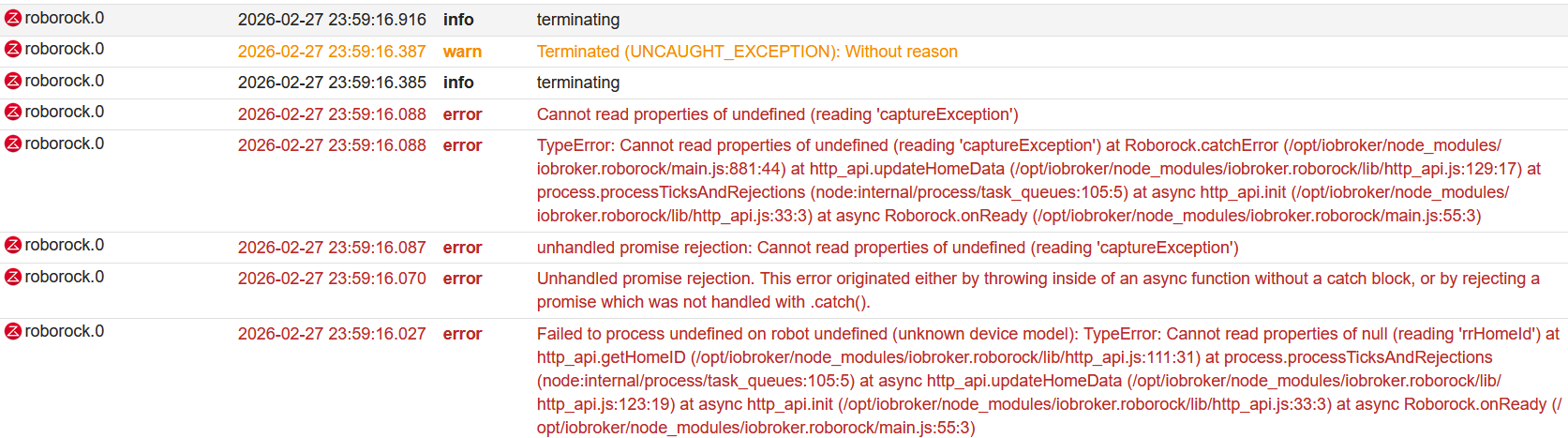
System läuft mit Node.js: v22.22.0.
-
Hallo zusammen - ich habe einen Roborock Q10 S5+ und es kommen folgende Fehlermeldungen zurück. Hab die Dokumentation vom Adapter gelesen, finde aber nichts wie ich den verbunden bekomme.
roborock.0
3280 2026-03-02 00:59:14.306 error Error in getUserData: Login returned empty userdata.. This is most likely due to too many reconnects.roborock.0
3280 2026-03-02 00:59:14.308 error Error retrieving or setting clientID: Error: Login returned empty userdata. at Roborock.getUserData (C:\ioBroker\node_modules\iobroker.roborock\main.js:236:11) at processTicksAndRejections (node:internal/process/task_queues:105:5) at Roborock.initializeRoborockApi (C:\ioBroker\node_modules\iobroker.roborock\main.js:103:21) at C:\ioBroker\node_modules\iobroker.roborock\main.js:75:35roborock.0
3280 2026-03-02 00:59:14.487 error Failed to get home details: Error: loginApi is not initialized. at Roborock.initializeHomeDetails (C:\ioBroker\node_modules\iobroker.roborock\main.js:144:25) at C:\ioBroker\node_modules\iobroker.roborock\main.js:77:15 -
Hallo zusammen,
ich überlege, mir einen Roborock zu holen.
Genau den QV35S https://www.amazon.de/roborock-Wischfunktion-Anti-Tangle-Bürsten-Schleudermopps-Hindernisvermeidung/dp/B0DSL8QV7QKann jemand bestätigen, dass dieser in den Adapter eingebunden werden kann? Ich bin mir da unsicher, da ich den genauen Typ in der Übersicht der unterstützten Geräte nicht finden kann...
Vielen Dank schonmal!
-
@Thomas-Braun sagte in Neuer Adapter für Roborock-Staubsauger:
iob add web --debugThomas was soll ich sagen. DER GEHT !!! ich werd verrückt der geht !!! danke !!
@Thomas-Braun sagte in Neuer Adapter für Roborock-Staubsauger:
iob add web --debugThomas was soll ich sagen. DER GEHT !!! ich werd verrückt der geht !!! danke !!
Ich sag auch vielen Dank! War gerade am verzweifeln mit meinem Docker Container und der Version 0.7.0. Aber jetzt funktioniert alles perfekt :)




Hey! Du scheinst an dieser Unterhaltung interessiert zu sein, hast aber noch kein Konto.
Hast du es satt, bei jedem Besuch durch die gleichen Beiträge zu scrollen? Wenn du dich für ein Konto anmeldest, kommst du immer genau dorthin zurück, wo du zuvor warst, und kannst dich über neue Antworten benachrichtigen lassen (entweder per E-Mail oder Push-Benachrichtigung). Du kannst auch Lesezeichen speichern und Beiträge positiv bewerten, um anderen Community-Mitgliedern deine Wertschätzung zu zeigen.
Mit deinem Input könnte dieser Beitrag noch besser werden 💗
Registrieren Anmelden509
Online33.1k
Benutzende83.8k
Themen1.4m
Beiträge