Skip to content
  • Home
  • Aktuell
  • Tags
  • 0 Ungelesen 0
  • Kategorien
  • Unreplied
  • Beliebt
  • GitHub
  • Docu
  • Hilfe
Skins
  • Light
  • Brite
  • Cerulean
  • Cosmo
  • Flatly
  • Journal
  • Litera
  • Lumen
  • Lux
  • Materia
  • Minty
  • Morph
  • Pulse
  • Sandstone
  • Simplex
  • Sketchy
  • Spacelab
  • United
  • Yeti
  • Zephyr
  • Dark
  • Cyborg
  • Darkly
  • Quartz
  • Slate
  • Solar
  • Superhero
  • Vapor

  • Standard: (Kein Skin)
  • Kein Skin
Einklappen
ioBroker Logo

Community Forum

donate donate
  1. ioBroker Community Home
  2. Deutsch
  3. Tester
  4. Neuer Adapter ioBroker.evcc

NEWS

  • UPDATE 31.10.: Amazon Alexa - ioBroker Skill läuft aus ?
    apollon77A
    apollon77
    48
    3
    8.9k

  • Monatsrückblick – September 2025
    BluefoxB
    Bluefox
    13
    1
    2.3k

  • Neues Video "KI im Smart Home" - ioBroker plus n8n
    BluefoxB
    Bluefox
    16
    1
    3.4k

Neuer Adapter ioBroker.evcc

Geplant Angeheftet Gesperrt Verschoben Tester
248 Beiträge 39 Kommentatoren 45.0k Aufrufe 36 Watching
  • Älteste zuerst
  • Neuste zuerst
  • Meiste Stimmen
Antworten
  • In einem neuen Thema antworten
Anmelden zum Antworten
Dieses Thema wurde gelöscht. Nur Nutzer mit entsprechenden Rechten können es sehen.
  • ChrizC Chriz

    @thomas-braun
    ich finde aber nix mehr mit Ring weder im iobroker selbst, noch im filesystem.

    Verstehe auch nicht wieso der Ring Adapter eine Abhängigkeit von dem EVCC Adapter sein kann.
    Ich interpretiere die Fehlermeldung so, dass der Ring Adapter eine nötig ist für EVCC und der Ring adapter bzw. ring-client-api max Node20 kann.

    Wie kommen diese Abhängigkeiten zustande?

    Thomas BraunT Online
    Thomas BraunT Online
    Thomas Braun
    Most Active
    schrieb am zuletzt editiert von Thomas Braun
    #200

    @chriz sagte in Neuer Adapter ioBroker.evcc:

    Ich verstehe auch nicht wieso der Ring adapter eine Abhängigkeit von dem EVCC adapter sein kann.

    Ist es nicht. Aber npm geht bei einer Installation von irgendeinem nodejs-Modul über den gesamten Installationsbaum und schaut ob die Abhängigkeiten bedient werden können.

    ich finde aber nix mehr mit Ring weder im iobroker selbst, noch im filesystem.

    Aber im node-Projekt ist das noch eingetragen. Da spielt dann auch die Anzeige im Admin oder was du da im Filesystem veranstaltest keine Rolle.

    iob del iobroker.ring --debug
    

    liefert?

    Ich interpretiere die Fehlermeldung so, dass der Ring Adapter eine nötig ist für EVCC und der Ring adapter bzw. ring-client-api max Node20 kann.

    Die erste Hälfte der Vermutung ist falsch.

    Linux-Werkzeugkasten:
    https://forum.iobroker.net/topic/42952/der-kleine-iobroker-linux-werkzeugkasten
    NodeJS Fixer Skript:
    https://forum.iobroker.net/topic/68035/iob-node-fix-skript
    iob_diag: curl -sLf -o diag.sh https://iobroker.net/diag.sh && bash diag.sh

    1 Antwort Letzte Antwort
    0
    • ChrizC Chriz

      @thomas-braun
      ich finde aber nix mehr mit Ring weder im iobroker selbst, noch im filesystem.

      Verstehe auch nicht wieso der Ring Adapter eine Abhängigkeit von dem EVCC Adapter sein kann.
      Ich interpretiere die Fehlermeldung so, dass der Ring Adapter eine nötig ist für EVCC und der Ring adapter bzw. ring-client-api max Node20 kann.

      Wie kommen diese Abhängigkeiten zustande?

      Thomas BraunT Online
      Thomas BraunT Online
      Thomas Braun
      Most Active
      schrieb am zuletzt editiert von
      #201

      @chriz

      cd /opt/iobroker && npm i --dry-run
      

      liefert?

      Linux-Werkzeugkasten:
      https://forum.iobroker.net/topic/42952/der-kleine-iobroker-linux-werkzeugkasten
      NodeJS Fixer Skript:
      https://forum.iobroker.net/topic/68035/iob-node-fix-skript
      iob_diag: curl -sLf -o diag.sh https://iobroker.net/diag.sh && bash diag.sh

      1 Antwort Letzte Antwort
      0
      • Thomas BraunT Thomas Braun

        @chriz

        Gib mal per Ausgabe von

        iob diag
        

        einen Überblick über die Kiste.

        das ist ja das komische, den Adapter habe ich schon seit Ewigkeiten nicht mehr installiert.

        Da isser doch...

        iobroker.inst@3.0.0 /opt/iobroker
        └─┬ iobroker.ring@6.3.0
          └── ring-client-api@13.1.0
        
        Thomas BraunT Online
        Thomas BraunT Online
        Thomas Braun
        Most Active
        schrieb am zuletzt editiert von
        #202

        @thomas-braun sagte in Neuer Adapter ioBroker.evcc:

        Und

        Gib mal per Ausgabe von

        iob diag
        

        einen Überblick über die Kiste.

        Linux-Werkzeugkasten:
        https://forum.iobroker.net/topic/42952/der-kleine-iobroker-linux-werkzeugkasten
        NodeJS Fixer Skript:
        https://forum.iobroker.net/topic/68035/iob-node-fix-skript
        iob_diag: curl -sLf -o diag.sh https://iobroker.net/diag.sh && bash diag.sh

        ChrizC 1 Antwort Letzte Antwort
        0
        • Thomas BraunT Thomas Braun

          @thomas-braun sagte in Neuer Adapter ioBroker.evcc:

          Und

          Gib mal per Ausgabe von

          iob diag
          

          einen Überblick über die Kiste.

          ChrizC Offline
          ChrizC Offline
          Chriz
          schrieb am zuletzt editiert von Chriz
          #203

          @thomas-braun
          diag:

          ========== Start marking the full check here ===========
          
          ```bash
          Script v.2025-03-08
          
          *** BASE SYSTEM ***
          Hardware Vendor : To Be Filled By O.E.M.
          Kernel          : x86_64
          Userland        : 64 bit
          Docker          : v11.0.0
          Virtualization  : docker
          Kernel          : x86_64
          Userland        : 64 bit
          
          Systemuptime and Load:
          19:57:00 up 62 days,  9:32,  0 user,  load average: 6.89, 4.21, 2.91
          CPU threads: 8
          
          
          *** LIFE CYCLE STATUS ***
          Unknown release codenamed ''. Please check yourself if the Operating System is actively maintained.
          
          *** TIME AND TIMEZONES ***
          Wed Aug  6 17:57:00 UTC 2025
          Wed Aug  6 19:57:00 CEST 2025
          CEST +0200
          Etc/UTC
          
          *** Users and Groups ***
          User that called 'iob diag':
          root
          HOME=/root
          GROUPS=root
          
          User that is running 'js-controller':
          iobroker
          HOME=/opt/iobroker
          GROUPS=users tty dialout audio video plugdev
          
          *** DISPLAY-SERVER SETUP ***
          Display-Server: false
          Desktop: 
          Terminal: 
          
          *** MEMORY ***
                        total        used        free      shared  buff/cache   available
          Mem:             12G        5.4G        862M        471M        7.2G        7.1G
          Swap:            10G        450M         10G
          Total:           23G        5.9G         11G
          
          Active iob-Instances:   24
          
                 11910 M total memory
                  5155 M used memory
                  4395 M active memory
                  4922 M inactive memory
                   822 M free memory
                     0 M buffer memory
                  6905 M swap cache
                 10239 M total swap
                   429 M used swap
                  9810 M free swap
          
          *** top - Table Of Processes  ***
          top - 19:57:00 up 62 days,  9:32,  0 user,  load average: 6.89, 4.21, 2.91
          Tasks:  32 total,   1 running,  31 sleeping,   0 stopped,   0 zombie
          %Cpu(s): 50.0 us,  0.0 sy,  0.0 ni, 50.0 id,  0.0 wa,  0.0 hi,  0.0 si,  0.0 st 
          MiB Mem :  11910.8 total,    819.0 free,   5158.0 used,   6907.1 buff/cache     
          MiB Swap:  10240.0 total,   9810.7 free,    429.3 used.   6752.8 avail Mem 
          
          
          *** DMESG CRITICAL ERRORS ***
          dmesg: read kernel buffer failed: Operation not permitted
          No critical errors detected
          
          *** FILESYSTEM ***
          Filesystem     Type       Size  Used Avail Use% Mounted on
          /dev/loop2     btrfs       25G  7.7G   17G  32% /
          tmpfs          tmpfs       64M     0   64M   0% /dev
          shm            tmpfs       64M     0   64M   0% /dev/shm
          shfs           fuse.shfs  932G  528G  402G  57% /opt/iobroker
          /dev/loop2     btrfs       25G  7.7G   17G  32% /etc/hosts
          tmpfs          tmpfs      5.9G     0  5.9G   0% /proc/acpi
          tmpfs          tmpfs      5.9G     0  5.9G   0% /sys/firmware
          
          Messages concerning ext4 filesystem in dmesg:
          dmesg: read kernel buffer failed: Operation not permitted
          
          Show mounted filesystems:
          TARGET                  SOURCE                                                                                               FSTYPE    OPTIONS
          /                       /dev/loop2[/btrfs/subvolumes/29b8ef038abf841abe4a11cce465461999a1f81ae4b20da4deb7d15633aafacf]       btrfs     rw,noatime,ssd,discard=async,space_cache=v2,subvolid=2501,subvol=/btrfs/subvolumes/29b8ef038abf841abe4a11cce465461999a1f81ae4b20da4deb7d15633aafacf
          |-/opt/iobroker         shfs[/appdata/iobroker/data]                                                                         fuse.shfs rw,nosuid,nodev,noatime,user_id=0,group_id=0,default_permissions,allow_other
          |-/opt/userscripts      shfs[/appdata/iobroker/scripts]                                                                      fuse.shfs rw,nosuid,nodev,noatime,user_id=0,group_id=0,default_permissions,allow_other
          |-/etc/resolv.conf      /dev/loop2[/containers/059ff1dc9fbaae111bbe6f890fece639920b55e5713336d396d04877daf2b22f/resolv.conf] btrfs     rw,noatime,ssd,discard=async,space_cache=v2,subvolid=5,subvol=/
          |-/etc/hostname         /dev/loop2[/containers/059ff1dc9fbaae111bbe6f890fece639920b55e5713336d396d04877daf2b22f/hostname]    btrfs     rw,noatime,ssd,discard=async,space_cache=v2,subvolid=5,subvol=/
          |-/etc/hosts            /dev/loop2[/containers/059ff1dc9fbaae111bbe6f890fece639920b55e5713336d396d04877daf2b22f/hosts]       btrfs     rw,noatime,ssd,discard=async,space_cache=v2,subvolid=5,subvol=/
          `-/usr/local/bin/influx shfs[/appdata/influx-cli/influx]                                                                     fuse.shfs ro,nosuid,nodev,noatime,user_id=0,group_id=0,default_permissions,allow_other
          
          Files in neuralgic directories:
          
          /var:
          35M     /var/
          33M     /var/lib
          19M     /var/lib/apt/lists
          19M     /var/lib/apt
          14M     /var/lib/dpkg
          
          
          /opt/iobroker/backups:
          12M     /opt/iobroker/backups/
          
          /opt/iobroker/iobroker-data:
          393M    /opt/iobroker/iobroker-data/
          195M    /opt/iobroker/iobroker-data/files
          143M    /opt/iobroker/iobroker-data/backup-objects
          48M     /opt/iobroker/iobroker-data/files/iot.admin
          47M     /opt/iobroker/iobroker-data/files/iot.admin/static/js
          
          The five largest files in iobroker-data are:
          38M     /opt/iobroker/iobroker-data/files/iot.admin/static/js/main.d3d286bd.js.map
          18M     /opt/iobroker/iobroker-data/objects.jsonl
          13M     /opt/iobroker/iobroker-data/objects.json.migrated
          13M     /opt/iobroker/iobroker-data/objects.json.bak.migrated
          8.8M    /opt/iobroker/iobroker-data/files/iot.admin/static/js/main.d3d286bd.js
          
          USB-Devices by-id:
          USB-Sticks -  Avoid direct links to /dev/tty* in your adapter setups, please always prefer the links 'by-id':
          
          /dev/serial/by-id/usb-Silicon_Labs_CP2102N_USB_to_UART_Bridge_Controller_3a866a46ae89eb118f103dc07d11dc1e-if00-port0
          /dev/serial/by-id/usb-ITead_Sonoff_Zigbee_3.0_USB_Dongle_Plus_de4ef275ea5fec118396325f25bfaa52-if00-port0
          
          *** ZigBee Settings ***
          
          HINT:
          Your zigbee.0 COM-Port is NOT matching 'by-id'. Please check your setting:
          /dev/serial/by-id/usb-ITead_Sonoff_Zigbee_3.0_USB_Dongle_Plus_de4ef275ea5fec118396325f25bfaa52-if00-port0
          Zigbee Network Settings on your coordinator/in nvbackup are:
          
          zigbee.X
          Extended Pan ID:
          *** MASKED ***
          Pan ID:
          *** MASKED ***
          Channel:
          *** MASKED ***
          Network Key:
          *** MASKED ***
          
          To unmask the settings run 'iob diag --unmask'
          
          
          *** NodeJS-Installation ***
          
          /usr/bin/nodejs         v22.17.1
          /usr/bin/node           v22.17.1
          /usr/bin/npm            10.9.2
          /usr/bin/npx            10.9.2
          /usr/bin/corepack       0.33.0
          
          nodejs:
           Installed: 22.17.1-1nodesource1
           Candidate: 22.18.0-1nodesource1
           Version table:
              22.18.0-1nodesource1 1001
                 500 https://deb.nodesource.com/node_22.x nodistro/main amd64 Packages
          *** 22.17.1-1nodesource1 1001
                 500 https://deb.nodesource.com/node_22.x nodistro/main amd64 Packages
                 100 /var/lib/dpkg/status
              22.17.0-1nodesource1 1001
                 500 https://deb.nodesource.com/node_22.x nodistro/main amd64 Packages
              22.16.0-1nodesource1 1001
                 500 https://deb.nodesource.com/node_22.x nodistro/main amd64 Packages
              22.15.1-1nodesource1 1001
                 500 https://deb.nodesource.com/node_22.x nodistro/main amd64 Packages
              22.15.0-1nodesource1 1001
                 500 https://deb.nodesource.com/node_22.x nodistro/main amd64 Packages
              22.14.0-1nodesource1 1001
                 500 https://deb.nodesource.com/node_22.x nodistro/main amd64 Packages
              22.13.1-1nodesource1 1001
                 500 https://deb.nodesource.com/node_22.x nodistro/main amd64 Packages
              22.13.0-1nodesource1 1001
                 500 https://deb.nodesource.com/node_22.x nodistro/main amd64 Packages
              22.12.0-1nodesource1 1001
                 500 https://deb.nodesource.com/node_22.x nodistro/main amd64 Packages
              22.11.0-1nodesource1 1001
                 500 https://deb.nodesource.com/node_22.x nodistro/main amd64 Packages
              22.10.0-1nodesource1 1001
                 500 https://deb.nodesource.com/node_22.x nodistro/main amd64 Packages
              22.9.0-1nodesource1 1001
                 500 https://deb.nodesource.com/node_22.x nodistro/main amd64 Packages
              22.8.0-1nodesource1 1001
                 500 https://deb.nodesource.com/node_22.x nodistro/main amd64 Packages
              22.7.0-1nodesource1 1001
                 500 https://deb.nodesource.com/node_22.x nodistro/main amd64 Packages
              22.6.0-1nodesource1 1001
                 500 https://deb.nodesource.com/node_22.x nodistro/main amd64 Packages
              22.5.1-1nodesource1 1001
                 500 https://deb.nodesource.com/node_22.x nodistro/main amd64 Packages
              22.5.0-1nodesource1 1001
                 500 https://deb.nodesource.com/node_22.x nodistro/main amd64 Packages
              22.4.1-1nodesource1 1001
                 500 https://deb.nodesource.com/node_22.x nodistro/main amd64 Packages
              22.4.0-1nodesource1 1001
                 500 https://deb.nodesource.com/node_22.x nodistro/main amd64 Packages
              22.3.0-1nodesource1 1001
                 500 https://deb.nodesource.com/node_22.x nodistro/main amd64 Packages
              22.2.0-1nodesource1 1001
                 500 https://deb.nodesource.com/node_22.x nodistro/main amd64 Packages
              22.1.0-1nodesource1 1001
                 500 https://deb.nodesource.com/node_22.x nodistro/main amd64 Packages
              22.0.0-1nodesource1 1001
                 500 https://deb.nodesource.com/node_22.x nodistro/main amd64 Packages
              18.19.0+dfsg-6~deb12u2 500
                 500 http://deb.debian.org/debian bookworm/main amd64 Packages
              18.19.0+dfsg-6~deb12u1 500
                 500 http://deb.debian.org/debian-security bookworm-security/main amd64 Packages
          
          Temp directories causing deletion problem: 0
          No problems detected
          
          Errors in npm tree: 0
          No problems detected
          
          *** ioBroker-Installation ***
          
          ioBroker Status
          iobroker is running on this host.
          
          
          Objects type: jsonl
          States  type: jsonl
          
          Hosts:
          059ff1dc9fba        059ff1dc9fba (version: 7.0.6, hostname: 059ff1dc9fba  , alive, uptime: 305)
          
          Core adapters versions
          js-controller:  7.0.6
          admin:          7.6.17
          javascript:     8.9.2
          
          nodejs modules from github:     1
          +-- iobroker.luxtronik2@0.3.1 (git+ssh://git@github.com/UncleSamSwiss/ioBroker.luxtronik2.git#e507d3d188440a4e8cd394648a5b20d75ce9cbb0)
          
          Adapter State
          + system.adapter.admin.0                  : admin                 : 059ff1dc9fba                             -  enabled, port: 8081, bind: 0.0.0.0, run as: admin
          + system.adapter.alexa2.0                 : alexa2                : 059ff1dc9fba                             -  enabled
          + system.adapter.backitup.0               : backitup              : 059ff1dc9fba                             -  enabled
          + system.adapter.denon.0                  : denon                 : 059ff1dc9fba                             -  enabled
          + system.adapter.discovery.0              : discovery             : 059ff1dc9fba                             -  enabled
          + system.adapter.homeconnect.0            : homeconnect           : 059ff1dc9fba                             -  enabled
           system.adapter.icons-mfd-svg.0          : icons-mfd-svg         : 059ff1dc9fba                             -  enabled
          + system.adapter.influxdb.0               : influxdb              : 059ff1dc9fba                             -  enabled, port: 8086
          + system.adapter.iot.0                    : iot                   : 059ff1dc9fba                             -  enabled
          + system.adapter.javascript.0             : javascript            : 059ff1dc9fba                             -  enabled
          + system.adapter.lgtv.0                   : lgtv                  : 059ff1dc9fba                             -  enabled
          + system.adapter.loxone.0                 : loxone                : 059ff1dc9fba                             -  enabled, port: 80
          + system.adapter.luxtronik2.0             : luxtronik2            : 059ff1dc9fba                             -  enabled, port: 8214
          + system.adapter.mqtt.0                   : mqtt                  : 059ff1dc9fba                             -  enabled, port: 1883, bind: 0.0.0.0
          + system.adapter.nuki-extended.0          : nuki-extended         : 059ff1dc9fba                             -  enabled
          + system.adapter.sainlogic.0              : sainlogic             : 059ff1dc9fba                             -  enabled, port: 45000, bind: 0.0.0.0
          + system.adapter.shelly.0                 : shelly                : 059ff1dc9fba                             -  enabled, port: 1882, bind: 0.0.0.0
          + system.adapter.signal-cmb.0             : signal-cmb            : 059ff1dc9fba                             -  enabled
          + system.adapter.simple-api.0             : simple-api            : 059ff1dc9fba                             -  enabled, port: 8087, bind: 0.0.0.0, run as: admin
          + system.adapter.smartmeter.0             : smartmeter            : 059ff1dc9fba                             -  enabled
          + system.adapter.tr-064.0                 : tr-064                : 059ff1dc9fba                             -  enabled
           system.adapter.vis-history.0            : vis-history           : 059ff1dc9fba                             -  enabled
           system.adapter.vis-hqwidgets.0          : vis-hqwidgets         : 059ff1dc9fba                             -  enabled
           system.adapter.vis-jqui-mfd.0           : vis-jqui-mfd          : 059ff1dc9fba                             -  enabled
           system.adapter.vis-justgage.0           : vis-justgage          : 059ff1dc9fba                             -  enabled
           system.adapter.vis-material-advanced.0  : vis-material-advanced : 059ff1dc9fba                             -  enabled
           system.adapter.vis-metro.0              : vis-metro             : 059ff1dc9fba                             -  enabled
           system.adapter.vis-timeandweather.0     : vis-timeandweather    : 059ff1dc9fba                             -  enabled
           system.adapter.vis-weather.0            : vis-weather           : 059ff1dc9fba                             -  enabled
           system.adapter.vis.0                    : vis                   : 059ff1dc9fba                             -  enabled
          + system.adapter.vw-connect.1             : vw-connect            : 059ff1dc9fba                             -  enabled
           system.adapter.weatherunderground.0     : weatherunderground    : 059ff1dc9fba                             -  enabled
          + system.adapter.web.0                    : web                   : 059ff1dc9fba                             -  enabled, port: 8082, bind: 0.0.0.0, run as: admin
          + system.adapter.zigbee.0                 : zigbee                : 059ff1dc9fba                             -  enabled, port: /dev/serial/by-id/usb-ITead_Sonoff_Zigbee_3.0_USB_Dongle_Plus_de4ef275ea5fec118396325f25bfaa52-if00-port0
          
          + instance is alive
          
          Enabled adapters with bindings
          + system.adapter.admin.0                  : admin                 : 059ff1dc9fba                             -  enabled, port: 8081, bind: 0.0.0.0, run as: admin
          + system.adapter.influxdb.0               : influxdb              : 059ff1dc9fba                             -  enabled, port: 8086
          + system.adapter.loxone.0                 : loxone                : 059ff1dc9fba                             -  enabled, port: 80
          + system.adapter.luxtronik2.0             : luxtronik2            : 059ff1dc9fba                             -  enabled, port: 8214
          + system.adapter.mqtt.0                   : mqtt                  : 059ff1dc9fba                             -  enabled, port: 1883, bind: 0.0.0.0
          + system.adapter.sainlogic.0              : sainlogic             : 059ff1dc9fba                             -  enabled, port: 45000, bind: 0.0.0.0
          + system.adapter.shelly.0                 : shelly                : 059ff1dc9fba                             -  enabled, port: 1882, bind: 0.0.0.0
          + system.adapter.simple-api.0             : simple-api            : 059ff1dc9fba                             -  enabled, port: 8087, bind: 0.0.0.0, run as: admin
          + system.adapter.web.0                    : web                   : 059ff1dc9fba                             -  enabled, port: 8082, bind: 0.0.0.0, run as: admin
          + system.adapter.zigbee.0                 : zigbee                : 059ff1dc9fba                             -  enabled, port: /dev/serial/by-id/usb-ITead_Sonoff_Zigbee_3.0_USB_Dongle_Plus_de4ef275ea5fec118396325f25bfaa52-if00-port0
          
          ioBroker-Repositories
          ┌─────────┬────────────────────┬─────────────────────────────────────────────────────────┬──────────────┐
          │ (index) │ name               │ url                                                     │ auto upgrade │
          ├─────────┼────────────────────┼─────────────────────────────────────────────────────────┼──────────────┤
          │ 0       │ 'Stable (default)' │ 'http://download.iobroker.net/sources-dist.json'        │ false        │
          │ 1       │ 'Beta (latest)'    │ 'http://download.iobroker.net/sources-dist-latest.json' │ false        │
          └─────────┴────────────────────┴─────────────────────────────────────────────────────────┴──────────────┘
          
          Active repo(s): Stable (default)
          Upgrade policy: none
          
          Installed ioBroker-Adapters
          Used repository: Stable (default)
          Adapter    "admin"        : 7.6.17   , installed 7.6.17
          Adapter    "alexa2"       : 3.27.3   , installed 3.27.3
          Adapter    "backitup"     : 3.3.5    , installed 3.3.5
          Adapter    "denon"        : 1.15.12  , installed 1.15.12
          Adapter    "discovery"    : 5.0.0    , installed 5.0.0
          Adapter    "homeconnect"  : 1.4.3    , installed 1.4.3
          Adapter    "icons-mfd-svg": 1.2.0    , installed 1.2.0
          Adapter    "influxdb"     : 4.0.2    , installed 4.0.2
          Adapter    "iot"          : 3.3.0    , installed 3.3.0
          Adapter    "javascript"   : 8.9.2    , installed 8.9.2
          Controller "js-controller": 7.0.6    , installed 7.0.6
          Adapter    "lgtv"         : 2.4.0    , installed 2.4.0
          Adapter    "loxone"       : 3.0.1    , installed 3.0.1
          Adapter    "mqtt"         : 6.1.2    , installed 6.1.2
          Adapter    "nuki-extended": 2.7.0    , installed 2.7.0
          Adapter    "sainlogic"    : 0.11.6   , installed 0.11.6
          Adapter    "shelly"       : 10.1.0   , installed 10.1.0
          Adapter    "signal-cmb"   : 0.3.0    , installed 0.3.0
          Adapter    "simple-api"   : 2.8.0    , installed 2.8.0
          Adapter    "smartmeter"   : 3.4.0    , installed 3.4.0
          Adapter    "socketio"     : 6.7.1    , installed 6.7.1
          Adapter    "tr-064"       : 4.3.0    , installed 4.3.0
          Adapter    "tuya"         : 3.16.0   , installed 3.16.0
          Adapter    "vis"          : 1.5.6    , installed 1.5.6
          Adapter    "vis-history"  : 1.0.0    , installed 1.0.0
          Adapter    "vis-hqwidgets": 1.5.1    , installed 1.5.1
          Adapter    "vis-jqui-mfd" : 1.1.1    , installed 1.1.1
          Adapter    "vis-justgage" : 2.1.7    , installed 2.1.7
          Adapter    "vis-material-advanced": 1.7.4, installed 1.7.4
          Adapter    "vis-metro"    : 1.2.0    , installed 1.2.0
          Adapter    "vis-timeandweather": 1.2.2, installed 1.2.2
          Adapter    "vis-weather"  : 2.5.12   , installed 2.5.12
          Adapter    "weatherunderground": 3.7.0, installed 3.7.0
          Adapter    "web"          : 7.0.8    , installed 7.0.8
          Adapter    "ws"           : 2.6.2    , installed 2.6.2
          Adapter    "zigbee"       : 2.0.5    , installed 2.0.5
          
          Objects and States
          Please stand by - This may take a while
          Objects:        9366
          States:         11370
          
          *** OS-Repositories and Updates ***
          Hit:1 http://deb.debian.org/debian bookworm InRelease
          Hit:2 http://deb.debian.org/debian bookworm-updates InRelease
          Hit:3 http://deb.debian.org/debian-security bookworm-security InRelease
          Hit:4 https://deb.nodesource.com/node_22.x nodistro InRelease
          Reading package lists...
          Pending Updates: 4
          
          *** Listening Ports ***
          Active Internet connections (only servers)
          Proto Recv-Q Send-Q Local Address           Foreign Address         State       User       Inode      PID/Program name    
          tcp        0      0 127.0.0.1:9000          0.0.0.0:*               LISTEN      99         720595906  -                   
          tcp        0      0 127.0.0.1:9001          0.0.0.0:*               LISTEN      99         720594576  -                   
          tcp        0      0 0.0.0.0:1882            0.0.0.0:*               LISTEN      99         720611543  -                   
          tcp        0      0 0.0.0.0:1883            0.0.0.0:*               LISTEN      99         720606906  -                   
          tcp        0      0 0.0.0.0:45000           0.0.0.0:*               LISTEN      99         720615133  -                   
          tcp6       0      0 :::8087                 :::*                    LISTEN      99         720616825  -                   
          tcp6       0      0 :::8081                 :::*                    LISTEN      99         720590748  -                   
          tcp6       0      0 :::8082                 :::*                    LISTEN      99         720612076  -                   
          
          *** Log File - Last 25 Lines ***
          
          2025-08-06 19:54:03.173  - info: sainlogic.0 (666) starting. Version 0.11.6 in /opt/iobroker/node_modules/iobroker.sainlogic, node: v22.17.1, js-controller: 7.0.6
          2025-08-06 19:54:03.183  - info: sainlogic.0 (666) Starting Listener
          2025-08-06 19:54:05.162  - info: smartmeter.0 (365) Received 12 values, 7 updated
          2025-08-06 19:54:09.728  - info: shelly.0 (495) [MQTT] Device with client id "shellyplusplugs-e465b841db7c" connected from 192.168.84.88!
          2025-08-06 19:54:10.765  - info: shelly.0 (495) [MQTT] Device with client id "shellypro3em-34987a46f790" connected from 192.168.84.123!
          2025-08-06 19:54:12.351  - info: shelly.0 (495) [MQTT] Device with client id "shellyplus1pm-c82e189576ec" connected from 192.168.84.98!
          2025-08-06 19:54:15.739  - info: shelly.0 (495) [MQTT] Device with client id "shellyplus2pm-2cbcbb380fb4" connected from 192.168.84.130!
          2025-08-06 19:54:17.122  - info: alexa2.0 (272) Initialization Done ...
          2025-08-06 19:54:24.248  - info: shelly.0 (495) [MQTT] Device with client id "shellyplusplugs-e465b8b5e948" connected from 192.168.84.125!
          2025-08-06 19:54:36.159  - info: smartmeter.0 (365) Received 12 values, 7 updated
          2025-08-06 19:54:40.305  - info: luxtronik2.0 (423) State value to set for "luxtronik2.0.Informationen.Anlagenstatus.Betriebszustand" has to be type "number" but received type "string" 
          2025-08-06 19:54:48.386  - info: luxtronik2.0 (423) State value to set for "luxtronik2.0.values.flowRate" has to be type "number" but received type "string" 
          2025-08-06 19:55:03.995  - info: luxtronik2.0 (423) State value to set for "luxtronik2.0.values.flowRate" has to be type "number" but received type "string" 
          2025-08-06 19:55:07.159  - info: smartmeter.0 (365) Received 12 values, 7 updated
          2025-08-06 19:55:38.162  - info: smartmeter.0 (365) Received 12 values, 8 updated
          2025-08-06 19:55:40.287  - info: luxtronik2.0 (423) State value to set for "luxtronik2.0.values.flowRate" has to be type "number" but received type "string" 
          2025-08-06 19:55:50.704  - info: luxtronik2.0 (423) State value to set for "luxtronik2.0.values.flowRate" has to be type "number" but received type "string" 
          2025-08-06 19:56:09.160  - info: smartmeter.0 (365) Received 12 values, 7 updated
          2025-08-06 19:56:40.157  - info: smartmeter.0 (365) Received 12 values, 7 updated
          2025-08-06 19:56:42.635  - info: luxtronik2.0 (423) State value to set for "luxtronik2.0.values.flowRate" has to be type "number" but received type "string" 
          2025-08-06 19:56:58.231  - info: luxtronik2.0 (423) State value to set for "luxtronik2.0.values.flowRate" has to be type "number" but received type "string" 
          2025-08-06 19:57:08.711  - info: luxtronik2.0 (423) State value to set for "luxtronik2.0.values.flowRate" has to be type "number" but received type "string" 
          2025-08-06 19:57:11.160  - info: smartmeter.0 (365) Received 12 values, 7 updated
          2025-08-06 19:57:34.740  - info: luxtronik2.0 (423) State value to set for "luxtronik2.0.values.flowRate" has to be type "number" but received type "string" 
          2025-08-06 19:57:42.157  - info: smartmeter.0 (365) Received 12 values, 7 updated
          
          
          ============ Mark until here for C&P =============
          

          iob del iobroker.ring --debug:

          Delete adapter "ring"
          host.059ff1dc9fba Counted 1 adapter for ring
          host.059ff1dc9fba Counted 1 states (system.adapter.ring.*) from states
          host.059ff1dc9fba file ring.admin deleted
          host.059ff1dc9fba object ring deleted
          host.059ff1dc9fba object ring.admin deleted
          host.059ff1dc9fba Deleting 2 object(s).
          host.059ff1dc9fba Deleting 1 state(s).
          Error deleting adapter ring from disk: Cannot find module 'iobroker.ring/io-package.json'
          Require stack:
          - /opt/iobroker/node_modules/@iobroker/js-controller-cli/build/esm/lib/setup/setupInstall.js
          You might have to delete it yourself!
          

          cd /opt/iobroker && npm i --dry-run

          npm error code EBADENGINE
          npm error engine Unsupported engine
          npm error engine Not compatible with your version of node/npm: ring-client-api@13.1.0
          npm error notsup Not compatible with your version of node/npm: ring-client-api@13.1.0
          npm error notsup Required: {"node":"^18 || ^20"}
          npm error notsup Actual:   {"npm":"10.9.2","node":"v22.17.1"}
          npm error A complete log of this run can be found in: /opt/iobroker/.npm/_logs/2025-08-06T18_01_08_129Z-debug-0.log
          

          Thomas BraunT 1 Antwort Letzte Antwort
          0
          • ChrizC Chriz

            @thomas-braun
            diag:

            ========== Start marking the full check here ===========
            
            ```bash
            Script v.2025-03-08
            
            *** BASE SYSTEM ***
            Hardware Vendor : To Be Filled By O.E.M.
            Kernel          : x86_64
            Userland        : 64 bit
            Docker          : v11.0.0
            Virtualization  : docker
            Kernel          : x86_64
            Userland        : 64 bit
            
            Systemuptime and Load:
            19:57:00 up 62 days,  9:32,  0 user,  load average: 6.89, 4.21, 2.91
            CPU threads: 8
            
            
            *** LIFE CYCLE STATUS ***
            Unknown release codenamed ''. Please check yourself if the Operating System is actively maintained.
            
            *** TIME AND TIMEZONES ***
            Wed Aug  6 17:57:00 UTC 2025
            Wed Aug  6 19:57:00 CEST 2025
            CEST +0200
            Etc/UTC
            
            *** Users and Groups ***
            User that called 'iob diag':
            root
            HOME=/root
            GROUPS=root
            
            User that is running 'js-controller':
            iobroker
            HOME=/opt/iobroker
            GROUPS=users tty dialout audio video plugdev
            
            *** DISPLAY-SERVER SETUP ***
            Display-Server: false
            Desktop: 
            Terminal: 
            
            *** MEMORY ***
                          total        used        free      shared  buff/cache   available
            Mem:             12G        5.4G        862M        471M        7.2G        7.1G
            Swap:            10G        450M         10G
            Total:           23G        5.9G         11G
            
            Active iob-Instances:   24
            
                   11910 M total memory
                    5155 M used memory
                    4395 M active memory
                    4922 M inactive memory
                     822 M free memory
                       0 M buffer memory
                    6905 M swap cache
                   10239 M total swap
                     429 M used swap
                    9810 M free swap
            
            *** top - Table Of Processes  ***
            top - 19:57:00 up 62 days,  9:32,  0 user,  load average: 6.89, 4.21, 2.91
            Tasks:  32 total,   1 running,  31 sleeping,   0 stopped,   0 zombie
            %Cpu(s): 50.0 us,  0.0 sy,  0.0 ni, 50.0 id,  0.0 wa,  0.0 hi,  0.0 si,  0.0 st 
            MiB Mem :  11910.8 total,    819.0 free,   5158.0 used,   6907.1 buff/cache     
            MiB Swap:  10240.0 total,   9810.7 free,    429.3 used.   6752.8 avail Mem 
            
            
            *** DMESG CRITICAL ERRORS ***
            dmesg: read kernel buffer failed: Operation not permitted
            No critical errors detected
            
            *** FILESYSTEM ***
            Filesystem     Type       Size  Used Avail Use% Mounted on
            /dev/loop2     btrfs       25G  7.7G   17G  32% /
            tmpfs          tmpfs       64M     0   64M   0% /dev
            shm            tmpfs       64M     0   64M   0% /dev/shm
            shfs           fuse.shfs  932G  528G  402G  57% /opt/iobroker
            /dev/loop2     btrfs       25G  7.7G   17G  32% /etc/hosts
            tmpfs          tmpfs      5.9G     0  5.9G   0% /proc/acpi
            tmpfs          tmpfs      5.9G     0  5.9G   0% /sys/firmware
            
            Messages concerning ext4 filesystem in dmesg:
            dmesg: read kernel buffer failed: Operation not permitted
            
            Show mounted filesystems:
            TARGET                  SOURCE                                                                                               FSTYPE    OPTIONS
            /                       /dev/loop2[/btrfs/subvolumes/29b8ef038abf841abe4a11cce465461999a1f81ae4b20da4deb7d15633aafacf]       btrfs     rw,noatime,ssd,discard=async,space_cache=v2,subvolid=2501,subvol=/btrfs/subvolumes/29b8ef038abf841abe4a11cce465461999a1f81ae4b20da4deb7d15633aafacf
            |-/opt/iobroker         shfs[/appdata/iobroker/data]                                                                         fuse.shfs rw,nosuid,nodev,noatime,user_id=0,group_id=0,default_permissions,allow_other
            |-/opt/userscripts      shfs[/appdata/iobroker/scripts]                                                                      fuse.shfs rw,nosuid,nodev,noatime,user_id=0,group_id=0,default_permissions,allow_other
            |-/etc/resolv.conf      /dev/loop2[/containers/059ff1dc9fbaae111bbe6f890fece639920b55e5713336d396d04877daf2b22f/resolv.conf] btrfs     rw,noatime,ssd,discard=async,space_cache=v2,subvolid=5,subvol=/
            |-/etc/hostname         /dev/loop2[/containers/059ff1dc9fbaae111bbe6f890fece639920b55e5713336d396d04877daf2b22f/hostname]    btrfs     rw,noatime,ssd,discard=async,space_cache=v2,subvolid=5,subvol=/
            |-/etc/hosts            /dev/loop2[/containers/059ff1dc9fbaae111bbe6f890fece639920b55e5713336d396d04877daf2b22f/hosts]       btrfs     rw,noatime,ssd,discard=async,space_cache=v2,subvolid=5,subvol=/
            `-/usr/local/bin/influx shfs[/appdata/influx-cli/influx]                                                                     fuse.shfs ro,nosuid,nodev,noatime,user_id=0,group_id=0,default_permissions,allow_other
            
            Files in neuralgic directories:
            
            /var:
            35M     /var/
            33M     /var/lib
            19M     /var/lib/apt/lists
            19M     /var/lib/apt
            14M     /var/lib/dpkg
            
            
            /opt/iobroker/backups:
            12M     /opt/iobroker/backups/
            
            /opt/iobroker/iobroker-data:
            393M    /opt/iobroker/iobroker-data/
            195M    /opt/iobroker/iobroker-data/files
            143M    /opt/iobroker/iobroker-data/backup-objects
            48M     /opt/iobroker/iobroker-data/files/iot.admin
            47M     /opt/iobroker/iobroker-data/files/iot.admin/static/js
            
            The five largest files in iobroker-data are:
            38M     /opt/iobroker/iobroker-data/files/iot.admin/static/js/main.d3d286bd.js.map
            18M     /opt/iobroker/iobroker-data/objects.jsonl
            13M     /opt/iobroker/iobroker-data/objects.json.migrated
            13M     /opt/iobroker/iobroker-data/objects.json.bak.migrated
            8.8M    /opt/iobroker/iobroker-data/files/iot.admin/static/js/main.d3d286bd.js
            
            USB-Devices by-id:
            USB-Sticks -  Avoid direct links to /dev/tty* in your adapter setups, please always prefer the links 'by-id':
            
            /dev/serial/by-id/usb-Silicon_Labs_CP2102N_USB_to_UART_Bridge_Controller_3a866a46ae89eb118f103dc07d11dc1e-if00-port0
            /dev/serial/by-id/usb-ITead_Sonoff_Zigbee_3.0_USB_Dongle_Plus_de4ef275ea5fec118396325f25bfaa52-if00-port0
            
            *** ZigBee Settings ***
            
            HINT:
            Your zigbee.0 COM-Port is NOT matching 'by-id'. Please check your setting:
            /dev/serial/by-id/usb-ITead_Sonoff_Zigbee_3.0_USB_Dongle_Plus_de4ef275ea5fec118396325f25bfaa52-if00-port0
            Zigbee Network Settings on your coordinator/in nvbackup are:
            
            zigbee.X
            Extended Pan ID:
            *** MASKED ***
            Pan ID:
            *** MASKED ***
            Channel:
            *** MASKED ***
            Network Key:
            *** MASKED ***
            
            To unmask the settings run 'iob diag --unmask'
            
            
            *** NodeJS-Installation ***
            
            /usr/bin/nodejs         v22.17.1
            /usr/bin/node           v22.17.1
            /usr/bin/npm            10.9.2
            /usr/bin/npx            10.9.2
            /usr/bin/corepack       0.33.0
            
            nodejs:
             Installed: 22.17.1-1nodesource1
             Candidate: 22.18.0-1nodesource1
             Version table:
                22.18.0-1nodesource1 1001
                   500 https://deb.nodesource.com/node_22.x nodistro/main amd64 Packages
            *** 22.17.1-1nodesource1 1001
                   500 https://deb.nodesource.com/node_22.x nodistro/main amd64 Packages
                   100 /var/lib/dpkg/status
                22.17.0-1nodesource1 1001
                   500 https://deb.nodesource.com/node_22.x nodistro/main amd64 Packages
                22.16.0-1nodesource1 1001
                   500 https://deb.nodesource.com/node_22.x nodistro/main amd64 Packages
                22.15.1-1nodesource1 1001
                   500 https://deb.nodesource.com/node_22.x nodistro/main amd64 Packages
                22.15.0-1nodesource1 1001
                   500 https://deb.nodesource.com/node_22.x nodistro/main amd64 Packages
                22.14.0-1nodesource1 1001
                   500 https://deb.nodesource.com/node_22.x nodistro/main amd64 Packages
                22.13.1-1nodesource1 1001
                   500 https://deb.nodesource.com/node_22.x nodistro/main amd64 Packages
                22.13.0-1nodesource1 1001
                   500 https://deb.nodesource.com/node_22.x nodistro/main amd64 Packages
                22.12.0-1nodesource1 1001
                   500 https://deb.nodesource.com/node_22.x nodistro/main amd64 Packages
                22.11.0-1nodesource1 1001
                   500 https://deb.nodesource.com/node_22.x nodistro/main amd64 Packages
                22.10.0-1nodesource1 1001
                   500 https://deb.nodesource.com/node_22.x nodistro/main amd64 Packages
                22.9.0-1nodesource1 1001
                   500 https://deb.nodesource.com/node_22.x nodistro/main amd64 Packages
                22.8.0-1nodesource1 1001
                   500 https://deb.nodesource.com/node_22.x nodistro/main amd64 Packages
                22.7.0-1nodesource1 1001
                   500 https://deb.nodesource.com/node_22.x nodistro/main amd64 Packages
                22.6.0-1nodesource1 1001
                   500 https://deb.nodesource.com/node_22.x nodistro/main amd64 Packages
                22.5.1-1nodesource1 1001
                   500 https://deb.nodesource.com/node_22.x nodistro/main amd64 Packages
                22.5.0-1nodesource1 1001
                   500 https://deb.nodesource.com/node_22.x nodistro/main amd64 Packages
                22.4.1-1nodesource1 1001
                   500 https://deb.nodesource.com/node_22.x nodistro/main amd64 Packages
                22.4.0-1nodesource1 1001
                   500 https://deb.nodesource.com/node_22.x nodistro/main amd64 Packages
                22.3.0-1nodesource1 1001
                   500 https://deb.nodesource.com/node_22.x nodistro/main amd64 Packages
                22.2.0-1nodesource1 1001
                   500 https://deb.nodesource.com/node_22.x nodistro/main amd64 Packages
                22.1.0-1nodesource1 1001
                   500 https://deb.nodesource.com/node_22.x nodistro/main amd64 Packages
                22.0.0-1nodesource1 1001
                   500 https://deb.nodesource.com/node_22.x nodistro/main amd64 Packages
                18.19.0+dfsg-6~deb12u2 500
                   500 http://deb.debian.org/debian bookworm/main amd64 Packages
                18.19.0+dfsg-6~deb12u1 500
                   500 http://deb.debian.org/debian-security bookworm-security/main amd64 Packages
            
            Temp directories causing deletion problem: 0
            No problems detected
            
            Errors in npm tree: 0
            No problems detected
            
            *** ioBroker-Installation ***
            
            ioBroker Status
            iobroker is running on this host.
            
            
            Objects type: jsonl
            States  type: jsonl
            
            Hosts:
            059ff1dc9fba        059ff1dc9fba (version: 7.0.6, hostname: 059ff1dc9fba  , alive, uptime: 305)
            
            Core adapters versions
            js-controller:  7.0.6
            admin:          7.6.17
            javascript:     8.9.2
            
            nodejs modules from github:     1
            +-- iobroker.luxtronik2@0.3.1 (git+ssh://git@github.com/UncleSamSwiss/ioBroker.luxtronik2.git#e507d3d188440a4e8cd394648a5b20d75ce9cbb0)
            
            Adapter State
            + system.adapter.admin.0                  : admin                 : 059ff1dc9fba                             -  enabled, port: 8081, bind: 0.0.0.0, run as: admin
            + system.adapter.alexa2.0                 : alexa2                : 059ff1dc9fba                             -  enabled
            + system.adapter.backitup.0               : backitup              : 059ff1dc9fba                             -  enabled
            + system.adapter.denon.0                  : denon                 : 059ff1dc9fba                             -  enabled
            + system.adapter.discovery.0              : discovery             : 059ff1dc9fba                             -  enabled
            + system.adapter.homeconnect.0            : homeconnect           : 059ff1dc9fba                             -  enabled
             system.adapter.icons-mfd-svg.0          : icons-mfd-svg         : 059ff1dc9fba                             -  enabled
            + system.adapter.influxdb.0               : influxdb              : 059ff1dc9fba                             -  enabled, port: 8086
            + system.adapter.iot.0                    : iot                   : 059ff1dc9fba                             -  enabled
            + system.adapter.javascript.0             : javascript            : 059ff1dc9fba                             -  enabled
            + system.adapter.lgtv.0                   : lgtv                  : 059ff1dc9fba                             -  enabled
            + system.adapter.loxone.0                 : loxone                : 059ff1dc9fba                             -  enabled, port: 80
            + system.adapter.luxtronik2.0             : luxtronik2            : 059ff1dc9fba                             -  enabled, port: 8214
            + system.adapter.mqtt.0                   : mqtt                  : 059ff1dc9fba                             -  enabled, port: 1883, bind: 0.0.0.0
            + system.adapter.nuki-extended.0          : nuki-extended         : 059ff1dc9fba                             -  enabled
            + system.adapter.sainlogic.0              : sainlogic             : 059ff1dc9fba                             -  enabled, port: 45000, bind: 0.0.0.0
            + system.adapter.shelly.0                 : shelly                : 059ff1dc9fba                             -  enabled, port: 1882, bind: 0.0.0.0
            + system.adapter.signal-cmb.0             : signal-cmb            : 059ff1dc9fba                             -  enabled
            + system.adapter.simple-api.0             : simple-api            : 059ff1dc9fba                             -  enabled, port: 8087, bind: 0.0.0.0, run as: admin
            + system.adapter.smartmeter.0             : smartmeter            : 059ff1dc9fba                             -  enabled
            + system.adapter.tr-064.0                 : tr-064                : 059ff1dc9fba                             -  enabled
             system.adapter.vis-history.0            : vis-history           : 059ff1dc9fba                             -  enabled
             system.adapter.vis-hqwidgets.0          : vis-hqwidgets         : 059ff1dc9fba                             -  enabled
             system.adapter.vis-jqui-mfd.0           : vis-jqui-mfd          : 059ff1dc9fba                             -  enabled
             system.adapter.vis-justgage.0           : vis-justgage          : 059ff1dc9fba                             -  enabled
             system.adapter.vis-material-advanced.0  : vis-material-advanced : 059ff1dc9fba                             -  enabled
             system.adapter.vis-metro.0              : vis-metro             : 059ff1dc9fba                             -  enabled
             system.adapter.vis-timeandweather.0     : vis-timeandweather    : 059ff1dc9fba                             -  enabled
             system.adapter.vis-weather.0            : vis-weather           : 059ff1dc9fba                             -  enabled
             system.adapter.vis.0                    : vis                   : 059ff1dc9fba                             -  enabled
            + system.adapter.vw-connect.1             : vw-connect            : 059ff1dc9fba                             -  enabled
             system.adapter.weatherunderground.0     : weatherunderground    : 059ff1dc9fba                             -  enabled
            + system.adapter.web.0                    : web                   : 059ff1dc9fba                             -  enabled, port: 8082, bind: 0.0.0.0, run as: admin
            + system.adapter.zigbee.0                 : zigbee                : 059ff1dc9fba                             -  enabled, port: /dev/serial/by-id/usb-ITead_Sonoff_Zigbee_3.0_USB_Dongle_Plus_de4ef275ea5fec118396325f25bfaa52-if00-port0
            
            + instance is alive
            
            Enabled adapters with bindings
            + system.adapter.admin.0                  : admin                 : 059ff1dc9fba                             -  enabled, port: 8081, bind: 0.0.0.0, run as: admin
            + system.adapter.influxdb.0               : influxdb              : 059ff1dc9fba                             -  enabled, port: 8086
            + system.adapter.loxone.0                 : loxone                : 059ff1dc9fba                             -  enabled, port: 80
            + system.adapter.luxtronik2.0             : luxtronik2            : 059ff1dc9fba                             -  enabled, port: 8214
            + system.adapter.mqtt.0                   : mqtt                  : 059ff1dc9fba                             -  enabled, port: 1883, bind: 0.0.0.0
            + system.adapter.sainlogic.0              : sainlogic             : 059ff1dc9fba                             -  enabled, port: 45000, bind: 0.0.0.0
            + system.adapter.shelly.0                 : shelly                : 059ff1dc9fba                             -  enabled, port: 1882, bind: 0.0.0.0
            + system.adapter.simple-api.0             : simple-api            : 059ff1dc9fba                             -  enabled, port: 8087, bind: 0.0.0.0, run as: admin
            + system.adapter.web.0                    : web                   : 059ff1dc9fba                             -  enabled, port: 8082, bind: 0.0.0.0, run as: admin
            + system.adapter.zigbee.0                 : zigbee                : 059ff1dc9fba                             -  enabled, port: /dev/serial/by-id/usb-ITead_Sonoff_Zigbee_3.0_USB_Dongle_Plus_de4ef275ea5fec118396325f25bfaa52-if00-port0
            
            ioBroker-Repositories
            ┌─────────┬────────────────────┬─────────────────────────────────────────────────────────┬──────────────┐
            │ (index) │ name               │ url                                                     │ auto upgrade │
            ├─────────┼────────────────────┼─────────────────────────────────────────────────────────┼──────────────┤
            │ 0       │ 'Stable (default)' │ 'http://download.iobroker.net/sources-dist.json'        │ false        │
            │ 1       │ 'Beta (latest)'    │ 'http://download.iobroker.net/sources-dist-latest.json' │ false        │
            └─────────┴────────────────────┴─────────────────────────────────────────────────────────┴──────────────┘
            
            Active repo(s): Stable (default)
            Upgrade policy: none
            
            Installed ioBroker-Adapters
            Used repository: Stable (default)
            Adapter    "admin"        : 7.6.17   , installed 7.6.17
            Adapter    "alexa2"       : 3.27.3   , installed 3.27.3
            Adapter    "backitup"     : 3.3.5    , installed 3.3.5
            Adapter    "denon"        : 1.15.12  , installed 1.15.12
            Adapter    "discovery"    : 5.0.0    , installed 5.0.0
            Adapter    "homeconnect"  : 1.4.3    , installed 1.4.3
            Adapter    "icons-mfd-svg": 1.2.0    , installed 1.2.0
            Adapter    "influxdb"     : 4.0.2    , installed 4.0.2
            Adapter    "iot"          : 3.3.0    , installed 3.3.0
            Adapter    "javascript"   : 8.9.2    , installed 8.9.2
            Controller "js-controller": 7.0.6    , installed 7.0.6
            Adapter    "lgtv"         : 2.4.0    , installed 2.4.0
            Adapter    "loxone"       : 3.0.1    , installed 3.0.1
            Adapter    "mqtt"         : 6.1.2    , installed 6.1.2
            Adapter    "nuki-extended": 2.7.0    , installed 2.7.0
            Adapter    "sainlogic"    : 0.11.6   , installed 0.11.6
            Adapter    "shelly"       : 10.1.0   , installed 10.1.0
            Adapter    "signal-cmb"   : 0.3.0    , installed 0.3.0
            Adapter    "simple-api"   : 2.8.0    , installed 2.8.0
            Adapter    "smartmeter"   : 3.4.0    , installed 3.4.0
            Adapter    "socketio"     : 6.7.1    , installed 6.7.1
            Adapter    "tr-064"       : 4.3.0    , installed 4.3.0
            Adapter    "tuya"         : 3.16.0   , installed 3.16.0
            Adapter    "vis"          : 1.5.6    , installed 1.5.6
            Adapter    "vis-history"  : 1.0.0    , installed 1.0.0
            Adapter    "vis-hqwidgets": 1.5.1    , installed 1.5.1
            Adapter    "vis-jqui-mfd" : 1.1.1    , installed 1.1.1
            Adapter    "vis-justgage" : 2.1.7    , installed 2.1.7
            Adapter    "vis-material-advanced": 1.7.4, installed 1.7.4
            Adapter    "vis-metro"    : 1.2.0    , installed 1.2.0
            Adapter    "vis-timeandweather": 1.2.2, installed 1.2.2
            Adapter    "vis-weather"  : 2.5.12   , installed 2.5.12
            Adapter    "weatherunderground": 3.7.0, installed 3.7.0
            Adapter    "web"          : 7.0.8    , installed 7.0.8
            Adapter    "ws"           : 2.6.2    , installed 2.6.2
            Adapter    "zigbee"       : 2.0.5    , installed 2.0.5
            
            Objects and States
            Please stand by - This may take a while
            Objects:        9366
            States:         11370
            
            *** OS-Repositories and Updates ***
            Hit:1 http://deb.debian.org/debian bookworm InRelease
            Hit:2 http://deb.debian.org/debian bookworm-updates InRelease
            Hit:3 http://deb.debian.org/debian-security bookworm-security InRelease
            Hit:4 https://deb.nodesource.com/node_22.x nodistro InRelease
            Reading package lists...
            Pending Updates: 4
            
            *** Listening Ports ***
            Active Internet connections (only servers)
            Proto Recv-Q Send-Q Local Address           Foreign Address         State       User       Inode      PID/Program name    
            tcp        0      0 127.0.0.1:9000          0.0.0.0:*               LISTEN      99         720595906  -                   
            tcp        0      0 127.0.0.1:9001          0.0.0.0:*               LISTEN      99         720594576  -                   
            tcp        0      0 0.0.0.0:1882            0.0.0.0:*               LISTEN      99         720611543  -                   
            tcp        0      0 0.0.0.0:1883            0.0.0.0:*               LISTEN      99         720606906  -                   
            tcp        0      0 0.0.0.0:45000           0.0.0.0:*               LISTEN      99         720615133  -                   
            tcp6       0      0 :::8087                 :::*                    LISTEN      99         720616825  -                   
            tcp6       0      0 :::8081                 :::*                    LISTEN      99         720590748  -                   
            tcp6       0      0 :::8082                 :::*                    LISTEN      99         720612076  -                   
            
            *** Log File - Last 25 Lines ***
            
            2025-08-06 19:54:03.173  - info: sainlogic.0 (666) starting. Version 0.11.6 in /opt/iobroker/node_modules/iobroker.sainlogic, node: v22.17.1, js-controller: 7.0.6
            2025-08-06 19:54:03.183  - info: sainlogic.0 (666) Starting Listener
            2025-08-06 19:54:05.162  - info: smartmeter.0 (365) Received 12 values, 7 updated
            2025-08-06 19:54:09.728  - info: shelly.0 (495) [MQTT] Device with client id "shellyplusplugs-e465b841db7c" connected from 192.168.84.88!
            2025-08-06 19:54:10.765  - info: shelly.0 (495) [MQTT] Device with client id "shellypro3em-34987a46f790" connected from 192.168.84.123!
            2025-08-06 19:54:12.351  - info: shelly.0 (495) [MQTT] Device with client id "shellyplus1pm-c82e189576ec" connected from 192.168.84.98!
            2025-08-06 19:54:15.739  - info: shelly.0 (495) [MQTT] Device with client id "shellyplus2pm-2cbcbb380fb4" connected from 192.168.84.130!
            2025-08-06 19:54:17.122  - info: alexa2.0 (272) Initialization Done ...
            2025-08-06 19:54:24.248  - info: shelly.0 (495) [MQTT] Device with client id "shellyplusplugs-e465b8b5e948" connected from 192.168.84.125!
            2025-08-06 19:54:36.159  - info: smartmeter.0 (365) Received 12 values, 7 updated
            2025-08-06 19:54:40.305  - info: luxtronik2.0 (423) State value to set for "luxtronik2.0.Informationen.Anlagenstatus.Betriebszustand" has to be type "number" but received type "string" 
            2025-08-06 19:54:48.386  - info: luxtronik2.0 (423) State value to set for "luxtronik2.0.values.flowRate" has to be type "number" but received type "string" 
            2025-08-06 19:55:03.995  - info: luxtronik2.0 (423) State value to set for "luxtronik2.0.values.flowRate" has to be type "number" but received type "string" 
            2025-08-06 19:55:07.159  - info: smartmeter.0 (365) Received 12 values, 7 updated
            2025-08-06 19:55:38.162  - info: smartmeter.0 (365) Received 12 values, 8 updated
            2025-08-06 19:55:40.287  - info: luxtronik2.0 (423) State value to set for "luxtronik2.0.values.flowRate" has to be type "number" but received type "string" 
            2025-08-06 19:55:50.704  - info: luxtronik2.0 (423) State value to set for "luxtronik2.0.values.flowRate" has to be type "number" but received type "string" 
            2025-08-06 19:56:09.160  - info: smartmeter.0 (365) Received 12 values, 7 updated
            2025-08-06 19:56:40.157  - info: smartmeter.0 (365) Received 12 values, 7 updated
            2025-08-06 19:56:42.635  - info: luxtronik2.0 (423) State value to set for "luxtronik2.0.values.flowRate" has to be type "number" but received type "string" 
            2025-08-06 19:56:58.231  - info: luxtronik2.0 (423) State value to set for "luxtronik2.0.values.flowRate" has to be type "number" but received type "string" 
            2025-08-06 19:57:08.711  - info: luxtronik2.0 (423) State value to set for "luxtronik2.0.values.flowRate" has to be type "number" but received type "string" 
            2025-08-06 19:57:11.160  - info: smartmeter.0 (365) Received 12 values, 7 updated
            2025-08-06 19:57:34.740  - info: luxtronik2.0 (423) State value to set for "luxtronik2.0.values.flowRate" has to be type "number" but received type "string" 
            2025-08-06 19:57:42.157  - info: smartmeter.0 (365) Received 12 values, 7 updated
            
            
            ============ Mark until here for C&P =============

            

            iob del iobroker.ring --debug:

            Delete adapter "ring"
            host.059ff1dc9fba Counted 1 adapter for ring
            host.059ff1dc9fba Counted 1 states (system.adapter.ring.*) from states
            host.059ff1dc9fba file ring.admin deleted
            host.059ff1dc9fba object ring deleted
            host.059ff1dc9fba object ring.admin deleted
            host.059ff1dc9fba Deleting 2 object(s).
            host.059ff1dc9fba Deleting 1 state(s).
            Error deleting adapter ring from disk: Cannot find module 'iobroker.ring/io-package.json'
            Require stack:
            - /opt/iobroker/node_modules/@iobroker/js-controller-cli/build/esm/lib/setup/setupInstall.js
            You might have to delete it yourself!
            

            cd /opt/iobroker && npm i --dry-run

            npm error code EBADENGINE
            npm error engine Unsupported engine
            npm error engine Not compatible with your version of node/npm: ring-client-api@13.1.0
            npm error notsup Not compatible with your version of node/npm: ring-client-api@13.1.0
            npm error notsup Required: {"node":"^18 || ^20"}
            npm error notsup Actual:   {"npm":"10.9.2","node":"v22.17.1"}
            npm error A complete log of this run can be found in: /opt/iobroker/.npm/_logs/2025-08-06T18_01_08_129Z-debug-0.log
            

            Thomas BraunT Online
            Thomas BraunT Online
            Thomas Braun
            Most Active
            schrieb am zuletzt editiert von
            #204

            @chriz

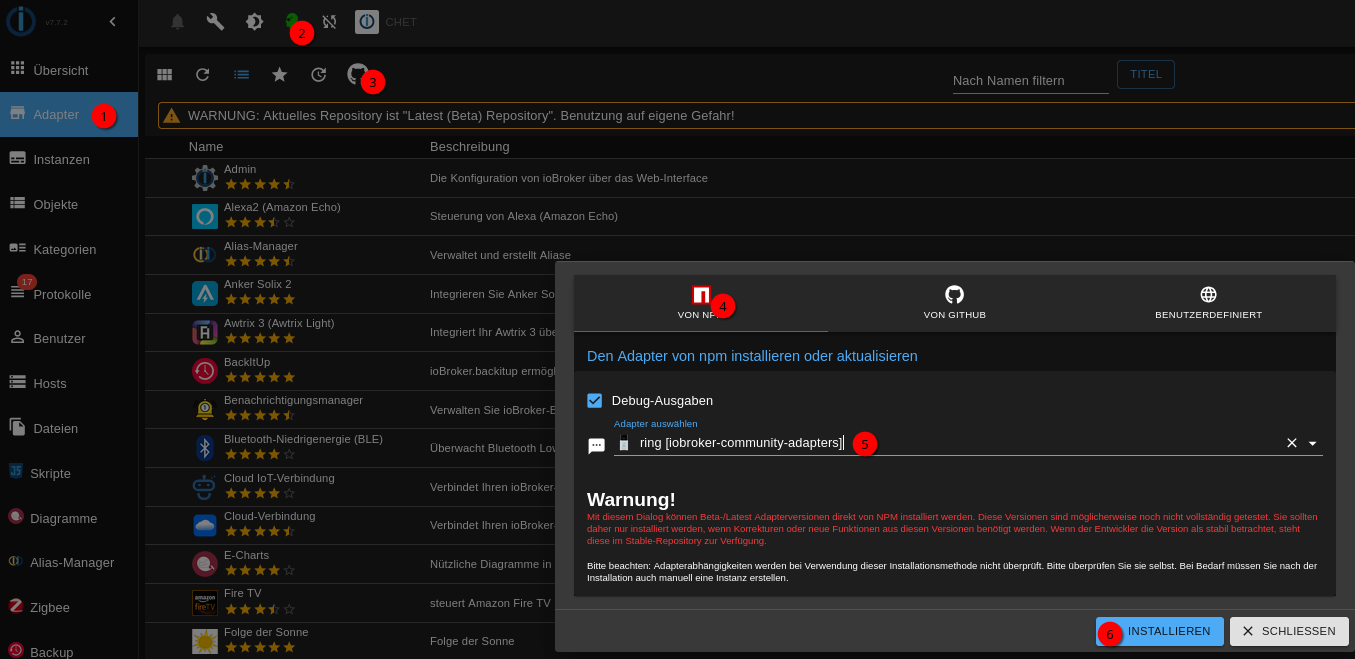
            Installier mal (temporär) ring@6.4.0 auus dem Beta-Repo.
            Falls das sauber funktioniert kannste den dann direkt wieder deinstallieren.

            Linux-Werkzeugkasten:
            https://forum.iobroker.net/topic/42952/der-kleine-iobroker-linux-werkzeugkasten
            NodeJS Fixer Skript:
            https://forum.iobroker.net/topic/68035/iob-node-fix-skript
            iob_diag: curl -sLf -o diag.sh https://iobroker.net/diag.sh && bash diag.sh

            ChrizC 1 Antwort Letzte Antwort
            0
            • Thomas BraunT Thomas Braun

              @chriz

              Installier mal (temporär) ring@6.4.0 auus dem Beta-Repo.
              Falls das sauber funktioniert kannste den dann direkt wieder deinstallieren.

              ChrizC Offline
              ChrizC Offline
              Chriz
              schrieb am zuletzt editiert von
              #205

              @thomas-braun

              wie mach ich das? sorry bin für einige Dinge zu laienhaft unterwegs :(

              Thomas BraunT 1 Antwort Letzte Antwort
              0
              • ChrizC Chriz

                @thomas-braun

                wie mach ich das? sorry bin für einige Dinge zu laienhaft unterwegs :(

                Thomas BraunT Online
                Thomas BraunT Online
                Thomas Braun
                Most Active
                schrieb am zuletzt editiert von
                #206

                @chriz

                800fe74e-29af-4092-9d07-029f1a5c43cf-grafik.png

                Linux-Werkzeugkasten:
                https://forum.iobroker.net/topic/42952/der-kleine-iobroker-linux-werkzeugkasten
                NodeJS Fixer Skript:
                https://forum.iobroker.net/topic/68035/iob-node-fix-skript
                iob_diag: curl -sLf -o diag.sh https://iobroker.net/diag.sh && bash diag.sh

                ChrizC 1 Antwort Letzte Antwort
                0
                • Thomas BraunT Thomas Braun

                  @chriz

                  800fe74e-29af-4092-9d07-029f1a5c43cf-grafik.png

                  ChrizC Offline
                  ChrizC Offline
                  Chriz
                  schrieb am zuletzt editiert von Chriz
                  #207

                  @thomas-braun
                  der adapter zeigt ein ähnliches Verhalten wie der erste Versuch das EVCC zu updaten.
                  es kommt

                  $ iobroker upload ring --debug
                  
                  upload [25] ring.admin /opt/iobroker/node_modules/iobroker.ring/admin/admin.d.ts admin.d.ts video/mp2t
                  
                  upload [20] ring.admin /opt/iobroker/node_modules/iobroker.ring/admin/i18n/de.json i18n/de.json application/json
                  
                  upload [19] ring.admin /opt/iobroker/node_modules/iobroker.ring/admin/i18n/en.json i18n/en.json application/json
                  
                  upload [18] ring.admin /opt/iobroker/node_modules/iobroker.ring/admin/i18n/es.json i18n/es.json application/json
                  
                  upload [17] ring.admin /opt/iobroker/node_modules/iobroker.ring/admin/i18n/fr.json i18n/fr.json application/json
                  
                  upload [16] ring.admin /opt/iobroker/node_modules/iobroker.ring/admin/i18n/it.json i18n/it.json application/json
                  
                  upload [15] ring.admin /opt/iobroker/node_modules/iobroker.ring/admin/i18n/nl.json i18n/nl.json application/json
                  
                  upload [14] ring.admin /opt/iobroker/node_modules/iobroker.ring/admin/i18n/pl.json i18n/pl.json application/json
                  
                  upload [13] ring.admin /opt/iobroker/node_modules/iobroker.ring/admin/i18n/pt.json i18n/pt.json application/json
                  
                  upload [12] ring.admin /opt/iobroker/node_modules/iobroker.ring/admin/i18n/ru.json i18n/ru.json application/json
                  
                  upload [11] ring.admin /opt/iobroker/node_modules/iobroker.ring/admin/i18n/uk.json i18n/uk.json application/json
                  
                  upload [10] ring.admin /opt/iobroker/node_modules/iobroker.ring/admin/i18n/zh-cn.json i18n/zh-cn.json application/json
                  
                  upload [9] ring.admin /opt/iobroker/node_modules/iobroker.ring/admin/index_m.html index_m.html text/html
                  
                  upload [8] ring.admin /opt/iobroker/node_modules/iobroker.ring/admin/jsonConfig.json jsonConfig.json application/json
                  
                  upload [7] ring.admin /opt/iobroker/node_modules/iobroker.ring/admin/preferences-desktop-notification-bell-3.png preferences-desktop-notification-bell-3.png image/png
                  
                  upload [6] ring.admin /opt/iobroker/node_modules/iobroker.ring/admin/preferences-system-login.png preferences-system-login.png image/png
                  
                  upload [5] ring.admin /opt/iobroker/node_modules/iobroker.ring/admin/ring.png ring.png image/png
                  
                  upload [4] ring.admin /opt/iobroker/node_modules/iobroker.ring/admin/style.css style.css text/css
                  
                  upload [3] ring.admin /opt/iobroker/node_modules/iobroker.ring/admin/tab_m.html tab_m.html text/html
                  
                  upload [2] ring.admin /opt/iobroker/node_modules/iobroker.ring/admin/tab_m.js tab_m.js application/javascript
                  
                  upload [1] ring.admin /opt/iobroker/node_modules/iobroker.ring/admin/tsconfig.json tsconfig.json application/json
                  
                  upload [0] ring.admin /opt/iobroker/node_modules/iobroker.ring/admin/words.js words.js application/javascript
                  
                  Updating objects from io-package.json for adapter "ring" with version "6.4.0"
                  
                  Process exited with code 0
                  

                  Aber er taucht nicht in meinen Adaptern auf.

                  komischerweise wird mir nun auch angezeigt das ich EVCC noch installiert hätte.
                  aber auch das ist nicht der Fall, taucht nicht bei Instanzen auf.
                  f39da2f1-4bc5-4229-a67f-6fe265281a04-image.png

                  Thomas BraunT 1 Antwort Letzte Antwort
                  0
                  • ChrizC Chriz

                    @thomas-braun
                    der adapter zeigt ein ähnliches Verhalten wie der erste Versuch das EVCC zu updaten.
                    es kommt

                    $ iobroker upload ring --debug
                    
                    upload [25] ring.admin /opt/iobroker/node_modules/iobroker.ring/admin/admin.d.ts admin.d.ts video/mp2t
                    
                    upload [20] ring.admin /opt/iobroker/node_modules/iobroker.ring/admin/i18n/de.json i18n/de.json application/json
                    
                    upload [19] ring.admin /opt/iobroker/node_modules/iobroker.ring/admin/i18n/en.json i18n/en.json application/json
                    
                    upload [18] ring.admin /opt/iobroker/node_modules/iobroker.ring/admin/i18n/es.json i18n/es.json application/json
                    
                    upload [17] ring.admin /opt/iobroker/node_modules/iobroker.ring/admin/i18n/fr.json i18n/fr.json application/json
                    
                    upload [16] ring.admin /opt/iobroker/node_modules/iobroker.ring/admin/i18n/it.json i18n/it.json application/json
                    
                    upload [15] ring.admin /opt/iobroker/node_modules/iobroker.ring/admin/i18n/nl.json i18n/nl.json application/json
                    
                    upload [14] ring.admin /opt/iobroker/node_modules/iobroker.ring/admin/i18n/pl.json i18n/pl.json application/json
                    
                    upload [13] ring.admin /opt/iobroker/node_modules/iobroker.ring/admin/i18n/pt.json i18n/pt.json application/json
                    
                    upload [12] ring.admin /opt/iobroker/node_modules/iobroker.ring/admin/i18n/ru.json i18n/ru.json application/json
                    
                    upload [11] ring.admin /opt/iobroker/node_modules/iobroker.ring/admin/i18n/uk.json i18n/uk.json application/json
                    
                    upload [10] ring.admin /opt/iobroker/node_modules/iobroker.ring/admin/i18n/zh-cn.json i18n/zh-cn.json application/json
                    
                    upload [9] ring.admin /opt/iobroker/node_modules/iobroker.ring/admin/index_m.html index_m.html text/html
                    
                    upload [8] ring.admin /opt/iobroker/node_modules/iobroker.ring/admin/jsonConfig.json jsonConfig.json application/json
                    
                    upload [7] ring.admin /opt/iobroker/node_modules/iobroker.ring/admin/preferences-desktop-notification-bell-3.png preferences-desktop-notification-bell-3.png image/png
                    
                    upload [6] ring.admin /opt/iobroker/node_modules/iobroker.ring/admin/preferences-system-login.png preferences-system-login.png image/png
                    
                    upload [5] ring.admin /opt/iobroker/node_modules/iobroker.ring/admin/ring.png ring.png image/png
                    
                    upload [4] ring.admin /opt/iobroker/node_modules/iobroker.ring/admin/style.css style.css text/css
                    
                    upload [3] ring.admin /opt/iobroker/node_modules/iobroker.ring/admin/tab_m.html tab_m.html text/html
                    
                    upload [2] ring.admin /opt/iobroker/node_modules/iobroker.ring/admin/tab_m.js tab_m.js application/javascript
                    
                    upload [1] ring.admin /opt/iobroker/node_modules/iobroker.ring/admin/tsconfig.json tsconfig.json application/json
                    
                    upload [0] ring.admin /opt/iobroker/node_modules/iobroker.ring/admin/words.js words.js application/javascript
                    
                    Updating objects from io-package.json for adapter "ring" with version "6.4.0"
                    
                    Process exited with code 0
                    

                    Aber er taucht nicht in meinen Adaptern auf.

                    komischerweise wird mir nun auch angezeigt das ich EVCC noch installiert hätte.
                    aber auch das ist nicht der Fall, taucht nicht bei Instanzen auf.
                    f39da2f1-4bc5-4229-a67f-6fe265281a04-image.png

                    Thomas BraunT Online
                    Thomas BraunT Online
                    Thomas Braun
                    Most Active
                    schrieb am zuletzt editiert von
                    #208

                    @chriz

                    cd /opt/iobroker && npm ls
                    

                    Linux-Werkzeugkasten:
                    https://forum.iobroker.net/topic/42952/der-kleine-iobroker-linux-werkzeugkasten
                    NodeJS Fixer Skript:
                    https://forum.iobroker.net/topic/68035/iob-node-fix-skript
                    iob_diag: curl -sLf -o diag.sh https://iobroker.net/diag.sh && bash diag.sh

                    ChrizC 1 Antwort Letzte Antwort
                    0
                    • Thomas BraunT Thomas Braun

                      @chriz

                      cd /opt/iobroker && npm ls
                      
                      ChrizC Offline
                      ChrizC Offline
                      Chriz
                      schrieb am zuletzt editiert von
                      #209

                      @thomas-braun
                      da taucht er tatsächlich auf:

                      iobroker.inst@3.0.0 /opt/iobroker
                      ├── @sentry/node@6.19.7
                      ├── iobroker.admin@7.6.17
                      ├── iobroker.alexa2@3.27.3
                      ├── iobroker.backitup@3.3.5
                      ├── iobroker.denon@1.15.12
                      ├── iobroker.discovery@5.0.0
                      ├── iobroker.homeconnect@1.4.3
                      ├── iobroker.icons-mfd-svg@1.2.0
                      ├── iobroker.influxdb@4.0.2
                      ├── iobroker.iot@3.3.0
                      ├── iobroker.javascript@8.9.2
                      ├── iobroker.js-controller@7.0.6
                      ├── iobroker.lgtv@2.4.0
                      ├── iobroker.loxone@3.0.1
                      ├── iobroker.luxtronik2@0.3.1 (git+ssh://git@github.com/UncleSamSwiss/ioBroker.luxtronik2.git#e507d3d188440a4e8cd394648a5b20d75ce9cbb0)
                      ├── iobroker.mqtt@6.1.2
                      ├── iobroker.nuki-extended@2.7.0
                      ├── iobroker.octoprint@5.1.0
                      ├── iobroker.ring@6.4.0
                      ├── iobroker.sainlogic@0.11.6
                      ├── iobroker.shelly@10.1.0
                      ├── iobroker.signal-cmb@0.3.0
                      ├── iobroker.simple-api@2.8.0
                      ├── iobroker.smartmeter@3.4.0
                      ├── iobroker.socketio@6.7.1
                      ├── iobroker.tr-064@4.3.0
                      ├── iobroker.tuya@3.16.0
                      ├── iobroker.vis-history@1.0.0
                      ├── iobroker.vis-hqwidgets@1.5.1
                      ├── iobroker.vis-jqui-mfd@1.1.1
                      ├── iobroker.vis-justgage@2.1.7
                      ├── iobroker.vis-material-advanced@1.7.4
                      ├── iobroker.vis-metro@1.2.0
                      ├── iobroker.vis-timeandweather@1.2.2
                      ├── iobroker.vis-weather@2.5.12
                      ├── iobroker.vis@1.5.6
                      ├── iobroker.vw-connect@0.0.67
                      ├── iobroker.weatherunderground@3.7.0
                      ├── iobroker.web@7.0.8
                      ├── iobroker.ws@2.6.2
                      ├── iobroker.zigbee@2.0.5
                      └── luxtronik2@2.4.0
                      

                      Thomas BraunT 1 Antwort Letzte Antwort
                      0
                      • ChrizC Chriz

                        @thomas-braun
                        da taucht er tatsächlich auf:

                        iobroker.inst@3.0.0 /opt/iobroker
                        ├── @sentry/node@6.19.7
                        ├── iobroker.admin@7.6.17
                        ├── iobroker.alexa2@3.27.3
                        ├── iobroker.backitup@3.3.5
                        ├── iobroker.denon@1.15.12
                        ├── iobroker.discovery@5.0.0
                        ├── iobroker.homeconnect@1.4.3
                        ├── iobroker.icons-mfd-svg@1.2.0
                        ├── iobroker.influxdb@4.0.2
                        ├── iobroker.iot@3.3.0
                        ├── iobroker.javascript@8.9.2
                        ├── iobroker.js-controller@7.0.6
                        ├── iobroker.lgtv@2.4.0
                        ├── iobroker.loxone@3.0.1
                        ├── iobroker.luxtronik2@0.3.1 (git+ssh://git@github.com/UncleSamSwiss/ioBroker.luxtronik2.git#e507d3d188440a4e8cd394648a5b20d75ce9cbb0)
                        ├── iobroker.mqtt@6.1.2
                        ├── iobroker.nuki-extended@2.7.0
                        ├── iobroker.octoprint@5.1.0
                        ├── iobroker.ring@6.4.0
                        ├── iobroker.sainlogic@0.11.6
                        ├── iobroker.shelly@10.1.0
                        ├── iobroker.signal-cmb@0.3.0
                        ├── iobroker.simple-api@2.8.0
                        ├── iobroker.smartmeter@3.4.0
                        ├── iobroker.socketio@6.7.1
                        ├── iobroker.tr-064@4.3.0
                        ├── iobroker.tuya@3.16.0
                        ├── iobroker.vis-history@1.0.0
                        ├── iobroker.vis-hqwidgets@1.5.1
                        ├── iobroker.vis-jqui-mfd@1.1.1
                        ├── iobroker.vis-justgage@2.1.7
                        ├── iobroker.vis-material-advanced@1.7.4
                        ├── iobroker.vis-metro@1.2.0
                        ├── iobroker.vis-timeandweather@1.2.2
                        ├── iobroker.vis-weather@2.5.12
                        ├── iobroker.vis@1.5.6
                        ├── iobroker.vw-connect@0.0.67
                        ├── iobroker.weatherunderground@3.7.0
                        ├── iobroker.web@7.0.8
                        ├── iobroker.ws@2.6.2
                        ├── iobroker.zigbee@2.0.5
                        └── luxtronik2@2.4.0
                        

                        Thomas BraunT Online
                        Thomas BraunT Online
                        Thomas Braun
                        Most Active
                        schrieb am zuletzt editiert von
                        #210

                        @chriz sagte in Neuer Adapter ioBroker.evcc:

                        da taucht er tatsächlich auf:

                        Weil GUIs dich anlügen.

                        iob del ring --debug
                        

                        Linux-Werkzeugkasten:
                        https://forum.iobroker.net/topic/42952/der-kleine-iobroker-linux-werkzeugkasten
                        NodeJS Fixer Skript:
                        https://forum.iobroker.net/topic/68035/iob-node-fix-skript
                        iob_diag: curl -sLf -o diag.sh https://iobroker.net/diag.sh && bash diag.sh

                        ChrizC 1 Antwort Letzte Antwort
                        0
                        • Thomas BraunT Thomas Braun

                          @chriz sagte in Neuer Adapter ioBroker.evcc:

                          da taucht er tatsächlich auf:

                          Weil GUIs dich anlügen.

                          iob del ring --debug
                          
                          ChrizC Offline
                          ChrizC Offline
                          Chriz
                          schrieb am zuletzt editiert von Chriz
                          #211

                          @thomas-braun said in Neuer Adapter ioBroker.evcc:

                          iob del ring --debug

                          oh na das lief jetzt komplett durch.

                          Delete adapter "ring"
                          host.059ff1dc9fba Counted 1 meta of ring
                          host.059ff1dc9fba Counted 1 adapter for ring
                          host.059ff1dc9fba Counted 1 states (system.adapter.ring.*) from states
                          host.059ff1dc9fba file ring.admin deleted
                          host.059ff1dc9fba object ring deleted
                          host.059ff1dc9fba object ring.admin deleted
                          host.059ff1dc9fba Deleting 3 object(s).
                          host.059ff1dc9fba Deleting 1 state(s).
                          
                          removed 139 packages in 9s
                          
                          153 packages are looking for funding
                            run `npm fund` for details
                          

                          AUch in der Liste cd /opt/iobroker && npm ls taucht er nicht mehr auf.

                          Thomas BraunT 1 Antwort Letzte Antwort
                          0
                          • ChrizC Chriz

                            @thomas-braun said in Neuer Adapter ioBroker.evcc:

                            iob del ring --debug

                            oh na das lief jetzt komplett durch.

                            Delete adapter "ring"
                            host.059ff1dc9fba Counted 1 meta of ring
                            host.059ff1dc9fba Counted 1 adapter for ring
                            host.059ff1dc9fba Counted 1 states (system.adapter.ring.*) from states
                            host.059ff1dc9fba file ring.admin deleted
                            host.059ff1dc9fba object ring deleted
                            host.059ff1dc9fba object ring.admin deleted
                            host.059ff1dc9fba Deleting 3 object(s).
                            host.059ff1dc9fba Deleting 1 state(s).
                            
                            removed 139 packages in 9s
                            
                            153 packages are looking for funding
                              run `npm fund` for details
                            

                            AUch in der Liste cd /opt/iobroker && npm ls taucht er nicht mehr auf.

                            Thomas BraunT Online
                            Thomas BraunT Online
                            Thomas Braun
                            Most Active
                            schrieb am zuletzt editiert von
                            #212

                            @chriz sagte in Neuer Adapter ioBroker.evcc:

                            AUch in der Liste cd /opt/iobroker && npm ls taucht er nicht mehr auf.

                            Ja, jetzt ist er ja auch sauber entfernt worden.
                            Fummel da nicht grobschlächtig im Dateisystem mit irgendwelchen Löschaktionen herum.
                            Sowas läuft unter Linux eigentlich immer über einen entsprechenden Paketmanager (z. B. dpkg, apt, pacman, npm etc.).
                            Die tragen die Installationen dann auch richtig in den jeweiligen Datenbanken ein und auch wieder aus.

                            Linux-Werkzeugkasten:
                            https://forum.iobroker.net/topic/42952/der-kleine-iobroker-linux-werkzeugkasten
                            NodeJS Fixer Skript:
                            https://forum.iobroker.net/topic/68035/iob-node-fix-skript
                            iob_diag: curl -sLf -o diag.sh https://iobroker.net/diag.sh && bash diag.sh

                            ChrizC 1 Antwort Letzte Antwort
                            0
                            • Thomas BraunT Thomas Braun

                              @chriz sagte in Neuer Adapter ioBroker.evcc:

                              AUch in der Liste cd /opt/iobroker && npm ls taucht er nicht mehr auf.

                              Ja, jetzt ist er ja auch sauber entfernt worden.
                              Fummel da nicht grobschlächtig im Dateisystem mit irgendwelchen Löschaktionen herum.
                              Sowas läuft unter Linux eigentlich immer über einen entsprechenden Paketmanager (z. B. dpkg, apt, pacman, npm etc.).
                              Die tragen die Installationen dann auch richtig in den jeweiligen Datenbanken ein und auch wieder aus.

                              ChrizC Offline
                              ChrizC Offline
                              Chriz
                              schrieb am zuletzt editiert von
                              #213

                              @thomas-braun

                              okay ich werde es mir zu herzen nehmen ;)

                              Meinst du ich kann jetzt nochmal versuchen den EVCC Adapter zu isntallieren oder sollte ich vorher noch was anderes machen?

                              Thomas BraunT 1 Antwort Letzte Antwort
                              0
                              • ChrizC Chriz

                                @thomas-braun

                                okay ich werde es mir zu herzen nehmen ;)

                                Meinst du ich kann jetzt nochmal versuchen den EVCC Adapter zu isntallieren oder sollte ich vorher noch was anderes machen?

                                Thomas BraunT Online
                                Thomas BraunT Online
                                Thomas Braun
                                Most Active
                                schrieb am zuletzt editiert von
                                #214

                                @chriz

                                iob add evcc --debug
                                

                                mal versuchen. Sollte dann jetzt eigentlich durchlaufen.

                                Linux-Werkzeugkasten:
                                https://forum.iobroker.net/topic/42952/der-kleine-iobroker-linux-werkzeugkasten
                                NodeJS Fixer Skript:
                                https://forum.iobroker.net/topic/68035/iob-node-fix-skript
                                iob_diag: curl -sLf -o diag.sh https://iobroker.net/diag.sh && bash diag.sh

                                ChrizC 1 Antwort Letzte Antwort
                                0
                                • Thomas BraunT Thomas Braun

                                  @chriz

                                  iob add evcc --debug
                                  

                                  mal versuchen. Sollte dann jetzt eigentlich durchlaufen.

                                  ChrizC Offline
                                  ChrizC Offline
                                  Chriz
                                  schrieb am zuletzt editiert von
                                  #215

                                  @thomas-braun

                                  vielen lieben dank für die großartige Hilfe :)

                                  Nun funzt alles.

                                  1 Antwort Letzte Antwort
                                  0
                                  • H Offline
                                    H Offline
                                    huzzel
                                    schrieb am zuletzt editiert von
                                    #216

                                    Mal ne Frage:
                                    Gibt es auch eine Tagesstatiskik?
                                    In evcc.0.status.statistics ist sie ja leider nicht enthalten.

                                    arteckA 1 Antwort Letzte Antwort
                                    0
                                    • H huzzel

                                      Mal ne Frage:
                                      Gibt es auch eine Tagesstatiskik?
                                      In evcc.0.status.statistics ist sie ja leider nicht enthalten.

                                      arteckA Offline
                                      arteckA Offline
                                      arteck
                                      Developer Most Active
                                      schrieb am zuletzt editiert von
                                      #217

                                      @huzzel sagte in Neuer Adapter ioBroker.evcc:

                                      Gibt es auch eine Tagesstatiskik?

                                      gibt den die API von evcc diese aus ??

                                      zigbee hab ich, zwave auch, nuc's genauso und HA auch

                                      H oberfraggerO 2 Antworten Letzte Antwort
                                      0
                                      • arteckA arteck

                                        @huzzel sagte in Neuer Adapter ioBroker.evcc:

                                        Gibt es auch eine Tagesstatiskik?

                                        gibt den die API von evcc diese aus ??

                                        H Offline
                                        H Offline
                                        huzzel
                                        schrieb am zuletzt editiert von
                                        #218

                                        @arteck unter Ladevorgänge gibt es zumindest für jeden Tag einen Balken. In wieweit das über die API zugänglich ist, habe ich keine Ahnung

                                        1 Antwort Letzte Antwort
                                        0
                                        • arteckA arteck

                                          @huzzel sagte in Neuer Adapter ioBroker.evcc:

                                          Gibt es auch eine Tagesstatiskik?

                                          gibt den die API von evcc diese aus ??

                                          oberfraggerO Offline
                                          oberfraggerO Offline
                                          oberfragger
                                          schrieb am zuletzt editiert von
                                          #219

                                          @huzzel Der Datenpunkt "evcc.0.loadpoint.1.status.sessionEnergy" ist ein Sessionzähler.

                                          Jedes mal wenn du den Stecker abnimmst bzw. ransteckst, startet die Session neu. Das siehst du auch ganz gt auf den Daten.
                                          45b7c277-ca6d-4f2c-ab5d-d12df2730321-image.png
                                          Da gibts mehrere "0" Werte pro Tag. Halt immer wenn der Stecker abgesteckt wurde.

                                          Die Tagesstatistik wird m.E. in der internen EVCC-Datenbank aggregiert. So eine Tagesstatistik hätte ich auch gern, da müsste ich mir dann per Script bauen. Sollte kein Hexenwerk sein.
                                          Wenn man dieses in den Adapter integriert, müsste man natürlich den:
                                          Tageswert pro Wallbox und den
                                          Tageswert pro Auto darstellen.

                                          Es gibt sicher Nutzer, die 2 Autos an der gleichen Wallbox laden.

                                          arteckA H 2 Antworten Letzte Antwort
                                          0
                                          Antworten
                                          • In einem neuen Thema antworten
                                          Anmelden zum Antworten
                                          • Älteste zuerst
                                          • Neuste zuerst
                                          • Meiste Stimmen


                                          Support us

                                          ioBroker
                                          Community Adapters
                                          Donate

                                          852

                                          Online

                                          32.4k

                                          Benutzer

                                          81.6k

                                          Themen

                                          1.3m

                                          Beiträge
                                          Community
                                          Impressum | Datenschutz-Bestimmungen | Nutzungsbedingungen | Einwilligungseinstellungen
                                          ioBroker Community 2014-2025
                                          logo
                                          • Anmelden

                                          • Du hast noch kein Konto? Registrieren

                                          • Anmelden oder registrieren, um zu suchen
                                          • Erster Beitrag
                                            Letzter Beitrag
                                          0
                                          • Home
                                          • Aktuell
                                          • Tags
                                          • Ungelesen 0
                                          • Kategorien
                                          • Unreplied
                                          • Beliebt
                                          • GitHub
                                          • Docu
                                          • Hilfe