
NEWS




[ESPHome] Beta release 0.5.0-beta.1 ready
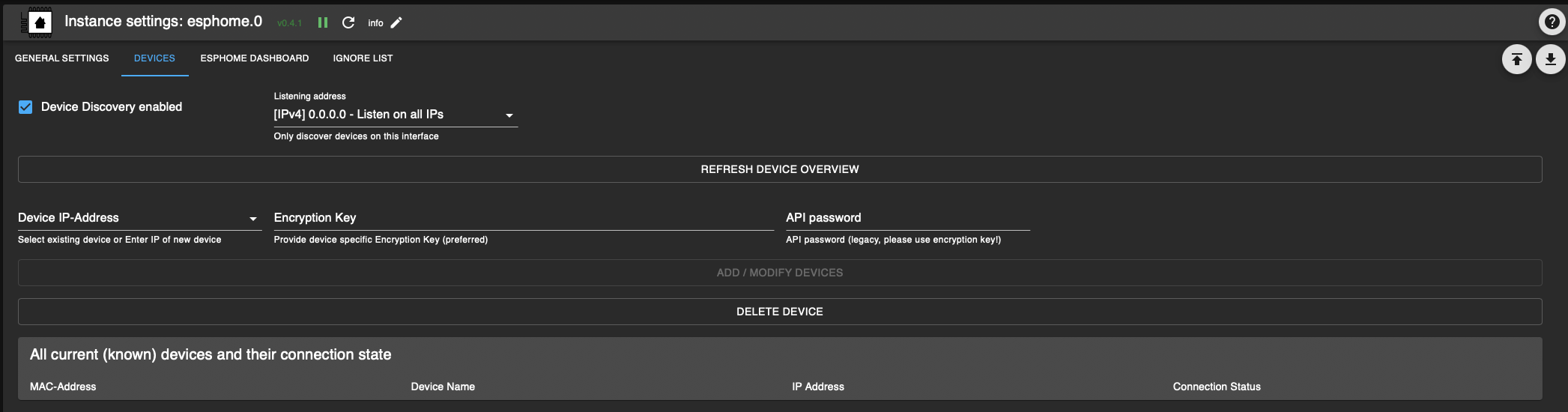
-
@tontechniker said in [ESPHome] Beta release 0.5.0-beta.1 ready:
Ich hatte wegen anderer Probleme in "/boot/config.txt", "arm_64bit=0" eingestellt (Tip aus dem Internet - warum und welcher Fehler damals war, kann ich nicht mehr sagen). Jetzt habe ich in der Datei auf "arm_64bit=1" geändert und einen reboot und einen Neustart des Raspi gemacht. Leider keine Änderung, weiterhin die Fehlermeldungen.
Falls du noch eine sd-karte frei hast bitte einmal Neuinstallation versuchen mit echtem 64bit
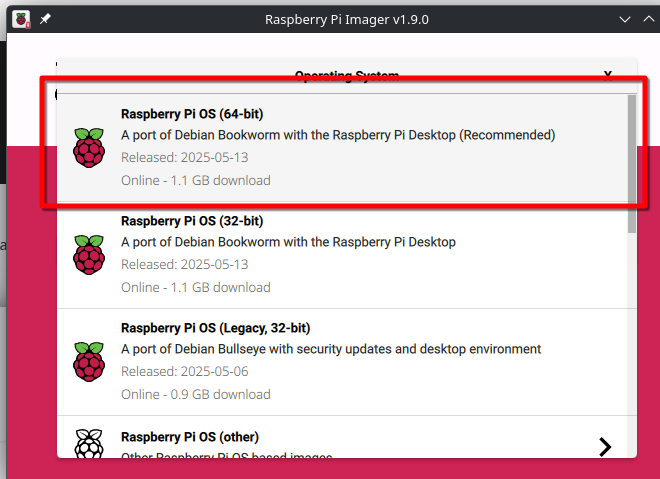
Z.b. beim Raspberry-Pi Imager "Raspberry Pi OS (64-bit)" auswählenDas Problem ist bereits schon mehrfach bekannt mit kaputten Setups von 64bit kernel aber 32bit Userland.
Bitte einmal output von "iob diag" senden um das zu verifizieren, aber basierend auf dem bereits bereitgestellten Log, ist das schon sehr wahrscheinlich.Siehe:
@simon42
Hallo Simon
ja wir sprechen über eine Beta Version von github, darf ich dennoch fragen ob eine Installation derzeit nach Deinem Verständnis für einen einfachen Nutzer funktionieren sollte? Der Kommunikation der Entwickler (https://github.com/DrozmotiX/ioBroker.esphome/pull/183) kann man folgen, aber heißt nicht dass man es auch versteht ;)
Ich möchte auf einem system ESPHome temporär für einen Test nutzen, aber kann dieses System nicht so einfach neu aufsetzen. Es ähnelt für mich stark dem System von @Fischje
wie folgt:
Debian 12 Bookworm, kein Docker.Dashboard esphome : 0.5.0-beta.10
Admin-Adapter: 7.1.5Python: 3.11.2
node: v20.18.1das Ganze erzeugt den Fehler:
esphome.0
	2024-11-21 08:48:09.852	error	Fatal error starting ESPHomeDashboard | Error: Command failed with exit code 1: /home/iobroker/.cache/autopy/venv/esphome/bin/python3 -m pip install esphome==2024.11.0 pillow==10.0.1ERROR: Cannot install esphome==2024.11.0 and pillow==10.0.1 because these package versions have conflicting dependencies.ERROR: ResolutionImpossible: for help visit https://pip.pypa.io/en/latest/topics/dependency-resolution/#dealing-with-dependency-conflicts[notice] A new release of pip is available: 24.0 -> 24.3.1[notice] To update, run: /home/iobroker/.cache/autopy/venv/esphome/bin/python3 -m pip install --upgrade pipCollecting esphome==2024.11.0 Using cached esphome-2024.11.0-py3-none-any.whl.metadata (3.5 kB)Collecting pillow==10.0.1 Using cached Pillow-10.0.1-cp311-cp311-manylinux_2_28_x86_64.whl.metadata (9.5 kB)Collecting cryptography==43.0.0 (from esphome==2024.11.0) Using cached cryptography-43.0.0-cp39-abi3-manylinux_2_28_x86_64.whl.metadata (5.4 kB)Collecting voluptuous==0.14.2 (from esphome==2024.11.0) Using cached voluptuous-0.14.2-py3-none-any.whl.metadata (20 kB)Collecting PyYAML==6.0.2 (from esphome==2024.11.0) Using cached PyYAML-6.0.2-cp311-cp311-manylinux_2_17_x86_64.manylinux2014_x86_64.whl.metadata (2.1 kB)Collecting paho-mqtt==1.6.1 (from esphome==2024.11.0) Using cached paho-mqtt-1.6.1.tar.gz (99 kB) Installing build dependencies: started Installing build dependencies: finished with status 'done' Getting requirements to build wheel: started Getting requirements to build wheel: finished with status 'done' Preparing metadata (pyproject.toml): started Preparing metadata (pyproject.toml): finished with status 'done'Collecting colorama==0.4.6 (from esphome==2024.11.0) Using cached colorama-0.4.6-py2.py3-none-any.whl.metadata (17 kB)Collecting icmplib==3.0.4 (from esphome==2024.11.0) Using cached icmplib-3.0.4-py3-none-any.whl.metadata (19 kB)Collecting tornado==6.4 (from esphome==2024.11.0) Using cached tornado-6.4-cp38-abi3-manylinux_2_5_x86_64.manylinux1_x86_64.manylinux_2_17_x86_64.manylinux2014_x86_64.whl.metadata (2.5 kB)Collecting tzlocal==5.2 (from esphome==2024.11.0) Using cached tzlocal-5.2-py3-none-any.whl.metadata (7.8 kB)Collecting tzdata>=2021.1 (from esphome==2024.11.0) Using cached tzdata-2024.2-py2.py3-none-any.whl.metadata (1.4 kB)Collecting pyserial==3.5 (from esphome==2024.11.0) Using cached pyserial-3.5-py2.py3-none-any.whl.metadata (1.6 kB)Collecting platformio==6.1.16 (from esphome==2024.11.0) Using cached platformio-6.1.16.tar.gz (239 kB) Installing build dependencies: started Installing build dependencies: finished with status 'done' Getting requirements to build wheel: started Getting requirements to build wheel: finished with status 'done' Preparing metadata (pyproject.toml): started Preparing metadata (pyproject.toml): finished with status 'done'Collecting esptool==4.7.0 (from esphome==2024.11.0) Using cached esptool-4.7.0.tar.gz (285 kB) Installing build dependencies: started Installing build dependencies: finished with status 'done' Getting requirements to build wheel: started Getting requirements to build wheel: finished with status 'done' Preparing metadata (pyproject.toml): started Preparing metadata (pyproject.toml): finished with status 'done'Collecting click==8.1.7 (from esphome==2024.11.0) Using cached click-8.1.7-py3-none-any.whl.metadata (3.0 kB)Collecting esphome-dashboard==20241120.0 (from esphome==2024.11.0) Using cached esphome_dashboard-20241120.0-py3-none-any.whl.metadata (1.0 kB)Collecting aioesphomeapi==24.6.2 (from esphome==2024.11.0) Using cached aioesphomeapi-24.6.2-cp311-cp311-manylinux_2_17_x86_64.manylinux2014_x86_64.whl.metadata (4.9 kB)Collecting zeroconf==0.132.2 (from esphome==2024.11.0) Using cached zeroconf-0.132.2-cp311-cp311-manylinux_2_17_x86_64.manylinux2014_x86_64.whl.metadata (6.0 kB)Collecting puremagic==1.27 (from esphome==2024.11.0) Using cached puremagic-1.27-py3-none-any.whl.metadata (5.8 kB)Collecting ruamel.yaml==0.18.6 (from esphome==2024.11.0) Using cached ruamel.yaml-0.18.6-py3-none-any.whl.metadata (23 kB)Collecting glyphsets==1.0.0 (from esphome==2024.11.0) Using cached glyphsets-1.0.0-py3-none-any.whl.metadata (12 kB)INFO: pip is looking at multiple versions of esphome to determine which version is compatible with other requirements. This could take a while.The conflict is caused by: The user requested pillow==10.0.1 esphome 2024.11.0 depends on pillow==10.4.0To fix this you could try to:1. loosen the range of package versions you've specified2. remove package versions to allow pip attempt to solve the dependency conflict | Error: Command failed with exit code 1: /home/iobroker/.cache/autopy/venv/esphome/bin/python3 -m pip install esphome==2024.11.0 pillow==10.0.1ERROR: Cannot install esphome==2024.11.0 and pillow==10.0.1 because these package versions have conflicting dependencies.ERROR: ResolutionImpossible: for help visit https://pip.pypa.io/en/latest/topics/dependency-resolution/#dealing-with-dependency-conflicts[notice] A new release of pip is available: 24.0 -> 24.3.1[notice] To update, run: /home/iobroker/.cache/autopy/venv/esphome/bin/python3 -m pip install --upgrade pipCollecting esphome==2024.11.0 Using cached esphome-2024.11.0-py3-none-any.whl.metadata (3.5 kB)Collecting pillow==10.0.1 Using cached Pillow-10.0.1-cp311-cp311-manylinux_2_28_x86_64.whl.metadata (9.5 kB)Collecting cryptography==43.0.0 (from esphome==2024.11.0) Using cached cryptography-43.0.0-cp39-abi3-manylinux_2_28_x86_64.whl.metadata (5.4 kB)Collecting voluptuous==0.14.2 (from esphome==2024.11.0) Using cached voluptuous-0.14.2-py3-none-any.whl.metadata (20 kB)Collecting PyYAML==6.0.2 (from esphome==2024.11.0) Using cached PyYAML-6.0.2-cp311-cp311-manylinux_2_17_x86_64.manylinux2014_x86_64.whl.metadata (2.1 kB)Collecting paho-mqtt==1.6.1 (from esphome==2024.11.0) Using cached paho-mqtt-1.6.1.tar.gz (99 kB) Installing build dependencies: started Installing build dependencies: finished with status 'done' Getting requirements to build wheel: started Getting requirements to build wheel: finished with status 'done' Preparing metadata (pyproject.toml): started Preparing metadata (pyproject.toml): finished with status 'done'Collecting colorama==0.4.6 (from esphome==2024.11.0) Using cached colorama-0.4.6-py2.py3-none-any.whl.metadata (17 kB)Collecting icmplib==3.0.4 (from esphome==2024.11.0) Using cached icmplib-3.0.4-py3-none-any.whl.metadata (19 kB)Collecting tornado==6.4 (from esphome==2024.11.0) Using cached tornado-6.4-cp38-abi3-manylinux_2_5_x86_64.manylinux1_x86_64.manylinux_2_17_x86_64.manylinux2014_x86_64.whl.metadata (2.5 kB)Collecting tzlocal==5.2 (from esphome==2024.11.0) Using cached tzlocal-5.2-py3-none-any.whl.metadata (7.8 kB)Collecting tzdata>=2021.1 (from esphome==2024.11.0) Using cached tzdata-2024.2-py2.py3-none-any.whl.metadata (1.4 kB)Collecting pyserial==3.5 (from esphome==2024.11.0) Using cached pyserial-3.5-py2.py3-none-any.whl.metadata (1.6 kB)Collecting platformio==6.1.16 (from esphome==2024.11.0) Using cached platformio-6.1.16.tar.gz (239 kB) Installing build dependencies: started Installing build dependencies: finished with status 'done' Getting requirements to build wheel: started Getting requirements to build wheel: finished with status 'done' Preparing metadata (pyproject.toml): started Preparing metadata (pyproject.toml): finished with status 'done'Collecting esptool==4.7.0 (from esphome==2024.11.0) Using cached esptool-4.7.0.tar.gz (285 kB) Installing build dependencies: started Installing build dependencies: finished with status 'done' Getting requirements to build wheel: started Getting requirements to build wheel: finished with status 'done' Preparing metadata (pyproject.toml): started Preparing metadata (pyproject.toml): finished with status 'done'Collecting click==8.1.7 (from esphome==2024.11.0) Using cached click-8.1.7-py3-none-any.whl.metadata (3.0 kB)Collecting esphome-dashboard==20241120.0 (from esphome==2024.11.0) Using cached esphome_dashboard-20241120.0-py3-none-any.whl.metadata (1.0 kB)Collecting aioesphomeapi==24.6.2 (from esphome==2024.11.0) Using cached aioesphomeapi-24.6.2-cp311-cp311-manylinux_2_17_x86_64.manylinux2014_x86_64.whl.metadata (4.9 kB)Collecting zeroconf==0.132.2 (from esphome==2024.11.0) Using cached zeroconf-0.132.2-cp311-cp311-manylinux_2_17_x86_64.manylinux2014_x86_64.whl.metadata (6.0 kB)Collecting puremagic==1.27 (from esphome==2024.11.0) Using cached puremagic-1.27-py3-none-any.whl.metadata (5.8 kB)Collecting ruamel.yaml==0.18.6 (from esphome==2024.11.0) Using cached ruamel.yaml-0.18.6-py3-none-any.whl.metadata (23 kB)Collecting glyphsets==1.0.0 (from esphome==2024.11.0) Using cached glyphsets-1.0.0-py3-none-any.whl.metadata (12 kB)INFO: pip is looking at multiple versions of esphome to determine which version is compatible with other requirements. This could take a while.The conflict is caused by: The user requested pillow==10.0.1 esphome 2024.11.0 depends on pillow==10.4.0To fix this you could try to:1. loosen the range of package versions you've specified2. remove package versions to allow pip attempt to solve the dependency conflict at makeError (file:///opt/iobroker/node_modules/autopy/node_modules/execa/lib/error.js:60:11) at handlePromise (file:///opt/iobroker/node_modules/autopy/node_modules/execa/index.js:124:26) at processTicksAndRejections (node:internal/process/task_queues:95:5) at $df9eabe9bda49ea8$export$e522f41234ab669a (file:///opt/iobroker/node_modules/autopy/src/index.ts:257:13) at Esphome.espHomeDashboard (/Users/nl69zh/Developer/community/opensource/ioBroker.esphome/main.js:180:7) at Esphome.onReady (/opt/iobroker/node_modules/iobroker.esphome/main.js:66:4)
Da ich noch ein system hab wo ESPHome auch im produktiven Einsatz ist, hatte ich mir dort python3 in version 3.9.2 abgeschaut und mit pyenv probiert aber bringt keinen Erfolg.
Kannst Du sagen welchen Status das Ganze hat und ich vielleicht besser die Versuche einstellen sollte?
Danke
-
Du hast mal wieder das "beliebte Pillow Problem".
Der von dir genannte Pr ist noch Zukunftsthema. Da @Dutchman (Hauptentwickler von dem Adapter) gerade irgendwie nicht aktiv ist, passiert hier wenig.In der Zwischenzeit sollte aber immer noch der Github install von meinem Fork funktionieren.:
https://github.com/DrozmotiX/ioBroker.esphome/issues/199#issuecomment-2460713594 -
Du hast mal wieder das "beliebte Pillow Problem".
Der von dir genannte Pr ist noch Zukunftsthema. Da @Dutchman (Hauptentwickler von dem Adapter) gerade irgendwie nicht aktiv ist, passiert hier wenig.In der Zwischenzeit sollte aber immer noch der Github install von meinem Fork funktionieren.:
https://github.com/DrozmotiX/ioBroker.esphome/issues/199#issuecomment-2460713594@simon42
Vielen Dank. Das gibt mir schon mal eine Richtung vor.
Habe Deinen Fork installiert und bekam wieder die Fehlermeldung im log. Dort war etwas bzgl. pip version angemerkt und habe danach pip von 24.0 auf 24.3.1 upgedated
Aber nach Adapterneustart immer noch:esphome.0 2024-11-21 17:06:00.515 error Fatal error starting ESPHomeDashboard | Error: Command failed with exit code 1: /home/iobroker/.cache/autopy/venv/esphome/bin/python3 -m pip install esphome==2024.11.0 pillow==10.2.0 ERROR: Cannot install esphome==2024.11.0 and pillow==10.2.0 because these package versions have conflicting dependencies. ERROR: ResolutionImpossible: for help visit https://pip.pypa.io/en/latest/topics/dependency-resolution/#dealing-with-dependency-conflicts Collecting esphome==2024.11.0 Using cached esphome-2024.11.0-py3-none-any.whl.metadata (3.5 kB) Collecting pillow==10.2.0 Using cached pillow-10.2.0-cp311-cp311-manylinux_2_28_x86_64.whl.metadata (9.7 kB) Collecting cryptography==43.0.0 (from esphome==2024.11.0) Using cached cryptography-43.0.0-cp39-abi3-manylinux_2_28_x86_64.whl.metadata (5.4 kB) Collecting voluptuous==0.14.2 (from esphome==2024.11.0) Using cached voluptuous-0.14.2-py3-none-any.whl.metadata (20 kB) Collecting PyYAML==6.0.2 (from esphome==2024.11.0) Using cached PyYAML-6.0.2-cp311-cp311-manylinux_2_17_x86_64.manylinux2014_x86_64.whl.metadata (2.1 kB) Collecting paho-mqtt==1.6.1 (from esphome==2024.11.0) Using cached paho-mqtt-1.6.1.tar.gz (99 kB) Installing build dependencies: started Installing build dependencies: finished with status 'done' Getting requirements to build wheel: started Getting requirements to build wheel: finished with status 'done' Preparing metadata (pyproject.toml): started Preparing metadata (pyproject.toml): finished with status 'done' Collecting colorama==0.4.6 (from esphome==2024.11.0) Using cached colorama-0.4.6-py2.py3-none-any.whl.metadata (17 kB) Collecting icmplib==3.0.4 (from esphome==2024.11.0) Using cached icmplib-3.0.4-py3-none-any.whl.metadata (19 kB) Collecting tornado==6.4 (from esphome==2024.11.0) Using cached tornado-6.4-cp38-abi3-manylinux_2_5_x86_64.manylinux1_x86_64.manylinux_2_17_x86_64.manylinux2014_x86_64.whl.metadata (2.5 kB) Collecting tzlocal==5.2 (from esphome==2024.11.0) Using cached tzlocal-5.2-py3-none-any.whl.metadata (7.8 kB) Collecting tzdata>=2021.1 (from esphome==2024.11.0) Using cached tzdata-2024.2-py2.py3-none-any.whl.metadata (1.4 kB) Collecting pyserial==3.5 (from esphome==2024.11.0) Using cached pyserial-3.5-py2.py3-none-any.whl.metadata (1.6 kB) Collecting platformio==6.1.16 (from esphome==2024.11.0) Using cached platformio-6.1.16.tar.gz (239 kB) Installing build dependencies: started Installing build dependencies: finished with status 'done' Getting requirements to build wheel: started Getting requirements to build wheel: finished with status 'done' Preparing metadata (pyproject.toml): started Preparing metadata (pyproject.toml): finished with status 'done' Collecting esptool==4.7.0 (from esphome==2024.11.0) Using cached esptool-4.7.0.tar.gz (285 kB) Installing build dependencies: started Installing build dependencies: finished with status 'done' Getting requirements to build wheel: started Getting requirements to build wheel: finished with status 'done' Preparing metadata (pyproject.toml): started Preparing metadata (pyproject.toml): finished with status 'done' Collecting click==8.1.7 (from esphome==2024.11.0) Using cached click-8.1.7-py3-none-any.whl.metadata (3.0 kB) Collecting esphome-dashboard==20241120.0 (from esphome==2024.11.0) Using cached esphome_dashboard-20241120.0-py3-none-any.whl.metadata (1.0 kB) Collecting aioesphomeapi==24.6.2 (from esphome==2024.11.0) Using cached aioesphomeapi-24.6.2-cp311-cp311-manylinux_2_17_x86_64.manylinux2014_x86_64.whl.metadata (4.9 kB) Collecting zeroconf==0.132.2 (from esphome==2024.11.0) Using cached zeroconf-0.132.2-cp311-cp311-manylinux_2_17_x86_64.manylinux2014_x86_64.whl.metadata (6.0 kB) Collecting puremagic==1.27 (from esphome==2024.11.0) Using cached puremagic-1.27-py3-none-any.whl.metadata (5.8 kB) Collecting ruamel.yaml==0.18.6 (from esphome==2024.11.0) Using cached ruamel.yaml-0.18.6-py3-none-any.whl.metadata (23 kB) Collecting glyphsets==1.0.0 (from esphome==2024.11.0) Using cached glyphsets-1.0.0-py3-none-any.whl.metadata (12 kB) INFO: pip is looking at multiple versions of esphome to determine which version is compatible with other requirements. This could take a while. The conflict is caused by: The user requested pillow==10.2.0 esphome 2024.11.0 depends on pillow==10.4.0 To fix this you could try to: 1. loosen the range of package versions you've specified 2. remove package versions to allow pip to attempt to solve the dependency conflict | Error: Command failed with exit code 1: /home/iobroker/.cache/autopy/venv/esphome/bin/python3 -m pip install esphome==2024.11.0 pillow==10.2.0 ERROR: Cannot install esphome==2024.11.0 and pillow==10.2.0 because these package versions have conflicting dependencies. ERROR: ResolutionImpossible: for help visit https://pip.pypa.io/en/latest/topics/dependency-resolution/#dealing-with-dependency-conflicts Collecting esphome==2024.11.0 Using cached esphome-2024.11.0-py3-none-any.whl.metadata (3.5 kB) Collecting pillow==10.2.0 Using cached pillow-10.2.0-cp311-cp311-manylinux_2_28_x86_64.whl.metadata (9.7 kB) Collecting cryptography==43.0.0 (from esphome==2024.11.0) Using cached cryptography-43.0.0-cp39-abi3-manylinux_2_28_x86_64.whl.metadata (5.4 kB) Collecting voluptuous==0.14.2 (from esphome==2024.11.0) Using cached voluptuous-0.14.2-py3-none-any.whl.metadata (20 kB) Collecting PyYAML==6.0.2 (from esphome==2024.11.0) Using cached PyYAML-6.0.2-cp311-cp311-manylinux_2_17_x86_64.manylinux2014_x86_64.whl.metadata (2.1 kB) Collecting paho-mqtt==1.6.1 (from esphome==2024.11.0) Using cached paho-mqtt-1.6.1.tar.gz (99 kB) Installing build dependencies: started Installing build dependencies: finished with status 'done' Getting requirements to build wheel: started Getting requirements to build wheel: finished with status 'done' Preparing metadata (pyproject.toml): started Preparing metadata (pyproject.toml): finished with status 'done' Collecting colorama==0.4.6 (from esphome==2024.11.0) Using cached colorama-0.4.6-py2.py3-none-any.whl.metadata (17 kB) Collecting icmplib==3.0.4 (from esphome==2024.11.0) Using cached icmplib-3.0.4-py3-none-any.whl.metadata (19 kB) Collecting tornado==6.4 (from esphome==2024.11.0) Using cached tornado-6.4-cp38-abi3-manylinux_2_5_x86_64.manylinux1_x86_64.manylinux_2_17_x86_64.manylinux2014_x86_64.whl.metadata (2.5 kB) Collecting tzlocal==5.2 (from esphome==2024.11.0) Using cached tzlocal-5.2-py3-none-any.whl.metadata (7.8 kB) Collecting tzdata>=2021.1 (from esphome==2024.11.0) Using cached tzdata-2024.2-py2.py3-none-any.whl.metadata (1.4 kB) Collecting pyserial==3.5 (from esphome==2024.11.0) Using cached pyserial-3.5-py2.py3-none-any.whl.metadata (1.6 kB) Collecting platformio==6.1.16 (from esphome==2024.11.0) Using cached platformio-6.1.16.tar.gz (239 kB) Installing build dependencies: started Installing build dependencies: finished with status 'done' Getting requirements to build wheel: started Getting requirements to build wheel: finished with status 'done' Preparing metadata (pyproject.toml): started Preparing metadata (pyproject.toml): finished with status 'done' Collecting esptool==4.7.0 (from esphome==2024.11.0) Using cached esptool-4.7.0.tar.gz (285 kB) Installing build dependencies: started Installing build dependencies: finished with status 'done' Getting requirements to build wheel: started Getting requirements to build wheel: finished with status 'done' Preparing metadata (pyproject.toml): started Preparing metadata (pyproject.toml): finished with status 'done' Collecting click==8.1.7 (from esphome==2024.11.0) Using cached click-8.1.7-py3-none-any.whl.metadata (3.0 kB) Collecting esphome-dashboard==20241120.0 (from esphome==2024.11.0) Using cached esphome_dashboard-20241120.0-py3-none-any.whl.metadata (1.0 kB) Collecting aioesphomeapi==24.6.2 (from esphome==2024.11.0) Using cached aioesphomeapi-24.6.2-cp311-cp311-manylinux_2_17_x86_64.manylinux2014_x86_64.whl.metadata (4.9 kB) Collecting zeroconf==0.132.2 (from esphome==2024.11.0) Using cached zeroconf-0.132.2-cp311-cp311-manylinux_2_17_x86_64.manylinux2014_x86_64.whl.metadata (6.0 kB) Collecting puremagic==1.27 (from esphome==2024.11.0) Using cached puremagic-1.27-py3-none-any.whl.metadata (5.8 kB) Collecting ruamel.yaml==0.18.6 (from esphome==2024.11.0) Using cached ruamel.yaml-0.18.6-py3-none-any.whl.metadata (23 kB) Collecting glyphsets==1.0.0 (from esphome==2024.11.0) Using cached glyphsets-1.0.0-py3-none-any.whl.metadata (12 kB) INFO: pip is looking at multiple versions of esphome to determine which version is compatible with other requirements. This could take a while. The conflict is caused by: The user requested pillow==10.2.0 esphome 2024.11.0 depends on pillow==10.4.0 To fix this you could try to: 1. loosen the range of package versions you've specified 2. remove package versions to allow pip to attempt to solve the dependency conflict at makeError (file:///opt/iobroker/node_modules/autopy/node_modules/execa/lib/error.js:60:11) at handlePromise (file:///opt/iobroker/node_modules/autopy/node_modules/execa/index.js:124:26) at processTicksAndRejections (node:internal/process/task_queues:95:5) at $df9eabe9bda49ea8$export$e522f41234ab669a (file:///opt/iobroker/node_modules/autopy/src/index.ts:257:13) at Esphome.espHomeDashboard (/Users/nl69zh/Developer/community/opensource/ioBroker.esphome/main.js:180:7) at Esphome.onReady (/opt/iobroker/node_modules/iobroker.esphome/main.js:66:4)Stimmt hier eine Version noch nicht bei mir? Hier steht was von pillow 10.1.0 und im Fehler von 10.2.0? Danke und sorry für die Fragen.
-
@simon42
Vielen Dank. Das gibt mir schon mal eine Richtung vor.
Habe Deinen Fork installiert und bekam wieder die Fehlermeldung im log. Dort war etwas bzgl. pip version angemerkt und habe danach pip von 24.0 auf 24.3.1 upgedated
Aber nach Adapterneustart immer noch:esphome.0 2024-11-21 17:06:00.515 error Fatal error starting ESPHomeDashboard | Error: Command failed with exit code 1: /home/iobroker/.cache/autopy/venv/esphome/bin/python3 -m pip install esphome==2024.11.0 pillow==10.2.0 ERROR: Cannot install esphome==2024.11.0 and pillow==10.2.0 because these package versions have conflicting dependencies. ERROR: ResolutionImpossible: for help visit https://pip.pypa.io/en/latest/topics/dependency-resolution/#dealing-with-dependency-conflicts Collecting esphome==2024.11.0 Using cached esphome-2024.11.0-py3-none-any.whl.metadata (3.5 kB) Collecting pillow==10.2.0 Using cached pillow-10.2.0-cp311-cp311-manylinux_2_28_x86_64.whl.metadata (9.7 kB) Collecting cryptography==43.0.0 (from esphome==2024.11.0) Using cached cryptography-43.0.0-cp39-abi3-manylinux_2_28_x86_64.whl.metadata (5.4 kB) Collecting voluptuous==0.14.2 (from esphome==2024.11.0) Using cached voluptuous-0.14.2-py3-none-any.whl.metadata (20 kB) Collecting PyYAML==6.0.2 (from esphome==2024.11.0) Using cached PyYAML-6.0.2-cp311-cp311-manylinux_2_17_x86_64.manylinux2014_x86_64.whl.metadata (2.1 kB) Collecting paho-mqtt==1.6.1 (from esphome==2024.11.0) Using cached paho-mqtt-1.6.1.tar.gz (99 kB) Installing build dependencies: started Installing build dependencies: finished with status 'done' Getting requirements to build wheel: started Getting requirements to build wheel: finished with status 'done' Preparing metadata (pyproject.toml): started Preparing metadata (pyproject.toml): finished with status 'done' Collecting colorama==0.4.6 (from esphome==2024.11.0) Using cached colorama-0.4.6-py2.py3-none-any.whl.metadata (17 kB) Collecting icmplib==3.0.4 (from esphome==2024.11.0) Using cached icmplib-3.0.4-py3-none-any.whl.metadata (19 kB) Collecting tornado==6.4 (from esphome==2024.11.0) Using cached tornado-6.4-cp38-abi3-manylinux_2_5_x86_64.manylinux1_x86_64.manylinux_2_17_x86_64.manylinux2014_x86_64.whl.metadata (2.5 kB) Collecting tzlocal==5.2 (from esphome==2024.11.0) Using cached tzlocal-5.2-py3-none-any.whl.metadata (7.8 kB) Collecting tzdata>=2021.1 (from esphome==2024.11.0) Using cached tzdata-2024.2-py2.py3-none-any.whl.metadata (1.4 kB) Collecting pyserial==3.5 (from esphome==2024.11.0) Using cached pyserial-3.5-py2.py3-none-any.whl.metadata (1.6 kB) Collecting platformio==6.1.16 (from esphome==2024.11.0) Using cached platformio-6.1.16.tar.gz (239 kB) Installing build dependencies: started Installing build dependencies: finished with status 'done' Getting requirements to build wheel: started Getting requirements to build wheel: finished with status 'done' Preparing metadata (pyproject.toml): started Preparing metadata (pyproject.toml): finished with status 'done' Collecting esptool==4.7.0 (from esphome==2024.11.0) Using cached esptool-4.7.0.tar.gz (285 kB) Installing build dependencies: started Installing build dependencies: finished with status 'done' Getting requirements to build wheel: started Getting requirements to build wheel: finished with status 'done' Preparing metadata (pyproject.toml): started Preparing metadata (pyproject.toml): finished with status 'done' Collecting click==8.1.7 (from esphome==2024.11.0) Using cached click-8.1.7-py3-none-any.whl.metadata (3.0 kB) Collecting esphome-dashboard==20241120.0 (from esphome==2024.11.0) Using cached esphome_dashboard-20241120.0-py3-none-any.whl.metadata (1.0 kB) Collecting aioesphomeapi==24.6.2 (from esphome==2024.11.0) Using cached aioesphomeapi-24.6.2-cp311-cp311-manylinux_2_17_x86_64.manylinux2014_x86_64.whl.metadata (4.9 kB) Collecting zeroconf==0.132.2 (from esphome==2024.11.0) Using cached zeroconf-0.132.2-cp311-cp311-manylinux_2_17_x86_64.manylinux2014_x86_64.whl.metadata (6.0 kB) Collecting puremagic==1.27 (from esphome==2024.11.0) Using cached puremagic-1.27-py3-none-any.whl.metadata (5.8 kB) Collecting ruamel.yaml==0.18.6 (from esphome==2024.11.0) Using cached ruamel.yaml-0.18.6-py3-none-any.whl.metadata (23 kB) Collecting glyphsets==1.0.0 (from esphome==2024.11.0) Using cached glyphsets-1.0.0-py3-none-any.whl.metadata (12 kB) INFO: pip is looking at multiple versions of esphome to determine which version is compatible with other requirements. This could take a while. The conflict is caused by: The user requested pillow==10.2.0 esphome 2024.11.0 depends on pillow==10.4.0 To fix this you could try to: 1. loosen the range of package versions you've specified 2. remove package versions to allow pip to attempt to solve the dependency conflict | Error: Command failed with exit code 1: /home/iobroker/.cache/autopy/venv/esphome/bin/python3 -m pip install esphome==2024.11.0 pillow==10.2.0 ERROR: Cannot install esphome==2024.11.0 and pillow==10.2.0 because these package versions have conflicting dependencies. ERROR: ResolutionImpossible: for help visit https://pip.pypa.io/en/latest/topics/dependency-resolution/#dealing-with-dependency-conflicts Collecting esphome==2024.11.0 Using cached esphome-2024.11.0-py3-none-any.whl.metadata (3.5 kB) Collecting pillow==10.2.0 Using cached pillow-10.2.0-cp311-cp311-manylinux_2_28_x86_64.whl.metadata (9.7 kB) Collecting cryptography==43.0.0 (from esphome==2024.11.0) Using cached cryptography-43.0.0-cp39-abi3-manylinux_2_28_x86_64.whl.metadata (5.4 kB) Collecting voluptuous==0.14.2 (from esphome==2024.11.0) Using cached voluptuous-0.14.2-py3-none-any.whl.metadata (20 kB) Collecting PyYAML==6.0.2 (from esphome==2024.11.0) Using cached PyYAML-6.0.2-cp311-cp311-manylinux_2_17_x86_64.manylinux2014_x86_64.whl.metadata (2.1 kB) Collecting paho-mqtt==1.6.1 (from esphome==2024.11.0) Using cached paho-mqtt-1.6.1.tar.gz (99 kB) Installing build dependencies: started Installing build dependencies: finished with status 'done' Getting requirements to build wheel: started Getting requirements to build wheel: finished with status 'done' Preparing metadata (pyproject.toml): started Preparing metadata (pyproject.toml): finished with status 'done' Collecting colorama==0.4.6 (from esphome==2024.11.0) Using cached colorama-0.4.6-py2.py3-none-any.whl.metadata (17 kB) Collecting icmplib==3.0.4 (from esphome==2024.11.0) Using cached icmplib-3.0.4-py3-none-any.whl.metadata (19 kB) Collecting tornado==6.4 (from esphome==2024.11.0) Using cached tornado-6.4-cp38-abi3-manylinux_2_5_x86_64.manylinux1_x86_64.manylinux_2_17_x86_64.manylinux2014_x86_64.whl.metadata (2.5 kB) Collecting tzlocal==5.2 (from esphome==2024.11.0) Using cached tzlocal-5.2-py3-none-any.whl.metadata (7.8 kB) Collecting tzdata>=2021.1 (from esphome==2024.11.0) Using cached tzdata-2024.2-py2.py3-none-any.whl.metadata (1.4 kB) Collecting pyserial==3.5 (from esphome==2024.11.0) Using cached pyserial-3.5-py2.py3-none-any.whl.metadata (1.6 kB) Collecting platformio==6.1.16 (from esphome==2024.11.0) Using cached platformio-6.1.16.tar.gz (239 kB) Installing build dependencies: started Installing build dependencies: finished with status 'done' Getting requirements to build wheel: started Getting requirements to build wheel: finished with status 'done' Preparing metadata (pyproject.toml): started Preparing metadata (pyproject.toml): finished with status 'done' Collecting esptool==4.7.0 (from esphome==2024.11.0) Using cached esptool-4.7.0.tar.gz (285 kB) Installing build dependencies: started Installing build dependencies: finished with status 'done' Getting requirements to build wheel: started Getting requirements to build wheel: finished with status 'done' Preparing metadata (pyproject.toml): started Preparing metadata (pyproject.toml): finished with status 'done' Collecting click==8.1.7 (from esphome==2024.11.0) Using cached click-8.1.7-py3-none-any.whl.metadata (3.0 kB) Collecting esphome-dashboard==20241120.0 (from esphome==2024.11.0) Using cached esphome_dashboard-20241120.0-py3-none-any.whl.metadata (1.0 kB) Collecting aioesphomeapi==24.6.2 (from esphome==2024.11.0) Using cached aioesphomeapi-24.6.2-cp311-cp311-manylinux_2_17_x86_64.manylinux2014_x86_64.whl.metadata (4.9 kB) Collecting zeroconf==0.132.2 (from esphome==2024.11.0) Using cached zeroconf-0.132.2-cp311-cp311-manylinux_2_17_x86_64.manylinux2014_x86_64.whl.metadata (6.0 kB) Collecting puremagic==1.27 (from esphome==2024.11.0) Using cached puremagic-1.27-py3-none-any.whl.metadata (5.8 kB) Collecting ruamel.yaml==0.18.6 (from esphome==2024.11.0) Using cached ruamel.yaml-0.18.6-py3-none-any.whl.metadata (23 kB) Collecting glyphsets==1.0.0 (from esphome==2024.11.0) Using cached glyphsets-1.0.0-py3-none-any.whl.metadata (12 kB) INFO: pip is looking at multiple versions of esphome to determine which version is compatible with other requirements. This could take a while. The conflict is caused by: The user requested pillow==10.2.0 esphome 2024.11.0 depends on pillow==10.4.0 To fix this you could try to: 1. loosen the range of package versions you've specified 2. remove package versions to allow pip to attempt to solve the dependency conflict at makeError (file:///opt/iobroker/node_modules/autopy/node_modules/execa/lib/error.js:60:11) at handlePromise (file:///opt/iobroker/node_modules/autopy/node_modules/execa/index.js:124:26) at processTicksAndRejections (node:internal/process/task_queues:95:5) at $df9eabe9bda49ea8$export$e522f41234ab669a (file:///opt/iobroker/node_modules/autopy/src/index.ts:257:13) at Esphome.espHomeDashboard (/Users/nl69zh/Developer/community/opensource/ioBroker.esphome/main.js:180:7) at Esphome.onReady (/opt/iobroker/node_modules/iobroker.esphome/main.js:66:4)Stimmt hier eine Version noch nicht bei mir? Hier steht was von pillow 10.1.0 und im Fehler von 10.2.0? Danke und sorry für die Fragen.
-
pip ist egal. war nur ne info, dass es halt eine neuere Version gibt.
Wie hast du pip geupdated?Bitte nochmal versuchen. Gab schon wieder ein update.
@simon42 said in [ESPHome] Beta release 0.5.0-beta.1 ready:
pip ist egal. war nur ne info, dass es halt eine neuere Version gibt.
Wie hast du pip geupdated?Bezogen auf die notiz:
[notice] A new release of pip is available: 24.0 -> 24.3.1
[notice] To update, run: /home/iobroker/.cache/autopy/venv/esphome/bin/python3 -m pip install --upgrade pip
mit:
sudo /home/iobroker/.cache/autopy/venv/esphome/bin/python3 -m pip install --upgrade pipBitte nochmal versuchen. Gab schon wieder ein update.
ok, danke versuchs.
-
pip ist egal. war nur ne info, dass es halt eine neuere Version gibt.
Wie hast du pip geupdated?Bitte nochmal versuchen. Gab schon wieder ein update.
@simon42 said in [ESPHome] Beta release 0.5.0-beta.1 ready:
Bitte nochmal versuchen. Gab schon wieder ein update.
Vielen Dank. Ist schon was länger her, aber nun hab ich endlich wieder eine ESPHome Möglichkeit zum testen auf dem System

-
@simon42 said in [ESPHome] Beta release 0.5.0-beta.1 ready:
pip ist egal. war nur ne info, dass es halt eine neuere Version gibt.
Wie hast du pip geupdated?Bezogen auf die notiz:
[notice] A new release of pip is available: 24.0 -> 24.3.1
[notice] To update, run: /home/iobroker/.cache/autopy/venv/esphome/bin/python3 -m pip install --upgrade pip
mit:
sudo /home/iobroker/.cache/autopy/venv/esphome/bin/python3 -m pip install --upgrade pipBitte nochmal versuchen. Gab schon wieder ein update.
ok, danke versuchs.
@dieter_p said in [ESPHome] Beta release 0.5.0-beta.1 ready:
[notice] A new release of pip is available: 24.0 -> 24.3.1 [notice] To update, run: /home/iobroker/.cache/autopy/venv/esphome/bin/python3 -m pip install --upgrade pip@dieter_p eben nur eine [notice]. Keine Warning oder ähnliches. aber ok
@dieter_p said in [ESPHome] Beta release 0.5.0-beta.1 ready:
sudo /home/iobroker/.cache/autopy/venv/esphome/bin/python3 -m pip install --upgrade pip
Bitte (auf linux generell) nicht unbedacht sudo verwenden. Führt meist früher als später zu Berechtigungsproblemen (vom iobroker).
Fix mit:sudo chown -R iobroker:iobroker /home/iobroker/.cache/autopyZukünftig commands als iobroker user ausführen z.B.:
sudo -Hu iobroker /home/iobroker/.cache/autopy/venv/esphome/bin/python3 -m pip install --upgrade pip -
@simon42 said in [ESPHome] Beta release 0.5.0-beta.1 ready:
Bitte nochmal versuchen. Gab schon wieder ein update.
Vielen Dank. Ist schon was länger her, aber nun hab ich endlich wieder eine ESPHome Möglichkeit zum testen auf dem System
-
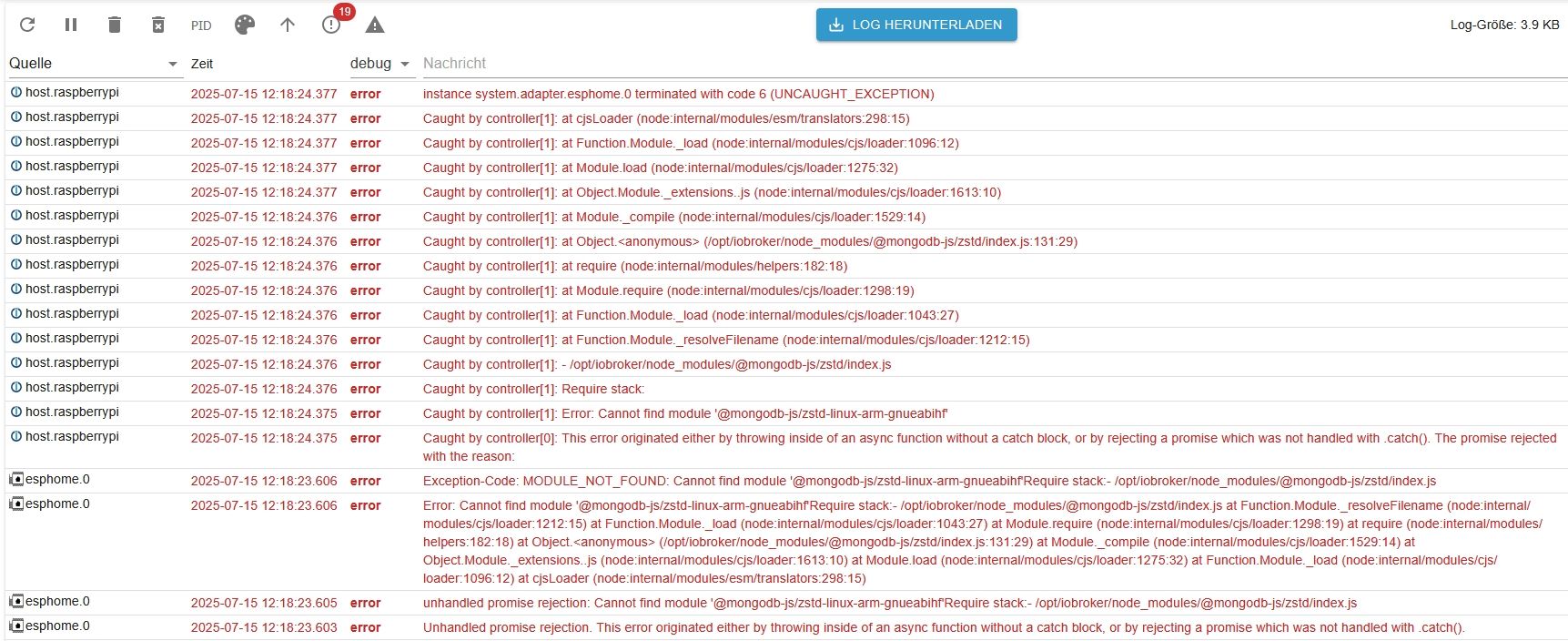
Ich habe die 6.0.1 Installiert. Meine Probleme ist bei Angabe der IP-Adresse für das Dashboard unten stehende Fehlermeldungen:
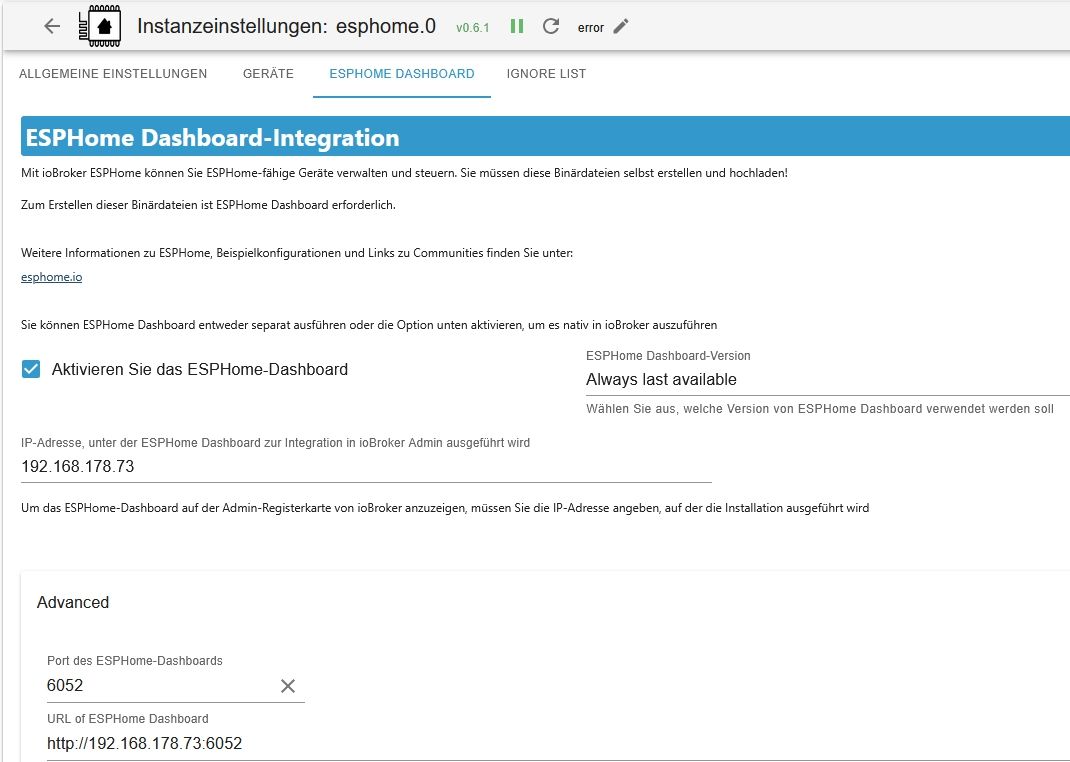
Hier meine Einstellungen:
Das Problem bestand auch schon bei den vorigen Versionen. Ein User schrieb, dass es mit meinem Raspi Betriebssystem zusammenhängt (alles auf aktuellem Stand!)??!
Kann mir jemand weiterhelfen das Dashboard zum Laufen zu bringen?
Gruß
Hans -
Ich habe die 6.0.1 Installiert. Meine Probleme ist bei Angabe der IP-Adresse für das Dashboard unten stehende Fehlermeldungen:
Hier meine Einstellungen:
Das Problem bestand auch schon bei den vorigen Versionen. Ein User schrieb, dass es mit meinem Raspi Betriebssystem zusammenhängt (alles auf aktuellem Stand!)??!
Kann mir jemand weiterhelfen das Dashboard zum Laufen zu bringen?
Gruß
Hans@tontechniker sagte in [ESPHome] Beta release 0.5.0-beta.1 ready:
Ein User schrieb, dass es mit meinem Raspi Betriebssystem zusammenhängt
Womit bist du denn da so unterwegs? Gesamtkonstrukt kannst du u.a. mittels
iob diagsehen.
-
@tontechniker sagte in [ESPHome] Beta release 0.5.0-beta.1 ready:
Ein User schrieb, dass es mit meinem Raspi Betriebssystem zusammenhängt
Womit bist du denn da so unterwegs? Gesamtkonstrukt kannst du u.a. mittels
iob diagsehen.
@thomas-braun
Hallo Thomas,
danke für Deine Antwort! Im Anhang die geloggte IOB-Diag. Vielleicht kannst Du ja etwas damit anfangen?
iob_diag.log
Und nach fix:
iob_diag 1.log
Danke für Deine Hilfe!
Gruß
Hans -
@thomas-braun
Hallo Thomas,
danke für Deine Antwort! Im Anhang die geloggte IOB-Diag. Vielleicht kannst Du ja etwas damit anfangen?
iob_diag.log
Und nach fix:
iob_diag 1.log
Danke für Deine Hilfe!
Gruß
Hans@tontechniker Hallo,
bereits bekanntes Problem:
OS is similar to: debian

Model		: Raspberry Pi 4 Model B Rev 1.4
Docker          : false
Virtualization  : none
Kernel          : aarch64
Userland        : 32 bit
Dein kernel ist 64bit aber 32bit userspace.
Bitte mal Standard 64-BIt Rasperry-Pi OS neu aufsetzen. (vorher backup machen! oder am besten Neuinstallation auf 2. SD-Karte und dann migrieren.Node und 32bit macht nur Probleme und ein PI4 sollte das locker schaffen.
-
@tontechniker Hallo,
bereits bekanntes Problem:
OS is similar to: debian

Model		: Raspberry Pi 4 Model B Rev 1.4
Docker          : false
Virtualization  : none
Kernel          : aarch64
Userland        : 32 bit
Dein kernel ist 64bit aber 32bit userspace.
Bitte mal Standard 64-BIt Rasperry-Pi OS neu aufsetzen. (vorher backup machen! oder am besten Neuinstallation auf 2. SD-Karte und dann migrieren.Node und 32bit macht nur Probleme und ein PI4 sollte das locker schaffen.
@simon42
Hallo Simon42
Kannst Du mir bitte den Link zum 64-Bit Raspberry-Pi-OS schreiben? Habe auf Raspi-Seite gesucht un es nicht gefunden.
Danke! -
@simon42
Hallo Simon42
Kannst Du mir bitte den Link zum 64-Bit Raspberry-Pi-OS schreiben? Habe auf Raspi-Seite gesucht un es nicht gefunden.
Danke!@tontechniker
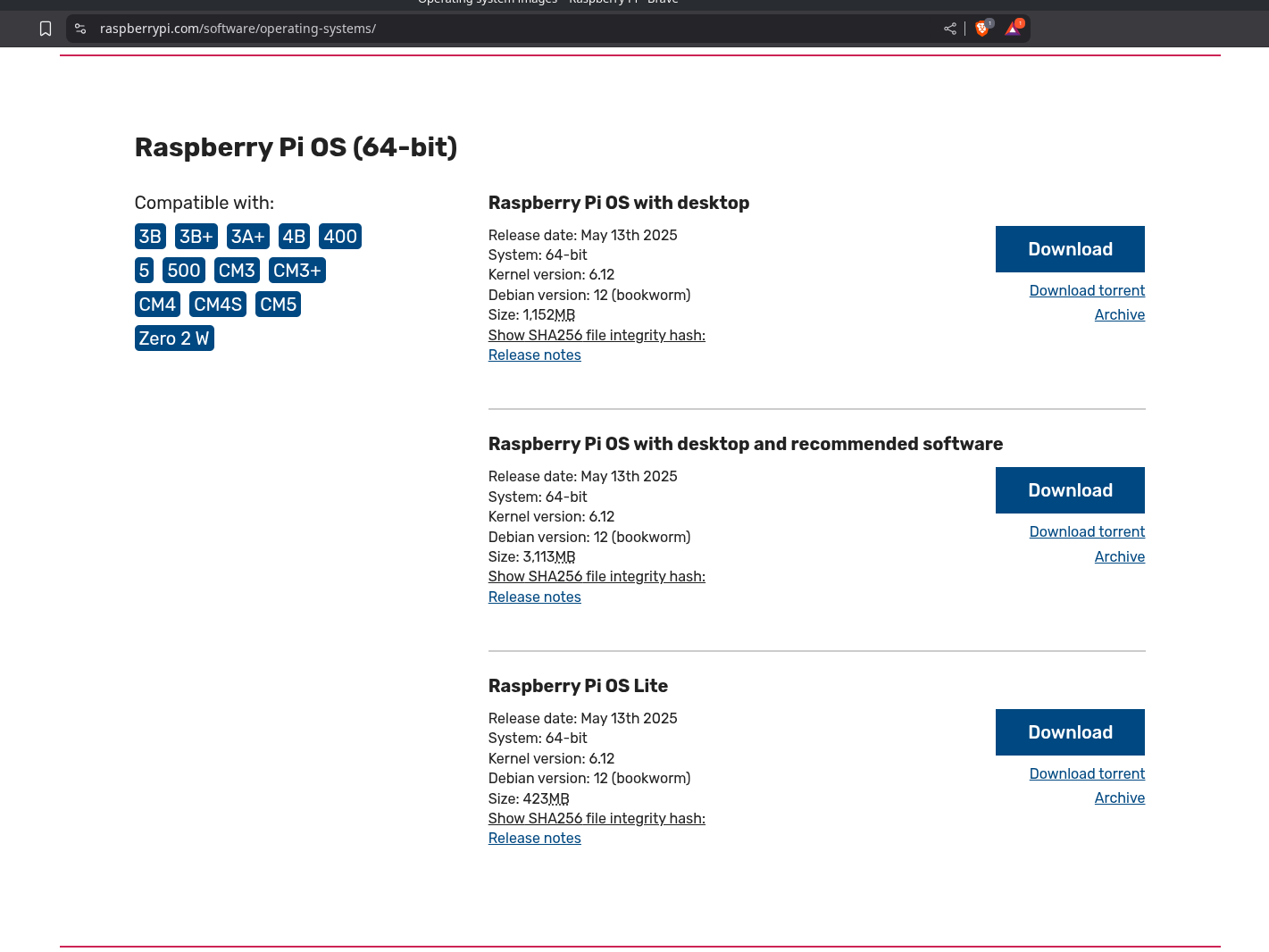
https://www.raspberrypi.com/software/operating-systems/
Einfach etwas nach unten scrollen:
Alternativ auch mit dem Raspberry Pi Imager:
-
@simon42
Hallo Simon42
Kannst Du mir bitte den Link zum 64-Bit Raspberry-Pi-OS schreiben? Habe auf Raspi-Seite gesucht un es nicht gefunden.
Danke!Ich würde es mit dem PiImager machen. Da kann man direkt schon ein paar Grundeinstellungen vornehmen.
https://forum.iobroker.net/topic/51869/installation-auf-raspi-einfacher-geht-s-nicht
-
Danke euch Beiden! Bin die nächste 8 Wochen wegen Bestrahlung nicht bei mir zu Hause. Melde mich, wenn ich es ausgeführt habe.
Danke!
Hans -
So, habe mein System jetzt auf 64bit.
Was muss ich alles installieren um mit ESPHome zu arbeiten? -
So, habe mein System jetzt auf 64bit.
Was muss ich alles installieren um mit ESPHome zu arbeiten?@tontechniker einfach nur den adapter. Installiert sich alles was er braucht selbst
-
@tontechniker einfach nur den adapter. Installiert sich alles was er braucht selbst
@simon42 Welche Version hast Du installiert?
Habe im Moment wieder auf 0.5.0 Beta 8 umgestellt. Macht immer noch bei Aufruf die Fehlermeldung
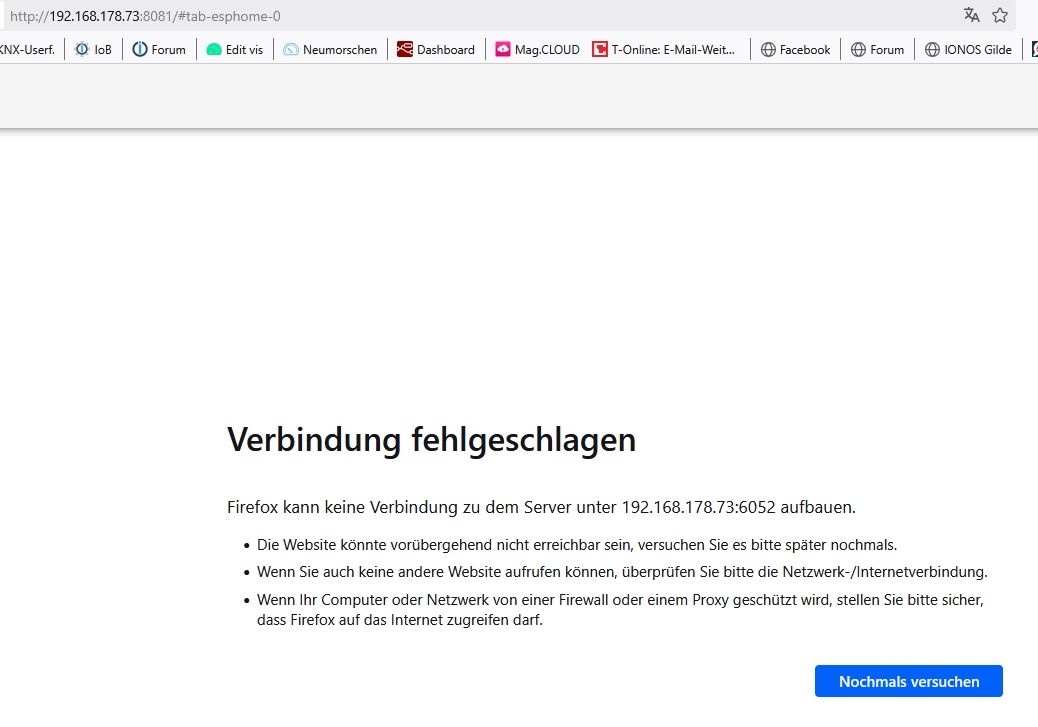
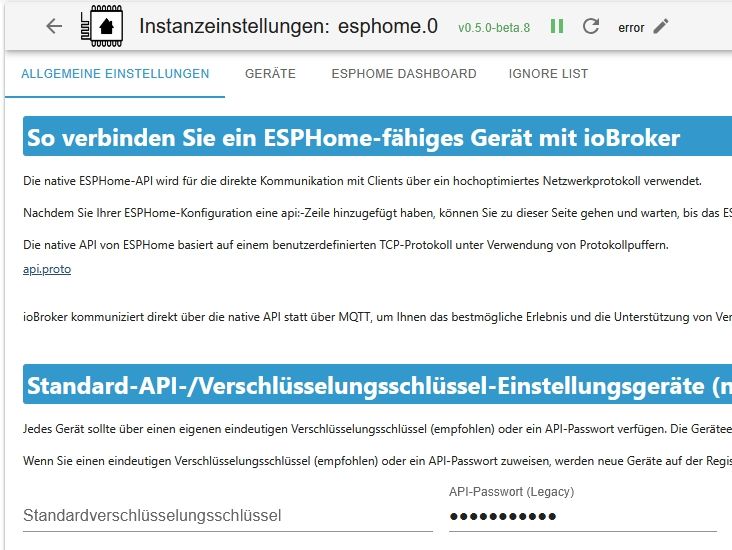
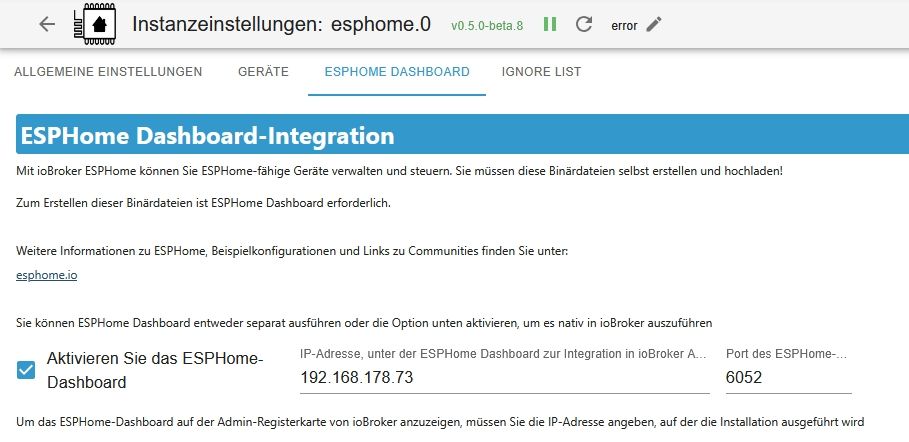
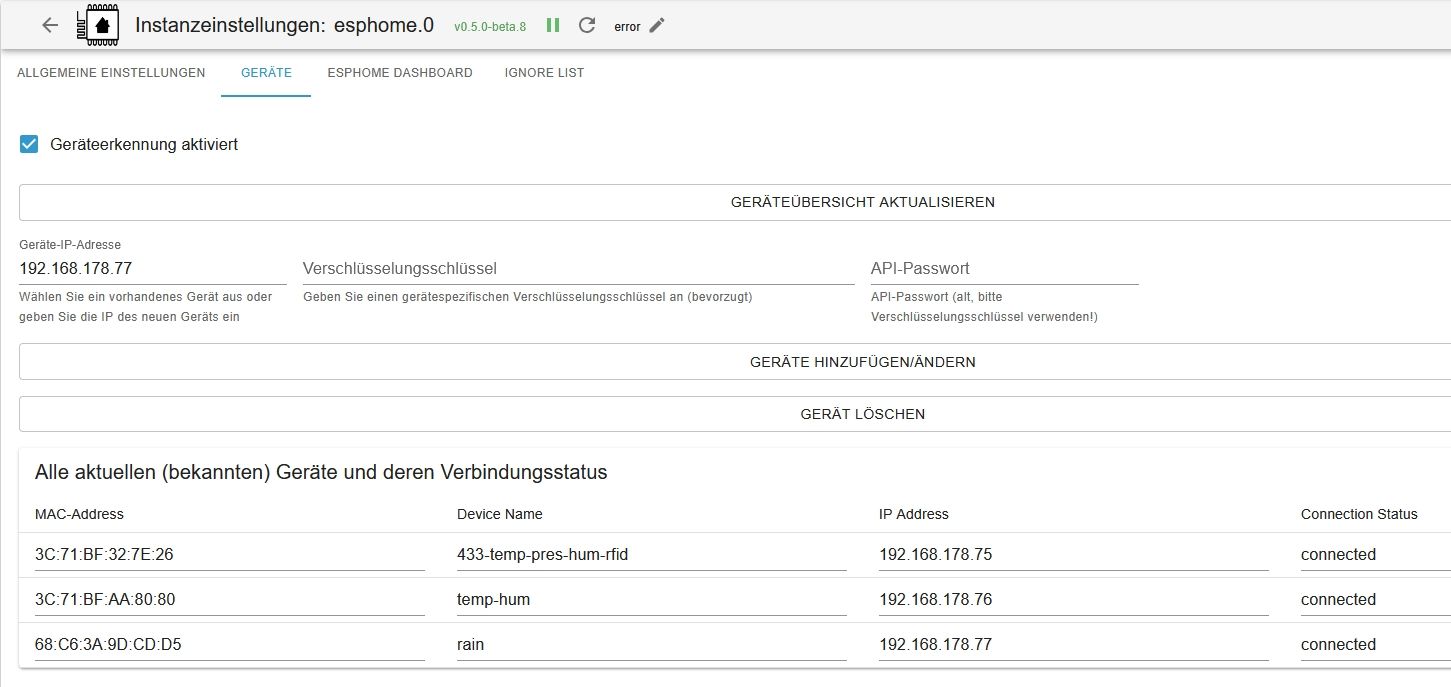
Die Geräte werden erkannt und die Daten sind O.K., ich komme nur nicht in die Entwicklerkonsole (Dashboard) um bestimmte Änderungen in den ESP-Geräten durzuführen. Rufe ich das Dashboard falsch auf??
-
@simon42 Welche Version hast Du installiert?
Habe im Moment wieder auf 0.5.0 Beta 8 umgestellt. Macht immer noch bei Aufruf die Fehlermeldung
Die Geräte werden erkannt und die Daten sind O.K., ich komme nur nicht in die Entwicklerkonsole (Dashboard) um bestimmte Änderungen in den ESP-Geräten durzuführen. Rufe ich das Dashboard falsch auf??
@tontechniker Ich verwend neuste 0.6.2.
Am dashboard ändert das nix, ob jetzt neue oder alte beta 8.Hast eventuell auch paar infos aus dem iobroker log, was der Fehler sein koennte

und eh mal kurz gewartet nach Start? Beim 1. Start / Dashboard version wechsel muss er das dashboard erst herunterladen - kann kurz daueren ...


Hey! Du scheinst an dieser Unterhaltung interessiert zu sein, hast aber noch kein Konto.
Hast du es satt, bei jedem Besuch durch die gleichen Beiträge zu scrollen? Wenn du dich für ein Konto anmeldest, kommst du immer genau dorthin zurück, wo du zuvor warst, und kannst dich über neue Antworten benachrichtigen lassen (entweder per E-Mail oder Push-Benachrichtigung). Du kannst auch Lesezeichen speichern und Beiträge positiv bewerten, um anderen Community-Mitgliedern deine Wertschätzung zu zeigen.
Mit deinem Input könnte dieser Beitrag noch besser werden 💗
Registrieren AnmeldenSupport us
355
Online33.1k
Benutzende83.7k
Themen1.3m
Beiträge