



Skip to content
  • Home
  • Aktuell
  • Tags
  • 0 Ungelesen 0
  • Kategorien
  • Unreplied
  • Beliebt
  • GitHub
  • Docu
  • Hilfe
Skins
  • Light
  • Brite
  • Cerulean
  • Cosmo
  • Flatly
  • Journal
  • Litera
  • Lumen
  • Lux
  • Materia
  • Minty
  • Morph
  • Pulse
  • Sandstone
  • Simplex
  • Sketchy
  • Spacelab
  • United
  • Yeti
  • Zephyr
  • Dark
  • Cyborg
  • Darkly
  • Quartz
  • Slate
  • Solar
  • Superhero
  • Vapor

  • Standard: (Kein Skin)
  • Kein Skin
Einklappen
ioBroker Logo

Community Forum

donate donate
  1. ioBroker Community Home
  2. Deutsch
  3. Error/Bug
  4. Fehler beim Start Javascript nach Neuinstallation

NEWS

  • UPDATE 31.10.: Amazon Alexa - ioBroker Skill läuft aus ?
    apollon77A
    apollon77
    48
    3
    8.9k

  • Monatsrückblick – September 2025
    BluefoxB
    Bluefox
    13
    1
    2.3k

  • Neues Video "KI im Smart Home" - ioBroker plus n8n
    BluefoxB
    Bluefox
    16
    1
    3.4k

Fehler beim Start Javascript nach Neuinstallation

Geplant Angeheftet Gesperrt Verschoben Error/Bug
51 Beiträge 5 Kommentatoren 4.4k Aufrufe 4 Watching
  • Älteste zuerst
  • Neuste zuerst
  • Meiste Stimmen
Antworten
  • In einem neuen Thema antworten
Anmelden zum Antworten
Dieses Thema wurde gelöscht. Nur Nutzer mit entsprechenden Rechten können es sehen.
  • OliverIOO OliverIO

    @matrose65

    Gemäß stackoverflow mach mal folgendes

    
    npm cache clear --force


    Wenn das nicht funktioniert, dann mal probieren die ganzen SSL Basis Zertifikate in deinem Image aktualisieren

    
    https://manpages.debian.org/buster/ca-certificates/update-ca-certificates.8.en.html


    Ich weiß ja nicht wie alt das Image ist beziehungsweise wann da das letzte Mal ein Update drüber gemacht worden ist

    Und natürlich auch in das Detaillog einmal reinschauen, eventuell gibt es da noch Hinweise

    M Offline
    M Offline
    matrose65
    schrieb am zuletzt editiert von
    #18

    @oliverio
    Ich habe jetzt das obere ausgeführt.
    Jetzt habe ich den Javascript Adapter ohne Probleme installiert und auch gestartet.
    Soll ich nochwas versuchen, bevor ich die Sicherung zurückspiele?

    OliverIOO 1 Antwort Letzte Antwort
    0
    • M matrose65

      @codierknecht
      Ja habe zugriff über SSL

      CodierknechtC Online
      CodierknechtC Online
      Codierknecht
      Developer Most Active
      schrieb am zuletzt editiert von
      #19

      @matrose65 sagte in Fehler beim Start Javascript nach Neuinstallation:

      Ja habe zugriff über SSL

      Nur so als Anmerkung:
      SSL im lokalen Netz ist eigentlich unnötig, solange das alles tatsächlich lokal bleibt. Eine Fehlerquelle weniger.
      Auch Authentifizierung am ioBroker in der Web-GUI kann man sich schenken, wenn nicht gerade irgendwelche Pupertisten im Haus sind die dem Vater gerne mal einen Streich spielen.

      "Any fool can write code that a computer can understand. Good programmers write code that humans can understand." (Martin Fowler, "Refactoring")

      Proxmox 9.1.1 LXC|8 GB|Core i7-6700
      HmIP|ZigBee|Tasmota|Unifi
      Zabbix Certified Specialist
      Konnte ich Dir helfen? Dann benutze bitte das Voting unten rechts im Beitrag

      M 1 Antwort Letzte Antwort
      0
      • CodierknechtC Codierknecht

        @matrose65 sagte in Fehler beim Start Javascript nach Neuinstallation:

        Ja habe zugriff über SSL

        Nur so als Anmerkung:
        SSL im lokalen Netz ist eigentlich unnötig, solange das alles tatsächlich lokal bleibt. Eine Fehlerquelle weniger.
        Auch Authentifizierung am ioBroker in der Web-GUI kann man sich schenken, wenn nicht gerade irgendwelche Pupertisten im Haus sind die dem Vater gerne mal einen Streich spielen.

        M Offline
        M Offline
        matrose65
        schrieb am zuletzt editiert von
        #20

        @codierknecht
        Ok Danke Ja es soll alles lokal bleiben.
        Und das mit den Pupertisten hat sich schon eine Weile erledigt

        CodierknechtC 1 Antwort Letzte Antwort
        0
        • M matrose65

          @codierknecht
          Ok Danke Ja es soll alles lokal bleiben.
          Und das mit den Pupertisten hat sich schon eine Weile erledigt

          CodierknechtC Online
          CodierknechtC Online
          Codierknecht
          Developer Most Active
          schrieb am zuletzt editiert von
          #21

          @matrose65 sagte in Fehler beim Start Javascript nach Neuinstallation:

          Ok Danke Ja es soll alles lokal bleiben.

          Dann kannst Du eigentlich auf SSL und Authentifizierung verzichten.
          Eine potenzielle Fehlerquelle weniger.

          Und das mit den Pupertisten hat sich schon eine Weile erledigt

          Hab' ich mir gedacht. Wir dürften den gleichen Jahrgang haben ;-)

          "Any fool can write code that a computer can understand. Good programmers write code that humans can understand." (Martin Fowler, "Refactoring")

          Proxmox 9.1.1 LXC|8 GB|Core i7-6700
          HmIP|ZigBee|Tasmota|Unifi
          Zabbix Certified Specialist
          Konnte ich Dir helfen? Dann benutze bitte das Voting unten rechts im Beitrag

          M 1 Antwort Letzte Antwort
          0
          • CodierknechtC Codierknecht

            @matrose65 sagte in Fehler beim Start Javascript nach Neuinstallation:

            Ok Danke Ja es soll alles lokal bleiben.

            Dann kannst Du eigentlich auf SSL und Authentifizierung verzichten.
            Eine potenzielle Fehlerquelle weniger.

            Und das mit den Pupertisten hat sich schon eine Weile erledigt

            Hab' ich mir gedacht. Wir dürften den gleichen Jahrgang haben ;-)

            M Offline
            M Offline
            matrose65
            schrieb am zuletzt editiert von
            #22

            @codierknecht
            Authentifizierung habe ich abgestellt bei SSL weis ich ehrlich nicht so richtig wie?

            Ansonsten läuft das backup gerade zurück. Mal sehen was wird

            Das mit dem Alter könnte laut deinem Bild passen ( 1965)

            CodierknechtC 1 Antwort Letzte Antwort
            0
            • M matrose65

              @codierknecht
              Authentifizierung habe ich abgestellt bei SSL weis ich ehrlich nicht so richtig wie?

              Ansonsten läuft das backup gerade zurück. Mal sehen was wird

              Das mit dem Alter könnte laut deinem Bild passen ( 1965)

              CodierknechtC Online
              CodierknechtC Online
              Codierknecht
              Developer Most Active
              schrieb am zuletzt editiert von
              #23

              @matrose65 sagte in Fehler beim Start Javascript nach Neuinstallation:

              bei SSL weis ich ehrlich nicht so richtig wie?
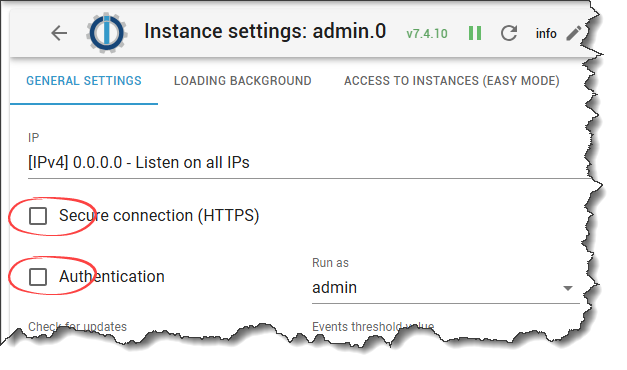
              435e9f63-d5f8-4137-b99b-d8280894d60c-image.png

              "Any fool can write code that a computer can understand. Good programmers write code that humans can understand." (Martin Fowler, "Refactoring")

              Proxmox 9.1.1 LXC|8 GB|Core i7-6700
              HmIP|ZigBee|Tasmota|Unifi
              Zabbix Certified Specialist
              Konnte ich Dir helfen? Dann benutze bitte das Voting unten rechts im Beitrag

              M 1 Antwort Letzte Antwort
              0
              • CodierknechtC Codierknecht

                @matrose65 sagte in Fehler beim Start Javascript nach Neuinstallation:

                bei SSL weis ich ehrlich nicht so richtig wie?

                435e9f63-d5f8-4137-b99b-d8280894d60c-image.png

                M Offline
                M Offline
                matrose65
                schrieb am zuletzt editiert von
                #24

                Ok das habe ich übersehen. Passt jetzt.

                Das Backup ist zurück gespielt und es läuft alles soweit. Auch javascript.

                Aber es ist immer nochwas nicht in Ordnung.
                Zweimal ist der IOB neugestartet, mit den Fehlermeldungen Code 7
                Bsp: instance system.adapter.wled.0 terminated with code 7 (ADAPTER_ALREADY_RUNNING)

                Danach sind alle Adapter wieder grün und es funktioniert alles.
                Das hatte ich voher auch schon immer mal, aber selten.
                Daher auch meine Idee das mit der SSD etwas nicht in Ordnung ist

                HomoranH 1 Antwort Letzte Antwort
                0
                • M matrose65

                  @oliverio
                  Ich habe jetzt das obere ausgeführt.
                  Jetzt habe ich den Javascript Adapter ohne Probleme installiert und auch gestartet.
                  Soll ich nochwas versuchen, bevor ich die Sicherung zurückspiele?

                  OliverIOO Offline
                  OliverIOO Offline
                  OliverIO
                  schrieb am zuletzt editiert von OliverIO
                  #25

                  @matrose65

                  Nein das war’s.
                  Entweder haben sich im Cache noch Pakete mit abweichender Signatur versteckt
                  Oder deine ssl Root Zertifikate waren veraltet, so das hier nicht überprüft werden konnte.
                  Ich gehe mal davon aus, das Iobroker per ssl hier keine Rolle gespielt hat.
                  Ich kenne mich jetzt mit proxmox nicht so aus, aber mal die Image Vorlagen von proxmox aktualisieren,

                  Meine Adapter und Widgets
                  TVProgram, SqueezeboxRPC, OpenLiga, RSSFeed, MyTime,, pi-hole2, vis-json-template, skiinfo, vis-mapwidgets, vis-2-widgets-rssfeed
                  Links im Profil

                  CodierknechtC 1 Antwort Letzte Antwort
                  0
                  • M matrose65

                    Ok das habe ich übersehen. Passt jetzt.

                    Das Backup ist zurück gespielt und es läuft alles soweit. Auch javascript.

                    Aber es ist immer nochwas nicht in Ordnung.
                    Zweimal ist der IOB neugestartet, mit den Fehlermeldungen Code 7
                    Bsp: instance system.adapter.wled.0 terminated with code 7 (ADAPTER_ALREADY_RUNNING)

                    Danach sind alle Adapter wieder grün und es funktioniert alles.
                    Das hatte ich voher auch schon immer mal, aber selten.
                    Daher auch meine Idee das mit der SSD etwas nicht in Ordnung ist

                    HomoranH Nicht stören
                    HomoranH Nicht stören
                    Homoran
                    Global Moderator Administrators
                    schrieb am zuletzt editiert von
                    #26

                    @matrose65 sagte in Fehler beim Start Javascript nach Neuinstallation:

                    Zweimal ist der IOB neugestartet, mit den Fehlermeldungen Code 7

                    das hat nichts mit der SSD zu tun, da lief noch ein alter Prozess, der aus irgendeinem Grund nicht korrekt beendet wurde bevor er wieder gestartet wurde.

                    kein Support per PN! - Fragen im Forum stellen - es gibt fast nichts, was nicht auch für andere interessant ist.

                    Benutzt das Voting rechts unten im Beitrag wenn er euch geholfen hat.

                    der Installationsfixer: curl -fsL https://iobroker.net/fix.sh | bash -

                    M 1 Antwort Letzte Antwort
                    0
                    • HomoranH Homoran

                      @matrose65 sagte in Fehler beim Start Javascript nach Neuinstallation:

                      Zweimal ist der IOB neugestartet, mit den Fehlermeldungen Code 7

                      das hat nichts mit der SSD zu tun, da lief noch ein alter Prozess, der aus irgendeinem Grund nicht korrekt beendet wurde bevor er wieder gestartet wurde.

                      M Offline
                      M Offline
                      matrose65
                      schrieb am zuletzt editiert von
                      #27

                      @homoran
                      Ok Danke. Kann ich dagegen was tun? Ich meine am Ende läuft ja alles wieder, das ist sicher nicht normal

                      HomoranH 1 Antwort Letzte Antwort
                      0
                      • M matrose65

                        @homoran
                        Ok Danke. Kann ich dagegen was tun? Ich meine am Ende läuft ja alles wieder, das ist sicher nicht normal

                        HomoranH Nicht stören
                        HomoranH Nicht stören
                        Homoran
                        Global Moderator Administrators
                        schrieb am zuletzt editiert von
                        #28

                        @matrose65 sagte in Fehler beim Start Javascript nach Neuinstallation:

                        Kann ich dagegen was tun

                        Wenn du es verursacht hast, indem du mit einem Neustart o.ä. nicht gewartet hast bis alle Prozesse vollständig beendet waren, ja: warten.
                        Ansonsten regelt das der Controller und wirft diese Meldung aus.

                        kein Support per PN! - Fragen im Forum stellen - es gibt fast nichts, was nicht auch für andere interessant ist.

                        Benutzt das Voting rechts unten im Beitrag wenn er euch geholfen hat.

                        der Installationsfixer: curl -fsL https://iobroker.net/fix.sh | bash -

                        M 1 Antwort Letzte Antwort
                        0
                        • HomoranH Homoran

                          @matrose65 sagte in Fehler beim Start Javascript nach Neuinstallation:

                          Kann ich dagegen was tun

                          Wenn du es verursacht hast, indem du mit einem Neustart o.ä. nicht gewartet hast bis alle Prozesse vollständig beendet waren, ja: warten.
                          Ansonsten regelt das der Controller und wirft diese Meldung aus.

                          M Offline
                          M Offline
                          matrose65
                          schrieb am zuletzt editiert von
                          #29

                          @homoran
                          Nein ich habe nichts neugestartet. Ich wollte eigentlich nur die LOGs runterladen.
                          Da wurde die Anzeige grau und dann starten alle Adapter neu

                          HomoranH 1 Antwort Letzte Antwort
                          0
                          • M matrose65

                            @homoran
                            Nein ich habe nichts neugestartet. Ich wollte eigentlich nur die LOGs runterladen.
                            Da wurde die Anzeige grau und dann starten alle Adapter neu

                            HomoranH Nicht stören
                            HomoranH Nicht stören
                            Homoran
                            Global Moderator Administrators
                            schrieb am zuletzt editiert von
                            #30

                            @matrose65 sagte in Fehler beim Start Javascript nach Neuinstallation:

                            starten alle Adapter neu

                            dann ist das die Ursache.

                            @matrose65 sagte in Fehler beim Start Javascript nach Neuinstallation:

                            wollte eigentlich nur die LOGs runterladen.
                            Da wurde die Anzeige grau

                            das sollte nicht sein.

                            Wie ausgelastet ist dein Server?

                            gsnz frisches, aktuelles iob diag in der Langfassung könnte etwas wissen

                            kein Support per PN! - Fragen im Forum stellen - es gibt fast nichts, was nicht auch für andere interessant ist.

                            Benutzt das Voting rechts unten im Beitrag wenn er euch geholfen hat.

                            der Installationsfixer: curl -fsL https://iobroker.net/fix.sh | bash -

                            M 1 Antwort Letzte Antwort
                            0
                            • OliverIOO OliverIO

                              @matrose65

                              Nein das war’s.
                              Entweder haben sich im Cache noch Pakete mit abweichender Signatur versteckt
                              Oder deine ssl Root Zertifikate waren veraltet, so das hier nicht überprüft werden konnte.
                              Ich gehe mal davon aus, das Iobroker per ssl hier keine Rolle gespielt hat.
                              Ich kenne mich jetzt mit proxmox nicht so aus, aber mal die Image Vorlagen von proxmox aktualisieren,

                              CodierknechtC Online
                              CodierknechtC Online
                              Codierknecht
                              Developer Most Active
                              schrieb am zuletzt editiert von
                              #31

                              @oliverio sagte in Fehler beim Start Javascript nach Neuinstallation:

                              Ich gehe mal davon aus, das Iobroker per ssl hier keine Rolle gespielt hat.

                              Ich auch. Wollte es nur angemerkt haben.
                              KISS ... Keep it simple, stupid. Alle unnötigen Fehlerquellen ausschließen.

                              "Any fool can write code that a computer can understand. Good programmers write code that humans can understand." (Martin Fowler, "Refactoring")

                              Proxmox 9.1.1 LXC|8 GB|Core i7-6700
                              HmIP|ZigBee|Tasmota|Unifi
                              Zabbix Certified Specialist
                              Konnte ich Dir helfen? Dann benutze bitte das Voting unten rechts im Beitrag

                              1 Antwort Letzte Antwort
                              0
                              • HomoranH Homoran

                                @matrose65 sagte in Fehler beim Start Javascript nach Neuinstallation:

                                starten alle Adapter neu

                                dann ist das die Ursache.

                                @matrose65 sagte in Fehler beim Start Javascript nach Neuinstallation:

                                wollte eigentlich nur die LOGs runterladen.
                                Da wurde die Anzeige grau

                                das sollte nicht sein.

                                Wie ausgelastet ist dein Server?

                                gsnz frisches, aktuelles iob diag in der Langfassung könnte etwas wissen

                                M Offline
                                M Offline
                                matrose65
                                schrieb am zuletzt editiert von matrose65
                                #32

                                @homoran
                                Hier die iodiag ausgabe

                                Copy text starting here:
                                
                                ```bash
                                ======================= SUMMARY =======================
                                                        v.2025-02-02
                                
                                
                                *** LIFE CYCLE STATUS ***
                                Operating System is the current Debian stable version codenamed 'bookworm'!
                                
                                *** TIME AND TIMEZONES ***
                                               Local time: Tue 2025-02-04 10:38:49 CET
                                           Universal time: Tue 2025-02-04 09:38:49 UTC
                                                 RTC time: Tue 2025-02-04 09:38:49
                                                Time zone: Europe/Berlin (CET, +0100)
                                System clock synchronized: yes
                                              NTP service: active
                                          RTC in local TZ: no
                                
                                *** Users and Groups ***
                                User that called 'iob diag':
                                uwe
                                HOME=/home/uwe
                                GROUPS=uwe cdrom floppy sudo audio dip video plugdev users netdev iobroker
                                
                                User that is running 'js-controller':
                                iobroker
                                HOME=/home/iobroker
                                GROUPS=iobroker tty dialout audio video plugdev
                                
                                *** DISPLAY-SERVER SETUP ***
                                Display-Server: false
                                Desktop:
                                Terminal:       tty
                                
                                *** MEMORY ***
                                               total        used        free      shared  buff/cache   available
                                Mem:             12G        2.1G        6.8G        573K        4.0G         10G
                                Swap:           1.0G          0B        1.0G
                                Total:           13G        2.1G        7.8G
                                
                                Active iob-Instances:   21
                                
                                        11960 M total memory
                                         1977 M used memory
                                          550 M active memory
                                         4552 M inactive memory
                                         6449 M free memory
                                           92 M buffer memory
                                         3756 M swap cache
                                          974 M total swap
                                            0 M used swap
                                          974 M free swap
                                
                                *** top - Table Of Processes  ***
                                top - 10:38:49 up  1:35,  3 users,  load average: 0.16, 0.08, 0.08
                                Tasks: 125 total,   1 running, 123 sleeping,   1 stopped,   0 zombie
                                %Cpu(s):  0.0 us, 50.0 sy,  0.0 ni, 50.0 id,  0.0 wa,  0.0 hi,  0.0 si,  0.0 st
                                MiB Mem :  11960.7 total,   6449.2 free,   1977.0 used,   3849.1 buff/cache
                                MiB Swap:    975.0 total,    975.0 free,      0.0 used.   9983.7 avail Mem
                                
                                *** FAILED SERVICES ***
                                
                                  UNIT LOAD ACTIVE SUB DESCRIPTION
                                0 loaded units listed.
                                
                                
                                *** DMESG CRITICAL ERRORS ***
                                No critical errors detected
                                
                                *** FILESYSTEM ***
                                Filesystem     Type      Size  Used Avail Use% Mounted on
                                udev           devtmpfs  5.9G     0  5.9G   0% /dev
                                tmpfs          tmpfs     1.2G  560K  1.2G   1% /run
                                /dev/sda1      ext4       27G  6.2G   19G  25% /
                                tmpfs          tmpfs     5.9G     0  5.9G   0% /dev/shm
                                tmpfs          tmpfs     5.0M     0  5.0M   0% /run/lock
                                tmpfs          tmpfs     1.2G     0  1.2G   0% /run/user/1000
                                
                                Messages concerning ext4 filesystem in dmesg:
                                [Tue Feb  4 09:03:14 2025] EXT4-fs (sda1): mounted filesystem with ordered data mode. Quota mode: none.
                                [Tue Feb  4 09:03:15 2025] EXT4-fs (sda1): re-mounted. Quota mode: none.
                                
                                Show mounted filesystems:
                                TARGET SOURCE    FSTYPE OPTIONS
                                /      /dev/sda1 ext4   rw,relatime,errors=remount-ro
                                
                                Files in neuralgic directories:
                                
                                /var:
                                461M    /var/
                                248M    /var/cache
                                241M    /var/cache/apt
                                174M    /var/lib
                                165M    /var/cache/apt/archives
                                
                                Hint: You are currently not seeing messages from other users and the system.
                                      Users in groups 'adm', 'systemd-journal' can see all messages.
                                      Pass -q to turn off this notice.
                                Archived and active journals take up 8.0M in the file system.
                                
                                /opt/iobroker/backups:
                                12M     /opt/iobroker/backups/
                                
                                /opt/iobroker/iobroker-data:
                                1.2G    /opt/iobroker/iobroker-data/files
                                1.2G    /opt/iobroker/iobroker-data/
                                617M    /opt/iobroker/iobroker-data/files/javascript.admin
                                560M    /opt/iobroker/iobroker-data/files/javascript.admin/static
                                558M    /opt/iobroker/iobroke Static hostname: iobroker
                                       Icon name: computer-vm
                                         Chassis: vm 🖴
                                  Virtualization: kvm
                                Operating System: Debian GNU/Linux 12 (bookworm)
                                          Kernel: Linux 6.1.0-30-amd64
                                    Architecture: x86-64
                                 Hardware Vendor: QEMU
                                  Hardware Model: Standard PC _i440FX + PIIX, 1996_
                                Firmware Version: rel-1.16.3-0-ga6ed6b701f0a-prebuilt.qemu.org
                                
                                Installation:           kvm
                                Kernel:                 x86_64
                                Userland:               64 bit
                                Timezone:               Europe/Berlin (CET, +0100)
                                User-ID:                1000
                                Display-Server:         false
                                Boot Target:            multi-user.target
                                
                                Pending OS-Updates:     0
                                Pending iob updates:    0
                                
                                Nodejs-Installation:
                                /usr/bin/nodejs         v20.18.2
                                /usr/bin/node           v20.18.2
                                /usr/bin/npm            10.8.2
                                /usr/bin/npx            10.8.2
                                /usr/bin/corepack       0.29.4
                                
                                Recommended versions are nodejs 20.18.2 and npm 10.8.2
                                nodeJS installation is correct
                                
                                MEMORY:
                                               total        used        free      shared  buff/cache   available
                                Mem:             12G        2.1G        6.6G        573K        4.2G         10G
                                Swap:           1.0G          0B        1.0G
                                Total:           13G        2.1G        7.6G
                                
                                Active iob-Instances:   21
                                Upgrade policy: none
                                
                                ioBroker Core:          js-controller           7.0.6
                                                        admin                   7.4.10
                                
                                ioBroker Status:        iobroker is running on this host.
                                
                                
                                Objects type: jsonl
                                States  type: jsonl
                                
                                Status admin and web instance:
                                + system.adapter.admin.0                  : admin                 : iobroker                                 -  enabled, port: 8081, bind: 192.168.1.13, run as: admin
                                + system.adapter.web.0                    : web                   : iobroker                                 -  enabled, port: 8083, bind: 0.0.0.0, run as: admin
                                
                                Objects:                8060
                                States:                 6994
                                
                                Size of iob-Database:
                                
                                38M     /opt/iobroker/iobroker-data/objects.jsonl
                                17M     /opt/iobroker/iobroker-data/states.jsonl
                                
                                
                                Operating System is the current Debian stable version codenamed 'bookworm'!
                                
                                =================== END OF SUMMARY ====================
                                
                                M 1 Antwort Letzte Antwort
                                0
                                • M matrose65

                                  @homoran
                                  Hier die iodiag ausgabe

                                  Copy text starting here:
                                  
                                  ```bash
                                  ======================= SUMMARY =======================
                                                          v.2025-02-02
                                  
                                  
                                  *** LIFE CYCLE STATUS ***
                                  Operating System is the current Debian stable version codenamed 'bookworm'!
                                  
                                  *** TIME AND TIMEZONES ***
                                                 Local time: Tue 2025-02-04 10:38:49 CET
                                             Universal time: Tue 2025-02-04 09:38:49 UTC
                                                   RTC time: Tue 2025-02-04 09:38:49
                                                  Time zone: Europe/Berlin (CET, +0100)
                                  System clock synchronized: yes
                                                NTP service: active
                                            RTC in local TZ: no
                                  
                                  *** Users and Groups ***
                                  User that called 'iob diag':
                                  uwe
                                  HOME=/home/uwe
                                  GROUPS=uwe cdrom floppy sudo audio dip video plugdev users netdev iobroker
                                  
                                  User that is running 'js-controller':
                                  iobroker
                                  HOME=/home/iobroker
                                  GROUPS=iobroker tty dialout audio video plugdev
                                  
                                  *** DISPLAY-SERVER SETUP ***
                                  Display-Server: false
                                  Desktop:
                                  Terminal:       tty
                                  
                                  *** MEMORY ***
                                                 total        used        free      shared  buff/cache   available
                                  Mem:             12G        2.1G        6.8G        573K        4.0G         10G
                                  Swap:           1.0G          0B        1.0G
                                  Total:           13G        2.1G        7.8G
                                  
                                  Active iob-Instances:   21
                                  
                                          11960 M total memory
                                           1977 M used memory
                                            550 M active memory
                                           4552 M inactive memory
                                           6449 M free memory
                                             92 M buffer memory
                                           3756 M swap cache
                                            974 M total swap
                                              0 M used swap
                                            974 M free swap
                                  
                                  *** top - Table Of Processes  ***
                                  top - 10:38:49 up  1:35,  3 users,  load average: 0.16, 0.08, 0.08
                                  Tasks: 125 total,   1 running, 123 sleeping,   1 stopped,   0 zombie
                                  %Cpu(s):  0.0 us, 50.0 sy,  0.0 ni, 50.0 id,  0.0 wa,  0.0 hi,  0.0 si,  0.0 st
                                  MiB Mem :  11960.7 total,   6449.2 free,   1977.0 used,   3849.1 buff/cache
                                  MiB Swap:    975.0 total,    975.0 free,      0.0 used.   9983.7 avail Mem
                                  
                                  *** FAILED SERVICES ***
                                  
                                    UNIT LOAD ACTIVE SUB DESCRIPTION
                                  0 loaded units listed.
                                  
                                  
                                  *** DMESG CRITICAL ERRORS ***
                                  No critical errors detected
                                  
                                  *** FILESYSTEM ***
                                  Filesystem     Type      Size  Used Avail Use% Mounted on
                                  udev           devtmpfs  5.9G     0  5.9G   0% /dev
                                  tmpfs          tmpfs     1.2G  560K  1.2G   1% /run
                                  /dev/sda1      ext4       27G  6.2G   19G  25% /
                                  tmpfs          tmpfs     5.9G     0  5.9G   0% /dev/shm
                                  tmpfs          tmpfs     5.0M     0  5.0M   0% /run/lock
                                  tmpfs          tmpfs     1.2G     0  1.2G   0% /run/user/1000
                                  
                                  Messages concerning ext4 filesystem in dmesg:
                                  [Tue Feb  4 09:03:14 2025] EXT4-fs (sda1): mounted filesystem with ordered data mode. Quota mode: none.
                                  [Tue Feb  4 09:03:15 2025] EXT4-fs (sda1): re-mounted. Quota mode: none.
                                  
                                  Show mounted filesystems:
                                  TARGET SOURCE    FSTYPE OPTIONS
                                  /      /dev/sda1 ext4   rw,relatime,errors=remount-ro
                                  
                                  Files in neuralgic directories:
                                  
                                  /var:
                                  461M    /var/
                                  248M    /var/cache
                                  241M    /var/cache/apt
                                  174M    /var/lib
                                  165M    /var/cache/apt/archives
                                  
                                  Hint: You are currently not seeing messages from other users and the system.
                                        Users in groups 'adm', 'systemd-journal' can see all messages.
                                        Pass -q to turn off this notice.
                                  Archived and active journals take up 8.0M in the file system.
                                  
                                  /opt/iobroker/backups:
                                  12M     /opt/iobroker/backups/
                                  
                                  /opt/iobroker/iobroker-data:
                                  1.2G    /opt/iobroker/iobroker-data/files
                                  1.2G    /opt/iobroker/iobroker-data/
                                  617M    /opt/iobroker/iobroker-data/files/javascript.admin
                                  560M    /opt/iobroker/iobroker-data/files/javascript.admin/static
                                  558M    /opt/iobroker/iobroke Static hostname: iobroker
                                         Icon name: computer-vm
                                           Chassis: vm 🖴
                                    Virtualization: kvm
                                  Operating System: Debian GNU/Linux 12 (bookworm)
                                            Kernel: Linux 6.1.0-30-amd64
                                      Architecture: x86-64
                                   Hardware Vendor: QEMU
                                    Hardware Model: Standard PC _i440FX + PIIX, 1996_
                                  Firmware Version: rel-1.16.3-0-ga6ed6b701f0a-prebuilt.qemu.org
                                  
                                  Installation:           kvm
                                  Kernel:                 x86_64
                                  Userland:               64 bit
                                  Timezone:               Europe/Berlin (CET, +0100)
                                  User-ID:                1000
                                  Display-Server:         false
                                  Boot Target:            multi-user.target
                                  
                                  Pending OS-Updates:     0
                                  Pending iob updates:    0
                                  
                                  Nodejs-Installation:
                                  /usr/bin/nodejs         v20.18.2
                                  /usr/bin/node           v20.18.2
                                  /usr/bin/npm            10.8.2
                                  /usr/bin/npx            10.8.2
                                  /usr/bin/corepack       0.29.4
                                  
                                  Recommended versions are nodejs 20.18.2 and npm 10.8.2
                                  nodeJS installation is correct
                                  
                                  MEMORY:
                                                 total        used        free      shared  buff/cache   available
                                  Mem:             12G        2.1G        6.6G        573K        4.2G         10G
                                  Swap:           1.0G          0B        1.0G
                                  Total:           13G        2.1G        7.6G
                                  
                                  Active iob-Instances:   21
                                  Upgrade policy: none
                                  
                                  ioBroker Core:          js-controller           7.0.6
                                                          admin                   7.4.10
                                  
                                  ioBroker Status:        iobroker is running on this host.
                                  
                                  
                                  Objects type: jsonl
                                  States  type: jsonl
                                  
                                  Status admin and web instance:
                                  + system.adapter.admin.0                  : admin                 : iobroker                                 -  enabled, port: 8081, bind: 192.168.1.13, run as: admin
                                  + system.adapter.web.0                    : web                   : iobroker                                 -  enabled, port: 8083, bind: 0.0.0.0, run as: admin
                                  
                                  Objects:                8060
                                  States:                 6994
                                  
                                  Size of iob-Database:
                                  
                                  38M     /opt/iobroker/iobroker-data/objects.jsonl
                                  17M     /opt/iobroker/iobroker-data/states.jsonl
                                  
                                  
                                  Operating System is the current Debian stable version codenamed 'bookworm'!
                                  
                                  =================== END OF SUMMARY ====================
                                  
                                  M Offline
                                  M Offline
                                  matrose65
                                  schrieb am zuletzt editiert von
                                  #33

                                  @matrose65
                                  Jetzt noch mal in Lang

                                  
                                  ========== Start marking the full check here ===========
                                  
                                  ```bash
                                  Script v.2025-02-02
                                  
                                  *** BASE SYSTEM ***
                                   Static hostname: iobroker
                                         Icon name: computer-vm
                                           Chassis: vm 🖴
                                    Virtualization: kvm
                                  Operating System: Debian GNU/Linux 12 (bookworm)
                                            Kernel: Linux 6.1.0-30-amd64
                                      Architecture: x86-64
                                   Hardware Vendor: QEMU
                                    Hardware Model: Standard PC _i440FX + PIIX, 1996_
                                  Firmware Version: rel-1.16.3-0-ga6ed6b701f0a-prebuilt.qemu.org
                                  OS is similar to:
                                  
                                  model name      : QEMU Virtual CPU version 2.5+
                                  Docker          : false
                                  Virtualization  : kvm
                                  Kernel          : x86_64
                                  Userland        : 64 bit
                                  
                                  Systemuptime and Load:
                                   10:47:34 up  1:44,  3 users,  load average: 0.00, 0.04, 0.07
                                  CPU threads: 4
                                  
                                  
                                  *** LIFE CYCLE STATUS ***
                                  Operating System is the current Debian stable version codenamed 'bookworm'!
                                  
                                  *** TIME AND TIMEZONES ***
                                                 Local time: Tue 2025-02-04 10:47:34 CET
                                             Universal time: Tue 2025-02-04 09:47:34 UTC
                                                   RTC time: Tue 2025-02-04 09:47:34
                                                  Time zone: Europe/Berlin (CET, +0100)
                                  System clock synchronized: yes
                                                NTP service: active
                                            RTC in local TZ: no
                                  
                                  *** Users and Groups ***
                                  User that called 'iob diag':
                                  uwe
                                  HOME=/home/uwe
                                  GROUPS=uwe cdrom floppy sudo audio dip video plugdev users netdev iobroker
                                  
                                  User that is running 'js-controller':
                                  iobroker
                                  HOME=/home/iobroker
                                  GROUPS=iobroker tty dialout audio video plugdev
                                  
                                  *** DISPLAY-SERVER SETUP ***
                                  Display-Server: false
                                  Desktop:
                                  Terminal:       tty
                                  
                                  *** MEMORY ***
                                                 total        used        free      shared  buff/cache   available
                                  Mem:             12G        2.1G        6.6G        573K        4.2G         10G
                                  Swap:           1.0G          0B        1.0G
                                  Total:           13G        2.1G        7.6G
                                  
                                  Active iob-Instances:   21
                                  
                                          11960 M total memory
                                           1980 M used memory
                                            655 M active memory
                                           4608 M inactive memory
                                           6299 M free memory
                                             96 M buffer memory
                                           3899 M swap cache
                                            974 M total swap
                                              0 M used swap
                                            974 M free swap
                                  
                                  *** top - Table Of Processes  ***
                                  top - 10:47:34 up  1:44,  3 users,  load average: 0.00, 0.04, 0.07
                                  Tasks: 126 total,   3 running, 122 sleeping,   1 stopped,   0 zombie
                                  %Cpu(s): 50.0 us,  0.0 sy,  0.0 ni, 50.0 id,  0.0 wa,  0.0 hi,  0.0 si,  0.0 st
                                  MiB Mem :  11960.7 total,   6299.3 free,   1980.0 used,   3995.9 buff/cache
                                  MiB Swap:    975.0 total,    975.0 free,      0.0 used.   9980.7 avail Mem
                                  
                                  *** FAILED SERVICES ***
                                  
                                    UNIT LOAD ACTIVE SUB DESCRIPTION
                                  0 loaded units listed.
                                  
                                  
                                  *** DMESG CRITICAL ERRORS ***
                                  No critical errors detected
                                  
                                  *** FILESYSTEM ***
                                  Filesystem     Type      Size  Used Avail Use% Mounted on
                                  udev           devtmpfs  5.9G     0  5.9G   0% /dev
                                  tmpfs          tmpfs     1.2G  560K  1.2G   1% /run
                                  /dev/sda1      ext4       27G  6.2G   19G  25% /
                                  tmpfs          tmpfs     5.9G     0  5.9G   0% /dev/shm
                                  tmpfs          tmpfs     5.0M     0  5.0M   0% /run/lock
                                  tmpfs          tmpfs     1.2G     0  1.2G   0% /run/user/1000
                                  
                                  Messages concerning ext4 filesystem in dmesg:
                                  [Tue Feb  4 09:03:14 2025] EXT4-fs (sda1): mounted filesystem with ordered data mode. Quota mode: none.
                                  [Tue Feb  4 09:03:15 2025] EXT4-fs (sda1): re-mounted. Quota mode: none.
                                  
                                  Show mounted filesystems:
                                  TARGET SOURCE    FSTYPE OPTIONS
                                  /      /dev/sda1 ext4   rw,relatime,errors=remount-ro
                                  
                                  Files in neuralgic directories:
                                  
                                  /var:
                                  461M    /var/
                                  248M    /var/cache
                                  241M    /var/cache/apt
                                  174M    /var/lib
                                  165M    /var/cache/apt/archives
                                  
                                  Hint: You are currently not seeing messages from other users and the system.
                                        Users in groups 'adm', 'systemd-journal' can see all messages.
                                        Pass -q to turn off this notice.
                                  Archived and active journals take up 8.0M in the file system.
                                  
                                  /opt/iobroker/backups:
                                  12M     /opt/iobroker/backups/
                                  
                                  /opt/iobroker/iobroker-data:
                                  1.2G    /opt/iobroker/iobroker-data/files
                                  1.2G    /opt/iobroker/iobroker-data/
                                  617M    /opt/iobroker/iobroker-data/files/javascript.admin
                                  560M    /opt/iobroker/iobroker-data/files/javascript.admin/static
                                  558M    /opt/iobroker/iobroker-data/files/javascript.admin/static/js
                                  
                                  The five largest files in iobroker-data are:
                                  38M     /opt/iobroker/iobroker-data/objects.jsonl
                                  35M     /opt/iobroker/iobroker-data/files/devices.admin/static/js/main.24f2bb56.js.map
                                  27M     /opt/iobroker/iobroker-data/files/tankerkoenig.admin/build/index.js.map
                                  24M     /opt/iobroker/iobroker-data/files/scenes.admin/static/js/main.c9369f6c.js.map
                                  19M     /opt/iobroker/iobroker-data/files/web.admin/static/js/main.1d90720e.js.map
                                  
                                  USB-Devices by-id:
                                  USB-Sticks -  Avoid direct links to /dev/tty* in your adapter setups, please always prefer the links 'by-id':
                                  
                                  /dev/serial/by-id/usb-Silicon_Labs_Sonoff_Zigbee_3.0_USB_Dongle_Plus_0001-if00-port0
                                  
                                  Your zigbee.0 COM-Port is matching 'by-id'. Very good!
                                  
                                  *** NodeJS-Installation ***
                                  
                                  /usr/bin/nodejs         v20.18.2
                                  /usr/bin/node           v20.18.2
                                  /usr/bin/npm            10.8.2
                                  /usr/bin/npx            10.8.2
                                  /usr/bin/corepack       0.29.4
                                  
                                  nodejs:
                                    Installed: 20.18.2-1nodesource1
                                    Candidate: 20.18.2-1nodesource1
                                    Version table:
                                   *** 20.18.2-1nodesource1 1001
                                          500 https://deb.nodesource.com/node_20.x nodistro/main amd64 Packages
                                          100 /var/lib/dpkg/status
                                       20.18.1-1nodesource1 1001
                                          500 https://deb.nodesource.com/node_20.x nodistro/main amd64 Packages
                                       20.18.0-1nodesource1 1001
                                          500 https://deb.nodesource.com/node_20.x nodistro/main amd64 Packages
                                       20.17.0-1nodesource1 1001
                                          500 https://deb.nodesource.com/node_20.x nodistro/main amd64 Packages
                                       20.16.0-1nodesource1 1001
                                          500 https://deb.nodesource.com/node_20.x nodistro/main amd64 Packages
                                       20.15.1-1nodesource1 1001
                                          500 https://deb.nodesource.com/node_20.x nodistro/main amd64 Packages
                                       20.15.0-1nodesource1 1001
                                          500 https://deb.nodesource.com/node_20.x nodistro/main amd64 Packages
                                       20.14.0-1nodesource1 1001
                                          500 https://deb.nodesource.com/node_20.x nodistro/main amd64 Packages
                                       20.13.1-1nodesource1 1001
                                          500 https://deb.nodesource.com/node_20.x nodistro/main amd64 Packages
                                       20.13.0-1nodesource1 1001
                                          500 https://deb.nodesource.com/node_20.x nodistro/main amd64 Packages
                                       20.12.2-1nodesource1 1001
                                          500 https://deb.nodesource.com/node_20.x nodistro/main amd64 Packages
                                       20.12.1-1nodesource1 1001
                                          500 https://deb.nodesource.com/node_20.x nodistro/main amd64 Packages
                                       20.12.0-1nodesource1 1001
                                          500 https://deb.nodesource.com/node_20.x nodistro/main amd64 Packages
                                       20.11.1-1nodesource1 1001
                                          500 https://deb.nodesource.com/node_20.x nodistro/main amd64 Packages
                                       20.11.0-1nodesource1 1001
                                          500 https://deb.nodesource.com/node_20.x nodistro/main amd64 Packages
                                       20.10.0-1nodesource1 1001
                                          500 https://deb.nodesource.com/node_20.x nodistro/main amd64 Packages
                                       20.9.0-1nodesource1 1001
                                          500 https://deb.nodesource.com/node_20.x nodistro/main amd64 Packages
                                       20.8.1-1nodesource1 1001
                                          500 https://deb.nodesource.com/node_20.x nodistro/main amd64 Packages
                                       20.8.0-1nodesource1 1001
                                          500 https://deb.nodesource.com/node_20.x nodistro/main amd64 Packages
                                       20.7.0-1nodesource1 1001
                                          500 https://deb.nodesource.com/node_20.x nodistro/main amd64 Packages
                                       20.6.1-1nodesource1 1001
                                          500 https://deb.nodesource.com/node_20.x nodistro/main amd64 Packages
                                       20.6.0-1nodesource1 1001
                                          500 https://deb.nodesource.com/node_20.x nodistro/main amd64 Packages
                                       20.5.1-1nodesource1 1001
                                          500 https://deb.nodesource.com/node_20.x nodistro/main amd64 Packages
                                       20.5.0-1nodesource1 1001
                                          500 https://deb.nodesource.com/node_20.x nodistro/main amd64 Packages
                                       20.4.0-1nodesource1 1001
                                          500 https://deb.nodesource.com/node_20.x nodistro/main amd64 Packages
                                       20.3.1-1nodesource1 1001
                                          500 https://deb.nodesource.com/node_20.x nodistro/main amd64 Packages
                                       20.3.0-1nodesource1 1001
                                          500 https://deb.nodesource.com/node_20.x nodistro/main amd64 Packages
                                       20.2.0-1nodesource1 1001
                                          500 https://deb.nodesource.com/node_20.x nodistro/main amd64 Packages
                                       20.1.0-1nodesource1 1001
                                          500 https://deb.nodesource.com/node_20.x nodistro/main amd64 Packages
                                       20.0.0-1nodesource1 1001
                                          500 https://deb.nodesource.com/node_20.x nodistro/main amd64 Packages
                                       18.19.0+dfsg-6~deb12u2 500
                                          500 http://deb.debian.org/debian bookworm/main amd64 Packages
                                       18.19.0+dfsg-6~deb12u1 500
                                          500 http://security.debian.org/debian-security bookworm-security/main amd64 Packages
                                  
                                  Temp directories causing deletion problem: 0
                                  No problems detected
                                  
                                  Errors in npm tree: 0
                                  No problems detected
                                  
                                  *** ioBroker-Installation ***
                                  
                                  ioBroker Status
                                  iobroker is running on this host.
                                  
                                  
                                  Objects type: jsonl
                                  States  type: jsonl
                                  
                                  Hosts:
                                  iobroker            iobroker (version: 7.0.6, hostname: iobroker      , alive, uptime: 2882)
                                  
                                  Core adapters versions
                                  js-controller:  7.0.6
                                  admin:          7.4.10
                                  javascript:     8.8.3
                                  
                                  nodejs modules from github:     0
                                  
                                  Adapter State
                                  + system.adapter.accuweather.0            : accuweather           : iobroker                                 -  enabled
                                  + system.adapter.admin.0                  : admin                 : iobroker                                 -  enabled, port: 8081, bind: 192.168.1.13, run as: admin
                                  + system.adapter.backitup.0               : backitup              : iobroker                                 -  enabled
                                    system.adapter.bmw.0                    : bmw                   : iobroker                                 - disabled
                                    system.adapter.daswetter.0              : daswetter             : iobroker                                 -  enabled
                                    system.adapter.devices.0                : devices               : iobroker                                 - disabled
                                    system.adapter.dwd.0                    : dwd                   : iobroker                                 -  enabled
                                    system.adapter.feiertage.0              : feiertage             : iobroker                                 -  enabled
                                  + system.adapter.fullybrowser.0           : fullybrowser          : iobroker                                 -  enabled
                                  + system.adapter.history.0                : history               : iobroker                                 -  enabled
                                  + system.adapter.hm-rega.0                : hm-rega               : iobroker                                 -  enabled
                                  + system.adapter.hm-rpc.0                 : hm-rpc                : iobroker                                 -  enabled, port: 8081
                                    system.adapter.ical.0                   : ical                  : iobroker                                 -  enabled
                                    system.adapter.ical.1                   : ical                  : iobroker                                 -  enabled
                                    system.adapter.ical.2                   : ical                  : iobroker                                 -  enabled
                                    system.adapter.ical.3                   : ical                  : iobroker                                 -  enabled
                                    system.adapter.icons-material-png.0     : icons-material-png    : iobroker                                 - disabled
                                  + system.adapter.javascript.0             : javascript            : iobroker                                 -  enabled
                                  + system.adapter.mqtt.0                   : mqtt                  : iobroker                                 -  enabled, port: 1888, bind: 0.0.0.0
                                    system.adapter.netatmo-crawler.0        : netatmo-crawler       : iobroker                                 -  enabled
                                    system.adapter.roborock.0               : roborock              : iobroker                                 - disabled
                                  + system.adapter.scenes.0                 : scenes                : iobroker                                 -  enabled
                                  + system.adapter.shelly.1                 : shelly                : iobroker                                 -  enabled, port: 1882, bind: 0.0.0.0
                                  + system.adapter.shelly.2                 : shelly                : iobroker                                 -  enabled, port: 1882, bind: 0.0.0.0
                                  + system.adapter.sonos.0                  : sonos                 : iobroker                                 -  enabled
                                    system.adapter.sourceanalytix.0         : sourceanalytix        : iobroker                                 - disabled
                                  + system.adapter.tankerkoenig.0           : tankerkoenig          : iobroker                                 -  enabled
                                  + system.adapter.tr-064.0                 : tr-064                : iobroker                                 -  enabled
                                  + system.adapter.unifi.0                  : unifi                 : iobroker                                 -  enabled
                                    system.adapter.vis-2-widgets-energy.0   : vis-2-widgets-energy  : iobroker                                 - disabled
                                    system.adapter.vis-2-widgets-gauges.0   : vis-2-widgets-gauges  : iobroker                                 - disabled
                                    system.adapter.vis-2-widgets-inventwo.0 : vis-2-widgets-inventwo: iobroker                                 - disabled
                                    system.adapter.vis-2-widgets-material.0 : vis-2-widgets-material: iobroker                                 - disabled
                                  + system.adapter.vis-2.0                  : vis-2                 : iobroker                                 -  enabled
                                    system.adapter.vis-icontwo.0            : vis-icontwo           : iobroker                                 - disabled
                                  + system.adapter.web.0                    : web                   : iobroker                                 -  enabled, port: 8083, bind: 0.0.0.0, run as: admin
                                  + system.adapter.wled.0                   : wled                  : iobroker                                 -  enabled
                                    system.adapter.worx.0                   : worx                  : iobroker                                 - disabled
                                  + system.adapter.zigbee.0                 : zigbee                : iobroker                                 -  enabled, port: /dev/serial/by-id/usb-Silicon_Labs_Sonoff_Zigbee_3.0_USB_Dongle_Plus_0001-if00-port0
                                  
                                  + instance is alive
                                  
                                  Enabled adapters with bindings
                                  + system.adapter.admin.0                  : admin                 : iobroker                                 -  enabled, port: 8081, bind: 192.168.1.13, run as: admin
                                  + system.adapter.hm-rpc.0                 : hm-rpc                : iobroker                                 -  enabled, port: 8081
                                  + system.adapter.mqtt.0                   : mqtt                  : iobroker                                 -  enabled, port: 1888, bind: 0.0.0.0
                                  + system.adapter.shelly.1                 : shelly                : iobroker                                 -  enabled, port: 1882, bind: 0.0.0.0
                                  + system.adapter.shelly.2                 : shelly                : iobroker                                 -  enabled, port: 1882, bind: 0.0.0.0
                                  + system.adapter.web.0                    : web                   : iobroker                                 -  enabled, port: 8083, bind: 0.0.0.0, run as: admin
                                  + system.adapter.zigbee.0                 : zigbee                : iobroker                                 -  enabled, port: /dev/serial/by-id/usb-Silicon_Labs_Sonoff_Zigbee_3.0_USB_Dongle_Plus_0001-if00-port0
                                  
                                  ioBroker-Repositories
                                  ┌─────────┬──────────┬─────────────────────────────────────────────────────────┬──────────────┐
                                  │ (index) │ name     │ url                                                     │ auto upgrade │
                                  ├─────────┼──────────┼─────────────────────────────────────────────────────────┼──────────────┤
                                  │ 0       │ 'stable' │ 'http://download.iobroker.net/sources-dist.json'        │ false        │
                                  │ 1       │ 'beta'   │ 'http://download.iobroker.net/sources-dist-latest.json' │ false        │
                                  └─────────┴──────────┴─────────────────────────────────────────────────────────┴──────────────┘
                                  
                                  Active repo(s): stable
                                  Upgrade policy: none
                                  
                                  Installed ioBroker-Instances
                                  Used repository: stable
                                  Adapter    "accuweather"  : 1.5.0    , installed 1.5.0
                                  Adapter    "admin"        : 7.4.10   , installed 7.4.10
                                  Adapter    "backitup"     : 3.0.31   , installed 3.0.31
                                  Adapter    "daswetter"    : 3.2.2    , installed 3.2.2
                                  Adapter    "devices"      : 1.1.5    , installed 1.1.5
                                  Adapter    "dwd"          : 2.8.5    , installed 2.8.5
                                  Adapter    "feiertage"    : 1.2.1    , installed 1.2.1
                                  Adapter    "fullybrowser" : 3.0.12   , installed 3.0.12
                                  Adapter    "history"      : 3.0.1    , installed 3.0.1
                                  Adapter    "hm-rega"      : 5.1.0    , installed 5.1.0
                                  Adapter    "hm-rpc"       : 2.0.2    , installed 2.0.2
                                  Adapter    "ical"         : 1.16.1   , installed 1.16.1
                                  Adapter    "icons-material-png": 0.1.0, installed 0.1.0
                                  Adapter    "javascript"   : 8.8.3    , installed 8.8.3
                                  Controller "js-controller": 7.0.6    , installed 7.0.6
                                  Adapter    "mqtt"         : 6.1.2    , installed 6.1.2
                                  Adapter    "netatmo-crawler": 0.8.1  , installed 0.8.1
                                  Adapter    "roborock"     : 0.6.18   , installed 0.6.18
                                  Adapter    "scenes"       : 3.2.3    , installed 3.2.3
                                  Adapter    "shelly"       : 8.5.1    , installed 8.5.1
                                  Adapter    "simple-api"   : 2.8.0    , installed 2.8.0
                                  Adapter    "socketio"     : 6.7.1    , installed 6.7.1
                                  Adapter    "sonos"        : 3.0.0    , installed 3.0.0
                                  Adapter    "tankerkoenig" : 3.4.0    , installed 3.4.0
                                  Adapter    "tr-064"       : 4.3.0    , installed 4.3.0
                                  Adapter    "unifi"        : 0.7.0    , installed 0.7.0
                                  Adapter    "vis-2"        : 2.9.64   , installed 2.11.2
                                  Adapter    "vis-2-widgets-energy": 1.0.2, installed 1.0.2
                                  Adapter    "vis-2-widgets-gauges": 1.1.0, installed 1.1.0
                                  Adapter    "vis-2-widgets-inventwo": 0.1.11, installed 0.1.11
                                  Adapter    "vis-2-widgets-material": 1.4.10, installed 1.4.10
                                  Adapter    "vis-icontwo"  : 1.11.0   , installed 1.11.0
                                  Adapter    "web"          : 6.2.5    , installed 6.3.0
                                  Adapter    "wled"         : 0.7.2    , installed 0.7.2
                                  Adapter    "worx"         : 3.1.1    , installed 3.1.1
                                  Adapter    "ws"           : 2.6.2    , installed 2.6.2
                                  Adapter    "zigbee"       : 1.10.14  , installed 1.10.14
                                  
                                  Objects and States
                                  Please stand by - This may take a while
                                  Objects:        8060
                                  States:         6994
                                  
                                  *** OS-Repositories and Updates ***
                                  Hit:1 http://deb.debian.org/debian bookworm InRelease
                                  Hit:2 http://security.debian.org/debian-security bookworm-security InRelease
                                  Hit:3 http://deb.debian.org/debian bookworm-updates InRelease
                                  Hit:4 https://deb.nodesource.com/node_20.x nodistro InRelease
                                  Reading package lists...
                                  Pending Updates: 0
                                  
                                  *** Listening Ports ***
                                  Active Internet connections (only servers)
                                  Proto Recv-Q Send-Q Local Address           Foreign Address         State       User       Inode      PID/Program name
                                  tcp        0      0 192.168.1.13:8082       0.0.0.0:*               LISTEN      1001       30623      4289/io.hm-rpc.0
                                  tcp        0      0 192.168.1.13:8081       0.0.0.0:*               LISTEN      1001       31125      3975/io.admin.0
                                  tcp        0      0 0.0.0.0:1889            0.0.0.0:*               LISTEN      1001       31507      4369/io.mqtt.0
                                  tcp        0      0 0.0.0.0:1888            0.0.0.0:*               LISTEN      1001       31506      4369/io.mqtt.0
                                  tcp        0      0 0.0.0.0:1882            0.0.0.0:*               LISTEN      1001       33165      4397/io.shelly.1
                                  tcp        0      0 0.0.0.0:111             0.0.0.0:*               LISTEN      0          14684      1/init
                                  tcp        0      0 0.0.0.0:22              0.0.0.0:*               LISTEN      0          16068      527/sshd: /usr/sbin
                                  tcp        0      0 127.0.0.1:9000          0.0.0.0:*               LISTEN      1001       30326      3843/iobroker.js-co
                                  tcp        0      0 127.0.0.1:9001          0.0.0.0:*               LISTEN      1001       31003      3843/iobroker.js-co
                                  tcp6       0      0 :::3500                 :::*                    LISTEN      1001       33825      4453/io.sonos.0
                                  tcp6       0      0 :::3000                 :::*                    LISTEN      1001       32698      4562/io.fullybrowse
                                  tcp6       0      0 :::111                  :::*                    LISTEN      0          12472      1/init
                                  tcp6       0      0 :::22                   :::*                    LISTEN      0          16070      527/sshd: /usr/sbin
                                  tcp6       0      0 :::8083                 :::*                    LISTEN      1001       33455      4592/io.web.0
                                  udp        0      0 0.0.0.0:5353            0.0.0.0:*                           1001       33472      4607/io.wled.0
                                  udp        0      0 0.0.0.0:5683            0.0.0.0:*                           1001       31545      4427/io.shelly.2
                                  udp        0      0 0.0.0.0:111             0.0.0.0:*                           0          15635      1/init
                                  udp6       0      0 :::111                  :::*                                0          14685      1/init
                                  
                                  *** Log File - Last 25 Lines ***
                                  
                                  2025-02-04 10:11:30.314  - info: netatmo-crawler.0 (4643) Getting data for stationid:70:ee:50:58:fd:44
                                  2025-02-04 10:11:31.157  - info: netatmo-crawler.0 (4643) Getting data for stationid:70:ee:50:2e:9d:b8
                                  2025-02-04 10:11:33.638  - info: netatmo-crawler.0 (4643) Terminated (ADAPTER_REQUESTED_TERMINATION): Everything done. Going to terminate till next schedule
                                  2025-02-04 10:11:34.151  - info: host.iobroker instance system.adapter.netatmo-crawler.0 having pid 4643 terminated with code 11 (ADAPTER_REQUESTED_TERMINATION)
                                  2025-02-04 10:14:55.013  - info: host.iobroker instance system.adapter.dwd.0 in version "2.8.5" started with pid 4660
                                  2025-02-04 10:14:55.852  - info: dwd.0 (4660) starting. Version 2.8.5 in /opt/iobroker/node_modules/iobroker.dwd, node: v20.18.2, js-controller: 7.0.6
                                  2025-02-04 10:14:56.245  - info: dwd.0 (4660) Terminated (ADAPTER_REQUESTED_TERMINATION): Without reason
                                  2025-02-04 10:14:56.758  - info: host.iobroker instance system.adapter.dwd.0 having pid 4660 terminated with code 11 (ADAPTER_REQUESTED_TERMINATION)
                                  2025-02-04 10:28:50.605  - info: web.0 (4592) <== Disconnect system.user.admin from ::ffff:192.168.1.144 vis-2
                                  2025-02-04 10:30:00.011  - info: host.iobroker instance system.adapter.ical.0 in version "1.16.1" started with pid 4687
                                  2025-02-04 10:30:00.893  - info: ical.0 (4687) starting. Version 1.16.1 in /opt/iobroker/node_modules/iobroker.ical, node: v20.18.2, js-controller: 7.0.6
                                  2025-02-04 10:30:01.532  - info: ical.0 (4687) processing URL: Familie https://calendar.google.com/calendar/s
                                  2025-02-04 10:30:06.689  - info: ical.0 (4687) Terminated (NO_ERROR): Without reason
                                  2025-02-04 10:30:07.202  - info: host.iobroker instance system.adapter.ical.0 having pid 4687 terminated with code 0 (NO_ERROR)
                                  2025-02-04 10:34:22.254  - info: fullybrowser.0 (4562) 🗸 192.168.1.144: Command screenOn successfully set to true
                                  2025-02-04 10:34:25.135  - info: web.0 (4592) ==> Connected system.user.admin from ::ffff:192.168.1.144
                                  2025-02-04 10:34:26.576  - info: web.0 (4592) <== Disconnect system.user.admin from ::ffff:192.168.1.144 vis-2
                                  2025-02-04 10:34:27.886  - info: web.0 (4592) ==> Connected system.user.admin from ::ffff:192.168.1.144
                                  2025-02-04 10:35:55.340  - info: fullybrowser.0 (4562) 🗸 192.168.1.144: Command screenOn successfully set to true
                                  2025-02-04 10:38:24.130  - info: fullybrowser.0 (4562) 🗸 192.168.1.144: Command screenOn successfully set to true
                                  2025-02-04 10:42:54.156  - info: fullybrowser.0 (4562) 🗸 192.168.1.144: Command screenOff successfully set to true
                                  2025-02-04 10:44:55.013  - info: host.iobroker instance system.adapter.dwd.0 in version "2.8.5" started with pid 6197
                                  2025-02-04 10:44:55.859  - info: dwd.0 (6197) starting. Version 2.8.5 in /opt/iobroker/node_modules/iobroker.dwd, node: v20.18.2, js-controller: 7.0.6
                                  2025-02-04 10:44:56.258  - info: dwd.0 (6197) Terminated (ADAPTER_REQUESTED_TERMINATION): Without reason
                                  2025-02-04 10:44:56.770  - info: host.iobroker instance system.adapter.dwd.0 having pid 6197 terminated with code 11 (ADAPTER_REQUESTED_TERMINATION)


                                  ============ Mark until here for C&P =============

                                  iob diag has finished.

                                  HomoranH 1 Antwort Letzte Antwort
                                  0
                                  • M matrose65

                                    @matrose65
                                    Jetzt noch mal in Lang

                                    
                                    ========== Start marking the full check here ===========
                                    
                                    ```bash
                                    Script v.2025-02-02
                                    
                                    *** BASE SYSTEM ***
                                     Static hostname: iobroker
                                           Icon name: computer-vm
                                             Chassis: vm 🖴
                                      Virtualization: kvm
                                    Operating System: Debian GNU/Linux 12 (bookworm)
                                              Kernel: Linux 6.1.0-30-amd64
                                        Architecture: x86-64
                                     Hardware Vendor: QEMU
                                      Hardware Model: Standard PC _i440FX + PIIX, 1996_
                                    Firmware Version: rel-1.16.3-0-ga6ed6b701f0a-prebuilt.qemu.org
                                    OS is similar to:
                                    
                                    model name      : QEMU Virtual CPU version 2.5+
                                    Docker          : false
                                    Virtualization  : kvm
                                    Kernel          : x86_64
                                    Userland        : 64 bit
                                    
                                    Systemuptime and Load:
                                     10:47:34 up  1:44,  3 users,  load average: 0.00, 0.04, 0.07
                                    CPU threads: 4
                                    
                                    
                                    *** LIFE CYCLE STATUS ***
                                    Operating System is the current Debian stable version codenamed 'bookworm'!
                                    
                                    *** TIME AND TIMEZONES ***
                                                   Local time: Tue 2025-02-04 10:47:34 CET
                                               Universal time: Tue 2025-02-04 09:47:34 UTC
                                                     RTC time: Tue 2025-02-04 09:47:34
                                                    Time zone: Europe/Berlin (CET, +0100)
                                    System clock synchronized: yes
                                                  NTP service: active
                                              RTC in local TZ: no
                                    
                                    *** Users and Groups ***
                                    User that called 'iob diag':
                                    uwe
                                    HOME=/home/uwe
                                    GROUPS=uwe cdrom floppy sudo audio dip video plugdev users netdev iobroker
                                    
                                    User that is running 'js-controller':
                                    iobroker
                                    HOME=/home/iobroker
                                    GROUPS=iobroker tty dialout audio video plugdev
                                    
                                    *** DISPLAY-SERVER SETUP ***
                                    Display-Server: false
                                    Desktop:
                                    Terminal:       tty
                                    
                                    *** MEMORY ***
                                                   total        used        free      shared  buff/cache   available
                                    Mem:             12G        2.1G        6.6G        573K        4.2G         10G
                                    Swap:           1.0G          0B        1.0G
                                    Total:           13G        2.1G        7.6G
                                    
                                    Active iob-Instances:   21
                                    
                                            11960 M total memory
                                             1980 M used memory
                                              655 M active memory
                                             4608 M inactive memory
                                             6299 M free memory
                                               96 M buffer memory
                                             3899 M swap cache
                                              974 M total swap
                                                0 M used swap
                                              974 M free swap
                                    
                                    *** top - Table Of Processes  ***
                                    top - 10:47:34 up  1:44,  3 users,  load average: 0.00, 0.04, 0.07
                                    Tasks: 126 total,   3 running, 122 sleeping,   1 stopped,   0 zombie
                                    %Cpu(s): 50.0 us,  0.0 sy,  0.0 ni, 50.0 id,  0.0 wa,  0.0 hi,  0.0 si,  0.0 st
                                    MiB Mem :  11960.7 total,   6299.3 free,   1980.0 used,   3995.9 buff/cache
                                    MiB Swap:    975.0 total,    975.0 free,      0.0 used.   9980.7 avail Mem
                                    
                                    *** FAILED SERVICES ***
                                    
                                      UNIT LOAD ACTIVE SUB DESCRIPTION
                                    0 loaded units listed.
                                    
                                    
                                    *** DMESG CRITICAL ERRORS ***
                                    No critical errors detected
                                    
                                    *** FILESYSTEM ***
                                    Filesystem     Type      Size  Used Avail Use% Mounted on
                                    udev           devtmpfs  5.9G     0  5.9G   0% /dev
                                    tmpfs          tmpfs     1.2G  560K  1.2G   1% /run
                                    /dev/sda1      ext4       27G  6.2G   19G  25% /
                                    tmpfs          tmpfs     5.9G     0  5.9G   0% /dev/shm
                                    tmpfs          tmpfs     5.0M     0  5.0M   0% /run/lock
                                    tmpfs          tmpfs     1.2G     0  1.2G   0% /run/user/1000
                                    
                                    Messages concerning ext4 filesystem in dmesg:
                                    [Tue Feb  4 09:03:14 2025] EXT4-fs (sda1): mounted filesystem with ordered data mode. Quota mode: none.
                                    [Tue Feb  4 09:03:15 2025] EXT4-fs (sda1): re-mounted. Quota mode: none.
                                    
                                    Show mounted filesystems:
                                    TARGET SOURCE    FSTYPE OPTIONS
                                    /      /dev/sda1 ext4   rw,relatime,errors=remount-ro
                                    
                                    Files in neuralgic directories:
                                    
                                    /var:
                                    461M    /var/
                                    248M    /var/cache
                                    241M    /var/cache/apt
                                    174M    /var/lib
                                    165M    /var/cache/apt/archives
                                    
                                    Hint: You are currently not seeing messages from other users and the system.
                                          Users in groups 'adm', 'systemd-journal' can see all messages.
                                          Pass -q to turn off this notice.
                                    Archived and active journals take up 8.0M in the file system.
                                    
                                    /opt/iobroker/backups:
                                    12M     /opt/iobroker/backups/
                                    
                                    /opt/iobroker/iobroker-data:
                                    1.2G    /opt/iobroker/iobroker-data/files
                                    1.2G    /opt/iobroker/iobroker-data/
                                    617M    /opt/iobroker/iobroker-data/files/javascript.admin
                                    560M    /opt/iobroker/iobroker-data/files/javascript.admin/static
                                    558M    /opt/iobroker/iobroker-data/files/javascript.admin/static/js
                                    
                                    The five largest files in iobroker-data are:
                                    38M     /opt/iobroker/iobroker-data/objects.jsonl
                                    35M     /opt/iobroker/iobroker-data/files/devices.admin/static/js/main.24f2bb56.js.map
                                    27M     /opt/iobroker/iobroker-data/files/tankerkoenig.admin/build/index.js.map
                                    24M     /opt/iobroker/iobroker-data/files/scenes.admin/static/js/main.c9369f6c.js.map
                                    19M     /opt/iobroker/iobroker-data/files/web.admin/static/js/main.1d90720e.js.map
                                    
                                    USB-Devices by-id:
                                    USB-Sticks -  Avoid direct links to /dev/tty* in your adapter setups, please always prefer the links 'by-id':
                                    
                                    /dev/serial/by-id/usb-Silicon_Labs_Sonoff_Zigbee_3.0_USB_Dongle_Plus_0001-if00-port0
                                    
                                    Your zigbee.0 COM-Port is matching 'by-id'. Very good!
                                    
                                    *** NodeJS-Installation ***
                                    
                                    /usr/bin/nodejs         v20.18.2
                                    /usr/bin/node           v20.18.2
                                    /usr/bin/npm            10.8.2
                                    /usr/bin/npx            10.8.2
                                    /usr/bin/corepack       0.29.4
                                    
                                    nodejs:
                                      Installed: 20.18.2-1nodesource1
                                      Candidate: 20.18.2-1nodesource1
                                      Version table:
                                     *** 20.18.2-1nodesource1 1001
                                            500 https://deb.nodesource.com/node_20.x nodistro/main amd64 Packages
                                            100 /var/lib/dpkg/status
                                         20.18.1-1nodesource1 1001
                                            500 https://deb.nodesource.com/node_20.x nodistro/main amd64 Packages
                                         20.18.0-1nodesource1 1001
                                            500 https://deb.nodesource.com/node_20.x nodistro/main amd64 Packages
                                         20.17.0-1nodesource1 1001
                                            500 https://deb.nodesource.com/node_20.x nodistro/main amd64 Packages
                                         20.16.0-1nodesource1 1001
                                            500 https://deb.nodesource.com/node_20.x nodistro/main amd64 Packages
                                         20.15.1-1nodesource1 1001
                                            500 https://deb.nodesource.com/node_20.x nodistro/main amd64 Packages
                                         20.15.0-1nodesource1 1001
                                            500 https://deb.nodesource.com/node_20.x nodistro/main amd64 Packages
                                         20.14.0-1nodesource1 1001
                                            500 https://deb.nodesource.com/node_20.x nodistro/main amd64 Packages
                                         20.13.1-1nodesource1 1001
                                            500 https://deb.nodesource.com/node_20.x nodistro/main amd64 Packages
                                         20.13.0-1nodesource1 1001
                                            500 https://deb.nodesource.com/node_20.x nodistro/main amd64 Packages
                                         20.12.2-1nodesource1 1001
                                            500 https://deb.nodesource.com/node_20.x nodistro/main amd64 Packages
                                         20.12.1-1nodesource1 1001
                                            500 https://deb.nodesource.com/node_20.x nodistro/main amd64 Packages
                                         20.12.0-1nodesource1 1001
                                            500 https://deb.nodesource.com/node_20.x nodistro/main amd64 Packages
                                         20.11.1-1nodesource1 1001
                                            500 https://deb.nodesource.com/node_20.x nodistro/main amd64 Packages
                                         20.11.0-1nodesource1 1001
                                            500 https://deb.nodesource.com/node_20.x nodistro/main amd64 Packages
                                         20.10.0-1nodesource1 1001
                                            500 https://deb.nodesource.com/node_20.x nodistro/main amd64 Packages
                                         20.9.0-1nodesource1 1001
                                            500 https://deb.nodesource.com/node_20.x nodistro/main amd64 Packages
                                         20.8.1-1nodesource1 1001
                                            500 https://deb.nodesource.com/node_20.x nodistro/main amd64 Packages
                                         20.8.0-1nodesource1 1001
                                            500 https://deb.nodesource.com/node_20.x nodistro/main amd64 Packages
                                         20.7.0-1nodesource1 1001
                                            500 https://deb.nodesource.com/node_20.x nodistro/main amd64 Packages
                                         20.6.1-1nodesource1 1001
                                            500 https://deb.nodesource.com/node_20.x nodistro/main amd64 Packages
                                         20.6.0-1nodesource1 1001
                                            500 https://deb.nodesource.com/node_20.x nodistro/main amd64 Packages
                                         20.5.1-1nodesource1 1001
                                            500 https://deb.nodesource.com/node_20.x nodistro/main amd64 Packages
                                         20.5.0-1nodesource1 1001
                                            500 https://deb.nodesource.com/node_20.x nodistro/main amd64 Packages
                                         20.4.0-1nodesource1 1001
                                            500 https://deb.nodesource.com/node_20.x nodistro/main amd64 Packages
                                         20.3.1-1nodesource1 1001
                                            500 https://deb.nodesource.com/node_20.x nodistro/main amd64 Packages
                                         20.3.0-1nodesource1 1001
                                            500 https://deb.nodesource.com/node_20.x nodistro/main amd64 Packages
                                         20.2.0-1nodesource1 1001
                                            500 https://deb.nodesource.com/node_20.x nodistro/main amd64 Packages
                                         20.1.0-1nodesource1 1001
                                            500 https://deb.nodesource.com/node_20.x nodistro/main amd64 Packages
                                         20.0.0-1nodesource1 1001
                                            500 https://deb.nodesource.com/node_20.x nodistro/main amd64 Packages
                                         18.19.0+dfsg-6~deb12u2 500
                                            500 http://deb.debian.org/debian bookworm/main amd64 Packages
                                         18.19.0+dfsg-6~deb12u1 500
                                            500 http://security.debian.org/debian-security bookworm-security/main amd64 Packages
                                    
                                    Temp directories causing deletion problem: 0
                                    No problems detected
                                    
                                    Errors in npm tree: 0
                                    No problems detected
                                    
                                    *** ioBroker-Installation ***
                                    
                                    ioBroker Status
                                    iobroker is running on this host.
                                    
                                    
                                    Objects type: jsonl
                                    States  type: jsonl
                                    
                                    Hosts:
                                    iobroker            iobroker (version: 7.0.6, hostname: iobroker      , alive, uptime: 2882)
                                    
                                    Core adapters versions
                                    js-controller:  7.0.6
                                    admin:          7.4.10
                                    javascript:     8.8.3
                                    
                                    nodejs modules from github:     0
                                    
                                    Adapter State
                                    + system.adapter.accuweather.0            : accuweather           : iobroker                                 -  enabled
                                    + system.adapter.admin.0                  : admin                 : iobroker                                 -  enabled, port: 8081, bind: 192.168.1.13, run as: admin
                                    + system.adapter.backitup.0               : backitup              : iobroker                                 -  enabled
                                      system.adapter.bmw.0                    : bmw                   : iobroker                                 - disabled
                                      system.adapter.daswetter.0              : daswetter             : iobroker                                 -  enabled
                                      system.adapter.devices.0                : devices               : iobroker                                 - disabled
                                      system.adapter.dwd.0                    : dwd                   : iobroker                                 -  enabled
                                      system.adapter.feiertage.0              : feiertage             : iobroker                                 -  enabled
                                    + system.adapter.fullybrowser.0           : fullybrowser          : iobroker                                 -  enabled
                                    + system.adapter.history.0                : history               : iobroker                                 -  enabled
                                    + system.adapter.hm-rega.0                : hm-rega               : iobroker                                 -  enabled
                                    + system.adapter.hm-rpc.0                 : hm-rpc                : iobroker                                 -  enabled, port: 8081
                                      system.adapter.ical.0                   : ical                  : iobroker                                 -  enabled
                                      system.adapter.ical.1                   : ical                  : iobroker                                 -  enabled
                                      system.adapter.ical.2                   : ical                  : iobroker                                 -  enabled
                                      system.adapter.ical.3                   : ical                  : iobroker                                 -  enabled
                                      system.adapter.icons-material-png.0     : icons-material-png    : iobroker                                 - disabled
                                    + system.adapter.javascript.0             : javascript            : iobroker                                 -  enabled
                                    + system.adapter.mqtt.0                   : mqtt                  : iobroker                                 -  enabled, port: 1888, bind: 0.0.0.0
                                      system.adapter.netatmo-crawler.0        : netatmo-crawler       : iobroker                                 -  enabled
                                      system.adapter.roborock.0               : roborock              : iobroker                                 - disabled
                                    + system.adapter.scenes.0                 : scenes                : iobroker                                 -  enabled
                                    + system.adapter.shelly.1                 : shelly                : iobroker                                 -  enabled, port: 1882, bind: 0.0.0.0
                                    + system.adapter.shelly.2                 : shelly                : iobroker                                 -  enabled, port: 1882, bind: 0.0.0.0
                                    + system.adapter.sonos.0                  : sonos                 : iobroker                                 -  enabled
                                      system.adapter.sourceanalytix.0         : sourceanalytix        : iobroker                                 - disabled
                                    + system.adapter.tankerkoenig.0           : tankerkoenig          : iobroker                                 -  enabled
                                    + system.adapter.tr-064.0                 : tr-064                : iobroker                                 -  enabled
                                    + system.adapter.unifi.0                  : unifi                 : iobroker                                 -  enabled
                                      system.adapter.vis-2-widgets-energy.0   : vis-2-widgets-energy  : iobroker                                 - disabled
                                      system.adapter.vis-2-widgets-gauges.0   : vis-2-widgets-gauges  : iobroker                                 - disabled
                                      system.adapter.vis-2-widgets-inventwo.0 : vis-2-widgets-inventwo: iobroker                                 - disabled
                                      system.adapter.vis-2-widgets-material.0 : vis-2-widgets-material: iobroker                                 - disabled
                                    + system.adapter.vis-2.0                  : vis-2                 : iobroker                                 -  enabled
                                      system.adapter.vis-icontwo.0            : vis-icontwo           : iobroker                                 - disabled
                                    + system.adapter.web.0                    : web                   : iobroker                                 -  enabled, port: 8083, bind: 0.0.0.0, run as: admin
                                    + system.adapter.wled.0                   : wled                  : iobroker                                 -  enabled
                                      system.adapter.worx.0                   : worx                  : iobroker                                 - disabled
                                    + system.adapter.zigbee.0                 : zigbee                : iobroker                                 -  enabled, port: /dev/serial/by-id/usb-Silicon_Labs_Sonoff_Zigbee_3.0_USB_Dongle_Plus_0001-if00-port0
                                    
                                    + instance is alive
                                    
                                    Enabled adapters with bindings
                                    + system.adapter.admin.0                  : admin                 : iobroker                                 -  enabled, port: 8081, bind: 192.168.1.13, run as: admin
                                    + system.adapter.hm-rpc.0                 : hm-rpc                : iobroker                                 -  enabled, port: 8081
                                    + system.adapter.mqtt.0                   : mqtt                  : iobroker                                 -  enabled, port: 1888, bind: 0.0.0.0
                                    + system.adapter.shelly.1                 : shelly                : iobroker                                 -  enabled, port: 1882, bind: 0.0.0.0
                                    + system.adapter.shelly.2                 : shelly                : iobroker                                 -  enabled, port: 1882, bind: 0.0.0.0
                                    + system.adapter.web.0                    : web                   : iobroker                                 -  enabled, port: 8083, bind: 0.0.0.0, run as: admin
                                    + system.adapter.zigbee.0                 : zigbee                : iobroker                                 -  enabled, port: /dev/serial/by-id/usb-Silicon_Labs_Sonoff_Zigbee_3.0_USB_Dongle_Plus_0001-if00-port0
                                    
                                    ioBroker-Repositories
                                    ┌─────────┬──────────┬─────────────────────────────────────────────────────────┬──────────────┐
                                    │ (index) │ name     │ url                                                     │ auto upgrade │
                                    ├─────────┼──────────┼─────────────────────────────────────────────────────────┼──────────────┤
                                    │ 0       │ 'stable' │ 'http://download.iobroker.net/sources-dist.json'        │ false        │
                                    │ 1       │ 'beta'   │ 'http://download.iobroker.net/sources-dist-latest.json' │ false        │
                                    └─────────┴──────────┴─────────────────────────────────────────────────────────┴──────────────┘
                                    
                                    Active repo(s): stable
                                    Upgrade policy: none
                                    
                                    Installed ioBroker-Instances
                                    Used repository: stable
                                    Adapter    "accuweather"  : 1.5.0    , installed 1.5.0
                                    Adapter    "admin"        : 7.4.10   , installed 7.4.10
                                    Adapter    "backitup"     : 3.0.31   , installed 3.0.31
                                    Adapter    "daswetter"    : 3.2.2    , installed 3.2.2
                                    Adapter    "devices"      : 1.1.5    , installed 1.1.5
                                    Adapter    "dwd"          : 2.8.5    , installed 2.8.5
                                    Adapter    "feiertage"    : 1.2.1    , installed 1.2.1
                                    Adapter    "fullybrowser" : 3.0.12   , installed 3.0.12
                                    Adapter    "history"      : 3.0.1    , installed 3.0.1
                                    Adapter    "hm-rega"      : 5.1.0    , installed 5.1.0
                                    Adapter    "hm-rpc"       : 2.0.2    , installed 2.0.2
                                    Adapter    "ical"         : 1.16.1   , installed 1.16.1
                                    Adapter    "icons-material-png": 0.1.0, installed 0.1.0
                                    Adapter    "javascript"   : 8.8.3    , installed 8.8.3
                                    Controller "js-controller": 7.0.6    , installed 7.0.6
                                    Adapter    "mqtt"         : 6.1.2    , installed 6.1.2
                                    Adapter    "netatmo-crawler": 0.8.1  , installed 0.8.1
                                    Adapter    "roborock"     : 0.6.18   , installed 0.6.18
                                    Adapter    "scenes"       : 3.2.3    , installed 3.2.3
                                    Adapter    "shelly"       : 8.5.1    , installed 8.5.1
                                    Adapter    "simple-api"   : 2.8.0    , installed 2.8.0
                                    Adapter    "socketio"     : 6.7.1    , installed 6.7.1
                                    Adapter    "sonos"        : 3.0.0    , installed 3.0.0
                                    Adapter    "tankerkoenig" : 3.4.0    , installed 3.4.0
                                    Adapter    "tr-064"       : 4.3.0    , installed 4.3.0
                                    Adapter    "unifi"        : 0.7.0    , installed 0.7.0
                                    Adapter    "vis-2"        : 2.9.64   , installed 2.11.2
                                    Adapter    "vis-2-widgets-energy": 1.0.2, installed 1.0.2
                                    Adapter    "vis-2-widgets-gauges": 1.1.0, installed 1.1.0
                                    Adapter    "vis-2-widgets-inventwo": 0.1.11, installed 0.1.11
                                    Adapter    "vis-2-widgets-material": 1.4.10, installed 1.4.10
                                    Adapter    "vis-icontwo"  : 1.11.0   , installed 1.11.0
                                    Adapter    "web"          : 6.2.5    , installed 6.3.0
                                    Adapter    "wled"         : 0.7.2    , installed 0.7.2
                                    Adapter    "worx"         : 3.1.1    , installed 3.1.1
                                    Adapter    "ws"           : 2.6.2    , installed 2.6.2
                                    Adapter    "zigbee"       : 1.10.14  , installed 1.10.14
                                    
                                    Objects and States
                                    Please stand by - This may take a while
                                    Objects:        8060
                                    States:         6994
                                    
                                    *** OS-Repositories and Updates ***
                                    Hit:1 http://deb.debian.org/debian bookworm InRelease
                                    Hit:2 http://security.debian.org/debian-security bookworm-security InRelease
                                    Hit:3 http://deb.debian.org/debian bookworm-updates InRelease
                                    Hit:4 https://deb.nodesource.com/node_20.x nodistro InRelease
                                    Reading package lists...
                                    Pending Updates: 0
                                    
                                    *** Listening Ports ***
                                    Active Internet connections (only servers)
                                    Proto Recv-Q Send-Q Local Address           Foreign Address         State       User       Inode      PID/Program name
                                    tcp        0      0 192.168.1.13:8082       0.0.0.0:*               LISTEN      1001       30623      4289/io.hm-rpc.0
                                    tcp        0      0 192.168.1.13:8081       0.0.0.0:*               LISTEN      1001       31125      3975/io.admin.0
                                    tcp        0      0 0.0.0.0:1889            0.0.0.0:*               LISTEN      1001       31507      4369/io.mqtt.0
                                    tcp        0      0 0.0.0.0:1888            0.0.0.0:*               LISTEN      1001       31506      4369/io.mqtt.0
                                    tcp        0      0 0.0.0.0:1882            0.0.0.0:*               LISTEN      1001       33165      4397/io.shelly.1
                                    tcp        0      0 0.0.0.0:111             0.0.0.0:*               LISTEN      0          14684      1/init
                                    tcp        0      0 0.0.0.0:22              0.0.0.0:*               LISTEN      0          16068      527/sshd: /usr/sbin
                                    tcp        0      0 127.0.0.1:9000          0.0.0.0:*               LISTEN      1001       30326      3843/iobroker.js-co
                                    tcp        0      0 127.0.0.1:9001          0.0.0.0:*               LISTEN      1001       31003      3843/iobroker.js-co
                                    tcp6       0      0 :::3500                 :::*                    LISTEN      1001       33825      4453/io.sonos.0
                                    tcp6       0      0 :::3000                 :::*                    LISTEN      1001       32698      4562/io.fullybrowse
                                    tcp6       0      0 :::111                  :::*                    LISTEN      0          12472      1/init
                                    tcp6       0      0 :::22                   :::*                    LISTEN      0          16070      527/sshd: /usr/sbin
                                    tcp6       0      0 :::8083                 :::*                    LISTEN      1001       33455      4592/io.web.0
                                    udp        0      0 0.0.0.0:5353            0.0.0.0:*                           1001       33472      4607/io.wled.0
                                    udp        0      0 0.0.0.0:5683            0.0.0.0:*                           1001       31545      4427/io.shelly.2
                                    udp        0      0 0.0.0.0:111             0.0.0.0:*                           0          15635      1/init
                                    udp6       0      0 :::111                  :::*                                0          14685      1/init
                                    
                                    *** Log File - Last 25 Lines ***
                                    
                                    2025-02-04 10:11:30.314  - info: netatmo-crawler.0 (4643) Getting data for stationid:70:ee:50:58:fd:44
                                    2025-02-04 10:11:31.157  - info: netatmo-crawler.0 (4643) Getting data for stationid:70:ee:50:2e:9d:b8
                                    2025-02-04 10:11:33.638  - info: netatmo-crawler.0 (4643) Terminated (ADAPTER_REQUESTED_TERMINATION): Everything done. Going to terminate till next schedule
                                    2025-02-04 10:11:34.151  - info: host.iobroker instance system.adapter.netatmo-crawler.0 having pid 4643 terminated with code 11 (ADAPTER_REQUESTED_TERMINATION)
                                    2025-02-04 10:14:55.013  - info: host.iobroker instance system.adapter.dwd.0 in version "2.8.5" started with pid 4660
                                    2025-02-04 10:14:55.852  - info: dwd.0 (4660) starting. Version 2.8.5 in /opt/iobroker/node_modules/iobroker.dwd, node: v20.18.2, js-controller: 7.0.6
                                    2025-02-04 10:14:56.245  - info: dwd.0 (4660) Terminated (ADAPTER_REQUESTED_TERMINATION): Without reason
                                    2025-02-04 10:14:56.758  - info: host.iobroker instance system.adapter.dwd.0 having pid 4660 terminated with code 11 (ADAPTER_REQUESTED_TERMINATION)
                                    2025-02-04 10:28:50.605  - info: web.0 (4592) <== Disconnect system.user.admin from ::ffff:192.168.1.144 vis-2
                                    2025-02-04 10:30:00.011  - info: host.iobroker instance system.adapter.ical.0 in version "1.16.1" started with pid 4687
                                    2025-02-04 10:30:00.893  - info: ical.0 (4687) starting. Version 1.16.1 in /opt/iobroker/node_modules/iobroker.ical, node: v20.18.2, js-controller: 7.0.6
                                    2025-02-04 10:30:01.532  - info: ical.0 (4687) processing URL: Familie https://calendar.google.com/calendar/s
                                    2025-02-04 10:30:06.689  - info: ical.0 (4687) Terminated (NO_ERROR): Without reason
                                    2025-02-04 10:30:07.202  - info: host.iobroker instance system.adapter.ical.0 having pid 4687 terminated with code 0 (NO_ERROR)
                                    2025-02-04 10:34:22.254  - info: fullybrowser.0 (4562) 🗸 192.168.1.144: Command screenOn successfully set to true
                                    2025-02-04 10:34:25.135  - info: web.0 (4592) ==> Connected system.user.admin from ::ffff:192.168.1.144
                                    2025-02-04 10:34:26.576  - info: web.0 (4592) <== Disconnect system.user.admin from ::ffff:192.168.1.144 vis-2
                                    2025-02-04 10:34:27.886  - info: web.0 (4592) ==> Connected system.user.admin from ::ffff:192.168.1.144
                                    2025-02-04 10:35:55.340  - info: fullybrowser.0 (4562) 🗸 192.168.1.144: Command screenOn successfully set to true
                                    2025-02-04 10:38:24.130  - info: fullybrowser.0 (4562) 🗸 192.168.1.144: Command screenOn successfully set to true
                                    2025-02-04 10:42:54.156  - info: fullybrowser.0 (4562) 🗸 192.168.1.144: Command screenOff successfully set to true
                                    2025-02-04 10:44:55.013  - info: host.iobroker instance system.adapter.dwd.0 in version "2.8.5" started with pid 6197
                                    2025-02-04 10:44:55.859  - info: dwd.0 (6197) starting. Version 2.8.5 in /opt/iobroker/node_modules/iobroker.dwd, node: v20.18.2, js-controller: 7.0.6
                                    2025-02-04 10:44:56.258  - info: dwd.0 (6197) Terminated (ADAPTER_REQUESTED_TERMINATION): Without reason
                                    2025-02-04 10:44:56.770  - info: host.iobroker instance system.adapter.dwd.0 having pid 6197 terminated with code 11 (ADAPTER_REQUESTED_TERMINATION)


                                    ============ Mark until here for C&P =============

                                    iob diag has finished.

                                    HomoranH Nicht stören
                                    HomoranH Nicht stören
                                    Homoran
                                    Global Moderator Administrators
                                    schrieb am zuletzt editiert von Homoran
                                    #34

                                    @matrose65 sagte in Fehler beim Start Javascript nach Neuinstallation:

                                    Jetzt noch mal in Lang

                                    ich sehe da auf Anhieb nichts böses wo ich es vermutet hatte.

                                    @matrose65 sagte in Fehler beim Start Javascript nach Neuinstallation:

                                    Mem: 12G 2.1G 6.6G 573K 4.2G 10G

                                    Reichlich freier und erst recht verfügbarer Speicher

                                    @matrose65 sagte in Fehler beim Start Javascript nach Neuinstallation:

                                    load average: 0.00, 0.04, 0.07

                                    keinsterlei Belastung des Systems

                                    @matrose65 sagte in Fehler beim Start Javascript nach Neuinstallation:

                                                            *** FILESYSTEM ***
                                    

                                    Ausreichend freier Platz auf der Platte und keinerlei Meldung zu Problemen dort.

                                    ALLERDINGS:

                                    @matrose65 sagte in Fehler beim Start Javascript nach Neuinstallation:

                                    system.adapter.hm-rpc.0 : hm-rpc : iobroker - enabled, port: 8081

                                    ist dieser Port doppelt vergeben.
                                    und hier auch
                                    @matrose65 sagte in Fehler beim Start Javascript nach Neuinstallation:

                                    system.adapter.shelly.2 : shelly : iobroker - enabled, port: 1882, bind: 0.0.0.0

                                    kein Support per PN! - Fragen im Forum stellen - es gibt fast nichts, was nicht auch für andere interessant ist.

                                    Benutzt das Voting rechts unten im Beitrag wenn er euch geholfen hat.

                                    der Installationsfixer: curl -fsL https://iobroker.net/fix.sh | bash -

                                    M 1 Antwort Letzte Antwort
                                    0
                                    • HomoranH Homoran

                                      @matrose65 sagte in Fehler beim Start Javascript nach Neuinstallation:

                                      Jetzt noch mal in Lang

                                      ich sehe da auf Anhieb nichts böses wo ich es vermutet hatte.

                                      @matrose65 sagte in Fehler beim Start Javascript nach Neuinstallation:

                                      Mem: 12G 2.1G 6.6G 573K 4.2G 10G

                                      Reichlich freier und erst recht verfügbarer Speicher

                                      @matrose65 sagte in Fehler beim Start Javascript nach Neuinstallation:

                                      load average: 0.00, 0.04, 0.07

                                      keinsterlei Belastung des Systems

                                      @matrose65 sagte in Fehler beim Start Javascript nach Neuinstallation:

                                                              *** FILESYSTEM ***
                                      

                                      Ausreichend freier Platz auf der Platte und keinerlei Meldung zu Problemen dort.

                                      ALLERDINGS:

                                      @matrose65 sagte in Fehler beim Start Javascript nach Neuinstallation:

                                      system.adapter.hm-rpc.0 : hm-rpc : iobroker - enabled, port: 8081

                                      ist dieser Port doppelt vergeben.
                                      und hier auch
                                      @matrose65 sagte in Fehler beim Start Javascript nach Neuinstallation:

                                      system.adapter.shelly.2 : shelly : iobroker - enabled, port: 1882, bind: 0.0.0.0

                                      M Offline
                                      M Offline
                                      matrose65
                                      schrieb am zuletzt editiert von
                                      #35

                                      @homoran
                                      Hm-RPC habe ich umgestellt 8084, Das funktioniert

                                      Shelly 2 steht eigentlich auf COAP. Da kann ich nichts umstellen?

                                      HomoranH 1 Antwort Letzte Antwort
                                      0
                                      • M matrose65

                                        @homoran
                                        Hm-RPC habe ich umgestellt 8084, Das funktioniert

                                        Shelly 2 steht eigentlich auf COAP. Da kann ich nichts umstellen?

                                        HomoranH Nicht stören
                                        HomoranH Nicht stören
                                        Homoran
                                        Global Moderator Administrators
                                        schrieb am zuletzt editiert von
                                        #36

                                        @matrose65
                                        Da scheint mal etwas krumm gelaufen zu sein.
                                        Admin hat standardmäßig 8081, web 8082

                                        8082 ist bei dir gar nicht vergeben.

                                        hm-rpc wird üblicherweise auf 0 gestellt (Adapterport!), dann wird automatisch ein freier Port verwendet.
                                        8084 ist meines Wissens nach auch ein Standardport.

                                        deine beiden shelly Instanzen laufen auf dem selben Port.
                                        Hier weiß ich allerdings nicht, ob das passt, und wenn nicht, wie das zu ändern geht

                                        kein Support per PN! - Fragen im Forum stellen - es gibt fast nichts, was nicht auch für andere interessant ist.

                                        Benutzt das Voting rechts unten im Beitrag wenn er euch geholfen hat.

                                        der Installationsfixer: curl -fsL https://iobroker.net/fix.sh | bash -

                                        M 1 Antwort Letzte Antwort
                                        0
                                        • HomoranH Homoran

                                          @matrose65
                                          Da scheint mal etwas krumm gelaufen zu sein.
                                          Admin hat standardmäßig 8081, web 8082

                                          8082 ist bei dir gar nicht vergeben.

                                          hm-rpc wird üblicherweise auf 0 gestellt (Adapterport!), dann wird automatisch ein freier Port verwendet.
                                          8084 ist meines Wissens nach auch ein Standardport.

                                          deine beiden shelly Instanzen laufen auf dem selben Port.
                                          Hier weiß ich allerdings nicht, ob das passt, und wenn nicht, wie das zu ändern geht

                                          M Offline
                                          M Offline
                                          matrose65
                                          schrieb am zuletzt editiert von
                                          #37

                                          @homoran
                                          OK das schaue ich mir heute abend an und stelle das auch entsprechend um
                                          Melde mich dann morgen früh nochmal
                                          Muß jetzt erstmal arbeiten

                                          Uwe

                                          M 1 Antwort Letzte Antwort
                                          0
                                          Antworten
                                          • In einem neuen Thema antworten
                                          Anmelden zum Antworten
                                          • Älteste zuerst
                                          • Neuste zuerst
                                          • Meiste Stimmen


                                          Support us

                                          ioBroker
                                          Community Adapters
                                          Donate

                                          699

                                          Online

                                          32.4k

                                          Benutzer

                                          81.6k

                                          Themen

                                          1.3m

                                          Beiträge
                                          Community
                                          Impressum | Datenschutz-Bestimmungen | Nutzungsbedingungen | Einwilligungseinstellungen
                                          ioBroker Community 2014-2025
                                          logo
                                          • Anmelden

                                          • Du hast noch kein Konto? Registrieren

                                          • Anmelden oder registrieren, um zu suchen
                                          • Erster Beitrag
                                            Letzter Beitrag
                                          0
                                          • Home
                                          • Aktuell
                                          • Tags
                                          • Ungelesen 0
                                          • Kategorien
                                          • Unreplied
                                          • Beliebt
                                          • GitHub
                                          • Docu
                                          • Hilfe