




Zigbee Sonoff lässt sich nicht aktivieren- Herdsman Problem
-
@homoran said in Zigbee Sonoff lässt sich nicht aktivieren- Herdsman Problem:
@dschones gib mal die Langversion von
iob diagpreis.hmm ... das will irgendwie nicht - es kommt immer:
*** iob diag is starting up, please wait ***
iob diag needs to be updated. Please execute 'iobroker fix' first.
Führe ich iobroker fix aus, so läuft folgendes durch, aber das Ergebnis ist das gleiche.
pi@iobroker-pi:~ $ iobroker fix library: loaded Library version=2024-10-22 ========================================================================== Welcome to the ioBroker installation fixer! Script version: 2024-10-22 You might need to enter your password a couple of times. ========================================================================== ========================================================================== Installing prerequisites (1/5) ========================================================================== Get:1 http://deb.debian.org/debian bullseye-proposed-updates InRelease [54.0 kB] Hit:2 http://raspbian.raspberrypi.org/raspbian bullseye InRelease Hit:3 http://archive.raspberrypi.org/debian bullseye InRelease Hit:4 https://deb.nodesource.com/node_20.x nodistro InRelease Hit:5 https://apt.pivccu.de/piVCCU stable InRelease Err:1 http://deb.debian.org/debian bullseye-proposed-updates InRelease The following signatures couldn't be verified because the public key is not available: NO_PUBKEY 0E98404D386FA1D9 NO_PUBKEY 6ED0E7B82643E131 Reading package lists... Done W: GPG error: http://deb.debian.org/debian bullseye-proposed-updates InRelease: The following signatures couldn't be verified because the public key is not available: NO_PUBKEY 0E98404D386FA1D9 NO_PUBKEY 6ED0E7B82643E131 E: The repository 'http://deb.debian.org/debian bullseye-proposed-updates InRelease' is not signed. N: Updating from such a repository can't be done securely, and is therefore disabled by default. N: See apt-secure(8) manpage for repository creation and user configuration details. W: GPG error: http://deb.debian.org/debian bullseye-proposed-updates InRelease: The following signatures couldn't be verified because the public key is not available: NO_PUBKEY 0E98404D386FA1D9 NO_PUBKEY 6ED0E7B82643E131 E: The repository 'http://deb.debian.org/debian bullseye-proposed-updates InRelease' is not signed. Installed polkitd ========================================================================== Checking ioBroker user and directory permissions (2/5) ========================================================================== Created /etc/sudoers.d/iobroker Fixing directory permissions... ========================================================================== Check and cleanup npm temporary directories (3/5) ========================================================================== Done. ========================================================================== Database maintenance (4/5) ========================================================================== Checking for uncompressed JSONL databases... This might take a while! Compressing /opt/iobroker/iobroker-data/states.jsonl Compressing /opt/iobroker/iobroker-data/objects.jsonl Compressed 2 JSONL files. Done ========================================================================== Checking autostart (5/5) ========================================================================== ==== AUTHENTICATING FOR org.freedesktop.systemd1.manage-units === Authentication is required to stop 'iobroker.service'. Authenticating as: ,,, (pi) Password: ==== AUTHENTICATION COMPLETE === Enabling autostart... Autostart enabled! ========================================================================== Your installation was fixed successfully Run iobroker start to start ioBroker again! ==========================================================================@dschones
ist das ein Raspi?
da braucht es im Moment eine Sonderbehandlungcurl https://raw.githubusercontent.com/Grothesk242/ioBroker/refs/heads/Raspbian/diag.sh > iob_diag.sh chmod 744 iob_diag.sh ./iob_diag.sh -
@homoran said in Zigbee Sonoff lässt sich nicht aktivieren- Herdsman Problem:
@dschones gib mal die Langversion von
iob diagpreis.hmm ... das will irgendwie nicht - es kommt immer:
*** iob diag is starting up, please wait ***
iob diag needs to be updated. Please execute 'iobroker fix' first.
Führe ich iobroker fix aus, so läuft folgendes durch, aber das Ergebnis ist das gleiche.
pi@iobroker-pi:~ $ iobroker fix library: loaded Library version=2024-10-22 ========================================================================== Welcome to the ioBroker installation fixer! Script version: 2024-10-22 You might need to enter your password a couple of times. ========================================================================== ========================================================================== Installing prerequisites (1/5) ========================================================================== Get:1 http://deb.debian.org/debian bullseye-proposed-updates InRelease [54.0 kB] Hit:2 http://raspbian.raspberrypi.org/raspbian bullseye InRelease Hit:3 http://archive.raspberrypi.org/debian bullseye InRelease Hit:4 https://deb.nodesource.com/node_20.x nodistro InRelease Hit:5 https://apt.pivccu.de/piVCCU stable InRelease Err:1 http://deb.debian.org/debian bullseye-proposed-updates InRelease The following signatures couldn't be verified because the public key is not available: NO_PUBKEY 0E98404D386FA1D9 NO_PUBKEY 6ED0E7B82643E131 Reading package lists... Done W: GPG error: http://deb.debian.org/debian bullseye-proposed-updates InRelease: The following signatures couldn't be verified because the public key is not available: NO_PUBKEY 0E98404D386FA1D9 NO_PUBKEY 6ED0E7B82643E131 E: The repository 'http://deb.debian.org/debian bullseye-proposed-updates InRelease' is not signed. N: Updating from such a repository can't be done securely, and is therefore disabled by default. N: See apt-secure(8) manpage for repository creation and user configuration details. W: GPG error: http://deb.debian.org/debian bullseye-proposed-updates InRelease: The following signatures couldn't be verified because the public key is not available: NO_PUBKEY 0E98404D386FA1D9 NO_PUBKEY 6ED0E7B82643E131 E: The repository 'http://deb.debian.org/debian bullseye-proposed-updates InRelease' is not signed. Installed polkitd ========================================================================== Checking ioBroker user and directory permissions (2/5) ========================================================================== Created /etc/sudoers.d/iobroker Fixing directory permissions... ========================================================================== Check and cleanup npm temporary directories (3/5) ========================================================================== Done. ========================================================================== Database maintenance (4/5) ========================================================================== Checking for uncompressed JSONL databases... This might take a while! Compressing /opt/iobroker/iobroker-data/states.jsonl Compressing /opt/iobroker/iobroker-data/objects.jsonl Compressed 2 JSONL files. Done ========================================================================== Checking autostart (5/5) ========================================================================== ==== AUTHENTICATING FOR org.freedesktop.systemd1.manage-units === Authentication is required to stop 'iobroker.service'. Authenticating as: ,,, (pi) Password: ==== AUTHENTICATION COMPLETE === Enabling autostart... Autostart enabled! ========================================================================== Your installation was fixed successfully Run iobroker start to start ioBroker again! ==========================================================================@dschones said in Zigbee Sonoff lässt sich nicht aktivieren- Herdsman Problem:
@homoran said in Zigbee Sonoff lässt sich nicht aktivieren- Herdsman Problem:
@dschones gib mal die Langversion von
iob diagpreis.hmm ... das will irgendwie nicht - es kommt immer:
*** iob diag is starting up, please wait ***
iob diag needs to be updated. Please execute 'iobroker fix' first.
Führe ich iobroker fix aus, so läuft folgendes durch, aber das Ergebnis ist das gleiche.
pi@iobroker-pi:~ $ iobroker fix
library: loaded
Library version=2024-10-22

==========================================================================

    Welcome to the ioBroker installation fixer!
    Script version: 2024-10-22

    You might need to enter your password a couple of times.

==========================================================================


==========================================================================
    Installing prerequisites (1/5)
==========================================================================

Get:1 http://deb.debian.org/debian bullseye-proposed-updates InRelease [54.0 kB]
Hit:2 http://raspbian.raspberrypi.org/raspbian bullseye InRelease
Hit:3 http://archive.raspberrypi.org/debian bullseye InRelease
Hit:4 https://deb.nodesource.com/node_20.x nodistro InRelease
Hit:5 https://apt.pivccu.de/piVCCU stable InRelease
Err:1 http://deb.debian.org/debian bullseye-proposed-updates InRelease
  The following signatures couldn't be verified because the public key is not available: NO_PUBKEY 0E98404D386FA1D9 NO_PUBKEY 6ED0E7B82643E131
Reading package lists... Done
W: GPG error: http://deb.debian.org/debian bullseye-proposed-updates InRelease: The following signatures couldn't be verified because the public key is not available: NO_PUBKEY 0E98404D386FA1D9 NO_PUBKEY 6ED0E7B82643E131
E: The repository 'http://deb.debian.org/debian bullseye-proposed-updates InRelease' is not signed.
N: Updating from such a repository can't be done securely, and is therefore disabled by default.
N: See apt-secure(8) manpage for repository creation and user configuration details.
W: GPG error: http://deb.debian.org/debian bullseye-proposed-updates InRelease: The following signatures couldn't be verified because the public key is not available: NO_PUBKEY 0E98404D386FA1D9 NO_PUBKEY 6ED0E7B82643E131
E: The repository 'http://deb.debian.org/debian bullseye-proposed-updates InRelease' is not signed.
Installed polkitd

==========================================================================
    Checking ioBroker user and directory permissions (2/5)
==========================================================================

Created /etc/sudoers.d/iobroker
Fixing directory permissions...

==========================================================================
    Check and cleanup npm temporary directories (3/5)
==========================================================================

Done.

==========================================================================
    Database maintenance (4/5)
==========================================================================

Checking for uncompressed JSONL databases... This might take a while!

Compressing /opt/iobroker/iobroker-data/states.jsonl
Compressing /opt/iobroker/iobroker-data/objects.jsonl
Compressed 2 JSONL files. Done

==========================================================================
    Checking autostart (5/5)
==========================================================================

==== AUTHENTICATING FOR org.freedesktop.systemd1.manage-units ===
Authentication is required to stop 'iobroker.service'.
Authenticating as: ,,, (pi)
Password:
==== AUTHENTICATION COMPLETE ===
Enabling autostart...
Autostart enabled!

==========================================================================

    Your installation was fixed successfully
    Run iobroker start to start ioBroker again!

==========================================================================
Dein System ist alles nur nicht aktuell. Du hast da noch Debian Bullseye drauf laut den Paketquellen.
Mach die Karte platt, installiert Debian Bookworm und probiere es dann nochmal. -
Hallo - ich bin neu in der Materie und viele meiner Probleme wurden durch dieses Forum schon gelöst.
Diesmal aber nicht - ich bekomme meinen neuen SONOFF Zigbee 3.0 USB Dongle Plus nicht im IO Broker zum laufen.es ist immer dieses Bild:
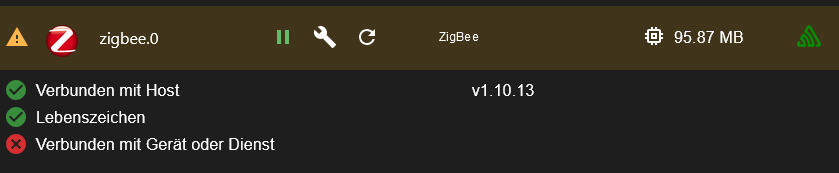
hier der passende Log dazu:
2025-01-03 12:49:26.125 - info: zigbee.0 (7400) Got terminate signal TERMINATE_YOURSELF
2025-01-03 12:49:26.131 - info: zigbee.0 (7400) cleaned everything up...
2025-01-03 12:49:26.134 - info: zigbee.0 (7400) Zigbee: disabling joining new devices.
2025-01-03 12:49:26.142 - info: zigbee.0 (7400) terminating
2025-01-03 12:49:26.144 - info: zigbee.0 (7400) Terminated (ADAPTER_REQUESTED_TERMINATION): Without reason
2025-01-03 12:49:26.217 - info: host.iobroker-pi stopInstance system.adapter.zigbee.0 send kill signal
2025-01-03 12:49:26.717 - info: host.iobroker-pi instance system.adapter.zigbee.0 terminated with code 11 (ADAPTER_REQUESTED_TERMINATION)
2025-01-03 12:49:29.275 - info: host.iobroker-pi instance system.adapter.zigbee.0 started with pid 10642
2025-01-03 12:49:33.967 - info: zigbee.0 (10642) starting. Version 1.10.13 in /opt/iobroker/node_modules/iobroker.zigbee, node: v18.20.5, js-controller: 4.0.23
2025-01-03 12:49:34.077 - info: zigbee.0 (10642) delete old Backup files. keep only last 10
2025-01-03 12:49:34.080 - info: zigbee.0 (10642) Starting Zigbee npm ...
2025-01-03 12:49:34.863 - info: zigbee.0 (10642) Installed Version: iobroker.zigbee@1.10.13
2025-01-03 12:49:55.119 - error: zigbee.0 (10642) Starting zigbee-herdsman problem : "Failed to connect to the adapter (Error: SRSP - SYS - ping after 6000ms)"
2025-01-03 12:49:55.120 - error: zigbee.0 (10642) Failed to start Zigbee
2025-01-03 12:49:55.121 - error: zigbee.0 (10642) Error herdsman start
2025-01-03 12:50:05.125 - info: zigbee.0 (10642) Try to reconnect. 1 attempts left
2025-01-03 12:50:05.126 - info: zigbee.0 (10642) Starting Zigbee npm ...
2025-01-03 12:50:05.138 - info: zigbee.0 (10642) Installed Version: iobroker.zigbee@1.10.13
2025-01-03 12:50:05.305 - error: zigbee.0 (10642) Starting zigbee-herdsman problem : "Error Resource temporarily unavailable Cannot lock port"
2025-01-03 12:50:05.306 - error: zigbee.0 (10642) Failed to start Zigbee
2025-01-03 12:50:05.307 - error: zigbee.0 (10642) Error herdsman start
Die Einstellungen im Adapter sind die folgenden - ich haeb auch schon andere PAN ID's versucht , aber das Problem blieb das gleiche
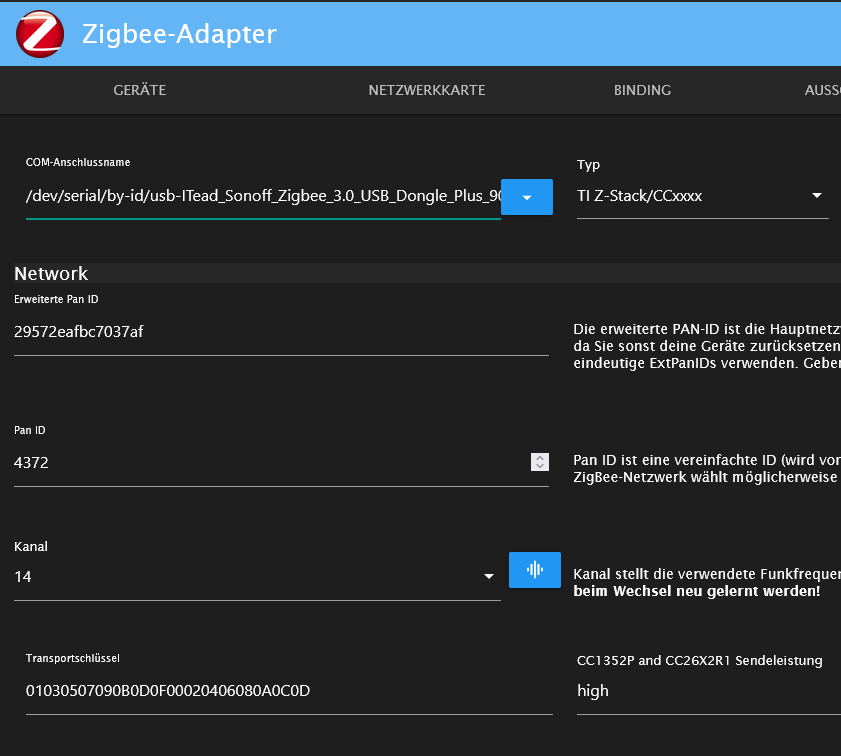
Was kann ich noch tun ? Der Zigbee - Adapter ist neu, mein raspberry pi 4 (4GB RAM; 64GB Speicher nahezu unbenutzt) ist aktuell
Dnake für eure Hilfe !
@dschones sagte in Zigbee Sonoff lässt sich nicht aktivieren- Herdsman Problem:
Die Einstellungen im Adapter sind die folgenden - ich haeb auch schon andere PAN ID's versucht , aber das Problem blieb das gleich
Das ist auch nicht verwunderlich. Dem Adapter gelingt es nicht mit der Firmware auf dem Stick zu reden. Mögliche Ursachen:
- Störungen durch USB3 (in welchem Port steckt der Zigbee-Stick ? In einem der USB3 oder einem der USB2, mit oder ohne USB Verlängerung
- Defekte Firmware auf dem Stick - da wäre dann neu Flaschen angesagt
- falsche Auswahl der Firmware im Adapter. Welchen Sonoff Dongle hast du genau ?
A.
p.s. All dies ist unabhängig von der alten Software auf dem PI4. Ein Update macht sicher Sinn, hat aber mit diesem Problem wenig bis nichts zu tun. -
@dschones sagte in Zigbee Sonoff lässt sich nicht aktivieren- Herdsman Problem:
Die Einstellungen im Adapter sind die folgenden - ich haeb auch schon andere PAN ID's versucht , aber das Problem blieb das gleich
Das ist auch nicht verwunderlich. Dem Adapter gelingt es nicht mit der Firmware auf dem Stick zu reden. Mögliche Ursachen:
- Störungen durch USB3 (in welchem Port steckt der Zigbee-Stick ? In einem der USB3 oder einem der USB2, mit oder ohne USB Verlängerung
- Defekte Firmware auf dem Stick - da wäre dann neu Flaschen angesagt
- falsche Auswahl der Firmware im Adapter. Welchen Sonoff Dongle hast du genau ?
A.
p.s. All dies ist unabhängig von der alten Software auf dem PI4. Ein Update macht sicher Sinn, hat aber mit diesem Problem wenig bis nichts zu tun.@asgothian said in Zigbee Sonoff lässt sich nicht aktivieren- Herdsman Problem:
@dschones sagte in Zigbee Sonoff lässt sich nicht aktivieren- Herdsman Problem:
Die Einstellungen im Adapter sind die folgenden - ich haeb auch schon andere PAN ID's versucht , aber das Problem blieb das gleich
Das ist auch nicht verwunderlich. Dem Adapter gelingt es nicht mit der Firmware auf dem Stick zu reden. Mögliche Ursachen:
- Störungen durch USB3 (in welchem Port steckt der Zigbee-Stick ? In einem der USB3 oder einem der USB2, mit oder ohne USB Verlängerung
ohne USB-Verlängerung , ich habe auch schon andere USB-Ports versucht - gleiches Ergebnis
pi@iobroker-pi:~ $ ls -la /dev/serial/by-id/ total 0 drwxr-xr-x 2 root root 80 Jan 2 22:17 . drwxr-xr-x 4 root root 80 Jan 2 22:17 .. lrwxrwxrwx 1 root root 13 Jan 2 22:17 usb-BSC_Computer_GmbH_FAM-USB-515_AB7BBEH P-if00-port0 -> ../../ttyUSB0 lrwxrwxrwx 1 root root 13 Jan 2 22:17 usb-ITead_Sonoff_Zigbee_3.0_USB_Dongle_Pl us_902fb787e3e7ed119668d7770b2af5ab-if00-port0 -> ../../ttyUSB1- Defekte Firmware auf dem Stick - da wäre dann neu Flaschen angesagt
ok, das habe ich noch nicht in Betracht zu gezogen, das ding ist ja "frisch"
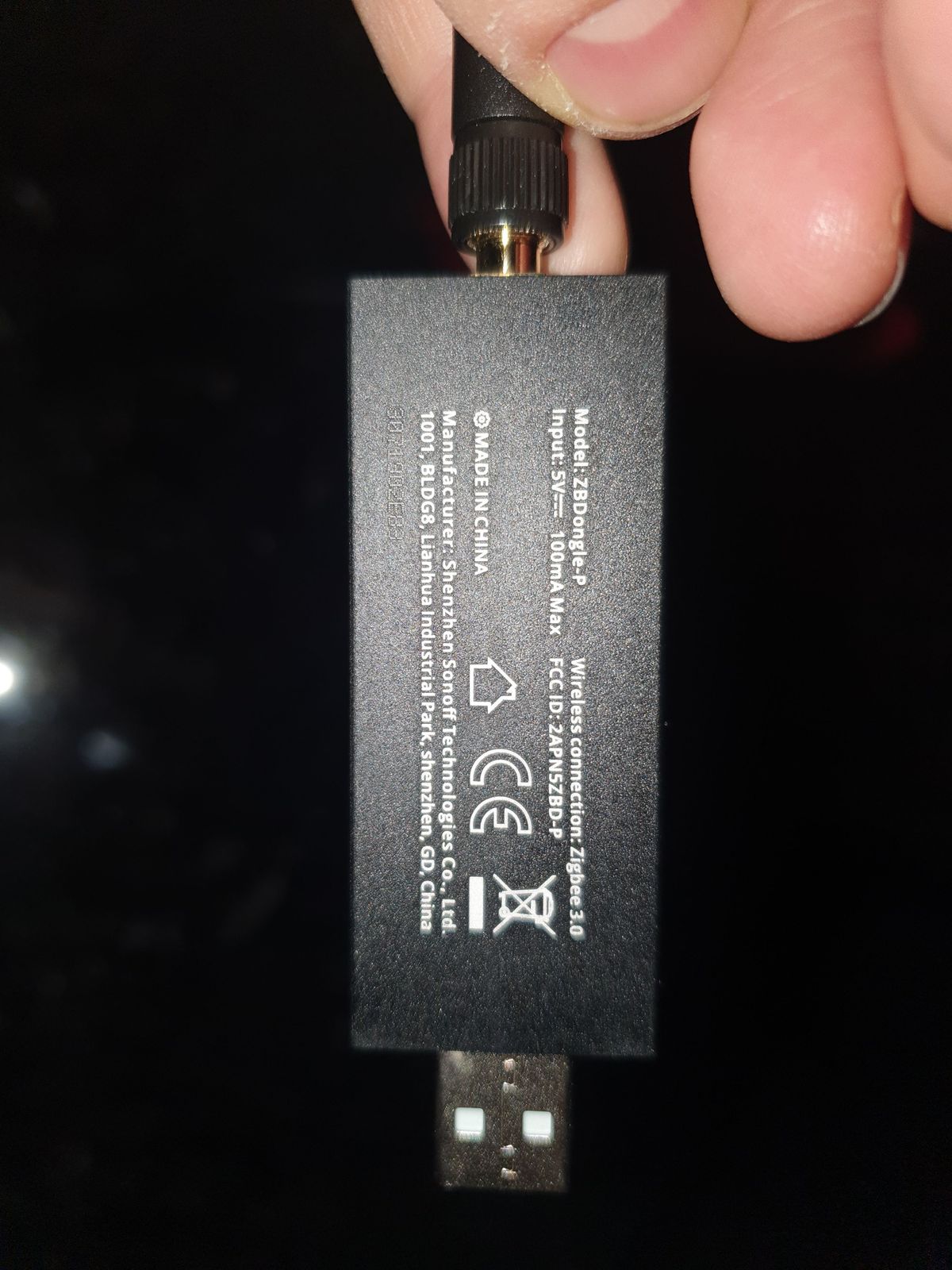
hast du da ne gute Anleitung ?- falsche Auswahl der Firmware im Adapter. Welchen Sonoff Dongle hast du genau ?
Hier:
A.
p.s. All dies ist unabhängig von der alten Software auf dem PI4. Ein Update macht sicher Sinn, hat aber mit diesem Problem wenig bis nichts zu tun.Das sehe ich ähnlich - Freunde von mir haben den Stick ebenfalls (auf noch viel älteren System) problemlos am laufen
-
@dschones
ist das ein Raspi?
da braucht es im Moment eine Sonderbehandlungcurl https://raw.githubusercontent.com/Grothesk242/ioBroker/refs/heads/Raspbian/diag.sh > iob_diag.sh chmod 744 iob_diag.sh ./iob_diag.shda komme ich nicht weiter:
pi@iobroker-pi:~ $ curl https://raw.githubusercontent.com/Grothesk242/ioBroker/refs/heads/Raspbian/diag.sh > iob_diag.shchmod 744 iob_diag.sh./iob_diag.sh % Total % Received % Xferd Average Speed Time Time Time Current Dload Upload Total Spent Left Speed 100 42291 100 42291 0 0 581k 0 --:--:-- --:--:-- --:--:-- 581k % Total % Received % Xferd Average Speed Time Time Time Current Dload Upload Total Spent Left Speed 0 0 0 0 0 0 0 0 --:--:-- 0:02:09 --:--:-- 0 curl: (28) Failed to connect to 744 port 80: Connection timed out % Total % Received % Xferd Average Speed Time Time Time Current Dload Upload Total Spent Left Speed 0 0 0 0 0 0 0 0 --:--:-- --:--:-- --:--:-- 0curl: (6) Could not resolve host: iob_diag.sh. -
@asgothian said in Zigbee Sonoff lässt sich nicht aktivieren- Herdsman Problem:
@dschones sagte in Zigbee Sonoff lässt sich nicht aktivieren- Herdsman Problem:
Die Einstellungen im Adapter sind die folgenden - ich haeb auch schon andere PAN ID's versucht , aber das Problem blieb das gleich
Das ist auch nicht verwunderlich. Dem Adapter gelingt es nicht mit der Firmware auf dem Stick zu reden. Mögliche Ursachen:
- Störungen durch USB3 (in welchem Port steckt der Zigbee-Stick ? In einem der USB3 oder einem der USB2, mit oder ohne USB Verlängerung
ohne USB-Verlängerung , ich habe auch schon andere USB-Ports versucht - gleiches Ergebnis
pi@iobroker-pi:~ $ ls -la /dev/serial/by-id/ total 0 drwxr-xr-x 2 root root 80 Jan 2 22:17 . drwxr-xr-x 4 root root 80 Jan 2 22:17 .. lrwxrwxrwx 1 root root 13 Jan 2 22:17 usb-BSC_Computer_GmbH_FAM-USB-515_AB7BBEH P-if00-port0 -> ../../ttyUSB0 lrwxrwxrwx 1 root root 13 Jan 2 22:17 usb-ITead_Sonoff_Zigbee_3.0_USB_Dongle_Pl us_902fb787e3e7ed119668d7770b2af5ab-if00-port0 -> ../../ttyUSB1- Defekte Firmware auf dem Stick - da wäre dann neu Flaschen angesagt
ok, das habe ich noch nicht in Betracht zu gezogen, das ding ist ja "frisch"
hast du da ne gute Anleitung ?- falsche Auswahl der Firmware im Adapter. Welchen Sonoff Dongle hast du genau ?
Hier:
A.
p.s. All dies ist unabhängig von der alten Software auf dem PI4. Ein Update macht sicher Sinn, hat aber mit diesem Problem wenig bis nichts zu tun.Das sehe ich ähnlich - Freunde von mir haben den Stick ebenfalls (auf noch viel älteren System) problemlos am laufen
@dschones sagte in Zigbee Sonoff lässt sich nicht aktivieren- Herdsman Problem:
ohne USB-Verlängerung , ich habe auch schon andere USB-Ports versucht - gleiches Ergebnis
Bitte eine USB Verlängerung einsetzen, damit der Stick vom PI weg kommt - ich denke da gibt es Störungen aus dem USB3 Bereich. Nutzt Du ggf. eine SSD ?
A.
-
da komme ich nicht weiter:
pi@iobroker-pi:~ $ curl https://raw.githubusercontent.com/Grothesk242/ioBroker/refs/heads/Raspbian/diag.sh > iob_diag.shchmod 744 iob_diag.sh./iob_diag.sh % Total % Received % Xferd Average Speed Time Time Time Current Dload Upload Total Spent Left Speed 100 42291 100 42291 0 0 581k 0 --:--:-- --:--:-- --:--:-- 581k % Total % Received % Xferd Average Speed Time Time Time Current Dload Upload Total Spent Left Speed 0 0 0 0 0 0 0 0 --:--:-- 0:02:09 --:--:-- 0 curl: (28) Failed to connect to 744 port 80: Connection timed out % Total % Received % Xferd Average Speed Time Time Time Current Dload Upload Total Spent Left Speed 0 0 0 0 0 0 0 0 --:--:-- --:--:-- --:--:-- 0curl: (6) Could not resolve host: iob_diag.sh.@dschones sagte in Zigbee Sonoff lässt sich nicht aktivieren- Herdsman Problem:
iob_diag.shchmod 744
bitte die Befehle nicht verschmelzen
-
@dschones sagte in Zigbee Sonoff lässt sich nicht aktivieren- Herdsman Problem:
ohne USB-Verlängerung , ich habe auch schon andere USB-Ports versucht - gleiches Ergebnis
Bitte eine USB Verlängerung einsetzen, damit der Stick vom PI weg kommt - ich denke da gibt es Störungen aus dem USB3 Bereich. Nutzt Du ggf. eine SSD ?
A.
Usb- Verlängerung ist drin , Problem ist dasselbe
-
@dschones sagte in Zigbee Sonoff lässt sich nicht aktivieren- Herdsman Problem:
iob_diag.shchmod 744
bitte die Befehle nicht verschmelzen
@homoran
da tut sich leider nixpi@iobroker-pi:~ $ curl https://raw.githubusercontent.com/Grothesk242/ioBroker/refs/heads/Raspbian/diag.sh > iob_diag.shchmod 744 % Total % Received % Xferd Average Speed Time Time Time Current Dload Upload Total Spent Left Speed 100 42291 100 42291 0 0 522k 0 --:--:-- --:--:-- --:--:-- 522k % Total % Received % Xferd Average Speed Time Time Time Current Dload Upload Total Spent Left Speed 0 0 0 0 0 0 0 0 --:--:-- 0:00:24 --:--:-- 0 0 0 0 0 0 0 0 0 --:--:-- 0:02:11 --:--:-- 0 curl: (28) Failed to connect to 744 port 80: Connection timed outwas mache ich falsch ?
-
@homoran
da tut sich leider nixpi@iobroker-pi:~ $ curl https://raw.githubusercontent.com/Grothesk242/ioBroker/refs/heads/Raspbian/diag.sh > iob_diag.shchmod 744 % Total % Received % Xferd Average Speed Time Time Time Current Dload Upload Total Spent Left Speed 100 42291 100 42291 0 0 522k 0 --:--:-- --:--:-- --:--:-- 522k % Total % Received % Xferd Average Speed Time Time Time Current Dload Upload Total Spent Left Speed 0 0 0 0 0 0 0 0 --:--:-- 0:00:24 --:--:-- 0 0 0 0 0 0 0 0 0 --:--:-- 0:02:11 --:--:-- 0 curl: (28) Failed to connect to 744 port 80: Connection timed outwas mache ich falsch ?
@dschones sagte in Zigbee Sonoff lässt sich nicht aktivieren- Herdsman Problem:
Raspbian/diag.sh > iob_diag.shchmod 744
du hast immer noch 2 Befehle verschmolzen!
sieh dir die drei einzelnen Befehle mal hier an
@homoran sagte in Zigbee Sonoff lässt sich nicht aktivieren- Herdsman Problem:
@dschones
ist das ein Raspi?
da braucht es im Moment eine Sonderbehandlungcurl https://raw.githubusercontent.com/Grothesk242/ioBroker/refs/heads/Raspbian/diag.sh > iob_diag.sh chmod 744 iob_diag.sh ./iob_diag.sh -
@homoran
da tut sich leider nixpi@iobroker-pi:~ $ curl https://raw.githubusercontent.com/Grothesk242/ioBroker/refs/heads/Raspbian/diag.sh > iob_diag.shchmod 744 % Total % Received % Xferd Average Speed Time Time Time Current Dload Upload Total Spent Left Speed 100 42291 100 42291 0 0 522k 0 --:--:-- --:--:-- --:--:-- 522k % Total % Received % Xferd Average Speed Time Time Time Current Dload Upload Total Spent Left Speed 0 0 0 0 0 0 0 0 --:--:-- 0:00:24 --:--:-- 0 0 0 0 0 0 0 0 0 --:--:-- 0:02:11 --:--:-- 0 curl: (28) Failed to connect to 744 port 80: Connection timed outwas mache ich falsch ?
Du kannst das nicht einfach ins Clipboard kopieren und in der Konsole ausführen, denn es sind drei Befehle.
Du kannst sie allerdings mit
&&verbinden und dann in der Konsole ausführen. Dann wird der nächste Befehl erst ausgeführt, wenn der vorherige abgeschlossen ist.z. B.
curl https://raw.githubusercontent.com/Grothesk242/ioBroker/refs/heads/Raspbian/diag.sh > iob_diag.sh && chmod 744 && iob_diag.sh && ./iob_diag.sh -
@dschones sagte in Zigbee Sonoff lässt sich nicht aktivieren- Herdsman Problem:
Raspbian/diag.sh > iob_diag.shchmod 744
du hast immer noch 2 Befehle verschmolzen!
sieh dir die drei einzelnen Befehle mal hier an
@homoran sagte in Zigbee Sonoff lässt sich nicht aktivieren- Herdsman Problem:
@dschones
ist das ein Raspi?
da braucht es im Moment eine Sonderbehandlungcurl https://raw.githubusercontent.com/Grothesk242/ioBroker/refs/heads/Raspbian/diag.sh > iob_diag.sh chmod 744 iob_diag.sh ./iob_diag.shsorry - ich bin da noch etwas zu ungeübt und unerfahren
hier das Ergebnis======================= SUMMARY ======================= v.2024-12-09 Raspbian+zigbee diag+masking Static hostname: iobroker-pi Icon name: computer Operating System: Raspbian GNU/Linux 11 (bullseye) Kernel: Linux 6.1.21-v7l+ Architecture: arm Installation: native Kernel: armv7l Userland: 32 bit Timezone: Europe/Berlin (CET, +0100) User-ID: 1000 Display-Server: false Boot Target: multi-user.target Pending OS-Updates: 0 Pending iob updates: 23 Nodejs-Installation: /usr/bin/nodejs v20.18.1 /usr/bin/node v20.18.1 /usr/bin/npm 10.8.2 /usr/bin/npx 10.8.2 /usr/bin/corepack 0.29.4 Recommended versions are nodejs 20.18.1 and npm 10.8.2 nodeJS installation is correct MEMORY: total used free shared buff/cache available Mem: 3.9G 1.1G 2.1G 0.0K 697M 2.6G Swap: 99M 0B 99M Total: 4.0G 1.1G 2.2G Active iob-Instances: 18 Upgrade policy: none ioBroker Core: js-controller 7.0.6 admin 7.1.5 ioBroker Status: iobroker is running on this host. Objects type: jsonl States type: jsonl Status admin and web instance: + system.adapter.admin.0 : admin : iobroker-pi - enabled, port: 8081, bind: 0.0.0.0 (SSL), run as: admin system.adapter.web.0 : web : iobroker-pi - enabled, port: 8082, bind: 0.0.0.0, run as: admin Objects: 9605 States: 8668 Size of iob-Database: 15M /opt/iobroker/iobroker-data/objects.jsonl 2.8M /opt/iobroker/iobroker-data/states.jsonl Debian 'bullseye' is the current oldstable version. Please upgrade to the latest stable release 'bookworm' in due time! =================== END OF SUMMARY ==================== -
sorry - ich bin da noch etwas zu ungeübt und unerfahren
hier das Ergebnis======================= SUMMARY ======================= v.2024-12-09 Raspbian+zigbee diag+masking Static hostname: iobroker-pi Icon name: computer Operating System: Raspbian GNU/Linux 11 (bullseye) Kernel: Linux 6.1.21-v7l+ Architecture: arm Installation: native Kernel: armv7l Userland: 32 bit Timezone: Europe/Berlin (CET, +0100) User-ID: 1000 Display-Server: false Boot Target: multi-user.target Pending OS-Updates: 0 Pending iob updates: 23 Nodejs-Installation: /usr/bin/nodejs v20.18.1 /usr/bin/node v20.18.1 /usr/bin/npm 10.8.2 /usr/bin/npx 10.8.2 /usr/bin/corepack 0.29.4 Recommended versions are nodejs 20.18.1 and npm 10.8.2 nodeJS installation is correct MEMORY: total used free shared buff/cache available Mem: 3.9G 1.1G 2.1G 0.0K 697M 2.6G Swap: 99M 0B 99M Total: 4.0G 1.1G 2.2G Active iob-Instances: 18 Upgrade policy: none ioBroker Core: js-controller 7.0.6 admin 7.1.5 ioBroker Status: iobroker is running on this host. Objects type: jsonl States type: jsonl Status admin and web instance: + system.adapter.admin.0 : admin : iobroker-pi - enabled, port: 8081, bind: 0.0.0.0 (SSL), run as: admin system.adapter.web.0 : web : iobroker-pi - enabled, port: 8082, bind: 0.0.0.0, run as: admin Objects: 9605 States: 8668 Size of iob-Database: 15M /opt/iobroker/iobroker-data/objects.jsonl 2.8M /opt/iobroker/iobroker-data/states.jsonl Debian 'bullseye' is the current oldstable version. Please upgrade to the latest stable release 'bookworm' in due time! =================== END OF SUMMARY ====================@dschones sagte in Zigbee Sonoff lässt sich nicht aktivieren- Herdsman Problem:
hier das Ergebnis
das ist leider nur das Summary!
bitte die Langfassung, die kommt vorher.
-
sorry - ich bin da noch etwas zu ungeübt und unerfahren
hier das Ergebnis======================= SUMMARY ======================= v.2024-12-09 Raspbian+zigbee diag+masking Static hostname: iobroker-pi Icon name: computer Operating System: Raspbian GNU/Linux 11 (bullseye) Kernel: Linux 6.1.21-v7l+ Architecture: arm Installation: native Kernel: armv7l Userland: 32 bit Timezone: Europe/Berlin (CET, +0100) User-ID: 1000 Display-Server: false Boot Target: multi-user.target Pending OS-Updates: 0 Pending iob updates: 23 Nodejs-Installation: /usr/bin/nodejs v20.18.1 /usr/bin/node v20.18.1 /usr/bin/npm 10.8.2 /usr/bin/npx 10.8.2 /usr/bin/corepack 0.29.4 Recommended versions are nodejs 20.18.1 and npm 10.8.2 nodeJS installation is correct MEMORY: total used free shared buff/cache available Mem: 3.9G 1.1G 2.1G 0.0K 697M 2.6G Swap: 99M 0B 99M Total: 4.0G 1.1G 2.2G Active iob-Instances: 18 Upgrade policy: none ioBroker Core: js-controller 7.0.6 admin 7.1.5 ioBroker Status: iobroker is running on this host. Objects type: jsonl States type: jsonl Status admin and web instance: + system.adapter.admin.0 : admin : iobroker-pi - enabled, port: 8081, bind: 0.0.0.0 (SSL), run as: admin system.adapter.web.0 : web : iobroker-pi - enabled, port: 8082, bind: 0.0.0.0, run as: admin Objects: 9605 States: 8668 Size of iob-Database: 15M /opt/iobroker/iobroker-data/objects.jsonl 2.8M /opt/iobroker/iobroker-data/states.jsonl Debian 'bullseye' is the current oldstable version. Please upgrade to the latest stable release 'bookworm' in due time! =================== END OF SUMMARY ====================@dschones sagte in Zigbee Sonoff lässt sich nicht aktivieren- Herdsman Problem:
Debian 'bullseye' is the current oldstable version. Please upgrade to the latest stable release 'bookworm' in due time!
Bevor weitere geriatrische Analysen durchgeführt werden, solltest du nach meiner Meinung auf bookworm wechseln und zwar in der minimalen 64Bit-Version.
Hast du aktuelle, funktionierende Backups mit dem backitup-Adapter außerhalb des ioBroker gesichert?
-
@dschones sagte in Zigbee Sonoff lässt sich nicht aktivieren- Herdsman Problem:
hier das Ergebnis
das ist leider nur das Summary!
bitte die Langfassung, die kommt vorher.
Script v.2024-12-09 Raspbian+zigbee diag+masking *** BASE SYSTEM *** Static hostname: iobroker-pi Icon name: computer Operating System: Raspbian GNU/Linux 11 (bullseye) Kernel: Linux 6.1.21-v7l+ Architecture: arm OS is similar to: debian Model : Raspberry Pi 4 Model B Rev 1.5 Docker : false Virtualization : none Kernel : armv7l Userland : 32 bit Systemuptime and Load: 16:56:37 up 8 days, 18:38, 1 user, load average: 0.65, 0.41, 0.25 CPU threads: 4 *** LIFE CYCLE STATUS *** Debian 'bullseye' is the current oldstable version. Please upgrade to the latest stable release 'bookworm' in due time! *** RASPBERRY THROTTLING *** Current issues: No throttling issues detected. Previously detected issues: No throttling issues detected. *** TIME AND TIMEZONES *** Local time: Sat 2025-01-11 16:56:38 CET Universal time: Sat 2025-01-11 15:56:38 UTC RTC time: Sat 2025-01-11 15:56:38 Time zone: Europe/Berlin (CET, +0100) System clock synchronized: yes NTP service: active RTC in local TZ: no *** Users and Groups *** User that called 'iob diag': pi HOME=/home/pi GROUPS=pi adm dialout cdrom sudo audio video plugdev games users input render netdev gpio i2c spi iobroker User that is running 'js-controller': iobroker HOME=/home/iobroker GROUPS=iobroker tty dialout audio video plugdev bluetooth gpio i2c *** DISPLAY-SERVER SETUP *** Display-Server: false Desktop: Terminal: tty *** MEMORY *** total used free shared buff/cache available Mem: 3.9G 1.1G 1.8G 0.0K 982M 2.6G Swap: 99M 0B 99M Total: 4.0G 1.1G 1.9G Active iob-Instances: 18 3887 M total memory 1106 M used memory 464 M active memory 1500 M inactive memory 1799 M free memory 113 M buffer memory 868 M swap cache 99 M total swap 0 M used swap 99 M free swap *** top - Table Of Processes *** top - 16:56:38 up 8 days, 18:38, 1 user, load average: 0.65, 0.41, 0.25 Tasks: 190 total, 1 running, 189 sleeping, 0 stopped, 0 zombie %Cpu(s): 0.0 us, 3.0 sy, 0.0 ni, 97.0 id, 0.0 wa, 0.0 hi, 0.0 si, 0.0 st MiB Mem : 3887.9 total, 1799.4 free, 1105.6 used, 982.9 buff/cache MiB Swap: 100.0 total, 100.0 free, 0.0 used. 2641.8 avail Mem *** FAILED SERVICES *** UNIT LOAD ACTIVE SUB DESCRIPTION 0 loaded units listed. *** DMESG CRITICAL ERRORS *** No critical errors detected *** FILESYSTEM *** Filesystem Type Size Used Avail Use% Mounted on /dev/root ext4 58G 7.2G 49G 13% / devtmpfs devtmpfs 1.7G 0 1.7G 0% /dev tmpfs tmpfs 1.9G 0 1.9G 0% /dev/shm tmpfs tmpfs 778M 876K 777M 1% /run tmpfs tmpfs 5.0M 4.0K 5.0M 1% /run/lock /dev/mmcblk0p1 vfat 253M 51M 202M 20% /boot tmpfs tmpfs 389M 0 389M 0% /run/user/1000 Messages concerning ext4 filesystem in dmesg: Show mounted filesystems: TARGET SOURCE FSTYPE OPTIONS / /dev/mmcblk0p2 ext4 rw,noatime `-/boot /dev/mmcblk0p1 vfat rw,relatime,fmask=0022,dmask=0022,codepage=437,iocharset=ascii,shortname=mixed,flush,errors=remount-ro Files in neuralgic directories: /var: du: cannot access '/var/lib/lxcfs/cgroup': Input/output error 3.3G /var/ 1.9G /var/log 1.8G /var/log/journal/834f3657738944fca3e7840589ae9346 1.8G /var/log/journal 755M /var/cache Archived and active journals take up 1.7G in the file system. /opt/iobroker/backups: 402M /opt/iobroker/backups/ /opt/iobroker/iobroker-data: 198M /opt/iobroker/iobroker-data/ 132M /opt/iobroker/iobroker-data/files 49M /opt/iobroker/iobroker-data/backup-objects 48M /opt/iobroker/iobroker-data/files/javascript.admin 32M /opt/iobroker/iobroker-data/files/javascript.admin/static The five largest files in iobroker-data are: 15M /opt/iobroker/iobroker-data/objects.jsonl 12M /opt/iobroker/iobroker-data/files/javascript.admin/static/js/790.1eb1f33b.chunk.js.map 7.0M /opt/iobroker/iobroker-data/files/admin.admin/custom/static/js/vendors-node_modules_mui_icons-material_esm_index_js.0c96b194.chunk.js.map 6.6M /opt/iobroker/iobroker-data/files/modbus.admin/static/js/main.8083c40d.js.map 6.2M /opt/iobroker/iobroker-data/files/javascript.admin/static/js/790.1eb1f33b.chunk.js USB-Devices by-id: USB-Sticks - Avoid direct links to /dev/tty* in your adapter setups, please always prefer the links 'by-id': /dev/serial/by-id/usb-ITead_Sonoff_Zigbee_3.0_USB_Dongle_Plus_902fb787e3e7ed119668d7770b2af5ab-if00-port0 /dev/serial/by-id/usb-BSC_Computer_GmbH_FAM-USB-515_AB7BBEHP-if00-port0 *** ZigBee Settings *** HINT: Your zigbee.0 COM-Port is NOT matching 'by-id'. Please check your setting: /dev/serial/by-id/usb-ITead_Sonoff_Zigbee_3.0_USB_Dongle_Plus_902fb787e3e7ed119668d7770b2af5ab-if00-port0 Zigbee Network Settings on your coordinator/in nvbackup are: zigbee.X Extended Pan ID: *** MASKED *** Pan ID: *** MASKED *** Channel: *** MASKED *** Network Key: *** MASKED *** To unmask the settings run 'iob diag --unmask' *** NodeJS-Installation *** /usr/bin/nodejs v20.18.1 /usr/bin/node v20.18.1 /usr/bin/npm 10.8.2 /usr/bin/npx 10.8.2 /usr/bin/corepack 0.29.4 nodejs: Installed: 20.18.1-1nodesource1 Candidate: 20.18.1-1nodesource1 Version table: *** 20.18.1-1nodesource1 1001 500 https://deb.nodesource.com/node_20.x nodistro/main armhf Packages 100 /var/lib/dpkg/status 20.18.0-1nodesource1 1001 500 https://deb.nodesource.com/node_20.x nodistro/main armhf Packages 20.17.0-1nodesource1 1001 500 https://deb.nodesource.com/node_20.x nodistro/main armhf Packages 20.16.0-1nodesource1 1001 500 https://deb.nodesource.com/node_20.x nodistro/main armhf Packages 20.15.1-1nodesource1 1001 500 https://deb.nodesource.com/node_20.x nodistro/main armhf Packages 20.15.0-1nodesource1 1001 500 https://deb.nodesource.com/node_20.x nodistro/main armhf Packages 20.14.0-1nodesource1 1001 500 https://deb.nodesource.com/node_20.x nodistro/main armhf Packages 20.13.1-1nodesource1 1001 500 https://deb.nodesource.com/node_20.x nodistro/main armhf Packages 20.13.0-1nodesource1 1001 500 https://deb.nodesource.com/node_20.x nodistro/main armhf Packages 20.12.2-1nodesource1 1001 500 https://deb.nodesource.com/node_20.x nodistro/main armhf Packages 20.12.1-1nodesource1 1001 500 https://deb.nodesource.com/node_20.x nodistro/main armhf Packages 20.12.0-1nodesource1 1001 500 https://deb.nodesource.com/node_20.x nodistro/main armhf Packages 20.11.1-1nodesource1 1001 500 https://deb.nodesource.com/node_20.x nodistro/main armhf Packages 20.11.0-1nodesource1 1001 500 https://deb.nodesource.com/node_20.x nodistro/main armhf Packages 20.10.0-1nodesource1 1001 500 https://deb.nodesource.com/node_20.x nodistro/main armhf Packages 20.9.0-1nodesource1 1001 500 https://deb.nodesource.com/node_20.x nodistro/main armhf Packages 20.8.1-1nodesource1 1001 500 https://deb.nodesource.com/node_20.x nodistro/main armhf Packages 20.8.0-1nodesource1 1001 500 https://deb.nodesource.com/node_20.x nodistro/main armhf Packages 20.7.0-1nodesource1 1001 500 https://deb.nodesource.com/node_20.x nodistro/main armhf Packages 20.6.1-1nodesource1 1001 500 https://deb.nodesource.com/node_20.x nodistro/main armhf Packages 20.6.0-1nodesource1 1001 500 https://deb.nodesource.com/node_20.x nodistro/main armhf Packages 20.5.1-1nodesource1 1001 500 https://deb.nodesource.com/node_20.x nodistro/main armhf Packages 20.5.0-1nodesource1 1001 500 https://deb.nodesource.com/node_20.x nodistro/main armhf Packages 20.4.0-1nodesource1 1001 500 https://deb.nodesource.com/node_20.x nodistro/main armhf Packages 20.3.1-1nodesource1 1001 500 https://deb.nodesource.com/node_20.x nodistro/main armhf Packages 20.3.0-1nodesource1 1001 500 https://deb.nodesource.com/node_20.x nodistro/main armhf Packages 20.2.0-1nodesource1 1001 500 https://deb.nodesource.com/node_20.x nodistro/main armhf Packages 20.1.0-1nodesource1 1001 500 https://deb.nodesource.com/node_20.x nodistro/main armhf Packages 20.0.0-1nodesource1 1001 500 https://deb.nodesource.com/node_20.x nodistro/main armhf Packages 12.22.12~dfsg-1~deb11u5 500 500 http://raspbian.raspberrypi.org/raspbian bullseye/main armhf Packages Temp directories causing deletion problem: 0 No problems detected Errors in npm tree: 0 No problems detected *** ioBroker-Installation *** ioBroker Status iobroker is running on this host. Objects type: jsonl States type: jsonl Hosts: iobroker-pi iobroker-pi (version: 7.0.6, hostname: iobroker-pi , alive, uptime: 673253) Core adapters versions js-controller: 7.0.6 admin: 7.1.5 javascript: 6.0.3 nodejs modules from github: 0 Adapter State + system.adapter.admin.0 : admin : iobroker-pi - enabled, port: 8081, bind: 0.0.0.0 (SSL), run as: admin + system.adapter.backitup.0 : backitup : iobroker-pi - enabled system.adapter.daswetter.0 : daswetter : iobroker-pi - enabled system.adapter.discovery.0 : discovery : iobroker-pi - enabled + system.adapter.fronius.0 : fronius : iobroker-pi - enabled system.adapter.history.0 : history : iobroker-pi - enabled + system.adapter.hm-rega.1 : hm-rega : iobroker-pi - enabled + system.adapter.hm-rpc.0 : hm-rpc : iobroker-pi - enabled, port: 0 + system.adapter.hm-rpc.1 : hm-rpc : iobroker-pi - enabled, port: 18701 + system.adapter.javascript.0 : javascript : iobroker-pi - enabled system.adapter.modbus.0 : modbus : iobroker-pi - disabled + system.adapter.mqtt-client.0 : mqtt-client : iobroker-pi - enabled, port: 1883 + system.adapter.ping.0 : ping : iobroker-pi - enabled + system.adapter.rpi2.0 : rpi2 : iobroker-pi - enabled system.adapter.sayit.0 : sayit : iobroker-pi - enabled + system.adapter.shelly.0 : shelly : iobroker-pi - enabled, port: 1882, bind: 0.0.0.0 + system.adapter.smartmeter.0 : smartmeter : iobroker-pi - enabled + system.adapter.sonoff.0 : sonoff : iobroker-pi - enabled, port: 1883, bind: 0.0.0.0 + system.adapter.tankerkoenig.0 : tankerkoenig : iobroker-pi - enabled + system.adapter.terminal.0 : terminal : iobroker-pi - enabled, port: 8088, bind: 0.0.0.0, run as: admin + system.adapter.velux.0 : velux : iobroker-pi - enabled system.adapter.vis-hqwidgets.0 : vis-hqwidgets : iobroker-pi - enabled system.adapter.vis-timeandweather.0 : vis-timeandweather : iobroker-pi - enabled system.adapter.vis.0 : vis : iobroker-pi - enabled system.adapter.web.0 : web : iobroker-pi - enabled, port: 8082, bind: 0.0.0.0, run as: admin + system.adapter.zigbee.0 : zigbee : iobroker-pi - enabled, port: /dev/serial/by-id/usb-ITead_Sonoff_Zigbee_3.0_USB_Dongle_Plus_902fb787e3e7ed119668d7770b2af5ab-if00-port0 + instance is alive Enabled adapters with bindings + system.adapter.admin.0 : admin : iobroker-pi - enabled, port: 8081, bind: 0.0.0.0 (SSL), run as: admin + system.adapter.hm-rpc.0 : hm-rpc : iobroker-pi - enabled, port: 0 + system.adapter.hm-rpc.1 : hm-rpc : iobroker-pi - enabled, port: 18701 + system.adapter.mqtt-client.0 : mqtt-client : iobroker-pi - enabled, port: 1883 + system.adapter.shelly.0 : shelly : iobroker-pi - enabled, port: 1882, bind: 0.0.0.0 + system.adapter.sonoff.0 : sonoff : iobroker-pi - enabled, port: 1883, bind: 0.0.0.0 + system.adapter.terminal.0 : terminal : iobroker-pi - enabled, port: 8088, bind: 0.0.0.0, run as: admin system.adapter.web.0 : web : iobroker-pi - enabled, port: 8082, bind: 0.0.0.0, run as: admin + system.adapter.zigbee.0 : zigbee : iobroker-pi - enabled, port: /dev/serial/by-id/usb-ITead_Sonoff_Zigbee_3.0_USB_Dongle_Plus_902fb787e3e7ed119668d7770b2af5ab-if00-port0 ioBroker-Repositories ┌─────────┬──────────┬─────────────────────────────────────────────────────────┬──────────────┐ │ (index) │ name │ url │ auto upgrade │ ├─────────┼──────────┼─────────────────────────────────────────────────────────┼──────────────┤ │ 0 │ 'stable' │ 'http://download.iobroker.net/sources-dist.json' │ false │ │ 1 │ 'beta' │ 'http://download.iobroker.net/sources-dist-latest.json' │ false │ └─────────┴──────────┴─────────────────────────────────────────────────────────┴──────────────┘ Active repo(s): stable Upgrade policy: none Installed ioBroker-Instances Used repository: stable Adapter "admin" : 7.4.10 , installed 7.1.5 [Updatable] Adapter "backitup" : 3.0.31 , installed 2.4.12 [Updatable] Adapter "daswetter" : 3.2.2 , installed 3.1.3 [Updatable] Adapter "discovery" : 5.0.0 , installed 3.0.5 [Updatable] Adapter "fronius" : 2.1.1 , installed 2.0.2 [Updatable] Adapter "history" : 3.0.1 , installed 2.2.0 [Updatable] Adapter "hm-rega" : 5.1.0 , installed 3.0.40 [Updatable] Adapter "hm-rpc" : 2.0.2 , installed 1.15.12 [Updatable] Adapter "javascript" : 8.8.3 , installed 6.0.3 [Updatable] Controller "js-controller": 7.0.6 , installed 7.0.6 Adapter "modbus" : 6.3.2 , installed 5.0.11 [Updatable] Adapter "mqtt-client" : 2.1.0 , installed 2.1.0 Adapter "ping" : 1.6.2 , installed 1.5.3 [Updatable] Adapter "plenticore" : 2.2.0 , installed 2.2.0 Adapter "rpi2" : 2.2.1 , installed 1.3.2 [Updatable] Adapter "sayit" : 5.0.0 , installed 1.12.3 [Updatable] Adapter "shelly" : 8.5.1 , installed 8.2.1 [Updatable] Adapter "simple-api" : 2.8.0 , installed 2.7.1 [Updatable] Adapter "smartmeter" : 3.4.0 , installed 3.4.0 Adapter "socketio" : 6.7.1 , installed 4.2.0 [Updatable] Adapter "sonoff" : 3.1.2 , installed 3.1.2 Adapter "tankerkoenig" : 3.4.0 , installed 2.1.1 [Updatable] Adapter "terminal" : 1.0.0 , installed 1.0.0 Adapter "velux" : 0.0.8 , installed 0.0.7 [Updatable] Adapter "vis" : 1.5.6 , installed 1.4.15 [Updatable] Adapter "vis-hqwidgets": 1.5.1 , installed 1.3.0 [Updatable] Adapter "vis-timeandweather": 1.2.2, installed 1.2.2 Adapter "web" : 6.2.5 , installed 4.3.0 [Updatable] Adapter "ws" : 2.6.2 , installed 1.3.0 [Updatable] Adapter "zigbee" : 1.10.14 , installed 1.10.13 [Updatable] Objects and States Please stand by - This may take a while Objects: 9605 States: 8668 *** OS-Repositories and Updates *** W: GPG error: http://deb.debian.org/debian bullseye-proposed-updates InRelease: The following signatures couldn't be verified because the public key is not available: NO_PUBKEY 0E98404D386FA1D9 NO_PUBKEY 6ED0E7B82643E131 E: The repository 'http://deb.debian.org/debian bullseye-proposed-updates InRelease' is not signed. Pending Updates: 0 *** Listening Ports *** Active Internet connections (only servers) Proto Recv-Q Send-Q Local Address Foreign Address State User Inode PID/Program name tcp 0 0 192.168.178.50:18701 0.0.0.0:* LISTEN 1001 1161594 6723/io.hm-rpc.1 tcp 0 0 0.0.0.0:1883 0.0.0.0:* LISTEN 1001 1264871 20308/io.sonoff.0 tcp 0 0 0.0.0.0:1882 0.0.0.0:* LISTEN 1001 1160161 6800/io.shelly.0 tcp 0 0 192.168.178.50:2010 0.0.0.0:* LISTEN 1001 1159103 6518/io.hm-rpc.0 tcp 0 0 0.0.0.0:22 0.0.0.0:* LISTEN 0 16436 968/sshd: /usr/sbin tcp 0 0 127.0.0.1:9001 0.0.0.0:* LISTEN 1001 1158040 6374/iobroker.js-co tcp 0 0 127.0.0.1:9000 0.0.0.0:* LISTEN 1001 1158045 6374/iobroker.js-co tcp 0 0 10.0.3.1:53 0.0.0.0:* LISTEN 0 14656 1013/dnsmasq tcp6 0 0 :::8081 :::* LISTEN 1001 1160707 6397/io.admin.0 tcp6 0 0 :::8088 :::* LISTEN 1001 1161918 7217/io.terminal.0 tcp6 0 0 :::22 :::* LISTEN 0 16438 968/sshd: /usr/sbin udp 0 0 10.0.3.1:53 0.0.0.0:* 0 14655 1013/dnsmasq udp 0 0 0.0.0.0:67 0.0.0.0:* 0 14652 1013/dnsmasq udp 0 0 0.0.0.0:68 0.0.0.0:* 0 12249 808/dhclient udp 0 0 0.0.0.0:5353 0.0.0.0:* 108 11089 406/avahi-daemon: r udp 0 0 0.0.0.0:38251 0.0.0.0:* 108 11091 406/avahi-daemon: r udp6 0 0 :::5353 :::* 108 11090 406/avahi-daemon: r udp6 0 0 :::35121 :::* 108 11092 406/avahi-daemon: r *** Log File - Last 25 Lines *** 2025-01-11 16:13:12.167 - info: host.iobroker-pi instance system.adapter.velux.0 in version "0.0.7" started with pid 31891 2025-01-11 16:13:14.688 - info: velux.0 (31891) starting. Version 0.0.7 in /opt/iobroker/node_modules/iobroker.velux, node: v20.18.1, js-controller: 7.0.6 2025-01-11 16:13:14.999 - error: velux.0 (31891) null 2025-01-11 16:13:15.004 - error: velux.0 (31891) Login was not successful 2025-01-11 16:15:54.022 - info: host.iobroker-pi instance system.adapter.daswetter.0 in version "3.1.3" started with pid 32127 2025-01-11 16:15:56.927 - info: daswetter.0 (32127) starting. Version 3.1.3 in /opt/iobroker/node_modules/iobroker.daswetter, node: v20.18.1, js-controller: 7.0.6 2025-01-11 16:16:11.263 - info: daswetter.0 (32127) still wrong data structure from server received! repaired... 2025-01-11 16:16:15.476 - info: daswetter.0 (32127) Terminated (ADAPTER_REQUESTED_TERMINATION): All data handled, adapter stopped until next scheduled moment 2025-01-11 16:16:15.997 - info: daswetter.0 (32127) cleaned everything up... 2025-01-11 16:16:16.015 - info: host.iobroker-pi instance system.adapter.daswetter.0 having pid 32127 terminated with code 11 (ADAPTER_REQUESTED_TERMINATION) 2025-01-11 16:30:54.025 - info: host.iobroker-pi instance system.adapter.daswetter.0 in version "3.1.3" started with pid 899 2025-01-11 16:30:56.939 - info: daswetter.0 (899) starting. Version 3.1.3 in /opt/iobroker/node_modules/iobroker.daswetter, node: v20.18.1, js-controller: 7.0.6 2025-01-11 16:31:11.118 - info: daswetter.0 (899) still wrong data structure from server received! repaired... 2025-01-11 16:31:15.240 - info: daswetter.0 (899) Terminated (ADAPTER_REQUESTED_TERMINATION): All data handled, adapter stopped until next scheduled moment 2025-01-11 16:31:15.755 - info: daswetter.0 (899) cleaned everything up... 2025-01-11 16:31:15.772 - info: host.iobroker-pi instance system.adapter.daswetter.0 having pid 899 terminated with code 11 (ADAPTER_REQUESTED_TERMINATION) 2025-01-11 16:45:54.020 - info: host.iobroker-pi instance system.adapter.daswetter.0 in version "3.1.3" started with pid 3933 2025-01-11 16:45:56.966 - info: daswetter.0 (3933) starting. Version 3.1.3 in /opt/iobroker/node_modules/iobroker.daswetter, node: v20.18.1, js-controller: 7.0.6 2025-01-11 16:46:11.024 - info: daswetter.0 (3933) still wrong data structure from server received! repaired... 2025-01-11 16:46:15.423 - info: daswetter.0 (3933) Terminated (ADAPTER_REQUESTED_TERMINATION): All data handled, adapter stopped until next scheduled moment 2025-01-11 16:46:15.941 - info: daswetter.0 (3933) cleaned everything up... 2025-01-11 16:46:15.958 - info: host.iobroker-pi instance system.adapter.daswetter.0 having pid 3933 terminated with code 11 (ADAPTER_REQUESTED_TERMINATION) 2025-01-11 16:51:25.964 - info: admin.0 (6397) Request actual repository... 2025-01-11 16:51:26.593 - info: host.iobroker-pi Updating repository "stable" under "http://download.iobroker.net/sources-dist.json" 2025-01-11 16:51:31.666 - info: admin.0 (6397) Repository received successfully. -
Script v.2024-12-09 Raspbian+zigbee diag+masking *** BASE SYSTEM *** Static hostname: iobroker-pi Icon name: computer Operating System: Raspbian GNU/Linux 11 (bullseye) Kernel: Linux 6.1.21-v7l+ Architecture: arm OS is similar to: debian Model : Raspberry Pi 4 Model B Rev 1.5 Docker : false Virtualization : none Kernel : armv7l Userland : 32 bit Systemuptime and Load: 16:56:37 up 8 days, 18:38, 1 user, load average: 0.65, 0.41, 0.25 CPU threads: 4 *** LIFE CYCLE STATUS *** Debian 'bullseye' is the current oldstable version. Please upgrade to the latest stable release 'bookworm' in due time! *** RASPBERRY THROTTLING *** Current issues: No throttling issues detected. Previously detected issues: No throttling issues detected. *** TIME AND TIMEZONES *** Local time: Sat 2025-01-11 16:56:38 CET Universal time: Sat 2025-01-11 15:56:38 UTC RTC time: Sat 2025-01-11 15:56:38 Time zone: Europe/Berlin (CET, +0100) System clock synchronized: yes NTP service: active RTC in local TZ: no *** Users and Groups *** User that called 'iob diag': pi HOME=/home/pi GROUPS=pi adm dialout cdrom sudo audio video plugdev games users input render netdev gpio i2c spi iobroker User that is running 'js-controller': iobroker HOME=/home/iobroker GROUPS=iobroker tty dialout audio video plugdev bluetooth gpio i2c *** DISPLAY-SERVER SETUP *** Display-Server: false Desktop: Terminal: tty *** MEMORY *** total used free shared buff/cache available Mem: 3.9G 1.1G 1.8G 0.0K 982M 2.6G Swap: 99M 0B 99M Total: 4.0G 1.1G 1.9G Active iob-Instances: 18 3887 M total memory 1106 M used memory 464 M active memory 1500 M inactive memory 1799 M free memory 113 M buffer memory 868 M swap cache 99 M total swap 0 M used swap 99 M free swap *** top - Table Of Processes *** top - 16:56:38 up 8 days, 18:38, 1 user, load average: 0.65, 0.41, 0.25 Tasks: 190 total, 1 running, 189 sleeping, 0 stopped, 0 zombie %Cpu(s): 0.0 us, 3.0 sy, 0.0 ni, 97.0 id, 0.0 wa, 0.0 hi, 0.0 si, 0.0 st MiB Mem : 3887.9 total, 1799.4 free, 1105.6 used, 982.9 buff/cache MiB Swap: 100.0 total, 100.0 free, 0.0 used. 2641.8 avail Mem *** FAILED SERVICES *** UNIT LOAD ACTIVE SUB DESCRIPTION 0 loaded units listed. *** DMESG CRITICAL ERRORS *** No critical errors detected *** FILESYSTEM *** Filesystem Type Size Used Avail Use% Mounted on /dev/root ext4 58G 7.2G 49G 13% / devtmpfs devtmpfs 1.7G 0 1.7G 0% /dev tmpfs tmpfs 1.9G 0 1.9G 0% /dev/shm tmpfs tmpfs 778M 876K 777M 1% /run tmpfs tmpfs 5.0M 4.0K 5.0M 1% /run/lock /dev/mmcblk0p1 vfat 253M 51M 202M 20% /boot tmpfs tmpfs 389M 0 389M 0% /run/user/1000 Messages concerning ext4 filesystem in dmesg: Show mounted filesystems: TARGET SOURCE FSTYPE OPTIONS / /dev/mmcblk0p2 ext4 rw,noatime `-/boot /dev/mmcblk0p1 vfat rw,relatime,fmask=0022,dmask=0022,codepage=437,iocharset=ascii,shortname=mixed,flush,errors=remount-ro Files in neuralgic directories: /var: du: cannot access '/var/lib/lxcfs/cgroup': Input/output error 3.3G /var/ 1.9G /var/log 1.8G /var/log/journal/834f3657738944fca3e7840589ae9346 1.8G /var/log/journal 755M /var/cache Archived and active journals take up 1.7G in the file system. /opt/iobroker/backups: 402M /opt/iobroker/backups/ /opt/iobroker/iobroker-data: 198M /opt/iobroker/iobroker-data/ 132M /opt/iobroker/iobroker-data/files 49M /opt/iobroker/iobroker-data/backup-objects 48M /opt/iobroker/iobroker-data/files/javascript.admin 32M /opt/iobroker/iobroker-data/files/javascript.admin/static The five largest files in iobroker-data are: 15M /opt/iobroker/iobroker-data/objects.jsonl 12M /opt/iobroker/iobroker-data/files/javascript.admin/static/js/790.1eb1f33b.chunk.js.map 7.0M /opt/iobroker/iobroker-data/files/admin.admin/custom/static/js/vendors-node_modules_mui_icons-material_esm_index_js.0c96b194.chunk.js.map 6.6M /opt/iobroker/iobroker-data/files/modbus.admin/static/js/main.8083c40d.js.map 6.2M /opt/iobroker/iobroker-data/files/javascript.admin/static/js/790.1eb1f33b.chunk.js USB-Devices by-id: USB-Sticks - Avoid direct links to /dev/tty* in your adapter setups, please always prefer the links 'by-id': /dev/serial/by-id/usb-ITead_Sonoff_Zigbee_3.0_USB_Dongle_Plus_902fb787e3e7ed119668d7770b2af5ab-if00-port0 /dev/serial/by-id/usb-BSC_Computer_GmbH_FAM-USB-515_AB7BBEHP-if00-port0 *** ZigBee Settings *** HINT: Your zigbee.0 COM-Port is NOT matching 'by-id'. Please check your setting: /dev/serial/by-id/usb-ITead_Sonoff_Zigbee_3.0_USB_Dongle_Plus_902fb787e3e7ed119668d7770b2af5ab-if00-port0 Zigbee Network Settings on your coordinator/in nvbackup are: zigbee.X Extended Pan ID: *** MASKED *** Pan ID: *** MASKED *** Channel: *** MASKED *** Network Key: *** MASKED *** To unmask the settings run 'iob diag --unmask' *** NodeJS-Installation *** /usr/bin/nodejs v20.18.1 /usr/bin/node v20.18.1 /usr/bin/npm 10.8.2 /usr/bin/npx 10.8.2 /usr/bin/corepack 0.29.4 nodejs: Installed: 20.18.1-1nodesource1 Candidate: 20.18.1-1nodesource1 Version table: *** 20.18.1-1nodesource1 1001 500 https://deb.nodesource.com/node_20.x nodistro/main armhf Packages 100 /var/lib/dpkg/status 20.18.0-1nodesource1 1001 500 https://deb.nodesource.com/node_20.x nodistro/main armhf Packages 20.17.0-1nodesource1 1001 500 https://deb.nodesource.com/node_20.x nodistro/main armhf Packages 20.16.0-1nodesource1 1001 500 https://deb.nodesource.com/node_20.x nodistro/main armhf Packages 20.15.1-1nodesource1 1001 500 https://deb.nodesource.com/node_20.x nodistro/main armhf Packages 20.15.0-1nodesource1 1001 500 https://deb.nodesource.com/node_20.x nodistro/main armhf Packages 20.14.0-1nodesource1 1001 500 https://deb.nodesource.com/node_20.x nodistro/main armhf Packages 20.13.1-1nodesource1 1001 500 https://deb.nodesource.com/node_20.x nodistro/main armhf Packages 20.13.0-1nodesource1 1001 500 https://deb.nodesource.com/node_20.x nodistro/main armhf Packages 20.12.2-1nodesource1 1001 500 https://deb.nodesource.com/node_20.x nodistro/main armhf Packages 20.12.1-1nodesource1 1001 500 https://deb.nodesource.com/node_20.x nodistro/main armhf Packages 20.12.0-1nodesource1 1001 500 https://deb.nodesource.com/node_20.x nodistro/main armhf Packages 20.11.1-1nodesource1 1001 500 https://deb.nodesource.com/node_20.x nodistro/main armhf Packages 20.11.0-1nodesource1 1001 500 https://deb.nodesource.com/node_20.x nodistro/main armhf Packages 20.10.0-1nodesource1 1001 500 https://deb.nodesource.com/node_20.x nodistro/main armhf Packages 20.9.0-1nodesource1 1001 500 https://deb.nodesource.com/node_20.x nodistro/main armhf Packages 20.8.1-1nodesource1 1001 500 https://deb.nodesource.com/node_20.x nodistro/main armhf Packages 20.8.0-1nodesource1 1001 500 https://deb.nodesource.com/node_20.x nodistro/main armhf Packages 20.7.0-1nodesource1 1001 500 https://deb.nodesource.com/node_20.x nodistro/main armhf Packages 20.6.1-1nodesource1 1001 500 https://deb.nodesource.com/node_20.x nodistro/main armhf Packages 20.6.0-1nodesource1 1001 500 https://deb.nodesource.com/node_20.x nodistro/main armhf Packages 20.5.1-1nodesource1 1001 500 https://deb.nodesource.com/node_20.x nodistro/main armhf Packages 20.5.0-1nodesource1 1001 500 https://deb.nodesource.com/node_20.x nodistro/main armhf Packages 20.4.0-1nodesource1 1001 500 https://deb.nodesource.com/node_20.x nodistro/main armhf Packages 20.3.1-1nodesource1 1001 500 https://deb.nodesource.com/node_20.x nodistro/main armhf Packages 20.3.0-1nodesource1 1001 500 https://deb.nodesource.com/node_20.x nodistro/main armhf Packages 20.2.0-1nodesource1 1001 500 https://deb.nodesource.com/node_20.x nodistro/main armhf Packages 20.1.0-1nodesource1 1001 500 https://deb.nodesource.com/node_20.x nodistro/main armhf Packages 20.0.0-1nodesource1 1001 500 https://deb.nodesource.com/node_20.x nodistro/main armhf Packages 12.22.12~dfsg-1~deb11u5 500 500 http://raspbian.raspberrypi.org/raspbian bullseye/main armhf Packages Temp directories causing deletion problem: 0 No problems detected Errors in npm tree: 0 No problems detected *** ioBroker-Installation *** ioBroker Status iobroker is running on this host. Objects type: jsonl States type: jsonl Hosts: iobroker-pi iobroker-pi (version: 7.0.6, hostname: iobroker-pi , alive, uptime: 673253) Core adapters versions js-controller: 7.0.6 admin: 7.1.5 javascript: 6.0.3 nodejs modules from github: 0 Adapter State + system.adapter.admin.0 : admin : iobroker-pi - enabled, port: 8081, bind: 0.0.0.0 (SSL), run as: admin + system.adapter.backitup.0 : backitup : iobroker-pi - enabled system.adapter.daswetter.0 : daswetter : iobroker-pi - enabled system.adapter.discovery.0 : discovery : iobroker-pi - enabled + system.adapter.fronius.0 : fronius : iobroker-pi - enabled system.adapter.history.0 : history : iobroker-pi - enabled + system.adapter.hm-rega.1 : hm-rega : iobroker-pi - enabled + system.adapter.hm-rpc.0 : hm-rpc : iobroker-pi - enabled, port: 0 + system.adapter.hm-rpc.1 : hm-rpc : iobroker-pi - enabled, port: 18701 + system.adapter.javascript.0 : javascript : iobroker-pi - enabled system.adapter.modbus.0 : modbus : iobroker-pi - disabled + system.adapter.mqtt-client.0 : mqtt-client : iobroker-pi - enabled, port: 1883 + system.adapter.ping.0 : ping : iobroker-pi - enabled + system.adapter.rpi2.0 : rpi2 : iobroker-pi - enabled system.adapter.sayit.0 : sayit : iobroker-pi - enabled + system.adapter.shelly.0 : shelly : iobroker-pi - enabled, port: 1882, bind: 0.0.0.0 + system.adapter.smartmeter.0 : smartmeter : iobroker-pi - enabled + system.adapter.sonoff.0 : sonoff : iobroker-pi - enabled, port: 1883, bind: 0.0.0.0 + system.adapter.tankerkoenig.0 : tankerkoenig : iobroker-pi - enabled + system.adapter.terminal.0 : terminal : iobroker-pi - enabled, port: 8088, bind: 0.0.0.0, run as: admin + system.adapter.velux.0 : velux : iobroker-pi - enabled system.adapter.vis-hqwidgets.0 : vis-hqwidgets : iobroker-pi - enabled system.adapter.vis-timeandweather.0 : vis-timeandweather : iobroker-pi - enabled system.adapter.vis.0 : vis : iobroker-pi - enabled system.adapter.web.0 : web : iobroker-pi - enabled, port: 8082, bind: 0.0.0.0, run as: admin + system.adapter.zigbee.0 : zigbee : iobroker-pi - enabled, port: /dev/serial/by-id/usb-ITead_Sonoff_Zigbee_3.0_USB_Dongle_Plus_902fb787e3e7ed119668d7770b2af5ab-if00-port0 + instance is alive Enabled adapters with bindings + system.adapter.admin.0 : admin : iobroker-pi - enabled, port: 8081, bind: 0.0.0.0 (SSL), run as: admin + system.adapter.hm-rpc.0 : hm-rpc : iobroker-pi - enabled, port: 0 + system.adapter.hm-rpc.1 : hm-rpc : iobroker-pi - enabled, port: 18701 + system.adapter.mqtt-client.0 : mqtt-client : iobroker-pi - enabled, port: 1883 + system.adapter.shelly.0 : shelly : iobroker-pi - enabled, port: 1882, bind: 0.0.0.0 + system.adapter.sonoff.0 : sonoff : iobroker-pi - enabled, port: 1883, bind: 0.0.0.0 + system.adapter.terminal.0 : terminal : iobroker-pi - enabled, port: 8088, bind: 0.0.0.0, run as: admin system.adapter.web.0 : web : iobroker-pi - enabled, port: 8082, bind: 0.0.0.0, run as: admin + system.adapter.zigbee.0 : zigbee : iobroker-pi - enabled, port: /dev/serial/by-id/usb-ITead_Sonoff_Zigbee_3.0_USB_Dongle_Plus_902fb787e3e7ed119668d7770b2af5ab-if00-port0 ioBroker-Repositories ┌─────────┬──────────┬─────────────────────────────────────────────────────────┬──────────────┐ │ (index) │ name │ url │ auto upgrade │ ├─────────┼──────────┼─────────────────────────────────────────────────────────┼──────────────┤ │ 0 │ 'stable' │ 'http://download.iobroker.net/sources-dist.json' │ false │ │ 1 │ 'beta' │ 'http://download.iobroker.net/sources-dist-latest.json' │ false │ └─────────┴──────────┴─────────────────────────────────────────────────────────┴──────────────┘ Active repo(s): stable Upgrade policy: none Installed ioBroker-Instances Used repository: stable Adapter "admin" : 7.4.10 , installed 7.1.5 [Updatable] Adapter "backitup" : 3.0.31 , installed 2.4.12 [Updatable] Adapter "daswetter" : 3.2.2 , installed 3.1.3 [Updatable] Adapter "discovery" : 5.0.0 , installed 3.0.5 [Updatable] Adapter "fronius" : 2.1.1 , installed 2.0.2 [Updatable] Adapter "history" : 3.0.1 , installed 2.2.0 [Updatable] Adapter "hm-rega" : 5.1.0 , installed 3.0.40 [Updatable] Adapter "hm-rpc" : 2.0.2 , installed 1.15.12 [Updatable] Adapter "javascript" : 8.8.3 , installed 6.0.3 [Updatable] Controller "js-controller": 7.0.6 , installed 7.0.6 Adapter "modbus" : 6.3.2 , installed 5.0.11 [Updatable] Adapter "mqtt-client" : 2.1.0 , installed 2.1.0 Adapter "ping" : 1.6.2 , installed 1.5.3 [Updatable] Adapter "plenticore" : 2.2.0 , installed 2.2.0 Adapter "rpi2" : 2.2.1 , installed 1.3.2 [Updatable] Adapter "sayit" : 5.0.0 , installed 1.12.3 [Updatable] Adapter "shelly" : 8.5.1 , installed 8.2.1 [Updatable] Adapter "simple-api" : 2.8.0 , installed 2.7.1 [Updatable] Adapter "smartmeter" : 3.4.0 , installed 3.4.0 Adapter "socketio" : 6.7.1 , installed 4.2.0 [Updatable] Adapter "sonoff" : 3.1.2 , installed 3.1.2 Adapter "tankerkoenig" : 3.4.0 , installed 2.1.1 [Updatable] Adapter "terminal" : 1.0.0 , installed 1.0.0 Adapter "velux" : 0.0.8 , installed 0.0.7 [Updatable] Adapter "vis" : 1.5.6 , installed 1.4.15 [Updatable] Adapter "vis-hqwidgets": 1.5.1 , installed 1.3.0 [Updatable] Adapter "vis-timeandweather": 1.2.2, installed 1.2.2 Adapter "web" : 6.2.5 , installed 4.3.0 [Updatable] Adapter "ws" : 2.6.2 , installed 1.3.0 [Updatable] Adapter "zigbee" : 1.10.14 , installed 1.10.13 [Updatable] Objects and States Please stand by - This may take a while Objects: 9605 States: 8668 *** OS-Repositories and Updates *** W: GPG error: http://deb.debian.org/debian bullseye-proposed-updates InRelease: The following signatures couldn't be verified because the public key is not available: NO_PUBKEY 0E98404D386FA1D9 NO_PUBKEY 6ED0E7B82643E131 E: The repository 'http://deb.debian.org/debian bullseye-proposed-updates InRelease' is not signed. Pending Updates: 0 *** Listening Ports *** Active Internet connections (only servers) Proto Recv-Q Send-Q Local Address Foreign Address State User Inode PID/Program name tcp 0 0 192.168.178.50:18701 0.0.0.0:* LISTEN 1001 1161594 6723/io.hm-rpc.1 tcp 0 0 0.0.0.0:1883 0.0.0.0:* LISTEN 1001 1264871 20308/io.sonoff.0 tcp 0 0 0.0.0.0:1882 0.0.0.0:* LISTEN 1001 1160161 6800/io.shelly.0 tcp 0 0 192.168.178.50:2010 0.0.0.0:* LISTEN 1001 1159103 6518/io.hm-rpc.0 tcp 0 0 0.0.0.0:22 0.0.0.0:* LISTEN 0 16436 968/sshd: /usr/sbin tcp 0 0 127.0.0.1:9001 0.0.0.0:* LISTEN 1001 1158040 6374/iobroker.js-co tcp 0 0 127.0.0.1:9000 0.0.0.0:* LISTEN 1001 1158045 6374/iobroker.js-co tcp 0 0 10.0.3.1:53 0.0.0.0:* LISTEN 0 14656 1013/dnsmasq tcp6 0 0 :::8081 :::* LISTEN 1001 1160707 6397/io.admin.0 tcp6 0 0 :::8088 :::* LISTEN 1001 1161918 7217/io.terminal.0 tcp6 0 0 :::22 :::* LISTEN 0 16438 968/sshd: /usr/sbin udp 0 0 10.0.3.1:53 0.0.0.0:* 0 14655 1013/dnsmasq udp 0 0 0.0.0.0:67 0.0.0.0:* 0 14652 1013/dnsmasq udp 0 0 0.0.0.0:68 0.0.0.0:* 0 12249 808/dhclient udp 0 0 0.0.0.0:5353 0.0.0.0:* 108 11089 406/avahi-daemon: r udp 0 0 0.0.0.0:38251 0.0.0.0:* 108 11091 406/avahi-daemon: r udp6 0 0 :::5353 :::* 108 11090 406/avahi-daemon: r udp6 0 0 :::35121 :::* 108 11092 406/avahi-daemon: r *** Log File - Last 25 Lines *** 2025-01-11 16:13:12.167 - info: host.iobroker-pi instance system.adapter.velux.0 in version "0.0.7" started with pid 31891 2025-01-11 16:13:14.688 - info: velux.0 (31891) starting. Version 0.0.7 in /opt/iobroker/node_modules/iobroker.velux, node: v20.18.1, js-controller: 7.0.6 2025-01-11 16:13:14.999 - error: velux.0 (31891) null 2025-01-11 16:13:15.004 - error: velux.0 (31891) Login was not successful 2025-01-11 16:15:54.022 - info: host.iobroker-pi instance system.adapter.daswetter.0 in version "3.1.3" started with pid 32127 2025-01-11 16:15:56.927 - info: daswetter.0 (32127) starting. Version 3.1.3 in /opt/iobroker/node_modules/iobroker.daswetter, node: v20.18.1, js-controller: 7.0.6 2025-01-11 16:16:11.263 - info: daswetter.0 (32127) still wrong data structure from server received! repaired... 2025-01-11 16:16:15.476 - info: daswetter.0 (32127) Terminated (ADAPTER_REQUESTED_TERMINATION): All data handled, adapter stopped until next scheduled moment 2025-01-11 16:16:15.997 - info: daswetter.0 (32127) cleaned everything up... 2025-01-11 16:16:16.015 - info: host.iobroker-pi instance system.adapter.daswetter.0 having pid 32127 terminated with code 11 (ADAPTER_REQUESTED_TERMINATION) 2025-01-11 16:30:54.025 - info: host.iobroker-pi instance system.adapter.daswetter.0 in version "3.1.3" started with pid 899 2025-01-11 16:30:56.939 - info: daswetter.0 (899) starting. Version 3.1.3 in /opt/iobroker/node_modules/iobroker.daswetter, node: v20.18.1, js-controller: 7.0.6 2025-01-11 16:31:11.118 - info: daswetter.0 (899) still wrong data structure from server received! repaired... 2025-01-11 16:31:15.240 - info: daswetter.0 (899) Terminated (ADAPTER_REQUESTED_TERMINATION): All data handled, adapter stopped until next scheduled moment 2025-01-11 16:31:15.755 - info: daswetter.0 (899) cleaned everything up... 2025-01-11 16:31:15.772 - info: host.iobroker-pi instance system.adapter.daswetter.0 having pid 899 terminated with code 11 (ADAPTER_REQUESTED_TERMINATION) 2025-01-11 16:45:54.020 - info: host.iobroker-pi instance system.adapter.daswetter.0 in version "3.1.3" started with pid 3933 2025-01-11 16:45:56.966 - info: daswetter.0 (3933) starting. Version 3.1.3 in /opt/iobroker/node_modules/iobroker.daswetter, node: v20.18.1, js-controller: 7.0.6 2025-01-11 16:46:11.024 - info: daswetter.0 (3933) still wrong data structure from server received! repaired... 2025-01-11 16:46:15.423 - info: daswetter.0 (3933) Terminated (ADAPTER_REQUESTED_TERMINATION): All data handled, adapter stopped until next scheduled moment 2025-01-11 16:46:15.941 - info: daswetter.0 (3933) cleaned everything up... 2025-01-11 16:46:15.958 - info: host.iobroker-pi instance system.adapter.daswetter.0 having pid 3933 terminated with code 11 (ADAPTER_REQUESTED_TERMINATION) 2025-01-11 16:51:25.964 - info: admin.0 (6397) Request actual repository... 2025-01-11 16:51:26.593 - info: host.iobroker-pi Updating repository "stable" under "http://download.iobroker.net/sources-dist.json" 2025-01-11 16:51:31.666 - info: admin.0 (6397) Repository received successfully.Ich würde die vielen Adapter-Upgrades durchführen, eine backitup-Sicherung durchführen und diese extern sichern. Anschließend würde ich das System mit dem aktuellen Debian 12.9 neu aufsetzen (wie oben beschrieben).
Alles andere ist vermeidbare Mehrarbeit.
Danach kann man das Zigbee-Problem angehen.
-
Ich würde die vielen Adapter-Upgrades durchführen, eine backitup-Sicherung durchführen und diese extern sichern. Anschließend würde ich das System mit dem aktuellen Debian 12.9 neu aufsetzen (wie oben beschrieben).
Alles andere ist vermeidbare Mehrarbeit.
Danach kann man das Zigbee-Problem angehen.
die Updates der Adapter habe ich durchgeführt, das Upgrade auf die neuste Debin-Version scheue ich aktuell weil ich noch nicht weis ob und wie ich das system wieder soaufgesetzt bekommne. Da ist auch u.a. eine Homematic - Version drauf mit der ich meine Heuzung steuere, wäre doof wenn das nun im Winter nicht mehr klappt.
gibt es keine andere Möglichkeit ?
-
die Updates der Adapter habe ich durchgeführt, das Upgrade auf die neuste Debin-Version scheue ich aktuell weil ich noch nicht weis ob und wie ich das system wieder soaufgesetzt bekommne. Da ist auch u.a. eine Homematic - Version drauf mit der ich meine Heuzung steuere, wäre doof wenn das nun im Winter nicht mehr klappt.
gibt es keine andere Möglichkeit ?
@dschones sagte in Zigbee Sonoff lässt sich nicht aktivieren- Herdsman Problem:
gibt es keine andere Möglichkeit ?
Du kannst den Hinweis erst einmal ignorieren - ich gehe eher nicht davon aus das die Probleme mit dem Sonoff an der OS Version hängen. eher ist denkbar das der Stick / die firmware defekt ist.
Insbesondere wenn USB Verlängerung etc. nichts gebracht haben.
Also Firmware neu flashen, neu versuchen.
Bevor die Diskussion los geht: Hier geht es mir nicht darum ob es sinnvoll ist das System zu aktualisieren, sondern ob das relevant für den beschriebenen Fehler ist. Das ist es sicher nicht. Ich habe die längste Zeit ein solches System selber betrieben - es funktioniert.
A.
-
@dschones sagte in Zigbee Sonoff lässt sich nicht aktivieren- Herdsman Problem:
gibt es keine andere Möglichkeit ?
Du kannst den Hinweis erst einmal ignorieren - ich gehe eher nicht davon aus das die Probleme mit dem Sonoff an der OS Version hängen. eher ist denkbar das der Stick / die firmware defekt ist.
Insbesondere wenn USB Verlängerung etc. nichts gebracht haben.
Also Firmware neu flashen, neu versuchen.
Bevor die Diskussion los geht: Hier geht es mir nicht darum ob es sinnvoll ist das System zu aktualisieren, sondern ob das relevant für den beschriebenen Fehler ist. Das ist es sicher nicht. Ich habe die längste Zeit ein solches System selber betrieben - es funktioniert.
A.
Das gleiche Chaos hatte ich auch neulich...
Letztendlich: iobroker runter (war strubbelich..) , neu drauf, vorher den Sonoff USB-Dongle mit der 7-er Firmware versehen
Unnu? Alles löppt wie Pavoo.
Firmware flashen via Web (https://darkxst.github.io/silabs-firmware-builder/) ging super, nachdem ich temporär die Rechte für ttyACM0 frei gesetzt hatte.Die Geräte waren nach 20 min. neu angelernt, so groß ist meine Hütte nicht.
Gruß, Bommel
-
Das gleiche Chaos hatte ich auch neulich...
Letztendlich: iobroker runter (war strubbelich..) , neu drauf, vorher den Sonoff USB-Dongle mit der 7-er Firmware versehen
Unnu? Alles löppt wie Pavoo.
Firmware flashen via Web (https://darkxst.github.io/silabs-firmware-builder/) ging super, nachdem ich temporär die Rechte für ttyACM0 frei gesetzt hatte.Die Geräte waren nach 20 min. neu angelernt, so groß ist meine Hütte nicht.
Gruß, Bommel
@bommel sagte in Zigbee Sonoff lässt sich nicht aktivieren- Herdsman Problem:
nachdem ich temporär die Rechte für ttyACM0 frei gesetzt
Du hättest besser den user in die passende Gruppe gepackt.
Nachschauen wie die Rechte da vom Treiber/Kernel vergeben werden, ist aber i.d.R. entwederdialupoderplugdevices




Hey! Du scheinst an dieser Unterhaltung interessiert zu sein, hast aber noch kein Konto.
Hast du es satt, bei jedem Besuch durch die gleichen Beiträge zu scrollen? Wenn du dich für ein Konto anmeldest, kommst du immer genau dorthin zurück, wo du zuvor warst, und kannst dich über neue Antworten benachrichtigen lassen (entweder per E-Mail oder Push-Benachrichtigung). Du kannst auch Lesezeichen speichern und Beiträge positiv bewerten, um anderen Community-Mitgliedern deine Wertschätzung zu zeigen.
Mit deinem Input könnte dieser Beitrag noch besser werden 💗
Registrieren Anmelden245
Online33.0k
Benutzer83.7k
Themen1.3m
Beiträge