Skip to content
  • Home
  • Aktuell
  • Tags
  • 0 Ungelesen 0
  • Kategorien
  • Unreplied
  • Beliebt
  • GitHub
  • Docu
  • Hilfe
Skins
  • Light
  • Brite
  • Cerulean
  • Cosmo
  • Flatly
  • Journal
  • Litera
  • Lumen
  • Lux
  • Materia
  • Minty
  • Morph
  • Pulse
  • Sandstone
  • Simplex
  • Sketchy
  • Spacelab
  • United
  • Yeti
  • Zephyr
  • Dark
  • Cyborg
  • Darkly
  • Quartz
  • Slate
  • Solar
  • Superhero
  • Vapor

  • Standard: (Kein Skin)
  • Kein Skin
Einklappen
ioBroker Logo

Community Forum

donate donate
  1. ioBroker Community Home
  2. Deutsch
  3. ioBroker Allgemein
  4. BACKITUP host.raspy-io Cannot pack directory /...

NEWS

  • Neuer Blogbeitrag: Monatsrückblick - Dezember 2025 🎄
    BluefoxB
    Bluefox
    11
    1
    488

  • Weihnachtsangebot 2025! 🎄
    BluefoxB
    Bluefox
    24
    1
    1.6k

  • UPDATE 31.10.: Amazon Alexa - ioBroker Skill läuft aus ?
    apollon77A
    apollon77
    48
    3
    9.6k

BACKITUP host.raspy-io Cannot pack directory /...

Geplant Angeheftet Gesperrt Verschoben ioBroker Allgemein
58 Beiträge 5 Kommentatoren 5.0k Aufrufe 4 Watching
  • Älteste zuerst
  • Neuste zuerst
  • Meiste Stimmen
Antworten
  • In einem neuen Thema antworten
Anmelden zum Antworten
Dieses Thema wurde gelöscht. Nur Nutzer mit entsprechenden Rechten können es sehen.
  • Q Qax1

    @thomas-braun

    Auf dem NAS ist ja Platz...

    ich hab jetzt im Adapter den "Lokaler Festplattenspeicher Grenzwert für Fehlermeldung (MB)
    "
    Höher gestellt

    Irgendwie muß es ja gehen, ging ja schon

    HomoranH Nicht stören
    HomoranH Nicht stören
    Homoran
    Global Moderator Administrators
    schrieb am zuletzt editiert von
    #35

    @qax1 sagte in BACKITUP host.raspy-io Cannot pack directory /...:

    Auf dem NAS ist ja Platz...

    auch in der Freigabe?

    kein Support per PN! - Fragen im Forum stellen - es gibt fast nichts, was nicht auch für andere interessant ist.

    Benutzt das Voting rechts unten im Beitrag wenn er euch geholfen hat.

    der Installationsfixer: curl -fsL https://iobroker.net/fix.sh | bash -

    Q 1 Antwort Letzte Antwort
    0
    • HomoranH Homoran

      @qax1 sagte in BACKITUP host.raspy-io Cannot pack directory /...:

      Auf dem NAS ist ja Platz...

      auch in der Freigabe?

      Q Offline
      Q Offline
      Qax1
      schrieb am zuletzt editiert von
      #36

      @homoran

      Ja...

      19:18:53.857INFOguiBackup gestartet ...
      19:19:03.909DEBUGmountcifs-mount command: "sudo mount -t cifs -o username=iostefan,password=****,rw,forceuid,uid=iobroker,forcegid,gid=iobroker,file_mode=0777,dir_mode=0777,vers=3.0 //192.168.2.100/NetBackup/IO-Backup /opt/iobroker/backups"
      19:19:04.335DEBUGmountmount successfully completed
      

      Was mir jetzt gerade auffällt...
      //192.xxx.xxx.1xxx/NetBackup/IO-Backup
      Ist der LEERE Ordner auf dem NAS...
      Warum hängt da im LOG opt/iobroker/backups hinten dran....
      Den Ordner gibt es dann ja gar nicht....

      Thomas BraunT 1 Antwort Letzte Antwort
      0
      • Q Qax1

        @homoran

        Ja...

        19:18:53.857INFOguiBackup gestartet ...
        19:19:03.909DEBUGmountcifs-mount command: "sudo mount -t cifs -o username=iostefan,password=****,rw,forceuid,uid=iobroker,forcegid,gid=iobroker,file_mode=0777,dir_mode=0777,vers=3.0 //192.168.2.100/NetBackup/IO-Backup /opt/iobroker/backups"
        19:19:04.335DEBUGmountmount successfully completed
        

        Was mir jetzt gerade auffällt...
        //192.xxx.xxx.1xxx/NetBackup/IO-Backup
        Ist der LEERE Ordner auf dem NAS...
        Warum hängt da im LOG opt/iobroker/backups hinten dran....
        Den Ordner gibt es dann ja gar nicht....

        Thomas BraunT Online
        Thomas BraunT Online
        Thomas Braun
        Most Active
        schrieb am zuletzt editiert von Thomas Braun
        #37

        @qax1 sagte in BACKITUP host.raspy-io Cannot pack directory /...:

        Warum hängt da im LOG opt/iobroker/backups hinten dran....

        Das ist der Mountpunkt. Also die Stelle, wo das entfernte Dateisystem eingehängt wird.
        Und der Mountpunkt muss ein leeres Verzeichnis sein.

        Häng das mal von Hand ein und schau dir df -h an.
        Bei mir schaut das dann z. B. so aus:

        echad@chet:~ $ mount /opt/iobroker/backups/
        echad@chet:~ $ df -h 
        Filesystem                                                        Size  Used Avail Use% Mounted on
        udev                                                              3.6G     0  3.6G   0% /dev
        tmpfs                                                             781M  1.3M  780M   1% /run
        /dev/sda2                                                         110G  8.0G   96G   8% /
        tmpfs                                                             3.9G     0  3.9G   0% /dev/shm
        tmpfs                                                             5.0M   16K  5.0M   1% /run/lock
        /dev/sda1                                                         510M   57M  454M  11% /boot/firmware
        tmpfs                                                             781M     0  781M   0% /run/user/1000
        //fritz.nas/FRITZ.NAS/Hitachi-HTS545012B9SA00-01/iobbackups/chet  113G   34G   80G  30% /opt/iobroker/backups
        echad@chet:~ $ 
        

        Auf meinem NAS sind also noch 80GB / 70% frei.

        Linux-Werkzeugkasten:
        https://forum.iobroker.net/topic/42952/der-kleine-iobroker-linux-werkzeugkasten
        NodeJS Fixer Skript:
        https://forum.iobroker.net/topic/68035/iob-node-fix-skript
        iob_diag: curl -sLf -o diag.sh https://iobroker.net/diag.sh && bash diag.sh

        Q 2 Antworten Letzte Antwort
        0
        • Thomas BraunT Thomas Braun

          @qax1 sagte in BACKITUP host.raspy-io Cannot pack directory /...:

          Warum hängt da im LOG opt/iobroker/backups hinten dran....

          Das ist der Mountpunkt. Also die Stelle, wo das entfernte Dateisystem eingehängt wird.
          Und der Mountpunkt muss ein leeres Verzeichnis sein.

          Häng das mal von Hand ein und schau dir df -h an.
          Bei mir schaut das dann z. B. so aus:

          echad@chet:~ $ mount /opt/iobroker/backups/
          echad@chet:~ $ df -h 
          Filesystem                                                        Size  Used Avail Use% Mounted on
          udev                                                              3.6G     0  3.6G   0% /dev
          tmpfs                                                             781M  1.3M  780M   1% /run
          /dev/sda2                                                         110G  8.0G   96G   8% /
          tmpfs                                                             3.9G     0  3.9G   0% /dev/shm
          tmpfs                                                             5.0M   16K  5.0M   1% /run/lock
          /dev/sda1                                                         510M   57M  454M  11% /boot/firmware
          tmpfs                                                             781M     0  781M   0% /run/user/1000
          //fritz.nas/FRITZ.NAS/Hitachi-HTS545012B9SA00-01/iobbackups/chet  113G   34G   80G  30% /opt/iobroker/backups
          echad@chet:~ $ 
          

          Auf meinem NAS sind also noch 80GB / 70% frei.

          Q Offline
          Q Offline
          Qax1
          schrieb am zuletzt editiert von
          #38

          @thomas-braun sagte in BACKITUP host.raspy-io Cannot pack directory /...:

          mount /opt/iobroker/backups/

          pi@raspy-io:~ $  mount /opt/iobroker/backups/
          mount: /opt/iobroker/backups: can't find in /etc/fstab.


          kommt dann

          Thomas BraunT 1 Antwort Letzte Antwort
          0
          • Thomas BraunT Thomas Braun

            @qax1 sagte in BACKITUP host.raspy-io Cannot pack directory /...:

            Warum hängt da im LOG opt/iobroker/backups hinten dran....

            Das ist der Mountpunkt. Also die Stelle, wo das entfernte Dateisystem eingehängt wird.
            Und der Mountpunkt muss ein leeres Verzeichnis sein.

            Häng das mal von Hand ein und schau dir df -h an.
            Bei mir schaut das dann z. B. so aus:

            echad@chet:~ $ mount /opt/iobroker/backups/
            echad@chet:~ $ df -h 
            Filesystem                                                        Size  Used Avail Use% Mounted on
            udev                                                              3.6G     0  3.6G   0% /dev
            tmpfs                                                             781M  1.3M  780M   1% /run
            /dev/sda2                                                         110G  8.0G   96G   8% /
            tmpfs                                                             3.9G     0  3.9G   0% /dev/shm
            tmpfs                                                             5.0M   16K  5.0M   1% /run/lock
            /dev/sda1                                                         510M   57M  454M  11% /boot/firmware
            tmpfs                                                             781M     0  781M   0% /run/user/1000
            //fritz.nas/FRITZ.NAS/Hitachi-HTS545012B9SA00-01/iobbackups/chet  113G   34G   80G  30% /opt/iobroker/backups
            echad@chet:~ $ 
            

            Auf meinem NAS sind also noch 80GB / 70% frei.

            Q Offline
            Q Offline
            Qax1
            schrieb am zuletzt editiert von
            #39

            @thomas-braun

            Ich hab jetzt mal dsas ZIGBEE Backup rausgenommen,
            dann gibt s nur beim IObrocker Backup das :

            20:07:56.503INFOguiBackup gestartet ...
            20:07:56.642DEBUGmountmount activ... umount is started before mount!!
            20:07:56.679DEBUGmountumount successfully completed
            20:08:06.649DEBUGmountcifs-mount command: "sudo mount -t cifs -o username=iostefan,password=****,rw,forceuid,uid=iobroker,forcegid,gid=iobroker,file_mode=0777,dir_mode=0777,vers=3.1.1 //192.168.2.100/NetBackup/IO-Backup /opt/iobroker/backups"
            20:08:07.078DEBUGmountmount successfully completed
            20:08:07.130DEBUGmountdone
            20:08:10.010DEBUGiobrokerhost.raspy-io 1333 objects saved
            20:08:10.109DEBUGiobrokerhost.raspy-io 488 states saved
            20:08:10.119DEBUGiobrokerhost.raspy-io Validating backup ...
            20:08:10.156DEBUGiobrokerhost.raspy-io "config.json" is valid
            host.raspy-io "objects.jsonl" exists
            host.raspy-io "states.jsonl" exists
            20:08:10.376DEBUGiobrokerhost.raspy-io JSONL lines are valid
            20:08:10.382DEBUGiobrokerhost.raspy-io The backup is valid!
            20:08:10.893DEBUGiobrokerBackup created: /opt/iobroker/backups/iobroker_2024_12_10-20_08_06_backupiobroker.tar.gz
            20:08:10.896DEBUGiobrokerThis backup can only be restored with js-controller version 7.0 or higher
            20:08:10.954ERRORiobrokerhost.raspy-io Cannot pack directory /opt/iobroker/node_modules/iobroker.js-controller/tmp/backup: ENOSPC: no space left on device, close
            20:08:11.890DEBUGiobrokerdone
            20:08:14.614DEBUGcifsused copy path: /NetBackup/IO-Backup
            20:08:14.659DEBUGcifsdone
            20:08:15.236WARNcleanNo older backup files are deleted, because this backup was started manually
            20:08:15.260DEBUGcleandone
            20:08:15.384DEBUGhistoryHTMLnew history html values created
            20:08:15.480DEBUGhistoryHTMLdone
            20:08:15.672DEBUGhistoryJSONnew history json values created
            20:08:15.713DEBUGhistoryJSONdone
            20:08:15.830DEBUGumountmount active, umount is started ...
            20:08:20.863DEBUGumountumount successfully completed
            20:08:20.909DEBUGumountdone
            20:08:23.228DEBUGnotificationdone
            20:08:23.379INFOguiDas Backup wurde erfolgreich erstellt!
            
            1 Antwort Letzte Antwort
            0
            • Q Qax1

              @thomas-braun sagte in BACKITUP host.raspy-io Cannot pack directory /...:

              mount /opt/iobroker/backups/

              pi@raspy-io:~ $  mount /opt/iobroker/backups/
              mount: /opt/iobroker/backups: can't find in /etc/fstab.


              kommt dann

              Thomas BraunT Online
              Thomas BraunT Online
              Thomas Braun
              Most Active
              schrieb am zuletzt editiert von
              #40

              @qax1 sagte in BACKITUP host.raspy-io Cannot pack directory /...:

              kommt dann

              Sorry, das funktioniert so nur auf einem System mit entsprechenden Einträgen in der fstab.
              Hast du aber nicht. Also musst du dass mit dem Befehl aus dem Backitup-Log machen.

              sudo mount -t cifs -o username=iostefan,password=****,rw,forceuid,uid=iobroker,forcegid,gid=iobroker,file_mode=0777,dir_mode=0777,vers=3.0 //192.168.2.100/NetBackup/IO-Backup /opt/iobroker/backups
              

              password halt richtig setzen. Und zuvor schauen, ob /opt/iobroker/backups leer ist:

              ls -l /opt/iobroker/backups/
              

              Linux-Werkzeugkasten:
              https://forum.iobroker.net/topic/42952/der-kleine-iobroker-linux-werkzeugkasten
              NodeJS Fixer Skript:
              https://forum.iobroker.net/topic/68035/iob-node-fix-skript
              iob_diag: curl -sLf -o diag.sh https://iobroker.net/diag.sh && bash diag.sh

              Q 1 Antwort Letzte Antwort
              0
              • Thomas BraunT Thomas Braun

                @qax1 sagte in BACKITUP host.raspy-io Cannot pack directory /...:

                kommt dann

                Sorry, das funktioniert so nur auf einem System mit entsprechenden Einträgen in der fstab.
                Hast du aber nicht. Also musst du dass mit dem Befehl aus dem Backitup-Log machen.

                sudo mount -t cifs -o username=iostefan,password=****,rw,forceuid,uid=iobroker,forcegid,gid=iobroker,file_mode=0777,dir_mode=0777,vers=3.0 //192.168.2.100/NetBackup/IO-Backup /opt/iobroker/backups
                

                password halt richtig setzen. Und zuvor schauen, ob /opt/iobroker/backups leer ist:

                ls -l /opt/iobroker/backups/
                
                Q Offline
                Q Offline
                Qax1
                schrieb am zuletzt editiert von Qax1
                #41

                @thomas-braun

                Das gibt nicht mal n Fehlermeldung....

                pi@raspy-io:~ $ sudo mount -t cifs -o username=iostefan,password=xxxxx,rw,forceuid,uid=iobroker,forcegid,gid=iobroker,file_mode=0777,dir_mode=0777,vers=3.0 //192.168.2.100/NetBackup/IO-Backup /opt/iobroker/backups
                pi@raspy-io:~ $


                opt/iobroker/backups/
                Waren 2 Dateien drin, hab ich mit rm gelöscht

                Thomas BraunT 2 Antworten Letzte Antwort
                0
                • Q Qax1

                  @thomas-braun

                  Das gibt nicht mal n Fehlermeldung....

                  pi@raspy-io:~ $ sudo mount -t cifs -o username=iostefan,password=xxxxx,rw,forceuid,uid=iobroker,forcegid,gid=iobroker,file_mode=0777,dir_mode=0777,vers=3.0 //192.168.2.100/NetBackup/IO-Backup /opt/iobroker/backups
                  pi@raspy-io:~ $


                  opt/iobroker/backups/
                  Waren 2 Dateien drin, hab ich mit rm gelöscht

                  Thomas BraunT Online
                  Thomas BraunT Online
                  Thomas Braun
                  Most Active
                  schrieb am zuletzt editiert von
                  #42

                  @qax1 sagte in BACKITUP host.raspy-io Cannot pack directory /...:

                  Das gibt nicht mal n Fehlermeldung....

                  Linuxisch: Keine Meldung, alles i.O.

                  Linux-Werkzeugkasten:
                  https://forum.iobroker.net/topic/42952/der-kleine-iobroker-linux-werkzeugkasten
                  NodeJS Fixer Skript:
                  https://forum.iobroker.net/topic/68035/iob-node-fix-skript
                  iob_diag: curl -sLf -o diag.sh https://iobroker.net/diag.sh && bash diag.sh

                  Q 1 Antwort Letzte Antwort
                  0
                  • Q Qax1

                    @thomas-braun

                    Das gibt nicht mal n Fehlermeldung....

                    pi@raspy-io:~ $ sudo mount -t cifs -o username=iostefan,password=xxxxx,rw,forceuid,uid=iobroker,forcegid,gid=iobroker,file_mode=0777,dir_mode=0777,vers=3.0 //192.168.2.100/NetBackup/IO-Backup /opt/iobroker/backups
                    pi@raspy-io:~ $


                    opt/iobroker/backups/
                    Waren 2 Dateien drin, hab ich mit rm gelöscht

                    Thomas BraunT Online
                    Thomas BraunT Online
                    Thomas Braun
                    Most Active
                    schrieb am zuletzt editiert von
                    #43

                    @qax1 sagte in BACKITUP host.raspy-io Cannot pack directory /...:

                    Waren 2 Dateien drin, hab ich mit rm gelöscht

                    Welche? Ich hoffe du hast nicht die . und .. Einträge gelöscht.

                    Linux-Werkzeugkasten:
                    https://forum.iobroker.net/topic/42952/der-kleine-iobroker-linux-werkzeugkasten
                    NodeJS Fixer Skript:
                    https://forum.iobroker.net/topic/68035/iob-node-fix-skript
                    iob_diag: curl -sLf -o diag.sh https://iobroker.net/diag.sh && bash diag.sh

                    1 Antwort Letzte Antwort
                    0
                    • Thomas BraunT Thomas Braun

                      @qax1 sagte in BACKITUP host.raspy-io Cannot pack directory /...:

                      Das gibt nicht mal n Fehlermeldung....

                      Linuxisch: Keine Meldung, alles i.O.

                      Q Offline
                      Q Offline
                      Qax1
                      schrieb am zuletzt editiert von
                      #44

                      @thomas-braun

                      is ja schön, wenn s funktionieren würde...

                      Thomas BraunT 2 Antworten Letzte Antwort
                      0
                      • Q Qax1

                        @thomas-braun

                        is ja schön, wenn s funktionieren würde...

                        Thomas BraunT Online
                        Thomas BraunT Online
                        Thomas Braun
                        Most Active
                        schrieb am zuletzt editiert von
                        #45

                        @qax1

                        Dann schau halt jetzt per

                        df -h 
                        

                        drauf.

                        Linux-Werkzeugkasten:
                        https://forum.iobroker.net/topic/42952/der-kleine-iobroker-linux-werkzeugkasten
                        NodeJS Fixer Skript:
                        https://forum.iobroker.net/topic/68035/iob-node-fix-skript
                        iob_diag: curl -sLf -o diag.sh https://iobroker.net/diag.sh && bash diag.sh

                        Q 1 Antwort Letzte Antwort
                        0
                        • Q Qax1

                          @thomas-braun

                          is ja schön, wenn s funktionieren würde...

                          Thomas BraunT Online
                          Thomas BraunT Online
                          Thomas Braun
                          Most Active
                          schrieb am zuletzt editiert von
                          #46

                          @qax1 sagte in BACKITUP host.raspy-io Cannot pack directory /...:

                          is ja schön, wenn s funktionieren würde...

                          Der Mount funktioniert ja schon mal.

                          Linux-Werkzeugkasten:
                          https://forum.iobroker.net/topic/42952/der-kleine-iobroker-linux-werkzeugkasten
                          NodeJS Fixer Skript:
                          https://forum.iobroker.net/topic/68035/iob-node-fix-skript
                          iob_diag: curl -sLf -o diag.sh https://iobroker.net/diag.sh && bash diag.sh

                          Q 1 Antwort Letzte Antwort
                          0
                          • Thomas BraunT Thomas Braun

                            @qax1 sagte in BACKITUP host.raspy-io Cannot pack directory /...:

                            is ja schön, wenn s funktionieren würde...

                            Der Mount funktioniert ja schon mal.

                            Q Offline
                            Q Offline
                            Qax1
                            schrieb am zuletzt editiert von
                            #47

                            @thomas-braun

                            Ähhhh.... ich hab jetzt mal links über die Leite getestet, nicht im Adapter....

                            20:25:54.129INFOguiBackup gestartet ...
                            20:26:04.195DEBUGmountcifs-mount command: "sudo mount -t cifs -o username=iostefan,password=****,rw,forceuid,uid=iobroker,forcegid,gid=iobroker,file_mode=0777,dir_mode=0777,vers=3.1.1 //192.168.2.100/NetBackup/IO-Backup /opt/iobroker/backups"
                            20:26:04.608DEBUGmountmount successfully completed
                            20:26:04.663DEBUGmountdone
                            20:26:07.662DEBUGiobrokerhost.raspy-io 1333 objects saved
                            20:26:07.764DEBUGiobrokerhost.raspy-io 488 states saved
                            host.raspy-io Validating backup ...
                            20:26:07.777DEBUGiobrokerhost.raspy-io "config.json" is valid
                            20:26:07.784DEBUGiobrokerhost.raspy-io "objects.jsonl" exists
                            host.raspy-io "states.jsonl" exists
                            20:26:08.026DEBUGiobrokerhost.raspy-io JSONL lines are valid
                            20:26:08.033DEBUGiobrokerhost.raspy-io The backup is valid!
                            20:26:08.513DEBUGiobrokerBackup created: /opt/iobroker/backups/iobroker_2024_12_10-20_26_03_backupiobroker.tar.gz
                            20:26:08.558DEBUGiobrokerThis backup can only be restored with js-controller version 7.0 or higher
                            20:26:09.551DEBUGiobrokerdone
                            20:26:12.274DEBUGcifsused copy path: /NetBackup/IO-Backup
                            20:26:12.319DEBUGcifsdone
                            20:26:12.909WARNcleanNo older backup files are deleted, because this backup was started manually
                            20:26:12.916DEBUGcleandone
                            20:26:13.035DEBUGhistoryHTMLnew history html values created
                            20:26:13.135DEBUGhistoryHTMLdone
                            20:26:13.313DEBUGhistoryJSONnew history json values created
                            20:26:13.358DEBUGhistoryJSONdone
                            20:26:13.475DEBUGumountmount active, umount is started ...
                            20:26:18.512DEBUGumountumount successfully completed
                            20:26:18.558DEBUGumountdone
                            20:26:20.871DEBUGnotificationdone
                            20:26:21.027INFOguiDas Backup wurde erfolgreich erstellt!
                            
                            1 Antwort Letzte Antwort
                            0
                            • Thomas BraunT Thomas Braun

                              @qax1

                              Dann schau halt jetzt per

                              df -h 
                              

                              drauf.

                              Q Offline
                              Q Offline
                              Qax1
                              schrieb am zuletzt editiert von
                              #48

                              @thomas-braun

                              pi@raspy-io:~ $ df -h
                              Filesystem                           Size  Used Avail Use% Mounted on
                              udev                                 1.6G     0  1.6G   0% /dev
                              tmpfs                                380M  1.2M  379M   1% /run
                              /dev/mmcblk0p2                       117G  5.4G  106G   5% /
                              tmpfs                                1.9G     0  1.9G   0% /dev/shm
                              tmpfs                                5.0M   16K  5.0M   1% /run/lock
                              /dev/mmcblk0p1                       510M   55M  456M  11% /boot/firmware
                              tmpfs                                380M     0  380M   0% /run/user/1000
                              //192.168.2.100/NetBackup/IO-Backup  500M  500M     0 100% /opt/iobroker/backups
                              
                              
                              Thomas BraunT HomoranH 2 Antworten Letzte Antwort
                              0
                              • Q Qax1

                                @thomas-braun

                                pi@raspy-io:~ $ df -h
                                Filesystem                           Size  Used Avail Use% Mounted on
                                udev                                 1.6G     0  1.6G   0% /dev
                                tmpfs                                380M  1.2M  379M   1% /run
                                /dev/mmcblk0p2                       117G  5.4G  106G   5% /
                                tmpfs                                1.9G     0  1.9G   0% /dev/shm
                                tmpfs                                5.0M   16K  5.0M   1% /run/lock
                                /dev/mmcblk0p1                       510M   55M  456M  11% /boot/firmware
                                tmpfs                                380M     0  380M   0% /run/user/1000
                                //192.168.2.100/NetBackup/IO-Backup  500M  500M     0 100% /opt/iobroker/backups
                                
                                
                                Thomas BraunT Online
                                Thomas BraunT Online
                                Thomas Braun
                                Most Active
                                schrieb am zuletzt editiert von
                                #49

                                @qax1 sagte in BACKITUP host.raspy-io Cannot pack directory /...:

                                Filesystem                           Size  Used Avail Use% Mounted on
                                //192.168.2.100/NetBackup/IO-Backup  500M  500M     0 100% /opt/iobroker/backups
                                

                                Das Ding ist RAPPELDICHT. 500MB Platz, 500MB verwendet.

                                Linux-Werkzeugkasten:
                                https://forum.iobroker.net/topic/42952/der-kleine-iobroker-linux-werkzeugkasten
                                NodeJS Fixer Skript:
                                https://forum.iobroker.net/topic/68035/iob-node-fix-skript
                                iob_diag: curl -sLf -o diag.sh https://iobroker.net/diag.sh && bash diag.sh

                                1 Antwort Letzte Antwort
                                0
                                • Q Qax1

                                  @thomas-braun

                                  pi@raspy-io:~ $ df -h
                                  Filesystem                           Size  Used Avail Use% Mounted on
                                  udev                                 1.6G     0  1.6G   0% /dev
                                  tmpfs                                380M  1.2M  379M   1% /run
                                  /dev/mmcblk0p2                       117G  5.4G  106G   5% /
                                  tmpfs                                1.9G     0  1.9G   0% /dev/shm
                                  tmpfs                                5.0M   16K  5.0M   1% /run/lock
                                  /dev/mmcblk0p1                       510M   55M  456M  11% /boot/firmware
                                  tmpfs                                380M     0  380M   0% /run/user/1000
                                  //192.168.2.100/NetBackup/IO-Backup  500M  500M     0 100% /opt/iobroker/backups
                                  
                                  
                                  HomoranH Nicht stören
                                  HomoranH Nicht stören
                                  Homoran
                                  Global Moderator Administrators
                                  schrieb am zuletzt editiert von Homoran
                                  #50

                                  @qax1 sagte in BACKITUP host.raspy-io Cannot pack directory /...:

                                  192.168.2.100/NetBackup/IO-Backup 500M 500M 0 100% /opt/iobroker/backups

                                  kein Support per PN! - Fragen im Forum stellen - es gibt fast nichts, was nicht auch für andere interessant ist.

                                  Benutzt das Voting rechts unten im Beitrag wenn er euch geholfen hat.

                                  der Installationsfixer: curl -fsL https://iobroker.net/fix.sh | bash -

                                  Q 1 Antwort Letzte Antwort
                                  0
                                  • HomoranH Homoran

                                    @qax1 sagte in BACKITUP host.raspy-io Cannot pack directory /...:

                                    192.168.2.100/NetBackup/IO-Backup 500M 500M 0 100% /opt/iobroker/backups

                                    Q Offline
                                    Q Offline
                                    Qax1
                                    schrieb am zuletzt editiert von Qax1
                                    #51

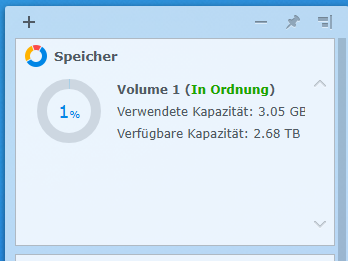
                                    @homoran

                                    Versteh ich gerade absolut nicht.... sorry

                                    58f28934-b8b3-4c26-8cb3-2e3f7dc37089-image.png

                                    Thomas BraunT HomoranH 2 Antworten Letzte Antwort
                                    0
                                    • Q Qax1

                                      @homoran

                                      Versteh ich gerade absolut nicht.... sorry

                                      58f28934-b8b3-4c26-8cb3-2e3f7dc37089-image.png

                                      Thomas BraunT Online
                                      Thomas BraunT Online
                                      Thomas Braun
                                      Most Active
                                      schrieb am zuletzt editiert von
                                      #52

                                      @qax1

                                      Das ist wohl das gesamte NAS. Die Freigabe muss aber kleiner sein.

                                      Linux-Werkzeugkasten:
                                      https://forum.iobroker.net/topic/42952/der-kleine-iobroker-linux-werkzeugkasten
                                      NodeJS Fixer Skript:
                                      https://forum.iobroker.net/topic/68035/iob-node-fix-skript
                                      iob_diag: curl -sLf -o diag.sh https://iobroker.net/diag.sh && bash diag.sh

                                      1 Antwort Letzte Antwort
                                      0
                                      • Q Qax1

                                        @homoran

                                        Versteh ich gerade absolut nicht.... sorry

                                        58f28934-b8b3-4c26-8cb3-2e3f7dc37089-image.png

                                        HomoranH Nicht stören
                                        HomoranH Nicht stören
                                        Homoran
                                        Global Moderator Administrators
                                        schrieb am zuletzt editiert von
                                        #53

                                        @qax1 sagte in BACKITUP host.raspy-io Cannot pack directory /...:

                                        Versteh ich gerade absolut nicht.... sorry

                                        wie ich bereits fragte

                                        @homoran sagte in BACKITUP host.raspy-io Cannot pack directory /...:

                                        @qax1 sagte in BACKITUP host.raspy-io Cannot pack directory /...:

                                        Auf dem NAS ist ja Platz...

                                        auch in der Freigabe?

                                        kein Support per PN! - Fragen im Forum stellen - es gibt fast nichts, was nicht auch für andere interessant ist.

                                        Benutzt das Voting rechts unten im Beitrag wenn er euch geholfen hat.

                                        der Installationsfixer: curl -fsL https://iobroker.net/fix.sh | bash -

                                        Q 1 Antwort Letzte Antwort
                                        0
                                        • HomoranH Homoran

                                          @qax1 sagte in BACKITUP host.raspy-io Cannot pack directory /...:

                                          Versteh ich gerade absolut nicht.... sorry

                                          wie ich bereits fragte

                                          @homoran sagte in BACKITUP host.raspy-io Cannot pack directory /...:

                                          @qax1 sagte in BACKITUP host.raspy-io Cannot pack directory /...:

                                          Auf dem NAS ist ja Platz...

                                          auch in der Freigabe?

                                          Q Offline
                                          Q Offline
                                          Qax1
                                          schrieb am zuletzt editiert von
                                          #54

                                          @homoran
                                          @MartinP
                                          @Thomas-Braun

                                          Ich bin euch Mega Dankbar...
                                          Da hab ich heute mal wieder sehr sehr viel gelernt.

                                          Es funktioniert jetzt.
                                          Ich hab mir den Synology Speicher-Analysator installiert,
                                          und mal aufgeräumt.

                                          Nochmals vielen vielen Dank.

                                          Stefan

                                          HomoranH 1 Antwort Letzte Antwort
                                          0
                                          Antworten
                                          • In einem neuen Thema antworten
                                          Anmelden zum Antworten
                                          • Älteste zuerst
                                          • Neuste zuerst
                                          • Meiste Stimmen


                                          Support us

                                          ioBroker
                                          Community Adapters
                                          Donate
                                          FAQ Cloud / IOT
                                          HowTo: Node.js-Update
                                          HowTo: Backup/Restore
                                          Downloads
                                          BLOG

                                          817

                                          Online

                                          32.5k

                                          Benutzer

                                          81.8k

                                          Themen

                                          1.3m

                                          Beiträge
                                          Community
                                          Impressum | Datenschutz-Bestimmungen | Nutzungsbedingungen | Einwilligungseinstellungen
                                          ioBroker Community 2014-2025
                                          logo
                                          • Anmelden

                                          • Du hast noch kein Konto? Registrieren

                                          • Anmelden oder registrieren, um zu suchen
                                          • Erster Beitrag
                                            Letzter Beitrag
                                          0
                                          • Home
                                          • Aktuell
                                          • Tags
                                          • Ungelesen 0
                                          • Kategorien
                                          • Unreplied
                                          • Beliebt
                                          • GitHub
                                          • Docu
                                          • Hilfe