



Skip to content
  • Home
  • Aktuell
  • Tags
  • 0 Ungelesen 0
  • Kategorien
  • Unreplied
  • Beliebt
  • GitHub
  • Docu
  • Hilfe
Skins
  • Light
  • Brite
  • Cerulean
  • Cosmo
  • Flatly
  • Journal
  • Litera
  • Lumen
  • Lux
  • Materia
  • Minty
  • Morph
  • Pulse
  • Sandstone
  • Simplex
  • Sketchy
  • Spacelab
  • United
  • Yeti
  • Zephyr
  • Dark
  • Cyborg
  • Darkly
  • Quartz
  • Slate
  • Solar
  • Superhero
  • Vapor

  • Standard: (Kein Skin)
  • Kein Skin
Einklappen
ioBroker Logo

Community Forum

donate donate
  1. ioBroker Community Home
  2. Deutsch
  3. Error/Bug
  4. [gelöst] Zigbee-Adapter

NEWS

  • UPDATE 31.10.: Amazon Alexa - ioBroker Skill läuft aus ?
    apollon77A
    apollon77
    48
    3
    8.9k

  • Monatsrückblick – September 2025
    BluefoxB
    Bluefox
    13
    1
    2.3k

  • Neues Video "KI im Smart Home" - ioBroker plus n8n
    BluefoxB
    Bluefox
    16
    1
    3.4k

[gelöst] Zigbee-Adapter

Geplant Angeheftet Gesperrt Verschoben Error/Bug
zigbee netzwerkkarte
63 Beiträge 7 Kommentatoren 6.6k Aufrufe 4 Watching
  • Älteste zuerst
  • Neuste zuerst
  • Meiste Stimmen
Antworten
  • In einem neuen Thema antworten
Anmelden zum Antworten
Dieses Thema wurde gelöscht. Nur Nutzer mit entsprechenden Rechten können es sehen.
  • Lenny.CBL Lenny.CB

    @asgothian sagte in [gelöst] Zigbee-Adapter:

    Lt. Thread-Titel steht da "gelöst" - ist dem wirklich so ?

    nein, dem ist nicht wirklich so. Ich habe das geschrieben, da ich gestern einen neues Stick bestellt habe und hoffe, dass es tatsächlich an meinen alten Schinken lag.

    nur um es aktuell noch einmal zu schildern.

    • alles was die letzten Wochen funktionierte, funktioniert auch weiterhin
    • alles Geräte die keine Verbindung mehr hatten (leere Batterie, außerhalb Reichweite) bekomme ich nicht mehr zum laufen
    • einem IKEA-Taster habe ich nach Batteriewechsel versucht zu löschen --> ohne Erfolg
    • einen neuen Taster wollte ich anlernen --> ohne Erfolg, kein "runterzählen" des Countdowns, kein Pairing-Fortschritt
    • es werden keine Verbindungen in der Netzwerkkarte angezeigt
    • State-Änderung im Baum (z.B. bei einer Lampe den "state" von false auf true ändern --> nicht möglich
    • Aktualisierungen im Objektbaum kommen bei eingen Geäten nicht an, Bild als Beispiel: Lampe ist seit gestern "stromlos" und wird im State "available" nicht aktualisiert.
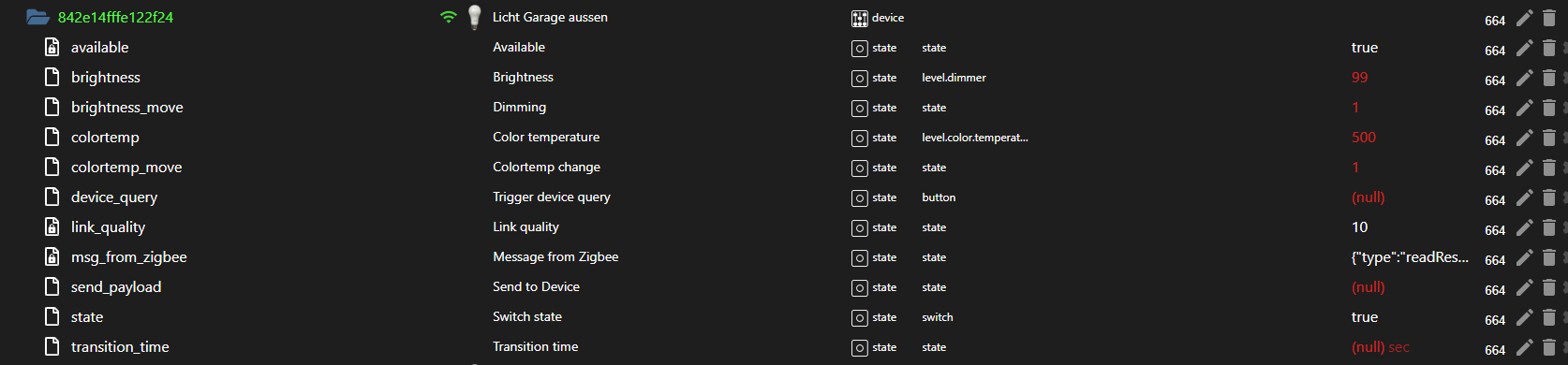
      69e48f23-40a4-4e58-a2a7-0e4f1dd8b947-image.png

    Ich kann nicht genau sagen seit wann das so ist, da genau die Funktionen nicht mehr gingen, diese sind, die nur sehr selten gebraucht werden.
    Gemacht habe ich in den letzten 2-3 Wochen nur ein Dist-Upgrade von "Buster" über "Bullseye" zu "Bookworm" sowie
    Controller und Adapterupdats, welches alles ohne Fehler durchlief.

    Sehr komisch ist hal, dass einiges normal funktioniert, anderes wieder nicht.
    Naja, morgen kommt der neue Stick, mal schauen.

    AsgothianA Offline
    AsgothianA Offline
    Asgothian
    Developer
    schrieb am zuletzt editiert von
    #43

    @lenny-cb Ok. Dann halt ich mich erst einmal raus bis du mit dem neuen Stick anfängst. Was das OS angeht bist du bei @Thomas-Braun sowieso besser als bei mir :)

    ioBroker auf RPi4 - Hardware soweit wie möglich via Zigbee.
    "Shit don't work" ist keine Fehlermeldung, sondern ein Fluch.

    1 Antwort Letzte Antwort
    0
    • Lenny.CBL Lenny.CB

      @thomas-braun dann verstehe ich aber nicht warum dann ein Dist-Upgrade auf der Konsole möglich ist (zugelassen wird) und das auch noch ohne Fehler durchläuft.

      PS: ist das nur bei RasberryOS so? Das gleiche Spiel habe ich auch mit meiner Master-Installation auf einer Proxmox-VM gemacht.

      Thomas BraunT Online
      Thomas BraunT Online
      Thomas Braun
      Most Active
      schrieb am zuletzt editiert von
      #44

      @lenny-cb

      Weil...
      Es eigentlich noch nie empfohlen wurde (weder von Mutter Debian noch von RaspberryOS), es in der Verantwortung des admin liegt, es dennoch zu versuchen und der admin dann checken muss, ob das auch alles trotzdem funktioniert.
      Linux ist frei, du kannst da alles machen, es legt dir keine Fesseln an. Du kannst natürlich auch etwas falsches tun, es bremst dich niemand aus das zu tun.

      Und ein in-line-Upgrade von Bullseye auf Bookworm funktioniert für RaspberryOS diesmal nicht richtig. Es bleibt u. a. der falsche Kernel stehen und wird gebootet.
      Bei

      uname -r
      

      wird wohl bei dir ein 5er-Kernel angezeigt, vermute ich. Aktuell muss da aber

      echad@chet:~ $ uname -r
      6.6.62+rpt-rpi-v8
      echad@chet:~ $
      

      rauskommen.

      Linux-Werkzeugkasten:
      https://forum.iobroker.net/topic/42952/der-kleine-iobroker-linux-werkzeugkasten
      NodeJS Fixer Skript:
      https://forum.iobroker.net/topic/68035/iob-node-fix-skript
      iob_diag: curl -sLf -o diag.sh https://iobroker.net/diag.sh && bash diag.sh

      Lenny.CBL 1 Antwort Letzte Antwort
      0
      • Thomas BraunT Thomas Braun

        @lenny-cb

        Weil...
        Es eigentlich noch nie empfohlen wurde (weder von Mutter Debian noch von RaspberryOS), es in der Verantwortung des admin liegt, es dennoch zu versuchen und der admin dann checken muss, ob das auch alles trotzdem funktioniert.
        Linux ist frei, du kannst da alles machen, es legt dir keine Fesseln an. Du kannst natürlich auch etwas falsches tun, es bremst dich niemand aus das zu tun.

        Und ein in-line-Upgrade von Bullseye auf Bookworm funktioniert für RaspberryOS diesmal nicht richtig. Es bleibt u. a. der falsche Kernel stehen und wird gebootet.
        Bei

        uname -r
        

        wird wohl bei dir ein 5er-Kernel angezeigt, vermute ich. Aktuell muss da aber

        echad@chet:~ $ uname -r
        6.6.62+rpt-rpi-v8
        echad@chet:~ $
        

        rauskommen.

        Lenny.CBL Offline
        Lenny.CBL Offline
        Lenny.CB
        Most Active
        schrieb am zuletzt editiert von Lenny.CB
        #45

        @thomas-braun sagte in [gelöst] Zigbee-Adapter:

        uname -r

        iobroker@raspberrypi:~ $ uname -r
        6.1.21-v7+
        iobroker@raspberrypi:~ $

        auf dem Master:
        iobroker@iobroker:~$ uname -r
        6.1.0-28-amd64
        iobroker@iobroker:~$

        Thomas BraunT 1 Antwort Letzte Antwort
        0
        • Lenny.CBL Lenny.CB

          @thomas-braun sagte in [gelöst] Zigbee-Adapter:

          uname -r

          iobroker@raspberrypi:~ $ uname -r
          6.1.21-v7+
          iobroker@raspberrypi:~ $

          auf dem Master:
          iobroker@iobroker:~$ uname -r
          6.1.0-28-amd64
          iobroker@iobroker:~$

          Thomas BraunT Online
          Thomas BraunT Online
          Thomas Braun
          Most Active
          schrieb am zuletzt editiert von
          #46

          @lenny-cb

          Gib mal die Ausgabe von

          iob diag
          

          zum besten. RaspberryOS 'Bookworm' kommt aktuell mit einem Kernel 6.6 daher.

          Linux-Werkzeugkasten:
          https://forum.iobroker.net/topic/42952/der-kleine-iobroker-linux-werkzeugkasten
          NodeJS Fixer Skript:
          https://forum.iobroker.net/topic/68035/iob-node-fix-skript
          iob_diag: curl -sLf -o diag.sh https://iobroker.net/diag.sh && bash diag.sh

          Lenny.CBL 1 Antwort Letzte Antwort
          0
          • Thomas BraunT Thomas Braun

            @lenny-cb

            Gib mal die Ausgabe von

            iob diag
            

            zum besten. RaspberryOS 'Bookworm' kommt aktuell mit einem Kernel 6.6 daher.

            Lenny.CBL Offline
            Lenny.CBL Offline
            Lenny.CB
            Most Active
            schrieb am zuletzt editiert von
            #47

            @thomas-braun sagte in [gelöst] Zigbee-Adapter:

            iob diag

            ich glaube da fängt es an zu kranken:

            *** iob diag is starting up, please wait ***
            iob diag needs to be updated. Please execute 'iobroker fix' first.
            iobroker@raspberrypi:~ $
            
            iob stop
            iob fix
            

            gemacht und ist durchgelaufen, aber iob diag erzeugt wieder den o.g. Text

            Thomas BraunT 1 Antwort Letzte Antwort
            0
            • Lenny.CBL Lenny.CB

              @thomas-braun sagte in [gelöst] Zigbee-Adapter:

              iob diag

              ich glaube da fängt es an zu kranken:

              *** iob diag is starting up, please wait ***
              iob diag needs to be updated. Please execute 'iobroker fix' first.
              iobroker@raspberrypi:~ $
              
              iob stop
              iob fix
              

              gemacht und ist durchgelaufen, aber iob diag erzeugt wieder den o.g. Text

              Thomas BraunT Online
              Thomas BraunT Online
              Thomas Braun
              Most Active
              schrieb am zuletzt editiert von
              #48

              @lenny-cb

              Verwende die Beta-Version von iob diag:

              curl https://raw.githubusercontent.com/Grothesk242/ioBroker/refs/heads/Raspbian/diag.sh > iob_diag.sh
              chmod 744 iob_diag.sh
              ./iob_diag.sh
              

              Linux-Werkzeugkasten:
              https://forum.iobroker.net/topic/42952/der-kleine-iobroker-linux-werkzeugkasten
              NodeJS Fixer Skript:
              https://forum.iobroker.net/topic/68035/iob-node-fix-skript
              iob_diag: curl -sLf -o diag.sh https://iobroker.net/diag.sh && bash diag.sh

              Lenny.CBL 1 Antwort Letzte Antwort
              0
              • Thomas BraunT Thomas Braun

                @lenny-cb

                Verwende die Beta-Version von iob diag:

                curl https://raw.githubusercontent.com/Grothesk242/ioBroker/refs/heads/Raspbian/diag.sh > iob_diag.sh
                chmod 744 iob_diag.sh
                ./iob_diag.sh
                
                Lenny.CBL Offline
                Lenny.CBL Offline
                Lenny.CB
                Most Active
                schrieb am zuletzt editiert von
                #49

                @thomas-braun sagte in [gelöst] Zigbee-Adapter:

                ./iob_diag.sh

                ======================= SUMMARY =======================
                                        v.2024-10-26 Raspbian
                
                
                 Static hostname: raspberrypi
                       Icon name: computer
                Operating System: Raspbian GNU/Linux 12 (bookworm)
                          Kernel: Linux 6.1.21-v7+
                    Architecture: arm
                
                Installation:           native
                Kernel:                 armv7l
                Userland:               32 bit
                Timezone:               Europe/Berlin (CET, +0100)
                User-ID:                1001
                Display-Server:         false
                Boot Target:            multi-user.target
                
                Pending OS-Updates:     0
                Pending iob updates:    0
                
                Nodejs-Installation:
                /usr/bin/nodejs         v20.18.1
                /usr/bin/node           v20.18.1
                /usr/bin/npm            10.8.2
                /usr/bin/npx            10.8.2
                /usr/bin/corepack       0.29.4
                
                Recommended versions are nodejs  and npm
                nodeJS installation is correct
                
                MEMORY:
                               total        used        free      shared  buff/cache   available
                Mem:            966M        135M        305M        925K        593M        831M
                Swap:           209M        786K        208M
                Total:          1.2G        135M        514M
                
                Active iob-Instances:   34
                Upgrade policy: none
                
                ioBroker Core:          js-controller           7.0.3
                                        admin                   7.4.3
                
                ioBroker Status:        iobroker is not running on this host.
                
                At least one iobroker host is running.
                
                Objects type: jsonl
                States  type: jsonl
                
                Status admin and web instance:
                + system.adapter.admin.0                  : admin                 : iobroker                                 -  enabled, port: 8081, bind: 0.0.0.0, run as: admin
                  system.adapter.admin.1                  : admin                 : RPI2                                     - disabled, port: 8081, bind: 0.0.0.0, run as: admin
                  system.adapter.admin.3                  : admin                 : iobroker                                 - disabled, port: 8881, bind: 0.0.0.0 (SSL), run as: admin
                + system.adapter.web.0                    : web                   : iobroker                                 -  enabled, port: 8082, bind: 0.0.0.0, run as: admin
                + system.adapter.web.1                    : web                   : iobroker                                 -  enabled, port: 8085, bind: 0.0.0.0, run as: admin
                
                Objects:                25550
                States:                 22170
                
                Size of iob-Database:
                
                3.7M    /opt/iobroker/iobroker-data/objects.jsonl
                76K     /opt/iobroker/iobroker-data/states.jsonl
                
                
                2 CRITICAL ERRORS DETECTED!
                Check 'sudo dmesg --level=emerg,alert,crit -T' for details
                Operating System is the current Debian stable version codenamed 'bookworm'!
                
                =================== END OF SUMMARY ====================
                
                
                Thomas BraunT HomoranH 2 Antworten Letzte Antwort
                0
                • Lenny.CBL Lenny.CB

                  @thomas-braun sagte in [gelöst] Zigbee-Adapter:

                  ./iob_diag.sh

                  ======================= SUMMARY =======================
                                          v.2024-10-26 Raspbian
                  
                  
                   Static hostname: raspberrypi
                         Icon name: computer
                  Operating System: Raspbian GNU/Linux 12 (bookworm)
                            Kernel: Linux 6.1.21-v7+
                      Architecture: arm
                  
                  Installation:           native
                  Kernel:                 armv7l
                  Userland:               32 bit
                  Timezone:               Europe/Berlin (CET, +0100)
                  User-ID:                1001
                  Display-Server:         false
                  Boot Target:            multi-user.target
                  
                  Pending OS-Updates:     0
                  Pending iob updates:    0
                  
                  Nodejs-Installation:
                  /usr/bin/nodejs         v20.18.1
                  /usr/bin/node           v20.18.1
                  /usr/bin/npm            10.8.2
                  /usr/bin/npx            10.8.2
                  /usr/bin/corepack       0.29.4
                  
                  Recommended versions are nodejs  and npm
                  nodeJS installation is correct
                  
                  MEMORY:
                                 total        used        free      shared  buff/cache   available
                  Mem:            966M        135M        305M        925K        593M        831M
                  Swap:           209M        786K        208M
                  Total:          1.2G        135M        514M
                  
                  Active iob-Instances:   34
                  Upgrade policy: none
                  
                  ioBroker Core:          js-controller           7.0.3
                                          admin                   7.4.3
                  
                  ioBroker Status:        iobroker is not running on this host.
                  
                  At least one iobroker host is running.
                  
                  Objects type: jsonl
                  States  type: jsonl
                  
                  Status admin and web instance:
                  + system.adapter.admin.0                  : admin                 : iobroker                                 -  enabled, port: 8081, bind: 0.0.0.0, run as: admin
                    system.adapter.admin.1                  : admin                 : RPI2                                     - disabled, port: 8081, bind: 0.0.0.0, run as: admin
                    system.adapter.admin.3                  : admin                 : iobroker                                 - disabled, port: 8881, bind: 0.0.0.0 (SSL), run as: admin
                  + system.adapter.web.0                    : web                   : iobroker                                 -  enabled, port: 8082, bind: 0.0.0.0, run as: admin
                  + system.adapter.web.1                    : web                   : iobroker                                 -  enabled, port: 8085, bind: 0.0.0.0, run as: admin
                  
                  Objects:                25550
                  States:                 22170
                  
                  Size of iob-Database:
                  
                  3.7M    /opt/iobroker/iobroker-data/objects.jsonl
                  76K     /opt/iobroker/iobroker-data/states.jsonl
                  
                  
                  2 CRITICAL ERRORS DETECTED!
                  Check 'sudo dmesg --level=emerg,alert,crit -T' for details
                  Operating System is the current Debian stable version codenamed 'bookworm'!
                  
                  =================== END OF SUMMARY ====================
                  
                  
                  Thomas BraunT Online
                  Thomas BraunT Online
                  Thomas Braun
                  Most Active
                  schrieb am zuletzt editiert von Thomas Braun
                  #50

                  @lenny-cb

                  Die Langfassung.

                  Und log dich mit deinem Standard-User (mit der uid=1000) ein. Vermutlich pi dann.

                  Linux-Werkzeugkasten:
                  https://forum.iobroker.net/topic/42952/der-kleine-iobroker-linux-werkzeugkasten
                  NodeJS Fixer Skript:
                  https://forum.iobroker.net/topic/68035/iob-node-fix-skript
                  iob_diag: curl -sLf -o diag.sh https://iobroker.net/diag.sh && bash diag.sh

                  Lenny.CBL 1 Antwort Letzte Antwort
                  0
                  • Lenny.CBL Lenny.CB

                    @thomas-braun sagte in [gelöst] Zigbee-Adapter:

                    ./iob_diag.sh

                    ======================= SUMMARY =======================
                                            v.2024-10-26 Raspbian
                    
                    
                     Static hostname: raspberrypi
                           Icon name: computer
                    Operating System: Raspbian GNU/Linux 12 (bookworm)
                              Kernel: Linux 6.1.21-v7+
                        Architecture: arm
                    
                    Installation:           native
                    Kernel:                 armv7l
                    Userland:               32 bit
                    Timezone:               Europe/Berlin (CET, +0100)
                    User-ID:                1001
                    Display-Server:         false
                    Boot Target:            multi-user.target
                    
                    Pending OS-Updates:     0
                    Pending iob updates:    0
                    
                    Nodejs-Installation:
                    /usr/bin/nodejs         v20.18.1
                    /usr/bin/node           v20.18.1
                    /usr/bin/npm            10.8.2
                    /usr/bin/npx            10.8.2
                    /usr/bin/corepack       0.29.4
                    
                    Recommended versions are nodejs  and npm
                    nodeJS installation is correct
                    
                    MEMORY:
                                   total        used        free      shared  buff/cache   available
                    Mem:            966M        135M        305M        925K        593M        831M
                    Swap:           209M        786K        208M
                    Total:          1.2G        135M        514M
                    
                    Active iob-Instances:   34
                    Upgrade policy: none
                    
                    ioBroker Core:          js-controller           7.0.3
                                            admin                   7.4.3
                    
                    ioBroker Status:        iobroker is not running on this host.
                    
                    At least one iobroker host is running.
                    
                    Objects type: jsonl
                    States  type: jsonl
                    
                    Status admin and web instance:
                    + system.adapter.admin.0                  : admin                 : iobroker                                 -  enabled, port: 8081, bind: 0.0.0.0, run as: admin
                      system.adapter.admin.1                  : admin                 : RPI2                                     - disabled, port: 8081, bind: 0.0.0.0, run as: admin
                      system.adapter.admin.3                  : admin                 : iobroker                                 - disabled, port: 8881, bind: 0.0.0.0 (SSL), run as: admin
                    + system.adapter.web.0                    : web                   : iobroker                                 -  enabled, port: 8082, bind: 0.0.0.0, run as: admin
                    + system.adapter.web.1                    : web                   : iobroker                                 -  enabled, port: 8085, bind: 0.0.0.0, run as: admin
                    
                    Objects:                25550
                    States:                 22170
                    
                    Size of iob-Database:
                    
                    3.7M    /opt/iobroker/iobroker-data/objects.jsonl
                    76K     /opt/iobroker/iobroker-data/states.jsonl
                    
                    
                    2 CRITICAL ERRORS DETECTED!
                    Check 'sudo dmesg --level=emerg,alert,crit -T' for details
                    Operating System is the current Debian stable version codenamed 'bookworm'!
                    
                    =================== END OF SUMMARY ====================
                    
                    
                    HomoranH Nicht stören
                    HomoranH Nicht stören
                    Homoran
                    Global Moderator Administrators
                    schrieb am zuletzt editiert von
                    #51

                    @lenny-cb sagte in [gelöst] Zigbee-Adapter:

                    Mem: 966M 135M 305M 925K 593M 831M

                    ensthaft?

                    bei

                    @lenny-cb sagte in [gelöst] Zigbee-Adapter:

                    Active iob-Instances: 34

                    hast du noch nie Probleme mit dem RAM gehabt?

                    kein Support per PN! - Fragen im Forum stellen - es gibt fast nichts, was nicht auch für andere interessant ist.

                    Benutzt das Voting rechts unten im Beitrag wenn er euch geholfen hat.

                    der Installationsfixer: curl -fsL https://iobroker.net/fix.sh | bash -

                    Lenny.CBL 1 Antwort Letzte Antwort
                    0
                    • HomoranH Homoran

                      @lenny-cb sagte in [gelöst] Zigbee-Adapter:

                      Mem: 966M 135M 305M 925K 593M 831M

                      ensthaft?

                      bei

                      @lenny-cb sagte in [gelöst] Zigbee-Adapter:

                      Active iob-Instances: 34

                      hast du noch nie Probleme mit dem RAM gehabt?

                      Lenny.CBL Offline
                      Lenny.CBL Offline
                      Lenny.CB
                      Most Active
                      schrieb am zuletzt editiert von
                      #52

                      @homoran sagte in [gelöst] Zigbee-Adapter:

                      @lenny-cb sagte in [gelöst] Zigbee-Adapter:

                      Mem: 966M 135M 305M 925K 593M 831M

                      ensthaft?

                      bei

                      @lenny-cb sagte in [gelöst] Zigbee-Adapter:

                      Active iob-Instances: 34

                      hast du noch nie Probleme mit dem RAM gehabt?

                      nö, noch keine Probleme mit dem RAM.
                      Jedoch wundern mich die "34 aktiven Instanzen" etwas. Auf dem PI (als Slave) läuft nur Zigbee, Traccar und Backup.

                      HomoranH 1 Antwort Letzte Antwort
                      0
                      • Thomas BraunT Thomas Braun

                        @lenny-cb

                        Die Langfassung.

                        Und log dich mit deinem Standard-User (mit der uid=1000) ein. Vermutlich pi dann.

                        Lenny.CBL Offline
                        Lenny.CBL Offline
                        Lenny.CB
                        Most Active
                        schrieb am zuletzt editiert von Lenny.CB
                        #53

                        @thomas-braun sagte in [gelöst] Zigbee-Adapter:

                        Die Langfassung.

                        ========== Start marking the full check here ===========
                        
                        
                        Script v.2024-10-26 Raspbian
                        
                        *** BASE SYSTEM ***
                        Static hostname: raspberrypi
                              Icon name: computer
                        Operating System: Raspbian GNU/Linux 12 (bookworm)
                                 Kernel: Linux 6.1.21-v7+
                           Architecture: arm
                        OS is similar to: debian
                        
                        Model           : Raspberry Pi 2 Model B Rev 1.1
                        Docker          : false
                        Virtualization  : none
                        Kernel          : armv7l
                        Userland        : 32 bit
                        
                        Systemuptime and Load:
                        12:03:35 up 21:35,  1 user,  load average: 0.02, 0.22, 0.27
                        CPU threads: 4
                        
                        
                        *** LIFE CYCLE STATUS ***
                        Operating System is the current Debian stable version codenamed 'bookworm'!
                        
                        *** RASPBERRY THROTTLING ***
                        Current issues:
                        No throttling issues detected.
                        
                        Previously detected issues:
                        ~ Under-voltage has occurred
                        ~ Arm frequency capping has occurred
                        
                        *** TIME AND TIMEZONES ***
                                      Local time: Mon 2024-12-02 12:03:35 CET
                                  Universal time: Mon 2024-12-02 11:03:35 UTC
                                        RTC time: n/a
                                       Time zone: Europe/Berlin (CET, +0100)
                        System clock synchronized: yes
                                     NTP service: active
                                 RTC in local TZ: no
                        
                        *** Users and Groups ***
                        User that called 'iob diag':
                        pi
                        HOME=/home/pi
                        GROUPS=pi adm dialout cdrom sudo audio video plugdev games users input render netdev gpio i2c spi iobroker
                        
                        User that is running 'js-controller':
                        js-controller is not running
                        
                        *** DISPLAY-SERVER SETUP ***
                        Display-Server: false
                        Desktop:
                        Terminal:       tty
                        
                        *** MEMORY ***
                                      total        used        free      shared  buff/cache   available
                        Mem:            966M        136M        299M        925K        598M        830M
                        Swap:           209M        786K        208M
                        Total:          1.2G        137M        508M
                        
                        Active iob-Instances:   34
                        
                                 921 M total memory
                                 130 M used memory
                                 296 M active memory
                                 239 M inactive memory
                                 285 M free memory
                                  97 M buffer memory
                                 474 M swap cache
                                 199 M total swap
                                   0 M used swap
                                 199 M free swap
                        
                        *** top - Table Of Processes  ***
                        top - 12:03:36 up 21:35,  1 user,  load average: 0.02, 0.22, 0.27
                        Tasks: 121 total,   1 running, 120 sleeping,   0 stopped,   0 zombie
                        %Cpu(s):  0.0 us, 16.7 sy,  0.0 ni, 75.0 id,  8.3 wa,  0.0 hi,  0.0 si,  0.0 st
                        MiB Mem :    922.0 total,    283.8 free,    132.0 used,    571.1 buff/cache
                        MiB Swap:    200.0 total,    199.2 free,      0.8 used.    790.0 avail Mem
                        
                        *** FAILED SERVICES ***
                        
                         UNIT             LOAD   ACTIVE SUB    DESCRIPTION
                        * iobroker.service loaded failed failed ioBroker Server
                        
                        LOAD   = Reflects whether the unit definition was properly loaded.
                        ACTIVE = The high-level unit activation state, i.e. generalization of SUB.
                        SUB    = The low-level unit activation state, values depend on unit type.
                        1 loaded units listed.
                        
                        
                        *** DMESG CRITICAL ERRORS ***
                        2 CRITICAL ERRORS DETECTED!
                        Check 'sudo dmesg --level=emerg,alert,crit -T' for details
                        
                        *** FILESYSTEM ***
                        Filesystem     Type      Size  Used Avail Use% Mounted on
                        /dev/root      ext4       29G  6.4G   22G  23% /
                        devtmpfs       devtmpfs  333M     0  333M   0% /dev
                        tmpfs          tmpfs     461M     0  461M   0% /dev/shm
                        tmpfs          tmpfs     185M  976K  184M   1% /run
                        tmpfs          tmpfs     5.0M   12K  5.0M   1% /run/lock
                        /dev/mmcblk0p1 vfat      255M   51M  205M  20% /boot
                        tmpfs          tmpfs      93M     0   93M   0% /run/user/0
                        tmpfs          tmpfs      93M     0   93M   0% /run/user/1000
                        
                        Messages concerning ext4 filesystem in dmesg:
                        [Sun Dec  1 14:28:17 2024] Kernel command line: coherent_pool=1M snd_bcm2835.enable_headphones=0 snd_bcm2835.enable_headphones=1 snd_bcm2835.enable_hdmi=1 snd_bcm2835.enable_hdmi=0 video=Composite-1:720x480@60i vc_mem.mem_base=0x3ec00000 vc_mem.mem_size=0x40000000  console=ttyAMA0,115200 console=tty1 root=PARTUUID=572b59fd-02 rootfstype=ext4 fsck.repair=yes rootwait
                        [Sun Dec  1 14:28:21 2024] EXT4-fs (mmcblk0p2): mounted filesystem with ordered data mode. Quota mode: none.
                        [Sun Dec  1 14:28:21 2024] VFS: Mounted root (ext4 filesystem) readonly on device 179:2.
                        [Sun Dec  1 14:28:27 2024] EXT4-fs (mmcblk0p2): re-mounted. Quota mode: none.
                        
                        Show mounted filesystems:
                        TARGET  SOURCE         FSTYPE OPTIONS
                        /       /dev/mmcblk0p2 ext4   rw,noatime
                        `-/boot /dev/mmcblk0p1 vfat   rw,relatime,fmask=0022,dmask=0022,codepage=437,iocharset=ascii,shortname=mixed,errors=remount-ro
                        
                        Files in neuralgic directories:
                        
                        /var:
                        1.6G    /var/
                        885M    /var/log
                        882M    /var/log/journal/24de808e72c141b89cdc93c28511878d
                        882M    /var/log/journal
                        418M    /var/cache
                        
                        Archived and active journals take up 881.3M in the file system.
                        
                        /opt/iobroker/backups:
                        148M    /opt/iobroker/backups/
                        
                        /opt/iobroker/iobroker-data:
                        18M     /opt/iobroker/iobroker-data/
                        15M     /opt/iobroker/iobroker-data/files
                        13M     /opt/iobroker/iobroker-data/files/admin.admin/custom/static/js
                        13M     /opt/iobroker/iobroker-data/files/admin.admin/custom/static
                        13M     /opt/iobroker/iobroker-data/files/admin.admin/custom
                        
                        The five largest files in iobroker-data are:
                        6.3M    /opt/iobroker/iobroker-data/files/admin.admin/custom/static/js/vendors-node_modules_iobroker_adapter-react-v5_assets_devices_parseNames_js-node_modules_iobr-99c23e.847b8ad9.chunk.js.map
                        3.7M    /opt/iobroker/iobroker-data/objects.jsonl
                        2.8M    /opt/iobroker/iobroker-data/files/admin.admin/custom/static/js/vendors-node_modules_iobroker_adapter-react-v5_assets_devices_parseNames_js-node_modules_iobr-99c23e.847b8ad9.chunk.js
                        1.6M    /opt/iobroker/iobroker-data/files/admin.admin/custom/static/js/vendors-node_modules_mui_material_Accordion_index_js-node_modules_mui_material_AccordionDetai-57e02d.0886b730.chunk.js.map
                        652K    /opt/iobroker/iobroker-data/files/admin.admin/custom/static/js/vendors-node_modules_mui_material_index_js.40e01f69.chunk.js.map
                        
                        USB-Devices by-id:
                        USB-Sticks -  Avoid direct links to /dev/tty* in your adapter setups, please always prefer the links 'by-id':
                        
                        /dev/serial/by-id/usb-Texas_Instruments_CC2538_USB_CDC-if00
                        
                        HINT:
                        Your zigbee.0 COM-Port is NOT matching 'by-id'. Please check your setting:
                        /dev/ttyACM0
                        
                        *** NodeJS-Installation ***
                        
                        /usr/bin/nodejs         v20.18.1
                        /usr/bin/node           v20.18.1
                        /usr/bin/npm            10.8.2
                        /usr/bin/npx            10.8.2
                        /usr/bin/corepack       0.29.4
                        
                        nodejs:
                         Installed: 20.18.1-1nodesource1
                         Candidate: 20.18.1-1nodesource1
                         Version table:
                        *** 20.18.1-1nodesource1 1001
                               500 https://deb.nodesource.com/node_20.x nodistro/main armhf Packages
                               100 /var/lib/dpkg/status
                            20.18.0-1nodesource1 1001
                               500 https://deb.nodesource.com/node_20.x nodistro/main armhf Packages
                            20.17.0-1nodesource1 1001
                               500 https://deb.nodesource.com/node_20.x nodistro/main armhf Packages
                            20.16.0-1nodesource1 1001
                               500 https://deb.nodesource.com/node_20.x nodistro/main armhf Packages
                            20.15.1-1nodesource1 1001
                               500 https://deb.nodesource.com/node_20.x nodistro/main armhf Packages
                            20.15.0-1nodesource1 1001
                               500 https://deb.nodesource.com/node_20.x nodistro/main armhf Packages
                            20.14.0-1nodesource1 1001
                               500 https://deb.nodesource.com/node_20.x nodistro/main armhf Packages
                            20.13.1-1nodesource1 1001
                               500 https://deb.nodesource.com/node_20.x nodistro/main armhf Packages
                            20.13.0-1nodesource1 1001
                               500 https://deb.nodesource.com/node_20.x nodistro/main armhf Packages
                            20.12.2-1nodesource1 1001
                               500 https://deb.nodesource.com/node_20.x nodistro/main armhf Packages
                            20.12.1-1nodesource1 1001
                               500 https://deb.nodesource.com/node_20.x nodistro/main armhf Packages
                            20.12.0-1nodesource1 1001
                               500 https://deb.nodesource.com/node_20.x nodistro/main armhf Packages
                            20.11.1-1nodesource1 1001
                               500 https://deb.nodesource.com/node_20.x nodistro/main armhf Packages
                            20.11.0-1nodesource1 1001
                               500 https://deb.nodesource.com/node_20.x nodistro/main armhf Packages
                            20.10.0-1nodesource1 1001
                               500 https://deb.nodesource.com/node_20.x nodistro/main armhf Packages
                            20.9.0-1nodesource1 1001
                               500 https://deb.nodesource.com/node_20.x nodistro/main armhf Packages
                            20.8.1-1nodesource1 1001
                               500 https://deb.nodesource.com/node_20.x nodistro/main armhf Packages
                            20.8.0-1nodesource1 1001
                               500 https://deb.nodesource.com/node_20.x nodistro/main armhf Packages
                            20.7.0-1nodesource1 1001
                               500 https://deb.nodesource.com/node_20.x nodistro/main armhf Packages
                            20.6.1-1nodesource1 1001
                               500 https://deb.nodesource.com/node_20.x nodistro/main armhf Packages
                            20.6.0-1nodesource1 1001
                               500 https://deb.nodesource.com/node_20.x nodistro/main armhf Packages
                            20.5.1-1nodesource1 1001
                               500 https://deb.nodesource.com/node_20.x nodistro/main armhf Packages
                            20.5.0-1nodesource1 1001
                               500 https://deb.nodesource.com/node_20.x nodistro/main armhf Packages
                            20.4.0-1nodesource1 1001
                               500 https://deb.nodesource.com/node_20.x nodistro/main armhf Packages
                            20.3.1-1nodesource1 1001
                               500 https://deb.nodesource.com/node_20.x nodistro/main armhf Packages
                            20.3.0-1nodesource1 1001
                               500 https://deb.nodesource.com/node_20.x nodistro/main armhf Packages
                            20.2.0-1nodesource1 1001
                               500 https://deb.nodesource.com/node_20.x nodistro/main armhf Packages
                            20.1.0-1nodesource1 1001
                               500 https://deb.nodesource.com/node_20.x nodistro/main armhf Packages
                            20.0.0-1nodesource1 1001
                               500 https://deb.nodesource.com/node_20.x nodistro/main armhf Packages
                            18.19.0+dfsg-6~deb12u2+rpi1 500
                               500 http://raspbian.raspberrypi.org/raspbian bookworm/main armhf Packages
                        
                        Temp directories causing deletion problem: 0
                        No problems detected
                        
                        Errors in npm tree: 0
                        No problems detected
                        
                        *** ioBroker-Installation ***
                        
                        ioBroker Status
                        iobroker is not running on this host.
                        
                        At least one iobroker host is running.
                        
                        Objects type: jsonl
                        States  type: jsonl
                        
                        Hosts:
                        RPI2                RPI2 (version: 7.0.3, hostname: RPI2          , alive, uptime: 75819)
                        iobroker            iobroker (version: 7.0.3, hostname: iobroker      , alive, uptime: 78188)
                        
                        Core adapters versions
                        js-controller:  7.0.3
                        admin:          7.4.3
                        javascript:     8.8.3
                        
                        nodejs modules from github:     1
                        +-- iobroker.gartenbewaesserung@0.0.6 (git+ssh://git@github.com/TA2k/ioBroker.gartenbewaesserung.git#a88728c2b522e8171960c3001a9edd92ce60f3bd)
                        
                        Adapter State
                        + system.adapter.admin.0                  : admin                 : iobroker                                 -  enabled, port: 8081, bind: 0.0.0.0, run as: admin
                         system.adapter.admin.1                  : admin                 : RPI2                                     - disabled, port: 8081, bind: 0.0.0.0, run as: admin
                         system.adapter.admin.3                  : admin                 : iobroker                                 - disabled, port: 8881, bind: 0.0.0.0 (SSL), run as: admin
                         system.adapter.alexa2.0                 : alexa2                : iobroker                                 - disabled
                         system.adapter.alias-manager.0          : alias-manager         : iobroker                                 - disabled
                         system.adapter.apg-info.0               : apg-info              : iobroker                                 -  enabled
                         system.adapter.awattar.0                : awattar               : iobroker                                 -  enabled
                        + system.adapter.backitup.0               : backitup              : iobroker                                 -  enabled
                         system.adapter.backitup.2               : backitup              : RPI2                                     -  enabled
                         system.adapter.cloud.1                  : cloud                 : iobroker                                 - disabled
                         system.adapter.daswetter.0              : daswetter             : iobroker                                 - disabled
                         system.adapter.devices.0                : devices               : iobroker                                 - disabled
                         system.adapter.dwd.0                    : dwd                   : iobroker                                 - disabled
                        + system.adapter.ebus.0                   : ebus                  : iobroker                                 -  enabled
                        + system.adapter.energiefluss-erweitert.0 : energiefluss-erweitert: iobroker                                 -  enabled
                        + system.adapter.energiefluss-erweitert.1 : energiefluss-erweitert: iobroker                                 -  enabled
                         system.adapter.flot.0                   : flot                  : iobroker                                 - disabled
                         system.adapter.fully-tablet-control.0   : fully-tablet-control  : iobroker                                 - disabled
                         system.adapter.gartenbewaesserung.0     : gartenbewaesserung    : RPI2                                     - disabled
                         system.adapter.history.0                : history               : iobroker                                 - disabled
                         system.adapter.hm-rega.0                : hm-rega               : RPI2                                     - disabled
                         system.adapter.hm-rpc.0                 : hm-rpc                : RPI2                                     - disabled, port: 0
                         system.adapter.hm-rpc.1                 : hm-rpc                : RPI2                                     - disabled, port: 0
                         system.adapter.ical.0                   : ical                  : iobroker                                 -  enabled
                         system.adapter.ical.1                   : ical                  : iobroker                                 -  enabled
                         system.adapter.icons-icons8.0           : icons-icons8          : iobroker                                 - disabled
                         system.adapter.icons-mfd-png.0          : icons-mfd-png         : iobroker                                 - disabled
                         system.adapter.icons-mfd-svg.0          : icons-mfd-svg         : iobroker                                 - disabled
                        + system.adapter.influxdb.0               : influxdb              : iobroker                                 -  enabled, port: 8086
                        + system.adapter.info.0                   : info                  : iobroker                                 -  enabled
                        + system.adapter.iot.0                    : iot                   : iobroker                                 -  enabled
                        + system.adapter.javascript.0             : javascript            : iobroker                                 -  enabled
                        + system.adapter.javascript.1             : javascript            : iobroker                                 -  enabled
                         system.adapter.javascript.3             : javascript            : RPI2                                     - disabled
                         system.adapter.luftdaten.0              : luftdaten             : iobroker                                 - disabled
                         system.adapter.material.0               : material              : iobroker                                 -  enabled
                         system.adapter.mielecloudservice.0      : mielecloudservice     : iobroker                                 - disabled
                        + system.adapter.modbus.0                 : modbus                : iobroker                                 -  enabled
                        + system.adapter.modbus.1                 : modbus                : iobroker                                 -  enabled
                        + system.adapter.mqtt.0                   : mqtt                  : iobroker                                 -  enabled, port: 1883, bind: 0.0.0.0
                        + system.adapter.node-red.0               : node-red              : iobroker                                 -  enabled, port: 1880, bind: 0.0.0.0 (SSL)
                        + system.adapter.parser.0                 : parser                : iobroker                                 -  enabled
                         system.adapter.pid.0                    : pid                   : iobroker                                 - disabled
                         system.adapter.ping.0                   : ping                  : iobroker                                 - disabled
                         system.adapter.pollenflug.0             : pollenflug            : RPI2                                     - disabled
                        + system.adapter.pvforecast.0             : pvforecast            : iobroker                                 -  enabled
                        + system.adapter.scenes.0                 : scenes                : iobroker                                 -  enabled
                        + system.adapter.shelly.0                 : shelly                : iobroker                                 -  enabled, port: 1879, bind: 0.0.0.0
                        + system.adapter.shelly.1                 : shelly                : iobroker                                 -  enabled, port: 1882, bind: 0.0.0.0
                        + system.adapter.shuttercontrol.0         : shuttercontrol        : iobroker                                 -  enabled
                        + system.adapter.simple-api.0             : simple-api            : iobroker                                 -  enabled, port: 8087, bind: 0.0.0.0, run as: admin
                        + system.adapter.smartcontrol.0           : smartcontrol          : iobroker                                 -  enabled
                        + system.adapter.socketio.0               : socketio              : iobroker                                 -  enabled, port: 8084, bind: 0.0.0.0, run as: admin
                        + system.adapter.sonoff.0                 : sonoff                : iobroker                                 -  enabled, port: 1887, bind: 0.0.0.0
                        + system.adapter.sourceanalytix.0         : sourceanalytix        : iobroker                                 -  enabled
                         system.adapter.tankerkoenig.0           : tankerkoenig          : iobroker                                 - disabled
                        + system.adapter.telegram.0               : telegram              : iobroker                                 -  enabled, port: 8443, bind: 0.0.0.0
                        + system.adapter.tr-064.0                 : tr-064                : iobroker                                 -  enabled
                         system.adapter.traccar.0                : traccar               : RPI2                                     -  enabled
                         system.adapter.vis-bars.0               : vis-bars              : iobroker                                 - disabled
                         system.adapter.vis-canvas-gauges.0      : vis-canvas-gauges     : iobroker                                 - disabled
                         system.adapter.vis-history.0            : vis-history           : iobroker                                 - disabled
                         system.adapter.vis-hqwidgets.0          : vis-hqwidgets         : iobroker                                 - disabled
                         system.adapter.vis-jqui-mfd.0           : vis-jqui-mfd          : iobroker                                 - disabled
                         system.adapter.vis-justgage.0           : vis-justgage          : iobroker                                 - disabled
                         system.adapter.vis-map.0                : vis-map               : iobroker                                 - disabled
                         system.adapter.vis-materialdesign.0     : vis-materialdesign    : iobroker                                 -  enabled
                         system.adapter.vis-metro.0              : vis-metro             : iobroker                                 - disabled
                         system.adapter.vis-players.0            : vis-players           : iobroker                                 - disabled
                         system.adapter.vis-plumb.0              : vis-plumb             : iobroker                                 - disabled
                         system.adapter.vis-rgraph.0             : vis-rgraph            : iobroker                                 - disabled
                         system.adapter.vis-timeandweather.0     : vis-timeandweather    : iobroker                                 - disabled
                         system.adapter.vis.0                    : vis                   : iobroker                                 -  enabled
                        + system.adapter.web.0                    : web                   : iobroker                                 -  enabled, port: 8082, bind: 0.0.0.0, run as: admin
                        + system.adapter.web.1                    : web                   : iobroker                                 -  enabled, port: 8085, bind: 0.0.0.0, run as: admin
                        + system.adapter.wireless-mbus.0          : wireless-mbus         : iobroker                                 -  enabled
                        + system.adapter.ws.0                     : ws                    : iobroker                                 -  enabled, port: 8086, bind: 0.0.0.0, run as: admin
                        + system.adapter.yeelight-2.0             : yeelight-2            : iobroker                                 -  enabled
                         system.adapter.yr.0                     : yr                    : iobroker                                 - disabled
                         system.adapter.zigbee.0                 : zigbee                : RPI2                                     -  enabled, port: /dev/ttyACM0
                        + system.adapter.zwave2.0                 : zwave2                : iobroker                                 -  enabled
                        
                        + instance is alive
                        
                        Enabled adapters with bindings
                        + system.adapter.admin.0                  : admin                 : iobroker                                 -  enabled, port: 8081, bind: 0.0.0.0, run as: admin
                        + system.adapter.influxdb.0               : influxdb              : iobroker                                 -  enabled, port: 8086
                        + system.adapter.mqtt.0                   : mqtt                  : iobroker                                 -  enabled, port: 1883, bind: 0.0.0.0
                        + system.adapter.node-red.0               : node-red              : iobroker                                 -  enabled, port: 1880, bind: 0.0.0.0 (SSL)
                        + system.adapter.shelly.0                 : shelly                : iobroker                                 -  enabled, port: 1879, bind: 0.0.0.0
                        + system.adapter.shelly.1                 : shelly                : iobroker                                 -  enabled, port: 1882, bind: 0.0.0.0
                        + system.adapter.simple-api.0             : simple-api            : iobroker                                 -  enabled, port: 8087, bind: 0.0.0.0, run as: admin
                        + system.adapter.socketio.0               : socketio              : iobroker                                 -  enabled, port: 8084, bind: 0.0.0.0, run as: admin
                        + system.adapter.sonoff.0                 : sonoff                : iobroker                                 -  enabled, port: 1887, bind: 0.0.0.0
                        + system.adapter.telegram.0               : telegram              : iobroker                                 -  enabled, port: 8443, bind: 0.0.0.0
                        + system.adapter.web.0                    : web                   : iobroker                                 -  enabled, port: 8082, bind: 0.0.0.0, run as: admin
                        + system.adapter.web.1                    : web                   : iobroker                                 -  enabled, port: 8085, bind: 0.0.0.0, run as: admin
                        + system.adapter.ws.0                     : ws                    : iobroker                                 -  enabled, port: 8086, bind: 0.0.0.0, run as: admin
                         system.adapter.zigbee.0                 : zigbee                : RPI2                                     -  enabled, port: /dev/ttyACM0
                        
                        ioBroker-Repositories
                        ┌─────────┬───────────────┬─────────────────────────────────────────────────────────┬──────────────┐
                        │ (index) │ name          │ url                                                     │ auto upgrade │
                        ├─────────┼───────────────┼─────────────────────────────────────────────────────────┼──────────────┤
                        │ 0       │ 'beta'        │ 'http://download.iobroker.net/sources-dist-latest.json' │ false        │
                        │ 1       │ 'stable'      │ 'http://download.iobroker.net/sources-dist.json'        │ false        │
                        │ 2       │ 'live-stable' │ 'http://iobroker.live/repo/sources-dist.json'           │ false        │
                        │ 3       │ 'live-beta'   │ 'http://iobroker.live/repo/sources-dist-latest.json'    │ false        │
                        └─────────┴───────────────┴─────────────────────────────────────────────────────────┴──────────────┘
                        
                        Active repo(s): beta
                        Upgrade policy: none
                        
                        Installed ioBroker-Instances
                        Used repository: beta
                        Adapter    "admin"        : 7.4.3    , installed 7.4.3
                        Adapter    "backitup"     : 3.0.31   , installed 3.0.31
                        Adapter    "hm-rega"      : 5.1.0    , installed 5.1.0
                        Adapter    "hm-rpc"       : 2.0.2    , installed 2.0.2
                        Adapter    "javascript"   : 8.8.3    , installed 8.8.3
                        Controller "js-controller": 7.0.3    , installed 7.0.3
                        Adapter    "pollenflug"   : 2.0.0    , installed 2.0.0
                        Adapter    "traccar"      : 1.1.6    , installed 1.1.6
                        Adapter    "wireless-mbus": 0.9.4    , installed 0.9.4
                        Adapter    "zigbee"       : 1.10.13  , installed 1.10.13
                        
                        Objects and States
                        Please stand by - This may take a while
                        Objects:        25550
                        States:         22170
                        
                        *** OS-Repositories and Updates ***
                        Hit:1 http://archive.raspberrypi.org/debian bookworm InRelease
                        Hit:2 http://raspbian.raspberrypi.org/raspbian bookworm InRelease
                        Hit:3 https://deb.nodesource.com/node_20.x nodistro InRelease
                        Reading package lists... Done
                        Pending Updates: 0
                        
                        *** Listening Ports ***
                        Active Internet connections (only servers)
                        Proto Recv-Q Send-Q Local Address           Foreign Address         State       User       Inode      PID/Program name
                        tcp        0      0 0.0.0.0:22              0.0.0.0:*               LISTEN      0          14320      495/sshd: /usr/sbin
                        tcp6       0      0 :::22                   :::*                    LISTEN      0          14339      495/sshd: /usr/sbin
                        udp        0      0 0.0.0.0:68              0.0.0.0:*                           0          10974      564/dhcpcd
                        udp        0      0 0.0.0.0:50300           0.0.0.0:*                           108        10907      343/avahi-daemon: r
                        udp        0      0 0.0.0.0:5353            0.0.0.0:*                           108        10905      343/avahi-daemon: r
                        udp6       0      0 :::58156                :::*                                108        10908      343/avahi-daemon: r
                        udp6       0      0 :::5353                 :::*                                108        10906      343/avahi-daemon: r
                        
                        *** Log File - Last 25 Lines ***
                        
                        2024-12-02 11:32:24.899  - info: host.RPI2 stopInstance system.adapter.hm-rega.0 (force=false, process=false)
                        2024-12-02 11:32:24.901  - info: host.RPI2 stopInstance system.adapter.hm-rpc.0 (force=false, process=false)
                        2024-12-02 11:32:24.904  - info: host.RPI2 stopInstance system.adapter.hm-rpc.1 (force=false, process=false)
                        2024-12-02 11:32:24.906  - info: host.RPI2 stopInstance system.adapter.pollenflug.0 (force=false, process=false)
                        2024-12-02 11:32:24.908  - info: host.RPI2 stopInstance system.adapter.zigbee.0 (force=false, process=true)
                        2024-12-02 11:32:24.910  - info: host.RPI2 stopInstance system.adapter.gartenbewaesserung.0 (force=false, process=false)
                        2024-12-02 11:32:24.913  - info: host.RPI2 stopInstance system.adapter.traccar.0 (force=false, process=true)
                        2024-12-02 11:32:24.934  - silly: traccar.0 (636) States system redis pmessage system.adapter.traccar.0.sigKill/system.adapter.traccar.0.sigKill:{"val":-1,"ack":false,"ts":1733135544930,"q":0,"from":"system.host.RPI2","lc":1733135544930}
                        2024-12-02 11:32:24.936  - info: traccar.0 (636) Got terminate signal TERMINATE_YOURSELF
                        2024-12-02 11:32:24.940  - info: host.RPI2 stopInstance system.adapter.backitup.2 send kill signal
                        2024-12-02 11:32:24.945  - info: host.RPI2 stopInstance system.adapter.zigbee.0 send kill signal
                        2024-12-02 11:32:24.947  - info: host.RPI2 stopInstance system.adapter.traccar.0 send kill signal
                        2024-12-02 11:32:25.416  - info: traccar.0 (636) terminating
                        2024-12-02 11:32:24.938  - info: zigbee.0 (2394) Zigbee: disabling joining new devices.
                        2024-12-02 11:32:25.922  - info: zigbee.0 (2394) Got terminate signal TERMINATE_YOURSELF
                        2024-12-02 11:32:25.944  - info: zigbee.0 (2394) terminating
                        2024-12-02 11:32:25.948  - info: zigbee.0 (2394) Terminated (NO_ERROR): Without reason
                        2024-12-02 11:32:26.031  - info: host.RPI2 instance system.adapter.traccar.0 terminated with code 0 (NO_ERROR)
                        2024-12-02 11:32:26.036  - info: host.RPI2 stopInstance timeout system.adapter.zigbee.0 killing pid 2394
                        2024-12-02 11:32:26.511  - info: host.RPI2 instance system.adapter.backitup.2 terminated with code 0 (NO_ERROR)
                        2024-12-02 11:32:26.515  - info: host.RPI2 All instances are stopped.
                        2024-12-02 11:32:27.010  - warn: host.RPI2 instance system.adapter.zigbee.0 terminated due to SIGKILL
                        2024-12-02 11:32:27.013  - info: host.RPI2 instance system.adapter.zigbee.0 terminated with code null ()
                        2024-12-02 11:32:27.014  - info: host.RPI2 All instances are stopped.
                        2024-12-02 11:32:27.045  - info: host.RPI2 terminated
                        
                        
                        ============ Mark until here for C&P =============


                        Thomas BraunT 1 Antwort Letzte Antwort
                        0
                        • Lenny.CBL Lenny.CB

                          @homoran sagte in [gelöst] Zigbee-Adapter:

                          @lenny-cb sagte in [gelöst] Zigbee-Adapter:

                          Mem: 966M 135M 305M 925K 593M 831M

                          ensthaft?

                          bei

                          @lenny-cb sagte in [gelöst] Zigbee-Adapter:

                          Active iob-Instances: 34

                          hast du noch nie Probleme mit dem RAM gehabt?

                          nö, noch keine Probleme mit dem RAM.
                          Jedoch wundern mich die "34 aktiven Instanzen" etwas. Auf dem PI (als Slave) läuft nur Zigbee, Traccar und Backup.

                          HomoranH Nicht stören
                          HomoranH Nicht stören
                          Homoran
                          Global Moderator Administrators
                          schrieb am zuletzt editiert von
                          #54

                          @lenny-cb sagte in [gelöst] Zigbee-Adapter:

                          Auf dem PI (als Slave)

                          ok, da alkes über/auf dem Master läuft, sieht iob diag dann wohl alles.

                          @lenny-cb sagte in [gelöst] Zigbee-Adapter:

                          läuft nur Zigbee, Traccar und Backup.

                          das geht auch mit 1GB

                          kein Support per PN! - Fragen im Forum stellen - es gibt fast nichts, was nicht auch für andere interessant ist.

                          Benutzt das Voting rechts unten im Beitrag wenn er euch geholfen hat.

                          der Installationsfixer: curl -fsL https://iobroker.net/fix.sh | bash -

                          1 Antwort Letzte Antwort
                          0
                          • Lenny.CBL Lenny.CB

                            @thomas-braun sagte in [gelöst] Zigbee-Adapter:

                            Die Langfassung.

                            ========== Start marking the full check here ===========
                            
                            
                            Script v.2024-10-26 Raspbian
                            
                            *** BASE SYSTEM ***
                            Static hostname: raspberrypi
                                  Icon name: computer
                            Operating System: Raspbian GNU/Linux 12 (bookworm)
                                     Kernel: Linux 6.1.21-v7+
                               Architecture: arm
                            OS is similar to: debian
                            
                            Model           : Raspberry Pi 2 Model B Rev 1.1
                            Docker          : false
                            Virtualization  : none
                            Kernel          : armv7l
                            Userland        : 32 bit
                            
                            Systemuptime and Load:
                            12:03:35 up 21:35,  1 user,  load average: 0.02, 0.22, 0.27
                            CPU threads: 4
                            
                            
                            *** LIFE CYCLE STATUS ***
                            Operating System is the current Debian stable version codenamed 'bookworm'!
                            
                            *** RASPBERRY THROTTLING ***
                            Current issues:
                            No throttling issues detected.
                            
                            Previously detected issues:
                            ~ Under-voltage has occurred
                            ~ Arm frequency capping has occurred
                            
                            *** TIME AND TIMEZONES ***
                                          Local time: Mon 2024-12-02 12:03:35 CET
                                      Universal time: Mon 2024-12-02 11:03:35 UTC
                                            RTC time: n/a
                                           Time zone: Europe/Berlin (CET, +0100)
                            System clock synchronized: yes
                                         NTP service: active
                                     RTC in local TZ: no
                            
                            *** Users and Groups ***
                            User that called 'iob diag':
                            pi
                            HOME=/home/pi
                            GROUPS=pi adm dialout cdrom sudo audio video plugdev games users input render netdev gpio i2c spi iobroker
                            
                            User that is running 'js-controller':
                            js-controller is not running
                            
                            *** DISPLAY-SERVER SETUP ***
                            Display-Server: false
                            Desktop:
                            Terminal:       tty
                            
                            *** MEMORY ***
                                          total        used        free      shared  buff/cache   available
                            Mem:            966M        136M        299M        925K        598M        830M
                            Swap:           209M        786K        208M
                            Total:          1.2G        137M        508M
                            
                            Active iob-Instances:   34
                            
                                     921 M total memory
                                     130 M used memory
                                     296 M active memory
                                     239 M inactive memory
                                     285 M free memory
                                      97 M buffer memory
                                     474 M swap cache
                                     199 M total swap
                                       0 M used swap
                                     199 M free swap
                            
                            *** top - Table Of Processes  ***
                            top - 12:03:36 up 21:35,  1 user,  load average: 0.02, 0.22, 0.27
                            Tasks: 121 total,   1 running, 120 sleeping,   0 stopped,   0 zombie
                            %Cpu(s):  0.0 us, 16.7 sy,  0.0 ni, 75.0 id,  8.3 wa,  0.0 hi,  0.0 si,  0.0 st
                            MiB Mem :    922.0 total,    283.8 free,    132.0 used,    571.1 buff/cache
                            MiB Swap:    200.0 total,    199.2 free,      0.8 used.    790.0 avail Mem
                            
                            *** FAILED SERVICES ***
                            
                             UNIT             LOAD   ACTIVE SUB    DESCRIPTION
                            * iobroker.service loaded failed failed ioBroker Server
                            
                            LOAD   = Reflects whether the unit definition was properly loaded.
                            ACTIVE = The high-level unit activation state, i.e. generalization of SUB.
                            SUB    = The low-level unit activation state, values depend on unit type.
                            1 loaded units listed.
                            
                            
                            *** DMESG CRITICAL ERRORS ***
                            2 CRITICAL ERRORS DETECTED!
                            Check 'sudo dmesg --level=emerg,alert,crit -T' for details
                            
                            *** FILESYSTEM ***
                            Filesystem     Type      Size  Used Avail Use% Mounted on
                            /dev/root      ext4       29G  6.4G   22G  23% /
                            devtmpfs       devtmpfs  333M     0  333M   0% /dev
                            tmpfs          tmpfs     461M     0  461M   0% /dev/shm
                            tmpfs          tmpfs     185M  976K  184M   1% /run
                            tmpfs          tmpfs     5.0M   12K  5.0M   1% /run/lock
                            /dev/mmcblk0p1 vfat      255M   51M  205M  20% /boot
                            tmpfs          tmpfs      93M     0   93M   0% /run/user/0
                            tmpfs          tmpfs      93M     0   93M   0% /run/user/1000
                            
                            Messages concerning ext4 filesystem in dmesg:
                            [Sun Dec  1 14:28:17 2024] Kernel command line: coherent_pool=1M snd_bcm2835.enable_headphones=0 snd_bcm2835.enable_headphones=1 snd_bcm2835.enable_hdmi=1 snd_bcm2835.enable_hdmi=0 video=Composite-1:720x480@60i vc_mem.mem_base=0x3ec00000 vc_mem.mem_size=0x40000000  console=ttyAMA0,115200 console=tty1 root=PARTUUID=572b59fd-02 rootfstype=ext4 fsck.repair=yes rootwait
                            [Sun Dec  1 14:28:21 2024] EXT4-fs (mmcblk0p2): mounted filesystem with ordered data mode. Quota mode: none.
                            [Sun Dec  1 14:28:21 2024] VFS: Mounted root (ext4 filesystem) readonly on device 179:2.
                            [Sun Dec  1 14:28:27 2024] EXT4-fs (mmcblk0p2): re-mounted. Quota mode: none.
                            
                            Show mounted filesystems:
                            TARGET  SOURCE         FSTYPE OPTIONS
                            /       /dev/mmcblk0p2 ext4   rw,noatime
                            `-/boot /dev/mmcblk0p1 vfat   rw,relatime,fmask=0022,dmask=0022,codepage=437,iocharset=ascii,shortname=mixed,errors=remount-ro
                            
                            Files in neuralgic directories:
                            
                            /var:
                            1.6G    /var/
                            885M    /var/log
                            882M    /var/log/journal/24de808e72c141b89cdc93c28511878d
                            882M    /var/log/journal
                            418M    /var/cache
                            
                            Archived and active journals take up 881.3M in the file system.
                            
                            /opt/iobroker/backups:
                            148M    /opt/iobroker/backups/
                            
                            /opt/iobroker/iobroker-data:
                            18M     /opt/iobroker/iobroker-data/
                            15M     /opt/iobroker/iobroker-data/files
                            13M     /opt/iobroker/iobroker-data/files/admin.admin/custom/static/js
                            13M     /opt/iobroker/iobroker-data/files/admin.admin/custom/static
                            13M     /opt/iobroker/iobroker-data/files/admin.admin/custom
                            
                            The five largest files in iobroker-data are:
                            6.3M    /opt/iobroker/iobroker-data/files/admin.admin/custom/static/js/vendors-node_modules_iobroker_adapter-react-v5_assets_devices_parseNames_js-node_modules_iobr-99c23e.847b8ad9.chunk.js.map
                            3.7M    /opt/iobroker/iobroker-data/objects.jsonl
                            2.8M    /opt/iobroker/iobroker-data/files/admin.admin/custom/static/js/vendors-node_modules_iobroker_adapter-react-v5_assets_devices_parseNames_js-node_modules_iobr-99c23e.847b8ad9.chunk.js
                            1.6M    /opt/iobroker/iobroker-data/files/admin.admin/custom/static/js/vendors-node_modules_mui_material_Accordion_index_js-node_modules_mui_material_AccordionDetai-57e02d.0886b730.chunk.js.map
                            652K    /opt/iobroker/iobroker-data/files/admin.admin/custom/static/js/vendors-node_modules_mui_material_index_js.40e01f69.chunk.js.map
                            
                            USB-Devices by-id:
                            USB-Sticks -  Avoid direct links to /dev/tty* in your adapter setups, please always prefer the links 'by-id':
                            
                            /dev/serial/by-id/usb-Texas_Instruments_CC2538_USB_CDC-if00
                            
                            HINT:
                            Your zigbee.0 COM-Port is NOT matching 'by-id'. Please check your setting:
                            /dev/ttyACM0
                            
                            *** NodeJS-Installation ***
                            
                            /usr/bin/nodejs         v20.18.1
                            /usr/bin/node           v20.18.1
                            /usr/bin/npm            10.8.2
                            /usr/bin/npx            10.8.2
                            /usr/bin/corepack       0.29.4
                            
                            nodejs:
                             Installed: 20.18.1-1nodesource1
                             Candidate: 20.18.1-1nodesource1
                             Version table:
                            *** 20.18.1-1nodesource1 1001
                                   500 https://deb.nodesource.com/node_20.x nodistro/main armhf Packages
                                   100 /var/lib/dpkg/status
                                20.18.0-1nodesource1 1001
                                   500 https://deb.nodesource.com/node_20.x nodistro/main armhf Packages
                                20.17.0-1nodesource1 1001
                                   500 https://deb.nodesource.com/node_20.x nodistro/main armhf Packages
                                20.16.0-1nodesource1 1001
                                   500 https://deb.nodesource.com/node_20.x nodistro/main armhf Packages
                                20.15.1-1nodesource1 1001
                                   500 https://deb.nodesource.com/node_20.x nodistro/main armhf Packages
                                20.15.0-1nodesource1 1001
                                   500 https://deb.nodesource.com/node_20.x nodistro/main armhf Packages
                                20.14.0-1nodesource1 1001
                                   500 https://deb.nodesource.com/node_20.x nodistro/main armhf Packages
                                20.13.1-1nodesource1 1001
                                   500 https://deb.nodesource.com/node_20.x nodistro/main armhf Packages
                                20.13.0-1nodesource1 1001
                                   500 https://deb.nodesource.com/node_20.x nodistro/main armhf Packages
                                20.12.2-1nodesource1 1001
                                   500 https://deb.nodesource.com/node_20.x nodistro/main armhf Packages
                                20.12.1-1nodesource1 1001
                                   500 https://deb.nodesource.com/node_20.x nodistro/main armhf Packages
                                20.12.0-1nodesource1 1001
                                   500 https://deb.nodesource.com/node_20.x nodistro/main armhf Packages
                                20.11.1-1nodesource1 1001
                                   500 https://deb.nodesource.com/node_20.x nodistro/main armhf Packages
                                20.11.0-1nodesource1 1001
                                   500 https://deb.nodesource.com/node_20.x nodistro/main armhf Packages
                                20.10.0-1nodesource1 1001
                                   500 https://deb.nodesource.com/node_20.x nodistro/main armhf Packages
                                20.9.0-1nodesource1 1001
                                   500 https://deb.nodesource.com/node_20.x nodistro/main armhf Packages
                                20.8.1-1nodesource1 1001
                                   500 https://deb.nodesource.com/node_20.x nodistro/main armhf Packages
                                20.8.0-1nodesource1 1001
                                   500 https://deb.nodesource.com/node_20.x nodistro/main armhf Packages
                                20.7.0-1nodesource1 1001
                                   500 https://deb.nodesource.com/node_20.x nodistro/main armhf Packages
                                20.6.1-1nodesource1 1001
                                   500 https://deb.nodesource.com/node_20.x nodistro/main armhf Packages
                                20.6.0-1nodesource1 1001
                                   500 https://deb.nodesource.com/node_20.x nodistro/main armhf Packages
                                20.5.1-1nodesource1 1001
                                   500 https://deb.nodesource.com/node_20.x nodistro/main armhf Packages
                                20.5.0-1nodesource1 1001
                                   500 https://deb.nodesource.com/node_20.x nodistro/main armhf Packages
                                20.4.0-1nodesource1 1001
                                   500 https://deb.nodesource.com/node_20.x nodistro/main armhf Packages
                                20.3.1-1nodesource1 1001
                                   500 https://deb.nodesource.com/node_20.x nodistro/main armhf Packages
                                20.3.0-1nodesource1 1001
                                   500 https://deb.nodesource.com/node_20.x nodistro/main armhf Packages
                                20.2.0-1nodesource1 1001
                                   500 https://deb.nodesource.com/node_20.x nodistro/main armhf Packages
                                20.1.0-1nodesource1 1001
                                   500 https://deb.nodesource.com/node_20.x nodistro/main armhf Packages
                                20.0.0-1nodesource1 1001
                                   500 https://deb.nodesource.com/node_20.x nodistro/main armhf Packages
                                18.19.0+dfsg-6~deb12u2+rpi1 500
                                   500 http://raspbian.raspberrypi.org/raspbian bookworm/main armhf Packages
                            
                            Temp directories causing deletion problem: 0
                            No problems detected
                            
                            Errors in npm tree: 0
                            No problems detected
                            
                            *** ioBroker-Installation ***
                            
                            ioBroker Status
                            iobroker is not running on this host.
                            
                            At least one iobroker host is running.
                            
                            Objects type: jsonl
                            States  type: jsonl
                            
                            Hosts:
                            RPI2                RPI2 (version: 7.0.3, hostname: RPI2          , alive, uptime: 75819)
                            iobroker            iobroker (version: 7.0.3, hostname: iobroker      , alive, uptime: 78188)
                            
                            Core adapters versions
                            js-controller:  7.0.3
                            admin:          7.4.3
                            javascript:     8.8.3
                            
                            nodejs modules from github:     1
                            +-- iobroker.gartenbewaesserung@0.0.6 (git+ssh://git@github.com/TA2k/ioBroker.gartenbewaesserung.git#a88728c2b522e8171960c3001a9edd92ce60f3bd)
                            
                            Adapter State
                            + system.adapter.admin.0                  : admin                 : iobroker                                 -  enabled, port: 8081, bind: 0.0.0.0, run as: admin
                             system.adapter.admin.1                  : admin                 : RPI2                                     - disabled, port: 8081, bind: 0.0.0.0, run as: admin
                             system.adapter.admin.3                  : admin                 : iobroker                                 - disabled, port: 8881, bind: 0.0.0.0 (SSL), run as: admin
                             system.adapter.alexa2.0                 : alexa2                : iobroker                                 - disabled
                             system.adapter.alias-manager.0          : alias-manager         : iobroker                                 - disabled
                             system.adapter.apg-info.0               : apg-info              : iobroker                                 -  enabled
                             system.adapter.awattar.0                : awattar               : iobroker                                 -  enabled
                            + system.adapter.backitup.0               : backitup              : iobroker                                 -  enabled
                             system.adapter.backitup.2               : backitup              : RPI2                                     -  enabled
                             system.adapter.cloud.1                  : cloud                 : iobroker                                 - disabled
                             system.adapter.daswetter.0              : daswetter             : iobroker                                 - disabled
                             system.adapter.devices.0                : devices               : iobroker                                 - disabled
                             system.adapter.dwd.0                    : dwd                   : iobroker                                 - disabled
                            + system.adapter.ebus.0                   : ebus                  : iobroker                                 -  enabled
                            + system.adapter.energiefluss-erweitert.0 : energiefluss-erweitert: iobroker                                 -  enabled
                            + system.adapter.energiefluss-erweitert.1 : energiefluss-erweitert: iobroker                                 -  enabled
                             system.adapter.flot.0                   : flot                  : iobroker                                 - disabled
                             system.adapter.fully-tablet-control.0   : fully-tablet-control  : iobroker                                 - disabled
                             system.adapter.gartenbewaesserung.0     : gartenbewaesserung    : RPI2                                     - disabled
                             system.adapter.history.0                : history               : iobroker                                 - disabled
                             system.adapter.hm-rega.0                : hm-rega               : RPI2                                     - disabled
                             system.adapter.hm-rpc.0                 : hm-rpc                : RPI2                                     - disabled, port: 0
                             system.adapter.hm-rpc.1                 : hm-rpc                : RPI2                                     - disabled, port: 0
                             system.adapter.ical.0                   : ical                  : iobroker                                 -  enabled
                             system.adapter.ical.1                   : ical                  : iobroker                                 -  enabled
                             system.adapter.icons-icons8.0           : icons-icons8          : iobroker                                 - disabled
                             system.adapter.icons-mfd-png.0          : icons-mfd-png         : iobroker                                 - disabled
                             system.adapter.icons-mfd-svg.0          : icons-mfd-svg         : iobroker                                 - disabled
                            + system.adapter.influxdb.0               : influxdb              : iobroker                                 -  enabled, port: 8086
                            + system.adapter.info.0                   : info                  : iobroker                                 -  enabled
                            + system.adapter.iot.0                    : iot                   : iobroker                                 -  enabled
                            + system.adapter.javascript.0             : javascript            : iobroker                                 -  enabled
                            + system.adapter.javascript.1             : javascript            : iobroker                                 -  enabled
                             system.adapter.javascript.3             : javascript            : RPI2                                     - disabled
                             system.adapter.luftdaten.0              : luftdaten             : iobroker                                 - disabled
                             system.adapter.material.0               : material              : iobroker                                 -  enabled
                             system.adapter.mielecloudservice.0      : mielecloudservice     : iobroker                                 - disabled
                            + system.adapter.modbus.0                 : modbus                : iobroker                                 -  enabled
                            + system.adapter.modbus.1                 : modbus                : iobroker                                 -  enabled
                            + system.adapter.mqtt.0                   : mqtt                  : iobroker                                 -  enabled, port: 1883, bind: 0.0.0.0
                            + system.adapter.node-red.0               : node-red              : iobroker                                 -  enabled, port: 1880, bind: 0.0.0.0 (SSL)
                            + system.adapter.parser.0                 : parser                : iobroker                                 -  enabled
                             system.adapter.pid.0                    : pid                   : iobroker                                 - disabled
                             system.adapter.ping.0                   : ping                  : iobroker                                 - disabled
                             system.adapter.pollenflug.0             : pollenflug            : RPI2                                     - disabled
                            + system.adapter.pvforecast.0             : pvforecast            : iobroker                                 -  enabled
                            + system.adapter.scenes.0                 : scenes                : iobroker                                 -  enabled
                            + system.adapter.shelly.0                 : shelly                : iobroker                                 -  enabled, port: 1879, bind: 0.0.0.0
                            + system.adapter.shelly.1                 : shelly                : iobroker                                 -  enabled, port: 1882, bind: 0.0.0.0
                            + system.adapter.shuttercontrol.0         : shuttercontrol        : iobroker                                 -  enabled
                            + system.adapter.simple-api.0             : simple-api            : iobroker                                 -  enabled, port: 8087, bind: 0.0.0.0, run as: admin
                            + system.adapter.smartcontrol.0           : smartcontrol          : iobroker                                 -  enabled
                            + system.adapter.socketio.0               : socketio              : iobroker                                 -  enabled, port: 8084, bind: 0.0.0.0, run as: admin
                            + system.adapter.sonoff.0                 : sonoff                : iobroker                                 -  enabled, port: 1887, bind: 0.0.0.0
                            + system.adapter.sourceanalytix.0         : sourceanalytix        : iobroker                                 -  enabled
                             system.adapter.tankerkoenig.0           : tankerkoenig          : iobroker                                 - disabled
                            + system.adapter.telegram.0               : telegram              : iobroker                                 -  enabled, port: 8443, bind: 0.0.0.0
                            + system.adapter.tr-064.0                 : tr-064                : iobroker                                 -  enabled
                             system.adapter.traccar.0                : traccar               : RPI2                                     -  enabled
                             system.adapter.vis-bars.0               : vis-bars              : iobroker                                 - disabled
                             system.adapter.vis-canvas-gauges.0      : vis-canvas-gauges     : iobroker                                 - disabled
                             system.adapter.vis-history.0            : vis-history           : iobroker                                 - disabled
                             system.adapter.vis-hqwidgets.0          : vis-hqwidgets         : iobroker                                 - disabled
                             system.adapter.vis-jqui-mfd.0           : vis-jqui-mfd          : iobroker                                 - disabled
                             system.adapter.vis-justgage.0           : vis-justgage          : iobroker                                 - disabled
                             system.adapter.vis-map.0                : vis-map               : iobroker                                 - disabled
                             system.adapter.vis-materialdesign.0     : vis-materialdesign    : iobroker                                 -  enabled
                             system.adapter.vis-metro.0              : vis-metro             : iobroker                                 - disabled
                             system.adapter.vis-players.0            : vis-players           : iobroker                                 - disabled
                             system.adapter.vis-plumb.0              : vis-plumb             : iobroker                                 - disabled
                             system.adapter.vis-rgraph.0             : vis-rgraph            : iobroker                                 - disabled
                             system.adapter.vis-timeandweather.0     : vis-timeandweather    : iobroker                                 - disabled
                             system.adapter.vis.0                    : vis                   : iobroker                                 -  enabled
                            + system.adapter.web.0                    : web                   : iobroker                                 -  enabled, port: 8082, bind: 0.0.0.0, run as: admin
                            + system.adapter.web.1                    : web                   : iobroker                                 -  enabled, port: 8085, bind: 0.0.0.0, run as: admin
                            + system.adapter.wireless-mbus.0          : wireless-mbus         : iobroker                                 -  enabled
                            + system.adapter.ws.0                     : ws                    : iobroker                                 -  enabled, port: 8086, bind: 0.0.0.0, run as: admin
                            + system.adapter.yeelight-2.0             : yeelight-2            : iobroker                                 -  enabled
                             system.adapter.yr.0                     : yr                    : iobroker                                 - disabled
                             system.adapter.zigbee.0                 : zigbee                : RPI2                                     -  enabled, port: /dev/ttyACM0
                            + system.adapter.zwave2.0                 : zwave2                : iobroker                                 -  enabled
                            
                            + instance is alive
                            
                            Enabled adapters with bindings
                            + system.adapter.admin.0                  : admin                 : iobroker                                 -  enabled, port: 8081, bind: 0.0.0.0, run as: admin
                            + system.adapter.influxdb.0               : influxdb              : iobroker                                 -  enabled, port: 8086
                            + system.adapter.mqtt.0                   : mqtt                  : iobroker                                 -  enabled, port: 1883, bind: 0.0.0.0
                            + system.adapter.node-red.0               : node-red              : iobroker                                 -  enabled, port: 1880, bind: 0.0.0.0 (SSL)
                            + system.adapter.shelly.0                 : shelly                : iobroker                                 -  enabled, port: 1879, bind: 0.0.0.0
                            + system.adapter.shelly.1                 : shelly                : iobroker                                 -  enabled, port: 1882, bind: 0.0.0.0
                            + system.adapter.simple-api.0             : simple-api            : iobroker                                 -  enabled, port: 8087, bind: 0.0.0.0, run as: admin
                            + system.adapter.socketio.0               : socketio              : iobroker                                 -  enabled, port: 8084, bind: 0.0.0.0, run as: admin
                            + system.adapter.sonoff.0                 : sonoff                : iobroker                                 -  enabled, port: 1887, bind: 0.0.0.0
                            + system.adapter.telegram.0               : telegram              : iobroker                                 -  enabled, port: 8443, bind: 0.0.0.0
                            + system.adapter.web.0                    : web                   : iobroker                                 -  enabled, port: 8082, bind: 0.0.0.0, run as: admin
                            + system.adapter.web.1                    : web                   : iobroker                                 -  enabled, port: 8085, bind: 0.0.0.0, run as: admin
                            + system.adapter.ws.0                     : ws                    : iobroker                                 -  enabled, port: 8086, bind: 0.0.0.0, run as: admin
                             system.adapter.zigbee.0                 : zigbee                : RPI2                                     -  enabled, port: /dev/ttyACM0
                            
                            ioBroker-Repositories
                            ┌─────────┬───────────────┬─────────────────────────────────────────────────────────┬──────────────┐
                            │ (index) │ name          │ url                                                     │ auto upgrade │
                            ├─────────┼───────────────┼─────────────────────────────────────────────────────────┼──────────────┤
                            │ 0       │ 'beta'        │ 'http://download.iobroker.net/sources-dist-latest.json' │ false        │
                            │ 1       │ 'stable'      │ 'http://download.iobroker.net/sources-dist.json'        │ false        │
                            │ 2       │ 'live-stable' │ 'http://iobroker.live/repo/sources-dist.json'           │ false        │
                            │ 3       │ 'live-beta'   │ 'http://iobroker.live/repo/sources-dist-latest.json'    │ false        │
                            └─────────┴───────────────┴─────────────────────────────────────────────────────────┴──────────────┘
                            
                            Active repo(s): beta
                            Upgrade policy: none
                            
                            Installed ioBroker-Instances
                            Used repository: beta
                            Adapter    "admin"        : 7.4.3    , installed 7.4.3
                            Adapter    "backitup"     : 3.0.31   , installed 3.0.31
                            Adapter    "hm-rega"      : 5.1.0    , installed 5.1.0
                            Adapter    "hm-rpc"       : 2.0.2    , installed 2.0.2
                            Adapter    "javascript"   : 8.8.3    , installed 8.8.3
                            Controller "js-controller": 7.0.3    , installed 7.0.3
                            Adapter    "pollenflug"   : 2.0.0    , installed 2.0.0
                            Adapter    "traccar"      : 1.1.6    , installed 1.1.6
                            Adapter    "wireless-mbus": 0.9.4    , installed 0.9.4
                            Adapter    "zigbee"       : 1.10.13  , installed 1.10.13
                            
                            Objects and States
                            Please stand by - This may take a while
                            Objects:        25550
                            States:         22170
                            
                            *** OS-Repositories and Updates ***
                            Hit:1 http://archive.raspberrypi.org/debian bookworm InRelease
                            Hit:2 http://raspbian.raspberrypi.org/raspbian bookworm InRelease
                            Hit:3 https://deb.nodesource.com/node_20.x nodistro InRelease
                            Reading package lists... Done
                            Pending Updates: 0
                            
                            *** Listening Ports ***
                            Active Internet connections (only servers)
                            Proto Recv-Q Send-Q Local Address           Foreign Address         State       User       Inode      PID/Program name
                            tcp        0      0 0.0.0.0:22              0.0.0.0:*               LISTEN      0          14320      495/sshd: /usr/sbin
                            tcp6       0      0 :::22                   :::*                    LISTEN      0          14339      495/sshd: /usr/sbin
                            udp        0      0 0.0.0.0:68              0.0.0.0:*                           0          10974      564/dhcpcd
                            udp        0      0 0.0.0.0:50300           0.0.0.0:*                           108        10907      343/avahi-daemon: r
                            udp        0      0 0.0.0.0:5353            0.0.0.0:*                           108        10905      343/avahi-daemon: r
                            udp6       0      0 :::58156                :::*                                108        10908      343/avahi-daemon: r
                            udp6       0      0 :::5353                 :::*                                108        10906      343/avahi-daemon: r
                            
                            *** Log File - Last 25 Lines ***
                            
                            2024-12-02 11:32:24.899  - info: host.RPI2 stopInstance system.adapter.hm-rega.0 (force=false, process=false)
                            2024-12-02 11:32:24.901  - info: host.RPI2 stopInstance system.adapter.hm-rpc.0 (force=false, process=false)
                            2024-12-02 11:32:24.904  - info: host.RPI2 stopInstance system.adapter.hm-rpc.1 (force=false, process=false)
                            2024-12-02 11:32:24.906  - info: host.RPI2 stopInstance system.adapter.pollenflug.0 (force=false, process=false)
                            2024-12-02 11:32:24.908  - info: host.RPI2 stopInstance system.adapter.zigbee.0 (force=false, process=true)
                            2024-12-02 11:32:24.910  - info: host.RPI2 stopInstance system.adapter.gartenbewaesserung.0 (force=false, process=false)
                            2024-12-02 11:32:24.913  - info: host.RPI2 stopInstance system.adapter.traccar.0 (force=false, process=true)
                            2024-12-02 11:32:24.934  - silly: traccar.0 (636) States system redis pmessage system.adapter.traccar.0.sigKill/system.adapter.traccar.0.sigKill:{"val":-1,"ack":false,"ts":1733135544930,"q":0,"from":"system.host.RPI2","lc":1733135544930}
                            2024-12-02 11:32:24.936  - info: traccar.0 (636) Got terminate signal TERMINATE_YOURSELF
                            2024-12-02 11:32:24.940  - info: host.RPI2 stopInstance system.adapter.backitup.2 send kill signal
                            2024-12-02 11:32:24.945  - info: host.RPI2 stopInstance system.adapter.zigbee.0 send kill signal
                            2024-12-02 11:32:24.947  - info: host.RPI2 stopInstance system.adapter.traccar.0 send kill signal
                            2024-12-02 11:32:25.416  - info: traccar.0 (636) terminating
                            2024-12-02 11:32:24.938  - info: zigbee.0 (2394) Zigbee: disabling joining new devices.
                            2024-12-02 11:32:25.922  - info: zigbee.0 (2394) Got terminate signal TERMINATE_YOURSELF
                            2024-12-02 11:32:25.944  - info: zigbee.0 (2394) terminating
                            2024-12-02 11:32:25.948  - info: zigbee.0 (2394) Terminated (NO_ERROR): Without reason
                            2024-12-02 11:32:26.031  - info: host.RPI2 instance system.adapter.traccar.0 terminated with code 0 (NO_ERROR)
                            2024-12-02 11:32:26.036  - info: host.RPI2 stopInstance timeout system.adapter.zigbee.0 killing pid 2394
                            2024-12-02 11:32:26.511  - info: host.RPI2 instance system.adapter.backitup.2 terminated with code 0 (NO_ERROR)
                            2024-12-02 11:32:26.515  - info: host.RPI2 All instances are stopped.
                            2024-12-02 11:32:27.010  - warn: host.RPI2 instance system.adapter.zigbee.0 terminated due to SIGKILL
                            2024-12-02 11:32:27.013  - info: host.RPI2 instance system.adapter.zigbee.0 terminated with code null ()
                            2024-12-02 11:32:27.014  - info: host.RPI2 All instances are stopped.
                            2024-12-02 11:32:27.045  - info: host.RPI2 terminated
                            
                            
                            ============ Mark until here for C&P =============


                            Thomas BraunT Online
                            Thomas BraunT Online
                            Thomas Braun
                            Most Active
                            schrieb am zuletzt editiert von Thomas Braun
                            #55

                            @lenny-cb sagte in [gelöst] Zigbee-Adapter:

                            *** DMESG CRITICAL ERRORS ***

                            Schau dir die an.

                            sudo dmesg --level=emerg,alert,crit -T
                            

                            Die Spannungsversorgung meldet Probleme:

                            Previously detected issues:
                            ~ Under-voltage has occurred
                            ~ Arm frequency capping has occurred
                            

                            Beim Filesystem ist wie erwartet der boot-Eintrag falsch:

                            /dev/mmcblk0p1 vfat      255M   51M  205M  20% /boot
                            

                            Setz den zigbee-Adapter auf den Link 'by-id'.

                            USB-Devices by-id:
                            USB-Sticks -  Avoid direct links to /dev/tty* in your adapter setups, please always prefer the links 'by-id':
                            /dev/serial/by-id/usb-Texas_Instruments_CC2538_USB_CDC-if00
                            HINT:
                            Your zigbee.0 COM-Port is NOT matching 'by-id'. Please check your setting:
                            /dev/ttyACM0
                            

                            Setz das LogLevel nicht auf silly, wenn du den nichtt gerade debuggst:

                            silly: traccar.0 
                            

                            Wie nicht anders erwartet hat das 'in-line'-Upgrade nicht richtig funktioniert.
                            Installier es wie vorgesehen komplett neu.

                            Linux-Werkzeugkasten:
                            https://forum.iobroker.net/topic/42952/der-kleine-iobroker-linux-werkzeugkasten
                            NodeJS Fixer Skript:
                            https://forum.iobroker.net/topic/68035/iob-node-fix-skript
                            iob_diag: curl -sLf -o diag.sh https://iobroker.net/diag.sh && bash diag.sh

                            Lenny.CBL 2 Antworten Letzte Antwort
                            0
                            • Thomas BraunT Thomas Braun

                              @lenny-cb sagte in [gelöst] Zigbee-Adapter:

                              *** DMESG CRITICAL ERRORS ***

                              Schau dir die an.

                              sudo dmesg --level=emerg,alert,crit -T
                              

                              Die Spannungsversorgung meldet Probleme:

                              Previously detected issues:
                              ~ Under-voltage has occurred
                              ~ Arm frequency capping has occurred
                              

                              Beim Filesystem ist wie erwartet der boot-Eintrag falsch:

                              /dev/mmcblk0p1 vfat      255M   51M  205M  20% /boot
                              

                              Setz den zigbee-Adapter auf den Link 'by-id'.

                              USB-Devices by-id:
                              USB-Sticks -  Avoid direct links to /dev/tty* in your adapter setups, please always prefer the links 'by-id':
                              /dev/serial/by-id/usb-Texas_Instruments_CC2538_USB_CDC-if00
                              HINT:
                              Your zigbee.0 COM-Port is NOT matching 'by-id'. Please check your setting:
                              /dev/ttyACM0
                              

                              Setz das LogLevel nicht auf silly, wenn du den nichtt gerade debuggst:

                              silly: traccar.0 
                              

                              Wie nicht anders erwartet hat das 'in-line'-Upgrade nicht richtig funktioniert.
                              Installier es wie vorgesehen komplett neu.

                              Lenny.CBL Offline
                              Lenny.CBL Offline
                              Lenny.CB
                              Most Active
                              schrieb am zuletzt editiert von
                              #56

                              @thomas-braun sagte in [gelöst] Zigbee-Adapter:

                              sudo dmesg --level=emerg,alert,crit -T

                              pi@raspberrypi:~ $ sudo dmesg --level=emerg,alert,crit -T
                              [Sun Dec 1 14:28:31 2024] hwmon hwmon1: Undervoltage detected!
                              [Sun Dec 1 18:51:28 2024] hwmon hwmon1: Undervoltage detected!
                              pi@raspberrypi:~ $

                              Thomas BraunT 1 Antwort Letzte Antwort
                              0
                              • Thomas BraunT Thomas Braun

                                @lenny-cb sagte in [gelöst] Zigbee-Adapter:

                                *** DMESG CRITICAL ERRORS ***

                                Schau dir die an.

                                sudo dmesg --level=emerg,alert,crit -T
                                

                                Die Spannungsversorgung meldet Probleme:

                                Previously detected issues:
                                ~ Under-voltage has occurred
                                ~ Arm frequency capping has occurred
                                

                                Beim Filesystem ist wie erwartet der boot-Eintrag falsch:

                                /dev/mmcblk0p1 vfat      255M   51M  205M  20% /boot
                                

                                Setz den zigbee-Adapter auf den Link 'by-id'.

                                USB-Devices by-id:
                                USB-Sticks -  Avoid direct links to /dev/tty* in your adapter setups, please always prefer the links 'by-id':
                                /dev/serial/by-id/usb-Texas_Instruments_CC2538_USB_CDC-if00
                                HINT:
                                Your zigbee.0 COM-Port is NOT matching 'by-id'. Please check your setting:
                                /dev/ttyACM0
                                

                                Setz das LogLevel nicht auf silly, wenn du den nichtt gerade debuggst:

                                silly: traccar.0 
                                

                                Wie nicht anders erwartet hat das 'in-line'-Upgrade nicht richtig funktioniert.
                                Installier es wie vorgesehen komplett neu.

                                Lenny.CBL Offline
                                Lenny.CBL Offline
                                Lenny.CB
                                Most Active
                                schrieb am zuletzt editiert von
                                #57

                                @thomas-braun sagte in [gelöst] Zigbee-Adapter:

                                /dev/mmcblk0p1 vfat 255M 51M 205M 20% /boot

                                Kann man es beheben? (außer mit einer Neuinstallation)

                                Thomas BraunT 1 Antwort Letzte Antwort
                                0
                                • Lenny.CBL Lenny.CB

                                  @thomas-braun sagte in [gelöst] Zigbee-Adapter:

                                  sudo dmesg --level=emerg,alert,crit -T

                                  pi@raspberrypi:~ $ sudo dmesg --level=emerg,alert,crit -T
                                  [Sun Dec 1 14:28:31 2024] hwmon hwmon1: Undervoltage detected!
                                  [Sun Dec 1 18:51:28 2024] hwmon hwmon1: Undervoltage detected!
                                  pi@raspberrypi:~ $

                                  Thomas BraunT Online
                                  Thomas BraunT Online
                                  Thomas Braun
                                  Most Active
                                  schrieb am zuletzt editiert von
                                  #58

                                  @lenny-cb

                                  Das passt zu

                                  Die Spannungsversorgung meldet Probleme

                                  Linux-Werkzeugkasten:
                                  https://forum.iobroker.net/topic/42952/der-kleine-iobroker-linux-werkzeugkasten
                                  NodeJS Fixer Skript:
                                  https://forum.iobroker.net/topic/68035/iob-node-fix-skript
                                  iob_diag: curl -sLf -o diag.sh https://iobroker.net/diag.sh && bash diag.sh

                                  1 Antwort Letzte Antwort
                                  0
                                  • Lenny.CBL Lenny.CB

                                    @thomas-braun sagte in [gelöst] Zigbee-Adapter:

                                    /dev/mmcblk0p1 vfat 255M 51M 205M 20% /boot

                                    Kann man es beheben? (außer mit einer Neuinstallation)

                                    Thomas BraunT Online
                                    Thomas BraunT Online
                                    Thomas Braun
                                    Most Active
                                    schrieb am zuletzt editiert von
                                    #59

                                    @lenny-cb sagte in [gelöst] Zigbee-Adapter:

                                    (außer mit einer Neuinstallation)

                                    Nein. Da sind mit Sicherheit auch noch andere Kinken drin.

                                    Linux-Werkzeugkasten:
                                    https://forum.iobroker.net/topic/42952/der-kleine-iobroker-linux-werkzeugkasten
                                    NodeJS Fixer Skript:
                                    https://forum.iobroker.net/topic/68035/iob-node-fix-skript
                                    iob_diag: curl -sLf -o diag.sh https://iobroker.net/diag.sh && bash diag.sh

                                    Lenny.CBL 1 Antwort Letzte Antwort
                                    0
                                    • Thomas BraunT Thomas Braun

                                      @lenny-cb sagte in [gelöst] Zigbee-Adapter:

                                      (außer mit einer Neuinstallation)

                                      Nein. Da sind mit Sicherheit auch noch andere Kinken drin.

                                      Lenny.CBL Offline
                                      Lenny.CBL Offline
                                      Lenny.CB
                                      Most Active
                                      schrieb am zuletzt editiert von
                                      #60

                                      @thomas-braun ich werd gleich mal mit dem Adapter auf den Master "umziehen". Mal schauen...

                                      Lenny.CBL 1 Antwort Letzte Antwort
                                      0
                                      • Lenny.CBL Lenny.CB

                                        @thomas-braun ich werd gleich mal mit dem Adapter auf den Master "umziehen". Mal schauen...

                                        Lenny.CBL Offline
                                        Lenny.CBL Offline
                                        Lenny.CB
                                        Most Active
                                        schrieb am zuletzt editiert von
                                        #61

                                        @Thomas-Braun, @Asgothian ich bin nun auf den Master umgezogen.

                                        Umzug war super einfach. Leider alles beim Alten. Was funktionierte geht, sonst wie oben beschrieben.
                                        Morgen geht es mit dem neuen Stick weiter.

                                        Mich wunderts halt, dass sonst keiner Probleme hat. Ich kann doch nicht der Einzige sein, der noch mit nem CC2538 rumfummelt.

                                        J 1 Antwort Letzte Antwort
                                        0
                                        • Lenny.CBL Lenny.CB

                                          @Thomas-Braun, @Asgothian ich bin nun auf den Master umgezogen.

                                          Umzug war super einfach. Leider alles beim Alten. Was funktionierte geht, sonst wie oben beschrieben.
                                          Morgen geht es mit dem neuen Stick weiter.

                                          Mich wunderts halt, dass sonst keiner Probleme hat. Ich kann doch nicht der Einzige sein, der noch mit nem CC2538 rumfummelt.

                                          J Offline
                                          J Offline
                                          JimmyBondi
                                          schrieb am zuletzt editiert von JimmyBondi
                                          #62

                                          @lenny-cb
                                          NEIN, Du bist nicht der einzige ;-)
                                          Und JA, ich habe ebenfalls Probleme nach dem Update von 1.10.3 auf 1.10.13
                                          Ich konnte keine Aktoren mehr steuern (Zwischenstecker und Licht), Sensoren lieferten aber Daten.
                                          Im Log gab es keine Fehlermeldungen und der Adapter startete korrekt.
                                          Nach einem Downgrade zurück auf 1.10.3 funktioniert nun alles wieder wie vorher.

                                          AsgothianA 1 Antwort Letzte Antwort
                                          0
                                          Antworten
                                          • In einem neuen Thema antworten
                                          Anmelden zum Antworten
                                          • Älteste zuerst
                                          • Neuste zuerst
                                          • Meiste Stimmen


                                          Support us

                                          ioBroker
                                          Community Adapters
                                          Donate

                                          515

                                          Online

                                          32.4k

                                          Benutzer

                                          81.6k

                                          Themen

                                          1.3m

                                          Beiträge
                                          Community
                                          Impressum | Datenschutz-Bestimmungen | Nutzungsbedingungen | Einwilligungseinstellungen
                                          ioBroker Community 2014-2025
                                          logo
                                          • Anmelden

                                          • Du hast noch kein Konto? Registrieren

                                          • Anmelden oder registrieren, um zu suchen
                                          • Erster Beitrag
                                            Letzter Beitrag
                                          0
                                          • Home
                                          • Aktuell
                                          • Tags
                                          • Ungelesen 0
                                          • Kategorien
                                          • Unreplied
                                          • Beliebt
                                          • GitHub
                                          • Docu
                                          • Hilfe
